 Spool. Factory - Spool Converter Pro Spool Conversion Software for i 5/i. Series/AS 400 XML Format
 Discover how to generate XML from Spool The power of XML Format The distribution of information by electronic means has become something habitual and necessary The evolution has gone from paper to electronic formats like e-mail and publication on the Web Spool Converter Pro can help to export the content of the reports by mean of spool to XML conversion Page 2
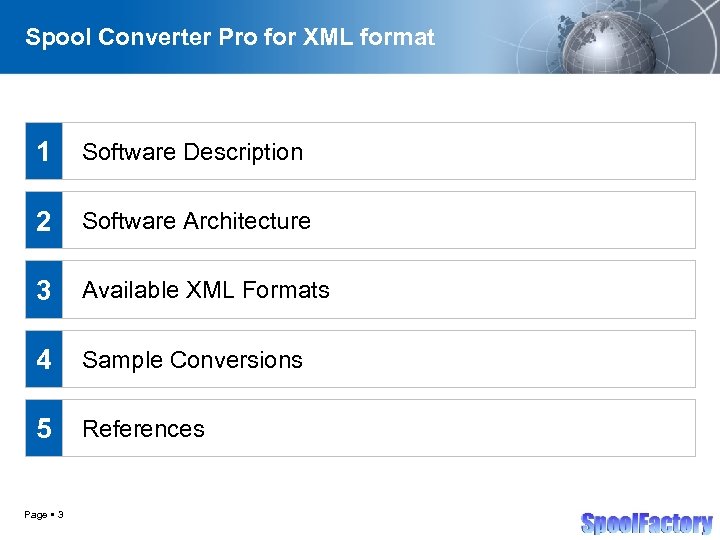 Spool Converter Pro for XML format 1 Software Description 2 Software Architecture 3 Available XML Formats 4 Sample Conversions 5 References Page 3
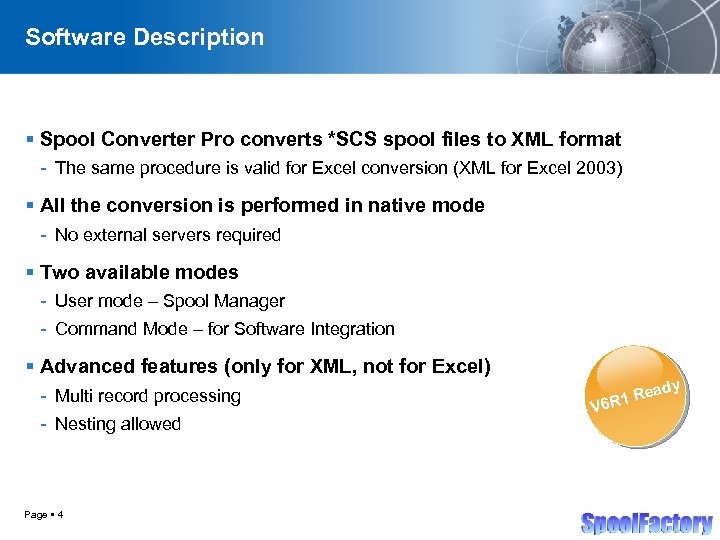 Software Description Spool Converter Pro converts *SCS spool files to XML format - The same procedure is valid for Excel conversion (XML for Excel 2003) All the conversion is performed in native mode - No external servers required Two available modes - User mode – Spool Manager - Command Mode – for Software Integration Advanced features (only for XML, not for Excel) - Multi record processing - Nesting allowed Page 4 y V 6 ead R 1 R
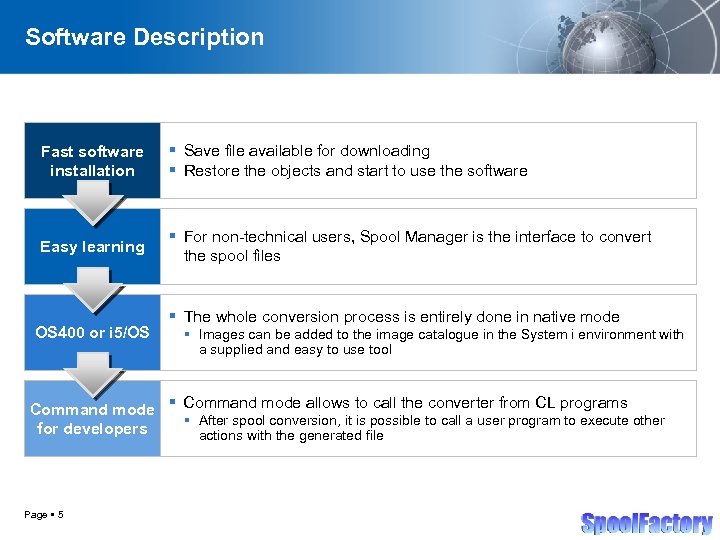 Software Description Fast software installation Save file available for downloading Restore the objects and start to use the software Easy learning For non-technical users, Spool Manager is the interface to convert the spool files OS 400 or i 5/OS The whole conversion process is entirely done in native mode Images can be added to the image catalogue in the System i environment with a supplied and easy to use tool Command mode allows to call the converter from CL programs After spool conversion, it is possible to call a user program to execute other for developers actions with the generated file Page 5
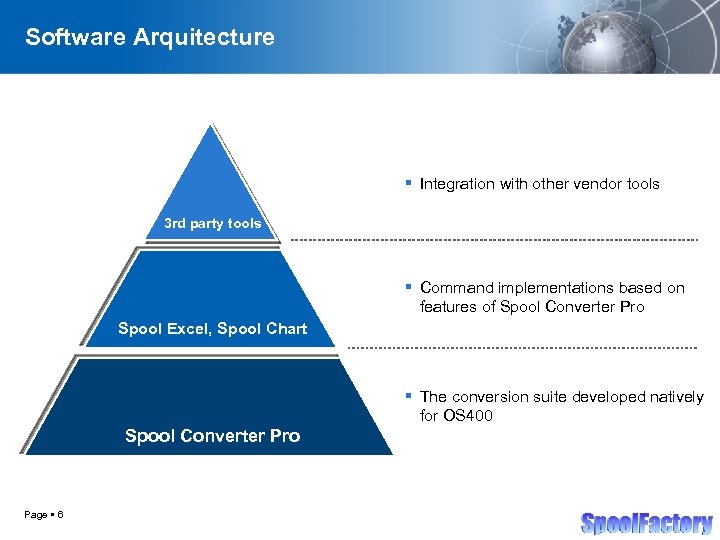 Software Arquitecture Integration with other vendor tools 3 rd party tools Command implementations based on features of Spool Converter Pro Spool Excel, Spool Chart The conversion suite developed natively for OS 400 Spool Converter Pro Page 6
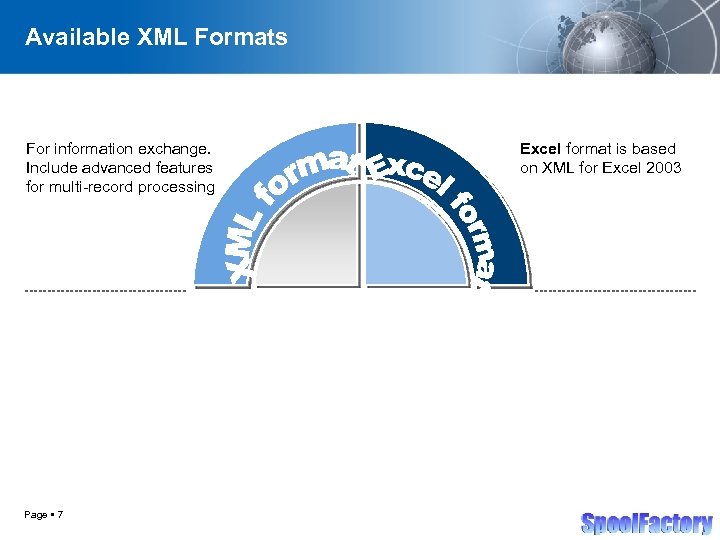 Available XML Formats For information exchange. Include advanced features for multi-record processing Page 7 Excel format is based on XML for Excel 2003
 Spool Converter Pro for XML format Sample Conversions Simple XML Conversion Page 8
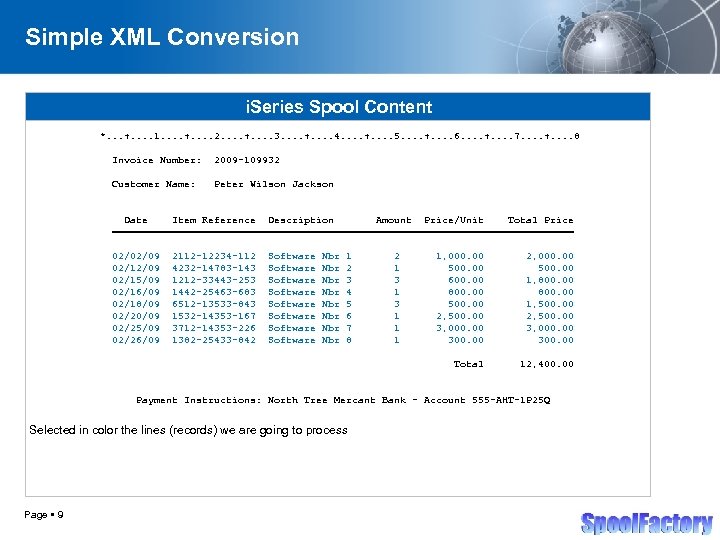 Simple XML Conversion i. Series Spool Content *. . . +. . 1. . +. . 2. . +. . 3. . +. . 4. . +. . 5. . +. . 6. . +. . 7. . +. . 8 Invoice Number: 2009 -109932 Customer Name: Peter Wilson Jackson Date Item Reference Description Amount Price/Unit Total Price ======================================= 02/02/09 02/15/09 02/16/09 02/18/09 02/20/09 02/25/09 02/26/09 2112 -12234 -112 4232 -14783 -143 1212 -33443 -253 1442 -25463 -683 6512 -13533 -843 1532 -14353 -167 3712 -14353 -226 1382 -25433 -842 Software Software Nbr Nbr 1 2 3 4 5 6 7 8 2 1 3 1 1, 000. 00 500. 00 600. 00 800. 00 500. 00 2, 500. 00 3, 000. 00 300. 00 2, 000. 00 500. 00 1, 800. 00 1, 500. 00 2, 500. 00 3, 000. 00 300. 00 Total 12, 400. 00 Payment Instructions: North Tree Mercant Bank - Account 555 -AHT-1 P 25 Q Selected in color the lines (records) we are going to process Page 9
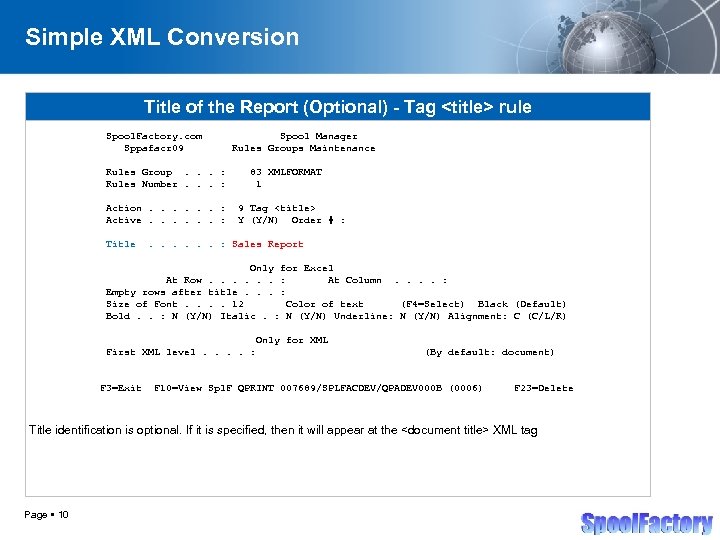 Simple XML Conversion Title of the Report (Optional) - Tag
rule Spool. Factory. com Sppafacr 09 Rules Group. . . : Rules Number. . . : Action. . . : Active. . . : Title Spool Manager Rules Groups Maintenance 83 XMLFORMAT 1 9 Tag <title> Y (Y/N) Order # : . . . : Sales Report Only for Excel At Row. . . : At Column. . : Empty rows after title. . . : Size of Font. . 12 Color of text (F 4=Select) Black (Default) Bold. . : N (Y/N) Italic. : N (Y/N) Underline: N (Y/N) Alignment: C (C/L/R) Only for XML First XML level. . : F 3=Exit (By default: document) F 10=View Spl. F QPRINT 007689/SPLFACDEV/QPADEV 000 B (0006) F 23=Delete Title identification is optional. If it is specified, then it will appear at the <document title> XML tag Page 10 </p>
</div>
<div style="width: auto;" class="description columns twelve"><p><img class="imgdescription" title="Simple XML Conversion Identify the records to process - Tag <record> rule Spool. Factory." src="https://present5.com/presentation/7b08eb87cdbcc24c989e717553e79c91/image-11.jpg" alt="Simple XML Conversion Identify the records to process - Tag <record> rule Spool. Factory." />
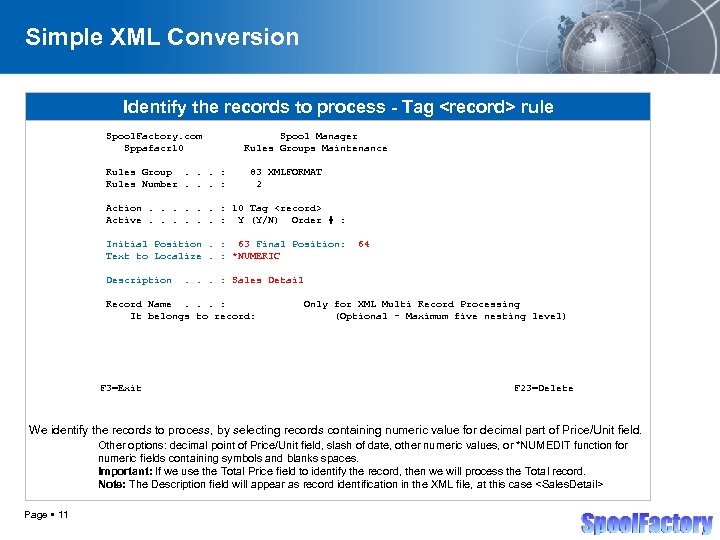
Simple XML Conversion Identify the records to process - Tag <record> rule Spool. Factory. com Sppafacr 10 Rules Group. . . : Rules Number. . . : Spool Manager Rules Groups Maintenance 83 XMLFORMAT 2 Action. . . : 10 Tag <record> Active. . . : Y (Y/N) Order # : Initial Position. : 63 Final Position: Text to Localize. : *NUMERIC Description . . . : Sales Detail Record Name. . . : It belongs to record: F 3=Exit 64 Only for XML Multi Record Processing (Optional - Maximum five nesting level) F 23=Delete We identify the records to process, by selecting records containing numeric value for decimal part of Price/Unit field. Other options: decimal point of Price/Unit field, slash of date, other numeric values, or *NUMEDIT function for numeric fields containing symbols and blanks spaces. Important: If we use the Total Price field to identify the record, then we will process the Total record. Note: The Description field will appear as record identification in the XML file, at this case <Sales. Detail> Page 11 </p>
</div>
<div style="width: auto;" class="description columns twelve"><p><img class="imgdescription" title="Simple XML Conversion Select the fields to retrieve (Date) - Tag <data> rule Spool." src="https://present5.com/presentation/7b08eb87cdbcc24c989e717553e79c91/image-12.jpg" alt="Simple XML Conversion Select the fields to retrieve (Date) - Tag <data> rule Spool." />
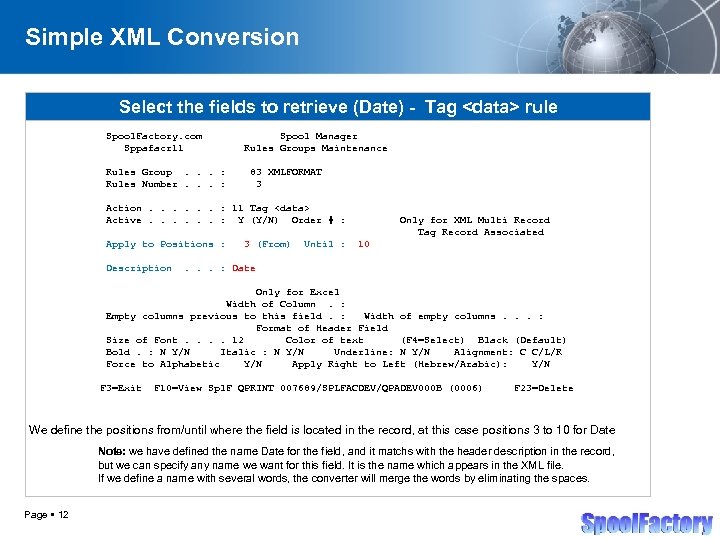
Simple XML Conversion Select the fields to retrieve (Date) - Tag <data> rule Spool. Factory. com Sppafacr 11 Rules Group. . . : Rules Number. . . : Spool Manager Rules Groups Maintenance 83 XMLFORMAT 3 Action. . . : 11 Tag <data> Active. . . : Y (Y/N) Order # : Apply to Positions : Description 3 (From) Until : Only for XML Multi Record Tag Record Associated 10 . . . : Date Only for Excel Width of Column. : Empty columns previous to this field. : Width of empty columns. . . : Format of Header Field Size of Font. . 12 Color of text (F 4=Select) Black (Default) Bold. : N Y/N Italic : N Y/N Underline: N Y/N Alignment: C C/L/R Force to Alphabetic Y/N Apply Right to Left (Hebrew/Arabic): Y/N F 3=Exit F 10=View Spl. F QPRINT 007689/SPLFACDEV/QPADEV 000 B (0006) F 23=Delete We define the positions from/until where the field is located in the record, at this case positions 3 to 10 for Date Note: we have defined the name Date for the field, and it matchs with the header description in the record, but we can specify any name we want for this field. It is the name which appears in the XML file. If we define a name with several words, the converter will merge the words by eliminating the spaces. Page 12 </p>
</div>
<div style="width: auto;" class="description columns twelve"><p><img class="imgdescription" title="Simple XML Conversion Select the fields to retrieve (Item Reference) - Tag <data> rule" src="https://present5.com/presentation/7b08eb87cdbcc24c989e717553e79c91/image-13.jpg" alt="Simple XML Conversion Select the fields to retrieve (Item Reference) - Tag <data> rule" />
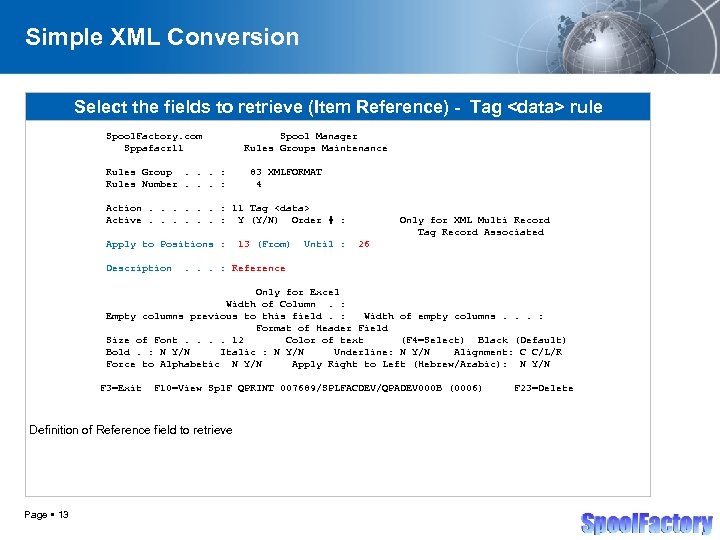
Simple XML Conversion Select the fields to retrieve (Item Reference) - Tag <data> rule Spool. Factory. com Sppafacr 11 Rules Group. . . : Rules Number. . . : Spool Manager Rules Groups Maintenance 83 XMLFORMAT 4 Action. . . : 11 Tag <data> Active. . . : Y (Y/N) Order # : Apply to Positions : Description 13 (From) Until : Only for XML Multi Record Tag Record Associated 26 . . . : Reference Only for Excel Width of Column. : Empty columns previous to this field. : Width of empty columns. . . : Format of Header Field Size of Font. . 12 Color of text (F 4=Select) Black (Default) Bold. : N Y/N Italic : N Y/N Underline: N Y/N Alignment: C C/L/R Force to Alphabetic N Y/N Apply Right to Left (Hebrew/Arabic): N Y/N F 3=Exit F 10=View Spl. F QPRINT 007689/SPLFACDEV/QPADEV 000 B (0006) Definition of Reference field to retrieve Page 13 F 23=Delete </p>
</div>
<div style="width: auto;" class="description columns twelve"><p><img class="imgdescription" title="Simple XML Conversion Select the fields to retrieve (Description) - Tag <data> rule Spool." src="https://present5.com/presentation/7b08eb87cdbcc24c989e717553e79c91/image-14.jpg" alt="Simple XML Conversion Select the fields to retrieve (Description) - Tag <data> rule Spool." />
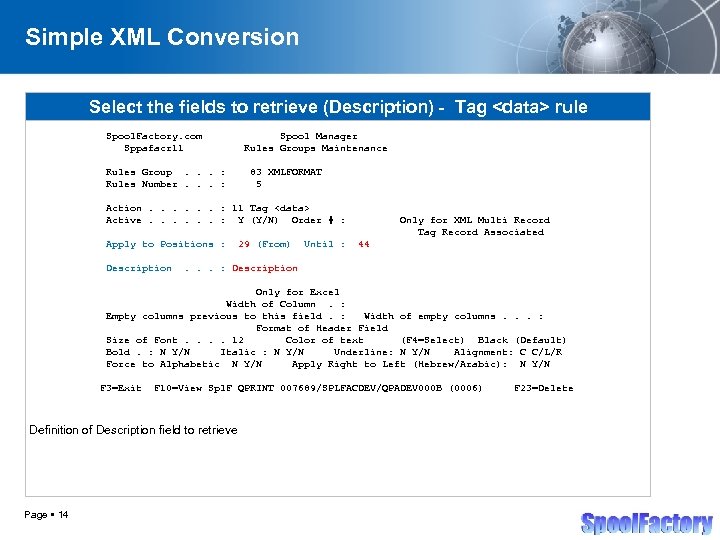
Simple XML Conversion Select the fields to retrieve (Description) - Tag <data> rule Spool. Factory. com Sppafacr 11 Rules Group. . . : Rules Number. . . : Spool Manager Rules Groups Maintenance 83 XMLFORMAT 5 Action. . . : 11 Tag <data> Active. . . : Y (Y/N) Order # : Apply to Positions : Description 29 (From) Until : Only for XML Multi Record Tag Record Associated 44 . . . : Description Only for Excel Width of Column. : Empty columns previous to this field. : Width of empty columns. . . : Format of Header Field Size of Font. . 12 Color of text (F 4=Select) Black (Default) Bold. : N Y/N Italic : N Y/N Underline: N Y/N Alignment: C C/L/R Force to Alphabetic N Y/N Apply Right to Left (Hebrew/Arabic): N Y/N F 3=Exit F 10=View Spl. F QPRINT 007689/SPLFACDEV/QPADEV 000 B (0006) Definition of Description field to retrieve Page 14 F 23=Delete </p>
</div>
<div style="width: auto;" class="description columns twelve"><p><img class="imgdescription" title="Simple XML Conversion Select the fields to retrieve (Amount) - Tag <data> rule Spool." src="https://present5.com/presentation/7b08eb87cdbcc24c989e717553e79c91/image-15.jpg" alt="Simple XML Conversion Select the fields to retrieve (Amount) - Tag <data> rule Spool." />
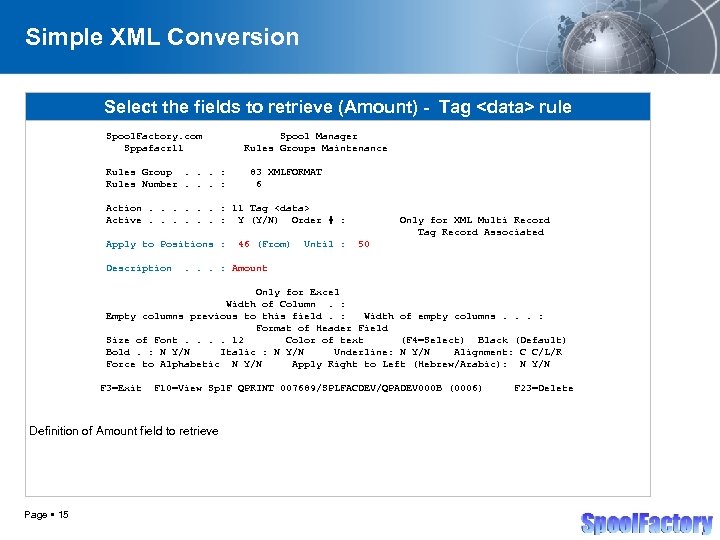
Simple XML Conversion Select the fields to retrieve (Amount) - Tag <data> rule Spool. Factory. com Sppafacr 11 Rules Group. . . : Rules Number. . . : Spool Manager Rules Groups Maintenance 83 XMLFORMAT 6 Action. . . : 11 Tag <data> Active. . . : Y (Y/N) Order # : Apply to Positions : Description 46 (From) Until : Only for XML Multi Record Tag Record Associated 50 . . . : Amount Only for Excel Width of Column. : Empty columns previous to this field. : Width of empty columns. . . : Format of Header Field Size of Font. . 12 Color of text (F 4=Select) Black (Default) Bold. : N Y/N Italic : N Y/N Underline: N Y/N Alignment: C C/L/R Force to Alphabetic N Y/N Apply Right to Left (Hebrew/Arabic): N Y/N F 3=Exit F 10=View Spl. F QPRINT 007689/SPLFACDEV/QPADEV 000 B (0006) Definition of Amount field to retrieve Page 15 F 23=Delete </p>
</div>
<div style="width: auto;" class="description columns twelve"><p><img class="imgdescription" title="Simple XML Conversion Select the fields to retrieve (Unit Price) - Tag <data> rule" src="https://present5.com/presentation/7b08eb87cdbcc24c989e717553e79c91/image-16.jpg" alt="Simple XML Conversion Select the fields to retrieve (Unit Price) - Tag <data> rule" />
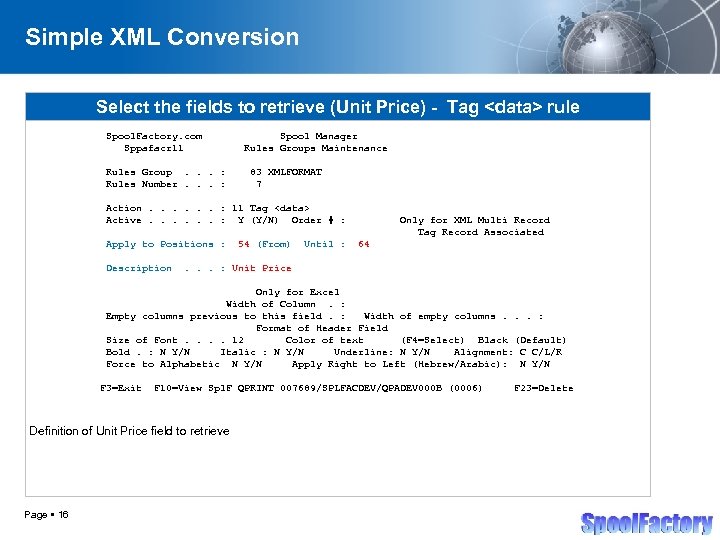
Simple XML Conversion Select the fields to retrieve (Unit Price) - Tag <data> rule Spool. Factory. com Sppafacr 11 Rules Group. . . : Rules Number. . . : Spool Manager Rules Groups Maintenance 83 XMLFORMAT 7 Action. . . : 11 Tag <data> Active. . . : Y (Y/N) Order # : Apply to Positions : Description 54 (From) Until : Only for XML Multi Record Tag Record Associated 64 . . . : Unit Price Only for Excel Width of Column. : Empty columns previous to this field. : Width of empty columns. . . : Format of Header Field Size of Font. . 12 Color of text (F 4=Select) Black (Default) Bold. : N Y/N Italic : N Y/N Underline: N Y/N Alignment: C C/L/R Force to Alphabetic N Y/N Apply Right to Left (Hebrew/Arabic): N Y/N F 3=Exit F 10=View Spl. F QPRINT 007689/SPLFACDEV/QPADEV 000 B (0006) Definition of Unit Price field to retrieve Page 16 F 23=Delete </p>
</div>
<div style="width: auto;" class="description columns twelve"><p><img class="imgdescription" title="Simple XML Conversion Select the fields to retrieve (Total Price) - Tag <data> rule" src="https://present5.com/presentation/7b08eb87cdbcc24c989e717553e79c91/image-17.jpg" alt="Simple XML Conversion Select the fields to retrieve (Total Price) - Tag <data> rule" />
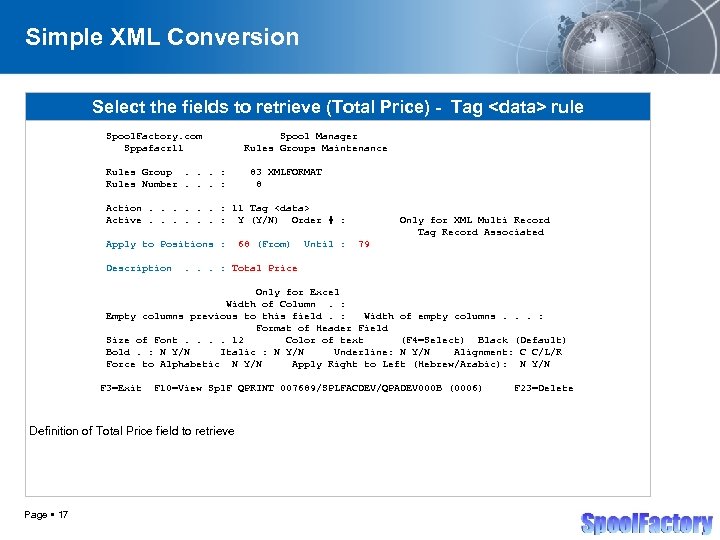
Simple XML Conversion Select the fields to retrieve (Total Price) - Tag <data> rule Spool. Factory. com Sppafacr 11 Rules Group. . . : Rules Number. . . : Spool Manager Rules Groups Maintenance 83 XMLFORMAT 8 Action. . . : 11 Tag <data> Active. . . : Y (Y/N) Order # : Apply to Positions : Description 68 (From) Until : Only for XML Multi Record Tag Record Associated 79 . . . : Total Price Only for Excel Width of Column. : Empty columns previous to this field. : Width of empty columns. . . : Format of Header Field Size of Font. . 12 Color of text (F 4=Select) Black (Default) Bold. : N Y/N Italic : N Y/N Underline: N Y/N Alignment: C C/L/R Force to Alphabetic N Y/N Apply Right to Left (Hebrew/Arabic): N Y/N F 3=Exit F 10=View Spl. F QPRINT 007689/SPLFACDEV/QPADEV 000 B (0006) Definition of Total Price field to retrieve Page 17 F 23=Delete </p>
</div>
<div style="width: auto;" class="description columns twelve"><p><img class="imgdescription" title="Simple XML Conversion XLM Final Result <? xml version="1. 0" encoding="ISO-8859 -1"? > <document" src="https://present5.com/presentation/7b08eb87cdbcc24c989e717553e79c91/image-18.jpg" alt="Simple XML Conversion XLM Final Result <? xml version="1. 0" encoding="ISO-8859 -1"? > <document" />
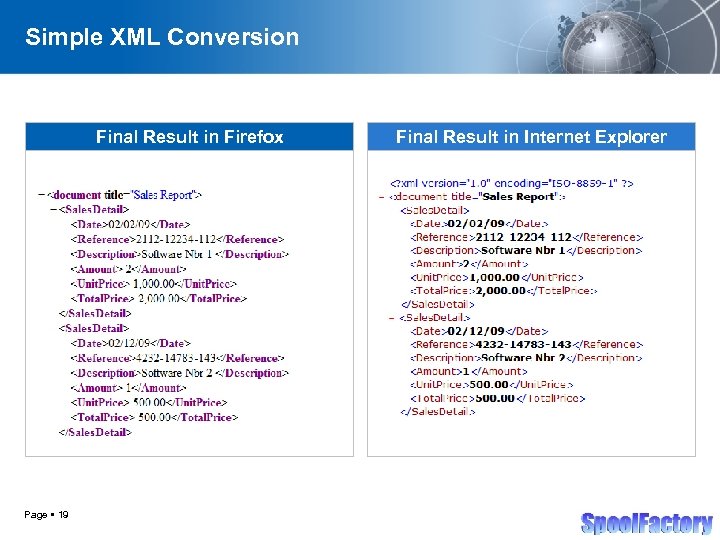
Simple XML Conversion XLM Final Result <? xml version="1. 0" encoding="ISO-8859 -1"? > <document title="Sales Report"> <Sales. Detail> <Date>02/02/09</Date> <Reference>2112 -12234 -112</Reference> <Description>Software Nbr 1 </Description> <Amount> 2</Amount> <Unit. Price> 1, 000. 00</Unit. Price> <Total. Price> 2, 000. 00</Total. Price> </Sales. Detail> <Date>02/12/09</Date> <Reference>4232 -14783 -143</Reference> <Description>Software Nbr 2 </Description> <Amount> 1</Amount> <Unit. Price> 500. 00</Unit. Price> <Total. Price> 500. 00</Total. Price> </Sales. Detail>. . </document> Result obtained when the converter applies the previously defined rules Page 18 </p>
</div>
<div style="width: auto;" class="description columns twelve"><p><img class="imgdescription" title="Simple XML Conversion Final Result in Firefox Page 19 Final Result in Internet Explorer" src="https://present5.com/presentation/7b08eb87cdbcc24c989e717553e79c91/image-19.jpg" alt="Simple XML Conversion Final Result in Firefox Page 19 Final Result in Internet Explorer" />
Simple XML Conversion Final Result in Firefox Page 19 Final Result in Internet Explorer </p>
</div>
<div style="width: auto;" class="description columns twelve"><p><img class="imgdescription" title="Spool Converter Pro for XML format Sample Conversions XML with Multi Record Processing Page" src="https://present5.com/presentation/7b08eb87cdbcc24c989e717553e79c91/image-20.jpg" alt="Spool Converter Pro for XML format Sample Conversions XML with Multi Record Processing Page" />
Spool Converter Pro for XML format Sample Conversions XML with Multi Record Processing Page 20 </p>
</div>
<div style="width: auto;" class="description columns twelve"><p><img class="imgdescription" title="Simple XML Conversion i. Series Spool Content *. . . +. . 1. ." src="https://present5.com/presentation/7b08eb87cdbcc24c989e717553e79c91/image-21.jpg" alt="Simple XML Conversion i. Series Spool Content *. . . +. . 1. ." />
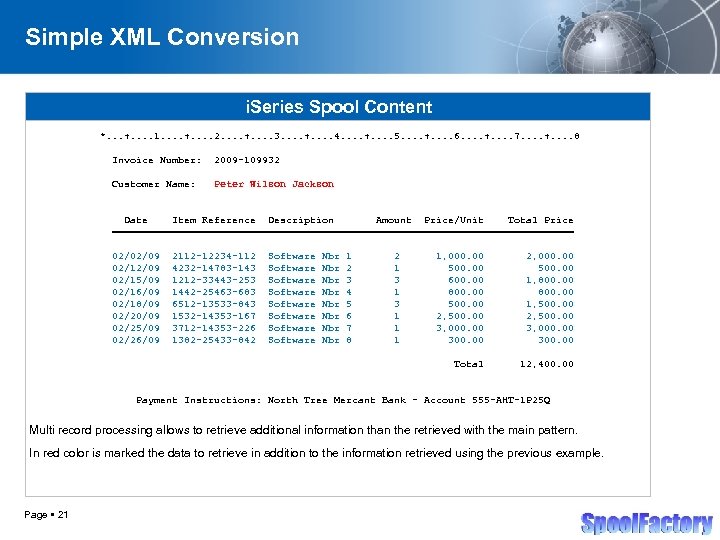
Simple XML Conversion i. Series Spool Content *. . . +. . 1. . +. . 2. . +. . 3. . +. . 4. . +. . 5. . +. . 6. . +. . 7. . +. . 8 Invoice Number: 2009 -109932 Customer Name: Peter Wilson Jackson Date Item Reference Description Amount Price/Unit Total Price ======================================= 02/02/09 02/15/09 02/16/09 02/18/09 02/20/09 02/25/09 02/26/09 2112 -12234 -112 4232 -14783 -143 1212 -33443 -253 1442 -25463 -683 6512 -13533 -843 1532 -14353 -167 3712 -14353 -226 1382 -25433 -842 Software Software Nbr Nbr 1 2 3 4 5 6 7 8 2 1 3 1 1, 000. 00 500. 00 600. 00 800. 00 500. 00 2, 500. 00 3, 000. 00 300. 00 2, 000. 00 500. 00 1, 800. 00 1, 500. 00 2, 500. 00 3, 000. 00 300. 00 Total 12, 400. 00 Payment Instructions: North Tree Mercant Bank - Account 555 -AHT-1 P 25 Q Multi record processing allows to retrieve additional information than the retrieved with the main pattern. In red color is marked the data to retrieve in addition to the information retrieved using the previous example. Page 21 </p>
</div>
<div style="width: auto;" class="description columns twelve"><p><img class="imgdescription" title="XML with Multi Record Processing Identify the records to process Spool. Factory. com Sppafacr" src="https://present5.com/presentation/7b08eb87cdbcc24c989e717553e79c91/image-22.jpg" alt="XML with Multi Record Processing Identify the records to process Spool. Factory. com Sppafacr" />
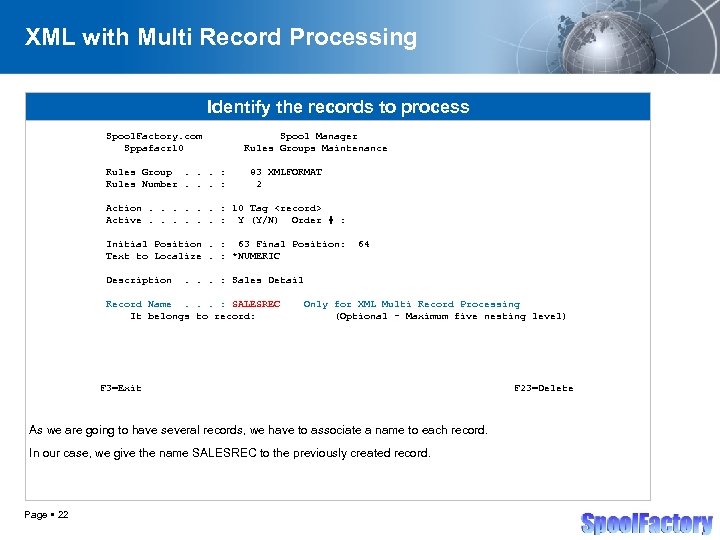
XML with Multi Record Processing Identify the records to process Spool. Factory. com Sppafacr 10 Rules Group. . . : Rules Number. . . : Spool Manager Rules Groups Maintenance 83 XMLFORMAT 2 Action. . . : 10 Tag <record> Active. . . : Y (Y/N) Order # : Initial Position. : 63 Final Position: Text to Localize. : *NUMERIC Description 64 . . . : Sales Detail Record Name. . . : SALESREC It belongs to record: Only for XML Multi Record Processing (Optional - Maximum five nesting level) F 3=Exit As we are going to have several records, we have to associate a name to each record. In our case, we give the name SALESREC to the previously created record. Page 22 F 23=Delete </p>
</div>
<div style="width: auto;" class="description columns twelve"><p><img class="imgdescription" title="XML with Multi Record Processing Select the fields to retrieve (Date) Spool. Factory. com" src="https://present5.com/presentation/7b08eb87cdbcc24c989e717553e79c91/image-23.jpg" alt="XML with Multi Record Processing Select the fields to retrieve (Date) Spool. Factory. com" />
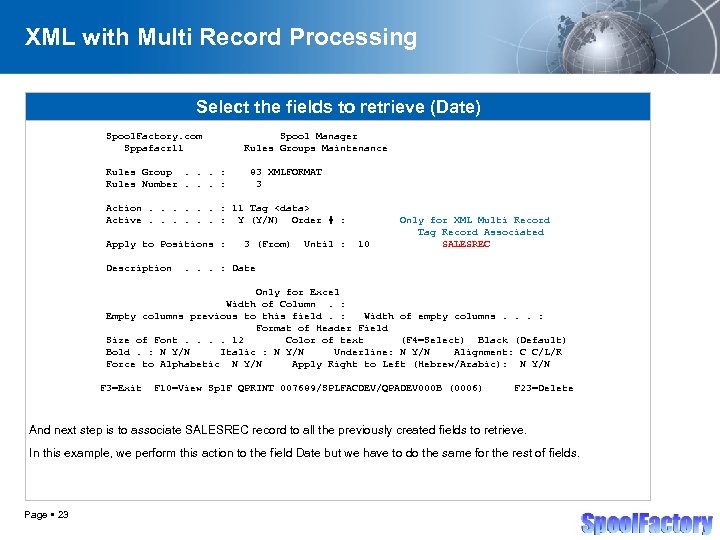
XML with Multi Record Processing Select the fields to retrieve (Date) Spool. Factory. com Sppafacr 11 Rules Group. . . : Rules Number. . . : Spool Manager Rules Groups Maintenance 83 XMLFORMAT 3 Action. . . : 11 Tag <data> Active. . . : Y (Y/N) Order # : Apply to Positions : Description 3 (From) Until : 10 Only for XML Multi Record Tag Record Associated SALESREC . . . : Date Only for Excel Width of Column. : Empty columns previous to this field. : Width of empty columns. . . : Format of Header Field Size of Font. . 12 Color of text (F 4=Select) Black (Default) Bold. : N Y/N Italic : N Y/N Underline: N Y/N Alignment: C C/L/R Force to Alphabetic N Y/N Apply Right to Left (Hebrew/Arabic): N Y/N F 3=Exit F 10=View Spl. F QPRINT 007689/SPLFACDEV/QPADEV 000 B (0006) F 23=Delete And next step is to associate SALESREC record to all the previously created fields to retrieve. In this example, we perform this action to the field Date but we have to do the same for the rest of fields. Page 23 </p>
</div>
<div style="width: auto;" class="description columns twelve"><p><img class="imgdescription" title="XML with Multi Record Processing New identificaton of records to process Spool. Factory. com" src="https://present5.com/presentation/7b08eb87cdbcc24c989e717553e79c91/image-24.jpg" alt="XML with Multi Record Processing New identificaton of records to process Spool. Factory. com" />
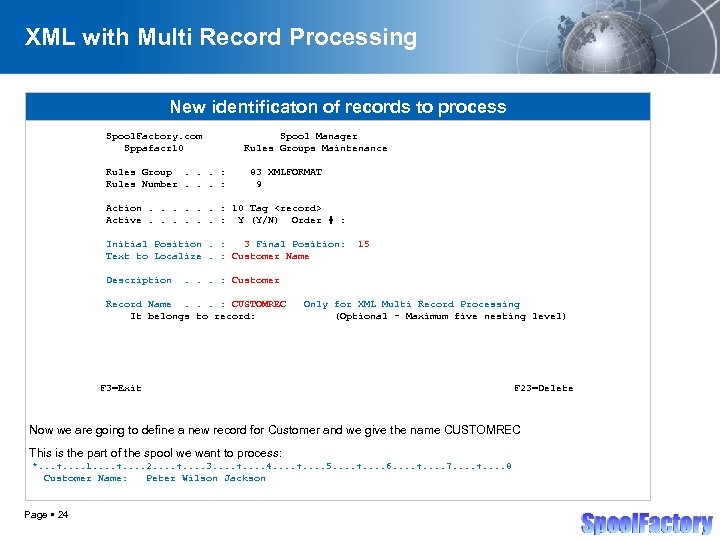
XML with Multi Record Processing New identificaton of records to process Spool. Factory. com Sppafacr 10 Rules Group. . . : Rules Number. . . : Spool Manager Rules Groups Maintenance 83 XMLFORMAT 9 Action. . . : 10 Tag <record> Active. . . : Y (Y/N) Order # : Initial Position. : 3 Final Position: Text to Localize. : Customer Name Description 15 . . . : Customer Record Name. . . : CUSTOMREC It belongs to record: Only for XML Multi Record Processing (Optional - Maximum five nesting level) F 3=Exit F 23=Delete Now we are going to define a new record for Customer and we give the name CUSTOMREC This is the part of the spool we want to process: *. . . +. . 1. . +. . 2. . +. . 3. . +. . 4. . +. . 5. . +. . 6. . +. . 7. . +. . 8 Customer Name: Peter Wilson Jackson Page 24 </p>
</div>
<div style="width: auto;" class="description columns twelve"><p><img class="imgdescription" title="XML with Multi Record Processing New field to retrieve Spool. Factory. com Sppafacr 11" src="https://present5.com/presentation/7b08eb87cdbcc24c989e717553e79c91/image-25.jpg" alt="XML with Multi Record Processing New field to retrieve Spool. Factory. com Sppafacr 11" />
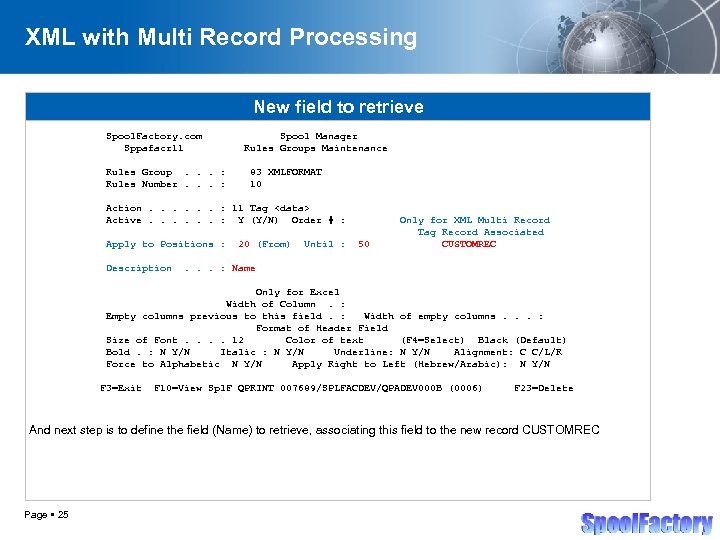
XML with Multi Record Processing New field to retrieve Spool. Factory. com Sppafacr 11 Rules Group. . . : Rules Number. . . : Spool Manager Rules Groups Maintenance 83 XMLFORMAT 10 Action. . . : 11 Tag <data> Active. . . : Y (Y/N) Order # : Apply to Positions : Description 20 (From) Until : 50 Only for XML Multi Record Tag Record Associated CUSTOMREC . . . : Name Only for Excel Width of Column. : Empty columns previous to this field. : Width of empty columns. . . : Format of Header Field Size of Font. . 12 Color of text (F 4=Select) Black (Default) Bold. : N Y/N Italic : N Y/N Underline: N Y/N Alignment: C C/L/R Force to Alphabetic N Y/N Apply Right to Left (Hebrew/Arabic): N Y/N F 3=Exit F 10=View Spl. F QPRINT 007689/SPLFACDEV/QPADEV 000 B (0006) F 23=Delete And next step is to define the field (Name) to retrieve, associating this field to the new record CUSTOMREC Page 25 </p>
</div>
<div style="width: auto;" class="description columns twelve"><p><img class="imgdescription" title="XML with Multi Record Processing XLM Final Result <? xml version="1. 0" encoding="ISO-8859 -1"?" src="https://present5.com/presentation/7b08eb87cdbcc24c989e717553e79c91/image-26.jpg" alt="XML with Multi Record Processing XLM Final Result <? xml version="1. 0" encoding="ISO-8859 -1"?" />
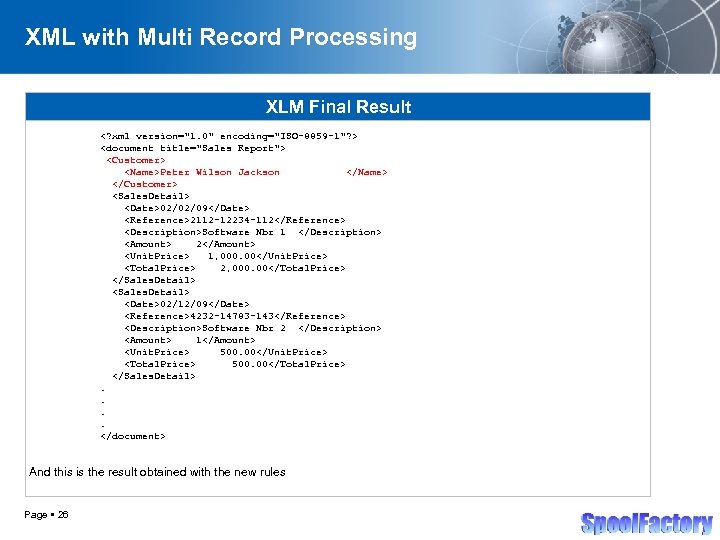
XML with Multi Record Processing XLM Final Result <? xml version="1. 0" encoding="ISO-8859 -1"? > <document title="Sales Report"> <Customer> <Name>Peter Wilson Jackson </Name> </Customer> <Sales. Detail> <Date>02/02/09</Date> <Reference>2112 -12234 -112</Reference> <Description>Software Nbr 1 </Description> <Amount> 2</Amount> <Unit. Price> 1, 000. 00</Unit. Price> <Total. Price> 2, 000. 00</Total. Price> </Sales. Detail> <Date>02/12/09</Date> <Reference>4232 -14783 -143</Reference> <Description>Software Nbr 2 </Description> <Amount> 1</Amount> <Unit. Price> 500. 00</Unit. Price> <Total. Price> 500. 00</Total. Price> </Sales. Detail>. . </document> And this is the result obtained with the new rules Page 26 </p>
</div>
<div style="width: auto;" class="description columns twelve"><p><img class="imgdescription" title="Spool Converter Pro for XML format Sample Conversions XML with Nested Levels Page 27" src="https://present5.com/presentation/7b08eb87cdbcc24c989e717553e79c91/image-27.jpg" alt="Spool Converter Pro for XML format Sample Conversions XML with Nested Levels Page 27" />
Spool Converter Pro for XML format Sample Conversions XML with Nested Levels Page 27 </p>
</div>
<div style="width: auto;" class="description columns twelve"><p><img class="imgdescription" title="XML with Nested Levels New identificaton of records to process Spool. Factory. com Sppafacr" src="https://present5.com/presentation/7b08eb87cdbcc24c989e717553e79c91/image-28.jpg" alt="XML with Nested Levels New identificaton of records to process Spool. Factory. com Sppafacr" />
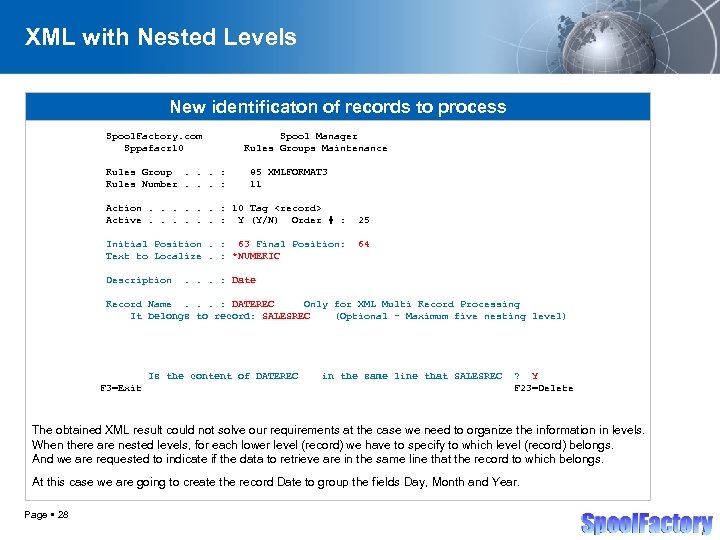
XML with Nested Levels New identificaton of records to process Spool. Factory. com Sppafacr 10 Rules Group. . . : Rules Number. . . : Spool Manager Rules Groups Maintenance 85 XMLFORMAT 3 11 Action. . . : 10 Tag <record> Active. . . : Y (Y/N) Order # : Initial Position. : 63 Final Position: Text to Localize. : *NUMERIC Description 25 64 . . . : Date Record Name. . . : DATEREC Only for XML Multi Record Processing It belongs to record: SALESREC (Optional - Maximum five nesting level) Is the content of DATEREC F 3=Exit in the same line that SALESREC ? Y F 23=Delete The obtained XML result could not solve our requirements at the case we need to organize the information in levels. When there are nested levels, for each lower level (record) we have to specify to which level (record) belongs. And we are requested to indicate if the data to retrieve are in the same line that the record to which belongs. At this case we are going to create the record Date to group the fields Day, Month and Year. Page 28 </p>
</div>
<div style="width: auto;" class="description columns twelve"><p><img class="imgdescription" title="XML with Nested Levels New field to retrieve Spool. Factory. com Sppafacr 11 Spool" src="https://present5.com/presentation/7b08eb87cdbcc24c989e717553e79c91/image-29.jpg" alt="XML with Nested Levels New field to retrieve Spool. Factory. com Sppafacr 11 Spool" />
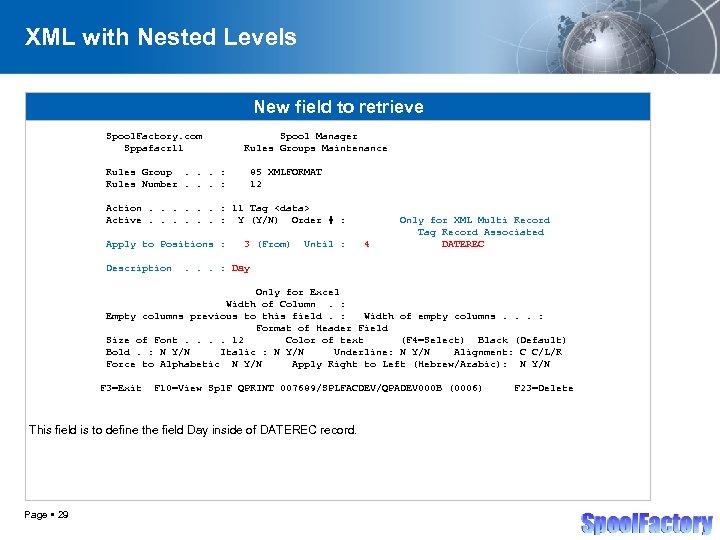
XML with Nested Levels New field to retrieve Spool. Factory. com Sppafacr 11 Spool Manager Rules Groups Maintenance Rules Group. . . : Rules Number. . . : 85 XMLFORMAT 12 Action. . . : 11 Tag <data> Active. . . : Y (Y/N) Order # : Apply to Positions : Description 3 (From) Until : 4 Only for XML Multi Record Tag Record Associated DATEREC . . . : Day Only for Excel Width of Column. : Empty columns previous to this field. : Width of empty columns. . . : Format of Header Field Size of Font. . 12 Color of text (F 4=Select) Black (Default) Bold. : N Y/N Italic : N Y/N Underline: N Y/N Alignment: C C/L/R Force to Alphabetic N Y/N Apply Right to Left (Hebrew/Arabic): N Y/N F 3=Exit F 10=View Spl. F QPRINT 007689/SPLFACDEV/QPADEV 000 B (0006) This field is to define the field Day inside of DATEREC record. Page 29 F 23=Delete </p>
</div>
<div style="width: auto;" class="description columns twelve"><p><img class="imgdescription" title="XML with Nested Levels New field to retrieve Spool. Factory. com Sppafacr 11 Rules" src="https://present5.com/presentation/7b08eb87cdbcc24c989e717553e79c91/image-30.jpg" alt="XML with Nested Levels New field to retrieve Spool. Factory. com Sppafacr 11 Rules" />
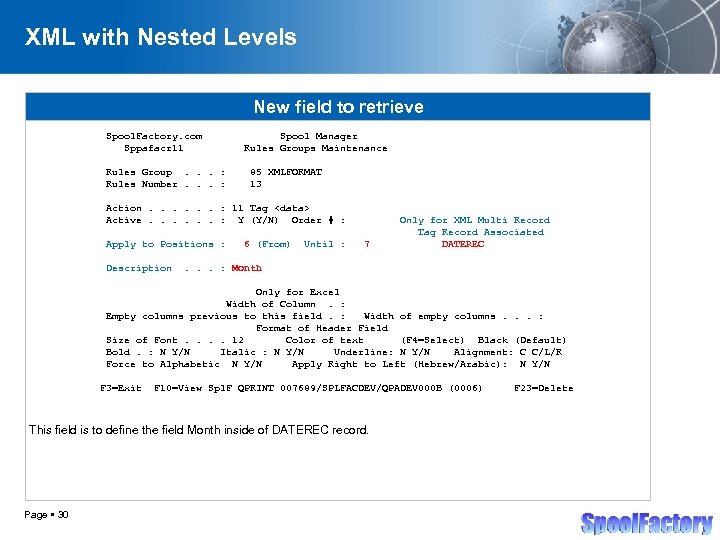
XML with Nested Levels New field to retrieve Spool. Factory. com Sppafacr 11 Rules Group. . . : Rules Number. . . : Spool Manager Rules Groups Maintenance 85 XMLFORMAT 13 Action. . . : 11 Tag <data> Active. . . : Y (Y/N) Order # : Apply to Positions : Description 6 (From) Until : 7 Only for XML Multi Record Tag Record Associated DATEREC . . . : Month Only for Excel Width of Column. : Empty columns previous to this field. : Width of empty columns. . . : Format of Header Field Size of Font. . 12 Color of text (F 4=Select) Black (Default) Bold. : N Y/N Italic : N Y/N Underline: N Y/N Alignment: C C/L/R Force to Alphabetic N Y/N Apply Right to Left (Hebrew/Arabic): N Y/N F 3=Exit F 10=View Spl. F QPRINT 007689/SPLFACDEV/QPADEV 000 B (0006) This field is to define the field Month inside of DATEREC record. Page 30 F 23=Delete </p>
</div>
<div style="width: auto;" class="description columns twelve"><p><img class="imgdescription" title="XML with Nested Levels New field to retrieve Spool. Factory. com Sppafacr 11 Rules" src="https://present5.com/presentation/7b08eb87cdbcc24c989e717553e79c91/image-31.jpg" alt="XML with Nested Levels New field to retrieve Spool. Factory. com Sppafacr 11 Rules" />
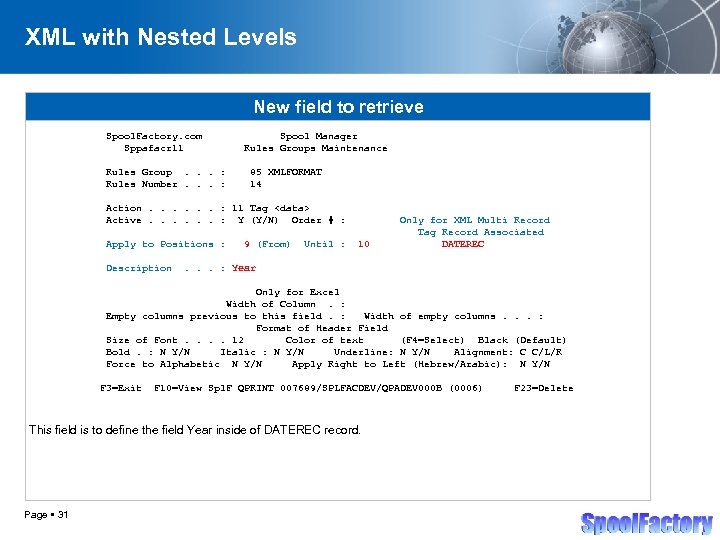
XML with Nested Levels New field to retrieve Spool. Factory. com Sppafacr 11 Rules Group. . . : Rules Number. . . : Spool Manager Rules Groups Maintenance 85 XMLFORMAT 14 Action. . . : 11 Tag <data> Active. . . : Y (Y/N) Order # : Apply to Positions : Description 9 (From) Until : 10 Only for XML Multi Record Tag Record Associated DATEREC . . . : Year Only for Excel Width of Column. : Empty columns previous to this field. : Width of empty columns. . . : Format of Header Field Size of Font. . 12 Color of text (F 4=Select) Black (Default) Bold. : N Y/N Italic : N Y/N Underline: N Y/N Alignment: C C/L/R Force to Alphabetic N Y/N Apply Right to Left (Hebrew/Arabic): N Y/N F 3=Exit F 10=View Spl. F QPRINT 007689/SPLFACDEV/QPADEV 000 B (0006) This field is to define the field Year inside of DATEREC record. Page 31 F 23=Delete </p>
</div>
<div style="width: auto;" class="description columns twelve"><p><img class="imgdescription" title="XML with Nested Levels New identificaton of records to process Spool. Factory. com Sppafacr" src="https://present5.com/presentation/7b08eb87cdbcc24c989e717553e79c91/image-32.jpg" alt="XML with Nested Levels New identificaton of records to process Spool. Factory. com Sppafacr" />
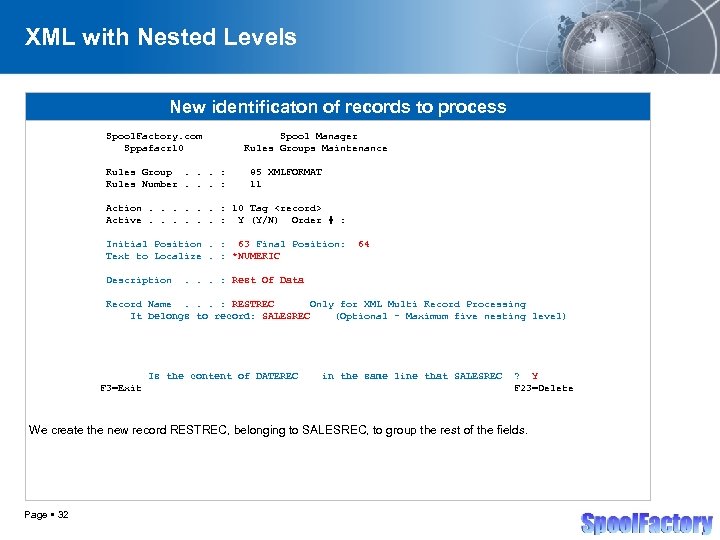
XML with Nested Levels New identificaton of records to process Spool. Factory. com Sppafacr 10 Rules Group. . . : Rules Number. . . : Spool Manager Rules Groups Maintenance 85 XMLFORMAT 11 Action. . . : 10 Tag <record> Active. . . : Y (Y/N) Order # : Initial Position. : 63 Final Position: Text to Localize. : *NUMERIC Description 64 . . . : Rest Of Data Record Name. . . : RESTREC Only for XML Multi Record Processing It belongs to record: SALESREC (Optional - Maximum five nesting level) Is the content of DATEREC F 3=Exit in the same line that SALESREC ? Y F 23=Delete We create the new record RESTREC, belonging to SALESREC, to group the rest of the fields. Page 32 </p>
</div>
<div style="width: auto;" class="description columns twelve"><p><img class="imgdescription" title="XML with Nested Levels Rest of fields to retrive – Assign to the new" src="https://present5.com/presentation/7b08eb87cdbcc24c989e717553e79c91/image-33.jpg" alt="XML with Nested Levels Rest of fields to retrive – Assign to the new" />
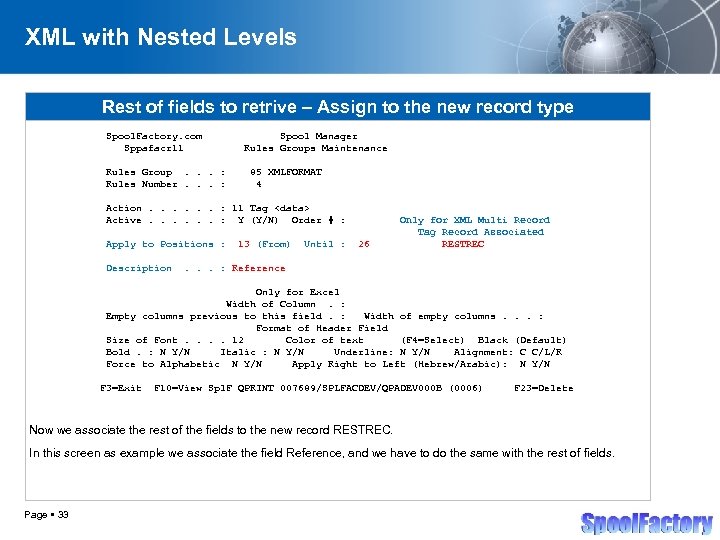
XML with Nested Levels Rest of fields to retrive – Assign to the new record type Spool. Factory. com Sppafacr 11 Rules Group. . . : Rules Number. . . : Spool Manager Rules Groups Maintenance 85 XMLFORMAT 4 Action. . . : 11 Tag <data> Active. . . : Y (Y/N) Order # : Apply to Positions : Description 13 (From) Until : 26 Only for XML Multi Record Tag Record Associated RESTREC . . . : Reference Only for Excel Width of Column. : Empty columns previous to this field. : Width of empty columns. . . : Format of Header Field Size of Font. . 12 Color of text (F 4=Select) Black (Default) Bold. : N Y/N Italic : N Y/N Underline: N Y/N Alignment: C C/L/R Force to Alphabetic N Y/N Apply Right to Left (Hebrew/Arabic): N Y/N F 3=Exit F 10=View Spl. F QPRINT 007689/SPLFACDEV/QPADEV 000 B (0006) F 23=Delete Now we associate the rest of the fields to the new record RESTREC. In this screen as example we associate the field Reference, and we have to do the same with the rest of fields. Page 33 </p>
</div>
<div style="width: auto;" class="description columns twelve"><p><img class="imgdescription" title="XML with Nested Levels XLM Final Result <? xml version="1. 0" encoding="ISO-8859 -1"? >" src="https://present5.com/presentation/7b08eb87cdbcc24c989e717553e79c91/image-34.jpg" alt="XML with Nested Levels XLM Final Result <? xml version="1. 0" encoding="ISO-8859 -1"? >" />
XML with Nested Levels XLM Final Result <? xml version="1. 0" encoding="ISO-8859 -1"? > <document title="Sales Report"> <Customer> <Name>Peter Wilson Jackson </Name> </Customer> <Sales. Detail> <Date> <Day>02</Day> <Month>02</Month> <Year>09</Year> </Date> <Rest. Of. Data> <Reference>2112 -12234 -112</Reference> <Description>Software Nbr 1 </Description> <Amount> 2</Amount> <Unit. Price> 1, 000. 00</Unit. Price> <Total. Price> 2, 000. 00</Total. Price> </Rest. Of. Data> </Sales. Detail>. . </document> And this is the XML result organized with nested levels Page 34 </p>
</div>
<div style="width: auto;" class="description columns twelve"><p><img class="imgdescription" title="References Company Country JVC USA United States Acum Israel Instec Software Solutions Inc. Canada" src="https://present5.com/presentation/7b08eb87cdbcc24c989e717553e79c91/image-35.jpg" alt="References Company Country JVC USA United States Acum Israel Instec Software Solutions Inc. Canada" />
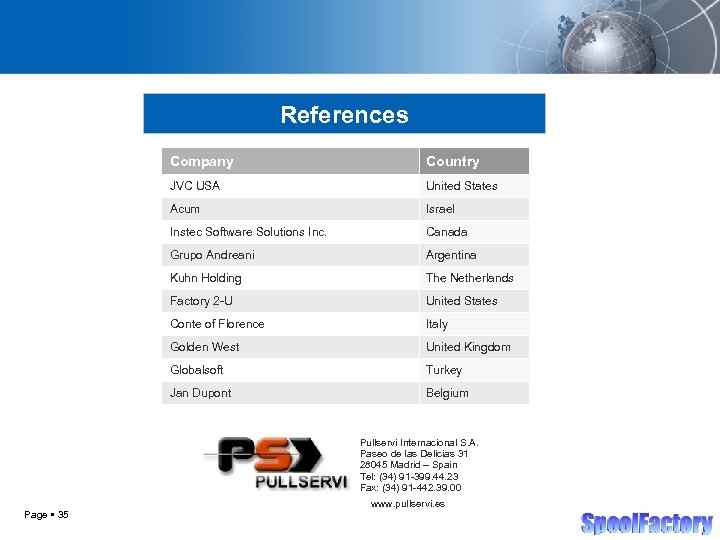
References Company Country JVC USA United States Acum Israel Instec Software Solutions Inc. Canada Grupo Andreani Argentina Kuhn Holding The Netherlands Factory 2 -U United States Conte of Florence Italy Golden West United Kingdom Globalsoft Turkey Jan Dupont Belgium Pullservi Internacional S. A. Paseo de las Delicias 31 28045 Madrid – Spain Tel: (34) 91 -399. 44. 23 Fax: (34) 91 -442. 39. 00 Page 35 www. pullservi. es </p>
</div>
<div style="width: auto;" class="description columns twelve"><p><img class="imgdescription" title="Sales comercial@pullservi. es Technical Supporting tecnico@pullservi. es General Info info@spoolfactory. com www. pullservi. es" src="https://present5.com/presentation/7b08eb87cdbcc24c989e717553e79c91/image-36.jpg" alt="Sales comercial@pullservi. es Technical Supporting tecnico@pullservi. es General Info info@spoolfactory. com www. pullservi. es" />
Sales comercial@pullservi. es Technical Supporting tecnico@pullservi. es General Info info@spoolfactory. com www. pullservi. es www. spoolfactory. com Page 36 </p>
</div>
<div style="width: auto;" class="description columns twelve"><p><img class="imgdescription" title="" src="" alt="" />
</p>
</div>
</div>
<div id="inputform">
<script>$("#inputform").load("https://present5.com/wp-content/plugins/report-content/inc/report-form-aj.php");
</script>
</div>
</p>
<!--end entry-content-->
</div>
</article><!-- .post -->
</section><!-- #content -->
<div class="three columns">
<div class="widget-entry">
</div>
</div>
</div>
</div>
<!-- #content-wrapper -->
<footer id="footer" style="padding: 5px 0 5px;">
<div class="container">
<div class="columns twelve">
<!--noindex-->
<!--LiveInternet counter--><script type="text/javascript"><!--
document.write("<img src='//counter.yadro.ru/hit?t26.10;r"+
escape(document.referrer)+((typeof(screen)=="undefined")?"":
";s"+screen.width+"*"+screen.height+"*"+(screen.colorDepth?
screen.colorDepth:screen.pixelDepth))+";u"+escape(document.URL)+
";"+Math.random()+
"' alt='' title='"+" ' "+
"border='0' width='1' height='1'><\/a>")
//--></script><!--/LiveInternet-->
<a href="https://slidetodoc.com/" alt="Наш международный проект SlideToDoc.com!" target="_blank"><img src="https://present5.com/SlideToDoc.png"></a> <script>
$(window).load(function() {
var owl = document.getElementsByClassName('owl-carousel owl-theme owl-loaded owl-drag')[0];
document.getElementById("owlheader").insertBefore(owl, null);
$('#owlheader').css('display', 'inline-block');
});
</script>
<script type="text/javascript">
var yaParams = {'typepage': '1000_top_300k',
'author': '1000_top_300k'
};
</script>
<!-- Yandex.Metrika counter --> <script type="text/javascript" > (function(m,e,t,r,i,k,a){m[i]=m[i]||function(){(m[i].a=m[i].a||[]).push(arguments)}; m[i].l=1*new Date(); for (var j = 0; j < document.scripts.length; j++) {if (document.scripts[j].src === r) { return; }} k=e.createElement(t),a=e.getElementsByTagName(t)[0],k.async=1,k.src=r,a.parentNode.insertBefore(k,a)}) (window, document, "script", "https://mc.yandex.ru/metrika/tag.js", "ym"); ym(32395810, "init", { clickmap:true, trackLinks:true, accurateTrackBounce:true, webvisor:true }); </script> <noscript><div><img src="https://mc.yandex.ru/watch/32395810" style="position:absolute; left:-9999px;" alt="" /></div></noscript> <!-- /Yandex.Metrika counter -->
<!--/noindex-->
<nav id="top-nav">
<ul id="menu-top" class="top-menu clearfix">
</ul> </nav>
</div>
</div><!--.container-->
</footer>
<script type='text/javascript'>
/* <![CDATA[ */
var wpcf7 = {"apiSettings":{"root":"https:\/\/present5.com\/wp-json\/contact-form-7\/v1","namespace":"contact-form-7\/v1"}};
/* ]]> */
</script>
<script type='text/javascript' src='https://present5.com/wp-content/plugins/contact-form-7/includes/js/scripts.js?ver=5.1.4'></script>
<script type='text/javascript' src='https://present5.com/wp-content/themes/sampression-lite/lib/js/jquery.shuffle.js?ver=4.9.26'></script>
<script type='text/javascript' src='https://present5.com/wp-content/themes/sampression-lite/lib/js/scripts.js?ver=1.13'></script>
<script type='text/javascript' src='https://present5.com/wp-content/themes/sampression-lite/lib/js/shuffle.js?ver=4.9.26'></script>
<!--[if lt IE 9]>
<script type='text/javascript' src='https://present5.com/wp-content/themes/sampression-lite/lib/js/selectivizr.js?ver=1.0.2'></script>
<![endif]-->
<script type='text/javascript' src='https://present5.com/wp-content/themes/sampression-lite/lib/js/notify.js?ver=1775922238'></script>
<script type='text/javascript'>
/* <![CDATA[ */
var my_ajax_object = {"ajax_url":"https:\/\/present5.com\/wp-admin\/admin-ajax.php","nonce":"d25918c977"};
/* ]]> */
</script>
<script type='text/javascript' src='https://present5.com/wp-content/themes/sampression-lite/lib/js/filer.js?ver=1775922238'></script>
</body>
</html> 


 Скачать презентацию Spool Factory — Spool Converter Pro Spool Conversion