


 Скачать презентацию Software Testing Quality Assurance Software Testing 1
7733d9d4748185e29ff5e08806f65462.ppt
- Количество слайдов: 76
 Software Testing Quality Assurance Software Testing 1
 Course Objectives • Discuss the main quality related elements from the project management point of view • Point out the importance and the relation between prevention and detection and their costs • Discuss the verification and the validation processes • Have the students understand the static and dynamic V&V • Offer insights into the inspection process • Define the location of the testing activities in the quality assurance framework Software Testing 2
 References • K. Schwalbe, Information Technology Project Management, Fifth Edition, 2007, Course Technology, CENGAGE Learning • I. Sommerwille, Software Engineering, 8 th edition, Addison Wesley, 2006 (chapter 22, 23) • S. Mc. Connell, Rapid Development: Taming Wild Software Schedules, Microsoft Press, 1996 • R. Patton: Software Testing, Sams Publishing, 2005(chpt. 1) • W. Lewis: Software Testing and Continuous Quality Improvement, Third edition, CRC Press, 2009 (chapter 1) • PMI, A Guide to Project Management Body of Knowledge, Third Edition, 2004
 Symptoms of Software Development Problems • • • User or business needs not met Requirements churn Modules do not integrate Hard to maintain Late discovery of flaws Poor quality or end-user experience Poor performance under load No coordinated team effort Build-and-release issues, etc. Software Testing 4
 IEEE Definition of "Software Quality" 1. The degree to which a system, component, or process meets specified requirements. 2. The degree to which a system, component, or process meets customer or user needs or expectations.
 IEEE Definition of "Software Quality Assurance" 1. A planned and systematic pattern of all actions necessary to provide adequate confidence that an item or product conforms to established technical requirements. 2. A set of activities designed to evaluate the process by which the products are developed or manufactured. Contrast with quality control.
 What Is Project Quality Management? • Project quality management ensures that the project will satisfy the needs for which it was undertaken • Processes include: – Quality planning: identifying which quality standards are relevant to the project and how to satisfy them – Quality assurance: periodically evaluating overall project performance to ensure the project will satisfy the relevant quality standards – Quality control: monitoring specific project results to ensure that they comply with the relevant quality standards Software Testing 7
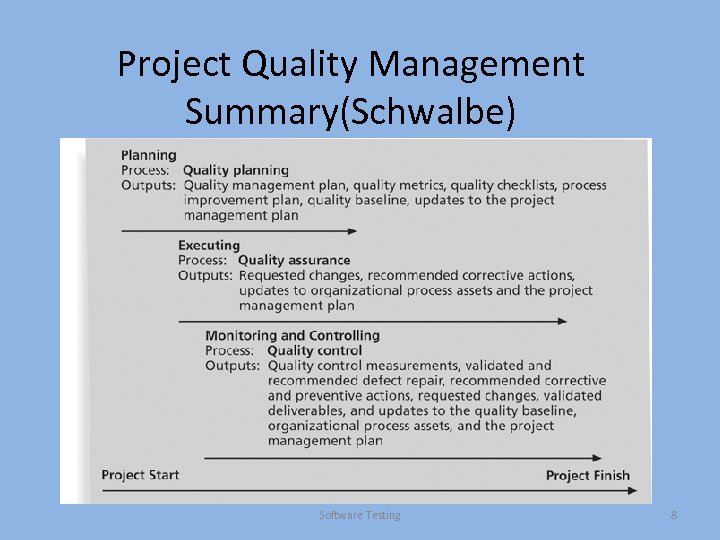 Project Quality Management Summary(Schwalbe) Software Testing 8
 Quality Planning • Implies the ability to anticipate situations and prepare actions to bring about the desired outcome • Important to prevent defects by: – Selecting proper materials – Training and indoctrinating people in quality – Planning a process that ensures the appropriate outcome Software Project Management 9
 Design of Experiments • Design of experiments is a quality planning technique that helps identify which variables have the most influence on the overall outcome of a process • Also applies to project management issues, such as cost and schedule trade-offs • Involves documenting important factors that directly contribute to meeting customer requirements Software Project Management 10
 Quality Aspects of IT Projects • Functionality is the degree to which a system performs its intended function • Features are the system’s special characteristics that appeal to users • System outputs are the screens and reports the system generates • Reliability is the ability of a product or service to perform as expected under normal conditions • Availability is the characteristic of a product or service to be accessible when required to be • Maintainability addresses the ease of performing maintenance on a product • Performance addresses how well a product or service performs the customer’s intended use • Scalability is the ability of systems to adapt and perform as expected under increased usage requirements • Other: fiability, flexibility, usability, robustness, safety, security, etc Software Testing 11
 Who’s Responsible for the Quality of Projects? • Project managers are ultimately responsible for quality management on their projects • Several organizations and references can help project managers and their teams understand quality – International Organization for Standardization (www. iso. org) – IEEE (www. ieee. org) Software Project Management 12
 Quality Assurance • Quality assurance includes all the activities related to satisfying the relevant quality standards for a project • Another goal of quality assurance is continuous quality improvement • Benchmarking generates ideas for quality improvements by comparing specific project practices or product characteristics to those of other projects or products within or outside the performing organization • A quality audit is a structured review of specific quality management activities that help identify lessons learned that could improve performance on current or future projects Software Project Management 13
 Quality Control • The main outputs of quality control are: – Acceptance decisions – Rework – Process adjustments • Tehniques: – Seven Basic Tools of Quality that help in performing quality control – Statistical Sampling – Six Sigma Software Project Management 14
 Cause-and-Effect Diagrams • Cause-and-effect diagrams trace complaints about quality problems back to the responsible production operations • They help you find the root cause of a problem • Also known as fishbone or Ishikawa diagrams • Can also use the 5 whys technique where you repeat the question “Why” (five is a good rule of thumb) to peel away the layers of symptoms that can lead to the root cause Software Project Management 15
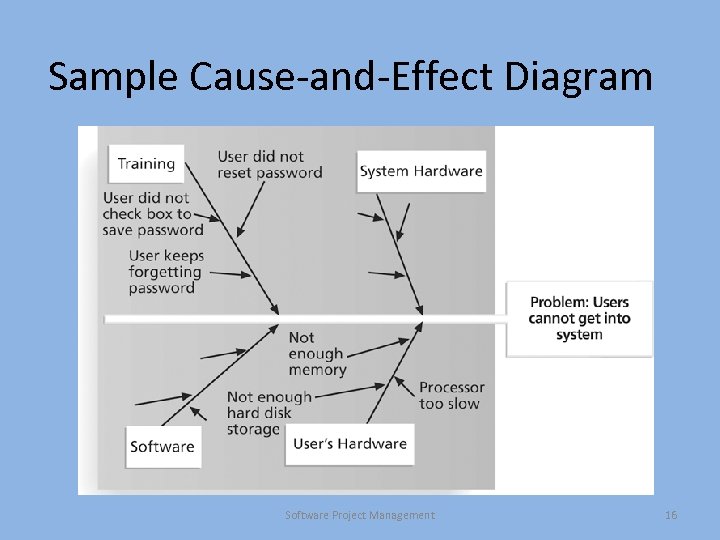 Sample Cause-and-Effect Diagram Software Project Management 16
 Quality Control Charts • A control chart is a graphic display of data that illustrates the results of a process over time • The main use of control charts is to prevent defects, rather than to detect or reject them • Quality control charts allow you to determine whether a process is in control or out of control – When a process is in control, any variations in the results of the process are created by random events; processes that are in control do not need to be adjusted – When a process is out of control, variations in the results of the process are caused by nonrandom events; you need to identify the causes of those nonrandom events and adjust the process to correct or eliminate them Software Project Management 17
 The Seven Rule • You can use quality control charts and the seven rule to look for patterns in data • The seven rule states that if seven data points in a row are all below the mean, above the mean, or are all increasing or decreasing, then the process needs to be examined for nonrandom problems Software Project Management 18
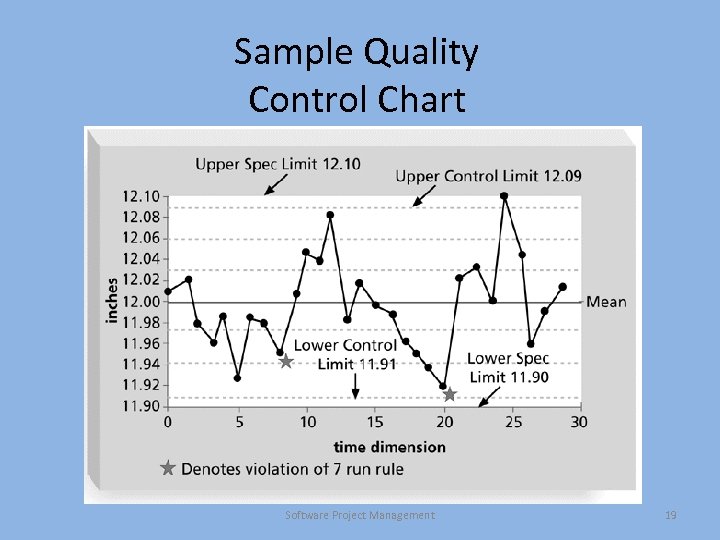 Sample Quality Control Chart Software Project Management 19
 Run Chart • A run chart displays the history and pattern of variation of a process over time • It is a line chart that shows data points plotted in the order in which they occur • Can be used to perform trend analysis to forecast future outcomes based on historical patterns Software Project Management 20
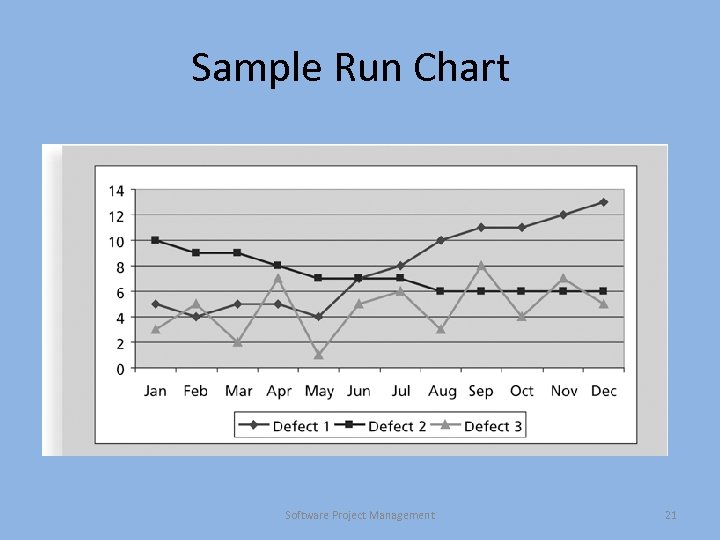 Sample Run Chart Software Project Management 21
 Scatter Diagram • A scatter diagram helps to show if there is a relationship between two variables • The closer data points are to a diagonal line, the more closely the two variables are related Software Project Management 22
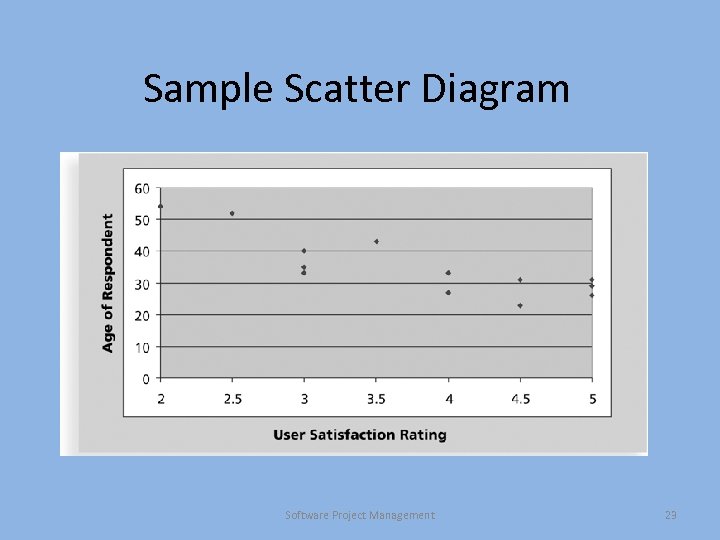 Sample Scatter Diagram Software Project Management 23
 Histograms • A histogram is a bar graph of a distribution of variables • Each bar represents an attribute or characteristic of a problem or situation, and the height of the bar represents its frequency Software Project Management 24
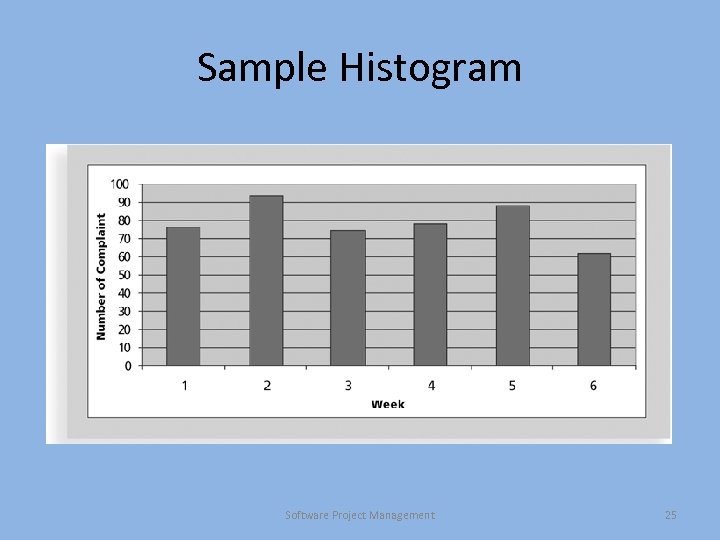 Sample Histogram Software Project Management 25
 Pareto Charts • A Pareto chart is a histogram that can help you identify and prioritize problem areas • Pareto analysis is also called the 80 -20 rule, meaning that 80 percent of problems are often due to 20 percent of the causes Software Project Management 26
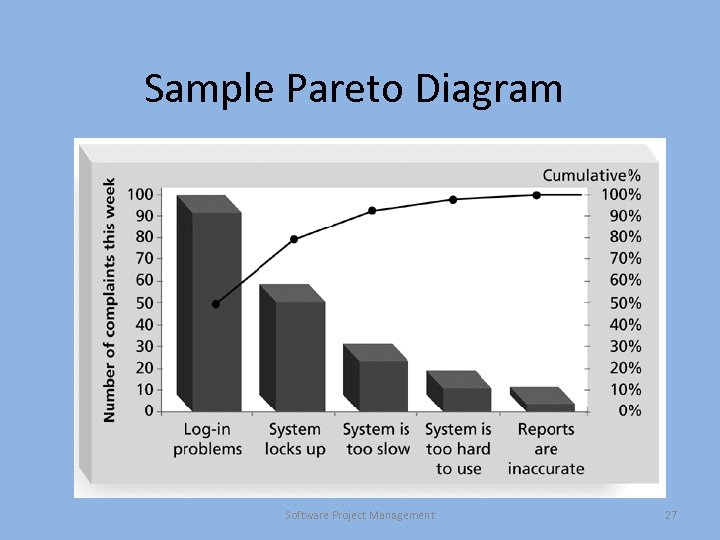 Sample Pareto Diagram Software Project Management 27
 Flowcharts • Flowcharts are graphic displays of the logic and flow of processes that help you analyze how problems occur and how processes can be improved • They show activities, decision points, and the order of how information is processed Software Project Management 28
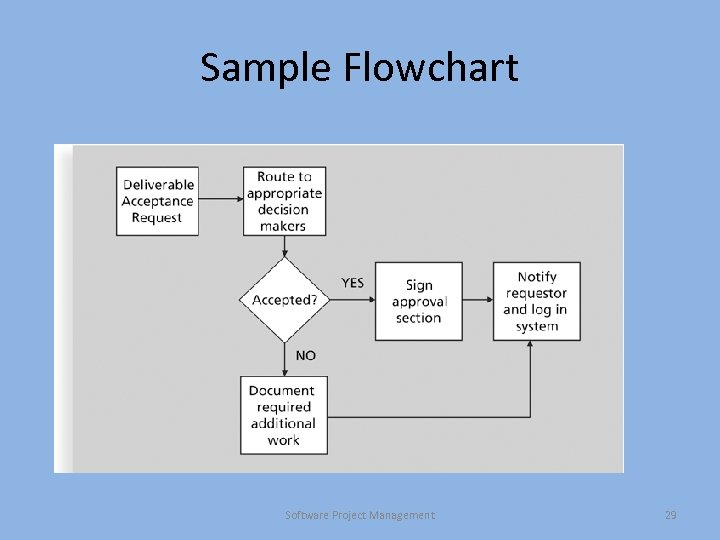 Sample Flowchart Software Project Management 29
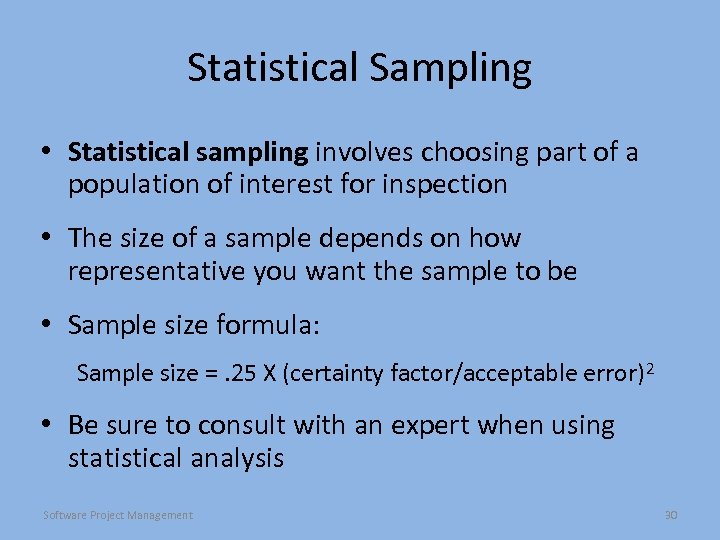 Statistical Sampling • Statistical sampling involves choosing part of a population of interest for inspection • The size of a sample depends on how representative you want the sample to be • Sample size formula: Sample size =. 25 X (certainty factor/acceptable error)2 • Be sure to consult with an expert when using statistical analysis Software Project Management 30
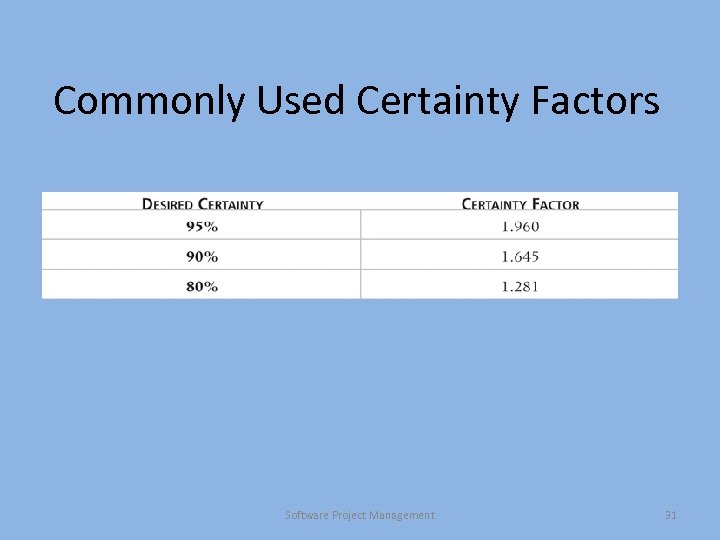 Commonly Used Certainty Factors Software Project Management 31
 Six Sigma • Six Sigma is “a comprehensive and flexible system for achieving, sustaining, and maximizing business success. Six Sigma is uniquely driven by close understanding of customer needs, disciplined use of facts, data, and statistical analysis, and diligent attention to managing, improving, and reinventing business processes. ”* *Pande, Peter S. , Robert P. Neuman, and Roland R. Cavanagh, The Six Sigma Way, New York: Mc. Graw-Hill, 2000, p. xi. Software Project Management 32
 Basic Information on Six Sigma • The target for perfection is the achievement of no more than 3. 4 defects per million opportunities • The principles can apply to a wide variety of processes • Six Sigma projects normally follow a five-phase improvement process called DMAIC Software Project Management 33
 DMAIC • DMAIC is a systematic, closed-loop process for continued improvement that is scientific and fact based • DMAIC stands for: – Define: Define the problem/opportunity, process, and customer requirements – Measure: Define measures, then collect, compile, and display data – Analyze: Scrutinize process details to find improvement opportunities – Improve: Generate solutions and ideas for improving the problem – Control: Track and verify the stability of the improvements and the predictability of the solution Software Project Management 34
 Six Sigma and Statistics • The term sigma means standard deviation • Standard deviation measures how much variation exists in a distribution of data • Standard deviation is a key factor in determining the acceptable number of defective units found in a population • Six Sigma projects strive for no more than 3. 4 defects per million opportunities Software Project Management 35
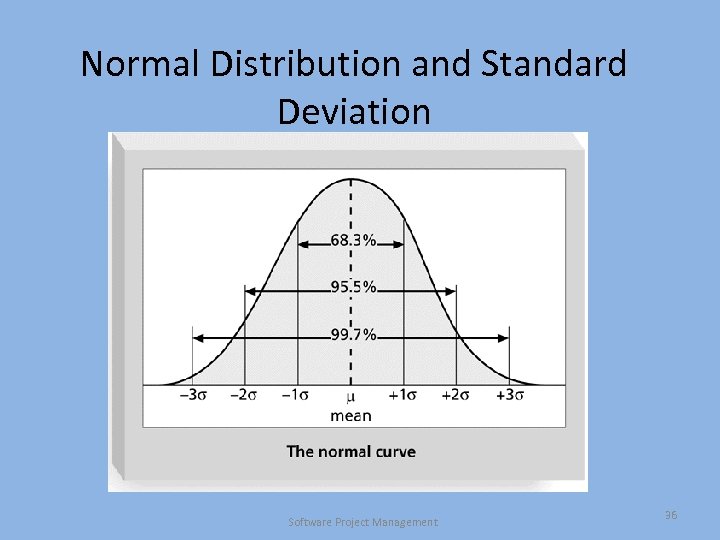 Normal Distribution and Standard Deviation Software Project Management 36
 Six Sigma’s Conversion Table • Using a normal curve, if a process is at six sigma, there would be no more than two defective units per billion produced • Six Sigma uses a scoring system that accounts for time, an important factor in determining process variations • Yield represents the number of units handled correctly through the process steps • A defect is any instance where the product or service fails to meet customer requirements • There can be several opportunities to have a defect • => defects/units changes in defects/number of opportunities Software Project Management 37
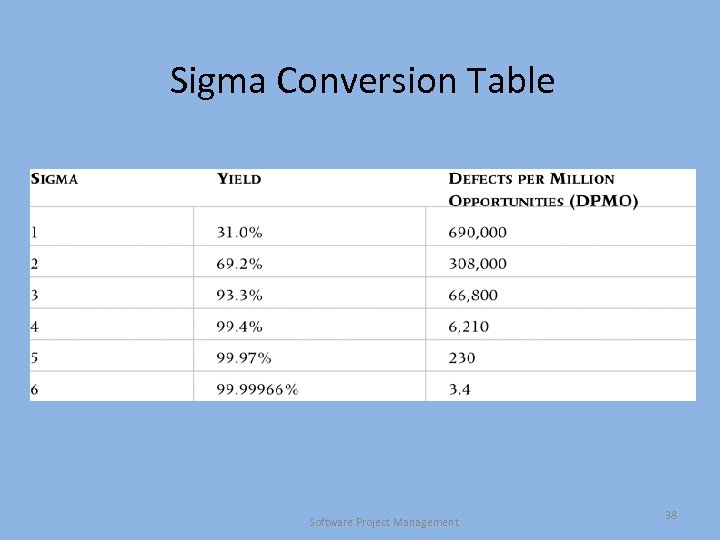 Sigma Conversion Table Software Project Management 38
 Testing Alone Is Not Enough • Watts S. Humphrey, an expert on software quality, defines a software defect as anything that must be changed before the delivery of the program • Testing does not sufficiently prevent software defects because, for example: – The number of ways to test a complex system is huge – Users will continue to invent new ways to use a system that its developers never considered • Humphrey suggests that people rethink the software development process to provide no potential defects when you enter system testing; developers must be responsible for providing error-free code at each stage of testing • What else than testing is needed? Software Testing 39
 Prevention vs. Detection • Prevention: – – – Element of the quality assurance Contributes to quality while the product is evolving Focus on process, standards, best practices, tools, etc. Involves verification and validation Performed early and continuously in the development cycle • Detection: – – Element of the quality control Assesses the quality of a completed product Involves verification and validation Performed later in the development cycle of a deliverable • Detection and Repairing costs are usually higher than Prevention costs • Prevention contributes the most to lower the overall project costs • Prevention and Detection are complementary and can provide most value when exercised together. Software Testing 40
 Modern Quality Management • Modern quality management: – Requires customer satisfaction – Prefers prevention to inspection – Recognizes management responsibility for quality • Noteworthy quality experts include Deming, Juran, Crosby, Ishikawa, Taguchi, and Feigenbaum Software Testing 41
 Prevention through Maturity Models • Maturity models are frameworks for helping organizations improve their processes and systems – The Software Quality Function Deployment Model focuses on defining user requirements and planning software projects – The Software Engineering Institute’s Capability Maturity Model Integration is a process improvement approach that provides organizations with the essential elements of effective processes Software Testing 42
 CMMI Levels • http: //www. sei. cmu. edu/publications/documents/06. reports/06 tr 008. html • CMMI levels, from lowest to highest, are: – – – Incomplete (0) Performed (1) Managed (2) Defined (3) Quantitatively Managed (4) Optimizing (5) • Companies may not get to bid on US government projects unless they have a CMMI Level 3 Software Testing 43
 Prevention by Avoiding Classic Mistakes • Mc. Connell’s Anti-Patterns • Types – People-Related – Process-Related – Product-Related – Technology-Related Software Testing 44
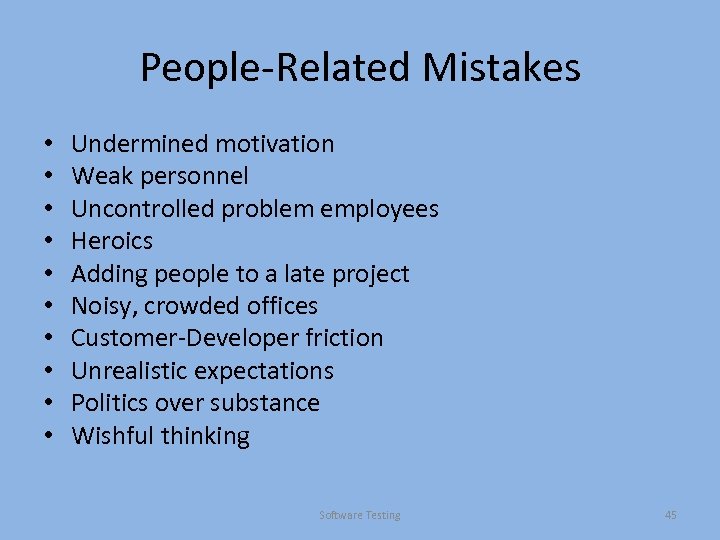 People-Related Mistakes • • • Undermined motivation Weak personnel Uncontrolled problem employees Heroics Adding people to a late project Noisy, crowded offices Customer-Developer friction Unrealistic expectations Politics over substance Wishful thinking Software Testing 45
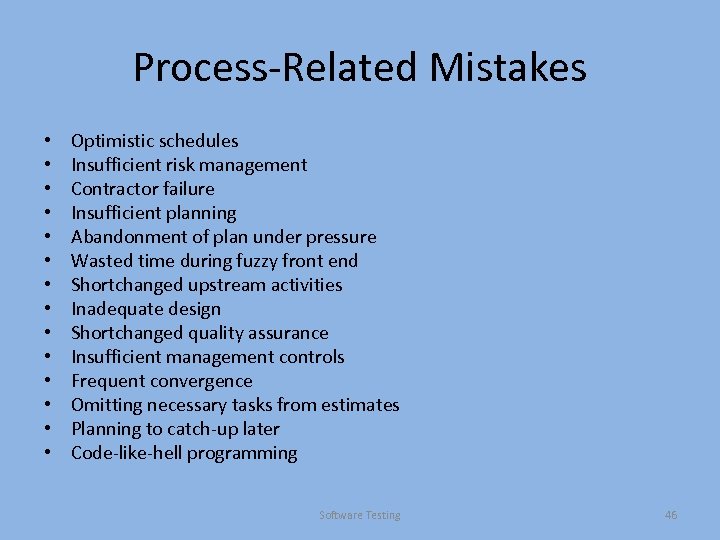 Process-Related Mistakes • • • • Optimistic schedules Insufficient risk management Contractor failure Insufficient planning Abandonment of plan under pressure Wasted time during fuzzy front end Shortchanged upstream activities Inadequate design Shortchanged quality assurance Insufficient management controls Frequent convergence Omitting necessary tasks from estimates Planning to catch-up later Code-like-hell programming Software Testing 46
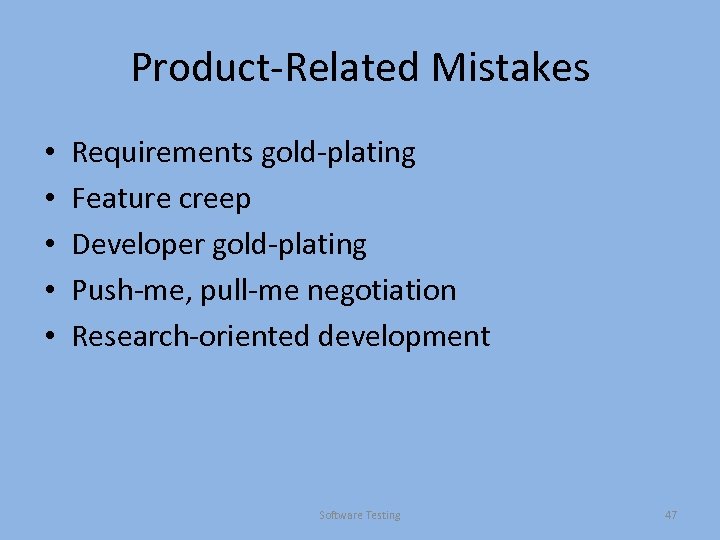 Product-Related Mistakes • • • Requirements gold-plating Feature creep Developer gold-plating Push-me, pull-me negotiation Research-oriented development Software Testing 47
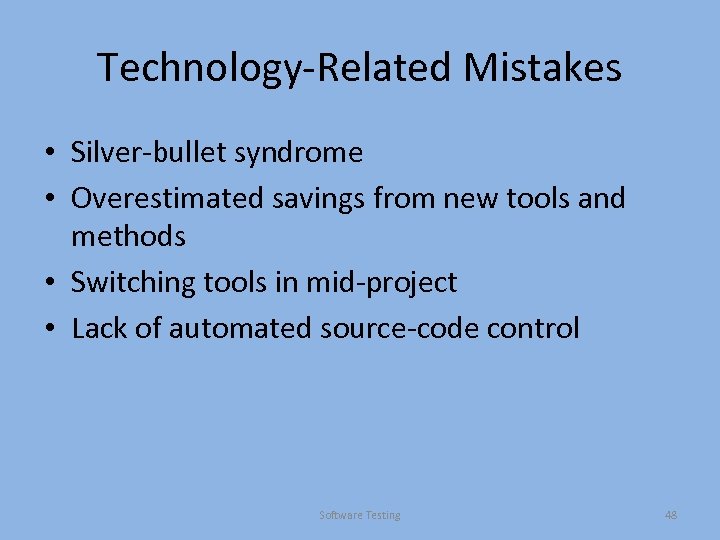 Technology-Related Mistakes • Silver-bullet syndrome • Overestimated savings from new tools and methods • Switching tools in mid-project • Lack of automated source-code control Software Testing 48
 Verification vs. Validation • Verification: "Are we building the product right”. • The software should conform to its specification. • Validation: "Are we building the right product”. • The software should do what the user really requires. Software Testing 49
 The V & V process • Is a whole life-cycle process - V & V must be applied at each stage in the software process. • Has two principal objectives – The discovery of defects in a system; – The assessment of whether or not the system is useful and useable in an operational situation. Software Testing 50
 V& V goals • Verification and validation should establish confidence that the software is fit for purpose. • This does NOT mean completely free of defects. • Rather, it must be good enough for its intended use and the type of use will determine the degree of confidence that is needed. Software Testing 51
 V & V planning • Careful planning is required to get the most out of testing and inspection processes. • Planning should start early in the development process. • The plan should identify the balance between static verification and testing. • Test planning is about defining standards for the testing process and then describing product tests. Software Testing 53
 Static and dynamic verification • Software inspections. Concerned with analysis of the static system representation to discover problems (static verification) – May be supplement by tool-based document and code analysis • Software testing. Concerned with exercising and observing product behaviour (dynamic verification) – The system is executed with test data and its operational behaviour is observed • Inspections and testing are complementary and not opposing verification techniques. • Both should be used during the V & V process. • Inspections can check conformance with a specification but not conformance with the customer’s real requirements. Software Testing 54
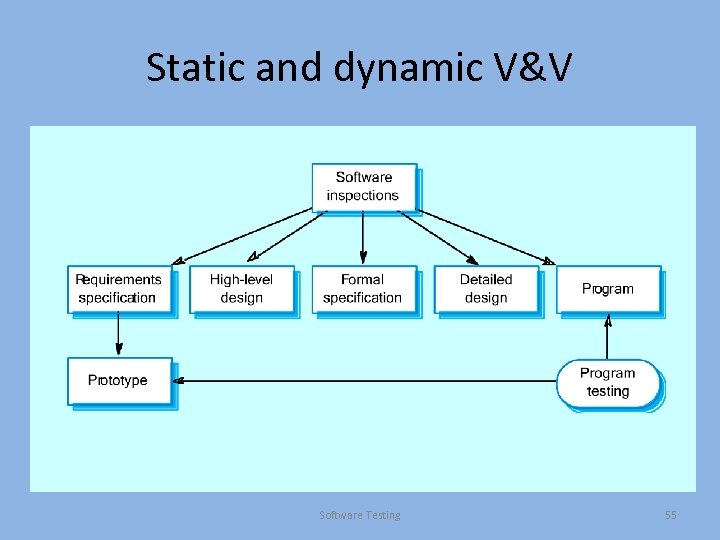 Static and dynamic V&V Software Testing 55
 Software inspections • These involve people examining the source representation with the aim of discovering anomalies and defects. • Inspections do not require execution of a system so may be used before implementation. • They may be applied to any representation of the system (requirements, design, configuration data, test data, etc. ). • They have been shown to be an effective technique for discovering program errors. Software Testing 56
 Inspection success • Many different defects may be discovered in a single inspection. In testing, one defect , may mask another so several executions are required. • They reuse the domain and programming knowledge so reviewers are likely to have seen the types of error that commonly arise. Software Testing 57
 Program inspections • Formalised approach to document reviews • Intended explicitly for defect detection (not correction). • Defects may be logical errors, anomalies in the code that might indicate an erroneous condition (e. g. an uninitialized variable) or non -compliance with standards. Software Testing 58
 Inspection pre-conditions • A precise specification must be available. • Team members must be familiar with the organisation standards. • Syntactically correct code or other system representations must be available. • An error checklist should be prepared. Software Testing 59
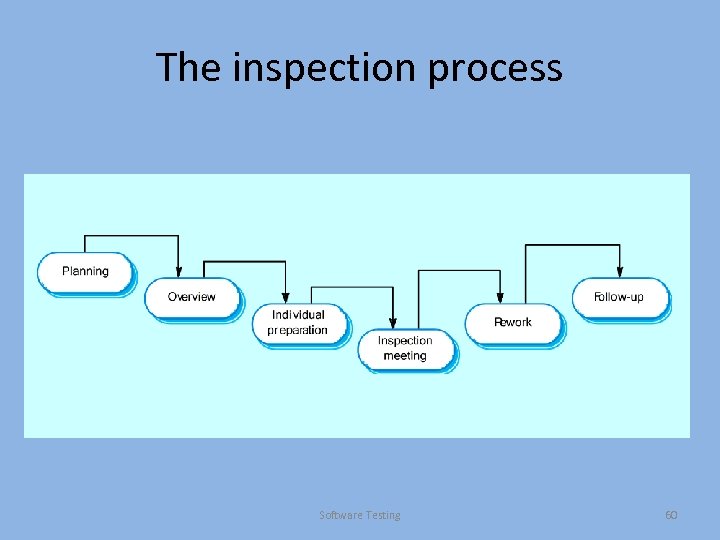 The inspection process Software Testing 60
 Inspection procedure • System overview presented to inspection team. • Code and associated documents are distributed to inspection team in advance. • Inspection takes place and discovered errors are noted. • Modifications are made to repair discovered errors. • Re-inspection may or may not be required. Software Testing 61
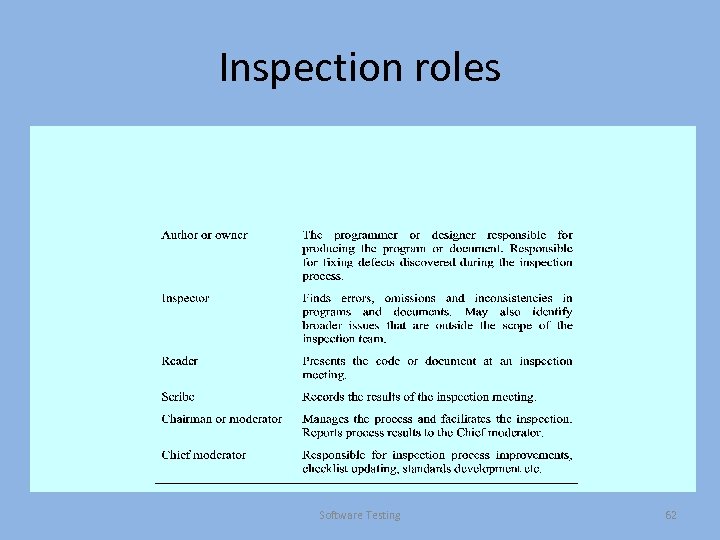 Inspection roles Software Testing 62
 Inspection checklists • Checklist of common errors should be used to drive the inspection. • Error checklists are also programming language dependent and reflect the characteristic errors that are likely to arise in the language. • In general, the 'weaker' the type checking, the larger the checklist. • Examples: Initialisation, Constant naming, loop termination, array bounds, etc. • Also see: Myers, The Art of Software Testing, ed 2, p 27. Software Testing 63
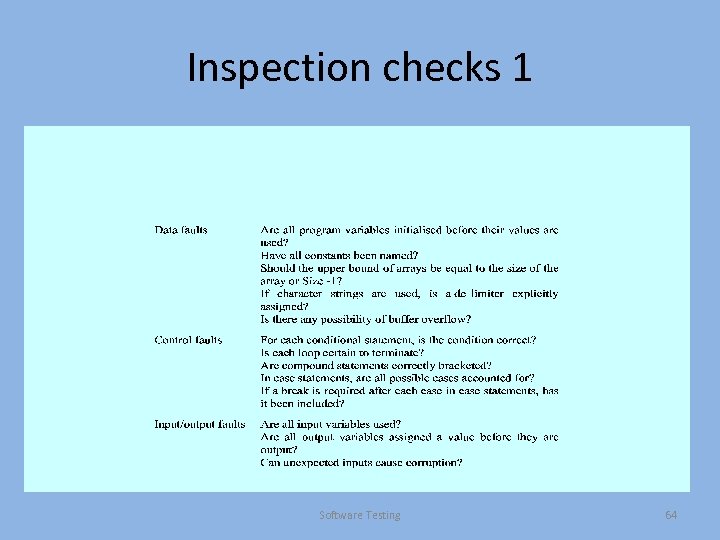 Inspection checks 1 Software Testing 64
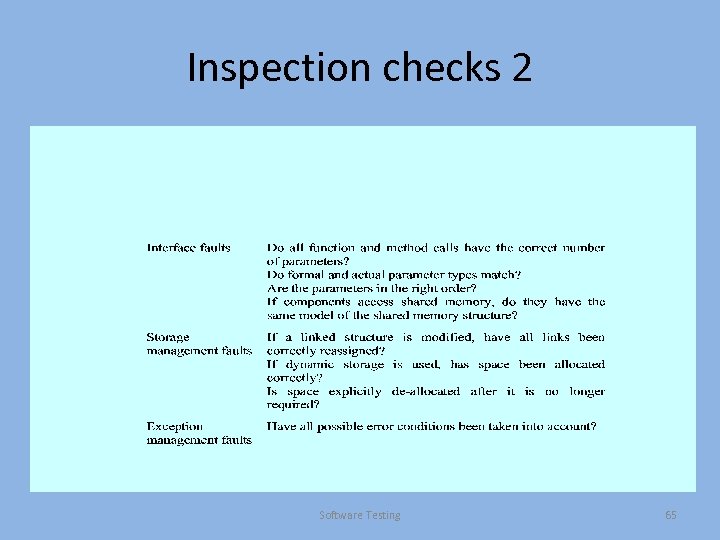 Inspection checks 2 Software Testing 65
 Inspection rate • 500 statements/hour during overview. • 125 source statement/hour during individual preparation. • 90 -125 statements/hour can be inspected. • Inspection is therefore an expensive process. • Inspecting 500 lines costs about 40 hours/man effort - about £ 2800 at UK rates. Software Testing 66
 Automated static analysis • Static analysers are software tools for source text processing. • They parse the program text and try to discover potentially erroneous conditions and bring these to the attention of the V & V team. • They are very effective as an aid to inspections • They are a supplement to but not a replacement for inspections. • http: //findbugs. sourceforge. net/ • http: //splint. org/ Software Testing 67
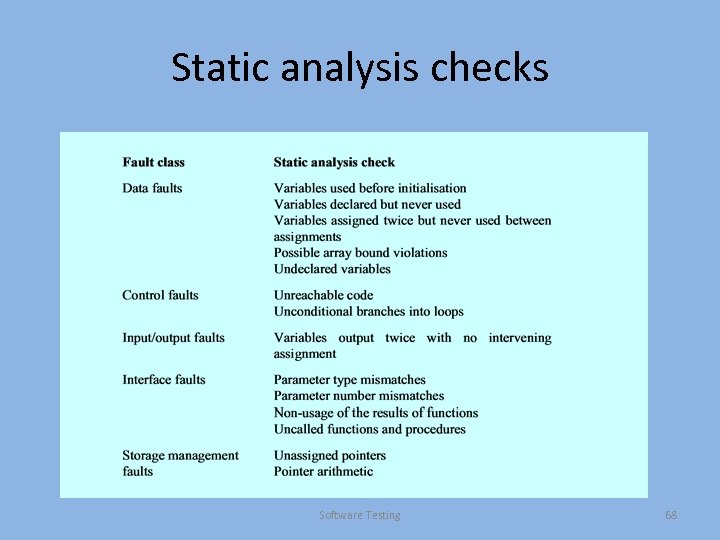 Static analysis checks Software Testing 68
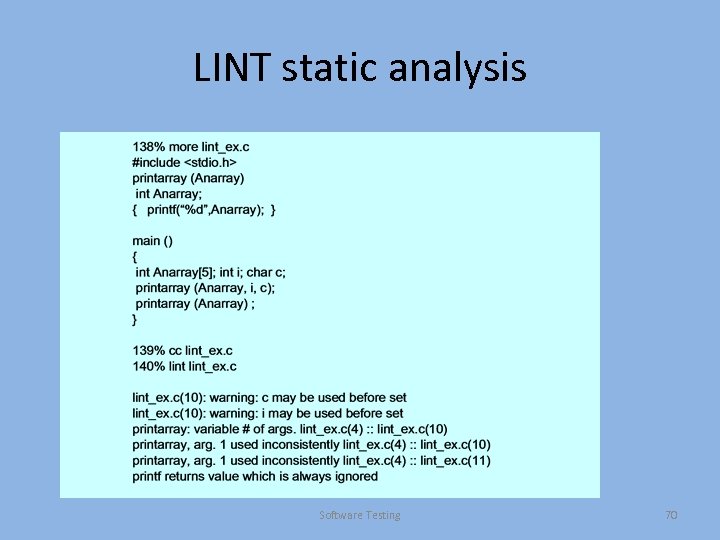 LINT static analysis Software Testing 70
 Use of static analysis • Particularly valuable when a language such as C is used which has weak typing and hence many errors are undetected by the compiler, • Less cost-effective for languages like Java that have strong type checking and can therefore detect many errors during compilation. Software Testing 71
 Verification and formal methods • Formal methods can be used when a mathematical specification of the system is produced. • They are the ultimate static verification technique. • They involve detailed mathematical analysis of the specification and may develop formal arguments that a program conforms to its mathematical specification. Software Testing 72
 Arguments formal methods • Producing a mathematical specification requires a detailed analysis of the requirements and this is likely to uncover errors. • They can detect implementation errors before testing when the program is analysed alongside the specification. Software Testing 73
 Arguments against formal methods • Require specialized notations that cannot be understood by domain experts. • Very expensive to develop a specification and even more expensive to show that a program meets that specification. • It may be possible to reach the same level of confidence in a program more cheaply using other V & V techniques. Software Testing 74
 Program testing • Can reveal the presence of errors NOT their absence. • The only validation technique for nonfunctional requirements as the software has to be executed to see how it behaves. • Should be used in conjunction with static verification to provide full V&V coverage. Software Testing 75
 Types of testing • Defect(verification) testing – Tests designed to discover system defects. – A successful defect test is one which reveals the presence of defects in a system. • Validation testing – Intended to show that the software meets its requirements. – A successful test is one that shows that a requirements has been properly implemented. Software Testing 76
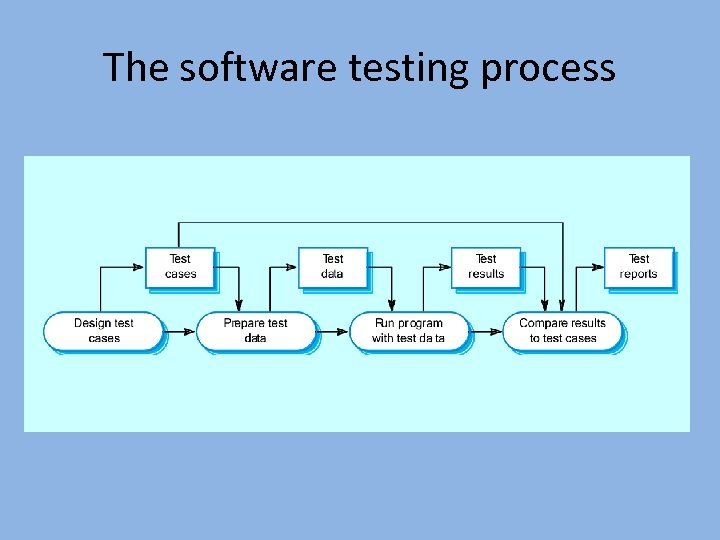 The software testing process
 Testing and debugging • Defect testing and debugging are distinct processes. • Verification and validation is concerned with establishing the existence of defects in a program. • Debugging is concerned with locating and repairing these errors. • Debugging involves formulating a hypothesis about program behaviour then testing these hypotheses to find the system error. Software Testing 78