


 Скачать презентацию Software rev 2005 1 0 Doc rev 22
462a1e6db70fac96a2b21ed5f794caa0.ppt
- Количество слайдов: 52
 Software rev: 2005. 1. 0 Doc. rev: 22 Apr 05 Top-down Design § System Description § Freehand Approach (recommended) – – – Build system with Platform Creator Build software manually Build and run simulation in System Verifier § Lab 15 – Building a Top-down System § Guided Approach (optional) – – – Build system with Platform Creator Top Down Flow Wizard Use automated software build Build and run simulation from Platform Creator § Lab 16 – Building a Design with the Top-down Flow Wizard
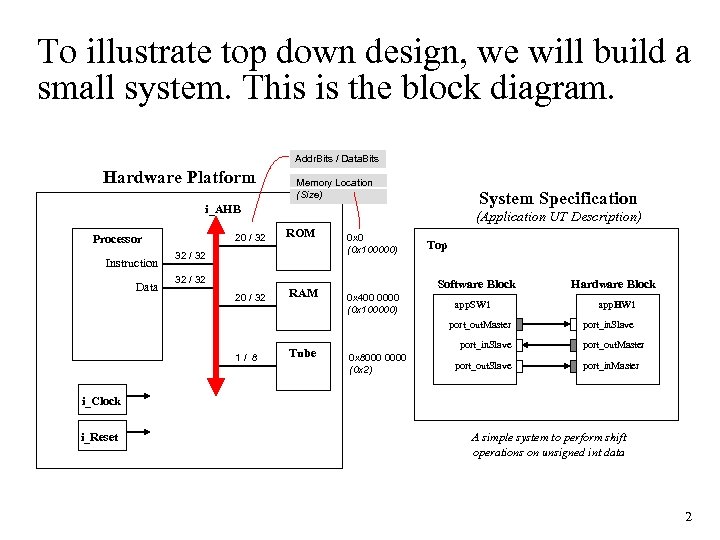 To illustrate top down design, we will build a small system. This is the block diagram. Addr. Bits / Data. Bits Hardware Platform Memory Location (Size) System Specification i_AHB 20 / 32 Processor Instruction Data (Application UT Description) ROM 20 / 32 RAM 32 / 32 0 x 0 (0 x 100000) 32 / 32 Top Software Block 0 x 400 0000 (0 x 100000) app. SW 1 port_out. Master 1/ 8 Tube Hardware Block app. HW 1 port_in. Slave 0 x 8000 0000 (0 x 2) port_out. Master port_out. Slave port_in. Master i_Clock i_Reset A simple system to perform shift operations on unsigned int data 2
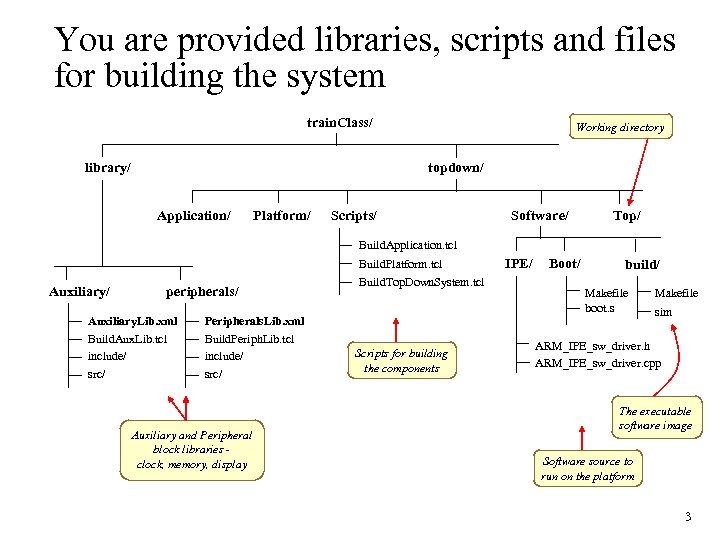 You are provided libraries, scripts and files for building the system train. Class/ library/ Working directory topdown/ Application/ Platform/ Scripts/ Software/ Top/ Build. Application. tcl Build. Platform. tcl Auxiliary/ peripherals/ Auxiliary. Lib. xml Peripherals. Lib. xml Build. Aux. Lib. tcl include/ src/ Build. Periph. Lib. tcl include/ src/ Build. Top. Down. System. tcl Auxiliary and Peripheral block libraries clock, memory, display Scripts for building the components IPE/ Boot/ build/ Makefile boot. s Makefile sim ARM_IPE_sw_driver. h ARM_IPE_sw_driver. cpp The executable software image Software source to run on the platform 3
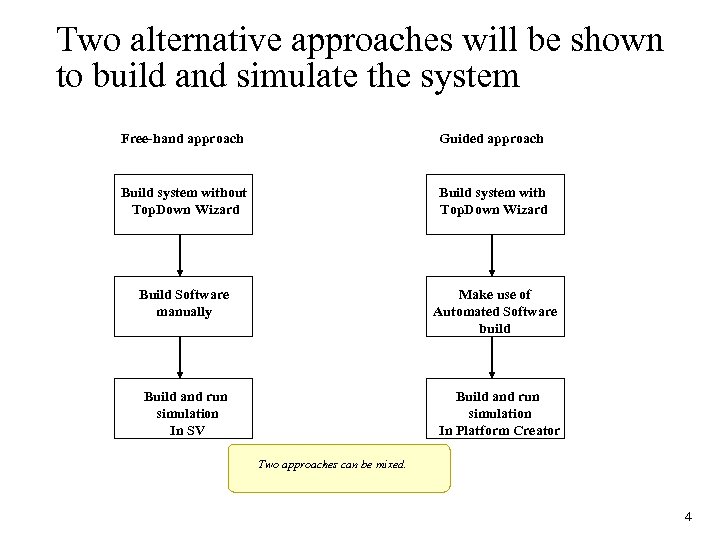 Two alternative approaches will be shown to build and simulate the system Free-hand approach Guided approach Build system without Top. Down Wizard Build system with Top. Down Wizard Build Software manually Make use of Automated Software build Build and run simulation In SV Build and run simulation In Platform Creator Two approaches can be mixed. 4
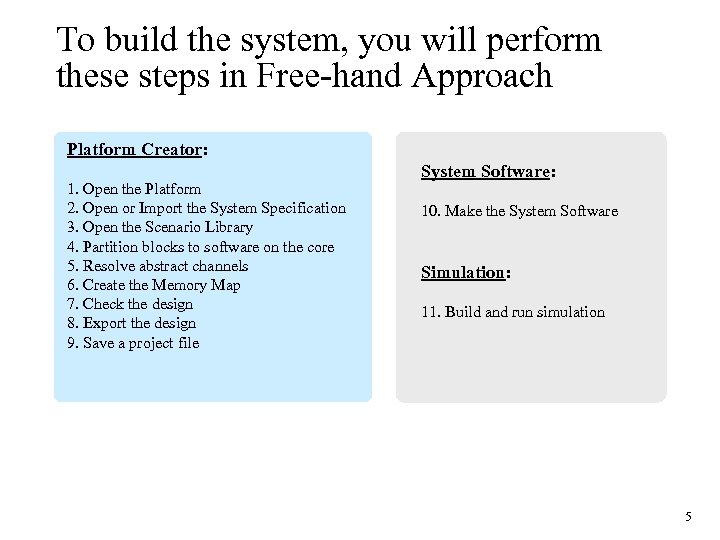 To build the system, you will perform these steps in Free-hand Approach Platform Creator: 1. Open the Platform 2. Open or Import the System Specification 3. Open the Scenario Library 4. Partition blocks to software on the core 5. Resolve abstract channels 6. Create the Memory Map 7. Check the design 8. Export the design 9. Save a project file System Software: 10. Make the System Software Simulation: 11. Build and run simulation 5
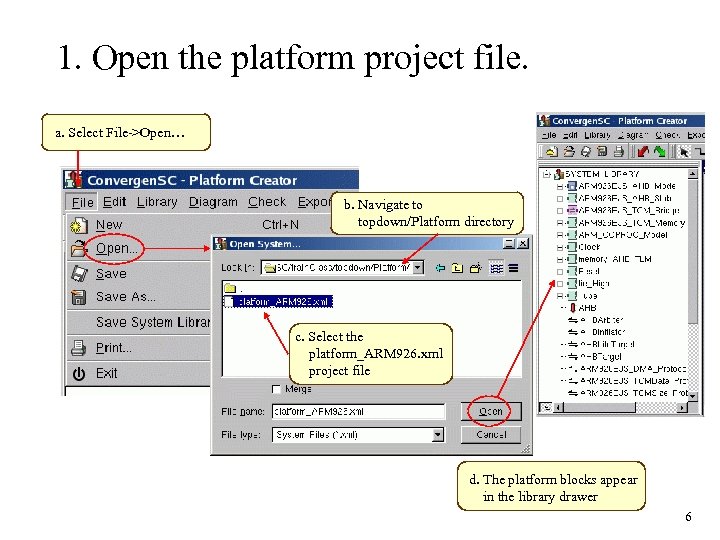 1. Open the platform project file. a. Select File->Open… b. Navigate to topdown/Platform directory c. Select the platform_ARM 926. xml project file d. The platform blocks appear in the library drawer 6
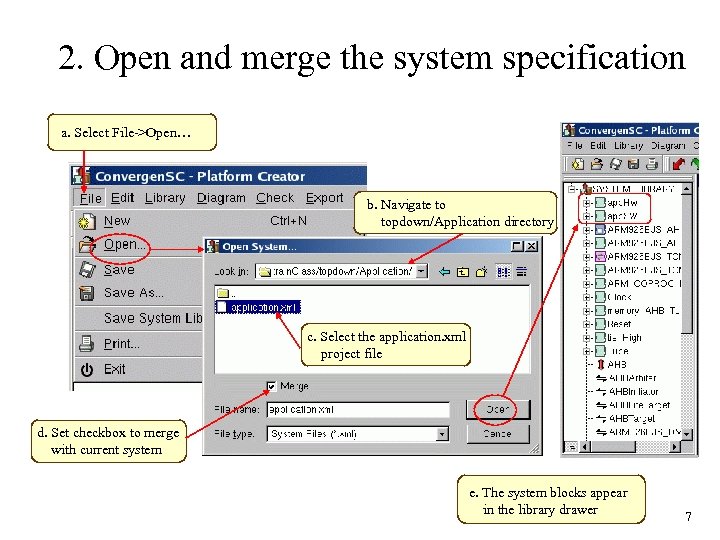 2. Open and merge the system specification a. Select File->Open… b. Navigate to topdown/Application directory c. Select the application. xml project file d. Set checkbox to merge with current system e. The system blocks appear in the library drawer 7
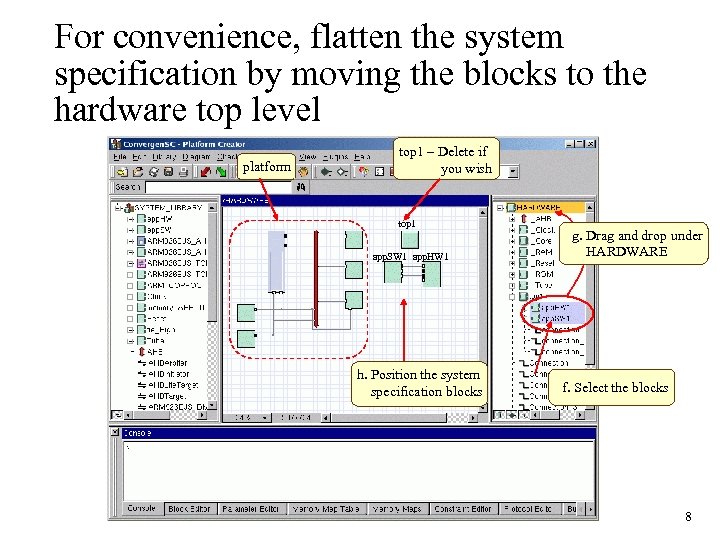 For convenience, flatten the system specification by moving the blocks to the hardware top level platform top 1 – Delete if you wish top 1 app. SW 1 app. HW 1 h. Position the system specification blocks g. Drag and drop under HARDWARE f. Select the blocks 8
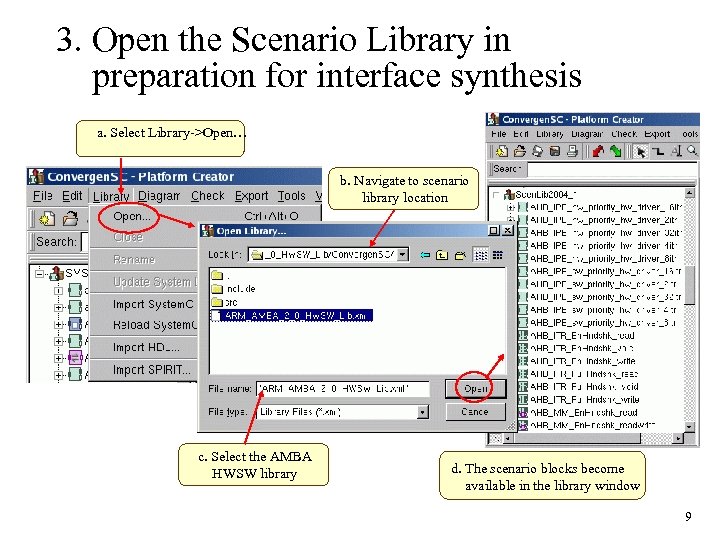 3. Open the Scenario Library in preparation for interface synthesis a. Select Library->Open… b. Navigate to scenario library location c. Select the AMBA HWSW library d. The scenario blocks become available in the library window 9
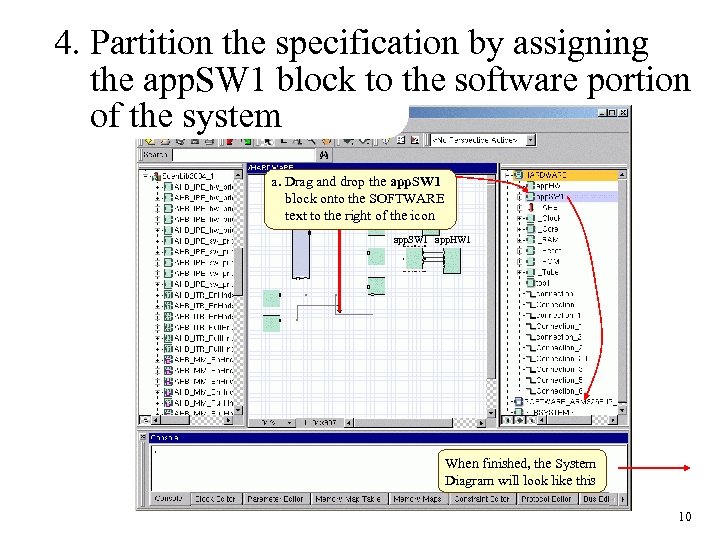 4. Partition the specification by assigning the app. SW 1 block to the software portion of the system a. Drag and drop the app. SW 1 block onto the SOFTWARE text to the right of the icon app. SW 1 app. HW 1 When finished, the System Diagram will look like this 10
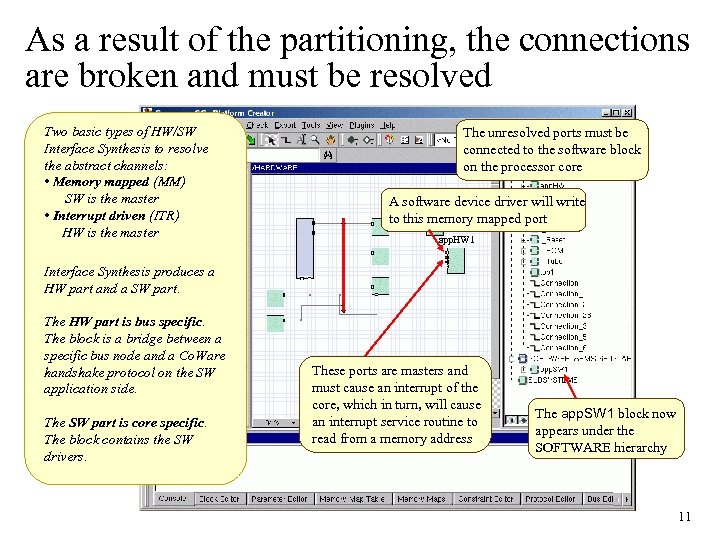 As a result of the partitioning, the connections are broken and must be resolved Two basic types of HW/SW Interface Synthesis to resolve the abstract channels: • Memory mapped (MM) SW is the master • Interrupt driven (ITR) HW is the master The unresolved ports must be connected to the software block on the processor core A software device driver will write to this memory mapped port app. HW 1 Interface Synthesis produces a HW part and a SW part. The HW part is bus specific. The block is a bridge between a specific bus node and a Co. Ware handshake protocol on the SW application side. The SW part is core specific. The block contains the SW drivers. These ports are masters and must cause an interrupt of the core, which in turn, will cause an interrupt service routine to read from a memory address The app. SW 1 block now appears under the SOFTWARE hierarchy 11
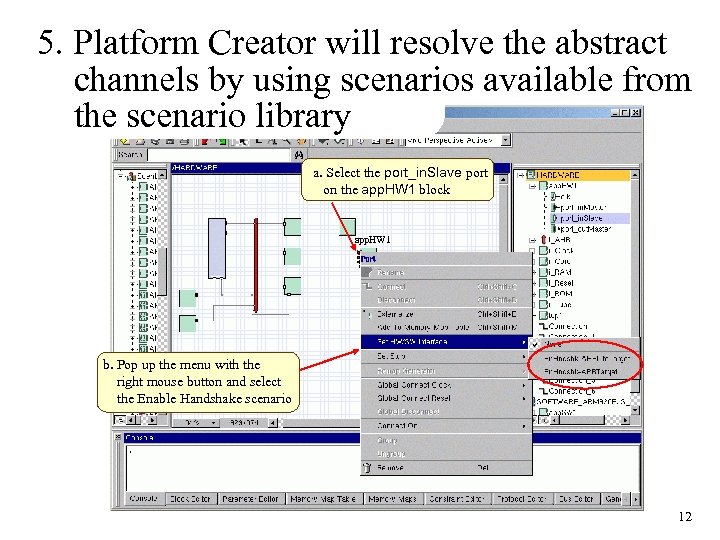 5. Platform Creator will resolve the abstract channels by using scenarios available from the scenario library a. Select the port_in. Slave port on the app. HW 1 block app. HW 1 b. Pop up the menu with the right mouse button and select the Enable Handshake scenario 12
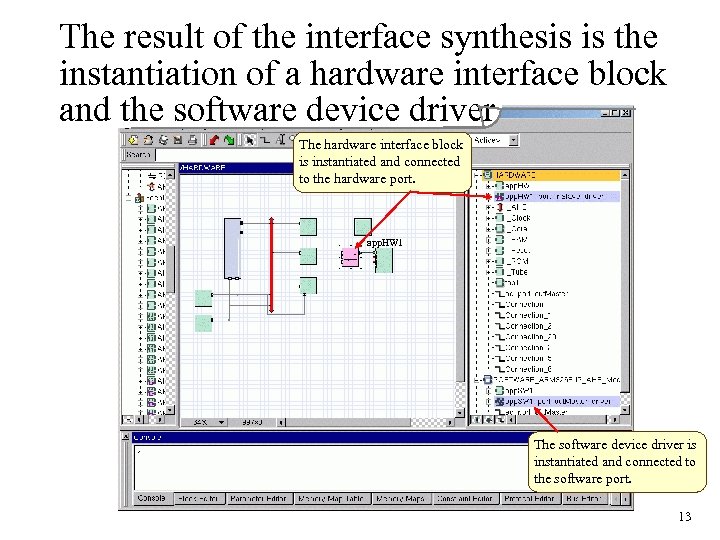 The result of the interface synthesis is the instantiation of a hardware interface block and the software device driver The hardware interface block is instantiated and connected to the hardware port. app. HW 1 The software device driver is instantiated and connected to the software port. 13
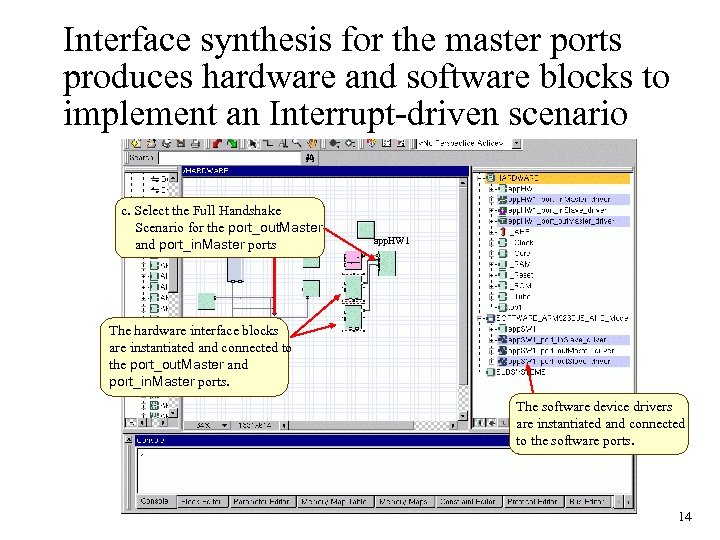 Interface synthesis for the master ports produces hardware and software blocks to implement an Interrupt-driven scenario c. Select the Full Handshake Scenario for the port_out. Master and port_in. Master ports app. HW 1 The hardware interface blocks are instantiated and connected to the port_out. Master and port_in. Master ports. The software device drivers are instantiated and connected to the software ports. 14
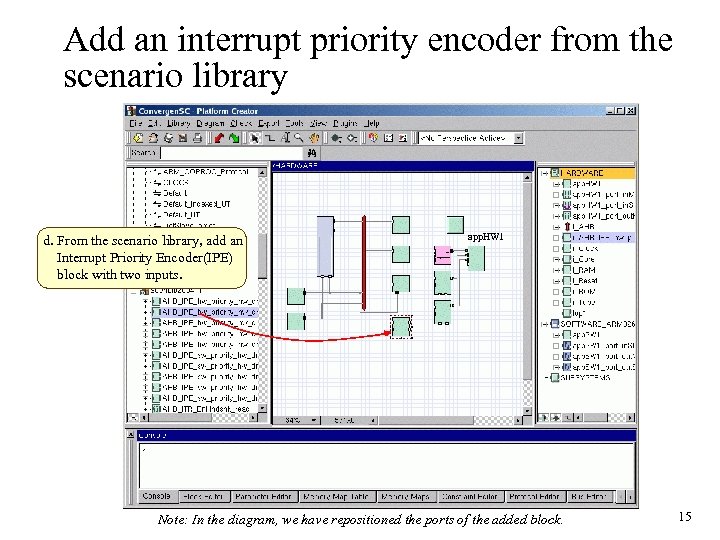 Add an interrupt priority encoder from the scenario library d. From the scenario library, add an Interrupt Priority Encoder(IPE) block with two inputs. app. HW 1 Note: In the diagram, we have repositioned the ports of the added block. 15
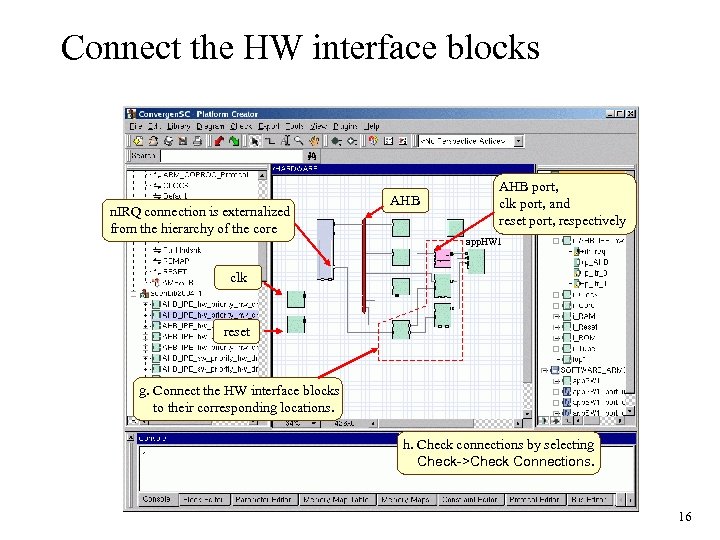 Connect the HW interface blocks n. IRQ connection is externalized from the hierarchy of the core AHB port, clk port, and reset port, respectively app. HW 1 clk reset g. Connect the HW interface blocks to their corresponding locations. h. Check connections by selecting Check->Check Connections. 16
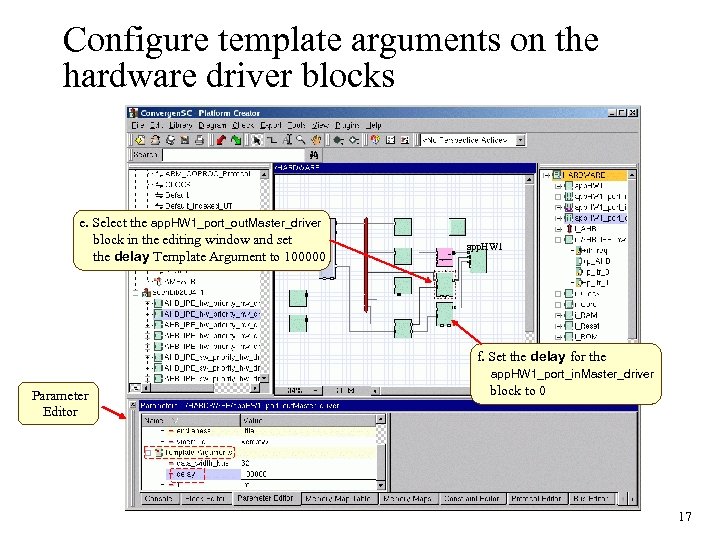 Configure template arguments on the hardware driver blocks e. Select the app. HW 1_port_out. Master_driver block in the editing window and set the delay Template Argument to 100000 app. HW 1 f. Set the delay for the app. HW 1_port_in. Master_driver Parameter Editor block to 0 17
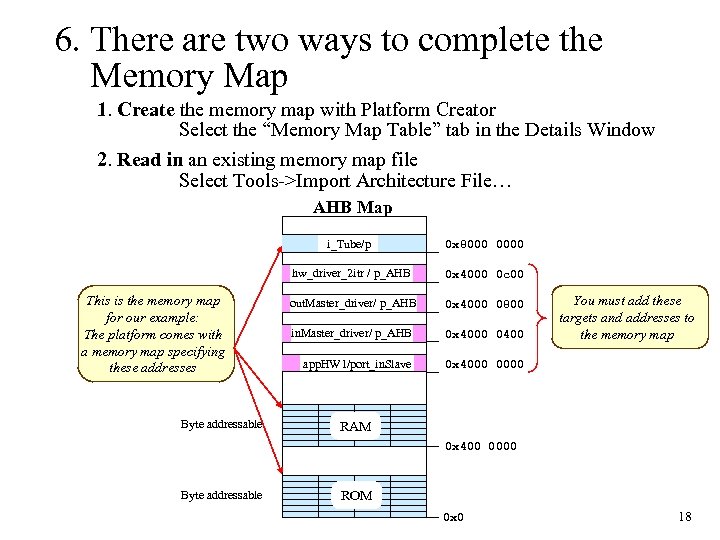 6. There are two ways to complete the Memory Map 1. Create the memory map with Platform Creator Select the “Memory Map Table” tab in the Details Window 2. Read in an existing memory map file Select Tools->Import Architecture File… AHB Map i_Tube/p hw_driver_2 itr / p_AHB This is the memory map for our example: The platform comes with a memory map specifying these addresses Byte addressable 0 x 8000 0 x 4000 0 c 00 out. Master_driver/ p_AHB 0 x 4000 0800 in. Master_driver/ p_AHB 0 x 4000 0400 app. HW 1/port_in. Slave 0 x 4000 0000 You must add these targets and addresses to the memory map RAM 0 x 400 0000 Byte addressable ROM 0 x 0 18
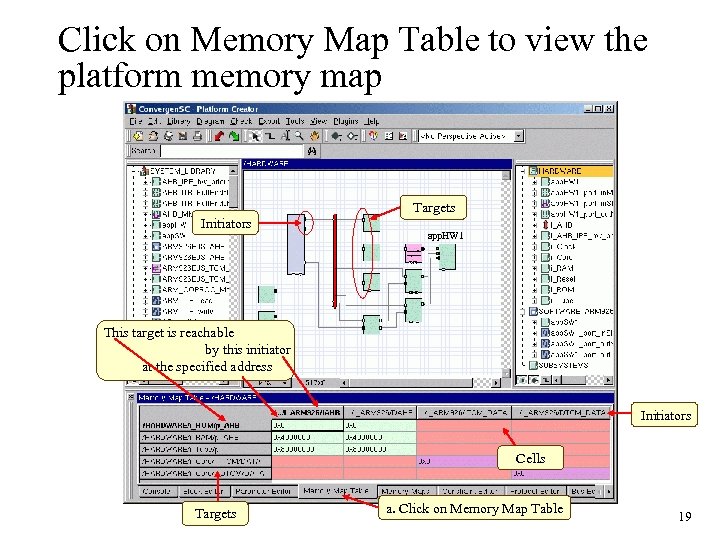 Click on Memory Map Table to view the platform memory map Targets Initiators app. HW 1 This target is reachable by this initiator at the specified address Initiators Cells Targets a. Click on Memory Map Table 19
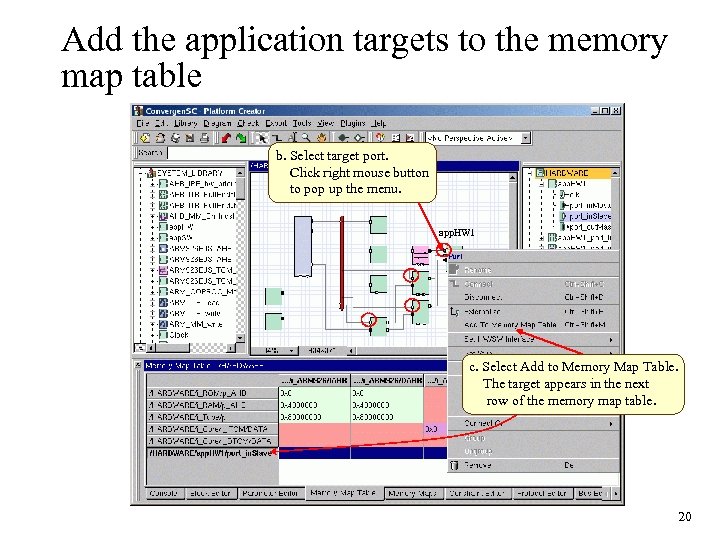 Add the application targets to the memory map table b. Select target port. Click right mouse button to pop up the menu. app. HW 1 c. Select Add to Memory Map Table. The target appears in the next row of the memory map table. 20
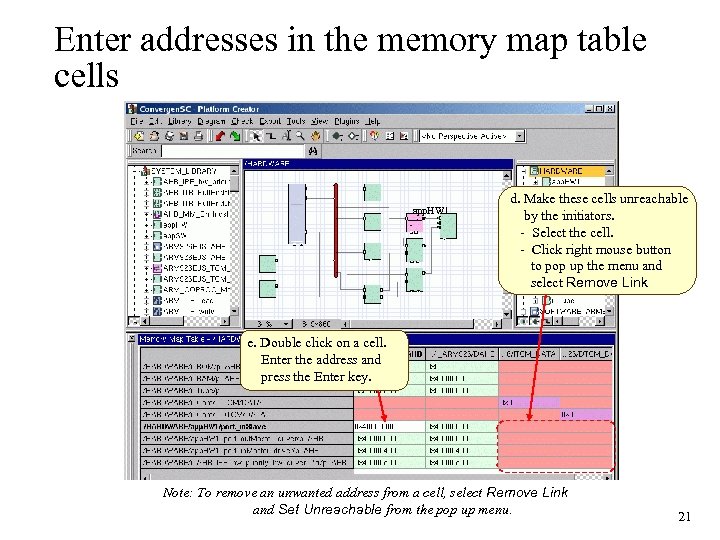 Enter addresses in the memory map table cells app. HW 1 d. Make these cells unreachable by the initiators. - Select the cell. - Click right mouse button to pop up the menu and select Remove Link e. Double click on a cell. Enter the address and press the Enter key. Note: To remove an unwanted address from a cell, select Remove Link and Set Unreachable from the pop up menu. 21
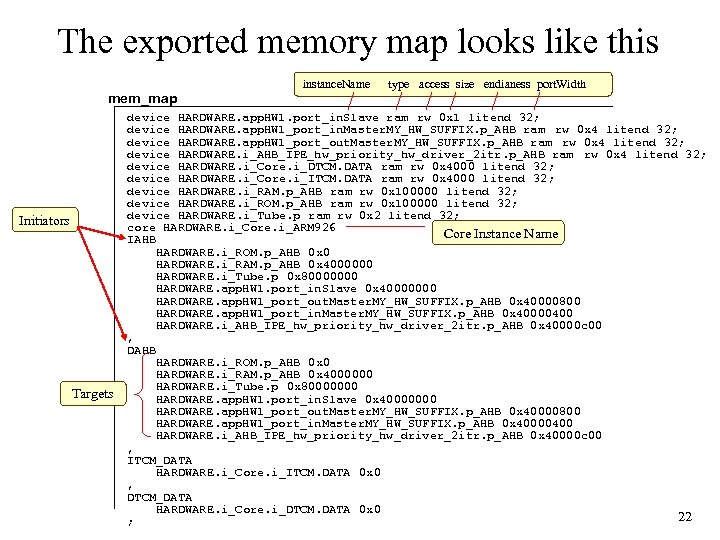 The exported memory map looks like this mem_map Initiators Targets instance. Name type access size endianess port. Width device HARDWARE. app. HW 1. port_in. Slave ram rw 0 x 1 litend 32; device HARDWARE. app. HW 1_port_in. Master. MY_HW_SUFFIX. p_AHB ram rw 0 x 4 litend 32; device HARDWARE. app. HW 1_port_out. Master. MY_HW_SUFFIX. p_AHB ram rw 0 x 4 litend 32; device HARDWARE. i_AHB_IPE_hw_priority_hw_driver_2 itr. p_AHB ram rw 0 x 4 litend 32; device HARDWARE. i_Core. i_DTCM. DATA ram rw 0 x 4000 litend 32; device HARDWARE. i_Core. i_ITCM. DATA ram rw 0 x 4000 litend 32; device HARDWARE. i_RAM. p_AHB ram rw 0 x 100000 litend 32; device HARDWARE. i_ROM. p_AHB ram rw 0 x 100000 litend 32; device HARDWARE. i_Tube. p ram rw 0 x 2 litend 32; core HARDWARE. i_Core. i_ARM 926 Core Instance Name IAHB HARDWARE. i_ROM. p_AHB 0 x 0 HARDWARE. i_RAM. p_AHB 0 x 4000000 HARDWARE. i_Tube. p 0 x 80000000 HARDWARE. app. HW 1. port_in. Slave 0 x 40000000 HARDWARE. app. HW 1_port_out. Master. MY_HW_SUFFIX. p_AHB 0 x 40000800 HARDWARE. app. HW 1_port_in. Master. MY_HW_SUFFIX. p_AHB 0 x 40000400 HARDWARE. i_AHB_IPE_hw_priority_hw_driver_2 itr. p_AHB 0 x 40000 c 00 , DAHB HARDWARE. i_ROM. p_AHB 0 x 0 HARDWARE. i_RAM. p_AHB 0 x 4000000 HARDWARE. i_Tube. p 0 x 80000000 HARDWARE. app. HW 1. port_in. Slave 0 x 40000000 HARDWARE. app. HW 1_port_out. Master. MY_HW_SUFFIX. p_AHB 0 x 40000800 HARDWARE. app. HW 1_port_in. Master. MY_HW_SUFFIX. p_AHB 0 x 40000400 HARDWARE. i_AHB_IPE_hw_priority_hw_driver_2 itr. p_AHB 0 x 40000 c 00 , ITCM_DATA HARDWARE. i_Core. i_ITCM. DATA 0 x 0 , DTCM_DATA HARDWARE. i_Core. i_DTCM. DATA 0 x 0 22 ;
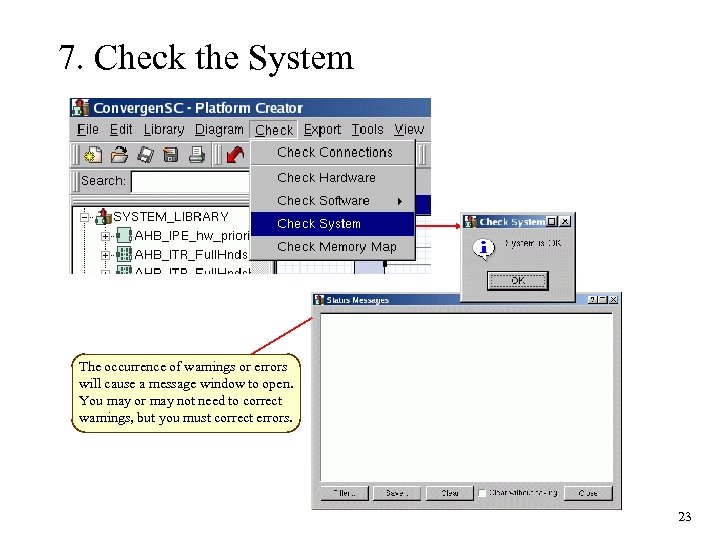 7. Check the System The occurrence of warnings or errors will cause a message window to open. You may or may not need to correct warnings, but you must correct errors. 23
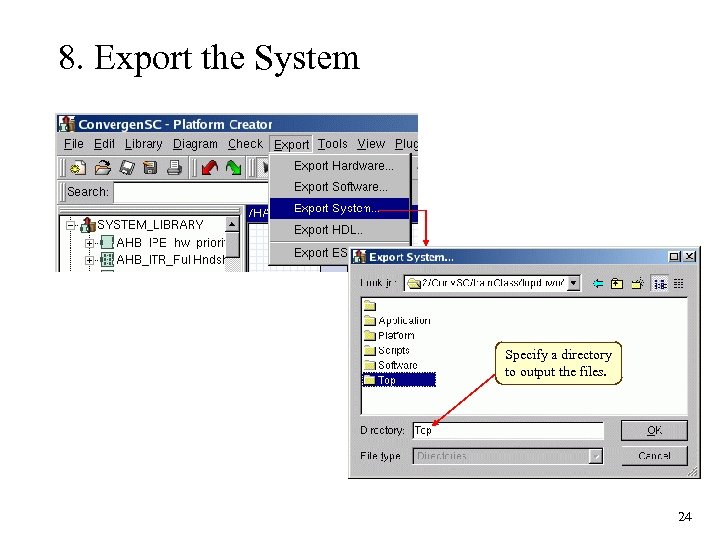 8. Export the System Specify a directory to output the files. 24
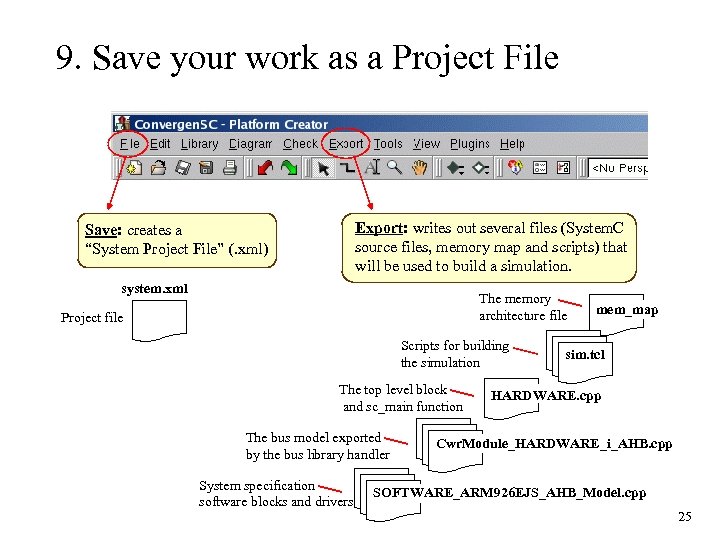 9. Save your work as a Project File Export: writes out several files (System. C source files, memory map and scripts) that will be used to build a simulation. Save: creates a “System Project File” (. xml) system. xml The memory architecture file Project file Scripts for building the simulation The top level block and sc_main function The bus model exported by the bus library handler System specification software blocks and drivers mem_map sim. tcl HARDWARE. cpp Cwr. Module_HARDWARE_i_AHB. cpp SOFTWARE_ARM 926 EJS_AHB_Model. cpp 25
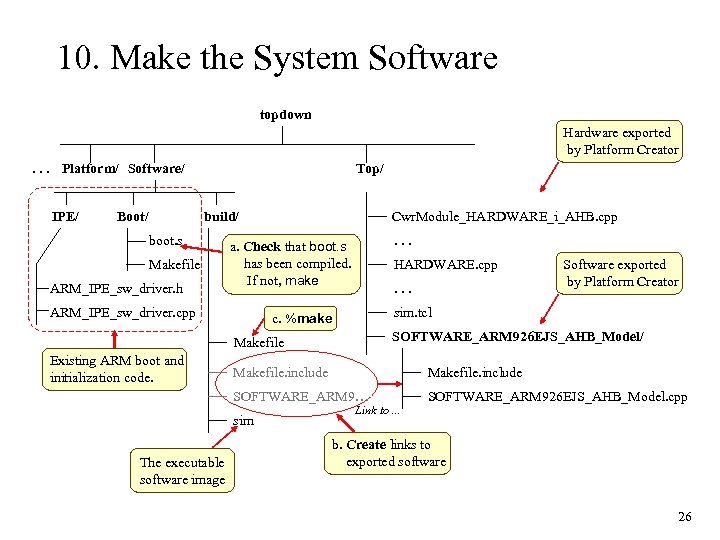 10. Make the System Software topdown Hardware exported by Platform Creator. . . Platform/ Software/ IPE/ Boot/ Top/ build/ boot. s Makefile ARM_IPE_sw_driver. h Cwr. Module_HARDWARE_i_AHB. cpp. . . a. Check that boot. s has been compiled. If not, make ARM_IPE_sw_driver. cpp HARDWARE. cpp. . . sim. tcl c. %make SOFTWARE_ARM 926 EJS_AHB_Model/ Makefile Existing ARM boot and initialization code. Makefile. include SOFTWARE_ARM 9… sim The executable software image Software exported by Platform Creator Link to. . . SOFTWARE_ARM 926 EJS_AHB_Model. cpp b. Create links to exported software 26
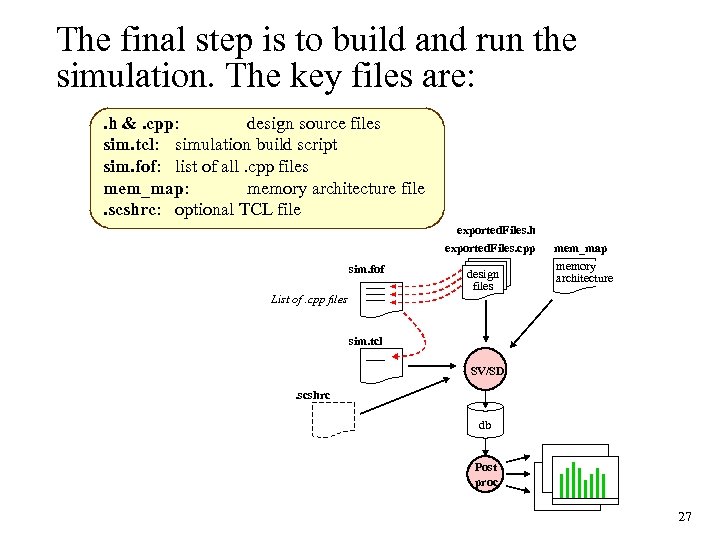 The final step is to build and run the simulation. The key files are: . h &. cpp: design source files sim. tcl: simulation build script sim. fof: list of all. cpp files mem_map: memory architecture file. scshrc: optional TCL file exported. Files. h exported. Files. cpp sim. fof List of. cpp files design files mem_map memory architecture sim. tcl SV/SD. scshrc db Post proc 27
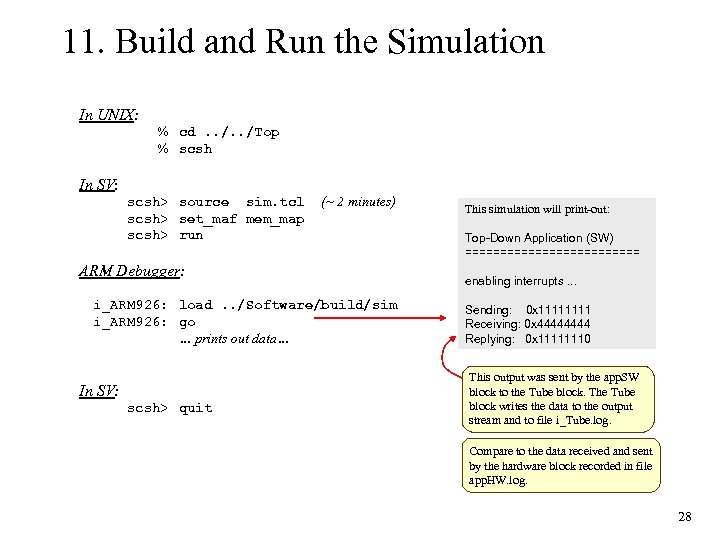 11. Build and Run the Simulation In UNIX: % cd. . /Top % scsh In SV: scsh> source sim. tcl scsh> set_maf mem_map scsh> run (~ 2 minutes) ARM Debugger: i_ARM 926: load. . /Software/build/sim i_ARM 926: go … prints out data… In SV: scsh> quit This simulation will print-out: Top-Down Application (SW) ============= enabling interrupts. . . Sending: 0 x 1111 Receiving: 0 x 4444 Replying: 0 x 11111110 This output was sent by the app. SW block to the Tube block. The Tube block writes the data to the output stream and to file i_Tube. log. Compare to the data received and sent by the hardware block recorded in file app. HW. log. 28
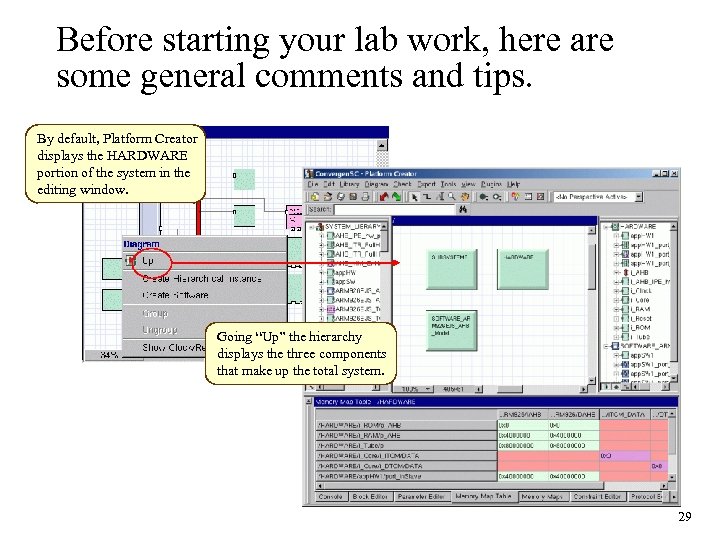 Before starting your lab work, here are some general comments and tips. By default, Platform Creator displays the HARDWARE portion of the system in the editing window. Going “Up” the hierarchy displays the three components that make up the total system. 29
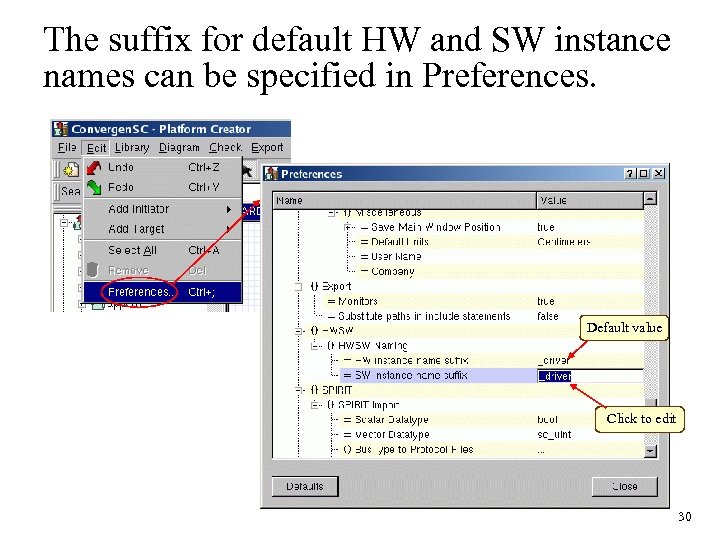 The suffix for default HW and SW instance names can be specified in Preferences. Default value Click to edit 30
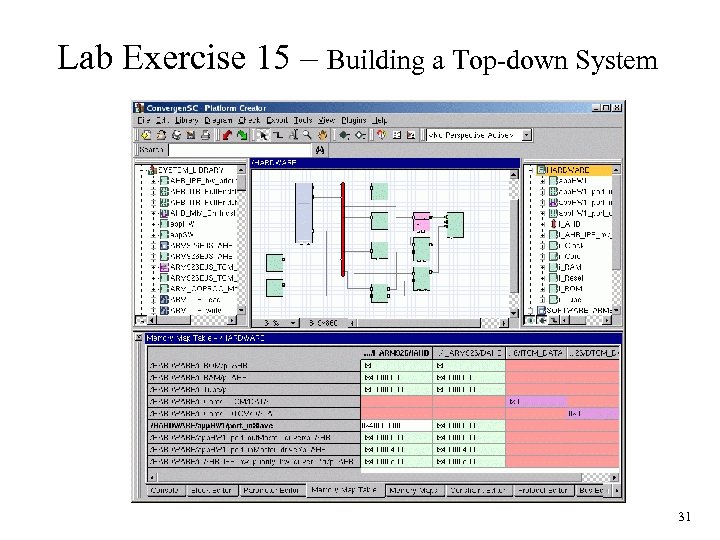 Lab Exercise 15 – Building a Top-down System 31
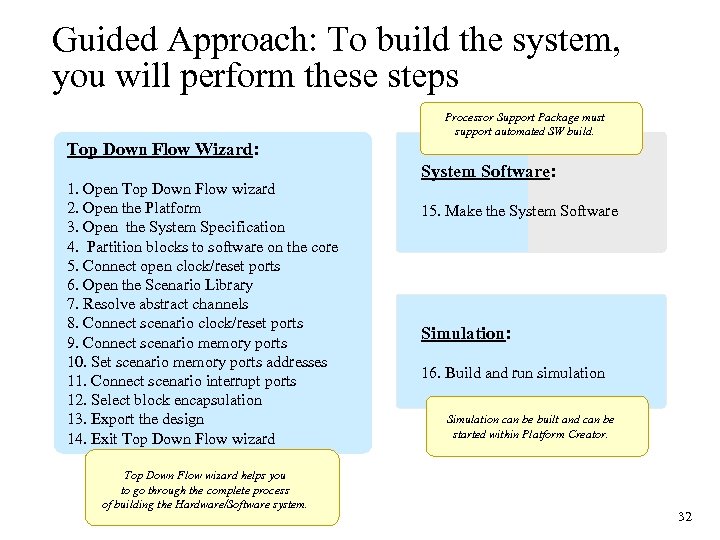 Guided Approach: To build the system, you will perform these steps Processor Support Package must support automated SW build. Top Down Flow Wizard: 1. Open Top Down Flow wizard 2. Open the Platform 3. Open the System Specification 4. Partition blocks to software on the core 5. Connect open clock/reset ports 6. Open the Scenario Library 7. Resolve abstract channels 8. Connect scenario clock/reset ports 9. Connect scenario memory ports 10. Set scenario memory ports addresses 11. Connect scenario interrupt ports 12. Select block encapsulation 13. Export the design 14. Exit Top Down Flow wizard helps you to go through the complete process of building the Hardware/Software system. System Software: 15. Make the System Software Simulation: 16. Build and run simulation Simulation can be built and can be started within Platform Creator. 32
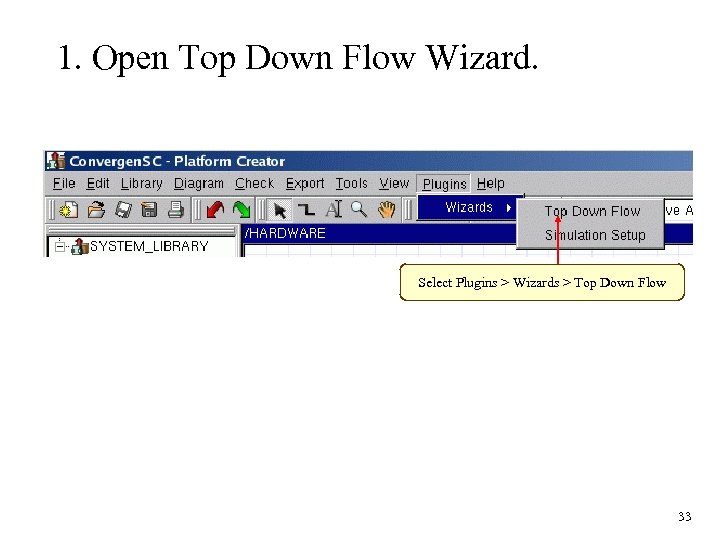 1. Open Top Down Flow Wizard. Select Plugins > Wizards > Top Down Flow 33
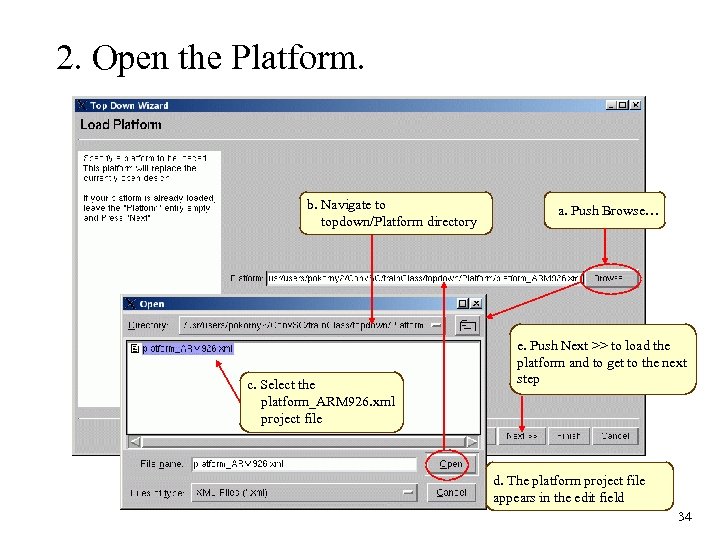 2. Open the Platform. b. Navigate to topdown/Platform directory c. Select the platform_ARM 926. xml project file a. Push Browse… e. Push Next >> to load the platform and to get to the next step d. The platform project file appears in the edit field 34
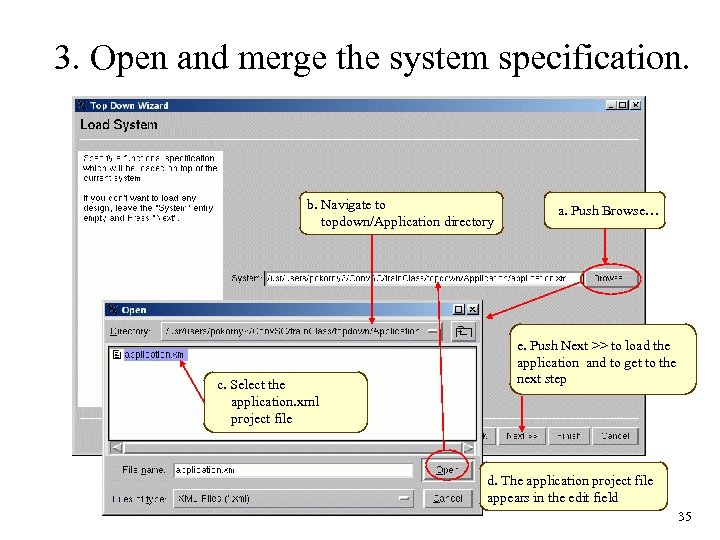 3. Open and merge the system specification. b. Navigate to topdown/Application directory c. Select the application. xml project file a. Push Browse… e. Push Next >> to load the application and to get to the next step d. The application project file appears in the edit field 35
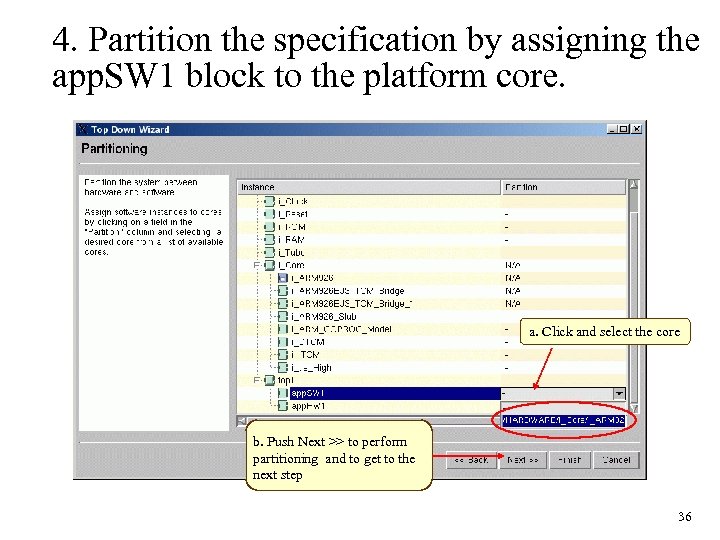 4. Partition the specification by assigning the app. SW 1 block to the platform core. a. Click and select the core b. Push Next >> to perform partitioning and to get to the next step 36
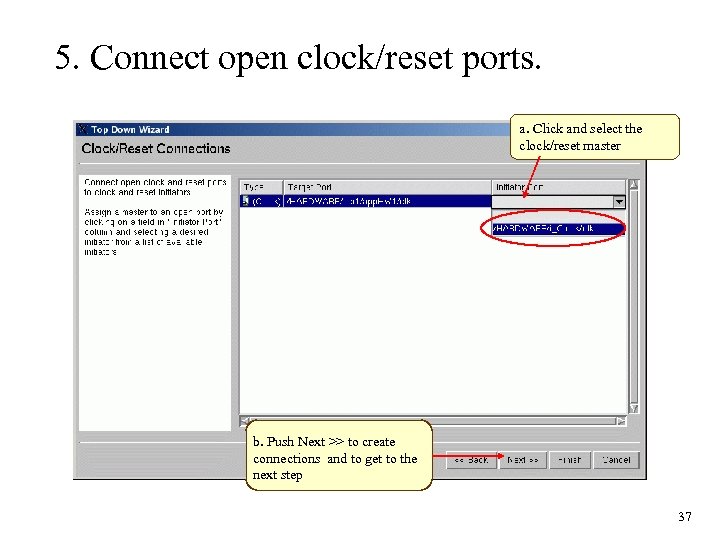 5. Connect open clock/reset ports. a. Click and select the clock/reset master b. Push Next >> to create connections and to get to the next step 37
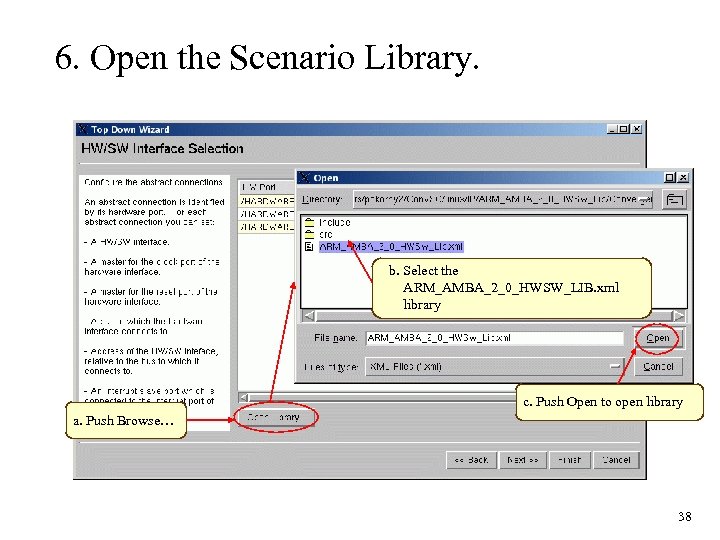 6. Open the Scenario Library. b. Select the ARM_AMBA_2_0_HWSW_LIB. xml library c. Push Open to open library a. Push Browse… 38
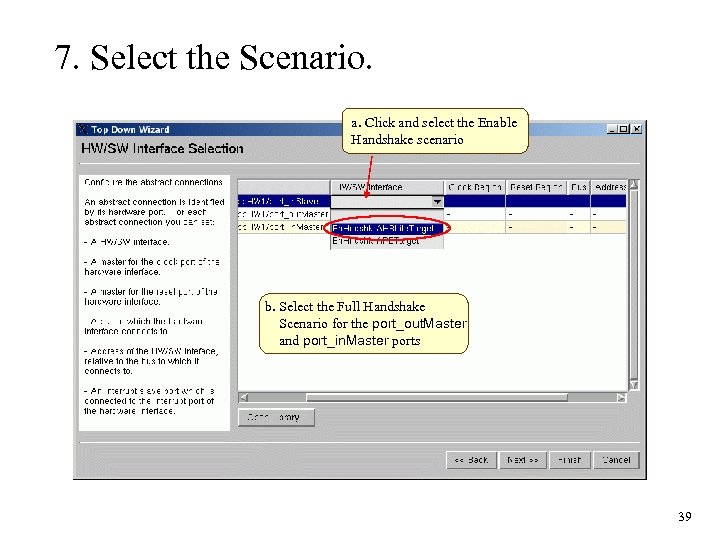 7. Select the Scenario. a. Click and select the Enable Handshake scenario b. Select the Full Handshake Scenario for the port_out. Master and port_in. Master ports 39
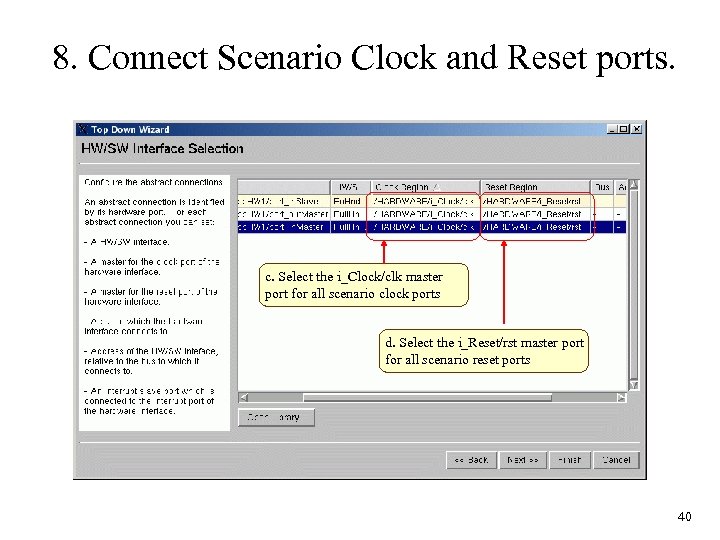 8. Connect Scenario Clock and Reset ports. c. Select the i_Clock/clk master port for all scenario clock ports d. Select the i_Reset/rst master port for all scenario reset ports 40
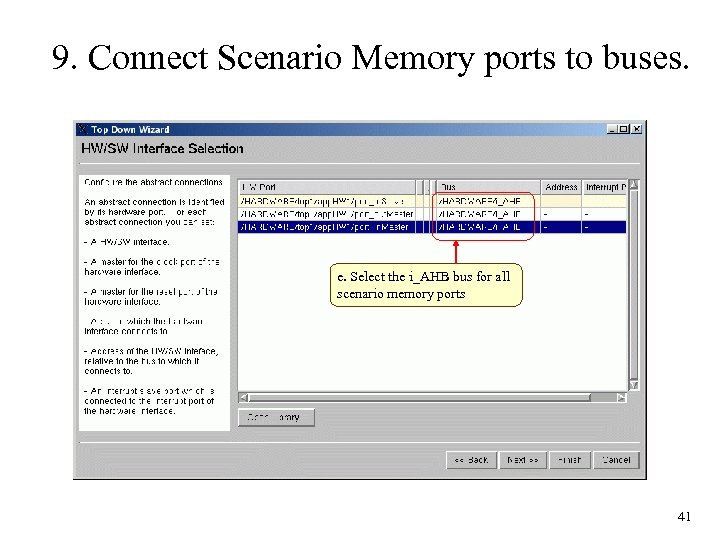 9. Connect Scenario Memory ports to buses. e. Select the i_AHB bus for all scenario memory ports 41
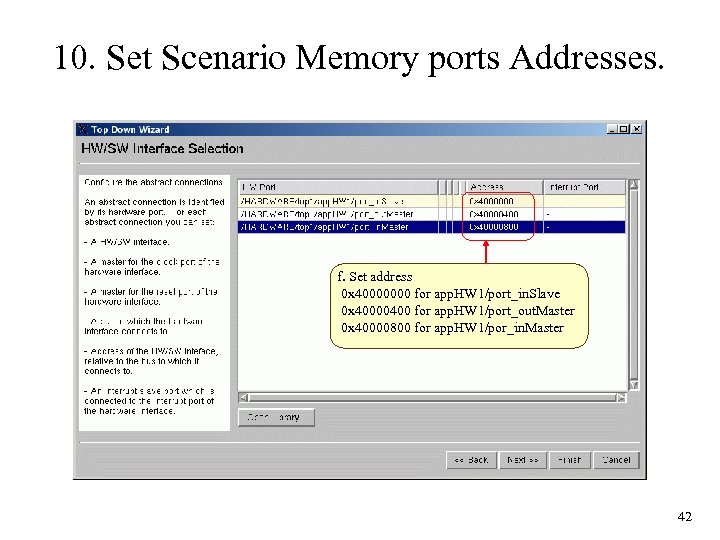 10. Set Scenario Memory ports Addresses. f. Set address 0 x 40000000 for app. HW 1/port_in. Slave 0 x 40000400 for app. HW 1/port_out. Master 0 x 40000800 for app. HW 1/por_in. Master 42
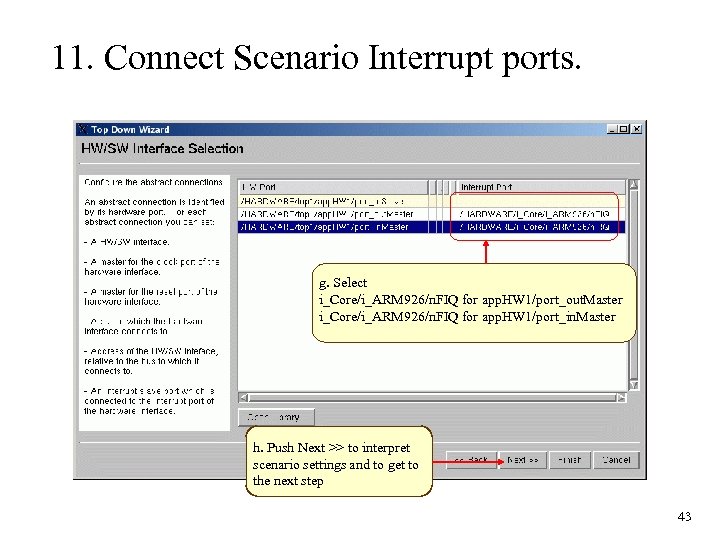 11. Connect Scenario Interrupt ports. g. Select i_Core/i_ARM 926/n. FIQ for app. HW 1/port_out. Master i_Core/i_ARM 926/n. FIQ for app. HW 1/port_in. Master h. Push Next >> to interpret scenario settings and to get to the next step 43
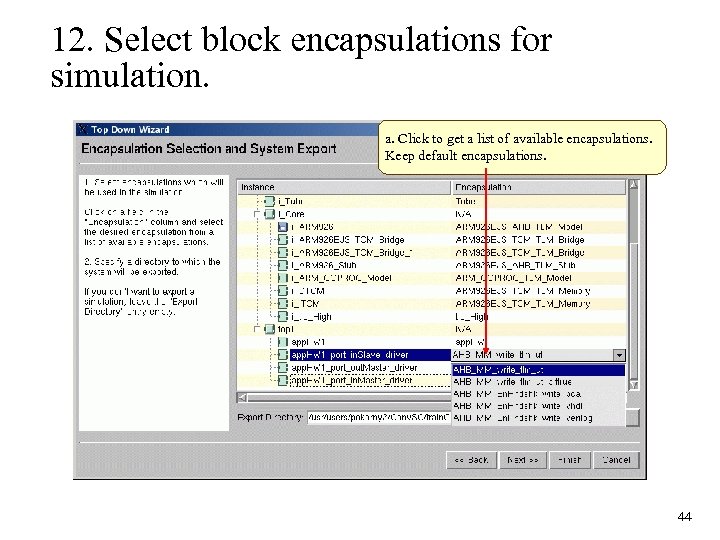 12. Select block encapsulations for simulation. a. Click to get a list of available encapsulations. Keep default encapsulations. 44
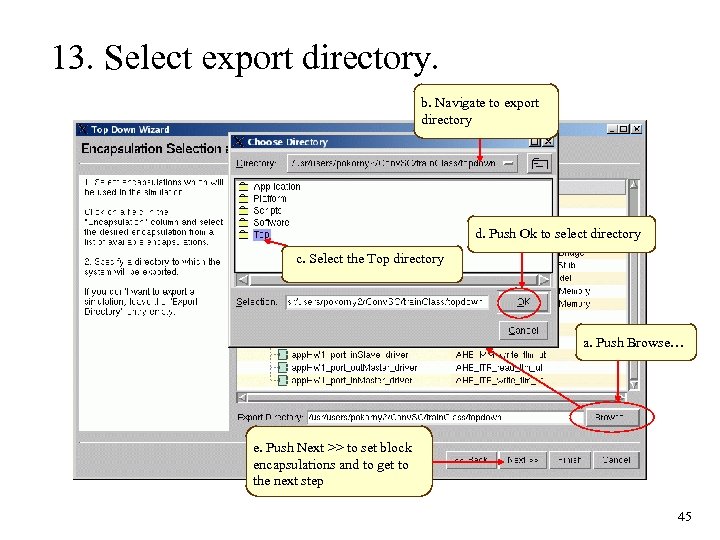 13. Select export directory. b. Navigate to export directory d. Push Ok to select directory c. Select the Top directory a. Push Browse… e. Push Next >> to set block encapsulations and to get to the next step 45
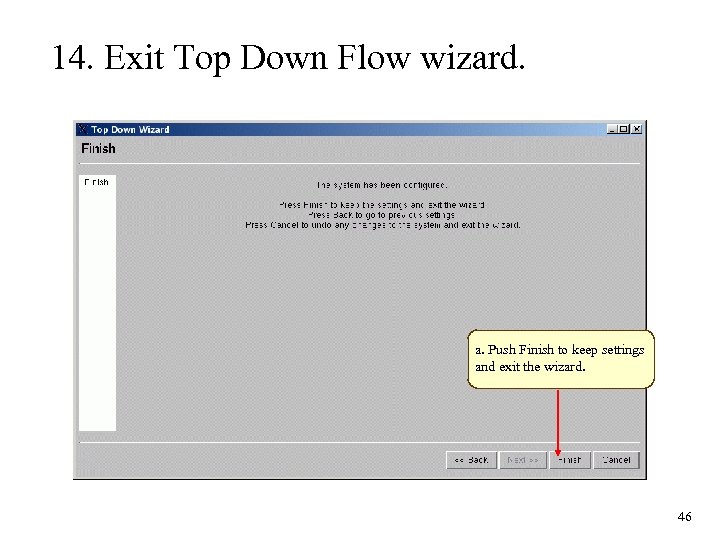 14. Exit Top Down Flow wizard. a. Push Finish to keep settings and exit the wizard. 46
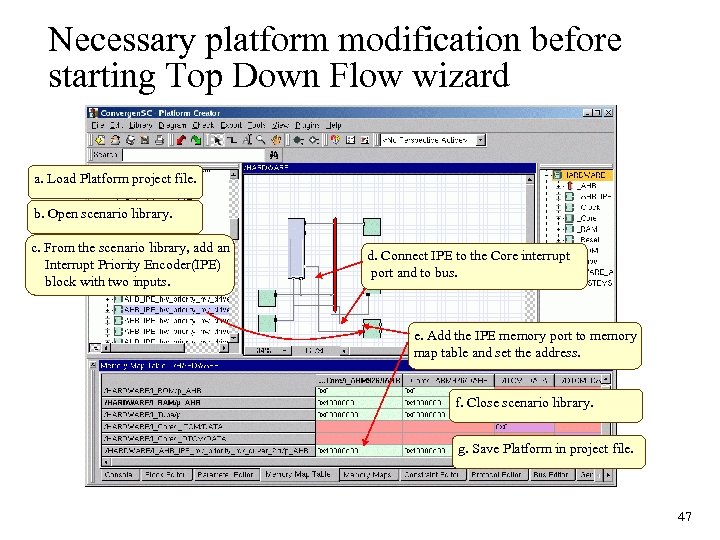 Necessary platform modification before starting Top Down Flow wizard a. Load Platform project file. b. Open scenario library. c. From the scenario library, add an Interrupt Priority Encoder(IPE) block with two inputs. d. Connect IPE to the Core interrupt port and to bus. e. Add the IPE memory port to memory map table and set the address. f. Close scenario library. g. Save Platform in project file. 47
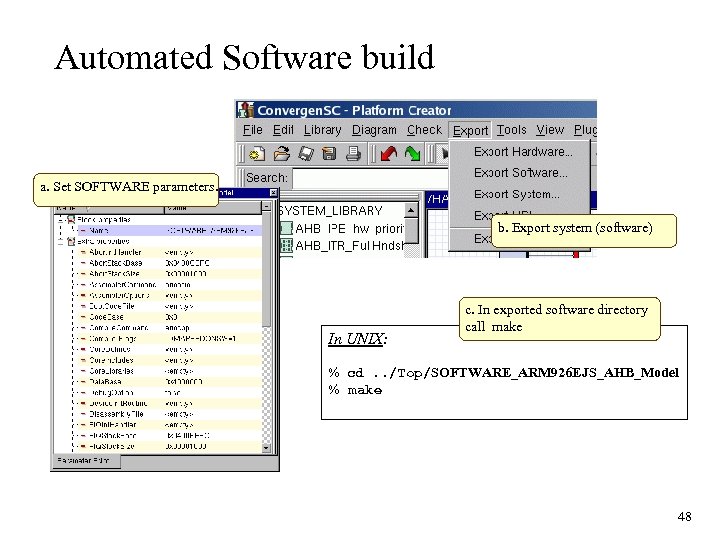 Automated Software build a. Set SOFTWARE parameters. b. Export system (software) In UNIX: c. In exported software directory call make % cd. . /Top/SOFTWARE_ARM 926 EJS_AHB_Model % make 48
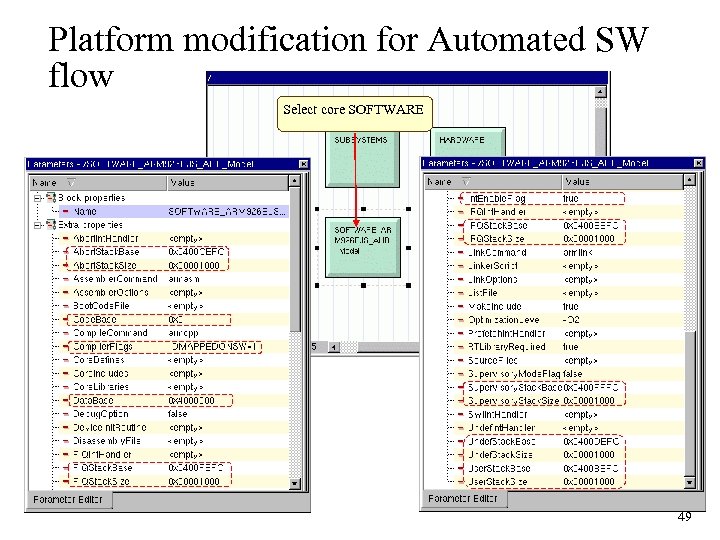 Platform modification for Automated SW flow Select core SOFTWARE 49
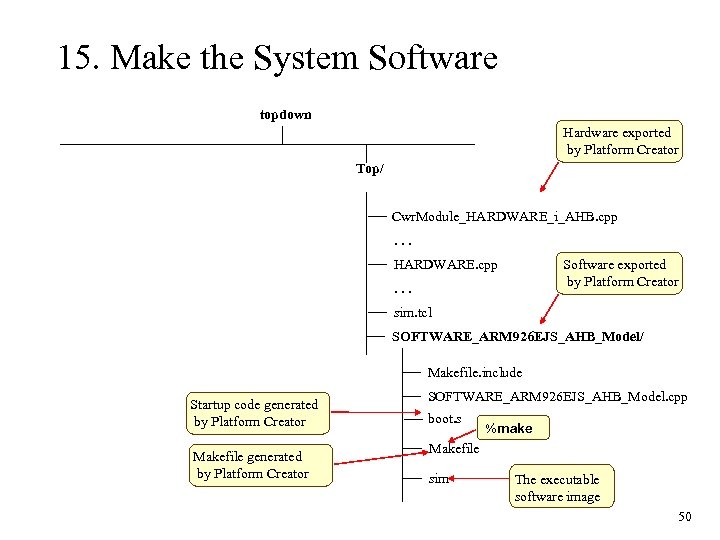 15. Make the System Software topdown Hardware exported by Platform Creator Top/ Cwr. Module_HARDWARE_i_AHB. cpp. . . HARDWARE. cpp Software exported by Platform Creator . . . sim. tcl SOFTWARE_ARM 926 EJS_AHB_Model/ Makefile. include Startup code generated by Platform Creator Makefile generated by Platform Creator SOFTWARE_ARM 926 EJS_AHB_Model. cpp boot. s %make Makefile sim The executable software image 50
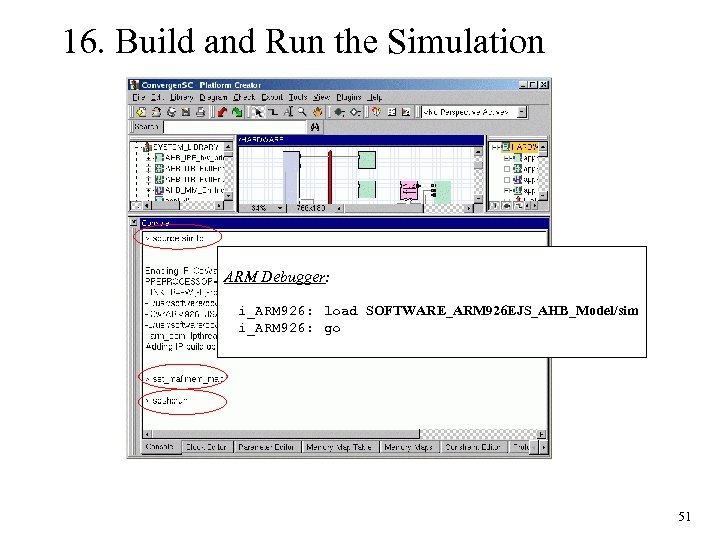 16. Build and Run the Simulation ARM Debugger: i_ARM 926: load SOFTWARE_ARM 926 EJS_AHB_Model/sim i_ARM 926: go 51
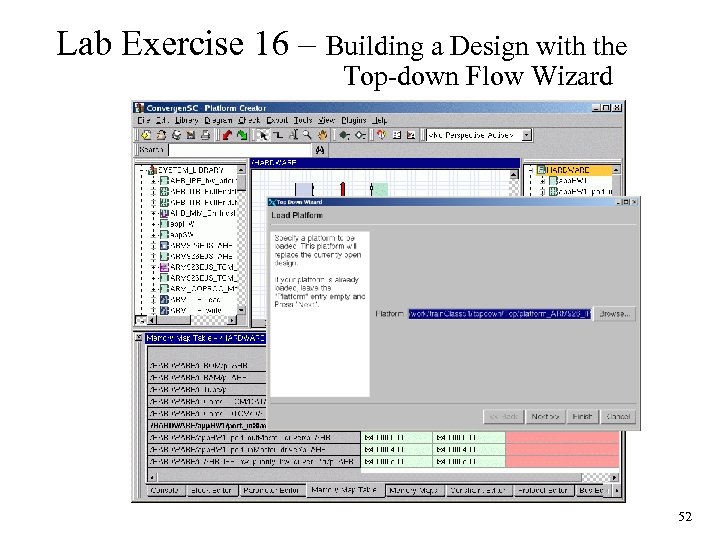 Lab Exercise 16 – Building a Design with the Top-down Flow Wizard 52