


 Скачать презентацию Software Engineering Software Specification Models The Waterfall
710dc051346dbdb5d783fa5ea782d2b3.ppt
- Количество слайдов: 72
 Software Engineering Software Specification Models
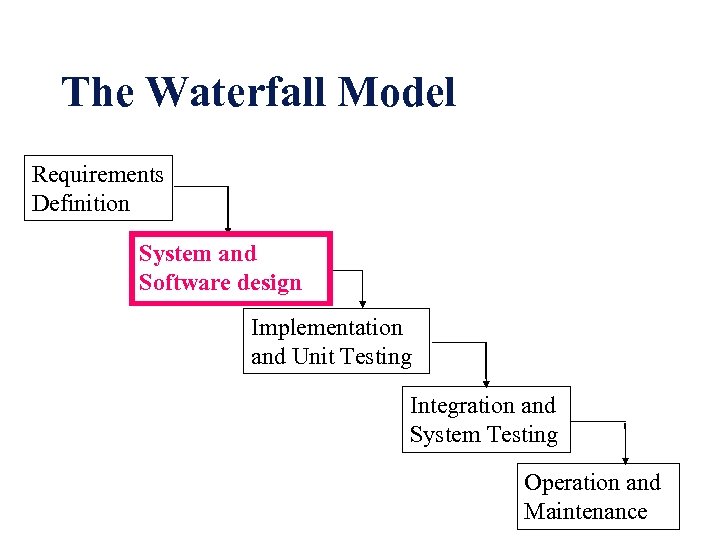 The Waterfall Model Requirements Definition System and Software design Implementation and Unit Testing Integration and System Testing Operation and Maintenance
 ANALYSIS PHASE • The development process starts with the analysis phase. This phase results in a specification document that shows what the software will do without specifying how it will be done. • The analysis phase can use two separate approaches, depending on whether the implementation phase is done using a procedural programming language or an object-oriented language.
 System modelling helps the analyst to understand the functionality of the system and models are used to communicate with customers
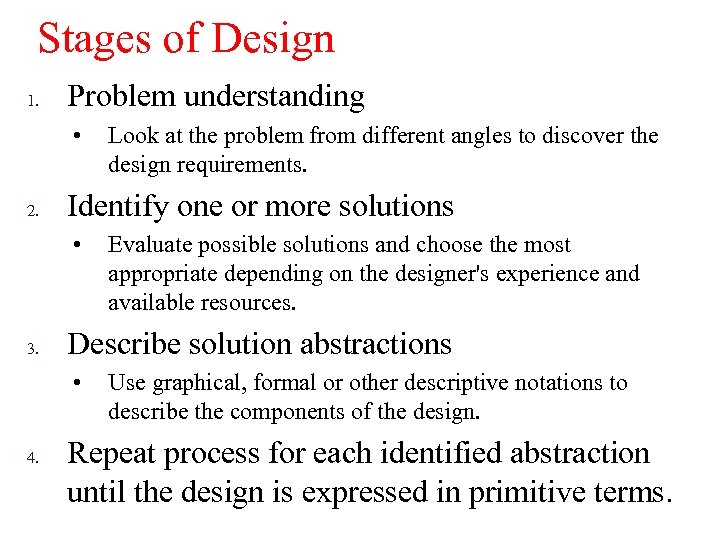 Stages of Design 1. Problem understanding • 2. Identify one or more solutions • 3. Evaluate possible solutions and choose the most appropriate depending on the designer's experience and available resources. Describe solution abstractions • 4. Look at the problem from different angles to discover the design requirements. Use graphical, formal or other descriptive notations to describe the components of the design. Repeat process for each identified abstraction until the design is expressed in primitive terms.
 Requirements Specification: Approaches • Natural language • Structured natural language • Design description language • Requirements specification language • Graphical notation • Formal specification
 Data Flow Diagrams l l l DFDs model the system from a functional perspective Tracking and documenting how the data associated with a process is helpful to develop an overall understanding of the system Data flow diagrams may also be used in showing the data exchange between a system and other systems in its environment
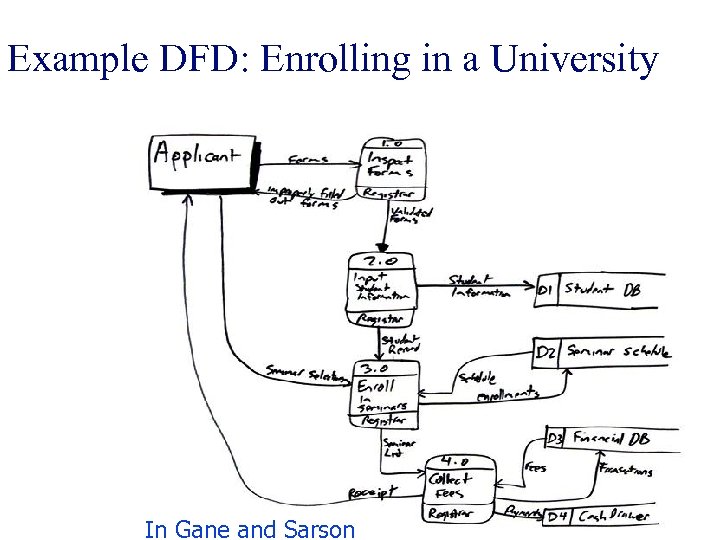 Example DFD: Enrolling in a University In Gane and Sarson
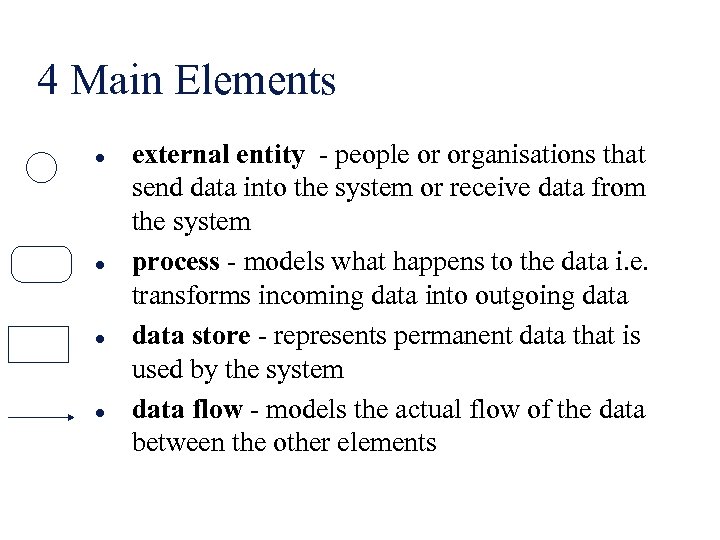 4 Main Elements l l external entity - people or organisations that send data into the system or receive data from the system process - models what happens to the data i. e. transforms incoming data into outgoing data store - represents permanent data that is used by the system data flow - models the actual flow of the data between the other elements
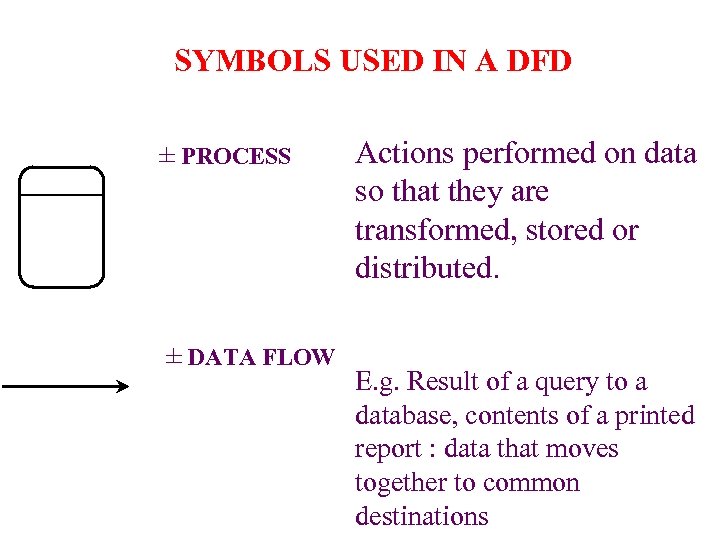 SYMBOLS USED IN A DFD ± PROCESS ± DATA FLOW Actions performed on data so that they are transformed, stored or distributed. E. g. Result of a query to a database, contents of a printed report : data that moves together to common destinations
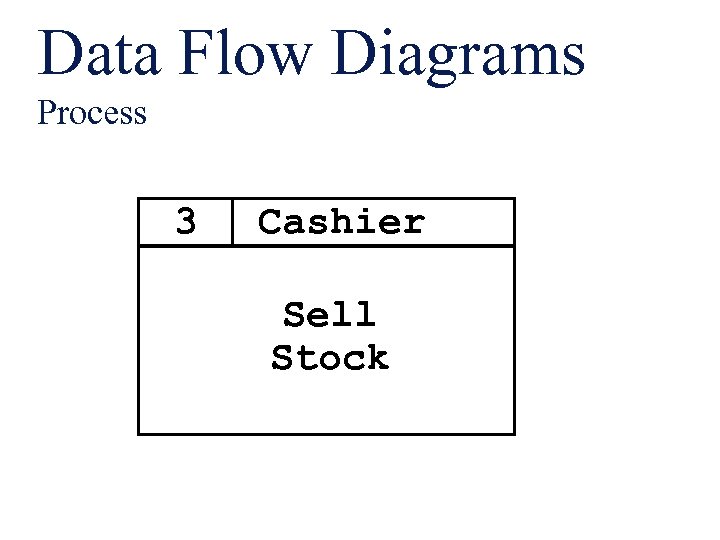 Data Flow Diagrams Process 3 Cashier Sell Stock
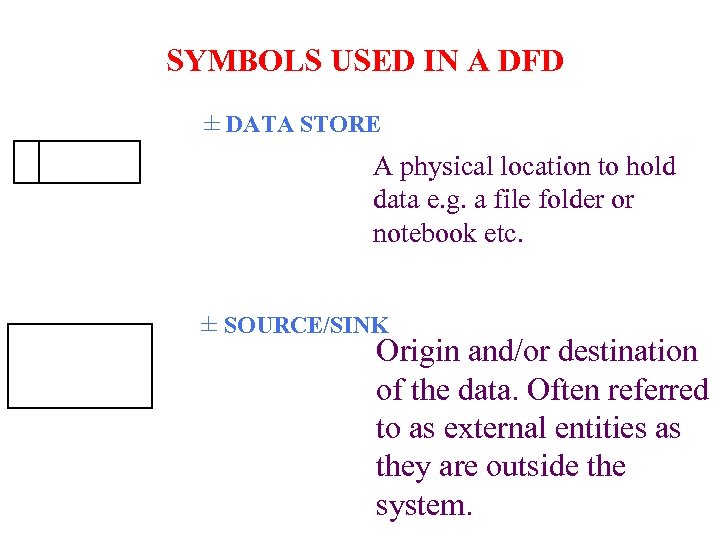 SYMBOLS USED IN A DFD ± DATA STORE A physical location to hold data e. g. a file folder or notebook etc. ± SOURCE/SINK Origin and/or destination of the data. Often referred to as external entities as they are outside the system.
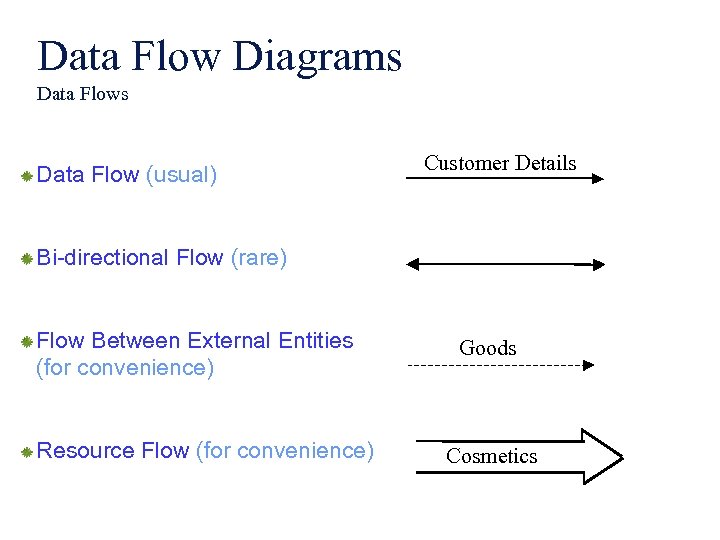 Data Flow Diagrams Data Flow (usual) Customer Details Bi-directional Flow (rare) Flow Between External Entities (for convenience) Resource Flow (for convenience) Goods Cosmetics
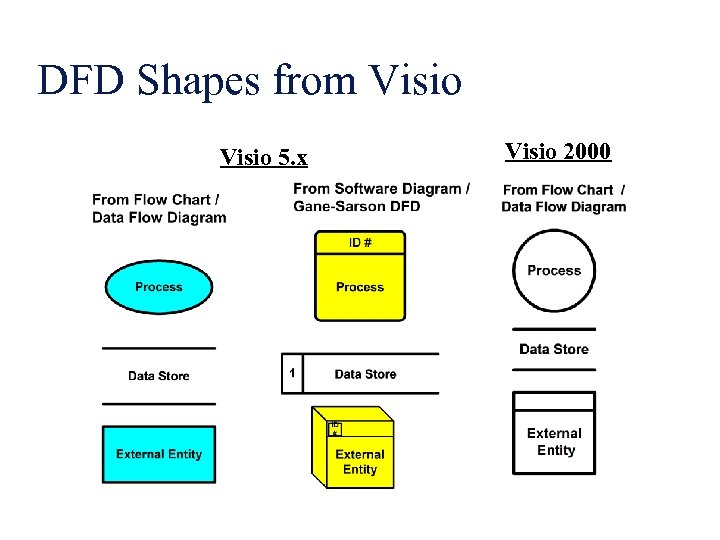 DFD Shapes from Visio 5. x Visio 2000
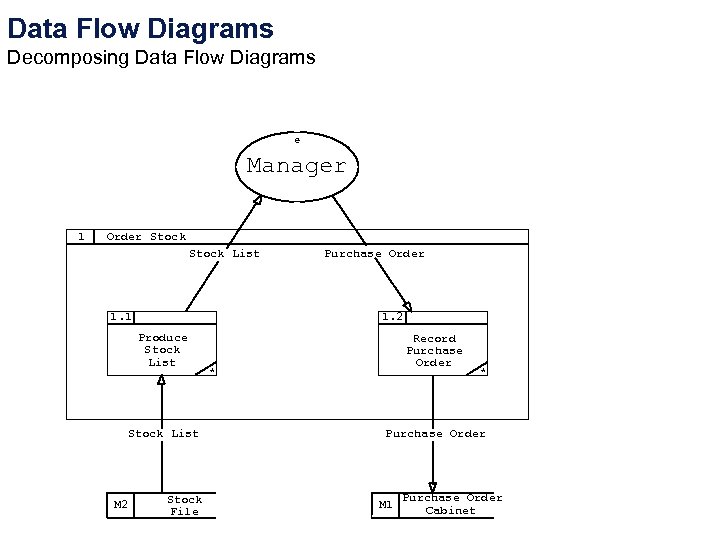 Data Flow Diagrams Decomposing Data Flow Diagrams e Manager 1 Order Stock List 1. 1 1. 2 Produce Stock List M 2 Purchase Order Stock File Record Purchase Order * * Purchase Order M 1 Purchase Order Cabinet
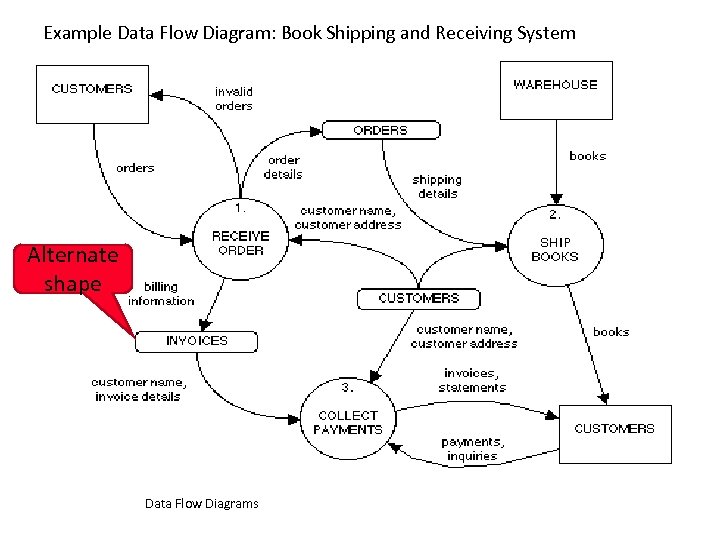 Example Data Flow Diagram: Book Shipping and Receiving System Alternate shape Data Flow Diagrams
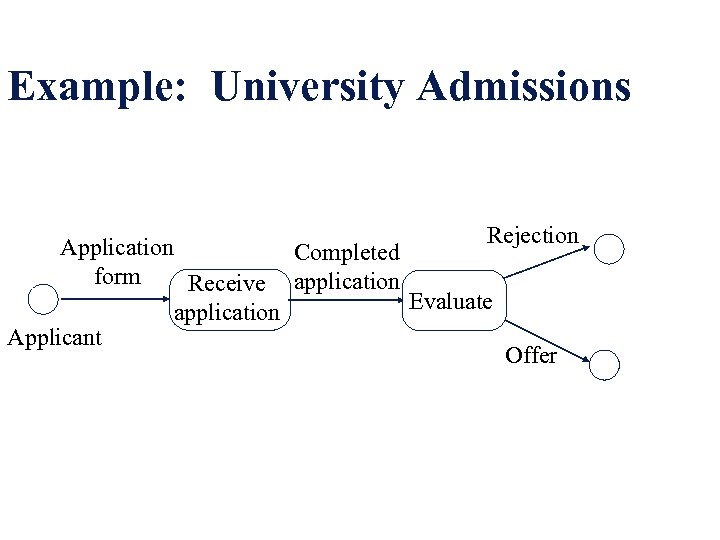 Example: University Admissions Rejection Application Completed form Receive application Evaluate application Applicant Offer
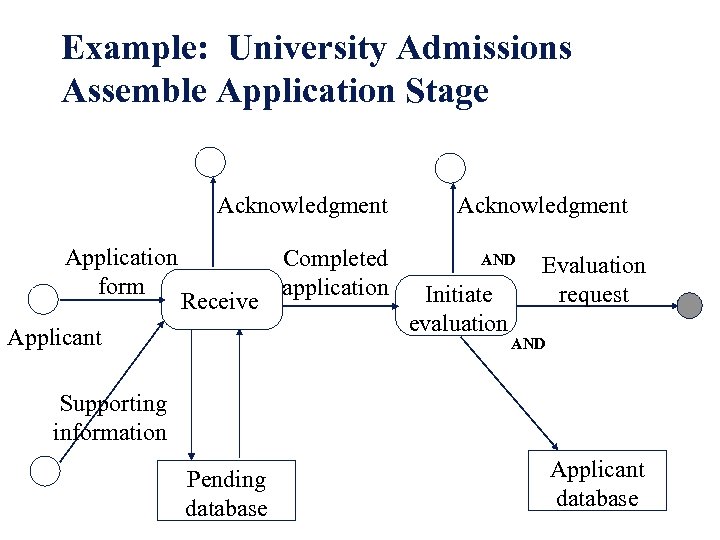 Example: University Admissions Assemble Application Stage Acknowledgment Application form Receive Applicant Completed application Acknowledgment AND Initiate evaluation Evaluation request AND Supporting information Pending database Applicant database
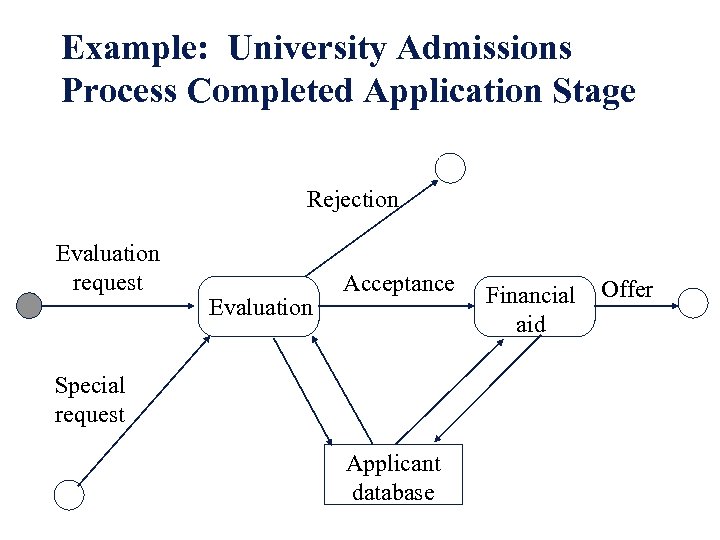 Example: University Admissions Process Completed Application Stage Rejection Evaluation request Evaluation Acceptance Special request Applicant database Financial aid Offer
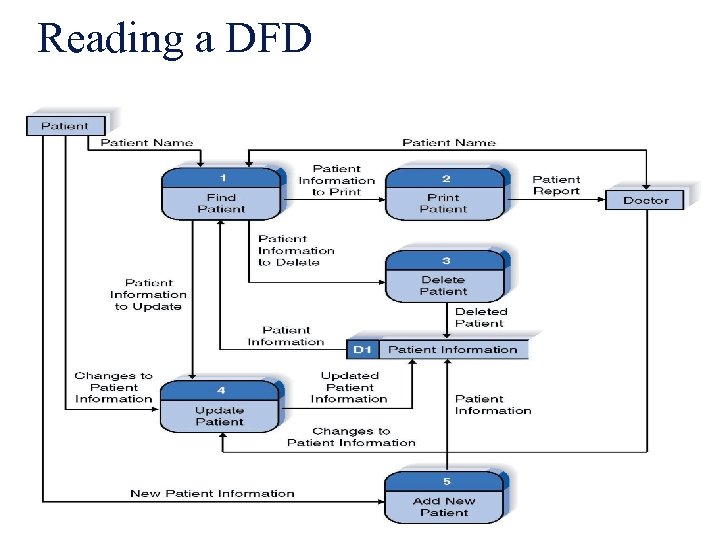 Reading a DFD
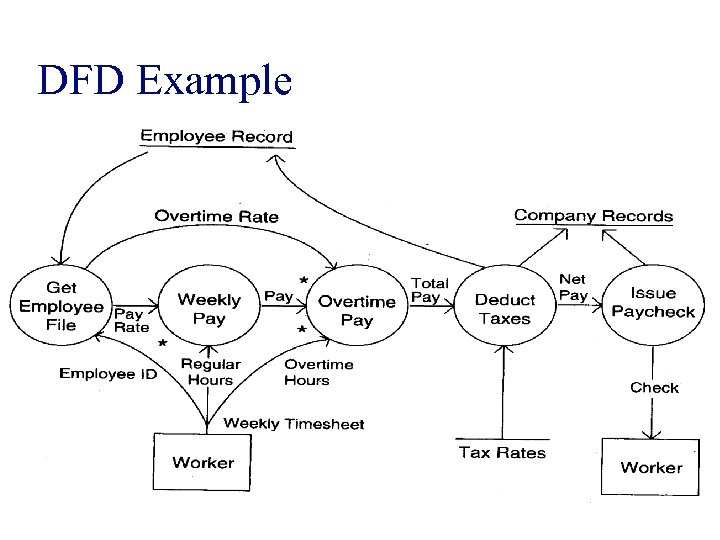 DFD Example
 Levelled DFDs l Even a small system could have many processes and data flows and DFD could be large and messy • use levelled DFDs - view system at different levels of detail • one overview and many progressively greater detailed views 4
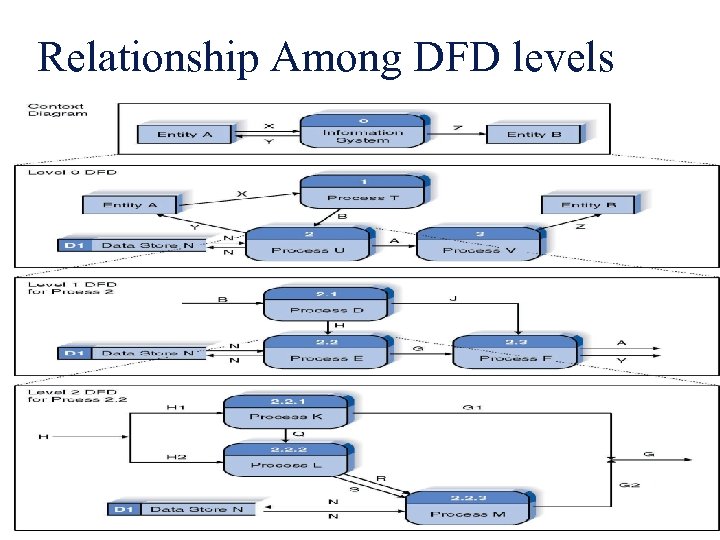 Relationship Among DFD levels
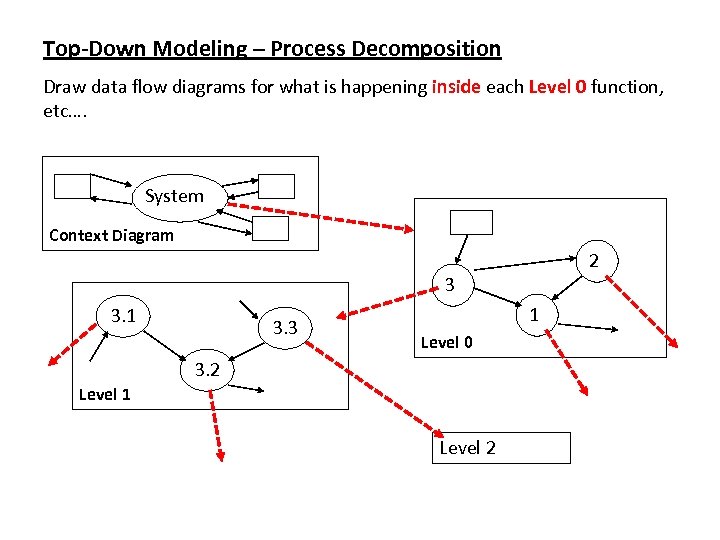 Top-Down Modeling – Process Decomposition Draw data flow diagrams for what is happening inside each Level 0 function, etc…. System Context Diagram 2 3 3. 1 3. 3 1 Level 0 3. 2 Level 1 Level 2
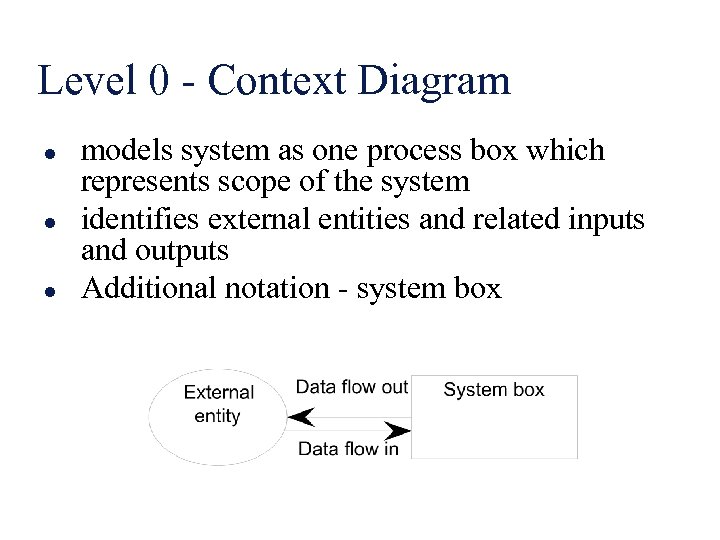 Level 0 - Context Diagram l l l models system as one process box which represents scope of the system identifies external entities and related inputs and outputs Additional notation - system box
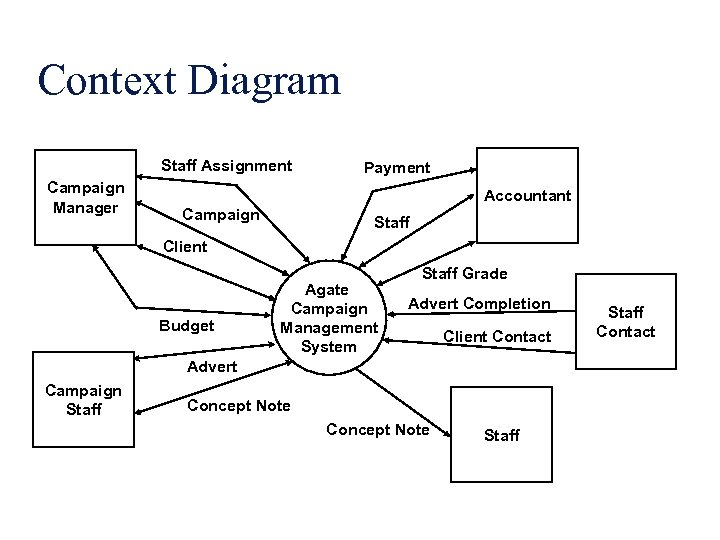 Context Diagram Staff Assignment Campaign Manager Payment Accountant Campaign Staff Client Budget Agate Campaign Management System Staff Grade Advert Completion Client Contact Advert Campaign Staff Concept Note Staff Contact
 Level 1 - overview diagram l l gives overview of full system identifies major processes and data flows between them identifies data stores that are used by the major processes boundary of level 1 is the context diagram
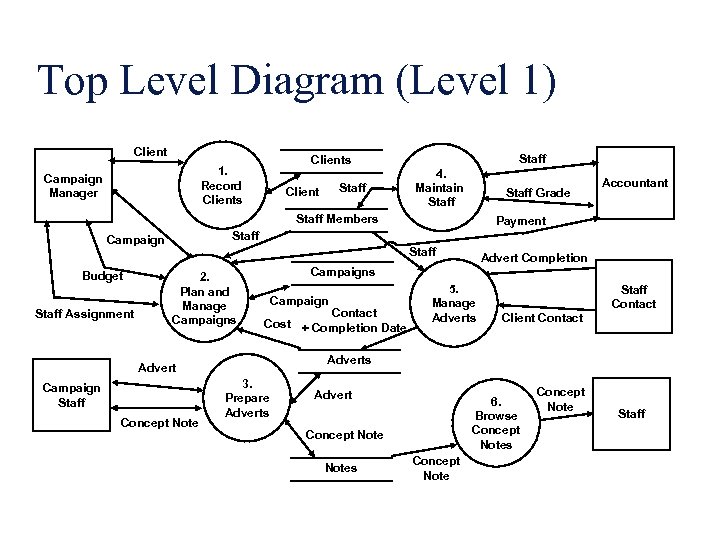 Top Level Diagram (Level 1) Client Campaign Manager Staff Clients 1. Record Clients Staff Client 4. Maintain Staff Grade Staff Members Staff Assignment Payment Staff Campaign Budget Accountant Staff 2. Plan and Manage Campaigns Concept Note Campaign Contact Cost + Completion Date 5. Manage Adverts Staff Contact Client Contact Adverts Advert Campaign Staff Advert Completion 3. Prepare Adverts Advert 6. Browse Concept Notes Concept Note Staff
 Level 2 Diagrams l l level 1 process is expanded into more detail each process in level 1 is decomposed to show its constituent processes Level 2 diagrams may not be needed for all level 1 processes Correctly numbering each process helps the user understand where the process fits into the overall system
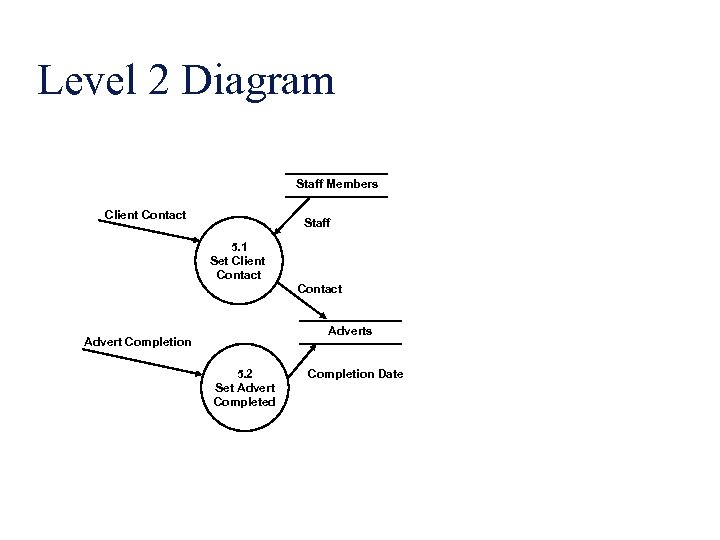 Level 2 Diagram Staff Members Client Contact Staff 5. 1 Set Client Contact Adverts Advert Completion 5. 2 Set Advert Completed Completion Date
 Numbering l l On level 1 processes are numbered 1, 2, 3… On level 2 processes are numbered x. 1, x. 2, x. 3… where x is the number of the parent level 1 process Number is used to uniquely identify process not to represent any order of processing Data store numbers usually D 1, D 2, D 3. . .
 Labelling l l Process label - short description of what the process does, e. g. Price order Data flow label - noun representing the data flowing through it e. g. Customer payment Data store label - describes the type of data stored Make labels as meaningful as possible
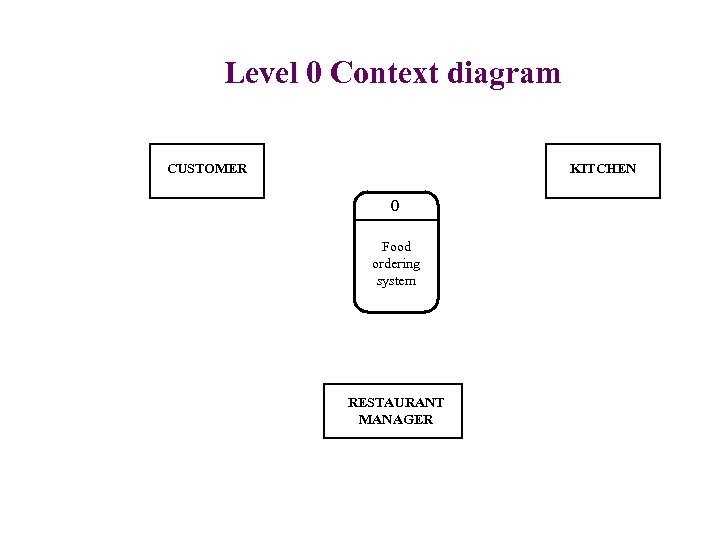 Level 0 Context diagram CUSTOMER KITCHEN 0 Food ordering system RESTAURANT MANAGER
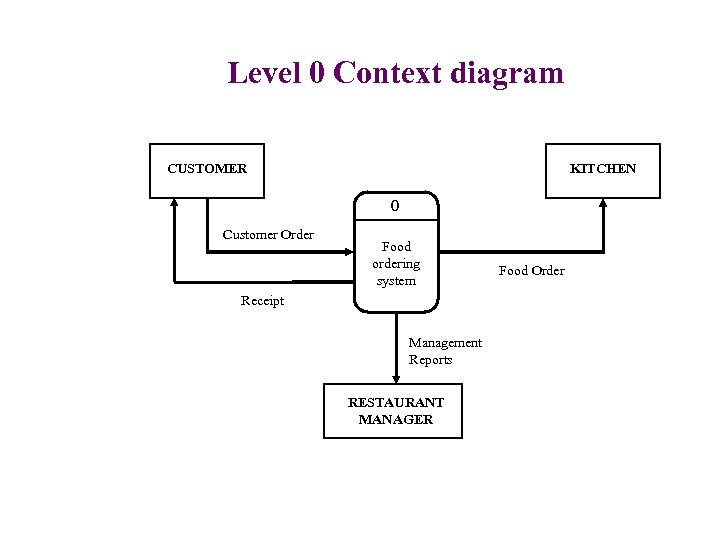 Level 0 Context diagram CUSTOMER KITCHEN 0 Customer Order Food ordering system Receipt Management Reports RESTAURANT MANAGER Food Order
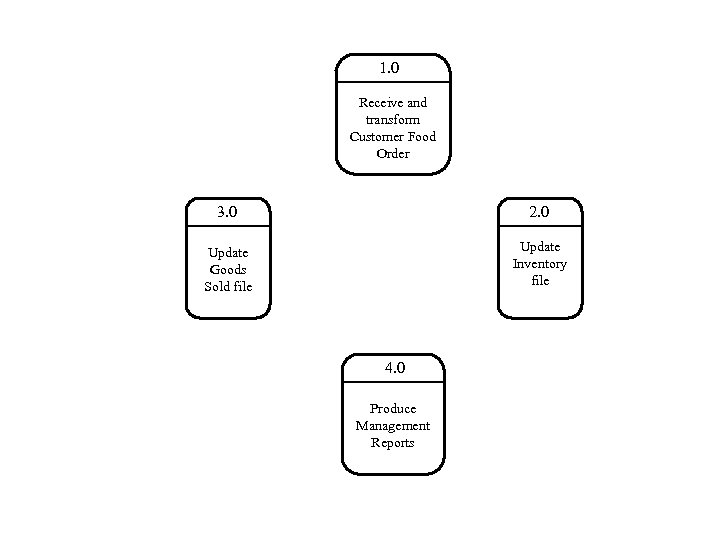 1. 0 Receive and transform Customer Food Order 3. 0 2. 0 Update Goods Sold file Update Inventory file 4. 0 Produce Management Reports
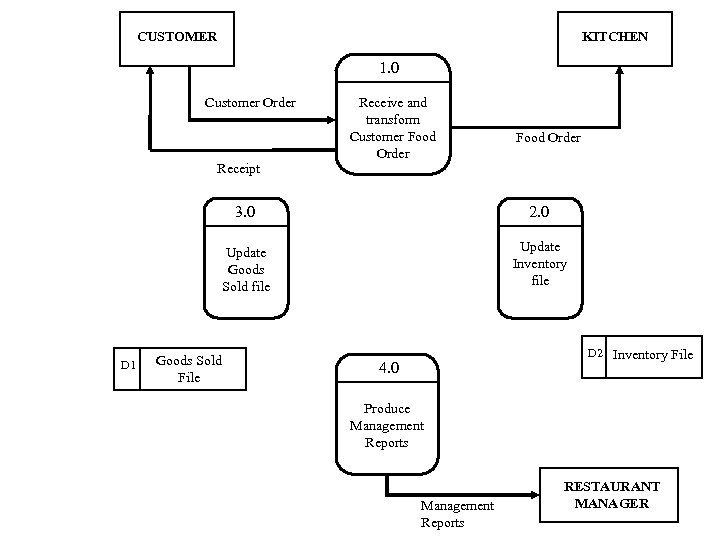 CUSTOMER KITCHEN 1. 0 Customer Order Receive and transform Customer Food Order Receipt 3. 0 Update Goods Sold file D 1 Goods Sold File 2. 0 Update Inventory file D 2 Inventory File 4. 0 Produce Management Reports RESTAURANT MANAGER
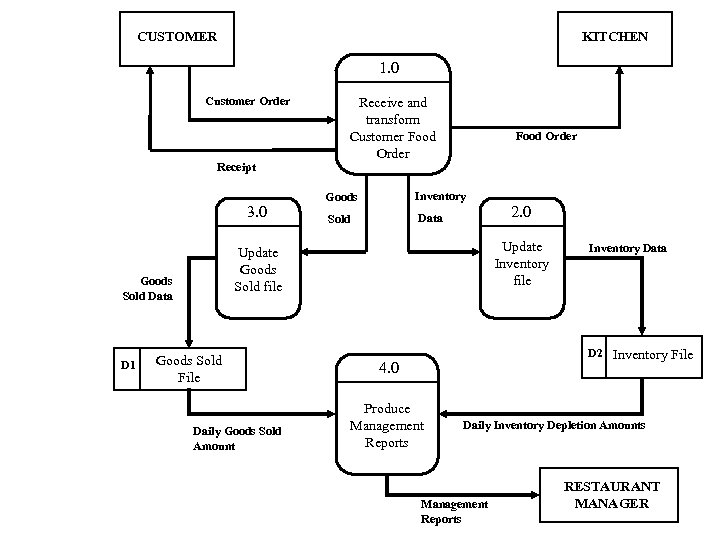 CUSTOMER KITCHEN 1. 0 Customer Order Receipt 3. 0 Food Order Goods Inventory Sold Data 2. 0 Update Inventory file Update Goods Sold file Goods Sold Data D 1 Receive and transform Customer Food Order Goods Sold File Daily Goods Sold Amount Inventory Data D 2 Inventory File 4. 0 Produce Management Reports Daily Inventory Depletion Amounts Management Reports RESTAURANT MANAGER
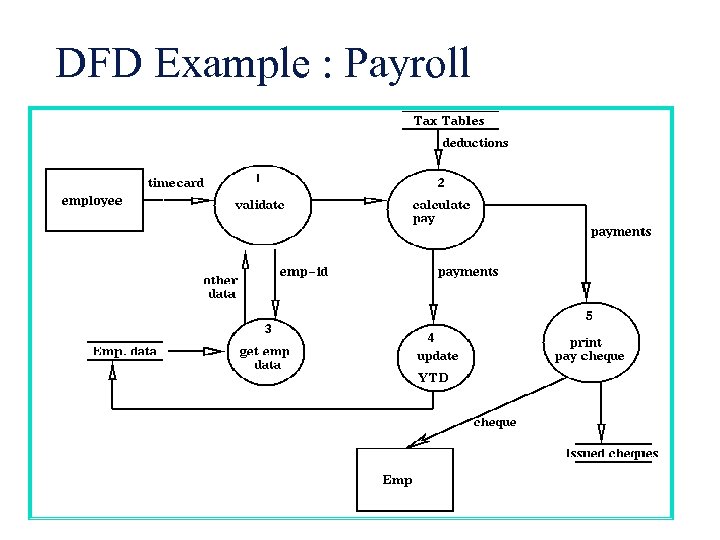 DFD Example : Payroll
 Example l l Alexsoft shop buys software from various suppliers and sells it to the public The shop stocks popular software packages and orders as required The shop sells monthly about 300 packages The shop need to be computerized
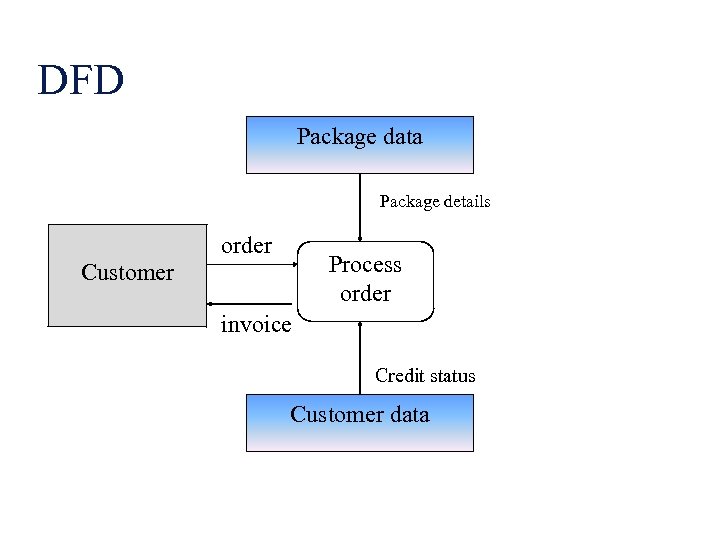 DFD Package data Package details order Process order Customer invoice Credit status Customer data
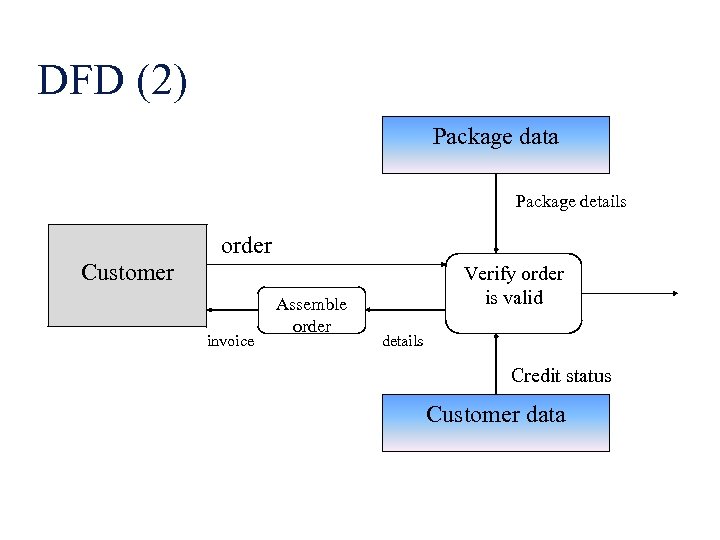 DFD (2) Package data Package details order Customer invoice Assemble order Verify order is valid details Credit status Customer data
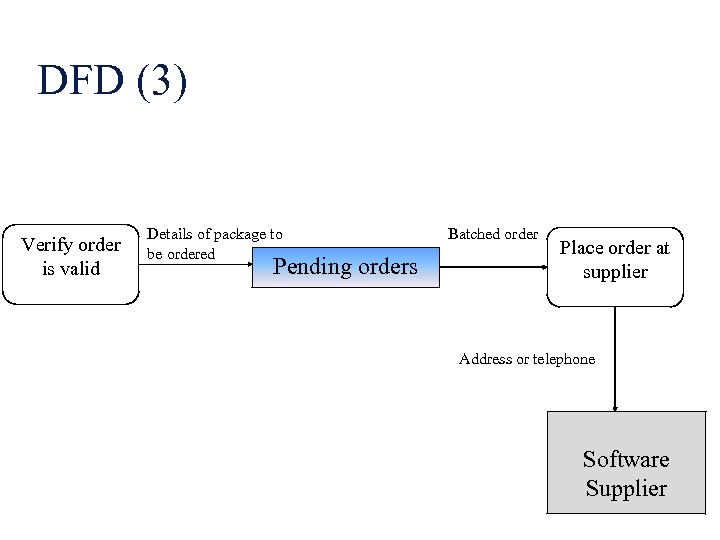 DFD (3) Verify order is valid Details of package to be ordered Pending orders Batched order Place order at supplier Address or telephone Software Supplier
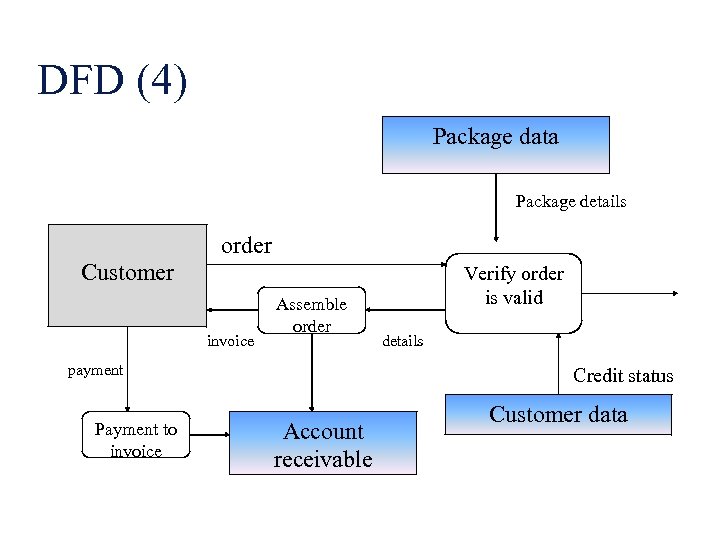 DFD (4) Package data Package details order Customer invoice Assemble order payment Payment to invoice Verify order is valid details Credit status Account receivable Customer data
 Creating Data Flow Diagrams Lemonade Stand Example
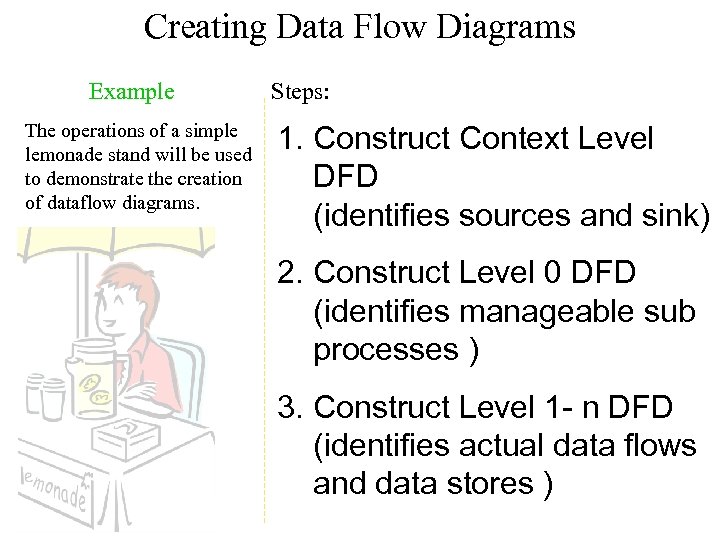 Creating Data Flow Diagrams Example The operations of a simple lemonade stand will be used to demonstrate the creation of dataflow diagrams. Steps: 1. Construct Context Level DFD (identifies sources and sink) 2. Construct Level 0 DFD (identifies manageable sub processes ) 3. Construct Level 1 - n DFD (identifies actual data flows and data stores )
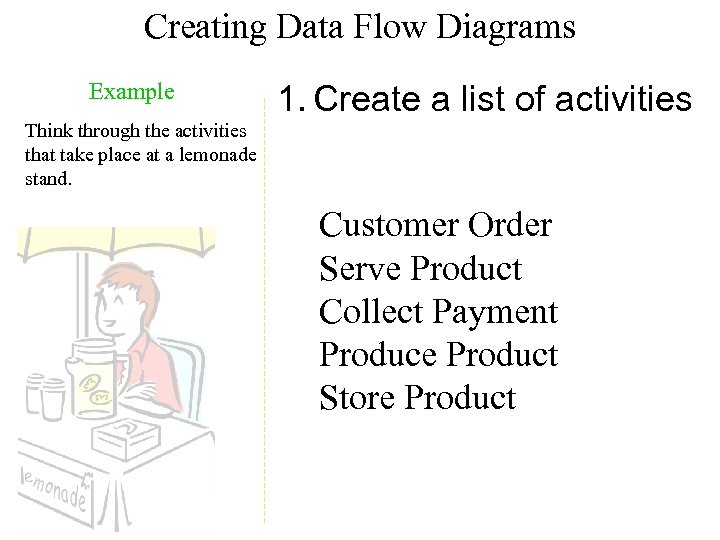 Creating Data Flow Diagrams Example 1. Create a list of activities Think through the activities that take place at a lemonade stand. Customer Order Serve Product Collect Payment Produce Product Store Product
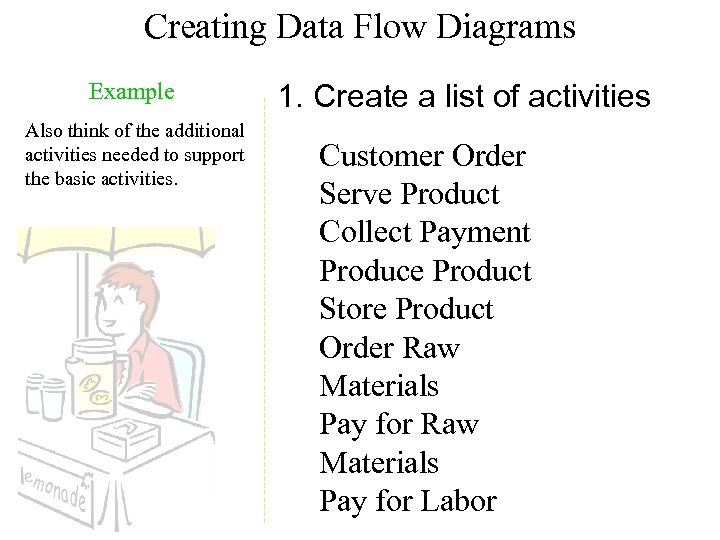 Creating Data Flow Diagrams Example Also think of the additional activities needed to support the basic activities. 1. Create a list of activities Customer Order Serve Product Collect Payment Produce Product Store Product Order Raw Materials Pay for Labor
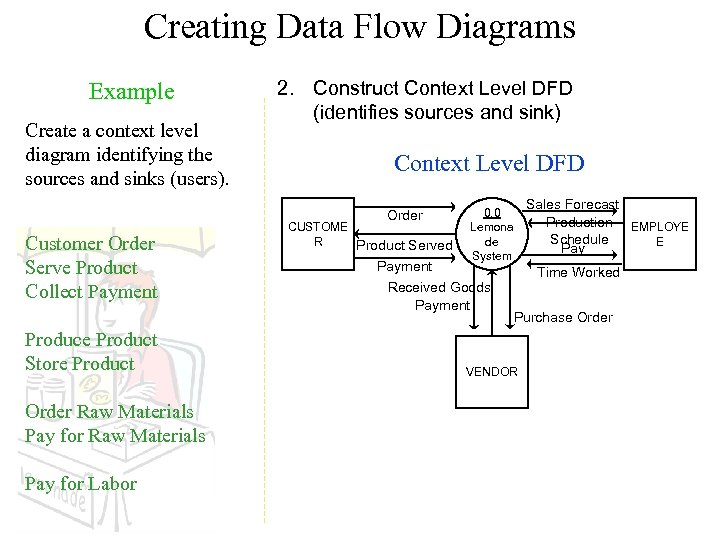 Creating Data Flow Diagrams Example Create a context level diagram identifying the sources and sinks (users). 2. Construct Context Level DFD (identifies sources and sink) Context Level DFD Order Customer Order Serve Product Collect Payment Produce Product Store Product Order Raw Materials Pay for Labor CUSTOME R Product Served 0. 0 Lemona de System Payment Received Goods Payment Sales Forecast Production EMPLOYE Schedule E Pay Time Worked Purchase Order VENDOR
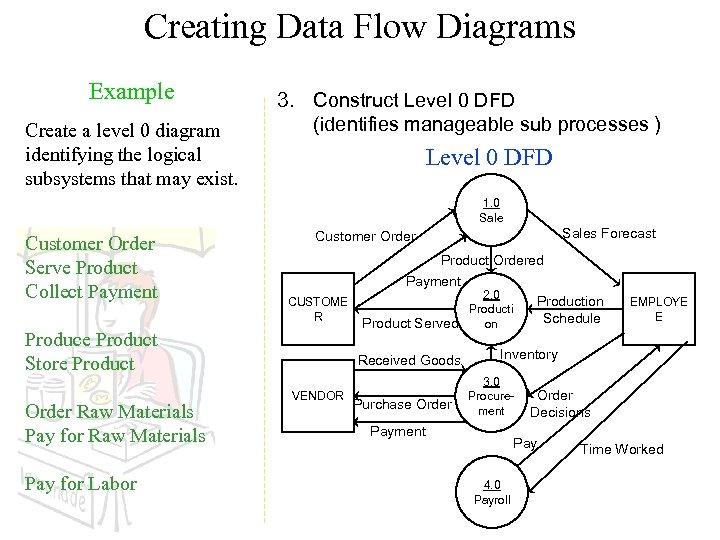 Creating Data Flow Diagrams Example Create a level 0 diagram identifying the logical subsystems that may exist. 3. Construct Level 0 DFD (identifies manageable sub processes ) Level 0 DFD 1. 0 Sale Customer Order Serve Product Collect Payment CUSTOME R Produce Product Store Product Order Raw Materials Pay for Labor Sales Forecast Customer Order Product Ordered Payment 2. 0 Production Producti Schedule Product Served on Received Goods VENDOR Purchase Order EMPLOYE E Inventory 3. 0 Procurement Payment Order Decisions Pay 4. 0 Payroll Time Worked
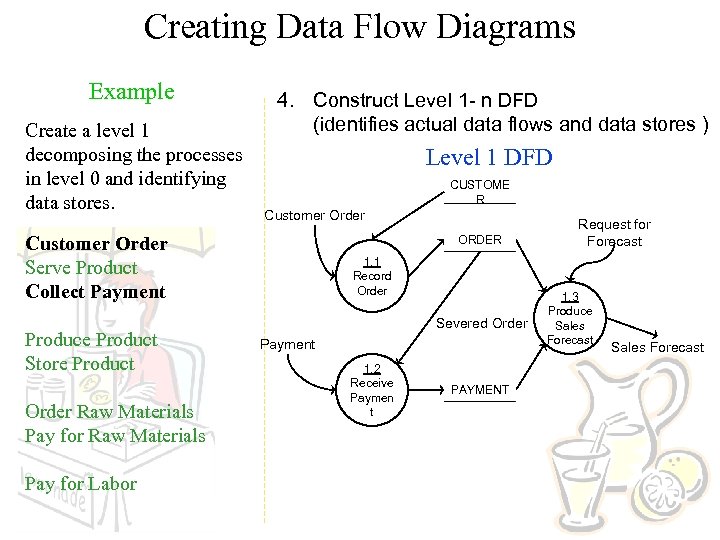 Creating Data Flow Diagrams Example Create a level 1 decomposing the processes in level 0 and identifying data stores. 4. Construct Level 1 - n DFD (identifies actual data flows and data stores ) Level 1 DFD CUSTOME R Customer Order Serve Product Collect Payment Produce Product Store Product Order Raw Materials Pay for Labor ORDER 1. 1 Record Order Severed Order Payment 1. 2 Receive Paymen t PAYMENT Request for Forecast 1. 3 Produce Sales Forecast
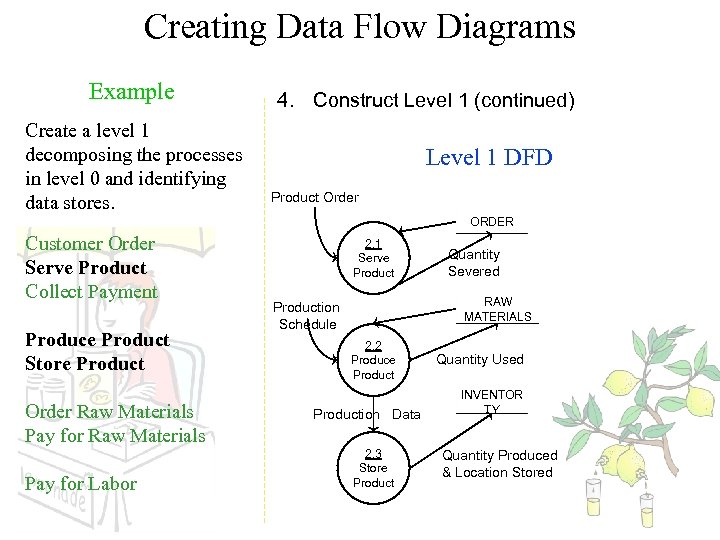 Creating Data Flow Diagrams Example Create a level 1 decomposing the processes in level 0 and identifying data stores. 4. Construct Level 1 (continued) Level 1 DFD Product Order ORDER Customer Order Serve Product Collect Payment Produce Product Store Product Order Raw Materials Pay for Labor 2. 1 Serve Product Quantity Severed RAW MATERIALS Production Schedule 2. 2 Produce Production Data 2. 3 Store Product Quantity Used INVENTOR TY Quantity Produced & Location Stored
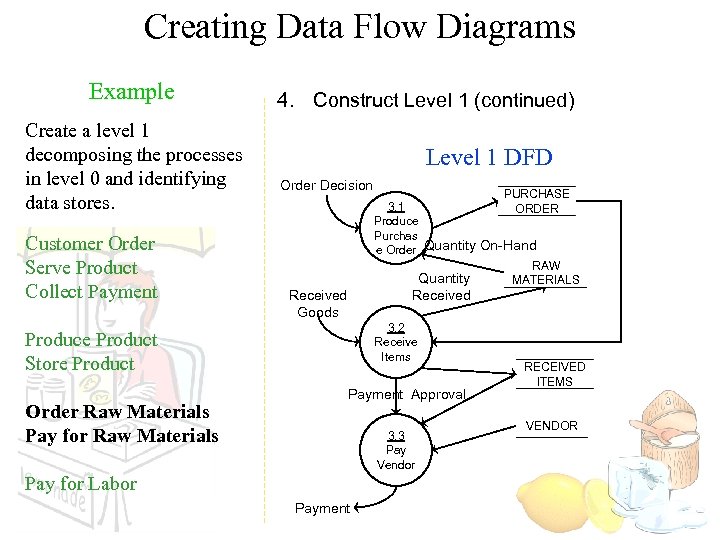 Creating Data Flow Diagrams Example Create a level 1 decomposing the processes in level 0 and identifying data stores. Customer Order Serve Product Collect Payment 4. Construct Level 1 (continued) Level 1 DFD Order Decision Received Goods 3. 2 Receive Items Produce Product Store Product Order Raw Materials Pay for Raw Materials PURCHASE 3. 1 ORDER Produce Purchas e Order Quantity On-Hand RAW Quantity MATERIALS Payment Approval 3. 3 Pay Vendor Pay for Labor Payment RECEIVED ITEMS VENDOR
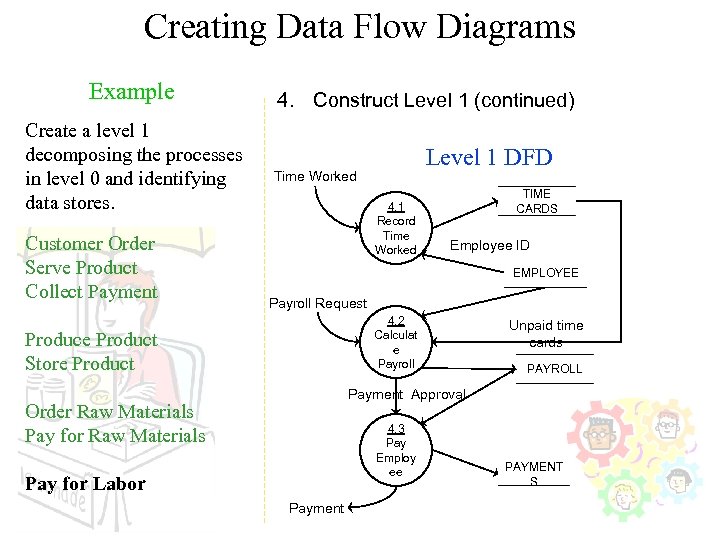 Creating Data Flow Diagrams Example Create a level 1 decomposing the processes in level 0 and identifying data stores. Customer Order Serve Product Collect Payment 4. Construct Level 1 (continued) Level 1 DFD Time Worked 4. 1 Record Time Worked TIME CARDS Employee ID EMPLOYEE Payroll Request 4. 2 Calculat e Payroll Produce Product Store Product Unpaid time cards PAYROLL Payment Approval Order Raw Materials Pay for Raw Materials 4. 3 Pay Employ ee Pay for Labor Payment PAYMENT S
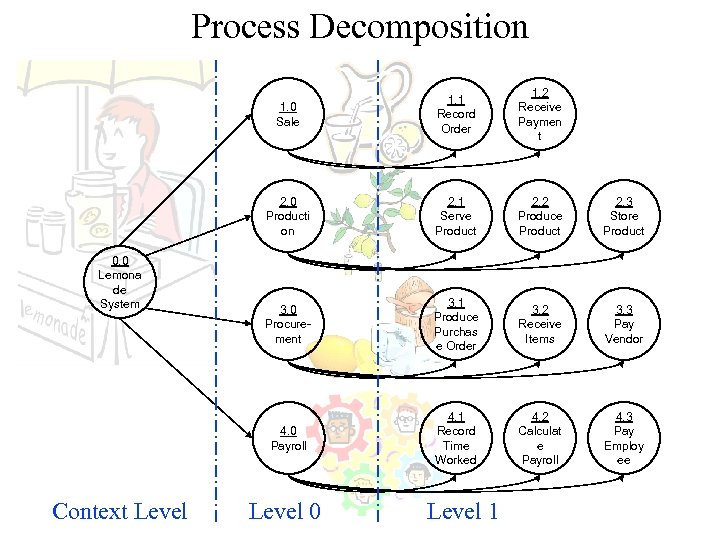 Process Decomposition 1. 0 Sale 2. 1 Serve Product 2. 2 Produce Product 2. 3 Store Product 3. 0 Procurement 3. 1 Produce Purchas e Order 3. 2 Receive Items 3. 3 Pay Vendor 4. 0 Payroll Context Level 1. 2 Receive Paymen t 2. 0 Producti on 0. 0 Lemona de System 1. 1 Record Order 4. 1 Record Time Worked 4. 2 Calculat e Payroll 4. 3 Pay Employ ee Level 0 Level 1
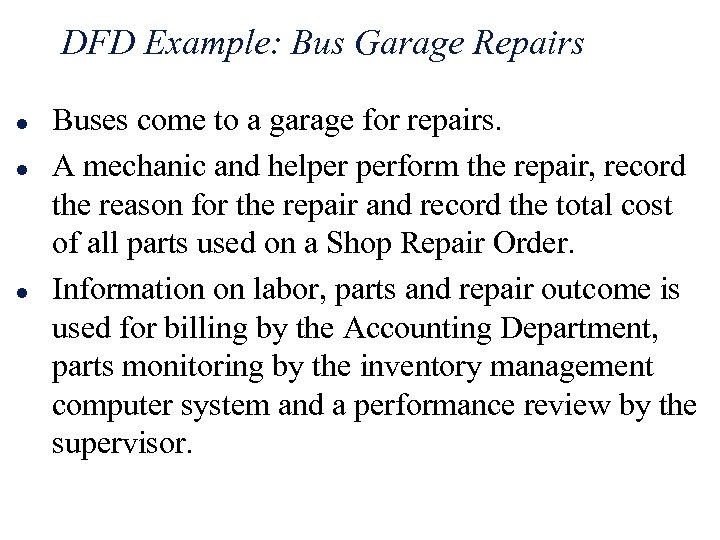 DFD Example: Bus Garage Repairs l l l Buses come to a garage for repairs. A mechanic and helper perform the repair, record the reason for the repair and record the total cost of all parts used on a Shop Repair Order. Information on labor, parts and repair outcome is used for billing by the Accounting Department, parts monitoring by the inventory management computer system and a performance review by the supervisor.
 DFD Example: Bus Garage Repairs (cont’d) l l l External Entities: Bus, Mechanic, Helper, Supervisor, Inventory Management System, Accounting Department, etc. Key process (“the system”): performing repairs and storing information related to repairs Processes: • • • Record Bus ID and reason for repair Determine parts needed Perform repair Calculate parts extended and total cost Record labor hours, cost
 DFD Example: Bus Garage Repairs (cont’d) l Data stores: • • l Personnel file Repairs file Bus master list Parts list Data flows: • • • Repair order Bus record Parts record Employee timecard Invoices
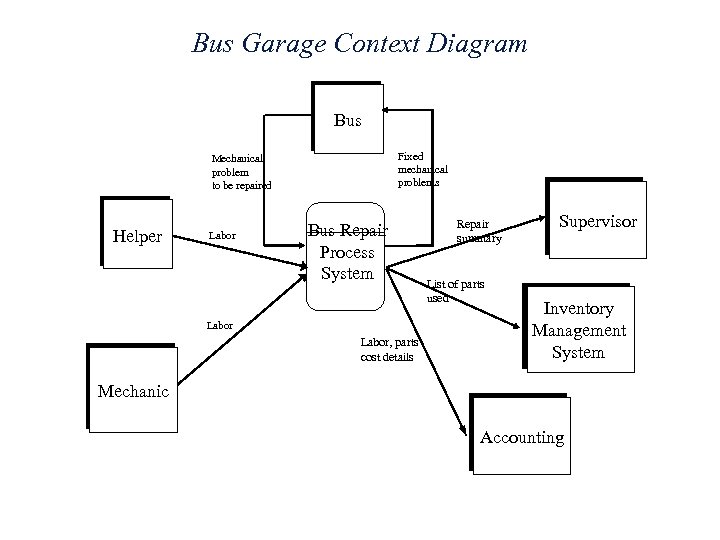 Bus Garage Context Diagram Bus Fixed mechanical problems Mechanical problem to be repaired Helper Labor Bus Repair Process System Labor, parts cost details Repair summary List of parts used Supervisor Inventory Management System Mechanic Accounting
 Burger’s Order Processing System l Draw the Burger’s context diagram • System » Order processing system • External entities » Kitchen » Restaurant » Customer • Processes » Customer order » Receipt » Food order » Management report
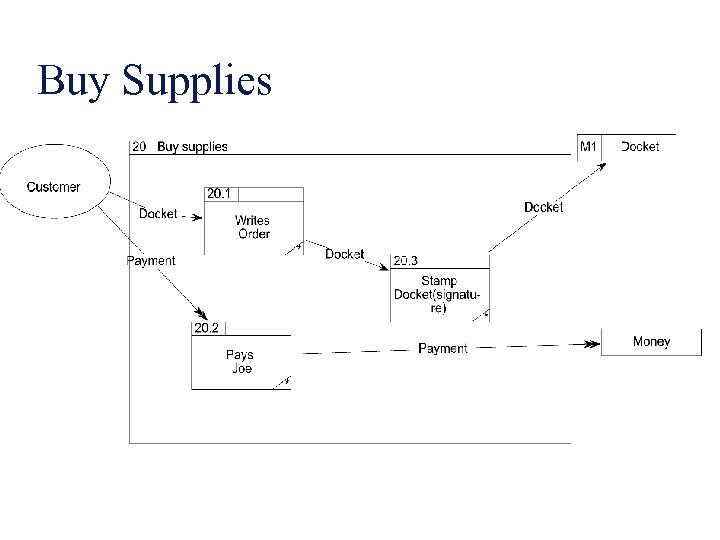
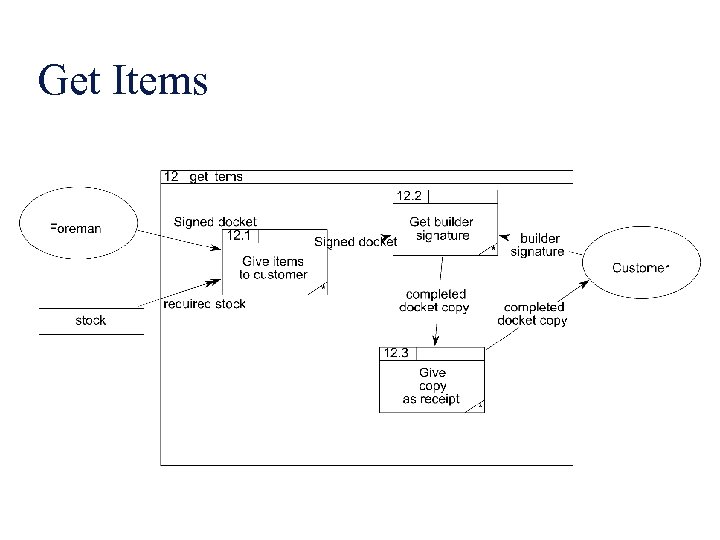
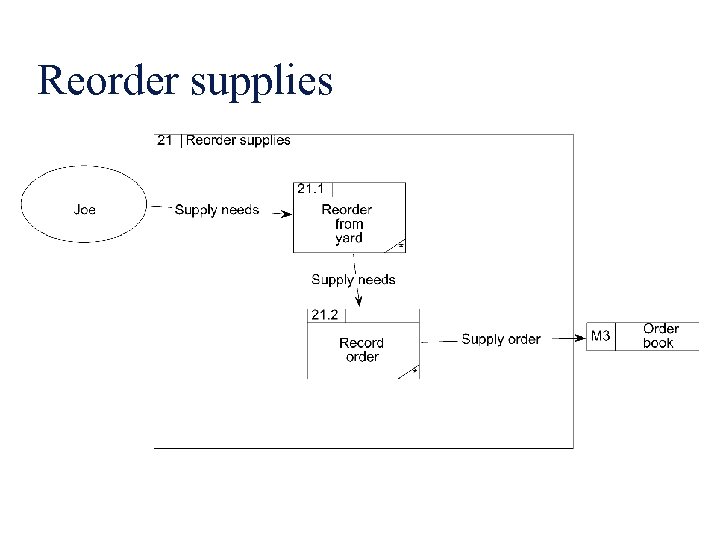
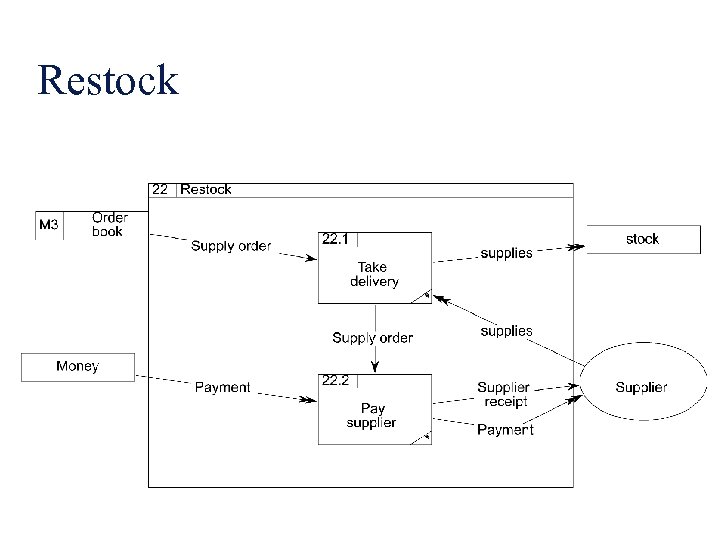
 Joe’s builders’ suppliers has a shop and a yard. He has a stock list on the wall of his shop, complete with prices. When a builder wants to buy supplies, he goes into the shop and picks the stock items from the list. He writes his order on a duplicate docket and pays Joe, who stamps the docket as paid. The builder takes the duplicate docket and he goes to the yard and hands it to the yard foreman. The yard foreman gets the ordered items from the yard and gives them to the builder. The builder signs the duplicate docket and leaves one copy with the foreman and takes one copy as a receipt. Every week, Joe looks around the yard to see if any of his stock is running low. He rings up the relevant suppliers and reorders stock. He records the order in his order book, which is kept in the yard. The yard foreman takes delivery of the new stock and checks it against what has been ordered. He pays for it on delivery and staples the receipt into the order book. At the end of every month, Joe goes through all the dockets and the order book and produces a financial report for the shareholders.
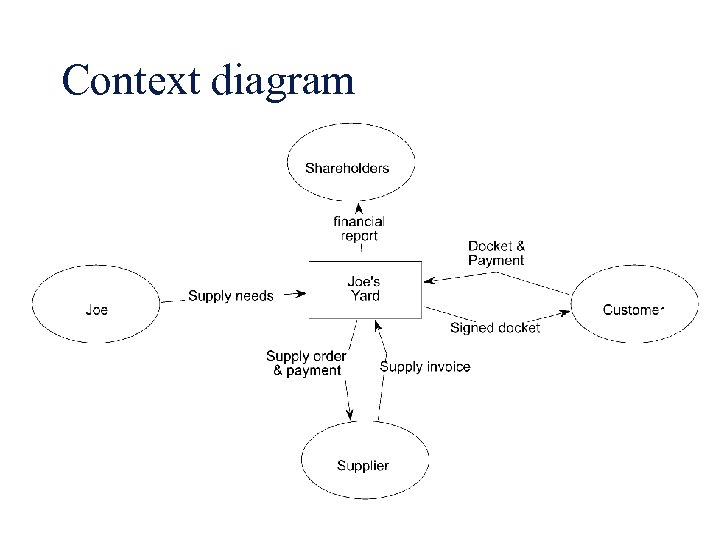 Context diagram
 Level-1 DFD processes Joe’s builders’ suppliers has a shop and a yard. His system is entirely manual. He has a stock list on the wall of his shop, complete with prices. When a builder wants to buy supplies, he goes into the shop and picks the stock items from the list. He writes his order on a duplicate docket and pays Joe, who stamps the docket as paid. The builder takes the duplicate docket and he goes to the yard and hands it to the yard foreman. The yard foreman gets the ordered items from the yard and gives them to the builder. The builder signs the duplicate docket and leaves one copy with the foreman and takes one copy as a receipt. Every week, Joe looks around the yard to see if any of his stock is running low. He rings up the relevant suppliers and reorders stock. He records the order in his order book, which is kept in the yard. The yard foreman takes delivery of the new stock and checks it against what has been ordered. He pays for it on delivery and staples the receipt into the order book. At the end of every month,
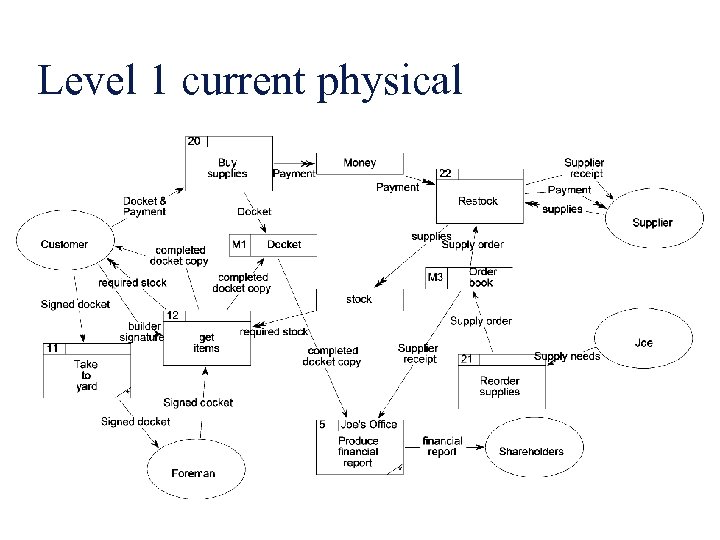 Level 1 current physical
 Buy Supplies
 Get Items
 Reorder supplies
 Restock
 l The waterfall model is appropriate when requirement changes are limited. • l b. False Evolutionary software process models • • l True Are iterative in nature Can easily accommodate product requirements changes Do not generally produce throwaway systems All of the above The first step in project planning is to • • determine the budget. select a team organizational model. determine the project constraints. establish the objectives and scope.
 l l l Give the time network chart for a giving example based on the following project data: i) The project involved 7 tasks: T 1, T 2, T 3, T 4, T 5, T 6, T 7; ii) The tasks have the following durations: T 1 (3 weeks), T 2 (2 weeks), T 3 (4 weeks), T 4 (1 week), T 5 (3 weeks), T 6 (2 weeks), T 7 (4 weeks); iii) Tasks T 4 and T 5 are dependent on Milestone M 1 produced by Task T 1; iv) Task T 5 is also dependent on Milestone M 2 produced by Task T 2; v) Task T 6 is dependent on Milestones M 3 and M 5 produced Task T 3 and Task T 5 respectively
 l l l l Suggest an appropriate software process model that might be used as a basis for managing the development of the following systems: a) an e-auction system which will run over the web, b) a modification to a computer game, c) a system to control radiation therapy administered to patients in a hospital, d) a new virtual learning environment for a college or school, and e) an interactive web-based system that allows customers to review films available and book tickets for a cinema. In each case, justify your choice by giving reasons that take into account the type of system that is to be developed.