 Скачать презентацию Software Engineering Software Development 홍 원 기
075bd7478f386f4e32d63de6e87e4909.ppt
- Количество слайдов: 27



Software Engineering & Software Development 홍 원 기 교수 http: //dpnm. postech. ac. kr/~jwkhong Oct. 8, 2002 Slide 1. 1
Outline l l l l l Software and Software Engineering Software Life Cycle Economic, Maintenance aspects Specification and design aspects Team Development aspects Software Life-Cycle Models Software Development Methodologies CASE Tools Terminology Summary Slide 1. 2
Software What is Software? Slide 1. 3
To Buy or To Develop Software? l Commercial off-the-shelf (COTS) software – “Shrink-wrapped software” l Nowadays, COTS software is often downloaded over the Internet – “Click-wrapped software” l What are examples of COTS software? Slide 1. 4
To Buy or To Develop Software? (contd) l When do we buy or when do we develop software? l Develop software only when we cannot find COTS software that will satisfy the user’s needs Slide 1. 5
Software Engineering What is Software Engineering? Slide 1. 6
Software Engineering l A NATO study group in 1967 coined the term software engineering – “building software is similar to other engineering tasks” – Endorsed by the 1968 NATO Conference in Garmisch, Germany – Aim: to solve the “Software Crisis” – Software Crisis: Software is delivered » Late » Over budget » Low quality with lots of faults – Software crisis is still present over 35 years later! Slide 1. 7
Software Engineering (contd) l Why cannot bridge-building techniques be used to build operating systems? – Attitude to collapse » Bridge collapse - redesigned and rebuilt from scratch » Operating system crash – reboot! – Imperfect engineering » Bridges are assumed to be perfectly engineered » OSs are assumed to be imperfectly engineered – Complexity is growing faster than we can master – Maintenance » Bridge maintenance – painting, repairing cracks, resurfacing the road » Software maintenance – porting to new hardware, adding more functions, re-write some parts, etc. Slide 1. 8
Conclusion l Software engineering is a discipline whose aim is the production of fault-free software that satisfies the user’s needs and is delivered on time within budget Slide 1. 9
Life Cycle What is Human Life Cycle? What is Software Life Cycle? Slide 1. 10
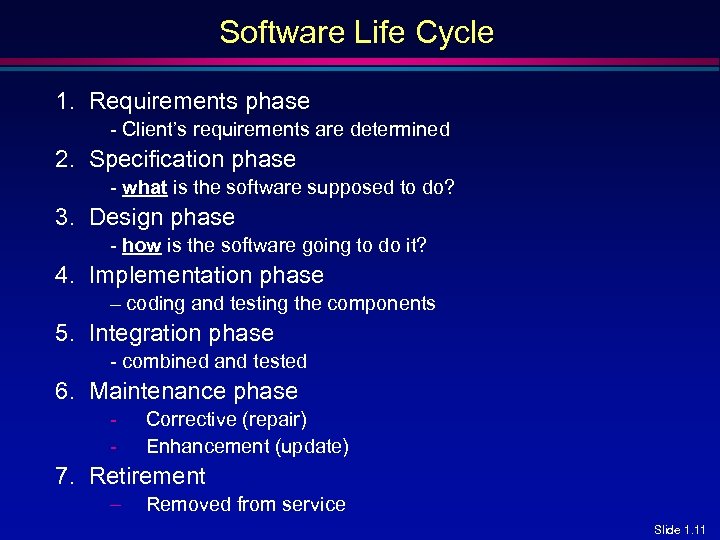
Software Life Cycle 1. Requirements phase - Client’s requirements are determined 2. Specification phase - what is the software supposed to do? 3. Design phase - how is the software going to do it? 4. Implementation phase – coding and testing the components 5. Integration phase - combined and tested 6. Maintenance phase - Corrective (repair) Enhancement (update) 7. Retirement – Removed from service Slide 1. 11
Testing Phase? l l There is NO testing phase separately Testing is an activity performed throughout software production Slide 1. 12
Documentation Phase? l l There is NO documentation phase separately Every phase must be fully documented before starting the next phase Slide 1. 13
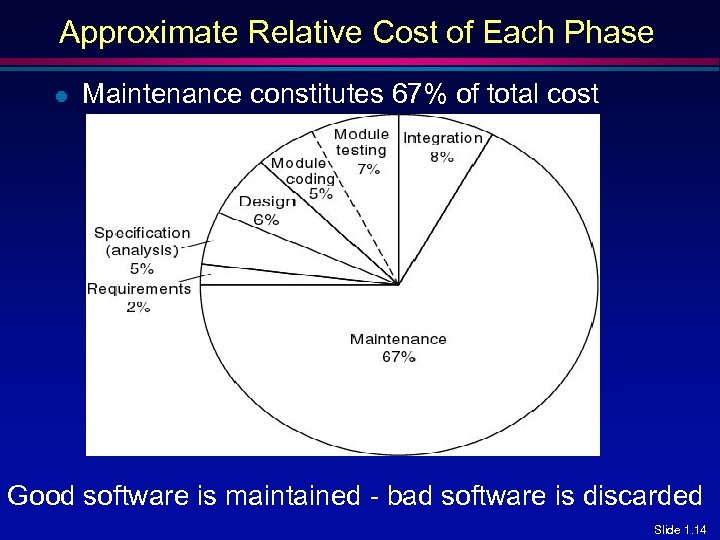
Approximate Relative Cost of Each Phase l Maintenance constitutes 67% of total cost Good software is maintained - bad software is discarded Slide 1. 14
Specification and Design Aspects l 60 to 70 percent of faults are specification and design faults [Boehm, 1979] l Faults must be found and corrected early in the development stage, otherwise it will cost a lot! Slide 1. 15
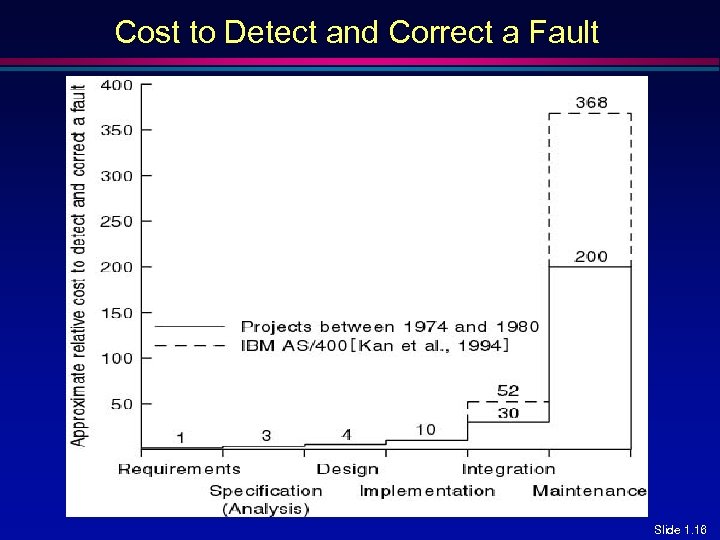
Cost to Detect and Correct a Fault Slide 1. 16
Team Development Aspects l Hardware is cheap – performance-price factor = time to perform 1 million additions x cost of CPU and main memory – We often have to build products that are too large to be written by one person in the available time l l Large product must be developed by a team But team development leads to – Interface problems – Communication problems l Good team organization and management is essential Slide 1. 17
Economic Aspects l Computer scientists investigate a variety of ways to produce software but software engineers are interested in economically viable techniques and solutions l New Coding method CMnew is 10% faster than currently used method CMold. Should it be used? – Common sense answer » Of course! – Software Engineering answer must consider » the cost of introducing CMnew into an organization » the effect of CMnew on maintenance Slide 1. 18
Software Life-Cycle Models l l l l Build-and-fix model Waterfall model Rapid prototyping model Incremental model Synchronize-and-stabilize model Spiral model Object-oriented life-cycle models Slide 1. 19
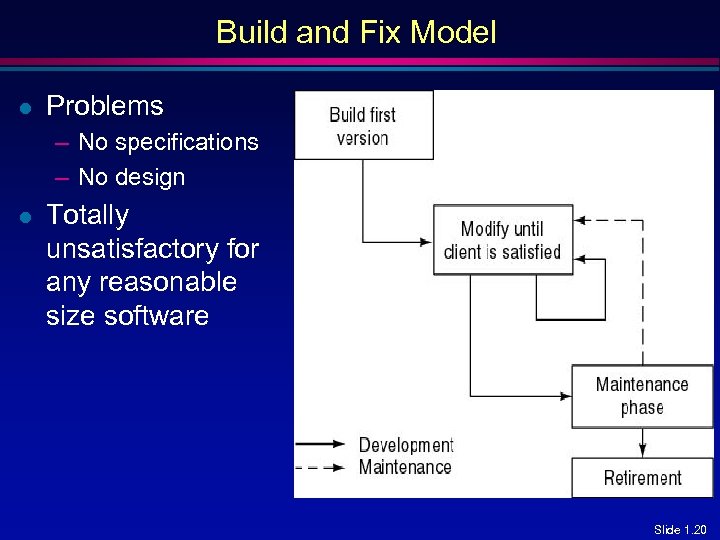
Build and Fix Model l Problems – No specifications – No design l Totally unsatisfactory for any reasonable size software Slide 1. 20
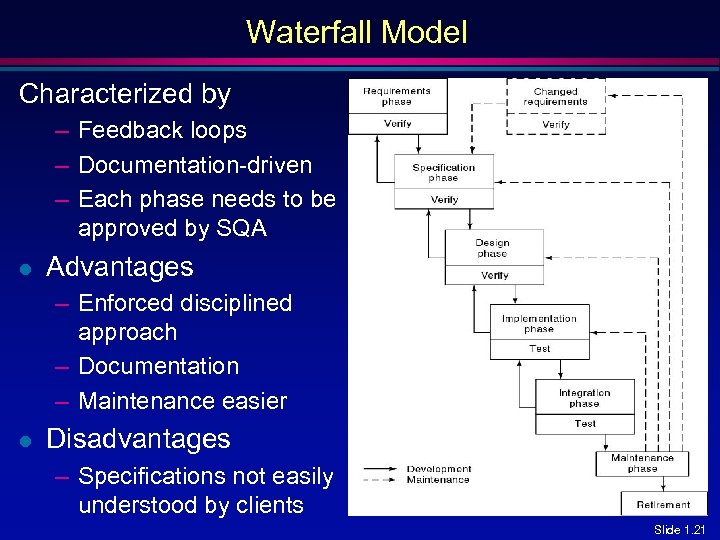
Waterfall Model Characterized by – Feedback loops – Documentation-driven – Each phase needs to be approved by SQA l Advantages – Enforced disciplined approach – Documentation – Maintenance easier l Disadvantages – Specifications not easily understood by clients Slide 1. 21
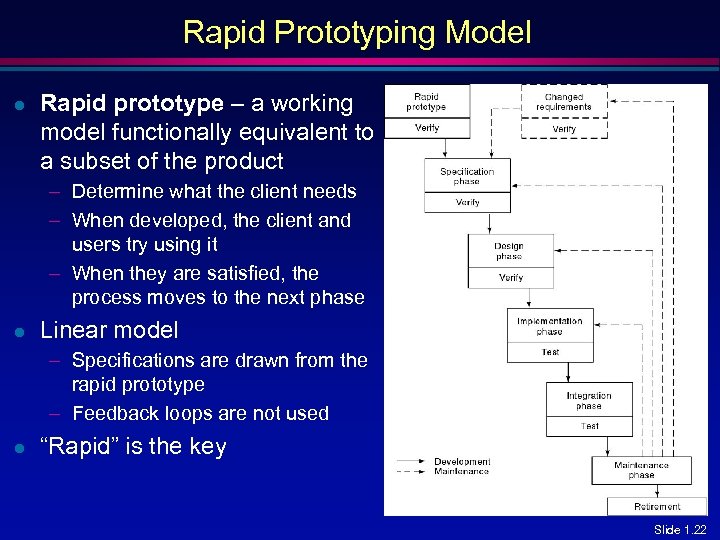
Rapid Prototyping Model l Rapid prototype – a working model functionally equivalent to a subset of the product – Determine what the client needs – When developed, the client and users try using it – When they are satisfied, the process moves to the next phase l Linear model – Specifications are drawn from the rapid prototype – Feedback loops are not used l “Rapid” is the key Slide 1. 22
Software Development Methodologies l Structured methods – – l Structured systems analysis data flow analysis structured programming Used in 70’s, 80’s & early 90’s Object-oriented methods – – Object-oriented analysis Object-oriented design Object-oriented programming Used from early 90’s to present Slide 1. 23
Structured vs. Object-oriented Methods l Structured methods had great successes initially – It started to fail with larger products (> 50, 000 LOC) l l Maintenance problems (up to 70% of effort) Reason: structured methods are – Action oriented (finite state machines, data flow diagrams); or – Data oriented (entity-relationship diagrams, Jackson’s method); – But not both l Both data and actions are of equal importance in OO Methods Slide 1. 24
CASE Tools l l CASE (Computer-Aided Software Engineering) Tools used to assist in the development and maintenance of software – Faster development – Fewer faults – Easier maintenance Slide 1. 25
Terminology l l Software: program + documentation Product – a nontrivial piece of software (cs 101 assignment? ) – The end result of software production l l l Software production: development + maintenance Methodology, paradigm: a collection of techniques for carrying out the software production Bug – “A bug crept into the code” instead of – “I made an error” – good software engineer! Slide 1. 26
Conclusions l l l Systematic approaches are essential for successful software development Life-cycle models & development methodologies Testing and documentation must be done in every phase Team organization and management very important You cannot be good software engineers without proper training and lots of experience Software engineering courses teach these interesting and important subjects! Slide 1. 27
Скачать презентацию Software Engineering Software Development 홍 원 기
075bd7478f386f4e32d63de6e87e4909.ppt