 Скачать презентацию Software Engineering Modern Approaches Eric Braude and Michael
d67dc013546e311f6f03cbee292bfe66.ppt
- Количество слайдов: 42



Software Engineering Modern Approaches Eric Braude and Michael Bernstein 1
Chapter 7: Principles of Project Management © 2010 John Wiley & Sons Ltd. 2
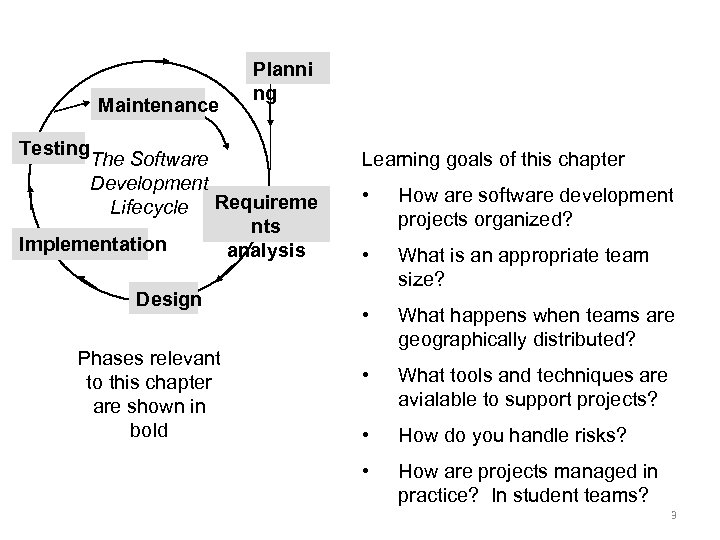
Maintenance Planni ng Testing The Software Development Lifecycle Requireme nts Implementation analysis Design Phases relevant to this chapter are shown in bold Learning goals of this chapter • How are software development projects organized? • What is an appropriate team size? • What happens when teams are geographically distributed? • What tools and techniques are avialable to support projects? • How do you handle risks? • How are projects managed in practice? In student teams? 3
Challenges of Software Project Management • Customers are seldom sure of what they want. • Customers change their requirements and plans may not be updated • It is hard to estimate up front the magnitude of the effort required. • It is hard to coordinate the many requirements, the design elements corresponding to each requirement, and the corresponding code. • There may be unforeseen technical difficuties to overcome • It is not easy to maintain constructive interpersonal team dynamics. Time pressures cause stress, and team members have differing opinions. 4 But these obstacles can all be overcome! © 2010 John Wiley & Sons Ltd.
What Does Project Management Address? • Organization • Project Management Tools • Risk Management • Estimation • Scheduling • Documentation and Monitoring © 2010 John Wiley & Sons Ltd. 5
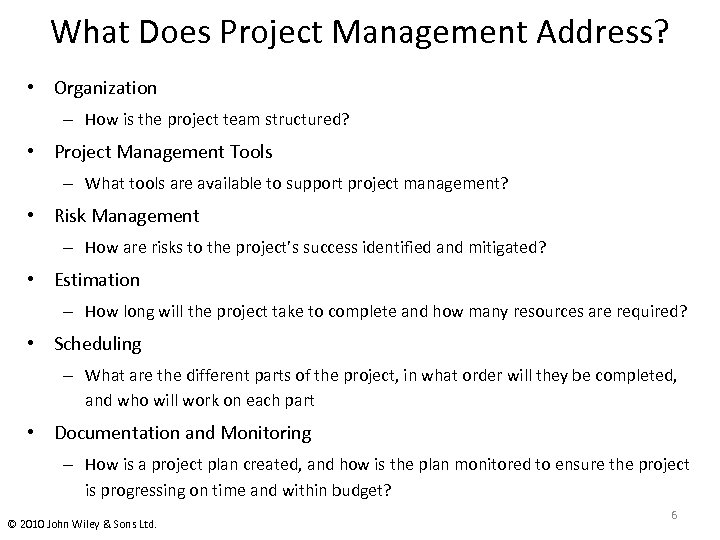
What Does Project Management Address? • Organization – How is the project team structured? • Project Management Tools – What tools are available to support project management? • Risk Management – How are risks to the project’s success identified and mitigated? • Estimation – How long will the project take to complete and how many resources are required? • Scheduling – What are the different parts of the project, in what order will they be completed, and who will work on each part • Documentation and Monitoring – How is a project plan created, and how is the plan monitored to ensure the project is progressing on time and within budget? © 2010 John Wiley & Sons Ltd. 6
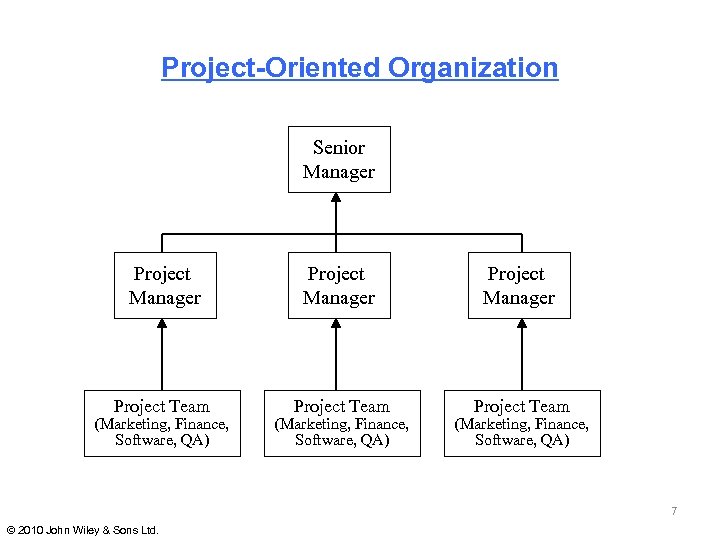
Project-Oriented Organization Senior Manager Project Team Project Team (Marketing, Finance, Software, QA) 7 © 2010 John Wiley & Sons Ltd.
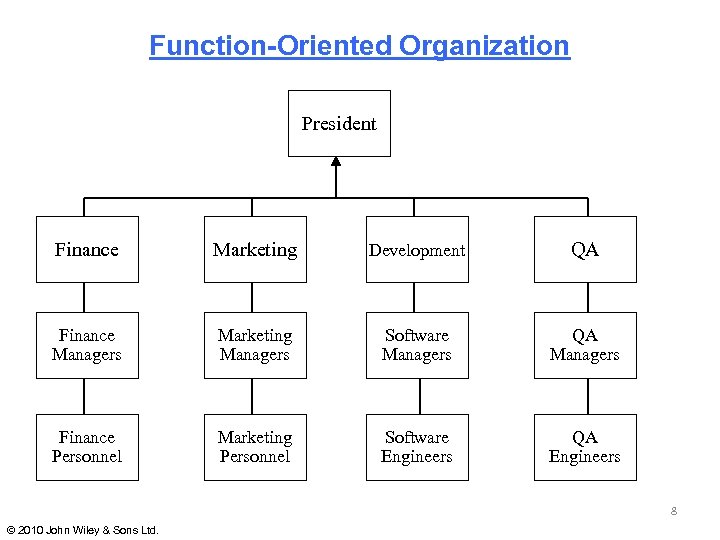
Function-Oriented Organization President Finance Marketing Development QA Finance Managers Marketing Managers Software Managers QA Managers Finance Personnel Marketing Personnel Software Engineers QA Engineers 8 © 2010 John Wiley & Sons Ltd.
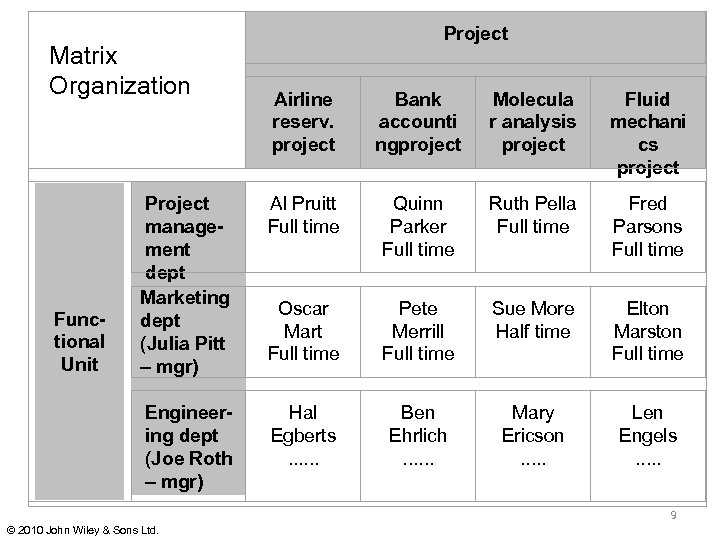
Project Matrix Organization Bank accounti ngproject Molecula r analysis project Fluid mechani cs project Project management dept Marketing dept (Julia Pitt – mgr) Al Pruitt Full time Quinn Parker Full time Ruth Pella Full time Fred Parsons Full time Oscar Mart Full time Pete Merrill Full time Sue More Half time Elton Marston Full time Engineering dept (Joe Roth – mgr) Functional Unit Airline reserv. project Hal Egberts. . . Ben Ehrlich. . . Mary Ericson. . . Len Engels. . . 9 © 2010 John Wiley & Sons Ltd.
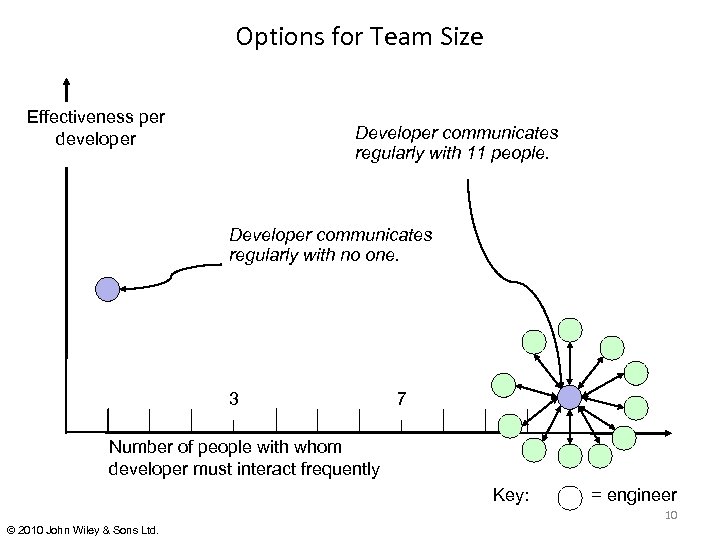
Options for Team Size Effectiveness per developer Developer communicates regularly with 11 people. Developer communicates regularly with no one. 3 7 Number of people with whom developer must interact frequently Key: = engineer 10 © 2010 John Wiley & Sons Ltd.
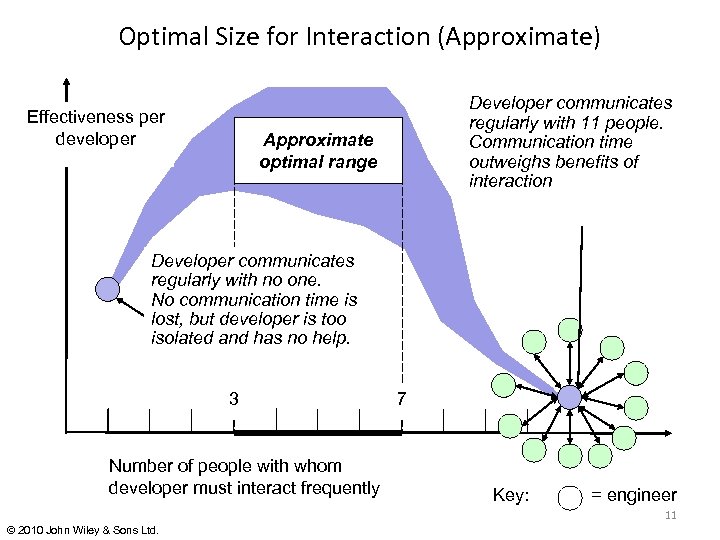
Optimal Size for Interaction (Approximate) Effectiveness per developer Developer communicates regularly with 11 people. Communication time outweighs benefits of interaction Approximate optimal range Developer communicates regularly with no one. No communication time is lost, but developer is too isolated and has no help. 3 Number of people with whom developer must interact frequently 7 Key: = engineer 11 © 2010 John Wiley & Sons Ltd.
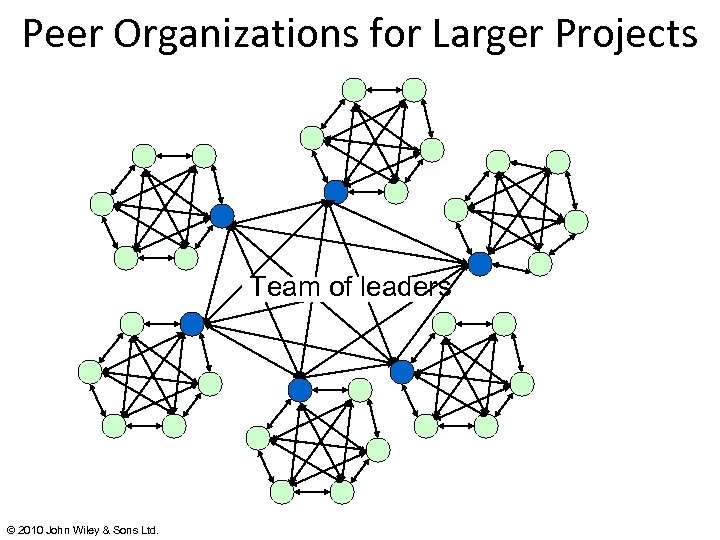
Peer Organizations for Larger Projects Team of leaders © 2010 John Wiley & Sons Ltd.
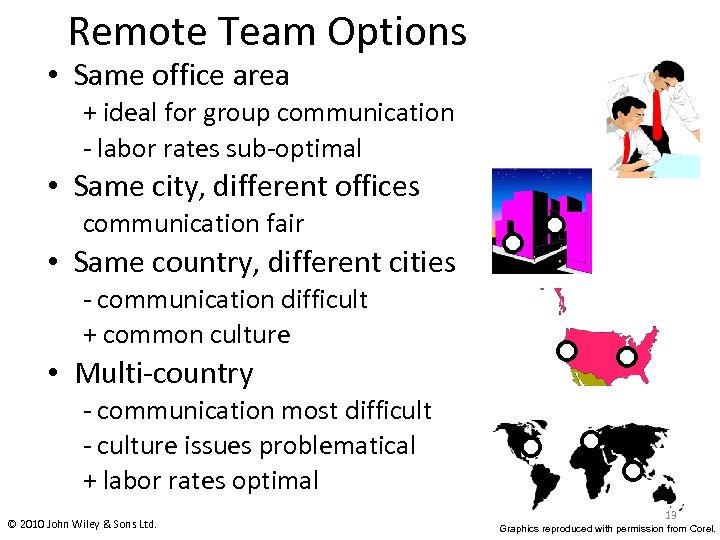
Remote Team Options • Same office area + ideal for group communication - labor rates sub-optimal • Same city, different offices communication fair • Same country, different cities - communication difficult + common culture • Multi-country - communication most difficult - culture issues problematical + labor rates optimal © 2010 John Wiley & Sons Ltd. 13 Graphics reproduced with permission from Corel.
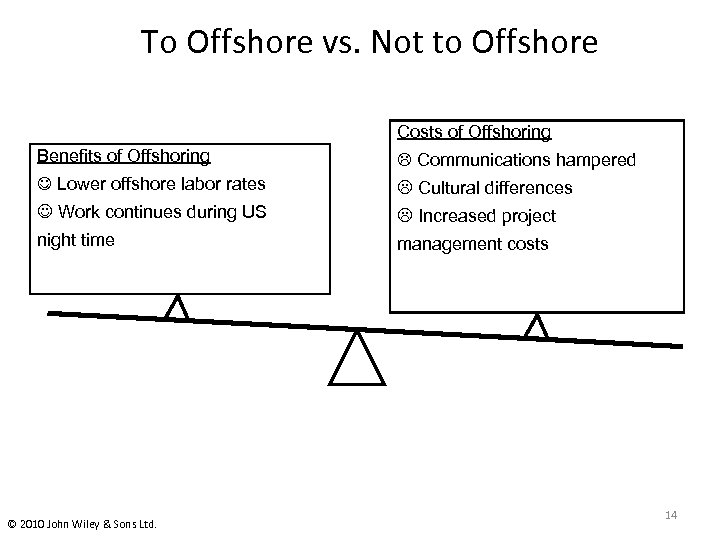
To Offshore vs. Not to Offshore Costs of Offshoring Benefits of Offshoring Communications hampered Lower offshore labor rates Cultural differences Work continues during US Increased project night time management costs © 2010 John Wiley & Sons Ltd. 14
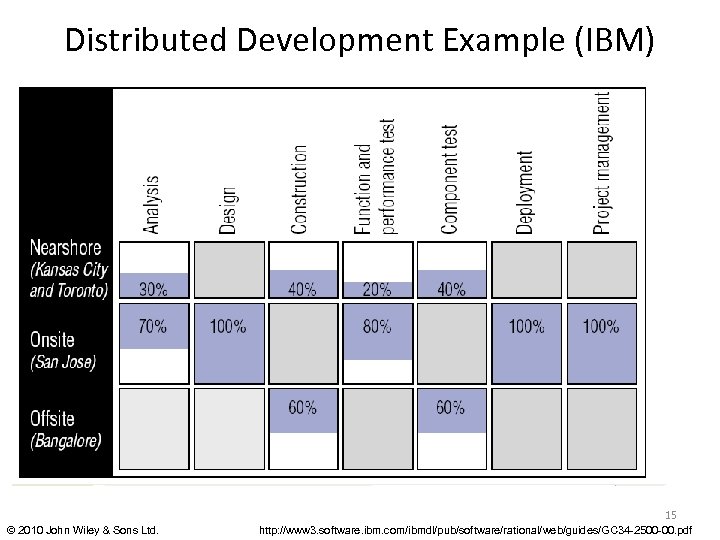
Distributed Development Example (IBM) 15 © 2010 John Wiley & Sons Ltd. http: //www 3. software. ibm. com/ibmdl/pub/software/rational/web/guides/GC 34 -2500 -00. pdf
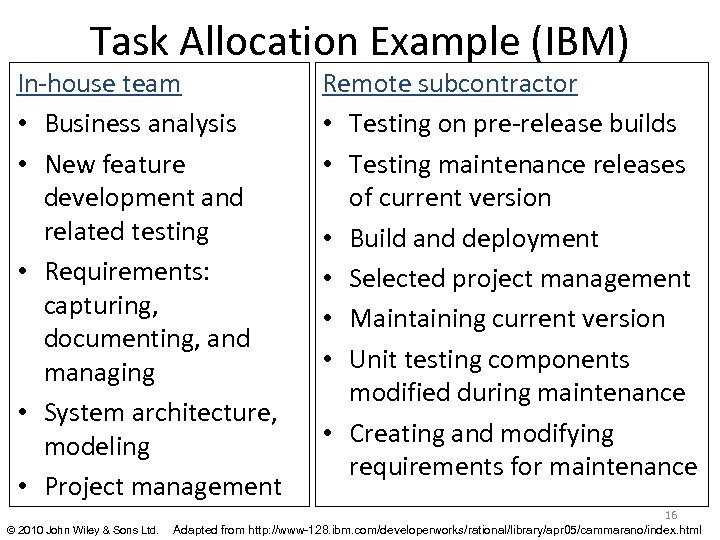
Task Allocation Example (IBM) In-house team • Business analysis • New feature development and related testing • Requirements: capturing, documenting, and managing • System architecture, modeling • Project management © 2010 John Wiley & Sons Ltd. Remote subcontractor • Testing on pre-release builds • Testing maintenance releases of current version • Build and deployment • Selected project management • Maintaining current version • Unit testing components modified during maintenance • Creating and modifying requirements for maintenance 16 Adapted from http: //www-128. ibm. com/developerworks/rational/library/apr 05/cammarano/index. html
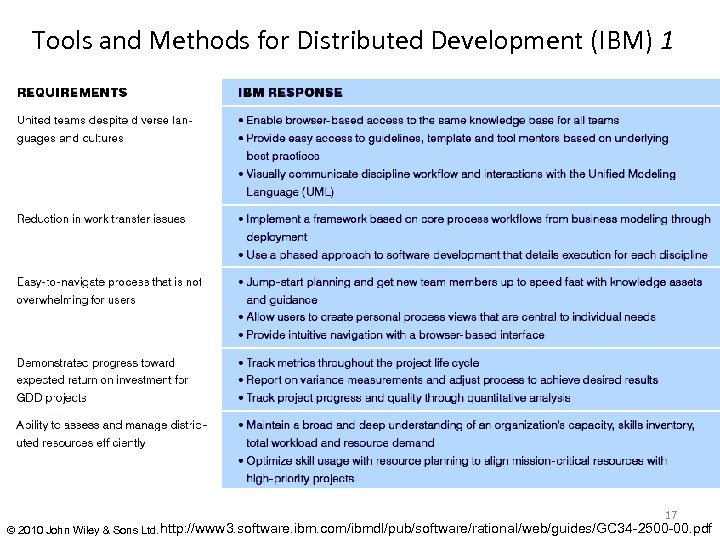
Tools and Methods for Distributed Development (IBM) 1 17 © 2010 John Wiley & Sons Ltd. http: //www 3. software. ibm. com/ibmdl/pub/software/rational/web/guides/GC 34 -2500 -00. pdf
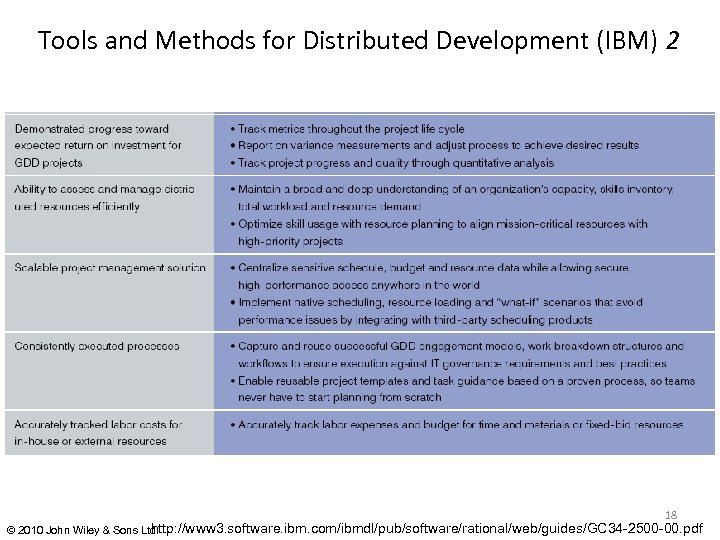
Tools and Methods for Distributed Development (IBM) 2 18 http: //www 3. software. ibm. com/ibmdl/pub/software/rational/web/guides/GC 34 -2500 -00. pdf © 2010 John Wiley & Sons Ltd.
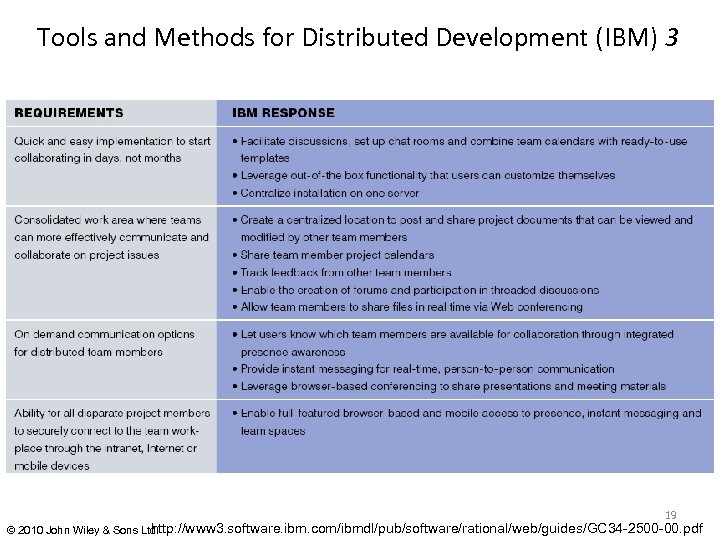
Tools and Methods for Distributed Development (IBM) 3 19 http: //www 3. software. ibm. com/ibmdl/pub/software/rational/web/guides/GC 34 -2500 -00. pdf © 2010 John Wiley & Sons Ltd.
TSP Objectives 1 (Humphrey) • Build self-directed teams – 3 -20 engineers – establish own goals – establish own process and plans – track work • Show managers how to manage teams – coach – motivate – sustain peak performance © 2010 John Wiley & Sons Ltd. 20 Graphics reproduced with permission from Corel.
TSP Objectives 2 (Humphrey) • Accelerate CMM improvement – make CMM 5 “normal” • “Provide improvement guidelines to highmaturity organizations” • “Facilitate university teaching of industrialgrade teams” © 2010 John Wiley & Sons Ltd. 21 Graphics reproduced with permission from Corel.
TSP § Team initiative § Bottom-up interaction § Professionalism among software engineers § Negotiate schedules § Emphasis on “coaching” by management Provide guidance, tools, and other required resources. § Participants required to be PSP-trained § Organized around iterations Each requires a “launch” § Numerous detailed scripts. © 2010 John Wiley & Sons Ltd. 22
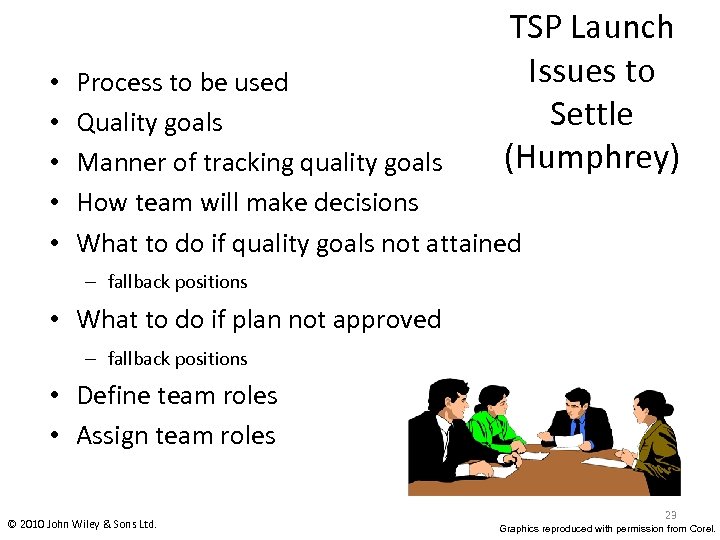
• • • TSP Launch Issues to Settle (Humphrey) Process to be used Quality goals Manner of tracking quality goals How team will make decisions What to do if quality goals not attained – fallback positions • What to do if plan not approved – fallback positions • Define team roles • Assign team roles © 2010 John Wiley & Sons Ltd. 23 Graphics reproduced with permission from Corel.
To Be Produced at Launches (Humphrey) 1. Written team goals 2. Defined team roles 3. Process development plan 4. Quality plan 5. Project’s support plan computers, software, personnel etc. 6. Overall development plan and schedule 7. Detailed plans for each engineer 8. Project risk assessment 9. Project status report © 2010 John Wiley & Sons Ltd. 24
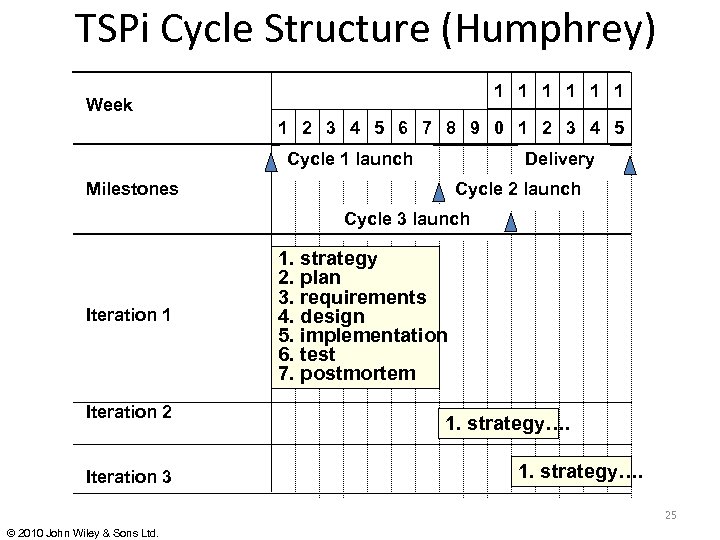
TSPi Cycle Structure (Humphrey) 1 1 1 Week 1 2 3 4 5 6 7 8 9 0 1 2 3 4 5 Cycle 1 launch Delivery Milestones Cycle 2 launch Cycle 3 launch Iteration 1 Iteration 2 Iteration 3 1. strategy 2. plan 3. requirements 4. design 5. implementation 6. test 7. postmortem 1. strategy…. 25 © 2010 John Wiley & Sons Ltd.
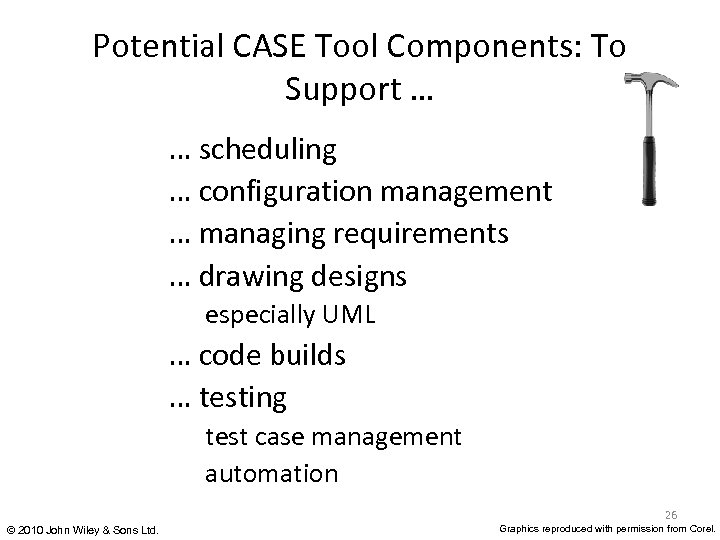
Potential CASE Tool Components: To Support … … scheduling … configuration management … managing requirements … drawing designs especially UML … code builds … testing test case management automation 26 © 2010 John Wiley & Sons Ltd. Graphics reproduced with permission from Corel.
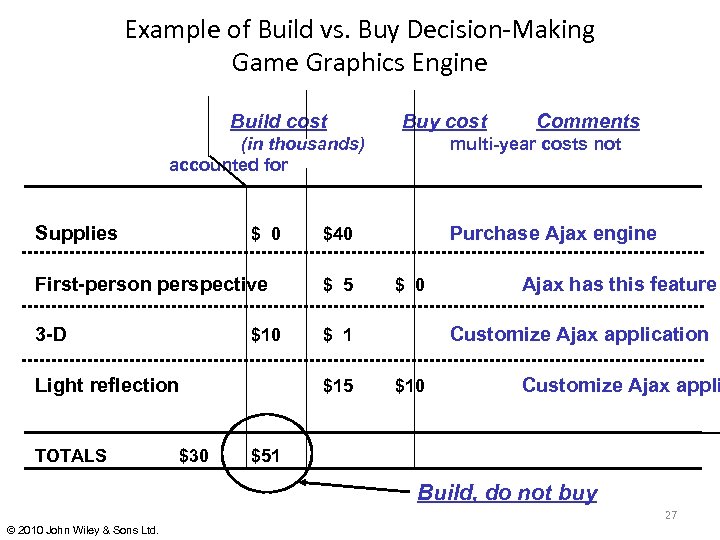
Example of Build vs. Buy Decision-Making Game Graphics Engine Build cost Buy cost Comments (in thousands) multi-year costs not accounted for Supplies $ 0 $40 Purchase Ajax engine First-person perspective $ 5 $ 0 $10 $ 1 Customize Ajax application $15 3 -D Light reflection ___ TOTALS $30 Ajax has this feature Customize Ajax appli ___ _________ $10 $51 Build, do not buy 27 © 2010 John Wiley & Sons Ltd.
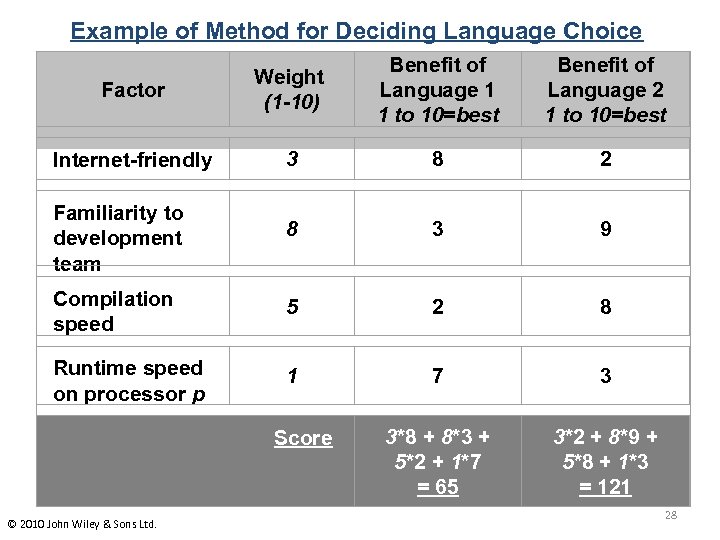
Example of Method for Deciding Language Choice Factor Weight (1 -10) Benefit of Language 1 1 to 10=best Internet-friendly 3 8 2 Familiarity to development team 8 3 9 Compilation speed 5 2 8 Runtime speed on processor p 1 7 3 3*8 + 8*3 + 5*2 + 1*7 = 65 3*2 + 8*9 + 5*8 + 1*3 = 121 Score © 2010 John Wiley & Sons Ltd. Benefit of Language 2 1 to 10=best 28
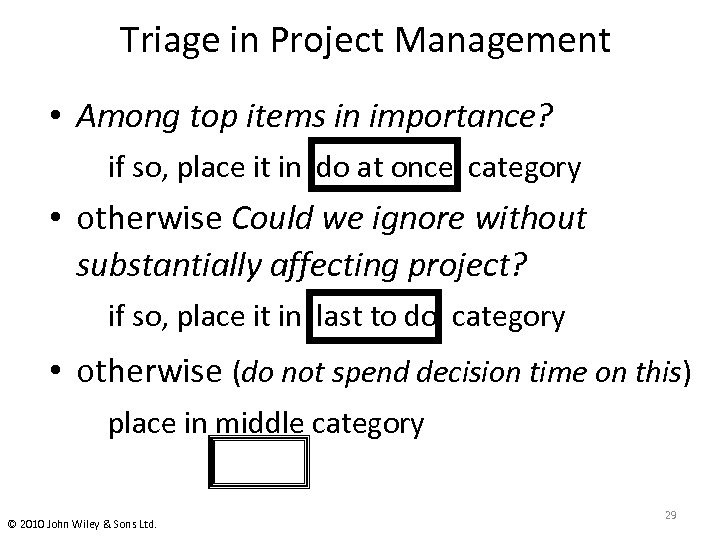
Triage in Project Management • Among top items in importance? if so, place it in do at once category • otherwise Could we ignore without substantially affecting project? if so, place it in last to do category • otherwise (do not spend decision time on this) place in middle category © 2010 John Wiley & Sons Ltd. 29
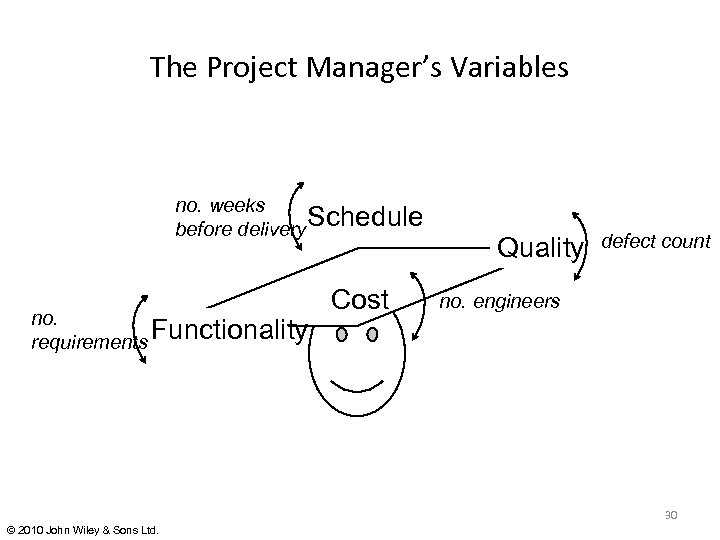
The Project Manager’s Variables no. weeks Schedule before delivery no. Functionality requirements Cost Quality defect count no. engineers 30 © 2010 John Wiley & Sons Ltd.
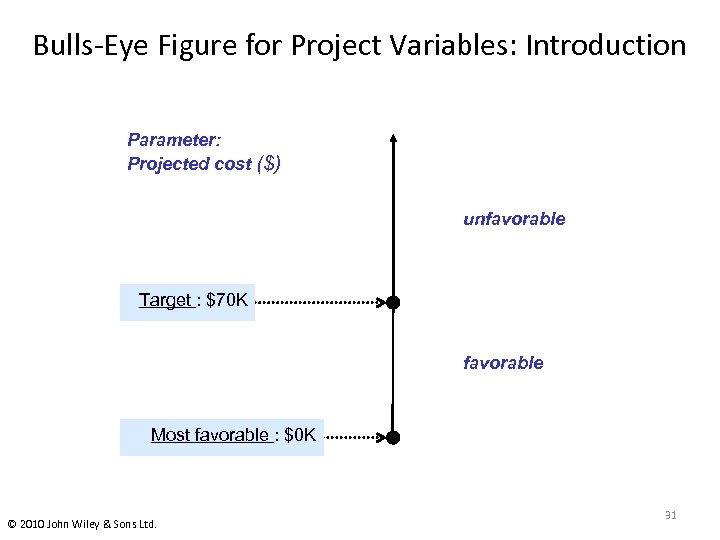
Bulls-Eye Figure for Project Variables: Introduction Parameter: Projected cost ($) unfavorable Target : $70 K favorable Most favorable : $0 K © 2010 John Wiley & Sons Ltd. 31
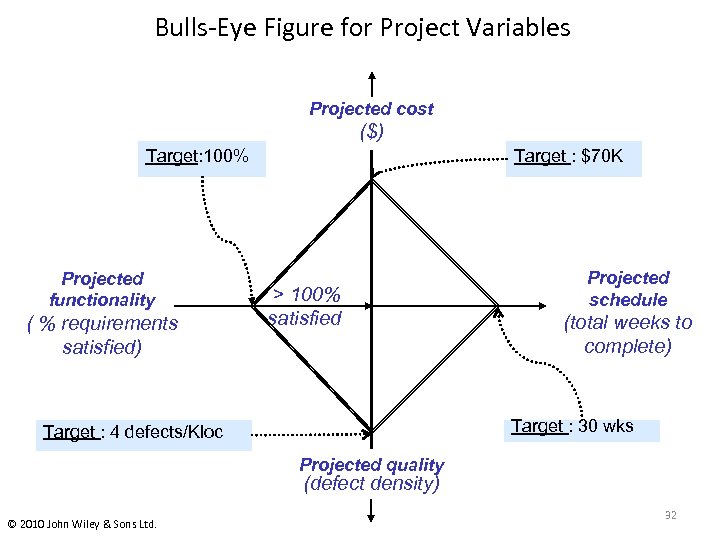
Bulls-Eye Figure for Project Variables Projected cost ($) Target: 100% Projected functionality ( % requirements satisfied) Target : $70 K > 100% satisfied Projected schedule (total weeks to complete) Target : 30 wks Target : 4 defects/Kloc Projected quality (defect density) © 2010 John Wiley & Sons Ltd. 32
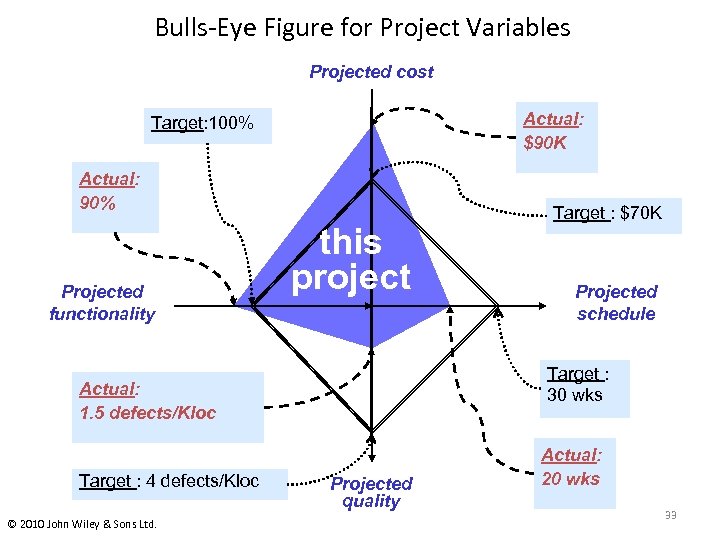
Bulls-Eye Figure for Project Variables Projected cost Actual: $90 K Target: 100% Actual: 90% Projected functionality this project © 2010 John Wiley & Sons Ltd. Projected schedule Target : 30 wks Actual: 1. 5 defects/Kloc Target : 4 defects/Kloc Target : $70 K Projected quality Actual: 20 wks 33
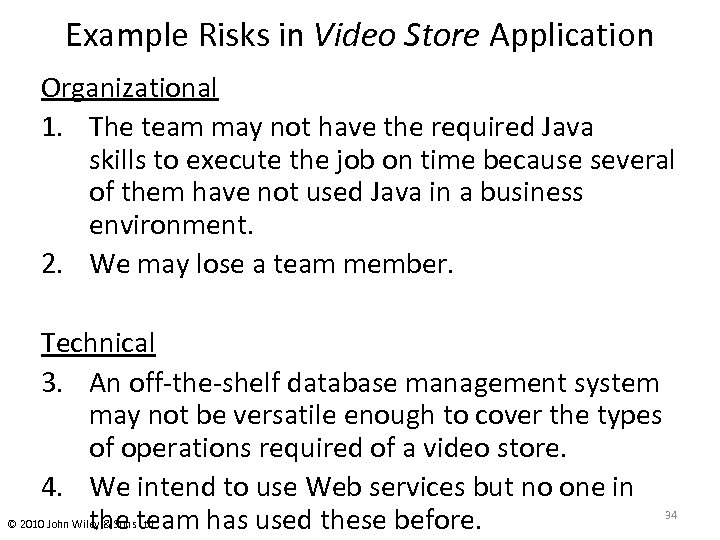
Example Risks in Video Store Application Organizational 1. The team may not have the required Java skills to execute the job on time because several of them have not used Java in a business environment. 2. We may lose a team member. Technical 3. An off-the-shelf database management system may not be versatile enough to cover the types of operations required of a video store. 4. We intend to use Web services but no one in the team has used these before. © 2010 John Wiley & Sons Ltd. 34
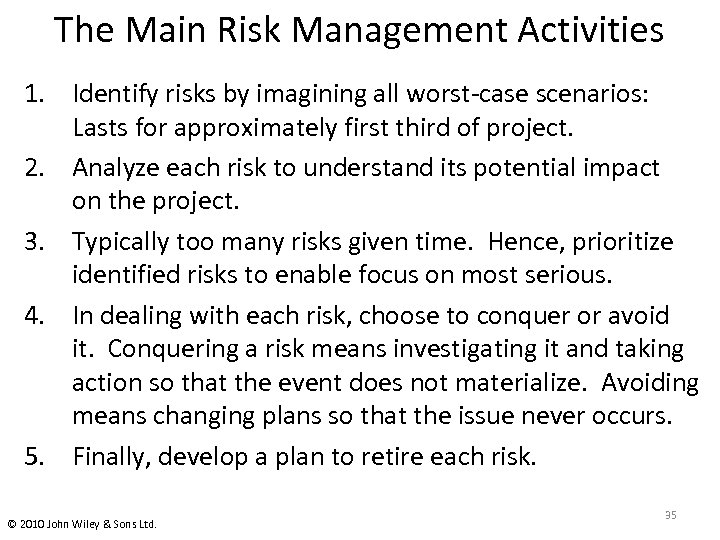
The Main Risk Management Activities 1. Identify risks by imagining all worst-case scenarios: Lasts for approximately first third of project. 2. Analyze each risk to understand its potential impact on the project. 3. Typically too many risks given time. Hence, prioritize identified risks to enable focus on most serious. 4. In dealing with each risk, choose to conquer or avoid it. Conquering a risk means investigating it and taking action so that the event does not materialize. Avoiding means changing plans so that the issue never occurs. 5. Finally, develop a plan to retire each risk. © 2010 John Wiley & Sons Ltd. 35
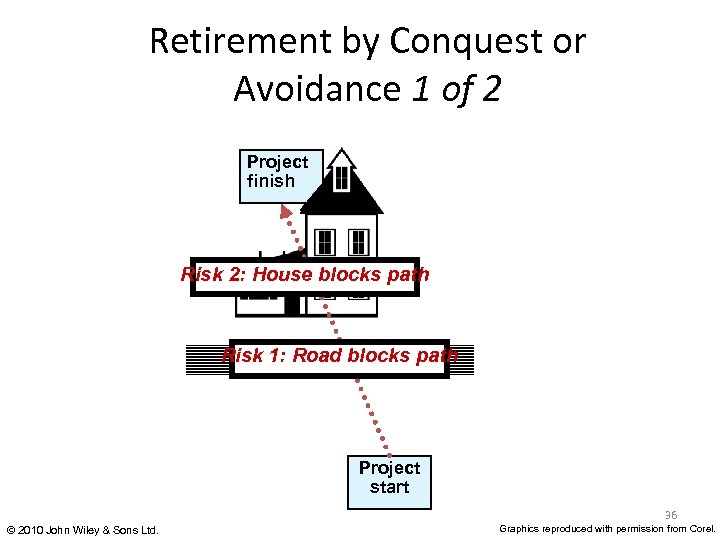
Retirement by Conquest or Avoidance 1 of 2 Project finish Risk 2: House blocks path Risk 1: Road blocks path Project start 36 © 2010 John Wiley & Sons Ltd. Graphics reproduced with permission from Corel.
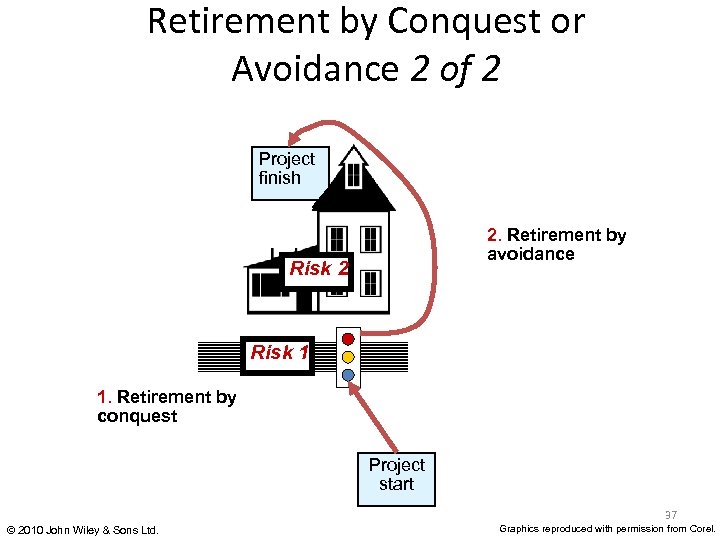
Retirement by Conquest or Avoidance 2 of 2 Project finish 2. Retirement by avoidance Risk 2 Risk 1 1. Retirement by conquest Project start 37 © 2010 John Wiley & Sons Ltd. Graphics reproduced with permission from Corel.
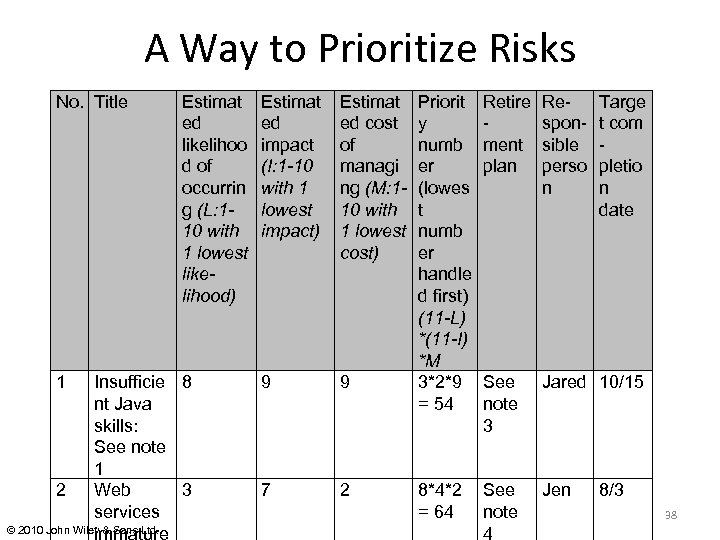
A Way to Prioritize Risks No. Title 1 Estimat ed likelihoo d of occurrin g (L: 110 with 1 lowest likelihood) Insufficie 8 nt Java skills: See note 1 2 Web 3 services © 2010 John Wiley & Sons Ltd. immature Estimat ed impact (I: 1 -10 with 1 lowest impact) Estimat ed cost of managi ng (M: 110 with 1 lowest cost) 9 9 7 2 Priorit y numb er (lowes t numb er handle d first) (11 -L) *(11 -I) *M 3*2*9 = 54 Retire ment plan Responsible perso n See note 3 Jared 10/15 8*4*2 See = 64 note 4 Jen Targe t com pletio n date 8/3 38
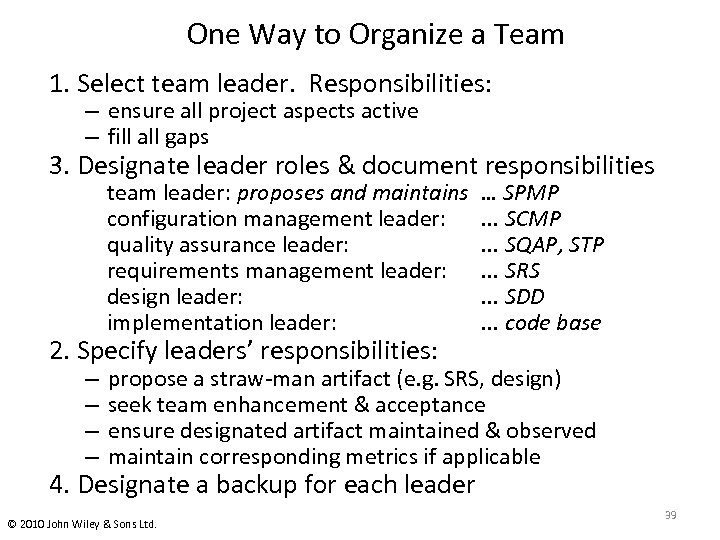
One Way to Organize a Team 1. Select team leader. Responsibilities: – ensure all project aspects active – fill all gaps 3. Designate leader roles & document responsibilities team leader: proposes and maintains configuration management leader: quality assurance leader: requirements management leader: design leader: implementation leader: 2. Specify leaders’ responsibilities: – – … SPMP . . . SCMP. . . SQAP, STP. . . SRS. . . SDD. . . code base propose a straw-man artifact (e. g. SRS, design) seek team enhancement & acceptance ensure designated artifact maintained & observed maintain corresponding metrics if applicable 4. Designate a backup for each leader © 2010 John Wiley & Sons Ltd. 39
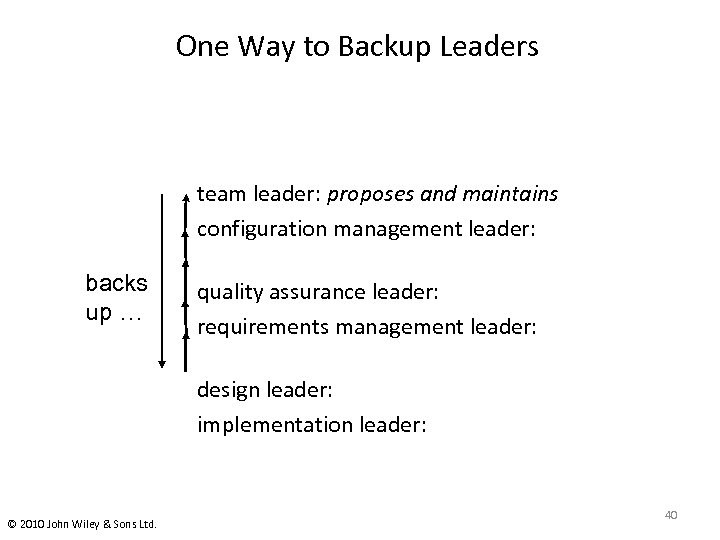
One Way to Backup Leaders team leader: proposes and maintains configuration management leader: backs up … quality assurance leader: requirements management leader: design leader: implementation leader: © 2010 John Wiley & Sons Ltd. 40
Planning and Conducting Meetings • Develop an agenda in advance of meeting, with everyone’s agreement. • Set time limits for meeting as a whole; each agenda item. Allow extra ten or fifteen minutes for unanticipated items. • Designate someone to take minutes: At least action items • At meeting, begin by briefly reviewing the agenda and time limits • Designate someone to watch time and warn of time limits. • Insist on one person speaking at a time. Listen to people, even if their ideas seem outrageous. (Probably aren’t. ) • Move unproductive discussions offline © 2010 John Wiley & Sons Ltd. 41
1. * Distribute start time, end time, and agenda with approximate times Planning and 2. * Ensure “straw-man” items prepared Executing 3. Start on time Meetings – list important items first 4. Have someone record action items‡ 5. Have someone track time & prompt members 6. Get agreement on the agenda and timing 7. Watch timing throughout, and end on time – allow exceptions for important discussion – stop excessive discussion; take off line 8. Keep discussion on the subject 9. ** E-mail action items & decision summary. * in advance of meeting ‡ actions members must perform ** after meeting © 2010 John Wiley & Sons Ltd. 42
Скачать презентацию Software Engineering Modern Approaches Eric Braude and Michael
d67dc013546e311f6f03cbee292bfe66.ppt