 Скачать презентацию Software Engineering Develop Software Precisely and Efficiently By
853bfc624bc6561e0bfa59f02f63d8f4.ppt
- Количество слайдов: 29



Software Engineering: Develop Software Precisely and Efficiently By Michel Daigle Development Manager Presented at CUSEC, March 8 th, 2002 Forensic Technology Inc. 5757 Cavendish blvd Cote St-Luc QC H 4 W 2 W 8
Presentation Outline l Present our company and products l Our development structure history l Our software engineering process l Discuss the benefits l Questions & Answers
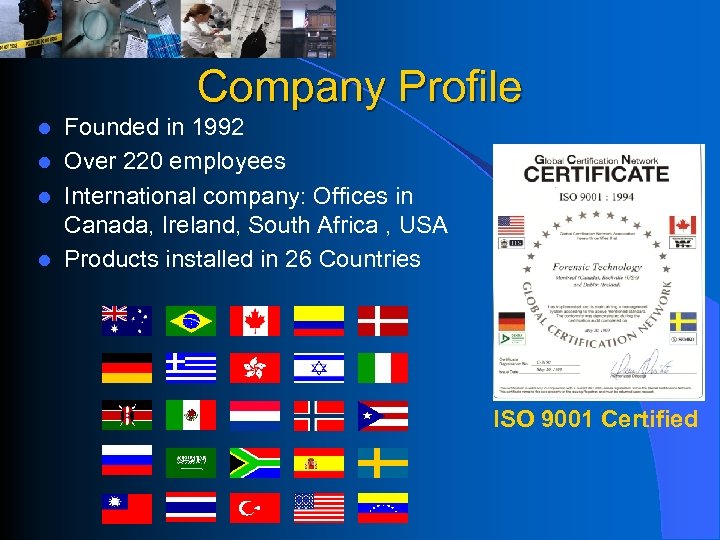
Company Profile Founded in 1992 l Over 220 employees l International company: Offices in Canada, Ireland, South Africa , USA l Products installed in 26 Countries l ISO 9001 Certified
Our Mission… Crime solving through innovative technology: • • • Ballistic Correlation and Information System Firearm Control System Criminalistics Laboratory Information System Forensic Pathology Information System Evidence Tracking and Management System
Our Products. . . Forensic Solutions
Development Structure History • • I’ve got a good idea ! Some customers told me they might be interested Let starts programming now! We’ll write the documentation at the end of the project (why now ? ) • The version 1. 0 will include 100 % of the desired functionality… we’ll be the best product of the market!
Development Structure History • We did not document customer’s needs enough; • We have developed our versioning standard during development; • We worked 24/7 for the version 1. 0… we worked 3 times the effort that we had planned; • The version 1. 0 was too big and did not necessarily fulfill 100% of the customer’s expectation; • We were a small team… our documentation was incomplete: • It was long and tedious to add new member to the development team; • We had to rush to complete documentation for customer’s quality review;
Development Structure History We’ve been extremely lucky: • Our initial idea was a technology breakthrough in law enforcement; • We have negotiated excellent sales’ contracts; • The product has been a technology and a commercial success. • With our past experience and with our company rapid growth (40 to 220 employees in 14 months) we have decided to implement a strong development structure: • We have adopted the Rational Unified Process (RUP) method
Effective Deployment 6 Best Practices 1. Develop Software Iteratively: • Asses risk and attack it through demonstrable progress • Produce frequent executable releases that enable continuous end user involvement and feedback • Development team stays focused on producing results, and frequent status checks help ensure that the project stays on schedule • An iterative approach also makes it easier to accommodate tactical changes in requirements, features or schedule
Effective Deployment 6 Best Practices 2. Manage Requirements: • Develop an approach that elicit, organize, and document required functionality and constraints; • Track and document tradeoffs and decisions; • Capture and communicate business requirements; • Use a set of pre-establish forms/document templates to that has been proven to be an excellent way to capture functional requirements • They provide coherent and traceable threads through both the development and the delivered system
Effective Deployment 6 Best Practices 3. Use Component-Based Architectures: • Focus on early development and baselining of a robust executable architecture, prior to committing resources for full-scale development; • Design a resilient architecture that is flexible, accommodates change, is intuitively understandable, and promotes more effective software reuse. • Components are non-trivial modules, subsystems that fulfill a clear function; • Use a well-defined architecture, either ad hoc, or in a component infrastructure such as the Internet, CORBA, and COM, for which an industry of reusable components is emerging.
Effective Deployment 6 Best Practices 4. Visually Model Software: • Visually model your software to capture the structure and behaviour of architectures and components; • Hide the details and write code using "graphical building blocks. " • Visual abstractions helps to communicate different aspects of the software; • Allow to see how the elements of the system fit together and make sure that the building blocks are consistent within the code; • maintain consistency between a design and its implementation; • Promote unambiguous communication. Use the industry-standard Unified Modeling Language (UML)
Effective Deployment 6 Best Practices 5. Verify Software Quality: • Poor application performance and poor reliability are common factors which dramatically inhibit the acceptability of today's software applications; • Hence, quality should be reviewed with respect to the requirements based on reliability, functionality, application performance and system performance; • Quality assessment must be built into the process, in all activities, involving all participants, using objective measurements and criteria • Must not treated as an afterthought or a separate activity performed by a separate group. • DO IT AT EVERY ITERATION !
Effective Deployment 6 Best Practices 6. Control Changes to Software: • Ability to manage change--making certain that each change is acceptable • Being able to track changes--is essential in an environment in which change is inevitable • Establish secure workspaces for each developer by providing isolation from changes made in other workspaces and by controlling changes of all software artefacts (e. g. , models, code, documents, etc • Bring a team together to work as a single unit by describing how to automate integration and build management. • Iterative process = GOOD VERSIONING PRACTICES
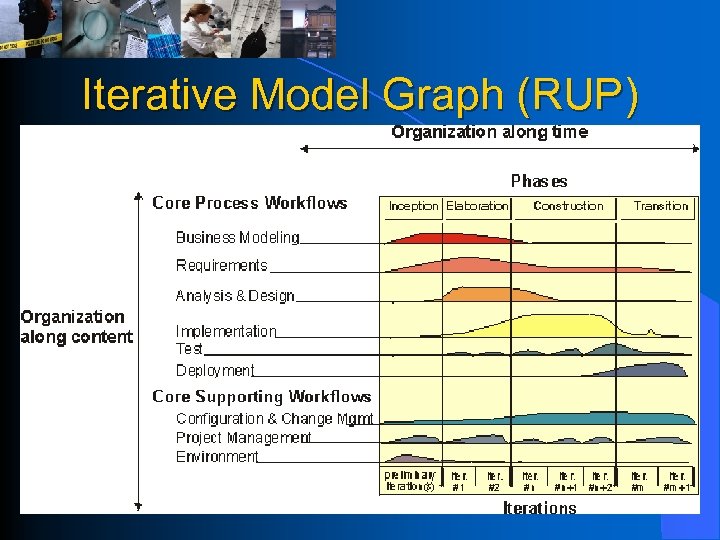
Iterative Model Graph (RUP)
Iterative Model Graph (RUP) Two Dimensions • The horizontal axis: Represents time and shows the dynamic aspect of the process as it is enacted, and it is expressed in terms of cycles, phases, iterations, and milestones. • The vertical axis: Represents the static aspect of the process: how it is described in terms of activities, artefacts, workers and workflows.
Iterative Model • The software lifecycle is broken into cycles, each cycle working on a new generation of the product. • The Rational Unified Process divides one development cycle in four consecutive phases: • • Inception phase Elaboration phase Construction phase Transition phase
Inception Phase • A Vision document: a general vision of the core project's requirements, key features, and main constraints; • An use-case model (10%-20% complete); • A project glossary (may optionally be partially expressed as a domain model); • A business case, which includes business context, success criteria (revenue projection, market recognition, and so on), and financial forecast; • A risk assessment analysis; • A project plan, showing phases and iterations; • A business model, if necessary; • One or several prototypes.
Inception Phase Lifecycle Objectives • Stakeholder concurrence on scope definition and cost/schedule estimates. • Requirements understanding as evidenced by the fidelity of the primary use cases. • Credibility of the cost/schedule estimates, priorities, risks, and development process. • Depth and breadth of any architectural prototype that was developed. • Actual expenditures versus planned expenditures.
Elaboration Phase • A use-case model (at least 80% complete) - all use cases and actors have been identified, and most use-case descriptions have been developed. • Supplementary requirements capturing the non functional requirements and any requirements that are not associated with a specific use case. • A Software Architecture Description. • An executable architectural prototype. • A revised risk list and a revised business case. • A development plan for the overall project, including the coarsegrained project plan, showing iterations" and evaluation criteria for each iteration. • An updated development case specifying the process to be used. • A preliminary user manual (optional… but, sooner the better!).
Elaboration Phase Lifecycle Objectives • Is the vision of the product stable? • Is the architecture stable? • Does the executable demonstration show that the major risk elements have been addressed and credibly resolved? • Is the plan for the construction phase sufficiently detailed and accurate? • Do all stakeholders agree that the current vision can be achieved if the current plan is executed to develop the complete system, in the context of the current architecture? • Is the actual resource expenditure versus planned expenditure acceptable?

Construction Phase • The software product integrated on the adequate platforms. • The user manuals. • A description of the current release. Lifecycle Objectives • Is this product release stable and mature enough to be deployed in the user community? • Are all stakeholders ready for the transition into the user community? • Are the actual resource expenditures versus planned expenditures still acceptable?
Transition Phase • "Beta testing" to validate the new system against user expectations • Parallel operation with a legacy system that it is replacing • Conversion of operational databases • Training of users and maintainers • Roll-out the product to the marketing, distribution, and sales teams
Transition Phase Lifecycle Objectives • Achieving user self-supportability • Achieving stakeholder concurrence that deployment baselines are complete and consistent with the evaluation criteria of the vision • Achieving final product baseline as rapidly and cost effectively as practical
Product Release! • Is the user satisfied? • Are the actual resources expenditures versus planned expenditures still acceptable?
Iterations and Versioning • Each phase in the Process can be further broken down into iterations. • An iteration is a complete development loop resulting in a release (internal or external) of an executable product, a subset of the final product under development, which grows incrementally from iteration to become the final system. • Therefore, through phases, it is vital to manage and synchronize documents and software versions.
Benefits of an Iterative Approach Compared to the traditional waterfall process, the iterative process has the following advantages: • • Risks are mitigated earlier; Change is more manageable ; Higher level of reuse; The project team can learn along the way; Better overall quality; The profits are higher; The customer is satisfied and… will bring you repeat business as well as good references.
What to Read… • • Dean Leffingwell, Don Widrig, Managing Software Requirements, Addison-Wesley, 2000, 491 p. Alistair Cockburn, Writing Effective Use Cases, Addison. Wesley, 2001, 270 p. Alan W. Brown (ed. ), Component-Based Software Engineering, IEEE Computer Society, Los Alamitos, CA, 1996, pp. 140. Ivar Jacobson, Magnus Christerson, Patrik Jonsson, and Gunnar Övergaard, Object-Oriented Software Engineering -A Use Case Driven Approach, Wokingham, England, Addison-Wesley, 1992, 582 p.
Questions ? Forensic Technology, Inc. Michel Daigle michel. daigle@fti-ibis. com www. forensictechnologyinc. com B • A • R • D, IBIS, Gunsights, Match. Point, VSN, and Crime. Seen are registered trademarks of Forensic Technology Incorporated. Oracle and the On Oracle logo are trademarks of Oracle Corporation. Windows 95, Windows 98, Windows ME, Windows 2000, Windows CE are trademarks of Microsoft; Microsoft is a registered trademark of Microsoft Corporation in the United States and other countries. Lims. Link is a registered trademark of Labtronics Incorporated. Rational, Rational Unified Process, RUP are trademark of the Rational Software Corporation.
Скачать презентацию Software Engineering Develop Software Precisely and Efficiently By
853bfc624bc6561e0bfa59f02f63d8f4.ppt