


 Скачать презентацию Society IT Computers not just for dorks
47c609c2a213e6691160073a46b1f9a3.ppt
- Количество слайдов: 24
 Society & IT Computers: not just for dorks sitting alone in front of glowing display monitors CSE/INFO 100. 3 Mar 2006. Presented by Sandra B. Fan, with lots of stuff taken from Larry Snyder & Shaun Kane
 Expecting the Unexpected Technology & computers have an impact on society and people’s social behavior, sometimes in unexpected ways Need to figure out why and deal with it.
 Outline We’ll look at three ways technology and society interact • Email/Netiquette • Intellectual Property • Accessibility
 The Problem With Email is part of our lives … but it’s not good for everything • Poor emotion, emphasis, alternating interactions, sarcasm … Email has (n)etiquette • 1 topic messages; include context w/ reply • Use ‘vacation’ auto-reply • Answer aging email in reverse arrival order • Get sender’s permission before forwarding • Distribution lists
 Intellectual Property (IP) What is IP? * An intellectual creation * E. g. books, music, images, software, designs for products/inventions/processes What is not IP? * Things like real estate, pets, cars, pencils, etc. You might own a physical copy of a music CD, but you don’t own the music.
 Software When you buy software, you don’t own software, you lease it * Use of software: site licenses * Can’t give/sell it * Shareware: try before you buy
 IP on the Web Who owns it? * Before internet, harder to share intellectual property because it was embodied in something physical * Now text, music, images, videos and other IP are all over the web * Sharing is a good thing * Stealing is not…how to resolve?
 Copyright: true or false? “I’m not making a profit, so it’s OK” * False, noncommercial use is still forbidden “The image was on a website, so it’s OK” * False, copyright may restrict your right to redistribute or use the image in another work “The item did not say it was copyrighted” * False, since 1989, all work is copyrighted by default “I bought the CD, so I can use it in my work” * False, buying a CD does not give you ownership rights
 What is Copyright? A way to give creator of some “work” incentive to create the work * Applies to artistic works only, not inventions/processes/etc. * Gives creator certain rights to their work * Work is automatically copyrighted when it is created, no need for © * Creator retains these rights for lifetime + 75 years
 What is Copyright? Copyright protects owner’s right to * Make a copy of the work * Create derivative works * Distribute/publish work, including electronically * Publicly perform the work * Publicly display the work
 When is it okay to use others’ work? Personal Use, e. g. * Print a copy of a webpage to read on bus * Making a backup copy of a CD Public Domain * After life+75 yrs, work falls into public domain * Anyone can use, for any purpose, even commercial
 Fair Use Allows limited use of copyrighted material, without permission, in certain ways, such as… * For educational or scholarly purposes * Limited quotations for review or criticism * For parody
 Fair Use Fair use is determined by: * the purpose and character of the use (including whether commercial or nonprofit educational) * Nature of copyrighted work * How much of work is being used * Effect on market value of work
 Copyright Infringement Don’t violate people’s copyright! * You can be sued * You can be fined * It’s just not nice Instead… * Ask for permission * Create your own * Creative Commons (http: //creativecommons. org) lets you easily and legally find shared files, and share your files, under more flexible copyright licenses (e. g. okay to use as long as non-commercial, or as long as you cite original creator, etc. )
 Resources How to determine if it’s fair use: * University of Texas: the Four-Factor Test (http: //www. utsystem. edu/OGC/Intelle ctual. Property/copypol 2. htm) * Copyright Management Center: Fair Use Checklist (http: //www. copyright. iupui. edu/check list. htm)
 Accessibility Internet has allowed many people with disabilities access to information they never could have had before. However, there are still barriers, but the great thing about technology is that these barriers can be easily overcome.
 What is accessibility? * Accessibility is the degree to which technology is usable by people with disabilities * Universal access is the philosophy of designing technology and information to be usable by all people without specialized adaptations
 Why do we care about accessibility? * Many people with visual, hearing, cognitive, motor disabilities in the US • Non-accessible products limit your audience * It’s the law • Government-funded websites must meet accessibility guidelines * Accessible design often just makes your webpage better • Easier to use webpages are good for everyone
 Color blindness Inability to distinguish between certain colors * Affects 10% of males * Often have problems with red and green
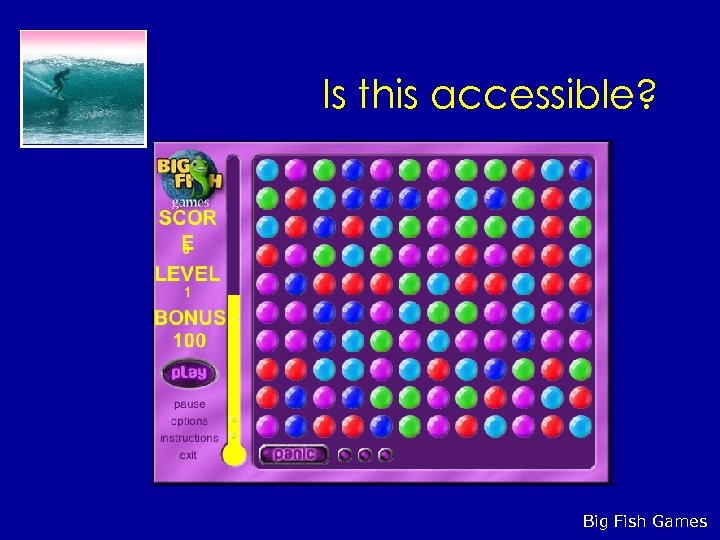 Is this accessible? Big Fish Games
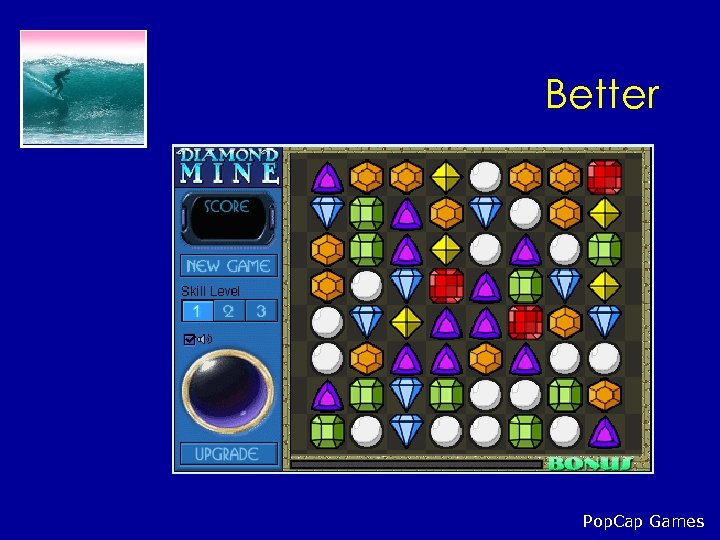 Better Pop. Cap Games
 How do people with disabilities access the web? Blindness * Use screen reader • Cannot scan page easily • Cannot view images • Must read page linearly * Screen reader simulation (http: //www. webaim. org/simulations/screenreader) Impaired motor skills * Specialized input device, like mouth stick or eye tracker • May be inaccurate or slow to use
 Solutions * Accessibility checklist: • http: //www. w 3. org/TR/WAIWEBCONTENT/checkpoint-list. html * Follow web standards • World Wide Web Consortium: http: //www. w 3. org/ * Structure your documents • Use headings (
,
), etc. to logically organize content • Don’t use large amounts of text
 Solutions * Use alt tags for images •
 * Make sure your webpage doesn’t depend on stylistic elements like color and fonts, use CSS for that • http: //www. w 3. org/Style/CSS/ * Tables should have row & column headers, and shouldn’t be used for stylistic formatting