 Скачать презентацию Slides for Chapter 16 Mobile and Ubiquitous Computing
9b6d2c9255c547078243e3aa5f6561d8.ppt
- Количество слайдов: 14




Slides for Chapter 16: Mobile and Ubiquitous Computing From Coulouris, Dollimore and Kindberg Distributed Systems: Concepts and Design Edition 4, © Addison-Wesley 2005
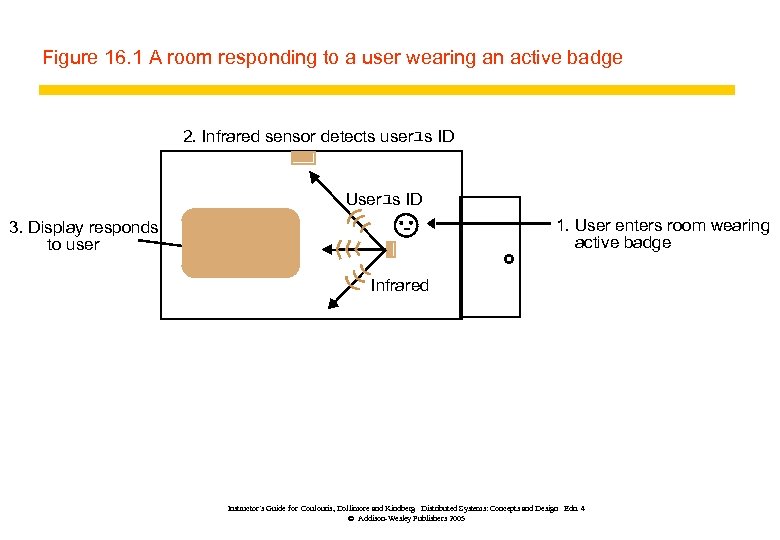
Figure 16. 1 A room responding to a user wearing an active badge 2. Infrared sensor detects userユs ID Userユs ID 3. Display responds to user 1. User enters room wearing active badge Hello Roy Infrared Instructor’s Guide for Coulouris, Dollimore and Kindberg Distributed Systems: Concepts and Design Edn. 4 © Addison-Wesley Publishers 2005
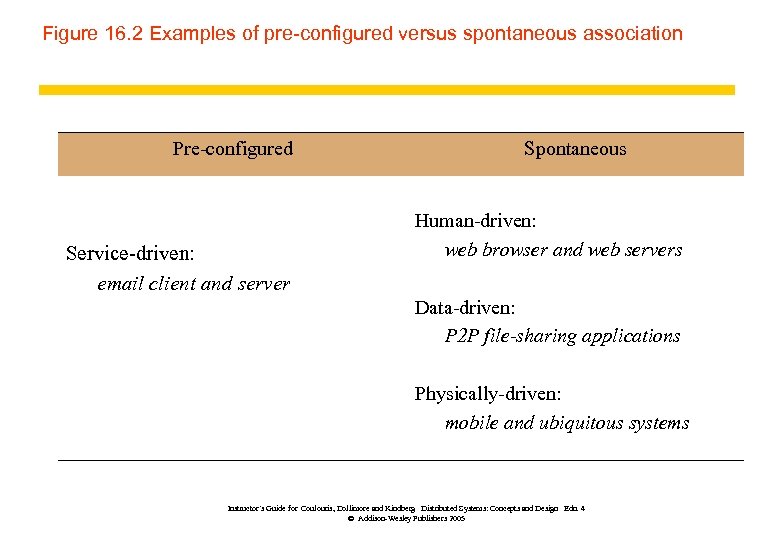
Figure 16. 2 Examples of pre-configured versus spontaneous association Pre-configured Service-driven: email client and server Spontaneous Human-driven: web browser and web servers Data-driven: P 2 P file-sharing applications Physically-driven: mobile and ubiquitous systems Instructor’s Guide for Coulouris, Dollimore and Kindberg Distributed Systems: Concepts and Design Edn. 4 © Addison-Wesley Publishers 2005
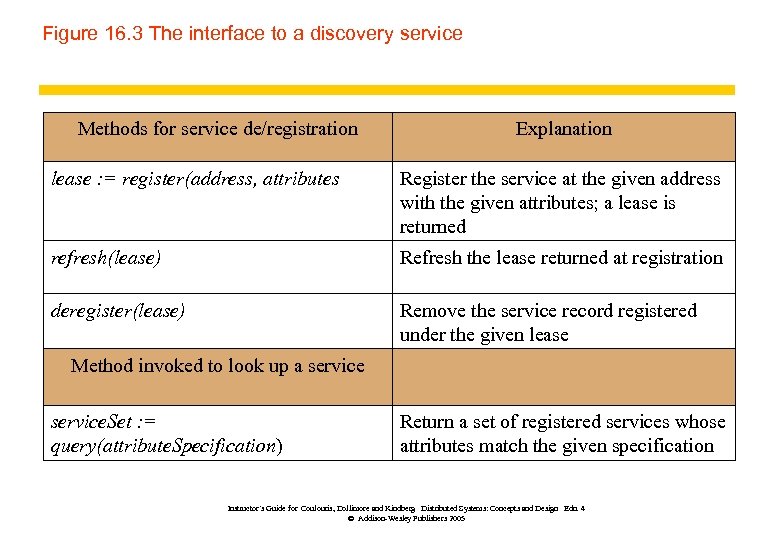
Figure 16. 3 The interface to a discovery service Methods for service de/registration Explanation lease : = register(address, attributes Register the service at the given address with the given attributes; a lease is returned refresh(lease) Refresh the lease returned at registration deregister(lease) Remove the service record registered under the given lease Method invoked to look up a service. Set : = query(attribute. Specification) Return a set of registered services whose attributes match the given specification Instructor’s Guide for Coulouris, Dollimore and Kindberg Distributed Systems: Concepts and Design Edn. 4 © Addison-Wesley Publishers 2005
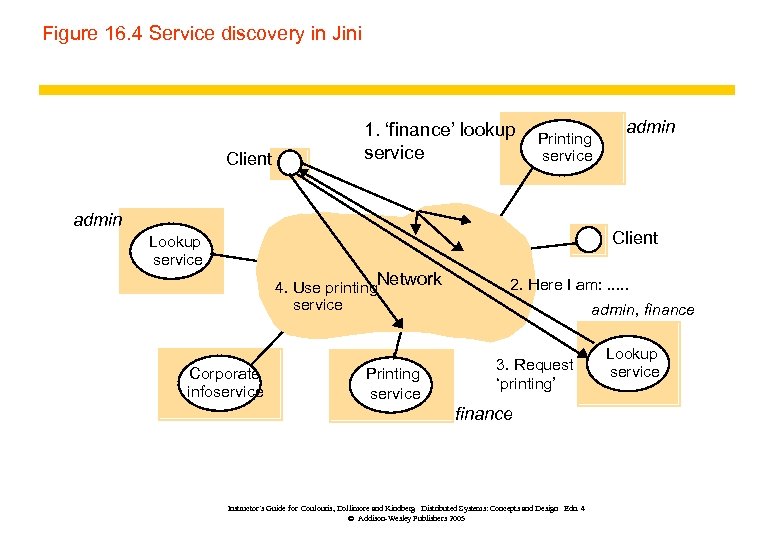
Figure 16. 4 Service discovery in Jini Client 1. ‘finance’ lookup service Printing service admin Client Lookup service Network 4. Use printing service Corporate infoservice Printing service 2. Here I am: . . . admin, finance 3. Request ‘printing’ finance Instructor’s Guide for Coulouris, Dollimore and Kindberg Distributed Systems: Concepts and Design Edn. 4 © Addison-Wesley Publishers 2005 Lookup service
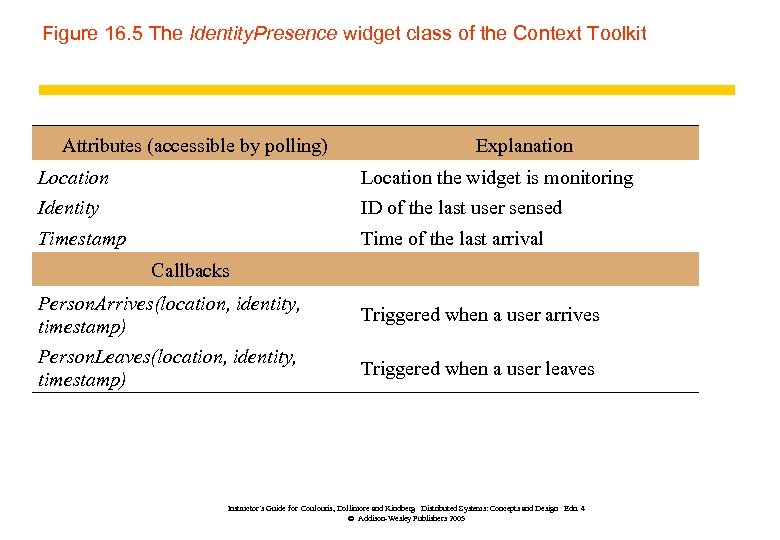
Figure 16. 5 The Identity. Presence widget class of the Context Toolkit Attributes (accessible by polling) Explanation Location the widget is monitoring Identity ID of the last user sensed Timestamp Time of the last arrival Callbacks Person. Arrives(location, identity, timestamp) Triggered when a user arrives Person. Leaves(location, identity, timestamp) Triggered when a user leaves Instructor’s Guide for Coulouris, Dollimore and Kindberg Distributed Systems: Concepts and Design Edn. 4 © Addison-Wesley Publishers 2005
Figure 16. 6 A Person. Finder widget constructed using Identity. Presence widgets Instructor’s Guide for Coulouris, Dollimore and Kindberg Distributed Systems: Concepts and Design Edn. 4 © Addison-Wesley Publishers 2005
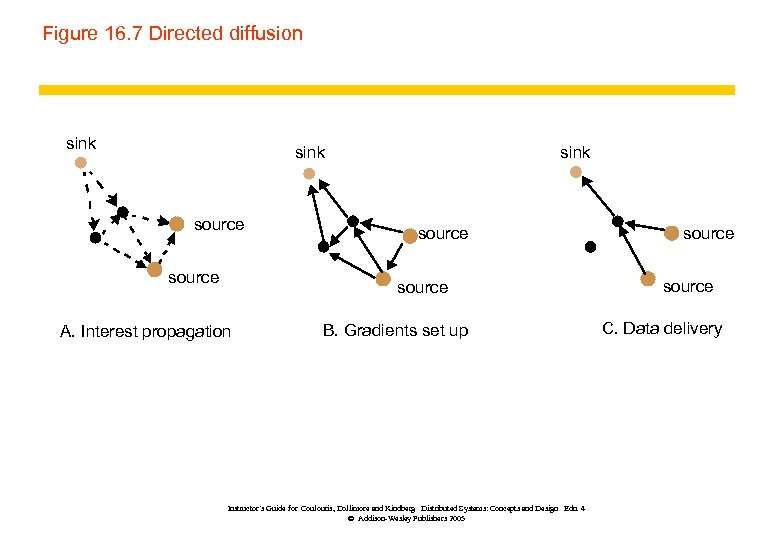
Figure 16. 7 Directed diffusion sink source A. Interest propagation B. Gradients set up Instructor’s Guide for Coulouris, Dollimore and Kindberg Distributed Systems: Concepts and Design Edn. 4 © Addison-Wesley Publishers 2005 source C. Data delivery
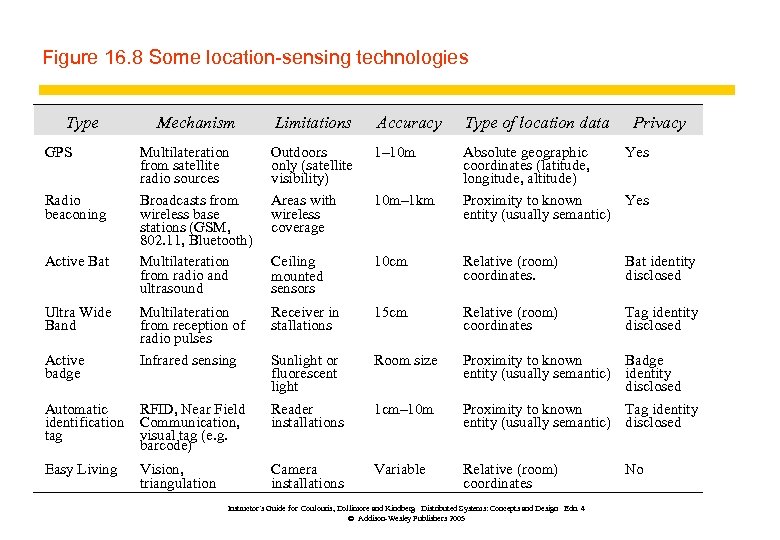
Figure 16. 8 Some location-sensing technologies Type Mechanism Limitations Accuracy Type of location data Multilateration from satellite radio sources Broadcasts from wireless base stations (GSM, 802. 11, Bluetooth) Multilateration from radio and ultrasound Outdoors only (satellite visibility) Areas with wireless coverage 1– 10 m Absolute geographic Yes coordinates (latitude, longitude, altitude) Proximity to known Yes entity (usually semantic) Ceiling mounted sensors 10 cm Relative (room) coordinates. Bat identity disclosed Multilateration from reception of radio pulses Infrared sensing Receiver in stallations 15 cm Relative (room) coordinates Tag identity disclosed Sunlight or fluorescent light Room size Proximity to known Badge entity (usually semantic) identity disclosed Automatic identification tag RFID, Near Field Communication, visual tag (e. g. barcode) Reader installations 1 cm– 10 m Proximity to known Tag identity (usually semantic) disclosed Easy Living Vision, triangulation Camera installations Variable Relative (room) coordinates GPS Radio beaconing Active Bat Ultra Wide Band Active badge 10 m– 1 km Instructor’s Guide for Coulouris, Dollimore and Kindberg Distributed Systems: Concepts and Design Edn. 4 © Addison-Wesley Publishers 2005 Privacy No
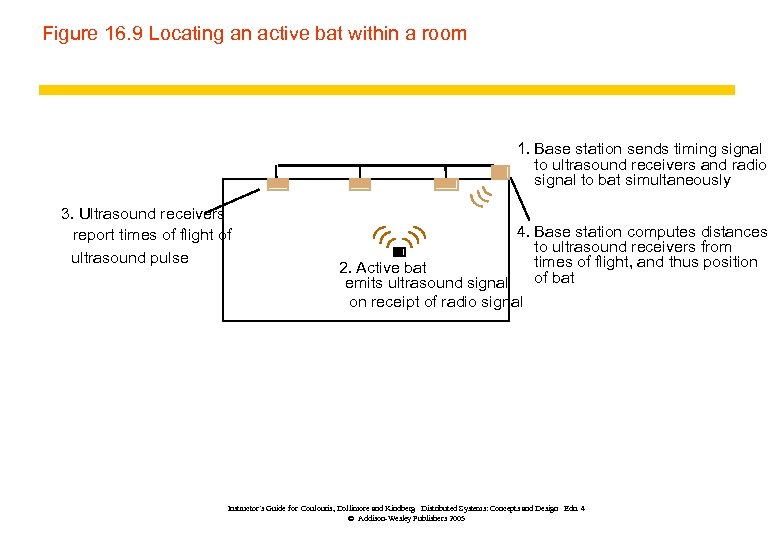
Figure 16. 9 Locating an active bat within a room 1. Base station sends timing signal to ultrasound receivers and radio signal to bat simultaneously 3. Ultrasound receivers report times of flight of ultrasound pulse 4. Base station computes distances to ultrasound receivers from times of flight, and thus position 2. Active bat of bat emits ultrasound signal on receipt of radio signal Instructor’s Guide for Coulouris, Dollimore and Kindberg Distributed Systems: Concepts and Design Edn. 4 © Addison-Wesley Publishers 2005
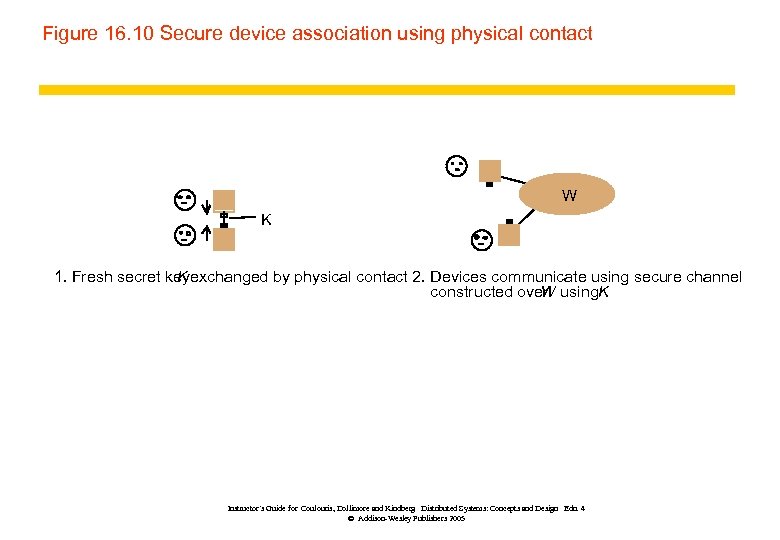
Figure 16. 10 Secure device association using physical contact W K 1. Fresh secret keyexchanged by physical contact 2. Devices communicate using secure channel K constructed over using. K W Instructor’s Guide for Coulouris, Dollimore and Kindberg Distributed Systems: Concepts and Design Edn. 4 © Addison-Wesley Publishers 2005
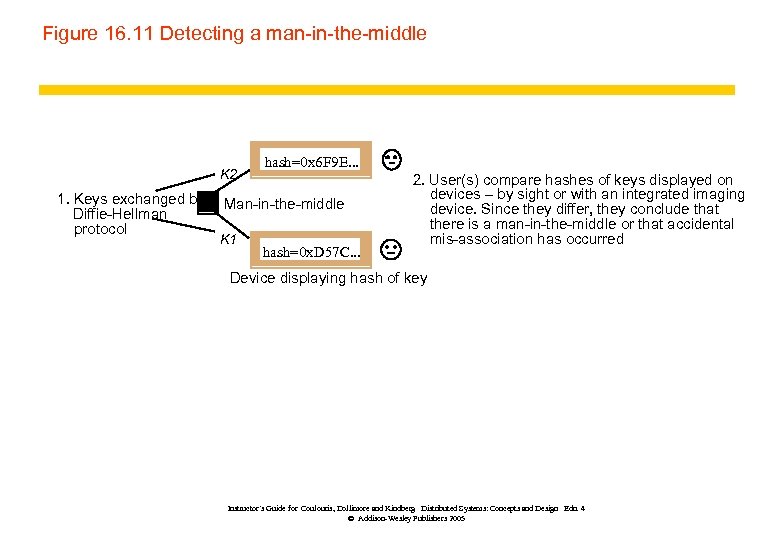
Figure 16. 11 Detecting a man-in-the-middle K 2 1. Keys exchanged by Diffie-Hellman protocol hash=0 x 6 F 9 E. . . Man-in-the-middle K 1 hash=0 x. D 57 C. . . 2. User(s) compare hashes of keys displayed on devices – by sight or with an integrated imaging device. Since they differ, they conclude that there is a man-in-the-middle or that accidental mis-association has occurred Device displaying hash of key Instructor’s Guide for Coulouris, Dollimore and Kindberg Distributed Systems: Concepts and Design Edn. 4 © Addison-Wesley Publishers 2005
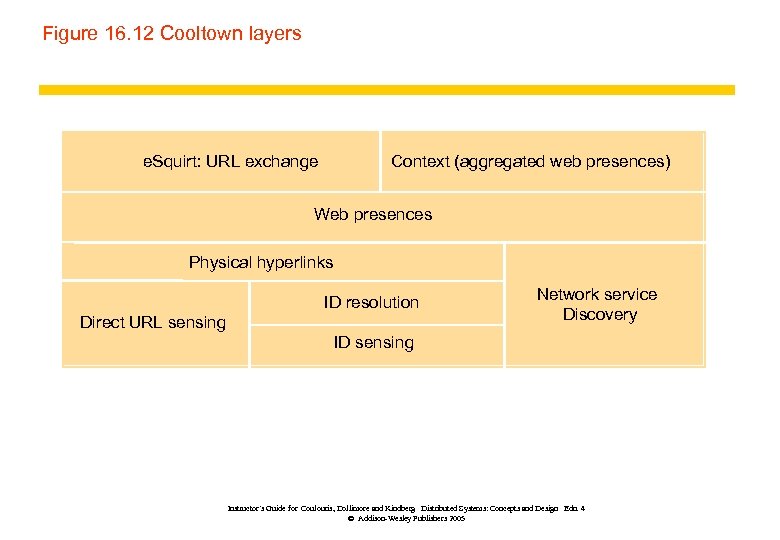
Figure 16. 12 Cooltown layers e. Squirt: URL exchange Context (aggregated web presences) Web presences Physical hyperlinks ID resolution Direct URL sensing Network service Discovery ID sensing Instructor’s Guide for Coulouris, Dollimore and Kindberg Distributed Systems: Concepts and Design Edn. 4 © Addison-Wesley Publishers 2005
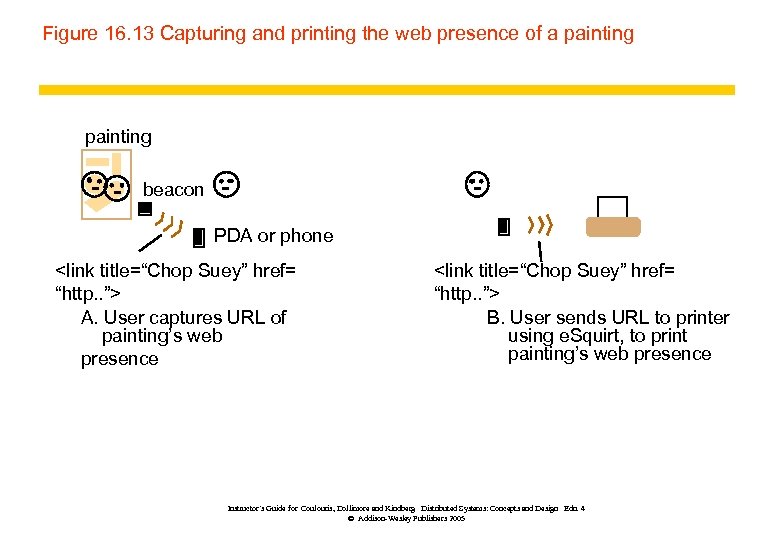
Figure 16. 13 Capturing and printing the web presence of a painting beacon PDA or phone <link title=“Chop Suey” href= “http. . ”> A. User captures URL of painting’s web presence <link title=“Chop Suey” href= “http. . ”> B. User sends URL to printer using e. Squirt, to print painting’s web presence Instructor’s Guide for Coulouris, Dollimore and Kindberg Distributed Systems: Concepts and Design Edn. 4 © Addison-Wesley Publishers 2005
Скачать презентацию Slides for Chapter 16 Mobile and Ubiquitous Computing
9b6d2c9255c547078243e3aa5f6561d8.ppt