


 Скачать презентацию Slide 5 -1 Copyright 2004 Pearson Education
fa7b9759102dc79683e42f720386df16.ppt
- Количество слайдов: 65
 Slide 5 -1 Copyright © 2004 Pearson Education, Inc. Operating Systems: A Modern Perspective, Chapter 5
 Slide 5 -2 Device Management Copyright © 2004 Pearson Education, Inc. 5 Operating Systems: A Modern Perspective, Chapter 5
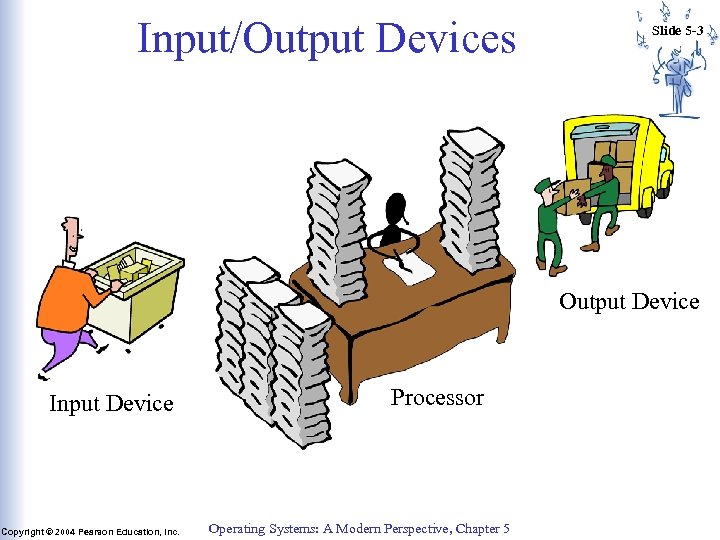 Input/Output Devices Slide 5 -3 Output Device Input Device Copyright © 2004 Pearson Education, Inc. Processor Operating Systems: A Modern Perspective, Chapter 5
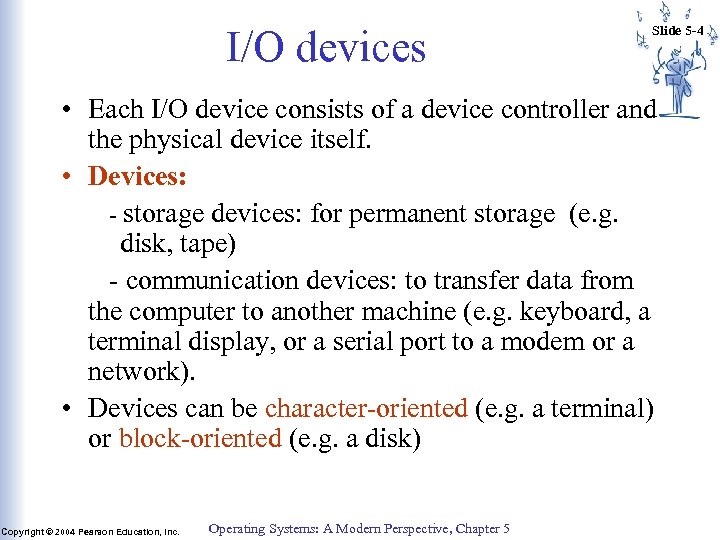 I/O devices Slide 5 -4 • Each I/O device consists of a device controller and the physical device itself. • Devices: - storage devices: for permanent storage (e. g. disk, tape) - communication devices: to transfer data from the computer to another machine (e. g. keyboard, a terminal display, or a serial port to a modem or a network). • Devices can be character-oriented (e. g. a terminal) or block-oriented (e. g. a disk) Copyright © 2004 Pearson Education, Inc. Operating Systems: A Modern Perspective, Chapter 5
 I/O Devices (cont. ) • Device controller: hardware that connects the device to the computer’s address and data bus: – continuously monitors and controls the operation of the device. – provides an interface to the computer: a set of components that the CPU can manipulate to perform I/O operations. Need to have a standard interface so that devices can be interchanged. Copyright © 2004 Pearson Education, Inc. Operating Systems: A Modern Perspective, Chapter 5 Slide 5 -5
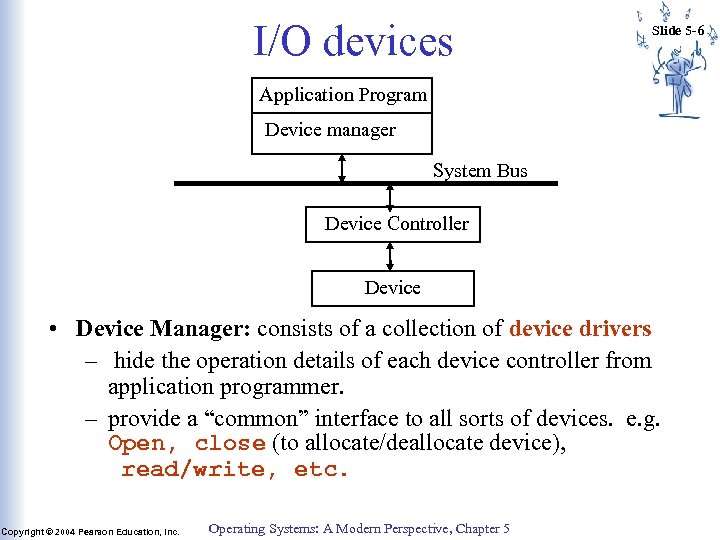 I/O devices Slide 5 -6 Application Program Device manager System Bus Device Controller Device • Device Manager: consists of a collection of device drivers – hide the operation details of each device controller from application programmer. – provide a “common” interface to all sorts of devices. e. g. Open, close (to allocate/deallocate device), read/write, etc. Copyright © 2004 Pearson Education, Inc. Operating Systems: A Modern Perspective, Chapter 5
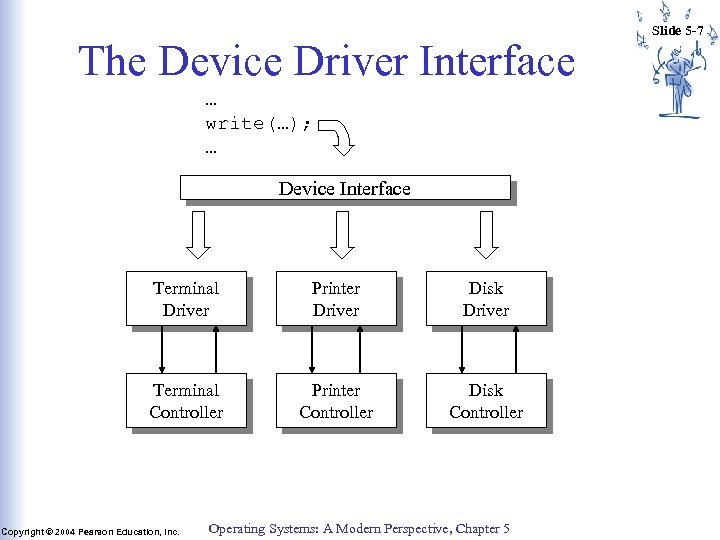 The Device Driver Interface … write(…); … Device Interface Terminal Driver Printer Driver Disk Driver Terminal Controller Printer Controller Disk Controller Copyright © 2004 Pearson Education, Inc. Operating Systems: A Modern Perspective, Chapter 5 Slide 5 -7
 Slide 5 -8 Infrastructure and device drivers • Device Manager is composed of device manager infrastructure (device independent part) and a collection of device drivers (device dependent part) • Infrastructure: – exports the common device interface as system calls – Routes calls on the generic interface to specific device driver functions Copyright © 2004 Pearson Education, Inc. Operating Systems: A Modern Perspective, Chapter 5
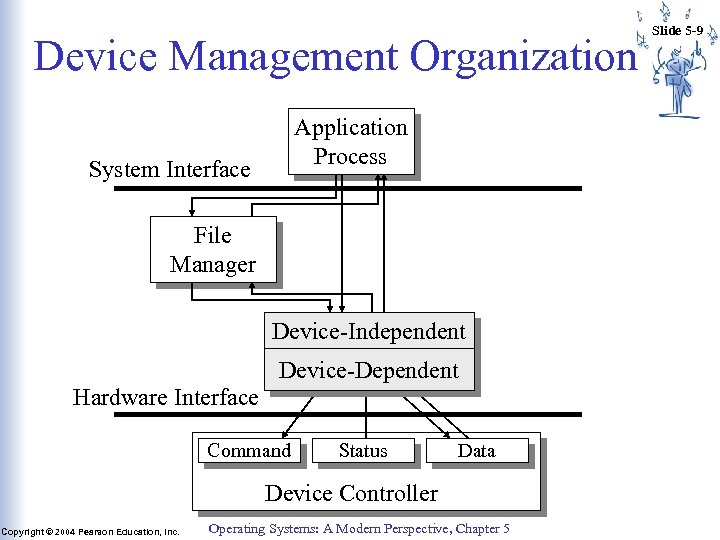 Device Management Organization Application Process System Interface File Manager Device-Independent Device-Dependent Hardware Interface Command Status Data Device Controller Copyright © 2004 Pearson Education, Inc. Operating Systems: A Modern Perspective, Chapter 5 Slide 5 -9
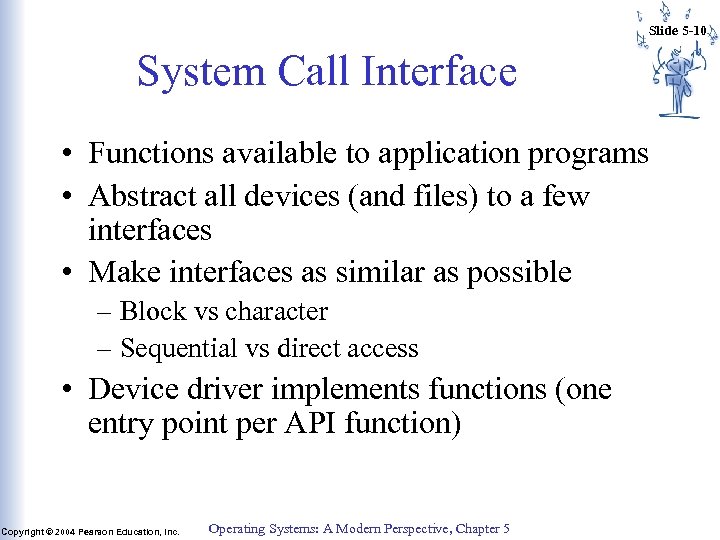 Slide 5 -10 System Call Interface • Functions available to application programs • Abstract all devices (and files) to a few interfaces • Make interfaces as similar as possible – Block vs character – Sequential vs direct access • Device driver implements functions (one entry point per API function) Copyright © 2004 Pearson Education, Inc. Operating Systems: A Modern Perspective, Chapter 5
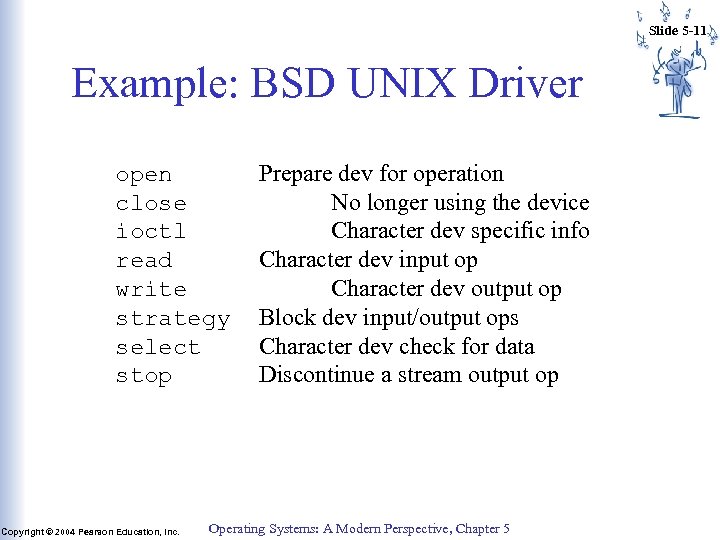 Slide 5 -11 Example: BSD UNIX Driver open close ioctl read write strategy select stop Copyright © 2004 Pearson Education, Inc. Prepare dev for operation No longer using the device Character dev specific info Character dev input op Character dev output op Block dev input/output ops Character dev check for data Discontinue a stream output op Operating Systems: A Modern Perspective, Chapter 5
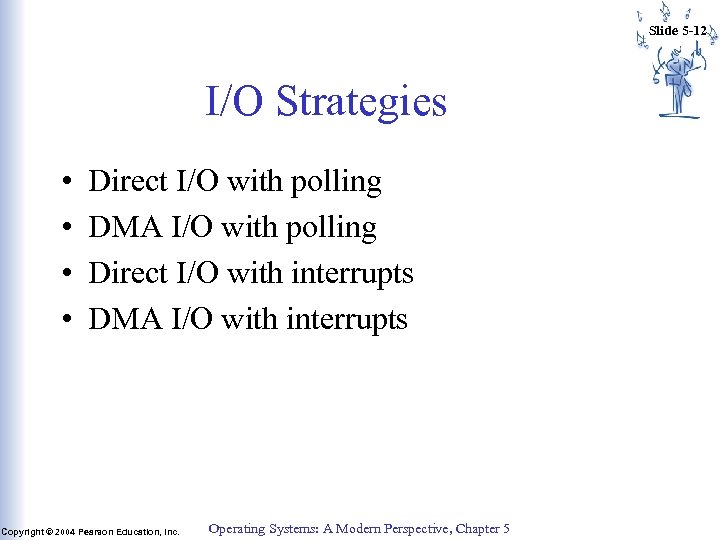 Slide 5 -12 I/O Strategies • • Direct I/O with polling DMA I/O with polling Direct I/O with interrupts DMA I/O with interrupts Copyright © 2004 Pearson Education, Inc. Operating Systems: A Modern Perspective, Chapter 5
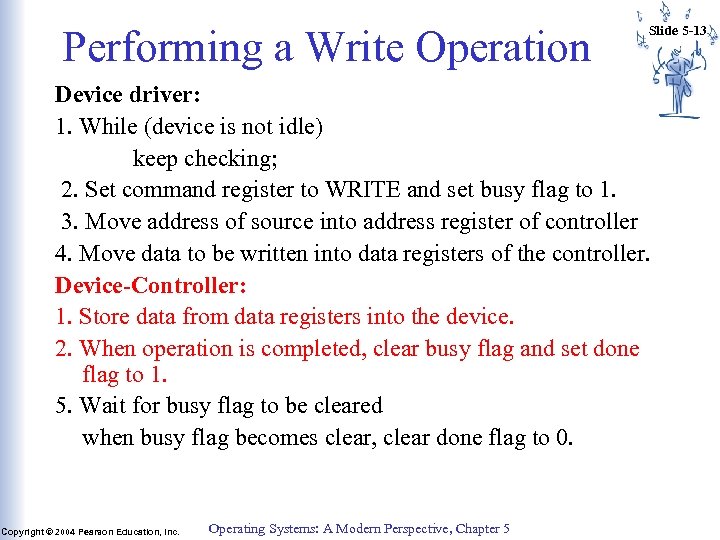 Performing a Write Operation Slide 5 -13 Device driver: 1. While (device is not idle) keep checking; 2. Set command register to WRITE and set busy flag to 1. 3. Move address of source into address register of controller 4. Move data to be written into data registers of the controller. Device-Controller: 1. Store data from data registers into the device. 2. When operation is completed, clear busy flag and set done flag to 1. 5. Wait for busy flag to be cleared when busy flag becomes clear, clear done flag to 0. Copyright © 2004 Pearson Education, Inc. Operating Systems: A Modern Perspective, Chapter 5
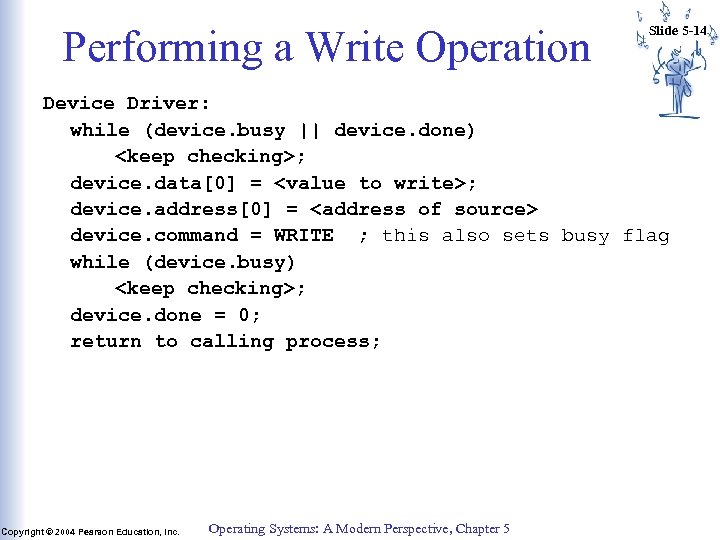 Performing a Write Operation Slide 5 -14 Device Driver: while (device. busy || device. done)
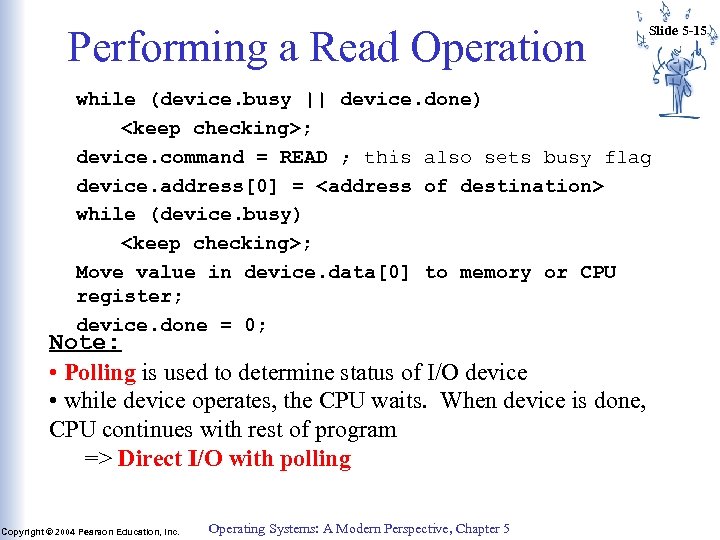 Performing a Read Operation Slide 5 -15 while (device. busy || device. done)
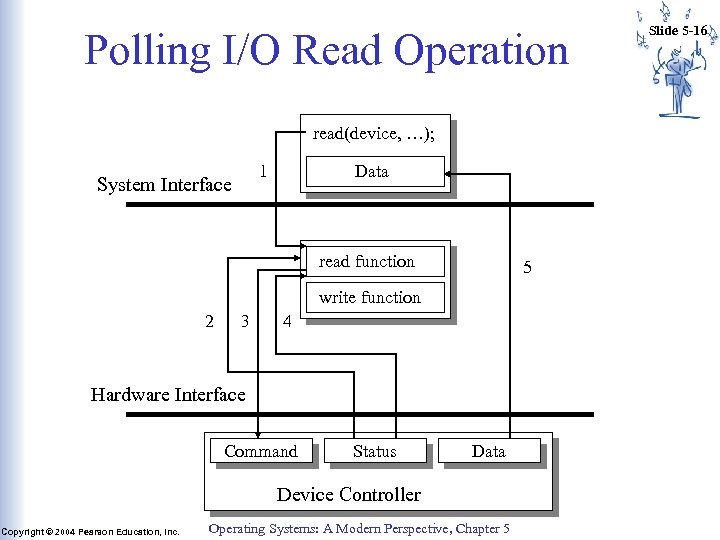 Polling I/O Read Operation read(device, …); 1 System Interface Data read function 5 write function 2 3 4 Hardware Interface Command Status Data Device Controller Copyright © 2004 Pearson Education, Inc. Operating Systems: A Modern Perspective, Chapter 5 Slide 5 -16
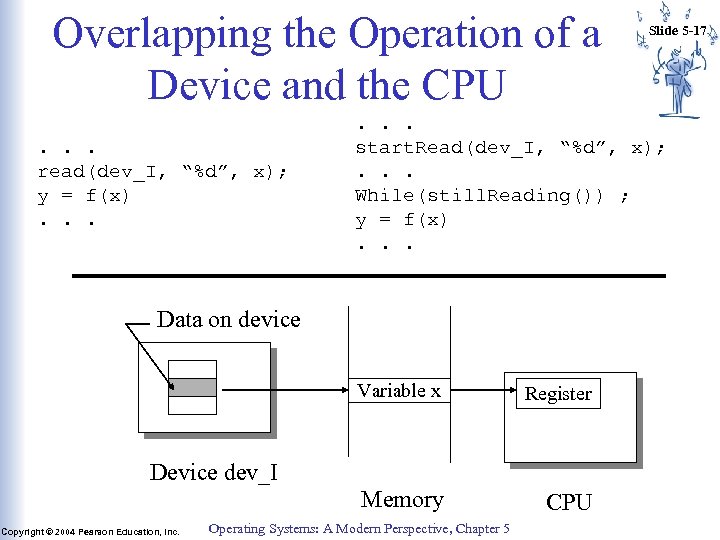 Overlapping the Operation of a Device and the CPU. . . read(dev_I, “%d”, x); y = f(x). . . start. Read(dev_I, “%d”, x); . . . While(still. Reading()) ; y = f(x). . . Data on device Variable x Register Memory CPU Device dev_I Copyright © 2004 Pearson Education, Inc. Slide 5 -17 Operating Systems: A Modern Perspective, Chapter 5
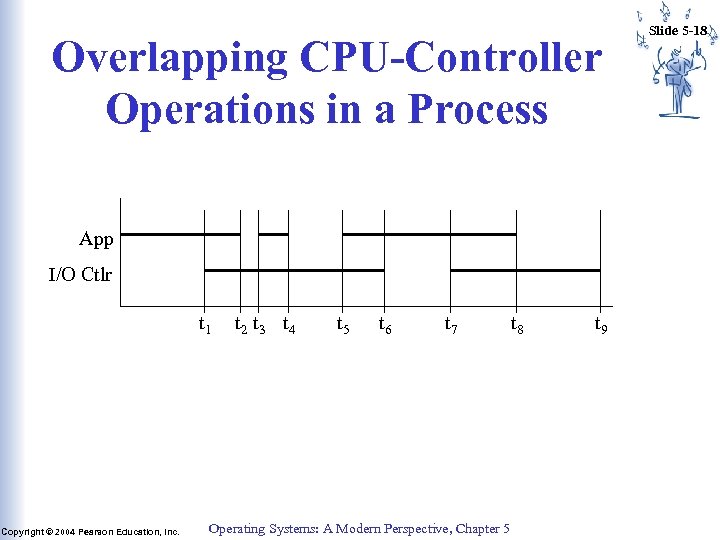 Overlapping CPU-Controller Operations in a Process App I/O Ctlr t 1 Copyright © 2004 Pearson Education, Inc. t 2 t 3 t 4 t 5 t 6 t 7 Operating Systems: A Modern Perspective, Chapter 5 t 8 t 9 Slide 5 -18
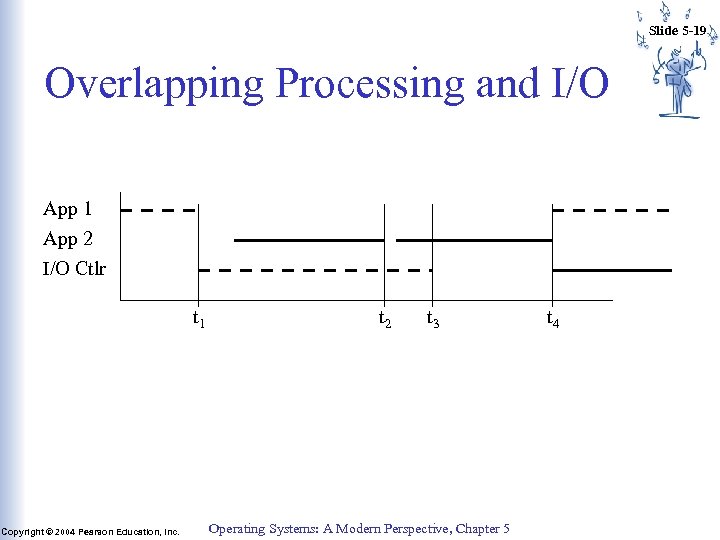 Slide 5 -19 Overlapping Processing and I/O App 1 App 2 I/O Ctlr t 1 Copyright © 2004 Pearson Education, Inc. t 2 t 3 Operating Systems: A Modern Perspective, Chapter 5 t 4
 Interrupt Driven I/O Slide 5 -20 • Instead of having the CPU continuously poll status register of I/O device(s), have I/O device notify CPU when it has completed an I/O operation. – CPU initiates an I/O operation as described before – as I/O device performs the operation, CPU is switched to another process (thru the process scheduler). – When the I/O device is done, it notifies the CPU by sending it an interrupt signal. – The CPU switches control to an interrupt handler to service the interrupt. – The interrupt handler completes I/O operation and returns control to interrupted process. Copyright © 2004 Pearson Education, Inc. Operating Systems: A Modern Perspective, Chapter 5
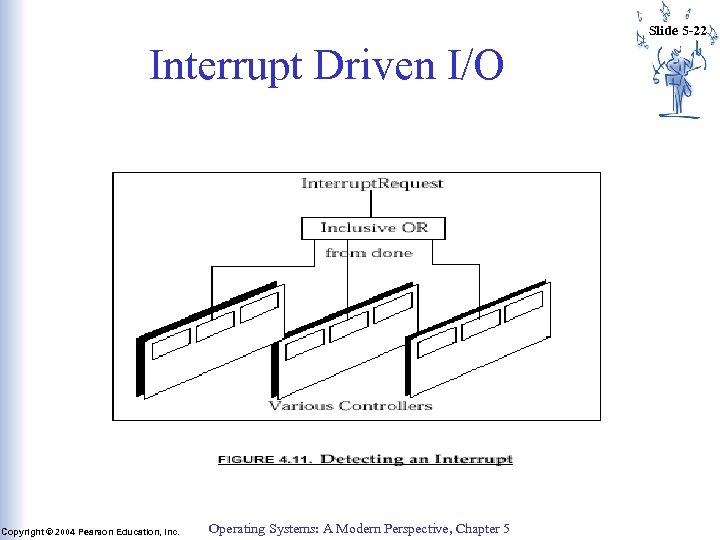
 Interrupt Driven I/O • An Interrupt. Request flag is incorporated in the CPU • Whenever an I/O device has completed its I/O operation, it sets the Interrupt. Request flag to 1. • Conceptually, this can be done by connecting the done flags of all I/O controllers to the Interrupt. Request flag through an OR gate. • Control unit of the CPU must check the Interrupt. Request flag before it starts each instruction. If flag is set, it jumps to an interrupt handler program. Copyright © 2004 Pearson Education, Inc. Operating Systems: A Modern Perspective, Chapter 5 Slide 5 -21
 Slide 5 -22 Interrupt Driven I/O Copyright © 2004 Pearson Education, Inc. Operating Systems: A Modern Perspective, Chapter 5
![Fetch-Execute Cycle with Interrupt PC = <Machine-Start-Address> ; IR = Memory[PC] ; halt. Flag](https://present5.com/presentation/fa7b9759102dc79683e42f720386df16/image-23.jpg "Fetch-Execute Cycle with Interrupt PC = <Machine-Start-Address> ; IR = Memory[PC] ; halt. Flag") Fetch-Execute Cycle with Interrupt PC =
Fetch-Execute Cycle with Interrupt PC =
 Slide 5 -24 Interrupt Handler The Interrupt Handler is a program that is part of the device manager. Each time it is called it does the following: 1. Save the state of the interrupted process: save the contents of CPU registers (all registers) and load CPU registers with its own values: Context Switch 2. Determine which I/O device caused the interrupt 3. Branch to the device driver associated with that device. Copyright © 2004 Pearson Education, Inc. Operating Systems: A Modern Perspective, Chapter 5
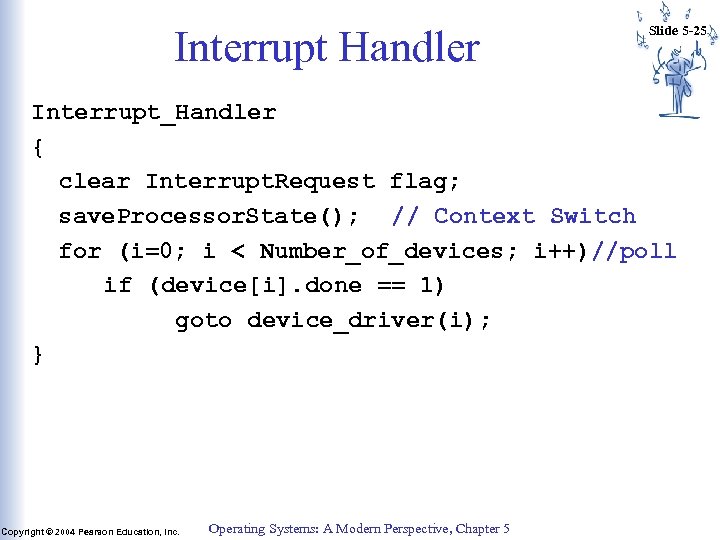 Interrupt Handler Slide 5 -25 Interrupt_Handler { clear Interrupt. Request flag; save. Processor. State(); // Context Switch for (i=0; i < Number_of_devices; i++)//poll if (device[i]. done == 1) goto device_driver(i); } Copyright © 2004 Pearson Education, Inc. Operating Systems: A Modern Perspective, Chapter 5
 Slide 5 -26 Device Driver • The device driver is a program that is part of the device manager. When called, it does the following: – determine the cause of the interrupt – complete the I/O operation – clear the done flag of the device controller status register – restore the state of the interrupted process context switch – return control to interrupted process Copyright © 2004 Pearson Education, Inc. Operating Systems: A Modern Perspective, Chapter 5
 Interrupt Vector Slide 5 -27 How can we avoid having the interrupt handler poll all the devices to determine which one caused the interrupt? • Replace the Interrupt. Request flag with an interrupt vector, ie. a collection of flags, one flag for each device. • Replace the OR gate with a vector of interrupt request lines one for each device. • An Interrupt Vector Table: a table of pointers to device drivers : entry i of the table stores the address of device driver i. • The interrupt vector table is generally stored at a fixed location in memory (e. g. first 100 locations). Copyright © 2004 Pearson Education, Inc. Operating Systems: A Modern Perspective, Chapter 5
 Race Condition Slide 5 -28 What if a second interrupt occurs while the first is being processed? two possibilities: 1. Disable all other interrupts while an interrupt is being processed – use an Interrupt. Enabled (IE) flag in CPU – provide instructions to set and clear the (IE) flag – Control unit must check the (IE) flag before processing any interrupt. if (Interrupt. Request & Interrupt. Enabled ) { disable. Interrupts(); save current PC and other CPU regs; PC = address of interrupt handler; } Copyright © 2004 Pearson Education, Inc. Operating Systems: A Modern Perspective, Chapter 5
 Slide 5 -29 Race Condition 2. Enable other interrupts while an interrupt is being processed – Must use system stack to save PC and state of the interrupted process. – Must use a priority scheme. – Part of the interrupt handler routine should not be interrupted. • Most CPUs have two types of interrupts: – maskable interrupts: can be interrupted – un-maskable interrupts: can not be interrupted Copyright © 2004 Pearson Education, Inc. Operating Systems: A Modern Perspective, Chapter 5
 Performing a Read Operation • • Slide 5 -30 Read(device_i, "%d", x) CPU is executing some process (say process A) Process A makes a request for a read operation to device i. This is done thru a system call to the OS The device manager of the OS check validity of system call and if valid, invokes the device driver of device i. The device driver queries the control status register (CSR) of device i to determine whether the device is idle. If the device is busy, the driver waits for it to become idle. Device driver may also have a queue of waiting I/O requests. Copyright © 2004 Pearson Education, Inc. Operating Systems: A Modern Perspective, Chapter 5
 Performing a Read Operation (cont. ) • The driver stores a READ command into the controller’s Command register ==> device Busy bit set to 1. • The CPU is switched to another process B while the I/O operation is being processed (device driver invokes CPU scheduler) • Eventually the device completes the READ operation and raises an interrupt to the CPU • The CPU is switched from process B to the interrupt handler. Copyright © 2004 Pearson Education, Inc. Operating Systems: A Modern Perspective, Chapter 5 Slide 5 -31
 Performing a Read Operation (cont. ) Slide 5 -32 • The interrupt handler determines which device caused the interrupt and calls the device driver of device_i. • The device driver determines what needs to be done and copies the contents of the controller’s data register(s) into the process space of process A (how does the device driver know which process? ) • when the read operation is done, the device driver clears the done flag of the device controller and returns control to the interrupted process (i. e. process B) Copyright © 2004 Pearson Education, Inc. Operating Systems: A Modern Perspective, Chapter 5
 Device Status Table Slide 5 -33 • While an I/O operation is being done, the CPU may be switched to some other process (other than the one that requested the I/O operation) • At any point of time, there may be several I/O requests pending by various processes • When a device driver is called to finish an I/O operation, how does it know to which process the I/O operation belongs? • Device status table: a table containing information about each I/O device. Copyright © 2004 Pearson Education, Inc. Operating Systems: A Modern Perspective, Chapter 5
 Slide 5 -34 Device Status Table (cont. ) • Contains an entry for each I/O device. • Each entry contains such information as: – device type, address, state (idle, busy, not functioning, etc. ) – if device is busy: • the type of operation being performed by that device • the process ID of the process that issued the operation • for some devices: a queue of waiting requests for that device Copyright © 2004 Pearson Education, Inc. Operating Systems: A Modern Perspective, Chapter 5
 Performing Read Operation Slide 5 -35 • CPU is executing some process (say process A) • Process A makes a request for an read operation to device i. This is done thru a system call to the OS • The device manager of the OS, invokes the device driver of device i. • The device driver queries the CSR of device i to determine whether device i is idle. If the device is busy, the driver waits for it to become idle (or queues process if there is a queue). Else if the device is idle: • If the device is idle: The driver stores a read command into the controller’s Command register ==> device Busy bit set to 1. Copyright © 2004 Pearson Education, Inc. Operating Systems: A Modern Perspective, Chapter 5
 Performing Read Operation (cont. ) Slide 5 -36 • The driver saves information regarding the I/O operation in the device status table. • The status of process A is changed from running to blocked • The device driver invokes the CPU scheduler, which switches the CPU to another process B • Eventually the device completes the operation and interrupts the CPU • The CPU is switched to the interrupt handler • Interrupt handler determine which device caused the interrupt and calls the device driver of device i. • The device driver retrieves information about the I/O operation on device i from the device status table ==> process A issued I/O operation Copyright © 2004 Pearson Education, Inc. Operating Systems: A Modern Perspective, Chapter 5
 Performing Read Operation (cont. ) • The device driver copies the contents of the controller’s data register(s) into the process space of process A. • Process A status should be changed from blocked to ready. • If there is a queue of requests for device_I, dispatch next request. • the device driver returns control to the interrupted process (i. e. process B). Copyright © 2004 Pearson Education, Inc. Operating Systems: A Modern Perspective, Chapter 5 Slide 5 -37
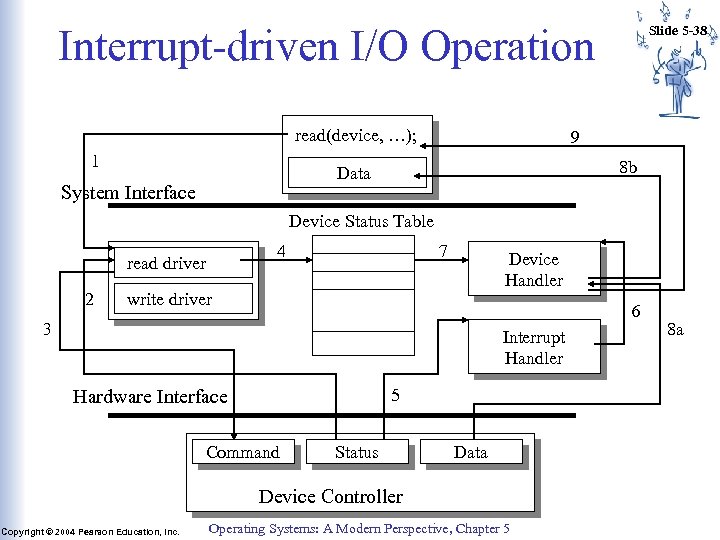 Interrupt-driven I/O Operation read(device, …); 1 9 8 b Data System Interface Slide 5 -38 Device Status Table 4 read driver 2 7 Device Handler write driver 6 3 Interrupt Handler 5 Hardware Interface Command Status Data Device Controller Copyright © 2004 Pearson Education, Inc. Operating Systems: A Modern Perspective, Chapter 5 8 a
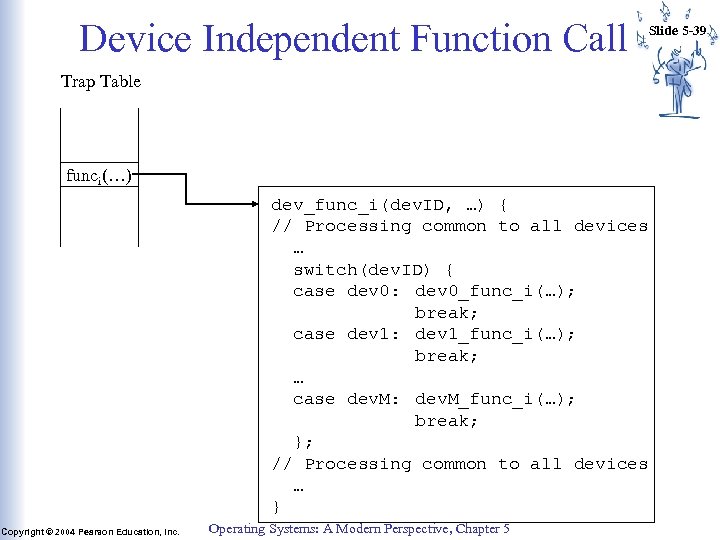 Device Independent Function Call Slide 5 -39 Trap Table funci(…) dev_func_i(dev. ID, …) { // Processing common to all devices … switch(dev. ID) { case dev 0: dev 0_func_i(…); break; case dev 1: dev 1_func_i(…); break; … case dev. M: dev. M_func_i(…); break; }; // Processing common to all devices … } Copyright © 2004 Pearson Education, Inc. Operating Systems: A Modern Perspective, Chapter 5
 Driver-Kernel Interface Slide 5 -40 • Drivers are distinct from main part of kernel • Kernel makes calls on specific functions, drivers implement them • Drivers use kernel functions for: – Device allocation – Resource (e. g. , memory) allocation – Scheduling – etc. (varies from OS to OS) Copyright © 2004 Pearson Education, Inc. Operating Systems: A Modern Perspective, Chapter 5
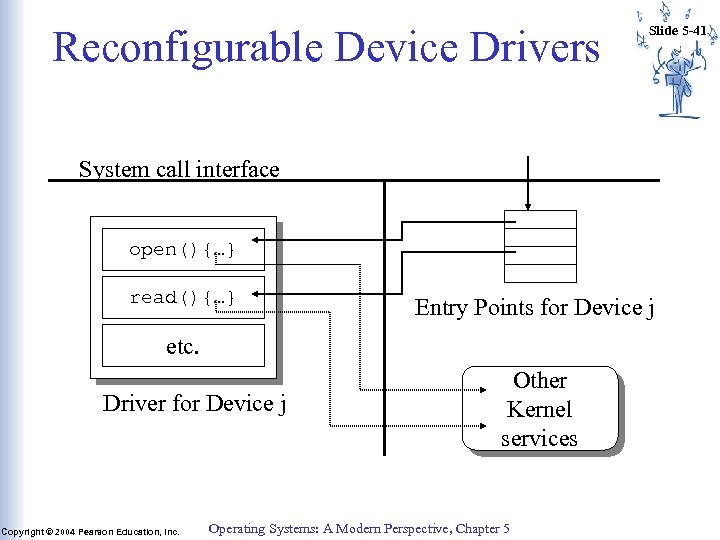 Reconfigurable Device Drivers Slide 5 -41 System call interface open(){…} read(){…} Entry Points for Device j etc. Driver for Device j Copyright © 2004 Pearson Education, Inc. Other Kernel services Operating Systems: A Modern Perspective, Chapter 5
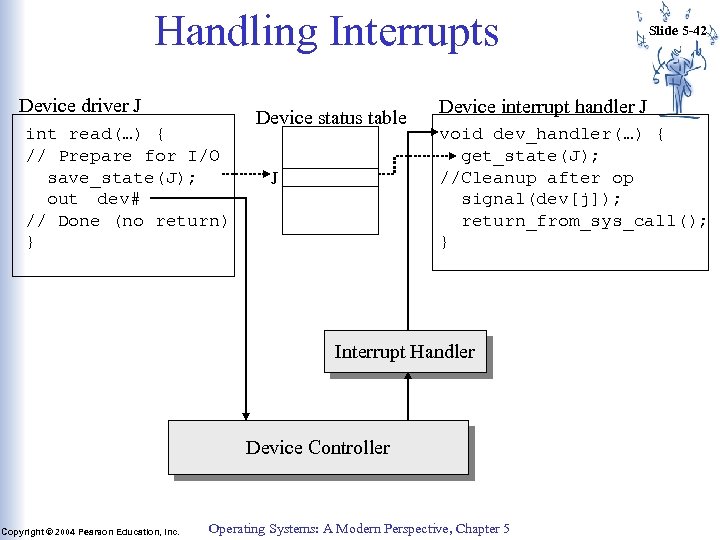 Handling Interrupts Device driver J int read(…) { // Prepare for I/O save_state(J); out dev# // Done (no return) } Device status table J Device interrupt handler J void dev_handler(…) { get_state(J); //Cleanup after op signal(dev[j]); return_from_sys_call(); } Interrupt Handler Device Controller Copyright © 2004 Pearson Education, Inc. Slide 5 -42 Operating Systems: A Modern Perspective, Chapter 5
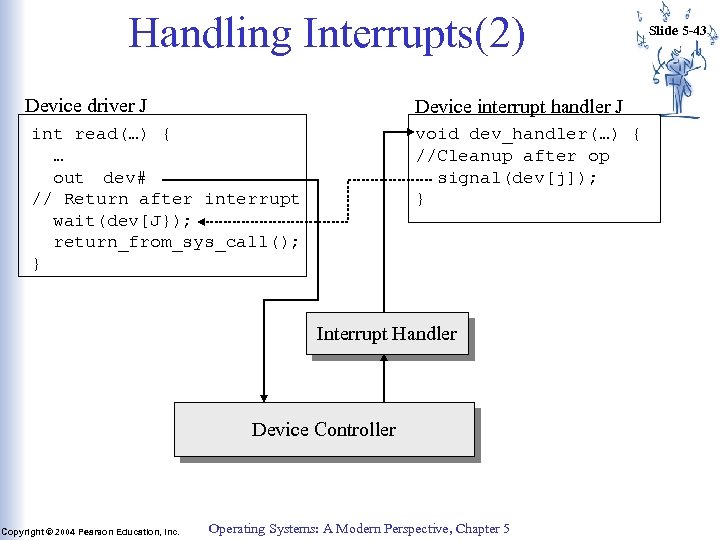 Handling Interrupts(2) Device driver J Device interrupt handler J int read(…) { … out dev# // Return after interrupt wait(dev[J}); return_from_sys_call(); } void dev_handler(…) { //Cleanup after op signal(dev[j]); } Interrupt Handler Device Controller Copyright © 2004 Pearson Education, Inc. Operating Systems: A Modern Perspective, Chapter 5 Slide 5 -43
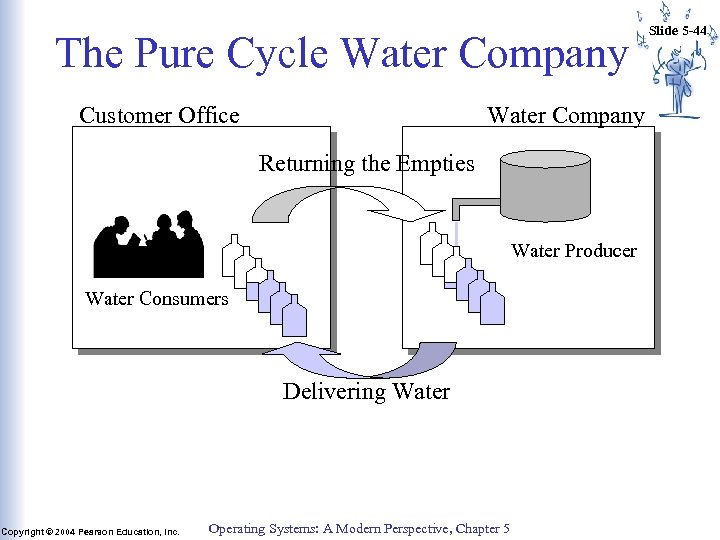 The Pure Cycle Water Company Customer Office Water Company Returning the Empties Water Producer Water Consumers Delivering Water Copyright © 2004 Pearson Education, Inc. Operating Systems: A Modern Perspective, Chapter 5 Slide 5 -44
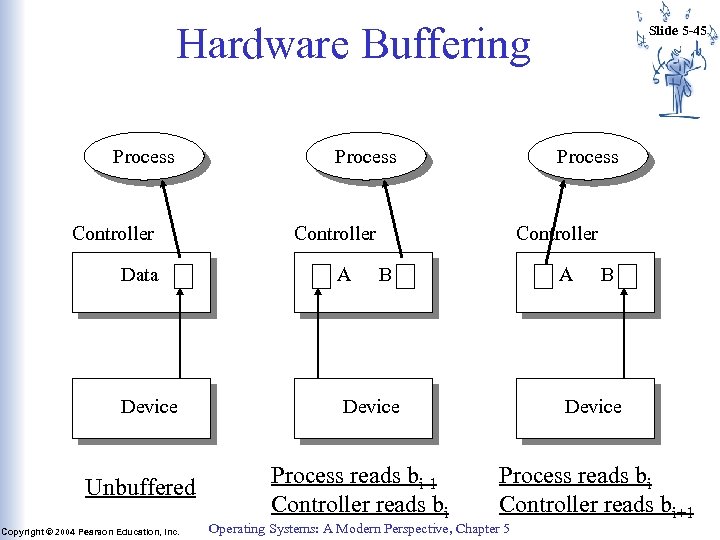 Hardware Buffering Process Controller Data A Device Unbuffered Copyright © 2004 Pearson Education, Inc. Slide 5 -45 B Process reads bi-1 Controller reads bi A B Device Process reads bi Controller reads bi+1 Operating Systems: A Modern Perspective, Chapter 5
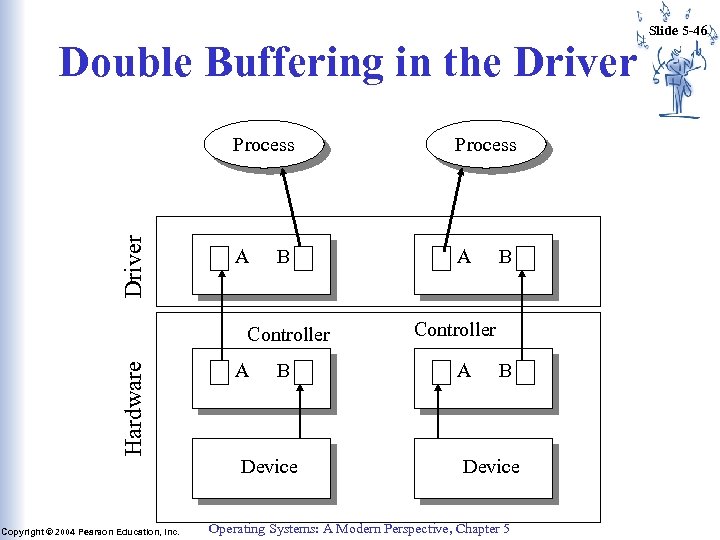 Double Buffering in the Driver Process A A B Hardware Controller Copyright © 2004 Pearson Education, Inc. A B Device B Controller A B Device Operating Systems: A Modern Perspective, Chapter 5 Slide 5 -46
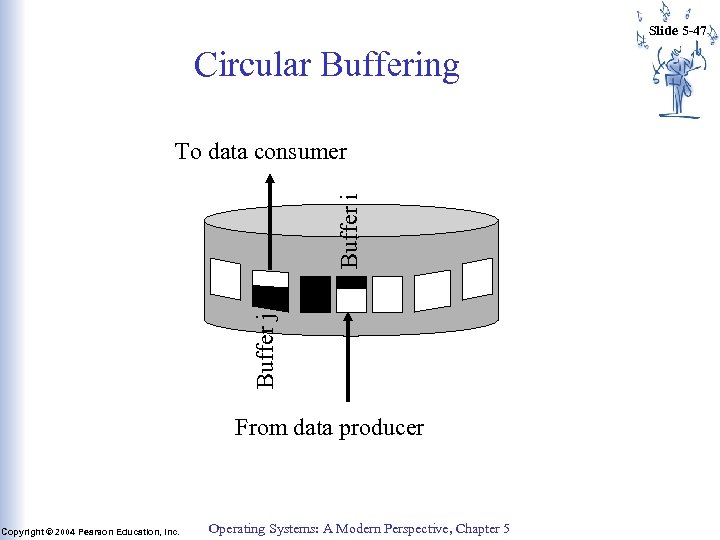 Slide 5 -47 Circular Buffering Buffer j Buffer i To data consumer From data producer Copyright © 2004 Pearson Education, Inc. Operating Systems: A Modern Perspective, Chapter 5
 Slide 5 -48 I/O Buffering A buffer is a memory area used to store data while it is being transferred between two devices or between a device and an application. • Used to reduce the effects of speed mismatch between I/O device and CPU or among I/O devices. • Generally used to allow more overlap between producer and consumer ==> more overlap between the CPU and I/O devices. Copyright © 2004 Pearson Education, Inc. Operating Systems: A Modern Perspective, Chapter 5
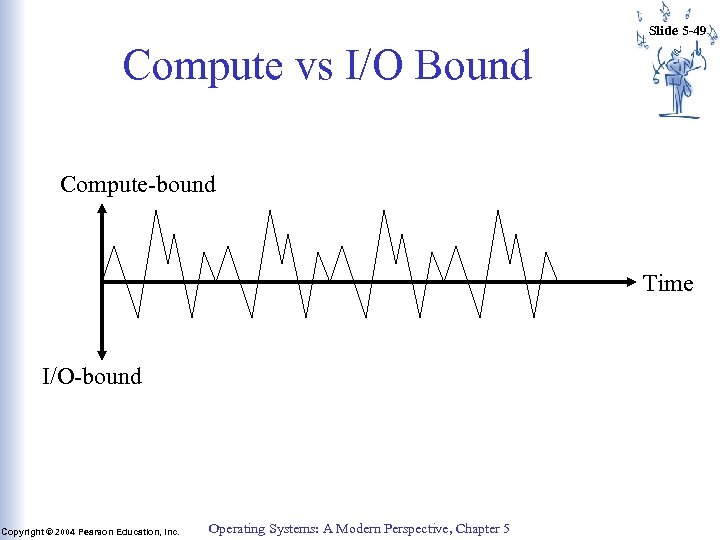 Slide 5 -49 Compute vs I/O Bound Compute-bound Time I/O-bound Copyright © 2004 Pearson Education, Inc. Operating Systems: A Modern Perspective, Chapter 5
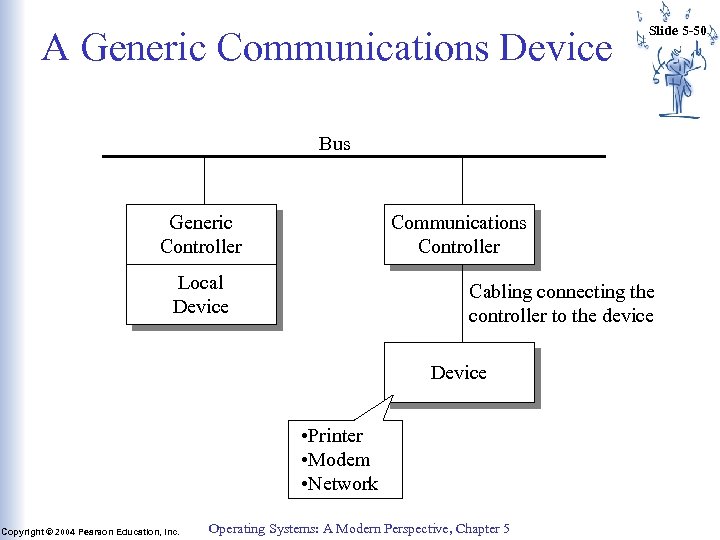 A Generic Communications Device Slide 5 -50 Bus Generic Controller Communications Controller Local Device Cabling connecting the controller to the device Device • Printer • Modem • Network Copyright © 2004 Pearson Education, Inc. Operating Systems: A Modern Perspective, Chapter 5
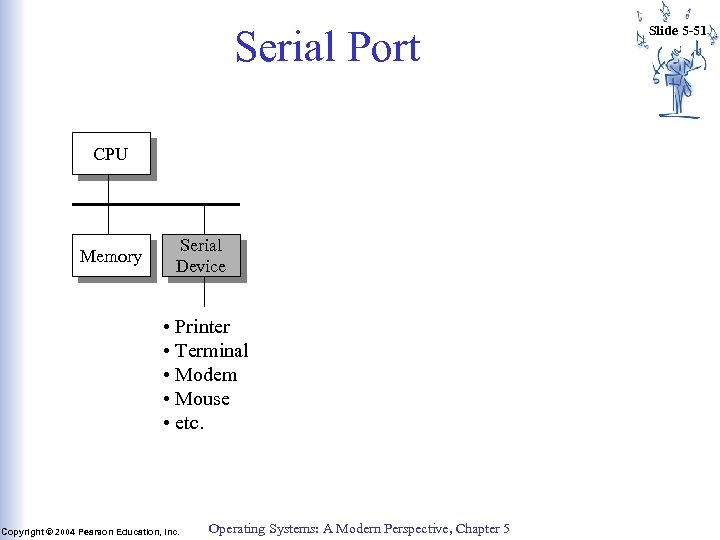 Serial Port CPU Memory Serial Device • Printer • Terminal • Modem • Mouse • etc. Copyright © 2004 Pearson Education, Inc. Operating Systems: A Modern Perspective, Chapter 5 Slide 5 -51
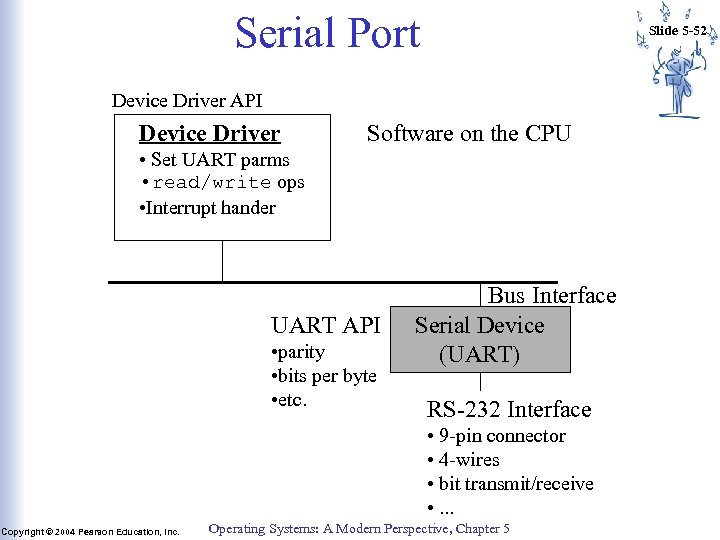 Serial Port Slide 5 -52 Device Driver API Device Driver Software on the CPU • Set UART parms • read/write ops • Interrupt hander UART API • parity • bits per byte • etc. Bus Interface Serial Device (UART) RS-232 Interface • 9 -pin connector • 4 -wires • bit transmit/receive • . . . Copyright © 2004 Pearson Education, Inc. Operating Systems: A Modern Perspective, Chapter 5
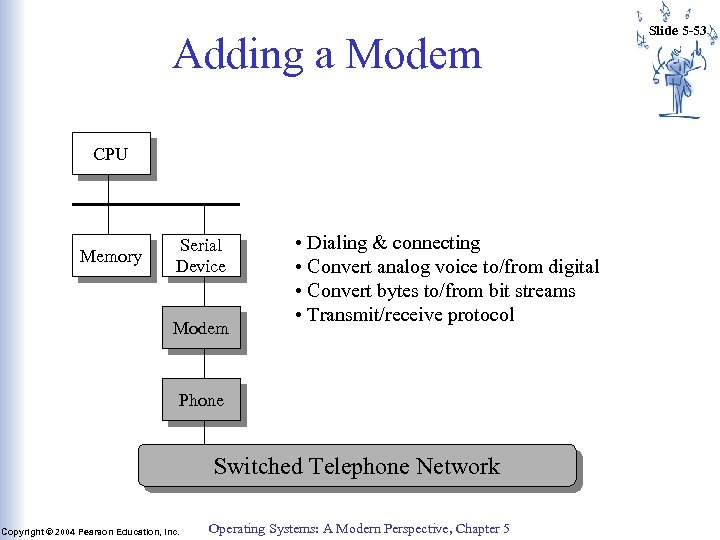 Adding a Modem CPU Memory Serial Device Modem • Dialing & connecting • Convert analog voice to/from digital • Convert bytes to/from bit streams • Transmit/receive protocol Phone Switched Telephone Network Copyright © 2004 Pearson Education, Inc. Operating Systems: A Modern Perspective, Chapter 5 Slide 5 -53
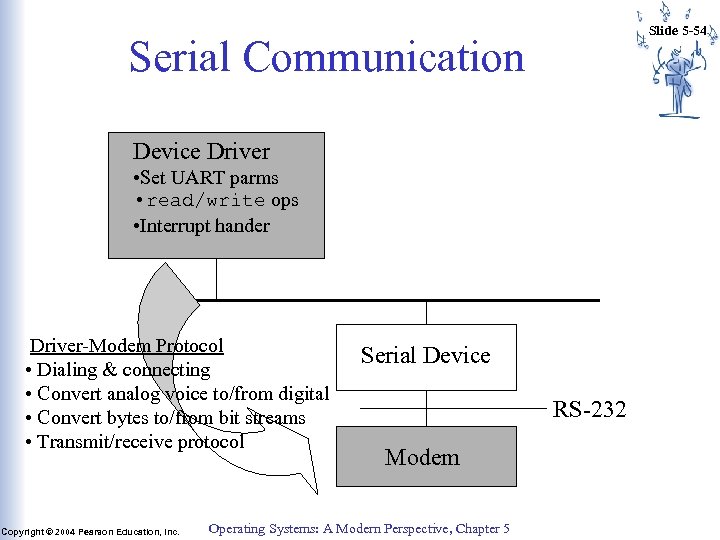 Slide 5 -54 Serial Communication Device Driver • Set UART parms • read/write ops • Interrupt hander Driver-Modem Protocol • Dialing & connecting • Convert analog voice to/from digital • Convert bytes to/from bit streams • Transmit/receive protocol Copyright © 2004 Pearson Education, Inc. Serial Device RS-232 Modem Operating Systems: A Modern Perspective, Chapter 5
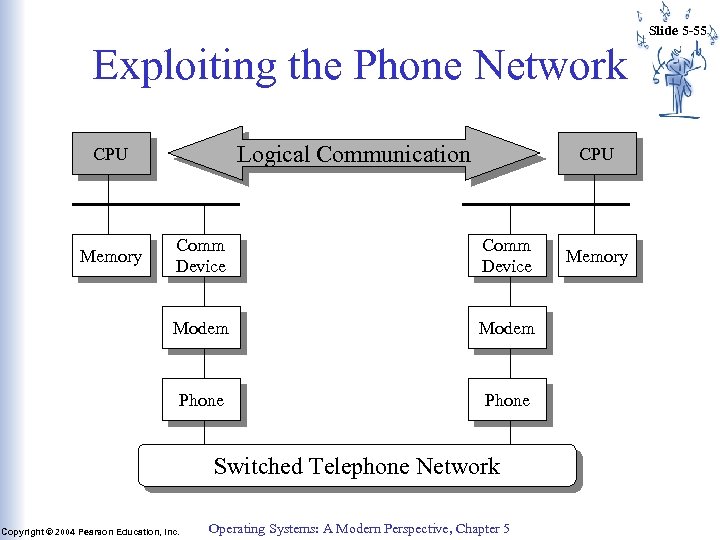 Slide 5 -55 Exploiting the Phone Network Logical Communication CPU Comm Device Modem Phone Memory Phone Switched Telephone Network Copyright © 2004 Pearson Education, Inc. Operating Systems: A Modern Perspective, Chapter 5 Memory
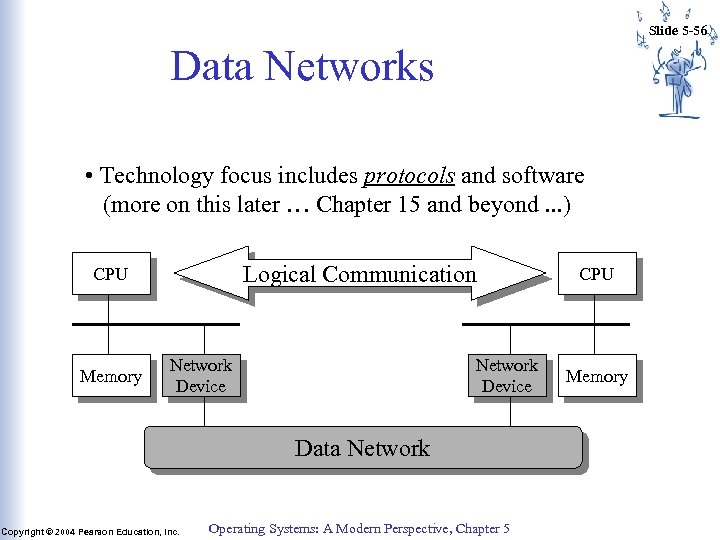 Slide 5 -56 Data Networks • Technology focus includes protocols and software (more on this later … Chapter 15 and beyond. . . ) Logical Communication CPU Memory Network Device Data Network Copyright © 2004 Pearson Education, Inc. Operating Systems: A Modern Perspective, Chapter 5 CPU Memory
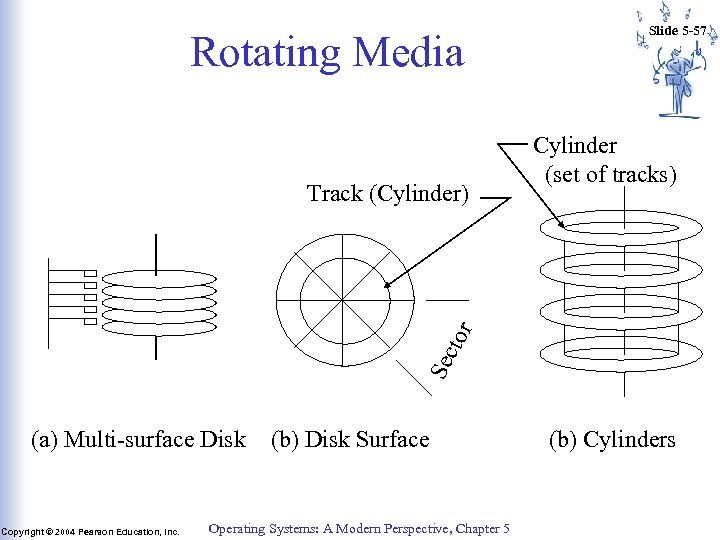 Rotating Media Cylinder (set of tracks) Sec tor Track (Cylinder) Slide 5 -57 (a) Multi-surface Disk Copyright © 2004 Pearson Education, Inc. (b) Disk Surface Operating Systems: A Modern Perspective, Chapter 5 (b) Cylinders
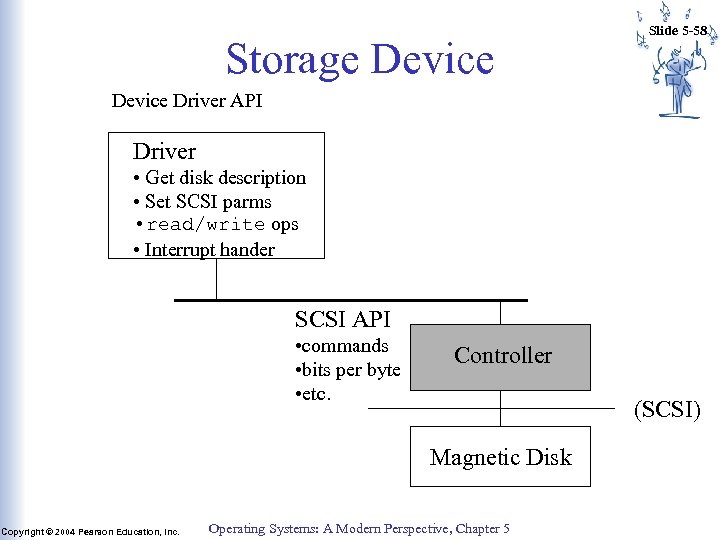 Storage Device Slide 5 -58 Device Driver API Driver • Get disk description • Set SCSI parms • read/write ops • Interrupt hander SCSI API • commands • bits per byte • etc. Controller (SCSI) Magnetic Disk Copyright © 2004 Pearson Education, Inc. Operating Systems: A Modern Perspective, Chapter 5
 Slide 5 -59 Disk Optimizations • Transfer Time: Time to copy bits from disk surface to memory • Disk latency time: Rotational delay waiting for proper sector to rotate under R/W head • Disk seek time: Delay while R/W head moves to the destination track/cylinder • Access Time = seek + latency + transfer Copyright © 2004 Pearson Education, Inc. Operating Systems: A Modern Perspective, Chapter 5
 Slide 5 -60 Optimizing Seek Time • Multiprogramming on I/O-bound programs => set of processes waiting for disk • Seek time dominates access time => minimize seek time across the set • Tracks 0: 99; Head at track 75, requests for 23, 87, 36, 93, 66 • FCFS: 52+ 64 + 51 + 57 + 27 = 251 steps Copyright © 2004 Pearson Education, Inc. Operating Systems: A Modern Perspective, Chapter 5
 Slide 5 -61 Optimizing Seek Time (cont) • Requests = 23, 87, 36, 93, 66 • SSTF: (75), 66, 87, 93, 36, 23 – 11 + 21 + 6 + 57 + 13 = 107 steps – Subject to starvation • Scan: (75), 87, 93, 99, 66, 36, 23 – 12 + 6 + 33 + 30 + 13 = 100 steps • Look: (75), 87, 93, 66, 36, 23 – 12 + 6 + 27 + 30 + 13 = 87 steps Copyright © 2004 Pearson Education, Inc. Operating Systems: A Modern Perspective, Chapter 5
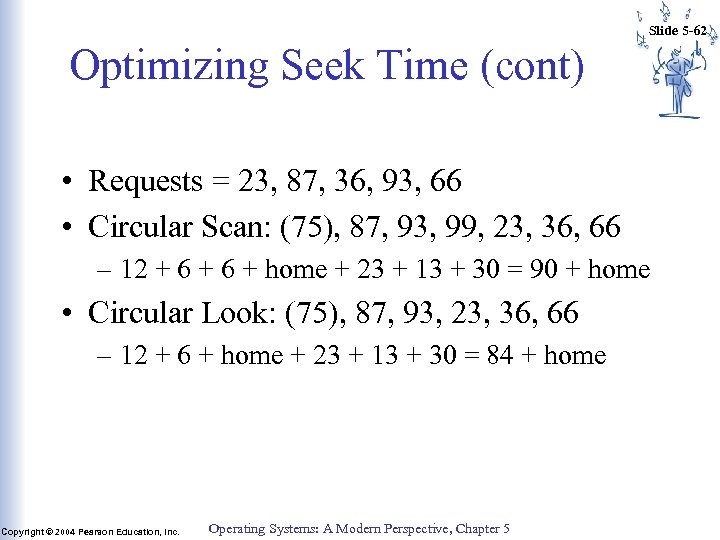 Slide 5 -62 Optimizing Seek Time (cont) • Requests = 23, 87, 36, 93, 66 • Circular Scan: (75), 87, 93, 99, 23, 36, 66 – 12 + 6 + home + 23 + 13 + 30 = 90 + home • Circular Look: (75), 87, 93, 23, 36, 66 – 12 + 6 + home + 23 + 13 + 30 = 84 + home Copyright © 2004 Pearson Education, Inc. Operating Systems: A Modern Perspective, Chapter 5
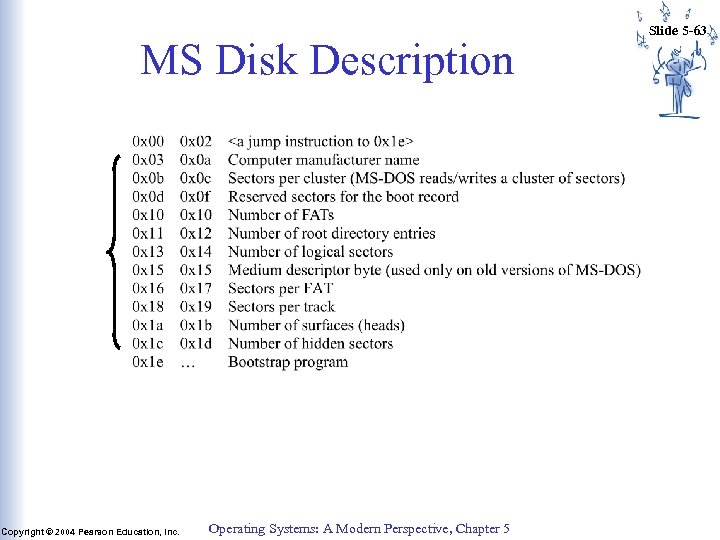 MS Disk Description Copyright © 2004 Pearson Education, Inc. Operating Systems: A Modern Perspective, Chapter 5 Slide 5 -63
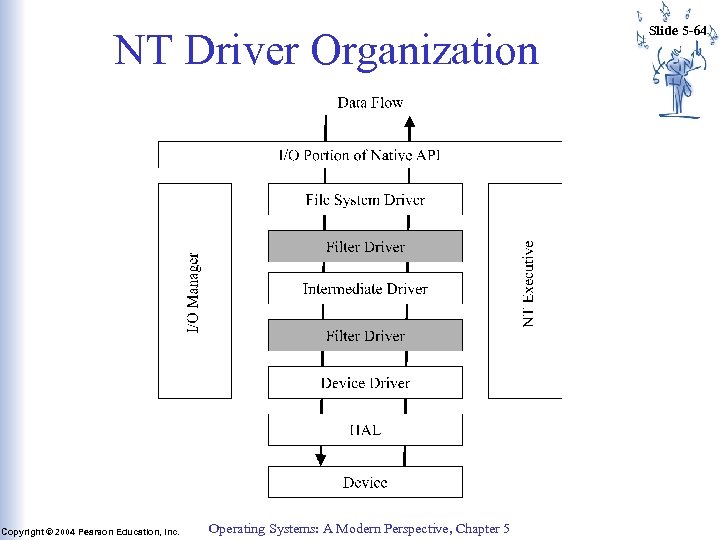 NT Driver Organization Copyright © 2004 Pearson Education, Inc. Operating Systems: A Modern Perspective, Chapter 5 Slide 5 -64
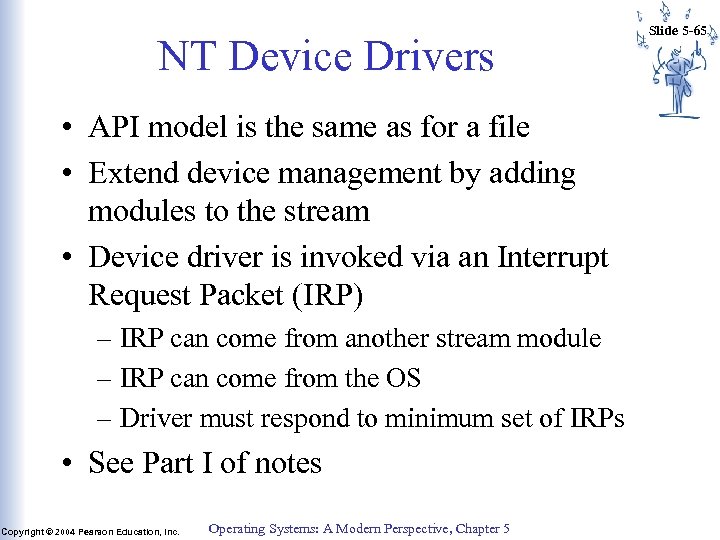 NT Device Drivers • API model is the same as for a file • Extend device management by adding modules to the stream • Device driver is invoked via an Interrupt Request Packet (IRP) – IRP can come from another stream module – IRP can come from the OS – Driver must respond to minimum set of IRPs • See Part I of notes Copyright © 2004 Pearson Education, Inc. Operating Systems: A Modern Perspective, Chapter 5 Slide 5 -65