


 Скачать презентацию Site Development Foundations Lesson 12 2004
6136145f10ce1c2f628d5864525d5304.ppt
- Количество слайдов: 34
 Site Development Foundations Lesson 12 • © 2004 Prosoft. Training • All rights reserved • ITD 110 Web Page Design I Instructors: Carlotta Eaton & John Sledd Copyright © 2004 Prosoft. Training, All Rights Reserved.
 Lesson 12: E-Commerce Practices Copyright © 2004 Prosoft. Training, All Rights Reserved.
 Objectives • • • Compare e-commerce to traditional commerce Define e-commerce terms and concepts Relate the concept of supply chain to e-commerce Identify payment models used in e-commerce Identify ways to protect private transactions Identify issues related to working in a global environment • Identify ways to build e-commerce relationships using Web-based technology
 Traditional Commerce vs. E-Commerce • Similarities – Both aim to deliver a valued product or service – Both want to serve a large audience – Both strive to quickly deliver products and services • Differences – E-commerce customers expect shorter fulfillment time – E-commerce customers must understand Web-based technologies – E-commerce provides a global audience – E-commerce orders are processed without human interaction or travel to a store location – E-commerce relies upon encryption for security
 E-Commerce Models • Business to consumer (B 2 C) – Targets consumers or end users, and sells products and/or services • Amazon. com, small business sites • Business to business (B 2 B) – Helps organizations to manage relationships and transactions with other businesses • B 2 BExchange • Consumer to consumer – Not a traditional B 2 C model • e. Bay
 Business and Internet Technologies • Traditional businesses also use e-commerce – Not an either/or proposition – Web technologies make traditional business more efficient • E-commerce concepts: – Supply chain management – Enterprise resource planning (ERP) – B 2 B information sharing – Internet marketing
 Supply Chain Management • The ability to manage the process that generates a product and distributes it to customers – You must manage the process that begins with raw materials and ends with a product delivered to a consumer – Customer can be: • An end user • Another business that resells your product after adding value to it, known as a Value Added Reseller (VAR)
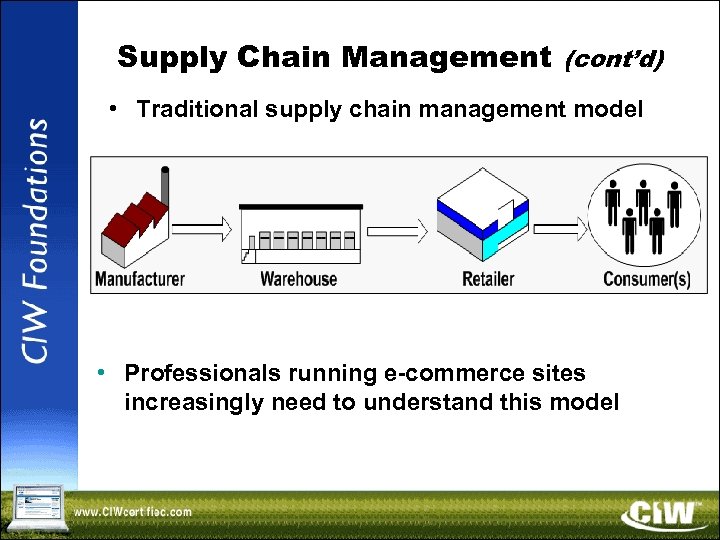 Supply Chain Management (cont’d) • Traditional supply chain management model • Professionals running e-commerce sites increasingly need to understand this model
 Supply Chain Management (cont’d) • Supply chain management involves the following business aspects: – Product demand – Information flow – Finance management • Essential supply chain management terms – Upstream and downstream – Capacity requirements plan – Additional terms found in coursebook
 Enterprise Resource Planning (ERP) • Use of software to create an automated plan for company operations • ERP goal -- enhance communication among all company departments and divisions through software automation • Accomplished through automation of tasks and reporting • All company/organization departments involved • Common terms: – Bolt-on system – Application programming interface (API) – Library
 B 2 B Information Sharing with XML • XML allows information to be indexed once, then used in many different applications and companies • DTD limitations • XML schema
 Internet Marketing • More than technical knowledge is needed – Relationship to the business, including the marketing department • Marketing terms
 E-Commerce Information-Formatting Technologies • When businesses need to exchange information, they must agree upon universal information-formatting methods • The two most common ways to format information are: – Electronic Data Interchange (EDI) – Open Buying on the Internet (OBI)
 Electronic Data Interchange (EDI) • A universal method formatting information so it can be transferred among organizations • In place for over 20 years • Useful for exchanging: – Invoices – Bills – Purchase orders – Inventory lists – Supply chain information • EDI implementation and drawbacks • EDI and XML
 Open Buying on the Internet (OBI) • Designed as an alternative to EDI • Developed to target high-volume, low-cost transactions – These account for almost 80 percent of most companies' purchasing activities • OBI components • OBI transactions • OBI and EDI • OBI and XML
 E-Commerce Payment Technologies • Payment technologies include: – Electronic Funds Transfer (EFT) – Payment gateways – Secure Electronic Transactions (SET) – Open Trading Protocol (OTP) – Secure Sockets Layer (SSL) / Transport Layer Security (TLS)
 Electronic Funds Transfer (EFT) • A generic term that describes the ability to transfer funds using computers rather than paper • Also known as wire transfer • EFT systems must ensure: – Confidentiality of payment information – Integrity of payment information – Merchant authentication – Interoperability • Automated Clearing House (ACH) – Governed in the United States by the National Automated Clearing House Association – Used in EFT
 Payment Gateway • Mediates between a merchant and a merchant bank • Once the merchant receives payment from a customer, the merchant uses the payment gateway to transmit credit card information to the bank • Responsibilities: – Forwarding information – Authenticating participants – Ensuring confidentiality – Ensuring data integrity • Payment gateway companies
 Secure Electronic Transactions (SET) • Uses digital certificates to secure financial transactions • Public and private keys ensure encryption, data confidentiality and non-repudiation • Designed to allow both simple and complex transactions • History of SET • SET example • SET vs. conventional transactions
 Open Trading Protocol (OTP) • Alternative to SET – An open standard (RFC 2802) – Used for both B 2 C and B 2 B – Often used with XML • OTP features: – Provides trading protocol options to control the way that the trade occurs – Provides a record of a particular trade – Supports real and virtual delivery of goods and services (payment tracking)
 Secure Sockets Layer (SSL) / Transport Layer Security (TLS) • Not transaction methods • Used to secure transactions • Services provided: – Authentication – Data confidentiality – Data integrity
 SSL/TLS and Public Key Infrastructure (PKI) • You need a certificate to enable host authentication before you can begin an SSL session • Public Key Infrastructure (PKI) – A collection of individuals, networks and machines that comprise the ability to authoritatively confirm the identity of a person, host or organization
 PKI Elements • PKI elements include: – Digital certificate – Certificate authority (CA) – Registration authority (RA) – Certificate server – Certification chain
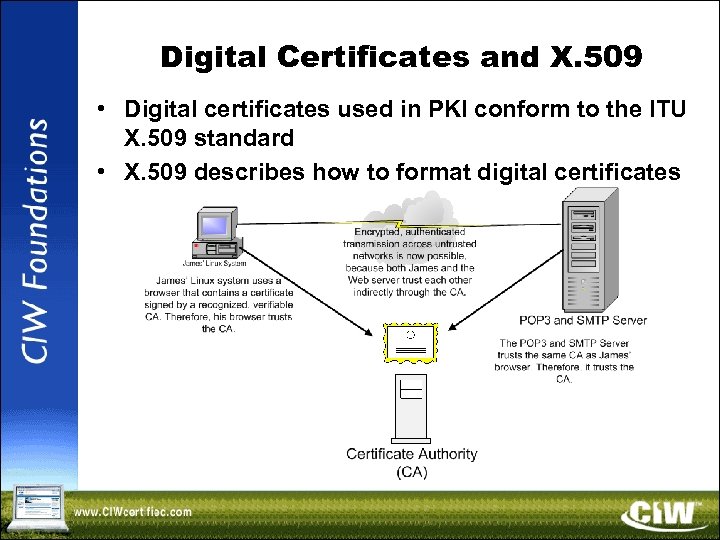 Digital Certificates and X. 509 • Digital certificates used in PKI conform to the ITU X. 509 standard • X. 509 describes how to format digital certificates
 PKCS Standards • Public-Key Cryptography Standards (PKCS) – Used to store and transport certificates • PKCS #7 – Used to secure e-mail certificates • PKCS #10 – Used to generate a certificate request to a certificate authority (CA)
 Certificate Life Cycle • Certificates usually have a limited life (e. g. , 1 month, 2 years, 6 years) • Life cycle helps reduce the likelihood of fraud • Terms include: – Certificate policy – Certificate Practice Statement (CPS) – Certificate expiration – Certificate revocation – Certificate suspension – Certificate renewal – Certificate revocation list (CRL) – Online Certificate Status Protocol (OCSP)
 Additional SSL/TLS Concepts • The SSL/TLS handshake • Common applications • Beginning an SSL/TLS session – Encryption begins after authentication – Issues: • Different host name • Certificate expired • Certificate date not yet valid • Invalid certificate format • Certificate presented by the server not signed by a recognized CA • Incompatible encryption settings
 Working in a Global Environment • By placing your business on the Web, you expand your audience to include anyone in the world with a browser and Internet access • Consider the level to which you will accommodate potential customers from countries outside yours – Issues to consider include: • Currency exchange rates • International shipping • Language concerns • Relationship management
 Currency and Trade • Each country (e. g. , China) and economic block (e. g. , European Union) uses its own currency • Businesses and organizations must be able to: – Automatically calculate exchange rates for the day of the transaction – Calculate taxes and tariffs on goods • Taxes, tariffs and trade
 International Shipping • Consider the following issues: – Customs searches – Costs incurred by customs – Delays caused by customs – All tariffs • Legal and regulatory issues
 Language Concerns • As you develop an e-commerce site, consider the following issues: – The language(s) used by the target audience – The characters necessary (e. g. , alphanumeric, mathematical or currency symbols) • Character sets and languages – Computers can use different character sets – Unicode
 Relationship Management • Building trust – Quality customer service – Frequent contact • Customer self-service – Automatic order tracking – Unattended choice – Order customization
 Lesson 12 Summary • Lesson 12 E-Commerce Practices • See Skills Review page 12 -29 • Hands On Time (optional)
 Thank you for attending Site Development Foundations • © 2004 Prosoft. Training • All rights reserved Copyright © 2004 Prosoft. Training, All Rights Reserved.