


 Скачать презентацию Simulation and Modelling MIS 7102 Introduction to Simulation
abe14772bf4df9162f44a74eda27a35e.ppt
- Количество слайдов: 61
 Simulation and Modelling MIS 7102 Introduction to Simulation & Modelling Week 1 By Agnes Rwashana Semwanga asemwanga@cit. mak. ac. ug Friday 6. 00 p. m. - 9. 00 p. m. Faculty of Technology Room 143 Introduction : Simulation and Modeling Wk 1 1
 • Core for § • MIS - Computer Information Systems (CIS) option Elective for § § MIS – Management Information System (MIS) option MIS – Information System management (ISM) MIS – Internet and Database System (IDS) MSC Computer Science Introduction : Simulation and Modeling Wk 1 2
 Course schedule • • • Week 1 : Introduction to Simulation & Modelling Week 2 : Introduction to System Dynamics Week 3 : Systems thinking and Causal Loop Diagramming Week 4 : System Archetypes + Assignment for Class Presentation Week 5 : Assignment / Test 1 Week 6 : Causal Loop Diagrams with Vensim § • • Discrete Event Simulation by Guest Lecturer : Mr. John Ngubiri (next 3 weeks 1 hr [8 -9]) Week 7 : Graphical Integration Week 8 : Feedback Structures Week 9 -11 : Class Presentations - Assignment 3 Week 12 : Assignment / Test 2 Week 13 : Model Testing & Validation Week 14 : Stock and Flow with STELLA software - Practice Week 15 : Preparation for Exams Introduction : Simulation and Modeling Wk 1 3
 References • • Senge Peter (2003). The Fifth Discipline. Steward Robinson (2004). Simulation. The Practice of Model Development and Use. John Wiley and Sons Ltd. Goodman Michael R. (1989) Study Notes in System Dynamics Pid, M. , (1992) Computer Simulation in Management Science, 3 Ed John Wiley, Chichester Introduction : Simulation and Modeling Wk 1 4
 Simulation Is … • • Simulation – Definition : An imitation of a system. Imitation implies mimicking or copying something else. very broad term – methods and applications to imitate or mimic real systems, usually via computer Applies in many fields and industries Very popular and powerful method Static simulation – imitates a system at a point in time Dynamic simulation – imitates a system as it progresses through time e. g movement of trains Computer based dynamic simulation – an imitation (on a computer) of a. Wk 1 Introduction : Simulation and Modeling system as it 5
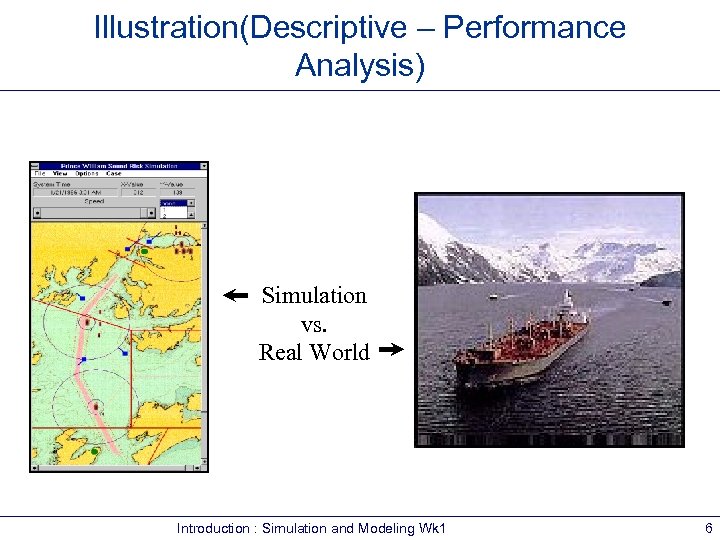 Illustration(Descriptive – Performance Analysis) Simulation vs. Real World Introduction : Simulation and Modeling Wk 1 6
 Typical Uses of Simulation • • • Estimating a set of productivity measures in production systems, inventory systems, manufacturing processes, materials handling and logistics operations. Designing and planning the capacity of computer systems and communication networks so as to minimize response times. Conducting war games to train military personnel or to evaluate the efficacy of proposed military operations Evaluating and improving maritime port operations, such as container ports or bulk-material marine terminals (coal, oil or minerals), so as to find ways of reducing vessel port times. Improving health care operations, financial and banking operations, Introduction : Simulation and Modeling Wk 1 airports, among transportation systems and 7
 Use of Simulation Modelling Simulation is one of the most powerful management science/operation research tools applied to solve real problems. • The modelling itself leads to greater insight into the Corporate investments appraisal. • Involves the construction of a model of the problem domain which involves learning through experiments and then permits testing alternative scenarios using “what if. . ? ” analysis.
 Simulation in Business Modelling • • • The essence of Modelling is that a manager makes decisions in advance of the real product, services or process being created. Simulation is one of the most fundamental approach to decision making. A tool to gain insights and explore possibilities through the formalised (situation) involved in using simulation models. Simulation explores the consequences of decision making rather than directly advising on the decision itself - it is a predictive rather than an optimising technique. Currently there are many tools both simulation
 Systems • • System – a collection of parts organized for some purpose (Coyle, 1996). Checkland (1981) identifies 4 main classes of systems : § § Natural system – origins lie in the origins of the universe eg. Atom Designed physical systems – physical systems that are a result of human design e. g house, car Designed abstract systems – abstract systems that are a result of human design e. g. mathematics and literature Human activity systems – systems of human activity that are consciously or unconsciously ordered. e. g. Family, city , political system. Introduction : Simulation and Modeling Wk 1 10
 Why simulate ? – The Nature of operations Systems • • • Variability - many operation systems are subject to variability. Some are predictable e. g. changing number of operators in a call centre during the day to meet the changing call volumes and others are unpredictable e. g arrival rate of patients at hospital emergency. Interconnectedness – components of the system do not work in isolation but affect one another. It is difficult to predict the effect of the interconnections. e. g customers who have to pass through various interconnected stages Complexity – many operations systems are complex, interconnections and combinations Introduction : Simulation and Modeling Wk 1 11 between the components of the system.
 The Advantages of Simulation Some of the reasons why simulation is preferable to direct experimentation : • Cost – Experimentation with real system is likely to be costly. § It is expensive to interrupt day to day operations to try out new ideas § If alterations cause operation’s performance to worsen- loss of customer satisfaction • Time – Time consuming to experiment with the real system and this may take many weeks and months before a true reflection is obtained. • Control of experimental conditions – It is useful to control the conditions under which the experiment is being done. e. g. it is not easy to control the arrival of patients at a hospital Introduction : Simulation exist. Wk 1 • The real system does notand Modeling. The real system may not 12
 Disadvantages of Simulation Some of the problems associated with using simulation • Expensive – simulation software is not necessarily cheap and cost of model development and use may be considerable. • Time consuming – simulation is a time consuming approach • Data hungry – most simulations require significant amount of data • Requires expertise – requires skills in conceptual modelling, validation and statistics. Introduction : Simulation and Modeling Wk 1 13
 Applications for which Simulation might be used • Manufacturing systems • Public systems, health care, military, natural • • • resources Transportation systems Construction systems Restaurant and entertainment systems Business process reengineering / management Food processing Computer system performance Introduction : Simulation and Modeling Wk 1 14
 Models • Model – set of assumptions/approximations about how the system works § § Study the model instead of the real system … usually much easier, faster, cheaper, safer Can try wide-ranging ideas with the model – § § Make your mistakes on the computer where they don’t count, rather than for real where they do count Often, just building the model is instructive – regardless of results Model validity (any kind of model … not just simulation) – – Care in building to mimic reality faithfully Level of detail Get same conclusions from the model as you would from system More in Chapter. Simulation and Modeling Wk 1 12 Introduction : 15
 Types of Models • Physical (iconic) models § § • Mock-ups of fast-food restaurants Hospital scheduling Operating room scheduling Flight simulators Logical (mathematical) models § § § Approximations and assumptions about a system’s operation Often represented via computer program in appropriate software Exercise the program to try things, get results, learn about model behavior Introduction : Simulation and Modeling Wk 1 16
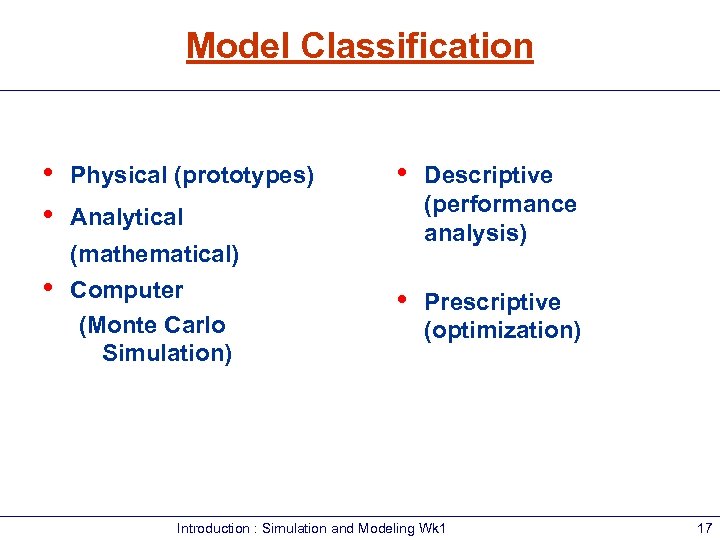 Model Classification • • Physical (prototypes) • Descriptive (performance analysis) • Prescriptive (optimization) Analytical (mathematical) • Computer (Monte Carlo Simulation) Introduction : Simulation and Modeling Wk 1 17
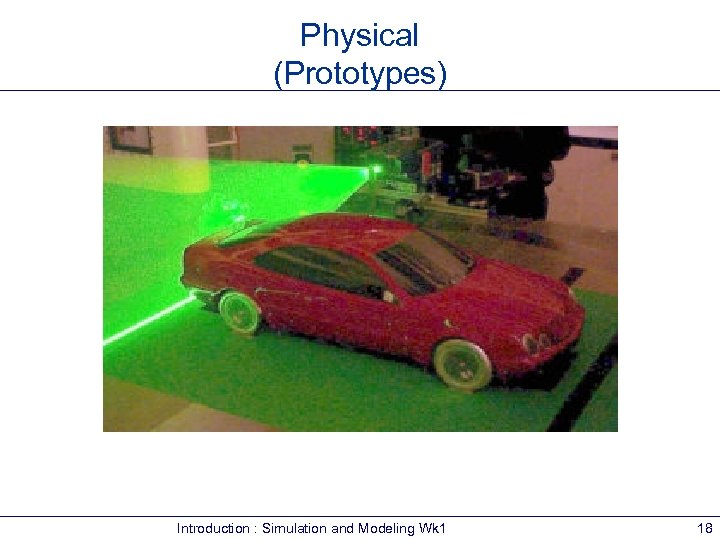 Physical (Prototypes) Introduction : Simulation and Modeling Wk 1 18
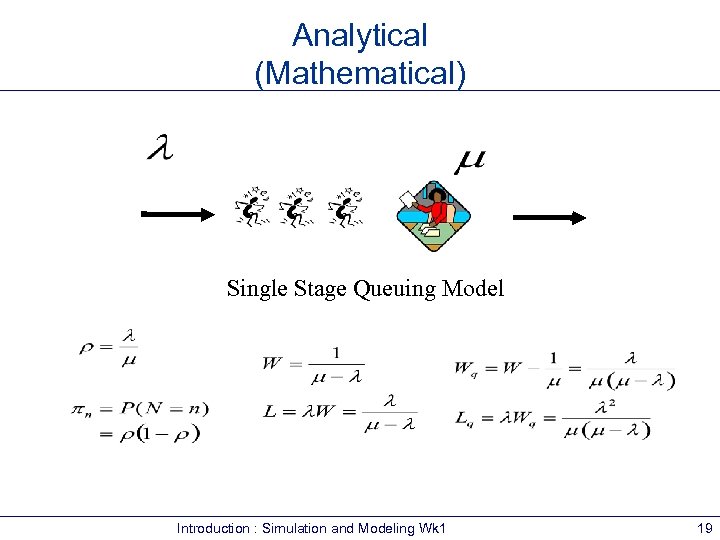 Analytical (Mathematical) Single Stage Queuing Model Introduction : Simulation and Modeling Wk 1 19
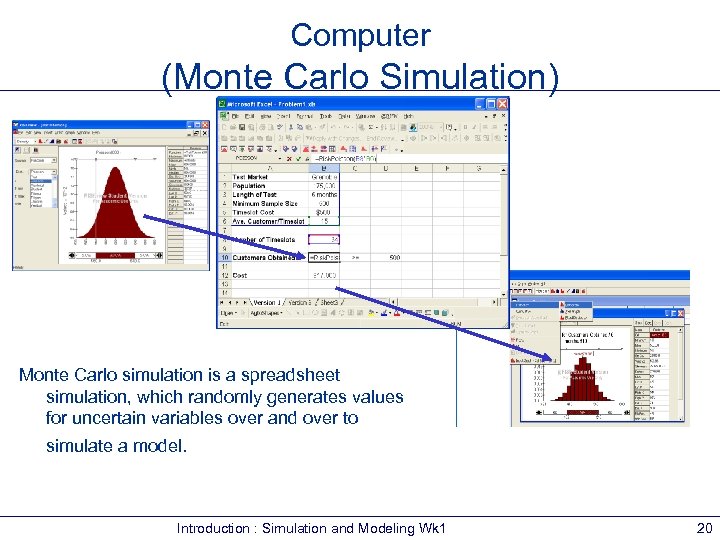 Computer (Monte Carlo Simulation) Monte Carlo simulation is a spreadsheet simulation, which randomly generates values for uncertain variables over and over to simulate a model. Introduction : Simulation and Modeling Wk 1 20
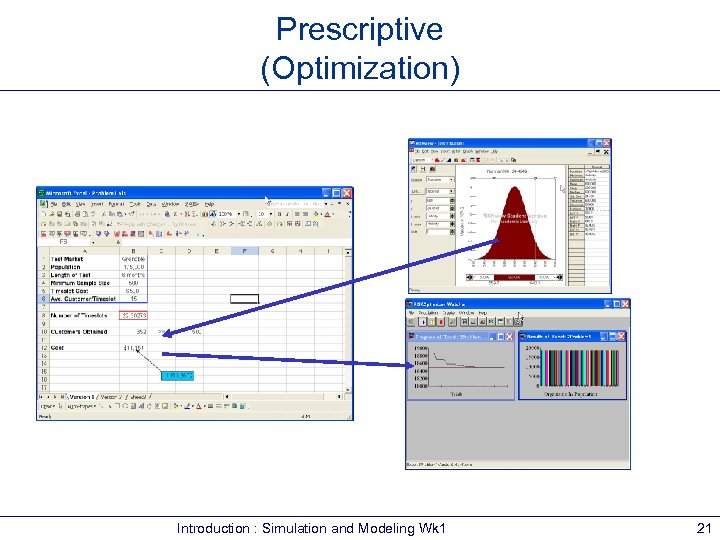 Prescriptive (Optimization) Introduction : Simulation and Modeling Wk 1 21
 Studying Logical Models • If model is simple enough, use traditional mathematical analysis … get exact results, lots of insight into model § § § • But complex systems can seldom be validly represented by a simple analytic model § • Queueing theory Differential equations Linear programming Danger of over-simplifying assumptions … model validity? Often, a complex system requires a complex model, and analytical methods don’t apply … what to do? Introduction : Simulation and Modeling Wk 1 22
 Computer Simulation • Broadly interpreted, computer simulation refers to methods for studying a wide variety of models of systems § § • • • Numerically evaluate on a computer Use software to imitate the system’s operations and characteristics, often over time Can be used to study simple models but should not use it if an analytical solution is available Real power of simulation is in studying complex models Simulation can tolerate complex models since we don’t even aspire to an analytical solution Introduction : Simulation and Modeling Wk 1 23
 Different Kinds of Simulation • Static vs. Dynamic § • Continuous-change vs. Discrete-change § • Can the “state” change continuously or only at discrete points in time? Deterministic vs. Stochastic § • Does time have a role in the model? Is everything for sure or is there uncertainty? Most operational models: § Dynamic, Discrete-change, Stochastic Introduction : Simulation and Modeling Wk 1 24
 Using Computers to Simulate • General-purpose languages (FORTRAN) § § • Support packages § § • Tedious, low-level, error-prone But, almost complete flexibility Subroutines for list processing, bookkeeping, time advance Widely distributed, widely modified Spreadsheets § § Usually static models Financial scenarios, distribution sampling, SQC Introduction : Simulation and Modeling Wk 1 25
 Using Computers to Simulate (cont’d. ) • Simulation languages § § § • GPSS, SIMSCRIPT, SLAM, SIMAN Popular, still in use Learning curve for features, effective use, syntax High-level simulators § § § Very easy, graphical interface Domain-restricted (manufacturing, communications) Limited flexibility — model validity? Introduction : Simulation and Modeling Wk 1 26
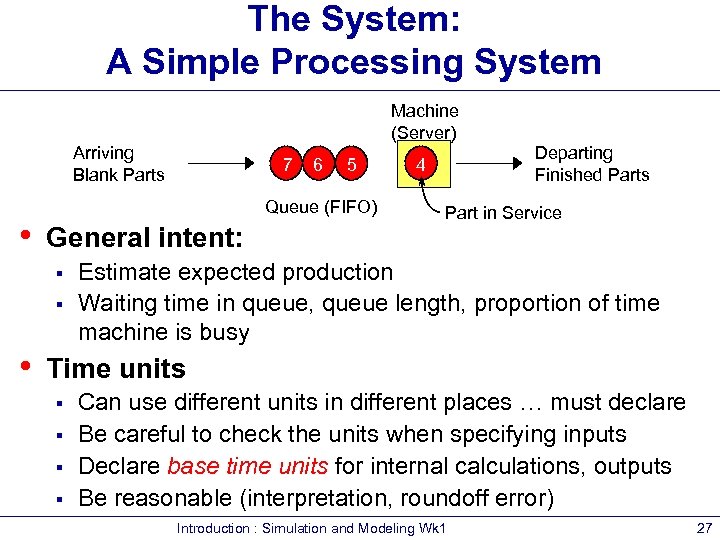 The System: A Simple Processing System Machine (Server) Arriving Blank Parts • 6 5 Queue (FIFO) General intent: § § • 7 Departing Finished Parts 4 Part in Service Estimate expected production Waiting time in queue, queue length, proportion of time machine is busy Time units § § Can use different units in different places … must declare Be careful to check the units when specifying inputs Declare base time units for internal calculations, outputs Be reasonable (interpretation, roundoff error) Introduction : Simulation and Modeling Wk 1 27
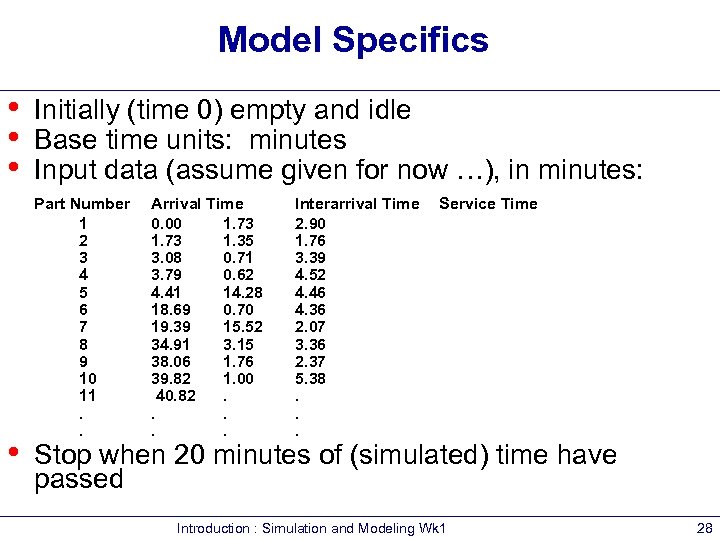 Model Specifics • • Initially (time 0) empty and idle Base time units: minutes Input data (assume given for now …), in minutes: Part Number 1 2 3 4 5 6 7 8 9 10 11. . Arrival Time 0. 00 1. 73 1. 35 3. 08 0. 71 3. 79 0. 62 4. 41 14. 28 18. 69 0. 70 19. 39 15. 52 34. 91 3. 15 38. 06 1. 76 39. 82 1. 00 40. 82. . . Interarrival Time 2. 90 1. 76 3. 39 4. 52 4. 46 4. 36 2. 07 3. 36 2. 37 5. 38. . . Service Time Stop when 20 minutes of (simulated) time have passed Introduction : Simulation and Modeling Wk 1 28
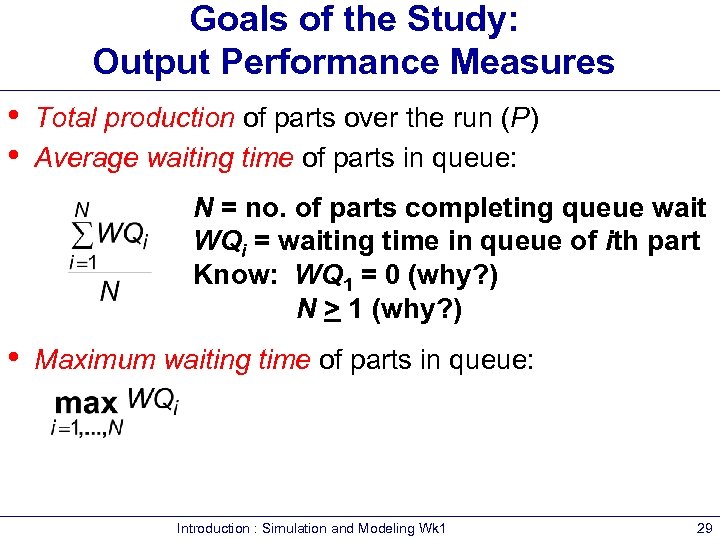 Goals of the Study: Output Performance Measures • • Total production of parts over the run (P) Average waiting time of parts in queue: N = no. of parts completing queue wait WQi = waiting time in queue of ith part Know: WQ 1 = 0 (why? ) N > 1 (why? ) • Maximum waiting time of parts in queue: Introduction : Simulation and Modeling Wk 1 29
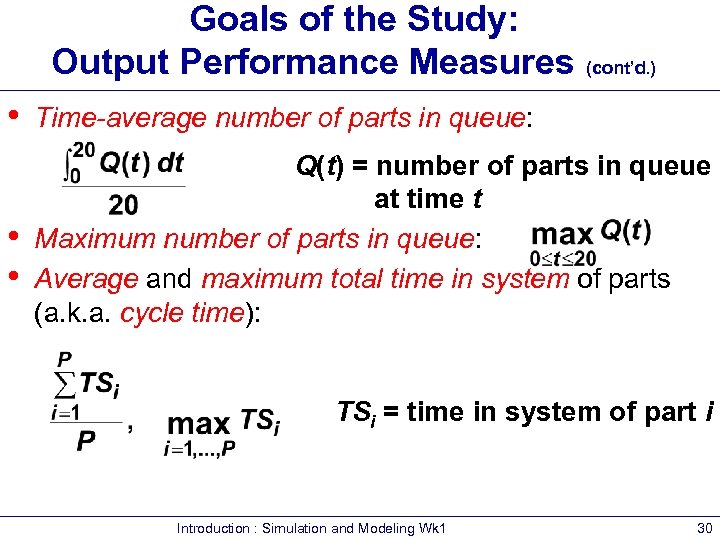 Goals of the Study: Output Performance Measures (cont’d. ) • • • Time-average number of parts in queue: Q(t) = number of parts in queue at time t Maximum number of parts in queue: Average and maximum total time in system of parts (a. k. a. cycle time): TSi = time in system of part i Introduction : Simulation and Modeling Wk 1 30
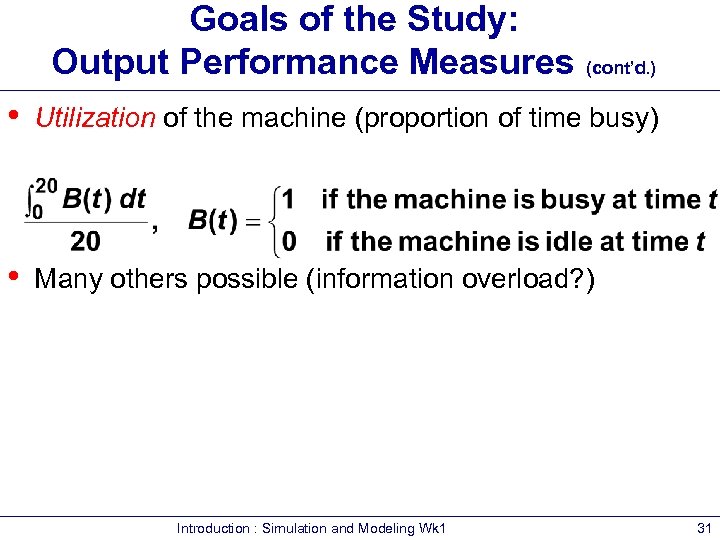 Goals of the Study: Output Performance Measures (cont’d. ) • Utilization of the machine (proportion of time busy) • Many others possible (information overload? ) Introduction : Simulation and Modeling Wk 1 31
 Pieces of a Simulation Model • Entities § § § “Players” that move around, change status, affect and are affected by other entities Dynamic objects — get created, move around, leave (maybe) Usually represent “real” things – § Can have “fake” entities for modeling “tricks” – § § § Our model: entities are the parts Breakdown demon, break angel Usually have multiple realizations floating around Can have different types of entities concurrently Usually, identifying the types of entities is the first thing to do in building a model Introduction : Simulation and Modeling Wk 1 32
 Pieces of a Simulation Model (cont’d. ) • Attributes § § Characteristic of all entities: describe, differentiate All entities have same attribute “slots” but different values for different entities, for example: – – § § § Time of arrival Due date Priority Color Attribute value tied to a specific entity Like “local” (to entities) variables Some automatic in Arena, some you define Introduction : Simulation and Modeling Wk 1 33
 Pieces of a Simulation Model (cont’d. ) • (Global) Variables § § Reflects a characteristic of the whole model, not of specific entities Used for many different kinds of things – – – § § § Travel time between all station pairs Number of parts in system Simulation clock (built-in Arena variable) Name, value of which there’s only one copy for the whole model Not tied to entities Entities can access, change variables Writing on the wall Some built-in by Arena, you can define others Introduction : Simulation and Modeling Wk 1 34
 Pieces of a Simulation Model (cont’d. ) • Resources § What entities compete for – – – § § § Entity seizes a resource, uses it, releases it Think of a resource being assigned to an entity, rather than an entity “belonging to” a resource “A” resource can have several units of capacity – – § People Equipment Space Seats at a table in a restaurant Identical ticketing agents at an airline counter Number of units of resource can be changed during the simulation Introduction : Simulation and Modeling Wk 1 35
 Pieces of a Simulation Model (cont’d. ) • Queues § § Place for entities to wait when they can’t move on (maybe since the resource they want to seize is not available) Have names, often tied to a corresponding resource Can have a finite capacity to model limited space — have to model what to do if an entity shows up to a queue that’s already full Usually watch the length of a queue, waiting time in it Introduction : Simulation and Modeling Wk 1 36
 Pieces of a Simulation Model (cont’d. ) • Statistical accumulators § § § Variables that “watch” what’s happening Depend on output performance measures desired “Passive” in model — don’t participate, just watch Many are automatic in Arena, but some you may have to set up and maintain during the simulation At end of simulation, used to compute final output performance measures Introduction : Simulation and Modeling Wk 1 37
 Pieces of a Simulation Model (cont’d. ) • Statistical accumulators for the simple processing system § § § § § Number of parts produced so far Total of the waiting times spent in queue so far No. of parts that have gone through the queue Max time in queue we’ve seen so far Total of times spent in system Max time in system we’ve seen so far Area so far under queue-length curve Q(t) Max of Q(t) so far Area so far under server-busy curve B(t) Introduction : Simulation and Modeling Wk 1 38
 Simulation Dynamics: The Event-Scheduling “World View” • • Identify characteristic events Decide on logic for each type of event to § § § • • Effect state changes for each event type Observe statistics Update times of future events (maybe of this type, other types) Keep a simulation clock, future event calendar Jump from one event to the next, process, observe statistics, update event calendar Must specify an appropriate stopping rule Usually done with general-purpose programming language (C, FORTRAN, etc. ) Wk 1 Introduction : Simulation and Modeling 39
 Events for the Simple Processing System • Arrival of a new part to the system § Update time-persistent statistical accumulators (from last event to now) – – – § § “Mark” arriving part with current time (use later) If machine is idle: – § Start processing (schedule departure), Make machine busy, Tally waiting time in queue (0) Else (machine is busy): – § Area under Q(t) Max of Q(t) Area under B(t) Put part at end of queue, increase queue-length variable Schedule the next arrival event Introduction : Simulation and Modeling Wk 1 40
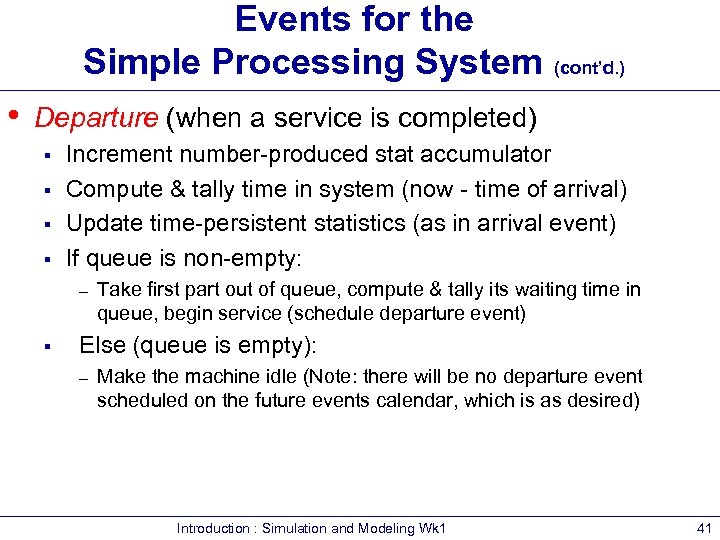 Events for the Simple Processing System (cont’d. ) • Departure (when a service is completed) § § Increment number-produced stat accumulator Compute & tally time in system (now - time of arrival) Update time-persistent statistics (as in arrival event) If queue is non-empty: – § Take first part out of queue, compute & tally its waiting time in queue, begin service (schedule departure event) Else (queue is empty): – Make the machine idle (Note: there will be no departure event scheduled on the future events calendar, which is as desired) Introduction : Simulation and Modeling Wk 1 41
 Events for the Simple Processing System (cont’d. ) • The End § § • • Update time-persistent statistics (to end of the simulation) Compute final output performance measures using current (= final) values of statistical accumulators After each event, the event calendar’s top record is removed to see what time it is, what to do Also must initialize everything Introduction : Simulation and Modeling Wk 1 42
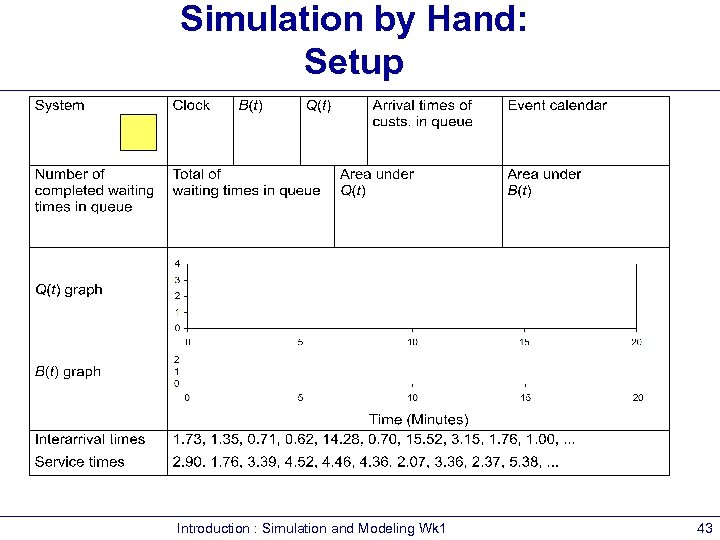 Simulation by Hand: Setup Introduction : Simulation and Modeling Wk 1 43
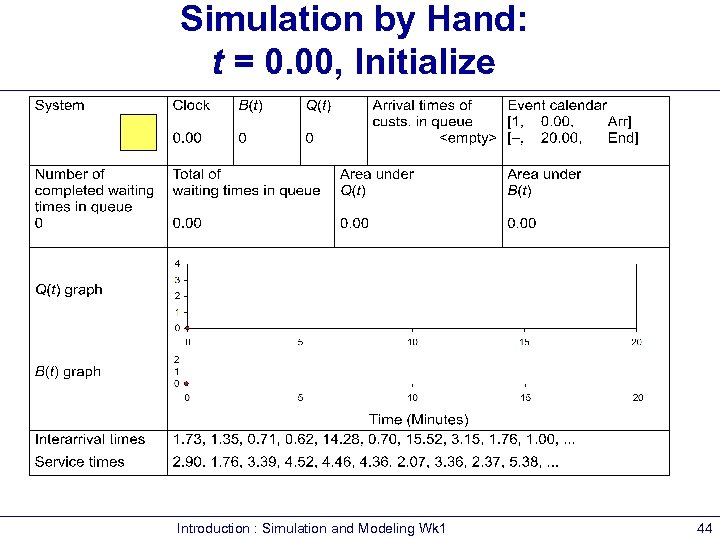 Simulation by Hand: t = 0. 00, Initialize Introduction : Simulation and Modeling Wk 1 44
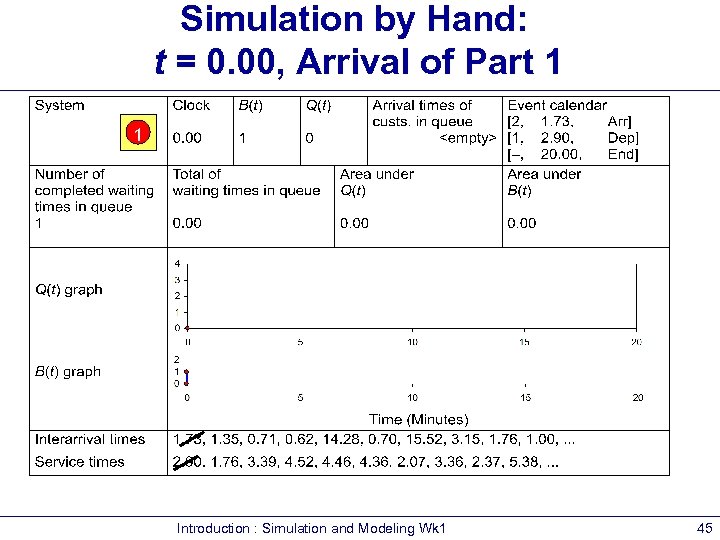 Simulation by Hand: t = 0. 00, Arrival of Part 1 1 Introduction : Simulation and Modeling Wk 1 45
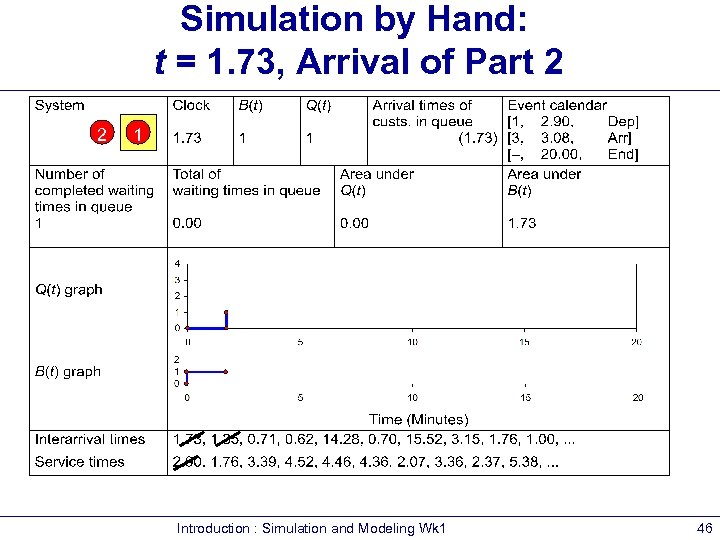 Simulation by Hand: t = 1. 73, Arrival of Part 2 2 1 Introduction : Simulation and Modeling Wk 1 46
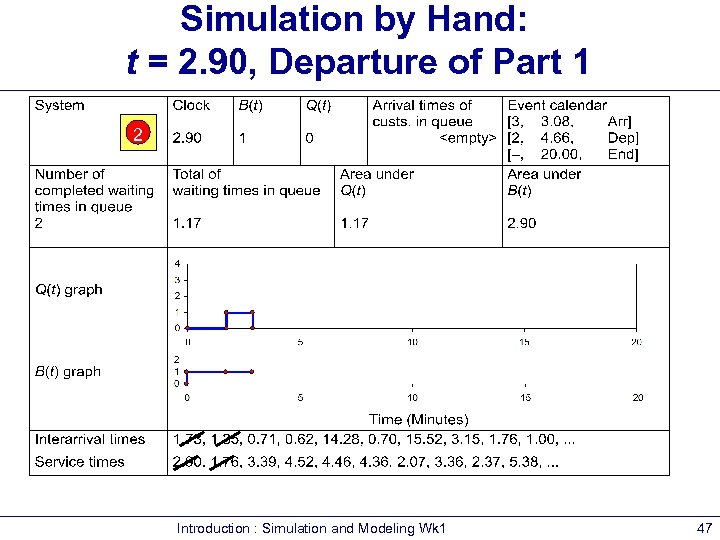 Simulation by Hand: t = 2. 90, Departure of Part 1 2 Introduction : Simulation and Modeling Wk 1 47
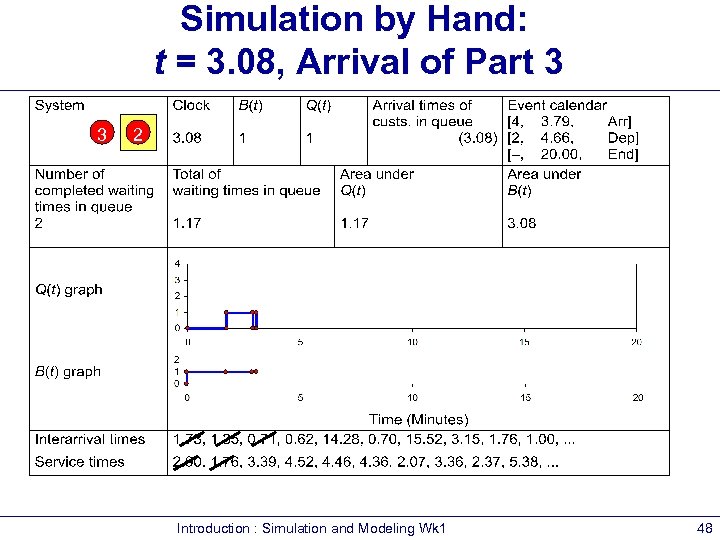 Simulation by Hand: t = 3. 08, Arrival of Part 3 3 2 Introduction : Simulation and Modeling Wk 1 48
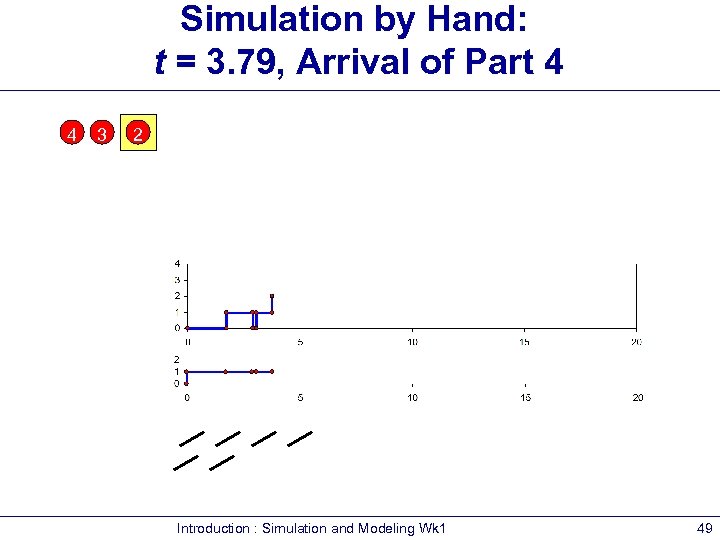 Simulation by Hand: t = 3. 79, Arrival of Part 4 4 3 2 Introduction : Simulation and Modeling Wk 1 49
 Simulation by Hand: t = 4. 41, Arrival of Part 5 5 4 3 2 Introduction : Simulation and Modeling Wk 1 50
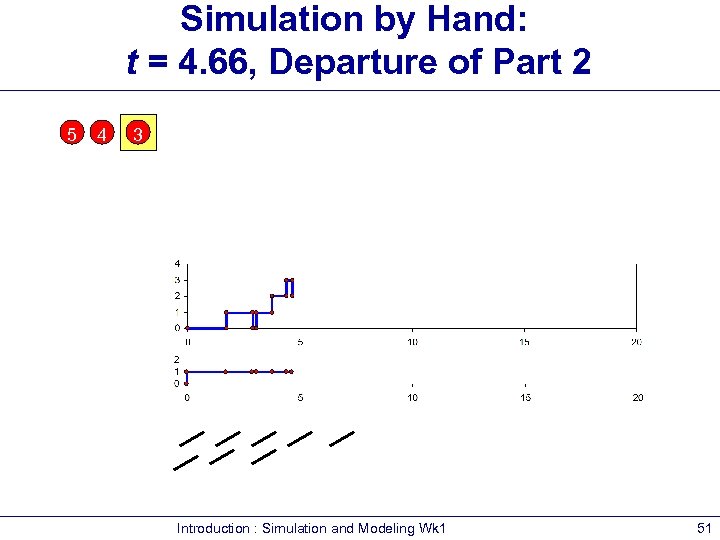 Simulation by Hand: t = 4. 66, Departure of Part 2 5 4 3 Introduction : Simulation and Modeling Wk 1 51
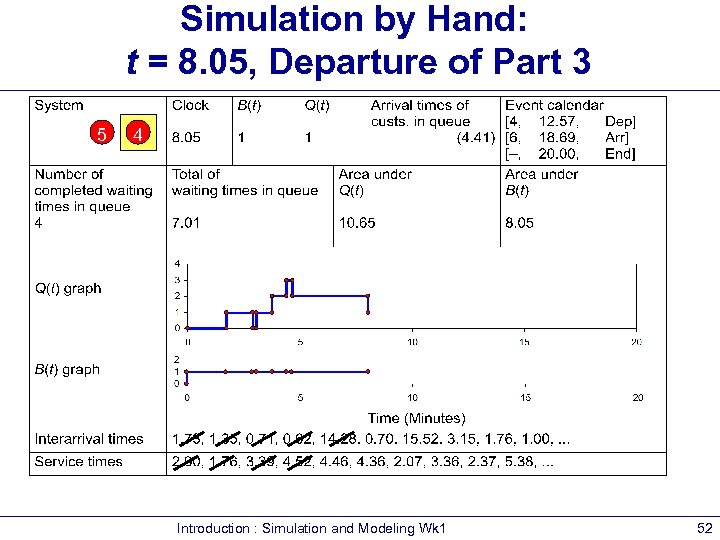 Simulation by Hand: t = 8. 05, Departure of Part 3 5 4 Introduction : Simulation and Modeling Wk 1 52
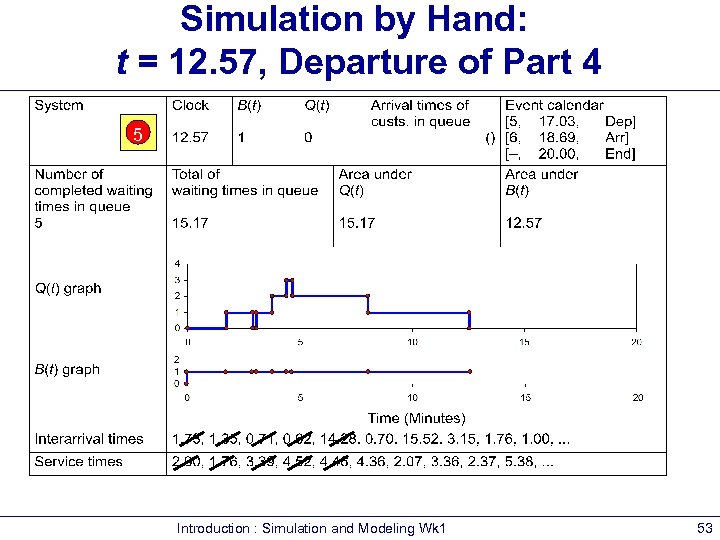 Simulation by Hand: t = 12. 57, Departure of Part 4 5 Introduction : Simulation and Modeling Wk 1 53
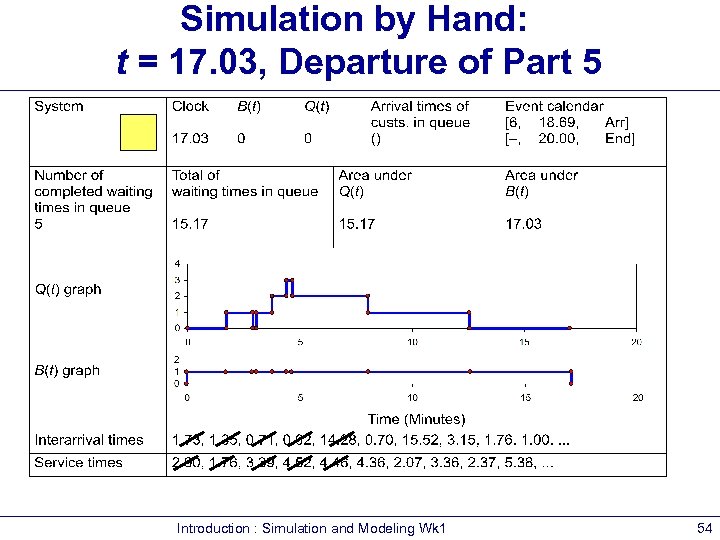 Simulation by Hand: t = 17. 03, Departure of Part 5 Introduction : Simulation and Modeling Wk 1 54
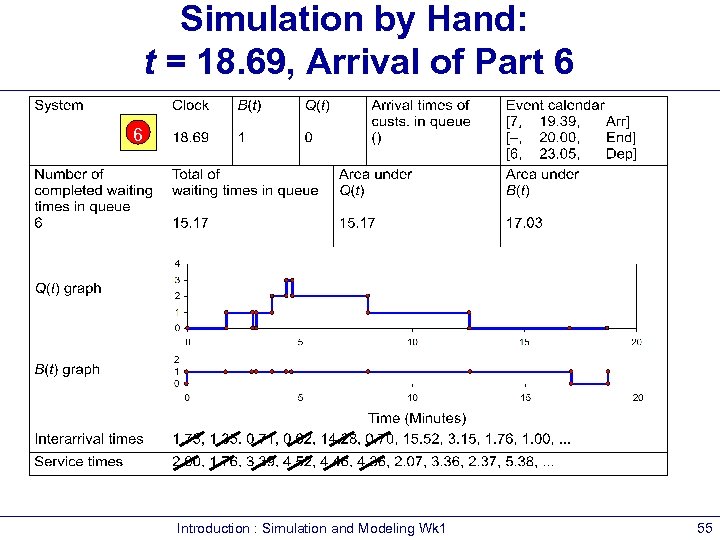 Simulation by Hand: t = 18. 69, Arrival of Part 6 6 Introduction : Simulation and Modeling Wk 1 55
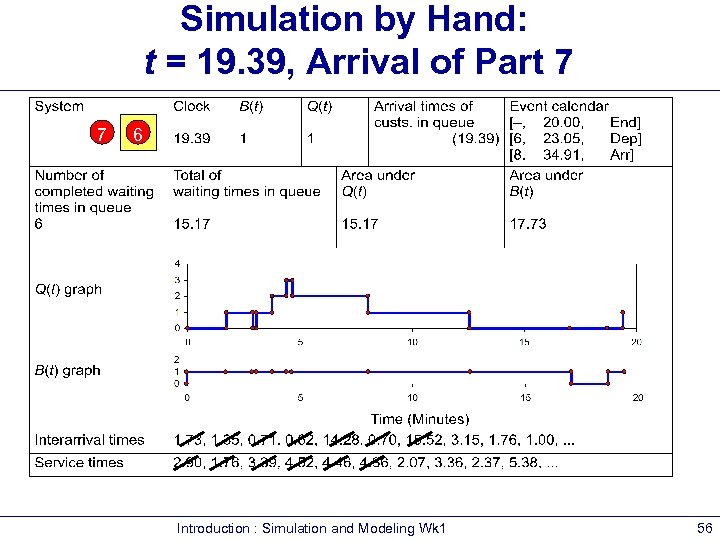 Simulation by Hand: t = 19. 39, Arrival of Part 7 7 6 Introduction : Simulation and Modeling Wk 1 56
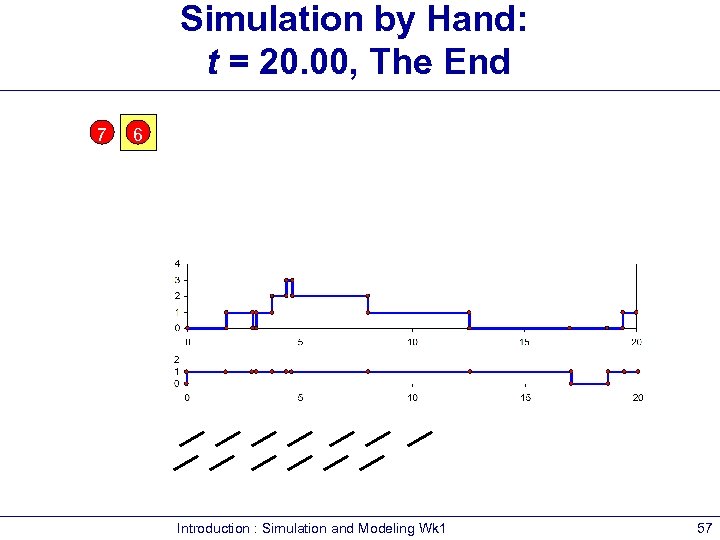 Simulation by Hand: t = 20. 00, The End 7 6 Introduction : Simulation and Modeling Wk 1 57
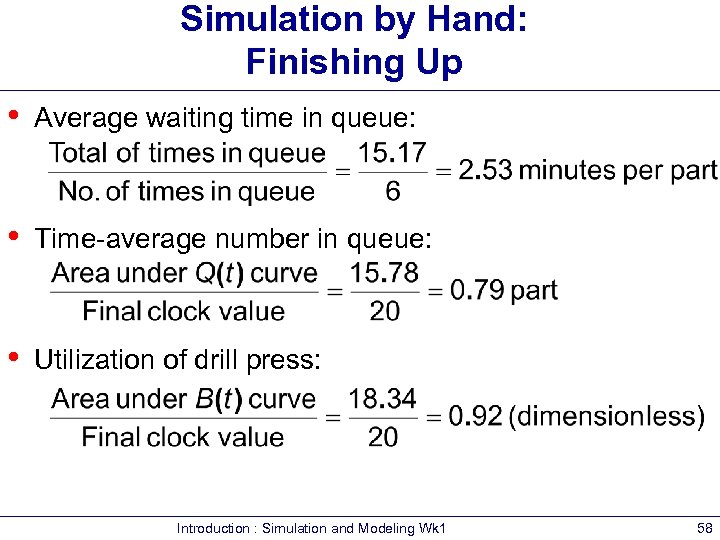 Simulation by Hand: Finishing Up • Average waiting time in queue: • Time-average number in queue: • Utilization of drill press: Introduction : Simulation and Modeling Wk 1 58
 Comparing Alternatives • • • Usually, simulation is used for more than just a single model “configuration” Often want to compare alternatives, select or search for the best (via some criterion) Simple processing system: What would happen if the arrival rate were to double? § § Cut interarrival times in half Rerun the model for double-time arrivals Introduction : Simulation and Modeling Wk 1 59
 Overview of a Simulation Study • • • Understand the system Be clear about the goals Formulate the model representation Translate into modeling software Verify “program” Validate model Design experiments Make runs Analyze, get insight, document results Introduction : Simulation and Modeling Wk 1 60
 Review Questions • Explain the following concepts, giving examples of the different types of each : § § § • • • Simulation Models Systems Explain the advantages and disadvantages using simulation Using a bank system or supermarket, identify the elements of variability, interconnectedness and complexity Using examples of systems on Slide 10, clearly outline what aspects make simulation appropriate for Introduction : Simulation and Modeling Wk 1 61