


 Скачать презентацию Service Hardening in Windows 2008 Concept of
72a6dff1648b6d045dbdb14f51d863aa.ppt
- Количество слайдов: 40
 Service Hardening in Windows 2008
 Concept of Service Hardening Presenter: Abu Rahat Chowdhary
 Preface • An estimated 90 percent of personal computers run on Microsoft Windows operating systems. • Microsoft has found itself under attack on several thousand instances • During 2002 -2005, Microsoft Windows worms like Blaster, Nachi, Sasser and Zotob infected a large number of systems on the Internet
 Vista WS 2008 (Longhorn) Security Features • • • User account protection Windows Service Hardening Anti-malware Advanced data protection Many more ……
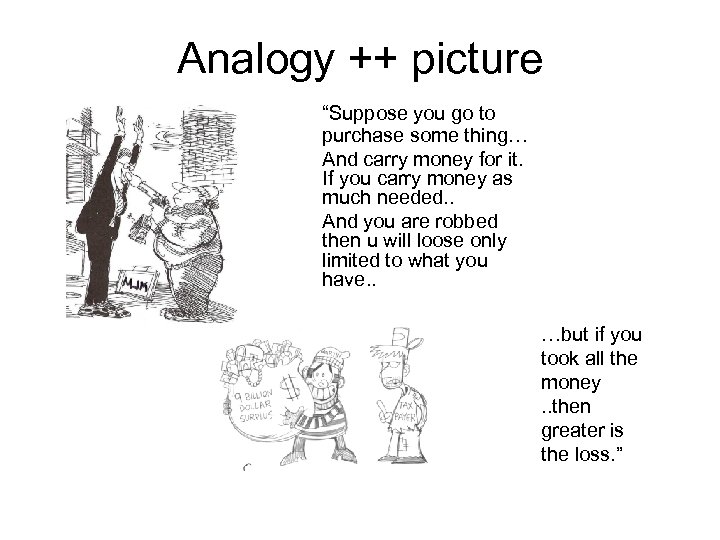 Analogy ++ picture “Suppose you go to purchase some thing… And carry money for it. If you carry money as much needed. . And you are robbed then u will loose only limited to what you have. . …but if you took all the money. . then greater is the loss. ”
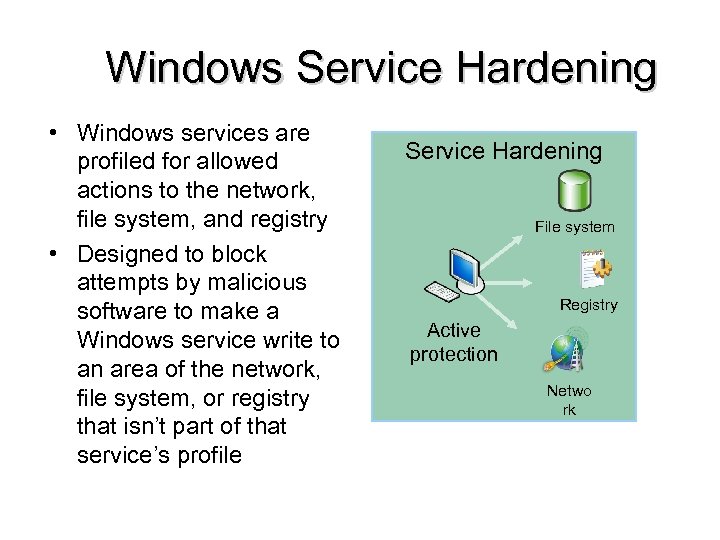 Windows Service Hardening • Windows services are profiled for allowed actions to the network, file system, and registry • Designed to block attempts by malicious software to make a Windows service write to an area of the network, file system, or registry that isn’t part of that service’s profile Service Hardening File system Registry Active protection Netwo rk
 Service Demonstration : Services. msc Three types of System Services – Local System – Local Service – Network Services typically run with high privileges and are attractive targets for viruses
 What is Service Hardening? • High privileged services when exploited allow attacker to gain unbounded control on the computer • Hardening a service means limiting damage to the system even if a service is compromised • Can not prevent a service from being compromised but provides additional layer of protection – Based on principle of defense-in-depth (Reference Slides)
 Service Hardening • Service hardening is one of many new security mechanisms in Windows Vista • The next generation of Windows server, currently known as Longhorn Server. • It more difficult for service exploits to do damage
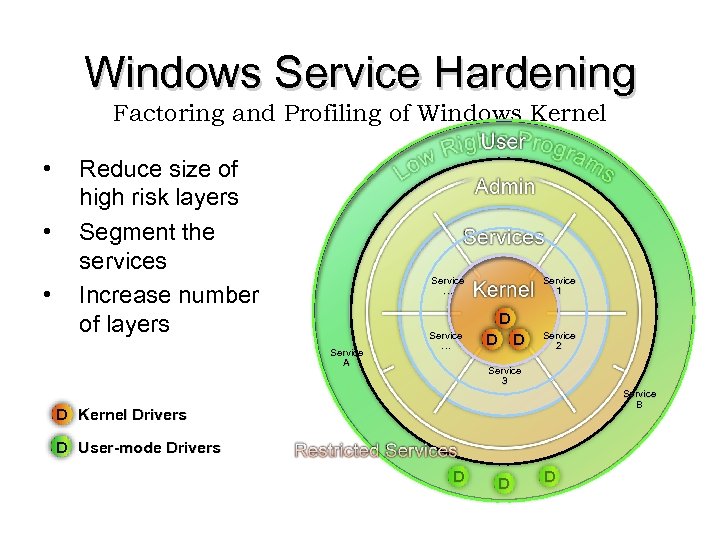 Windows Service Hardening Factoring and Profiling of Windows Kernel • • • Reduce size of high risk layers Segment the services Increase number of layers Service … Service 1 D Service A Service … D D Service 2 Service 3 Service B D Kernel Drivers D User-mode Drivers D D D
 Why Service Hardening? Issues with earlier versions of Windows Presenter: Radha Maldhure
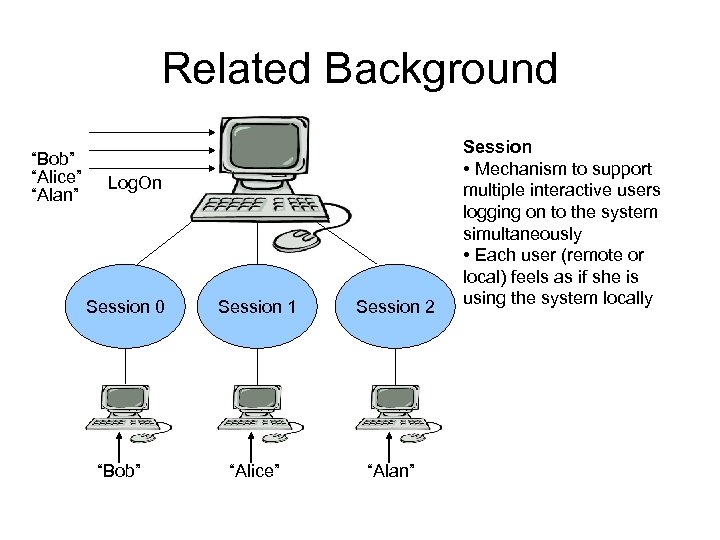 Related Background “Bob” “Alice” “Alan” Log. On Session 0 “Bob” Session 1 Session 2 “Alice” “Alan” Session • Mechanism to support multiple interactive users logging on to the system simultaneously • Each user (remote or local) feels as if she is using the system locally
 Related Background • Window Messages – Communication mechanism between application windows or system and application windows – E. g. when system time is changed, system sends WM_TIMECHANGE to all application windows on desktop. • Privilege – Right of an account to perform various system-related operations on the local computer – Example: shutting down the system, changing system time etc
 Issues with earlier versions of Windows • Shared Session 0 • Privilege Issue • No Service Isolation
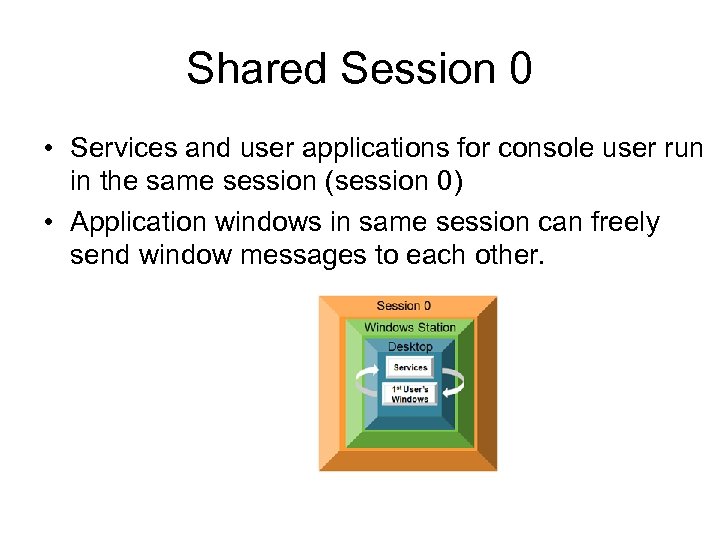 Shared Session 0 • Services and user applications for console user run in the same session (session 0) • Application windows in same session can freely send window messages to each other.
 Shared Session 0 ( contd) • Shatter Attack – Freelance security consultant Chris Paget discovered flaw in Windows messaging named as “Shatter Attack” – A low privilege application window may exploit a vulnerability in high privilege application window by means of window messaging – It is possible due to Shared Session 0
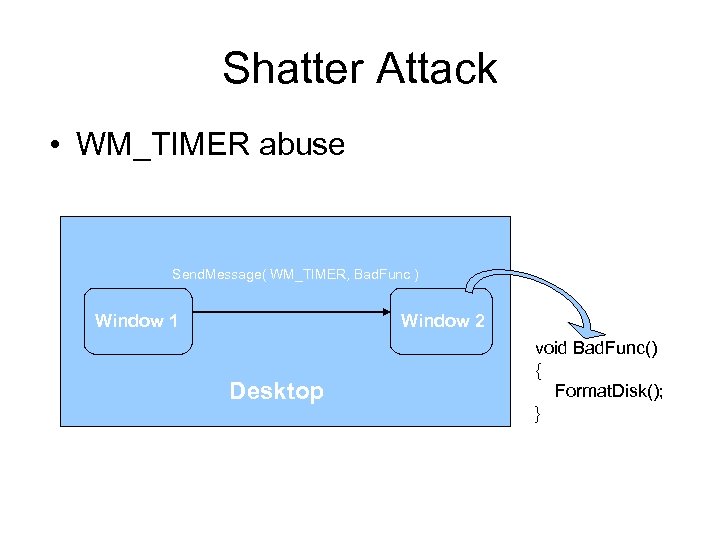 Shatter Attack • WM_TIMER abuse Send. Message( WM_TIMER, Bad. Func ) Window 1 Window 2 Desktop void Bad. Func() { Format. Disk(); }
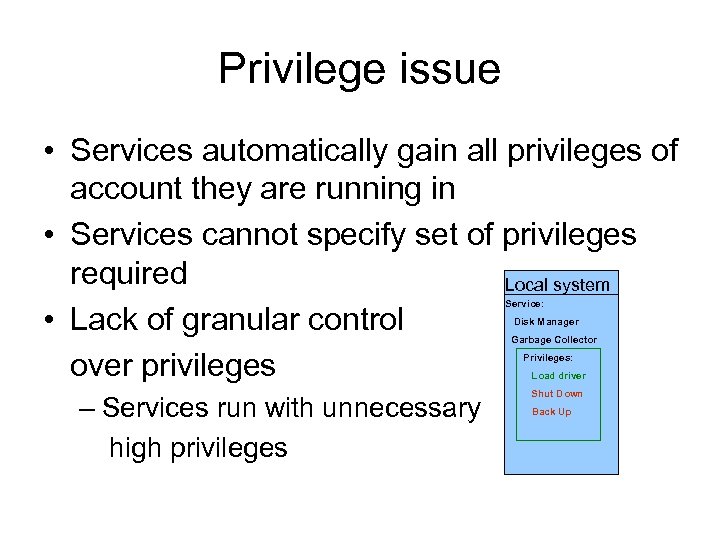 Privilege issue • Services automatically gain all privileges of account they are running in • Services cannot specify set of privileges required Local system • Lack of granular control over privileges Service: Disk Manager Garbage Collector Privileges: Load driver – Services run with unnecessary high privileges Shut Down Back Up
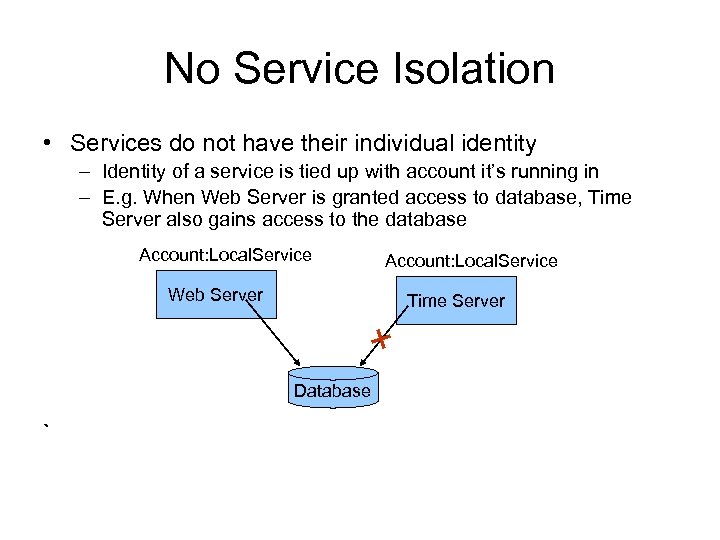 No Service Isolation • Services do not have their individual identity – Identity of a service is tied up with account it’s running in – E. g. When Web Server is granted access to database, Time Server also gains access to the database Account: Local. Service Web Server Time Server Database ` Account: Local. Service
 Service Hardening in Longhorn/ Vista Solutions to Issues with earlier versions of Windows Presenter: Kishore Padma Raju
 Service Hardening in Longhorn/Vista • Session 0 Isolation – Session 0 is assigned exclusively to services and the session is made non-interactive • Fostering principle of “least privileges” – Services can now specify required set of privileges • Per-service Security Identifier (SID) • Network Access Restriction
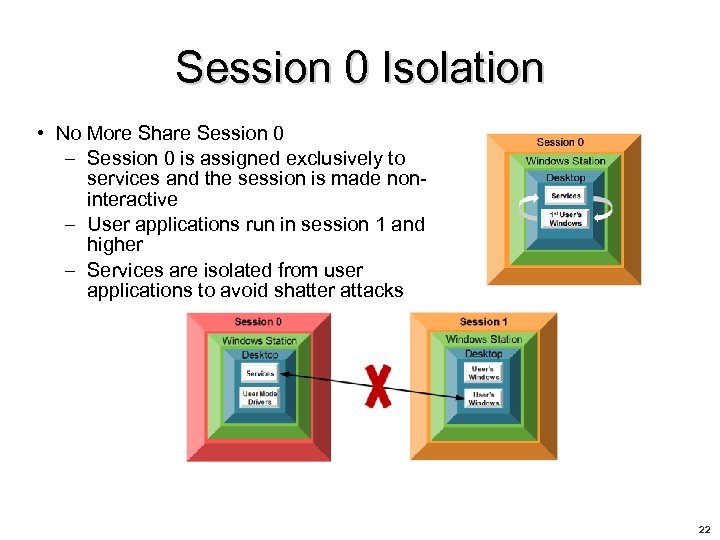 Session 0 Isolation • No More Share Session 0 – Session 0 is assigned exclusively to services and the session is made noninteractive – User applications run in session 1 and higher – Services are isolated from user applications to avoid shatter attacks 22
 Fostering principle of “least privileges” – Services can now specify required set of privileges • Services are no longer required to run with all the privileges associated with the accounts they run in • Provides granular control – Service Control Manager (SCM) removes all the privileges that are not specified as required privileges from the process token • If no required privileges are specified, SCM assumes that service needs all the privileges • If service requires privileges not present in the process token, service is not started 23
 Per-service Security Identifier (SID) • Per-service Security Identifier (SID) – Each service installed on Longhorn/Vista is assigned a SID • Per-service SID is based on the service name and is unique to that service on the computer – When per-service SID is enabled for a service, it is added to the service’s process token by SCM when the service is started – Per-service SID can be used to protect service resources • Service resources can be ACL’d with service SID to grant access exclusively to that service • It provides more granularity and service isolation 24
 Per-service Security Identifier (SID) – Per-service SID can be used to gain access to certain objects normally accessible to administrative privileges • By virtue of service SID, services can run in low privilege account and can still access certain objects that are accessible only to high privilege accounts • e. g. A service running in low privilege might need write-access to its log files stored in “Program Files
 Network Access Restriction – Service network restriction are implemented with per-service SIDs – Longhorn/Vista firewall has been enhanced to support service network restriction 26
 Network Access Restriction (Continued) – Services can add firewall rule to specify communication protocol, ports and direction of the traffic • e. g. A service can add a rule to restrict its network access on TCP port 10000 for outbound communication – Integrated firewall in Vista/Longhorn will block all other type of network access 27
 Weakness • With reduced privileges, certain Services may not function correctly – Extensive research is required to determine exact required privileges • Cannot completely avoid the damage caused by vulnerability exploit • May ask for design level changes
 Strength • Adds as second layer of protection • Reduces damage of vulnerability exploit to a great extent • Fosters better security practices
 Conclusion • Service Hardening is a significant move towards enhancing Windows security • Eliminates Shatter attack
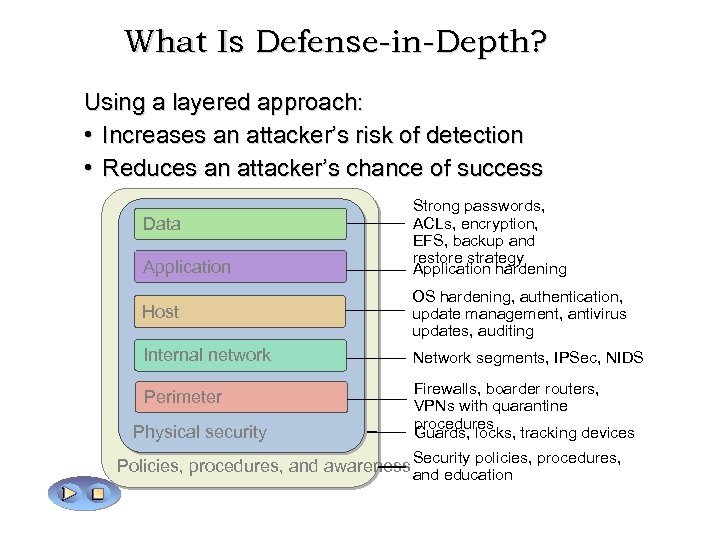 What Is Defense-in-Depth? Using a layered approach: • Increases an attacker’s risk of detection • Reduces an attacker’s chance of success Data Application Strong passwords, ACLs, encryption, EFS, backup and restore strategy Application hardening Host OS hardening, authentication, update management, antivirus updates, auditing Internal network Network segments, IPSec, NIDS Perimeter Firewalls, boarder routers, VPNs with quarantine procedures Guards, locks, tracking devices Physical security Policies, procedures, and awareness Security policies, procedures, and education
 DEFENSE AGAINST BUFFER OVERFLOW VULNERABILITIES
 Buffer Over Flow Tutorial • Buffer overflow vulnerabilities hunted, found and exploited over decades. • Unfortunately still effective • Numerous protection techniques attempted against buffer overflow attack
 Stack Smashing • Occurs when a cracker purposely overflows a buffer on stack to get access to forbidden regions of computer memory. • A stack smash is based upon the attributes of common implementations of C and C++.
 Techniques used for defenses • Nonexecutable Stacks Ensures that code on the stack can’t be run Implemented on Linux OS[Sol 06] • Address Randomization Randomizing address space of program Attackers can work around some type of address randomization
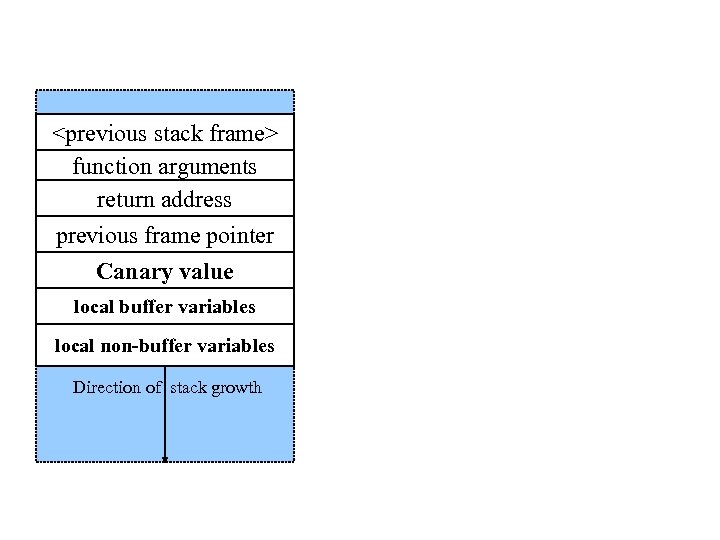
 Techniques used for defenses ( contd ) • Code Analyzers Scan the code for security errors Existing code scanners: Rats[Seca], BOON[Wag] Large number of false positives • Stack Guard (canaries) Put a known value on stack just before return address Cowan’s Stack guard
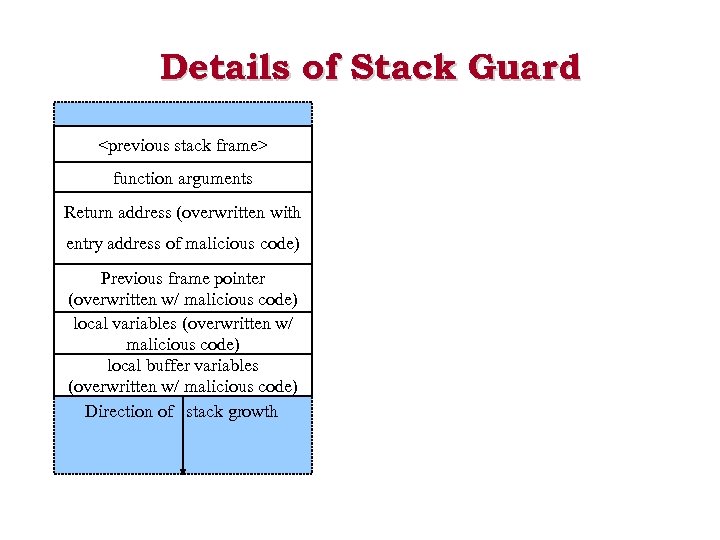 Details of Stack Guard
 • Like the legendary canary-in-the-mine, it detects stack smash attacks. • Inserts a “Canary value” just below the return address (Stack Guard) or just below the previous frame pointer (Stack Smashing Protector). This value gets checked right before a function returns.
 Problems • Stack. Guard implemented as a GCC patch. – Program must be recompiled. – Minimal performance effects: 8% for Apache • Canary value checking only takes place at return time, so other attacks possible • Canaries don’t offer fullproof protection. – Some stack smashing attacks can leave canaries untouched.