


 Скачать презентацию Server Time Protocol Overview and Planning Considerations
45e45d0ba54b99951c7607c794046f8d.ppt
- Количество слайдов: 68
 Server Time Protocol Overview and Planning Considerations © 2015 IBM Corporation
 Introduction § Server Time Protocol (STP), a time synchronization facility for z Systems is designed to provide time synchronization for multiple IBM® servers, and is the follow-on to the Sysplex Timer (9037 -002). § Customers with existing External Time Reference (ETR) networks can concurrently migrate to STP § This session will describe the – Key functional capabilities of STP – Configurations STP is designed to support – Hardware and software planning considerations required for implementing STP 2 © 2013 IBM Corporation
 Statement of Direction (April 28, 2009) § The System z 10 will be the last server to support connections to the Sysplex Timer® (9037). – Servers that require time synchronization, such as to support a base or Parallel Sysplex, will require Server Time Protocol (STP). STP has been available since January 2007 and is offered on the System z 10, System z 9, and z. Series® 990 and 890 servers. 3 © 2013 IBM Corporation
 Hardware withdrawal: announced July 12, 2011 IBM System z 10 EC IBM System z 10 BC § Effective June 30, 2012 § Model conversions and hardware MES features applied to an existing z 10 EC or z 10 BC server § After June 30, 2013, features and conversions that are delivered solely through a modification to the LIC will be withdrawn. § The Capacity on Demand offerings that are configured prior to withdrawal are usable until the offering expiration date or termination date, as applicable. 4 © 2013 IBM Corporation
 Statement of Direction (July 22, 2010) § The IBM z. Enterprise 196 is planned to be the last high-end server to support dial-up modems for use with the Remote Support Facility (RSF), and the External Time Source (ETS) option of Server Time Protocol (STP). – The currently available Network Time Protocol (NTP) server option for ETS as well as Internet time services available using broadband connections can be used to provide the same degree of accuracy as dial-up time services. – Enterprises should begin migrating from dial-up modems to Broadband for RSF connections. 5 © 2013 IBM Corporation
 Agenda § STP Overview § Hardware Planning § External Time Source (ETS) Planning § Software Planning Overview § Server Role Planning § Operational Safeguards § Additional Information 6 © 2013 IBM Corporation
 STP Overview § Designed to provide the capability for multiple servers to maintain time synchronization with each other and form a Coordinated Timing Network (CTN) – CTN: a collection of servers that are time synchronized to a time value called Coordinated Server Time (CST) § IBM Server-wide facility implemented in IBM z 13, IBM® z. Enterprise™ EC 12 (z. EC 12), IBM® z. Enterprise™ BC 12 (z. BC 12), IBM® z. Enterprise™ 196 (z 196), IBM® z. Enterprise™ 114 (z 114), IBM System z 10™, IBM System z 9™, IBM e. Server™ z. Series® 990 (z 990), z. Series 890 (z 890) Licensed Internal Code (LIC) – Single view of “time” to PR/SM™ – PR/SM can virtualize this view of time to the individual logical partitions (LPARs) § Message based time synchronization protocol – Similar to Network Time Protocol (NTP) – an industry standard – Timekeeping information transmitted over Coupling Links supported by machine type. • ISC-3 links (Peer mode), ICB-3, ICB-4, PSIFB links and ICA SR. – NOT standard NTP 7 © 2013 IBM Corporation
 Key Attributes § Designed to provide improved time synchronization, compared to Sysplex Timer®, for servers in a Sysplex or non-Sysplex configuration § Can scale with distance – Generally, servers exchanging data over fast short links require more stringent synchronization than servers exchanging data over long distances § Supports a multi-site timing network of up to 200 km over fiber optic cabling – Parallel Sysplex® cluster can span up to 200 km – RPQ 8 P 2263 required for distances greater than 100 km § Potentially reduces the cross-site connectivity required for a multi-site Parallel Sysplex cluster – Dedicated links not required to transmit timekeeping information § With proper planning, allows concurrent migration from an existing External Time Reference (ETR) network § Allows – Coexistence with ETR network – Automatic updates of DST offset based on time zone algorithm – Adjustment of CST up to +/- 60 seconds 8 © 2013 IBM Corporation
 Terminology § STP-capable server/CF – z 13, z. EC 12, z. BC 12, z 196, z 114, z 10(EC or BC), z 990, z 890 server/CF with STP LIC installed § STP-enabled server/CF – STP-capable server/CF with STP Feature Code 1021 installed – STP panels at the HMC/SE can now be used § STP-configured server/CF – STP-enabled server/CF with a CTN ID assigned – STP message exchanges can take place • CTN – Collection of servers that are time synchronized to a time value called Coordinated Server Time (CST) • CTN ID – Common identifier assigned to Servers / Coupling Facilities (CFs) that make up the same CTN 9 © 2013 IBM Corporation
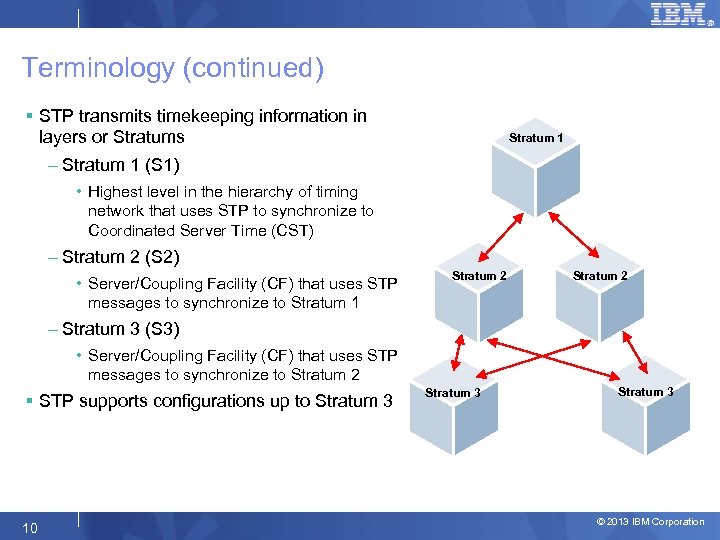 Terminology (continued) § STP transmits timekeeping information in layers or Stratums Stratum 1 – Stratum 1 (S 1) • Highest level in the hierarchy of timing network that uses STP to synchronize to Coordinated Server Time (CST) – Stratum 2 (S 2) • Server/Coupling Facility (CF) that uses STP messages to synchronize to Stratum 1 Stratum 2 – Stratum 3 (S 3) • Server/Coupling Facility (CF) that uses STP messages to synchronize to Stratum 2 § STP supports configurations up to Stratum 3 10 Stratum 3 © 2013 IBM Corporation
 Configurations § Two types of CTN configurations possible: – Mixed CTN • Allows servers/CFs that can only be synchronized to a Sysplex Timer (ETR network) to coexist with servers/CFs that can be synchronized with CST in the “same” timing network • Sysplex Timer® provides timekeeping information • CTN ID format – STP network ID concatenated with ETR network ID – STP-only CTN • All servers/CFs synchronized with CST • Sysplex Timer is NOT required and not part of CTN • CTN ID format – STP network ID only (ETR network ID field has to be null) 11 © 2013 IBM Corporation
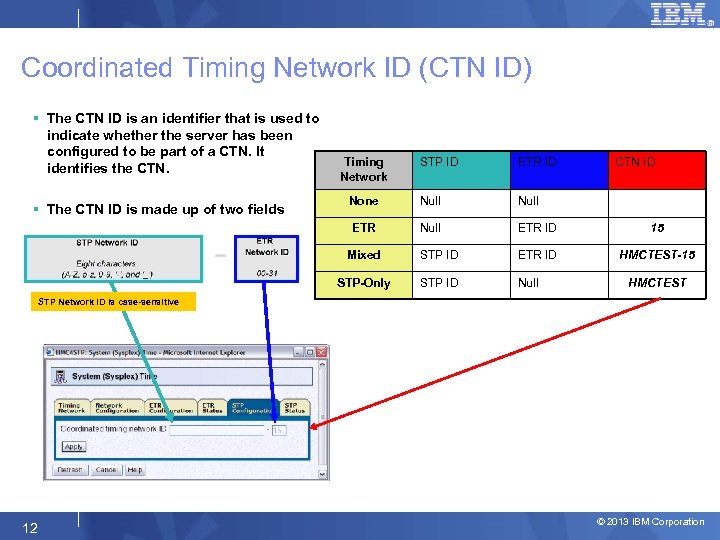 Coordinated Timing Network ID (CTN ID) § The CTN ID is an identifier that is used to indicate whether the server has been configured to be part of a CTN. It identifies the CTN. STP ID ETR ID None Null ETR ID 15 Mixed STP ID ETR ID HMCTEST-15 STP-Only § The CTN ID is made up of two fields Timing Network CTN ID STP ID Null HMCTEST STP Network ID is case-sensitive 12 © 2013 IBM Corporation
 Mixed Coordinated Timing Network (CTN) § Need at least one STP-enabled server to configure Mixed CTN – Selected STP-enabled server MUST also be synchronized to the Sysplex Timer • Automatically becomes a S 1 server for the Mixed CTN • Can have multiple S 1 servers in Mixed CTN • Note: z 13, z. EC 12, z. BC 12, z 196 and z 114 do not support attachment to Sysplex Timer – S 2 server/CF uses S 1 as clock source – S 3 server/CF uses S 2 as clock source § Sysplex Timer provides timekeeping information for Mixed CTN § Sysplex Timer console continues to be used for all timing related functions of the Mixed CTN – Initialize time; Set Time Zone, Daylight Saving Time (DST), Leap seconds offsets – Schedule DST and Leap seconds offset changes – Adjust time up to +/- 4. 999 seconds § Hardware Management Console (HMC) must be used for Mixed CTN ID initialization and modification 13 © 2013 IBM Corporation
 Mixed CTN (continued) § Concurrent migration from ETR network (with proper planning) – Concurrently migrate from existing ETR network to Mixed CTN – Concurrently migrate from Mixed CTN to ETR Network • Allows testing Mixed CTN during change window and go back concurrently to • 14 ETR network at start of production © 2013 IBM Corporation
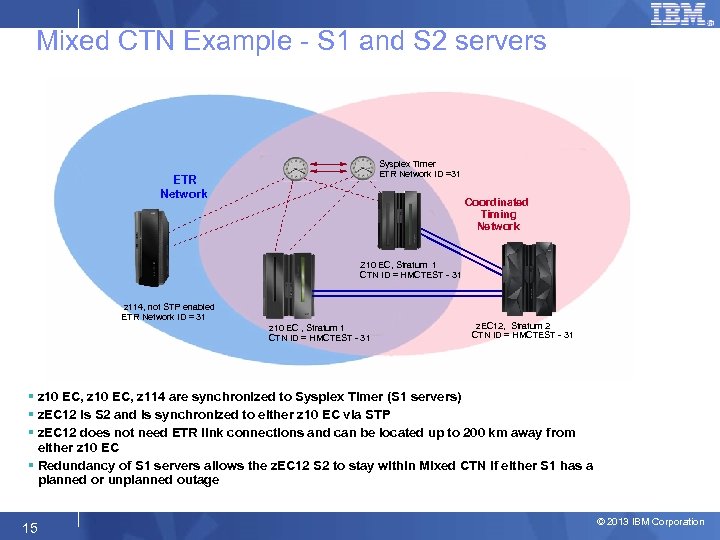 Mixed CTN Example - S 1 and S 2 servers Sysplex Timer ETR Network ID =31 ETR Network Coordinated Timing Network ETR Timing Mode ISC-3 Z 10 EC, Stratum 1 CTN ID = HMCTEST - 31 ETR Timing Mode z 114, not STP enabled ETR Network ID = 31 z 10 EC , Stratum 1 CTN ID = HMCTEST - 31 STP Timing Mode ISC-3 z. EC 12, Stratum 2 CTN ID = HMCTEST - 31 § z 10 EC, z 114 are synchronized to Sysplex Timer (S 1 servers) § z. EC 12 is S 2 and is synchronized to either z 10 EC via STP § z. EC 12 does not need ETR link connections and can be located up to 200 km away from either z 10 EC § Redundancy of S 1 servers allows the z. EC 12 S 2 to stay within Mixed CTN if either S 1 has a planned or unplanned outage 15 © 2013 IBM Corporation
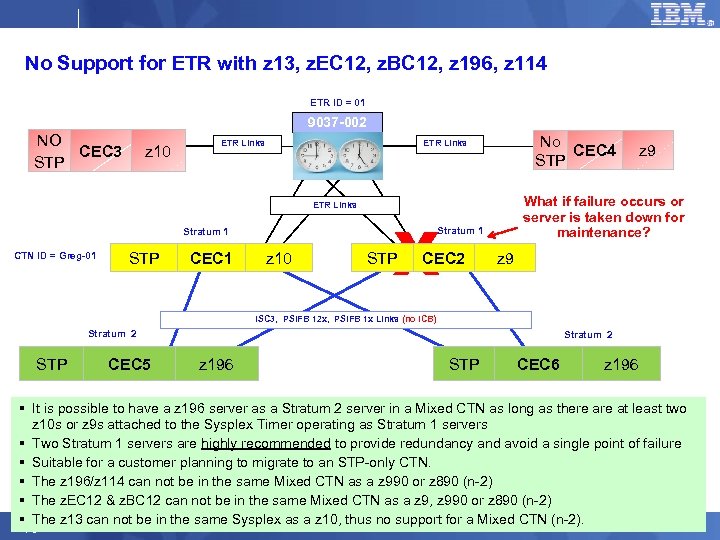 No Support for ETR with z 13, z. EC 12, z. BC 12, z 196, z 114 ETR ID = 01 9037 -002 NO CEC 3 STP z 10 ETR Links STP CEC 1 z 10 X STP CEC 2 z 9 What if failure occurs or server is taken down for maintenance? Stratum 1 CTN ID = Greg-01 No CEC 4 STP ETR Links z 9 ISC 3, PSIFB 12 x, PSIFB 1 x Links (no ICB) Stratum 2 STP Stratum 2 CEC 5 Stratum 2 z 196 STP CEC 6 z 196 § It is possible to have a z 196 server as a Stratum 2 server in a Mixed CTN as long as there at least two z 10 s or z 9 s attached to the Sysplex Timer operating as Stratum 1 servers § Two Stratum 1 servers are highly recommended to provide redundancy and avoid a single point of failure § Suitable for a customer planning to migrate to an STP-only CTN. § The z 196/z 114 can not be in the same Mixed CTN as a z 990 or z 890 (n-2) § The z. EC 12 & z. BC 12 can not be in the same Mixed CTN as a z 9, z 990 or z 890 (n-2) § The z 13 can not be in the same Sysplex as a z 10, thus no support for a Mixed CTN (n-2). © 2013 IBM Corporation 16 16
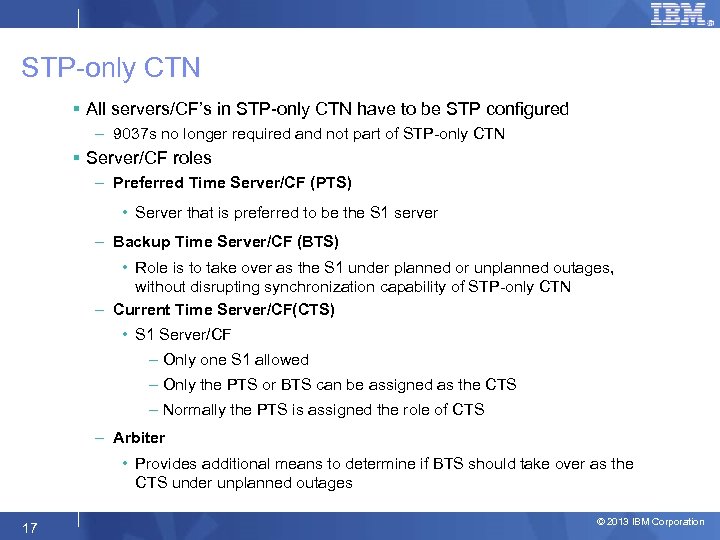 STP-only CTN § All servers/CF’s in STP-only CTN have to be STP configured – 9037 s no longer required and not part of STP-only CTN § Server/CF roles – Preferred Time Server/CF (PTS) • Server that is preferred to be the S 1 server – Backup Time Server/CF (BTS) • Role is to take over as the S 1 under planned or unplanned outages, without disrupting synchronization capability of STP-only CTN – Current Time Server/CF(CTS) • S 1 Server/CF – Only one S 1 allowed – Only the PTS or BTS can be assigned as the CTS – Normally the PTS is assigned the role of CTS – Arbiter • Provides additional means to determine if BTS should take over as the CTS under unplanned outages 17 © 2013 IBM Corporation
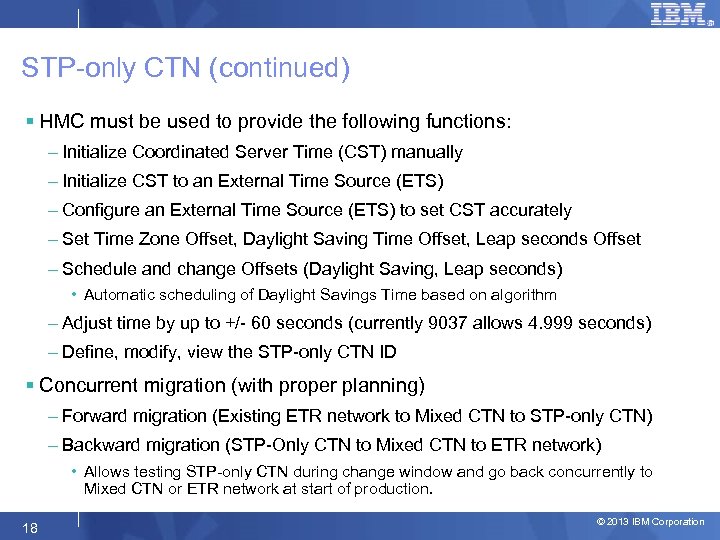 STP-only CTN (continued) § HMC must be used to provide the following functions: – Initialize Coordinated Server Time (CST) manually – Initialize CST to an External Time Source (ETS) – Configure an External Time Source (ETS) to set CST accurately – Set Time Zone Offset, Daylight Saving Time Offset, Leap seconds Offset – Schedule and change Offsets (Daylight Saving, Leap seconds) • Automatic scheduling of Daylight Savings Time based on algorithm – Adjust time by up to +/- 60 seconds (currently 9037 allows 4. 999 seconds) – Define, modify, view the STP-only CTN ID § Concurrent migration (with proper planning) – Forward migration (Existing ETR network to Mixed CTN to STP-only CTN) – Backward migration (STP-Only CTN to Mixed CTN to ETR network) • Allows testing STP-only CTN during change window and go back concurrently to Mixed CTN or ETR network at start of production. 18 © 2013 IBM Corporation
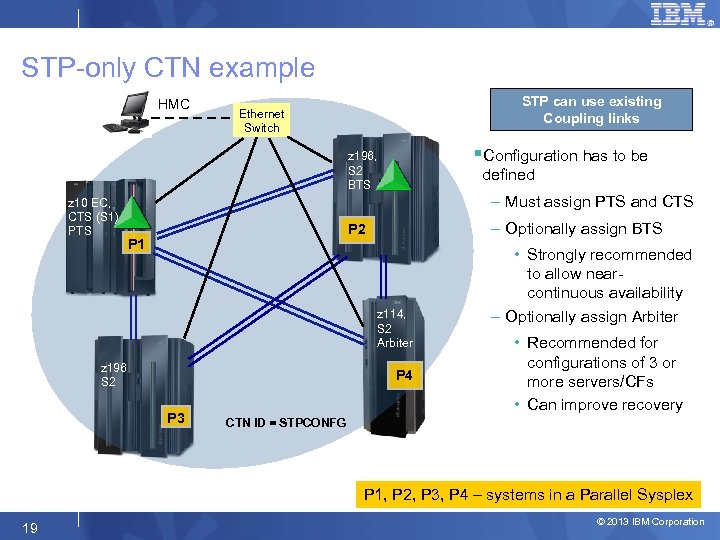 STP-only CTN example HMC STP can use existing Coupling links Ethernet Switch §Configuration has to be z 196, S 2 BTS z 10 EC, CTS (S 1) PTS defined – Must assign PTS and CTS – Optionally assign BTS P 2 P 1 z 114, S 2 Arbiter z 196 S 2 P 4 P 3 • Strongly recommended to allow nearcontinuous availability – Optionally assign Arbiter • Recommended for configurations of 3 or more servers/CFs • Can improve recovery CTN ID = STPCONFG P 1, P 2, P 3, P 4 – systems in a Parallel Sysplex 19 © 2013 IBM Corporation
 Agenda § STP Overview § Hardware Planning § External Time Source (ETS) Planning § Software Planning Overview § Server Role Planning § Operational Safeguards § Additional Information 20 © 2013 IBM Corporation
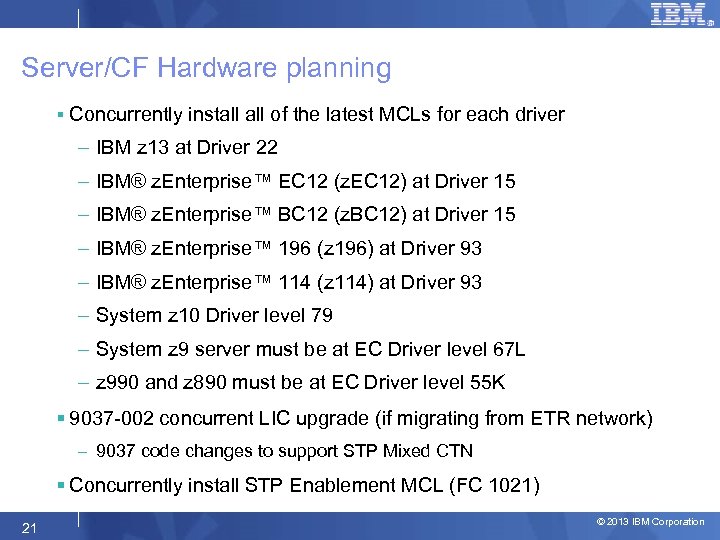 Server/CF Hardware planning § Concurrently install of the latest MCLs for each driver – IBM z 13 at Driver 22 – IBM® z. Enterprise™ EC 12 (z. EC 12) at Driver 15 – IBM® z. Enterprise™ BC 12 (z. BC 12) at Driver 15 – IBM® z. Enterprise™ 196 (z 196) at Driver 93 – IBM® z. Enterprise™ 114 (z 114) at Driver 93 – System z 10 Driver level 79 – System z 9 server must be at EC Driver level 67 L – z 990 and z 890 must be at EC Driver level 55 K § 9037 -002 concurrent LIC upgrade (if migrating from ETR network) – 9037 code changes to support STP Mixed CTN § Concurrently install STP Enablement MCL (FC 1021) 21 © 2013 IBM Corporation
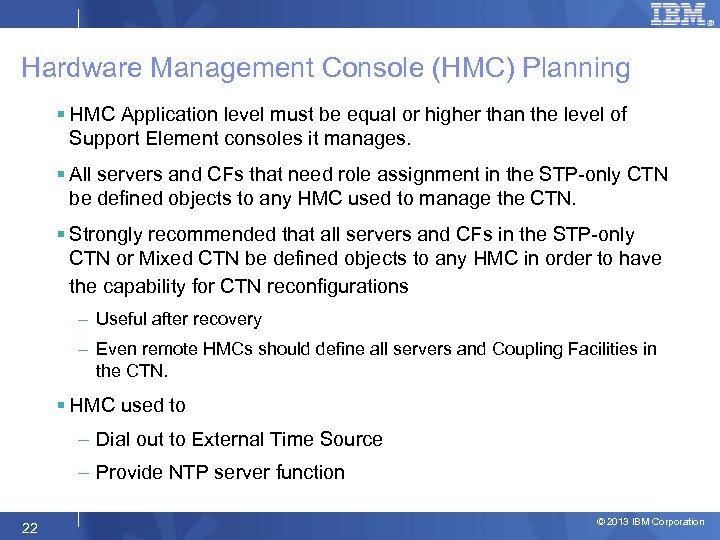 Hardware Management Console (HMC) Planning § HMC Application level must be equal or higher than the level of Support Element consoles it manages. § All servers and CFs that need role assignment in the STP-only CTN be defined objects to any HMC used to manage the CTN. § Strongly recommended that all servers and CFs in the STP-only CTN or Mixed CTN be defined objects to any HMC in order to have the capability for CTN reconfigurations – Useful after recovery – Even remote HMCs should define all servers and Coupling Facilities in the CTN. § HMC used to – Dial out to External Time Source – Provide NTP server function 22 © 2013 IBM Corporation
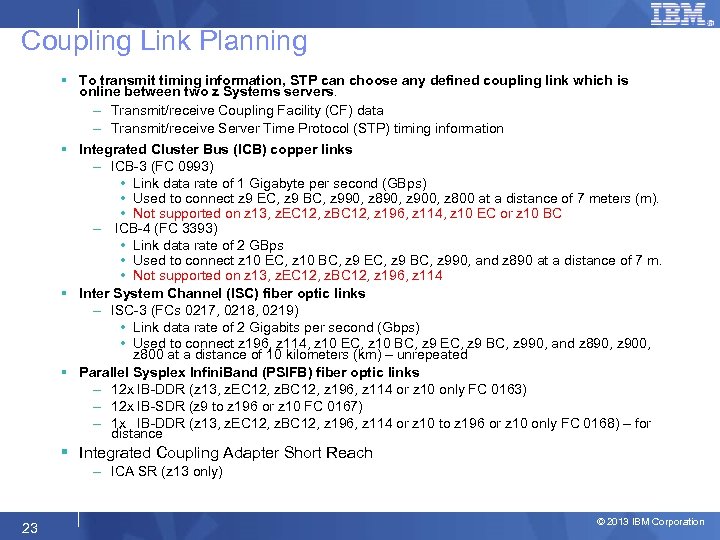 Coupling Link Planning § To transmit timing information, STP can choose any defined coupling link which is online between two z Systems servers. – Transmit/receive Coupling Facility (CF) data – Transmit/receive Server Time Protocol (STP) timing information § Integrated Cluster Bus (ICB) copper links – ICB-3 (FC 0993) • Link data rate of 1 Gigabyte per second (GBps) • Used to connect z 9 EC, z 9 BC, z 990, z 890, z 900, z 800 at a distance of 7 meters (m). • Not supported on z 13, z. EC 12, z. BC 12, z 196, z 114, z 10 EC or z 10 BC – ICB-4 (FC 3393) • Link data rate of 2 GBps • Used to connect z 10 EC, z 10 BC, z 9 EC, z 9 BC, z 990, and z 890 at a distance of 7 m. • Not supported on z 13, z. EC 12, z. BC 12, z 196, z 114 § Inter System Channel (ISC) fiber optic links – ISC-3 (FCs 0217, 0218, 0219) • Link data rate of 2 Gigabits per second (Gbps) • Used to connect z 196, z 114, z 10 EC, z 10 BC, z 9 EC, z 9 BC, z 990, and z 890, z 900, z 800 at a distance of 10 kilometers (km) – unrepeated § Parallel Sysplex Infini. Band (PSIFB) fiber optic links – 12 x IB-DDR (z 13, z. EC 12, z. BC 12, z 196, z 114 or z 10 only FC 0163) – 12 x IB-SDR (z 9 to z 196 or z 10 FC 0167) – 1 x IB-DDR (z 13, z. EC 12, z. BC 12, z 196, z 114 or z 10 to z 196 or z 10 only FC 0168) – for distance § Integrated Coupling Adapter Short Reach – ICA SR (z 13 only) 23 © 2013 IBM Corporation
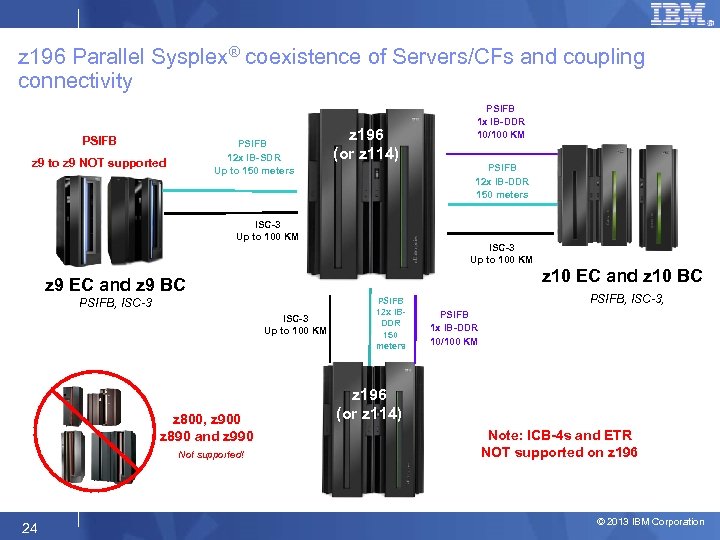 z 196 Parallel Sysplex® coexistence of Servers/CFs and coupling connectivity PSIFB 12 x IB-SDR Up to 150 meters z 9 to z 9 NOT supported z 196 (or z 114) PSIFB 1 x IB-DDR 10/100 KM PSIFB 12 x IB-DDR 150 meters ISC-3 Up to 100 KM z 10 EC and z 10 BC z 9 EC and z 9 BC PSIFB, ISC-3 Up to 100 KM z 800, z 900 z 890 and z 990 Not supported! 24 PSIFB 12 x IBDDR 150 meters PSIFB, ISC-3, PSIFB 1 x IB-DDR 10/100 KM z 196 (or z 114) Note: ICB-4 s and ETR NOT supported on z 196 © 2013 IBM Corporation
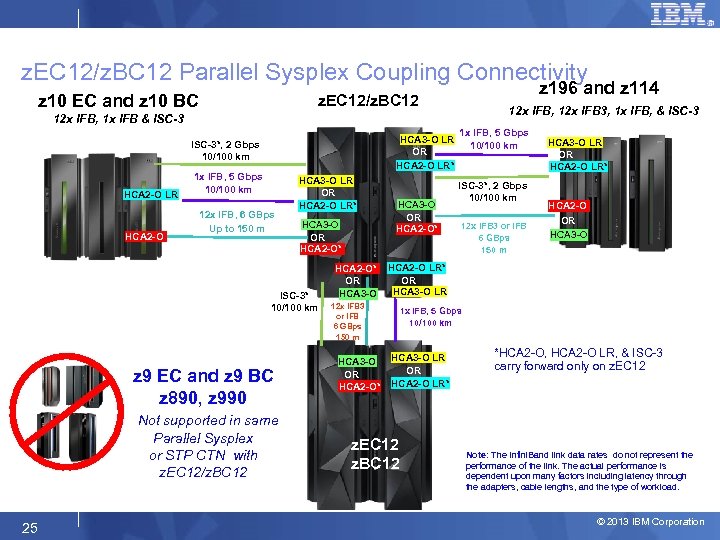 z. EC 12/z. BC 12 Parallel Sysplex Coupling Connectivity z 10 EC and z 10 BC z 196 and z 114 z. EC 12/z. BC 12 12 x IFB, 12 x IFB 3, 1 x IFB, & ISC-3 12 x IFB, 1 x IFB & ISC-3 HCA 3 -O LR OR HCA 2 -O LR* ISC-3*, 2 Gbps 10/100 km HCA 2 -O LR HCA 2 -O 1 x IFB, 5 Gbps 10/100 km 12 x IFB, 6 GBps Up to 150 m HCA 3 -O LR OR HCA 2 -O LR* HCA 3 -O OR HCA 2 -O* ISC-3* 10/100 km z 9 EC and z 9 BC z 890, z 990 Not supported in same Parallel Sysplex or STP CTN with z. EC 12/z. BC 12 25 HCA 2 -O* OR HCA 3 -O 12 x IFB 3 or IFB 6 GBps 150 m HCA 3 -O OR HCA 2 -O* 1 x IFB, 5 Gbps 10/100 km ISC-3*, 2 Gbps 10/100 km 12 x IFB 3 or IFB 6 GBps 150 m HCA 3 -O LR OR HCA 2 -O LR* HCA 2 -O OR HCA 3 -O HCA 2 -O LR* OR HCA 3 -O LR 1 x IFB, 5 Gbps 10/100 km HCA 3 -O LR OR HCA 2 -O LR* z. EC 12 z. BC 12 *HCA 2 -O, HCA 2 -O LR, & ISC-3 carry forward only on z. EC 12 Note: The Infini. Band link data rates do not represent the performance of the link. The actual performance is dependent upon many factors including latency through the adapters, cable lengths, and the type of workload. © 2013 IBM Corporation
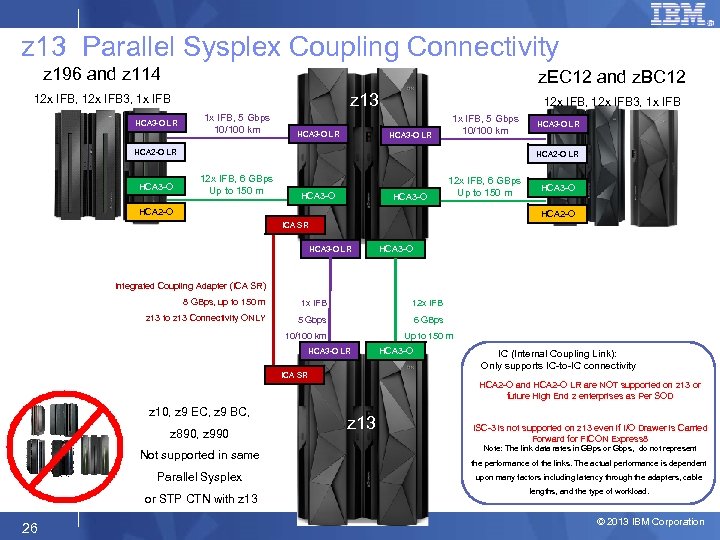 z 13 Parallel Sysplex Coupling Connectivity z 196 and z 114 z. EC 12 and z. BC 12 z 13 12 x IFB, 12 x IFB 3, 1 x IFB HCA 3 -O LR 1 x IFB, 5 Gbps 10/100 km HCA 3 -O LR 12 x IFB, 12 x IFB 3, 1 x IFB HCA 3 -O LR 1 x IFB, 5 Gbps 10/100 km HCA 2 -O LR HCA 3 -O LR HCA 2 -O LR 12 x IFB, 6 GBps Up to 150 m HCA 3 -O 12 x IFB, 6 GBps Up to 150 m HCA 2 -O HCA 3 -O HCA 2 -O ICA SR HCA 3 -O LR HCA 3 -O Integrated Coupling Adapter (ICA SR) 8 GBps, up to 150 m 1 x IFB 12 x IFB z 13 to z 13 Connectivity ONLY 5 Gbps 6 GBps 10/100 km Up to 150 m HCA 3 -O LR ICA SR HCA 3 -O IC (Internal Coupling Link): Only supports IC-to-IC connectivity HCA 2 -O and HCA 2 -O LR are NOT supported on z 13 or future High End z enterprises as Per SOD z 10, z 9 EC, z 9 BC, z 890, z 990 Not supported in same Parallel Sysplex or STP CTN with z 13 26 z 13 ISC-3 is not supported on z 13 even if I/O Drawer is Carried Forward for FICON Express 8 Note: The link data rates in GBps or Gbps, do not represent the performance of the links. The actual performance is dependent upon many factors including latency through the adapters, cable lengths, and the type of workload. © 2013 IBM Corporation
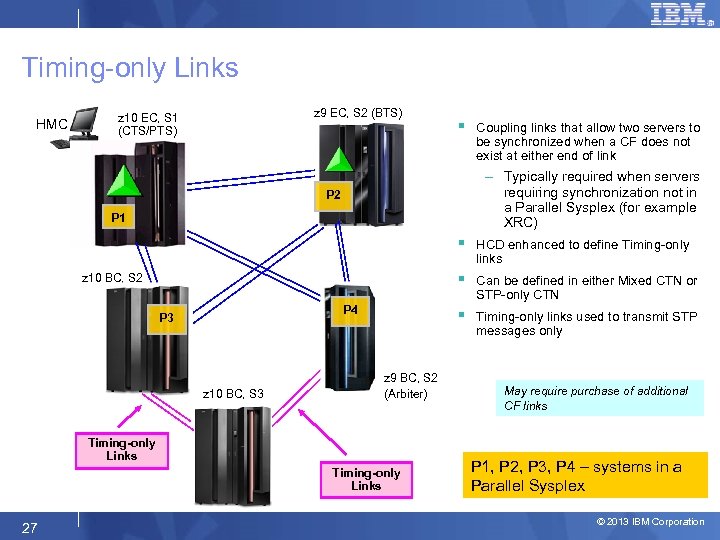 Timing-only Links HMC z 9 EC, S 2 (BTS) z 10 EC, S 1 (CTS/PTS) § Coupling links that allow two servers to be synchronized when a CF does not exist at either end of link – Typically required when servers requiring synchronization not in a Parallel Sysplex (for example XRC) P 2 P 1 § § P 4 P 3 z 10 BC, S 3 z 9 BC, S 2 (Arbiter) Timing-only Links 27 Can be defined in either Mixed CTN or STP-only CTN § z 10 BC, S 2 HCD enhanced to define Timing-only links used to transmit STP messages only May require purchase of additional CF links P 1, P 2, P 3, P 4 – systems in a Parallel Sysplex © 2013 IBM Corporation
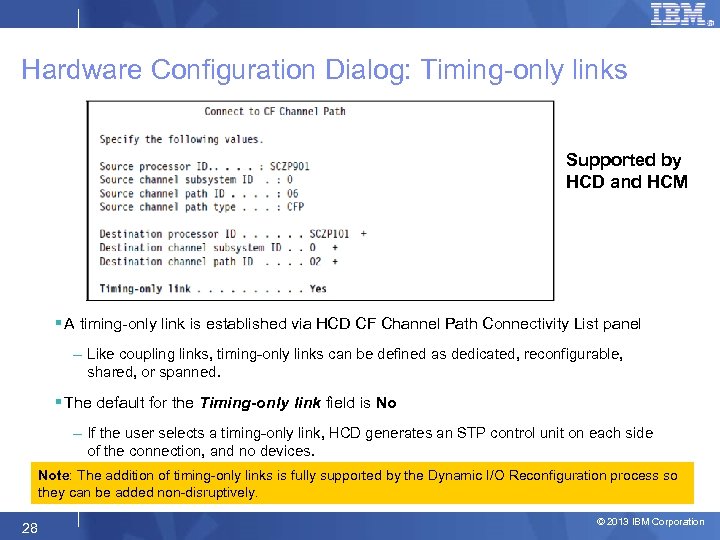 Hardware Configuration Dialog: Timing-only links Supported by HCD and HCM § A timing-only link is established via HCD CF Channel Path Connectivity List panel – Like coupling links, timing-only links can be defined as dedicated, reconfigurable, shared, or spanned. § The default for the Timing-only link field is No – If the user selects a timing-only link, HCD generates an STP control unit on each side of the connection, and no devices. Note: The addition of timing-only links is fully supported by the Dynamic I/O Reconfiguration process so they can be added non-disruptively. 28 © 2013 IBM Corporation
 Hardware Configuration Dialog: Timing-only links § For a timing-only link, HCD performs the following checks: – CHPIDs of a timing-only link must belong to different servers. • A timing-only link cannot be looped back into the same server. – If a CF connection already exists between two servers, • HCD does not allow defining a timing-only connection between these servers. – Also, if a timing-only link already exists between two servers, HCD will not allow defining a CF connection between these servers Rule of thumb • If there is an ICF or CF at either end of the definition, define a coupling link in HCD • This will provide better positioning in case link needed for CF data in the future 29 © 2013 IBM Corporation
 Multi-Site Sysplex planning § IBM supports only those DWDM products qualified by IBM for use in multi-site sysplex applications, such as GDPS® § The latest list of qualified DWDM vendor products can be found on the Resource Link™ Web site at: – https: //www. ibm. com/servers/resourcelink/ • They are listed under the Hardware Products for Servers on the Library page § Plan for redundant, diverse fiber routes between sites to help avoid a single point of failure of the fiber trunk § Please ensure that the vendor qualification document is inspected carefully by a DWDM technical expert. – The document is written to be very specific (unit number, version number, applicable features that are qualified for STP). Time Division Multiplexing (TDM) may (or may not) be qualified, depending on the vendor. 32 © 2013 IBM Corporation
 Multi-Site Sysplex planning (continued) § To transmit timing information, STP can choose any defined coupling link which is online between two z Systems servers. § If coupling links are configured over DWDM equipment, all coupling links must use specific DWDM hardware (optical modules, transponders, TDM modules) with interface cards qualified by IBM for STP. – Cannot configure the links over a mixture of qualified and unqualified equipment, – STP may choose a coupling link configured over an unqualified connection. – May result in timing problems where servers may become unsynchronized without your knowledge. § Only specific vendor models at specific releases have been qualified to TDM coupling links when used for STP message exchanges – Example: Cisco has a qualified 10 G Muxponder module that is qualified for ISC-3 links when transferring CF data but NOT QUALIFIED for ISC-3 links when also exchanging STP messages 33 © 2013 IBM Corporation
 Selection of qualified DWDM § Selecting qualified WDM vendor does not mean that WDM model selected is qualified – Vendors do not qualify all models § Selecting qualified WDM model does not mean that specific Release level is qualified – Vendors do not qualify all release levels § Ensure that the vendor qualification letter is inspected carefully by a DWDM technical expert. – Letter specifies model number, release level, interface modules qualified, protocols, application limitations, etc 34 © 2013 IBM Corporation
 Agenda § STP Overview § Hardware Planning § External Time Source (ETS) Planning § Software Planning Overview § Server Role Planning § Operational Safeguards § Additional Information 35 © 2013 IBM Corporation
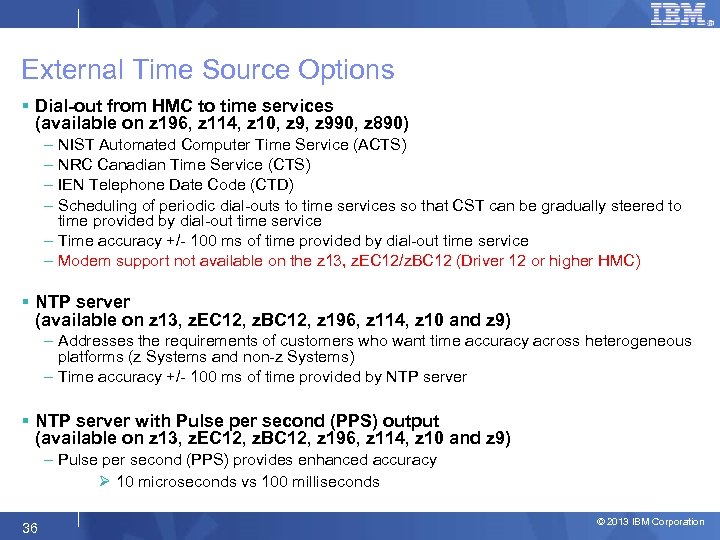 External Time Source Options § Dial-out from HMC to time services (available on z 196, z 114, z 10, z 990, z 890) – NIST Automated Computer Time Service (ACTS) – NRC Canadian Time Service (CTS) – IEN Telephone Date Code (CTD) – Scheduling of periodic dial-outs to time services so that CST can be gradually steered to time provided by dial-out time service – Time accuracy +/- 100 ms of time provided by dial-out time service – Modem support not available on the z 13, z. EC 12/z. BC 12 (Driver 12 or higher HMC) § NTP server (available on z 13, z. EC 12, z. BC 12, z 196, z 114, z 10 and z 9) – Addresses the requirements of customers who want time accuracy across heterogeneous platforms (z Systems and non-z Systems) – Time accuracy +/- 100 ms of time provided by NTP server § NTP server with Pulse per second (PPS) output (available on z 13, z. EC 12, z. BC 12, z 196, z 114, z 10 and z 9) – Pulse per second (PPS) provides enhanced accuracy Ø 10 microseconds vs 100 milliseconds 36 © 2013 IBM Corporation
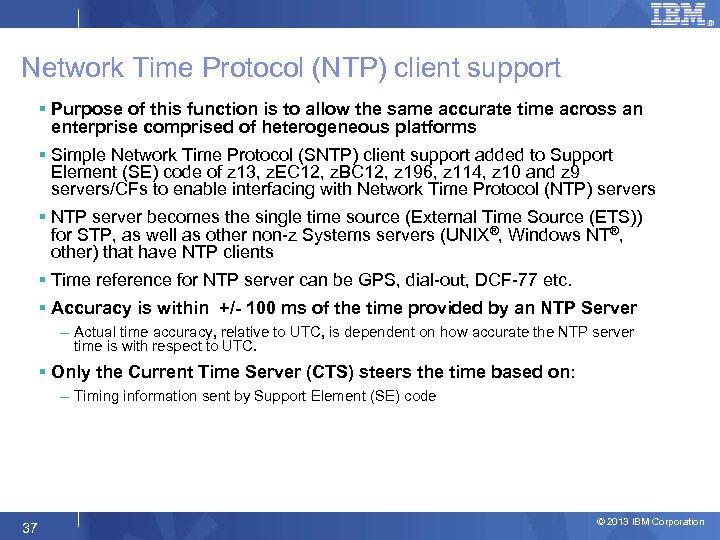 Network Time Protocol (NTP) client support § Purpose of this function is to allow the same accurate time across an enterprise comprised of heterogeneous platforms § Simple Network Time Protocol (SNTP) client support added to Support Element (SE) code of z 13, z. EC 12, z. BC 12, z 196, z 114, z 10 and z 9 servers/CFs to enable interfacing with Network Time Protocol (NTP) servers § NTP server becomes the single time source (External Time Source (ETS)) for STP, as well as other non-z Systems servers (UNIX®, Windows NT®, other) that have NTP clients § Time reference for NTP server can be GPS, dial-out, DCF-77 etc. § Accuracy is within +/- 100 ms of the time provided by an NTP Server – Actual time accuracy, relative to UTC, is dependent on how accurate the NTP server time is with respect to UTC. § Only the Current Time Server (CTS) steers the time based on: – Timing information sent by Support Element (SE) code 37 © 2013 IBM Corporation
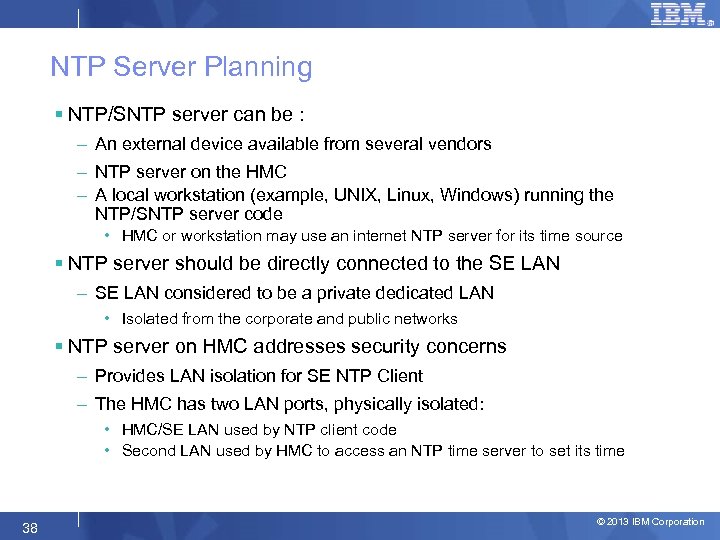 NTP Server Planning § NTP/SNTP server can be : – An external device available from several vendors – NTP server on the HMC – A local workstation (example, UNIX, Linux, Windows) running the NTP/SNTP server code • HMC or workstation may use an internet NTP server for its time source § NTP server should be directly connected to the SE LAN – SE LAN considered to be a private dedicated LAN • Isolated from the corporate and public networks § NTP server on HMC addresses security concerns – Provides LAN isolation for SE NTP Client – The HMC has two LAN ports, physically isolated: • HMC/SE LAN used by NTP client code • Second LAN used by HMC to access an NTP time server to set its time 38 © 2013 IBM Corporation
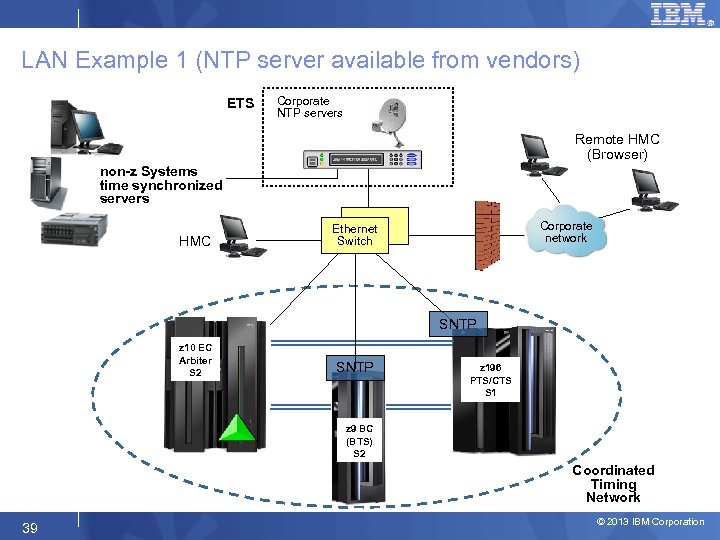 LAN Example 1 (NTP server available from vendors) ETS Corporate NTP servers Remote HMC (Browser) non-z Systems time synchronized servers HMC Corporate network Ethernet Switch SNTP z 10 EC Arbiter S 2 SNTP z 196 PTS/CTS S 1 z 9 BC (BTS) S 2 Coordinated Timing Network 39 © 2013 IBM Corporation
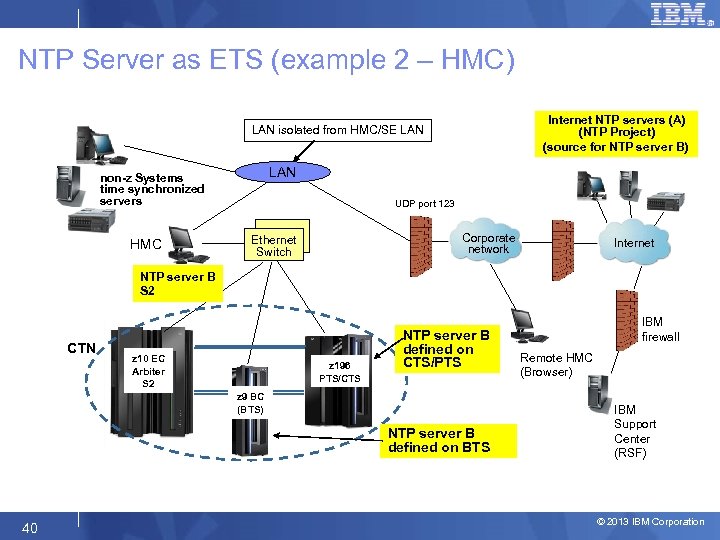 NTP Server as ETS (example 2 – HMC) Internet NTP servers (A) (NTP Project) (source for NTP server B) LAN isolated from HMC/SE LAN non-z Systems time synchronized servers HMC UDP port 123 Corporate network Ethernet Switch Internet NTP server B S 2 CTN z 10 EC Arbiter S 2 z 196 PTS/CTS NTP server B defined on CTS/PTS z 9 BC (BTS) NTP server B defined on BTS 40 IBM firewall Remote HMC (Browser) IBM Support Center (RSF) © 2013 IBM Corporation
 Enhanced Accuracy to an External Time Source (ETS) § Some NTP servers also provide a highly stable, accurate “Pulse per second” (PPS) output – PPS capability exists on the z 13, z. EC 12, z. BC 12, z 196, z 114, z 10 EC, z 10 BC, z 9 EC and z 9 BC § STP utilizes the PPS signal to provide additional accuracy – Accuracy to PPS – 10 microseconds § Only the Current Time Server (CTS) steers the time based on: – Timing information sent by Support Element (SE) code – PPS signal received by PPS port on ETR/OSC card 41 © 2013 IBM Corporation
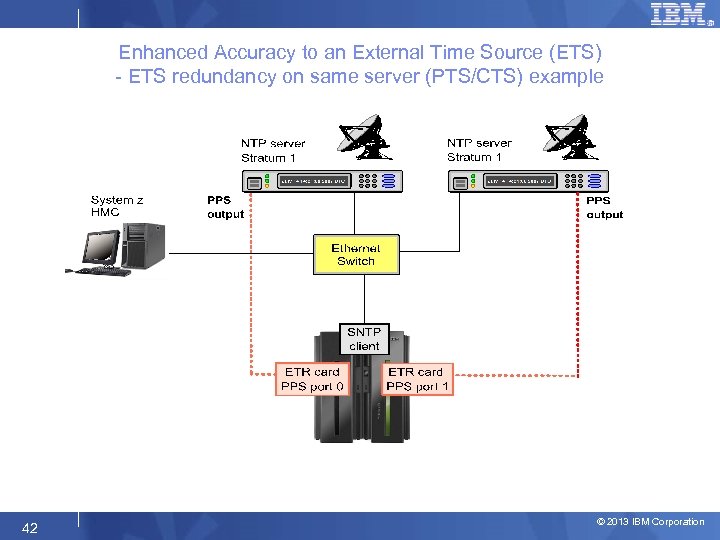 Enhanced Accuracy to an External Time Source (ETS) - ETS redundancy on same server (PTS/CTS) example 42 © 2013 IBM Corporation
 NTP Server Redundancy Recommendations § At least one NTP server must be configured on the PTS/CTS – Only the Current Time Server (CTS) makes time adjustments based on information from the NTP Server § Also recommended to configure at least one NTP server on the BTS – Allows continuous NTP server access when BTS becomes the CTS – Time adjustments to the STP-only CTN when the PTS/CTS cannot access any of its NTP servers § STP allows two NTP servers to be configured for every z System server in the STP-only CTN – When two NTP servers are configured on the server that has the PTS/CTS role, STP will automatically access the second NTP server configured on the PTS/CTS if the selected NTP server fails. – For best availability, configure two NTP servers for both the PTS and the BTS § NTP servers can also be configured for all servers in the STP-only CTN – Provides access to NTP servers if server roles reassigned Recommendations apply when using NTP servers with or without PPS 43 © 2013 IBM Corporation
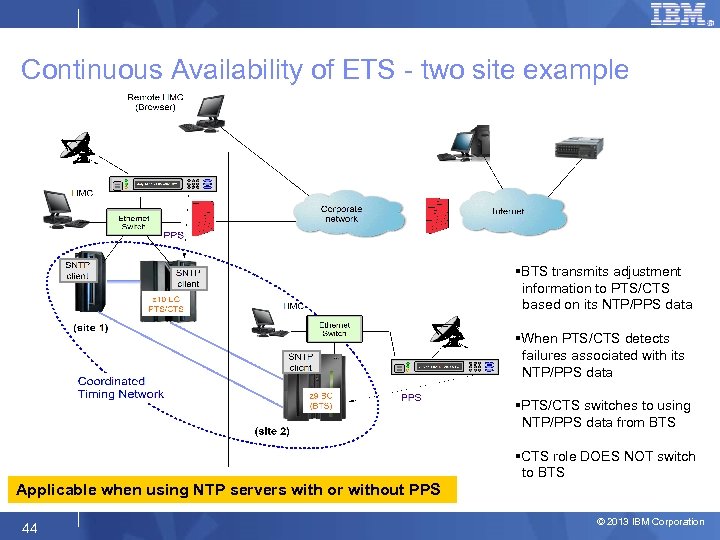 Continuous Availability of ETS - two site example §BTS transmits adjustment information to PTS/CTS based on its NTP/PPS data §When PTS/CTS detects failures associated with its NTP/PPS data §PTS/CTS switches to using NTP/PPS data from BTS §CTS role DOES NOT switch to BTS Applicable when using NTP servers with or without PPS 44 © 2013 IBM Corporation
 Agenda § STP Overview § Hardware Planning § External Time Source (ETS) Planning § Software Planning Overview § Server Role Planning § Operational Safeguards § Additional Information 45 © 2013 IBM Corporation
 Software Prerequisites §z/OS 1. 7 – any current version/release § Additional PTFs may be required – Maintenance can be applied using “rolling IPL” process § Check Preventive Service Planning (PSP) buckets § To simplify identification of PTFs for STP, functional PSP bucket created – SMPe 3. 5 § Coexistence with z/OS 1. 4 through z/OS 1. 6 – Mixed CTN can include pre-1. 7 systems – PTFs required for toleration code – z/OS 1. 4 through 1. 6 – service has been discontinued Note: Upgrade z/OS to the latest supported releases. 46 © 2013 IBM Corporation
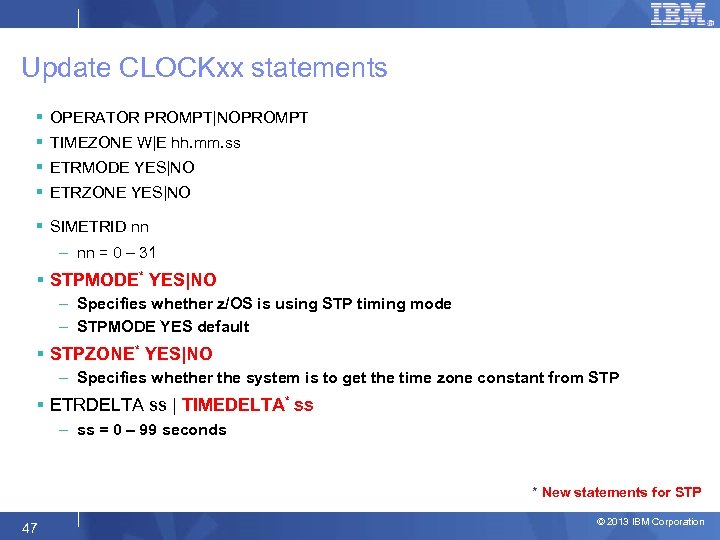 Update CLOCKxx statements § OPERATOR PROMPT|NOPROMPT § TIMEZONE W|E hh. mm. ss § ETRMODE YES|NO § ETRZONE YES|NO § SIMETRID nn – nn = 0 – 31 § STPMODE* YES|NO – Specifies whether z/OS is using STP timing mode – STPMODE YES default § STPZONE* YES|NO – Specifies whether the system is to get the time zone constant from STP § ETRDELTA ss | TIMEDELTA* ss – ss = 0 – 99 seconds * New statements for STP 47 © 2013 IBM Corporation
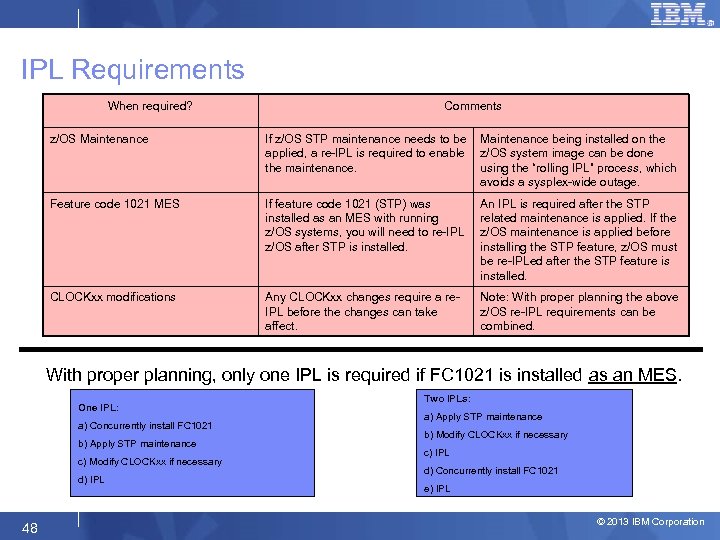 IPL Requirements When required? Comments z/OS Maintenance If z/OS STP maintenance needs to be applied, a re-IPL is required to enable the maintenance. Maintenance being installed on the z/OS system image can be done using the “rolling IPL” process, which avoids a sysplex-wide outage. Feature code 1021 MES If feature code 1021 (STP) was installed as an MES with running z/OS systems, you will need to re-IPL z/OS after STP is installed. An IPL is required after the STP related maintenance is applied. If the z/OS maintenance is applied before installing the STP feature, z/OS must be re-IPLed after the STP feature is installed. CLOCKxx modifications Any CLOCKxx changes require a re. IPL before the changes can take affect. Note: With proper planning the above z/OS re-IPL requirements can be combined. With proper planning, only one IPL is required if FC 1021 is installed as an MES. One IPL: a) Concurrently install FC 1021 b) Apply STP maintenance c) Modify CLOCKxx if necessary d) IPL 48 Two IPLs: a) Apply STP maintenance b) Modify CLOCKxx if necessary c) IPL d) Concurrently install FC 1021 e) IPL © 2013 IBM Corporation
 Agenda § STP Overview § Hardware Planning § External Time Source (ETS) Planning § Software Planning Overview § Server Role Planning § Operational Safeguards § Additional Information 49 © 2013 IBM Corporation
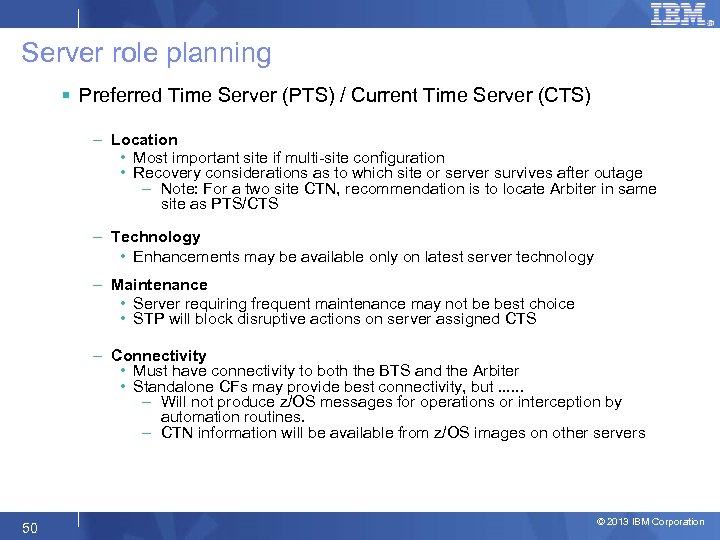 Server role planning § Preferred Time Server (PTS) / Current Time Server (CTS) – Location • Most important site if multi-site configuration • Recovery considerations as to which site or server survives after outage – Note: For a two site CTN, recommendation is to locate Arbiter in same site as PTS/CTS – Technology • Enhancements may be available only on latest server technology – Maintenance • Server requiring frequent maintenance may not be best choice • STP will block disruptive actions on server assigned CTS – Connectivity • Must have connectivity to both the BTS and the Arbiter • Standalone CFs may provide best connectivity, but. . . – Will not produce z/OS messages for operations or interception by automation routines. – CTN information will be available from z/OS images on other servers 50 © 2013 IBM Corporation
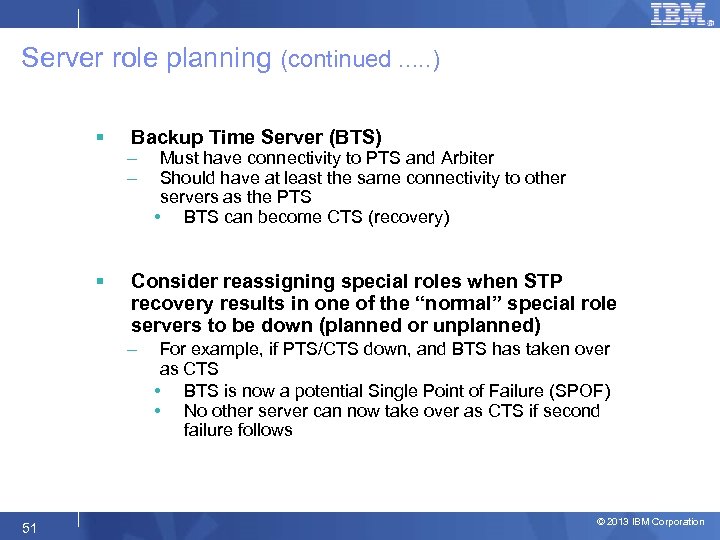 Server role planning (continued. . . ) § § Backup Time Server (BTS) – – Consider reassigning special roles when STP recovery results in one of the “normal” special role servers to be down (planned or unplanned) – 51 Must have connectivity to PTS and Arbiter Should have at least the same connectivity to other servers as the PTS • BTS can become CTS (recovery) For example, if PTS/CTS down, and BTS has taken over as CTS • BTS is now a potential Single Point of Failure (SPOF) • No other server can now take over as CTS if second failure follows © 2013 IBM Corporation
 Agenda § STP Overview § Hardware Planning § External Time Source (ETS) Planning § Software Planning Overview § Server Role Planning § Operational Safeguards § Additional Information 52 © 2013 IBM Corporation
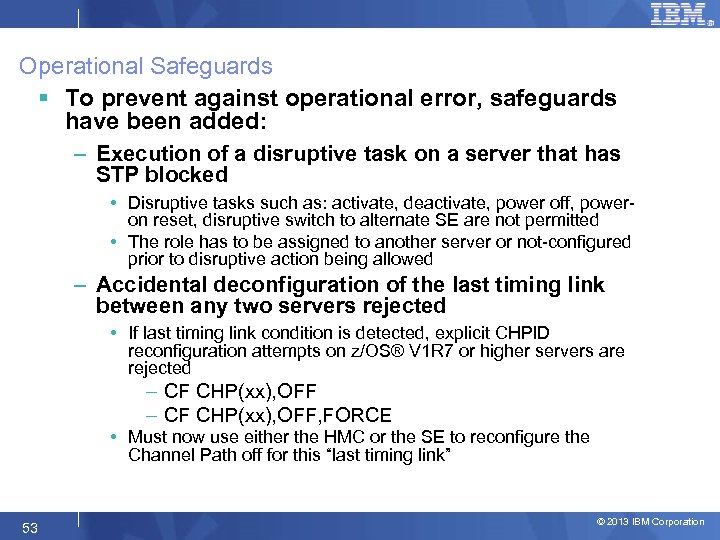 Operational Safeguards § To prevent against operational error, safeguards have been added: – Execution of a disruptive task on a server that has STP blocked • Disruptive tasks such as: activate, deactivate, power off, poweron reset, disruptive switch to alternate SE are not permitted • The role has to be assigned to another server or not-configured prior to disruptive action being allowed – Accidental deconfiguration of the last timing link between any two servers rejected • If last timing link condition is detected, explicit CHPID reconfiguration attempts on z/OS® V 1 R 7 or higher servers are rejected – CF CHP(xx), OFF, FORCE • Must now use either the HMC or the SE to reconfigure the Channel Path off for this “last timing link” 53 © 2013 IBM Corporation
 Agenda § STP Overview § Hardware Planning § External Time Source (ETS) Planning § Software Planning Overview § Server Role Planning § Operational Safeguards § Additional Information 54 © 2013 IBM Corporation
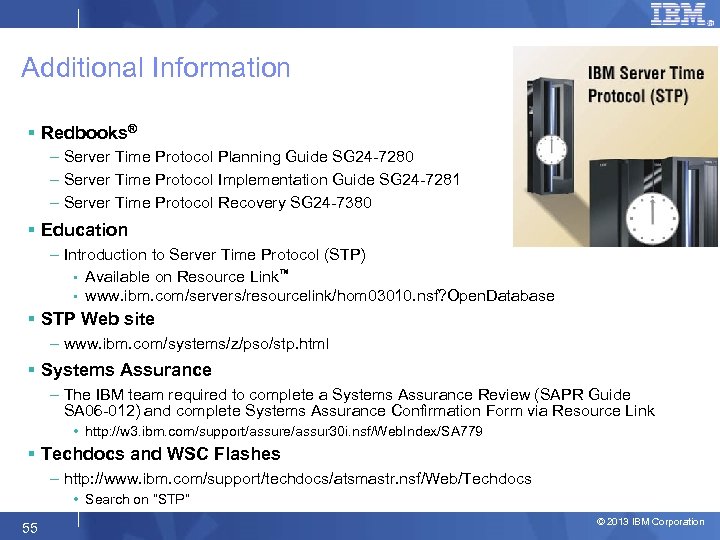 Additional Information § Redbooks® – Server Time Protocol Planning Guide SG 24 -7280 – Server Time Protocol Implementation Guide SG 24 -7281 – Server Time Protocol Recovery SG 24 -7380 § Education – Introduction to Server Time Protocol (STP) • Available on Resource Link™ • www. ibm. com/servers/resourcelink/hom 03010. nsf? Open. Database § STP Web site – www. ibm. com/systems/z/pso/stp. html § Systems Assurance – The IBM team required to complete a Systems Assurance Review (SAPR Guide SA 06 -012) and complete Systems Assurance Confirmation Form via Resource Link • http: //w 3. ibm. com/support/assure/assur 30 i. nsf/Web. Index/SA 779 § Techdocs and WSC Flashes – http: //www. ibm. com/support/techdocs/atsmastr. nsf/Web/Techdocs • Search on “STP” 55 © 2013 IBM Corporation
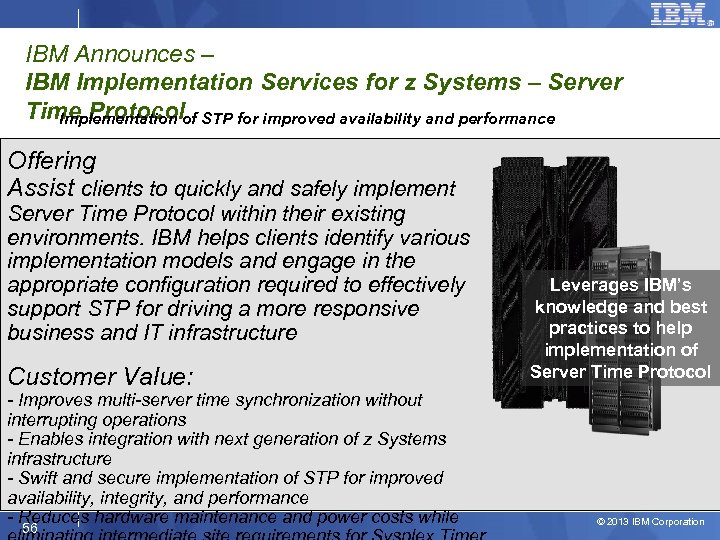 IBM Announces – IBM Implementation Services for z Systems – Server Time Protocolof STP for improved availability and performance Implementation Offering Assist clients to quickly and safely implement Server Time Protocol within their existing environments. IBM helps clients identify various implementation models and engage in the appropriate configuration required to effectively support STP for driving a more responsive business and IT infrastructure Customer Value: - Improves multi-server time synchronization without interrupting operations - Enables integration with next generation of z Systems infrastructure - Swift and secure implementation of STP for improved availability, integrity, and performance - Reduces hardware maintenance and power costs while 56 Leverages IBM’s knowledge and best practices to help implementation of Server Time Protocol © 2013 IBM Corporation
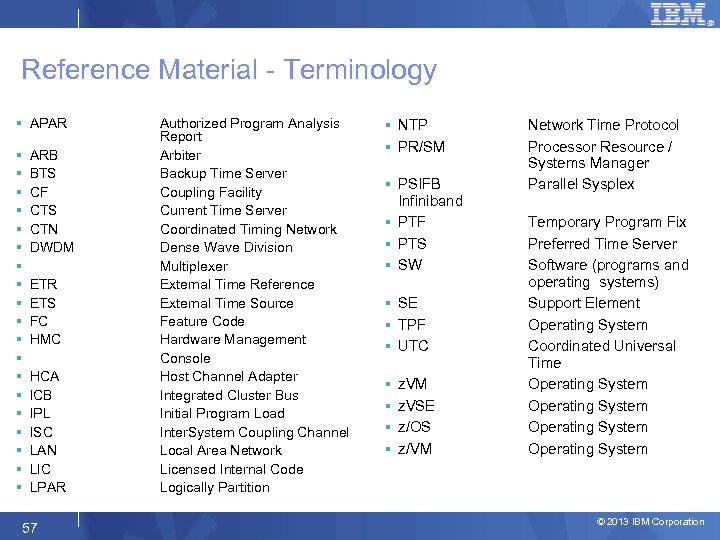 Reference Material - Terminology § APAR § § § § § ARB BTS CF CTS CTN DWDM ETR ETS FC HMC HCA ICB IPL ISC LAN LIC LPAR 57 Authorized Program Analysis Report Arbiter Backup Time Server Coupling Facility Current Time Server Coordinated Timing Network Dense Wave Division Multiplexer External Time Reference External Time Source Feature Code Hardware Management Console Host Channel Adapter Integrated Cluster Bus Initial Program Load Inter. System Coupling Channel Local Area Network Licensed Internal Code Logically Partition § NTP § PR/SM § PSIFB Infiniband § PTF § PTS § SW § SE § TPF § UTC § § z. VM z. VSE z/OS z/VM Network Time Protocol Processor Resource / Systems Manager Parallel Sysplex Temporary Program Fix Preferred Time Server Software (programs and operating systems) Support Element Operating System Coordinated Universal Time Operating System © 2013 IBM Corporation
 Questions? §What are your questions? 58 © 2013 IBM Corporation
 Trademarks The following are trademarks of the International Business Machines Corporation in the United States, other countries, or both. Not all common law marks used by IBM are listed on this page. Failure of a mark to appear does not mean that IBM does not use the mark nor does it mean that the product is not actively marketed or is not significant within its relevant market. Those trademarks followed by ® are registered trademarks of IBM in the United States; all others are trademarks or common law marks of IBM in the United States. For a complete list of IBM Trademarks, see www. ibm. com/legal/copytrade. shtml: *, AS/400®, e business(logo)®, DBE, ESCO, e. Server, FICON, IBM®, IBM (logo)®, i. Series®, MVS, OS/390®, p. Series®, RS/6000®, S/30, VM/ESA®, VSE/ESA, Web. Sphere®, x. Series®, z/OS®, z. Series®, z/VM®, System i 5, System p 5, System x, System z, z Systems, System z 9®, System z 10®, Blade. Center® The following are trademarks or registered trademarks of other companies. Adobe, the Adobe logo, Post. Script, and the Post. Script logo are either registered trademarks or trademarks of Adobe Systems Incorporated in the United States, and/or other countries. Cell Broadband Engine is a trademark of Sony Computer Entertainment, Inc. in the United States, other countries, or both and is used under license therefrom. Java and all Java-based trademarks are trademarks of Sun Microsystems, Inc. in the United States, other countries, or both. Microsoft, Windows NT, and the Windows logo are trademarks of Microsoft Corporation in the United States, other countries, or both. Intel, Intel logo, Intel Inside logo, Intel Centrino logo, Celeron, Intel Xeon, Intel Speed. Step, Itanium, and Pentium are trademarks or registered trademarks of Intel Corporation or its subsidiaries in the United States and other countries. UNIX is a registered trademark of The Open Group in the United States and other countries. Linux is a registered trademark of Linus Torvalds in the United States, other countries, or both. ITIL is a registered trademark, and a registered community trademark of the Office of Government Commerce, and is registered in the U. S. Patent and Trademark Office. IT Infrastructure Library is a registered trademark of the Central Computer and Telecommunications Agency, which is now part of the Office of Government Commerce. * All other products may be trademarks or registered trademarks of their respective companies. Notes: Performance is in Internal Throughput Rate (ITR) ratio based on measurements and projections using standard IBM benchmarks in a controlled environment. The actual throughput that any user will experience will vary depending upon considerations such as the amount of multiprogramming in the user's job stream, the I/O configuration, the storage configuration, and the workload processed. Therefore, no assurance can be given that an individual user will achieve throughput improvements equivalent to the performance ratios stated here. IBM hardware products are manufactured from new parts, or new and serviceable used parts. Regardless, our warranty terms apply. All customer examples cited or described in this presentation are presented as illustrations of the manner in which some customers have used IBM products and the results they may have achieved. Actual environmental costs and performance characteristics will vary depending on individual customer configurations and conditions. This publication was produced in the United States. IBM may not offer the products, services or features discussed in this document in other countries, and the information may be subject to change without notice. Consult your local IBM business contact for information on the product or services available in your area. All statements regarding IBM's future direction and intent are subject to change or withdrawal without notice, and represent goals and objectives only. Information about non-IBM products is obtained from the manufacturers of those products or their published announcements. IBM has not tested those products and cannot confirm the performance, compatibility, or any other claims related to non-IBM products. Questions on the capabilities of non-IBM products should be addressed to the suppliers of those products. Prices subject to change without notice. Contact your IBM representative or Business Partner for the most current pricing in your geography. 59 © 2013 IBM Corporation
 BACKUP SLIDES 60 © 2013 IBM Corporation
 PTS/CTS role planning § Location – Most important site if multi-site configuration – Recovery considerations as to which site or server survives after outage • Note: For a two site CTN, recommendation is to locate Arbiter in same site as PTS/CTS § Technology – Enhancements may be available only on latest server technology – Examples of functions not available on z 990, z 890 • NTP Client support • Restore STP configuration for two server CTN § Maintenance – Server requiring frequent maintenance may not be best choice – STP will block disruptive actions on server assigned CTS 61 © 2013 IBM Corporation
 PTS/CTS role planning (continued) § Connectivity – Standalone CFs will typically provide best connectivity to other servers requiring time synchronization – Existing coupling link connectivity can be used to exchange STP messages, but. . • What additional connectivity do you need to follow connectivity rules and best practices recommendations for reassigning roles? – Standalone CFs will not produce z/OS messages for operations or interception by automation routines • Information messages at IPL or interrupt time may not be displayed – IEA 380 I THIS SYSTEM IS NOW OPERATING IN STP TIMING MODE. – IEA 381 I THE STP FACILITY IS NOT USABLE. SYSTEM CONTINUES IN LOCAL TIMING MODE • Warning messages identifying a condition being associated for a given server. – If the condition being raised relates to connectivity between two servers, the information might be available to a z/OS system image at the other end of the link. – However, if both ends of the link are CF partitions, no warning message is available to the user. 62 © 2013 IBM Corporation
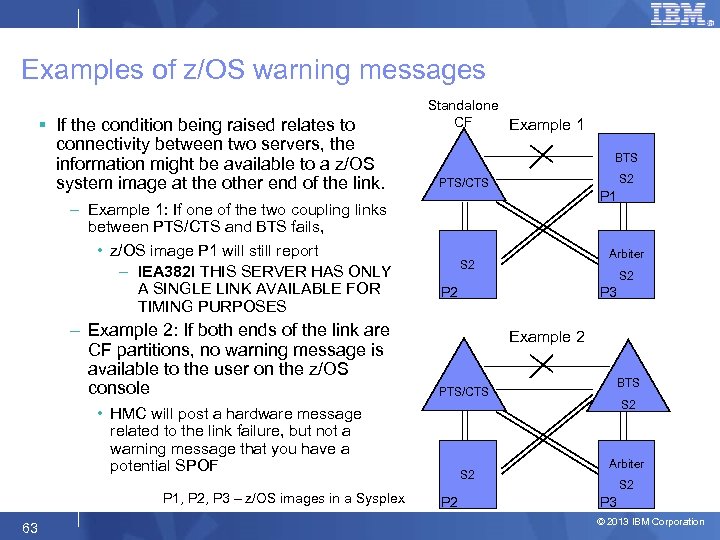 Examples of z/OS warning messages § If the condition being raised relates to connectivity between two servers, the information might be available to a z/OS system image at the other end of the link. – Example 1: If one of the two coupling links between PTS/CTS and BTS fails, • z/OS image P 1 will still report – IEA 382 I THIS SERVER HAS ONLY A SINGLE LINK AVAILABLE FOR TIMING PURPOSES – Example 2: If both ends of the link are CF partitions, no warning message is available to the user on the z/OS console Standalone CF Example 1 BTS 63 P 1 Arbiter S 2 P 2 P 3 Example 2 PTS/CTS • HMC will post a hardware message related to the link failure, but not a warning message that you have a potential SPOF P 1, P 2, P 3 – z/OS images in a Sysplex S 2 PTS/CTS S 2 P 2 BTS P 1 S 2 Arbiter S 2 P 3 © 2013 IBM Corporation
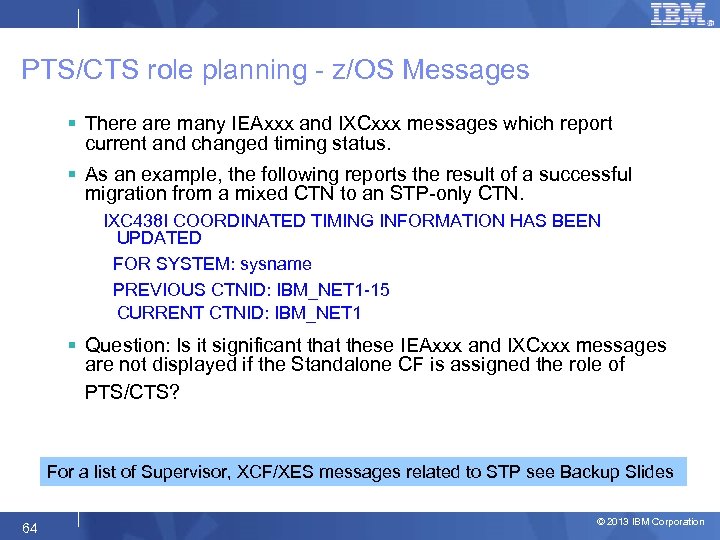 PTS/CTS role planning - z/OS Messages § There are many IEAxxx and IXCxxx messages which report current and changed timing status. § As an example, the following reports the result of a successful migration from a mixed CTN to an STP-only CTN. IXC 438 I COORDINATED TIMING INFORMATION HAS BEEN UPDATED FOR SYSTEM: sysname PREVIOUS CTNID: IBM_NET 1 -15 CURRENT CTNID: IBM_NET 1 § Question: Is it significant that these IEAxxx and IXCxxx messages are not displayed if the Standalone CF is assigned the role of PTS/CTS? For a list of Supervisor, XCF/XES messages related to STP see Backup Slides 64 © 2013 IBM Corporation
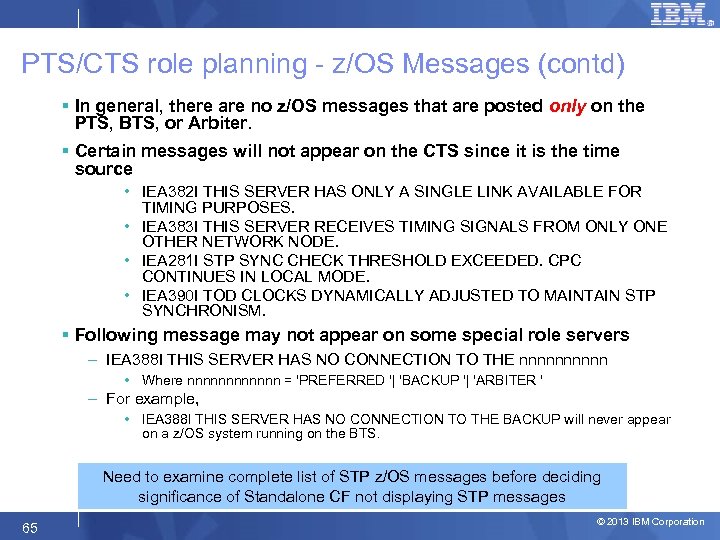 PTS/CTS role planning - z/OS Messages (contd) § In general, there are no z/OS messages that are posted only on the PTS, BTS, or Arbiter. § Certain messages will not appear on the CTS since it is the time source • IEA 382 I THIS SERVER HAS ONLY A SINGLE LINK AVAILABLE FOR TIMING PURPOSES. • IEA 383 I THIS SERVER RECEIVES TIMING SIGNALS FROM ONLY ONE OTHER NETWORK NODE. • IEA 281 I STP SYNC CHECK THRESHOLD EXCEEDED. CPC CONTINUES IN LOCAL MODE. • IEA 390 I TOD CLOCKS DYNAMICALLY ADJUSTED TO MAINTAIN STP SYNCHRONISM. § Following message may not appear on some special role servers – IEA 388 I THIS SERVER HAS NO CONNECTION TO THE nnnnn • Where nnnnnn = 'PREFERRED '| 'BACKUP '| 'ARBITER ' – For example, • IEA 388 I THIS SERVER HAS NO CONNECTION TO THE BACKUP will never appear on a z/OS system running on the BTS. Need to examine complete list of STP z/OS messages before deciding significance of Standalone CF not displaying STP messages 65 © 2013 IBM Corporation
 Summary – Server role planning § After deciding which server assigned PTS/CTS, similar review should be made for the BTS – If multi-site sysplex, Arbiter should be placed in same site as PTS/CTS § Many considerations to evaluate before deciding which servers assigned special roles – – Location, Technology, Maintenance Connectivity Stand alone CF z/OS message automation § Consider following best practices recommendations for reassignment of roles § Every customer needs to do their own assessment – No single recommendation fits all configurations 66 © 2013 IBM Corporation
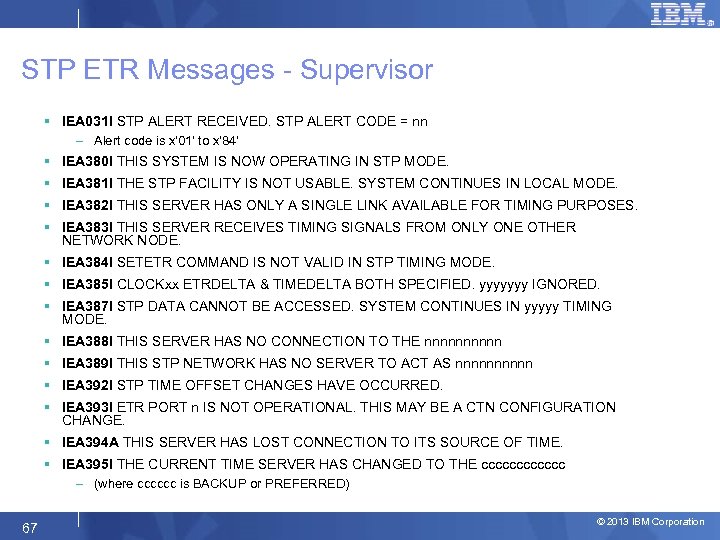 STP ETR Messages - Supervisor § IEA 031 I STP ALERT RECEIVED. STP ALERT CODE = nn – Alert code is x'01' to x'84‘ § IEA 380 I THIS SYSTEM IS NOW OPERATING IN STP MODE. § IEA 381 I THE STP FACILITY IS NOT USABLE. SYSTEM CONTINUES IN LOCAL MODE. § IEA 382 I THIS SERVER HAS ONLY A SINGLE LINK AVAILABLE FOR TIMING PURPOSES. § IEA 383 I THIS SERVER RECEIVES TIMING SIGNALS FROM ONLY ONE OTHER NETWORK NODE. § IEA 384 I SETETR COMMAND IS NOT VALID IN STP TIMING MODE. § IEA 385 I CLOCKxx ETRDELTA & TIMEDELTA BOTH SPECIFIED. yyyyyyy IGNORED. § IEA 387 I STP DATA CANNOT BE ACCESSED. SYSTEM CONTINUES IN yyyyy TIMING MODE. § IEA 388 I THIS SERVER HAS NO CONNECTION TO THE nnnnn § IEA 389 I THIS STP NETWORK HAS NO SERVER TO ACT AS nnnnn § IEA 392 I STP TIME OFFSET CHANGES HAVE OCCURRED. § IEA 393 I ETR PORT n IS NOT OPERATIONAL. THIS MAY BE A CTN CONFIGURATION CHANGE. § IEA 394 A THIS SERVER HAS LOST CONNECTION TO ITS SOURCE OF TIME. § IEA 395 I THE CURRENT TIME SERVER HAS CHANGED TO THE cccccc – (where cccccc is BACKUP or PREFERRED) 67 © 2013 IBM Corporation
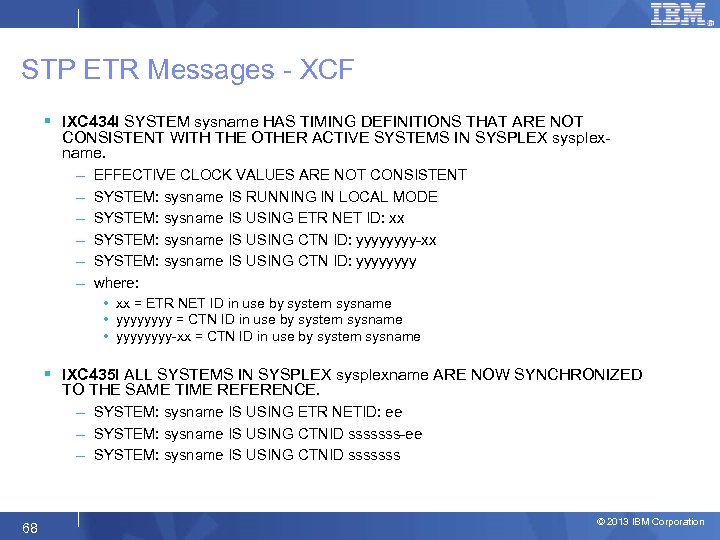 STP ETR Messages - XCF § IXC 434 I SYSTEM sysname HAS TIMING DEFINITIONS THAT ARE NOT CONSISTENT WITH THE OTHER ACTIVE SYSTEMS IN SYSPLEX sysplexname. – – – EFFECTIVE CLOCK VALUES ARE NOT CONSISTENT SYSTEM: sysname IS RUNNING IN LOCAL MODE SYSTEM: sysname IS USING ETR NET ID: xx SYSTEM: sysname IS USING CTN ID: yyyy-xx SYSTEM: sysname IS USING CTN ID: yyyy where: • xx = ETR NET ID in use by system sysname • yyyy = CTN ID in use by system sysname • yyyy-xx = CTN ID in use by system sysname § IXC 435 I ALL SYSTEMS IN SYSPLEX sysplexname ARE NOW SYNCHRONIZED TO THE SAME TIME REFERENCE. – SYSTEM: sysname IS USING ETR NETID: ee – SYSTEM: sysname IS USING CTNID sssssss-ee – SYSTEM: sysname IS USING CTNID sssssss 68 © 2013 IBM Corporation
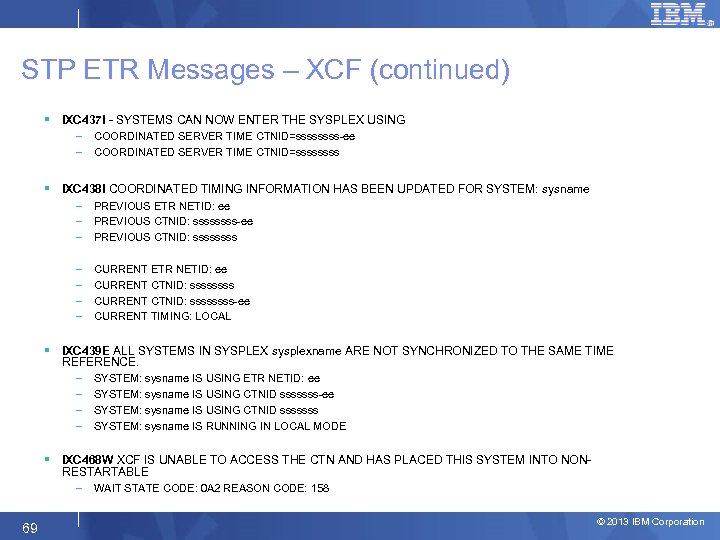 STP ETR Messages – XCF (continued) § IXC 437 I - SYSTEMS CAN NOW ENTER THE SYSPLEX USING – – COORDINATED SERVER TIME CTNID=ssss-ee COORDINATED SERVER TIME CTNID=ssss § IXC 438 I COORDINATED TIMING INFORMATION HAS BEEN UPDATED FOR SYSTEM: sysname – – – PREVIOUS ETR NETID: ee PREVIOUS CTNID: ssss-ee PREVIOUS CTNID: ssss – – CURRENT ETR NETID: ee CURRENT CTNID: ssssssss-ee CURRENT TIMING: LOCAL § IXC 439 E ALL SYSTEMS IN SYSPLEX sysplexname ARE NOT SYNCHRONIZED TO THE SAME TIME REFERENCE. – – SYSTEM: sysname IS USING ETR NETID: ee SYSTEM: sysname IS USING CTNID sssssss-ee SYSTEM: sysname IS USING CTNID sssssss SYSTEM: sysname IS RUNNING IN LOCAL MODE § IXC 468 W XCF IS UNABLE TO ACCESS THE CTN AND HAS PLACED THIS SYSTEM INTO NONRESTARTABLE – 69 WAIT STATE CODE: 0 A 2 REASON CODE: 158 © 2013 IBM Corporation
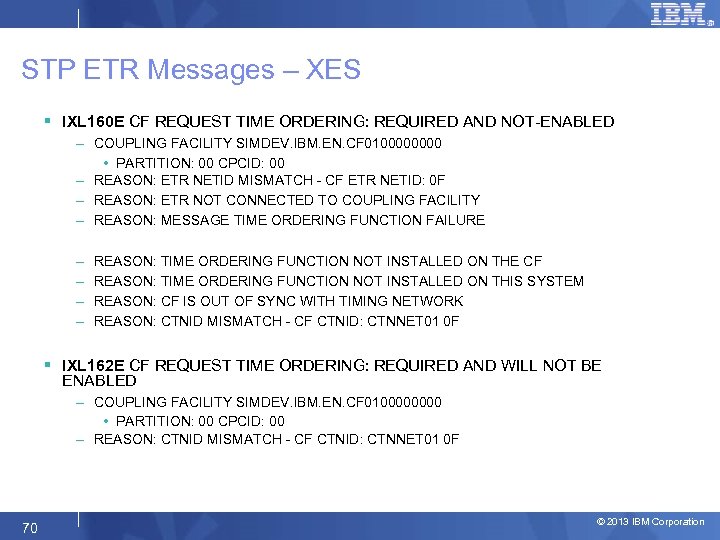 STP ETR Messages – XES § IXL 160 E CF REQUEST TIME ORDERING: REQUIRED AND NOT-ENABLED – COUPLING FACILITY SIMDEV. IBM. EN. CF 010000 • PARTITION: 00 CPCID: 00 – REASON: ETR NETID MISMATCH - CF ETR NETID: 0 F – REASON: ETR NOT CONNECTED TO COUPLING FACILITY – REASON: MESSAGE TIME ORDERING FUNCTION FAILURE – – REASON: TIME ORDERING FUNCTION NOT INSTALLED ON THE CF REASON: TIME ORDERING FUNCTION NOT INSTALLED ON THIS SYSTEM REASON: CF IS OUT OF SYNC WITH TIMING NETWORK REASON: CTNID MISMATCH - CF CTNID: CTNNET 01 0 F § IXL 162 E CF REQUEST TIME ORDERING: REQUIRED AND WILL NOT BE ENABLED – COUPLING FACILITY SIMDEV. IBM. EN. CF 010000 • PARTITION: 00 CPCID: 00 – REASON: CTNID MISMATCH - CF CTNID: CTNNET 01 0 F 70 © 2013 IBM Corporation