


 Скачать презентацию Server Time Protocol Implementation Considerations for Single CPC
b2e6dd44c8330ee10d013838829e7517.ppt
- Количество слайдов: 44
 Server Time Protocol Implementation Considerations for Single CPC configurations Michael Großmann STG Lab Services - Global Client Center, IBM Germany R&D Senior IT Specialist - System z © 2012 IBM Corporation
 Disclaimer § In this presentation the author has put together some information, when single CPC configurations implement STP § This presentation is a for single CPC configurations § Additional Reading – Server Time Protocol Overview Presentation – ibm. com/support/techdocs/atsmastr. nsf/Web. Index/PRS 2398 § Additional Reading – Server Time Protocol Implementation Considerations – ibm. com/support/techdocs/atsmastr. nsf/Web. Index/PRS 3845 2 © 2012 IBM Corporation
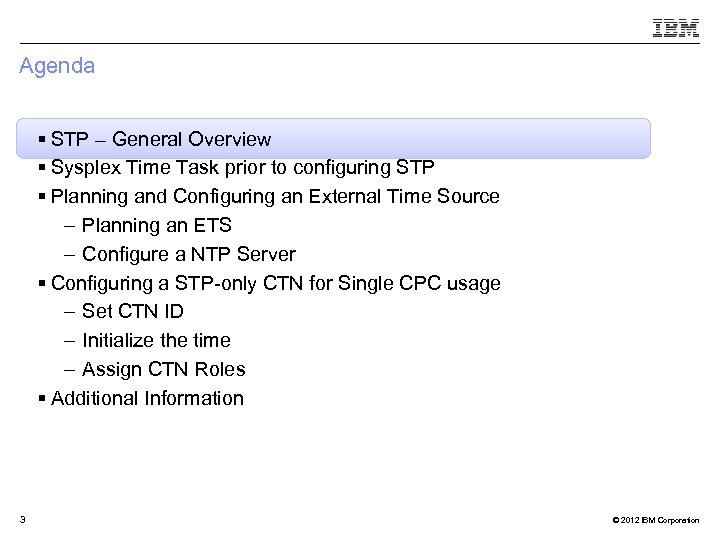 Agenda § STP – General Overview § Sysplex Time Task prior to configuring STP § Planning and Configuring an External Time Source – Planning an ETS – Configure a NTP Server § Configuring a STP-only CTN for Single CPC usage – Set CTN ID – Initialize the time – Assign CTN Roles § Additional Information 3 © 2012 IBM Corporation
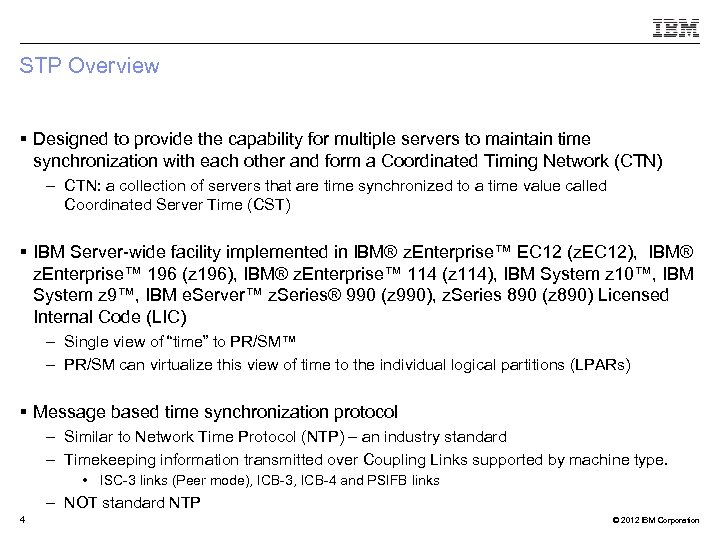 STP Overview § Designed to provide the capability for multiple servers to maintain time synchronization with each other and form a Coordinated Timing Network (CTN) – CTN: a collection of servers that are time synchronized to a time value called Coordinated Server Time (CST) § IBM Server-wide facility implemented in IBM® z. Enterprise™ EC 12 (z. EC 12), IBM® z. Enterprise™ 196 (z 196), IBM® z. Enterprise™ 114 (z 114), IBM System z 10™, IBM System z 9™, IBM e. Server™ z. Series® 990 (z 990), z. Series 890 (z 890) Licensed Internal Code (LIC) – Single view of “time” to PR/SM™ – PR/SM can virtualize this view of time to the individual logical partitions (LPARs) § Message based time synchronization protocol – Similar to Network Time Protocol (NTP) – an industry standard – Timekeeping information transmitted over Coupling Links supported by machine type. • ISC-3 links (Peer mode), ICB-3, ICB-4 and PSIFB links – NOT standard NTP 4 © 2012 IBM Corporation
 Agenda § STP – General Overview § Sysplex Time Task prior to configuring STP § Planning and Configuring an External Time Source – Planning an ETS – Configure a NTP Server § Configuring a STP-only CTN for Single CPC usage – Set CTN ID – Initialize the time – Assign CTN Roles § Additional Information 5 © 2012 IBM Corporation
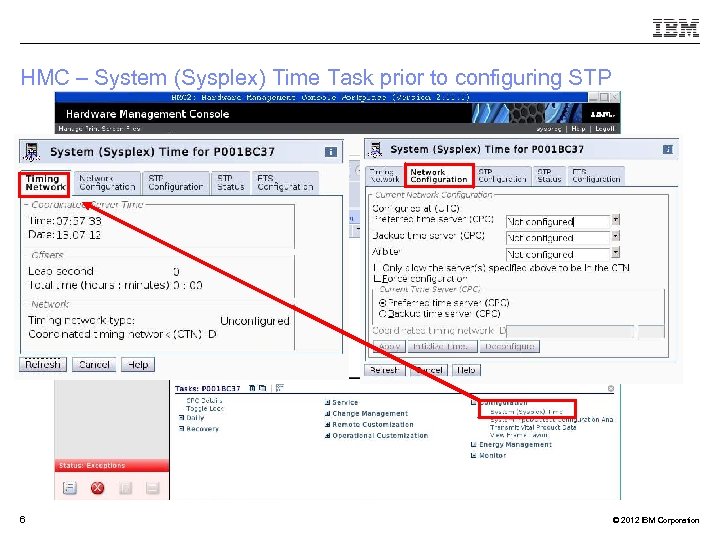 HMC – System (Sysplex) Time Task prior to configuring STP 6 © 2012 IBM Corporation
 Agenda § STP – General Overview § Sysplex Time Task prior to configuring STP § Planning and Configuring an External Time Source – Planning an ETS – Configure a NTP Server § Configuring a STP-only CTN for Single CPC usage – Set CTN ID – Initialize the time – Assign CTN Roles § Additional Information 7 © 2012 IBM Corporation
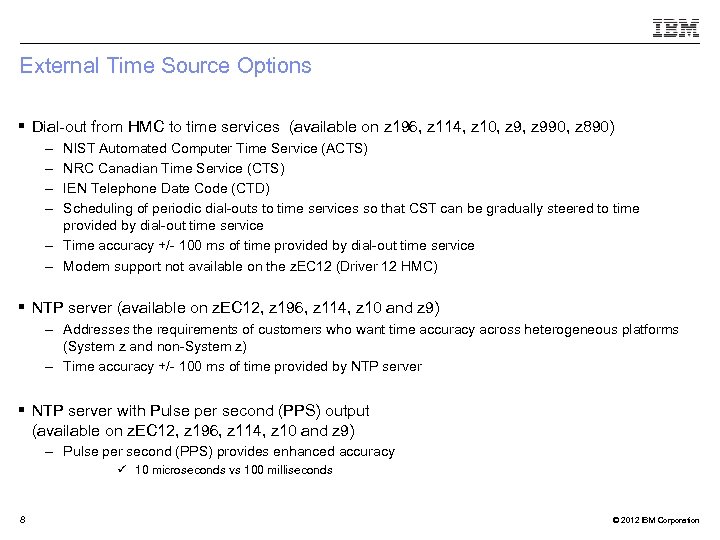 External Time Source Options § Dial-out from HMC to time services (available on z 196, z 114, z 10, z 990, z 890) – – NIST Automated Computer Time Service (ACTS) NRC Canadian Time Service (CTS) IEN Telephone Date Code (CTD) Scheduling of periodic dial-outs to time services so that CST can be gradually steered to time provided by dial-out time service – Time accuracy +/- 100 ms of time provided by dial-out time service – Modem support not available on the z. EC 12 (Driver 12 HMC) § NTP server (available on z. EC 12, z 196, z 114, z 10 and z 9) – Addresses the requirements of customers who want time accuracy across heterogeneous platforms (System z and non-System z) – Time accuracy +/- 100 ms of time provided by NTP server § NTP server with Pulse per second (PPS) output (available on z. EC 12, z 196, z 114, z 10 and z 9) – Pulse per second (PPS) provides enhanced accuracy ü 10 microseconds vs 100 milliseconds 8 © 2012 IBM Corporation
 Network Time Protocol (NTP) client support § Purpose of this function is to allow the same accurate time across an enterprise comprised of heterogeneous platforms § Simple Network Time Protocol (SNTP) client support added to Support Element (SE) code of z. EC 12, z 196, z 114, z 10 and z 9 servers/CFs to enable interfacing with Network Time Protocol (NTP) servers § NTP server becomes the single time source (External Time Source (ETS)) for STP, as well as other non-System z servers (UNIX®, Windows NT®, other) that have NTP clients § Time reference for NTP server can be GPS, dial-out, DCF-77 etc. § Accuracy is within +/- 100 ms of the time provided by an NTP Server – Actual time accuracy, relative to UTC, is dependent on how accurate the NTP server time is with respect to UTC. § Only the Current Time Server (CTS) steers the time based on: – Timing information sent by Support Element (SE) code 9 © 2012 IBM Corporation
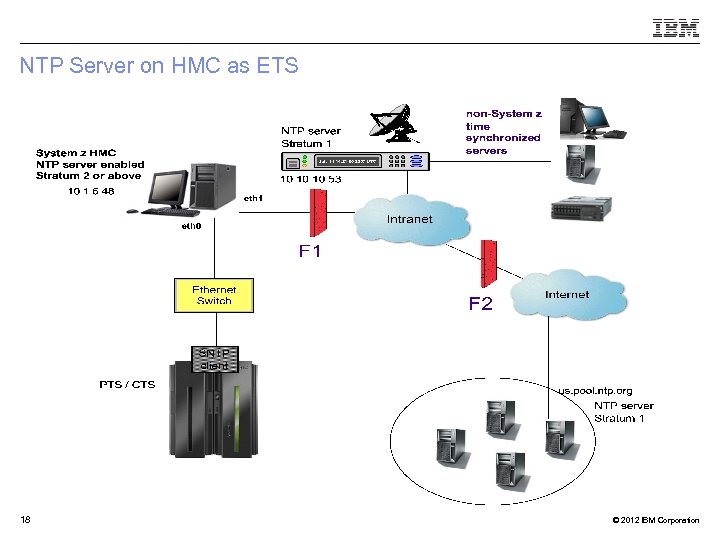
 NTP Server Planning § NTP/SNTP server can be : – An external device available from several vendors – NTP server on the HMC – A local workstation (example, UNIX, Linux, Windows) running the NTP/SNTP server code • HMC or workstation may use an internet NTP server for its time source § NTP server should be directly connected to the SE LAN – SE LAN considered to be a private dedicated LAN • Isolated from the corporate and public networks § NTP server on HMC addresses security concerns – Provides LAN isolation for SE NTP Client – The HMC has two LAN ports, physically isolated: • HMC/SE LAN used by NTP client code • Second LAN used by HMC to access an NTP time server to set its time 10 © 2012 IBM Corporation
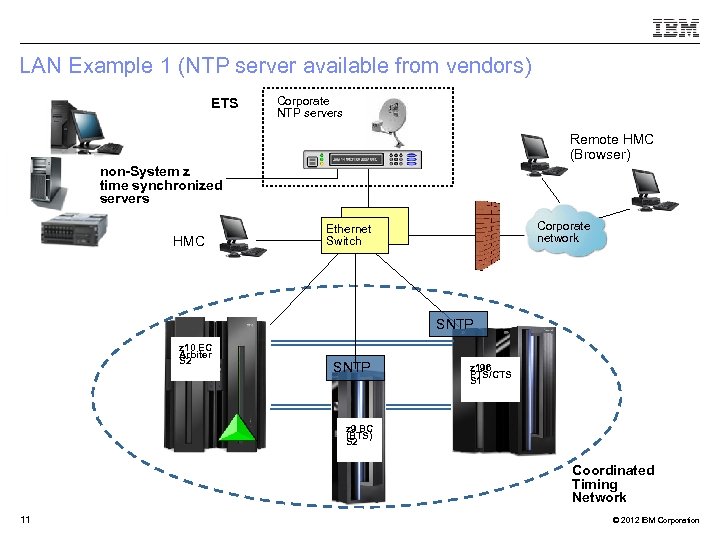 LAN Example 1 (NTP server available from vendors) ETS Corporate NTP servers Remote HMC (Browser) non-System z time synchronized servers HMC Corporate network Ethernet Switch SNTP z 10 EC Arbiter S 2 SNTP z 196 PTS/CTS S 1 z 9 BC (BTS) S 2 Coordinated Timing Network 11 © 2012 IBM Corporation
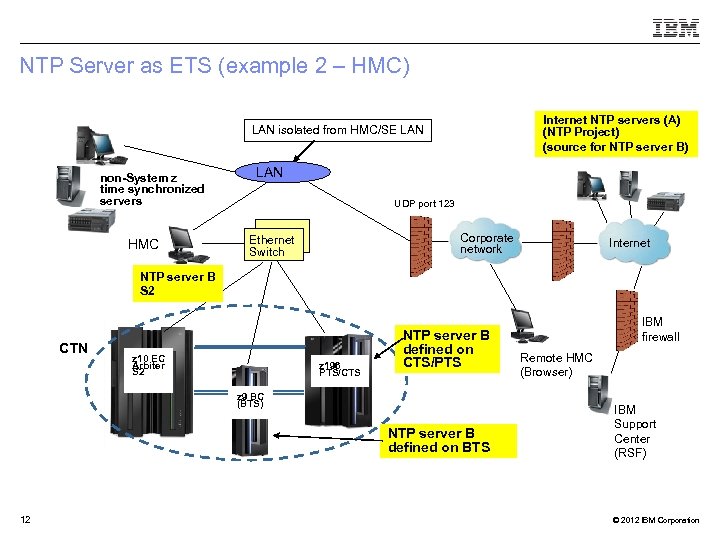 NTP Server as ETS (example 2 – HMC) Internet NTP servers (A) (NTP Project) (source for NTP server B) LAN isolated from HMC/SE LAN non-System z time synchronized servers HMC LAN UDP port 123 Corporate network Ethernet Switch Internet NTP server B S 2 CTN z 10 EC Arbiter S 2 z 196 PTS/CTS NTP server B defined on CTS/PTS z 9 BC (BTS) NTP server B defined on BTS 12 IBM firewall Remote HMC (Browser) IBM Support Center (RSF) © 2012 IBM Corporation
 Enhanced Accuracy to an External Time Source (ETS) § Some NTP servers also provide a highly stable, accurate “Pulse per second” (PPS) output – ETR card of z 10 EC, z 10 BC, z 9 EC and z 9 BC has additional PPS input – PPS capability exists on the z. EC 12, z 196 or z 114 on the FSP/STP card – Each System z has 2 ETR or FSP/STP cards providing capability of attaching to two NTP Servers with PPS output for redundancy § STP utilizes the PPS signal to provide additional accuracy – Accuracy to PPS – 10 microseconds § Only the Current Time Server (CTS) steers the time based on: – Timing information sent by Support Element (SE) code – PPS signal received by PPS port on ETR card 13 © 2012 IBM Corporation
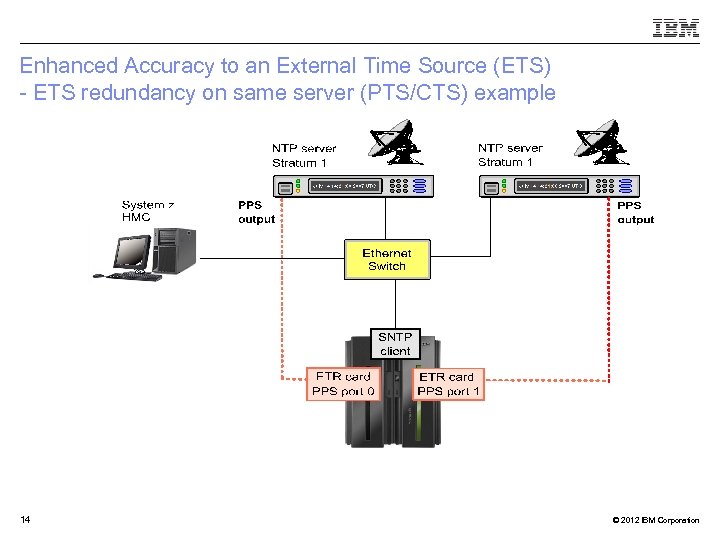 Enhanced Accuracy to an External Time Source (ETS) - ETS redundancy on same server (PTS/CTS) example 14 © 2012 IBM Corporation
 NTP Server Redundancy Recommendations § At least one NTP server must be configured on the PTS/CTS – Only the Current Time Server (CTS) makes time adjustments based on information from the NTP Server § Also recommended to configure at least one NTP server on the BTS – Allows continuous NTP server access when BTS becomes the CTS – Time adjustments to the STP-only CTN when the PTS/CTS cannot access any of its NTP servers § STP allows two NTP servers to be configured for every System z server in the STP -only CTN – When two NTP servers are configured on the server that has the PTS/CTS role, STP will automatically access the second NTP server configured on the PTS/CTS if the selected NTP server fails. – For best availability, configure two NTP servers for both the PTS and the BTS § NTP servers can also be configured for all servers in the STP-only CTN – Provides access to NTP servers if server roles reassigned Recommendations apply when using NTP servers with or without PPS 15 © 2012 IBM Corporation
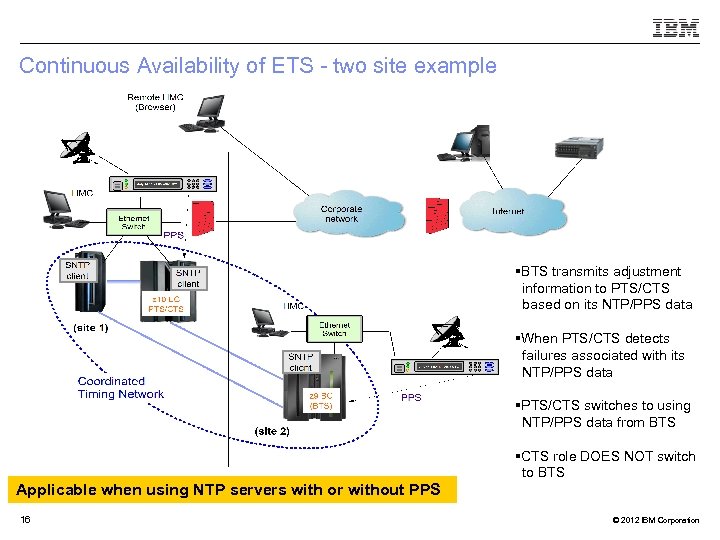 Continuous Availability of ETS - two site example §BTS transmits adjustment information to PTS/CTS based on its NTP/PPS data §When PTS/CTS detects failures associated with its NTP/PPS data §PTS/CTS switches to using NTP/PPS data from BTS §CTS role DOES NOT switch to BTS Applicable when using NTP servers with or without PPS 16 © 2012 IBM Corporation
 Agenda § STP – General Overview § Sysplex Time Task prior to configuring STP § Planning and Configuring an External Time Source – Planning an ETS – Configure a NTP Server § Configuring a STP-only CTN for Single CPC usage – Set CTN ID – Initialize the time – Assign CTN Roles § Additional Information 17 © 2012 IBM Corporation
 NTP Server on HMC as ETS 18 © 2012 IBM Corporation
 Configuring an NTP Server on HMC Customize Console Date and Time – initial view 19 © 2012 IBM Corporation
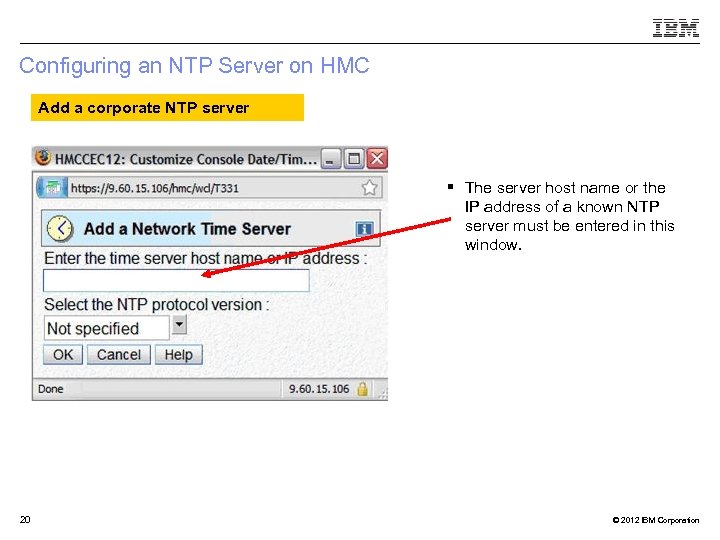 Configuring an NTP Server on HMC Add a corporate NTP server § The server host name or the IP address of a known NTP server must be entered in this window. 20 © 2012 IBM Corporation
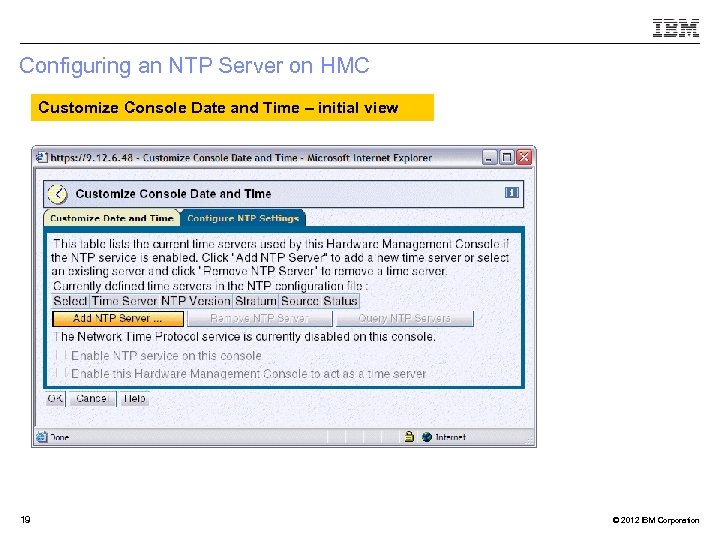
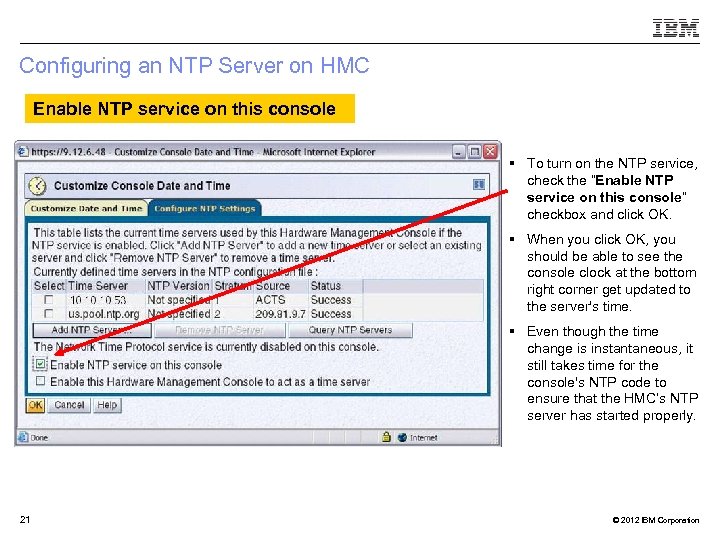 Configuring an NTP Server on HMC Enable NTP service on this console § To turn on the NTP service, check the “Enable NTP service on this console” checkbox and click OK. § When you click OK, you should be able to see the console clock at the bottom right corner get updated to the server's time. § Even though the time change is instantaneous, it still takes time for the console's NTP code to ensure that the HMC’s NTP server has started properly. 21 © 2012 IBM Corporation
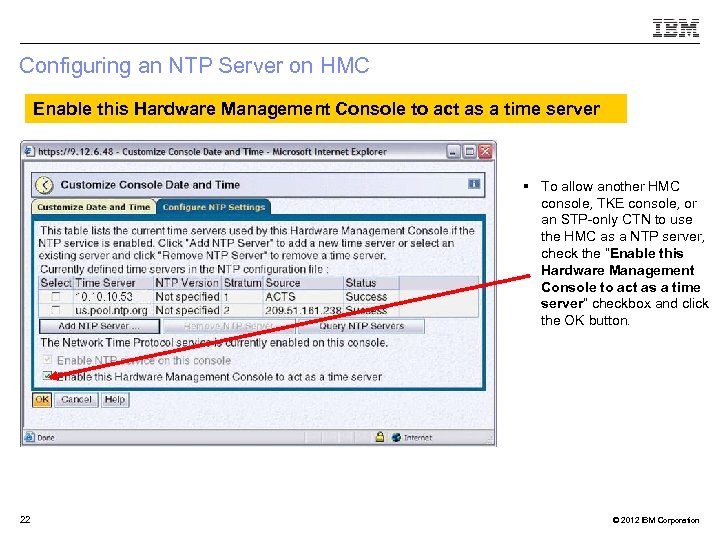 Configuring an NTP Server on HMC Enable this Hardware Management Console to act as a time server § To allow another HMC console, TKE console, or an STP-only CTN to use the HMC as a NTP server, check the “Enable this Hardware Management Console to act as a time server” checkbox and click the OK button. 22 © 2012 IBM Corporation
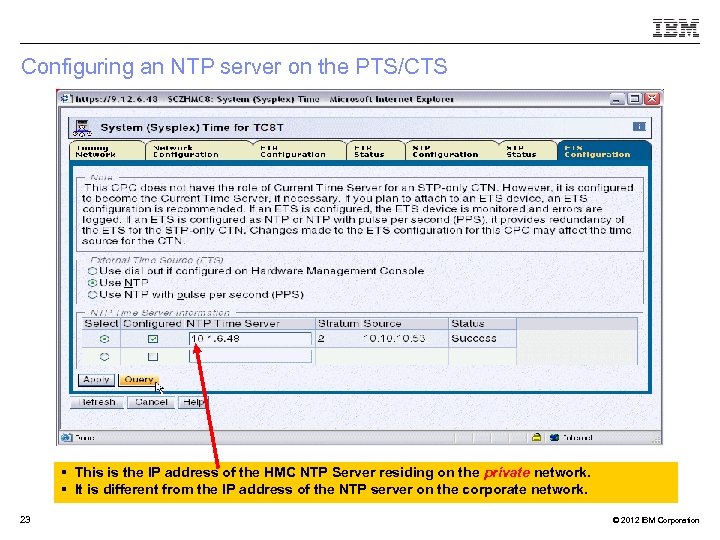 Configuring an NTP server on the PTS/CTS § This is the IP address of the HMC NTP Server residing on the private network. § It is different from the IP address of the NTP server on the corporate network. 23 © 2012 IBM Corporation
 Agenda § STP – General Overview § Sysplex Time Task prior to configuring STP § Planning and Configuring an External Time Source – Planning an ETS – Configure a NTP Server § Configuring a STP-only CTN for Single CPC usage – Set CTN ID – Initialize the time – Assign CTN Roles § Additional Information 24 © 2012 IBM Corporation
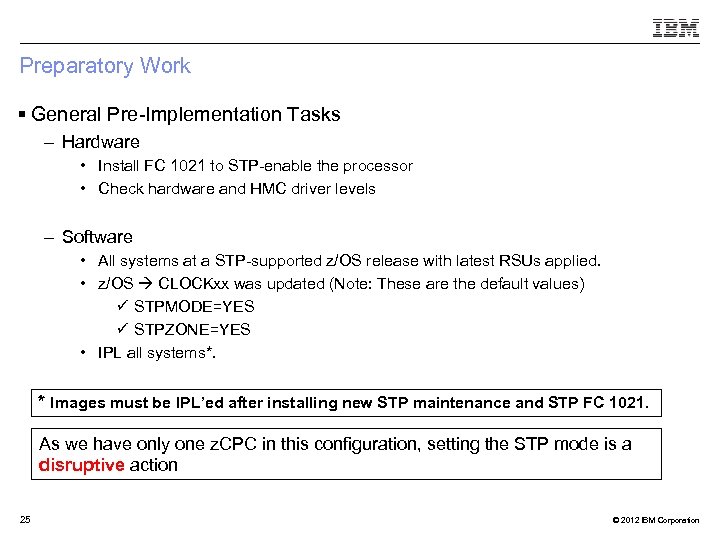 Preparatory Work § General Pre-Implementation Tasks – Hardware • Install FC 1021 to STP-enable the processor • Check hardware and HMC driver levels – Software • All systems at a STP-supported z/OS release with latest RSUs applied. • z/OS CLOCKxx was updated (Note: These are the default values) ü STPMODE=YES ü STPZONE=YES • IPL all systems*. * Images must be IPL’ed after installing new STP maintenance and STP FC 1021. As we have only one z. CPC in this configuration, setting the STP mode is a disruptive action 25 © 2012 IBM Corporation
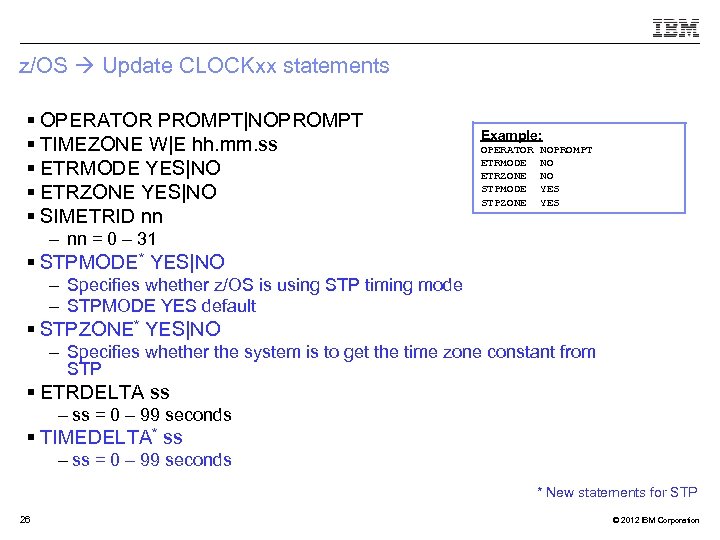 z/OS Update CLOCKxx statements § OPERATOR PROMPT|NOPROMPT § TIMEZONE W|E hh. mm. ss § ETRMODE YES|NO § ETRZONE YES|NO § SIMETRID nn Example: OPERATOR ETRMODE ETRZONE STPMODE STPZONE NOPROMPT NO NO YES – nn = 0 – 31 § STPMODE* YES|NO – Specifies whether z/OS is using STP timing mode – STPMODE YES default § STPZONE* YES|NO – Specifies whether the system is to get the time zone constant from STP § ETRDELTA ss – ss = 0 – 99 seconds § TIMEDELTA* ss – ss = 0 – 99 seconds * New statements for STP 26 © 2012 IBM Corporation
 Agenda § STP – General Overview § Sysplex Time Task prior to configuring STP § Planning and Configuring an External Time Source – Planning an ETS – Configure a NTP Server § Configuring a STP-only CTN for Single CPC usage – Set CTN ID – Initialize the time – Assign CTN Roles § Additional Information 27 © 2012 IBM Corporation
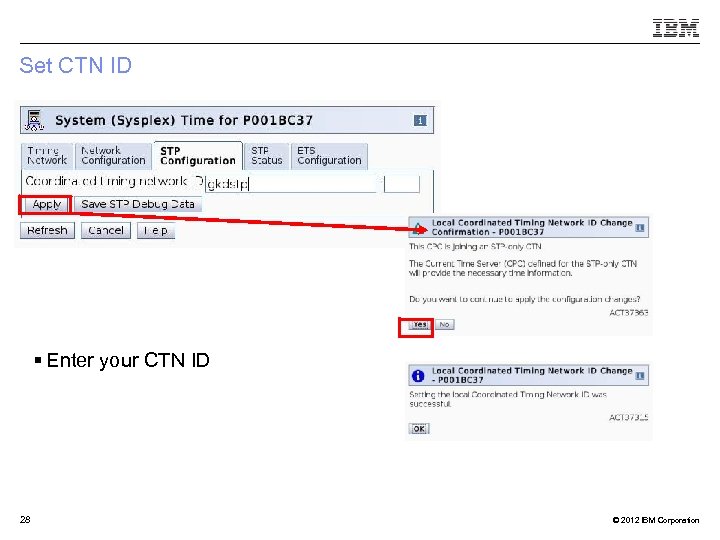 Set CTN ID § Enter your CTN ID 28 © 2012 IBM Corporation
 Agenda § STP – General Overview § Sysplex Time Task prior to configuring STP § Planning and Configuring an External Time Source – Planning an ETS – Configure a NTP Server § Configuring a STP-only CTN for Single CPC usage – Set CTN ID – Initialize the time – Assign CTN Roles § Additional Information 29 © 2012 IBM Corporation
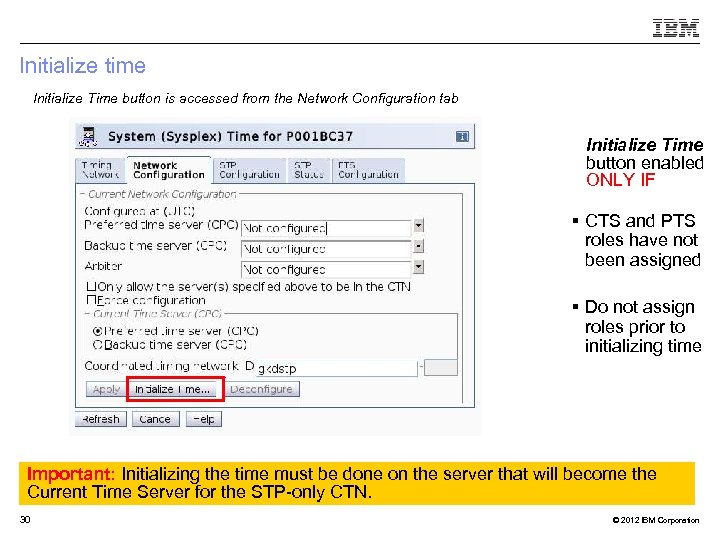 Initialize time Initialize Time button is accessed from the Network Configuration tab Initialize Time button enabled ONLY IF § CTS and PTS roles have not been assigned § Do not assign roles prior to initializing time Important: Initializing the time must be done on the server that will become the Current Time Server for the STP-only CTN. 30 © 2012 IBM Corporation
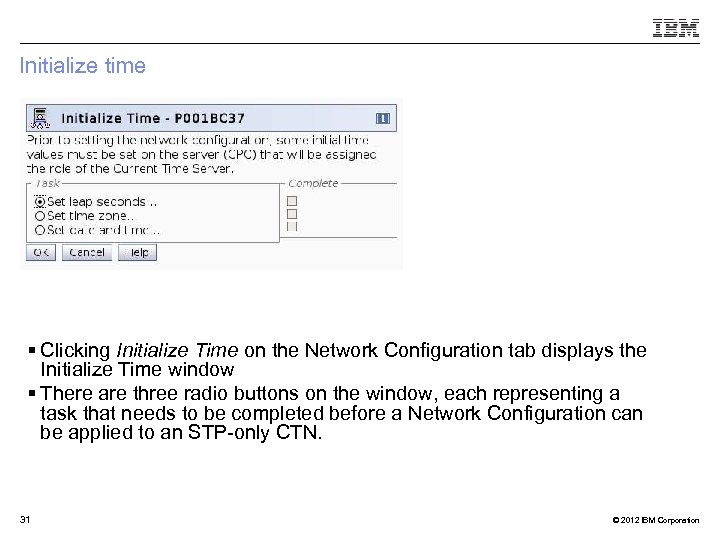 Initialize time § Clicking Initialize Time on the Network Configuration tab displays the Initialize Time window § There are three radio buttons on the window, each representing a task that needs to be completed before a Network Configuration can be applied to an STP-only CTN. 31 © 2012 IBM Corporation
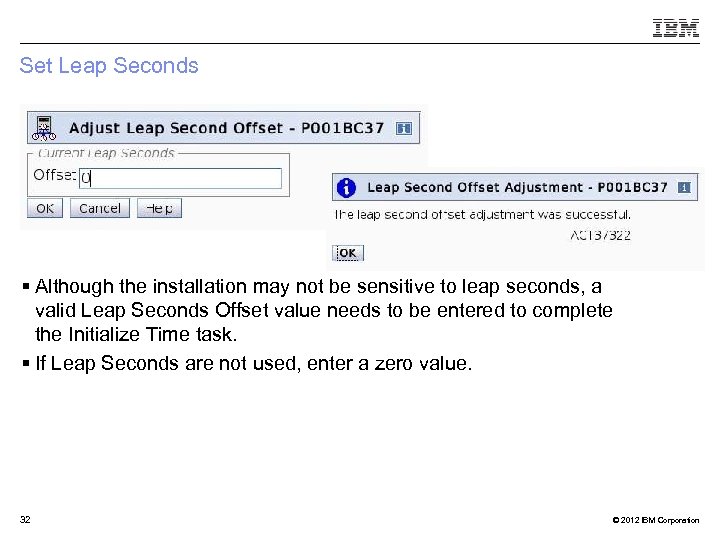 Set Leap Seconds § Although the installation may not be sensitive to leap seconds, a valid Leap Seconds Offset value needs to be entered to complete the Initialize Time task. § If Leap Seconds are not used, enter a zero value. 32 © 2012 IBM Corporation
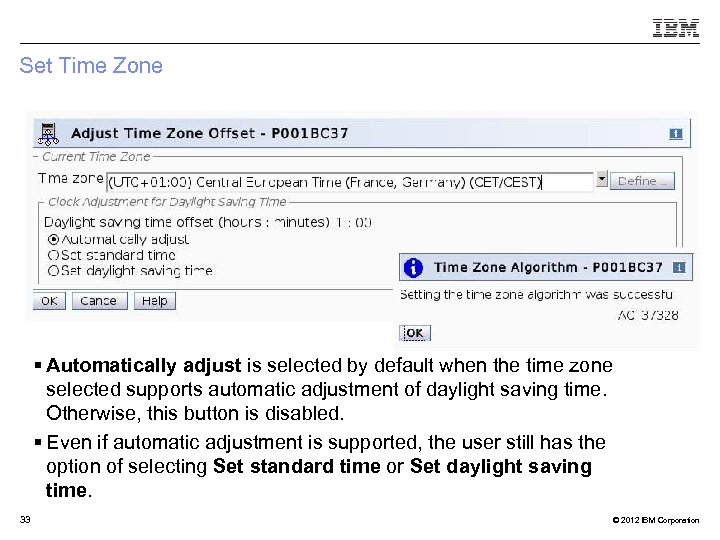 Set Time Zone § Automatically adjust is selected by default when the time zone selected supports automatic adjustment of daylight saving time. Otherwise, this button is disabled. § Even if automatic adjustment is supported, the user still has the option of selecting Set standard time or Set daylight saving time. 33 © 2012 IBM Corporation
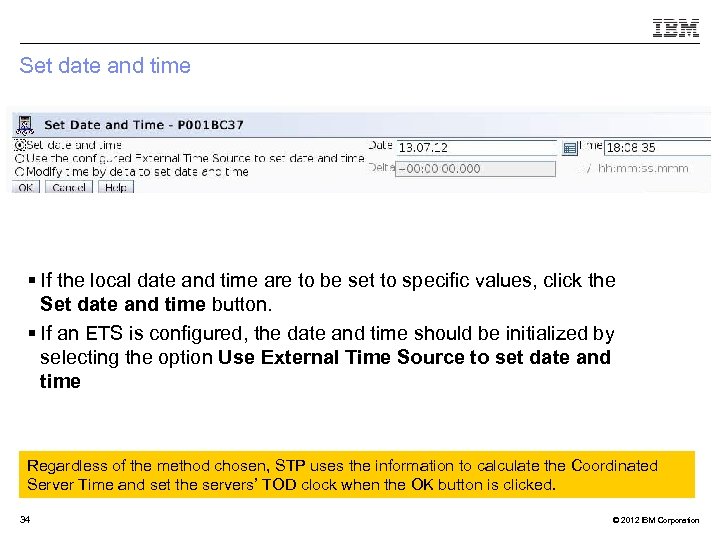 Set date and time § If the local date and time are to be set to specific values, click the Set date and time button. § If an ETS is configured, the date and time should be initialized by selecting the option Use External Time Source to set date and time Regardless of the method chosen, STP uses the information to calculate the Coordinated Server Time and set the servers’ TOD clock when the OK button is clicked. 34 © 2012 IBM Corporation
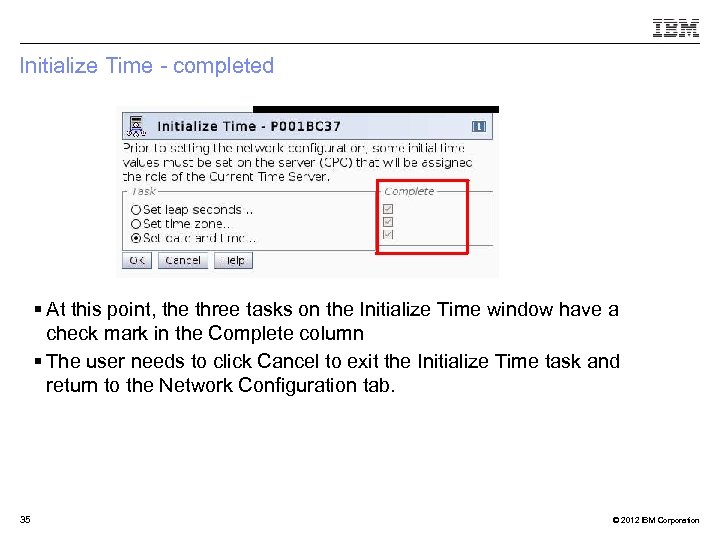 Initialize Time - completed § At this point, the three tasks on the Initialize Time window have a check mark in the Complete column § The user needs to click Cancel to exit the Initialize Time task and return to the Network Configuration tab. 35 © 2012 IBM Corporation
 Agenda § STP – General Overview § Sysplex Time Task prior to configuring STP § Planning and Configuring an External Time Source – Planning an ETS – Configure a NTP Server § Configuring a STP-only CTN for Single CPC usage – Set CTN ID – Initialize the time – Assign CTN Roles § Additional Information 36 © 2012 IBM Corporation
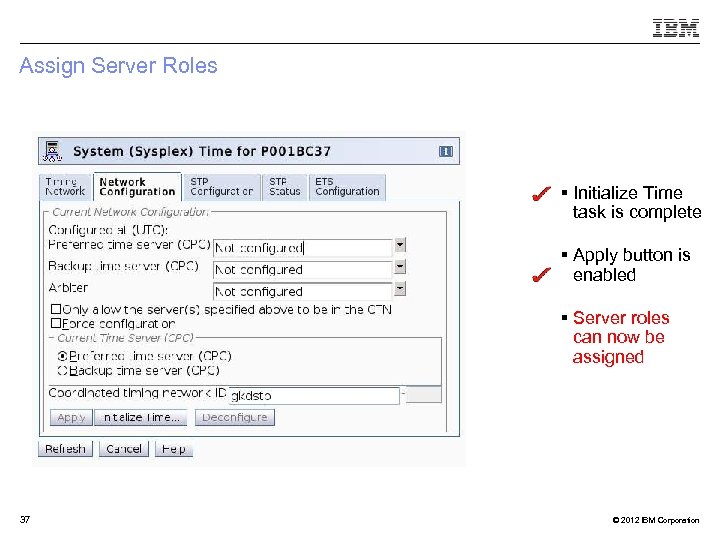 Assign Server Roles § Initialize Time task is complete § Apply button is enabled § Server roles can now be assigned 37 © 2012 IBM Corporation
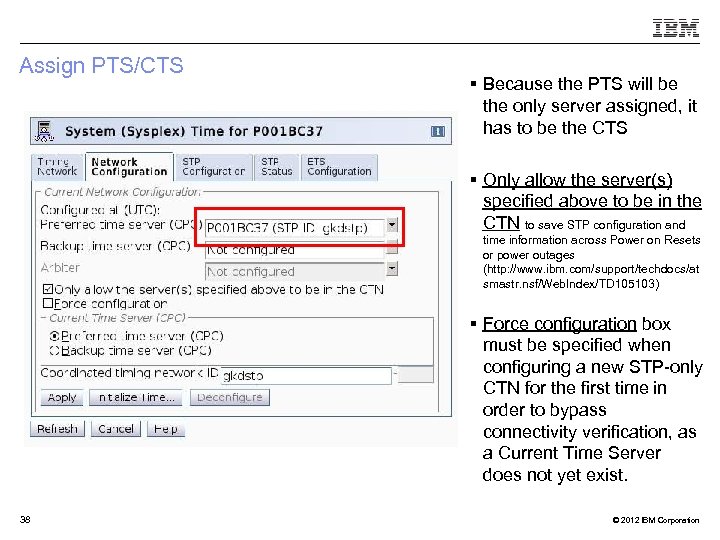 Assign PTS/CTS § Because the PTS will be the only server assigned, it has to be the CTS § Only allow the server(s) specified above to be in the CTN to save STP configuration and time information across Power on Resets or power outages (http: //www. ibm. com/support/techdocs/at smastr. nsf/Web. Index/TD 105103) § Force configuration box must be specified when configuring a new STP-only CTN for the first time in order to bypass connectivity verification, as a Current Time Server does not yet exist. 38 © 2012 IBM Corporation
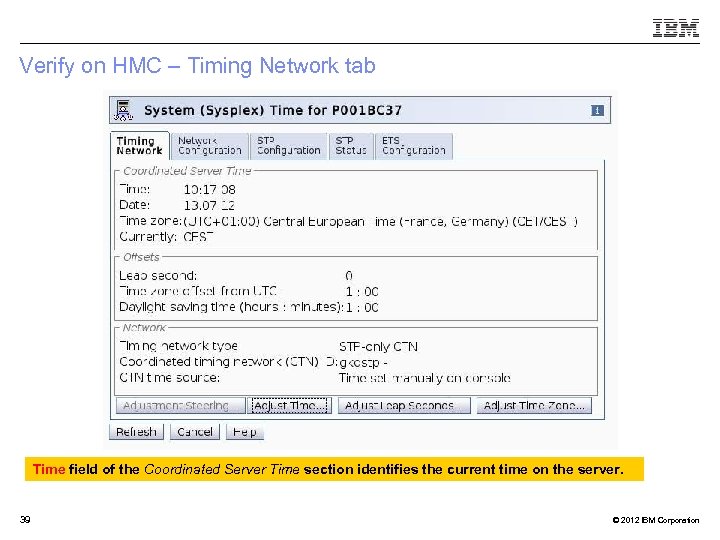 Verify on HMC – Timing Network tab Time field of the Coordinated Server Time section identifies the current time on the server. 39 © 2012 IBM Corporation
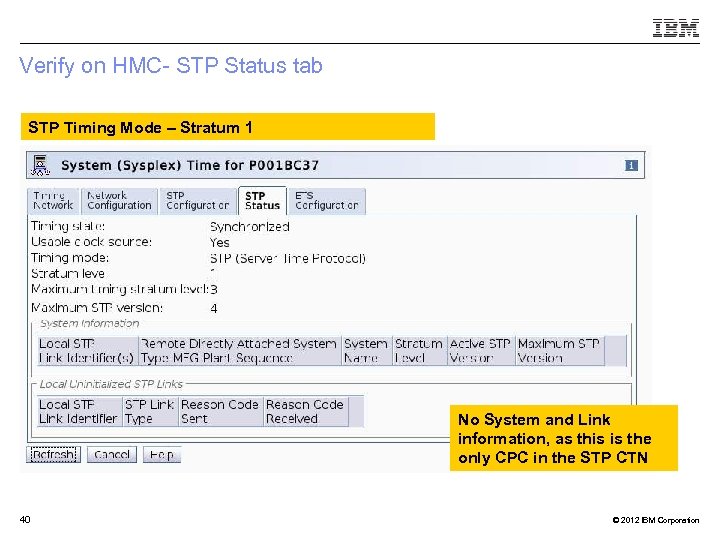 Verify on HMC- STP Status tab STP Timing Mode – Stratum 1 No System and Link information, as this is the only CPC in the STP CTN 40 © 2012 IBM Corporation
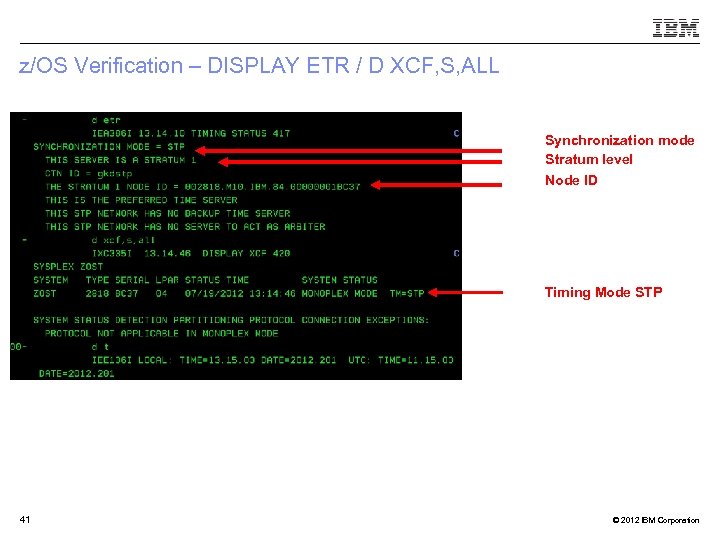 z/OS Verification – DISPLAY ETR / D XCF, S, ALL Synchronization mode Stratum level Node ID Timing Mode STP 41 © 2012 IBM Corporation
 Agenda § STP – General Overview § Sysplex Time Task prior to configuring STP § Planning and Configuring an External Time Source – Planning an ETS – Configure a NTP Server § Configuring a STP-only CTN for Single CPC usage ! – Set CTN ID NE – Initialize the time O D – Assign CTN Roles § Additional Information 42 © 2012 IBM Corporation
 Additional Information § Redbooks® – Server Time Protocol Planning Guide SG 24 -7280 – Server Time Protocol Implementation Guide SG 24 -7281 – Server Time Protocol Recovery Guide, SG 24 -7380 § Education – Introduction to Server Time Protocol (STP) • Available on Resource Link™ • www. ibm. com/servers/resourcelink/hom 03010. nsf? Open. Database § STP Web site – www. ibm. com/systems/z/advantages/pso/stp/hardware. html § Systems Assurance – The IBM team is required to complete a Systems Assurance Review (SAPR Guide SA 06 -012) and to complete the Systems Assurance Confirmation Form via Resource Link 43 © 2012 IBM Corporation ZSP 03016 -USEN-01
 Trademarks § For a complete list of IBM Trademarks, see ibm. com/legal/copytrade. shtml 44 © 2012 IBM Corporation