


 Скачать презентацию Sensor Network Querying Dina Q Goldin University of
cca6fd944dc3ececfa768d5eb99732d0.ppt
- Количество слайдов: 33
 Sensor Network Querying Dina Q Goldin University of Connecticut, USA March 17, 2003
 The Invisible Computer • The most user-friendly computer is one we don’t see • Advocated in mid-1990’s by Michael Dertouzos, director of MIT's Laboratory for Computer Science for 25 years. • Does that make sense?
 Outline • Computing in the 21 st century • Sensors and sensor networks • Sensor network querying
 The Disappearing Computer • More and more processors are not on desktops • Processors in cars, in cellular telephones, in toys • Even the computer itself can “dissolve” into an entertainment system - digital TV screen and speakers - CPU on shelf - wireless keyboard on lap
 Home Computer of Tomorrow 1. Flat wall screens for TV/computer in many rooms 2. Connected to an out-of-sight CPU by LAN 3. Multiple speakers embedded in/around screen for 3 D sound effects 4. Screen can act as an (open) window when not in use 5. Natural input interface -- voice/pointing (no keyboard needed)
 House as a Web Site • Processors in various appliances • All networked (locally, and to wireless hub) • Appliances can communicate with outside world - Security system calls you or police - “Smart recycling bin” orders more food • Can log onto your house site to control them - Turn heat up - Turn coffeemaker on (already a reality)
 Cars of Tomorrow • GPS to know position • Wireless connection to obtain traffic conditions • Sensors: - distance to cars / people / obstacles - indoor/outdoor temperatures - road traction • Screen to show sensor readings / maps • Radio used for warnings / directions • Automatic controls based on sensor readings
 Sensors for/in the Body • Digital jewelry: – DCPU in watch, speaker in an earring, camera in glasses • Scenarios: – (salesmen) Identifies person approaching, whispers their name, position to you – (repair trainee) Identifies machine parts, projects visual instructions on glasses • Assumes powerful vision/voice recognition • Embedded microsensors – Track vital signs, blood levels – For at-risk people: sick, old, mountain climbers
 Ambient Intelligence Intelligent environments of all kinds: • Highways - Where are the traffic jams? • Airports – Who is entering/leaving high-risk areas? • Large high-rise office complexes - Are there problems with heat/AC anywhere? • Oceans – Is a Tzunami on its way? • People
 Pervasive Computing • Computation in service of our needs: – Personal: Entertainment, daily activities, travel, house monitoring – Companies: Work efficiency, building monitoring – Scientific/medical: remote training / diagnosis, monitoring oceans - Governments: security, automatic gathering of statistics
 Pervasive Computing • Computing made easy - Interaction through natural modalities - Interaction during natural activities • Computing made invisible - Hidden in objects of everyday use - Distributed - Embedded in environments The computing paradigm for 21 st century
 Sensors • Essential part of pervasive computing • Computation – A small embedded computer with limited processing power and memory • Communication: – LAN, Wireless, Infrared / sound • Sensing – Temperature, pressure, magnetic field, noise levels, chemicals, etc.
 Sensor Constraints • A race to decrease: ü Size ü Price ü Energy consumption • A race to increase: ü Sensoring / transmitting abilities ü Computation power • Applications constrained by this tradeoff
 Sensor Networks • • • Many sensors distributed in a region Performing a common task Local communication (between neighbors) Frequent failures Fault-tolerant distributed computing
 Monitoring Tasks • “Killer application” for sensor networks • Highways - Where are the traffic jams? • Airports – Who is entering/leaving high-risk areas? • Large high-rise office complexes - Are there problems with heat/AC anywhere? • Networks custom-engineered for each task
 Sensor Network Wish List • Robust performance – Failed sensors do not bring down the network • Ad-hoc routing – New sensors join the network on their own • Concerns also shared by mobile computing networks – Cell phones / PDAs / laptops / GPS devices • Established research area
 Monitoring Task Wish List • Ad-hoc computing – New sensor join the task on their own • Ad-hoc querying – Monitoring tasks can be initiated by user • Impossible while each task is customengineered • New approach is needed
 Sensor Network Querying • A single general-purpose platform to enable sensor network users to perform all the monitoring activities mentioned above – A single (extensible) query language – A single (extensible) OS/DB engine – No more custom engineering • New & exciting research area
 Axioms of SN Querying • User sees network as a single intelligent information system – Sensors as sources of data – Monitoring tasks as data processing • Ad-hoc querying of sensor networks - Each task specified by user, not customengineered - Multiple tasks can be present at once • Separation of engineering concerns – physical level (routing, communication) – logical level (data processing) – our focus
 Sensors As Data • Sensors form a database relation – Sensors(Node. ID, locn, temp, pressure, …. ) • Syntax as for regular relations – Employees(Emp. ID, birthdate, salary, …) • Data semantics is dynamic – Temperature and pressure are streams of continuously changing values
 Monitoring Tasks as Queries • User asks queries in a query language – Return average temperature of each room in building • Syntax similar to regular database query languages – Such as SQL • Query semantics is continuous – Query “lives” in the network – Continuously reevaluated as sensor data dynamically changes
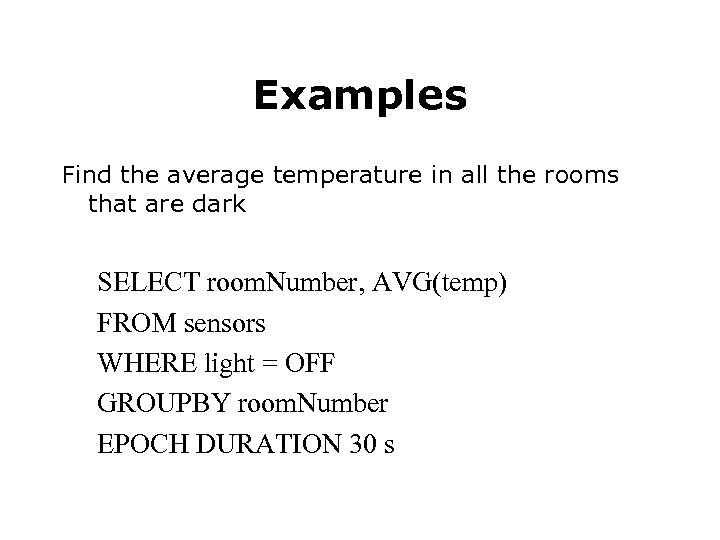 Examples Find the average temperature in all the rooms that are dark SELECT room. Number, AVG(temp) FROM sensors WHERE light = OFF GROUPBY room. Number EPOCH DURATION 30 s
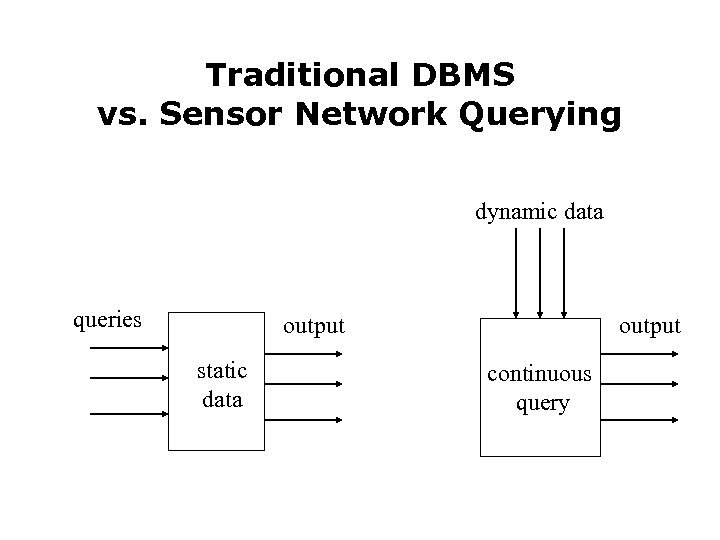 Traditional DBMS vs. Sensor Network Querying dynamic data queries output static data output continuous query
 Distributed DB Engine… • Each sensor has an OS – for managing routing, communication, etc – for controlling sensors – such as Tiny. OS (UC Berkeley) • Each sensor has a DB processor – remembers all queries “alive” in the network – evaluates each of them continuously – such as Tiny. DB (UC Berkeley) • New sensors join the network seamlessly
 Coupled to Central Processor • • Entry point into sensor network User interacts with network via a CP Additional (static) data stored at CP Sensors are routed in a single tree whose root is connected to CP • Some data processing is centralized (at the CP), other localized (at the sensors)
 Query Optimization • Traditionally: - minimize computation time / disk accesses • In sensor networks: - minimize power consumption • Sensor power consumption – Computation – Sensing (various modalities) – Communication (receiving, transmitting)
 Events • Will play important role in SN querying • As part of query specification ON EVENT door-open(loc) [QUERY DESCRIPTION] • As optimization technique [monitor for sounds every 30 sec] BETWEEN EVENTS door-open, door-closed [monitor for sounds every 1 sec]
 Aggregation • Impossible to continuously collect raw sensor data (information overload) • Aggregation – family of operators to summarize data – Min, max, average • In-network aggregation for optimal query evaluation
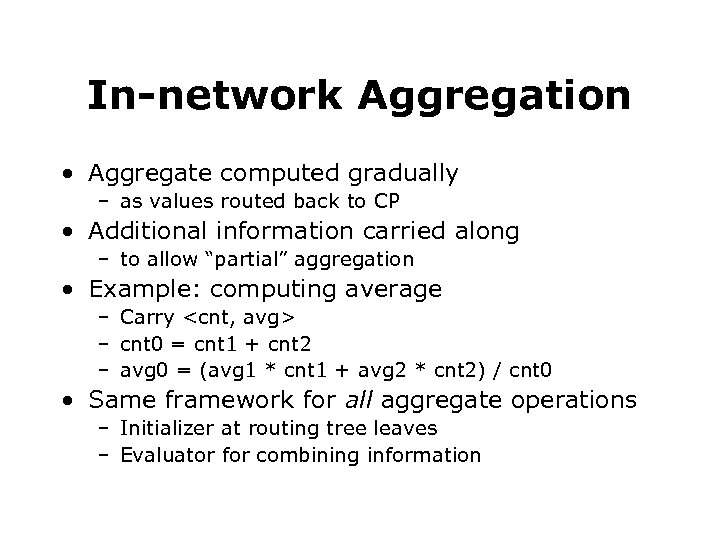 In-network Aggregation • Aggregate computed gradually – as values routed back to CP • Additional information carried along – to allow “partial” aggregation • Example: computing average – Carry
 Spatial Data • Spatial Databases store spatial data – Locations (of fire stations) – Regions (towns, lakes) – Lines (roads, rivers) • Spatial data will play larger role in SN querying • Dynamic spatial data – Contour maps – Tracking paths – Sensor locations (for mobile sensors) • Challenge: querying over dynamic spatial data
 Example Queries over Dynamic Spatial Data • When there is an unusually loud sound, return the path that is followed by the source of this sound • Identify when we have a growing area of decreased pressure that exceeds some specified tolerances • Track the area where the average daily temperature has been exceeding its expected value by some specified tolerance for a specified period of time.
 Georouting • For reducing communication during broadcasts of spatial data • Maintain bounding box at each sensor, over locations of sensors in its routing subtree • Use it to filter out spatial data that falls outside the bounding box • Results in very significant savings
 The Future: Active Sensor Networks • Sensors become mobile robots • Multiple communication modalities – Sound, wireless, infrared, smell • Can act upon their environments – Move things, turn switches, deposit color or scent • Interacting with our environment – Rather than just monitoring