


 Скачать презентацию SEMICON West 2006 STEP Methods to Measure Improve Equipment
502e8499524411f19066a699001f7f57.ppt
- Количество слайдов: 35
 SEMICON West 2006 STEP Methods to Measure/Improve Equipment Productivity Improving Equipment Performance Tracking Using SEMI Standards Lisa Pivin Intel lisa. m. pivin@intel. com Jan 1, 2006 Event, Venue information
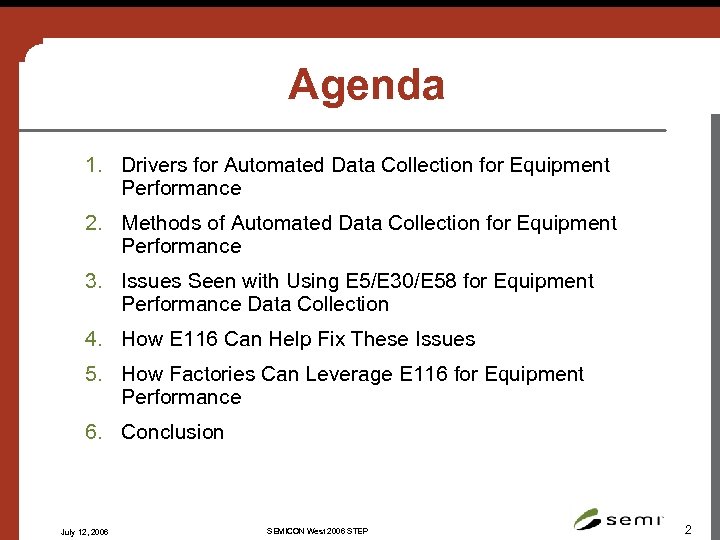 Agenda 1. Drivers for Automated Data Collection for Equipment Performance 2. Methods of Automated Data Collection for Equipment Performance 3. Issues Seen with Using E 5/E 30/E 58 for Equipment Performance Data Collection 4. How E 116 Can Help Fix These Issues 5. How Factories Can Leverage E 116 for Equipment Performance 6. Conclusion July 12, 2006 SEMICON West 2006 STEP 2
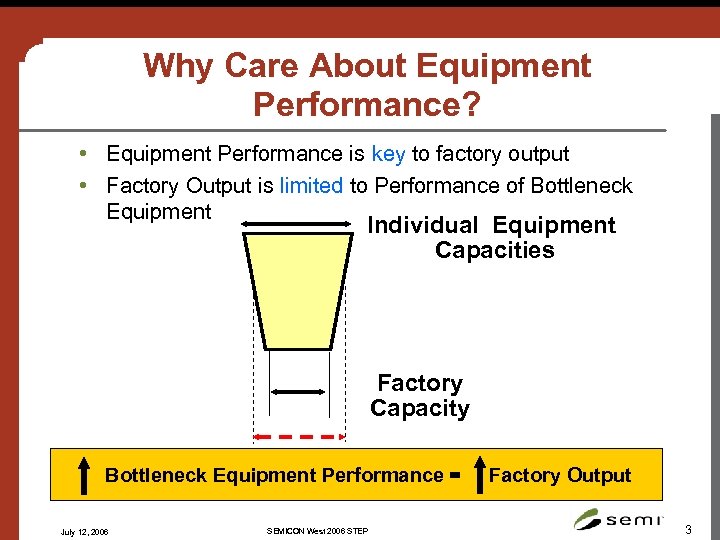 Why Care About Equipment Performance? • Equipment Performance is key to factory output • Factory Output is limited to Performance of Bottleneck Equipment Individual Equipment Capacities Factory Capacity Bottleneck Equipment Performance = July 12, 2006 SEMICON West 2006 STEP Factory Output 3
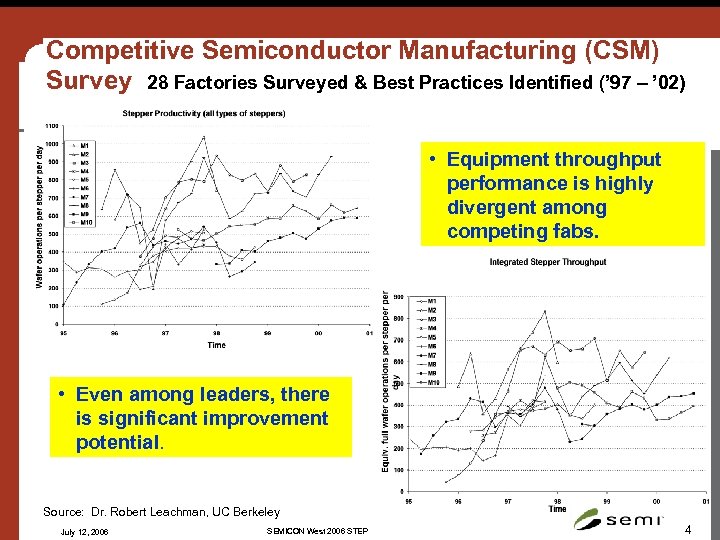 Competitive Semiconductor Manufacturing (CSM) Survey 28 Factories Surveyed & Best Practices Identified (’ 97 – ’ 02) • Equipment throughput performance is highly divergent among competing fabs. • Even among leaders, there is significant improvement potential. Source: Dr. Robert Leachman, UC Berkeley July 12, 2006 SEMICON West 2006 STEP 4
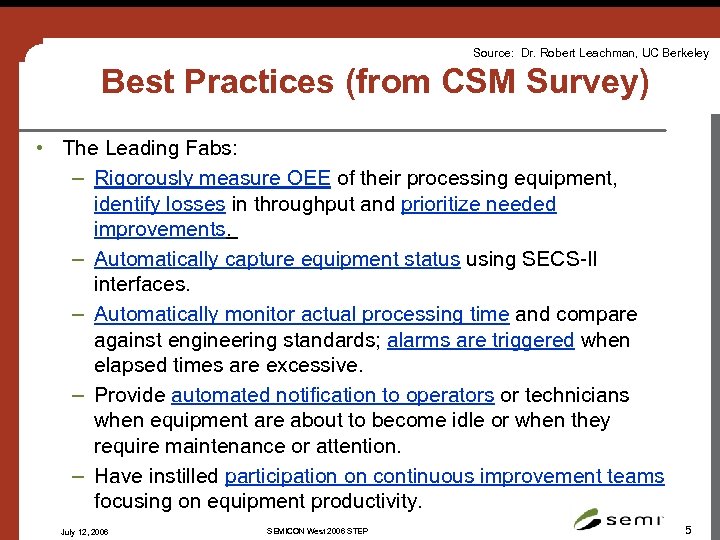 Source: Dr. Robert Leachman, UC Berkeley Best Practices (from CSM Survey) • The Leading Fabs: – Rigorously measure OEE of their processing equipment, identify losses in throughput and prioritize needed improvements. – Automatically capture equipment status using SECS-II interfaces. – Automatically monitor actual processing time and compare against engineering standards; alarms are triggered when elapsed times are excessive. – Provide automated notification to operators or technicians when equipment are about to become idle or when they require maintenance or attention. – Have instilled participation on continuous improvement teams focusing on equipment productivity. July 12, 2006 SEMICON West 2006 STEP 5
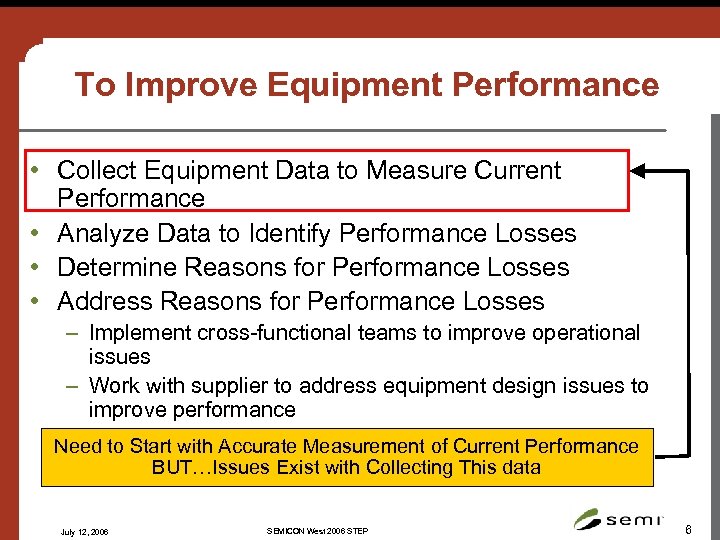 To Improve Equipment Performance • Collect Equipment Data to Measure Current Performance • Analyze Data to Identify Performance Losses • Determine Reasons for Performance Losses • Address Reasons for Performance Losses – Implement cross-functional teams to improve operational issues – Work with supplier to address equipment design issues to improve performance Need to Start with Accurate Measurement of Current Performance BUT…Issues Exist with Collecting This data July 12, 2006 SEMICON West 2006 STEP 6
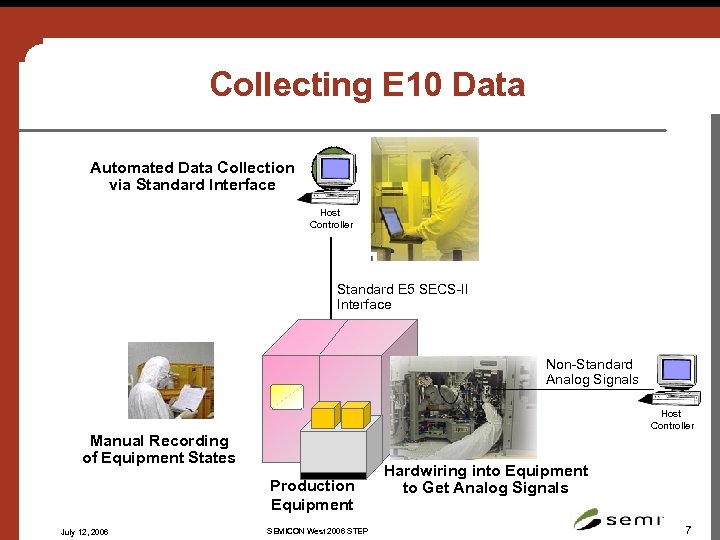 Collecting E 10 Data Automated Data Collection via Standard Interface Host Controller Standard E 5 SECS-II Interface Non-Standard Analog Signals Host Controller Manual Recording of Equipment States Production Equipment July 12, 2006 SEMICON West 2006 STEP Hardwiring into Equipment to Get Analog Signals 7
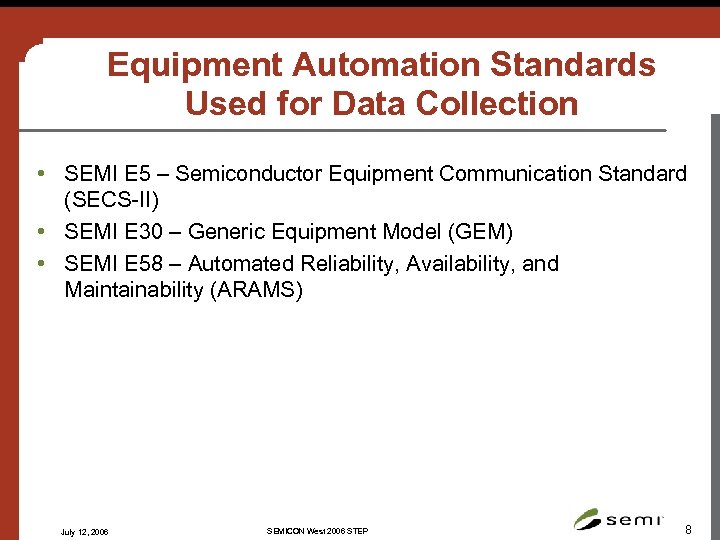 Equipment Automation Standards Used for Data Collection • SEMI E 5 – Semiconductor Equipment Communication Standard (SECS-II) • SEMI E 30 – Generic Equipment Model (GEM) • SEMI E 58 – Automated Reliability, Availability, and Maintainability (ARAMS) July 12, 2006 SEMICON West 2006 STEP 8
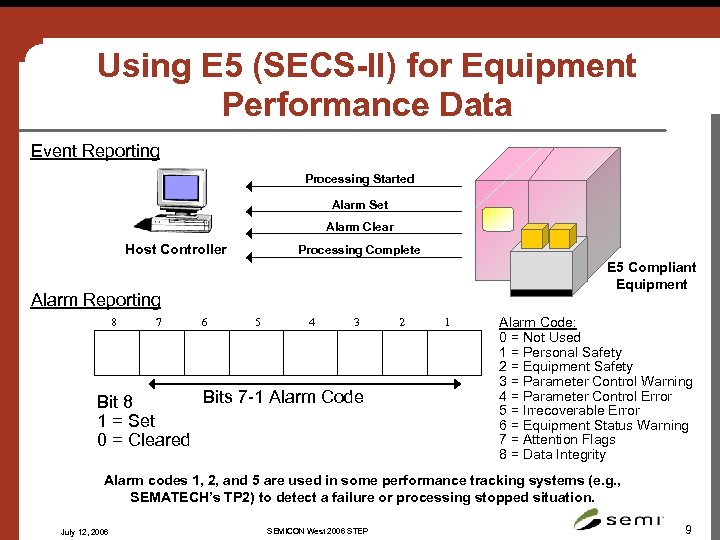 Using E 5 (SECS-II) for Equipment Performance Data Event Reporting Processing Started Alarm Set Alarm Clear Host Controller Processing Complete E 5 Compliant Equipment Alarm Reporting 8 7 6 5 4 3 Bits 7 -1 Alarm Code Bit 8 1 = Set 0 = Cleared 2 1 Alarm Code: 0 = Not Used 1 = Personal Safety 2 = Equipment Safety 3 = Parameter Control Warning 4 = Parameter Control Error 5 = Irrecoverable Error 6 = Equipment Status Warning 7 = Attention Flags 8 = Data Integrity Alarm codes 1, 2, and 5 are used in some performance tracking systems (e. g. , SEMATECH’s TP 2) to detect a failure or processing stopped situation. July 12, 2006 SEMICON West 2006 STEP 9
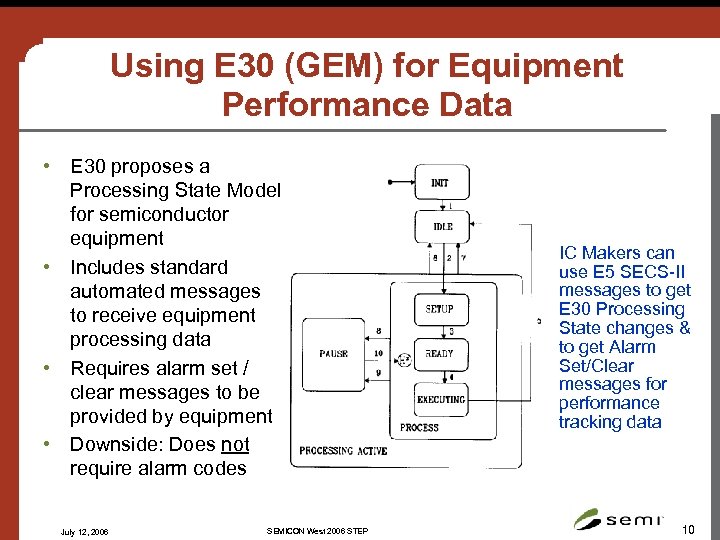 Using E 30 (GEM) for Equipment Performance Data • E 30 proposes a Processing State Model for semiconductor equipment • Includes standard automated messages to receive equipment processing data • Requires alarm set / clear messages to be provided by equipment • Downside: Does not require alarm codes July 12, 2006 SEMICON West 2006 STEP IC Makers can use E 5 SECS-II messages to get E 30 Processing State changes & to get Alarm Set/Clear messages for performance tracking data 10
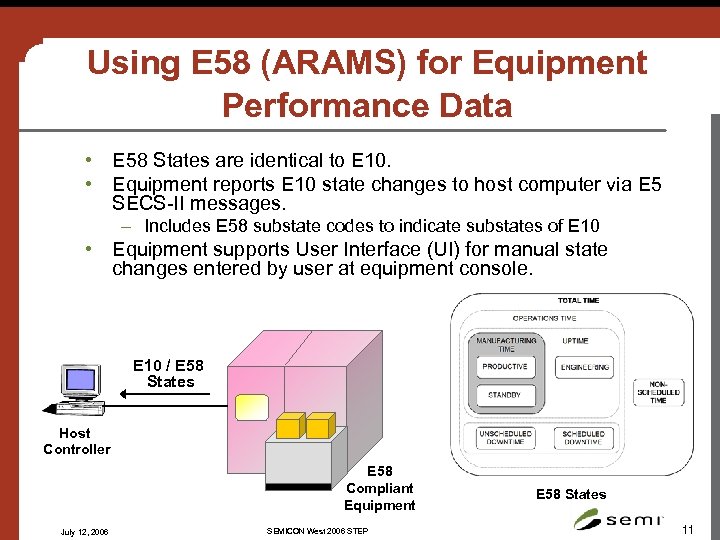 Using E 58 (ARAMS) for Equipment Performance Data • E 58 States are identical to E 10. • Equipment reports E 10 state changes to host computer via E 5 SECS-II messages. – Includes E 58 substate codes to indicate substates of E 10 • Equipment supports User Interface (UI) for manual state changes entered by user at equipment console. E 10 / E 58 States Host Controller E 58 Compliant Equipment July 12, 2006 SEMICON West 2006 STEP E 58 States 11
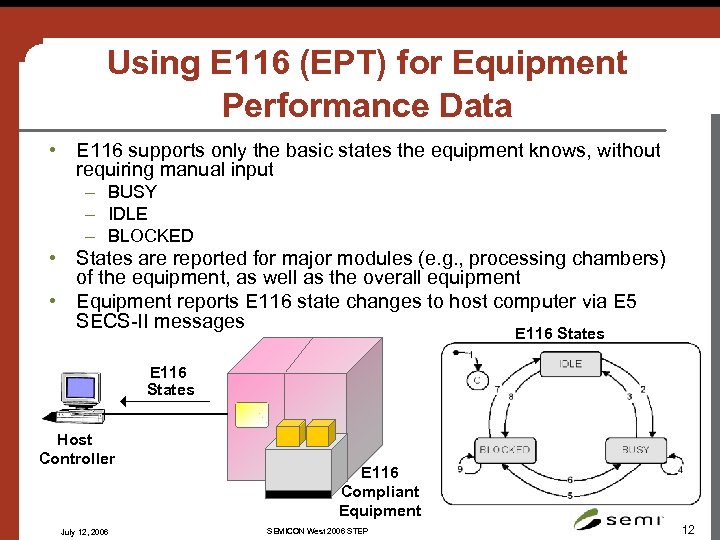 Using E 116 (EPT) for Equipment Performance Data • E 116 supports only the basic states the equipment knows, without requiring manual input – BUSY – IDLE – BLOCKED • States are reported for major modules (e. g. , processing chambers) of the equipment, as well as the overall equipment • Equipment reports E 116 state changes to host computer via E 5 SECS-II messages E 116 States Host Controller July 12, 2006 E 116 Compliant Equipment SEMICON West 2006 STEP 12
 Issues with Automated Data Collection using E 5/E 30/E 58 • Lack of standardized messages, state models, equipment behavior for equipment performance tracking • Inability to consistently obtain performance data for individual chambers of a multichamber equipment • No standard “failure” message • Dependency on manual input from a human operator July 12, 2006 SEMICON West 2006 STEP 13
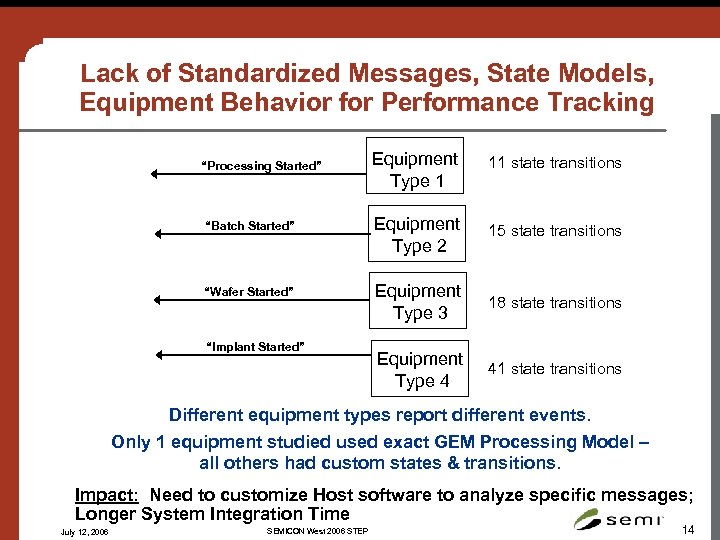 Lack of Standardized Messages, State Models, Equipment Behavior for Performance Tracking Equipment Type 1 11 state transitions “Batch Started” Equipment Type 2 15 state transitions “Wafer Started” Equipment Type 3 18 state transitions Equipment Type 4 41 state transitions “Processing Started” “Implant Started” Different equipment types report different events. Only 1 equipment studied used exact GEM Processing Model – all others had custom states & transitions. Impact: Need to customize Host software to analyze specific messages; Longer System Integration Time July 12, 2006 SEMICON West 2006 STEP 14
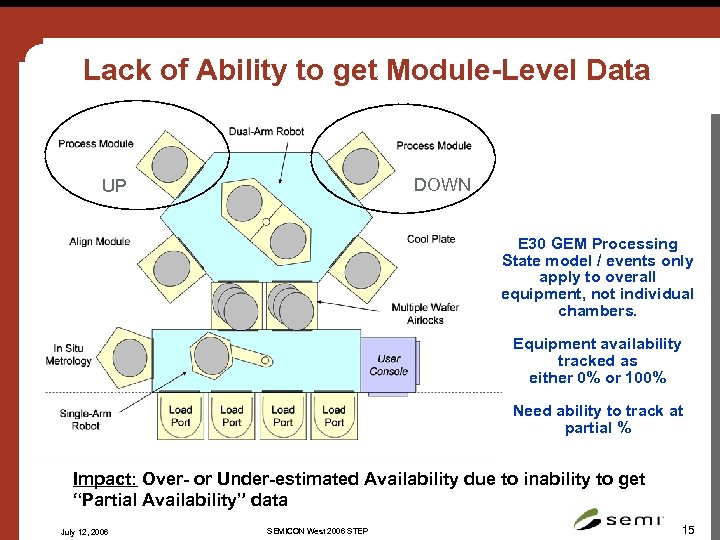 Lack of Ability to get Module-Level Data DOWN UP E 30 GEM Processing State model / events only apply to overall equipment, not individual chambers. Equipment availability tracked as either 0% or 100% Need ability to track at partial % Impact: Over- or Under-estimated Availability due to inability to get “Partial Availability” data July 12, 2006 SEMICON West 2006 STEP 15
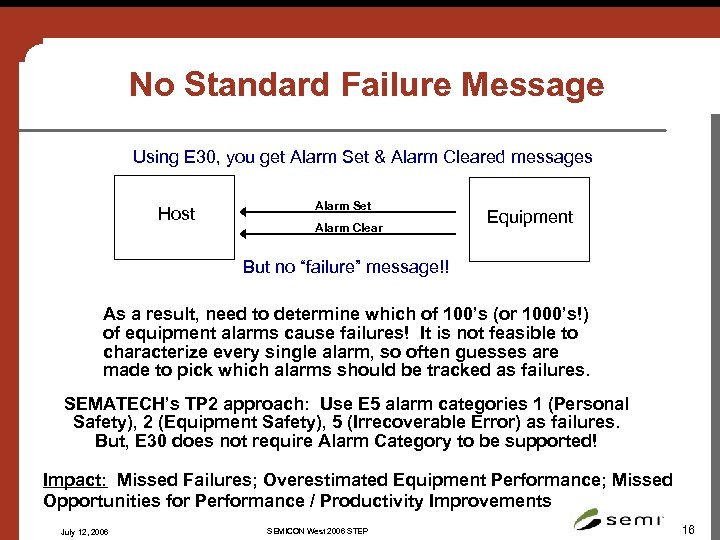 No Standard Failure Message Using E 30, you get Alarm Set & Alarm Cleared messages Host Alarm Set Alarm Clear Equipment But no “failure” message!! As a result, need to determine which of 100’s (or 1000’s!) of equipment alarms cause failures! It is not feasible to characterize every single alarm, so often guesses are made to pick which alarms should be tracked as failures. SEMATECH’s TP 2 approach: Use E 5 alarm categories 1 (Personal Safety), 2 (Equipment Safety), 5 (Irrecoverable Error) as failures. But, E 30 does not require Alarm Category to be supported! Impact: Missed Failures; Overestimated Equipment Performance; Missed Opportunities for Performance / Productivity Improvements July 12, 2006 SEMICON West 2006 STEP 16
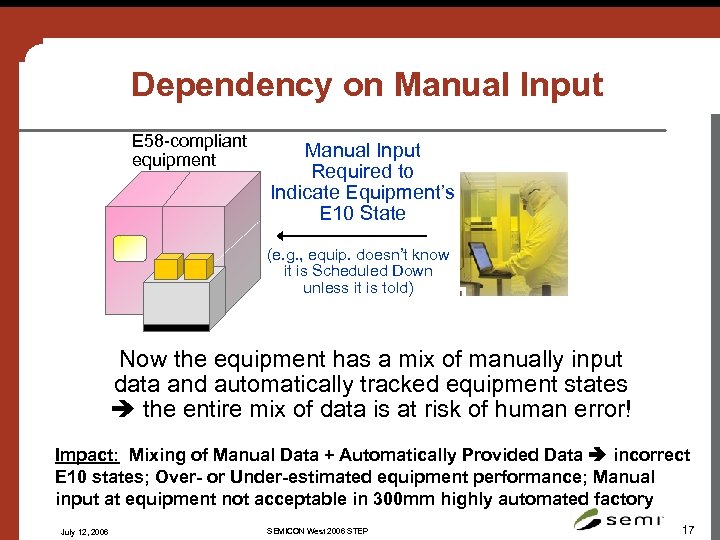 Dependency on Manual Input E 58 -compliant equipment Manual Input Required to Indicate Equipment’s E 10 State (e. g. , equip. doesn’t know it is Scheduled Down unless it is told) Now the equipment has a mix of manually input data and automatically tracked equipment states the entire mix of data is at risk of human error! Impact: Mixing of Manual Data + Automatically Provided Data incorrect E 10 states; Over- or Under-estimated equipment performance; Manual input at equipment not acceptable in 300 mm highly automated factory July 12, 2006 SEMICON West 2006 STEP 17
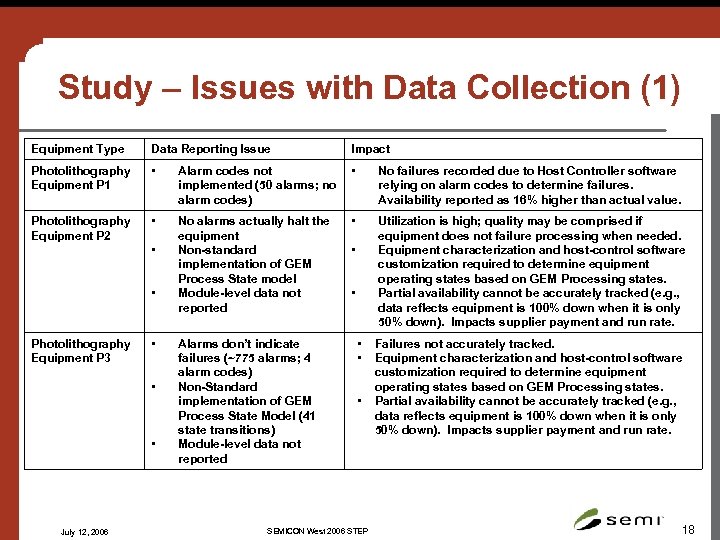 Study – Issues with Data Collection (1) Equipment Type Data Reporting Issue Impact Photolithography Equipment P 1 • Alarm codes not implemented (50 alarms; no alarm codes) • No failures recorded due to Host Controller software relying on alarm codes to determine failures. Availability reported as 16% higher than actual value. Photolithography Equipment P 2 • No alarms actually halt the equipment Non-standard implementation of GEM Process State model Module-level data not reported • Utilization is high; quality may be comprised if equipment does not failure processing when needed. Equipment characterization and host-control software customization required to determine equipment operating states based on GEM Processing states. Partial availability cannot be accurately tracked (e. g. , data reflects equipment is 100% down when it is only 50% down). Impacts supplier payment and run rate. • • Photolithography Equipment P 3 • • • July 12, 2006 Alarms don’t indicate failures (~775 alarms; 4 alarm codes) Non-Standard implementation of GEM Process State Model (41 state transitions) Module-level data not reported • • • SEMICON West 2006 STEP Failures not accurately tracked. Equipment characterization and host-control software customization required to determine equipment operating states based on GEM Processing states. Partial availability cannot be accurately tracked (e. g. , data reflects equipment is 100% down when it is only 50% down). Impacts supplier payment and run rate. 18
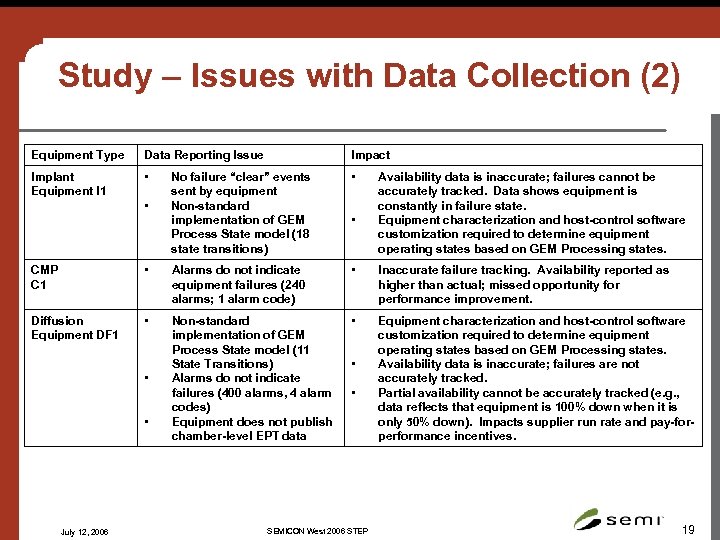 Study – Issues with Data Collection (2) Equipment Type Data Reporting Issue Impact Implant Equipment I 1 • No failure “clear” events sent by equipment Non-standard implementation of GEM Process State model (18 state transitions) • • • Availability data is inaccurate; failures cannot be accurately tracked. Data shows equipment is constantly in failure state. Equipment characterization and host-control software customization required to determine equipment operating states based on GEM Processing states. CMP C 1 • Alarms do not indicate equipment failures (240 alarms; 1 alarm code) • Inaccurate failure tracking. Availability reported as higher than actual; missed opportunity for performance improvement. Diffusion Equipment DF 1 • Non-standard implementation of GEM Process State model (11 State Transitions) Alarms do not indicate failures (400 alarms, 4 alarm codes) Equipment does not publish chamber-level EPT data • Equipment characterization and host-control software customization required to determine equipment operating states based on GEM Processing states. Availability data is inaccurate; failures are not accurately tracked. Partial availability cannot be accurately tracked (e. g. , data reflects that equipment is 100% down when it is only 50% down). Impacts supplier run rate and pay-forperformance incentives. • • July 12, 2006 • • SEMICON West 2006 STEP 19
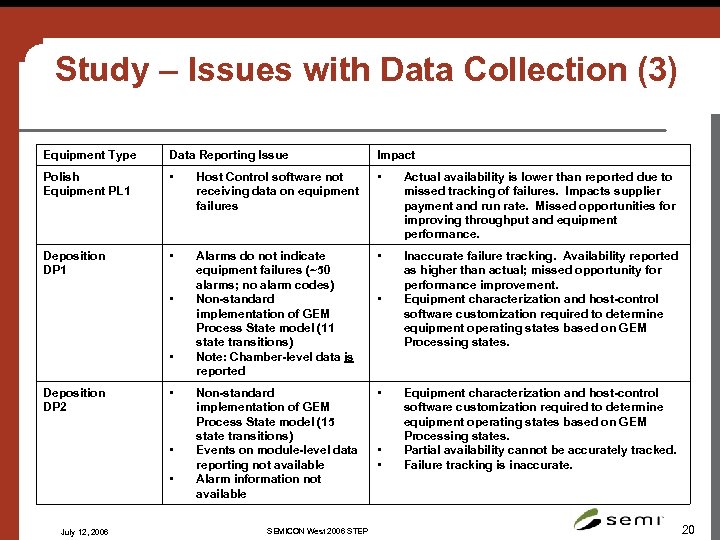 Study – Issues with Data Collection (3) Equipment Type Data Reporting Issue Impact Polish Equipment PL 1 • Host Control software not receiving data on equipment failures • Actual availability is lower than reported due to missed tracking of failures. Impacts supplier payment and run rate. Missed opportunities for improving throughput and equipment performance. Deposition DP 1 • Alarms do not indicate equipment failures (~50 alarms; no alarm codes) Non-standard implementation of GEM Process State model (11 state transitions) Note: Chamber-level data is reported • Inaccurate failure tracking. Availability reported as higher than actual; missed opportunity for performance improvement. Equipment characterization and host-control software customization required to determine equipment operating states based on GEM Processing states. Non-standard implementation of GEM Process State model (15 state transitions) Events on module-level data reporting not available Alarm information not available • • • Deposition DP 2 • • • July 12, 2006 SEMICON West 2006 STEP • • • Equipment characterization and host-control software customization required to determine equipment operating states based on GEM Processing states. Partial availability cannot be accurately tracked. Failure tracking is inaccurate. 20
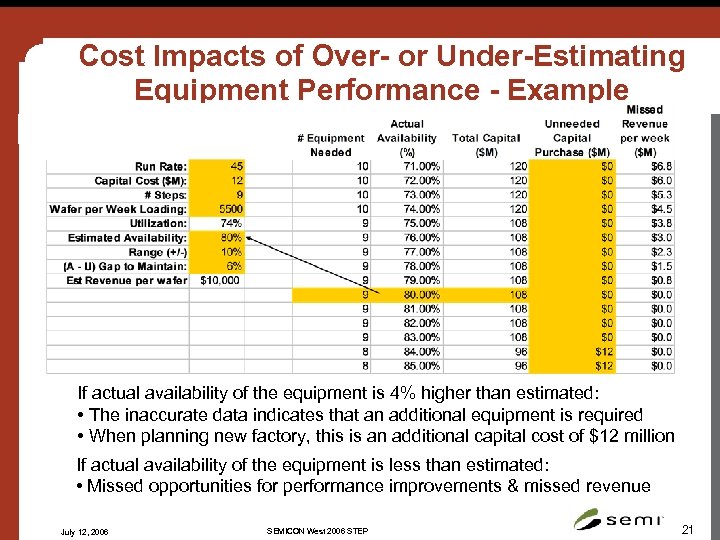 Cost Impacts of Over- or Under-Estimating Equipment Performance - Example If actual availability of the equipment is 4% higher than estimated: • The inaccurate data indicates that an additional equipment is required • When planning new factory, this is an additional capital cost of $12 million If actual availability of the equipment is less than estimated: • Missed opportunities for performance improvements & missed revenue July 12, 2006 SEMICON West 2006 STEP 21
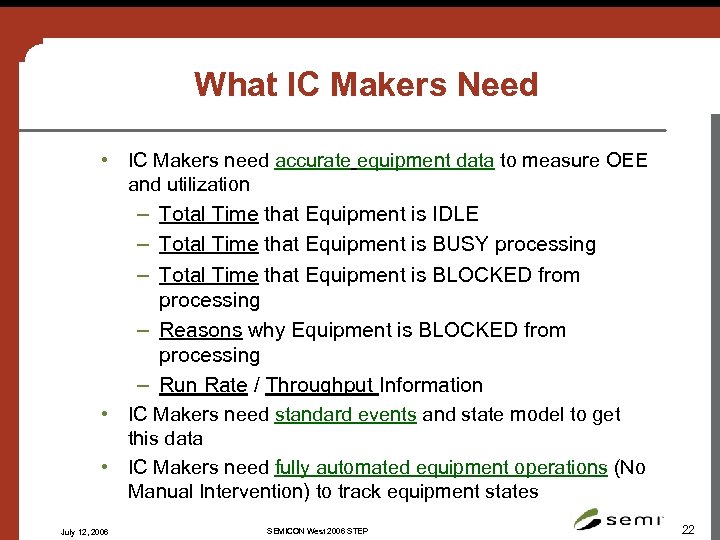 What IC Makers Need • IC Makers need accurate equipment data to measure OEE and utilization – Total Time that Equipment is IDLE – Total Time that Equipment is BUSY processing – Total Time that Equipment is BLOCKED from processing – Reasons why Equipment is BLOCKED from processing – Run Rate / Throughput Information • IC Makers need standard events and state model to get this data • IC Makers need fully automated equipment operations (No Manual Intervention) to track equipment states July 12, 2006 SEMICON West 2006 STEP 22
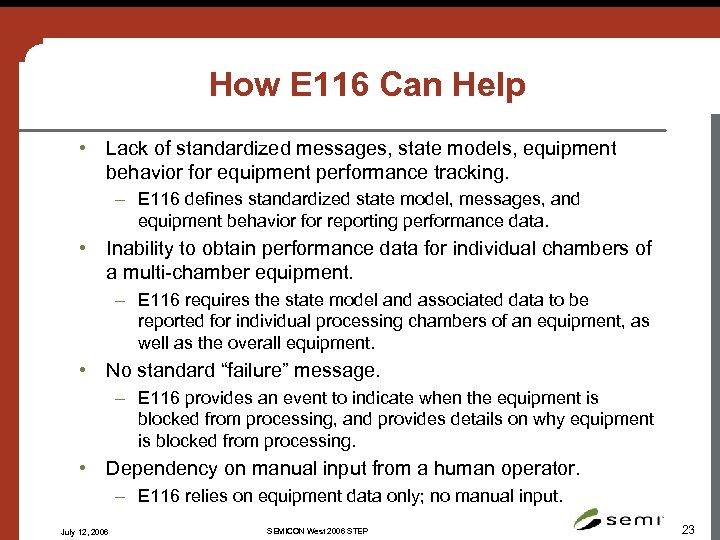 How E 116 Can Help • Lack of standardized messages, state models, equipment behavior for equipment performance tracking. – E 116 defines standardized state model, messages, and equipment behavior for reporting performance data. • Inability to obtain performance data for individual chambers of a multi-chamber equipment. – E 116 requires the state model and associated data to be reported for individual processing chambers of an equipment, as well as the overall equipment. • No standard “failure” message. – E 116 provides an event to indicate when the equipment is blocked from processing, and provides details on why equipment is blocked from processing. • Dependency on manual input from a human operator. – E 116 relies on equipment data only; no manual input. July 12, 2006 SEMICON West 2006 STEP 23
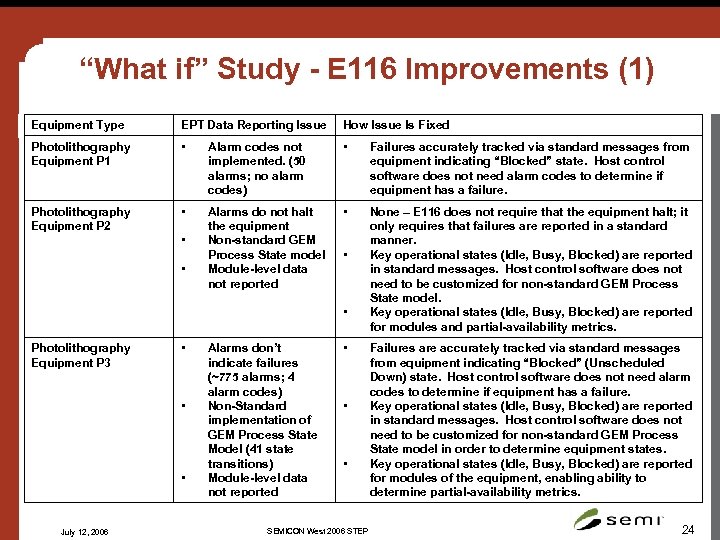 “What if” Study - E 116 Improvements (1) Equipment Type EPT Data Reporting Issue How Issue Is Fixed Photolithography Equipment P 1 • Alarm codes not implemented. (50 alarms; no alarm codes) • Failures accurately tracked via standard messages from equipment indicating “Blocked” state. Host control software does not need alarm codes to determine if equipment has a failure. Photolithography Equipment P 2 • Alarms do not halt the equipment Non-standard GEM Process State model Module-level data not reported • None – E 116 does not require that the equipment halt; it only requires that failures are reported in a standard manner. Key operational states (Idle, Busy, Blocked) are reported in standard messages. Host control software does not need to be customized for non-standard GEM Process State model. Key operational states (Idle, Busy, Blocked) are reported for modules and partial-availability metrics. • • Photolithography Equipment P 3 • • • July 12, 2006 Alarms don’t indicate failures (~775 alarms; 4 alarm codes) Non-Standard implementation of GEM Process State Model (41 state transitions) Module-level data not reported • • • SEMICON West 2006 STEP Failures are accurately tracked via standard messages from equipment indicating “Blocked” (Unscheduled Down) state. Host control software does not need alarm codes to determine if equipment has a failure. Key operational states (Idle, Busy, Blocked) are reported in standard messages. Host control software does not need to be customized for non-standard GEM Process State model in order to determine equipment states. Key operational states (Idle, Busy, Blocked) are reported for modules of the equipment, enabling ability to determine partial-availability metrics. 24
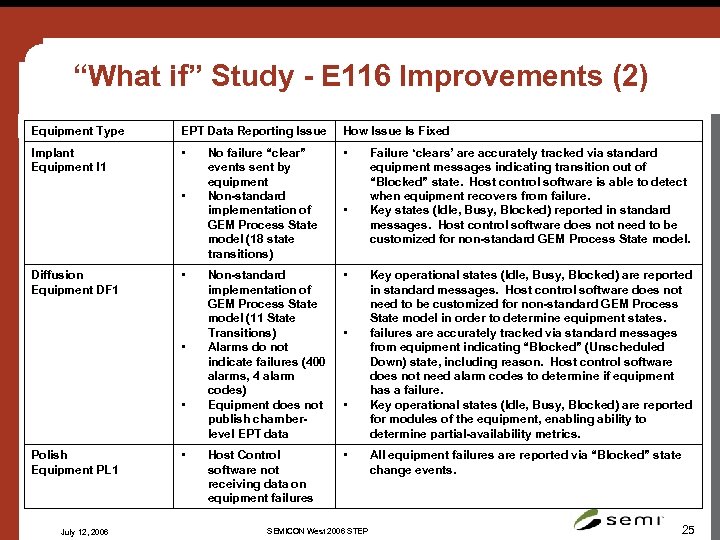 “What if” Study - E 116 Improvements (2) Equipment Type EPT Data Reporting Issue How Issue Is Fixed Implant Equipment I 1 • No failure “clear” events sent by equipment Non-standard implementation of GEM Process State model (18 state transitions) • Non-standard implementation of GEM Process State model (11 State Transitions) Alarms do not indicate failures (400 alarms, 4 alarm codes) Equipment does not publish chamberlevel EPT data • Host Control software not receiving data on equipment failures • • Diffusion Equipment DF 1 • • • Polish Equipment PL 1 July 12, 2006 • • SEMICON West 2006 STEP Failure ‘clears’ are accurately tracked via standard equipment messages indicating transition out of “Blocked” state. Host control software is able to detect when equipment recovers from failure. Key states (Idle, Busy, Blocked) reported in standard messages. Host control software does not need to be customized for non-standard GEM Process State model. Key operational states (Idle, Busy, Blocked) are reported in standard messages. Host control software does not need to be customized for non-standard GEM Process State model in order to determine equipment states. failures are accurately tracked via standard messages from equipment indicating “Blocked” (Unscheduled Down) state, including reason. Host control software does not need alarm codes to determine if equipment has a failure. Key operational states (Idle, Busy, Blocked) are reported for modules of the equipment, enabling ability to determine partial-availability metrics. All equipment failures are reported via “Blocked” state change events. 25
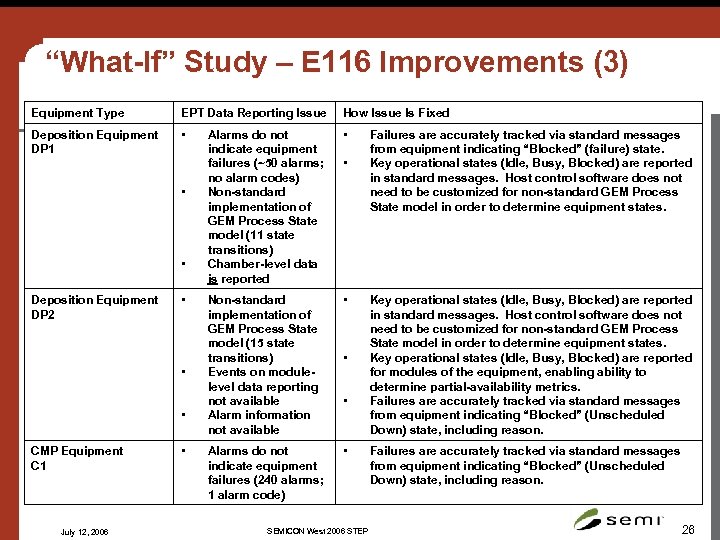 “What-If” Study – E 116 Improvements (3) Equipment Type EPT Data Reporting Issue How Issue Is Fixed Deposition Equipment DP 1 • Alarms do not indicate equipment failures (~50 alarms; no alarm codes) Non-standard implementation of GEM Process State model (11 state transitions) Chamber-level data is reported • Non-standard implementation of GEM Process State model (15 state transitions) Events on modulelevel data reporting not available Alarm information not available • Alarms do not indicate equipment failures (240 alarms; 1 alarm code) • • • Deposition Equipment DP 2 • • • CMP Equipment C 1 July 12, 2006 • • SEMICON West 2006 STEP Failures are accurately tracked via standard messages from equipment indicating “Blocked” (failure) state. Key operational states (Idle, Busy, Blocked) are reported in standard messages. Host control software does not need to be customized for non-standard GEM Process State model in order to determine equipment states. Key operational states (Idle, Busy, Blocked) are reported for modules of the equipment, enabling ability to determine partial-availability metrics. Failures are accurately tracked via standard messages from equipment indicating “Blocked” (Unscheduled Down) state, including reason. 26
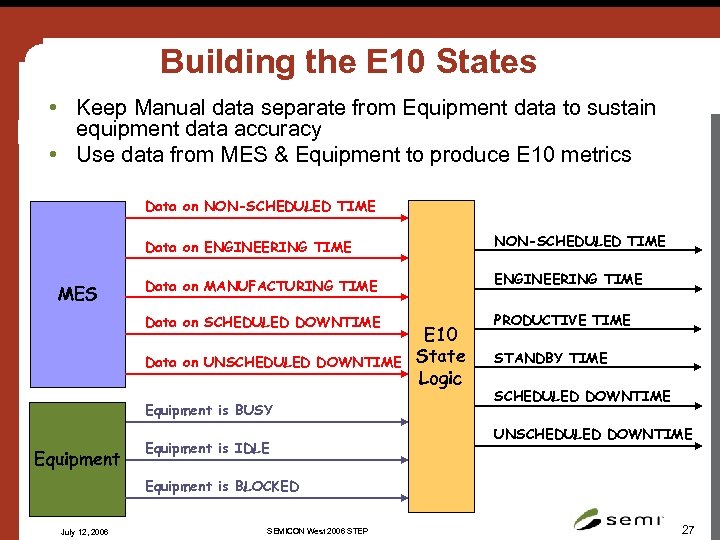 Building the E 10 States • Keep Manual data separate from Equipment data to sustain equipment data accuracy • Use data from MES & Equipment to produce E 10 metrics Data on NON-SCHEDULED TIME Data on ENGINEERING TIME Data on MANUFACTURING TIME ENGINEERING TIME Data on SCHEDULED DOWNTIME MES NON-SCHEDULED TIME PRODUCTIVE TIME Data on UNSCHEDULED DOWNTIME Equipment is BUSY Equipment is IDLE E 10 State Logic STANDBY TIME SCHEDULED DOWNTIME UNSCHEDULED DOWNTIME Equipment is BLOCKED July 12, 2006 SEMICON West 2006 STEP 27
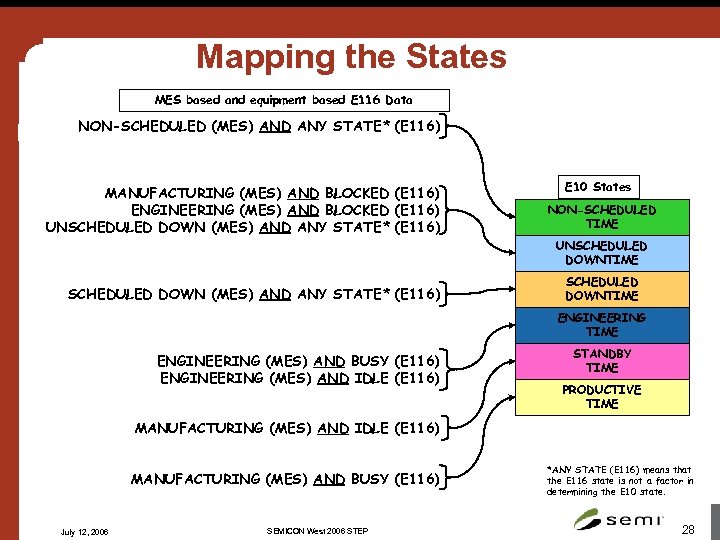 Mapping the States MES based and equipment based E 116 Data NON-SCHEDULED (MES) AND ANY STATE* (E 116) MANUFACTURING (MES) AND BLOCKED (E 116) ENGINEERING (MES) AND BLOCKED (E 116) UNSCHEDULED DOWN (MES) AND ANY STATE* (E 116) E 10 States NON-SCHEDULED TIME UNSCHEDULED DOWNTIME SCHEDULED DOWN (MES) AND ANY STATE* (E 116) SCHEDULED DOWNTIME ENGINEERING (MES) AND BUSY (E 116) ENGINEERING (MES) AND IDLE (E 116) STANDBY TIME PRODUCTIVE TIME MANUFACTURING (MES) AND IDLE (E 116) MANUFACTURING (MES) AND BUSY (E 116) July 12, 2006 SEMICON West 2006 STEP *ANY STATE (E 116) means that the E 116 state is not a factor in determining the E 10 state. 28
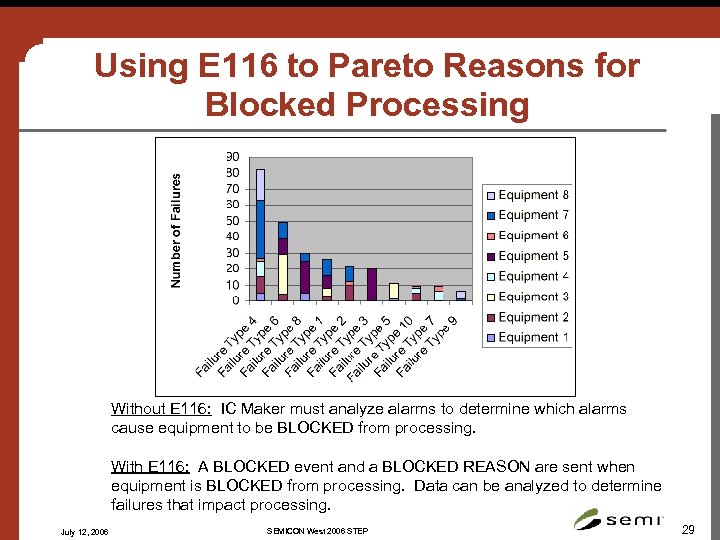 Using E 116 to Pareto Reasons for Blocked Processing Without E 116: IC Maker must analyze alarms to determine which alarms cause equipment to be BLOCKED from processing. With E 116: A BLOCKED event and a BLOCKED REASON are sent when equipment is BLOCKED from processing. Data can be analyzed to determine failures that impact processing. July 12, 2006 SEMICON West 2006 STEP 29
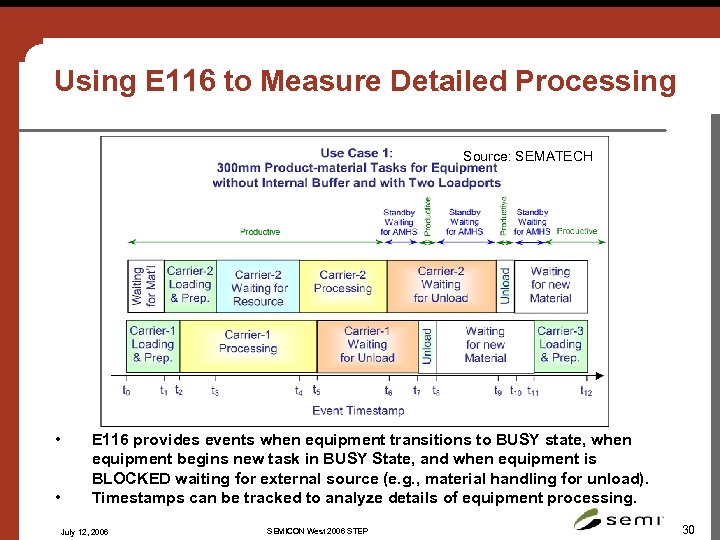 Using E 116 to Measure Detailed Processing Source: SEMATECH • • E 116 provides events when equipment transitions to BUSY state, when equipment begins new task in BUSY State, and when equipment is BLOCKED waiting for external source (e. g. , material handling for unload). Timestamps can be tracked to analyze details of equipment processing. July 12, 2006 SEMICON West 2006 STEP 30
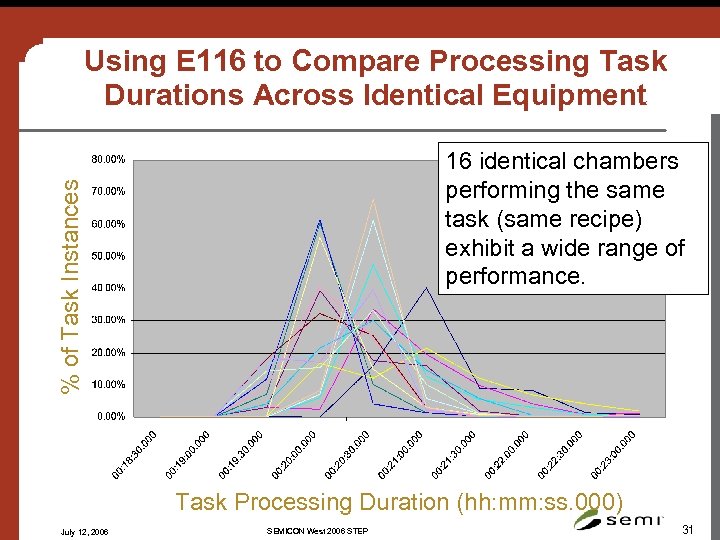 Using E 116 to Compare Processing Task Durations Across Identical Equipment % of Task Instances 16 identical chambers performing the same task (same recipe) exhibit a wide range of performance. Task Processing Duration (hh: mm: ss. 000) July 12, 2006 SEMICON West 2006 STEP 31
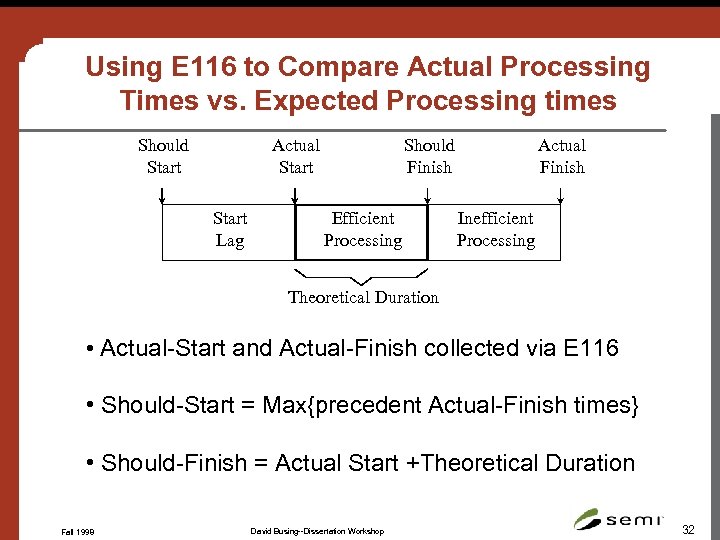 Using E 116 to Compare Actual Processing Times vs. Expected Processing times Should Start Actual Start Lag Should Finish Efficient Processing Actual Finish Inefficient Processing Theoretical Duration • Actual-Start and Actual-Finish collected via E 116 • Should-Start = Max{precedent Actual-Finish times} • Should-Finish = Actual Start +Theoretical Duration Fall 1998 David Busing--Dissertation Workshop 32
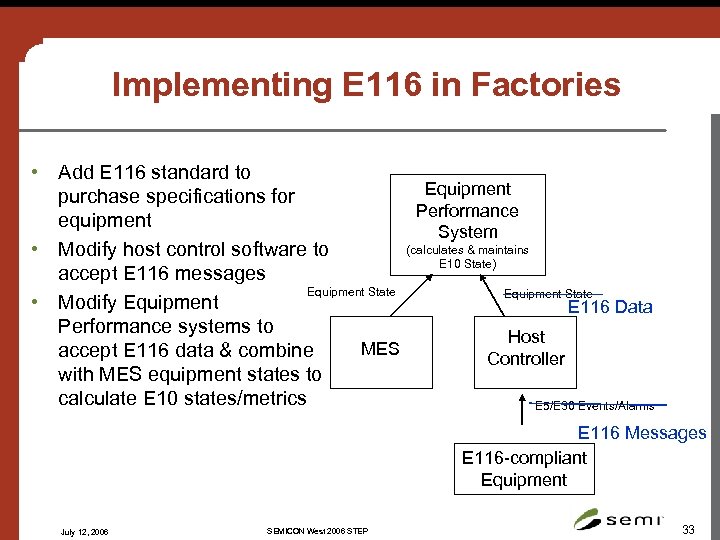 Implementing E 116 in Factories • Add E 116 standard to Equipment purchase specifications for Performance equipment System (calculates & maintains • Modify host control software to E 10 State) accept E 116 messages Equipment State • Modify Equipment E 116 Data Performance systems to Host MES accept E 116 data & combine Controller with MES equipment states to calculate E 10 states/metrics E 5/E 30 Events/Alarms E 116 Messages E 116 -compliant Equipment July 12, 2006 SEMICON West 2006 STEP 33
 Using E 116 to Improve Performance • Leverage E 116 to improve implementation/development time – Use standard Host Controller framework based on collecting E 116 standard messages to minimize development time – Leverage “BLOCKED” state to eliminate need to identify which alarms cause failures • Collect E 116 data to measure: – Time Equipment was BUSY • What tasks it was busy doing • How long these tasks took • Variance in task processing time between products, equipment, sites, etc. – Time Equipment was BLOCKED • • How long equipment was BLOCKED overall How long equipment was blocked for high-level categories of Blocked time How long equipment was blocked for specific reasons Pareto top equipment why equipment was blocked – Time Equipment was IDLE – Module-level data • Partial Availability based on chamber-level uptime/downtime • • Regularly review data to determine areas for improvements Drive productivity improvement teams & feedback to OEMs for improvement July 12, 2006 SEMICON West 2006 STEP 34
 Summary • Improved equipment performance is key for IC Makers. – Improving bottleneck equipment performance improves factory output • First, accurate data is needed. Automated data collection is best. • Without E 116, IC Makers lack ability to easily collect automated, accurate equipment performance data. – – Lack of standardized messages, state models, equipment behavior Inability to report module-level performance data No standard “failure” message Dependency on manual input from a human operator • Issues with data result in: – – Over or under estimates of equipment performance Increased system integration time / effort for performance tracking Missed opportunities for performance improvements Unnecessary capital purchases and/or missed revenue due to capacity • The new E 116 standard was designed to address these issues with automated data collection of equipment performance data. • With E 116, IC Makers can improve performance data collection and use data to drive performance improvements to improve output. July 12, 2006 SEMICON West 2006 STEP 35