 /*/*/self: : * XPath Dongwon Lee, Ph. D. IST 516 Fall 2011
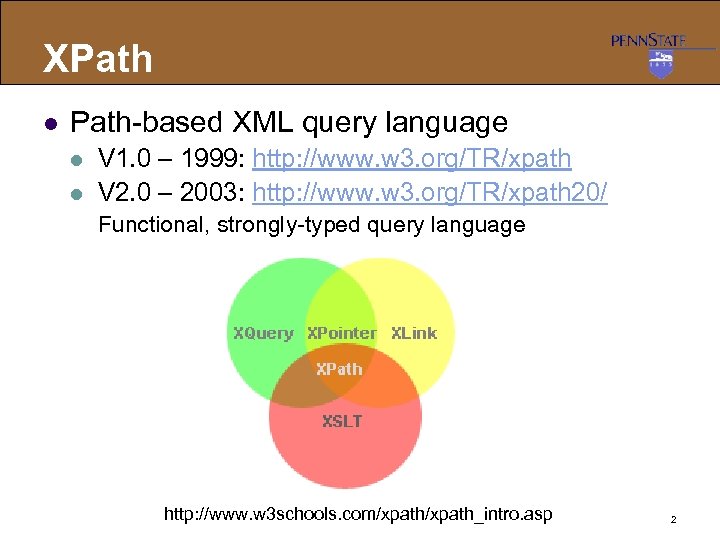 XPath l Path-based XML query language l l V 1. 0 – 1999: http: //www. w 3. org/TR/xpath V 2. 0 – 2003: http: //www. w 3. org/TR/xpath 20/ Functional, strongly-typed query language http: //www. w 3 schools. com/xpath_intro. asp 2
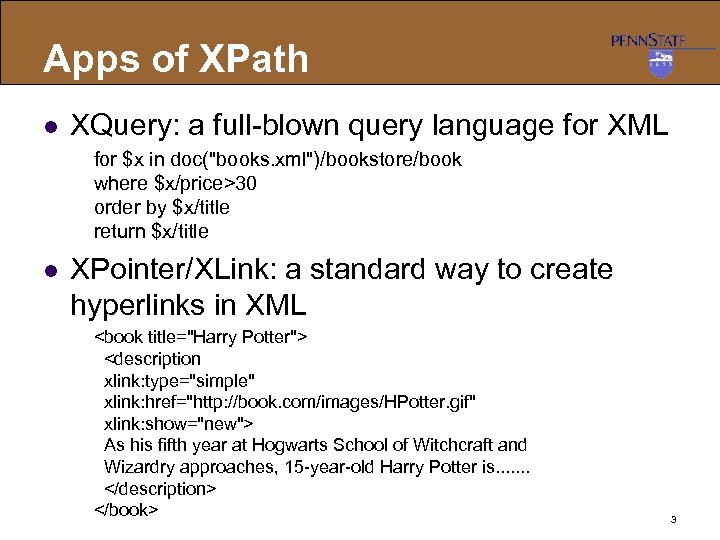 Apps of XPath l XQuery: a full-blown query language for XML for $x in doc("books. xml")/bookstore/book where $x/price>30 order by $x/title return $x/title l XPointer/XLink: a standard way to create hyperlinks in XML As his fifth year at Hogwarts School of Witchcraft and Wizardry approaches, 15 -year-old Harry Potter is. . . . 3
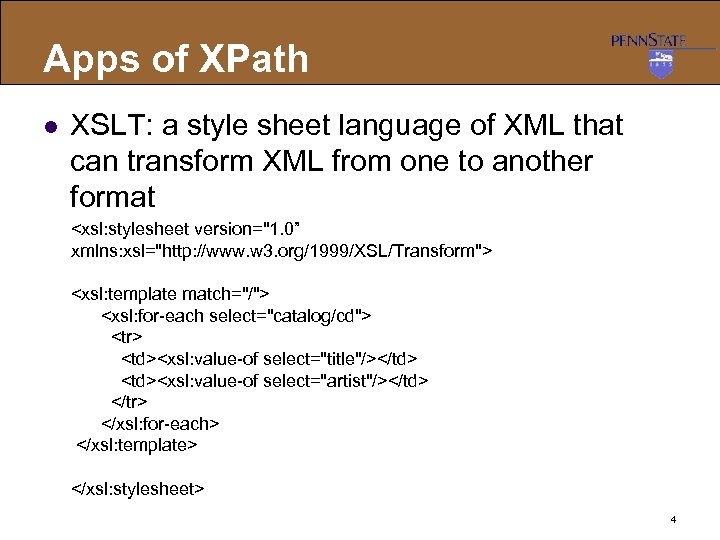 Apps of XPath l XSLT: a style sheet language of XML that can transform XML from one to another format
 | |
4
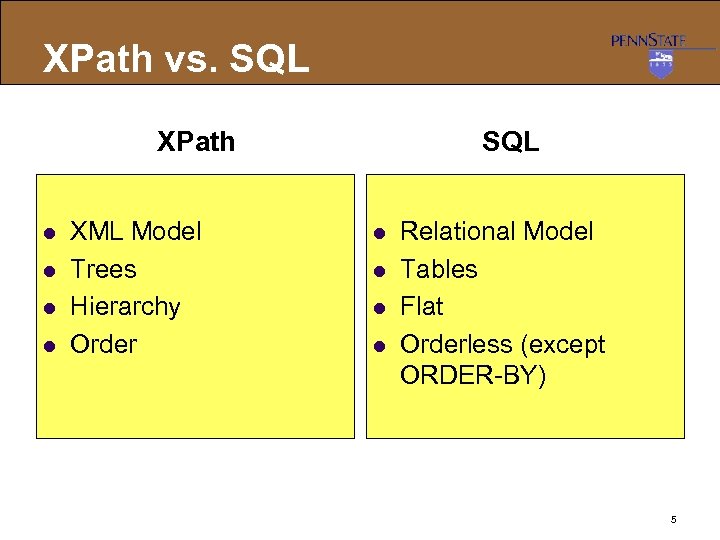 XPath vs. SQL XPath l l XML Model Trees Hierarchy Order SQL l l Relational Model Tables Flat Orderless (except ORDER-BY) 5
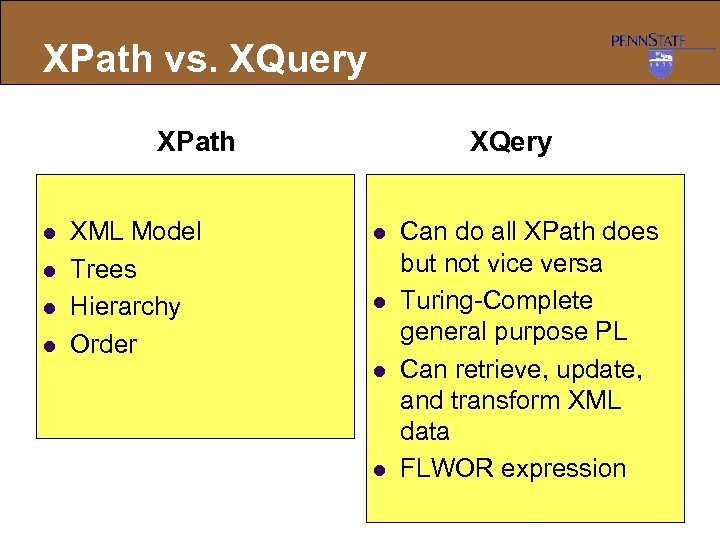 XPath vs. XQuery XPath l l XML Model Trees Hierarchy Order XQery l l Can do all XPath does but not vice versa Turing-Complete general purpose PL Can retrieve, update, and transform XML data FLWOR expression 6
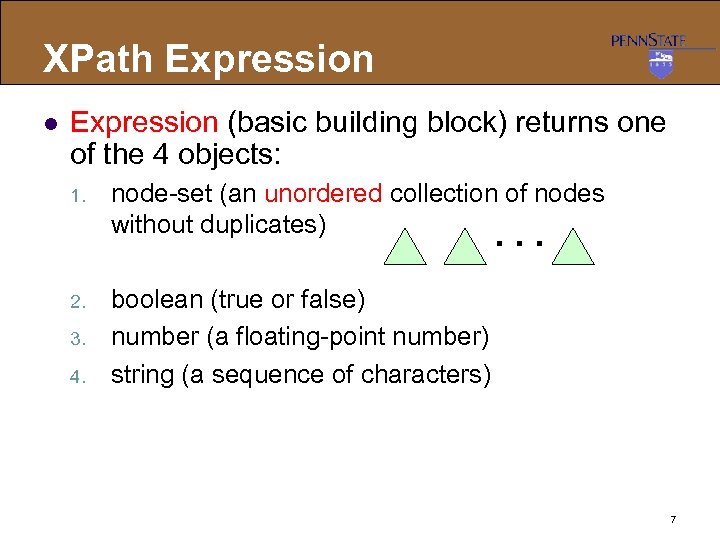 XPath Expression l Expression (basic building block) returns one of the 4 objects: 1. node-set (an unordered collection of nodes without duplicates). . . 2. boolean (true or false) number (a floating-point number) string (a sequence of characters) 3. 4. 7
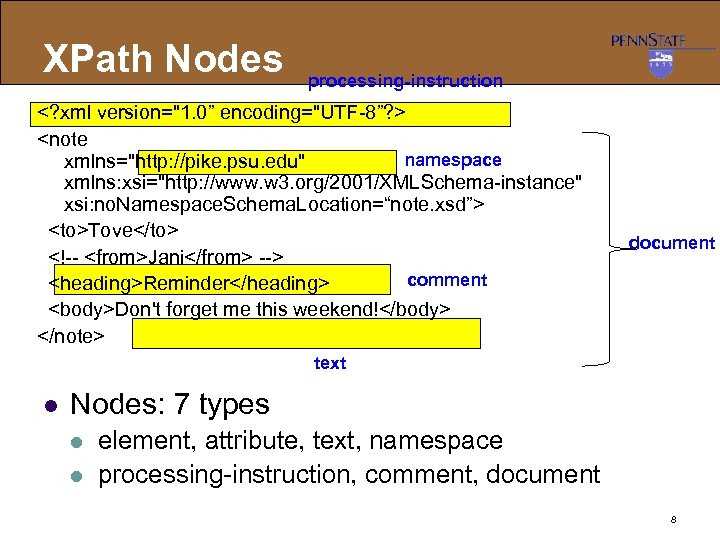 XPath Nodes processing-instruction Tove comment Reminder Don't forget me this weekend! document text l Nodes: 7 types l l element, attribute, text, namespace processing-instruction, comment, document 8
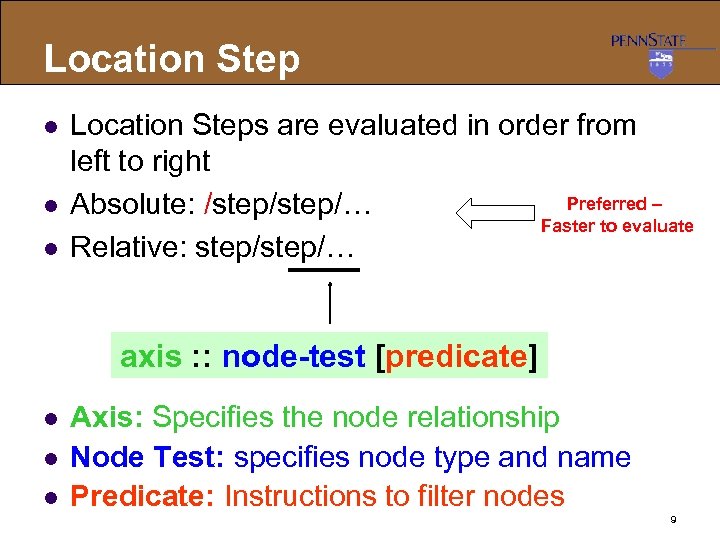 Location Step l l l Location Steps are evaluated in order from left to right Preferred – Absolute: /step/… Faster to evaluate Relative: step/… axis : : node-test [predicate] l l l Axis: Specifies the node relationship Node Test: specifies node type and name Predicate: Instructions to filter nodes 9
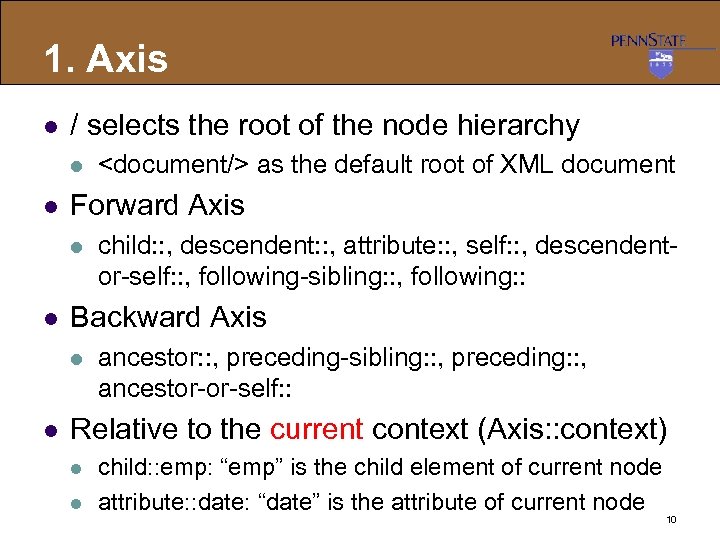 1. Axis l / selects the root of the node hierarchy l l Forward Axis l l child: : , descendent: : , attribute: : , self: : , descendentor-self: : , following-sibling: : , following: : Backward Axis l l as the default root of XML document ancestor: : , preceding-sibling: : , preceding: : , ancestor-or-self: : Relative to the current context (Axis: : context) l l child: : emp: “emp” is the child element of current node attribute: : date: “date” is the attribute of current node 10
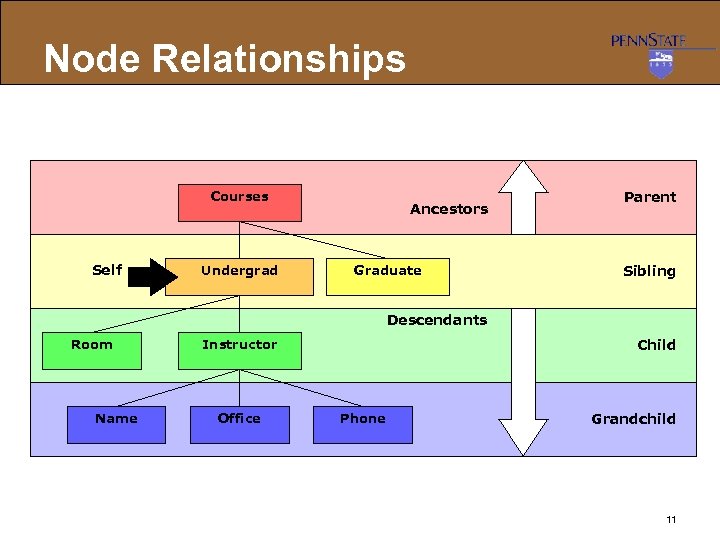 Node Relationships Courses Self Undergrad Ancestors Graduate Parent Sibling Descendants Room Name Instructor Office Child Phone Grandchild 11
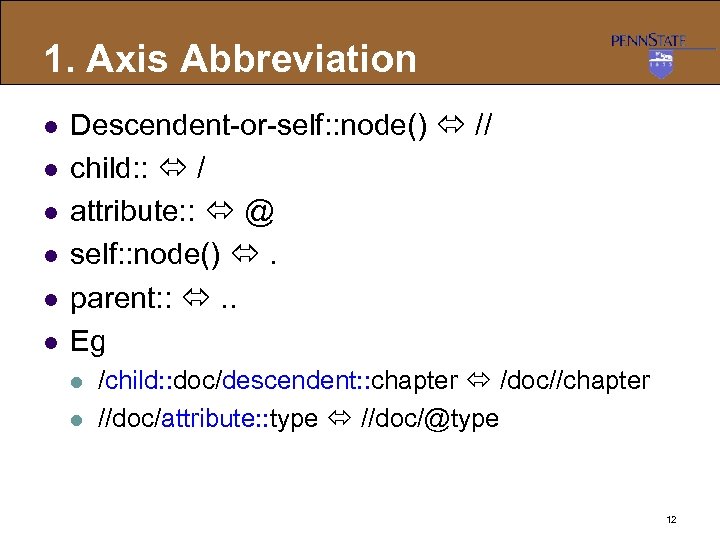 1. Axis Abbreviation l l l Descendent-or-self: : node() // child: : / attribute: : @ self: : node() . parent: : . . Eg l l /child: : doc/descendent: : chapter /doc//chapter //doc/attribute: : type //doc/@type 12
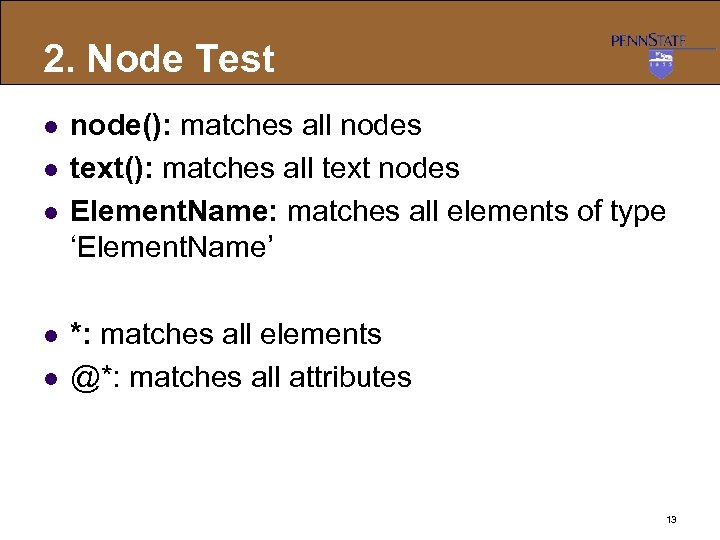 2. Node Test l l l node(): matches all nodes text(): matches all text nodes Element. Name: matches all elements of type ‘Element. Name’ *: matches all elements @*: matches all attributes 13
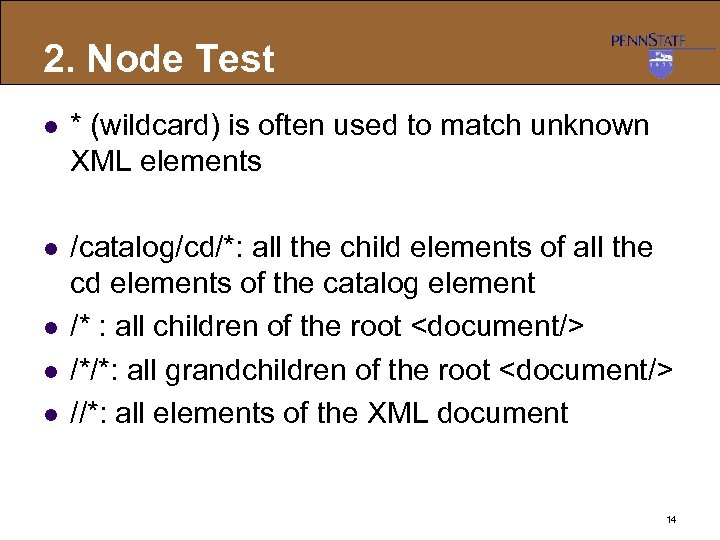 2. Node Test l * (wildcard) is often used to match unknown XML elements l /catalog/cd/*: all the child elements of all the cd elements of the catalog element /* : all children of the root /*/*: all grandchildren of the root //*: all elements of the XML document l l l 14
![3. Predicate l l Path-expresson[ filtering condition ] Pathexpression that satisfies the filtering condition](https://present5.com/presentation/d8ec56e58585d524de144451a696ce78/image-15.jpg "3. Predicate l l Path-expresson[ filtering condition ] Pathexpression that satisfies the filtering condition") 3. Predicate l l Path-expresson[ filtering condition ] Pathexpression that satisfies the filtering condition Eg l l l //doc [@type=‘PDF’] finds all elements whose attribute “type” values are ‘PDF’ This returns elements, not its attributes “type” Filtering condition does not affect the returned answers (ie, projection) of XPath l It just adds more constraints to satisfy 15
3. Predicate l l Path-expresson[ filtering condition ] Pathexpression that satisfies the filtering condition Eg l l l //doc [@type=‘PDF’] finds all elements whose attribute “type” values are ‘PDF’ This returns elements, not its attributes “type” Filtering condition does not affect the returned answers (ie, projection) of XPath l It just adds more constraints to satisfy 15
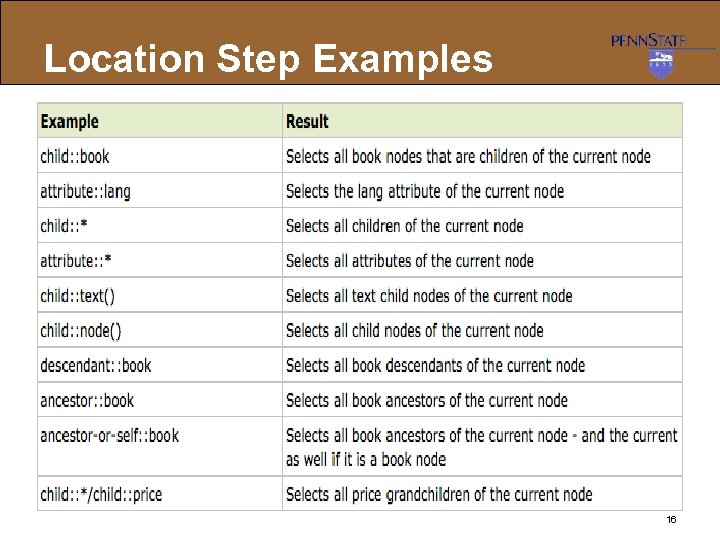 Location Step Examples 16
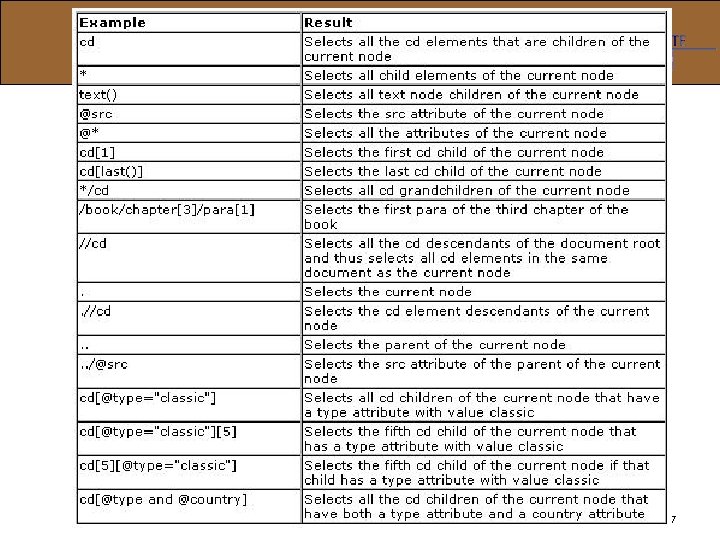 Examples of usage 17
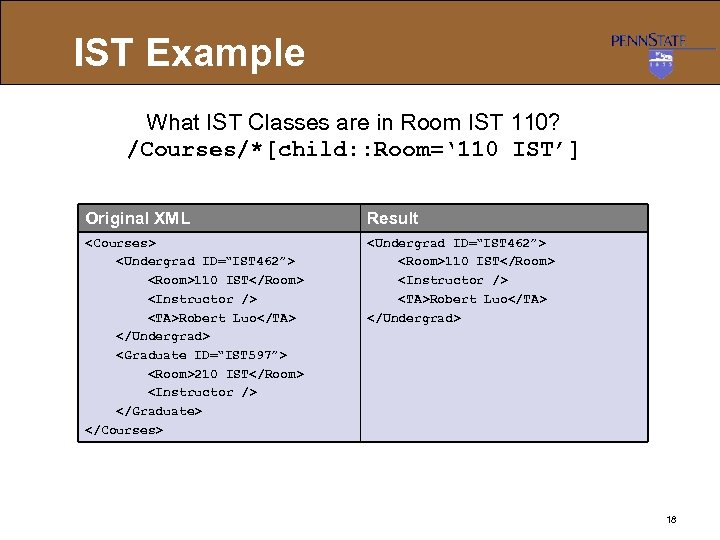 IST Example What IST Classes are in Room IST 110? /Courses/*[child: : Room=‘ 110 IST’] Original XML Result 110 IST Robert Luo 210 IST 110 IST Robert Luo 18
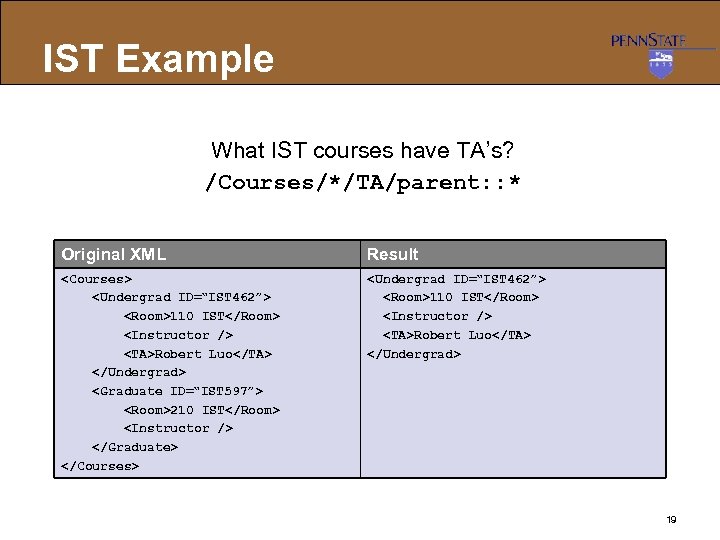 IST Example What IST courses have TA’s? /Courses/*/TA/parent: : * Original XML Result 110 IST Robert Luo 210 IST 110 IST Robert Luo 19
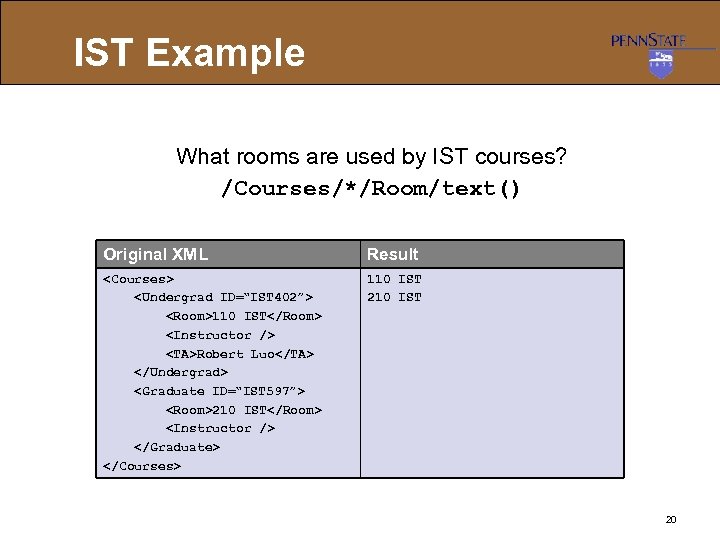 IST Example What rooms are used by IST courses? /Courses/*/Room/text() Original XML Result 110 IST Robert Luo 210 IST 110 IST 20
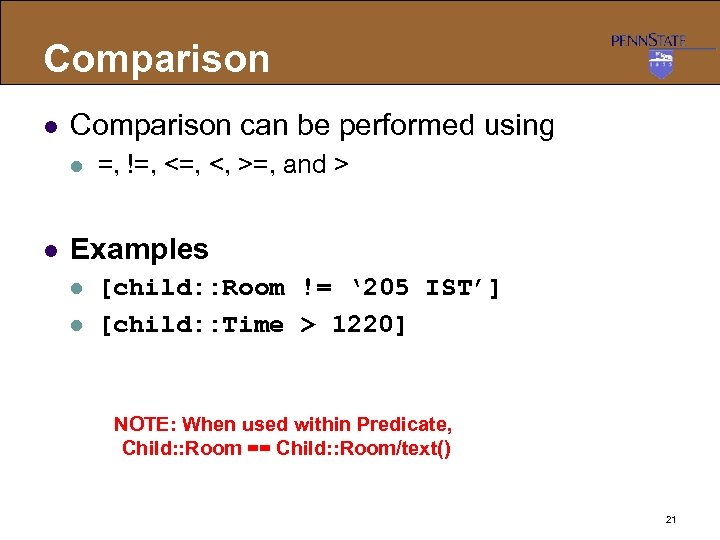 Comparison l Comparison can be performed using l l =, !=, <, >=, and > Examples l l [child: : Room != ‘ 205 IST’] [child: : Time > 1220] NOTE: When used within Predicate, Child: : Room == Child: : Room/text() 21
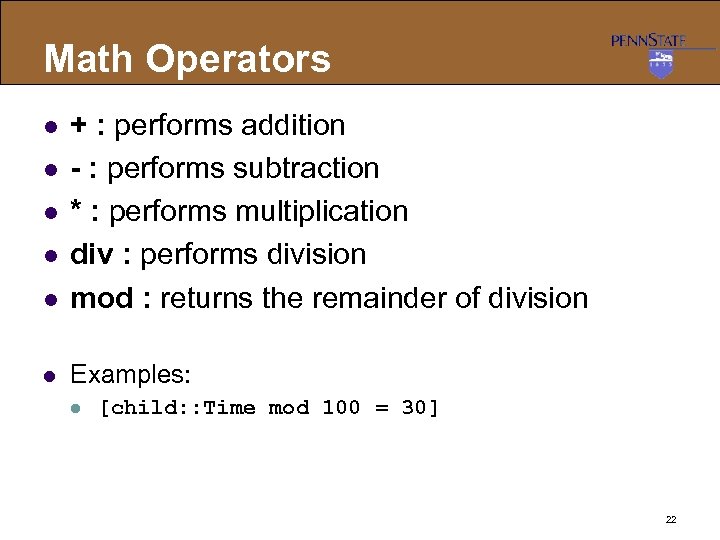 Math Operators l + : performs addition - : performs subtraction * : performs multiplication div : performs division mod : returns the remainder of division l Examples: l l l [child: : Time mod 100 = 30] 22
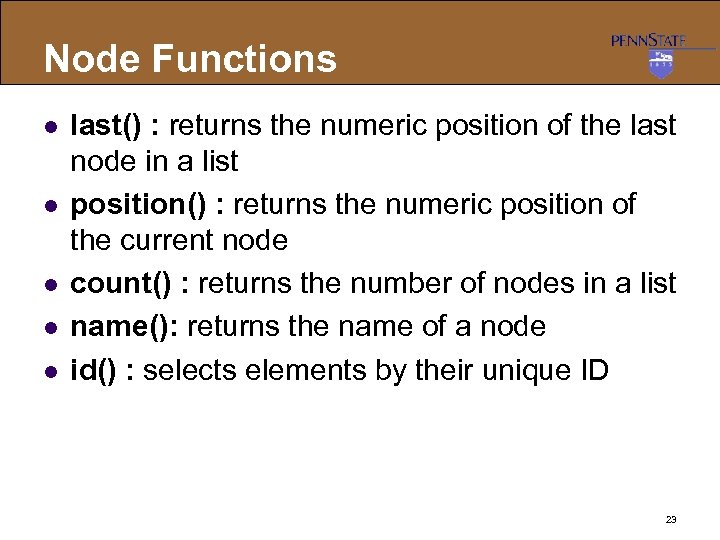 Node Functions l l last() : returns the numeric position of the last node in a list position() : returns the numeric position of the current node count() : returns the number of nodes in a list name(): returns the name of a node id() : selects elements by their unique ID 23
![Node Function Example Which courses have more than 2 child elements? /Courses/*[count(child: : *)>2]](https://present5.com/presentation/d8ec56e58585d524de144451a696ce78/image-24.jpg "Node Function Example Which courses have more than 2 child elements? /Courses/*[count(child: : *)>2]") Node Function Example Which courses have more than 2 child elements? /Courses/*[count(child: : *)>2] Original XML Result 110 IST Robert Luo 210 IST 110 IST Robert Luo 24
Node Function Example Which courses have more than 2 child elements? /Courses/*[count(child: : *)>2] Original XML Result 110 IST Robert Luo 210 IST 110 IST Robert Luo 24
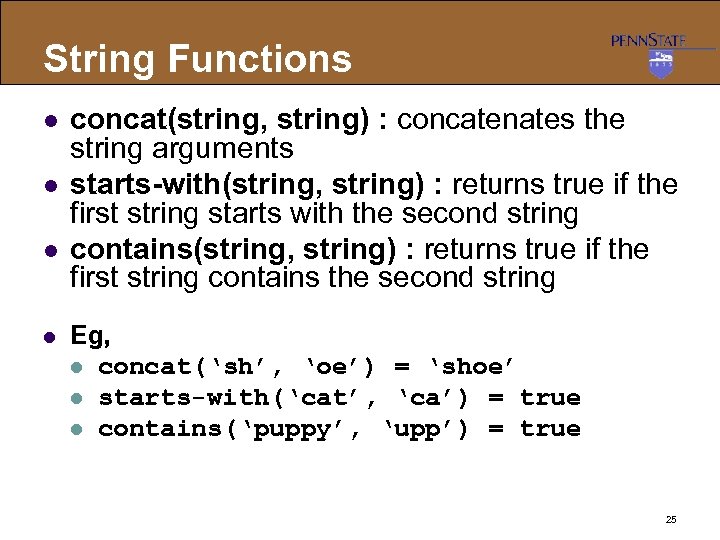 String Functions l l concat(string, string) : concatenates the string arguments starts-with(string, string) : returns true if the first string starts with the second string contains(string, string) : returns true if the first string contains the second string Eg, l concat(‘sh’, ‘oe’) = ‘shoe’ l starts-with(‘cat’, ‘ca’) = true l contains(‘puppy’, ‘upp’) = true 25
![String Functions l l l substring(string, number, [number]) : returns a substring of the](https://present5.com/presentation/d8ec56e58585d524de144451a696ce78/image-26.jpg "String Functions l l l substring(string, number, [number]) : returns a substring of the") String Functions l l l substring(string, number, [number]) : returns a substring of the provided string-length(string) : returns the number of characters in the string Eg, l l l substring(‘chicken’, 3, 4) = ‘icke’ substring(‘chicken’, 3) = ‘icken’ string-length(‘cat’) = 3 26
String Functions l l l substring(string, number, [number]) : returns a substring of the provided string-length(string) : returns the number of characters in the string Eg, l l l substring(‘chicken’, 3, 4) = ‘icke’ substring(‘chicken’, 3) = ‘icken’ string-length(‘cat’) = 3 26
![String Functions Examples l //Book [startswith(child: : Title, “X”)] / price l //Book [stringlength(Author/FN)=3]](https://present5.com/presentation/d8ec56e58585d524de144451a696ce78/image-27.jpg "String Functions Examples l //Book [startswith(child: : Title, “X”)] / price l //Book [stringlength(Author/FN)=3]") String Functions Examples l //Book [startswith(child: : Title, “X”)] / price l //Book [stringlength(Author/FN)=3] / Title XML</> <Price>19. 9</> <Author> <FN>Joe</> </Author> </Book> <Title>XSLT</> <Price>22. 9</> <Author> <FN>HJ</><LN>Kyle</> </Author> </Book> </Catalog> 27 </p>
</div>
<div style="width: auto;" class="description columns twelve"><p><img class="imgdescription" title="Number Functions l sum(node-set) : returns the sum of values for each node in" src="https://present5.com/presentation/d8ec56e58585d524de144451a696ce78/image-28.jpg" alt="Number Functions l sum(node-set) : returns the sum of values for each node in" />
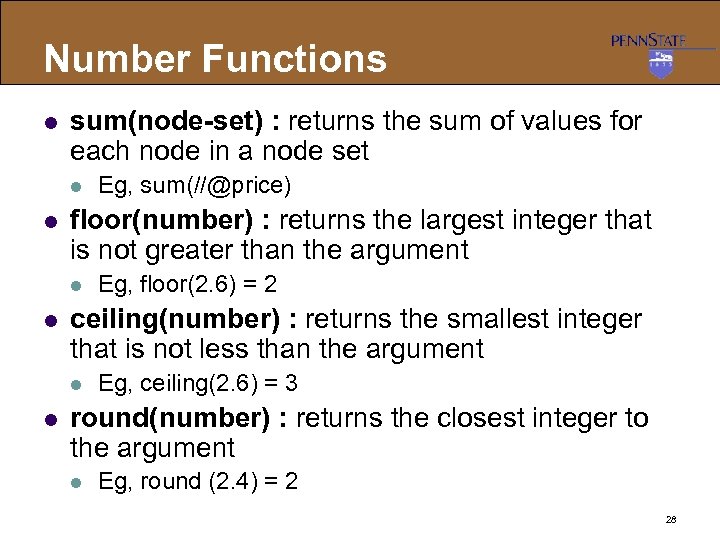
Number Functions l sum(node-set) : returns the sum of values for each node in a node set l l floor(number) : returns the largest integer that is not greater than the argument l l Eg, floor(2. 6) = 2 ceiling(number) : returns the smallest integer that is not less than the argument l l Eg, sum(//@price) Eg, ceiling(2. 6) = 3 round(number) : returns the closest integer to the argument l Eg, round (2. 4) = 2 28 </p>
</div>
<div style="width: auto;" class="description columns twelve"><p><img class="imgdescription" title="Boolean OPs in XPath l Conjunction: “and” l l Disjunction: ““or” l l /Customer[@cname=‘Lee’" src="https://present5.com/presentation/d8ec56e58585d524de144451a696ce78/image-29.jpg" alt="Boolean OPs in XPath l Conjunction: “and” l l Disjunction: ““or” l l /Customer[@cname=‘Lee’" />
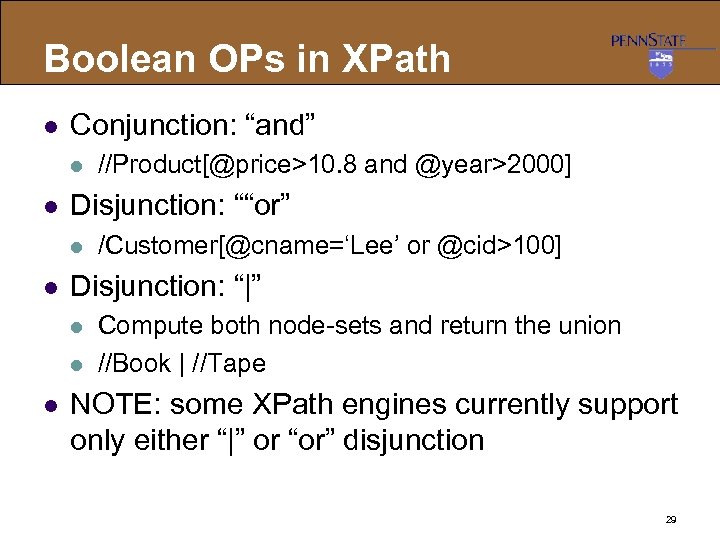
Boolean OPs in XPath l Conjunction: “and” l l Disjunction: ““or” l l /Customer[@cname=‘Lee’ or @cid>100] Disjunction: “|” l l l //Product[@price>10. 8 and @year>2000] Compute both node-sets and return the union //Book | //Tape NOTE: some XPath engines currently support only either “|” or “or” disjunction 29 </p>
</div>
<div style="width: auto;" class="description columns twelve"><p><img class="imgdescription" title="XPath Lab [www. zvon. org] l /AAA/CCC <AAA> <BBB/> <CCC/> <BBB/> <DDD> <BBB/> </DDD>" src="https://present5.com/presentation/d8ec56e58585d524de144451a696ce78/image-30.jpg" alt="XPath Lab [www. zvon. org] l /AAA/CCC <AAA> <BBB/> <CCC/> <BBB/> <DDD> <BBB/> </DDD>" />
XPath Lab [www. zvon. org] l /AAA/CCC <AAA> <BBB/> <CCC/> <BBB/> <DDD> <BBB/> </DDD> <CCC/> </AAA> l /AAA/DDD/BBB <AAA> <BBB/> <CCC/> <BBB/> <DDD> <BBB/> </DDD> <CCC/> </AAA> 30 </p>
</div>
<div style="width: auto;" class="description columns twelve"><p><img class="imgdescription" title="XPath Lab [www. zvon. org] l //BBB <AAA> <BBB/> <CCC/> <BBB/> <DDD> <BBB/> </DDD>" src="https://present5.com/presentation/d8ec56e58585d524de144451a696ce78/image-31.jpg" alt="XPath Lab [www. zvon. org] l //BBB <AAA> <BBB/> <CCC/> <BBB/> <DDD> <BBB/> </DDD>" />
XPath Lab [www. zvon. org] l //BBB <AAA> <BBB/> <CCC/> <BBB/> <DDD> <BBB/> </DDD> <CCC/> </AAA> l /AAA/* <AAA> <BBB/> <CCC/> <BBB/> <DDD> <BBB/> </DDD> <CCC/> </AAA> 31 </p>
</div>
<div style="width: auto;" class="description columns twelve"><p><img class="imgdescription" title="XPath Lab [www. zvon. org] l /AAA/BBB[1] <AAA> <BBB/> <CCC/> <BBB/> <DDD> <BBB/> </DDD>" src="https://present5.com/presentation/d8ec56e58585d524de144451a696ce78/image-32.jpg" alt="XPath Lab [www. zvon. org] l /AAA/BBB[1] <AAA> <BBB/> <CCC/> <BBB/> <DDD> <BBB/> </DDD>" />
XPath Lab [www. zvon. org] l /AAA/BBB[1] <AAA> <BBB/> <CCC/> <BBB/> <DDD> <BBB/> </DDD> <CCC/> </AAA> l /AAA/BBB[last()] <AAA> <BBB/> <CCC/> <BBB/> <DDD> <BBB/> </DDD> <CCC/> </AAA> 32 </p>
</div>
<div style="width: auto;" class="description columns twelve"><p><img class="imgdescription" title="XPath Lab [www. zvon. org] l /AAA//BBB[1] <AAA> <BBB/> <CCC/> <BBB/> <DDD> <BBB/> </DDD>" src="https://present5.com/presentation/d8ec56e58585d524de144451a696ce78/image-33.jpg" alt="XPath Lab [www. zvon. org] l /AAA//BBB[1] <AAA> <BBB/> <CCC/> <BBB/> <DDD> <BBB/> </DDD>" />
XPath Lab [www. zvon. org] l /AAA//BBB[1] <AAA> <BBB/> <CCC/> <BBB/> <DDD> <BBB/> </DDD> <CCC/> </AAA> l /AAA//BBB[last()] <AAA> <BBB/> <CCC/> <BBB/> <DDD> <BBB/> </DDD> <CCC/> </AAA> Position=3 Position =1 33 </p>
</div>
<div style="width: auto;" class="description columns twelve"><p><img class="imgdescription" title="Position Explanation l “/AAA//BBB” returns two lists: l l l Three <BBB> as the" src="https://present5.com/presentation/d8ec56e58585d524de144451a696ce78/image-34.jpg" alt="Position Explanation l “/AAA//BBB” returns two lists: l l l Three <BBB> as the" />
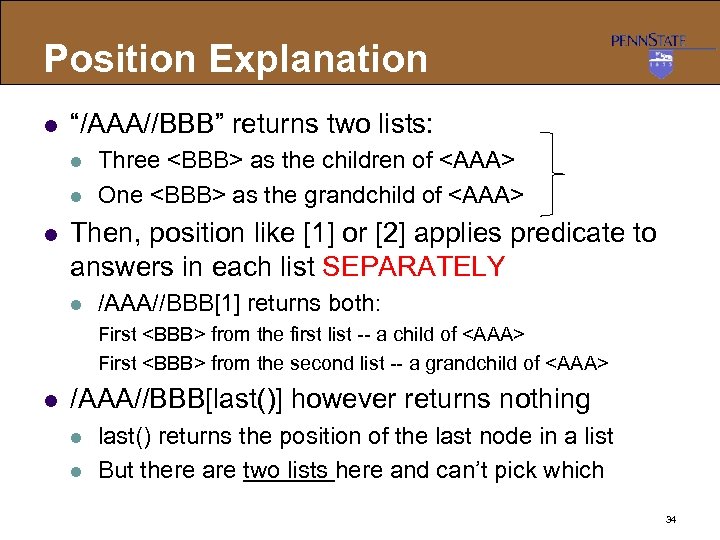
Position Explanation l “/AAA//BBB” returns two lists: l l l Three <BBB> as the children of <AAA> One <BBB> as the grandchild of <AAA> Then, position like [1] or [2] applies predicate to answers in each list SEPARATELY l /AAA//BBB[1] returns both: First <BBB> from the first list -- a child of <AAA> First <BBB> from the second list -- a grandchild of <AAA> l /AAA//BBB[last()] however returns nothing l l last() returns the position of the last node in a list But there are two lists here and can’t pick which 34 </p>
</div>
<div style="width: auto;" class="description columns twelve"><p><img class="imgdescription" title="XPath Lab [www. zvon. org] l //@id <AAA> <BBB id = "b 1"/> <BBB" src="https://present5.com/presentation/d8ec56e58585d524de144451a696ce78/image-35.jpg" alt="XPath Lab [www. zvon. org] l //@id <AAA> <BBB id = "b 1"/> <BBB" />
XPath Lab [www. zvon. org] l //@id <AAA> <BBB id = "b 1"/> <BBB id = "b 2"/> <BBB name = "bbb"/> <BBB/> </AAA> l //BBB[@id=“b 2”] <AAA> <BBB id = "b 1"/> <BBB id = "b 2"/> <BBB name = "bbb"/> <BBB/> </AAA> 35 </p>
</div>
<div style="width: auto;" class="description columns twelve"><p><img class="imgdescription" title="XPath Lab [www. zvon. org] l //*[count(BBB)=2] <AAA> <CCC> <BBB/> </CCC> <DDD> <BBB/> </DDD>" src="https://present5.com/presentation/d8ec56e58585d524de144451a696ce78/image-36.jpg" alt="XPath Lab [www. zvon. org] l //*[count(BBB)=2] <AAA> <CCC> <BBB/> </CCC> <DDD> <BBB/> </DDD>" />
XPath Lab [www. zvon. org] l //*[count(BBB)=2] <AAA> <CCC> <BBB/> </CCC> <DDD> <BBB/> </DDD> <EEE> <CCC/> <DDD/> </EEE> </AAA> l //*[count(*)=3] <AAA> <CCC> <BBB/> </CCC> <DDD> <BBB/> </DDD> <EEE> <CCC/> <DDD/> </EEE> </AAA> 36 </p>
</div>
<div style="width: auto;" class="description columns twelve"><p><img class="imgdescription" title="XPath Evaluation S/W l l Many S/W have built-in support for XPath 1. 0" src="https://present5.com/presentation/d8ec56e58585d524de144451a696ce78/image-37.jpg" alt="XPath Evaluation S/W l l Many S/W have built-in support for XPath 1. 0" />
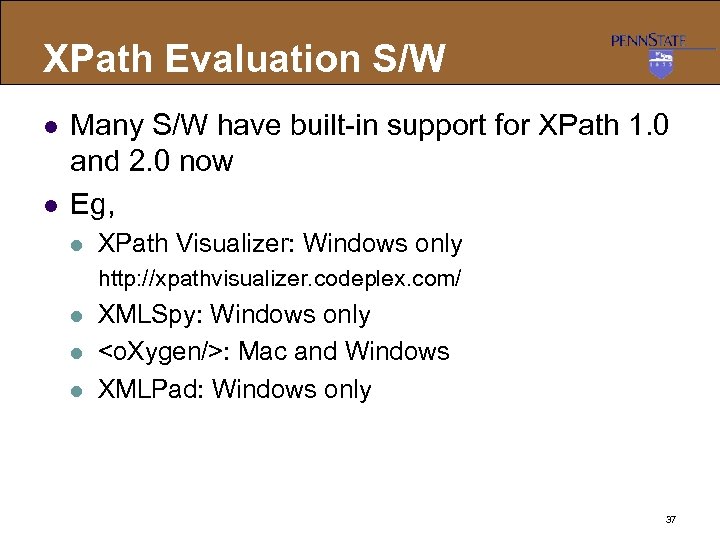
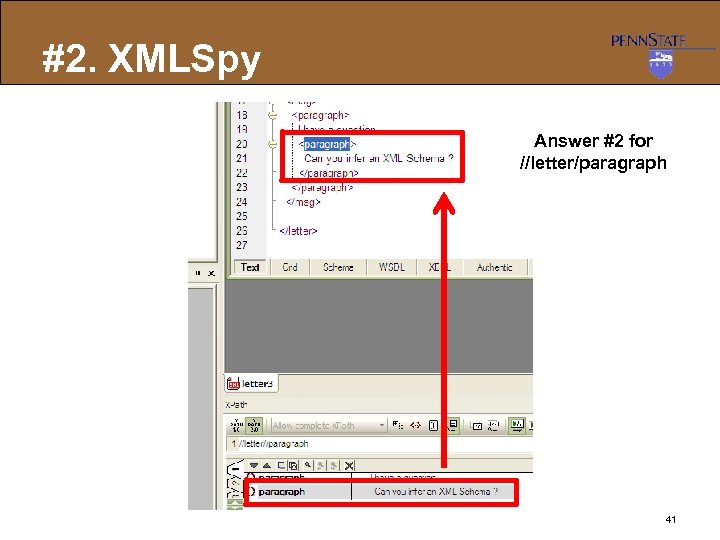
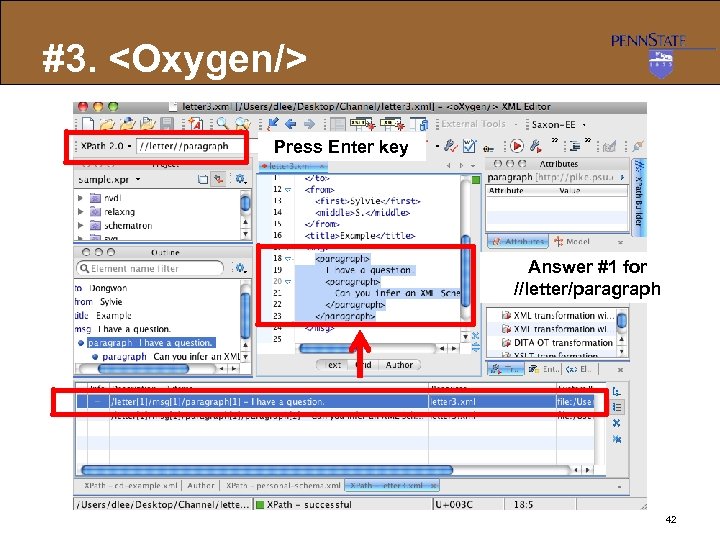
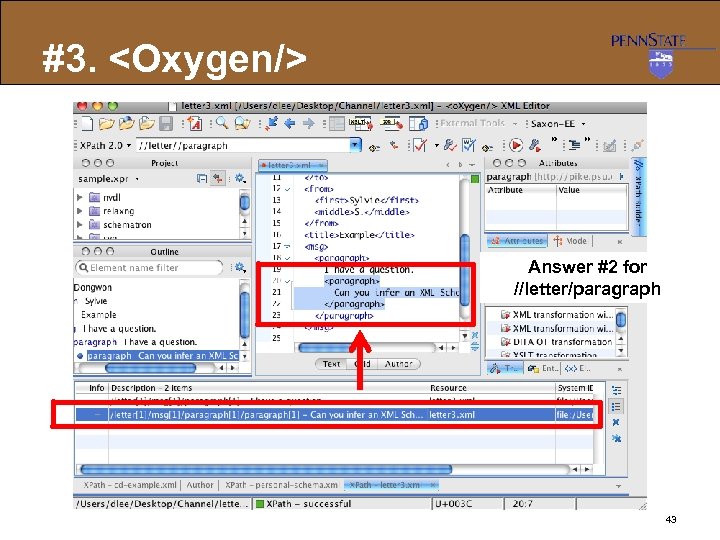
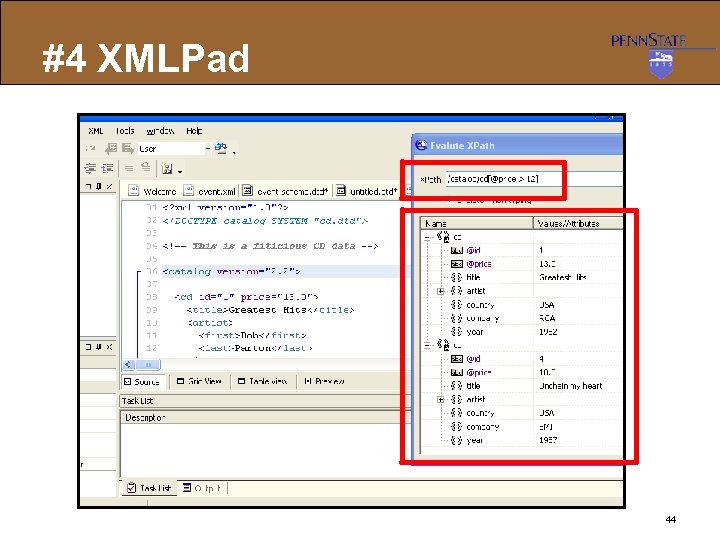
XPath Evaluation S/W l l Many S/W have built-in support for XPath 1. 0 and 2. 0 now Eg, l XPath Visualizer: Windows only http: //xpathvisualizer. codeplex. com/ l l l XMLSpy: Windows only <o. Xygen/>: Mac and Windows XMLPad: Windows only 37 </p>
</div>
<div style="width: auto;" class="description columns twelve"><p><img class="imgdescription" title="#1. XPath Visualizer Answer #2 for //letter/paragraph Answer #1 for //letter/paragraph Minor bug here" src="https://present5.com/presentation/d8ec56e58585d524de144451a696ce78/image-38.jpg" alt="#1. XPath Visualizer Answer #2 for //letter/paragraph Answer #1 for //letter/paragraph Minor bug here" />
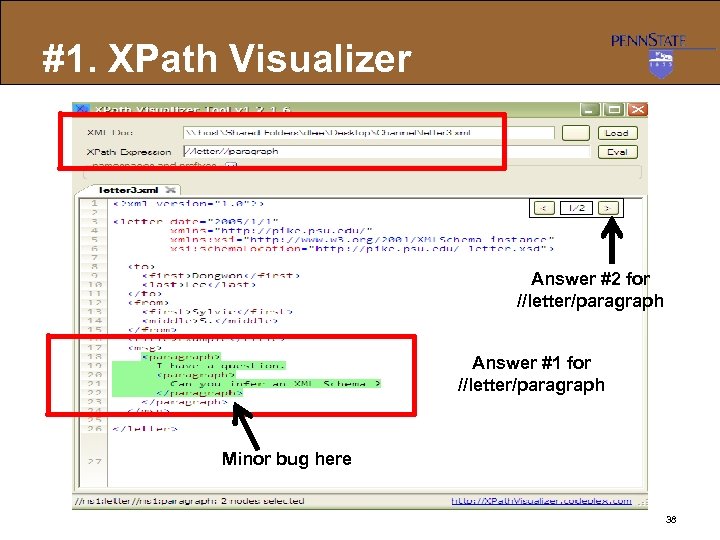
#1. XPath Visualizer Answer #2 for //letter/paragraph Answer #1 for //letter/paragraph Minor bug here 38 </p>
</div>
<div style="width: auto;" class="description columns twelve"><p><img class="imgdescription" title="#2. XMLSpy Choose Evaluate XPath 39 " src="https://present5.com/presentation/d8ec56e58585d524de144451a696ce78/image-39.jpg" alt="#2. XMLSpy Choose Evaluate XPath 39 " />
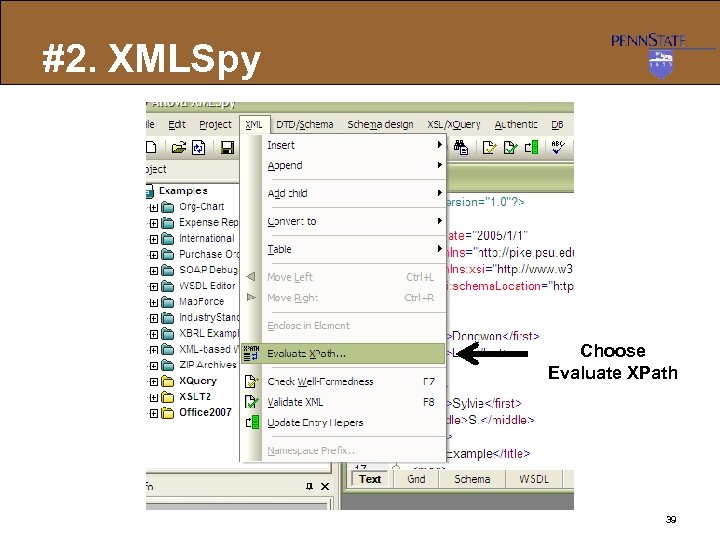
#2. XMLSpy Choose Evaluate XPath 39 </p>
</div>
<div style="width: auto;" class="description columns twelve"><p><img class="imgdescription" title="#2. XMLSpy Answer #1 for //letter/paragraph 40 " src="https://present5.com/presentation/d8ec56e58585d524de144451a696ce78/image-40.jpg" alt="#2. XMLSpy Answer #1 for //letter/paragraph 40 " />
#2. XMLSpy Answer #1 for //letter/paragraph 40 </p>
</div>
<div style="width: auto;" class="description columns twelve"><p><img class="imgdescription" title="#2. XMLSpy Answer #2 for //letter/paragraph 41 " src="https://present5.com/presentation/d8ec56e58585d524de144451a696ce78/image-41.jpg" alt="#2. XMLSpy Answer #2 for //letter/paragraph 41 " />
#2. XMLSpy Answer #2 for //letter/paragraph 41 </p>
</div>
<div style="width: auto;" class="description columns twelve"><p><img class="imgdescription" title="#3. <Oxygen/> Press Enter key Answer #1 for //letter/paragraph 42 " src="https://present5.com/presentation/d8ec56e58585d524de144451a696ce78/image-42.jpg" alt="#3. <Oxygen/> Press Enter key Answer #1 for //letter/paragraph 42 " />
#3. <Oxygen/> Press Enter key Answer #1 for //letter/paragraph 42 </p>
</div>
<div style="width: auto;" class="description columns twelve"><p><img class="imgdescription" title="#3. <Oxygen/> Answer #2 for //letter/paragraph 43 " src="https://present5.com/presentation/d8ec56e58585d524de144451a696ce78/image-43.jpg" alt="#3. <Oxygen/> Answer #2 for //letter/paragraph 43 " />
#3. <Oxygen/> Answer #2 for //letter/paragraph 43 </p>
</div>
<div style="width: auto;" class="description columns twelve"><p><img class="imgdescription" title="#4 XMLPad 44 " src="https://present5.com/presentation/d8ec56e58585d524de144451a696ce78/image-44.jpg" alt="#4 XMLPad 44 " />
#4 XMLPad 44 </p>
</div>
<div style="width: auto;" class="description columns twelve"><p><img class="imgdescription" title="XPath Evaluation in Programming l XPath Engines / Libraries l l Apache Xalan-Java: http:" src="https://present5.com/presentation/d8ec56e58585d524de144451a696ce78/image-45.jpg" alt="XPath Evaluation in Programming l XPath Engines / Libraries l l Apache Xalan-Java: http:" />
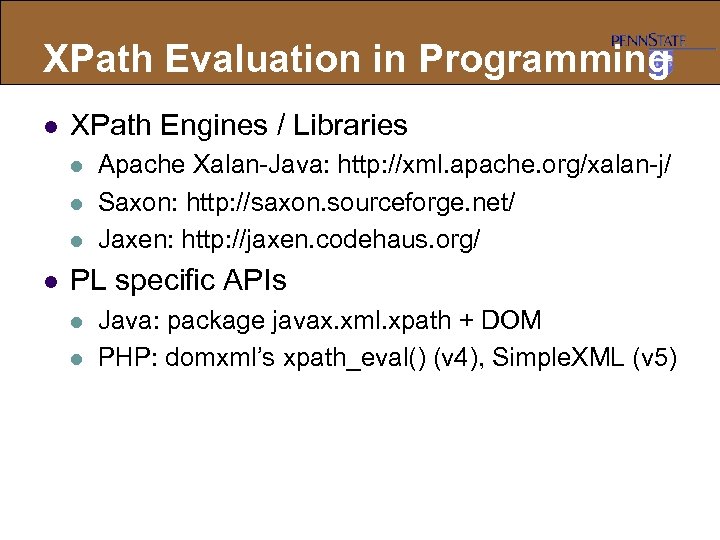
XPath Evaluation in Programming l XPath Engines / Libraries l l Apache Xalan-Java: http: //xml. apache. org/xalan-j/ Saxon: http: //saxon. sourceforge. net/ Jaxen: http: //jaxen. codehaus. org/ PL specific APIs l l Java: package javax. xml. xpath + DOM PHP: domxml’s xpath_eval() (v 4), Simple. XML (v 5) </p>
</div>
<div style="width: auto;" class="description columns twelve"><p><img class="imgdescription" title="Eg. XPath in JAVA public Node find. Address(String name, Document source) throws Exception {" src="https://present5.com/presentation/d8ec56e58585d524de144451a696ce78/image-46.jpg" alt="Eg. XPath in JAVA public Node find. Address(String name, Document source) throws Exception {" />
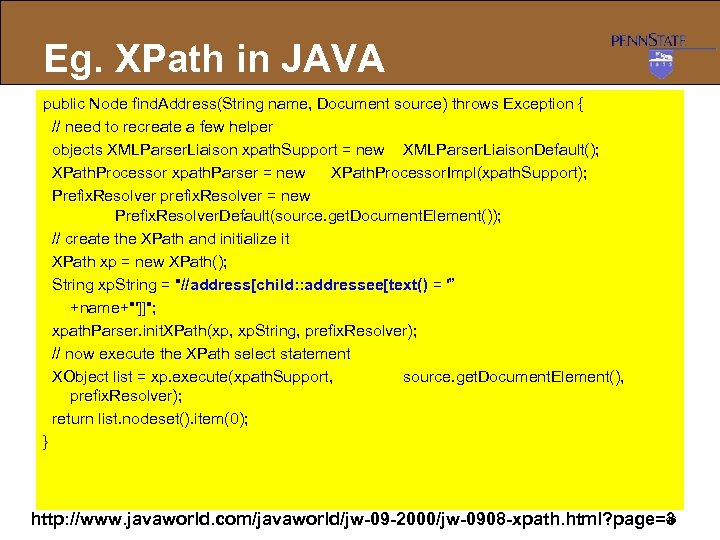
Eg. XPath in JAVA public Node find. Address(String name, Document source) throws Exception { // need to recreate a few helper objects XMLParser. Liaison xpath. Support = new XMLParser. Liaison. Default(); XPath. Processor xpath. Parser = new XPath. Processor. Impl(xpath. Support); Prefix. Resolver prefix. Resolver = new Prefix. Resolver. Default(source. get. Document. Element()); // create the XPath and initialize it XPath xp = new XPath(); String xp. String = "//address[child: : addressee[text() = '” +name+"']]"; xpath. Parser. init. XPath(xp, xp. String, prefix. Resolver); // now execute the XPath select statement XObject list = xp. execute(xpath. Support, source. get. Document. Element(), prefix. Resolver); return list. nodeset(). item(0); } 46 http: //www. javaworld. com/javaworld/jw-09 -2000/jw-0908 -xpath. html? page=3 </p>
</div>
<div style="width: auto;" class="description columns twelve"><p><img class="imgdescription" title="Eg. Simple. XML in PHP <? php $xml = simplexml_load_file('employees. xml'); echo "<strong>Using direct" src="https://present5.com/presentation/d8ec56e58585d524de144451a696ce78/image-47.jpg" alt="Eg. Simple. XML in PHP <? php $xml = simplexml_load_file('employees. xml'); echo "<strong>Using direct" />
Eg. Simple. XML in PHP <? php $xml = simplexml_load_file('employees. xml'); echo "<strong>Using direct method. . . </strong><br />"; $names = $xml->xpath('/employees/employee/name'); foreach($names as $name) { echo "Found $name<br />"; } echo "<br />"; echo "<strong>Using indirect method. . . </strong><br />"; $employees = $xml->xpath('/employees/employee'); foreach($employees as $employee) { echo "Found {$employee->name}<br />"; } echo "<br />"; echo "<strong>Using wildcard method. . . </strong><br />"; $names = $xml->xpath('//name'); foreach($names as $name) { echo "Found $name<br />"; } ? > http: //www. tuxradar. com/practicalphp/12/3/3 47 </p>
</div>
<div style="width: auto;" class="description columns twelve"><p><img class="imgdescription" title="Lab #2 (DUE: Sep. 25 11: 55 PM) l https: //online. ist. psu. edu/ist" src="https://present5.com/presentation/d8ec56e58585d524de144451a696ce78/image-48.jpg" alt="Lab #2 (DUE: Sep. 25 11: 55 PM) l https: //online. ist. psu. edu/ist" />
Lab #2 (DUE: Sep. 25 11: 55 PM) l https: //online. ist. psu. edu/ist 516/labs l Tasks: l l l Individual Lab Using an XML files, practice XPath queries Turn-In l l XPath queries and English interpretation Screenshot of results of XPath queries 48 </p>
</div>
<div style="width: auto;" class="description columns twelve"><p><img class="imgdescription" title="" src="" alt="" />
</p>
</div>
</div>
<div id="inputform">
<script>$("#inputform").load("https://present5.com/wp-content/plugins/report-content/inc/report-form-aj.php");
</script>
</div>
</p>
<!--end entry-content-->
</div>
</article><!-- .post -->
</section><!-- #content -->
<div class="three columns">
<div class="widget-entry">
</div>
</div>
</div>
</div>
<!-- #content-wrapper -->
<footer id="footer" style="padding: 5px 0 5px;">
<div class="container">
<div class="columns twelve">
<!--noindex-->
<!--LiveInternet counter--><script type="text/javascript"><!--
document.write("<img src='//counter.yadro.ru/hit?t26.10;r"+
escape(document.referrer)+((typeof(screen)=="undefined")?"":
";s"+screen.width+"*"+screen.height+"*"+(screen.colorDepth?
screen.colorDepth:screen.pixelDepth))+";u"+escape(document.URL)+
";"+Math.random()+
"' alt='' title='"+" ' "+
"border='0' width='1' height='1'><\/a>")
//--></script><!--/LiveInternet-->
<a href="https://slidetodoc.com/" alt="Наш международный проект SlideToDoc.com!" target="_blank"><img src="https://present5.com/SlideToDoc.png"></a> <script>
$(window).load(function() {
var owl = document.getElementsByClassName('owl-carousel owl-theme owl-loaded owl-drag')[0];
document.getElementById("owlheader").insertBefore(owl, null);
$('#owlheader').css('display', 'inline-block');
});
</script>
<script type="text/javascript">
var yaParams = {'typepage': '1000_top_300k',
'author': '1000_top_300k'
};
</script>
<!-- Yandex.Metrika counter --> <script type="text/javascript" > (function(m,e,t,r,i,k,a){m[i]=m[i]||function(){(m[i].a=m[i].a||[]).push(arguments)}; m[i].l=1*new Date(); for (var j = 0; j < document.scripts.length; j++) {if (document.scripts[j].src === r) { return; }} k=e.createElement(t),a=e.getElementsByTagName(t)[0],k.async=1,k.src=r,a.parentNode.insertBefore(k,a)}) (window, document, "script", "https://mc.yandex.ru/metrika/tag.js", "ym"); ym(32395810, "init", { clickmap:true, trackLinks:true, accurateTrackBounce:true, webvisor:true }); </script> <noscript><div><img src="https://mc.yandex.ru/watch/32395810" style="position:absolute; left:-9999px;" alt="" /></div></noscript> <!-- /Yandex.Metrika counter -->
<!--/noindex-->
<nav id="top-nav">
<ul id="menu-top" class="top-menu clearfix">
</ul> </nav>
</div>
</div><!--.container-->
</footer>
<script type='text/javascript'>
/* <![CDATA[ */
var wpcf7 = {"apiSettings":{"root":"https:\/\/present5.com\/wp-json\/contact-form-7\/v1","namespace":"contact-form-7\/v1"}};
/* ]]> */
</script>
<script type='text/javascript' src='https://present5.com/wp-content/plugins/contact-form-7/includes/js/scripts.js?ver=5.1.4'></script>
<script type='text/javascript' src='https://present5.com/wp-content/themes/sampression-lite/lib/js/jquery.shuffle.js?ver=4.9.26'></script>
<script type='text/javascript' src='https://present5.com/wp-content/themes/sampression-lite/lib/js/scripts.js?ver=1.13'></script>
<script type='text/javascript' src='https://present5.com/wp-content/themes/sampression-lite/lib/js/shuffle.js?ver=4.9.26'></script>
<!--[if lt IE 9]>
<script type='text/javascript' src='https://present5.com/wp-content/themes/sampression-lite/lib/js/selectivizr.js?ver=1.0.2'></script>
<![endif]-->
<script type='text/javascript' src='https://present5.com/wp-content/themes/sampression-lite/lib/js/notify.js?ver=1770496441'></script>
<script type='text/javascript'>
/* <![CDATA[ */
var my_ajax_object = {"ajax_url":"https:\/\/present5.com\/wp-admin\/admin-ajax.php","nonce":"33a1179831"};
/* ]]> */
</script>
<script type='text/javascript' src='https://present5.com/wp-content/themes/sampression-lite/lib/js/filer.js?ver=1770496441'></script>
</body>
</html>
String Functions Examples l //Book [startswith(child: : Title, “X”)] / price l //Book [stringlength(Author/FN)=3] / Title XML</> <Price>19. 9</> <Author> <FN>Joe</> </Author> </Book> <Title>XSLT</> <Price>22. 9</> <Author> <FN>HJ</><LN>Kyle</> </Author> </Book> </Catalog> 27 </p>
</div>
<div style="width: auto;" class="description columns twelve"><p><img class="imgdescription" title="Number Functions l sum(node-set) : returns the sum of values for each node in" src="https://present5.com/presentation/d8ec56e58585d524de144451a696ce78/image-28.jpg" alt="Number Functions l sum(node-set) : returns the sum of values for each node in" />
Number Functions l sum(node-set) : returns the sum of values for each node in a node set l l floor(number) : returns the largest integer that is not greater than the argument l l Eg, floor(2. 6) = 2 ceiling(number) : returns the smallest integer that is not less than the argument l l Eg, sum(//@price) Eg, ceiling(2. 6) = 3 round(number) : returns the closest integer to the argument l Eg, round (2. 4) = 2 28 </p>
</div>
<div style="width: auto;" class="description columns twelve"><p><img class="imgdescription" title="Boolean OPs in XPath l Conjunction: “and” l l Disjunction: ““or” l l /Customer[@cname=‘Lee’" src="https://present5.com/presentation/d8ec56e58585d524de144451a696ce78/image-29.jpg" alt="Boolean OPs in XPath l Conjunction: “and” l l Disjunction: ““or” l l /Customer[@cname=‘Lee’" />
Boolean OPs in XPath l Conjunction: “and” l l Disjunction: ““or” l l /Customer[@cname=‘Lee’ or @cid>100] Disjunction: “|” l l l //Product[@price>10. 8 and @year>2000] Compute both node-sets and return the union //Book | //Tape NOTE: some XPath engines currently support only either “|” or “or” disjunction 29 </p>
</div>
<div style="width: auto;" class="description columns twelve"><p><img class="imgdescription" title="XPath Lab [www. zvon. org] l /AAA/CCC <AAA> <BBB/> <CCC/> <BBB/> <DDD> <BBB/> </DDD>" src="https://present5.com/presentation/d8ec56e58585d524de144451a696ce78/image-30.jpg" alt="XPath Lab [www. zvon. org] l /AAA/CCC <AAA> <BBB/> <CCC/> <BBB/> <DDD> <BBB/> </DDD>" />
XPath Lab [www. zvon. org] l /AAA/CCC <AAA> <BBB/> <CCC/> <BBB/> <DDD> <BBB/> </DDD> <CCC/> </AAA> l /AAA/DDD/BBB <AAA> <BBB/> <CCC/> <BBB/> <DDD> <BBB/> </DDD> <CCC/> </AAA> 30 </p>
</div>
<div style="width: auto;" class="description columns twelve"><p><img class="imgdescription" title="XPath Lab [www. zvon. org] l //BBB <AAA> <BBB/> <CCC/> <BBB/> <DDD> <BBB/> </DDD>" src="https://present5.com/presentation/d8ec56e58585d524de144451a696ce78/image-31.jpg" alt="XPath Lab [www. zvon. org] l //BBB <AAA> <BBB/> <CCC/> <BBB/> <DDD> <BBB/> </DDD>" />
XPath Lab [www. zvon. org] l //BBB <AAA> <BBB/> <CCC/> <BBB/> <DDD> <BBB/> </DDD> <CCC/> </AAA> l /AAA/* <AAA> <BBB/> <CCC/> <BBB/> <DDD> <BBB/> </DDD> <CCC/> </AAA> 31 </p>
</div>
<div style="width: auto;" class="description columns twelve"><p><img class="imgdescription" title="XPath Lab [www. zvon. org] l /AAA/BBB[1] <AAA> <BBB/> <CCC/> <BBB/> <DDD> <BBB/> </DDD>" src="https://present5.com/presentation/d8ec56e58585d524de144451a696ce78/image-32.jpg" alt="XPath Lab [www. zvon. org] l /AAA/BBB[1] <AAA> <BBB/> <CCC/> <BBB/> <DDD> <BBB/> </DDD>" />
XPath Lab [www. zvon. org] l /AAA/BBB[1] <AAA> <BBB/> <CCC/> <BBB/> <DDD> <BBB/> </DDD> <CCC/> </AAA> l /AAA/BBB[last()] <AAA> <BBB/> <CCC/> <BBB/> <DDD> <BBB/> </DDD> <CCC/> </AAA> 32 </p>
</div>
<div style="width: auto;" class="description columns twelve"><p><img class="imgdescription" title="XPath Lab [www. zvon. org] l /AAA//BBB[1] <AAA> <BBB/> <CCC/> <BBB/> <DDD> <BBB/> </DDD>" src="https://present5.com/presentation/d8ec56e58585d524de144451a696ce78/image-33.jpg" alt="XPath Lab [www. zvon. org] l /AAA//BBB[1] <AAA> <BBB/> <CCC/> <BBB/> <DDD> <BBB/> </DDD>" />
XPath Lab [www. zvon. org] l /AAA//BBB[1] <AAA> <BBB/> <CCC/> <BBB/> <DDD> <BBB/> </DDD> <CCC/> </AAA> l /AAA//BBB[last()] <AAA> <BBB/> <CCC/> <BBB/> <DDD> <BBB/> </DDD> <CCC/> </AAA> Position=3 Position =1 33 </p>
</div>
<div style="width: auto;" class="description columns twelve"><p><img class="imgdescription" title="Position Explanation l “/AAA//BBB” returns two lists: l l l Three <BBB> as the" src="https://present5.com/presentation/d8ec56e58585d524de144451a696ce78/image-34.jpg" alt="Position Explanation l “/AAA//BBB” returns two lists: l l l Three <BBB> as the" />
Position Explanation l “/AAA//BBB” returns two lists: l l l Three <BBB> as the children of <AAA> One <BBB> as the grandchild of <AAA> Then, position like [1] or [2] applies predicate to answers in each list SEPARATELY l /AAA//BBB[1] returns both: First <BBB> from the first list -- a child of <AAA> First <BBB> from the second list -- a grandchild of <AAA> l /AAA//BBB[last()] however returns nothing l l last() returns the position of the last node in a list But there are two lists here and can’t pick which 34 </p>
</div>
<div style="width: auto;" class="description columns twelve"><p><img class="imgdescription" title="XPath Lab [www. zvon. org] l //@id <AAA> <BBB id = "b 1"/> <BBB" src="https://present5.com/presentation/d8ec56e58585d524de144451a696ce78/image-35.jpg" alt="XPath Lab [www. zvon. org] l //@id <AAA> <BBB id = "b 1"/> <BBB" />
XPath Lab [www. zvon. org] l //@id <AAA> <BBB id = "b 1"/> <BBB id = "b 2"/> <BBB name = "bbb"/> <BBB/> </AAA> l //BBB[@id=“b 2”] <AAA> <BBB id = "b 1"/> <BBB id = "b 2"/> <BBB name = "bbb"/> <BBB/> </AAA> 35 </p>
</div>
<div style="width: auto;" class="description columns twelve"><p><img class="imgdescription" title="XPath Lab [www. zvon. org] l //*[count(BBB)=2] <AAA> <CCC> <BBB/> </CCC> <DDD> <BBB/> </DDD>" src="https://present5.com/presentation/d8ec56e58585d524de144451a696ce78/image-36.jpg" alt="XPath Lab [www. zvon. org] l //*[count(BBB)=2] <AAA> <CCC> <BBB/> </CCC> <DDD> <BBB/> </DDD>" />
XPath Lab [www. zvon. org] l //*[count(BBB)=2] <AAA> <CCC> <BBB/> </CCC> <DDD> <BBB/> </DDD> <EEE> <CCC/> <DDD/> </EEE> </AAA> l //*[count(*)=3] <AAA> <CCC> <BBB/> </CCC> <DDD> <BBB/> </DDD> <EEE> <CCC/> <DDD/> </EEE> </AAA> 36 </p>
</div>
<div style="width: auto;" class="description columns twelve"><p><img class="imgdescription" title="XPath Evaluation S/W l l Many S/W have built-in support for XPath 1. 0" src="https://present5.com/presentation/d8ec56e58585d524de144451a696ce78/image-37.jpg" alt="XPath Evaluation S/W l l Many S/W have built-in support for XPath 1. 0" />
XPath Evaluation S/W l l Many S/W have built-in support for XPath 1. 0 and 2. 0 now Eg, l XPath Visualizer: Windows only http: //xpathvisualizer. codeplex. com/ l l l XMLSpy: Windows only <o. Xygen/>: Mac and Windows XMLPad: Windows only 37 </p>
</div>
<div style="width: auto;" class="description columns twelve"><p><img class="imgdescription" title="#1. XPath Visualizer Answer #2 for //letter/paragraph Answer #1 for //letter/paragraph Minor bug here" src="https://present5.com/presentation/d8ec56e58585d524de144451a696ce78/image-38.jpg" alt="#1. XPath Visualizer Answer #2 for //letter/paragraph Answer #1 for //letter/paragraph Minor bug here" />
#1. XPath Visualizer Answer #2 for //letter/paragraph Answer #1 for //letter/paragraph Minor bug here 38 </p>
</div>
<div style="width: auto;" class="description columns twelve"><p><img class="imgdescription" title="#2. XMLSpy Choose Evaluate XPath 39 " src="https://present5.com/presentation/d8ec56e58585d524de144451a696ce78/image-39.jpg" alt="#2. XMLSpy Choose Evaluate XPath 39 " />
#2. XMLSpy Choose Evaluate XPath 39 </p>
</div>
<div style="width: auto;" class="description columns twelve"><p><img class="imgdescription" title="#2. XMLSpy Answer #1 for //letter/paragraph 40 " src="https://present5.com/presentation/d8ec56e58585d524de144451a696ce78/image-40.jpg" alt="#2. XMLSpy Answer #1 for //letter/paragraph 40 " />
#2. XMLSpy Answer #1 for //letter/paragraph 40 </p>
</div>
<div style="width: auto;" class="description columns twelve"><p><img class="imgdescription" title="#2. XMLSpy Answer #2 for //letter/paragraph 41 " src="https://present5.com/presentation/d8ec56e58585d524de144451a696ce78/image-41.jpg" alt="#2. XMLSpy Answer #2 for //letter/paragraph 41 " />
#2. XMLSpy Answer #2 for //letter/paragraph 41 </p>
</div>
<div style="width: auto;" class="description columns twelve"><p><img class="imgdescription" title="#3. <Oxygen/> Press Enter key Answer #1 for //letter/paragraph 42 " src="https://present5.com/presentation/d8ec56e58585d524de144451a696ce78/image-42.jpg" alt="#3. <Oxygen/> Press Enter key Answer #1 for //letter/paragraph 42 " />
#3. <Oxygen/> Press Enter key Answer #1 for //letter/paragraph 42 </p>
</div>
<div style="width: auto;" class="description columns twelve"><p><img class="imgdescription" title="#3. <Oxygen/> Answer #2 for //letter/paragraph 43 " src="https://present5.com/presentation/d8ec56e58585d524de144451a696ce78/image-43.jpg" alt="#3. <Oxygen/> Answer #2 for //letter/paragraph 43 " />
#3. <Oxygen/> Answer #2 for //letter/paragraph 43 </p>
</div>
<div style="width: auto;" class="description columns twelve"><p><img class="imgdescription" title="#4 XMLPad 44 " src="https://present5.com/presentation/d8ec56e58585d524de144451a696ce78/image-44.jpg" alt="#4 XMLPad 44 " />
#4 XMLPad 44 </p>
</div>
<div style="width: auto;" class="description columns twelve"><p><img class="imgdescription" title="XPath Evaluation in Programming l XPath Engines / Libraries l l Apache Xalan-Java: http:" src="https://present5.com/presentation/d8ec56e58585d524de144451a696ce78/image-45.jpg" alt="XPath Evaluation in Programming l XPath Engines / Libraries l l Apache Xalan-Java: http:" />
XPath Evaluation in Programming l XPath Engines / Libraries l l Apache Xalan-Java: http: //xml. apache. org/xalan-j/ Saxon: http: //saxon. sourceforge. net/ Jaxen: http: //jaxen. codehaus. org/ PL specific APIs l l Java: package javax. xml. xpath + DOM PHP: domxml’s xpath_eval() (v 4), Simple. XML (v 5) </p>
</div>
<div style="width: auto;" class="description columns twelve"><p><img class="imgdescription" title="Eg. XPath in JAVA public Node find. Address(String name, Document source) throws Exception {" src="https://present5.com/presentation/d8ec56e58585d524de144451a696ce78/image-46.jpg" alt="Eg. XPath in JAVA public Node find. Address(String name, Document source) throws Exception {" />
Eg. XPath in JAVA public Node find. Address(String name, Document source) throws Exception { // need to recreate a few helper objects XMLParser. Liaison xpath. Support = new XMLParser. Liaison. Default(); XPath. Processor xpath. Parser = new XPath. Processor. Impl(xpath. Support); Prefix. Resolver prefix. Resolver = new Prefix. Resolver. Default(source. get. Document. Element()); // create the XPath and initialize it XPath xp = new XPath(); String xp. String = "//address[child: : addressee[text() = '” +name+"']]"; xpath. Parser. init. XPath(xp, xp. String, prefix. Resolver); // now execute the XPath select statement XObject list = xp. execute(xpath. Support, source. get. Document. Element(), prefix. Resolver); return list. nodeset(). item(0); } 46 http: //www. javaworld. com/javaworld/jw-09 -2000/jw-0908 -xpath. html? page=3 </p>
</div>
<div style="width: auto;" class="description columns twelve"><p><img class="imgdescription" title="Eg. Simple. XML in PHP <? php $xml = simplexml_load_file('employees. xml'); echo "<strong>Using direct" src="https://present5.com/presentation/d8ec56e58585d524de144451a696ce78/image-47.jpg" alt="Eg. Simple. XML in PHP <? php $xml = simplexml_load_file('employees. xml'); echo "<strong>Using direct" />
Eg. Simple. XML in PHP <? php $xml = simplexml_load_file('employees. xml'); echo "<strong>Using direct method. . . </strong><br />"; $names = $xml->xpath('/employees/employee/name'); foreach($names as $name) { echo "Found $name<br />"; } echo "<br />"; echo "<strong>Using indirect method. . . </strong><br />"; $employees = $xml->xpath('/employees/employee'); foreach($employees as $employee) { echo "Found {$employee->name}<br />"; } echo "<br />"; echo "<strong>Using wildcard method. . . </strong><br />"; $names = $xml->xpath('//name'); foreach($names as $name) { echo "Found $name<br />"; } ? > http: //www. tuxradar. com/practicalphp/12/3/3 47 </p>
</div>
<div style="width: auto;" class="description columns twelve"><p><img class="imgdescription" title="Lab #2 (DUE: Sep. 25 11: 55 PM) l https: //online. ist. psu. edu/ist" src="https://present5.com/presentation/d8ec56e58585d524de144451a696ce78/image-48.jpg" alt="Lab #2 (DUE: Sep. 25 11: 55 PM) l https: //online. ist. psu. edu/ist" />
Lab #2 (DUE: Sep. 25 11: 55 PM) l https: //online. ist. psu. edu/ist 516/labs l Tasks: l l l Individual Lab Using an XML files, practice XPath queries Turn-In l l XPath queries and English interpretation Screenshot of results of XPath queries 48 </p>
</div>
<div style="width: auto;" class="description columns twelve"><p><img class="imgdescription" title="" src="" alt="" />
</p>
</div>
</div>
<div id="inputform">
<script>$("#inputform").load("https://present5.com/wp-content/plugins/report-content/inc/report-form-aj.php");
</script>
</div>
</p>
<!--end entry-content-->
</div>
</article><!-- .post -->
</section><!-- #content -->
<div class="three columns">
<div class="widget-entry">
</div>
</div>
</div>
</div>
<!-- #content-wrapper -->
<footer id="footer" style="padding: 5px 0 5px;">
<div class="container">
<div class="columns twelve">
<!--noindex-->
<!--LiveInternet counter--><script type="text/javascript"><!--
document.write("<img src='//counter.yadro.ru/hit?t26.10;r"+
escape(document.referrer)+((typeof(screen)=="undefined")?"":
";s"+screen.width+"*"+screen.height+"*"+(screen.colorDepth?
screen.colorDepth:screen.pixelDepth))+";u"+escape(document.URL)+
";"+Math.random()+
"' alt='' title='"+" ' "+
"border='0' width='1' height='1'><\/a>")
//--></script><!--/LiveInternet-->
<a href="https://slidetodoc.com/" alt="Наш международный проект SlideToDoc.com!" target="_blank"><img src="https://present5.com/SlideToDoc.png"></a> <script>
$(window).load(function() {
var owl = document.getElementsByClassName('owl-carousel owl-theme owl-loaded owl-drag')[0];
document.getElementById("owlheader").insertBefore(owl, null);
$('#owlheader').css('display', 'inline-block');
});
</script>
<script type="text/javascript">
var yaParams = {'typepage': '1000_top_300k',
'author': '1000_top_300k'
};
</script>
<!-- Yandex.Metrika counter --> <script type="text/javascript" > (function(m,e,t,r,i,k,a){m[i]=m[i]||function(){(m[i].a=m[i].a||[]).push(arguments)}; m[i].l=1*new Date(); for (var j = 0; j < document.scripts.length; j++) {if (document.scripts[j].src === r) { return; }} k=e.createElement(t),a=e.getElementsByTagName(t)[0],k.async=1,k.src=r,a.parentNode.insertBefore(k,a)}) (window, document, "script", "https://mc.yandex.ru/metrika/tag.js", "ym"); ym(32395810, "init", { clickmap:true, trackLinks:true, accurateTrackBounce:true, webvisor:true }); </script> <noscript><div><img src="https://mc.yandex.ru/watch/32395810" style="position:absolute; left:-9999px;" alt="" /></div></noscript> <!-- /Yandex.Metrika counter -->
<!--/noindex-->
<nav id="top-nav">
<ul id="menu-top" class="top-menu clearfix">
</ul> </nav>
</div>
</div><!--.container-->
</footer>
<script type='text/javascript'>
/* <![CDATA[ */
var wpcf7 = {"apiSettings":{"root":"https:\/\/present5.com\/wp-json\/contact-form-7\/v1","namespace":"contact-form-7\/v1"}};
/* ]]> */
</script>
<script type='text/javascript' src='https://present5.com/wp-content/plugins/contact-form-7/includes/js/scripts.js?ver=5.1.4'></script>
<script type='text/javascript' src='https://present5.com/wp-content/themes/sampression-lite/lib/js/jquery.shuffle.js?ver=4.9.26'></script>
<script type='text/javascript' src='https://present5.com/wp-content/themes/sampression-lite/lib/js/scripts.js?ver=1.13'></script>
<script type='text/javascript' src='https://present5.com/wp-content/themes/sampression-lite/lib/js/shuffle.js?ver=4.9.26'></script>
<!--[if lt IE 9]>
<script type='text/javascript' src='https://present5.com/wp-content/themes/sampression-lite/lib/js/selectivizr.js?ver=1.0.2'></script>
<![endif]-->
<script type='text/javascript' src='https://present5.com/wp-content/themes/sampression-lite/lib/js/notify.js?ver=1770496441'></script>
<script type='text/javascript'>
/* <![CDATA[ */
var my_ajax_object = {"ajax_url":"https:\/\/present5.com\/wp-admin\/admin-ajax.php","nonce":"33a1179831"};
/* ]]> */
</script>
<script type='text/javascript' src='https://present5.com/wp-content/themes/sampression-lite/lib/js/filer.js?ver=1770496441'></script>
</body>
</html>



![XPath Lab [www. zvon. org] l /AAA/CCC <AAA> <BBB/> <CCC/> <BBB/> <DDD> <BBB/> </DDD>](https://present5.com/presentation/d8ec56e58585d524de144451a696ce78/image-30.jpg "XPath Lab [www. zvon. org] l /AAA/CCC <AAA> <BBB/> <CCC/> <BBB/> <DDD> <BBB/> </DDD>")
![XPath Lab [www. zvon. org] l //BBB <AAA> <BBB/> <CCC/> <BBB/> <DDD> <BBB/> </DDD>](https://present5.com/presentation/d8ec56e58585d524de144451a696ce78/image-31.jpg "XPath Lab [www. zvon. org] l //BBB <AAA> <BBB/> <CCC/> <BBB/> <DDD> <BBB/> </DDD>")
![XPath Lab [www. zvon. org] l /AAA/BBB[1] <AAA> <BBB/> <CCC/> <BBB/> <DDD> <BBB/> </DDD>](https://present5.com/presentation/d8ec56e58585d524de144451a696ce78/image-32.jpg "XPath Lab [www. zvon. org] l /AAA/BBB[1] <AAA> <BBB/> <CCC/> <BBB/> <DDD> <BBB/> </DDD>")
![XPath Lab [www. zvon. org] l /AAA//BBB[1] <AAA> <BBB/> <CCC/> <BBB/> <DDD> <BBB/> </DDD>](https://present5.com/presentation/d8ec56e58585d524de144451a696ce78/image-33.jpg "XPath Lab [www. zvon. org] l /AAA//BBB[1] <AAA> <BBB/> <CCC/> <BBB/> <DDD> <BBB/> </DDD>")
![XPath Lab [www. zvon. org] l //*[count(BBB)=2] <AAA> <CCC> <BBB/> </CCC> <DDD> <BBB/> </DDD>](https://present5.com/presentation/d8ec56e58585d524de144451a696ce78/image-36.jpg "XPath Lab [www. zvon. org] l //*[count(BBB)=2] <AAA> <CCC> <BBB/> </CCC> <DDD> <BBB/> </DDD>")

 Скачать презентацию self XPath Dongwon Lee Ph D