


 Скачать презентацию Section 6 4 Unit 3 Section 6 4
ba622c0de80afa123c265a5cf41828ea.ppt
- Количество слайдов: 30
 Section 6. 4 Unit 3 Section 6. 4: Internet Security AQA Computing A 2 © Nelson Thornes 2009 1
 Section 6. 4 Types of issues Viruses Spam Worms Phishing/Pharming Spyware AQA Computing A 2 © Nelson Thornes 2009
 Section 6. 4 Viruses A small program that attacks computers and replicates itself by attaching itself to other programs or files. List of computer viruses How Computer Viruses Work Computer viruses: description, prevention, and recovery AQA Computing A 2 © Nelson Thornes 2009
 Section 6. 4 Spam Unsolicited junk emails What is spam? Blind and partially sighted people are the inadvertent victims in a war being fought against the software robots used by spammers. SPAMfighter wins big spam filter test in Germany’s largest computer magazine AQA Computing A 2 © Nelson Thornes 2009 4
 Section 6. 4 Worms A small program that attacks computers by exploiting network security weaknesses and replicates itself through computer networks. Worm strikes down Windows 2000 systems A computer worm is a self-replicating computer program. The International Computer Science Institute is a nonprofit institute in Berkeley, California. They pursue research on internet architecture and related networking issues. AQA Computing A 2 © Nelson Thornes 2009 5
 Section 6. 4 Phishing and Pharming Phishing is when someone tries to get you to give them your personal information. Pharming is when a phisher changes DNS server information so that customers are directed to another site. Bank turmoil fuels phishing boom Committed to wiping out internet scams and fraud Recognize phishing scams and fraudulent email Is a hacker’s attack aiming to redirect a website’s traffic to another, bogus website AQA Computing A 2 © Nelson Thornes 2009 6
 Section 6. 4 Spyware A computer program that tracks and records a user’s actions e. g. websites visited. Can redirect a user’s browser to unwanted websites Can change computer settings AQA Computing A 2 © Nelson Thornes 2009
 Section 6. 4 Firewalls A hardware device or program Controls traffic between Internet and computer system Can be customised by setting rules on data packets allowed through Traffic can be blocked from specific IP addresses, domain names and port numbers Packet filtering Proxy server AQA Computing A 2 © Nelson Thornes 2009
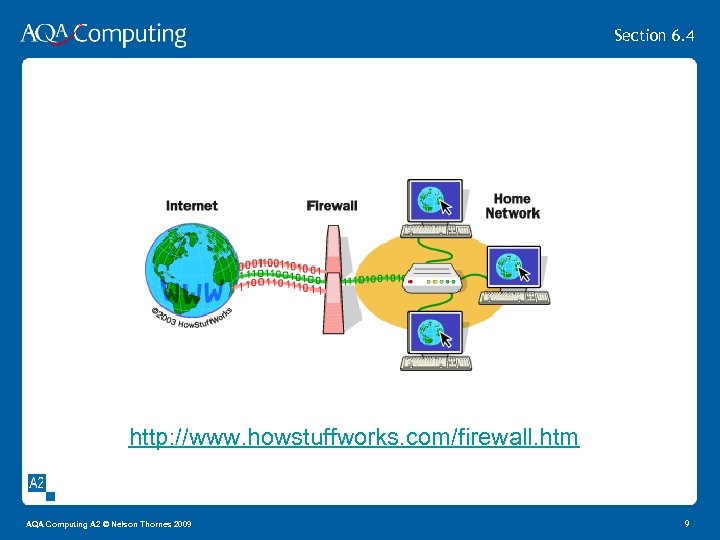 Section 6. 4 http: //www. howstuffworks. com/firewall. htm AQA Computing A 2 © Nelson Thornes 2009 9
 Section 6. 4 Encryption algorithm Plain text encrypted into cipher text Decryption algorithm and decryption key Cipher text decrypted to plain text Cryptography Cryptanalysis THE NUM 8 ER MY 5 TERIES: the case of the uncrackable code AQA Computing A 2 © Nelson Thornes 2009
 Section 6. 4 Symmetric Encryption Cipher text can be decrypted using encryption algorithm and the encryption key Enigma machine used during WW II Code breakers at Bletchley Park http: //www. bletchleypark. org. uk/content/machines. rhtm Difficult to distribute symmetric key without being intercepted Easy to decrypt the message with key AQA Computing A 2 © Nelson Thornes 2009
 Section 6. 4 Asymmetric encryption Also called public key encryption e. g. RSA Pair of keys – public and private Private key is kept secret Encryption algorithm and public keys are freely available A message encrypted with A’s private key can only be decrypted with A’s public key A message encrypted with A’s public key can only be decrypted by A with it’s private key It’s slow AQA Computing A 2 © Nelson Thornes 2009
 Section 6. 4 Digital Signatures and Certificates To prove that an electronic message is genuine, a sender can digitally sign the message. This means it can be detected if the message has been tampered with and the signature is proof that it has been sent by the correct person. Digital signatures use asymmetric encryption. The process to send a message is as follows: AQA Computing A 2 © Nelson Thornes 2009 13
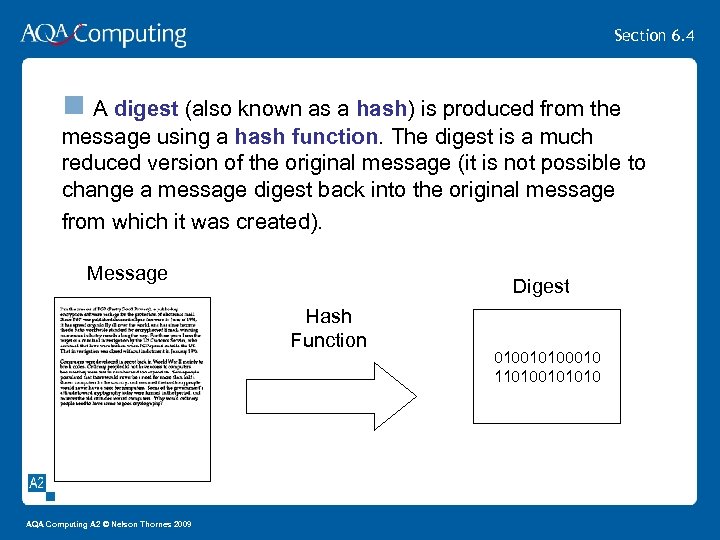 Section 6. 4 n A digest (also known as a hash) is produced from the message using a hash function. The digest is a much reduced version of the original message (it is not possible to change a message digest back into the original message from which it was created). Message Digest Hash Function AQA Computing A 2 © Nelson Thornes 2009 010010100010 110100101010
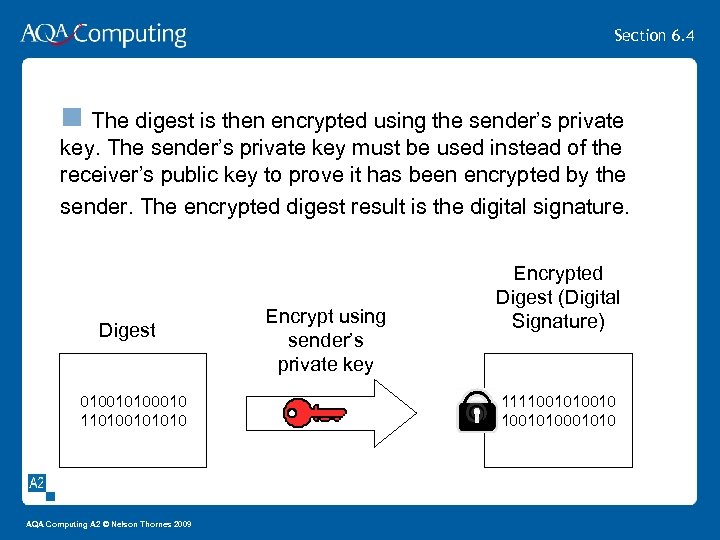 Section 6. 4 n The digest is then encrypted using the sender’s private key. The sender’s private key must be used instead of the receiver’s public key to prove it has been encrypted by the sender. The encrypted digest result is the digital signature. Digest 010010100010 110100101010 AQA Computing A 2 © Nelson Thornes 2009 Encrypt using sender’s private key Encrypted Digest (Digital Signature) 1111001010
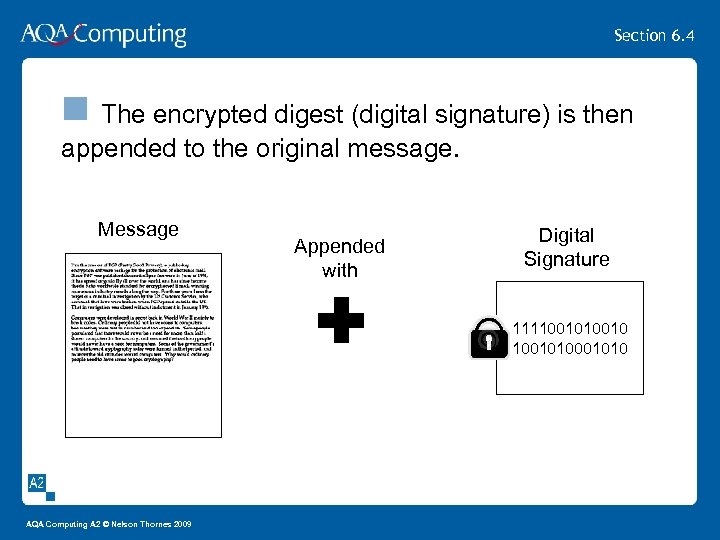 Section 6. 4 n The encrypted digest (digital signature) is then appended to the original message. Message Appended with Digital Signature 1111001010 AQA Computing A 2 © Nelson Thornes 2009
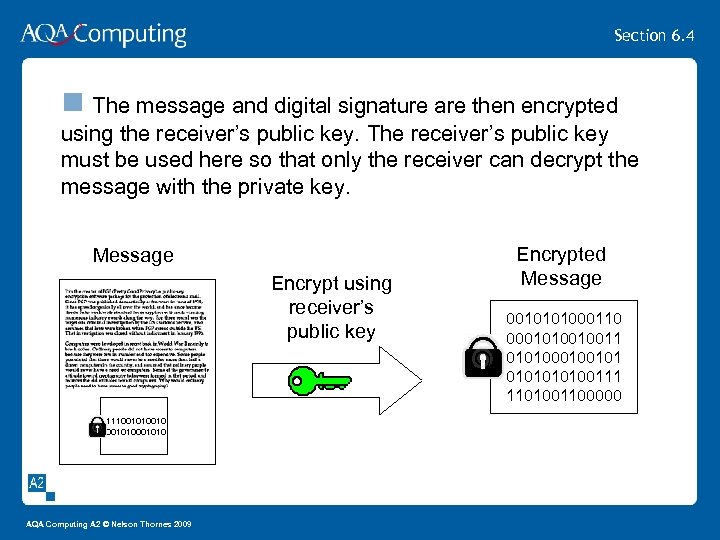 Section 6. 4 n The message and digital signature are then encrypted using the receiver’s public key. The receiver’s public key must be used here so that only the receiver can decrypt the message with the private key. Message Encrypt using receiver’s public key 1111001010 AQA Computing A 2 © Nelson Thornes 2009 Encrypted Message 0010101000110 0001010010011 01010010100111 1101001100000
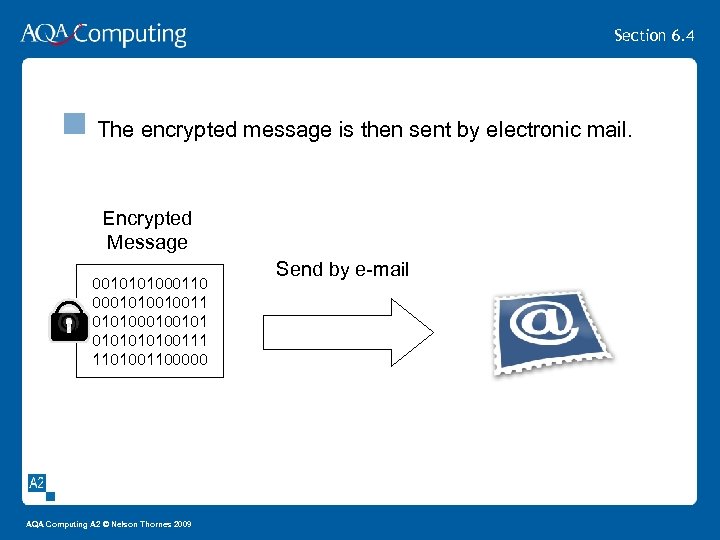 Section 6. 4 n The encrypted message is then sent by electronic mail. Encrypted Message 0010101000110 0001010010011 01010010100111 1101001100000 AQA Computing A 2 © Nelson Thornes 2009 Send by e-mail
 Section 6. 4 Digital Signatures and Certificates The process to verify that a message is genuine is as follows: AQA Computing A 2 © Nelson Thornes 2009
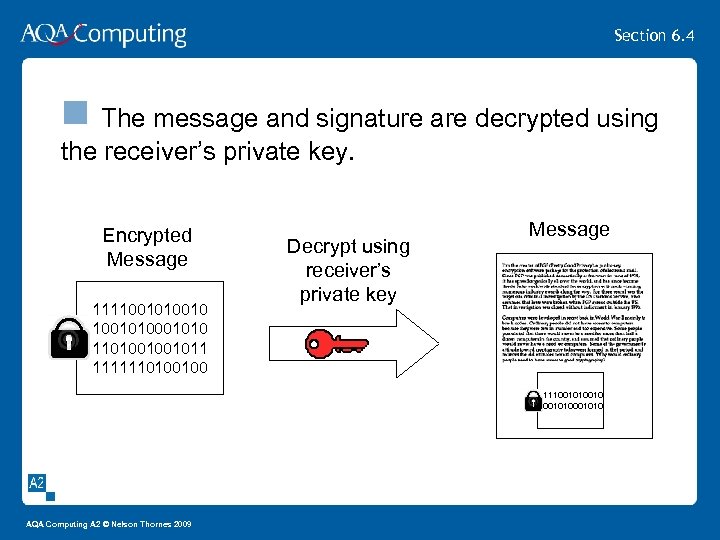 Section 6. 4 n The message and signature are decrypted using the receiver’s private key. Encrypted Message 1111001010 1101001001011 1111110100100 Decrypt using receiver’s private key Message 1111001010 AQA Computing A 2 © Nelson Thornes 2009
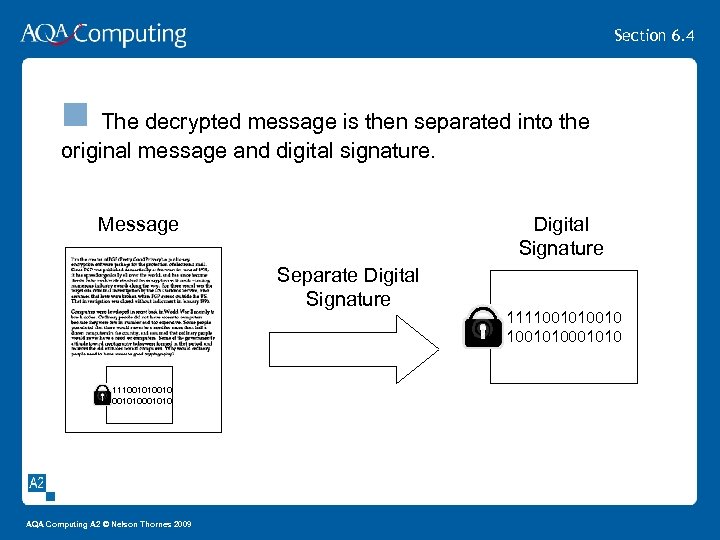 Section 6. 4 n The decrypted message is then separated into the original message and digital signature. Message Digital Signature Separate Digital Signature 1111001010 AQA Computing A 2 © Nelson Thornes 2009 1111001010
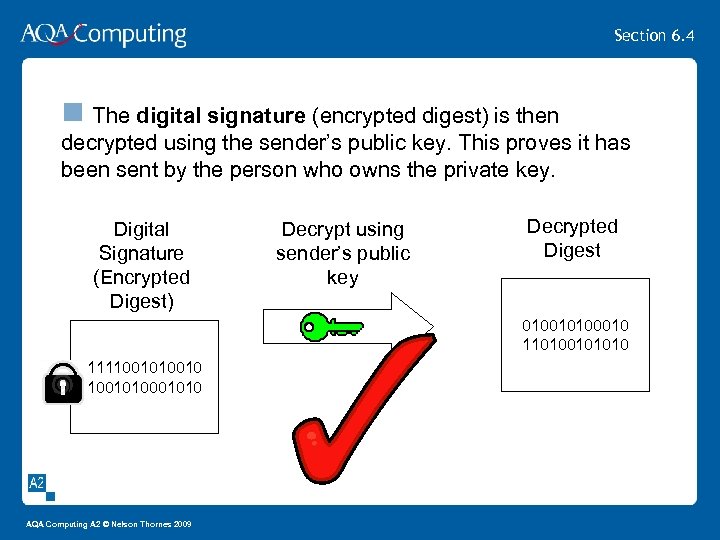 Section 6. 4 n The digital signature (encrypted digest) is then decrypted using the sender’s public key. This proves it has been sent by the person who owns the private key. Digital Signature (Encrypted Digest) Decrypt using sender’s public key Decrypted Digest 010010100010 110100101010 1111001010 AQA Computing A 2 © Nelson Thornes 2009
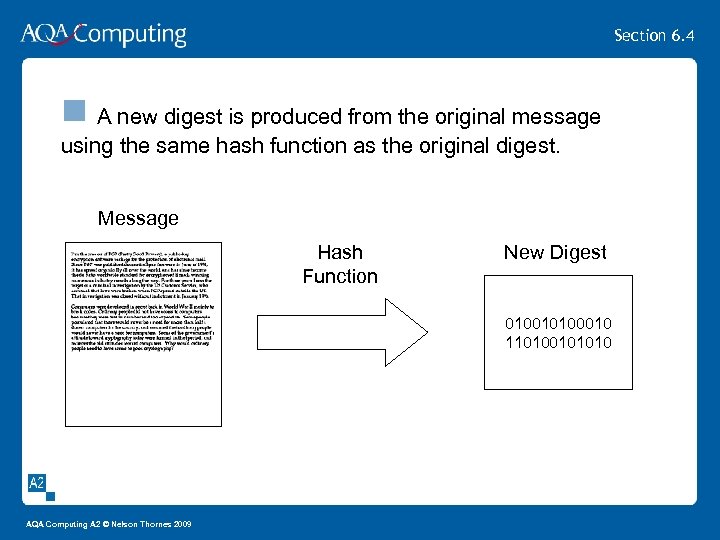 Section 6. 4 n A new digest is produced from the original message using the same hash function as the original digest. Message Hash Function New Digest 010010100010 110100101010 AQA Computing A 2 © Nelson Thornes 2009
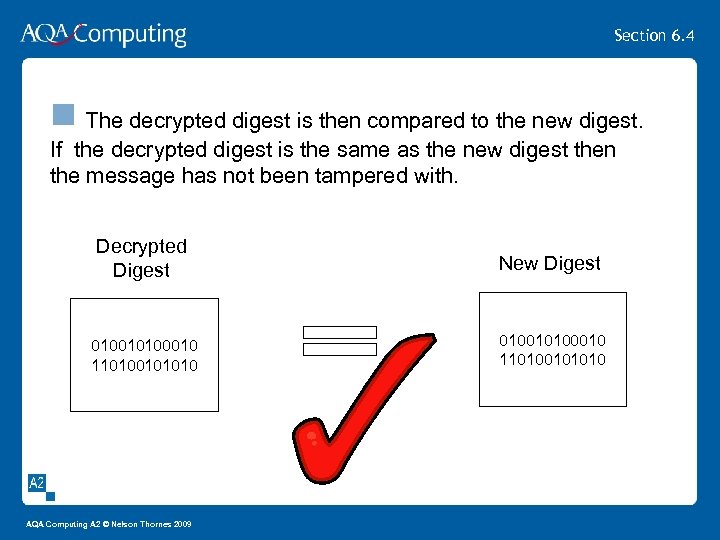 Section 6. 4 n The decrypted digest is then compared to the new digest. If the decrypted digest is the same as the new digest then the message has not been tampered with. Decrypted Digest New Digest 010010100010 110100101010 AQA Computing A 2 © Nelson Thornes 2009
 Section 6. 4 Digital Signatures and Certificates Although this process sounds complicated it is all handled by the signing software so the messages can be signed and received using a simple click. AQA Computing A 2 © Nelson Thornes 2009
 Section 6. 4 Digital Signatures and Certificates A digital certificate is issued by a certification authority. It contains your name, a serial number, expiration dates, a copy of the certificate holder's public key (used for encrypting messages and digital signatures), and the digital signature of the certificate-issuing authority so that a recipient can verify that the certificate is real. Digital certificates can be kept in registries so that authenticating users can look up other users' public keys. AQA Computing A 2 © Nelson Thornes 2009
 Section 6. 4 Virus detection Antivirus scanner software Checks files against a dictionary of known viruses Users must regularly update the dictionary If infected file found then antivirus scanner will delete the virus from the file If unable to delete virus then file quarantined where file can be deleted AQA Computing A 2 © Nelson Thornes 2009
 Section 6. 4 Computer Security Procedures Authentication used to verify user is legitimate e. g. passwords, biometric data, security tokens, digital certificates Digitally signed email is used to authenticate the sender thus reducing phishing attacks Authorisation by user ID and password Users authorised to use certain resources System administrator grants permissions to users Passwords and encryption used to keep data secret from unauthorised persons Accounting – systems generate activity logs e. g. website IP addresses logged AQA Computing A 2 © Nelson Thornes 2009
 Section 6. 4 Past Paper Questions The following past papers have questions on Internet security. They are in the ‘ 6. 4 Internet Security’ folder in Learning resources. January 2007 CPT 5 Q 5 January 2006 CPT 5 Q 7 January 2003 CPT 5 Q 5 AQA Computing A 2 © Nelson Thornes 2009
 Section 6. 4 Class work and Homework 1. 2. Using the hyperlinks in this presentation research Viruses Spam Worms Phishing Pharming Spyware Firewalls Encryption Complete the past paper questions AQA Computing A 2 © Nelson Thornes 2009