


 Скачать презентацию Section 5 Understand the End-Year Review process and
ee6dfc6b0d220155293ebaf6fba4eb01.ppt
- Количество слайдов: 54
 Section 5 Understand the End-Year Review process and the >My. Piramal system for performance review
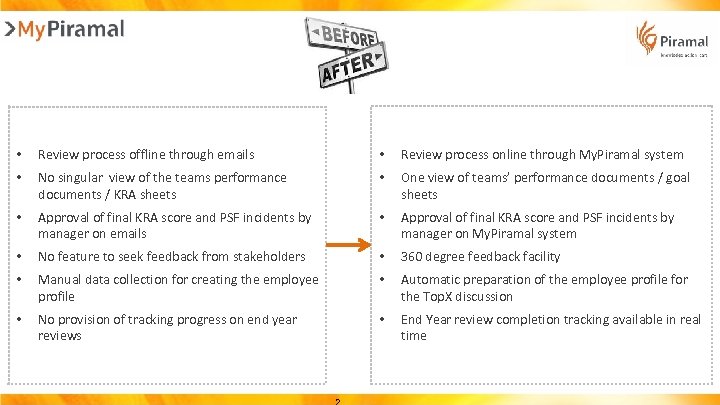 • Review process offline through emails • Review process online through My. Piramal system • No singular view of the teams performance documents / KRA sheets • One view of teams’ performance documents / goal sheets • Approval of final KRA score and PSF incidents by manager on emails • Approval of final KRA score and PSF incidents by manager on My. Piramal system • No feature to seek feedback from stakeholders • 360 degree feedback facility • Manual data collection for creating the employee profile • Automatic preparation of the employee profile for the Top. X discussion • No provision of tracking progress on end year reviews • End Year review completion tracking available in real time
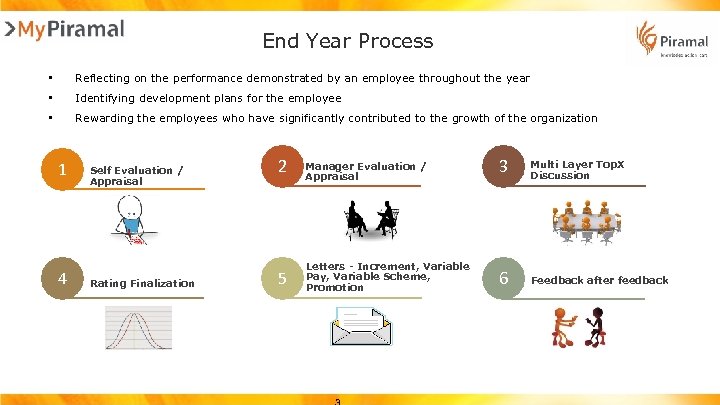 End Year Process • Reflecting on the performance demonstrated by an employee throughout the year • Identifying development plans for the employee • Rewarding the employees who have significantly contributed to the growth of the organization 1 4 Self Evaluation / Appraisal Rating Finalization 2 Manager Evaluation / Appraisal 3 Multi Layer Top. X Discussion 5 Letters - Increment, Variable Pay, Variable Scheme, Promotion 6 Feedback after feedback
 Part 1 Conducting Self Evaluation
 1 Objectives Self Evaluation / Appraisal Reflect on your performance for the year against the set targets. Identify or highlight any difficulties that one may have had or are having during the year Mention your career aspirations within the organization to your manager Identify and suggest development requirements for yourself Provide behavioral incidences using the Piramal Success Factors for evaluating performance
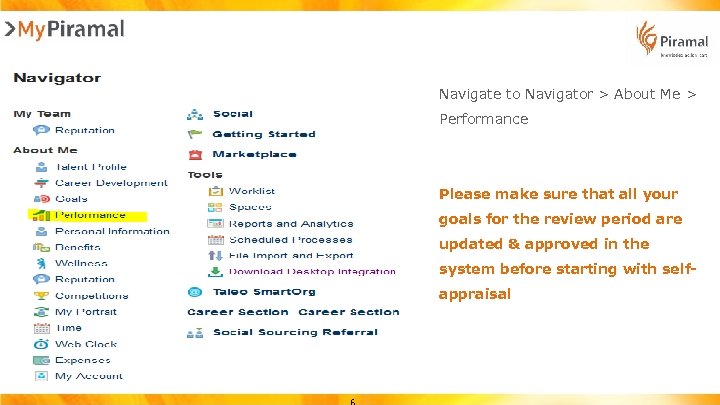 Navigate to Navigator > About Me > Performance Please make sure that all your goals for the review period are updated & approved in the system before starting with selfappraisal
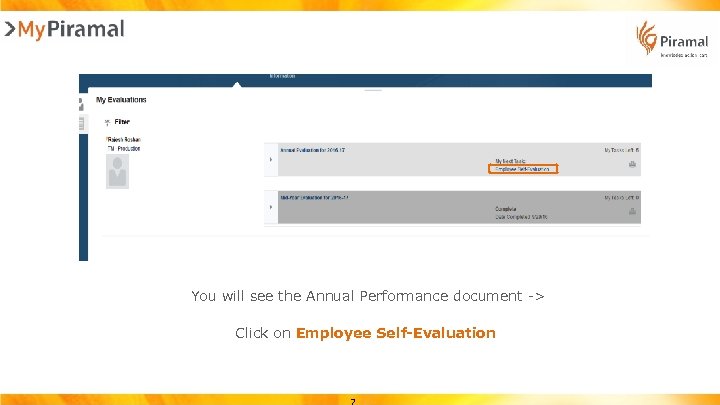 You will see the Annual Performance document -> Click on Employee Self-Evaluation
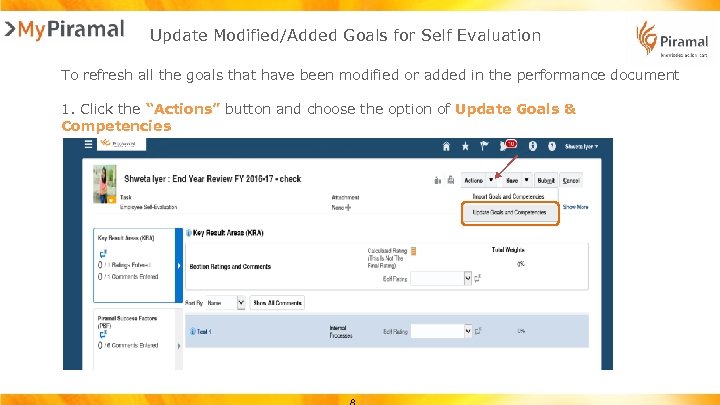 Update Modified/Added Goals for Self Evaluation To refresh all the goals that have been modified or added in the performance document 1. Click the “Actions” button and choose the option of Update Goals & Competencies
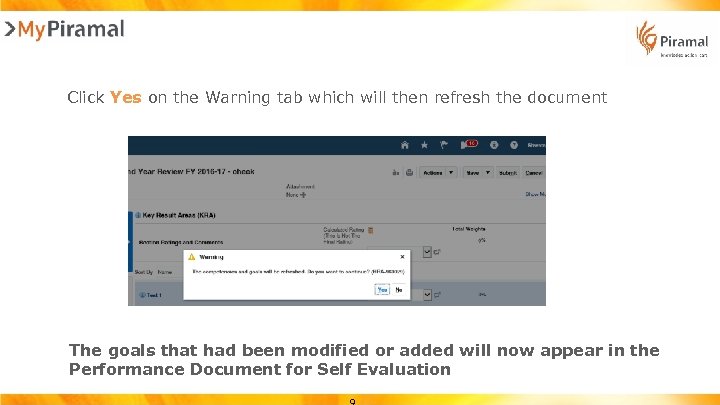 Click Yes on the Warning tab which will then refresh the document The goals that had been modified or added will now appear in the Performance Document for Self Evaluation
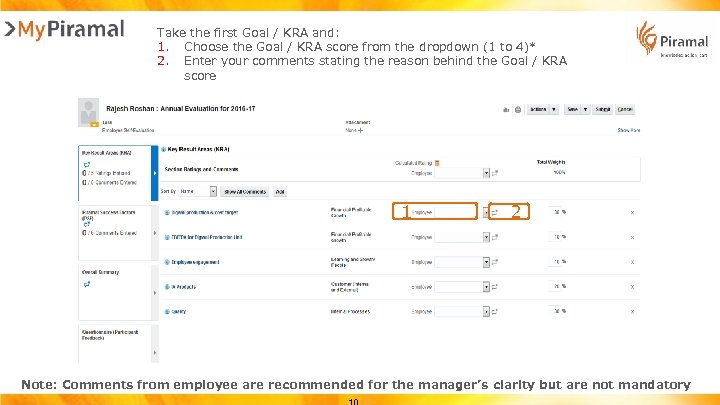 Take the first Goal / KRA and: 1. Choose the Goal / KRA score from the dropdown (1 to 4)* 2. Enter your comments stating the reason behind the Goal / KRA score 1 2 Note: Comments from employee are recommended for the manager’s clarity but are not mandatory
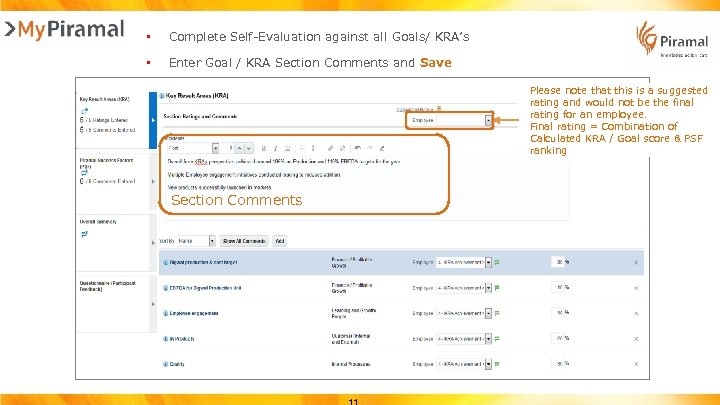 • Complete Self-Evaluation against all Goals/ KRA’s • Enter Goal / KRA Section Comments and Save Please note that this is a suggested rating and would not be the final rating for an employee. Final rating = Combination of Calculated KRA / Goal score & PSF ranking Section Comments
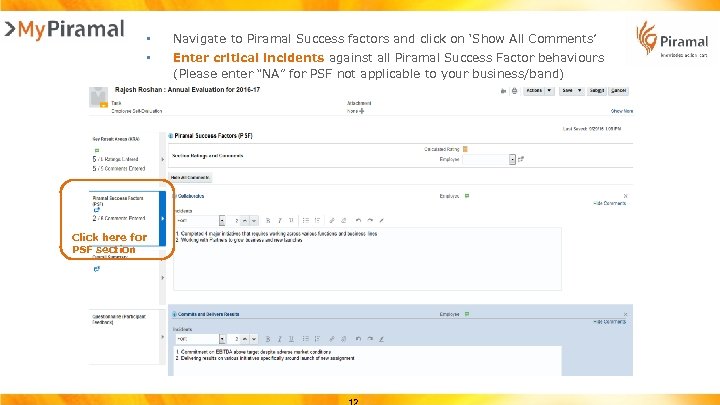 • • Click here for PSF section Navigate to Piramal Success factors and click on ‘Show All Comments’ Enter critical incidents against all Piramal Success Factor behaviours (Please enter “NA” for PSF not applicable to your business/band)
 • Navigate to ‘Overall Summary’ and enter comments • Click on Submit Please note that this is a suggested rating and would not be the final rating for an employee. Final rating = Combination of Calculated KRA / Goal score & PSF ranking Overall Summary Comments
 Part 2 Manager Evaluation
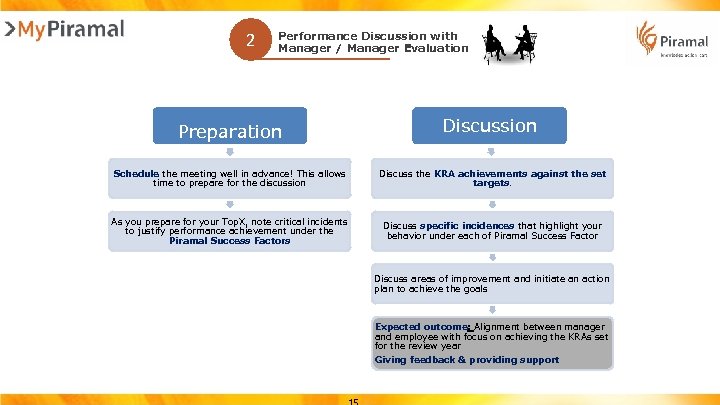 2 Performance Discussion with Manager / Manager Evaluation Preparation Discussion Schedule the meeting well in advance! This allows time to prepare for the discussion Discuss the KRA achievements against the set targets. As you prepare for your Top. X, note critical incidents to justify performance achievement under the Piramal Success Factors Discuss specific incidences that highlight your behavior under each of Piramal Success Factor Discuss areas of improvement and initiate an action plan to achieve the goals Expected outcome: Alignment between manager and employee with focus on achieving the KRAs set for the review year Giving feedback & providing support
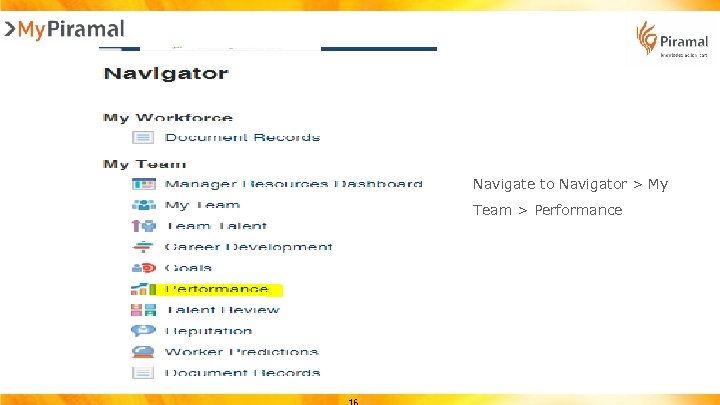 Navigate to Navigator > My Team > Performance
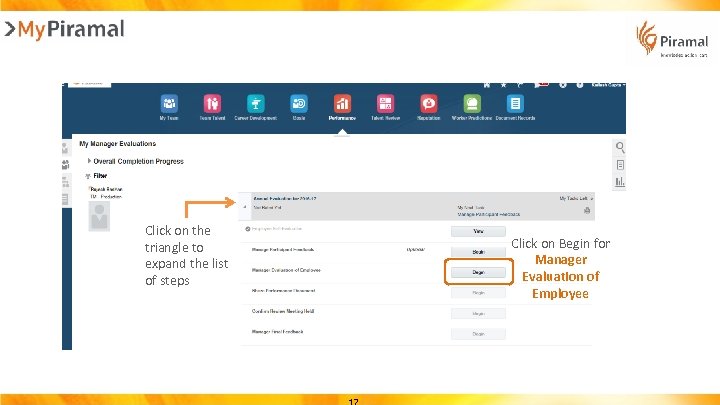 Click on the triangle to expand the list of steps Click on Begin for Manager Evaluation of Employee
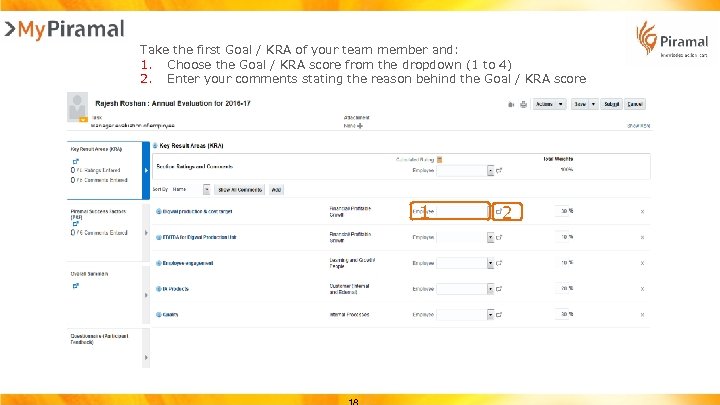 Take the first Goal / KRA of your team member and: 1. Choose the Goal / KRA score from the dropdown (1 to 4) 2. Enter your comments stating the reason behind the Goal / KRA score 1 2
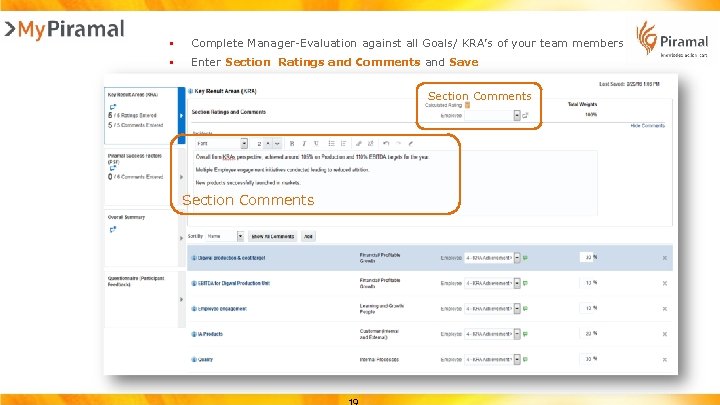 • Complete Manager-Evaluation against all Goals/ KRA’s of your team members • Enter Section Ratings and Comments and Save Section Comments
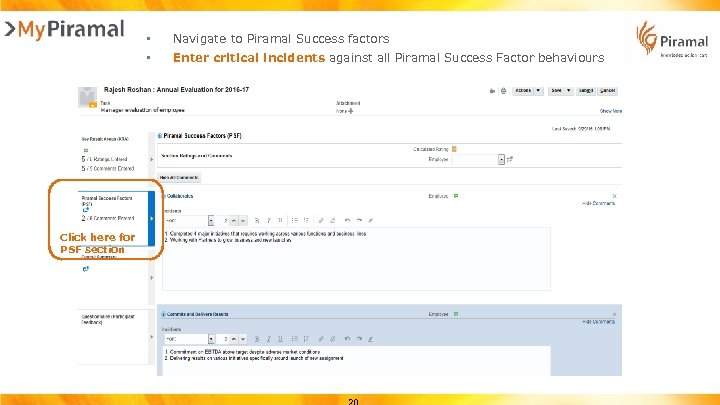 • • Click here for PSF section Navigate to Piramal Success factors Enter critical incidents against all Piramal Success Factor behaviours
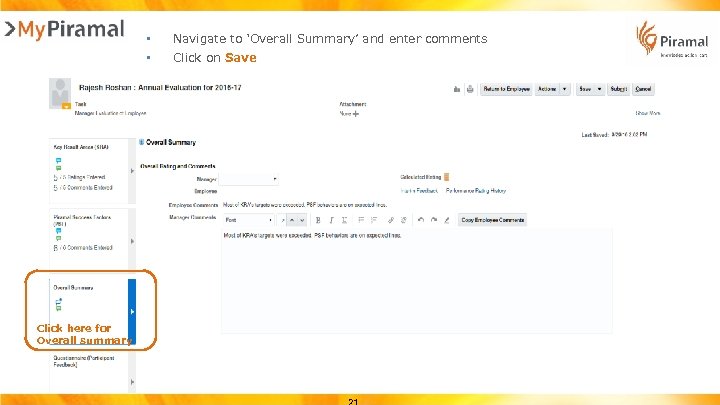 • • Click here for Overall summary Navigate to ‘Overall Summary’ and enter comments Click on Save
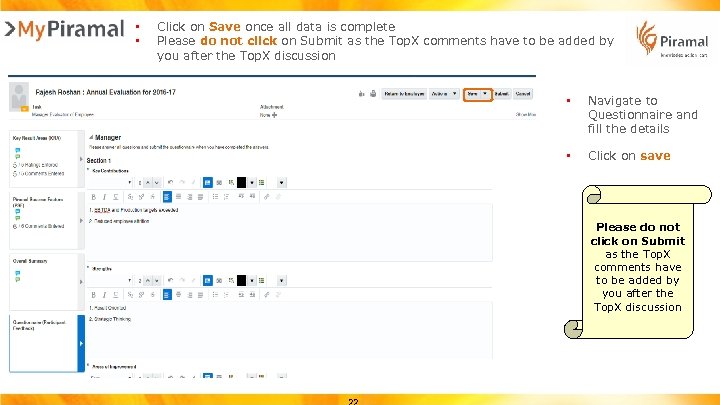 • • Click on Save once all data is complete Please do not click on Submit as the Top. X comments have to be added by you after the Top. X discussion • Navigate to Questionnaire and fill the details • Click on save Please do not click on Submit as the Top. X comments have to be added by you after the Top. X discussion
 Part 3 Promotion Recommendation Process
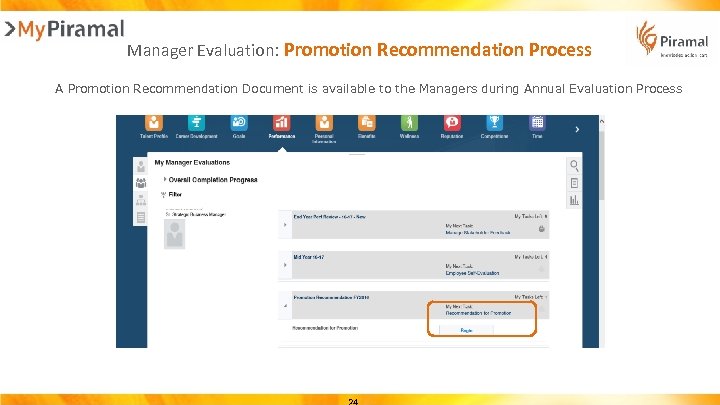 Manager Evaluation: Promotion Recommendation Process A Promotion Recommendation Document is available to the Managers during Annual Evaluation Process
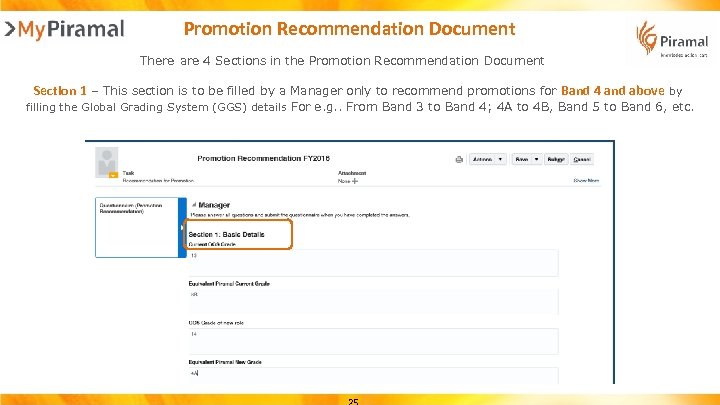 Promotion Recommendation Document There are 4 Sections in the Promotion Recommendation Document Section 1 – This section is to be filled by a Manager only to recommend promotions for Band 4 and above by filling the Global Grading System (GGS) details For e. g. . From Band 3 to Band 4; 4 A to 4 B, Band 5 to Band 6, etc.
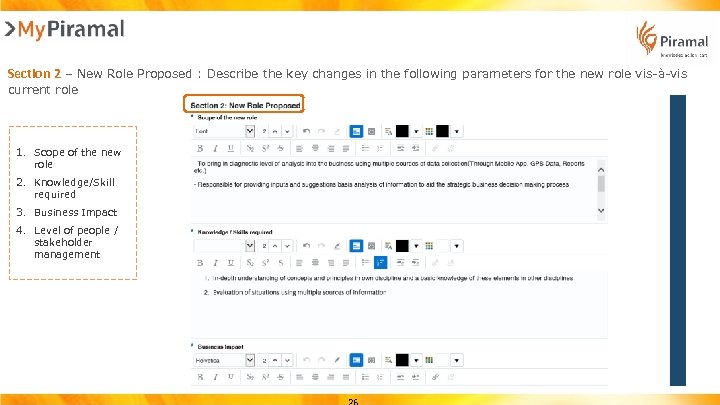 Section 2 – New Role Proposed : Describe the key changes in the following parameters for the new role vis-à-vis current role 1. Scope of the new role 2. Knowledge/Skill required 3. Business Impact 4. Level of people / stakeholder management
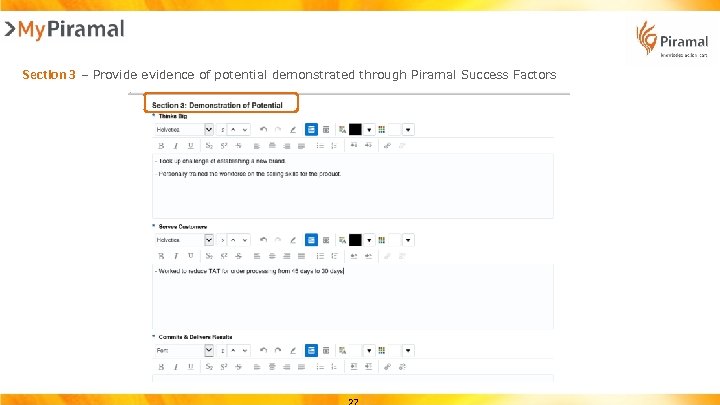 Section 3 – Provide evidence of potential demonstrated through Piramal Success Factors
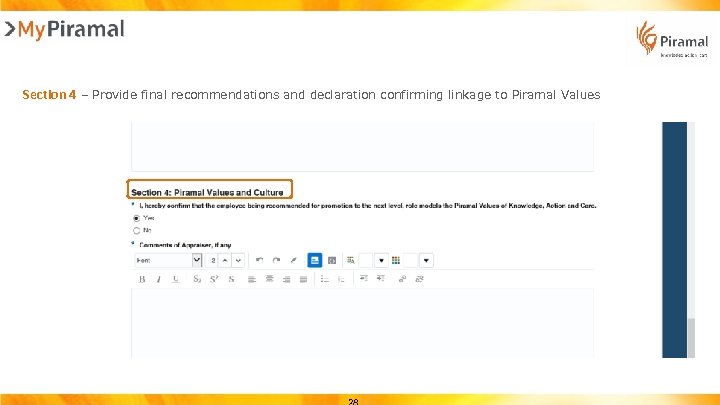 Section 4 – Provide final recommendations and declaration confirming linkage to Piramal Values
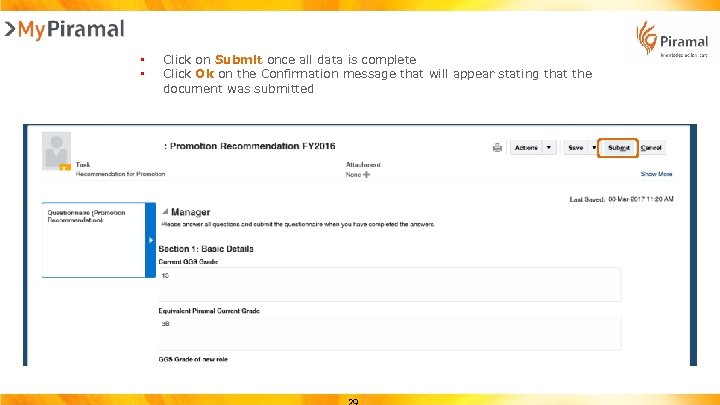 • • Click on Submit once all data is complete Click Ok on the Confirmation message that will appear stating that the document was submitted
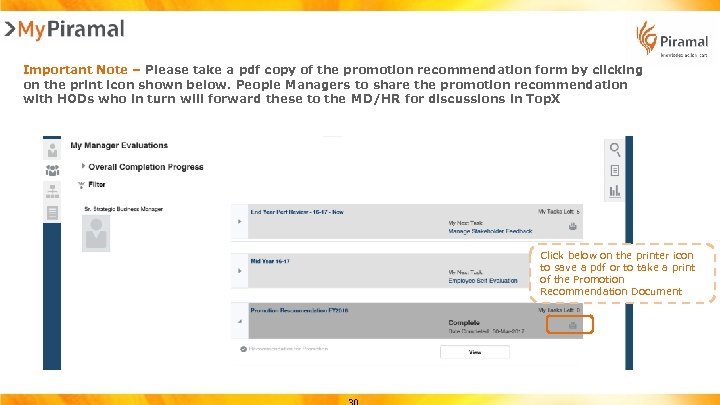 Important Note – Please take a pdf copy of the promotion recommendation form by clicking on the print icon shown below. People Managers to share the promotion recommendation with HODs who in turn will forward these to the MD/HR for discussions in Top. X Click below on the printer icon to save a pdf or to take a print of the Promotion Recommendation Document
 Part 4 Top. X Process
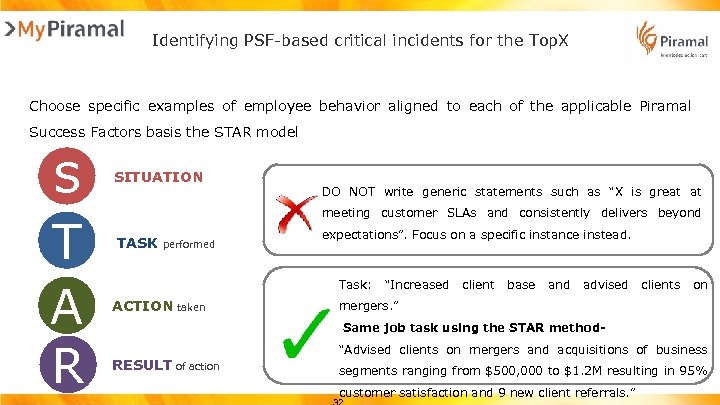 Identifying PSF-based critical incidents for the Top. X Choose specific examples of employee behavior aligned to each of the applicable Piramal Success Factors basis the STAR model s T A R SITUATION DO NOT write generic statements such as “X is great at meeting customer SLAs and consistently delivers beyond TASK performed expectations”. Focus on a specific instance instead. Task: ACTION taken “Increased client base and advised clients on mergers. ” Same job task using the STAR method- RESULT of action “Advised clients on mergers and acquisitions of business segments ranging from $500, 000 to $1. 2 M resulting in 95% customer satisfaction and 9 new client referrals. ”
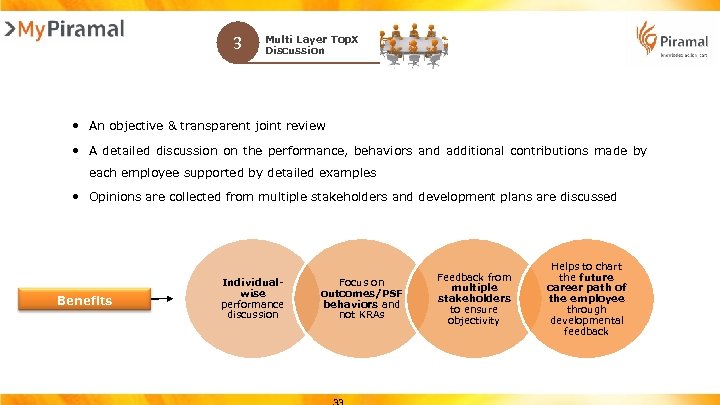 3 Multi Layer Top. X Discussion • An objective & transparent joint review • A detailed discussion on the performance, behaviors and additional contributions made by each employee supported by detailed examples • Opinions are collected from multiple stakeholders and development plans are discussed Benefits Individualwise performance discussion Focus on outcomes/PSF behaviors and not KRAs Feedback from multiple stakeholders to ensure objectivity Helps to chart the future career path of the employee through developmental feedback
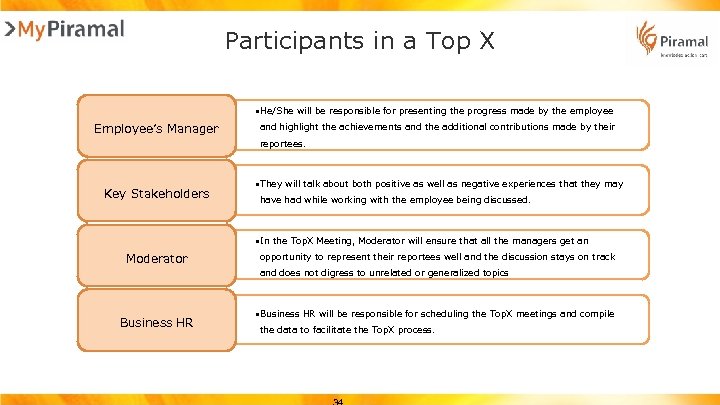 Participants in a Top X • He/She will be responsible for presenting the progress made by the employee Employee’s Manager and highlight the achievements and the additional contributions made by their reportees. Key Stakeholders • They will talk about both positive as well as negative experiences that they may have had while working with the employee being discussed. • In the Top. X Meeting, Moderator will ensure that all the managers get an Moderator opportunity to represent their reportees well and the discussion stays on track and does not digress to unrelated or generalized topics Business HR • Business HR will be responsible for scheduling the Top. X meetings and compile the data to facilitate the Top. X process.
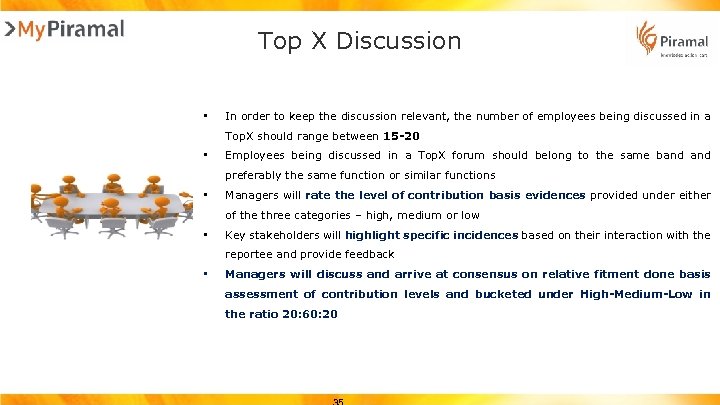 Top X Discussion • In order to keep the discussion relevant, the number of employees being discussed in a Top. X should range between 15 -20 • Employees being discussed in a Top. X forum should belong to the same band preferably the same function or similar functions • Managers will rate the level of contribution basis evidences provided under either of the three categories – high, medium or low • Key stakeholders will highlight specific incidences based on their interaction with the reportee and provide feedback • Managers will discuss and arrive at consensus on relative fitment done basis assessment of contribution levels and bucketed under High-Medium-Low in the ratio 20: 60: 20
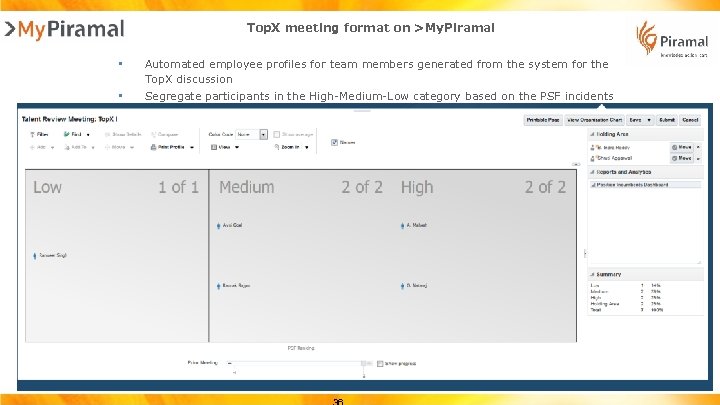 Top. X meeting format on >My. Piramal • Automated employee profiles for team members generated from the system for the Top. X discussion • Segregate participants in the High-Medium-Low category based on the PSF incidents
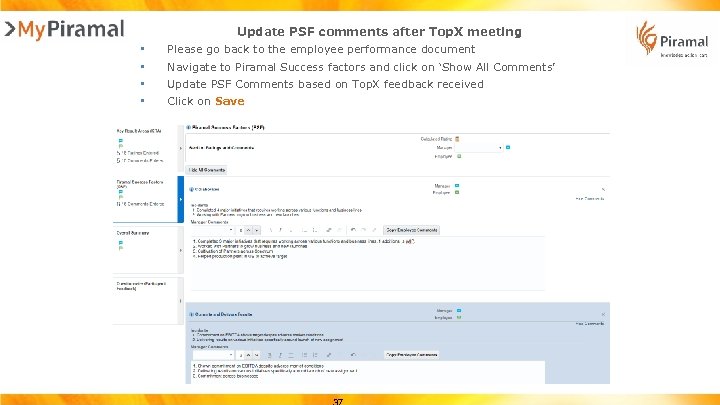 Update PSF comments after Top. X meeting • • Please go back to the employee performance document Navigate to Piramal Success factors and click on ‘Show All Comments’ Update PSF Comments based on Top. X feedback received Click on Save
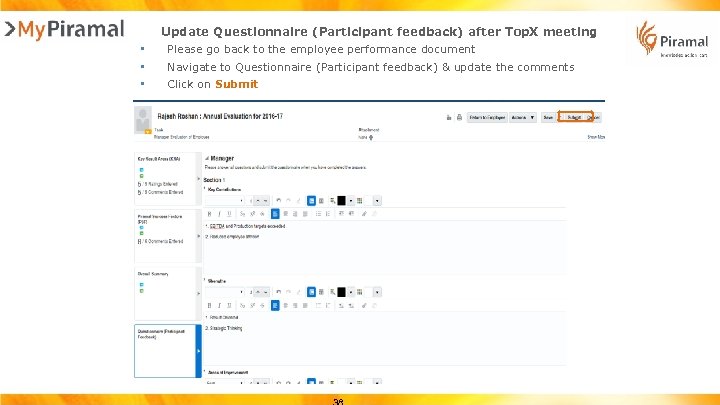 Update Questionnaire (Participant feedback) after Top. X meeting • • • Please go back to the employee performance document Navigate to Questionnaire (Participant feedback) & update the comments Click on Submit
 Top X Outcomes § Expected outcome: Piramal Success Factor level basis assessment of contribution levels and employee bucketing under High-Medium-Low in the ratio 20: 60: 20 § Promotion recommendations § Feedback for employees – from stakeholders, strengths, areas of improvement § Understanding what other managers and their reportees are doing differently to improve performance and behaviors for the benefit of the business
 6 § Feedback after Top. X Each manager will receive a performance document containing strengths and areas of improvements for their team members post the Top X process completion from the HR team § A critical step Top X is to share the feedback along with performance document with the employee § As a manager, set aside specific time to share the feedback discussed by stakeholders with your teams. It is important to not assign blame on a specific person nor share person wise comments. The feedback shared should reflect the overall strengths and improvements areas emerging and the general opinion of stakeholders. § Help her/him understand what other peers are doing differently to contribute more to the organization § This would also be a good time to realign your reportee’s action plan for the year with the feedback received
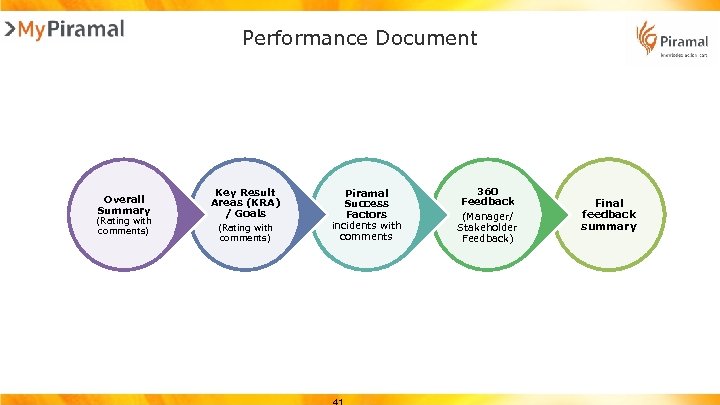 Performance Document Overall Summary (Rating with comments) Key Result Areas (KRA) / Goals (Rating with comments) Piramal Success Factors incidents with comments 360 Feedback (Manager/ Stakeholder Feedback) Final feedback summary
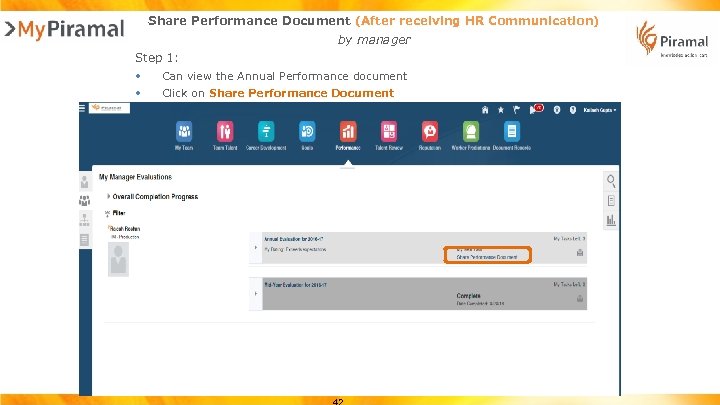 Share Performance Document (After receiving HR Communication) by manager Step 1: • Can view the Annual Performance document • Click on Share Performance Document
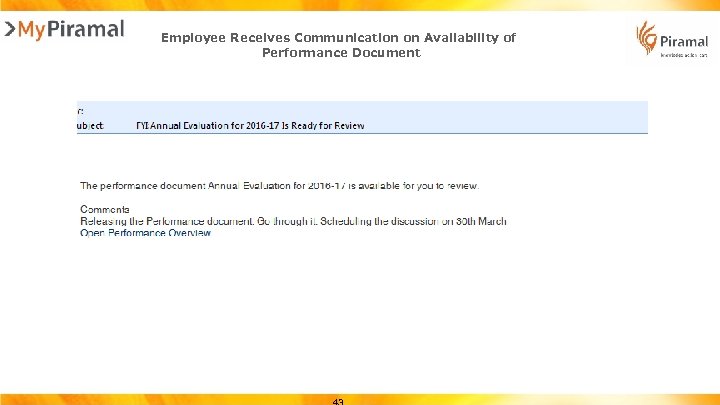 Employee Receives Communication on Availability of Performance Document
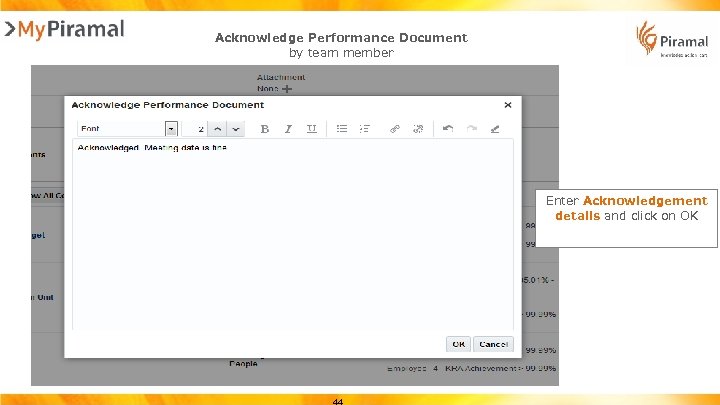 Acknowledge Performance Document by team member Enter Acknowledgement details and click on OK
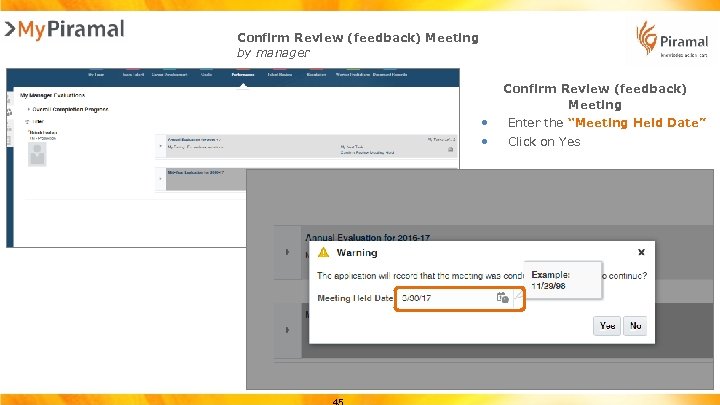 Confirm Review (feedback) Meeting by manager Confirm Review (feedback) Meeting • • Enter the “Meeting Held Date” Click on Yes
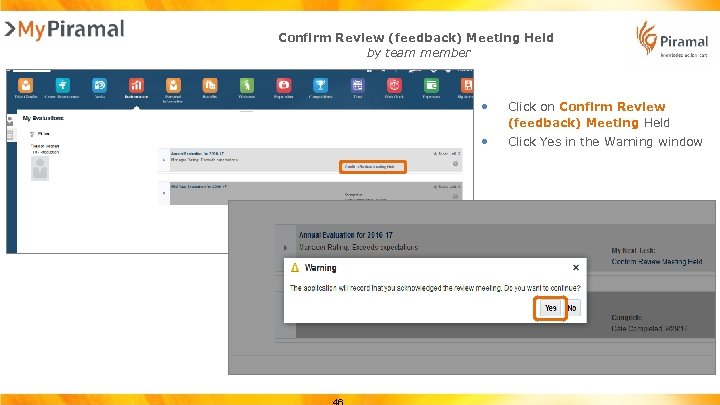 Confirm Review (feedback) Meeting Held by team member • Click on Confirm Review (feedback) Meeting Held • Click Yes in the Warning window
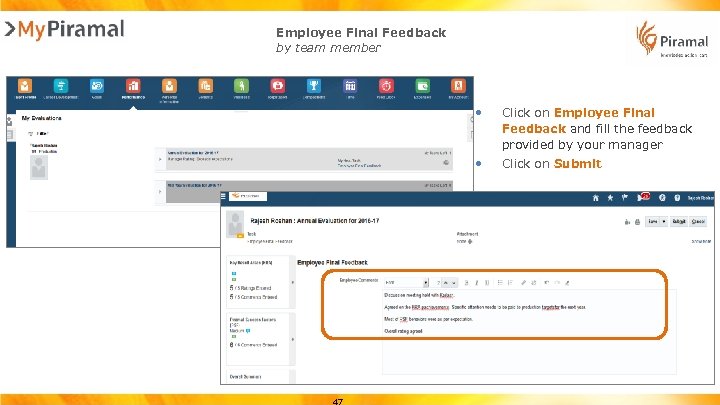 Employee Final Feedback by team member • Click on Employee Final Feedback and fill the feedback provided by your manager • Click on Submit
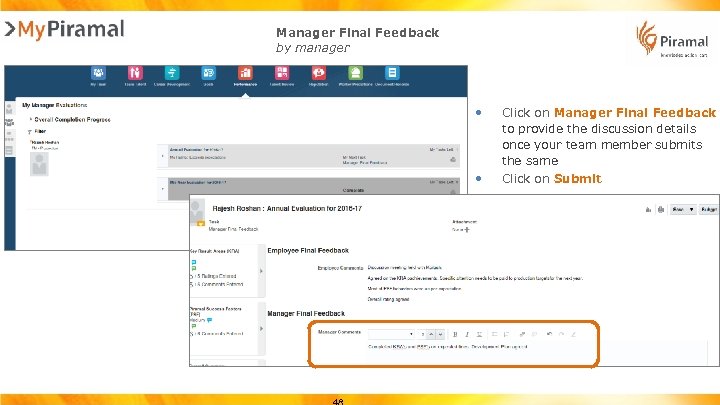 Manager Final Feedback by manager • Click on Manager Final Feedback to provide the discussion details once your team member submits the same • Click on Submit
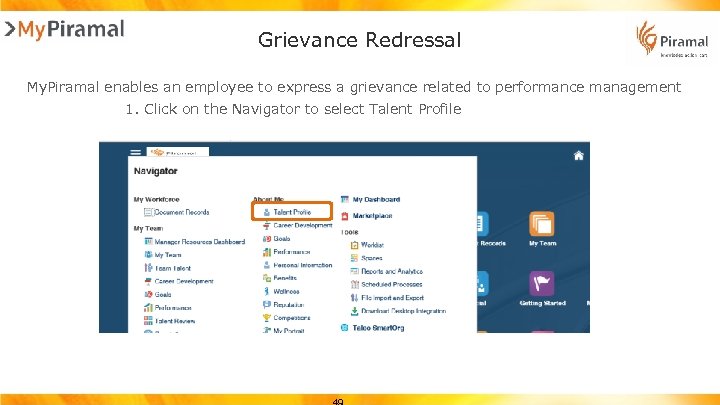 Grievance Redressal My. Piramal enables an employee to express a grievance related to performance management 1. Click on the Navigator to select Talent Profile
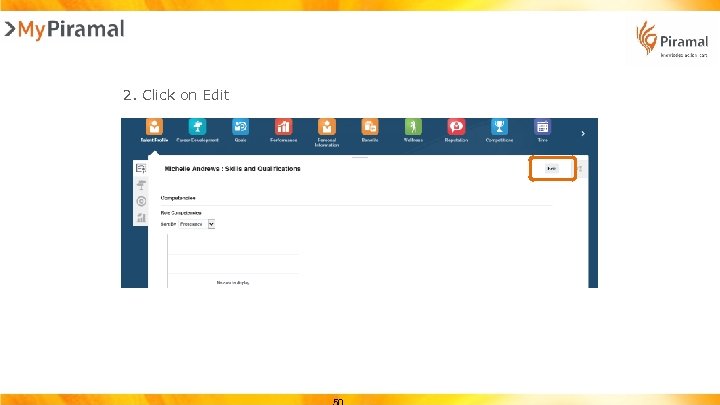 2. Click on Edit
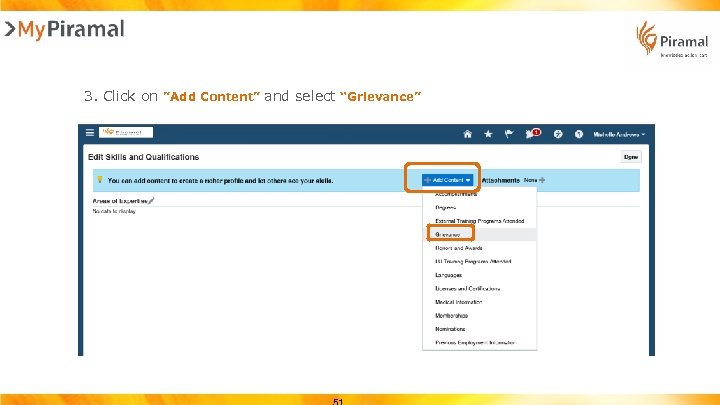 3. Click on ”Add Content” and select “Grievance”
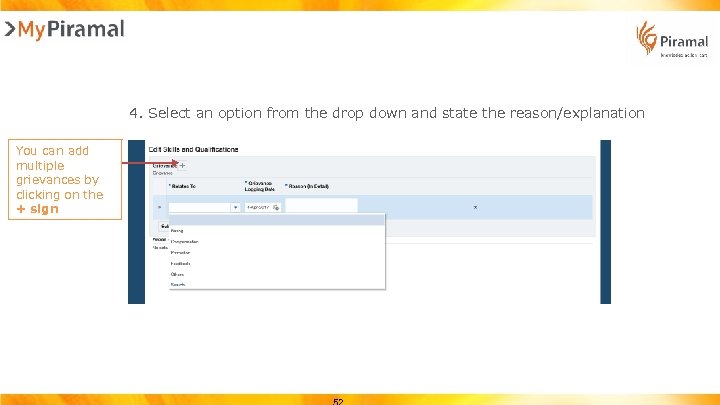 4. Select an option from the drop down and state the reason/explanation You can add multiple grievances by clicking on the + sign
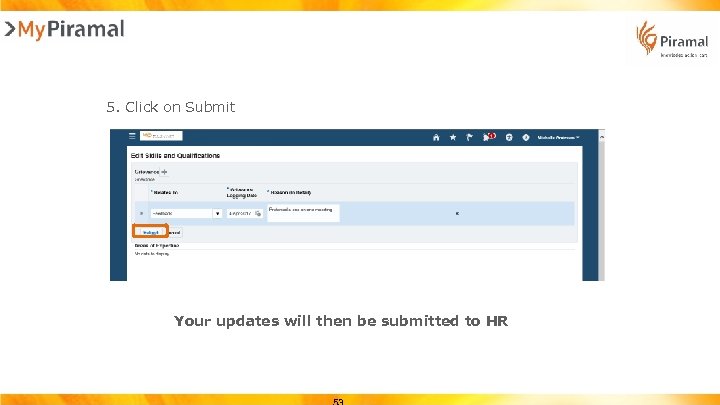 5. Click on Submit Your updates will then be submitted to HR
 Thank You!