

SECTION 1




SECTION 1 OVERVIEW NAS 120, Section 1, September 2007 Copyright 2007 MSC. Software Corporation S 1 -1
NAS 120, Section 1, September 2007 Copyright 2007 MSC. Software Corporation S 1 -2
COURSE OBJECTIVES ● Learn the basic features in MD Nastran ● Data structure ● Element library ● Linear static, normal modes, and buckling analyses ● Learn the basic functionalities in MD Patran ● Build finite element models (pre-processing) ● Evaluate analysis results (post-processing) ● Become familiar with solving engineering problems in an integrated Patran/Nastran environment through hands-on training ● Students will work through a number of workshop problems in class with assistance from the instructor ● Simple workshop problems designed to introduce basic concepts ● Real-world workshop problems designed to lead the students through engineering problems from beginning to end NAS 120, Section 1, September 2007 Copyright 2007 MSC. Software Corporation S 1 -3
WHAT IS MD NASTRAN? ● MD Nastran is a general-purpose finite element analysis program capable of solving a wide variety of engineering problems, including: ● Linear static analysis ● Static analysis with geometric and material nonlinearity ● Transient analysis with geometric and material nonlinearity ● Normal modes analysis ● Buckling analysis ● Direct and modal complex eigenvalue analysis ● Direct and modal frequency analysis (including random analysis) ● Direct and modal transient analysis (including response spectrum analysis) NAS 120, Section 1, September 2007 Copyright 2007 MSC. Software Corporation S 1 -4
WHAT IS MD NASTRAN? (Cont. ) ● MD Nastran Capabilities (Cont. ) ● Linear cyclic symmetry analysis (including static, normal modes, buckling, and direct frequency response) ● Linear and nonlinear steady-state heat transfer ● Linear and nonlinear transient heat transfer ● Aeroelasticity ● Substructure analysis (superelements) ● Design sensitivity and optimization ● Acoustics ● Composite material analysis ● P-element analysis ● Rotor Dynamics NAS 120, Section 1, September 2007 Copyright 2007 MSC. Software Corporation S 1 -5
WHAT IS MD NASTRAN? (Cont. ) ● MD Nastran is ● Extensively documented (including online encyclopedia) ● Extensively tested ● Continually enhanced with new capabilities ● Highly efficient in using modern numerical analysis techniques ● Used extensively by aerospace, automotive, energy, biomedical, civil, and other industries NAS 120, Section 1, September 2007 Copyright 2007 MSC. Software Corporation S 1 -6
WHAT IS MD PATRAN? ● MD Patran is a CAE pre- and post-processing software package. It consists of the following major components: ● User-Friendly Graphical User Interface ● Powerful Geometry Import, Export, and Creation ● Robust Meshing Algorithms ● Fast Results Visualization and Reporting ● Extensive Analysis Code Preferences NAS 120, Section 1, September 2007 Copyright 2007 MSC. Software Corporation S 1 -7
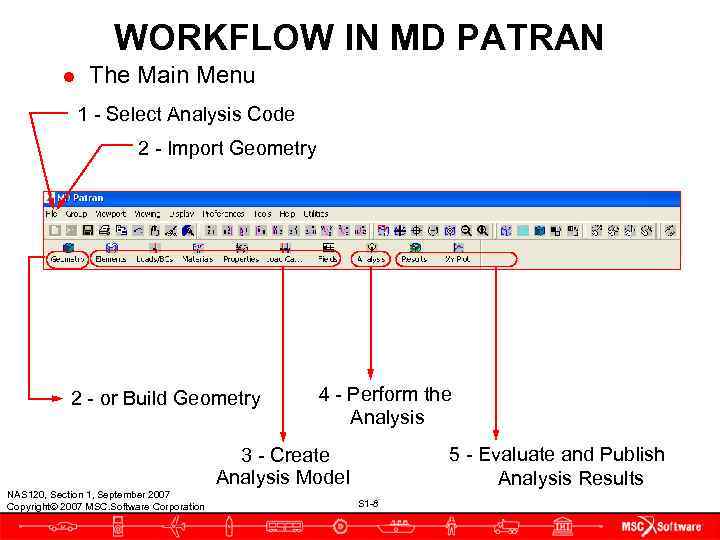
WORKFLOW IN MD PATRAN ● The Main Menu 1 - Select Analysis Code 2 - Import Geometry 2 - or Build Geometry 4 - Perform the Analysis 3 - Create 5 - Evaluate and Publish Analysis Model Analysis Results NAS 120, Section 1, September 2007 Copyright 2007 MSC. Software Corporation S 1 -8
SOLVING A TYPICAL ENGINEERING PROBLEM ● The following case study demonstrates how to use MD Patran and MD Nastran in a typical engineering application NAS 120, Section 1, September 2007 Copyright 2007 MSC. Software Corporation S 1 -9
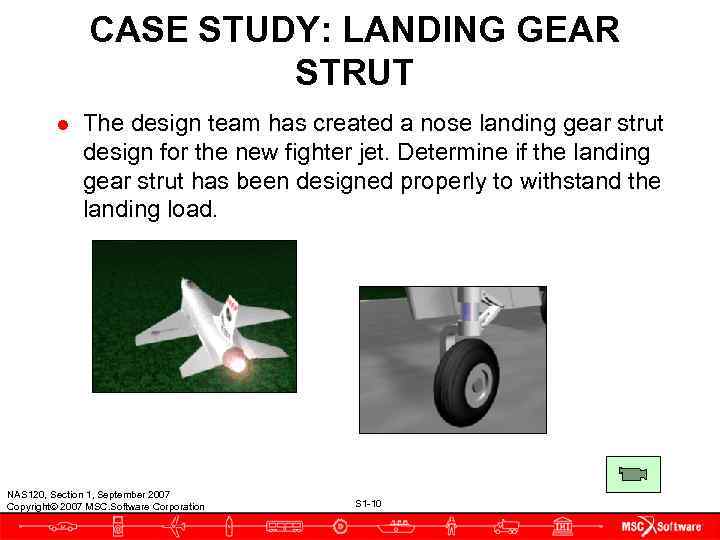
CASE STUDY: LANDING GEAR STRUT ● The design team has created a nose landing gear strut design for the new fighter jet. Determine if the landing gear strut has been designed properly to withstand the landing load. NAS 120, Section 1, September 2007 Copyright 2007 MSC. Software Corporation S 1 -10
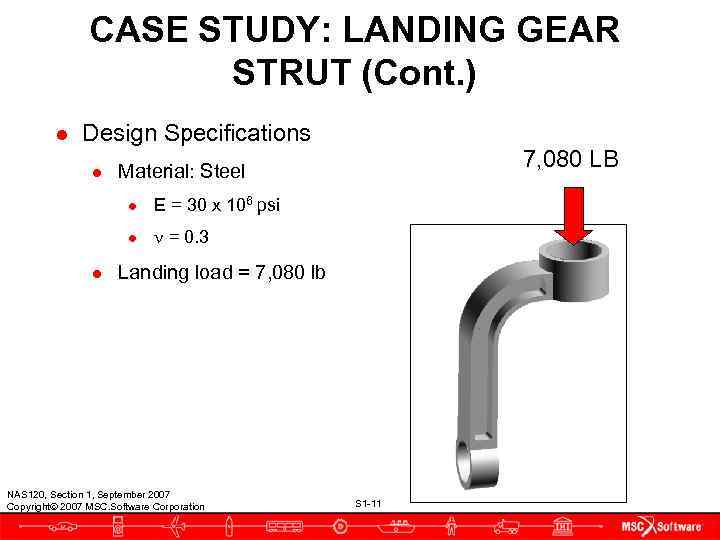
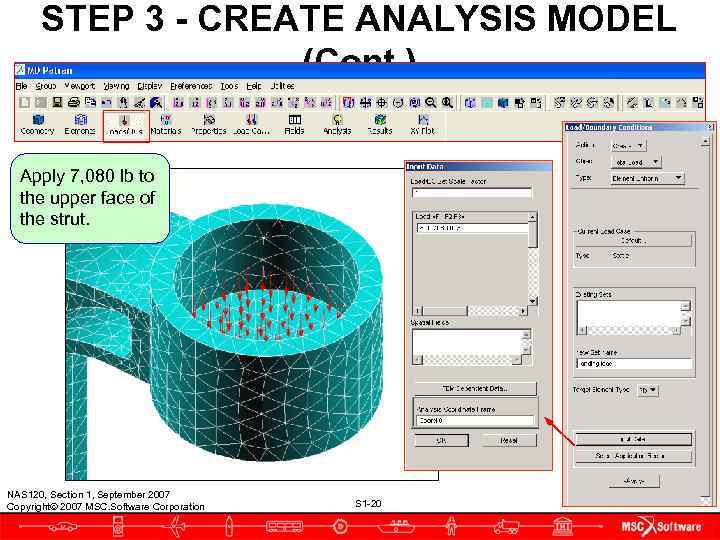
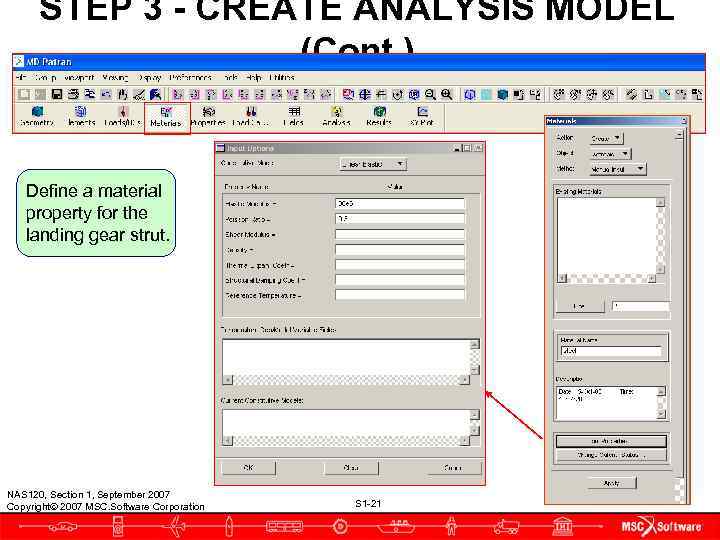
CASE STUDY: LANDING GEAR STRUT (Cont. ) ● Design Specifications ● Material: Steel 7, 080 LB ● E = 30 x 106 psi ● n = 0. 3 ● Landing load = 7, 080 lb NAS 120, Section 1, September 2007 Copyright 2007 MSC. Software Corporation S 1 -11
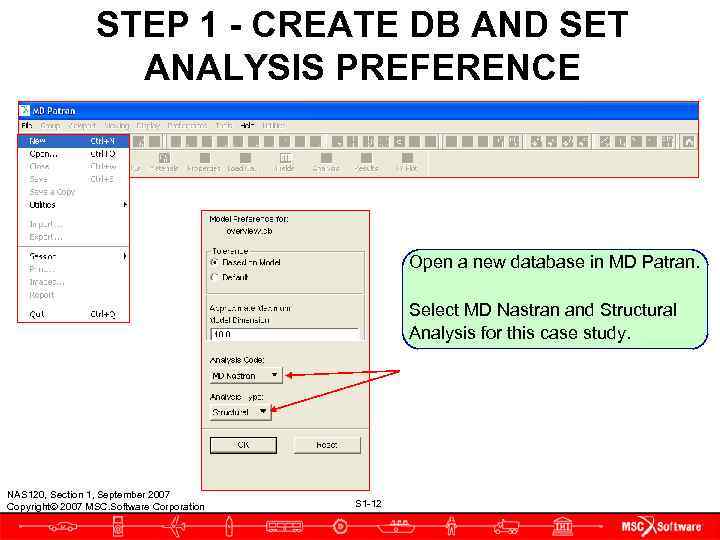
STEP 1 - CREATE DB AND SET ANALYSIS PREFERENCE Open a new database in MD Patran. Select MD Nastran and Structural Analysis for this case study. NAS 120, Section 1, September 2007 Copyright 2007 MSC. Software Corporation S 1 -12
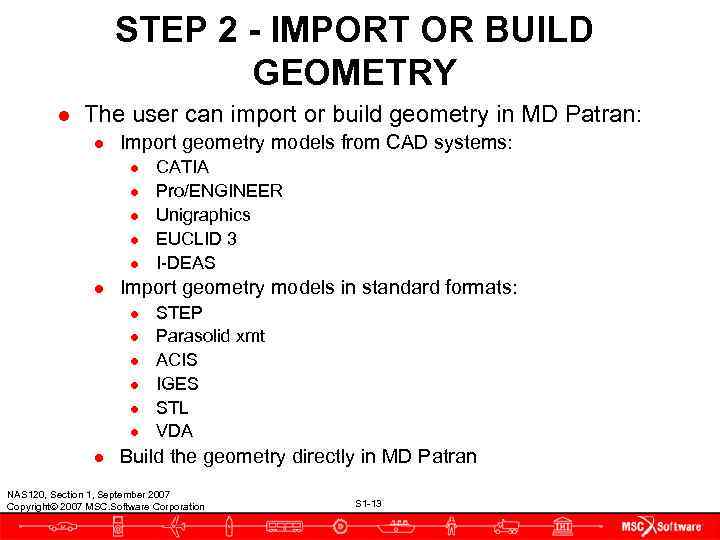
STEP 2 - IMPORT OR BUILD GEOMETRY ● The user can import or build geometry in MD Patran: ● Import geometry models from CAD systems: ● CATIA ● Pro/ENGINEER ● Unigraphics ● EUCLID 3 ● I-DEAS ● Import geometry models in standard formats: ● STEP ● Parasolid xmt ● ACIS ● IGES ● STL ● VDA ● Build the geometry directly in MD Patran NAS 120, Section 1, September 2007 Copyright 2007 MSC. Software Corporation S 1 -13
STEP 2 - IMPORT OR BUILD GEOMETRY (Cont. ) ● For this case study, the landing gear strut geometry model is available as a parasolid xmt file. ● Import this model directly into MD Patran. NAS 120, Section 1, September 2007 Copyright 2007 MSC. Software Corporation S 1 -14
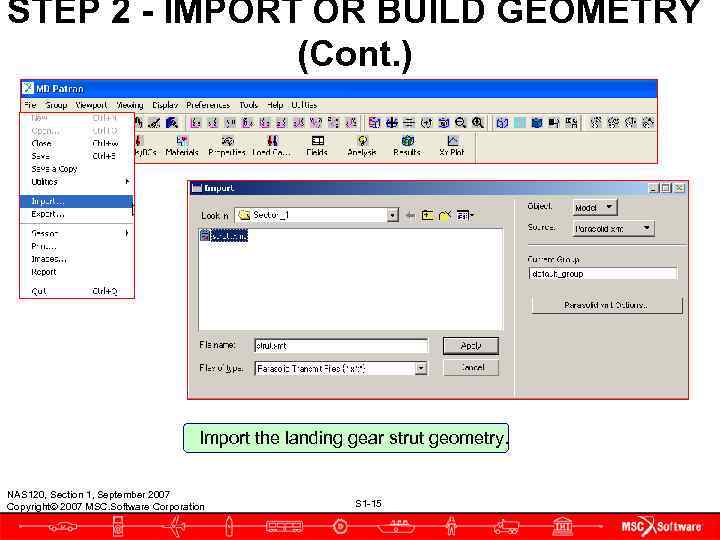
STEP 2 - IMPORT OR BUILD GEOMETRY (Cont. ) Import the landing gear strut geometry. NAS 120, Section 1, September 2007 Copyright 2007 MSC. Software Corporation S 1 -15
STEP 2 - IMPORT OR BUILD GEOMETRY (Cont. ) ● The landing gear strut geometry is imported. NAS 120, Section 1, September 2007 Copyright 2007 MSC. Software Corporation S 1 -16
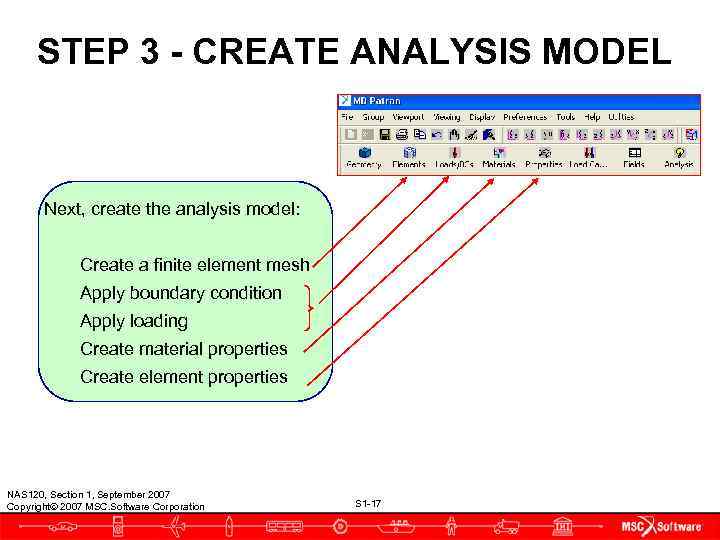
STEP 3 - CREATE ANALYSIS MODEL Next, create the analysis model: Create a finite element mesh Apply boundary condition Apply loading Create material properties Create element properties NAS 120, Section 1, September 2007 Copyright 2007 MSC. Software Corporation S 1 -17
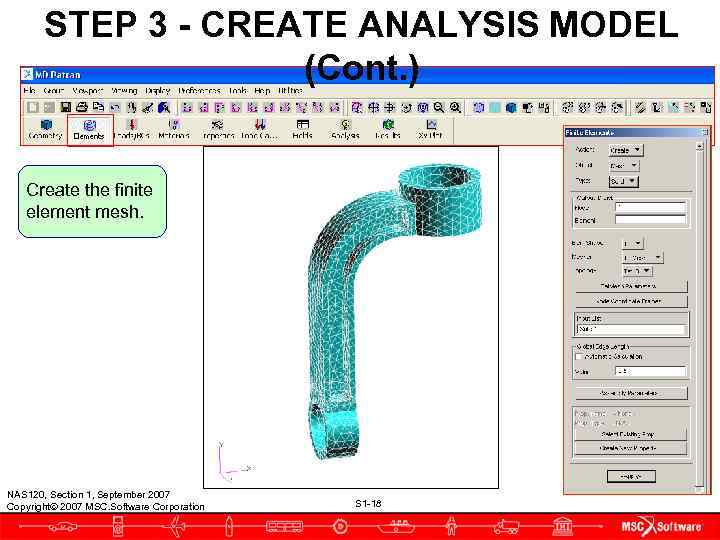
STEP 3 - CREATE ANALYSIS MODEL (Cont. ) Create the finite element mesh. NAS 120, Section 1, September 2007 Copyright 2007 MSC. Software Corporation S 1 -18
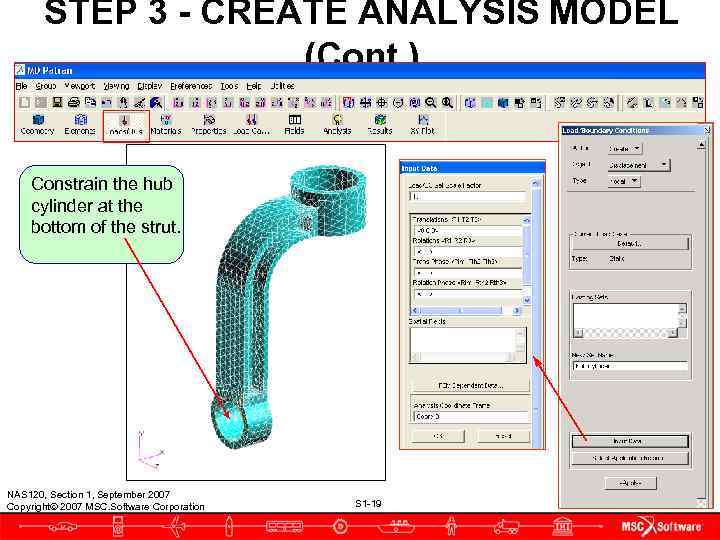
STEP 3 - CREATE ANALYSIS MODEL (Cont. ) Constrain the hub cylinder at the bottom of the strut. NAS 120, Section 1, September 2007 Copyright 2007 MSC. Software Corporation S 1 -19
STEP 3 - CREATE ANALYSIS MODEL (Cont. ) Apply 7, 080 lb to the upper face of the strut. NAS 120, Section 1, September 2007 Copyright 2007 MSC. Software Corporation S 1 -20
STEP 3 - CREATE ANALYSIS MODEL (Cont. ) Define a material property for the landing gear strut. NAS 120, Section 1, September 2007 Copyright 2007 MSC. Software Corporation S 1 -21
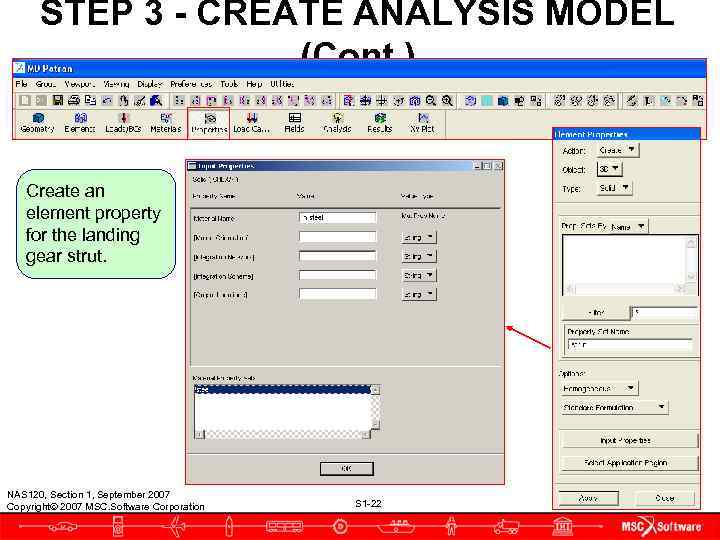
STEP 3 - CREATE ANALYSIS MODEL (Cont. ) Create an element property for the landing gear strut. NAS 120, Section 1, September 2007 Copyright 2007 MSC. Software Corporation S 1 -22
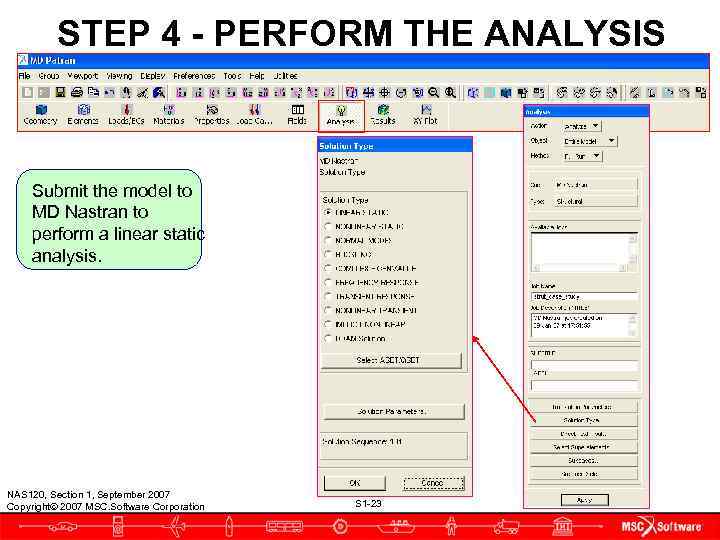
STEP 4 - PERFORM THE ANALYSIS Submit the model to MD Nastran to perform a linear static analysis. NAS 120, Section 1, September 2007 Copyright 2007 MSC. Software Corporation S 1 -23
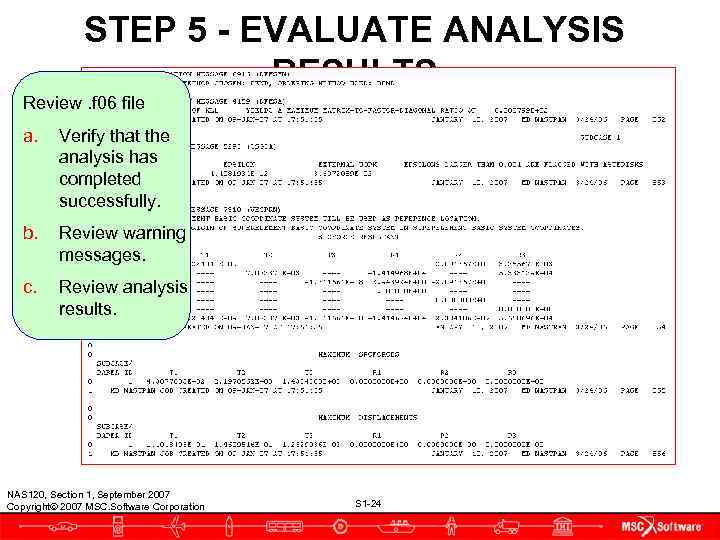
STEP 5 - EVALUATE ANALYSIS RESULTS Review. f 06 file a. Verify that the analysis has completed successfully. b. Review warning messages. c. Review analysis results. NAS 120, Section 1, September 2007 Copyright 2007 MSC. Software Corporation S 1 -24
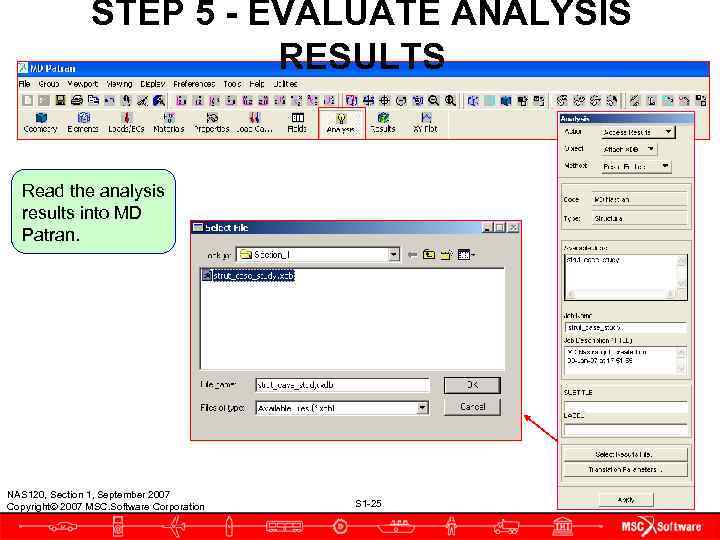
STEP 5 - EVALUATE ANALYSIS RESULTS Read the analysis results into MD Patran. NAS 120, Section 1, September 2007 Copyright 2007 MSC. Software Corporation S 1 -25
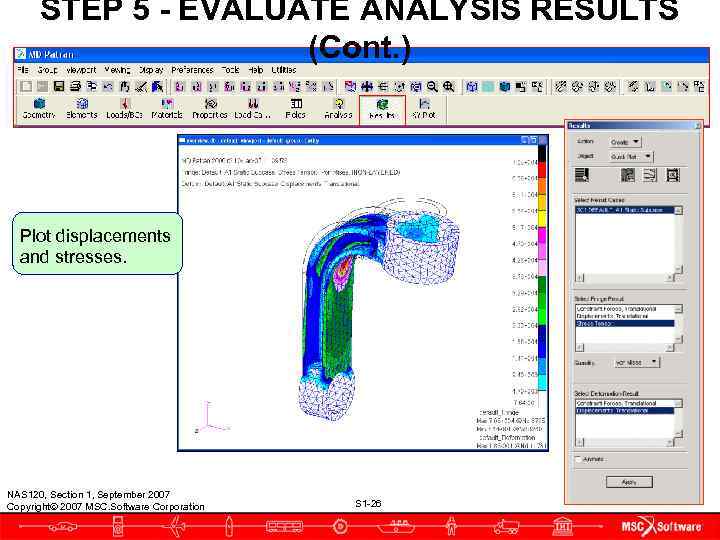
STEP 5 - EVALUATE ANALYSIS RESULTS (Cont. ) Plot displacements and stresses. NAS 120, Section 1, September 2007 Copyright 2007 MSC. Software Corporation S 1 -26
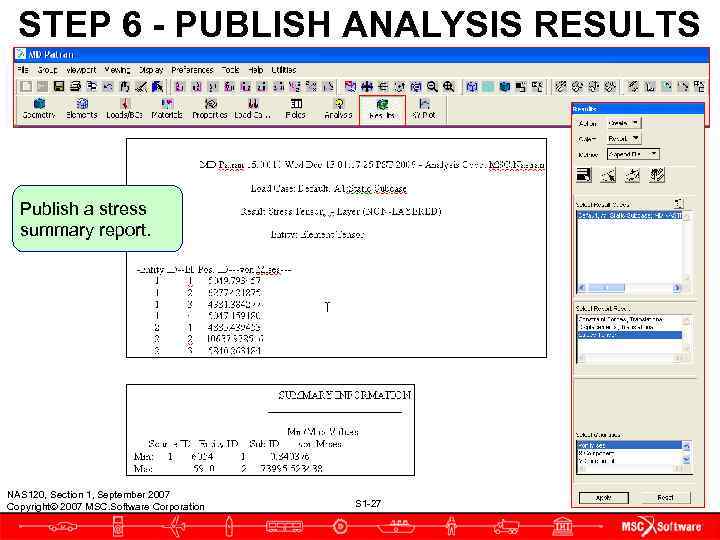
STEP 6 - PUBLISH ANALYSIS RESULTS Publish a stress summary report. NAS 120, Section 1, September 2007 Copyright 2007 MSC. Software Corporation S 1 -27
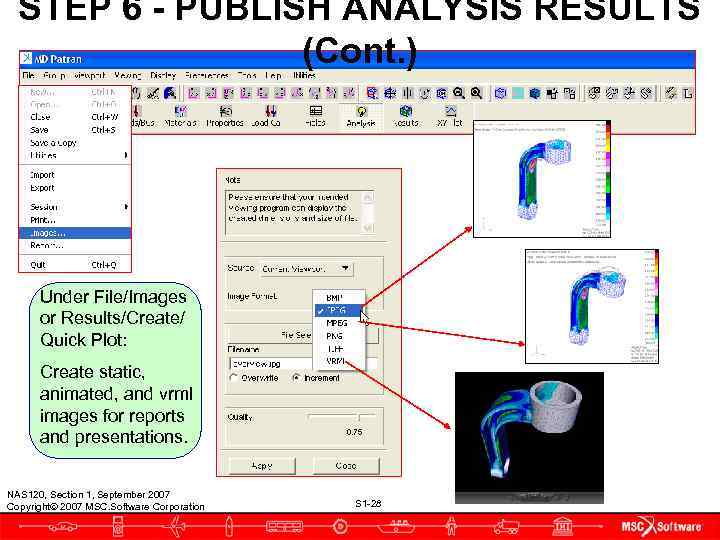
STEP 6 - PUBLISH ANALYSIS RESULTS (Cont. ) Under File/Images or Results/Create/ Quick Plot: Create static, animated, and vrml images for reports and presentations. NAS 120, Section 1, September 2007 Copyright 2007 MSC. Software Corporation S 1 -28
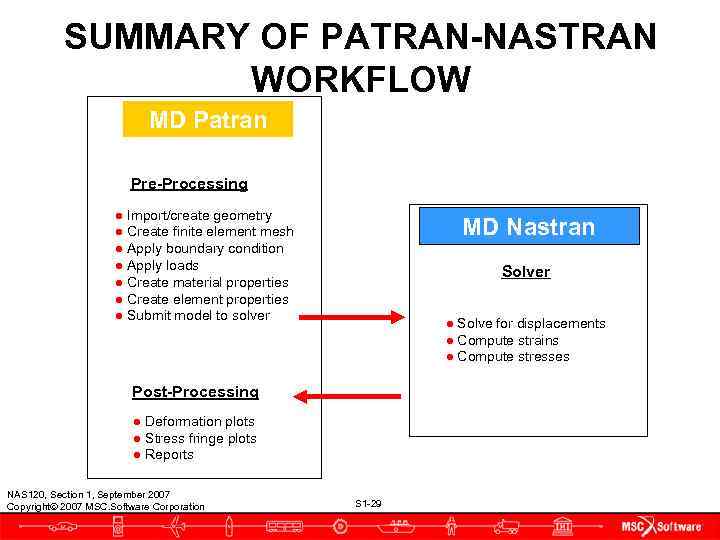
SUMMARY OF PATRAN-NASTRAN WORKFLOW MD Patran Pre-Processing ● Import/create geometry ● Create finite element mesh MD Nastran ● Apply boundary condition ● Apply loads Solver ● Create material properties ● Create element properties ● Submit model to solver ● Solve for displacements ● Compute strains ● Compute stresses Post-Processing ● Deformation plots ● Stress fringe plots ● Reports NAS 120, Section 1, September 2007 Copyright 2007 MSC. Software Corporation S 1 -29
COMPANY OVERVIEW ● The MSC. Software Corporation has been supplying sophisticated computer-aided engineering (CAE) tools since 1963. ● MSC. Software is the developer, distributor, and supporter of the most complete and widely-used structural analysis program in the world, MD Nastran. ● MSC. Software is also the developer, distributor, and supporter of the state of the art CAE analysis program, MD Patran. ● MD. Patran is an open architecture, pre and post processor for all major finite element analysis (FEA) software, including MD Nastran and Marc. NAS 120, Section 1, September 2007 Copyright 2007 MSC. Software Corporation S 1 -30
WHERE TO GO FOR HELP ● The MSC Technical Support Hotline 1 -800 -732 -7284 is staffed Monday through Friday, 8: 00 a. m. to 5: 00 p. m. ● Email support: ● mscpatran. support@mscsoftware. com ● mscnastran. support@mscsoftware. com ● Website support at www. mscsoftware. com/support NAS 120, Section 1, September 2007 Copyright 2007 MSC. Software Corporation S 1 -31
WHERE TO GET TRAINING ● MD Nastran and MD Patran seminars are held worldwide ● Locations, dates, and descriptions of all scheduled classes can be found at www. mscsoftware. com/support/msc_institute ● MSC also conducts cost-effective in-house seminars at clients’ facilities. These seminars can be tailored to meet clients’ specific needs. ● Contact the MSC Institute at 1 -800 -732 -7211 NAS 120, Section 1, September 2007 Copyright 2007 MSC. Software Corporation S 1 -32
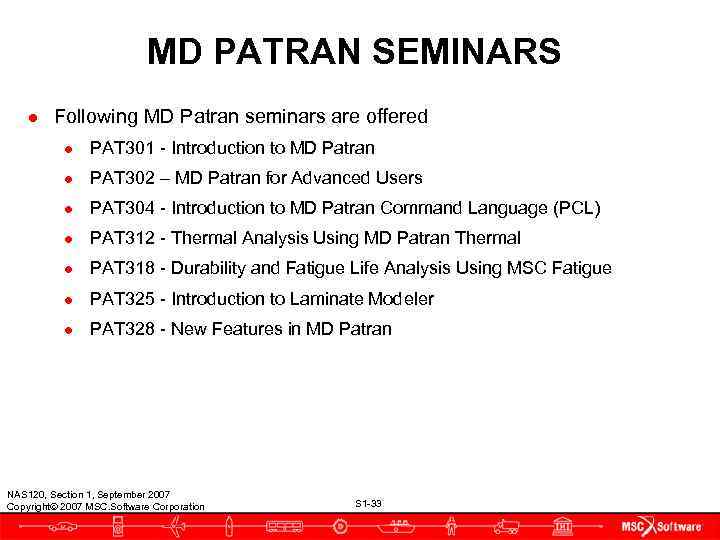
MD PATRAN SEMINARS ● Following MD Patran seminars are offered ● PAT 301 - Introduction to MD Patran ● PAT 302 – MD Patran for Advanced Users ● PAT 304 - Introduction to MD Patran Command Language (PCL) ● PAT 312 - Thermal Analysis Using MD Patran Thermal ● PAT 318 - Durability and Fatigue Life Analysis Using MSC Fatigue ● PAT 325 - Introduction to Laminate Modeler ● PAT 328 - New Features in MD Patran NAS 120, Section 1, September 2007 Copyright 2007 MSC. Software Corporation S 1 -33
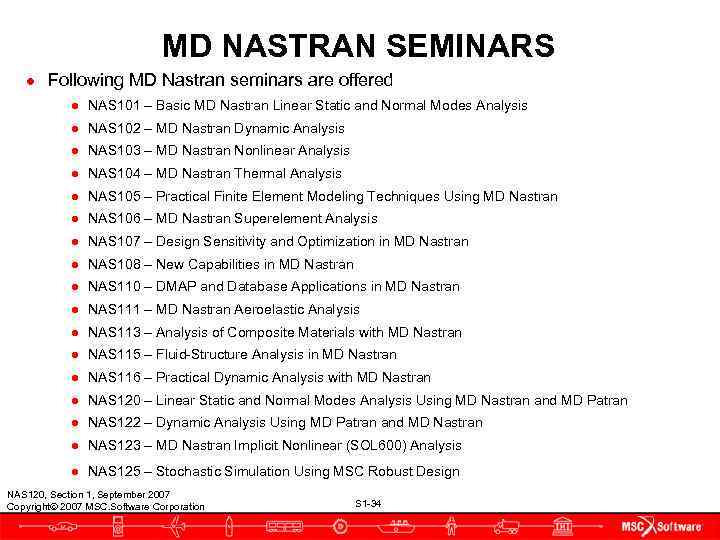
MD NASTRAN SEMINARS ● Following MD Nastran seminars are offered ● NAS 101 – Basic MD Nastran Linear Static and Normal Modes Analysis ● NAS 102 – MD Nastran Dynamic Analysis ● NAS 103 – MD Nastran Nonlinear Analysis ● NAS 104 – MD Nastran Thermal Analysis ● NAS 105 – Practical Finite Element Modeling Techniques Using MD Nastran ● NAS 106 – MD Nastran Superelement Analysis ● NAS 107 – Design Sensitivity and Optimization in MD Nastran ● NAS 108 – New Capabilities in MD Nastran ● NAS 110 – DMAP and Database Applications in MD Nastran ● NAS 111 – MD Nastran Aeroelastic Analysis ● NAS 113 – Analysis of Composite Materials with MD Nastran ● NAS 115 – Fluid-Structure Analysis in MD Nastran ● NAS 116 – Practical Dynamic Analysis with MD Nastran ● NAS 120 – Linear Static and Normal Modes Analysis Using MD Nastran and MD Patran ● NAS 122 – Dynamic Analysis Using MD Patran and MD Nastran ● NAS 123 – MD Nastran Implicit Nonlinear (SOL 600) Analysis ● NAS 125 – Stochastic Simulation Using MSC Robust Design NAS 120, Section 1, September 2007 Copyright 2007 MSC. Software Corporation S 1 -34
EXERCISE ● Perform Workshop 1 “Landing Gear Strut Analysis” in your exercise workbook. NAS 120, Section 1, September 2007 Copyright 2007 MSC. Software Corporation S 1 -35