



 Scheduling
 4 4 Where are we? 1. Introduction 2. Project Life Cycles 3. Project Artifacts 4. Work Elements, Schedule, Budget 4 4. 1 Work Breakdown Structure 4 4. 2 Dependencies between tasks - 4. 3 Schedule (Today’s lecture) – 4. 4 Resource Requirements – 4. 5 Budget • Optional Inclusions
 Outline • • • The last lecture dealt with Artifacts of Project Today we focus on Dependencies and Scheduling Estimating times for activities Determining critical path and slack times Determining project duration Many heuristics and examples – How to live with a given deadline – Optimizing schedules – Rearranging schedules
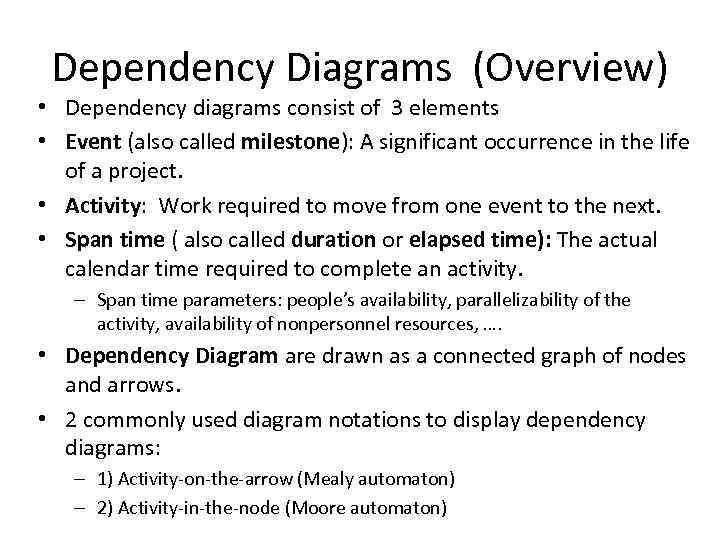 Dependency Diagrams (Overview) • Dependency diagrams consist of 3 elements • Event (also called milestone): A significant occurrence in the life of a project. • Activity: Work required to move from one event to the next. • Span time ( also called duration or elapsed time): The actual calendar time required to complete an activity. – Span time parameters: people’s availability, parallelizability of the activity, availability of nonpersonnel resources, …. • Dependency Diagram are drawn as a connected graph of nodes and arrows. • 2 commonly used diagram notations to display dependency diagrams: – 1) Activity-on-the-arrow (Mealy automaton) – 2) Activity-in-the-node (Moore automaton)
 Why Dependency Diagrams? • Example: – You are assigned a project consisting of 10 activities which take one week each to be completed. – How long does the project take? • When projects have more than 15 -20 activities, one cannot to compute the schedule in the head any more. • Dependency Diagrams are a formal notation to help in the construction and analysis of complex schedules
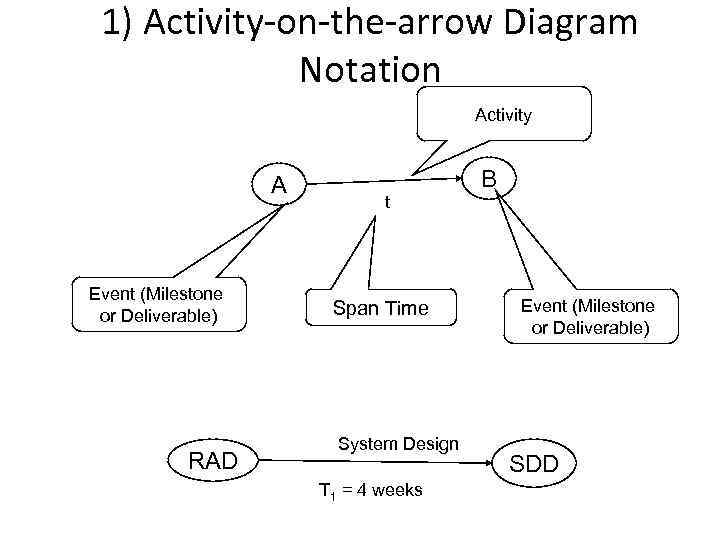 1) Activity-on-the-arrow Diagram Notation Activity A Event (Milestone or Deliverable) RAD t Span Time System Design T 1 = 4 weeks B Event (Milestone or Deliverable) SDD
 PERT • PERT is an activity-on-the-arrow notation • PERT = Program Evaluation and Review Technique • Developed in the 50 s to plan the Polaris weapon system in the USA. • PERT allows to assign optimistic, pessimistic and most likely estimates for the span times of each activity. • You can then compute the probability to determine the likelihood that overall project duration will fall within specified limits.
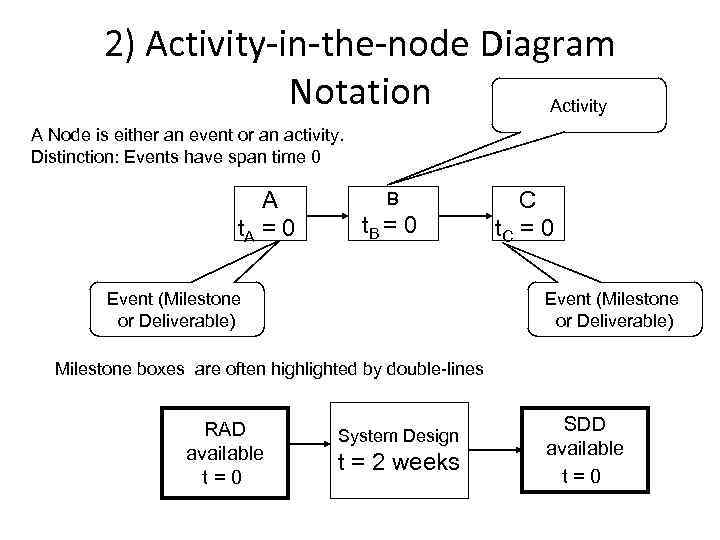 2) Activity-in-the-node Diagram Notation Activity A Node is either an event or an activity. Distinction: Events have span time 0 A t. A = 0 B t. B = 0 Event (Milestone or Deliverable) C t. C = 0 Event (Milestone or Deliverable) Milestone boxes are often highlighted by double-lines RAD available t=0 System Design t = 2 weeks SDD available t=0
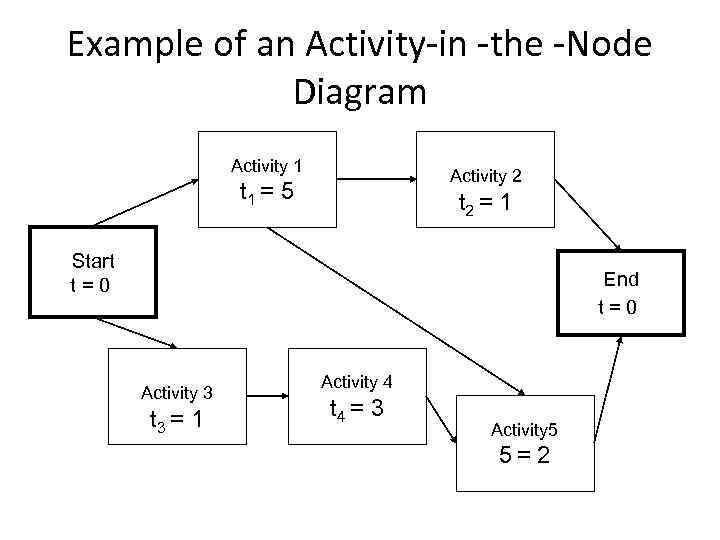 Example of an Activity-in -the -Node Diagram Activity 1 Activity 2 t 1 = 5 t 2 = 1 Start t=0 End t=0 Activity 3 t 3 = 1 Activity 4 t 4 = 3 Activity 5 5= 2
 What do we do with these diagrams? • Compute the project duration • Determine activities that are critical to ensure a timely delivery • Analyse the diagrams – to find ways to shorten the project duration – To find ways to do activities in parallel • 2 techniques are used – Forward pass (determine critical paths) – Backward pass (determine slack time)
 • Definitions: Critical Path and Slack Time 4 Critical path: – A sequence of activities that take the longest time to complete – The length of the critical path(s) defines how long your project will take to complete. • Noncritical path: – A sequence of activities that you can delay and still finish the project in the shortest time possible. • Slack time: – The maximum amount of time that you can delay an activity and still finish your project in the shortest time possible.
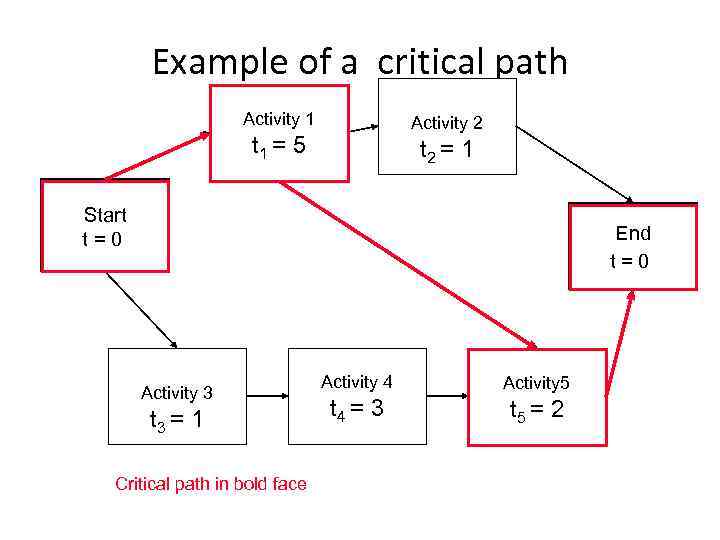 Example of a critical path Activity 1 Activity 2 t 1 = 5 t 2 = 1 Start t=0 End t=0 Activity 3 t 3 = 1 Critical path in bold face Activity 4 Activity 5 t 4 = 3 5 t 5 = 2
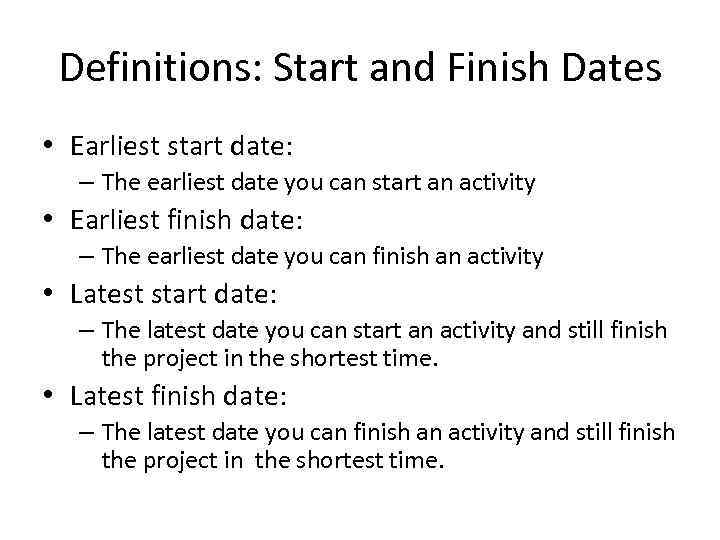 Definitions: Start and Finish Dates • Earliest start date: – The earliest date you can start an activity • Earliest finish date: – The earliest date you can finish an activity • Latest start date: – The latest date you can start an activity and still finish the project in the shortest time. • Latest finish date: – The latest date you can finish an activity and still finish the project in the shortest time.
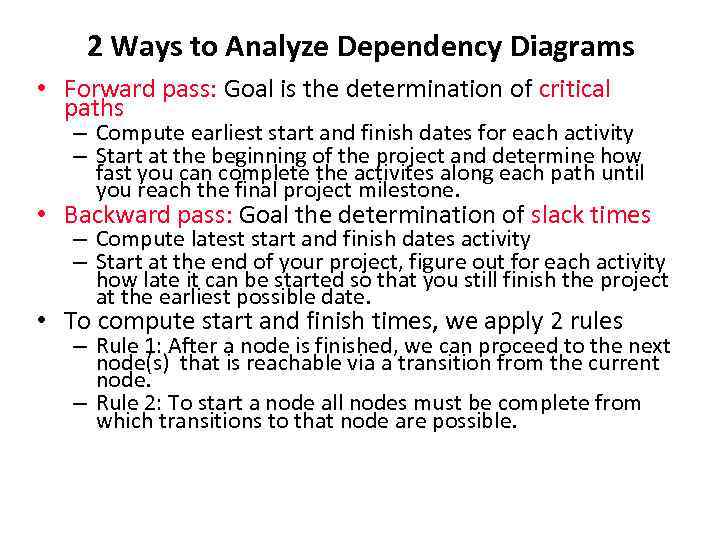 2 Ways to Analyze Dependency Diagrams • Forward pass: Goal is the determination of critical paths – Compute earliest start and finish dates for each activity – Start at the beginning of the project and determine how fast you can complete the activites along each path until you reach the final project milestone. • Backward pass: Goal the determination of slack times – Compute latest start and finish dates activity – Start at the end of your project, figure out for each activity how late it can be started so that you still finish the project at the earliest possible date. • To compute start and finish times, we apply 2 rules – Rule 1: After a node is finished, we can proceed to the next node(s) that is reachable via a transition from the current node. – Rule 2: To start a node all nodes must be complete from which transitions to that node are possible.
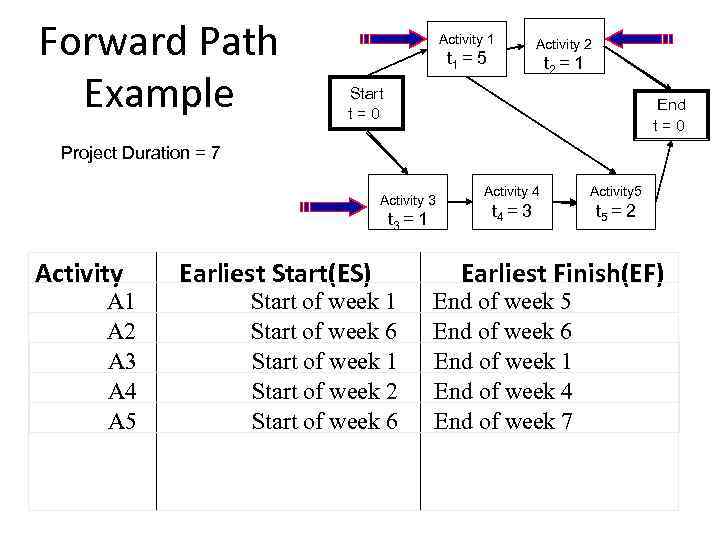 Forward Path Example Activity 1 t 1 = 5 Activity 2 t 2 = 1 Start t=0 End t=0 Project Duration = 7 Activity 3 t. A = 1 3 Activity A 1 A 2 A 3 A 4 A 5 Earliest Start(ES) Start of week 1 Start of week 6 Start of week 1 Start of week 2 Start of week 6 Activity 4 Activity 5 t. A = 3 4 t 5 = 2 Earliest Finish(EF) End of week 5 End of week 6 End of week 1 End of week 4 End of week 7
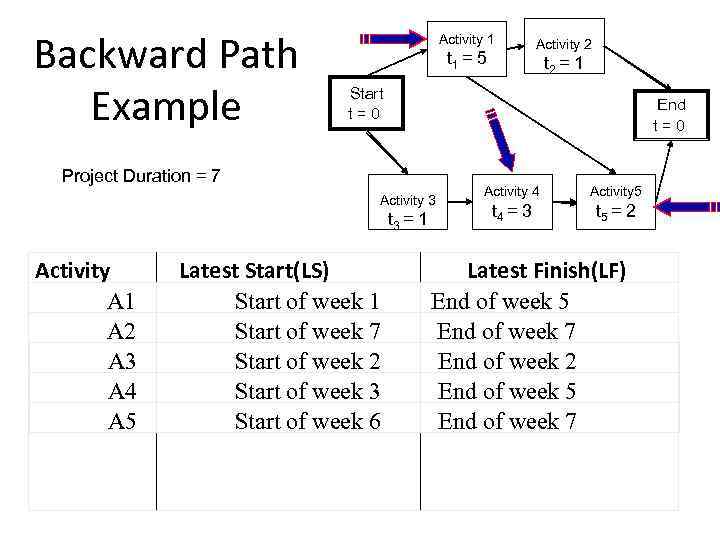 Backward Path Example Activity 1 t 1 = 5 t 2 = 1 Start t=0 End t=0 Project Duration = 7 Activity 3 t. A = 1 3 Activity A 1 A 2 A 3 A 4 A 5 Activity 2 Latest Start(LS) Start of week 1 Start of week 7 Start of week 2 Start of week 3 Start of week 6 Activity 4 Activity 5 t. A = 3 4 t 5 = 2 Latest Finish(LF) End of week 5 End of week 7 End of week 2 End of week 5 End of week 7
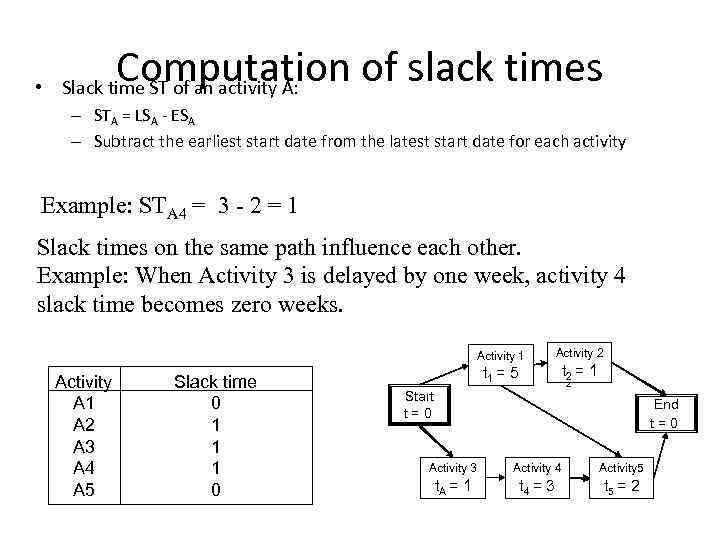 Computation of slack times • Slack time ST of an activity A: – STA = LSA - ESA – Subtract the earliest start date from the latest start date for each activity Example: STA 4 = 3 - 2 = 1 Slack times on the same path influence each other. Example: When Activity 3 is delayed by one week, activity 4 slack time becomes zero weeks. Activity 1 Activity A 1 A 2 A 3 A 4 A 5 Slack time 0 1 1 1 0 t 1 = 5 Activity 2 Start t=0 t 2 = 1 End t=0 Activity 3 Activity 4 Activity 5 t. A = 1 t. A = 3 4 t 5 = 2
 Path types in dependency graphs • Critical path: Any path in a dependency diagram, in which all activities have zero slack time. • Noncritical path: Any path with at least one activity that has a nonzero slack time. • Overcritical path: A path with at least one activity that has a negative slack time. – Overcritical paths should be considered as serious warnings: Your plan contains unreal time estimates • Any dependency diagram with no fixed intermediate milestones has at least one critical path. • A project schedule with fixed intermediate milestones might have no critical path – Example: The analysis review must be done 1 month after project start, the estimated time for all activities before the review is 3 weeks.
 Frequently used formats for dependency graphs • Milestone View (“Key-Events report”): – A table that lists milestones and the dates on which you plan to reach them. • Activities View: – A table that lists the activities and the dates on which you plan to start and end them • Gantt chart View: – A graphical illustrating on a timeline when each activity will start, be performed and end. • Combined Gantt Chart and Milestone View: – The Gantt Chart contains activities as well as milestones.
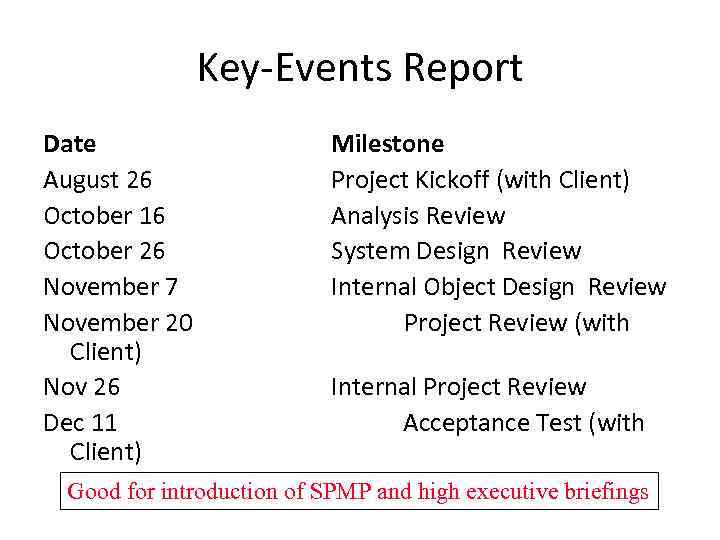 Key-Events Report Date August 26 October 16 October 26 November 7 November 20 Client) Nov 26 Dec 11 Client) Milestone Project Kickoff (with Client) Analysis Review System Design Review Internal Object Design Review Project Review (with Internal Project Review Acceptance Test (with Good for introduction of SPMP and high executive briefings
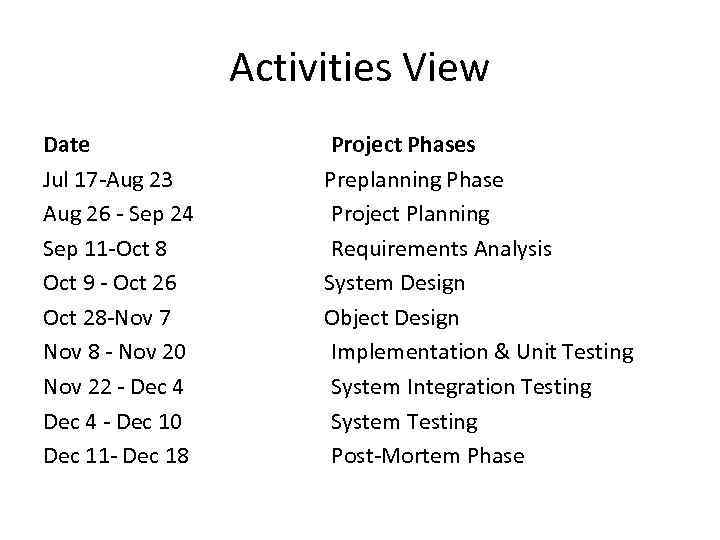 Activities View Date Jul 17 -Aug 23 Aug 26 - Sep 24 Sep 11 -Oct 8 Oct 9 - Oct 26 Oct 28 -Nov 7 Nov 8 - Nov 20 Nov 22 - Dec 4 - Dec 10 Dec 11 - Dec 18 Project Phases Preplanning Phase Project Planning Requirements Analysis System Design Object Design Implementation & Unit Testing System Integration Testing System Testing Post-Mortem Phase
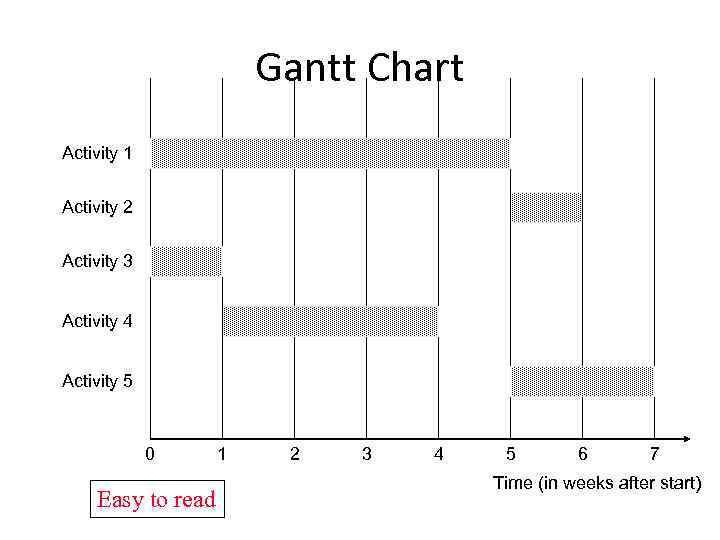 Gantt Chart Activity 1 Activity 2 Activity 3 Activity 4 Activity 5 0 Easy to read 1 2 3 4 5 6 7 Time (in weeks after start)
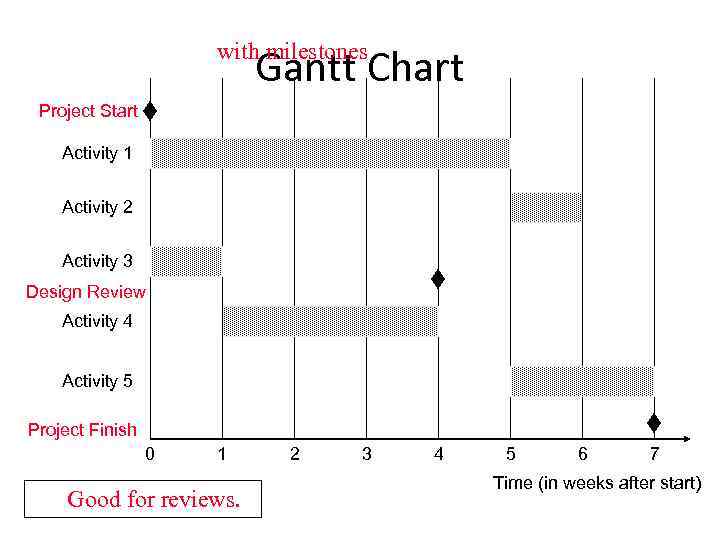 with milestones Gantt Chart Project Start Activity 1 Activity 2 Activity 3 Design Review Activity 4 Activity 5 Project Finish 0 1 Good for reviews. 2 3 4 5 6 7 Time (in weeks after start)
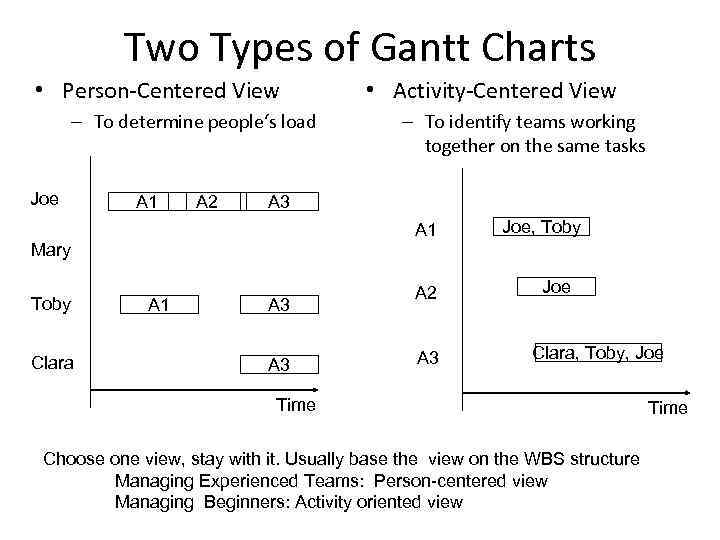 Two Types of Gantt Charts • Person-Centered View – To determine people‘s load Joe A 1 A 2 Clara – To identify teams working together on the same tasks A 3 A 1 Mary Toby • Activity-Centered View A 1 A 3 A 2 A 3 Joe, Toby Joe Clara, Toby, Joe Time Choose one view, stay with it. Usually base the view on the WBS structure Managing Experienced Teams: Person-centered view Managing Beginners: Activity oriented view Time
 Tools support for Establishing Schedules • Tool support for – Graphical user interface for entering activity data – Automatic computation of critical paths – Multiple views (PERT, Gantt, table views) and switching between these views • Many products available. Examples – Fast Track (Demo) (http: //www. aecsoft. com/downloads/demo/dow nloads_listindex. asp? bhcp=1) • Main view: Gantt Charts – Microsoft Project (http: //www. microsoft. com/office/project/default. asp) • PERT Charts, Gantt Charts, combined Milestone/Gantt Charts
 How to develop an Initial Project Schedule • Identify all your activities (reuse a template if possible) • Identify intermediate and final dates that must be met – Assign milestones to these dates • Identify all activities and milestones outside your project that may affect your project’s schedule • Identify “depends on” relationships between all these identified activities
 Developing a Schedule for Integration Testing Five Steps: 1. Start with System Decomposition 2. Determine your Integration Testing Strategy 3. Determine the Dependency Diagram (UML Activity Diagram) 4. Add Time Estimates 5. Visualize the activities on a time scale: Gantt Chart See Bruegge&Dutoit 2003, Chapter 9 Testing
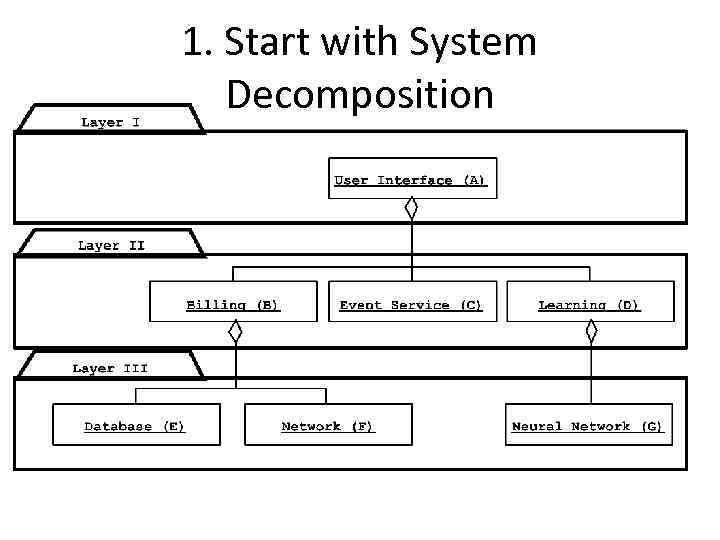 1. Start with System Decomposition
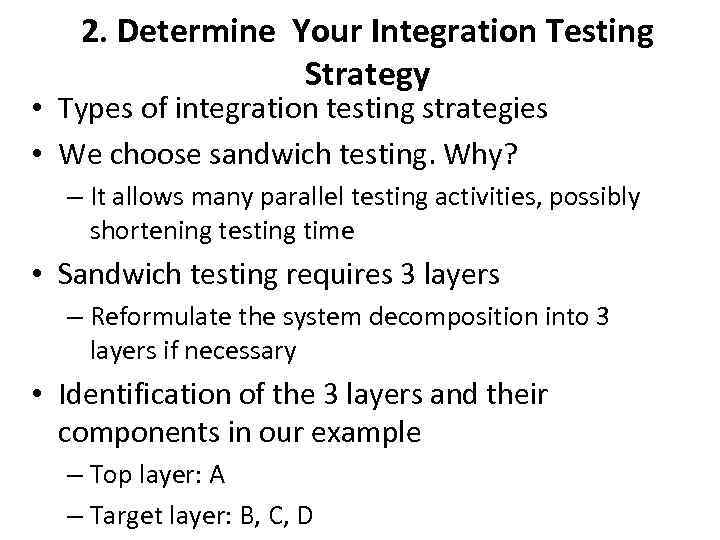 2. Determine Your Integration Testing Strategy • Types of integration testing strategies • We choose sandwich testing. Why? – It allows many parallel testing activities, possibly shortening testing time • Sandwich testing requires 3 layers – Reformulate the system decomposition into 3 layers if necessary • Identification of the 3 layers and their components in our example – Top layer: A – Target layer: B, C, D
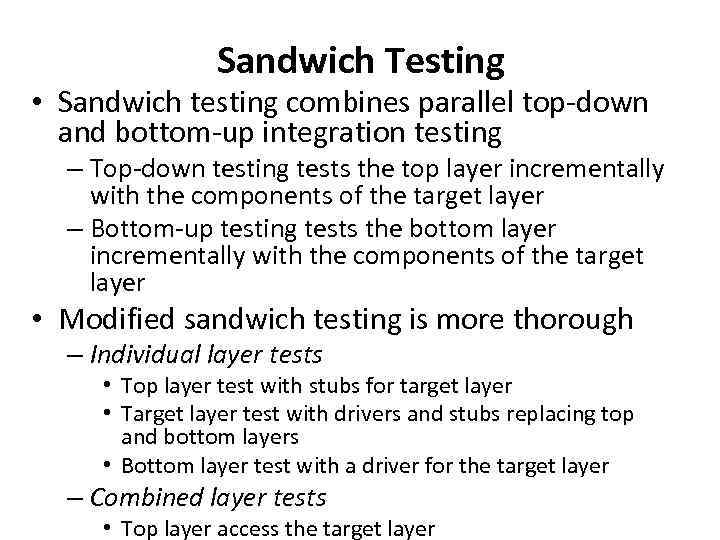 Sandwich Testing • Sandwich testing combines parallel top-down and bottom-up integration testing – Top-down testing tests the top layer incrementally with the components of the target layer – Bottom-up testing tests the bottom layer incrementally with the components of the target layer • Modified sandwich testing is more thorough – Individual layer tests • Top layer test with stubs for target layer • Target layer test with drivers and stubs replacing top and bottom layers • Bottom layer test with a driver for the target layer – Combined layer tests • Top layer access the target layer
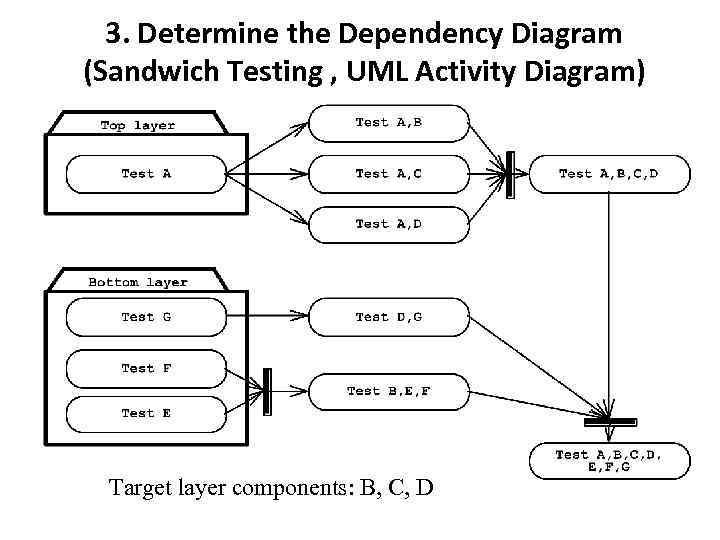 3. Determine the Dependency Diagram (Sandwich Testing , UML Activity Diagram) Target layer components: B, C, D
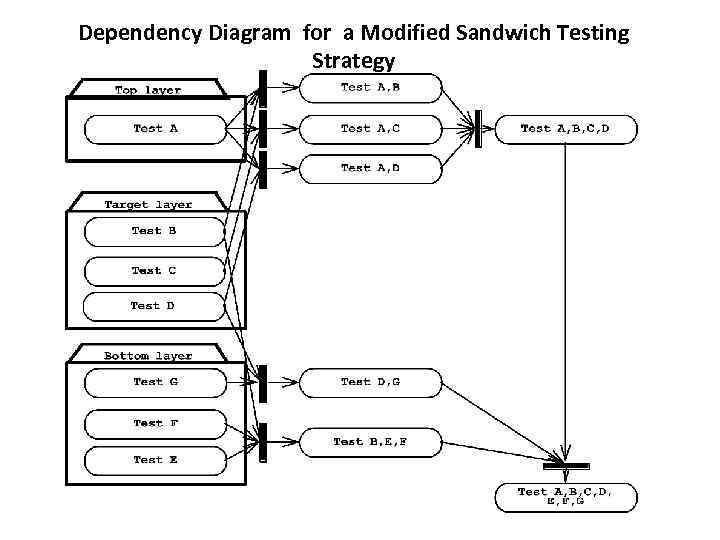 Dependency Diagram for a Modified Sandwich Testing Strategy
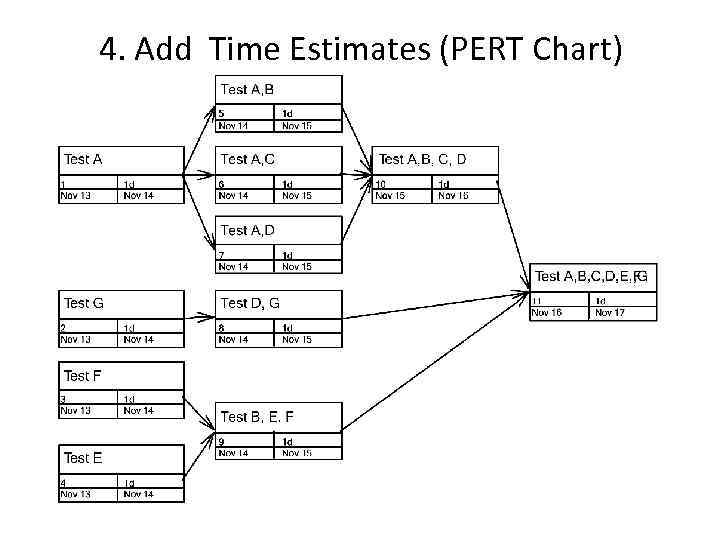 4. Add Time Estimates (PERT Chart)
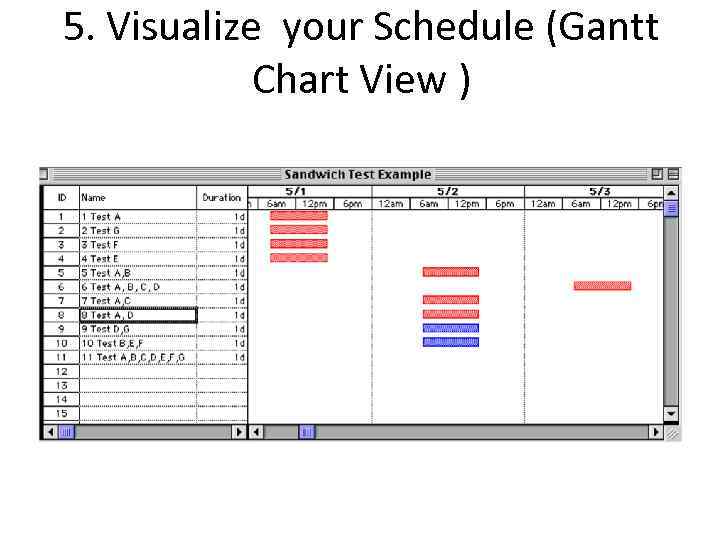 5. Visualize your Schedule (Gantt Chart View )
 How to reduce the planned project time • Recheck the original span time estimates – Ask other experts to check the estimates – Has the development environment changed? (batch vs interactive systems, desktop vs laptop development) • Hire more experienced personnel to perform the activities – Trade-off: Experts work fast, but cost more • Consider different strategies to perform the activities – Consider to Buy a work product instead of building it (Trade-off: Buy-vs-build) – Consider extern subcontractor instead of performing the work internally • Try to find parallelizable activites on the critical path – Continue coding while waiting for the results of a review – Risky activity, portions of the work may have to be redone. • Develop an entirely new strategy to solve the problem
 Typical Mistakes when Developing Schedules • The „Backing in“ Mistake • Using Fudge Factors
 The “Backing in” Mistake • Definition “Backing In”: – You start at the last milestone of the project and work your way back toward the starting milestone, while estimating durations that will add up to the amount of the available time • Problems with Backing in: – You probably miss activities because your focus is on meeting the time constraints rather than identifying the required work – Your span time estimates are based on what you allow activites to take, not what they actually require – The order in which you propose activities may not be the most effective one.
 Using Fudge Factors • Parkinson formulated this law for project completion: – Work tends to expand to fill the time allotted for it. • Fudge factor: – A fudge factor is the extra amount of time you add to your best estimate of span time “just to be safe”. – Example: Many software companies double their span time estimates.
 Heuristics for dealing with time 1. First Set the Project Start Time => – Determines the planned project time – Determine the critical path(s) 2. Then try to reduce the planned project time – If you want to get your project done in less time, you need to consider ways to shorten the aggregate time it takes to complete the critical path. • Avoid fudge factors
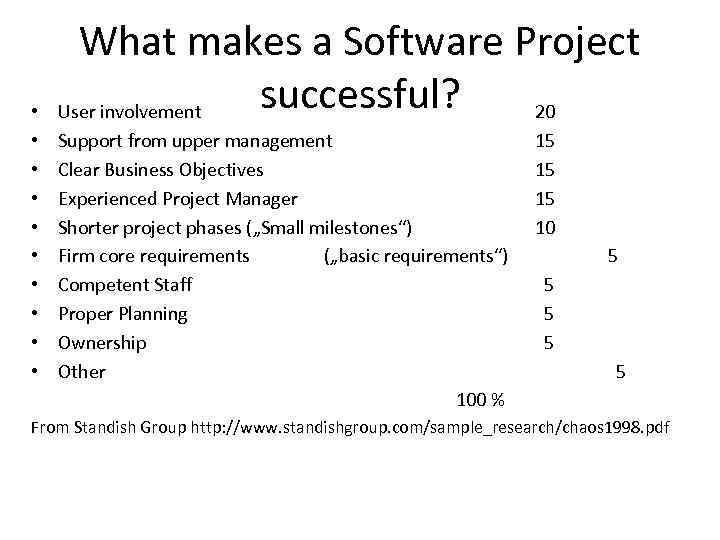 • • • What makes a Software Project successful? User involvement 20 Support from upper management Clear Business Objectives Experienced Project Manager Shorter project phases („Small milestones“) Firm core requirements („basic requirements“) Competent Staff Proper Planning Ownership Other 100 % 15 15 15 10 5 5 5 From Standish Group http: //www. standishgroup. com/sample_research/chaos 1998. pdf
 Become a better software project manager • End User and Management involvement 35% – Learn how to involve the customer and end users – Learn how to get support from your upper management • Practice project management 30 % – Do as many projects as possible – Learn from your project failures • Focus on business objectives and
 Summary • Software Project Management Plan, Section 5: Ü 5. 1 Work Breakdown Structure Ü 5. 2 Dependencies between tasks v 5. 3 Resource Requirements (=> Lecture on project organization) v 5. 4 Budget (=> Lecture on project estimation) Ü 5. 5 Schedule • Work Breakdown Structure (WBS): Set of activities to do (“use cases”) • Dependency Graph: Identification of dependency relationships between activities identified in the WBS
 Summary: Another view: -) • Developing a project plan is is an art. Practice it! • Use project templates for yourself or your organization, build these templates iteratively • There are several different ways to do a WBS (activity-oriented, entity-oriented, …. ) • The detailed planning horizon should not got beyond a 3 month time frame • Innovative projects with changing requirements or technology enablers should include a initial planning phase that results in a project agreement. • A dependency graph is the WBS plus dependencies.