 Скачать презентацию Scalla xrootd Andrew Hanushevsky SLAC National Accelerator Laboratory Stanford
7a5c52d3dc330a1be9e245940e156f50.ppt
- Количество слайдов: 44



Scalla/xrootd Andrew Hanushevsky SLAC National Accelerator Laboratory Stanford University 1 -July-09 OSG Storage Forum http: //xrootd. slac. stanford. edu/
Outline System Overview n What’s it made of and how it works Hardware Requirements Typical Configuration Files Performance, Scalability, & Stability Monitoring & Troubleshooting Recent and Future Developments OSG Storage Forum 1 -July-09 2
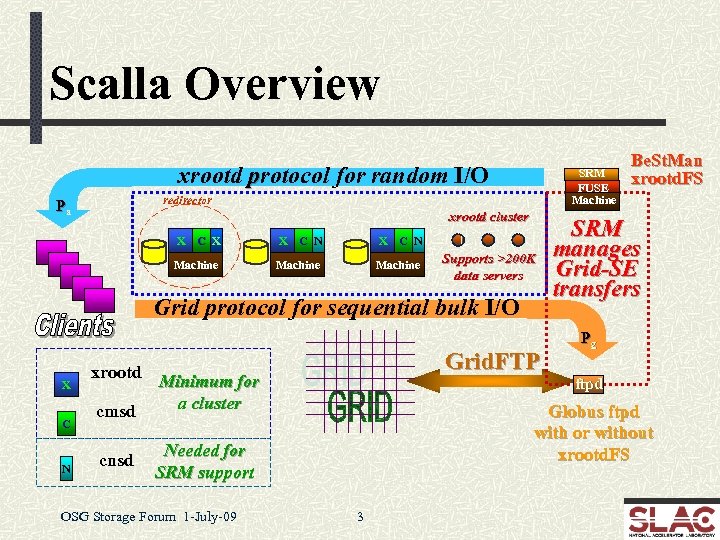
Scalla Overview xrootd protocol for random I/O SRM FUSE Machine redirector Pa xrootd cluster X C X X C N Machine Supports >200 K data servers Grid protocol for sequential bulk I/O X C N Grid. FTP xrootd Minimum for a cluster cmsd cnsd SRM manages Grid-SE transfers Pg ftpd Globus ftpd with or without xrootd. FS Needed for SRM support OSG Storage Forum 1 -July-09 Be. St. Man xrootd. FS 3
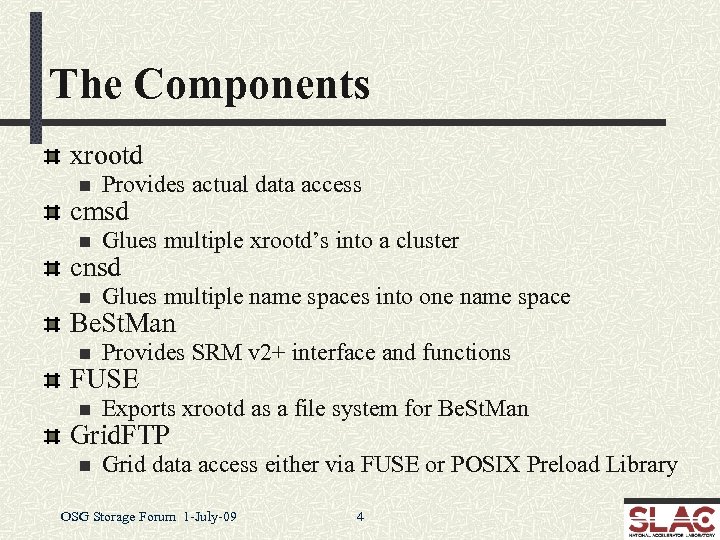
The Components xrootd n Provides actual data access n Glues multiple xrootd’s into a cluster n Glues multiple name spaces into one name space n Provides SRM v 2+ interface and functions n Exports xrootd as a file system for Be. St. Man n Grid data access either via FUSE or POSIX Preload Library cmsd cnsd Be. St. Man FUSE Grid. FTP OSG Storage Forum 1 -July-09 4
Getting to xrootd hosted data Via the root framework n n Automatic when files named root: //. . Manually, use TXNet. File() object n Note: identical TFile() object will not work with xrootd! xrdcp n The native copy command Be. St. Man (SRM add-on) n srmcp, grid. FTP FUSE n Linux only: xrootd as a mounted file system POSIX preload library n Allows POSIX compliant applications to use xrootd OSG Storage Forum 1 -July-09 5
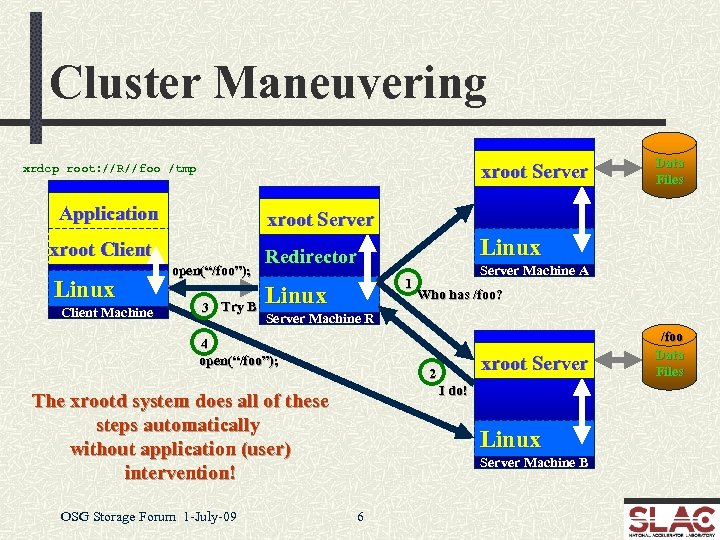
Cluster Maneuvering xroot Server xrdcp root: //R//foo /tmp Application xroot Server xroot Client Linux Client Machine Data Files open(“/foo”); 3 Try B 1 Linux Server Machine A Who has /foo? Server Machine R 4 open(“/foo”); xroot Server 2 I do! The xrootd system does all of these steps automatically without application (user) intervention! OSG Storage Forum 1 -July-09 Linux Redirector Linux Server Machine B 6 /foo Data Files
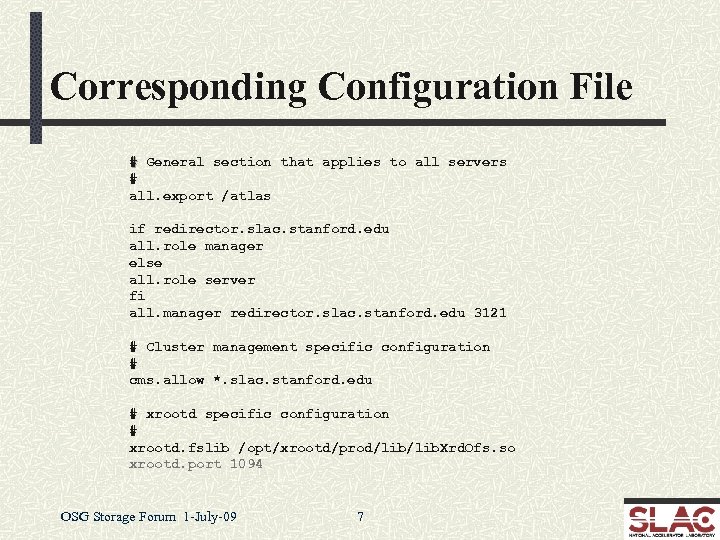
Corresponding Configuration File # General section that applies to all servers # all. export /atlas if redirector. slac. stanford. edu all. role manager else all. role server fi all. manager redirector. slac. stanford. edu 3121 # Cluster management specific configuration # cms. allow *. slac. stanford. edu # xrootd specific configuration # xrootd. fslib /opt/xrootd/prod/lib. Xrd. Ofs. so xrootd. port 1094 OSG Storage Forum 1 -July-09 7
File Discovery Considerations The redirector does not have a catalog of files n n It always asks each server, and Caches the answers in memory for a “while” n So, it won’t ask again when asked about a past lookup Allows real-time configuration changes n Clients never see the disruption Does have some side-effects n n The lookup takes less than a millisecond when files exist Much longer when a requested file does not exist! OSG Storage Forum 1 -July-09 8
Why Do It This Way? Simple, lightweight, and ultra-scalable n Easy configuration and administration Has the R 3 property n Real-Time Reality Representation n Allows n n for ad hoc changes Add and remove servers and files without fussing Restart anything in any order at any time Uniform cookie-cutter tree architecture n Fast-tracks innovative clustering OSG Storage Forum 1 -July-09 12
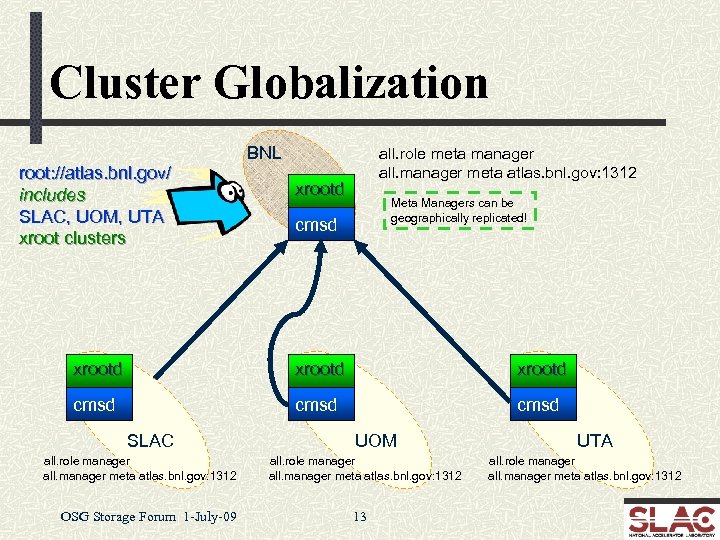
Cluster Globalization BNL root: //atlas. bnl. gov/ includes SLAC, UOM, UTA xroot clusters all. role meta manager all. manager meta atlas. bnl. gov: 1312 xrootd Meta Managers can be geographically replicated! cmsd xrootd cmsd SLAC all. role manager all. manager meta atlas. bnl. gov: 1312 OSG Storage Forum 1 -July-09 UOM all. role manager all. manager meta atlas. bnl. gov: 1312 13 UTA all. role manager all. manager meta atlas. bnl. gov: 1312
What’s Good About This? Uniform view of participating clusters n Can easily deploy a virtual MSS n Fetch n missing files when needed with high confidence Provide real time WAN access as appropriate n You don’t necessarily need data everywhere all the time! n Significantly n Must n Keeps improve WAN transfer rates use torrent copy mode of xrdcp (explained later) clusters administratively independent Alice is using this model n Handles globally distributed autonomous clusters OSG Storage Forum 1 -July-09 14
Hardware Requirements Xrootd extremely efficient of machine resources n Ultra low CPU usage with a memory footprint 20 ≈ 80 MB n At least 500 MB – 1 GB memory and 2 GHZ CPU n I/O or network subsystem will be the bottleneck Redirector Data Servers n n CPU should be fast enough to handle max disk and network I/O load The more memory the better for file system cache n 2 – 4 GB memory recommended n n But 8 GB memory per core (e. g. , Sun Thumper or Thor) works much better Performance directly related to hardware n You get what you pay for! OSG Storage Forum 1 -July-09 15
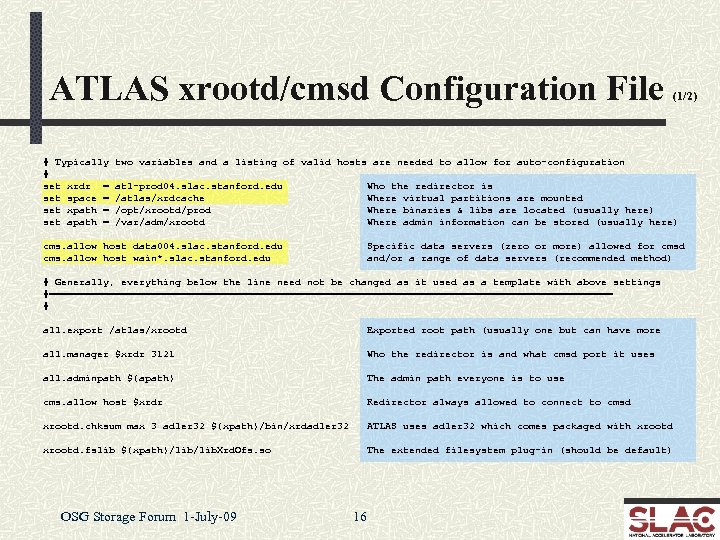
ATLAS xrootd/cmsd Configuration File # Typically # set xrdr = set space = set xpath = set apath = (1/2) two variables and a listing of valid hosts are needed to allow for auto-configuration atl-prod 04. slac. stanford. edu /atlas/xrdcache /opt/xrootd/prod /var/adm/xrootd Who the redirector is Where virtual partitions are mounted Where binaries & libs are located (usually here) Where admin information can be stored (usually here) cms. allow host data 004. slac. stanford. edu cms. allow host wain*. slac. stanford. edu Specific data servers (zero or more) allowed for cmsd and/or a range of data servers (recommended method) # Generally, everything below the line need not be changed as it used as a template with above settings #=============================================== # all. export /atlas/xrootd Exported root path (usually one but can have more all. manager $xrdr 3121 Who the redirector is and what cmsd port it uses all. adminpath ${apath} The admin path everyone is to use cms. allow host $xrdr Redirector always allowed to connect to cmsd xrootd. chksum max 3 adler 32 ${xpath}/bin/xrdadler 32 ATLAS uses adler 32 which comes packaged with xrootd. fslib ${xpath}/lib. Xrd. Ofs. so The extended filesystem plug-in (should be default) OSG Storage Forum 1 -July-09 16
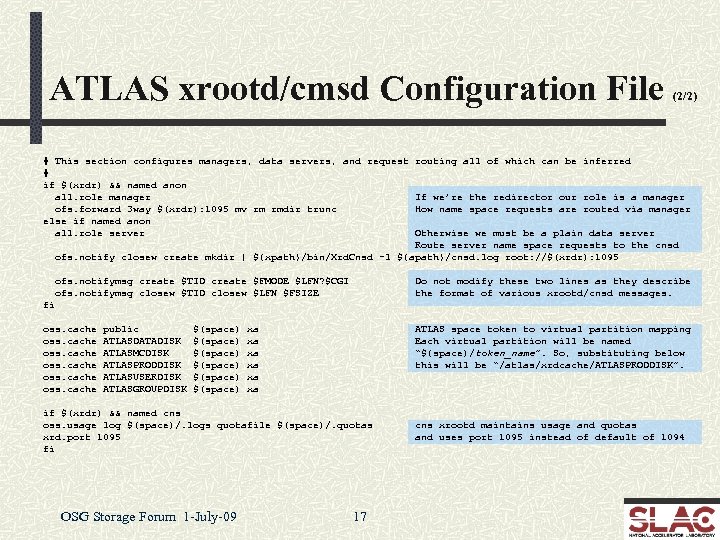
ATLAS xrootd/cmsd Configuration File (2/2) # This section configures managers, data servers, and request routing all of which can be inferred # if $(xrdr) && named anon all. role manager If we’re the redirector our role is a manager ofs. forward 3 way $(xrdr): 1095 mv rm rmdir trunc How name space requests are routed via manager else if named anon all. role server Otherwise we must be a plain data server Route server name space requests to the cnsd ofs. notify closew create mkdir | ${xpath}/bin/Xrd. Cnsd -l ${apath}/cnsd. log root: //$(xrdr): 1095 ofs. notifymsg create $TID create $FMODE $LFN? $CGI ofs. notifymsg closew $TID closew $LFN $FSIZE Do not modify these two lines as they describe the format of various xrootd/cnsd messages. fi oss. cache public ATLASDATADISK ATLASMCDISK ATLASPRODDISK ATLASUSERDISK ATLASGROUPDISK $(space) $(space) xa xa xa ATLAS space token to virtual partition mapping Each virtual partition will be named “${space)/token_name”. So, substituting below this will be “/atlas/xrdcache/ATLASPRODDISK”. if $(xrdr) && named cns oss. usage log $(space)/. logs quotafile $(space)/. quotas xrd. port 1095 fi OSG Storage Forum 1 -July-09 17 cns xrootd maintains usage and quotas and uses port 1095 instead of default of 1094
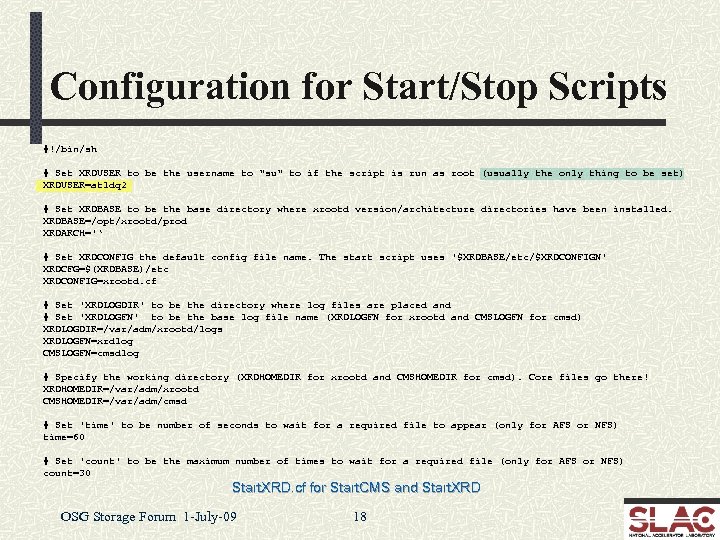
Configuration for Start/Stop Scripts #!/bin/sh # Set XRDUSER to be the username to "su" to if the script is run as root (usually the only thing to be set) XRDUSER=atldq 2 # Set XRDBASE to be the base directory where xrootd version/architecture directories have been installed. XRDBASE=/opt/xrootd/prod XRDARCH='‘ # Set XRDCONFIG the default config file name. The start script uses '$XRDBASE/etc/$XRDCONFIGN' XRDCFG=$(XRDBASE)/etc XRDCONFIG=xrootd. cf # Set 'XRDLOGDIR' to be the directory where log files are placed and # Set 'XRDLOGFN' to be the base log file name (XRDLOGFN for xrootd and CMSLOGFN for cmsd) XRDLOGDIR=/var/adm/xrootd/logs XRDLOGFN=xrdlog CMSLOGFN=cmsdlog # Specify the working directory (XRDHOMEDIR for xrootd and CMSHOMEDIR for cmsd). Core files go there! XRDHOMEDIR=/var/adm/xrootd CMSHOMEDIR=/var/adm/cmsd # Set 'time' to be number of seconds to wait for a required file to appear (only for AFS or NFS) time=60 # Set 'count' to be the maximum number of times to wait for a required file (only for AFS or NFS) count=30 Start. XRD. cf for Start. CMS and Start. XRD OSG Storage Forum 1 -July-09 18
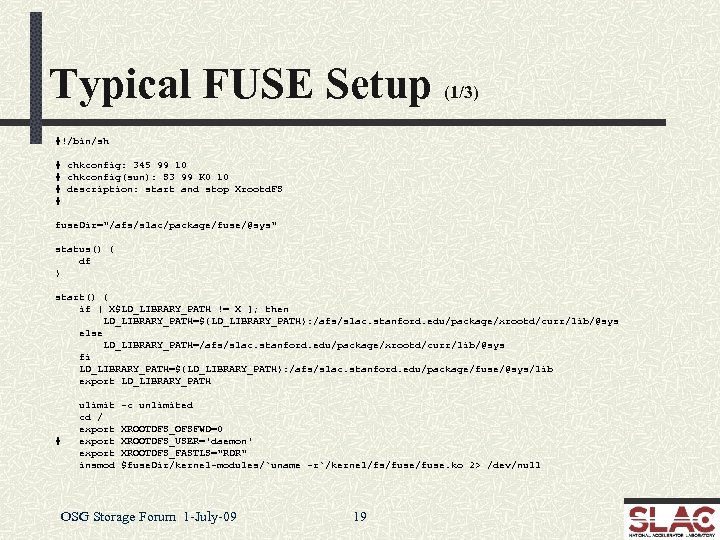
Typical FUSE Setup (1/3) #!/bin/sh # chkconfig: 345 99 10 # chkconfig(sun): S 3 99 K 0 10 # description: start and stop Xrootd. FS # fuse. Dir="/afs/slac/package/fuse/@sys" status() { df } start() { if [ X$LD_LIBRARY_PATH != X ]; then LD_LIBRARY_PATH=${LD_LIBRARY_PATH}: /afs/slac. stanford. edu/package/xrootd/curr/lib/@sys else LD_LIBRARY_PATH=/afs/slac. stanford. edu/package/xrootd/curr/lib/@sys fi LD_LIBRARY_PATH=${LD_LIBRARY_PATH}: /afs/slac. stanford. edu/package/fuse/@sys/lib export LD_LIBRARY_PATH # ulimit cd / export insmod -c unlimited XROOTDFS_OFSFWD=0 XROOTDFS_USER='daemon' XROOTDFS_FASTLS="RDR" $fuse. Dir/kernel-modules/`uname -r`/kernel/fs/fuse. ko 2> /dev/null OSG Storage Forum 1 -July-09 19
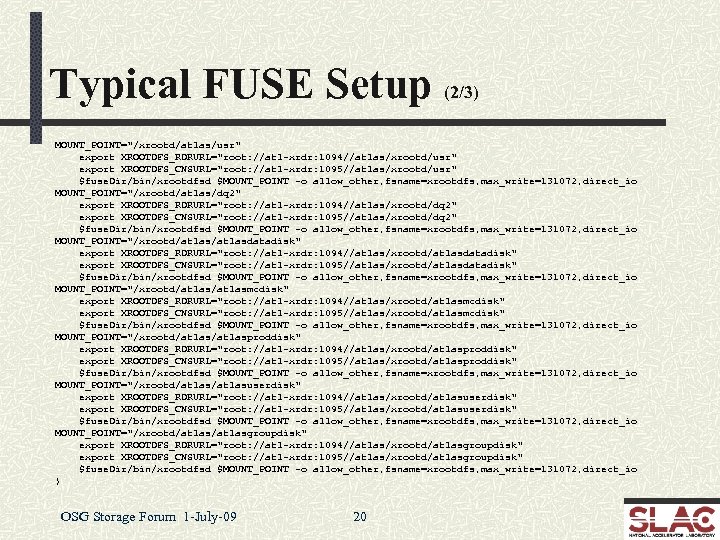
Typical FUSE Setup (2/3) MOUNT_POINT="/xrootd/atlas/usr" export XROOTDFS_RDRURL="root: //atl-xrdr: 1094//atlas/xrootd/usr" export XROOTDFS_CNSURL="root: //atl-xrdr: 1095//atlas/xrootd/usr" $fuse. Dir/bin/xrootdfsd $MOUNT_POINT -o allow_other, fsname=xrootdfs, max_write=131072, direct_io MOUNT_POINT="/xrootd/atlas/dq 2" export XROOTDFS_RDRURL="root: //atl-xrdr: 1094//atlas/xrootd/dq 2" export XROOTDFS_CNSURL="root: //atl-xrdr: 1095//atlas/xrootd/dq 2" $fuse. Dir/bin/xrootdfsd $MOUNT_POINT -o allow_other, fsname=xrootdfs, max_write=131072, direct_io MOUNT_POINT="/xrootd/atlasdatadisk" export XROOTDFS_RDRURL="root: //atl-xrdr: 1094//atlas/xrootd/atlasdatadisk" export XROOTDFS_CNSURL="root: //atl-xrdr: 1095//atlas/xrootd/atlasdatadisk" $fuse. Dir/bin/xrootdfsd $MOUNT_POINT -o allow_other, fsname=xrootdfs, max_write=131072, direct_io MOUNT_POINT="/xrootd/atlasmcdisk" export XROOTDFS_RDRURL="root: //atl-xrdr: 1094//atlas/xrootd/atlasmcdisk" export XROOTDFS_CNSURL="root: //atl-xrdr: 1095//atlas/xrootd/atlasmcdisk" $fuse. Dir/bin/xrootdfsd $MOUNT_POINT -o allow_other, fsname=xrootdfs, max_write=131072, direct_io MOUNT_POINT="/xrootd/atlasproddisk" export XROOTDFS_RDRURL="root: //atl-xrdr: 1094//atlas/xrootd/atlasproddisk" export XROOTDFS_CNSURL="root: //atl-xrdr: 1095//atlas/xrootd/atlasproddisk" $fuse. Dir/bin/xrootdfsd $MOUNT_POINT -o allow_other, fsname=xrootdfs, max_write=131072, direct_io MOUNT_POINT="/xrootd/atlasuserdisk" export XROOTDFS_RDRURL="root: //atl-xrdr: 1094//atlas/xrootd/atlasuserdisk" export XROOTDFS_CNSURL="root: //atl-xrdr: 1095//atlas/xrootd/atlasuserdisk" $fuse. Dir/bin/xrootdfsd $MOUNT_POINT -o allow_other, fsname=xrootdfs, max_write=131072, direct_io MOUNT_POINT="/xrootd/atlasgroupdisk" export XROOTDFS_RDRURL="root: //atl-xrdr: 1094//atlas/xrootd/atlasgroupdisk" export XROOTDFS_CNSURL="root: //atl-xrdr: 1095//atlas/xrootd/atlasgroupdisk" $fuse. Dir/bin/xrootdfsd $MOUNT_POINT -o allow_other, fsname=xrootdfs, max_write=131072, direct_io } OSG Storage Forum 1 -July-09 20
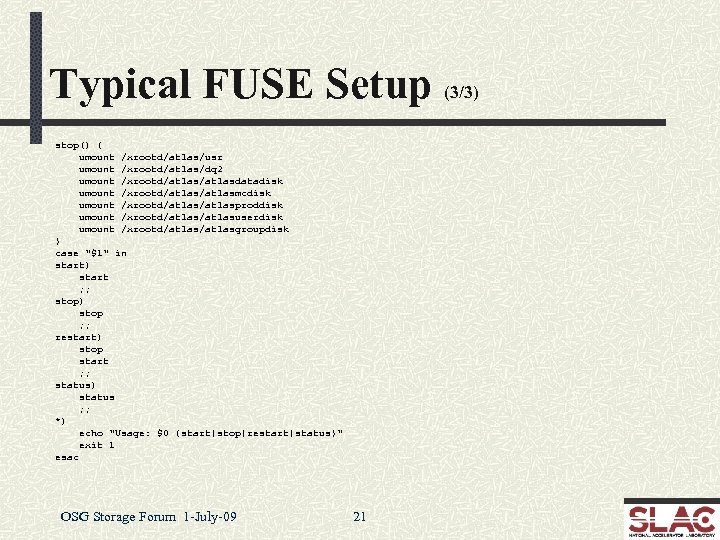
Typical FUSE Setup (3/3) stop() { umount /xrootd/atlas/usr umount /xrootd/atlas/dq 2 umount /xrootd/atlasdatadisk umount /xrootd/atlasmcdisk umount /xrootd/atlasproddisk umount /xrootd/atlasuserdisk umount /xrootd/atlasgroupdisk } case "$1" in start) start ; ; stop) stop ; ; restart) stop start ; ; status) status ; ; *) echo "Usage: $0 {start|stop|restart|status}" exit 1 esac OSG Storage Forum 1 -July-09 21
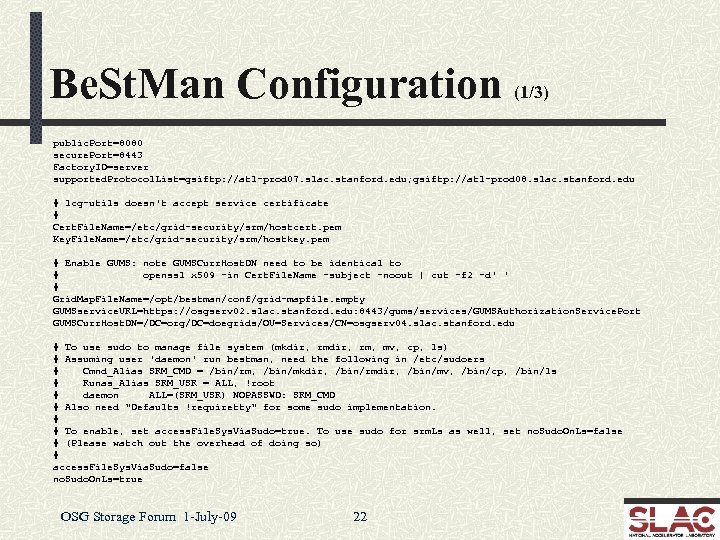
Be. St. Man Configuration (1/3) public. Port=8080 secure. Port=8443 Factory. ID=server supported. Protocol. List=gsiftp: //atl-prod 07. slac. stanford. edu; gsiftp: //atl-prod 08. slac. stanford. edu # lcg-utils doesn't accept service certificate # Cert. File. Name=/etc/grid-security/srm/hostcert. pem Key. File. Name=/etc/grid-security/srm/hostkey. pem # Enable GUMS: note GUMSCurr. Host. DN need to be identical to # openssl x 509 -in Cert. File. Name -subject -noout | cut -f 2 -d' ' # Grid. Map. File. Name=/opt/bestman/conf/grid-mapfile. empty GUMSservice. URL=https: //osgserv 02. slac. stanford. edu: 8443/gums/services/GUMSAuthorization. Service. Port GUMSCurr. Host. DN=/DC=org/DC=doegrids/OU=Services/CN=osgserv 04. slac. stanford. edu # To use sudo to manage file system (mkdir, rm, mv, cp, ls) # Assuming user 'daemon' run bestman, need the following in /etc/sudoers # Cmnd_Alias SRM_CMD = /bin/rm, /bin/mkdir, /bin/rmdir, /bin/mv, /bin/cp, /bin/ls # Runas_Alias SRM_USR = ALL, !root # daemon ALL=(SRM_USR) NOPASSWD: SRM_CMD # Also need "Defaults !requiretty" for some sudo implementation. # # To enable, set access. File. Sys. Via. Sudo=true. To use sudo for srm. Ls as well, set no. Sudo. On. Ls=false # (Please watch out the overhead of doing so) # access. File. Sys. Via. Sudo=false no. Sudo. On. Ls=true OSG Storage Forum 1 -July-09 22
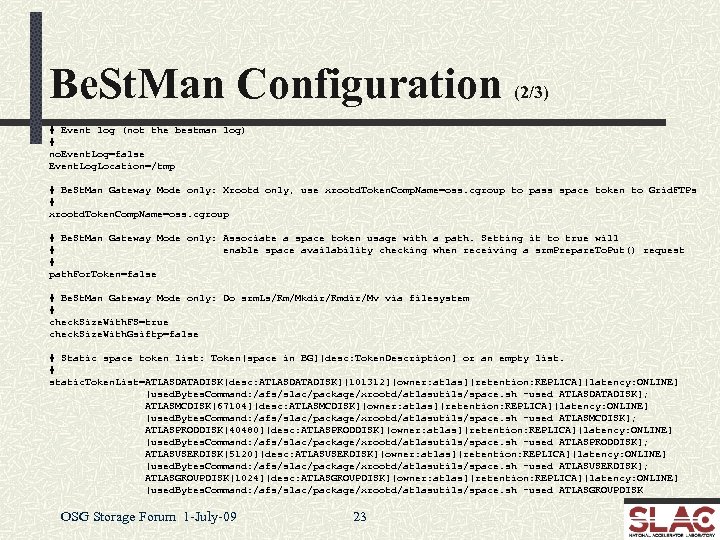
Be. St. Man Configuration (2/3) # Event log (not the bestman log) # no. Event. Log=false Event. Log. Location=/tmp # Be. St. Man Gateway Mode only: Xrootd only, use xrootd. Token. Comp. Name=oss. cgroup to pass space token to Grid. FTPs # xrootd. Token. Comp. Name=oss. cgroup # Be. St. Man Gateway Mode only: Associate a space token usage with a path. Setting it to true will # enable space availability checking when receiving a srm. Prepare. To. Put() request # path. For. Token=false # Be. St. Man Gateway Mode only: Do srm. Ls/Rm/Mkdir/Rmdir/Mv via filesystem # check. Size. With. FS=true check. Size. With. Gsiftp=false # Static space token list: Token[space in BG][desc: Token. Description] or an empty list. # static. Token. List=ATLASDATADISK[desc: ATLASDATADISK][101312][owner: atlas][retention: REPLICA][latency: ONLINE] [used. Bytes. Command: /afs/slac/package/xrootd/atlasutils/space. sh -used ATLASDATADISK]; ATLASMCDISK[67104][desc: ATLASMCDISK][owner: atlas][retention: REPLICA][latency: ONLINE] [used. Bytes. Command: /afs/slac/package/xrootd/atlasutils/space. sh -used ATLASMCDISK]; ATLASPRODDISK[40480][desc: ATLASPRODDISK][owner: atlas][retention: REPLICA][latency: ONLINE] [used. Bytes. Command: /afs/slac/package/xrootd/atlasutils/space. sh -used ATLASPRODDISK]; ATLASUSERDISK[5120][desc: ATLASUSERDISK][owner: atlas][retention: REPLICA][latency: ONLINE] [used. Bytes. Command: /afs/slac/package/xrootd/atlasutils/space. sh -used ATLASUSERDISK]; ATLASGROUPDISK[1024][desc: ATLASGROUPDISK][owner: atlas][retention: REPLICA][latency: ONLINE] [used. Bytes. Command: /afs/slac/package/xrootd/atlasutils/space. sh -used ATLASGROUPDISK OSG Storage Forum 1 -July-09 23
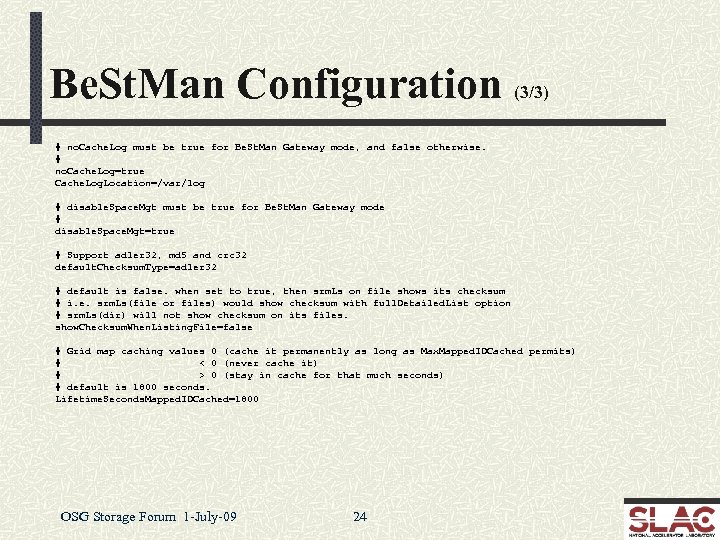
Be. St. Man Configuration (3/3) # no. Cache. Log must be true for Be. St. Man Gateway mode, and false otherwise. # no. Cache. Log=true Cache. Log. Location=/var/log # disable. Space. Mgt must be true for Be. St. Man Gateway mode # disable. Space. Mgt=true # Support adler 32, md 5 and crc 32 default. Checksum. Type=adler 32 # default is false. when set to true, then srm. Ls on file shows its checksum # i. e. srm. Ls(file or files) would show checksum with full. Detailed. List option # srm. Ls(dir) will not show checksum on its files. show. Checksum. When. Listing. File=false # Grid map caching values 0 (cache it permanently as long as Max. Mapped. IDCached permits) # < 0 (never cache it) # > 0 (stay in cache for that much seconds) # default is 1800 seconds. Lifetime. Seconds. Mapped. IDCached=1800 OSG Storage Forum 1 -July-09 24
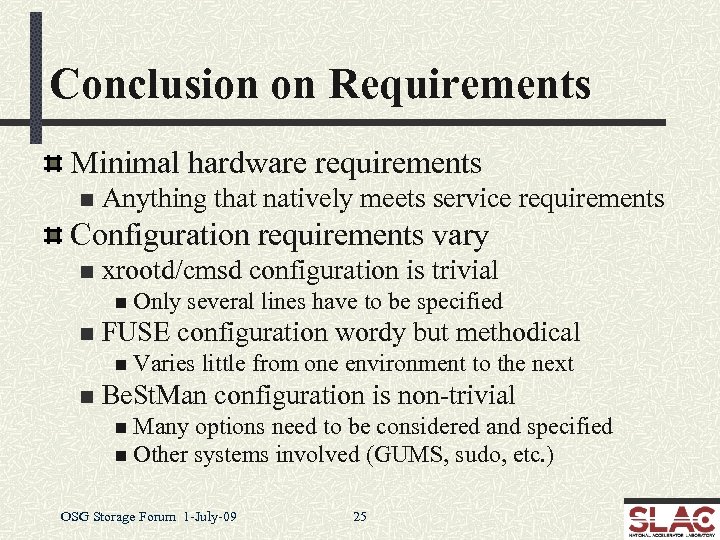
Conclusion on Requirements Minimal hardware requirements n Anything that natively meets service requirements Configuration requirements vary n xrootd/cmsd configuration is trivial n Only n several lines have to be specified FUSE configuration wordy but methodical n Varies n little from one environment to the next Be. St. Man configuration is non-trivial n Many options need to be considered and specified n Other systems involved (GUMS, sudo, etc. ) OSG Storage Forum 1 -July-09 25
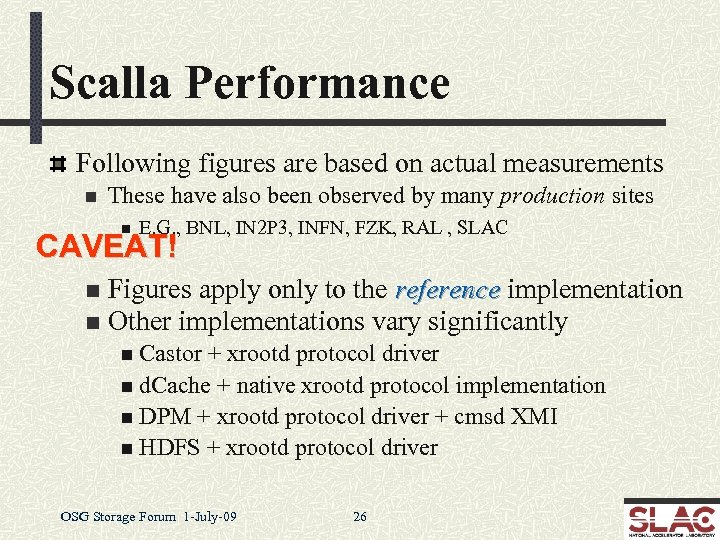
Scalla Performance Following figures are based on actual measurements n These have also been observed by many production sites n E. G. , BNL, IN 2 P 3, INFN, FZK, RAL , SLAC CAVEAT! Figures apply only to the reference implementation n Other implementations vary significantly n n Castor + xrootd protocol driver n d. Cache + native xrootd protocol implementation n DPM + xrootd protocol driver + cmsd XMI n HDFS + xrootd protocol driver OSG Storage Forum 1 -July-09 26
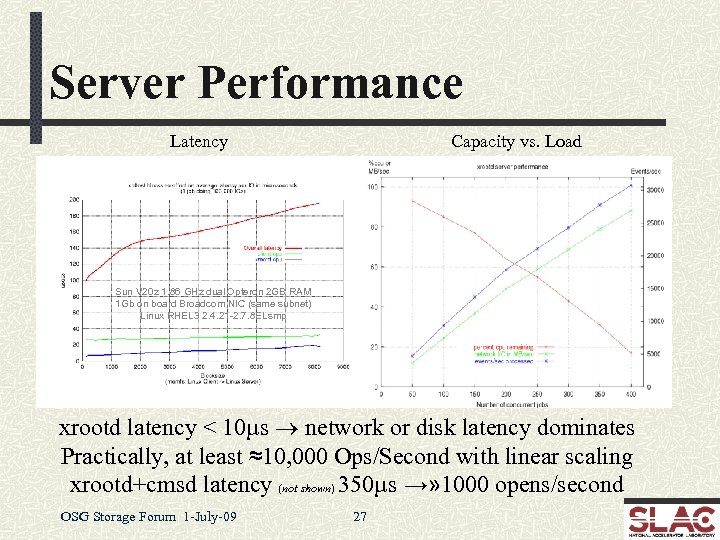
Server Performance Latency Capacity vs. Load Sun V 20 z 1. 86 GHz dual Opteron 2 GB RAM 1 Gb on board Broadcom NIC (same subnet) Linux RHEL 3 2. 4. 21 -2. 7. 8 ELsmp xrootd latency < 10µs ® network or disk latency dominates Practically, at least ≈10, 000 Ops/Second with linear scaling xrootd+cmsd latency (not shown) 350µs →» 1000 opens/second OSG Storage Forum 1 -July-09 27
High Performance Side Effects High performance + linear scaling n Makes client/server software virtually transparent n Disk n subsystem and network become determinants This is actually excellent for planning and funding HOWEVER n Transparency allows applications to over-run H/W n Hardware/Filesystem/Application n Requires deft trade-off between CPU & Storage resources n Over-runs n dependent usually due to unruly applications Such as ATLAS analysis OSG Storage Forum 1 -July-09 28
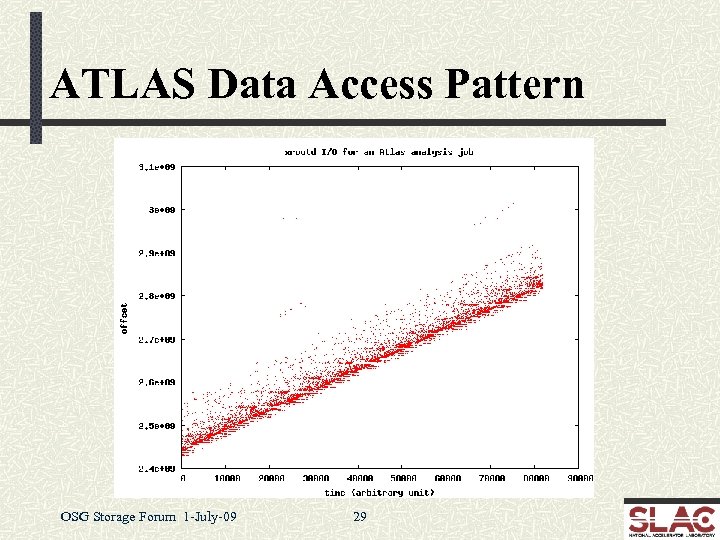
ATLAS Data Access Pattern OSG Storage Forum 1 -July-09 29
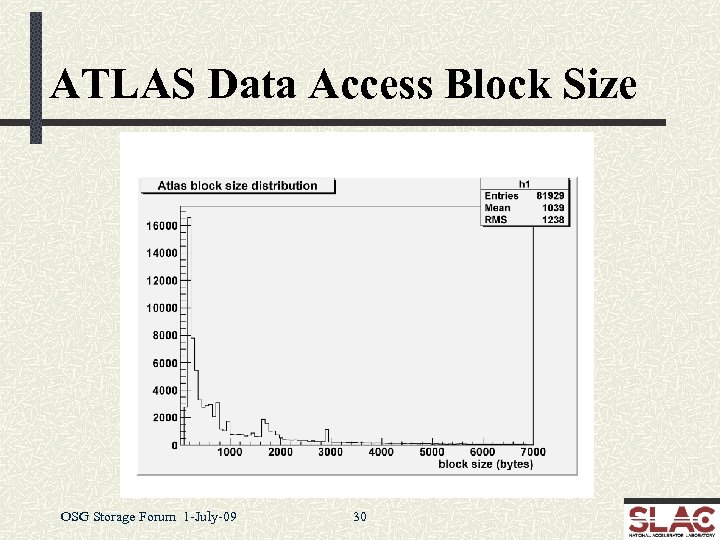
ATLAS Data Access Block Size OSG Storage Forum 1 -July-09 30
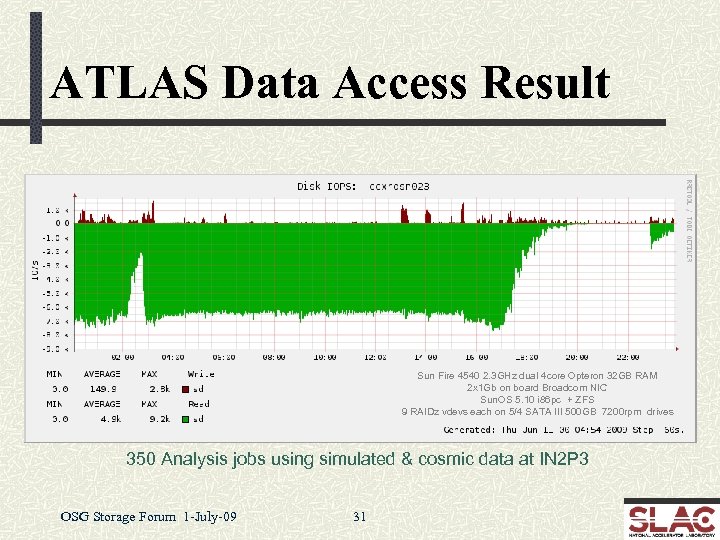
ATLAS Data Access Result Sun Fire 4540 2. 3 GHz dual 4 core Opteron 32 GB RAM 2 x 1 Gb on board Broadcom NIC Sun. OS 5. 10 i 86 pc + ZFS 9 RAIDz vdevs each on 5/4 SATA III 500 GB 7200 rpm drives 350 Analysis jobs using simulated & cosmic data at IN 2 P 3 OSG Storage Forum 1 -July-09 31
Data Access Problem Atlas analysis is fundamentally indulgent n While xrootd can sustain the request load the H/W cannot Replication? n Except for some files this is not a universal solution n The experiment is already disk space insufficient Copy files to local node for analysis? n Inefficient, high impact, and may overload the LAN Faster hardware (e. g. , SSD)? n This appears to be generally cost-prohibitive n That said, we are experimenting with smart SSD handling OSG Storage Forum 1 -July-09 32
Some “Realistic” Approaches Code rewrite is the most cost-effective n Unlikely to be done soon due to publishing pressure Minimizing performance degradation n Recently implemented in xrootd (see next slide) Tight file system tuning n Problematic for numerous reasons Batch job throttling n Two approaches in mind n Batch queue feedback (depends on batch system) n Use built-in xrootd reactive scheduling interface OSG Storage Forum 1 -July-09 33
Overload Detection The xrootd server is blazingly fast n Trivial to overload a server’s I/O subsystem n File n system specific, but effect generally the same Sluggish response and large differential between Disk & Net I/O New overload recovery algorithm implemented n Detects overload in the session recovery path n Paces clients to re-achieve expected response envelope n Additional improvements here will likely be needed OSG Storage Forum 1 -July-09 34
Stability & Scalability Improvements xrootd has a 5+ year production history n Numerous high-stress environments n BNL, n FZK, IN 2 P 3, INFN, RAL, SLAC Stability has been vetted n Changes are now very focused n n Hardware/OS edge effect limitations n n Functionality improvements Esoteric bugs in low use paths Scalability is already at theoretical maximum n E. g. , STAR/BNL runs a 400+ server production cluster OSG Storage Forum 1 -July-09 35
Summary Monitoring xrootd has built-in summary monitoring Can auto-report summary statistics n xrd. report configuration directive n Available in latest release Data sent to up to two central locations n Accommodates most current monitoring tools n n Ganglia, GRIS, Nagios, Mon. ALISA, and perhaps more n Requires external xml-to-monitor data convertor n Will provide a stream multiplexing and xml parsing tool n Currently converting Ganglia feeder to use auto-reporting OSG Storage Forum 1 -July-09 36
Detail Monitoring xrootd has built-in multi-level monitoring n Session, service, and I/O requests n Detail level if configurable n Minimal impact on server performance n Current data collector/renderer is functional n Still needs better packaging and documentation n Work in progress to fund “productization” effort OSG Storage Forum 1 -July-09 37
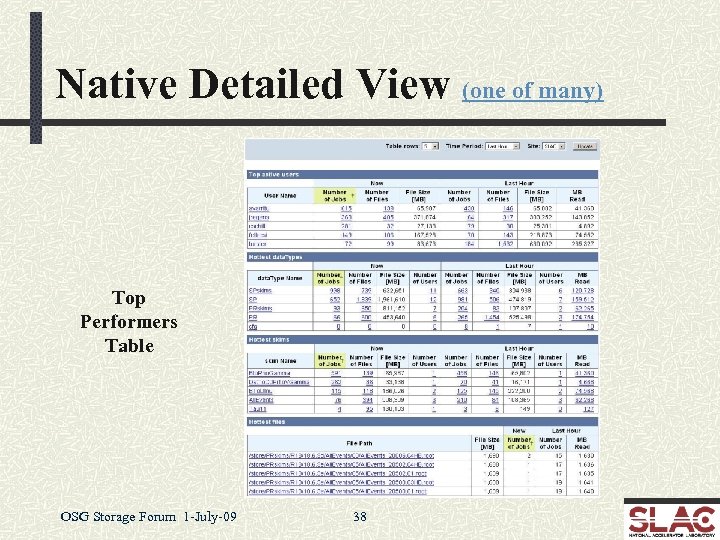
Native Detailed View (one of many) Top Performers Table OSG Storage Forum 1 -July-09 38
Troubleshooting is log based Xrootd & cmsd maintain auto-rotating log files n Messages usually indicate the problem n n Log n n is normally lean and clean Easy to spot problem messages Can change verbosity to further isolate problems • E. g. , turn on various trace levels Simple clustering of independent file systems n Use OS tools to trouble shoot any individual node n Admin needs to know standard Unix tools to succeed OSG Storage Forum 1 -July-09 44
Problem Handling OSG is the first level contact n Handles obvious problems n E. G. , configuration problems SLAC or CERN handle software problems OSG refers software problems to SLAC n Problem ticket is created to track resolution n n R/T via xrootd-bugs@slac. stanford. edu Use discussion list for general issues n http: //xrootd. slac. stanford. edu/ n List via xrootd-l@slac. stanford. edu OSG Storage Forum 1 -July-09 45
Recent Developments Auto-reporting summary data n June, 2009 (covered under monitoring) Ephemeral files n June, 2009 Torrent WAN transfers n May, 2009 File Residency Manager (FRM) n April, 2009 OSG Storage Forum 1 -July-09 46
Ephemeral Files that persist only when successfully closed n Excellent safeguard against leaving partial files n Application, n Server provides grace period after failure n Allows n n server, or network failures application to complete creating the file Normal xrootd error recovery protocol Clients asking for read access are delayed Clients asking for write access are usually denied • Obviously, original creator is allowed write access Enabled via xrdcp –P option or ofs. posc CGI element OSG Storage Forum 1 -July-09 47
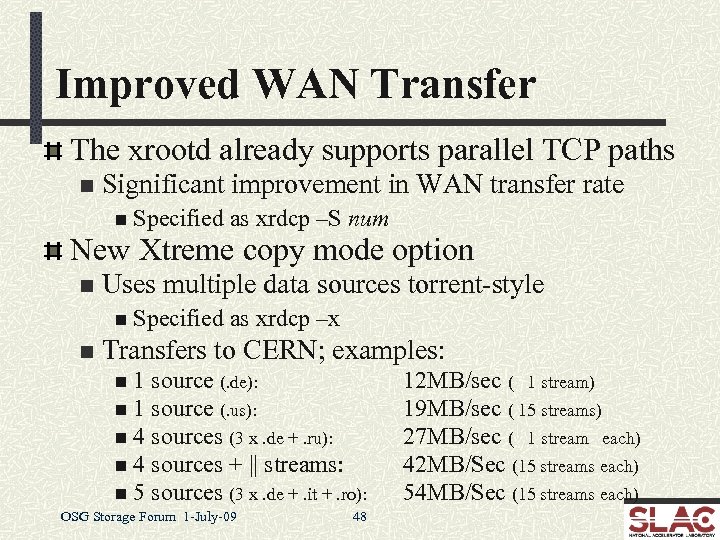
Improved WAN Transfer The xrootd already supports parallel TCP paths n Significant improvement in WAN transfer rate n Specified as xrdcp –S num New Xtreme copy mode option n Uses multiple data sources torrent-style n Specified n as xrdcp –x Transfers to CERN; examples: n 1 source (. de): n 1 source (. us): n 4 sources (3 x. de +. ru): n 4 sources + || streams: n 5 sources (3 x. de +. it +. ro): OSG Storage Forum 1 -July-09 48 12 MB/sec ( 1 stream) 19 MB/sec ( 15 streams) 27 MB/sec ( 1 stream each) 42 MB/Sec (15 streams each) 54 MB/Sec (15 streams each)
File Residency Manager (FRM) Functional replacement for MPS scripts n Currently, includes… n Pre-staging n n n daemon frm_pstgd and agent frm_pstga Distributed copy-in prioritized queue of requests Can copy from any source using any transfer agent Used to interface to real and virtual MSS’s n frm_admin n n command Audit, correct, obtain space information • Space token names, utilization, etc. Can run on a live system OSG Storage Forum 1 -July-09 49
![Future Developments Simple Server Inventory (SSI) [July release] Maintains a file inventory per data](https://present5.com/presentation/7a5c52d3dc330a1be9e245940e156f50/image-42.jpg "Future Developments Simple Server Inventory (SSI) [July release] Maintains a file inventory per data")
Future Developments Simple Server Inventory (SSI) [July release] Maintains a file inventory per data server n Does not replace PQ 2 tools (Neng Xu, Univerity of Wisconsin) n n Good for uncomplicated sites needing a server inventory Smart SSD handling Getfile/Putfile protocol implementation [July start] n [August release] Support for true 3 rd party server-to-server transfers Additional simplifications OSG Storage Forum 1 -July-09 50 [ongoing]
Conclusion Xrootd is a lightweight data access system n Suitable for resource constrained environments n Human n as well as hardware Rugged enough to scale to large installations n CERN analysis & reconstruction farms Readily available n Distributed as part of the OSG VDT n Also part of the CERN root distribution Visit the web site for more information n http: //xrootd. slac. stanford. edu/ OSG Storage Forum 1 -July-09 51
Acknowledgements Software Contributors n n n Alice: Derek Feichtinger CERN: Fabrizio Furano , Andreas Peters Fermi/GLAST: Tony Johnson (Java) Root: Gerri Ganis, Beterand Bellenet, Fons Rademakers SLAC: Tofigh Azemoon, Jacek Becla, Andrew Hanushevsky, Wilko Kroeger LBNL: Alex Sim, Junmin Gu, Vijaya Natarajan (Be. St. Man team) Be. St. Man Operational Collaborators n BNL, CERN, FZK, IN 2 P 3, RAL, SLAC, UVIC, UTA Partial Funding n US Department of Energy n Contract DE-AC 02 -76 SF 00515 with Stanford University OSG Storage Forum 1 -July-09 52
Скачать презентацию Scalla xrootd Andrew Hanushevsky SLAC National Accelerator Laboratory Stanford
7a5c52d3dc330a1be9e245940e156f50.ppt