 Скачать презентацию SATO XML-enabled Printers Introduction www satoworldwide com
f21cb800025e0e239d576c495da63442.ppt
- Количество слайдов: 20



SATO XML-enabled Printers Introduction www. satoworldwide. com
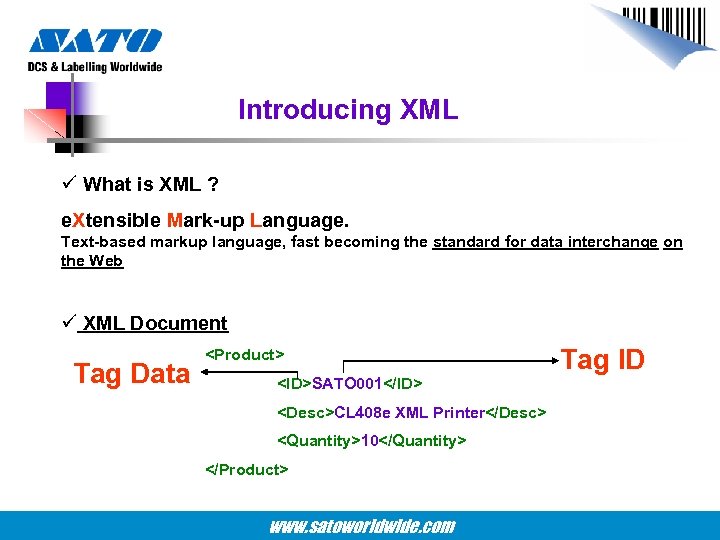
Introducing XML ü What is XML ? e. Xtensible Mark-up Language. Text-based markup language, fast becoming the standard for data interchange on the Web ü XML Document Tag Data <Product> <ID>SATO 001</ID> <Desc>CL 408 e XML Printer</Desc> <Quantity>10</Quantity> </Product> www. satoworldwide. com Tag ID
Introducing e. Xtensible Markup Language ü Why XML ? 1. Easily processed. Regular and consistent notation makes it easy to interpret XML. 2. Data Identification. XML documents indicate exactly what kind of data you have. Data is identified using tags. The tags identify the data, rather merely specifying how to display it. 3. Plain Text. Since XML is not binary format, an XML file can be easily created using a standard text editor. 4. Traditional Data Processing. XML is increasingly becoming the data representation of choice for the Web. It is easier to transmit XML-encoded data back and forth between the client and server in any client/server application such as between the host and printer in a network environment. 5. Data Interchange. In the future, XML will potentially be the answer for data interchange in all types of transactions. 6. Data Interoperability. An XML file can be easily generated by a different enterprise application. www. satoworldwide. com
SATO XML Solutions 1. Direct Printing Solution OR 2. Middleware Solution with SATO XML–enabled printer www. satoworldwide. com
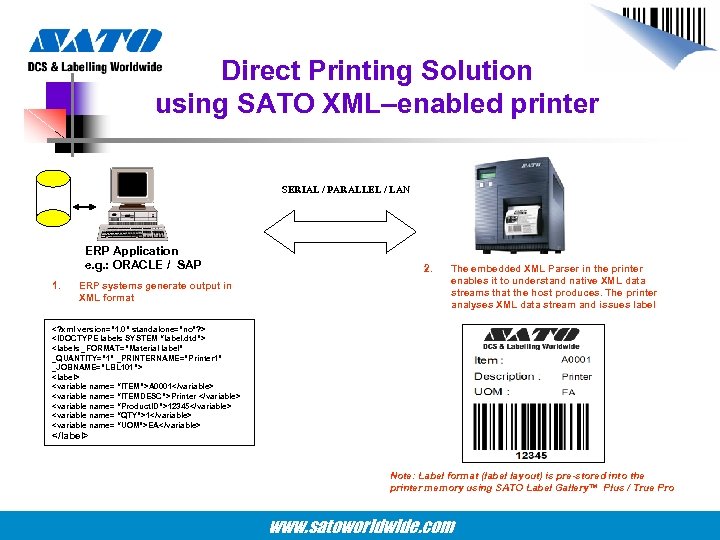
Direct Printing Solution using SATO XML–enabled printer SERIAL / PARALLEL / LAN ERP Application e. g. : ORACLE / SAP 1. ERP systems generate output in XML format 2. The embedded XML Parser in the printer enables it to understand native XML data streams that the host produces. The printer analyses XML data stream and issues label <? xml version=” 1. 0” standalone=”no”? > <!DOCTYPE labels SYSTEM “label. dtd”> <labels _FORMAT=”Material label” _QUANTITY=” 1” _PRINTERNAME=”Printer 1” _JOBNAME=”LBL 101”> <label> <variable name= “ITEM”>A 0001</variable> <variable name= “ITEMDESC”>Printer </variable> <variable name= “Product. ID”>12345</variable> <variable name= “QTY”>1</variable> <variable name= “UOM”>EA</variable> </label> Note: Label format (label layout) is pre-stored into the printer memory using SATO Label Gallery™ Plus / True Pro www. satoworldwide. com
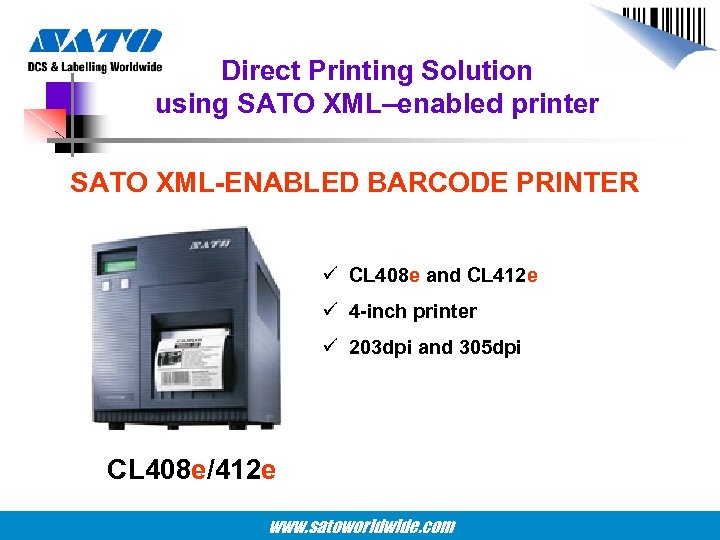
Direct Printing Solution using SATO XML–enabled printer SATO XML-ENABLED BARCODE PRINTER ü CL 408 e and CL 412 e ü 4 -inch printer ü 203 dpi and 305 dpi CL 408 e/412 e www. satoworldwide. com
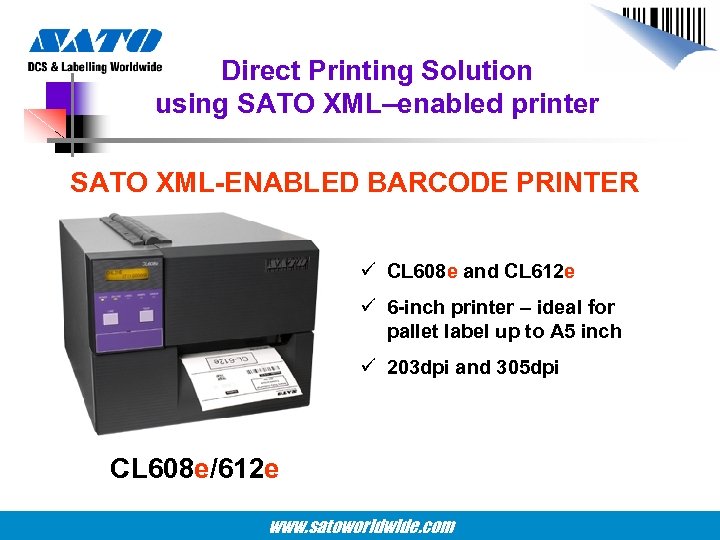
Direct Printing Solution using SATO XML–enabled printer SATO XML-ENABLED BARCODE PRINTER ü CL 608 e and CL 612 e ü 6 -inch printer – ideal for pallet label up to A 5 inch ü 203 dpi and 305 dpi CL 608 e/612 e www. satoworldwide. com
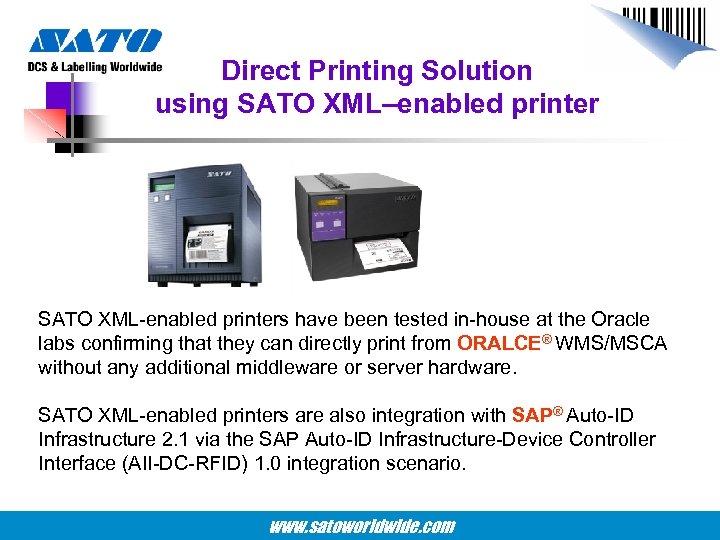
Direct Printing Solution using SATO XML–enabled printer SATO XML-enabled printers have been tested in-house at the Oracle labs confirming that they can directly print from ORALCE® WMS/MSCA without any additional middleware or server hardware. SATO XML-enabled printers are also integration with SAP® Auto-ID Infrastructure 2. 1 via the SAP Auto-ID Infrastructure-Device Controller Interface (AII-DC-RFID) 1. 0 integration scenario. www. satoworldwide. com
Direct Printing Solution using SATO XML–enabled printer Function : SATO XML-Enabled Barcode Printer ü XML-enabled printer understands XML data stream and interprets it into SBPL format ü ORACLE® WMS/MSCA or SAP® AG’s Auto-ID infrastructure (via the SAP Auto-ID Infrastructure-Device Controller Interface (AII-DC-RFID) 1. 0 integration scenario) sends XML print jobs to printer ü Printer processes XML output and prints directly from a ORACLE WMS/MSCA or SAP® AG’s Auto-ID infrastructure 2. 1 via the SAP Auto. ID Infrastructure-Device Controller Interface (AII-DC-RFID) 1. 0 integration scenario ü XML parsing function embedded into printer makes it possible to print without resorting to any middleware www. satoworldwide. com
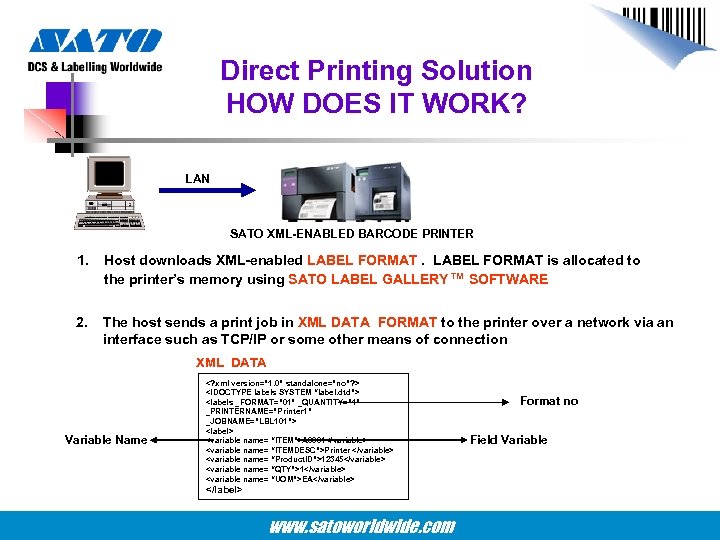
Direct Printing Solution HOW DOES IT WORK? LAN SATO XML-ENABLED BARCODE PRINTER 1. Host downloads XML-enabled LABEL FORMAT is allocated to the printer’s memory using SATO LABEL GALLERY™ SOFTWARE 2. The host sends a print job in XML DATA FORMAT to the printer over a network via an interface such as TCP/IP or some other means of connection XML DATA Variable Name <? xml version=” 1. 0” standalone=”no”? > <!DOCTYPE labels SYSTEM “label. dtd”> <labels _FORMAT=” 01” _QUANTITY=” 1” _PRINTERNAME=”Printer 1” _JOBNAME=”LBL 101”> <label> <variable name= “ITEM”>A 0001</variable> <variable name= “ITEMDESC”>Printer </variable> <variable name= “Product. ID”>12345</variable> <variable name= “QTY”>1</variable> <variable name= “UOM”>EA</variable> </label> www. satoworldwide. com Format no Field Variable
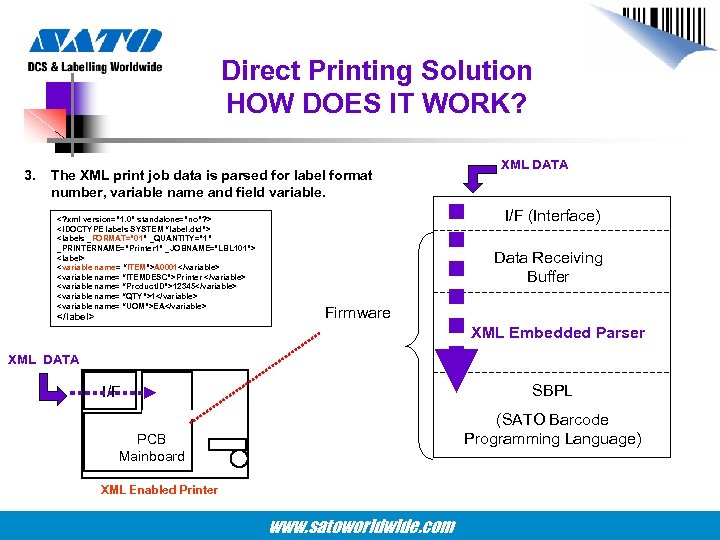
Direct Printing Solution HOW DOES IT WORK? 3. The XML print job data is parsed for label format number, variable name and field variable. <? xml version=” 1. 0” standalone=”no”? > <!DOCTYPE labels SYSTEM “label. dtd”> <labels _FORMAT=” 01” _QUANTITY=” 1” _PRINTERNAME=”Printer 1” _JOBNAME=”LBL 101”> <label> <variable name= “ITEM”>A 0001</variable> <variable name= “ITEMDESC”>Printer </variable> <variable name= “Product. ID”>12345</variable> <variable name= “QTY”>1</variable> <variable name= “UOM”>EA</variable> </label> XML DATA I/F (Interface) Data Receiving Buffer Firmware XML Embedded Parser XML DATA SBPL I/F (SATO Barcode Programming Language) PCB Mainboard XML Enabled Printer www. satoworldwide. com
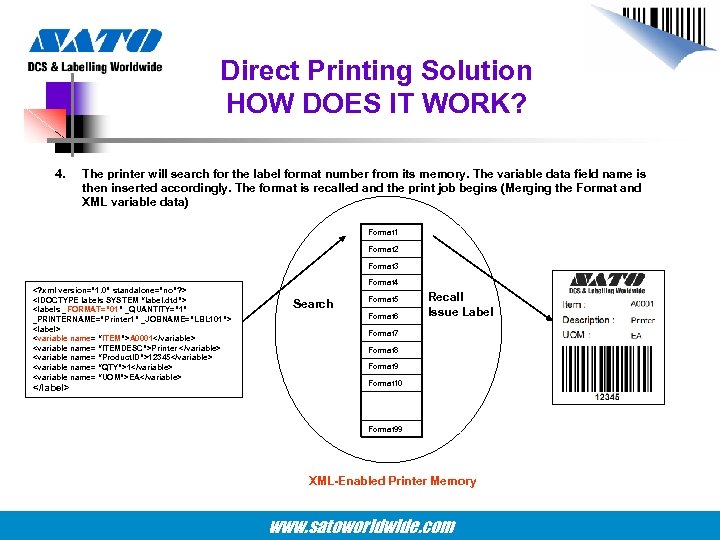
Direct Printing Solution HOW DOES IT WORK? 4. The printer will search for the label format number from its memory. The variable data field name is then inserted accordingly. The format is recalled and the print job begins (Merging the Format and XML variable data) Format 1 Format 2 Format 3 <? xml version=” 1. 0” standalone=”no”? > <!DOCTYPE labels SYSTEM “label. dtd”> <labels _FORMAT=” 01” _QUANTITY=” 1” _PRINTERNAME=”Printer 1” _JOBNAME=”LBL 101”> <label> <variable name= “ITEM”>A 0001</variable> <variable name= “ITEMDESC”>Printer </variable> <variable name= “Product. ID”>12345</variable> <variable name= “QTY”>1</variable> <variable name= “UOM”>EA</variable> </label> Format 4 Search Format 5 Format 6 Recall Issue Label Format 7 Format 8 Format 9 Format 10 Format 99 XML-Enabled Printer Memory www. satoworldwide. com
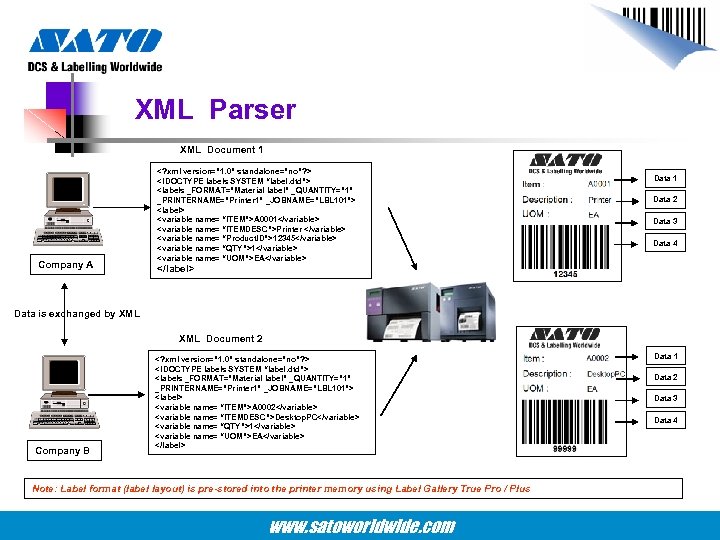
XML Parser XML Document 1 Company A <? xml version=” 1. 0” standalone=”no”? > <!DOCTYPE labels SYSTEM “label. dtd”> <labels _FORMAT=”Material label” _QUANTITY=” 1” _PRINTERNAME=”Printer 1” _JOBNAME=”LBL 101”> <label> <variable name= “ITEM”>A 0001</variable> <variable name= “ITEMDESC”>Printer </variable> <variable name= “Product. ID”>12345</variable> <variable name= “QTY”>1</variable> <variable name= “UOM”>EA</variable> Data 1 Data 2 Data 3 Data 4 </label> Data is exchanged by XML Document 2 Company B <? xml version=” 1. 0” standalone=”no”? > <!DOCTYPE labels SYSTEM “label. dtd”> <labels _FORMAT=”Material label” _QUANTITY=” 1” _PRINTERNAME=”Printer 1” _JOBNAME=”LBL 101”> <label> <variable name= “ITEM”>A 0002</variable> <variable name= “ITEMDESC”>Desktop. PC</variable> <variable name= “QTY”>1</variable> <variable name= “UOM”>EA</variable> </label> Note: Label format (label layout) is pre-stored into the printer memory using Label Gallery True Pro / Plus www. satoworldwide. com Data 1 Data 2 Data 3 Data 4
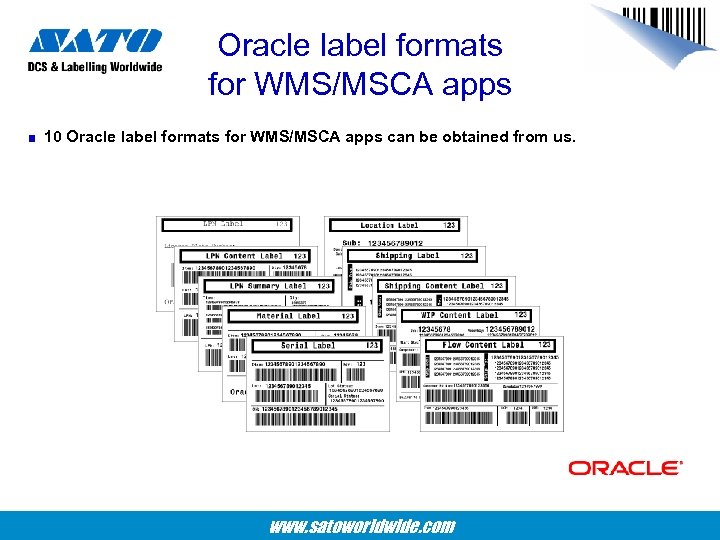
Oracle label formats for WMS/MSCA apps 10 Oracle label formats for WMS/MSCA apps can be obtained from us. www. satoworldwide. com
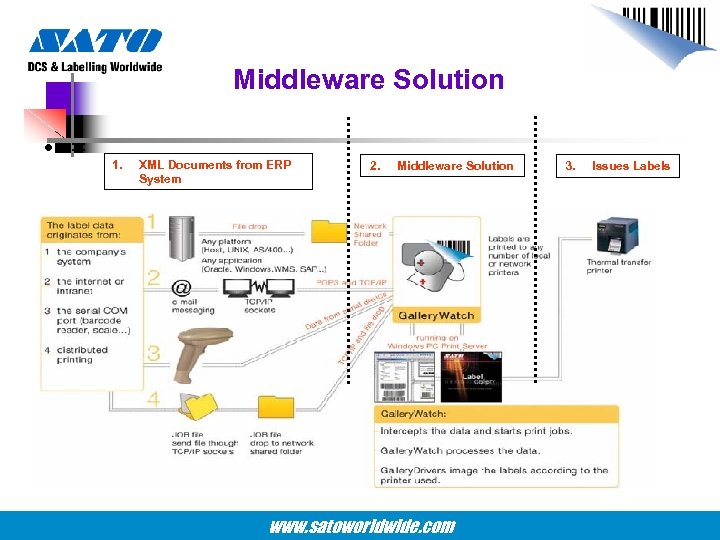
Middleware Solution • = 1. XML Documents from ERP System 2. Middleware Solution www. satoworldwide. com 3. Issues Labels
SATO Middleware Solution • = 1 You can perform customisations using Visual Basic script programming in LABEL GALLERY WATCH to meet your customers’ needs. 2 GALLERY WATCH is part of the SATO Label Gallery™True. Pro software package, which will allow the user to manipulate the label at the appearance of trigger file / receipt of an e-mail from the ERP system. This activity generates a trigger event for GALLERY WATCH to start the execution of the intended action. 3 Customised programming requests can be done by all SATO GMCs. www. satoworldwide. com
Direct Printing and Middleware Solution • = Direct Printing Solution ü Simplified overall system design and reduced operation layers. ü Reduced cost because no additional application layer between EPR system and printing system. Middleware Solution ü Easily customised label formats ü Easier error correction in case any error occurs. www. satoworldwide. com
XML and RFID Function • = ü Does SATO XML-enabled printer support RFID ? YES ü What are the transponders supported? EPC Class Gen 2 EPC Class 1 EPC Class 0+ Philips UCODE EPC 1. 19 www. satoworldwide. com
What SATO offers in its XML Solution ? ü SATO 4 -inch and 6 -inch XML-Enabled Printer ü XML-enabled 4 -inch printer can also print RFID labels ü Label Gallery True. Pro software package can store XML-enabled label formats www. satoworldwide. com
• = Thank You www. satoworldwide. com
Скачать презентацию SATO XML-enabled Printers Introduction www satoworldwide com
f21cb800025e0e239d576c495da63442.ppt