


 Скачать презентацию RIP version 1 Routing Protocols and Concepts
Exploration_Routing_Chapter_5.ppt
- Количество слайдов: 29
 RIP version 1 Routing Protocols and Concepts – Chapter 5 ITE PC v 4. 0 Chapter 1 © 2007 Cisco Systems, Inc. All rights reserved. Cisco Public 1
 Objectives § Describe the functions, characteristics, and operation of the RIPv 1 protocol. § Configure a device for using RIPv 1. § Verify proper RIPv 1 operation. § Describe how RIPv 1 performs automatic summarization. § Configure, verify, and troubleshoot default routes propagated in a routed network implementing RIPv 1. § Use recommended techniques to solve problems related to RIPv 1 ITE PC v 4. 0 Chapter 1 © 2007 Cisco Systems, Inc. All rights reserved. Cisco Public 2
 RIPv 1 § RIP Characteristics -A classful, Distance Vector (DV) routing protocol -Metric = hop count -Routes with a hop count > 15 are unreachable -Updates are broadcast every 30 seconds ITE PC v 4. 0 Chapter 1 © 2007 Cisco Systems, Inc. All rights reserved. Cisco Public 3
 RIPv 1 § RIP Message Format § RIP header - divided into 3 fields -Command field -Version field -Must be zero § Route Entry - composed of 3 fields -Address family identifier -IP address -Metric ITE PC v 4. 0 Chapter 1 © 2007 Cisco Systems, Inc. All rights reserved. Cisco Public 4
 RIPv 1 § RIP Operation –RIP uses 2 message types: §Request message -This is sent out on startup by each RIP enabled interface -Requests all RIP enabled neighbors to send routing table §Response message -Message sent to requesting router containing routing table ITE PC v 4. 0 Chapter 1 © 2007 Cisco Systems, Inc. All rights reserved. Cisco Public 5
 RIPv 1 § IP addresses initially divided into classes -Class A -Class B -Class C § RIP is a classful routing protocol -Does not send subnet masks in routing updates ITE PC v 4. 0 Chapter 1 © 2007 Cisco Systems, Inc. All rights reserved. Cisco Public 6
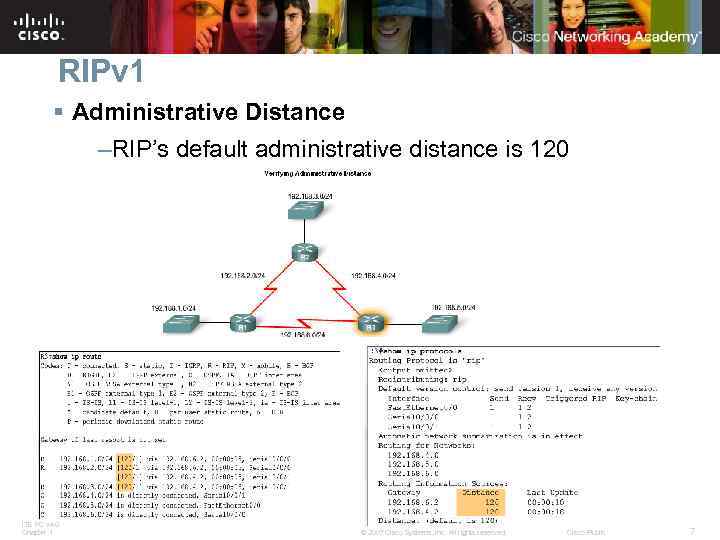 RIPv 1 § Administrative Distance –RIP’s default administrative distance is 120 ITE PC v 4. 0 Chapter 1 © 2007 Cisco Systems, Inc. All rights reserved. Cisco Public 7
 Basic RIPv 1 Configuration § A typical topology suitable for use by RIPv 1 includes: -Three router set up -No PCs attached to LANs -Use of 5 different IP subnets ITE PC v 4. 0 Chapter 1 © 2007 Cisco Systems, Inc. All rights reserved. Cisco Public 8
 Basic RIPv 1 Configuration § Router RIP Command –To enable RIP enter: -Router rip at the global configuration prompt -Prompt will look like R 1(config-router)# ITE PC v 4. 0 Chapter 1 © 2007 Cisco Systems, Inc. All rights reserved. Cisco Public 9
 Basic RIPv 1 Configuration § Specifying Networks –Use the network command to: -Enable RIP on all interfaces that belong to this network -Advertise this network in RIP updates sent to other routers every 30 seconds ITE PC v 4. 0 Chapter 1 © 2007 Cisco Systems, Inc. All rights reserved. Cisco Public 10
 Verification and Troubleshooting § Show ip Route § To verify and troubleshoot routing -Use the following commands: -show ip route -show ip protocols -debug ip rip ITE PC v 4. 0 Chapter 1 © 2007 Cisco Systems, Inc. All rights reserved. Cisco Public 11
 Verification and Troubleshooting § show ip protocols command -Displays routing protocol configured on router ITE PC v 4. 0 Chapter 1 © 2007 Cisco Systems, Inc. All rights reserved. Cisco Public 12
 Verification and Troubleshooting § Debug ip rip command -Used to display RIP routing updates as they are happening ITE PC v 4. 0 Chapter 1 © 2007 Cisco Systems, Inc. All rights reserved. Cisco Public 13
 Verification and Troubleshooting § Passive interface command -Used to prevent a router from sending updates through an interface -Example: Router(config-router)#passive-interface-type interface-number ITE PC v 4. 0 Chapter 1 © 2007 Cisco Systems, Inc. All rights reserved. Cisco Public 14
 Verification and Troubleshooting § Passive interfaces ITE PC v 4. 0 Chapter 1 © 2007 Cisco Systems, Inc. All rights reserved. Cisco Public 15
 Automatic Summarization Modified Topology § The original scenario has been modified such that: Three classful networks are used: ITE PC v 4. 0 Chapter 1 172. 30. 0. 0/16 192. 168. 4. 0/24 192. 168. 5. 0/24 The 172. 30. 0. 0/16 network is subnetted into three subnets: 172. 30. 1. 0/24 172. 30. 2. 0/24 172. 30. 3. 0/24 The following devices are part of the 172. 30. 0. 0/16 classful network address: All interfaces on R 1 S 0/0/0 and Fa 0/0 on R 2 © 2007 Cisco Systems, Inc. All rights reserved. Cisco Public 16
 Automatic Summarization § Configuration Details -To remove the RIP routing process use the following command No router rip -To check the configuration use the following command Show run ITE PC v 4. 0 Chapter 1 © 2007 Cisco Systems, Inc. All rights reserved. Cisco Public 17
 Automatic Summarization § Boundary Routers –RIP automatically summarizes classful networks –Boundary routers summarize RIP subnets from one major network to another. ITE PC v 4. 0 Chapter 1 © 2007 Cisco Systems, Inc. All rights reserved. Cisco Public 18
 Automatic Summarization Processing RIP Updates § 2 rules govern RIPv 1 updates: -If a routing update and the interface it’s received on belong to the same network then The subnet mask of the interface is applied to the network in the routing update -If a routing update and the interface it’s received on belong to a different network then The classful subnet mask of the network is applied to the network in the routing update. ITE PC v 4. 0 Chapter 1 © 2007 Cisco Systems, Inc. All rights reserved. Cisco Public 19
 Automatic Summarization § Sending RIP Updates –RIP uses automatic summarization to reduce the size of a routing table. ITE PC v 4. 0 Chapter 1 © 2007 Cisco Systems, Inc. All rights reserved. Cisco Public 20
 Automatic Summarization § Advantages of automatic summarization: -The size of routing updates is reduced -Single routes are used to represent multiple routes which results in faster lookup in the routing table. ITE PC v 4. 0 Chapter 1 © 2007 Cisco Systems, Inc. All rights reserved. Cisco Public 21
 Automatic Summarization § Disadvantage of Automatic Summarization: -Does not support discontiguous networks ITE PC v 4. 0 Chapter 1 © 2007 Cisco Systems, Inc. All rights reserved. Cisco Public 22
 Automatic Summarization § Discontiguous Topologies do not converge with RIPv 1 § A router will only advertise major network addresses out interfaces that do not belong to the advertised route. ITE PC v 4. 0 Chapter 1 © 2007 Cisco Systems, Inc. All rights reserved. Cisco Public 23
 Default Route and RIPv 1 § Modified Topology: Scenario C § Default routes Packets that are not defined specifically in a routing table will go to the specified interface for the default route Example: Customer routers use default routes to connect to an ISP router. Command used to configure a default route is ip route 0. 0 s 0/0/1 ITE PC v 4. 0 Chapter 1 © 2007 Cisco Systems, Inc. All rights reserved. Cisco Public 24
 Default Route and RIPv 1 ITE PC v 4. 0 Chapter 1 © 2007 Cisco Systems, Inc. All rights reserved. Cisco Public 25
 Default Route and RIPv 1 § Propagating the Default Route in RIPv 1 § Default-information originate command -This command is used to specify that the router is to originate default information, by propagating the static default route in RIP update. ITE PC v 4. 0 Chapter 1 © 2007 Cisco Systems, Inc. All rights reserved. Cisco Public 26
 Summary § RIP characteristics include: Classful, distance vector routing protocol Metric is Hop Count Does not support VLSM or discontiguous subnets Updates every 30 seconds § Rip messages are encapsulated in a UDP segment with source and destination ports of 520 ITE PC v 4. 0 Chapter 1 © 2007 Cisco Systems, Inc. All rights reserved. Cisco Public 27
 Summary: Commands used by RIP Command’s purpose Rtr(config)#router rip Enables RIP routing process Rtr(config-router)#network Associates a network with a RIP routing process Rtr#debug ip rip used to view real time RIP routing updates Rtr(config-router)#passive-interface fa 0/0 Prevent RIP updates from going out an interface Rtr(config-router)#default-information originate Used by RIP to propagate default routes Rtr#show ip protocols Used to display timers used by RIP ITE PC v 4. 0 Chapter 1 © 2007 Cisco Systems, Inc. All rights reserved. Cisco Public 28
 ITE PC v 4. 0 Chapter 1 © 2007 Cisco Systems, Inc. All rights reserved. Cisco Public 29