


 Скачать презентацию REVISION 2002 Year 12 VET Certificate III Information
a51c1bd95cf4019ef0336eee80f3f77d.ppt
- Количество слайдов: 101
 REVISION 2002 Year 12 VET Certificate III Information Technology (General) Cert III VET IT 2002, L. Dobb
 THE EXAM n n Friday 1 November 2002 3: 00 pm to 4: 45 pm 15 minutes reading time. 3 parts – Part A Multiple Choice Questions – Part B Short Answer Questions – Part C Case Study - attempt the Part C for General course. Cert III VET IT 2002, L. Dobb 2
 STUDY TIPS n n n Find a study method that suits you. If you learn better with pictures - draw diagrams to summarise your work. Try to think of ways to remember key details. Record yourself reading your summaries and play it back. Be active and practice answering questions without your books, read information aloud, practice rephrasing questions, summarise the essentials and LEARN them, use appropriate terminology. Learn concepts and aim for understanding so that you can apply them to any case study. Try to concentrate for longer periods so that you can focus for almost 2 hours. Start by answering a 10 mark question in 10 minutes and build up to longer periods. Take regular breaks while studying. Get plenty of sleep - especially the night before an exam. Cert III VET IT 2002, L. Dobb 3
 EXAM TIPS n n n Read and reread the questions in the exam before answering check that you have fully answered the questions when proofing at the end of the exam. Critically look at the sample questions and practice answering in the way that will be expected. Discipline yourself to work at the time of day that the exam will be held. Have a snack before going into the exam. Set down your ideas logically on scrap paper before answering in the exam. Proof your answers!!!!! Cert III VET IT 2002, L. Dobb 4
 THE UNITS OF STUDY n ICAITU 126 A Use advanced features of computer applications n ICAITS 031 B Provide advice to clients n ICAITU 018 B Develop macros and templates for clients using standard products n ICAITU 019 B Migrate to new technology n ICAITS 020 B Install and optimise system software n ICAITS 032 B Provide network systems administration n ICAITD 128 A Create user and technical documentation Cert III VET IT 2002, L. Dobb 5
 ICAITU 126 A Use advanced features of computer applications n The Criteria – Manipulate data – Access and use support resources – Configure the computing environment Cert III VET IT 2002, L. Dobb 6
 Manipulate data n n n . Advanced features of application are employed in the preparation and presentation of data. Data is efficiently transferred between applications. Objects, macros and templates are created and employed for routine activities. Shortcuts and features are regularly employed for increased productivity. Related data files are linked as required Cert III VET IT 2002, L. Dobb 7
 Access and use support resources n n n . Routine problems are solved with the use of support resources. On line help is accessed and used to overcome difficulties with applications. Manuals and training booklets are used to solve advanced problems. Problems are analysed and eliminated according to results. Technical support is accessed and trouble shooting results and alert messages are supplied to technical support Cert III VET IT 2002, L. Dobb 8
 Configure the computing environment n n n . Performance of PC is enhanced. Environment is configured according to user/ organisational requirements. PC environment is customised and optimised Cert III VET IT 2002, L. Dobb 9
 Underpinning Knowledge includes: n n n General OH&S principles and responsibilities. Basic understanding of operating systems software and system tools. Broad knowledge base of vendor product directions. Broad knowledge base of vendor applications and their features. Basic understanding of troubleshooting. Broad knowledge of OHS requirements in relation to work safety, environmental factors and ergonomic considerations. Cert III VET IT 2002, L. Dobb 10
 Underpinning Skills includes: n n n Basic analysis skills in relation to normal routine work processes. Detailed skills in using applications features. Basic skills in interpreting technical information. Problem solving skills in known areas during normal routine work processes. Plain English literacy and communication skills in relation to dealing with clients and team members. Cert III VET IT 2002, L. Dobb 11
 SUMMARY OF SOFTWARE COVERED MS WORD n n n n SKILLS Auto. Text and Auto. Correct. Mail Merge. Styles and Table of Contents. Advanced Tables. Importing Data. Headers & Footers, inserting field data. Page Setup and printing. Desktop publishing with MS Word – text boxes, columns, Word. Art, Graphics. Cert III VET IT 2002, L. Dobb 12
 SUMMARY OF SOFTWARE COVERED MS EXCEL n n n n n SKILLS Advanced formulas – including Absolute and Relative cell references. Advanced functions – apart from basic functions like MAX, MIN, AVERAGE, IF, COUNTA and SUM, you should also know VLOOKUP, CHOOSE, PMT, NESTED IF, ISERROR among others? Importing data. Using form tools like buttons for navigation. Setting up multiple sheets. Cell and Worksheet Protection. Using Auto. Filter Using Auto. Outline Auto. Format and formatting spreadsheets in general. Linking and using Paste Special. Paste Values to copy formulas to another set of cells and convert the result to just values. Page Setup – Fit-to-One-Page, Center on page Horizontally and Vertically, Headers & Footers. Printing. Charts – on the same VET IT 2002, L. Dobb a separate sheet. 13 Cert III sheet and on Formatting charts.
 SUMMARY OF SOFTWARE COVERED MS ACCESS n n n n SKILLS Database Design – designing a database structure, importing data from MS Word Excel or another database, relationships, referential integrity, relational databases. Forms and Controls. Reports Setting up User Menus or Switchboards. Database security. INTEGRATING SOFTWARE PACKAGES DESIGNING AN APPLICATION TO SUIT CLIENT NEEDS Cert III VET IT 2002, L. Dobb 14
 PAST EXAM QUESTIONS FOR…. n ICAITU 126 A Use advanced features of computer applications ? Cert III VET IT 2002, L. Dobb 15
 ICAITS 031 B Provide advice to clients n The Criteria – – Analyse client support issues Provide advice on software Provide advice on hardware Provide advice on network Cert III VET IT 2002, L. Dobb 16
 . Analyse client support issues n n n logged requests are answered in accordance with organisation guidelines Client support issues are investigated and documented in accordance with organisation guidelines Previous logs are checked for similar problem by same or other client Cert III VET IT 2002, L. Dobb 17
 . Provide advice on software n n n Client requirements are confirmed Advice is determined and provided or client is referred for further technical assistance Advice is provided to client to overcome software problem in line with organisation guidelines Manuals and help documentation are provided to client Group or one to one instruction is provided, as required Upgrade requirements or new software requirements are documented and recommendations are referred to supervisor/management Cert III VET IT 2002, L. Dobb 18
 Provide advice on hardware n n n Client requirements are obtained from documentation Advice is provided to client to overcome hardware problem in line with organisation guidelines Manuals and help documentation are provided to client Group or one to one instruction are provided , as required Further requirements are documented , such as new equipment requirements, and refer recommendations to supervisor/management Cert III VET IT 2002, L. Dobb 19
 . Provide advice on network n n n Client requirements are obtained from documentation Advice and support is provided to client to overcome network problem in line with organisation guidelines Manuals and help documentation are provided to client Group or one to one instruction is provided , as required Further requirements are documented and recommendations are referred to supervisor/management Cert III VET IT 2002, L. Dobb 20
 Obtain client feedback n n Client evaluation and feedback are obtained to ensure client requirements are met Function is performed by client unassisted according to instruction Cert III VET IT 2002, L. Dobb 21
 Underpinning knowledge of includes: n n n Operating systems supported by the organisation Advanced features and functions of software Information sources Contract and service agreements with vendors Principles of OH&S Operating systems functions and basic features Hardware and software supported by the organisation Features of different types of hardware Advanced knowledge of software features supported by the organisation Security and network guidelines/procedures Available in-house and vendor support Occupational Health and Safety legislation relating to the use of equipment Cert III VET IT 2002, L. Dobb 22
 Underpinning skills include: n n n Writing macros and templates One to one instruction Client needs assessment methods Interpretation of technical manuals Verbal and non verbal communication skills to convey and clarify complex information Apply customer service skills in a range of contexts at various levels Cert III VET IT 2002, L. Dobb 23
 The Help Desk n n The help desk is a central contact point for clients experiencing problems with their computer systems. Types of Problems – – Hardware problems Software problems Network problems Training problems Cert III VET IT 2002, L. Dobb 24
 Call-talking procedures n n Identifying yourself Identifying the client – – – Name Organisation (if applicable) Identification number or code (if applicable) Contact phone number Location Cert III VET IT 2002, L. Dobb 25
 Call-talking procedures n Identifying the problem – Note the date and time of the call – Establish whether this is a call about a new problem or a follow-up to a previous call. – If a previous call, what is the reference number? – When did the problem occur? – Ask the caller to outline the problem – Ending the call • • Summarise your understanding of the situation Outline any follow-up action Provide the caller with a reference number Ask the caller to contact you again if further problems occur. Cert III VET IT 2002, L. Dobb 26
 Dealing with clients n n n Listening Jargon When will the problem be fixed? Forgetfulness Difficult clients Cert III VET IT 2002, L. Dobb 27
 Documentation n Cllient request log – – – n client contact details description of the problem prioritise tasks track the progress print a list of incomplete tasks search the database analyse the data collected of logged requests Daily running sheet Cert III VET IT 2002, L. Dobb 28
 Documentation cont. . n Equipment register – – – ID or equipment register number Asset register number Workstation serial number CPU type Memory Monitor, Keyboard, Mouse, Disk drives, CD, Video card, Sound card and speakers, Network card – CMOS settings, Disk partition information, IRQ settings, DMA settings – Software register, Software title, Supplier, Product key or code number, Version number, License requirements, Patches applied, Maintenance contracts Cert III VET IT 2002, L. Dobb 29
 Documentation cont. . n n n Client Information database Inventory Training database Cert III VET IT 2002, L. Dobb 30
 IDENTIFYING THE PROBLEM n n n What technical information is required to help in identifying a user’s problem? How do you categorise and prioritise reported problems? What to do when handing the problem over to support/maintenance organisations. Cert III VET IT 2002, L. Dobb 31
 BACKGROUND INFORMATION n The background information you will need includes details of the software and hardware being used by the client. This information includes: – The ID of the client’s workstation. – The operating system being used. – Details of the hardware including things like the make and model of equipment, including serial numbers, the memory (RAM) and cards inside the PC. Cert III VET IT 2002, L. Dobb 32
 OBTAINING PHONE n OVER THE The following is a guide: – – – n INFORMATION Are you reporting this problem for the first time? Do you have a help desk reference number? What is the problem? What software were you running at the time? What error messages were displayed? What other software was running? Has the problem occurred before? Have you been able to successfully perform this task on previous occasions? What software or hardware has been changed on your workstation recently? Is the problem an intermittent one or does it happen consistently? Are other workstations in your section working properly? Are you still able to use your workstation for other tasks? List has both open and closed questions. Cert III VET IT 2002, L. Dobb 33
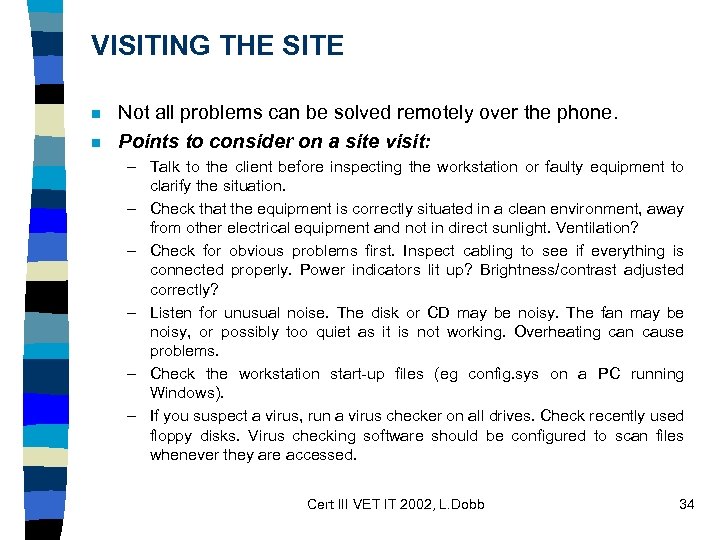 VISITING THE SITE n n Not all problems can be solved remotely over the phone. Points to consider on a site visit: – Talk to the client before inspecting the workstation or faulty equipment to clarify the situation. – Check that the equipment is correctly situated in a clean environment, away from other electrical equipment and not in direct sunlight. Ventilation? – Check for obvious problems first. Inspect cabling to see if everything is connected properly. Power indicators lit up? Brightness/contrast adjusted correctly? – Listen for unusual noise. The disk or CD may be noisy. The fan may be noisy, or possibly too quiet as it is not working. Overheating can cause problems. – Check the workstation start-up files (eg config. sys on a PC running Windows). – If you suspect a virus, run a virus checker on all drives. Check recently used floppy disks. Virus checking software should be configured to scan files whenever they are accessed. Cert III VET IT 2002, L. Dobb 34
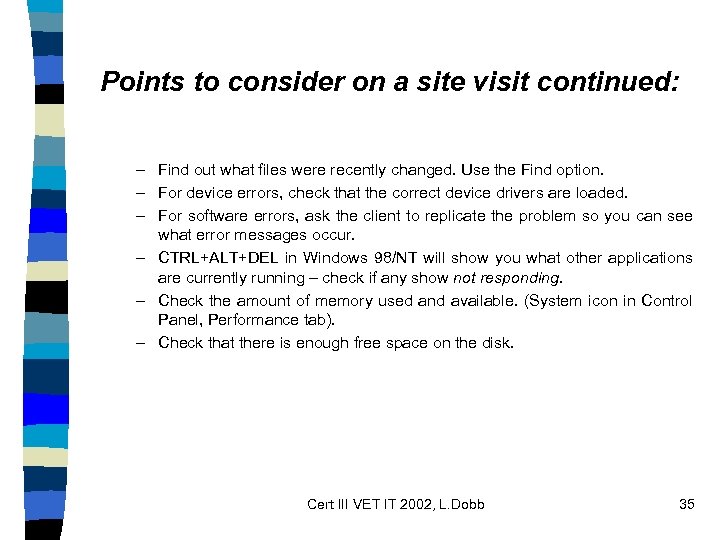 Points to consider on a site visit continued: – Find out what files were recently changed. Use the Find option. – For device errors, check that the correct device drivers are loaded. – For software errors, ask the client to replicate the problem so you can see what error messages occur. – CTRL+ALT+DEL in Windows 98/NT will show you what other applications are currently running – check if any show not responding. – Check the amount of memory used and available. (System icon in Control Panel, Performance tab). – Check that there is enough free space on the disk. Cert III VET IT 2002, L. Dobb 35
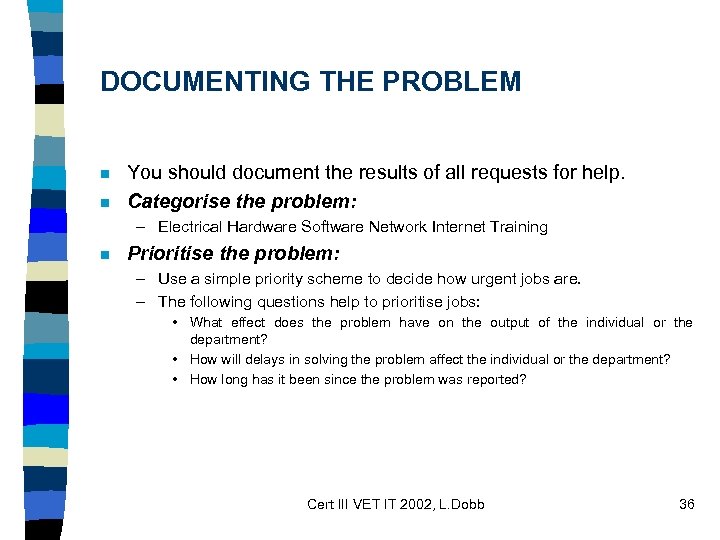 DOCUMENTING THE PROBLEM n n You should document the results of all requests for help. Categorise the problem: – Electrical Hardware Software Network Internet Training n Prioritise the problem: – Use a simple priority scheme to decide how urgent jobs are. – The following questions help to prioritise jobs: • What effect does the problem have on the output of the individual or the department? • How will delays in solving the problem affect the individual or the department? • How long has it been since the problem was reported? Cert III VET IT 2002, L. Dobb 36
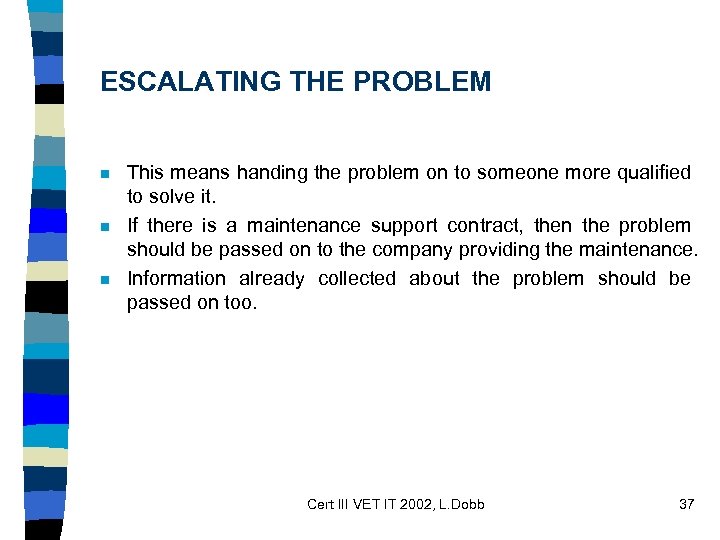 ESCALATING THE PROBLEM n n n This means handing the problem on to someone more qualified to solve it. If there is a maintenance support contract, then the problem should be passed on to the company providing the maintenance. Information already collected about the problem should be passed on too. Cert III VET IT 2002, L. Dobb 37
 FINDING SOLUTIONS n There are many sources of information that can help to solve computing related problems. – – – PRINTED SOURCES LOCAL ON-LINE SOURCES HELP DESK SOFTWARE ON-LINE HELP README FILES INTERNET SOURCES Cert III VET IT 2002, L. Dobb 38
 PRINTED SOURCES n n n The help desk needs to build up (or have access to) a technical library of printed resources. The resources include the internal documentation and procedures produced by the organisation. They need to be collected, collated and updated on a regular basis. Cert III VET IT 2002, L. Dobb 39
 LOCAL ON-LINE SOURCES n Local on-line sources include help desk software, on-line help and READme files. Cert III VET IT 2002, L. Dobb 40
 HELP DESK SOFTWARE n n This is usually a database that acts as a good source of problem -solving information. Key words allow you to search for information about commonly recurring problems and how to fix them. This kind of database is often called a knowledge base and the information is sometimes sold to other companies. Examples: Microhouse Technical Library and Microsoft’s Tech. Net CD collection. Cert III VET IT 2002, L. Dobb 41
 ON-LINE HELP n n n On-line help is a good place to start looking for help with problems with software applications. Contents tab – complete list of the topics available. Search tab – allows you to search for key words. Index tab – details on very specific topics. Use this when you know the name of the topic but need to find some specific details. Cert III VET IT 2002, L. Dobb 42
 README FILES n n n These contain installation information, details of undocumented features and known bugs. The files are usually found in the installation directory, and you are often asked if you want to view the readme file at the end of the installation process. Microsoft Word’s readme file can be accessed through the program’s Help menu. Cert III VET IT 2002, L. Dobb 43
 INTERNET SOURCES n n The World Wide Web Listservers – A listserver is a computer system, which manages an electronic mailing list. Once your email address is listed, you will receive regular messages containing the latest information and news releases. You need to subscribe to mailing lists through email. n FTP sites – An FTP (File Transfer Protocol) site allows you to upload and download files. The sites provide access to software, upgrades and patches as well as documentation. n Newsgroups – Usenet predates the Internet by many years. It carries thousands of discussion groups (called newsgroups); each dedicated to a particular topic. Newsgroups operate like notice boards, where people can post notes or read notes posted by others. – Browsers like Netscape can access newsgroups. Cert III VET IT 2002, L. Dobb 44
 HELP DESK STAFF AND TECHNICAL STAFF n n It can be useful to develop contacts with the people you work with. Some ways to make contacts include: Training courses. Conferences and trade shows. User group meetings and industry organisation meetings. Examples include the Australian Computer Society (ACS), the Australian Information Industry Association (AIIA) and the Help Desk Institute of Australia (HDI) Cert III VET IT 2002, L. Dobb 45
 SOLVING TRAINING RELATED PROBLEMS n When problems arise from staff inexperience or a lack of training, you may need to: – Try to solve the problem over the phone – but this is only appropriate for simple problems. – Provide training materials for the package the client is using – to help the client train him or herself. – Recommend a computer-based training (CBT) package. – Direct some clients to local user groups. n WORKAROUND – A workaround is a temporary solution to a problem. It enables the client to keep working until a more permanent solution is found. Cert III VET IT 2002, L. Dobb 46
 DOCUMENTING SOLUTIONS n n n It is important to document how you have tried and/or succeeded to fix a problem, so that others with a similar problem can benefit from your experience. You should record the resources you have used and the solutions you have tried, as well as keeping notes on other things that should be investigated further. If Parts need to be removed for repair following details should be recorded. When the part or a replacement is returned, note the Date returned, the Actual cost and the Solution to the problem. It is important to backup a client’s data is a PC is sent away for repair. Cert III VET IT 2002, L. Dobb 47
 IMPROVING CUSTOMER SERVICE n n The data collected by the help desk can be analysed to look for any commonly recurring problems. You can then detect common hardware, software or operator problems and take action to avoid them in future. ANALYSING THE HELP DESK DATABASE – Analysing the information stored in the help desk database can help you detect and prevent problems with hardware and software. – Taking preventative action reduces the workload of the help desk. Identifying and fixing common problems means that many employees don’t have to contact you about the same problem. n BENCHMARKING – A benchmark is a set of performance criteria which a product / organisation is expected to meet. You can measure the performance of the help desk by: • Number of client calls – number of client requests logged per day, Response time – the time to initially respond to the client’s request, Completion time – average time taken to solve a problem and the Throughput – number of calls cleared per day or week. Cert III VET IT 2002, L. Dobb 48
 IMPROVING CUSTOMER SERVICE cont. . n BEING PROACTIVE – Apart from analysing the data help in the fault log, there are other ways in which you can be proactive: – Upgrade or suggest an upgrade to management to improve performance and productivity. – Check that hardware is adequate for the job. – Suggest an alternative package if you are sure that it has few bugs / is more reliable than the one currently in use. – Make suggestions to improve occupational health and safety or ergonomic problems when you notice them. Cert III VET IT 2002, L. Dobb 49
 IMPROVING CUSTOMER SERVICE cont. . n GETTING FEEDBACK – The help desk should actively seek client feedback and use the responses to improve customer service. Feedback can be collected using a form or questionnaire – paper based or electronic. – The kind of detail to survey includes the client’s perception of the: • • n Service provided by the help desk. Timeliness of the help desk’s response to the client’s problem. Explanations and technical advice provided. Technician’s manner and professionalism. TEAMWORK – The help desk is a team, and it is important that the team function cohesively. It should be adequately trained and must fully understand the needs of the client. Cert III VET IT 2002, L. Dobb 50
 PAST EXAM QUESTIONS FOR … n ICAITS 031 B Provide advice to clients ? ? Cert III VET IT 2002, L. Dobb 51
 ICAITU 018 B Develop macros and templates for clients using standard products n THE CRITERIA n 1. Determine macro or template requirement –. Client requirements are determined in line with organisational guidelines –. Macro/template specifications are developed and client’s needs are confirmed n 2. Develop macro or template for client –. Macro/template specifications are developed using standard package in line with organisation guidelines –. Client feedback is obtained –. Amendments are made as required for client n 3. Provide client support for the macro or template –. Support/instruction requirements are determined and documented –. Client is instructed in use of macro/template –. Client documentation to help desk is provided for future support Cert III VET IT 2002, L. Dobb 52
 Underpinning knowledge includes: · · General knowledge of functions and features of the operating system. General knowledge of software and hardware supported by the organisation. General understanding of features and functions of particular categories of commercial computing packages. Software packages supported by the organisation. Cert III VET IT 2002, L. Dobb 53
 Underpinning skills include: · · · Problem solving known problems within a range of procedures Questioning and active listening for clarifying information. Plain English literacy and communication skills in relation to dealing with clients and team members. Ability to read and interpret software manuals from a users perspective. One to one instruction. Cert III VET IT 2002, L. Dobb 54
 SUMMARY OF SOFTWARE COVERED MS WORD · · · SKILLS Creating and Organising Templates Recording Macros Customising Menus and Toolbars Word – Editing Macros Word: The Visual Basic Environment. Cert III VET IT 2002, L. Dobb 55
 SUMMARY OF SOFTWARE SKILLS COVERED MS EXCEL · · · Creating and Managing Templates Recording Macros Customising Menus and Toolbars Excel – Editing Macros Excel: Visual Basic. Excel: Problem Solving Cert III VET IT 2002, L. Dobb 56
 SUMMARY OF SOFTWARE SKILLS COVERED MS ACCESS · · Access Macros Access Menus Access: Visual Basic for Applications Access: Problem Solving Cert III VET IT 2002, L. Dobb 57
 CUSTOMISING SOFTWARE · Planning the Customisation · · · System relationships. System limitations. Customising according to client needs. Obtaining client agreement. Customising Software · Customising software. · Obtaining client feedback. · Making changes to customised software. Cert III VET IT 2002, L. Dobb 58
 PAST EXAM QUESTIONS FOR … n ICAITU 018 B Develop macros and templates for clients using standard products Cert III VET IT 2002, L. Dobb 59
 ICAITU 019 B Migrate to new technology n n THE CRITERIA 1. Apply existing knowledge and techniques to new technology – Existing knowledge and techniques are applied to explore new technology – New technology acquired by the organisation is used with minimum disruption – Functions and features of new technology available to the organisation are readily employed to meet organisational requirements n 2. Apply advanced functions of the technology to solve organizational problems – Specialised features of technology, software and hardware utilised to solve organisational problems – Advanced features and functions are used in a manner that exploits the fully capacity of the new technology – Sources of information are accessed to determine the fully range of benefits of new technology n 3. Apply new functions of upgraded technology – Specialised features of upgraded technology are used to solve organisational problems Cert III VET IT 2002, L. Dobb – Upgraded technology is used for enhanced productivity and efficiency 60
 Underpinning knowledge includes: n n n Current technology trends and directions in IT Broad knowledge base of vendor product directions Available sources of information regarding IT and new technology Organisation strategic direction in relation to future IT requirements Understanding systems, organisational and technical Board understanding with detail in some areas of operating systems features and functions Software features and functions Identify components of the business planning process relevant to the development of IT business solutions Current industry accepted hardware and software products with broad knowledge of general features and capabilities Broad general knowledge of the client business domain A basic knowledge of. Cert III VET IT 2002, L. Dobb techniques information gathering 61
 Underpinning skills include: n n n n n Research skills for identifying, analysing and evaluating broad features of new technologies Decision making involving discretion and judgement Verbal and non verbal communication is clear, coherent and concise Customer Service for internal and external interaction Questioning and active listening for conveying and clarifying meaning Literacy skills in regard to interpretation of technical manuals Problem solving known problems in a variety of contexts General analytical skills in relation to known problems in a variety of contexts General research skills in relation to readily available information Cert III VET IT 2002, L. Dobb 62
 CHANGING TECHNOLOGY n n How can changing technology be of benefit to an organisation? HISTORY OF CHANGING TECHNOLOGY – Late 1960’s and early 1970’s – computers first used by organisations for processing information systems. – Mid 1970’s – minicomputers appeared and were scaled down versions of mainframes. – Very expensive and only used for payroll and general ledger. – Early 1980’s – microcomputer appeared. – Late 1980’s and early 1990’s – computing power increased dramatically, with costs being reduced dramatically. Microchips made technology smaller, faster and cheaper. – 1990’s to 2000’s – PCs become very popular as the Internet became widely available in the 1990’s. Cert III VET IT 2002, L. Dobb 63
 APPLYING NEW TECHNOLOGY n n Early computer systems concentrated on data processing – automating existing clerical and administrative systems. Today computers are used in a wide range of disciplines, including electronic commerce, multimedia, education and entertainment. Cert III VET IT 2002, L. Dobb 64
 INFORMATION TECHNOLOGY STRATEGIC PLANNING n n Any change has an element of risk, but prudent planning increases the chances of the new technology benefiting the organisation. Strategic planning involves setting goals. The following steps are undertaken in the process of developing an information technology strategic plan: – – – Develop the business strategy. Identify information technology strategies. Analyse the information technology strategies. Select the most appropriate information technology strategy. Develop a plan to implement the information technology strategy. Cert III VET IT 2002, L. Dobb 65
 The Business Strategy – A strategy is a tactic or an approach to the way something is to be done. A business strategy is the way the organisation does its business. n Business Planning Techniques – A simple technique commonly used to identify strategies to address organisation needs is SWOT analysis: Strengths, Weaknesses, Opportunities, Threats n Identifying Information Technology Strategies – Each strategy identified should be analysed in detail. Some issues to be considered: • Cost? Availability? Implementation time? Will it support the existing business plan? • Effects of the change on the organisation? Effect of the new system on the existing system? • Will existing systems have to be changed? Will policies and procedures have to be changed? n Selecting a Strategy The analysis stage will guide this step. Cert III VET IT 2002, L. Dobb 66
 Developing an Implementation Plan n A plan is developed to implement the information technology strategy. The plan should indicate the hardware and software required, training needs, procedures to be used, security, a schedule of implementation and the expected cost. Cert III VET IT 2002, L. Dobb 67
 BENEFITS OF NEW TECHNOLOGY n n The business environment has become more competitive with the development of technology. Business organisations seek to increase profits, increase market share and reduce costs. Non-profit organisations seek to provide improved services at less cost. Some possible benefits of new technology are: – New business opportunities. Increase in existing business. Greater efficiency. – Greater competitive advantage. Improved management and work practices. n PRODUCTIVITY AND EFFICIENCY GAINS – Gains in productivity and efficiency can be achieved by: • Producing more for the same or less effort and Producing the same amount at less cost. Cert III VET IT 2002, L. Dobb 68
 SELECTING NEW TECHNOLOGY n n As an information technology professional, you will need to keep up to date with developments and trends. You will need to choose the most appropriate technology by evaluating options and selecting what is relevant for the client’s needs. TRENDS AND DIRECTIONS – Over the last couple of years? – In the future? Cert III VET IT 2002, L. Dobb 69
 SOURCES OF INFORMATION n It is important to keep up with developments in the industry. Some possible sources include: – – – Consultants Suppliers Contacts Publications Trade shows The Internet Cert III VET IT 2002, L. Dobb 70
 EVALUATING NEW TECHNOLOGY n n Of the information technology products and services that are relevant to your field, you have to decide which are worth more detailed consideration. To determine this, go back to the information technology strategic plan and evaluate if it fits with the plan. You will need to come up with a list of criteria related to the technology needed. Cert III VET IT 2002, L. Dobb 71
 SELECTING NEW TECHNOLOGY n Once you have identified products and services that fit in with the information technology plan, you will need to select specific products and services from those available. Some practical selection criteria include: – – – – Functionality – what does the technology do? Net benefits – tangible and intangible benefits and costs? Security – does access to system need to be controlled? Growth – will the technology keep up with company growth? Delivery time – when will it be available? Software and hardware – what is required to run the technology? Support – is adequate support available for the technology? Risk – what risks are involved? What are the chances of success? Cert III VET IT 2002, L. Dobb 72
 MEASUREMENT CRITERIA n n Some time after implementing new technology, it is important to determine whether it has been successful. Has it benefited the organisation? Revisiting the business goals in the strategic business plan, and seeing whether they have been achieved can make an objective assessment. Cert III VET IT 2002, L. Dobb 73
 APPLYING NEW TECHNOLOGY n n It is very rare for new information technology systems to be implemented without any problems, but planning the implementation carefully will help create a smoother transition to the new system. Once introduced, the new information technology needs to be maintained. Cert III VET IT 2002, L. Dobb 74
 POSSIBLE PROBLEMS WITH NEW TECHNOLOGY n n When something new is introduced, problems are always a possibility. Potential problems should be anticipated and planned for. There are two types of potential problems: – Problems with the technology itself. – Breakdown of hardware or failure of software. n Problems that users have with the technology include: – Resistance to change – Inability to use the system. Cert III VET IT 2002, L. Dobb 75
 IMPLEMENTATION PLAN n n The introduction of new technology, hardware or software or both requires careful planning. A well-planned implementation is more likely to lead to a smooth transition. The implementation plan should consider the following: – – – The timing The tasks involved The resources required The schedule The acceptance procedure Organisational issues Cert III VET IT 2002, L. Dobb 76
 MANAGING NEW TECHNOLOGY n The technology products and its use need to be managed in order for the technology to be used effectively. Management includes such tasks as: – – Overcoming resistance to technology Ensuring that users are competent to use the technology Monitoring the efficient use of the technology Monitoring the performance of the technology Cert III VET IT 2002, L. Dobb 77
 UPGRADING TECHNOLOGY n Some significant leaps in technology include: – – – n The microcomputer The graphical user interface ATM’s for banks The Internet E-commerce Any upgrade should seek to maximise the benefits of the new technology and allow for future upgrades and developments in technology. Cert III VET IT 2002, L. Dobb 78
 PAST EXAM QUESTIONS FOR… n ICAITU 019 B Migrate to new technology ? ? Cert III VET IT 2002, L. Dobb 79
 ICAITS 020 B Install and optimise system software n n THE CRITERIA 1. Determine operating systems requirements: – Operating system requirements are determined and documented – Requirements of clients are evaluated in line with organisation guidelines, corporate, licensing arrangements and budget n 2. Obtain operating system – Vendors are contacted technical specifications are obtained – Recommendations are documented and provided to appropriate personnel – Licensing, hardware and security requirements are determined and followed n 3. Install and optimise operating system – Operating system is installed, configured and tested in accordance with installation. procedures and organisational requirements – System to meet organisational requirements is optimised – System is documented according to organisational requirements – Installation is conducted with minimal disruption to clients n 4. Provide instruction to meet new software requirements – One to one instruction to the client is provided as required – Client evaluation and Cert III VETare 2002, L. Dobb ensure requirements of client feedback IT obtained to 80 are met
 Underpinning knowledge of includes: n n n Information Technology infrastructure Understanding systems, organisational and technical Detailed knowledge of the system current functionality Functions and features of operating systems supported by the organisation Organisation’s network linkage Set up and configuration procedures Current industry accepted hardware and software products with broad knowledge of general features and capabilities and detailed knowledge in some areas Software packages supported by the organisation Pre-requisites needed for system software installation Vendor specifications and requirements for installation Broad general knowledge of the client business domain Broad knowledge base incorporating theoretical concepts of systems software Cert III VET IT 2002, L. Dobb 81 Broad general knowledge of systems diagnostic software
 Underpinning skills include: n n n Problem solving skills for a defined range of predictable problems Plain English literacy and communication skills in relation to analysis, evaluation and presentation of information Report writing skills for business requiring depth in some areas, analysis and evaluation of information in a defined range of areas Strong interpersonal skills for team work and responsible workplace interactions Questioning and active listening for conveying and clarifying information Literacy skills in regard to interpretation of technical computer installation manuals Cert III VET IT 2002, L. Dobb 82
 INSTALLING WINDOWS 98 n n n Minimum recommended system requirements. Running Windows 98 Setup. First log on and the Welcome screen. The Windows 98 desktop. Plug and play devices. Cert III VET IT 2002, L. Dobb 83
 CUSTOMISING THE DESKTOP n n n Setting the date and time. Controlling the background colour. Choosing a colour scheme. Number of colours and resolution. Viewing styles. Creating shortcuts on the desktop. Cert III VET IT 2002, L. Dobb 84
 SYSTEM PERFORMANCE n n n Multi-tasking. Checking a disk for errors. Conserving system resources. Disk optimisation. Disk caching (read-ahead optimisation). Virtual memory (the swap file). Cert III VET IT 2002, L. Dobb 85
 A COMPARISON WITH THE LINUX OPEN SOURCE OPERATING SYSTEM ? ? Cert III VET IT 2002, L. Dobb 86
 PAST EXAM QUESTIONS FOR … n ICAITS 020 B Install and optimise system software ? ? Cert III VET IT 2002, L. Dobb 87
 ICAITS 032 B Provide network systems administration n n THE CRITERIA 1. Provide client access and security – Log-ons, passwords and applications file access are provided, and documented in line with organisational security requirements – Records of client accounts are evaluated – System integrity and security are maintained – Virus protection is used in line with organisation recommendations n 2. Input into and disseminate disaster recovery plan – Input is provided into disaster recovery plan – Disaster recovery plan is provided to clients as required n 3. Monitor network performance – – – Diagnostic tests are performed Diagnostic information is analysed and acted on Software usage is monitored Illegal software is deleted from the system Hardware response time is monitored Methods for improving efficiency are 2002, L. Dobb and acted on according to 88 Cert III VET IT determined organization guidelines
 Underpinning knowledge of includes: n n n n Understanding systems organisational and technical Organisational access and security procedures Software copyright responsibilities Operating systems supported by the organisation Operating systems functions and basic features Organisational procedures for protection against and elimination of computer viruses Advanced knowledge of software features supported by the organisation Cert III VET IT 2002, L. Dobb 89
 Underpinning knowledge cont. . n n n n Security and network guidelines/procedures Policy and procedures for deleting, restoring and archiving of files Approaches to back up and restoring computer data Disaster recovery policy Procedures for creating logons File access Available in-house and vendor support Occupational Health and Safety legislation relating to the use of equipment Cert III VET IT 2002, L. Dobb 90
 Underpinning skills n n n n Interpretation of technical manuals One to one instruction Questioning and active listening to convey and clarify information Client needs assessment methods Verbal and non verbal communication skills to convey and clarify complex information Apply customer service skills in a range of contexts at various levels Diagnostic skills Cert III VET IT 2002, L. Dobb 91
 PAST EXAM QUESTIONS FOR … n ICAITS 032 B Provide network systems administration ? ? Cert III VET IT 2002, L. Dobb 92
 ICAITD 128 A Create user and technical documentation n n The Criteria 1. Determine documentation standards and requirements –. Standards for documentation are determined from overall project documentation standards and industry standards. –. Documentation types and design templates are identified and agreed with higher authorities. –. Authors are informed of the standards and any technical resources/materials/manuals to support documentation. n 2. Produce technical software documentation –. Technical documentation is recorded in line with project documentation standards. –. All supporting technical information such as the architecture and detailed project plan are clearly and accurately referenced. –. Modification and maintenance requirements are clearly documented to documentation standards. –. Documentation is understandable to programmers as a stand alone document. Cert III VET IT 2002, L. Dobb 93
 The Criteria cont. . n 3. Create client user documentation –. Developed software’s operational procedures are clearly and coherently documented in non technical jargon. –. Documentation is aligned with client requirements to support ease of use. –. Documentation is written in clear, coherent and concise plain English and logically sequenced and cross referenced. n 4. Obtain endorsement/sign-off –. Developed documentation is reviewed by target audience –. Changes are made according to target audience feedback –. Documentation is submitted for higher authority sign off Cert III VET IT 2002, L. Dobb 94
 Underpinning knowledge of · · · · Current business practices in relation to preparing reports. Detailed knowledge of documentation practices and standards. Broad knowledge base of quality assurance practices. Broad general knowledge of the client business domain. General OH&S principles and responsibilities. Current industry accepted hardware and software products with broad knowledge of general features and capabilities. Broad knowledge base of vendor product directions. Cert III VET IT 2002, L. Dobb 95
 Underpinning skills in · · · Problem solving skills for a defined range of predictable problems. Report writing skills for business requiring depth in some areas, analysis and evaluation of information in a defined range of areas. Plain English literacy and communication skills in relation to analysis, evaluation and presentation of information. Technical writing skills for business requiring depth in some areas, analysis and evaluation of information in a defined range of areas. Comprehension skills relevant to technical materials. Cert III VET IT 2002, L. Dobb 96
 COMPUTER SYSTEM DOCUMENTATION · · · TYPES OF DOCUMENTATION PURPOSE OF DOCUMENTATION METHODOLOGIES FOR PRODUCING DOCUMENTATION STANDARDS TEMPLATES DOCUMENTATION TOOLS Cert III VET IT 2002, L. Dobb 97
 TECHNICAL DOCUMENTATION · · · WHAT IS TECHNICAL DOCUMENTATION? PURPOSE OF TECHNICAL DOCUMENTATION DEVELOPING TECHNICAL DOCUMENTATION REFERENCING MAINTENANCE Cert III VET IT 2002, L. Dobb 98
 USER DOCUMENTATION · · · TYPES OF USER DOCUMENTATION PURPOSE OF USER DOCUMENTATION DEVELOPING USER DOCUMENTATION WRITING STYLE PRINTED DOCUMENTATION ON-LINE DOCUMENTATION Cert III VET IT 2002, L. Dobb 99
 USER REQUIREMENTS AND TRAINING n USER NEEDS · · · n USER REQUESTS COLLECTING INFORMATION DETERMINING REQUIREMENTS ANALYSING REQUIREMENTS DOCUMENTING REQUIREMENTS TRAINING · · · TRAINING NEEDS TRAINING LEVELS TYPES OF TRAINING SOURCES OF TRAINING EVALUATION Cert III VET IT 2002, L. Dobb 100
 PAST EXAM QUESTIONS FOR. . . n ICAITD 128 A Create user and technical documentation? ? Cert III VET IT 2002, L. Dobb 101