 Скачать презентацию REVIEW Object types System security levels
39f3fd526830fdcf94ba7deb972a27ff.ppt
- Количество слайдов: 36



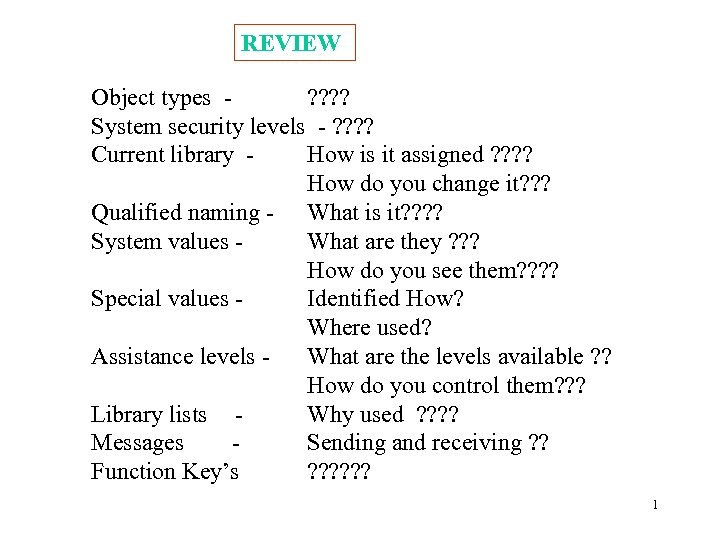
REVIEW Object types ? ? System security levels - ? ? Current library How is it assigned ? ? How do you change it? ? ? Qualified naming - What is it? ? System values What are they ? ? ? How do you see them? ? Special values Identified How? Where used? Assistance levels What are the levels available ? ? How do you control them? ? ? Library lists Why used ? ? Messages Sending and receiving ? ? Function Key’s ? ? ? 1
Chapter 4 working with jobs Handling messages 2
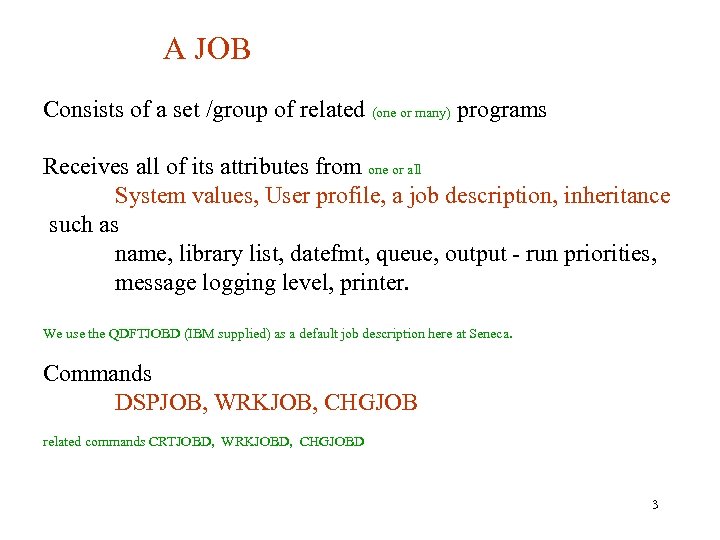
A JOB Consists of a set /group of related (one or many) programs Receives all of its attributes from one or all System values, User profile, a job description, inheritance such as name, library list, datefmt, queue, output - run priorities, message logging level, printer. We use the QDFTJOBD (IBM supplied) as a default job description here at Seneca. Commands DSPJOB, WRKJOB, CHGJOB related commands CRTJOBD, WRKJOBD, CHGJOBD 3
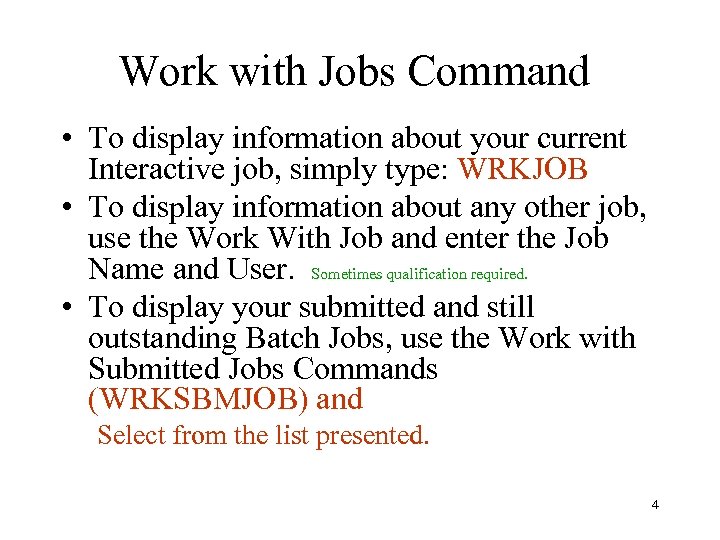
Work with Jobs Command • To display information about your current Interactive job, simply type: WRKJOB • To display information about any other job, use the Work With Job and enter the Job Name and User. Sometimes qualification required. • To display your submitted and still outstanding Batch Jobs, use the Work with Submitted Jobs Commands (WRKSBMJOB) and Select from the list presented. 4
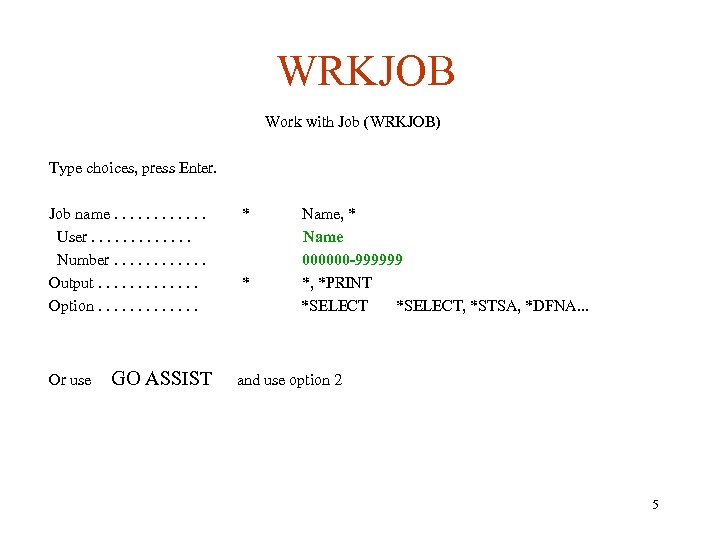
WRKJOB Work with Job (WRKJOB) Type choices, press Enter. Job name. . . User. . . Number. . . Output. . . Option. . . Or use GO ASSIST * * Name, * Name 000000 -999999 *, *PRINT *SELECT, *STSA, *DFNA. . . and use option 2 5
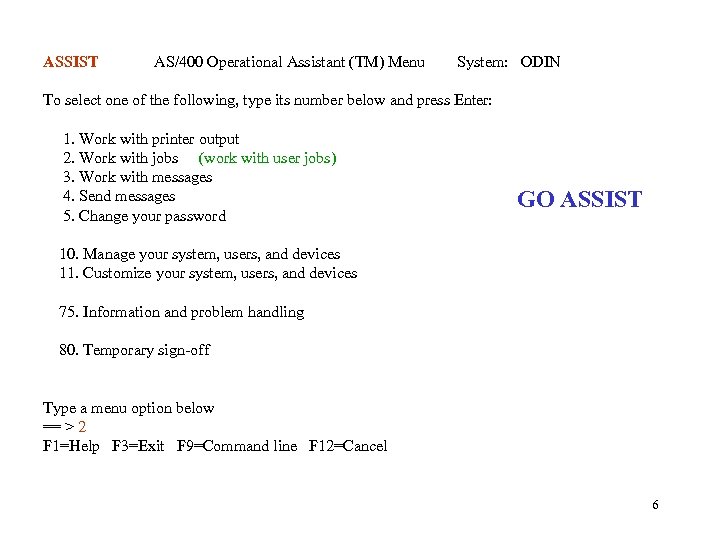
ASSIST AS/400 Operational Assistant (TM) Menu System: ODIN To select one of the following, type its number below and press Enter: 1. Work with printer output 2. Work with jobs (work with user jobs) 3. Work with messages 4. Send messages 5. Change your password GO ASSIST 10. Manage your system, users, and devices 11. Customize your system, users, and devices 75. Information and problem handling 80. Temporary sign-off Type a menu option below == > 2 F 1=Help F 3=Exit F 9=Command line F 12=Cancel 6
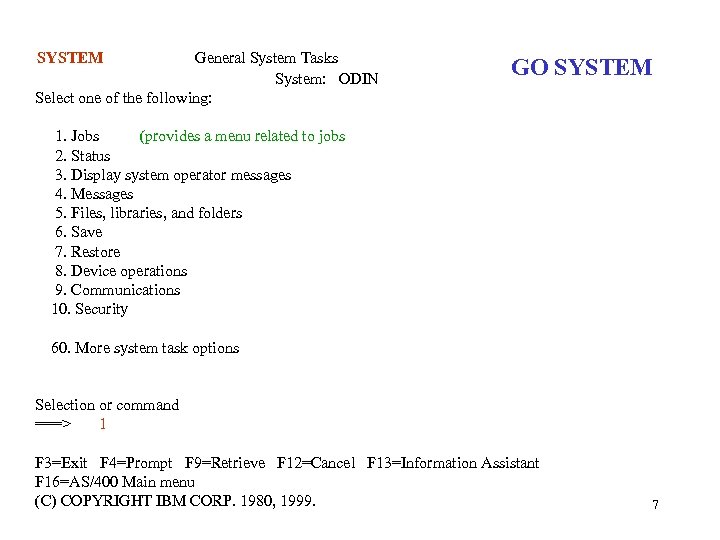
SYSTEM General System Tasks System: ODIN Select one of the following: GO SYSTEM 1. Jobs (provides a menu related to jobs 2. Status 3. Display system operator messages 4. Messages 5. Files, libraries, and folders 6. Save 7. Restore 8. Device operations 9. Communications 10. Security 60. More system task options Selection or command ===> 1 F 3=Exit F 4=Prompt F 9=Retrieve F 12=Cancel F 13=Information Assistant F 16=AS/400 Main menu (C) COPYRIGHT IBM CORP. 1980, 1999. 7
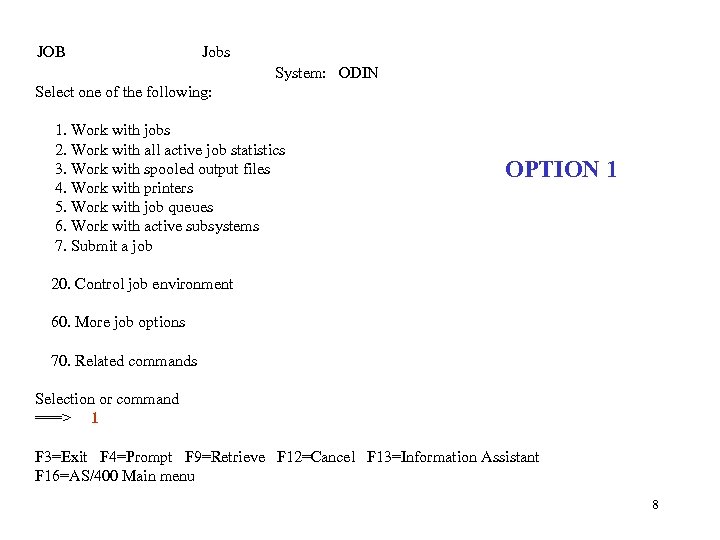
JOB Jobs System: ODIN Select one of the following: 1. Work with jobs 2. Work with all active job statistics 3. Work with spooled output files 4. Work with printers 5. Work with job queues 6. Work with active subsystems 7. Submit a job OPTION 1 20. Control job environment 60. More job options 70. Related commands Selection or command ===> 1 F 3=Exit F 4=Prompt F 9=Retrieve F 12=Cancel F 13=Information Assistant F 16=AS/400 Main menu 8
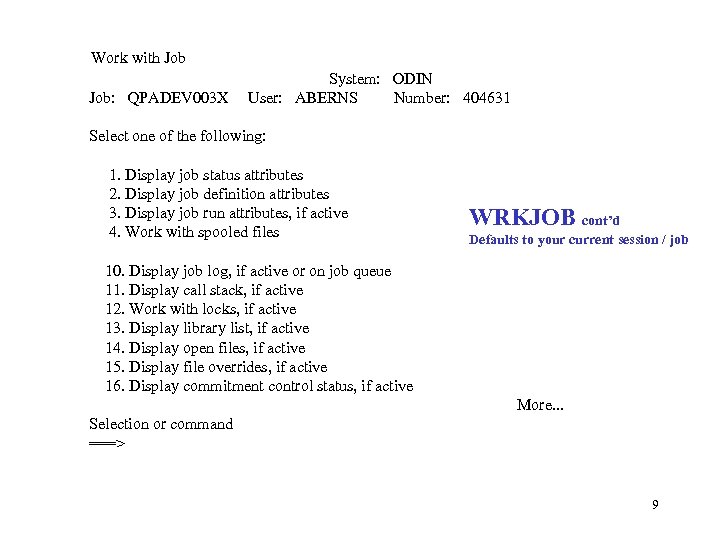
Work with Job: QPADEV 003 X System: ODIN User: ABERNS Number: 404631 Select one of the following: 1. Display job status attributes 2. Display job definition attributes 3. Display job run attributes, if active 4. Work with spooled files WRKJOB cont’d Defaults to your current session / job 10. Display job log, if active or on job queue 11. Display call stack, if active 12. Work with locks, if active 13. Display library list, if active 14. Display open files, if active 15. Display file overrides, if active 16. Display commitment control status, if active More. . . Selection or command ===> 9
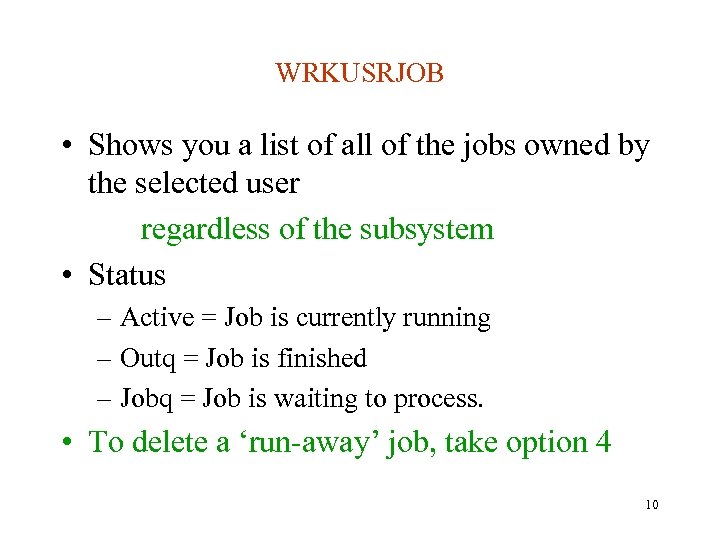
WRKUSRJOB • Shows you a list of all of the jobs owned by the selected user regardless of the subsystem • Status – Active = Job is currently running – Outq = Job is finished – Jobq = Job is waiting to process. • To delete a ‘run-away’ job, take option 4 10
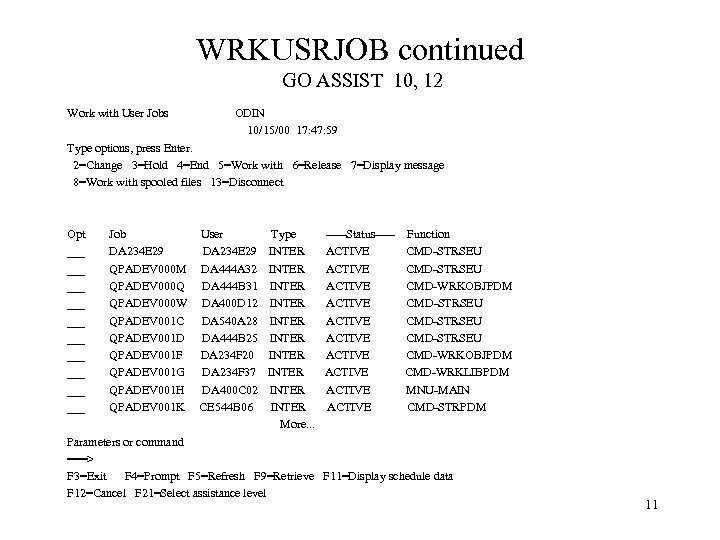
WRKUSRJOB continued GO ASSIST 10, 12 Work with User Jobs ODIN 10/15/00 17: 47: 59 Type options, press Enter. 2=Change 3=Hold 4=End 5=Work with 6=Release 7=Display message 8=Work with spooled files 13=Disconnect Opt ___ ___ ___ Job DA 234 E 29 QPADEV 000 M QPADEV 000 Q QPADEV 000 W QPADEV 001 C QPADEV 001 D QPADEV 001 F QPADEV 001 G QPADEV 001 H QPADEV 001 K User DA 234 E 29 DA 444 A 32 DA 444 B 31 DA 400 D 12 DA 540 A 28 DA 444 B 25 DA 234 F 20 DA 234 F 37 DA 400 C 02 CE 544 B 06 Type INTER INTER INTER More. . . -----Status----ACTIVE ACTIVE ACTIVE Function CMD-STRSEU CMD-WRKOBJPDM CMD-STRSEU CMD-WRKOBJPDM CMD-WRKLIBPDM MNU-MAIN CMD-STRPDM Parameters or command ===> F 3=Exit F 4=Prompt F 5=Refresh F 9=Retrieve F 11=Display schedule data F 12=Cancel F 21=Select assistance level 11
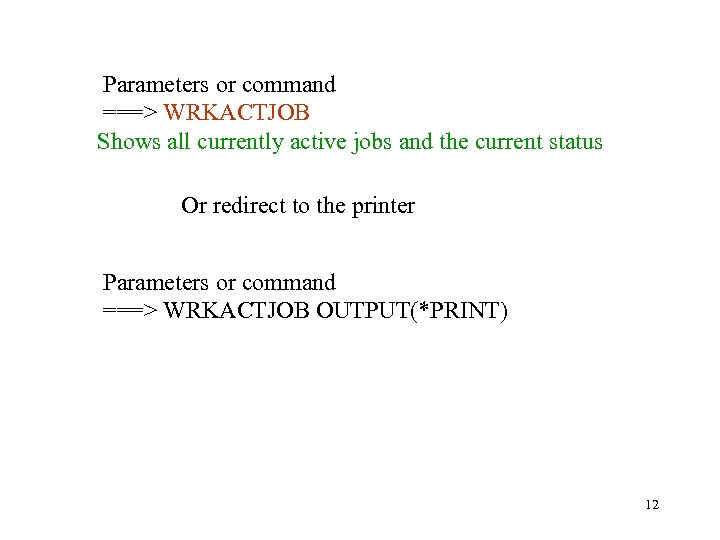
Parameters or command ===> WRKACTJOB Shows all currently active jobs and the current status Or redirect to the printer Parameters or command ===> WRKACTJOB OUTPUT(*PRINT) 12
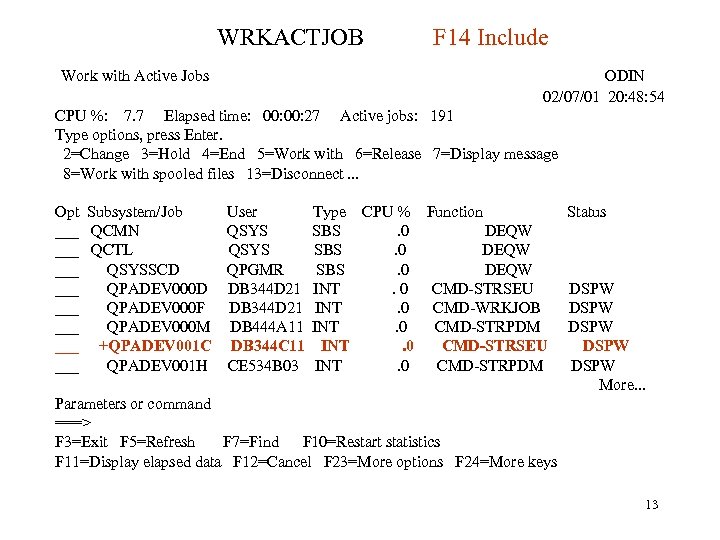
WRKACTJOB Work with Active Jobs F 14 Include ODIN 02/07/01 20: 48: 54 CPU %: 7. 7 Elapsed time: 00: 27 Active jobs: 191 Type options, press Enter. 2=Change 3=Hold 4=End 5=Work with 6=Release 7=Display message 8=Work with spooled files 13=Disconnect. . . Opt Subsystem/Job User ___ QCMN QSYS ___ QCTL QSYS ___ QSYSSCD QPGMR ___ QPADEV 000 D DB 344 D 21 ___ QPADEV 000 F DB 344 D 21 ___ QPADEV 000 M DB 444 A 11 ___ +QPADEV 001 C DB 344 C 11 ___ QPADEV 001 H CE 534 B 03 Type CPU % Function SBS. 0 DEQW INT. 0 CMD-STRSEU INT. 0 CMD-WRKJOB INT. 0 CMD-STRPDM INT. 0 CMD-STRSEU INT. 0 CMD-STRPDM Status DSPW DSPW More. . . Parameters or command ===> F 3=Exit F 5=Refresh F 7=Find F 10=Restart statistics F 11=Display elapsed data F 12=Cancel F 23=More options F 24=More keys 13
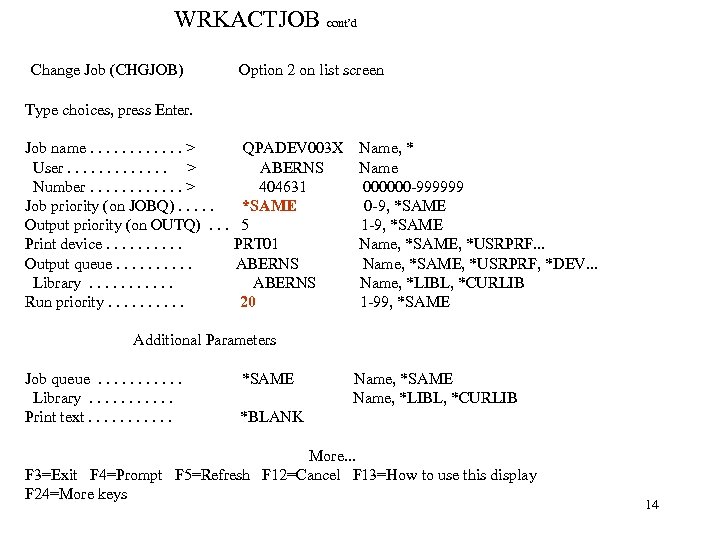
WRKACTJOB cont’d Change Job (CHGJOB) Option 2 on list screen Type choices, press Enter. Job name. . . > User. . . > Number. . . > Job priority (on JOBQ). . . Output priority (on OUTQ). . . Print device. . Output queue. . Library. . . Run priority. . QPADEV 003 X Name, * ABERNS Name 404631 000000 -999999 *SAME 0 -9, *SAME 5 1 -9, *SAME PRT 01 Name, *SAME, *USRPRF. . . ABERNS Name, *SAME, *USRPRF, *DEV. . . ABERNS Name, *LIBL, *CURLIB 20 1 -99, *SAME Additional Parameters Job queue. . . Library. . . Print text. . . *SAME Name, *LIBL, *CURLIB *BLANK More. . . F 3=Exit F 4=Prompt F 5=Refresh F 12=Cancel F 13=How to use this display F 24=More keys 14
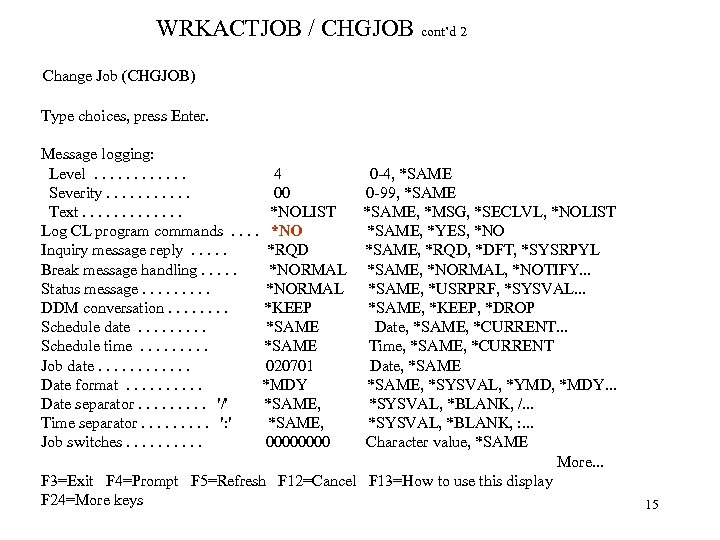
WRKACTJOB / CHGJOB cont’d 2 Change Job (CHGJOB) Type choices, press Enter. Message logging: Level. . . 4 Severity. . . 00 Text. . . *NOLIST Log CL program commands. . *NO Inquiry message reply. . . *RQD Break message handling. . . *NORMAL Status message. . *NORMAL DDM conversation. . . . *KEEP Schedule date. . *SAME Schedule time. . *SAME Job date. . . 020701 Date format. . *MDY Date separator. . '/' *SAME, Time separator. . ': ' *SAME, Job switches. . 0000 0 -4, *SAME 0 -99, *SAME, *MSG, *SECLVL, *NOLIST *SAME, *YES, *NO *SAME, *RQD, *DFT, *SYSRPYL *SAME, *NORMAL, *NOTIFY. . . *SAME, *USRPRF, *SYSVAL. . . *SAME, *KEEP, *DROP Date, *SAME, *CURRENT. . . Time, *SAME, *CURRENT Date, *SAME, *SYSVAL, *YMD, *MDY. . . *SYSVAL, *BLANK, /. . . *SYSVAL, *BLANK, : . . . Character value, *SAME More. . . F 3=Exit F 4=Prompt F 5=Refresh F 12=Cancel F 13=How to use this display F 24=More keys 15
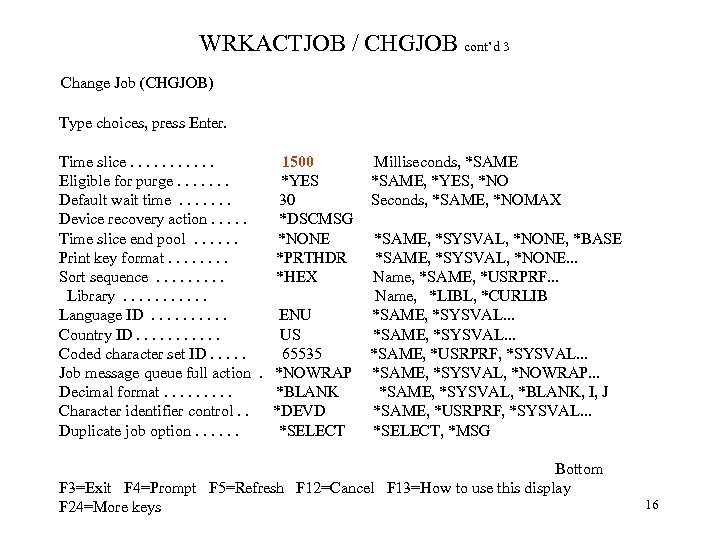
WRKACTJOB / CHGJOB cont’d 3 Change Job (CHGJOB) Type choices, press Enter. Time slice. . . 1500 Eligible for purge. . . . *YES Default wait time. . . . 30 Device recovery action. . . *DSCMSG Time slice end pool. . . *NONE Print key format. . . . *PRTHDR Sort sequence. . *HEX Library. . . Language ID. . ENU Country ID. . . US Coded character set ID. . . 65535 Job message queue full action. *NOWRAP Decimal format. . *BLANK Character identifier control. . *DEVD Duplicate job option. . . *SELECT Milliseconds, *SAME, *YES, *NO Seconds, *SAME, *NOMAX *SAME, *SYSVAL, *NONE, *BASE *SAME, *SYSVAL, *NONE. . . Name, *SAME, *USRPRF. . . Name, *LIBL, *CURLIB *SAME, *SYSVAL. . . *SAME, *USRPRF, *SYSVAL. . . *SAME, *SYSVAL, *NOWRAP. . . *SAME, *SYSVAL, *BLANK, I, J *SAME, *USRPRF, *SYSVAL. . . *SELECT, *MSG Bottom F 3=Exit F 4=Prompt F 5=Refresh F 12=Cancel F 13=How to use this display F 24=More keys 16
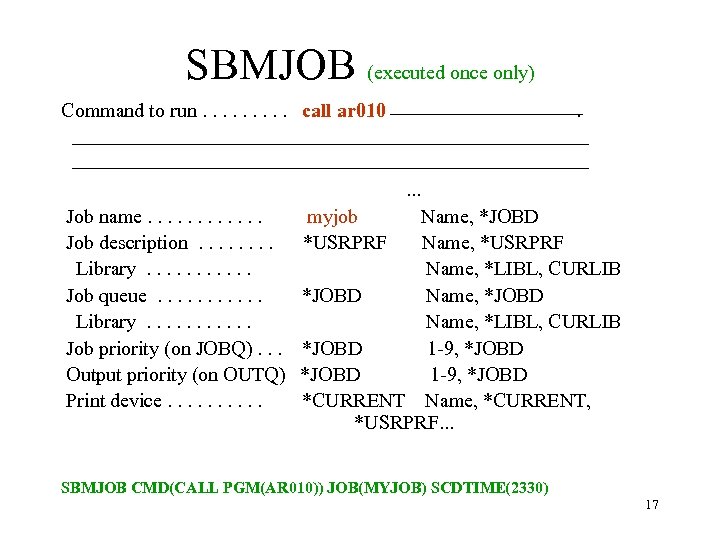
SBMJOB (executed once only) Command to run. . call ar 010 . . Job name. . . Job description. . . . Library. . . Job queue. . . Library. . . Job priority (on JOBQ). . . Output priority (on OUTQ) Print device. . myjob *USRPRF Name, *JOBD Name, *USRPRF Name, *LIBL, CURLIB *JOBD 1 -9, *JOBD *CURRENT Name, *CURRENT, *USRPRF. . . SBMJOB CMD(CALL PGM(AR 010)) JOB(MYJOB) SCDTIME(2330) 17
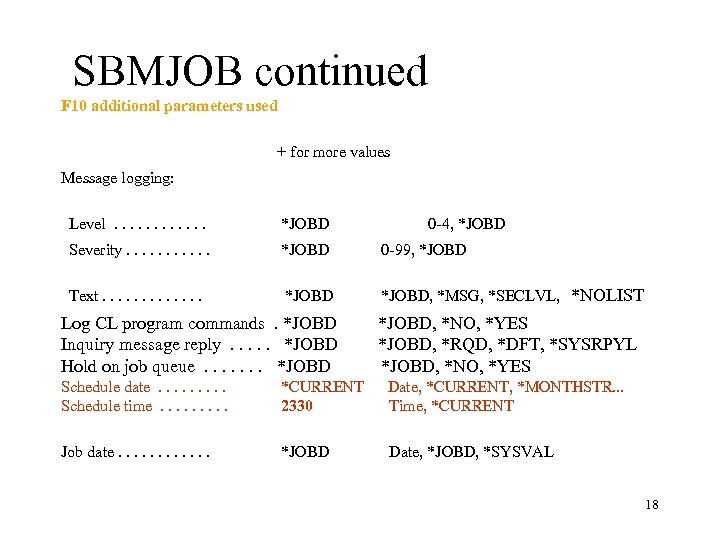
SBMJOB continued F 10 additional parameters used + for more values Message logging: Level. . . *JOBD Severity. . . *JOBD 0 -99, *JOBD Text. . . *JOBD, *MSG, *SECLVL, *NOLIST Log CL program commands. *JOBD Inquiry message reply. . . *JOBD Hold on job queue. . . . *JOBD 0 -4, *JOBD, *NO, *YES *JOBD, *RQD, *DFT, *SYSRPYL *JOBD, *NO, *YES Schedule date. . Schedule time. . *CURRENT 2330 Date, *CURRENT, *MONTHSTR. . . Time, *CURRENT Job date. . . *JOBD Date, *JOBD, *SYSVAL 18
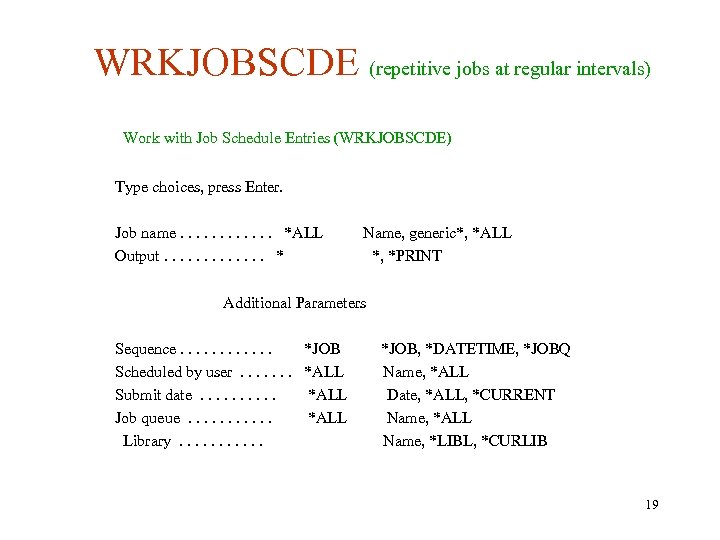
WRKJOBSCDE (repetitive jobs at regular intervals) Work with Job Schedule Entries (WRKJOBSCDE) Type choices, press Enter. Job name. . . *ALL Output. . . * Name, generic*, *ALL *, *PRINT Additional Parameters Sequence. . . Scheduled by user. . . . Submit date. . Job queue. . . Library. . . *JOB *ALL *JOB, *DATETIME, *JOBQ Name, *ALL Date, *ALL, *CURRENT Name, *ALL Name, *LIBL, *CURLIB 19
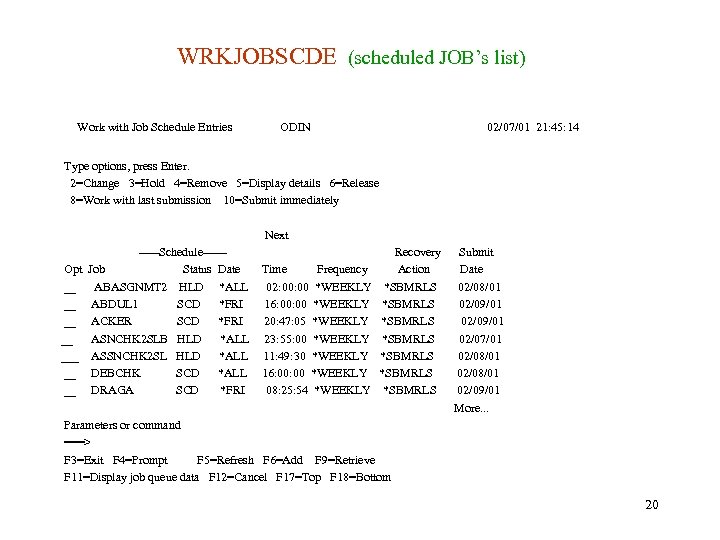
WRKJOBSCDE (scheduled JOB’s list) Work with Job Schedule Entries ODIN 02/07/01 21: 45: 14 Type options, press Enter. 2=Change 3=Hold 4=Remove 5=Display details 6=Release 8=Work with last submission 10=Submit immediately Next Opt __ __ ___ __ __ -----Schedule-----Job Status Date ABASGNMT 2 HLD *ALL ABDUL 1 SCD *FRI ACKER SCD *FRI ASNCHK 2 SLB HLD *ALL ASSNCHK 2 SL HLD *ALL DEBCHK SCD *ALL DRAGA SCD *FRI Time Frequency 02: 00 *WEEKLY 16: 00 *WEEKLY 20: 47: 05 *WEEKLY 23: 55: 00 *WEEKLY 11: 49: 30 *WEEKLY 16: 00 *WEEKLY 08: 25: 54 *WEEKLY Recovery Action *SBMRLS *SBMRLS Submit Date 02/08/01 02/09/01 02/07/01 02/08/01 02/09/01 More. . . Parameters or command ===> F 3=Exit F 4=Prompt F 5=Refresh F 6=Add F 9=Retrieve F 11=Display job queue data F 12=Cancel F 17=Top F 18=Bottom 20
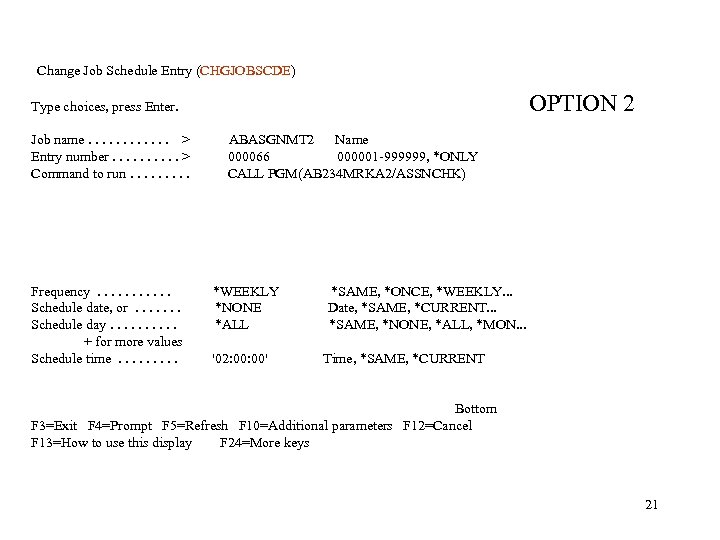
Change Job Schedule Entry (CHGJOBSCDE) OPTION 2 Type choices, press Enter. Job name. . . > Entry number. . > Command to run. . Frequency. . . Schedule date, or. . . . Schedule day. . + for more values Schedule time. . ABASGNMT 2 Name 000066 000001 -999999, *ONLY CALL PGM(AB 234 MRKA 2/ASSNCHK) *WEEKLY *NONE *ALL '02: 00' *SAME, *ONCE, *WEEKLY. . . Date, *SAME, *CURRENT. . . *SAME, *NONE, *ALL, *MON. . . Time, *SAME, *CURRENT Bottom F 3=Exit F 4=Prompt F 5=Refresh F 10=Additional parameters F 12=Cancel F 13=How to use this display F 24=More keys 21
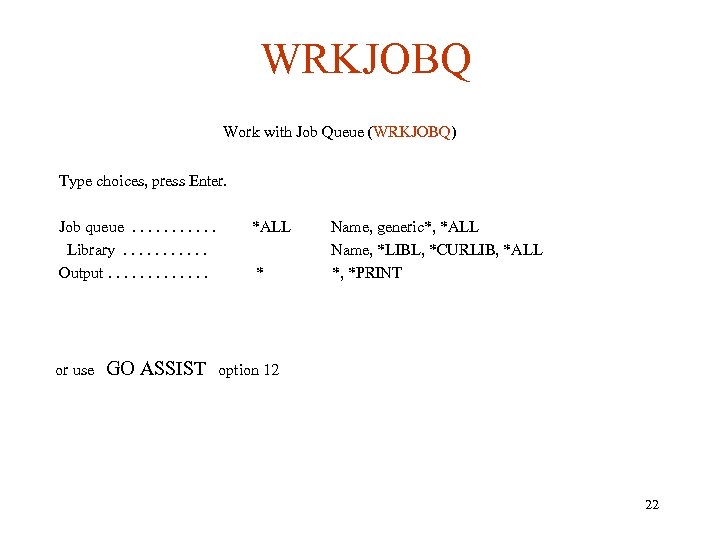
WRKJOBQ Work with Job Queue (WRKJOBQ) Type choices, press Enter. Job queue. . . Library. . . Output. . . or use GO ASSIST *ALL * Name, generic*, *ALL Name, *LIBL, *CURLIB, *ALL *, *PRINT option 12 22
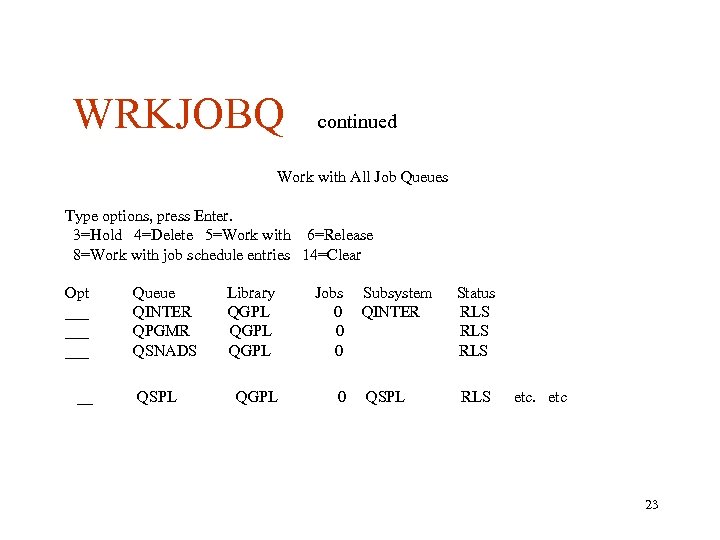
WRKJOBQ continued Work with All Job Queues Type options, press Enter. 3=Hold 4=Delete 5=Work with 6=Release 8=Work with job schedule entries 14=Clear Opt ___ ___ __ Queue QINTER QPGMR QSNADS QSPL Library QGPL Jobs 0 0 0 QGPL 0 Subsystem QINTER Status RLS RLS QSPL RLS etc 23
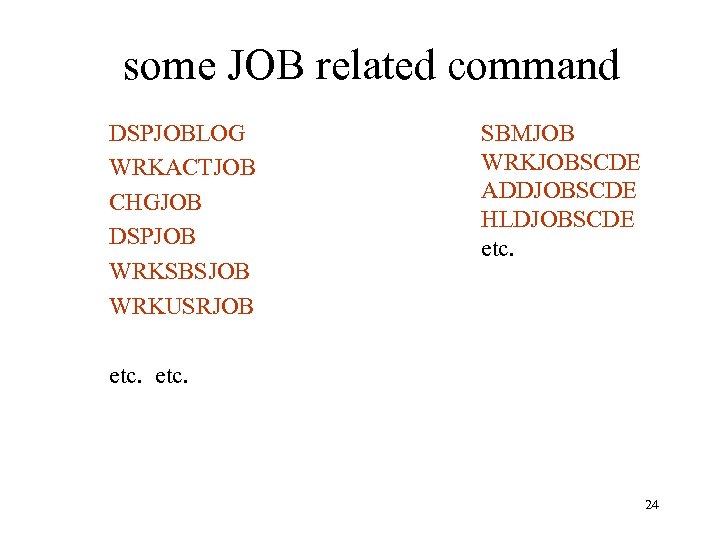
some JOB related command DSPJOBLOG WRKACTJOB CHGJOB DSPJOB WRKSBSJOB WRKUSRJOB SBMJOB WRKJOBSCDE ADDJOBSCDE HLDJOBSCDE etc. 24
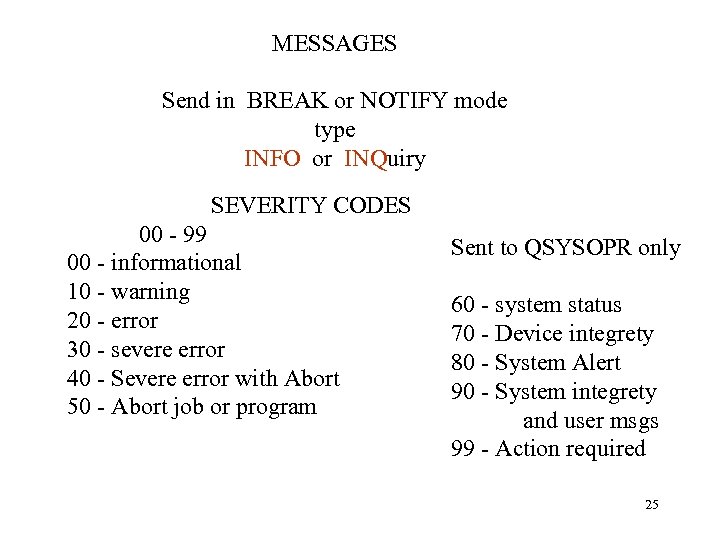
MESSAGES Send in BREAK or NOTIFY mode type INFO or INQuiry SEVERITY CODES 00 - 99 00 - informational 10 - warning 20 - error 30 - severe error 40 - Severe error with Abort 50 - Abort job or program Sent to QSYSOPR only 60 - system status 70 - Device integrety 80 - System Alert 90 - System integrety and user msgs 99 - Action required 25
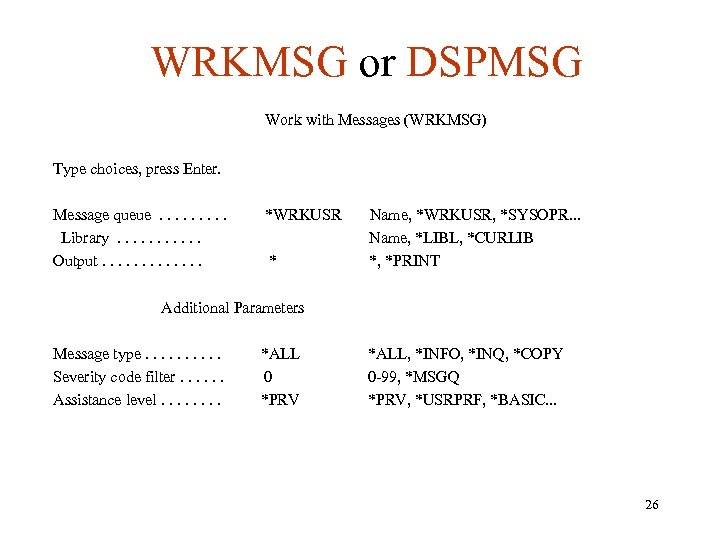
WRKMSG or DSPMSG Work with Messages (WRKMSG) Type choices, press Enter. Message queue. . Library. . . Output. . . *WRKUSR * Name, *WRKUSR, *SYSOPR. . . Name, *LIBL, *CURLIB *, *PRINT Additional Parameters Message type. . Severity code filter. . . Assistance level. . . . *ALL 0 *PRV *ALL, *INFO, *INQ, *COPY 0 -99, *MSGQ *PRV, *USRPRF, *BASIC. . . 26
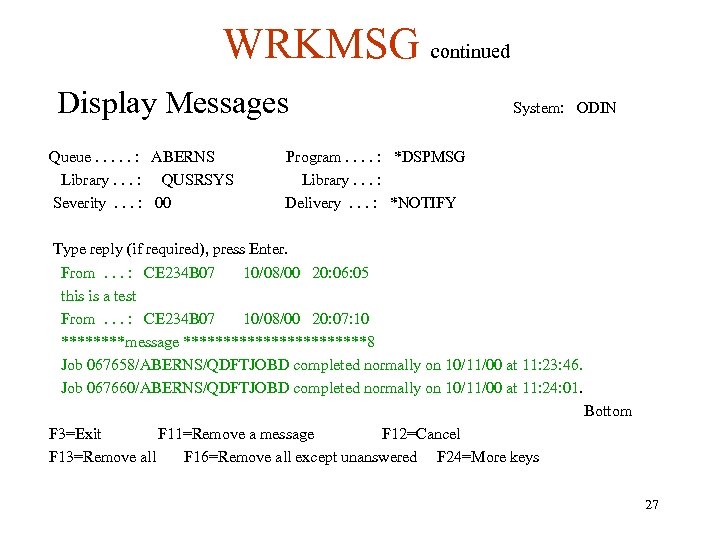
WRKMSG continued Display Messages Queue. . . : ABERNS Library. . . : QUSRSYS Severity. . . : 00 System: ODIN Program. . : *DSPMSG Library. . . : Delivery. . . : *NOTIFY Type reply (if required), press Enter. From. . . : CE 234 B 07 10/08/00 20: 06: 05 this is a test From. . . : CE 234 B 07 10/08/00 20: 07: 10 ****message ************8 Job 067658/ABERNS/QDFTJOBD completed normally on 10/11/00 at 11: 23: 46. Job 067660/ABERNS/QDFTJOBD completed normally on 10/11/00 at 11: 24: 01. Bottom F 3=Exit F 11=Remove a message F 12=Cancel F 13=Remove all F 16=Remove all except unanswered F 24=More keys 27
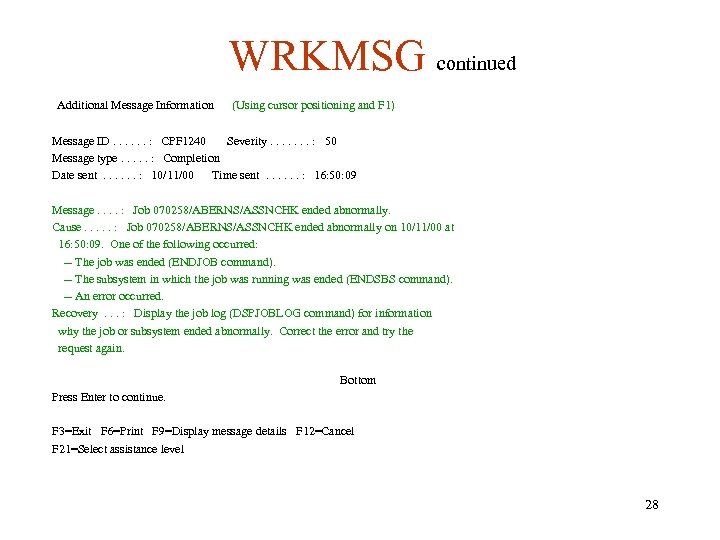
WRKMSG continued Additional Message Information (Using cursor positioning and F 1) Message ID. . . : CPF 1240 Severity. . . . : 50 Message type. . . : Completion Date sent. . . : 10/11/00 Time sent. . . : 16: 50: 09 Message. . : Job 070258/ABERNS/ASSNCHK ended abnormally. Cause. . . : Job 070258/ABERNS/ASSNCHK ended abnormally on 10/11/00 at 16: 50: 09. One of the following occurred: -- The job was ended (ENDJOB command). -- The subsystem in which the job was running was ended (ENDSBS command). -- An error occurred. Recovery. . . : Display the job log (DSPJOBLOG command) for information why the job or subsystem ended abnormally. Correct the error and try the request again. Bottom Press Enter to continue. F 3=Exit F 6=Print F 9=Display message details F 12=Cancel F 21=Select assistance level 28
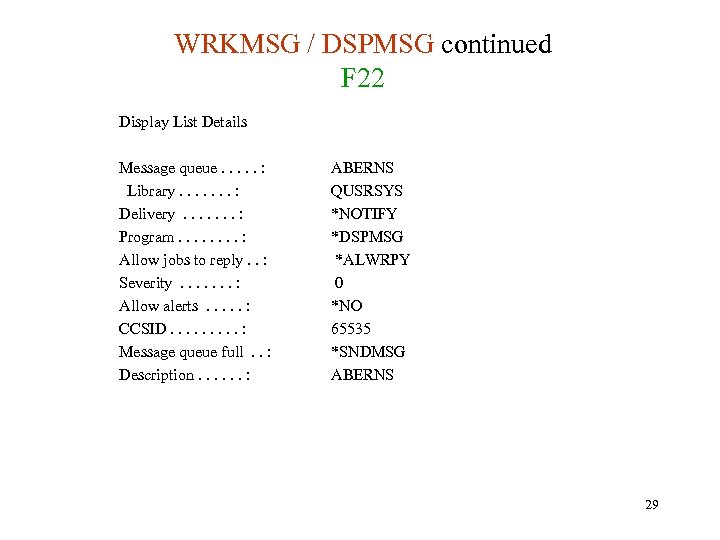
WRKMSG / DSPMSG continued F 22 Display List Details Message queue. . . : Library. . . . : Delivery. . . . : Program. . . . : Allow jobs to reply. . : Severity. . . . : Allow alerts. . . : CCSID. . : Message queue full. . : Description. . . : ABERNS QUSRSYS *NOTIFY *DSPMSG *ALWRPY 0 *NO 65535 *SNDMSG ABERNS 29
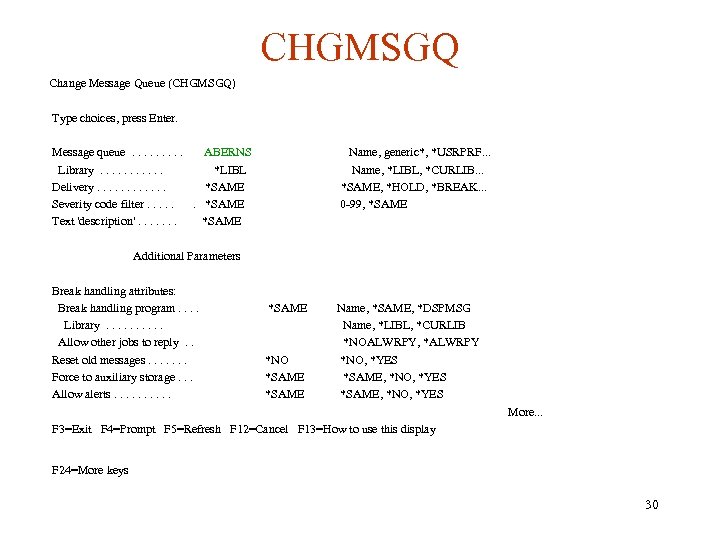
CHGMSGQ Change Message Queue (CHGMSGQ) Type choices, press Enter. Message queue. . ABERNS Library. . . *LIBL Delivery. . . *SAME Severity code filter. . . *SAME Text 'description'. . . . *SAME Name, generic*, *USRPRF. . . Name, *LIBL, *CURLIB. . . *SAME, *HOLD, *BREAK. . . 0 -99, *SAME Additional Parameters Break handling attributes: Break handling program. . Library. . Allow other jobs to reply. . Reset old messages. . . . Force to auxiliary storage. . . Allow alerts. . *SAME *NO *SAME Name, *SAME, *DSPMSG Name, *LIBL, *CURLIB *NOALWRPY, *ALWRPY *NO, *YES *SAME, *NO, *YES More. . . F 3=Exit F 4=Prompt F 5=Refresh F 12=Cancel F 13=How to use this display F 24=More keys 30
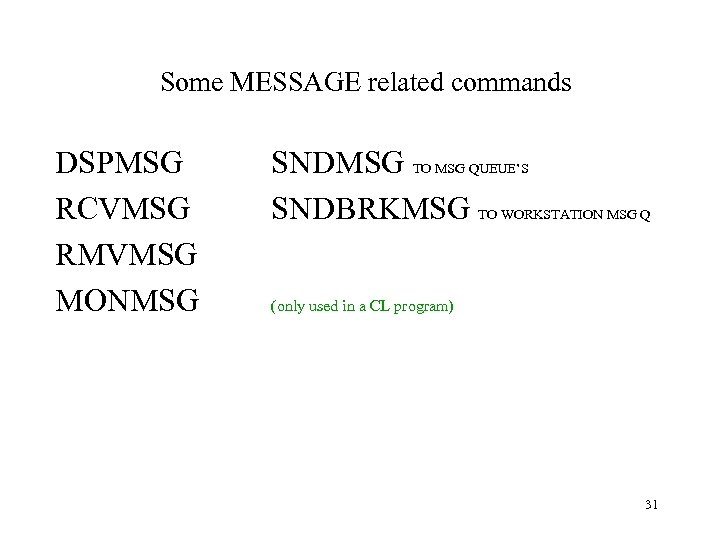
Some MESSAGE related commands DSPMSG RCVMSG RMVMSG MONMSG SNDMSG TO MSG QUEUE’S SNDBRKMSG TO WORKSTATION MSG Q (only used in a CL program) 31
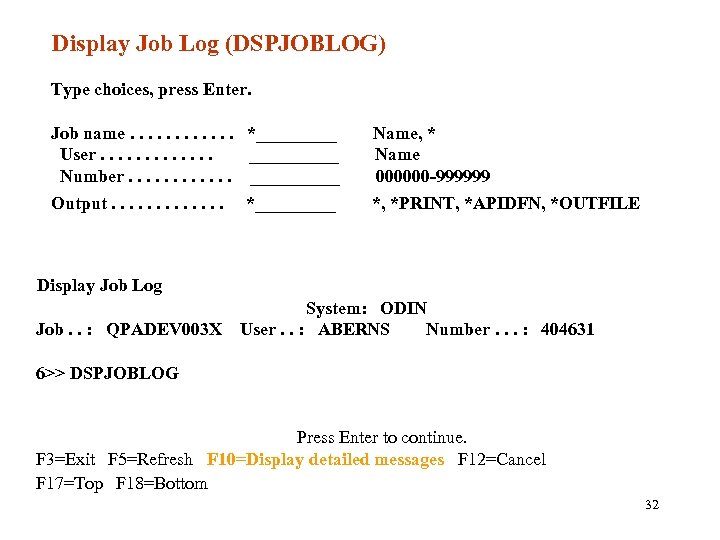
Display Job Log (DSPJOBLOG) Type choices, press Enter. Job name. . . *_____ User. . . _____ Number. . . _____ Name, * Name 000000 -999999 Output. . . *, *PRINT, *APIDFN, *OUTFILE *_____ Display Job Log System: ODIN Job. . : QPADEV 003 X User. . : ABERNS Number. . . : 404631 6>> DSPJOBLOG Press Enter to continue. F 3=Exit F 5=Refresh F 10=Display detailed messages F 12=Cancel F 17=Top F 18=Bottom 32
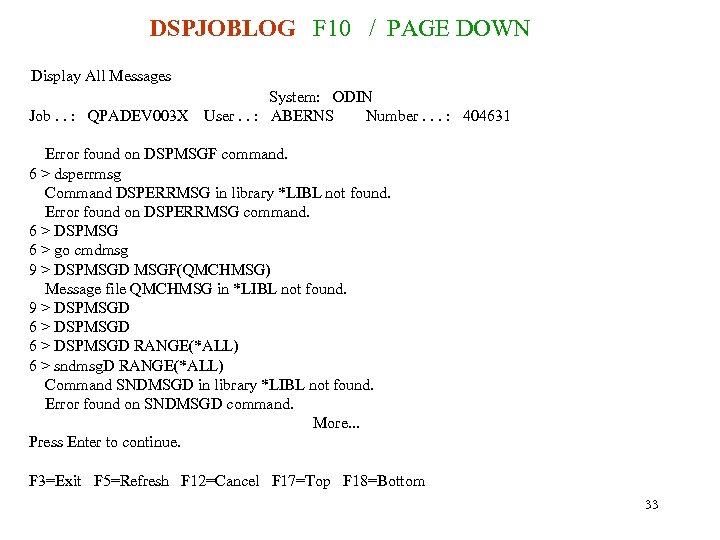
DSPJOBLOG F 10 / PAGE DOWN Display All Messages Job. . : QPADEV 003 X System: ODIN User. . : ABERNS Number. . . : 404631 Error found on DSPMSGF command. 6 > dsperrmsg Command DSPERRMSG in library *LIBL not found. Error found on DSPERRMSG command. 6 > DSPMSG 6 > go cmdmsg 9 > DSPMSGD MSGF(QMCHMSG) Message file QMCHMSG in *LIBL not found. 9 > DSPMSGD 6 > DSPMSGD RANGE(*ALL) 6 > sndmsg. D RANGE(*ALL) Command SNDMSGD in library *LIBL not found. Error found on SNDMSGD command. More. . . Press Enter to continue. F 3=Exit F 5=Refresh F 12=Cancel F 17=Top F 18=Bottom 33
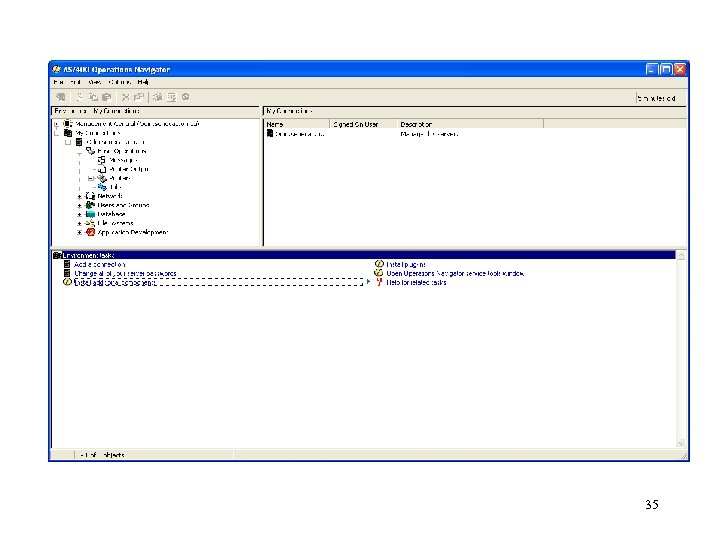
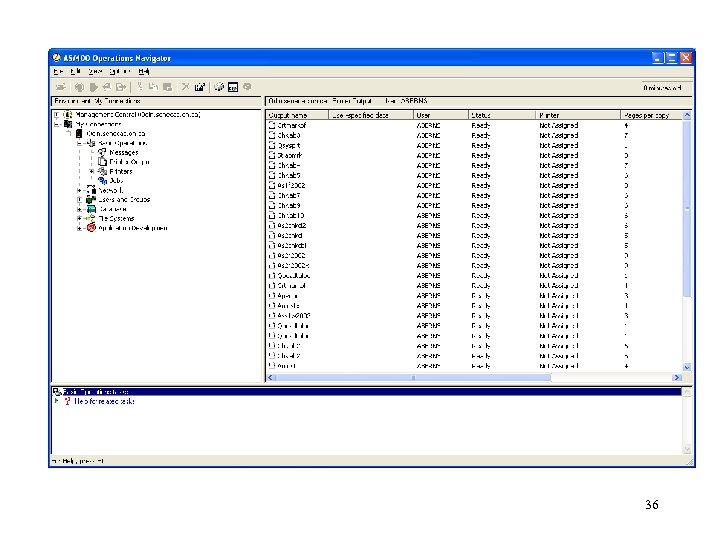
Operations Navigator • Graphical User Interface for AS/400 • Used for: – Displaying messages – Displaying Spool files – Database operations • To install Operations Navigator on your PC – go to ACS, Downloads, sign in, AS/400 on the cd. senecac. on. ca website and retrieve Client Access / Operations Navigator. Install it and if you need help they also have answers for you. 34
35
36
Скачать презентацию REVIEW Object types System security levels
39f3fd526830fdcf94ba7deb972a27ff.ppt