 Скачать презентацию Remote Access Kenneth Evans Jr February 22 2005
f67eaf98c15de8dad78c7c48611ccbd9.ppt
- Количество слайдов: 35



Remote Access Kenneth Evans, Jr. February 22, 2005 Part of the EPICS “Getting Started” Lecture Series Argonne National Laboratory Office of Science U. S. Department of Energy A U. S. Department of Energy Office of Science Laboratory Operated by The University of Chicago
Outline • • • VPN Citrix and other Terminal Servers Tarantella VNC Access Grid • Wireless • EPICS on Windows 2 Pioneering Science and Technology Office of Science U. S. Department of Energy
VPN • • • Stands for Virtual Private Network A private network built on a public network (i. e. the Internet) Uses encryption - Encryption excludes hosts from outside the private network seeing your data - Even if they are on the public network Uses access control and authentication with secure protocols - IPSEC is the security layer standard - Type “man ipsec” if you want to know more (You probably don’t) Less expensive than dedicated lines Sometimes referred to as “tunneling” 3 Pioneering Science and Technology Office of Science U. S. Department of Energy
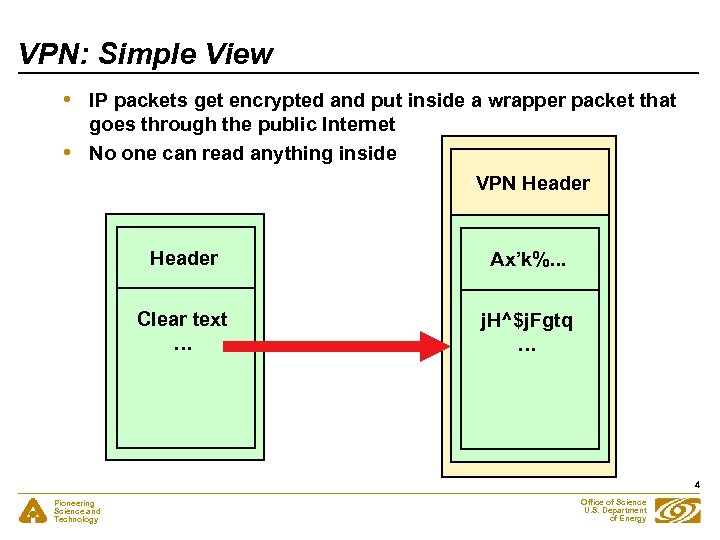
VPN: Simple View • • IP packets get encrypted and put inside a wrapper packet that goes through the public Internet No one can read anything inside • VPN Header Ax’k%. . . Clear text … j. H^$j. Fgtq … 4 Pioneering Science and Technology Office of Science U. S. Department of Energy
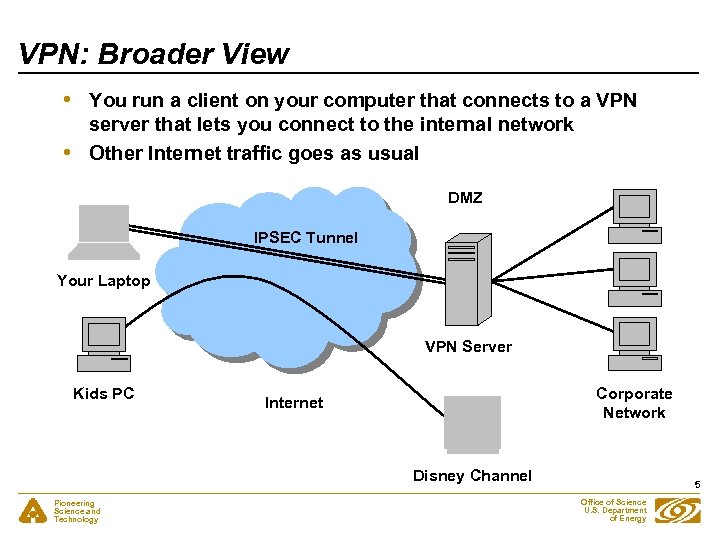
VPN: Broader View • • You run a client on your computer that connects to a VPN server that lets you connect to the internal network Other Internet traffic goes as usual DMZ IPSEC Tunnel Your Laptop VPN Server Kids PC Corporate Network Internet Disney Channel Pioneering Science and Technology 5 Office of Science U. S. Department of Energy
How to use a VPN • • Talk to your System Administrator - He or she will tell you what to do Typically you need to install client software on your computer - And run it to make the VPN connection The System Administrator needs to allow you access Will be similar to being connected internally - You can see the internal APS web pages, for example - You can’t view adult sites You will probably be on a different subnet from your work computer - The networks you see may (or may not) be limited It should work from any place where you have Internet access It is not a secure as some other means - You can transmit viruses into the system Pioneering Science and Technology Office of Science U. S. Department of Energy 6
Citrix and Terminal Servers • • • A means of accessing the corporate network from almost anywhere - Your mother’s computer (if she has administrator privileges) You may need to download a client - Clients are available for most platforms, even PDAs You access a web page and enter a password This allows you on an internal Windows machine - With access to standard applications - Or your own full Windows desktop At the APS the desktop has Exceed and EPICS installed - You can run EPICS applications, such as MEDM - You can connect to other computers via Exceed’s Xstart Your applications are running on the internal computer - You cannot transmit viruses Pioneering Science and Technology Office of Science U. S. Department of Energy 7
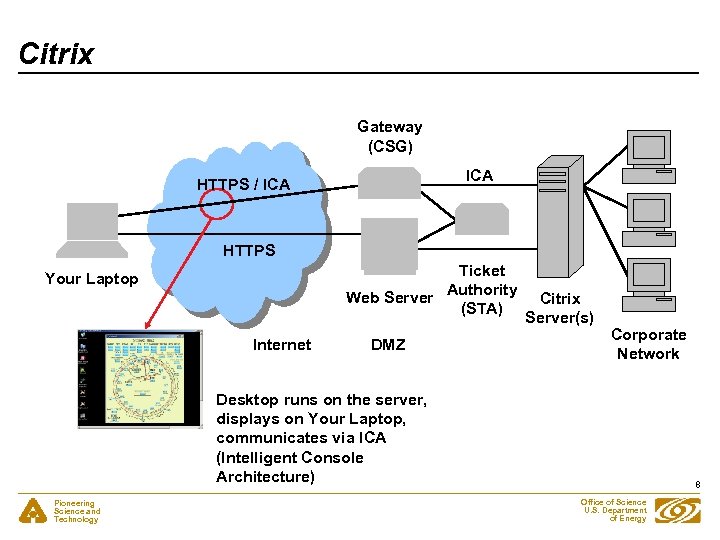
Citrix Gateway (CSG) ICA HTTPS / ICA HTTPS Ticket Web Server Authority (STA) Your Laptop Internet DMZ Citrix Server(s) Corporate Network Desktop runs on the server, displays on Your Laptop, communicates via ICA (Intelligent Console Architecture) Pioneering Science and Technology 8 Office of Science U. S. Department of Energy
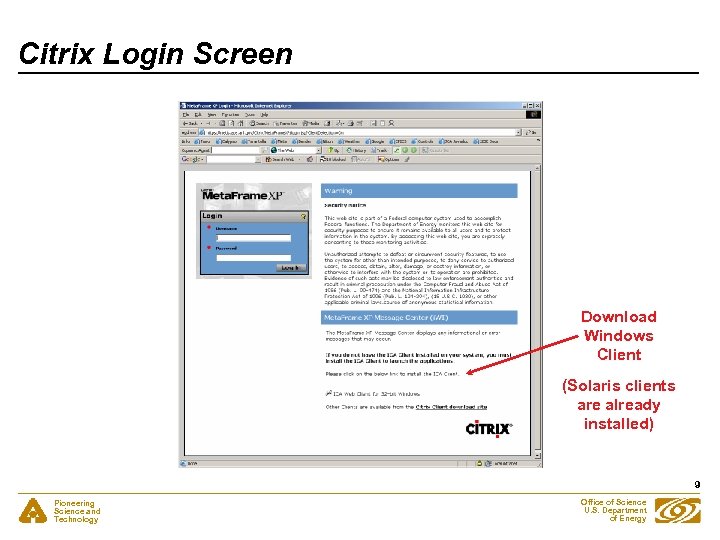
Citrix Login Screen Download Windows Client (Solaris clients are already installed) 9 Pioneering Science and Technology Office of Science U. S. Department of Energy
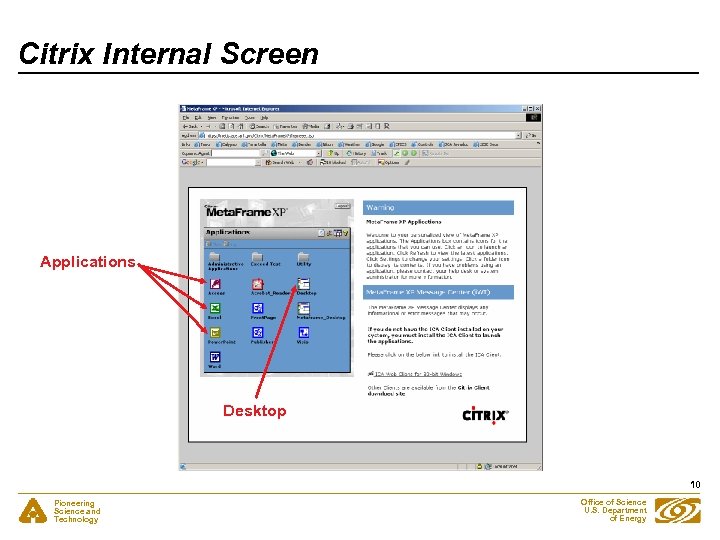
Citrix Internal Screen Applications Desktop 10 Pioneering Science and Technology Office of Science U. S. Department of Energy
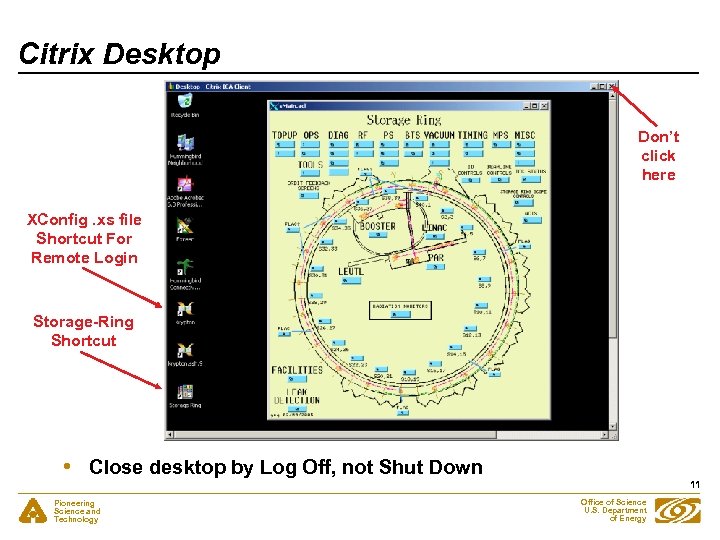
Citrix Desktop Don’t click here XConfig. xs file Shortcut For Remote Login Storage-Ring Shortcut • Close desktop by Log Off, not Shut Down 11 Pioneering Science and Technology Office of Science U. S. Department of Energy
Tarantella • • • Similar to Citrix except that it connects to UNIX and uses X Windows as well as Microsoft Windows Is a Portlet (Java) running on a Portal Server You access a web page and enter a password You do not need to download a client - You use a browser - But there are native clients available Your applications are running on the internal computer - You cannot transmit viruses 12 Pioneering Science and Technology Office of Science U. S. Department of Energy
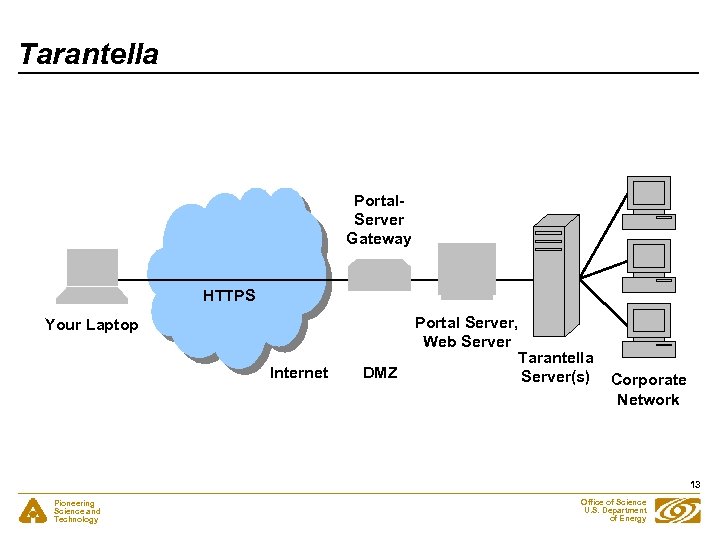
Tarantella Portal. Server Gateway HTTPS Your Laptop Internet • DMZ Portal Server, Web Server Tarantella Server(s) Corporate Network 13 Pioneering Science and Technology Office of Science U. S. Department of Energy
VNC • • • Virtual Network Computing Interact with one computer (Server) by using a simple program (Viewer) on another computer Fully cross platform (e. g. Viewing Solaris on Windows) Free and publicly available Not secure - Sends clear text (except perhaps the password) Needs a VPN or SSH Includes an optional web server - Runs on the Server machine on port 5800 by default - Allows the Client to connect via a Java interface in a browser - Such web servers are typically prohibited in a corporate network Interface is more primitive and slower than Citrix May not be permitted Pioneering Science and Technology Office of Science U. S. Department of Energy 14
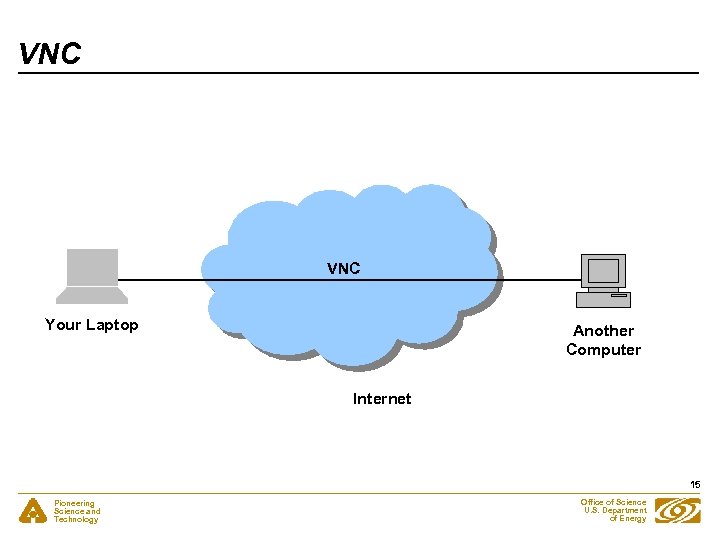
VNC Your Laptop Another Computer Internet 15 Pioneering Science and Technology Office of Science U. S. Department of Energy
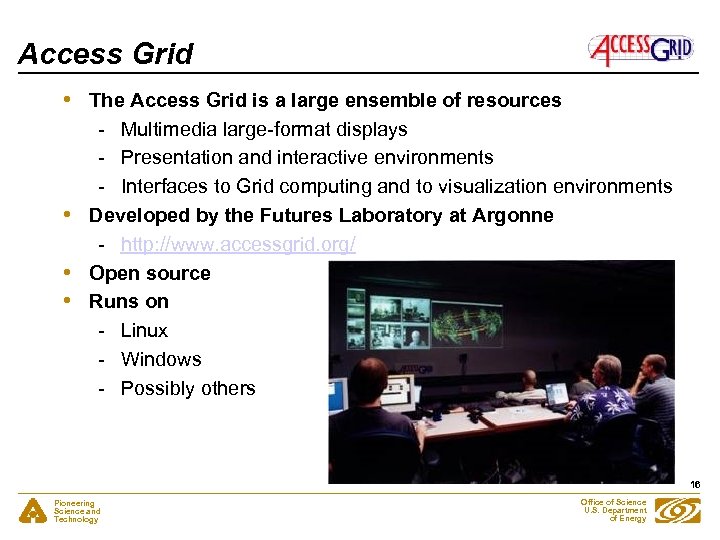
Access Grid • • The Access Grid is a large ensemble of resources - Multimedia large-format displays - Presentation and interactive environments - Interfaces to Grid computing and to visualization environments Developed by the Futures Laboratory at Argonne - http: //www. accessgrid. org/ Open source Runs on - Linux - Windows - Possibly others 16 Pioneering Science and Technology Office of Science U. S. Department of Energy
Access Grid • • • Designed for teleconferencing Has a virtual meeting place, called a Virtual Venue - There is a Venue Server running somewhere The Venue provides users with all the necessary information needed to communicate with each other - Audio and video streams, user capabilities, data, services, applications, connections to other Venues, etc. Security is via certificates - Superior to a password strategy - Certificate belongs to the user - You request and configure your certificate only once - You can then export it to other machines - See: http: //www. globus. org/security/ Do not need a password or account on the corporate network Pioneering Science and Technology Office of Science U. S. Department of Energy 17
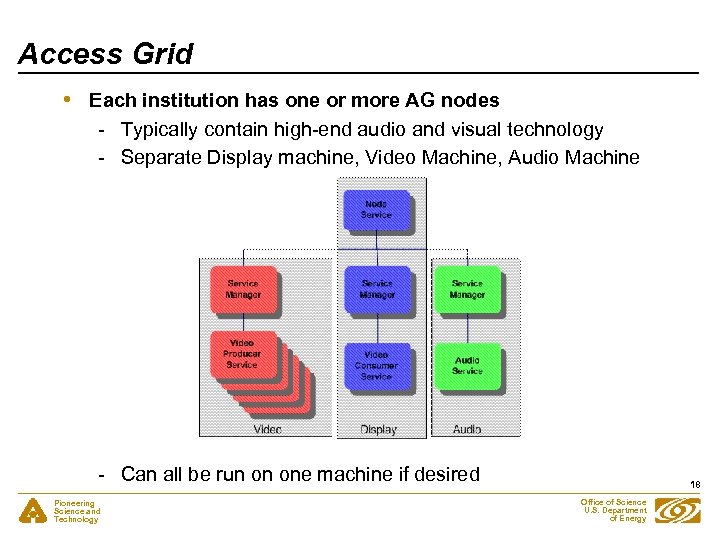
Access Grid • Each institution has one or more AG nodes - Typically contain high-end audio and visual technology - Separate Display machine, Video Machine, Audio Machine - Can all be run on one machine if desired Pioneering Science and Technology 18 Office of Science U. S. Department of Energy
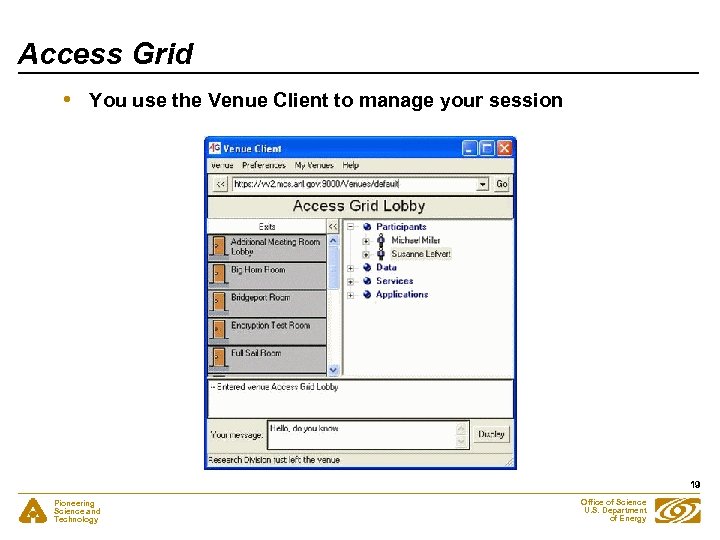
Access Grid • You use the Venue Client to manage your session 19 Pioneering Science and Technology Office of Science U. S. Department of Energy
Access Grid • • • Installation is large but not difficult Can be done on one machine (e. g. Your Laptop) You do not need to use all the available capability Can use VNC to connect to an internal computer AG node Can add other features as you need them - E. g. Video is a common need These extra features are not typically available with the other methods described in this presentation - Makes it an attractive alternative if you have other needs 20 Pioneering Science and Technology Office of Science U. S. Department of Energy
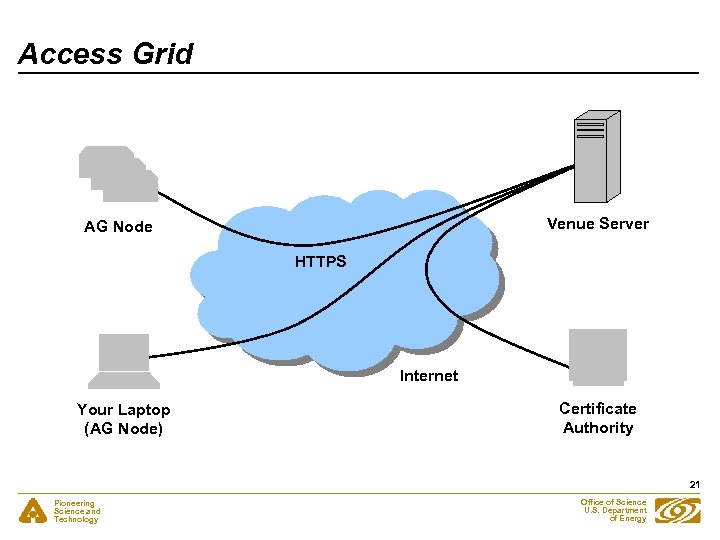
Access Grid Venue Server AG Node HTTPS Internet Your Laptop (AG Node) Certificate Authority 21 Pioneering Science and Technology Office of Science U. S. Department of Energy
Wireless • • • There is little difference in most of the subjects covered here whether you connect via Wireless or some other kind of Internet connection Wireless networks are typically provided in: - Hotels - Airports - Coffee Shops - Facilities like the APS or SNS Once you have a connection, you proceed as usual Wireless communications can be intercepted by anyone with an appropriate antenna The security built into the standard wireless protocols such as 802. 11 tends to be weak Using a VPN or Citrix should be relatively safe 22 Pioneering Science and Technology Office of Science U. S. Department of Energy
EPICS on Windows • • • EPICS applications (e. g. MEDM) are typically written for UNIX and Motif / X Windows You can run them by connecting to an internal UNIX machine - All Channel Access traffic goes over the wire - All X traffic goes over the wire - But, there is far more X traffic than EPICS traffic You can avoid this by running them locally - Will be much faster - Accessing system ADL files may be a problem You want a way to run MEDM, etc. on Windows - The remote machine (Your Laptop) is usually Windows - The Citrix desktop is Windows You can use Exceed and the EPICS WIN 32 Extensions to do this 23 Pioneering Science and Technology Office of Science U. S. Department of Energy
Exceed • • Hummingbird Exceed - Arguably the best Windows X Server - The only viable source of Motif libraries for Windows - Possible to use other Windows X Servers but it is not supported - See a System Administrator to get Exceed installed You can also use Exceed to connect to other computers Use the Exceed Xstart utility - Secure Shell is the preferred Start method (or may be required) - The command is usually “xterm &” Show progress is suggested Show host reply for debugging - (The location of these settings varies with the Exceed version) Exceed is already installed on the Citrix servers 24 Pioneering Science and Technology Office of Science U. S. Department of Energy
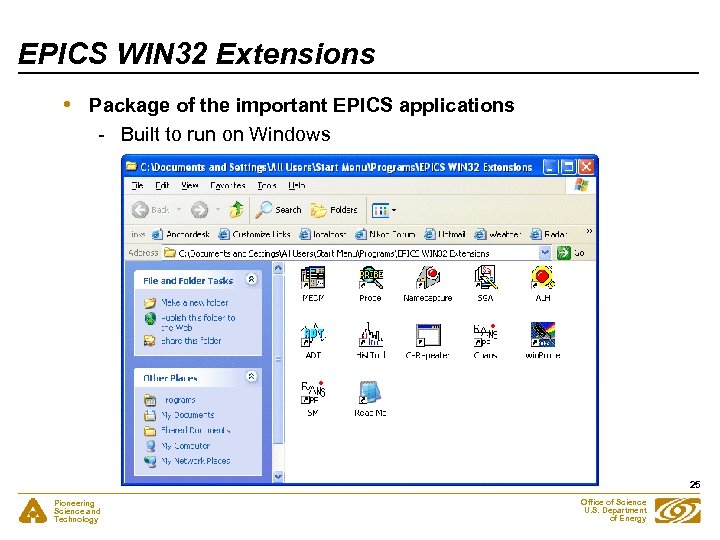
EPICS WIN 32 Extensions • Package of the important EPICS applications - Built to run on Windows 25 Pioneering Science and Technology Office of Science U. S. Department of Energy
How to Install the EPICS WIN 32 Extensions • • • Information can be found at - http: //www. aps. anl. gov/epics/distributions/win 32/index. php There is an Install. Shield installer located at - http: //www. aps. anl. gov/epics/download/distributions/index. php - You usually want the latest version there The installation is easy and should not mess up your computer Uninstalling them is also easy - If you be sure to stop all running programs first - Closing Exceed stops all except Ca. Repeater Read the README before starting! Install Exceed first • You already did all this if you installed the Virtual Linac • • • 26 Pioneering Science and Technology Office of Science U. S. Department of Energy
Storage-Ring Shortcut • • It is convenient to make shortcuts to ADL files - E. g. the Storage-Ring main screen at the APS Right drag the MEDM menu item from the programs menu to your desktop and rename it Storage Ring Right click it and choose Properties Add the following to the end of the command after the quotes: -x \oxygenadlsyssrps. Apps. Main. adl Change the Start in: item to \oxygenadlsys Set the following environment variables - EPICS_CA_ADDR_LIST to point to the Main Gateway - EPICS_CA_AUTO_ADDR_LIST=NO - EPICS_DISPLAY_PATH=\oxygenadlsys; \oxygenxfdsys Click the icon to bring up the Storage Ring main screen Change these directions as necessary for your situation 27 Pioneering Science and Technology Office of Science U. S. Department of Energy
ADL Files • • You need ADL files to run MEDM These are usually found on the internal file system You have two choices 1. Copy them to Your Laptop - You do not then require a connection to the file system - MEDM will be faster - But they will get out of date - This may be useful if you only have a few 2. Link to the ones on the internal file system - You probably have a VPN connection or are using Citrix, anyway, so this is not a problem The preceding slide shows one way to link to the internal file system to get ADL files - Or, make a link in your home directory, mount that directory 28 Pioneering Science and Technology Office of Science U. S. Department of Energy
MEDM Fonts • • • MEDM uses font aliases for flexibility However, they are not in Exceed by default Installing them is slightly different for different versions of Exceed There are detailed instructions on the MEDM page at: - http: //www. aps. anl. gov/asd/controls/epics/Epics. Documentation/ Extensions. Manuals/MEDMFonts. htm Essentially, there are two ways - Use a font server - Install them in Exceed locally 29 Pioneering Science and Technology Office of Science U. S. Department of Energy
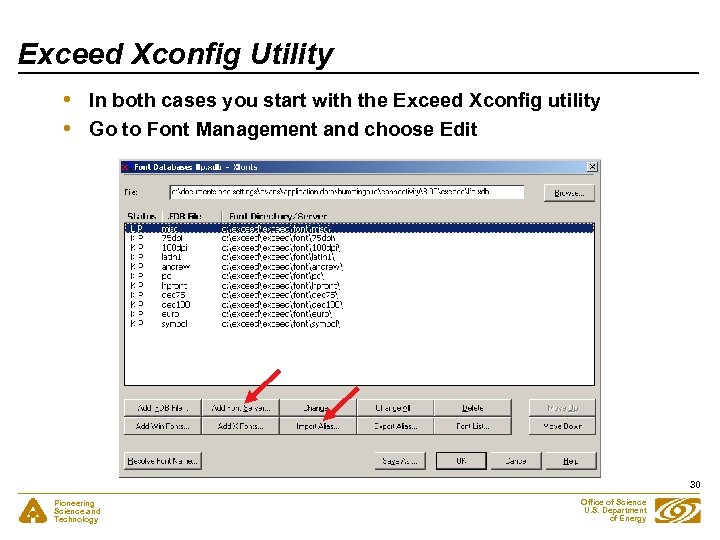
Exceed Xconfig Utility • • In both cases you start with the Exceed Xconfig utility Go to Font Management and choose Edit 30 Pioneering Science and Technology Office of Science U. S. Department of Energy
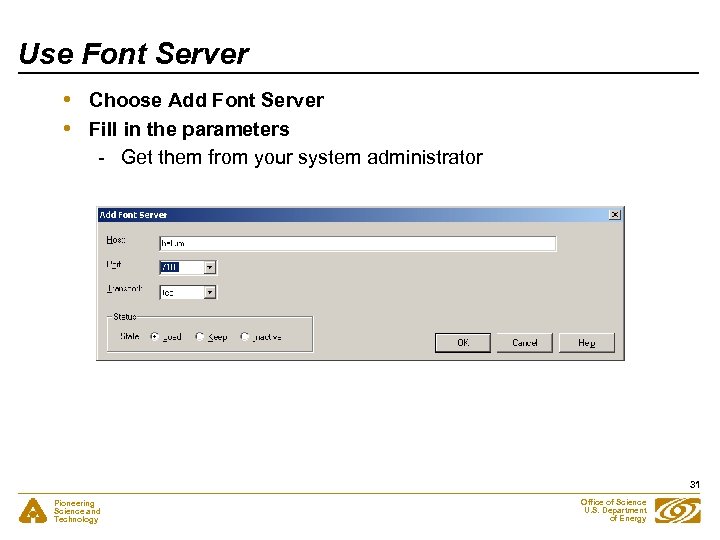
Use Font Server • • Choose Add Font Server Fill in the parameters - Get them from your system administrator 31 Pioneering Science and Technology Office of Science U. S. Department of Energy
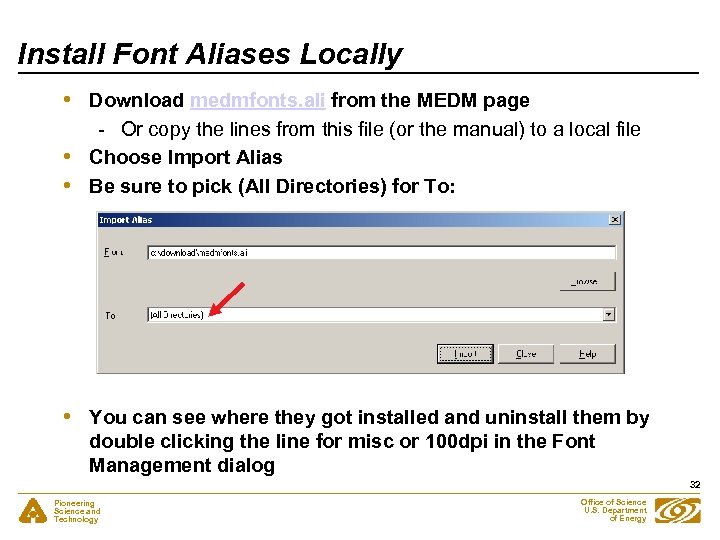
Install Font Aliases Locally • • Download medmfonts. ali from the MEDM page - Or copy the lines from this file (or the manual) to a local file Choose Import Alias Be sure to pick (All Directories) for To: You can see where they got installed and uninstall them by double clicking the line for misc or 100 dpi in the Font Management dialog 32 Pioneering Science and Technology Office of Science U. S. Department of Energy
Acknowledgements • Extensive help for this presentation and discussions were provided by - Ken Sidorowitz - Steve Potempa - Dave Leibfritz - Roger Sersted - Brian Tieman 33 Pioneering Science and Technology Office of Science U. S. Department of Energy
Thank You This has been an APS Controls Presentation 34 Pioneering Science and Technology Office of Science U. S. Department of Energy
Thank You This has been an APS Controls Presentation 35 Pioneering Science and Technology Office of Science U. S. Department of Energy
Скачать презентацию Remote Access Kenneth Evans Jr February 22 2005
f67eaf98c15de8dad78c7c48611ccbd9.ppt