 Скачать презентацию Relatively New RAM-RDRAM RDRAM—Rambus RAM It
303b9d7c9106ba9776c252f3fca7d444.ppt
- Количество слайдов: 56



Relatively New RAM-RDRAM • RDRAM---Rambus RAM • It is a very fast different type of DRAM. • Rambus is the company’s name. Intel has adopted this RAM for a while. • The special RDRAM bus delivers address and control information using an asynchronous blockoriented protocol. • The bus can address up to 320 RDRAM chips and it rated at 1. 6 GBps
External Memory • 1. Magnetic disk---Floppy disk, hard disk • 2. Magnetic tape • 3. Optical Memory---CD, CD-RW… • DVD, DVD-RW.
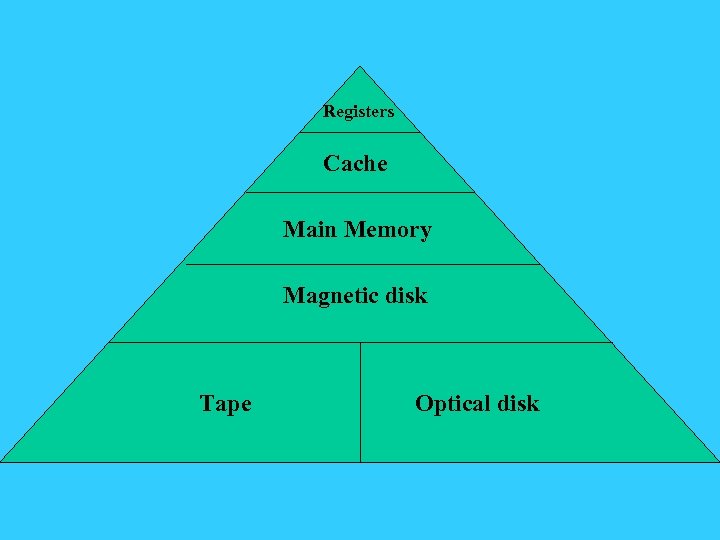
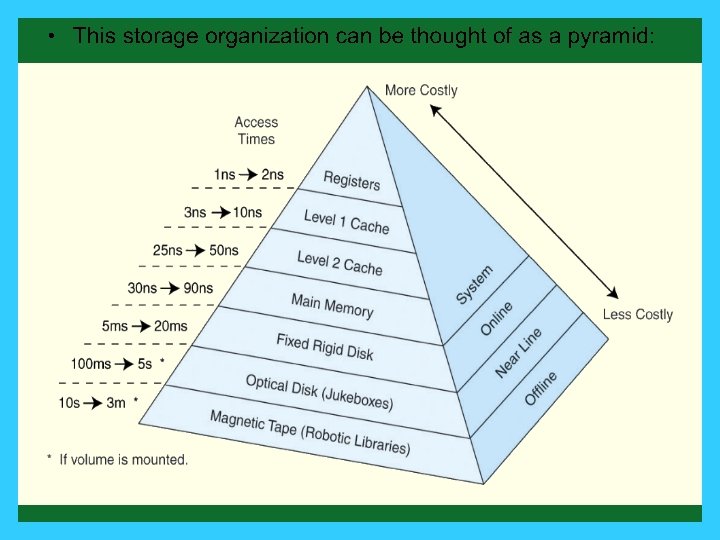
Registers Cache Main Memory Magnetic disk Tape Optical disk
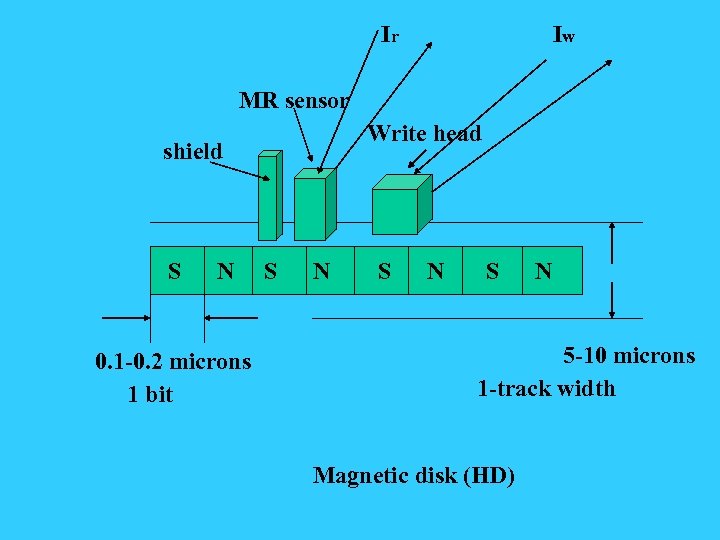
Ir Iw MR sensor Write head shield S N 0. 1 -0. 2 microns 1 bit S N S N 5 -10 microns 1 -track width Magnetic disk (HD)
MR---Magnetoresistive Sensor • The MR material has an electrical resistance that depends on the direction of the magnetization of the medium moving under it. • By passing a current through the MR sensor, resistance changes are detected as voltage signals. • Main advantage: High frequency operation----High Speed.
HD-related terms • • Track Sector Cylinder Spindle speed RPM Capacity Track-to Track Seek Time Average Seek Time

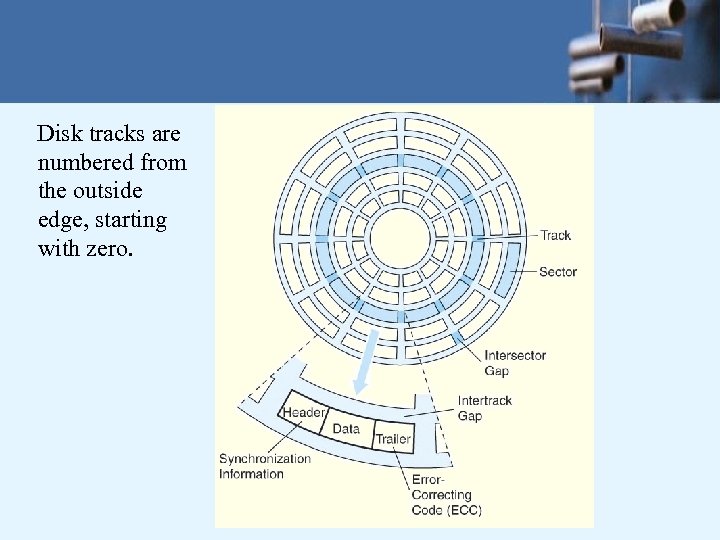
Disk tracks are numbered from the outside edge, starting with zero.
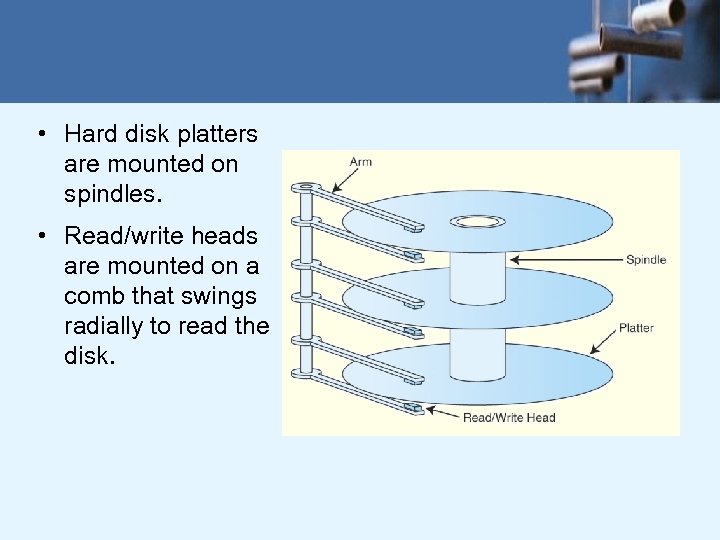
• Hard disk platters are mounted on spindles. • Read/write heads are mounted on a comb that swings radially to read the disk.
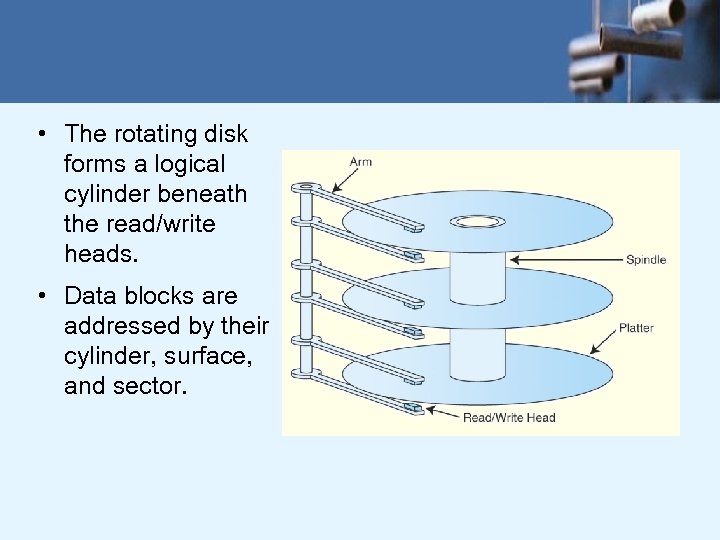
• The rotating disk forms a logical cylinder beneath the read/write heads. • Data blocks are addressed by their cylinder, surface, and sector.

HD --- cont…, • • • Average Rotational Delay Maximum Transfer Rate Bytes per Sector per Track per Cylinder Constant Angular Velocity
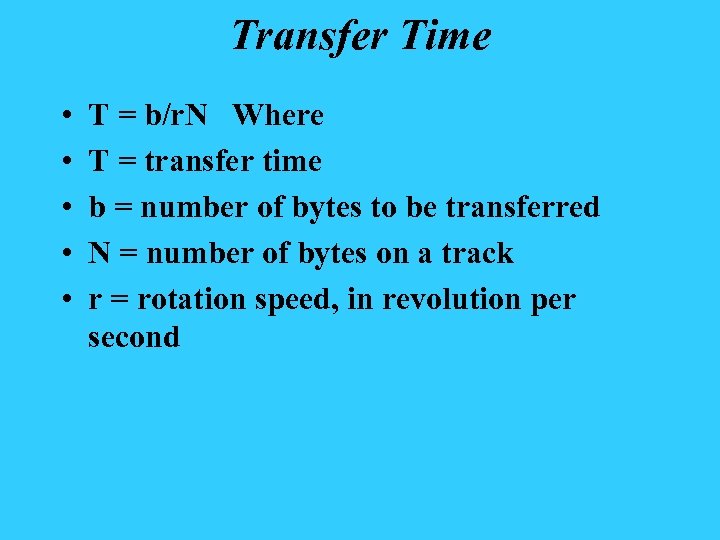
Transfer Time • • • T = b/r. N Where T = transfer time b = number of bytes to be transferred N = number of bytes on a track r = rotation speed, in revolution per second

• There a number of electromechanical properties of hard disk drives that determine how fast its data can be accessed. • Seek time is the time that it takes for a disk arm to move into position over the desired cylinder. • Rotational delay is the time that it takes for the desired sector to move into position beneath the read/write head. • Seek time + rotational delay = access time.
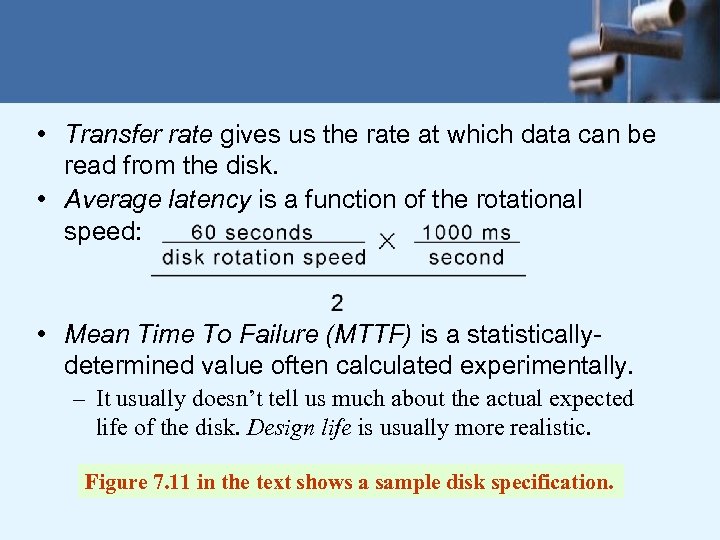
• Transfer rate gives us the rate at which data can be read from the disk. • Average latency is a function of the rotational speed: • Mean Time To Failure (MTTF) is a statisticallydetermined value often calculated experimentally. – It usually doesn’t tell us much about the actual expected life of the disk. Design life is usually more realistic. Figure 7. 11 in the text shows a sample disk specification.
• Floppy (flexible) disks are organized in the same way as hard disks, with concentric tracks that are divided into sectors. • Physical and logical limitations restrict floppies to much lower densities than hard disks. • A major logical limitation of the DOS/Windows floppy diskette is the organization of its file allocation table (FAT). – The FAT gives the status of each sector on the disk: Free, in use, damaged, reserved, etc.
• On a standard 1. 44 MB floppy, the FAT is limited to nine 512 -byte sectors. – There are two copies of the FAT. • There are 18 sectors per track and 80 tracks on each surface of a floppy, for a total of 2880 sectors on the disk. So each FAT entry needs at least 14 bits (214=4096 < 213 = 2048). – FAT entries are actually 16 bits, and the organization is called FAT 16.
• The disk directory associates logical file names with physical disk locations. • Directories contain a file name and the file’s first FAT entry. • If the file spans more than one sector (or cluster), the FAT contains a pointer to the next cluster (and FAT entry) for the file. • The FAT is read like a linked list until the <EOF> entry is found.
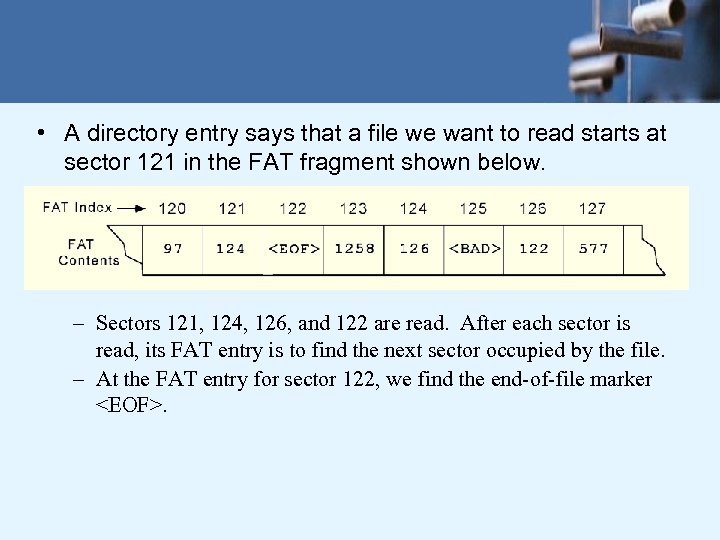
• A directory entry says that a file we want to read starts at sector 121 in the FAT fragment shown below. – Sectors 121, 124, 126, and 122 are read. After each sector is read, its FAT entry is to find the next sector occupied by the file. – At the FAT entry for sector 122, we find the end-of-file marker <EOF>.
IDE---versus---SCSI • • IDE---Integrated Drive Electronics It has a limit of drive size of 528 MB Due to the BIOS calling convention 4 bits for head, 6 bits for the sector, 10 bits for the cylinder. The max. drive then has 16 heads, 63 sectors and 1024 cylinders • ----which lead to the 528 MB • EIDE--- Extended IDE
SCSI (Small Computer System Interface) Disks • Main features: • 1. Faster • 2. Allows more active drives at the same time 7 devices for SCSI and 15 devices for wide SCSI for a single SCSI Controller.
RAID---Redundant Array of Inexpensive Disks (Independent Disks in other textbook) • Purpose---Increase both speed and reliability • Total 7 (0 -6) levels in RAID scheme. • All the 7 -levels share three common characteristics:
• 1. RAID is a set of physical disk drives viewed by the operating system as a single logical drive. • 2. Data are distributed across the physical drives of an array. • 3. Redundant disk capacity is used to store parity information, while guarantees data recoverability in case of a disk failure.

These levels do not imply a hierarchical relationship • Level 0 doesn’t support the third characteristics. • Level 2 and 4 are not commercially offered and are not likely to achieve industry standard.
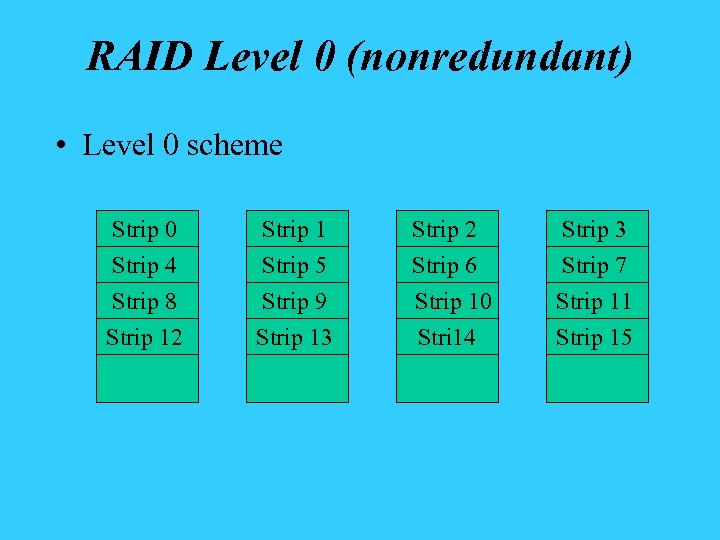
RAID Level 0 (nonredundant) • Level 0 scheme Strip 0 Strip 4 Strip 1 Strip 5 Strip 2 Strip 6 Strip 3 Strip 7 Strip 8 Strip 12 Strip 9 Strip 13 Strip 10 Stri 14 Strip 11 Strip 15
Level 1 ---Mirrored • In this level, it added another same set of disks • main feature: • 1. Increased reliability. • 2. Same write speed. • 3. Double read speed can be realized. • 4. Easy to replace a bad disk.
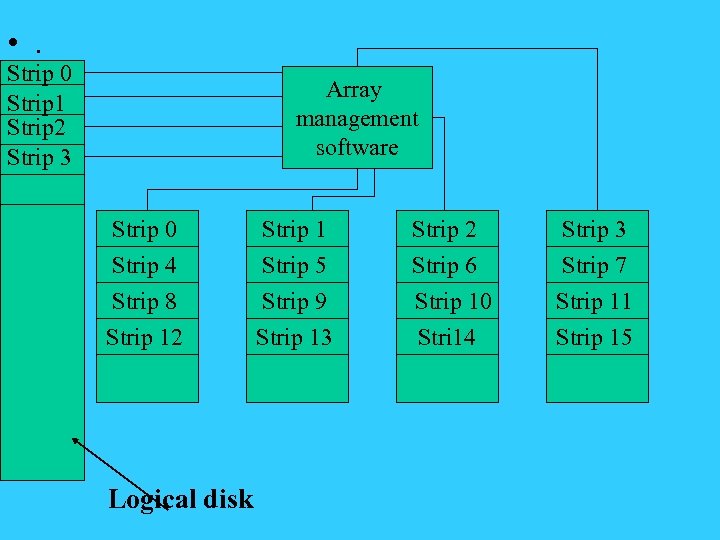
• . Strip 0 Strip 1 Strip 2 Strip 3 Array management software Strip 0 Strip 4 Strip 1 Strip 5 Strip 2 Strip 6 Strip 3 Strip 7 Strip 8 Strip 12 Strip 9 Strip 13 Strip 10 Stri 14 Strip 11 Strip 15 Logical disk
RAID…. • The main feature is the speed and reliability. • Due to the reason of cost, RAID is mainly used on larger systems.
Serial and parallel ATA HD – Right now, the ATA hard drive landscape looks pretty good, and it's about to get even better. – Current ATA hard drives use the ATA/100 and ATA/133 specs, which are limited to transfer rates of 100 and 133 MB/sec, respectively. – These drives use bulky 80 -pin ribbon cables that clutter case interiors and interfere with internal air flow, but help is on the way. – The new Serial ATA standard promises transfer rates of up to 150 MB/sec using thin, flexible cables might make some wonder how they got by with IDE ribbons at all.
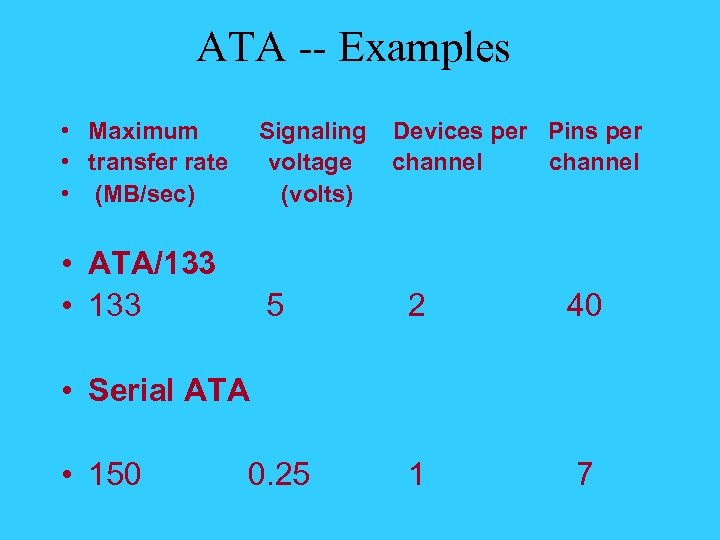
ATA -- Examples • Maximum • transfer rate • (MB/sec) Signaling voltage (volts) • ATA/133 • 133 5 2 40 0. 25 1 7 Devices per Pins per channel • Serial ATA • 150
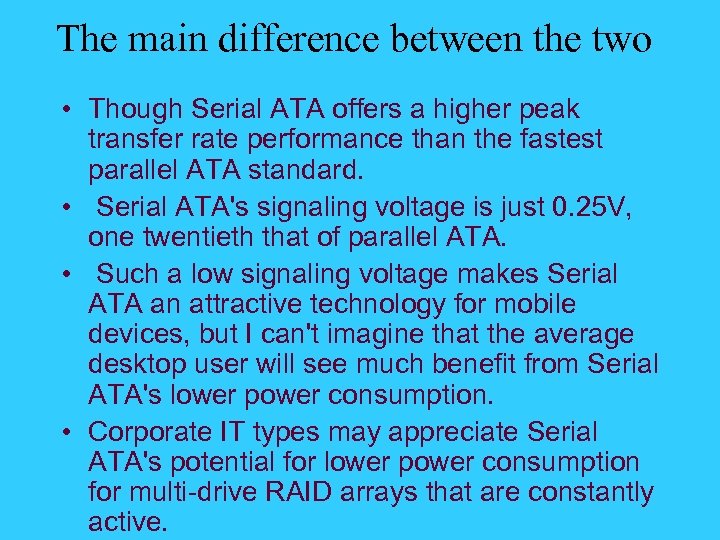
The main difference between the two • Though Serial ATA offers a higher peak transfer rate performance than the fastest parallel ATA standard. • Serial ATA's signaling voltage is just 0. 25 V, one twentieth that of parallel ATA. • Such a low signaling voltage makes Serial ATA an attractive technology for mobile devices, but I can't imagine that the average desktop user will see much benefit from Serial ATA's lower power consumption. • Corporate IT types may appreciate Serial ATA's potential for lower power consumption for multi-drive RAID arrays that are constantly active.
What is ATA? • ATA Short for Advanced Technology Attachment. • a disk drive implementation that integrates the controller on the disk drive itself. • There are several versions of ATA, all developed by the Small Form Factor (SFF) Committee:
ATA • ATA: Known also as IDE, supports one or two hard drives, a 16 -bit interface and PIO modes 0, 1 and 2. • ATA-2: Supports faster PIO modes (3 and 4) and multiword DMA modes (1 and 2). Also supports logical block addressing (LBA) and block transfers. ATA-2 is marketed as Fast ATA and Enhanced IDE (EIDE). • ATA-3: Minor revision to ATA-2.
ATA • Ultra-ATA: Also called Ultra-DMA, ATA-33, and DMA-33, supports multiword DMA mode 3 running at 33 MBps. • ATA/66: A version of ATA proposed by Quantum Corporation, and supported by Intel, that doubles ATA's throughput to 66 MBps. • ATA/100: An updated version of ATA/66 that increases data transfer rates to 100 MBps. • ATA also is called Parallel ATA. Contrast with Serial ATA.
Serial ATA • http: //www. explosivelabs. com/articles/sata/
CD • . 12 mm 120 mm in diameter 1. 2 mm thickness
CD –ROMs Land • Working principle: Label Pit Protective acrylic Polycarbonate plastic Laser beams Aluminum or other metals
Cross Section of CD-R • . Reflective gold layer Printed label Protective lacquer 1. 2 mm Polycarbonate Substrate Dye layer Reflective beam Transmit beam Dark spot burned by laser
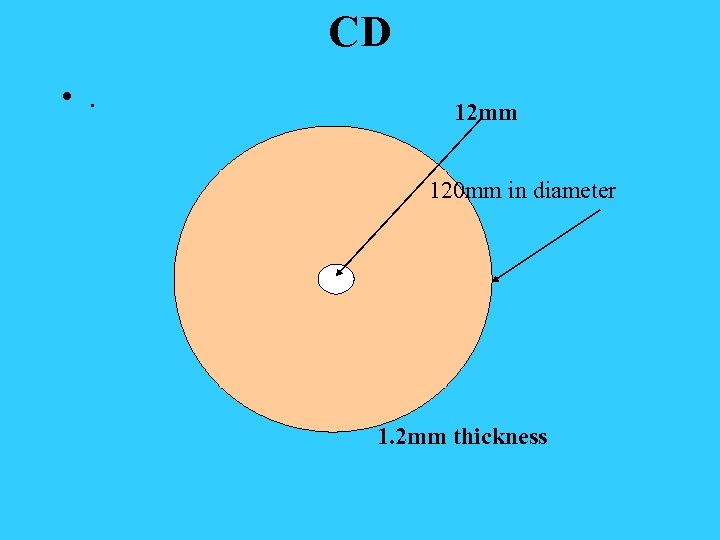
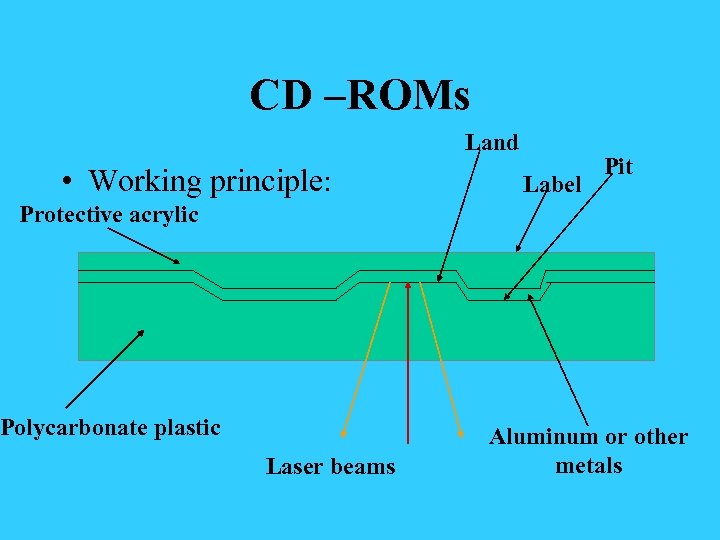
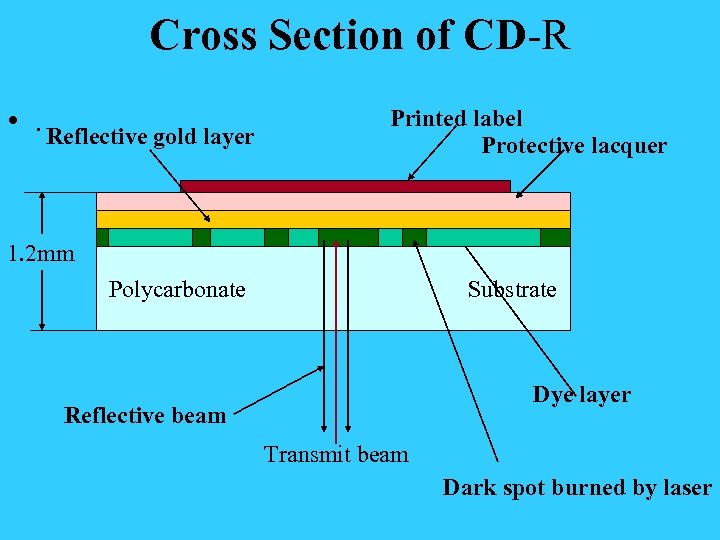
Information on the CD disks • Data are written in series form and are read in series fashion, too. • The disks have to rotate with a constant linear velocity for CD-music. • Single-speed CD-ROM drives operate at 75 sectors/sec---153, 600 bytes/sec in mode 1 and 175, 200 bytes/sec in mode 2. • The difference between 1 and 2 is between music and video mode or data mode.
Yellow Book Definition • The basic format of a CD-ROM consists of encoding every byte in a 14 –bit symbol. • A group of 42 consecutive symbols forms a 588 -bit frame. (each frame holds 192 data bits and the remaining 396 bits are used for error correction and control) • 98 frames make 1 sector
Similarity to HD • Both are external memories • Both disks rotate and have the head move above the disks • The heads float on the surface of the disks • Both can be made with high capacity
The Differences Between the Two • HD is much faster than CD-ROM or CDRW • CD-ROMs have much longer life if handled carefully.
DVD • The capacity improvement are due to 3 factors: • 1. Smaller pits (0. 4 microns versus 0. 8 ) • 2. A tighter spiral (0. 74 microns versus 1. 6) • 3. A red laser at 0. 65 microns versus 0. 78 microns.
Capacity of DVD • 1. Single-sided, single-layer (4. 7 GB). • 2. Single-sided, dual-layer (8. 5 GB). • 3. Double-sided, single-layer (9. 4 GB). • 4. Double-sided, dual-layer (17 GB).
Newer Blue-Laser DVD • There is a war between two new DVD standard right now. • One is SONY’s blue-ray system and the other is Toshiba’s HD-DVD system. • Nov 11, 2004 - Sharp Introduces Blu -ray Disc Recorder with Hard Drive/DVD
Blue-Ray • Sharp today announced that they will introduce a new Blu-ray Disc recorder on the Japanese market in December. (11/11/2004) • The new BD-HD 100, which features a built-in hard drive (160 GB), can record and play back high-definition video (HDTV) without any loss in quality. • It comes equipped with the world's first twin BD/DVD tray that enables
Blue-Ray • digital dubbing between the hard drive, DVDs, and Blu-ray Discs, including the ability to dub five DVDs (4. 7 GB) onto a single Blu-ray Disc (25 GB). • The recorder also features an HDMI output jack, enabling users to enjoy full -digital high-definition video and highfidelity audio with no signal deterioration by outputting recorded high-definition video (HDTV) to a compatible monitor for playback. • The BD-HD 100 will begin selling in Japan next month for about 320, 000 yen ($2, 991).

Blue-Ray • http: //www. blu-ray. com/
Key-Component – Blue Laser • Blu-ray uses a blue laser to record data on discs, while CD and DVD systems use red lasers. • Blue lasers have a shorter wavelength-405 nanometers compared to around 650 nanometers on DVD systems. • --and that means the laser beam can be focused onto a smaller area of the disc surface. • In turn, this means less area is needed to store one bit of data and so more data can be stored on a disc.
Blue-Ray • The format is backed by Sony, Hitachi, LG Electronics, Matsushita Electric Industrial (Panasonic), Philips Electronics, Pioneer Electronics, Samsung Electronics, Sharp, and Thomson Multimedia.
HD-DVD • First Blood in the New DVD War The Toshiba-backed high-definition format may soon get support from three major Hollywood studios. • That could put Sony's team in a tight spot
What this war means to us? • Like the old war between Bata standard and VHS standard, consumers will be the victim along with the loser of the two, because the industry world normally have to pick one as the winner. • What do we buy now? • Nobody knows! • Fortunately, both will support your current 4. 7 GB DVD disks.
MRAM -- Magnetic Ram • Infineon, IBM show prototype 16 Mb magnetic RAM • Prototype MRAM chip brings powersaving technology one step closer
MRAM • MRAM is expected to first be used in mobile applications as a replacement for flash. • At some point in the future, MRAM could also replace SRAM and DRAM, which is cheap to manufacture but is slower than MRAM and requires a constant power supply to retain stored data. • Using MRAM instead of DRAM in notebooks PCs could help extend battery life, according to Infineon and IBM.
Скачать презентацию Relatively New RAM-RDRAM RDRAM—Rambus RAM It
303b9d7c9106ba9776c252f3fca7d444.ppt