 Скачать презентацию Quick Guide to Using Your Versa Lab APM
415b9c3c8bc6470670c10d0737446ead.ppt
- Количество слайдов: 48




Quick Guide to Using Your Versa. Lab® APM or APM 2 Nicolet Vascular a division of VIASYS Healthcare 5225 Verona Road, Bldg. 2 Madison, WI 53711 Toll-free USA 800 -525 -2519 Phone: 608 -441 -2266 Fax: 608 -441 -2232 www. Nicolet. Vascular. com www. viasyshc. com © 2003 VIASYS Healthcare Inc.

Quick Guide to Using Your Versa. Lab APM or APM 2 § Please refer to Versa. Lab APM & APM 2 Operation Manual (item # M 7 -0827) for more comprehensive instructions. © 2003 VIASYS Healthcare Inc.
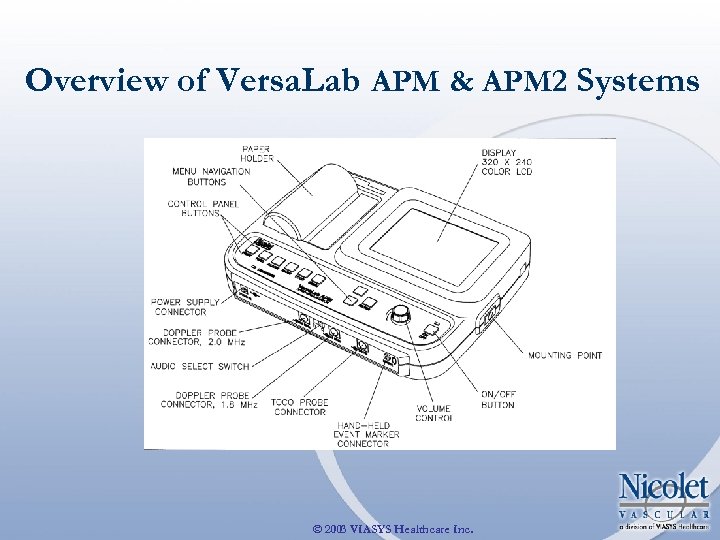
Overview of Versa. Lab APM & APM 2 Systems © 2003 VIASYS Healthcare Inc.
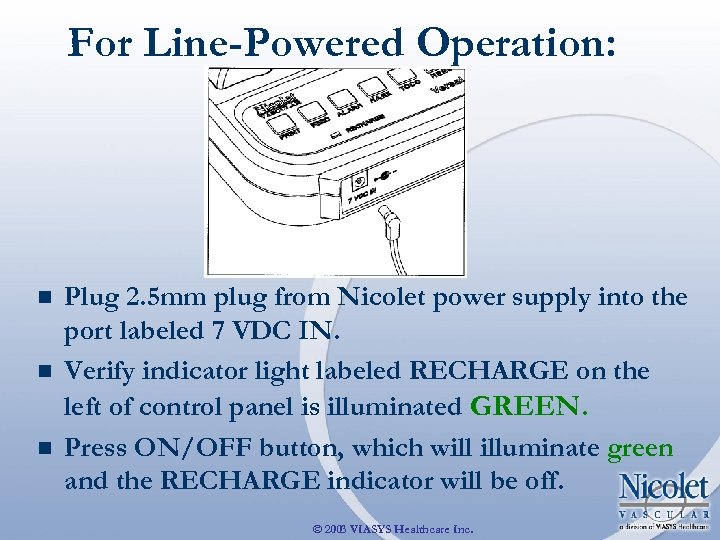
For Line-Powered Operation: n n n Plug 2. 5 mm plug from Nicolet power supply into the port labeled 7 VDC IN. Verify indicator light labeled RECHARGE on the left of control panel is illuminated GREEN. Press ON/OFF button, which will illuminate green and the RECHARGE indicator will be off. © 2003 VIASYS Healthcare Inc.
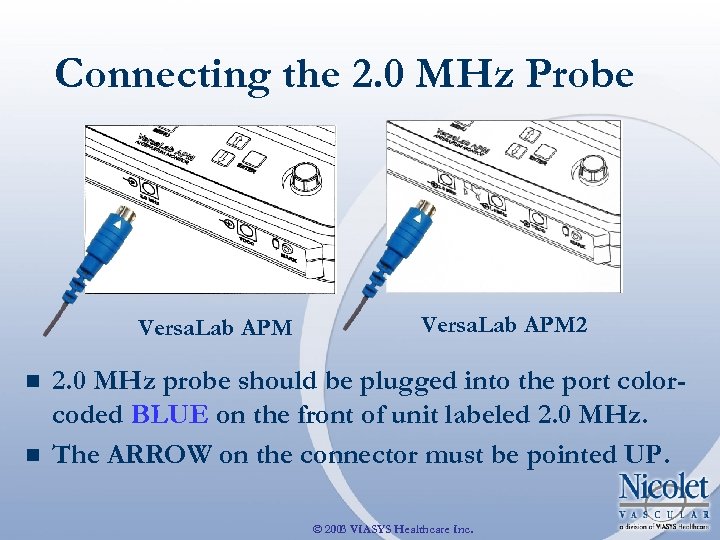
Connecting the 2. 0 MHz Probe Versa. Lab APM n n Versa. Lab APM 2 2. 0 MHz probe should be plugged into the port colorcoded BLUE on the front of unit labeled 2. 0 MHz. The ARROW on the connector must be pointed UP. © 2003 VIASYS Healthcare Inc.
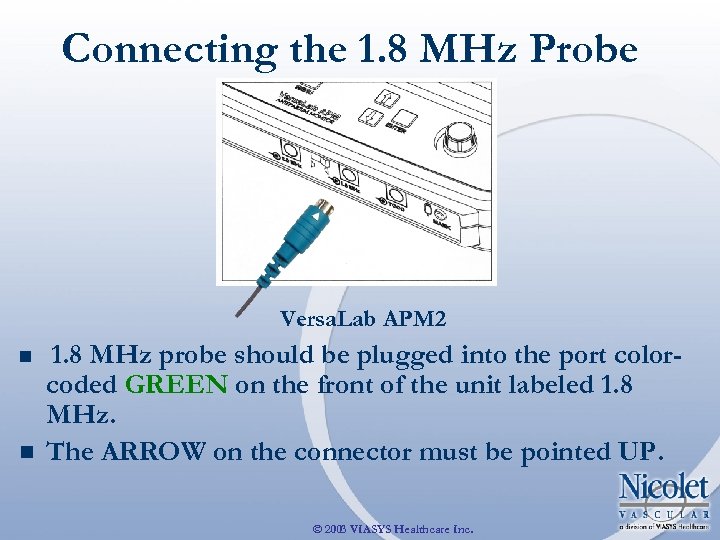
Connecting the 1. 8 MHz Probe Versa. Lab APM 2 n n 1. 8 MHz probe should be plugged into the port colorcoded GREEN on the front of the unit labeled 1. 8 MHz. The ARROW on the connector must be pointed UP. © 2003 VIASYS Healthcare Inc.
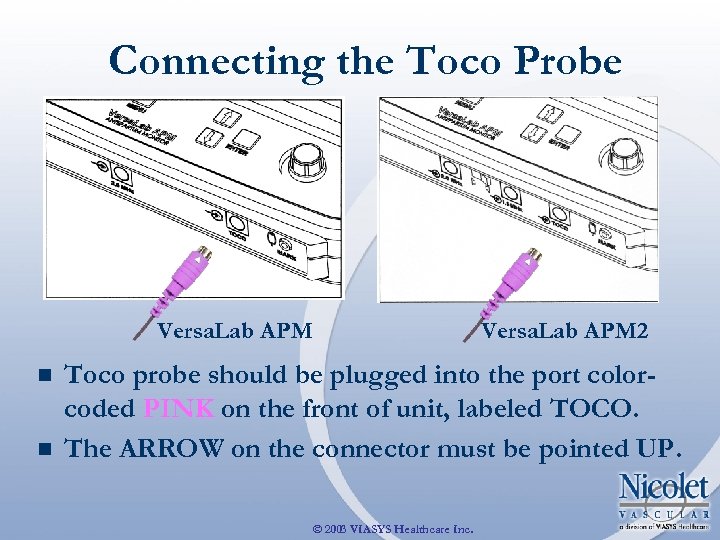
Connecting the Toco Probe Versa. Lab APM n n Versa. Lab APM 2 Toco probe should be plugged into the port colorcoded PINK on the front of unit, labeled TOCO. The ARROW on the connector must be pointed UP. © 2003 VIASYS Healthcare Inc.
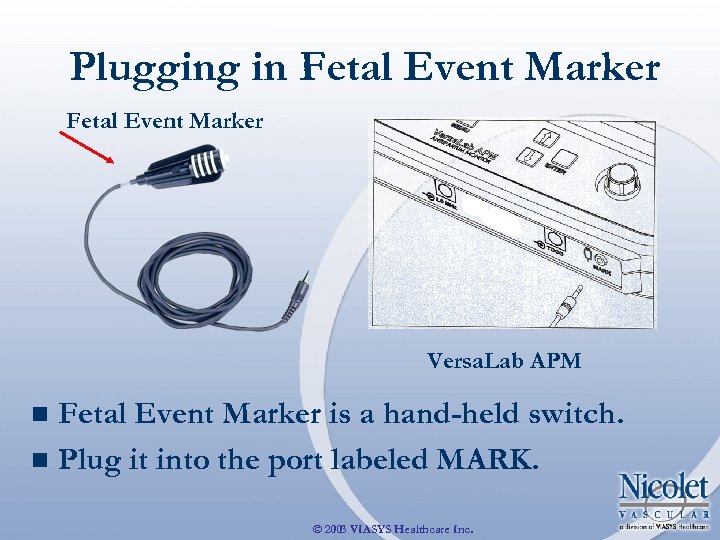
Plugging in Fetal Event Marker Versa. Lab APM Fetal Event Marker is a hand-held switch. n Plug it into the port labeled MARK. n © 2003 VIASYS Healthcare Inc.
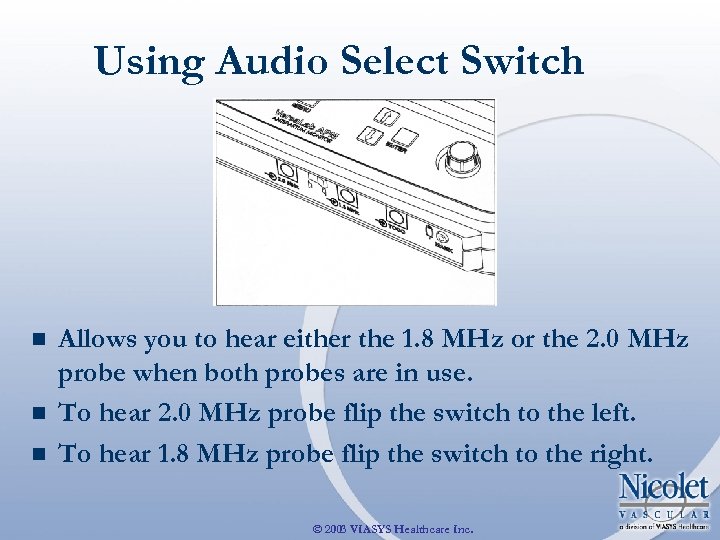
Using Audio Select Switch n n n Allows you to hear either the 1. 8 MHz or the 2. 0 MHz probe when both probes are in use. To hear 2. 0 MHz probe flip the switch to the left. To hear 1. 8 MHz probe flip the switch to the right. © 2003 VIASYS Healthcare Inc.

Positioning the Toco: Position one of the belts around the woman’s abdomen. n Push the knob on top of the Toco probe through one of the holes on the belt. n © 2003 VIASYS Healthcare Inc.
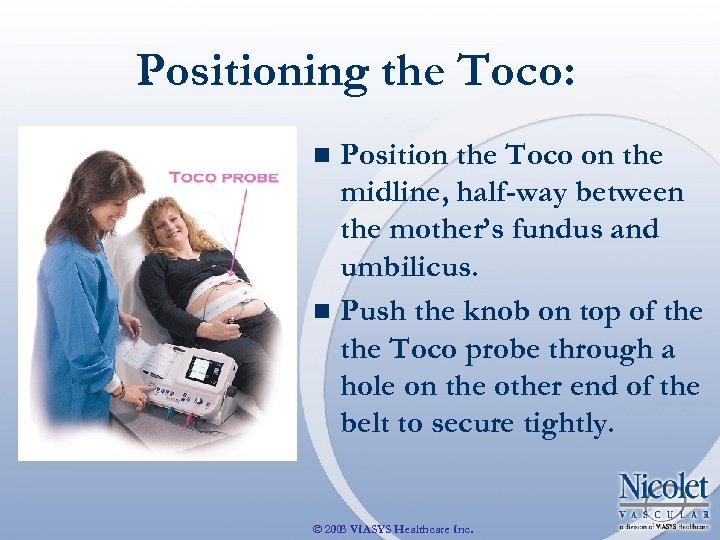
Positioning the Toco: Position the Toco on the midline, half-way between the mother’s fundus and umbilicus. n Push the knob on top of the Toco probe through a hole on the other end of the belt to secure tightly. n © 2003 VIASYS Healthcare Inc.
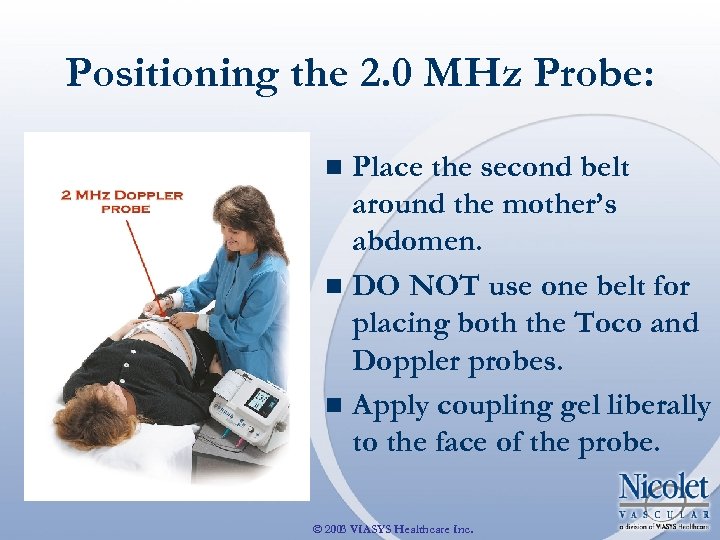
Positioning the 2. 0 MHz Probe: Place the second belt around the mother’s abdomen. n DO NOT use one belt for placing both the Toco and Doppler probes. n Apply coupling gel liberally to the face of the probe. n © 2003 VIASYS Healthcare Inc.
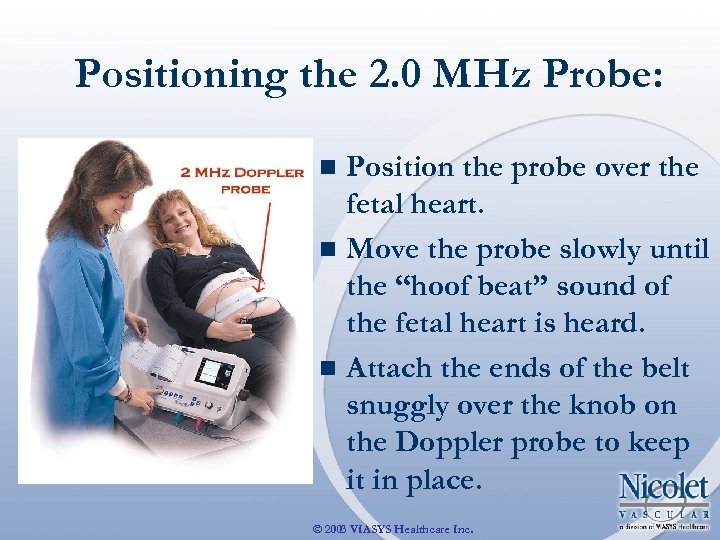
Positioning the 2. 0 MHz Probe: Position the probe over the fetal heart. n Move the probe slowly until the “hoof beat” sound of the fetal heart is heard. n Attach the ends of the belt snuggly over the knob on the Doppler probe to keep it in place. n © 2003 VIASYS Healthcare Inc.

Dual/Two Heart Beats Positioning TWO Doppler Probes n Place third belt around the mother’s abdomen. n DO NOTuse the same belt for placing both Doppler probes and/or the Toco. n Use a separate belt for EACH probe and the Toco. n Apply coupling gel liberally to the face of the Doppler probes. © 2003 VIASYS Healthcare Inc.
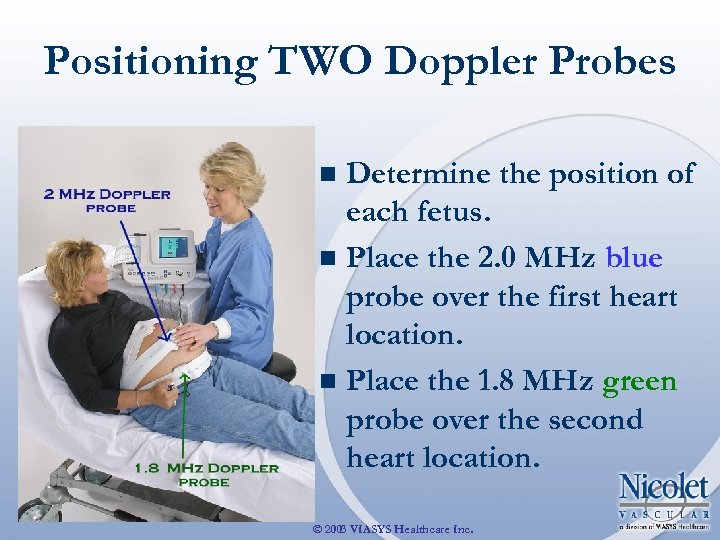
Positioning TWO Doppler Probes Determine the position of each fetus. n Place the 2. 0 MHz blue probe over the first heart location. n Place the 1. 8 MHz green probe over the second heart location. n © 2003 VIASYS Healthcare Inc.
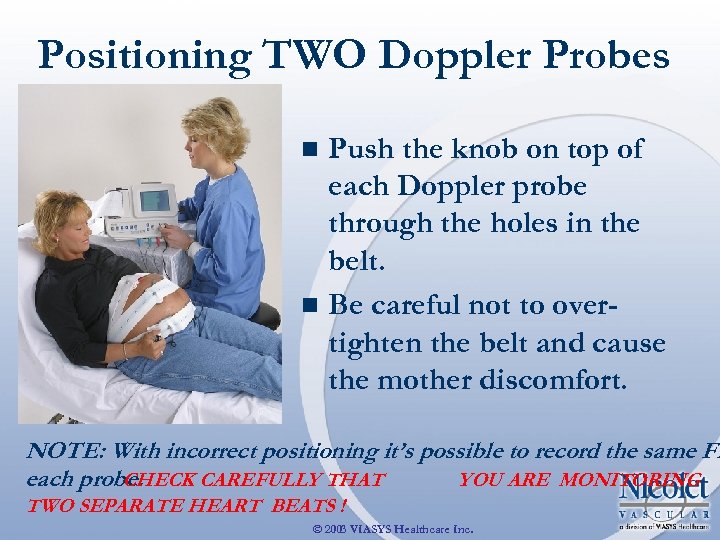
Positioning TWO Doppler Probes Push the knob on top of each Doppler probe through the holes in the belt. n Be careful not to overtighten the belt and cause the mother discomfort. n NOTE: With incorrect positioning it’s possible to record the same FH each probe. CHECK CAREFULLY THAT YOU ARE MONITORING TWO SEPARATE HEART BEATS ! © 2003 VIASYS Healthcare Inc.
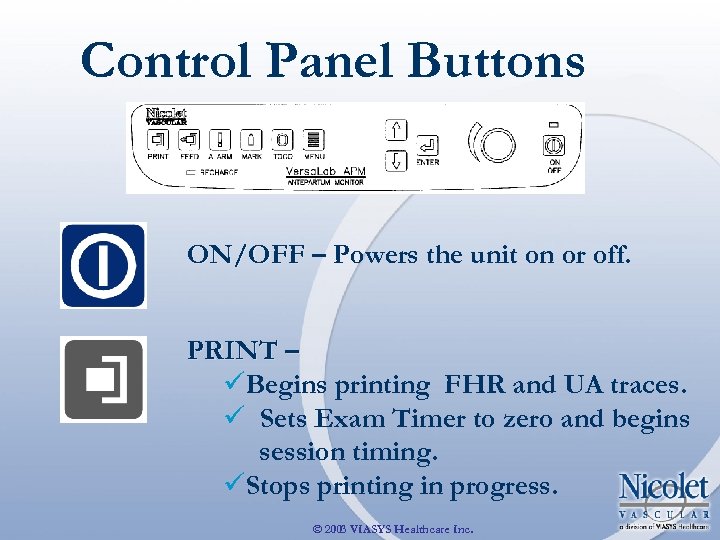
Control Panel Buttons ON/OFF – Powers the unit on or off. PRINT – üBegins printing FHR and UA traces. ü Sets Exam Timer to zero and begins session timing. üStops printing in progress. © 2003 VIASYS Healthcare Inc.
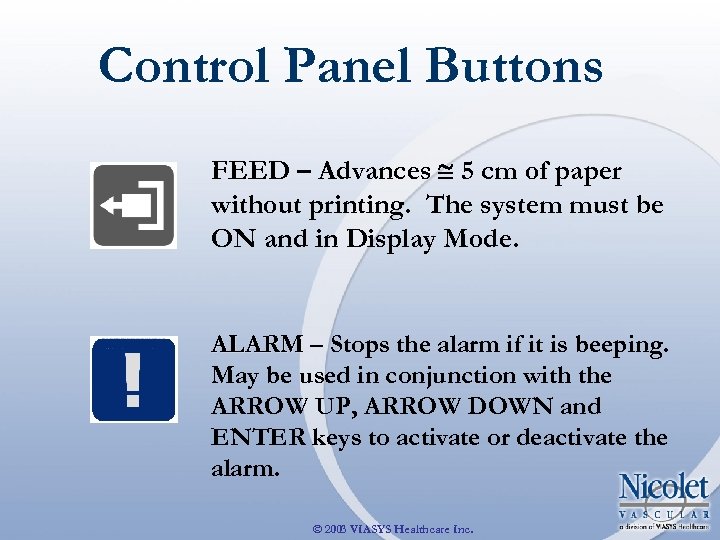
Control Panel Buttons FEED – Advances 5 cm of paper without printing. The system must be ON and in Display Mode. ALARM – Stops the alarm if it is beeping. May be used in conjunction with the ARROW UP, ARROW DOWN and ENTER keys to activate or deactivate the alarm. © 2003 VIASYS Healthcare Inc.
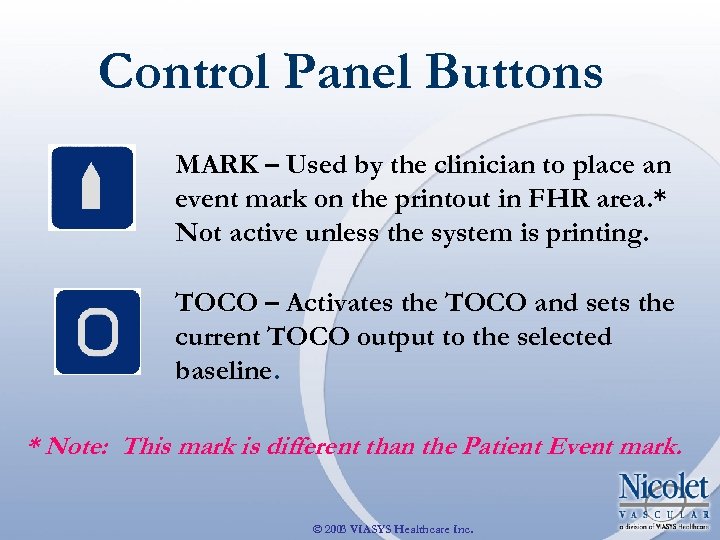
Control Panel Buttons MARK – Used by the clinician to place an event mark on the printout in FHR area. * Not active unless the system is printing. TOCO – Activates the TOCO and sets the current TOCO output to the selected baseline. * Note: This mark is different than the Patient Event mark. © 2003 VIASYS Healthcare Inc.
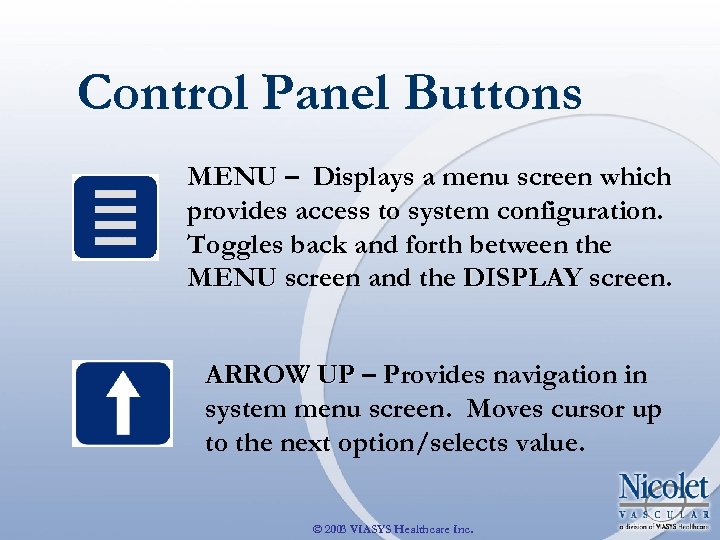
Control Panel Buttons MENU – Displays a menu screen which provides access to system configuration. Toggles back and forth between the MENU screen and the DISPLAY screen. ARROW UP – Provides navigation in system menu screen. Moves cursor up to the next option/selects value. © 2003 VIASYS Healthcare Inc.
Control Panel Buttons ARROW DOWN – Provides navigation in system menu screen. Moves cursor down to the next option/selects value. ENTER – üActivates currently highlighted function in system setup screen. üSteps through available choices for currently highlighted function. © 2003 VIASYS Healthcare Inc.
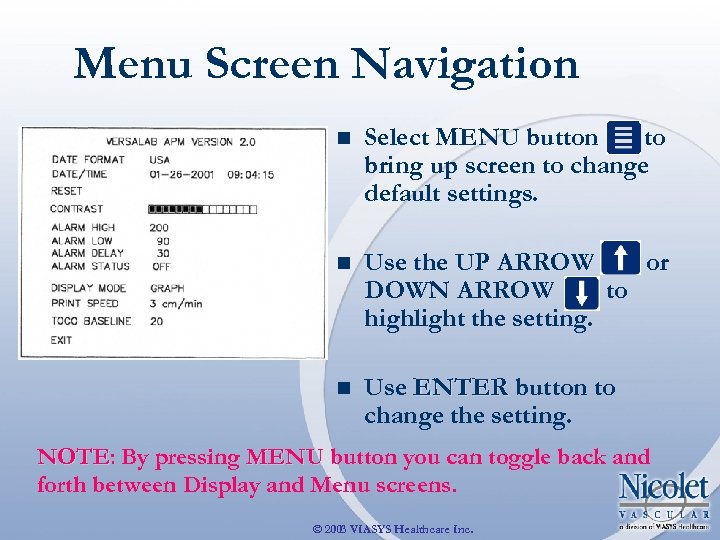
Menu Screen Navigation n Select MENU button to bring up screen to change default settings. n Use the UP ARROW or DOWN ARROW to highlight the setting. n Use ENTER button to change the setting. NOTE: By pressing MENU button you can toggle back and NOTE forth between Display and Menu screens. © 2003 VIASYS Healthcare Inc.
Changing Settings n DATE FORMAT: Highlight and press ENTER to change format of DATE/TIME on display and printout. n DATE/TIME: Highlight and press ENTER to access date and time. Use UP/DOWN arrows to adjust. © 2003 VIASYS Healthcare Inc.
Changing Settings n RESET: Highlight and press ENTER to return all settings to the factory defaults. n CONTRAST: Allows adjustment of screen brightness. Highlight CONTRAST, then press ENTER to activate the contrast bar. Use the UP and DOWN arrows to achieve desired brightness. © 2003 VIASYS Healthcare Inc.
Changing Settings n ALARM HIGH. Allows you to set High Alarm FHR level between 160 BPM and 230 BPM. Press ENTER to increase setting in 10 BPM increments. ü Cycle through options beginning at 160 BPM to 230 BPM. If FHR goes above set rate for longer than ALARM DELAY, alarm will sound. ü © 2003 VIASYS Healthcare Inc.
Changing Settings n ALARM LOW. Allows you to set Low Alarm FHR level between 60 BPM and 120 BPM. Press ENTER to increase setting in 10 BPM increments. ü Cycle through options beginning at 60 BPM to 120 BPM. If FHR goes below set rate for longer than ALARM DELAY, alarm will sound. ü © 2003 VIASYS Healthcare Inc.
Changing Settings n ALARM DELAY. Allows you to set the amount of delay time before the alarm sounds. Highlight ALARM DELAY press ENTER to increase the delay time. The default setting is 30 seconds. ü Cycle through options: 15, 30, 45 or 60 seconds by pressing ENTER. When an FHR goes outside the set rate for the active ALARM for the amount of delay time, the ALARM will sound. ü © 2003 VIASYS Healthcare Inc.
Changing Settings ALARM STATUS. ü Highlight ALARM STATUS and press ENTER to show ON or OFF. The default for the ALARM is OFF. ü ALARM LIMITS and ALARM DELAY settings are saved when the unit is turned OFF. n © 2003 VIASYS Healthcare Inc.
Changing Settings n DISPLAY MODE: Allows you to change the DISPLAY MODE from NUMBER to GRAPH. ü Highlight DISPLAY MODE and press ENTER to choose NUMBER or GRAPH. The default setting is NUMBER display. © 2003 VIASYS Healthcare Inc.
Changing Settings n PRINT SPEED: Allows you to set the rate at which the data is printed at 1, 2, or 3 cm/min. ü Press ENTER to cycle through the values. The default print speed is 3 cm/min. © 2003 VIASYS Healthcare Inc.
Changing Settings n TOCO BASELINE: Allows you to reset the TOCO BASELINE. ü Highlight TOCO BASELINE and press ENTER to choose 10 or 20. The default is 20% when the Toco key is pressed. n EXIT: Allows you to leave MENU screen and go to DISPLAY screen. ü Highlight EXIT and press ENTER. © 2003 VIASYS Healthcare Inc.
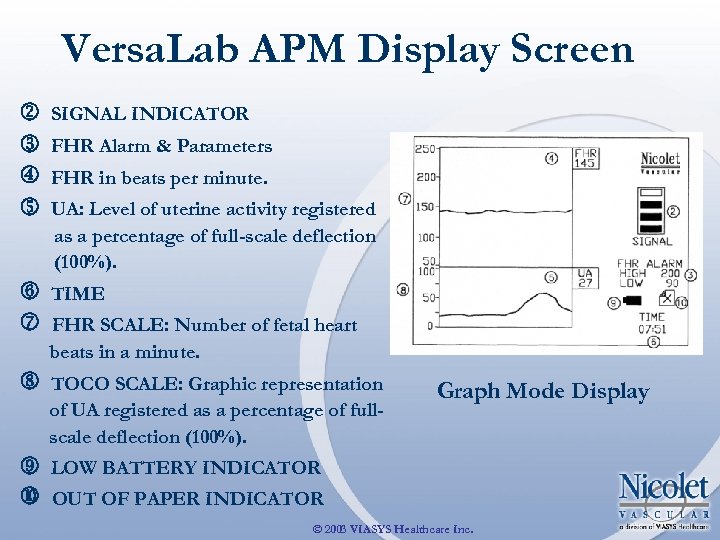
Versa. Lab APM Display Screen SIGNAL INDICATOR FHR Alarm & Parameters FHR in beats per minute. UA: Level of uterine activity registered as a percentage of full-scale deflection (100%). TIME FHR SCALE: Number of fetal heart beats in a minute. TOCO SCALE: Graphic representation of UA registered as a percentage of fullscale deflection (100%). Graph Mode Display LOW BATTERY INDICATOR OUT OF PAPER INDICATOR © 2003 VIASYS Healthcare Inc.
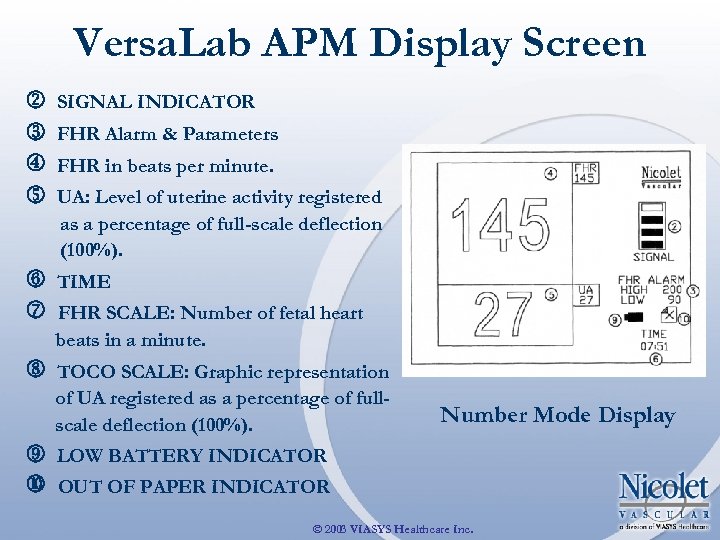
Versa. Lab APM Display Screen SIGNAL INDICATOR FHR Alarm & Parameters FHR in beats per minute. UA: Level of uterine activity registered as a percentage of full-scale deflection (100%). TIME FHR SCALE: Number of fetal heart beats in a minute. TOCO SCALE: Graphic representation of UA registered as a percentage of fullscale deflection (100%). Number Mode Display LOW BATTERY INDICATOR OUT OF PAPER INDICATOR © 2003 VIASYS Healthcare Inc.
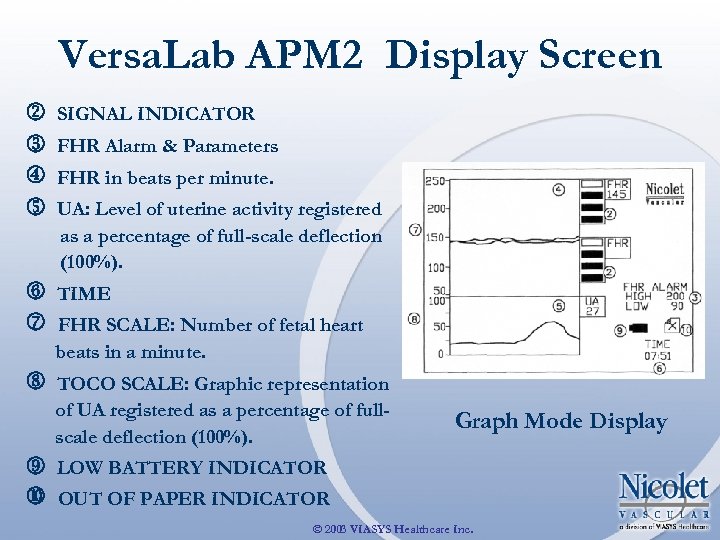
Versa. Lab APM 2 Display Screen SIGNAL INDICATOR FHR Alarm & Parameters FHR in beats per minute. UA: Level of uterine activity registered as a percentage of full-scale deflection (100%). TIME FHR SCALE: Number of fetal heart beats in a minute. TOCO SCALE: Graphic representation of UA registered as a percentage of fullscale deflection (100%). Graph Mode Display LOW BATTERY INDICATOR OUT OF PAPER INDICATOR © 2003 VIASYS Healthcare Inc.
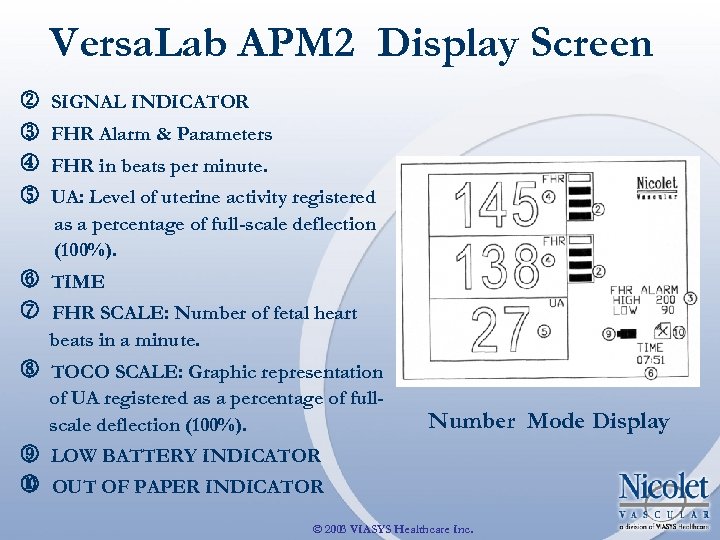
Versa. Lab APM 2 Display Screen SIGNAL INDICATOR FHR Alarm & Parameters FHR in beats per minute. UA: Level of uterine activity registered as a percentage of full-scale deflection (100%). TIME FHR SCALE: Number of fetal heart beats in a minute. TOCO SCALE: Graphic representation of UA registered as a percentage of fullscale deflection (100%). Number Mode Display LOW BATTERY INDICATOR OUT OF PAPER INDICATOR © 2003 VIASYS Healthcare Inc.
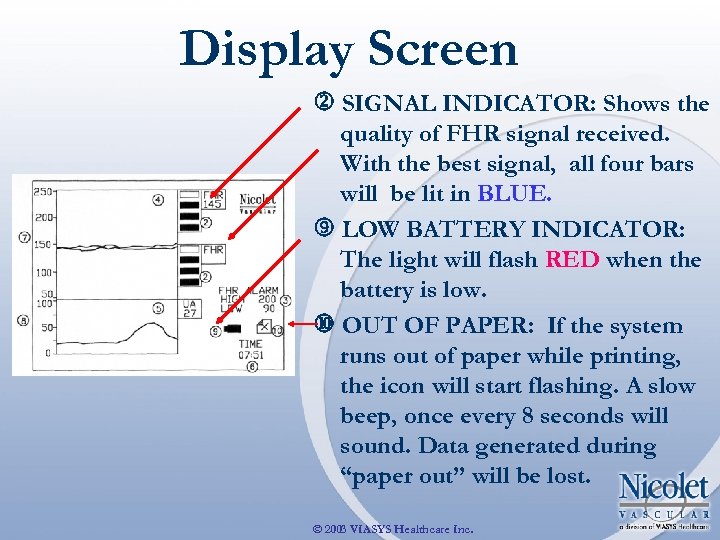
Display Screen SIGNAL INDICATOR: Shows the quality of FHR signal received. With the best signal, all four bars will be lit in BLUE. LOW BATTERY INDICATOR: The light will flash RED when the battery is low. OUT OF PAPER: If the system runs out of paper while printing, the icon will start flashing. A slow beep, once every 8 seconds will sound. Data generated during “paper out” will be lost. © 2003 VIASYS Healthcare Inc.
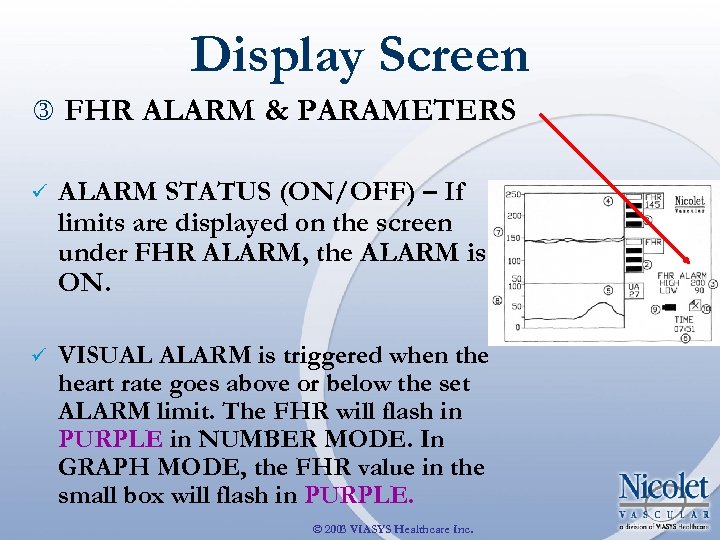
Display Screen FHR ALARM & PARAMETERS ü ALARM STATUS (ON/OFF) – If limits are displayed on the screen under FHR ALARM, the ALARM is ON. ü VISUAL ALARM is triggered when the heart rate goes above or below the set ALARM limit. The FHR will flash in PURPLE in NUMBER MODE. In GRAPH MODE, the FHR value in the small box will flash in PURPLE. © 2003 VIASYS Healthcare Inc.
Versa. Lab APM/APM 2 Printout n ü ü PRINT SPEED: Can be set for 1, 2 or 3 cm per minute To start the printer and record non-stress test, press the PRINT button. A header will be printed with Date, Start Time and Print Speed. To stop printing, press PRINT button again. A footer will display Date, End Time, and Elapsed Time of the test. © 2003 VIASYS Healthcare Inc.
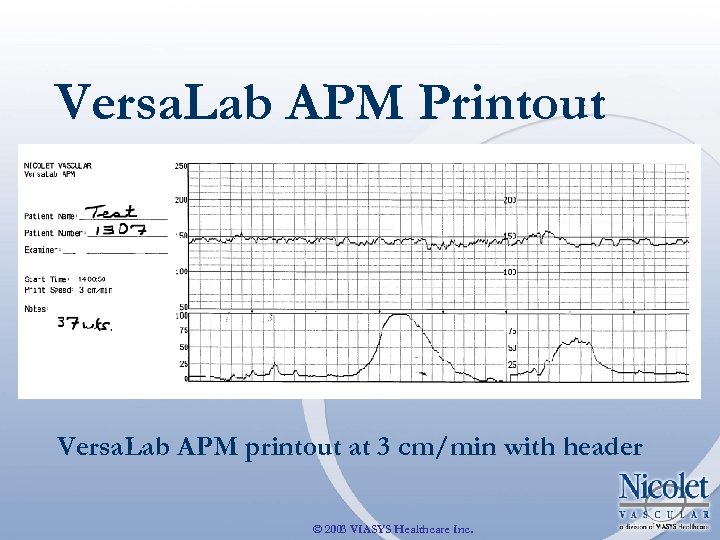
Versa. Lab APM Printout Versa. Lab APM printout at 3 cm/min with header © 2003 VIASYS Healthcare Inc.
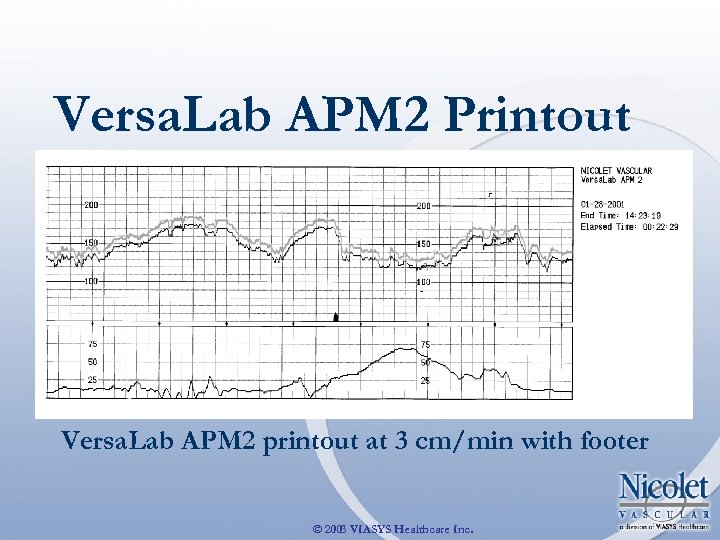
Versa. Lab APM 2 Printout Versa. Lab APM 2 printout at 3 cm/min with footer © 2003 VIASYS Healthcare Inc.
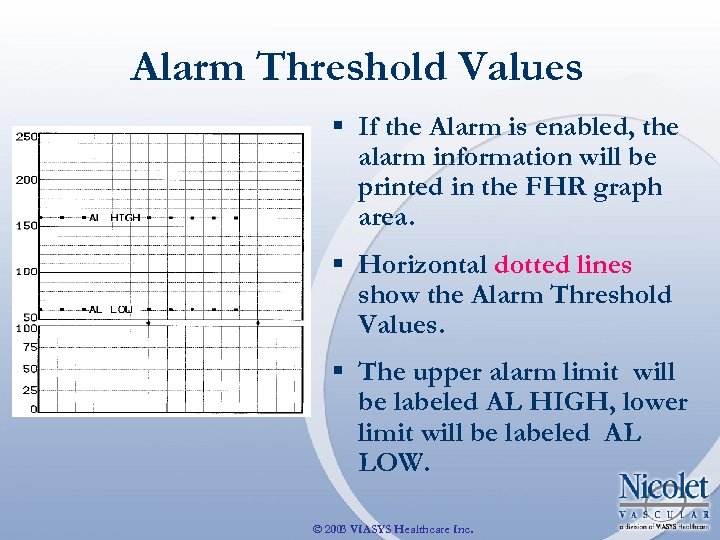
Alarm Threshold Values § If the Alarm is enabled, the alarm information will be printed in the FHR graph area. § Horizontal dotted lines show the Alarm Threshold Values. § The upper alarm limit will be labeled AL HIGH, lower limit will be labeled AL LOW. © 2003 VIASYS Healthcare Inc.
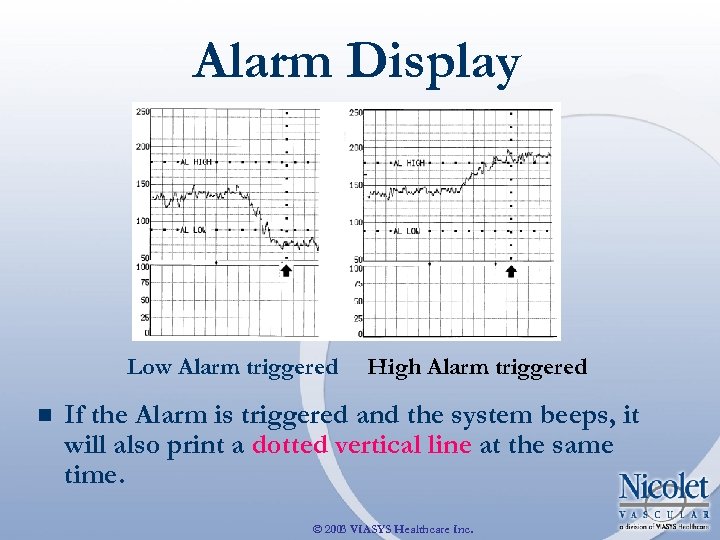
Alarm Display Low Alarm triggered n High Alarm triggered If the Alarm is triggered and the system beeps, it will also print a dotted vertical line at the same time. © 2003 VIASYS Healthcare Inc.
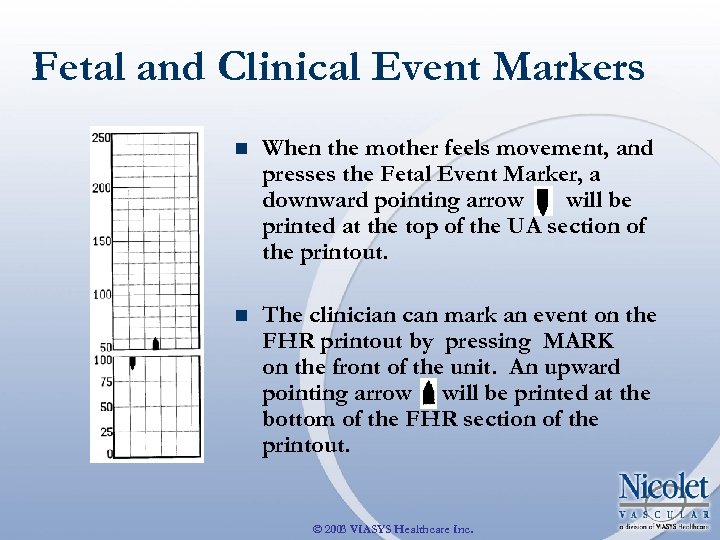
Fetal and Clinical Event Markers n When the mother feels movement, and presses the Fetal Event Marker, a downward pointing arrow will be printed at the top of the UA section of the printout. n The clinician can mark an event on the FHR printout by pressing MARK on the front of the unit. An upward pointing arrow will be printed at the bottom of the FHR section of the printout. © 2003 VIASYS Healthcare Inc.
Suggested Criteria for Interpretation of Non-Stress Testing: n During antepartum testing, the patient is monitored for about 20 minutes. n The baseline FHR is noted and recorded. © 2003 VIASYS Healthcare Inc.

Suggested Criteria for Interpretation of Non-Stress Testing* : REACTIVE: Two accelerations of 15 beats per minute or more for 15 seconds or longer during any 10 minute period. Fetal movement indications are usually seen but not required. n NON-REACTIVE: Positive evidence of fetal movement during a 40 minute testing period, but no 10 minute segment during which two accelerations meeting the “ 15 -15 rule” occur. n © 2003 VIASYS Healthcare Inc.

Suggested Criteria for Interpretation of Non-Stress Testing*: n UNSATISFACTORY: Quality of FHR recording too low to determine whether the criteria for activity are met. © 2003 VIASYS Healthcare Inc.
Suggested Criteria for Interpretation of Non-Stress Testing*: n FOLLOW-UP: If the non-stress test is reactive, repeat the test weekly or bi-weekly. If the results are non-reactive, repeat the test in 2 -3 hrs. If the test is still non-reactive, a Contractions Stress Test (CST) should be performed. NOTE This information is provided as a guideline and cannot be substituted : for the physician’s experience and judgment when determining patient care or intervention. * Langer, O. et al: “Categorization of Terminal Fetal Heart-Rate Patterns in Antepartum Cardiotocography. ” British Journal of Obstetrics and Gynaecology 1982; 89: 179 -185. © 2003 VIASYS Healthcare Inc.

Questions: § If you have any questions, comments or would like to order more Versa. Lab APM/APM 2 Quick Guide CDs (catalog# APMC), please contact us at: Nicolet Vascular 5225 Verona Road, Bldg. 2 Madison, WI 53711 Toll-free USA 800 -525 -2519 Phone: 608 -441 -2266 Fax: 608 -441 -2232 www. Nicolet. Vascular. com © 2003 VIASYS Healthcare Inc.
Скачать презентацию Quick Guide to Using Your Versa Lab APM
415b9c3c8bc6470670c10d0737446ead.ppt