


 Скачать презентацию Querying XML XQuery XPath and SQL XML in Context
146f35b0d0224d8de979dac82a872612.ppt
- Количество слайдов: 44
 Querying XML: XQuery, XPath, and SQL/XML in Context Authors: Jim Melton and Stephen Buxton Publisher: Morgan Kaufmann Publication Year: 2006 Lecturer: Kyungpook National University School of EECS Lab. of Database Systems Young Chul Park 2007 -7/KNU Querying XML: XQuery, XPath, and SQL/XML in Context
 Chapter 15 SQL/XML 15. 1 Introduction 15. 2 SQL/XML Publishing Functions Publishing SQL data to XML. 15. 2. 1 Examples : XMLELEMENT, XMLATTRIBUTES 15. 2. 2 XMLAGG 15. 2. 3 XMLFOREST 15. 2. 4 XMLCONCAT 15. 2. 5 Summary 15. 3 XML Data Types Store and manage XML natively in a SQL database 15. 4 XQuery Functions Querying XML data in SQL to produce either SQL data, XML data, or a Boolean result. 15. 4. 1 XMLQUERY XML data 15. 4. 2 XMLTABLE SQL data 15. 4. 3 XMLEXISTS a Boolean result 15. 5 Managing XML in the Database The language for piecewise updates of XML. 15. 6 Talking the Same Language – Mappings 15. 6. 1 Character Sets 15. 6. 2 Names 15. 6. 3 Types and Values Mapping SQL Data Types to XML Schema Data Types Mapping XML Schema Atomic Values to SQL Values The Casting Functions – XMLSERIALIZE, XMLPARSE, XMLCAST Mapping SQL Tables, Schemas, Catalogs to XML 2007 -7/KNU Querying XML: XQuery, XPath, and SQL/XML in Context 2
 Chapter 15 SQL/XML 15. 1 Introduction The goal of the SQLX Group was to define a set of extensions to the SQL standard to integrate SQL and XML, supporting bidirectional movement of data allowing SQL programmers to manage and query XML data. Specifically they worked to: – Query SQL data and publish the results as XML – Store and manage XML natively in a SQL database – Query XML and publish the results as either XML or as SQL data – Map SQL data and identifiers to XML, and vice versa SQL/XML : the short name for part 14 of the SQL standard, that part that deals with XML. “SQL part 14, XML-Related Specifications (SQL/XML). ” SQL/XML: 2003, SQL/XML: 2006, SQL/XML: 2007 SQLX: the informal name of the group that creates and presents proposals for SQL/XML to INCITS : the U. S. body chartered with development of standards in IT, including SQLXML: a Microsoft term for Microsoft’s proprietary SQL extensions that do roughly the same thing as the SQL/XML publishing functions. The “SQL/XML functions” (e. g. , publishing functions and XQuery functions) are not actually functions at all. In SQL terms, they are pseudo-functions. 2007 -7/KNU Querying XML: XQuery, XPath, and SQL/XML in Context 3
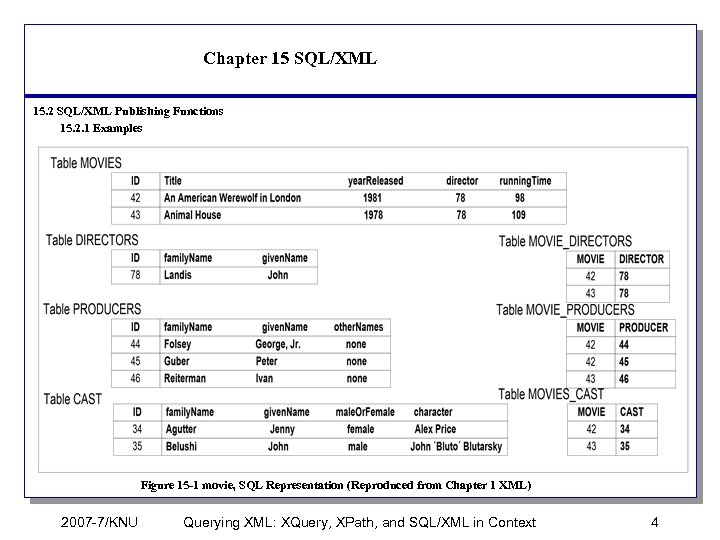 Chapter 15 SQL/XML 15. 2 SQL/XML Publishing Functions 15. 2. 1 Examples Figure 15 -1 movie, SQL Representation (Reproduced from Chapter 1 XML) 2007 -7/KNU Querying XML: XQuery, XPath, and SQL/XML in Context 4
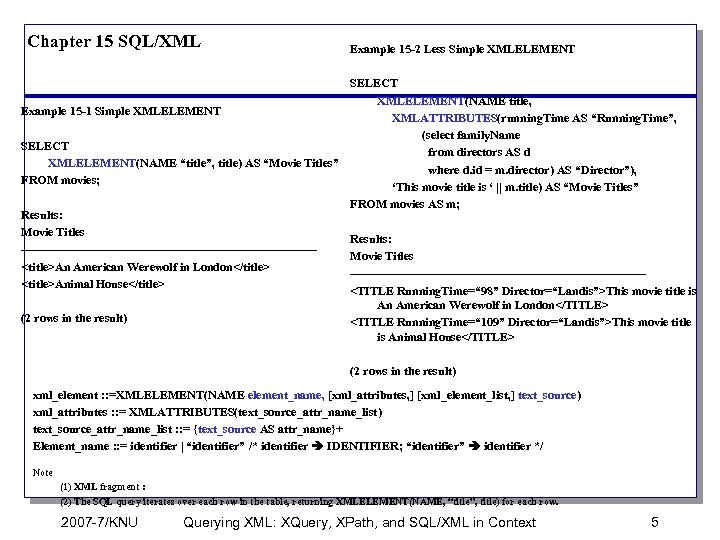 Chapter 15 SQL/XML Example 15 -2 Less Simple XMLELEMENT SELECT XMLELEMENT(NAME title, Example 15 -1 Simple XMLELEMENT XMLATTRIBUTES(running. Time AS “Running. Time”, (select family. Name SELECT from directors AS d XMLELEMENT(NAME “title”, title) AS “Movie Titles” where d. id = m. director) AS “Director”), FROM movies; ‘This movie title is ‘ || m. title) AS “Movie Titles” FROM movies AS m; Results: Movie Titles Results: -------------------------------------Movie Titles
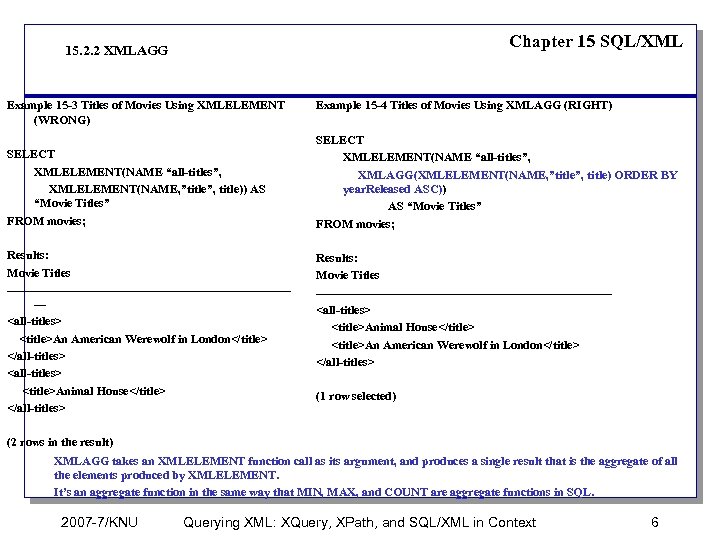 Chapter 15 SQL/XML 15. 2. 2 XMLAGG Example 15 -3 Titles of Movies Using XMLELEMENT (WRONG) SELECT XMLELEMENT(NAME “all-titles”, XMLELEMENT(NAME, ”title”, title)) AS “Movie Titles” FROM movies; Results: Movie Titles ------------------------------------
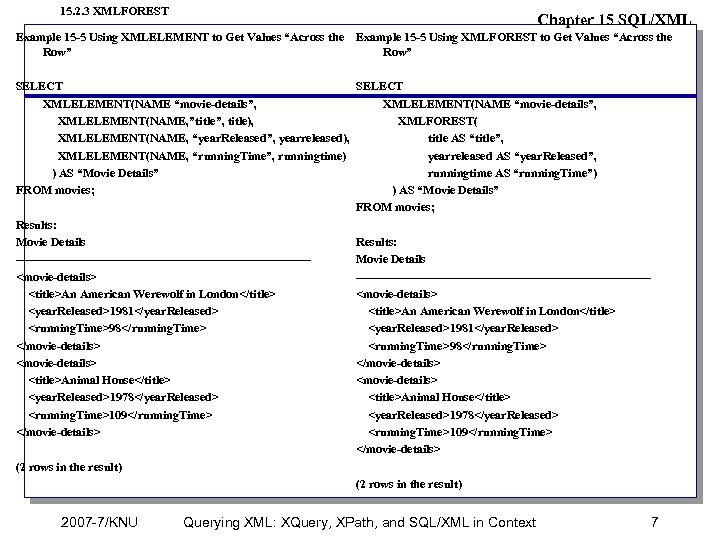 15. 2. 3 XMLFOREST Chapter 15 SQL/XML Example 15 -5 Using XMLELEMENT to Get Values “Across the Example 15 -5 Using XMLFOREST to Get Values “Across the Row” SELECT XMLELEMENT(NAME “movie-details”, XMLELEMENT(NAME, ”title”, title), XMLFOREST( XMLELEMENT(NAME, “year. Released”, yearreleased), title AS “title”, XMLELEMENT(NAME, “running. Time”, runningtime) yearreleased AS “year. Released”, ) AS “Movie Details” runningtime AS “running. Time”) FROM movies; ) AS “Movie Details” FROM movies; Results: Movie Details Results: -------------------------------------Movie Details
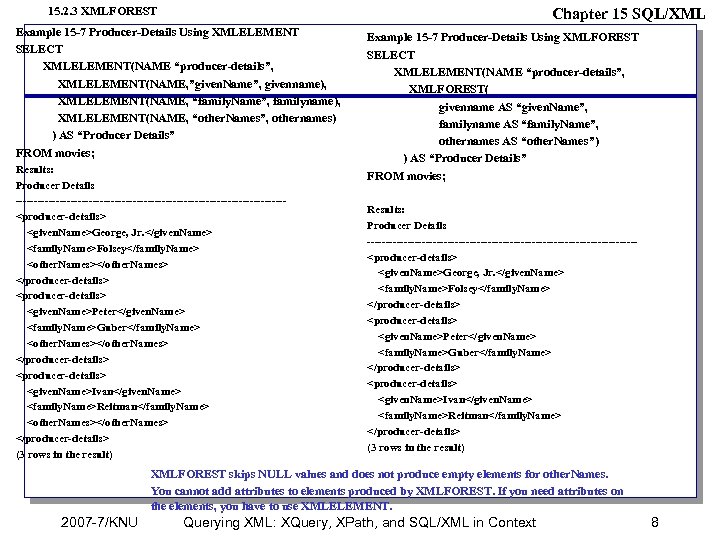 15. 2. 3 XMLFOREST Chapter 15 SQL/XML Example 15 -7 Producer-Details Using XMLELEMENT SELECT XMLELEMENT(NAME “producer-details”, XMLELEMENT(NAME, ”given. Name”, givenname), XMLELEMENT(NAME, “family. Name”, familyname), XMLELEMENT(NAME, “other. Names”, othernames) ) AS “Producer Details” FROM movies; Results: Producer Details -------------------------------------
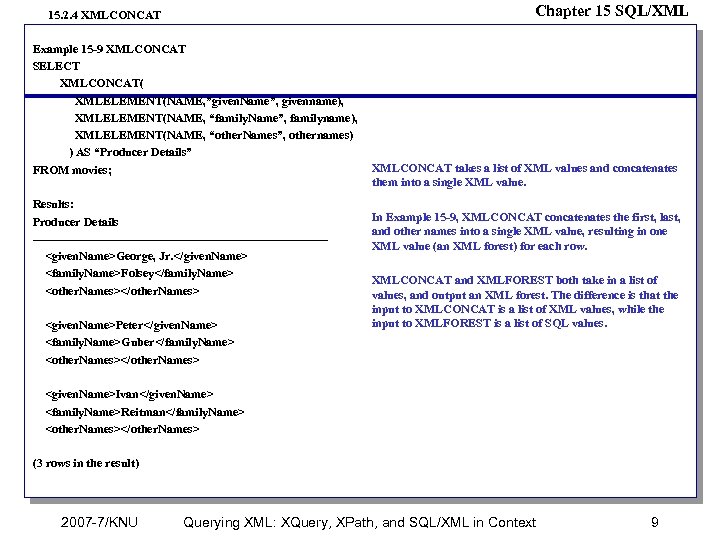 Chapter 15 SQL/XML 15. 2. 4 XMLCONCAT Example 15 -9 XMLCONCAT SELECT XMLCONCAT( XMLELEMENT(NAME, ”given. Name”, givenname), XMLELEMENT(NAME, “family. Name”, familyname), XMLELEMENT(NAME, “other. Names”, othernames) ) AS “Producer Details” FROM movies; Results: Producer Details -------------------------------------
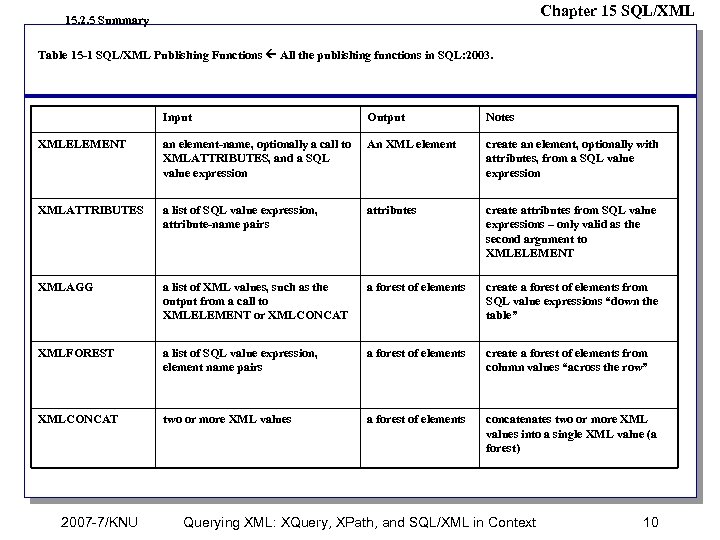 Chapter 15 SQL/XML 15. 2. 5 Summary Table 15 -1 SQL/XML Publishing Functions All the publishing functions in SQL: 2003. Input Output Notes XMLELEMENT an element-name, optionally a call to XMLATTRIBUTES, and a SQL value expression An XML element create an element, optionally with attributes, from a SQL value expression XMLATTRIBUTES a list of SQL value expression, attribute-name pairs attributes create attributes from SQL value expressions – only valid as the second argument to XMLELEMENT XMLAGG a list of XML values, such as the output from a call to XMLELEMENT or XMLCONCAT a forest of elements create a forest of elements from SQL value expressions “down the table” XMLFOREST a list of SQL value expression, element name pairs a forest of elements create a forest of elements from column values “across the row” XMLCONCAT two or more XML values a forest of elements concatenates two or more XML values into a single XML value (a forest) 2007 -7/KNU Querying XML: XQuery, XPath, and SQL/XML in Context 10
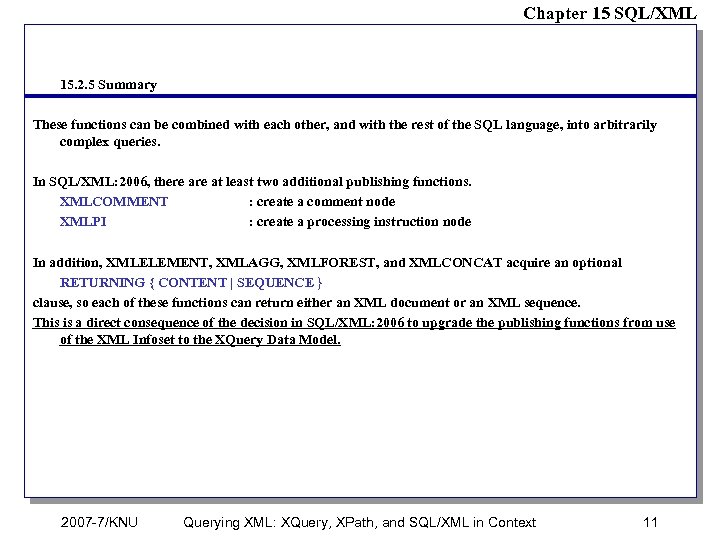 Chapter 15 SQL/XML 15. 2. 5 Summary These functions can be combined with each other, and with the rest of the SQL language, into arbitrarily complex queries. In SQL/XML: 2006, there at least two additional publishing functions. XMLCOMMENT : create a comment node XMLPI : create a processing instruction node In addition, XMLELEMENT, XMLAGG, XMLFOREST, and XMLCONCAT acquire an optional RETURNING { CONTENT | SEQUENCE } clause, so each of these functions can return either an XML document or an XML sequence. This is a direct consequence of the decision in SQL/XML: 2006 to upgrade the publishing functions from use of the XML Infoset to the XQuery Data Model. 2007 -7/KNU Querying XML: XQuery, XPath, and SQL/XML in Context 11
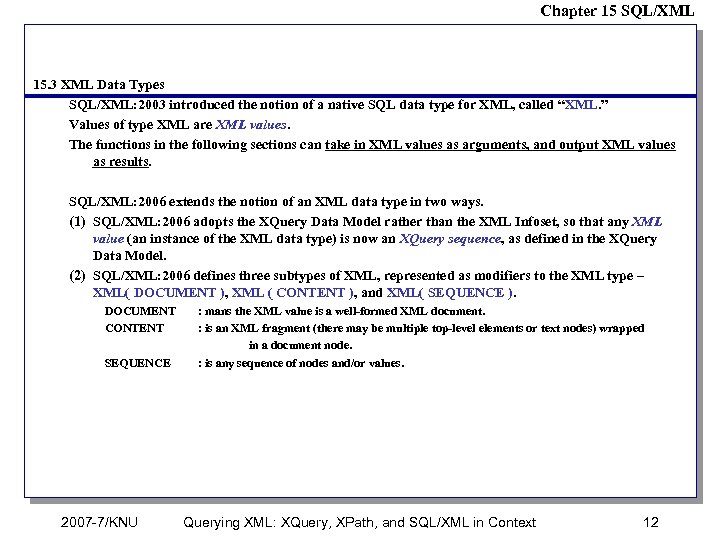 Chapter 15 SQL/XML 15. 3 XML Data Types SQL/XML: 2003 introduced the notion of a native SQL data type for XML, called “XML. ” Values of type XML are XML values. The functions in the following sections can take in XML values as arguments, and output XML values as results. SQL/XML: 2006 extends the notion of an XML data type in two ways. (1) SQL/XML: 2006 adopts the XQuery Data Model rather than the XML Infoset, so that any XML value (an instance of the XML data type) is now an XQuery sequence, as defined in the XQuery Data Model. (2) SQL/XML: 2006 defines three subtypes of XML, represented as modifiers to the XML type – XML( DOCUMENT ), XML ( CONTENT ), and XML( SEQUENCE ). DOCUMENT CONTENT SEQUENCE 2007 -7/KNU : mans the XML value is a well-formed XML document. : is an XML fragment (there may be multiple top-level elements or text nodes) wrapped in a document node. : is any sequence of nodes and/or values. Querying XML: XQuery, XPath, and SQL/XML in Context 12
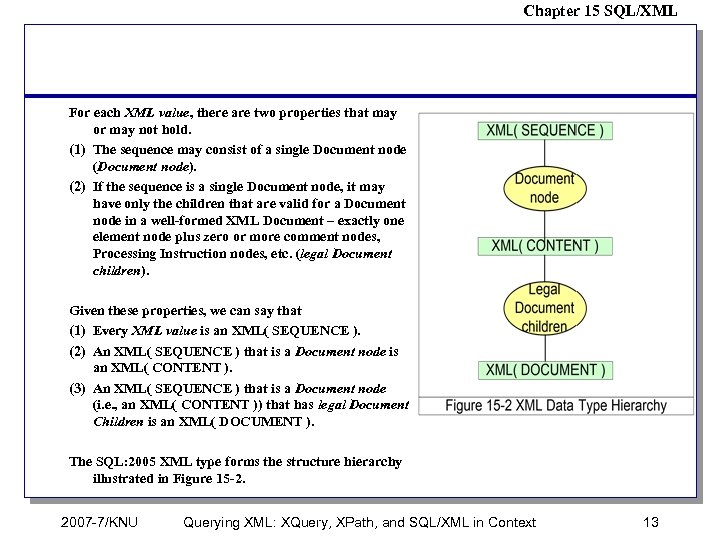 Chapter 15 SQL/XML For each XML value, there are two properties that may or may not hold. (1) The sequence may consist of a single Document node (Document node). (2) If the sequence is a single Document node, it may have only the children that are valid for a Document node in a well-formed XML Document – exactly one element node plus zero or more comment nodes, Processing Instruction nodes, etc. (legal Document children). Given these properties, we can say that (1) Every XML value is an XML( SEQUENCE ). (2) An XML( SEQUENCE ) that is a Document node is an XML( CONTENT ). (3) An XML( SEQUENCE ) that is a Document node (i. e. , an XML( CONTENT )) that has legal Document Children is an XML( DOCUMENT ). The SQL: 2005 XML type forms the structure hierarchy illustrated in Figure 15 -2. 2007 -7/KNU Querying XML: XQuery, XPath, and SQL/XML in Context 13
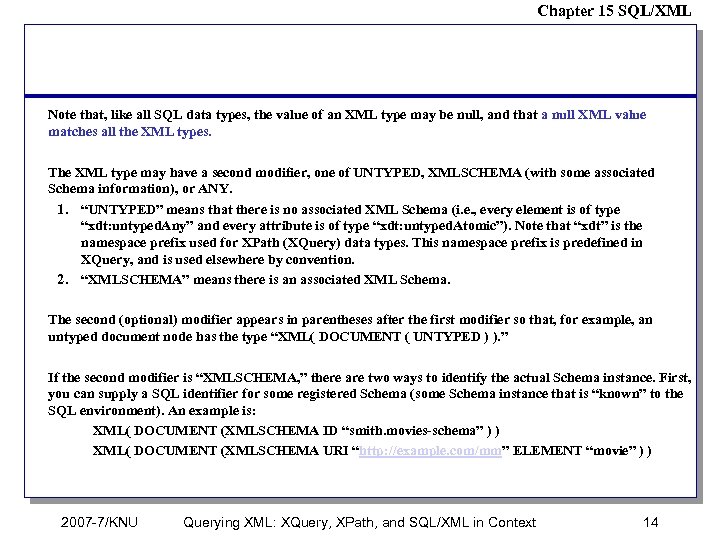 Chapter 15 SQL/XML Note that, like all SQL data types, the value of an XML type may be null, and that a null XML value matches all the XML types. The XML type may have a second modifier, one of UNTYPED, XMLSCHEMA (with some associated Schema information), or ANY. 1. “UNTYPED” means that there is no associated XML Schema (i. e. , every element is of type “xdt: untyped. Any” and every attribute is of type “xdt: untyped. Atomic”). Note that “xdt” is the namespace prefix used for XPath (XQuery) data types. This namespace prefix is predefined in XQuery, and is used elsewhere by convention. 2. “XMLSCHEMA” means there is an associated XML Schema. The second (optional) modifier appears in parentheses after the first modifier so that, for example, an untyped document node has the type “XML( DOCUMENT ( UNTYPED ) ). ” If the second modifier is “XMLSCHEMA, ” there are two ways to identify the actual Schema instance. First, you can supply a SQL identifier for some registered Schema (some Schema instance that is “known” to the SQL environment). An example is: XML( DOCUMENT (XMLSCHEMA ID “smith. movies-schema” ) ) XML( DOCUMENT (XMLSCHEMA URI “http: //example. com/mm” ELEMENT “movie” ) ) 2007 -7/KNU Querying XML: XQuery, XPath, and SQL/XML in Context 14
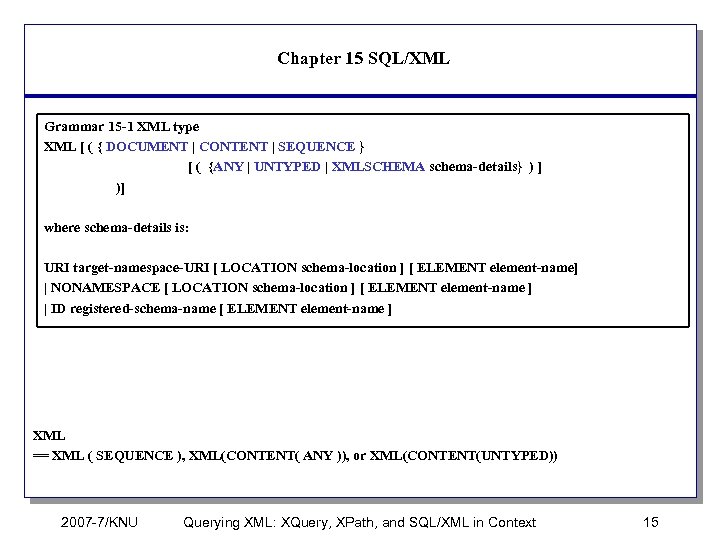 Chapter 15 SQL/XML Grammar 15 -1 XML type XML [ ( { DOCUMENT | CONTENT | SEQUENCE } [ ( {ANY | UNTYPED | XMLSCHEMA schema-details} ) ] )] where schema-details is: URI target-namespace-URI [ LOCATION schema-location ] [ ELEMENT element-name] | NONAMESPACE [ LOCATION schema-location ] [ ELEMENT element-name ] | ID registered-schema-name [ ELEMENT element-name ] XML == XML ( SEQUENCE ), XML(CONTENT( ANY )), or XML(CONTENT(UNTYPED)) 2007 -7/KNU Querying XML: XQuery, XPath, and SQL/XML in Context 15
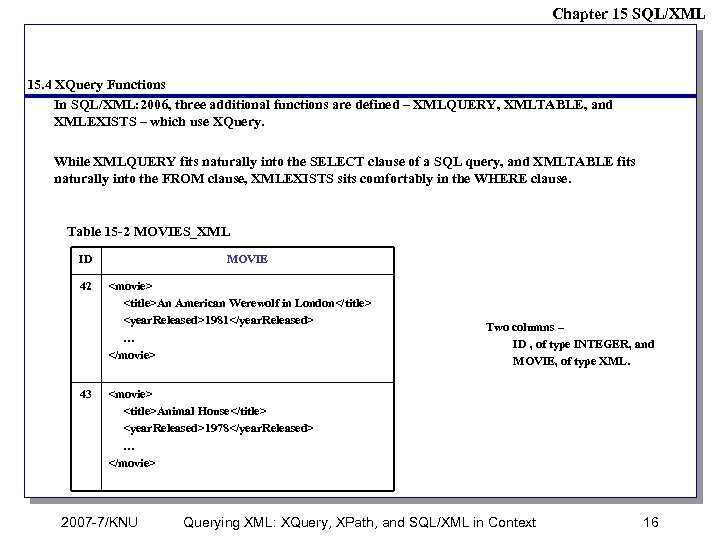 Chapter 15 SQL/XML 15. 4 XQuery Functions In SQL/XML: 2006, three additional functions are defined – XMLQUERY, XMLTABLE, and XMLEXISTS – which use XQuery. While XMLQUERY fits naturally into the SELECT clause of a SQL query, and XMLTABLE fits naturally into the FROM clause, XMLEXISTS sits comfortably in the WHERE clause. Table 15 -2 MOVIES_XML ID 42 43 MOVIE
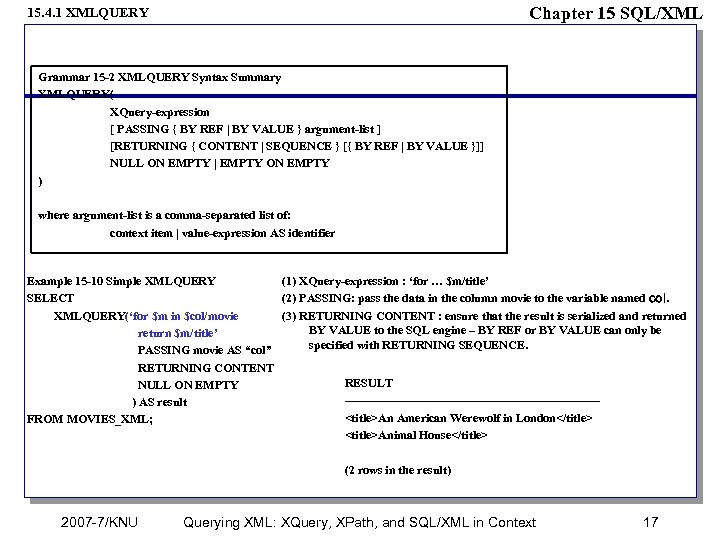 Chapter 15 SQL/XML 15. 4. 1 XMLQUERY Grammar 15 -2 XMLQUERY Syntax Summary XMLQUERY( XQuery-expression [ PASSING { BY REF | BY VALUE } argument-list ] [RETURNING { CONTENT | SEQUENCE } [{ BY REF | BY VALUE }]] NULL ON EMPTY | EMPTY ON EMPTY ) where argument-list is a comma-separated list of: context item | value-expression AS identifier Example 15 -10 Simple XMLQUERY (1) XQuery-expression : ‘for … $m/title’ SELECT (2) PASSING: pass the data in the column movie to the variable named col. XMLQUERY(‘for $m in $col/movie (3) RETURNING CONTENT : ensure that the result is serialized and returned BY VALUE to the SQL engine – BY REF or BY VALUE can only be return $m/title’ specified with RETURNING SEQUENCE. PASSING movie AS “col” RETURNING CONTENT RESULT NULL ON EMPTY --------------------------------) AS result
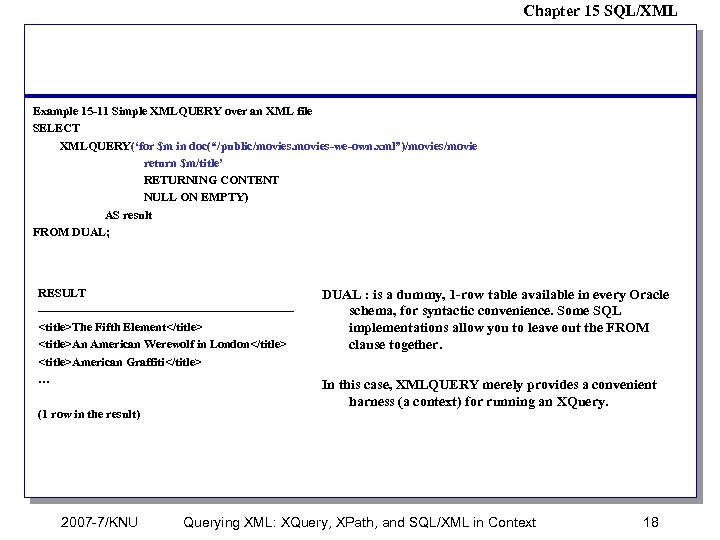 Chapter 15 SQL/XML Example 15 -11 Simple XMLQUERY over an XML file SELECT XMLQUERY(‘for $m in doc(“/public/movies-we-own. xml”)/movies/movie return $m/title’ RETURNING CONTENT NULL ON EMPTY) AS result FROM DUAL; RESULT --------------------------------
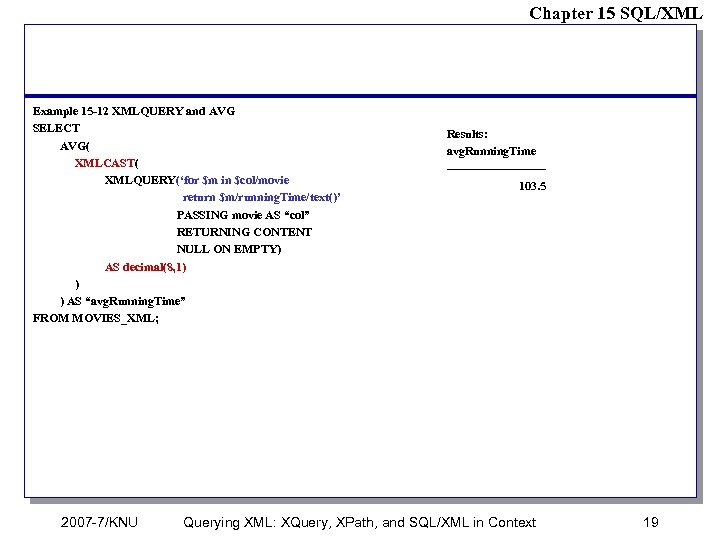 Chapter 15 SQL/XML Example 15 -12 XMLQUERY and AVG SELECT AVG( XMLCAST( XMLQUERY(‘for $m in $col/movie return $m/running. Time/text()’ PASSING movie AS “col” RETURNING CONTENT NULL ON EMPTY) AS decimal(8, 1) ) ) AS “avg. Running. Time” FROM MOVIES_XML; 2007 -7/KNU Results: avg. Running. Time ------------103. 5 Querying XML: XQuery, XPath, and SQL/XML in Context 19
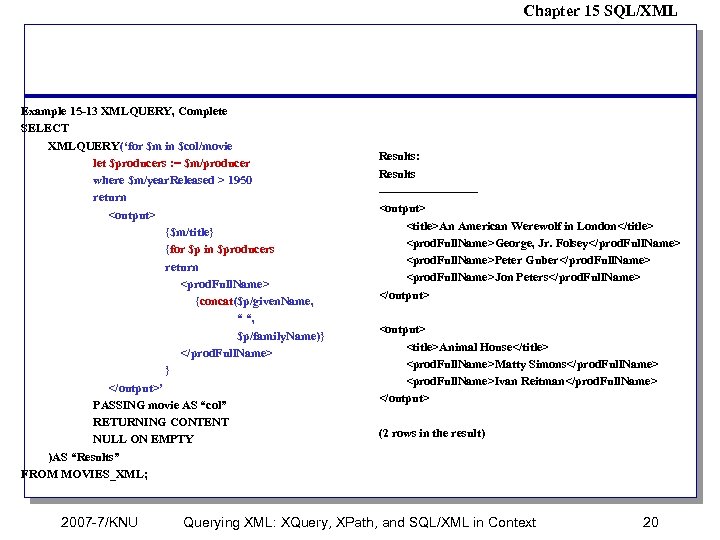 Chapter 15 SQL/XML Example 15 -13 XMLQUERY, Complete SELECT XMLQUERY(‘for $m in $col/movie let $producers : = $m/producer where $m/year. Released > 1950 return ’ PASSING movie AS “col” RETURNING CONTENT NULL ON EMPTY )AS “Results” FROM MOVIES_XML; 2007 -7/KNU Results: Results ------------
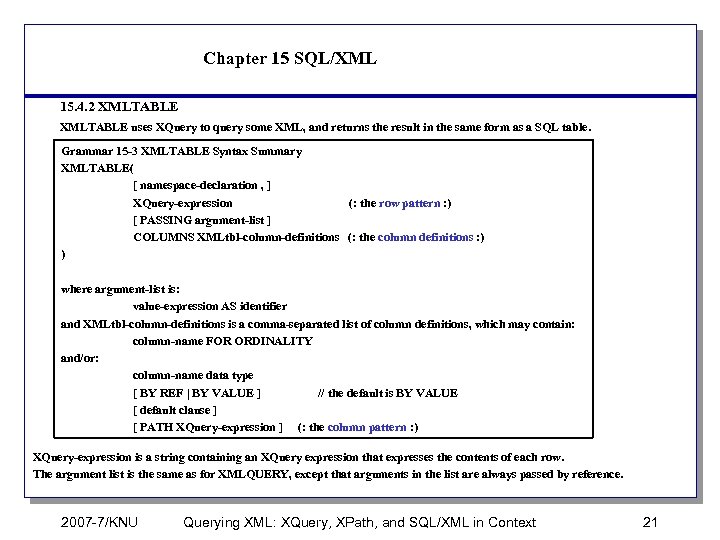 Chapter 15 SQL/XML 15. 4. 2 XMLTABLE uses XQuery to query some XML, and returns the result in the same form as a SQL table. Grammar 15 -3 XMLTABLE Syntax Summary XMLTABLE( [ namespace-declaration , ] XQuery-expression (: the row pattern : ) [ PASSING argument-list ] COLUMNS XMLtbl-column-definitions (: the column definitions : ) ) where argument-list is: value-expression AS identifier and XMLtbl-column-definitions is a comma-separated list of column definitions, which may contain: column-name FOR ORDINALITY and/or: column-name data type [ BY REF | BY VALUE ] // the default is BY VALUE [ default clause ] [ PATH XQuery-expression ] (: the column pattern : ) XQuery-expression is a string containing an XQuery expression that expresses the contents of each row. The argument list is the same as for XMLQUERY, except that arguments in the list are always passed by reference. 2007 -7/KNU Querying XML: XQuery, XPath, and SQL/XML in Context 21
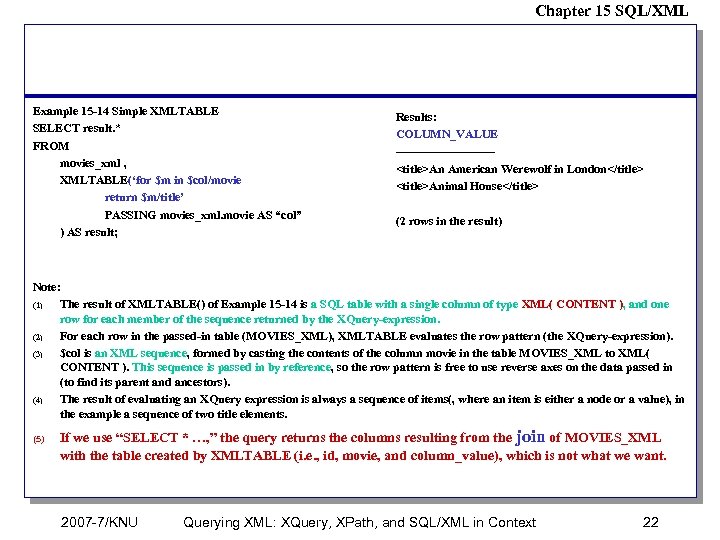 Chapter 15 SQL/XML Example 15 -14 Simple XMLTABLE SELECT result. * FROM movies_xml , XMLTABLE(‘for $m in $col/movie return $m/title’ PASSING movies_xml. movie AS “col” ) AS result; Results: COLUMN_VALUE ------------
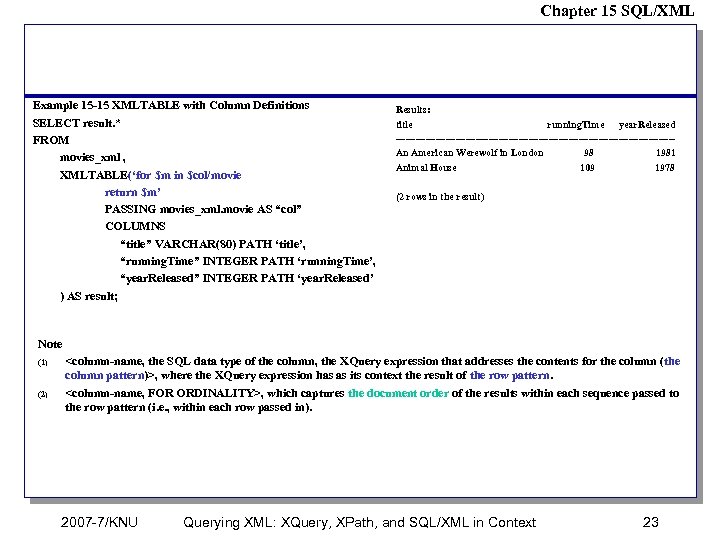 Chapter 15 SQL/XML Example 15 -15 XMLTABLE with Column Definitions SELECT result. * FROM movies_xml , XMLTABLE(‘for $m in $col/movie return $m’ PASSING movies_xml. movie AS “col” COLUMNS “title” VARCHAR(80) PATH ‘title’, “running. Time” INTEGER PATH ‘running. Time’, “year. Released” INTEGER PATH ‘year. Released’ ) AS result; Results: title running. Time year. Released ------------------------------------------An American Werewolf in London 98 1981 Animal House 109 1978 (2 rows in the result) Note (1) (2)
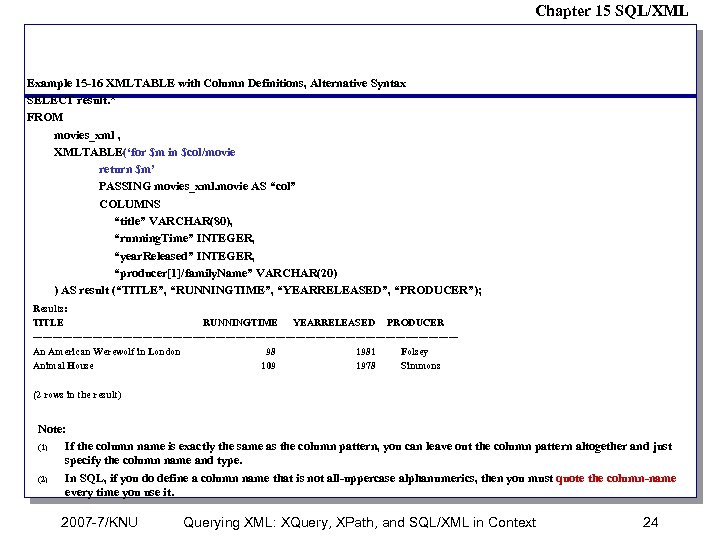 Chapter 15 SQL/XML Example 15 -16 XMLTABLE with Column Definitions, Alternative Syntax SELECT result. * FROM movies_xml , XMLTABLE(‘for $m in $col/movie return $m’ PASSING movies_xml. movie AS “col” COLUMNS “title” VARCHAR(80), “running. Time” INTEGER, “year. Released” INTEGER, “producer[1]/family. Name” VARCHAR(20) ) AS result (“TITLE”, “RUNNINGTIME”, “YEARRELEASED”, “PRODUCER”); Results: TITLE RUNNINGTIME YEARRELEASED PRODUCER ----------------------------------------------------------------An American Werewolf in London 98 1981 Folsey Animal House 109 1978 Simmons (2 rows in the result) Note: (1) If the column name is exactly the same as the column pattern, you can leave out the column pattern altogether and just specify the column name and type. (2) In SQL, if you do define a column name that is not all-uppercase alphanumerics, then you must quote the column-name every time you use it. 2007 -7/KNU Querying XML: XQuery, XPath, and SQL/XML in Context 24
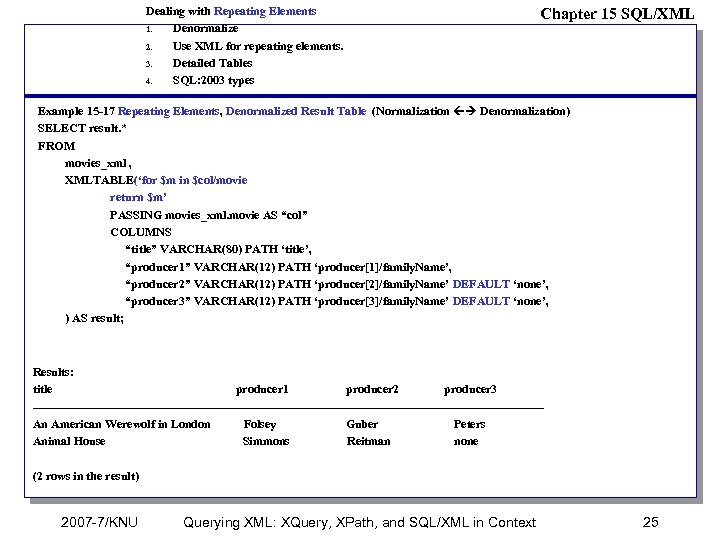 Dealing with Repeating Elements 1. Denormalize 2. Use XML for repeating elements. 3. Detailed Tables 4. SQL: 2003 types Chapter 15 SQL/XML Example 15 -17 Repeating Elements, Denormalized Result Table (Normalization Denormalization) SELECT result. * FROM movies_xml , XMLTABLE(‘for $m in $col/movie return $m’ PASSING movies_xml. movie AS “col” COLUMNS “title” VARCHAR(80) PATH ‘title’, “producer 1” VARCHAR(12) PATH ‘producer[1]/family. Name’, “producer 2” VARCHAR(12) PATH ‘producer[2]/family. Name’ DEFAULT ‘none’, “producer 3” VARCHAR(12) PATH ‘producer[3]/family. Name’ DEFAULT ‘none’, ) AS result; Results: title producer 1 producer 2 producer 3 ----------------------------------------------------------------An American Werewolf in London Folsey Guber Peters Animal House Simmons Reitman none (2 rows in the result) 2007 -7/KNU Querying XML: XQuery, XPath, and SQL/XML in Context 25
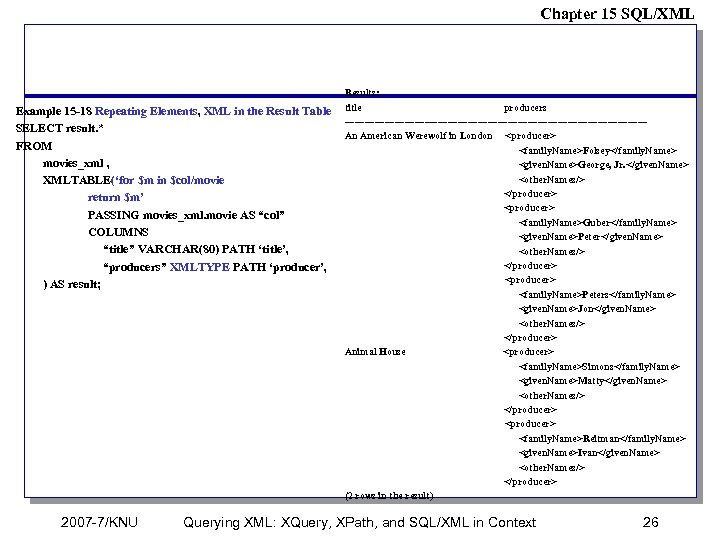 Chapter 15 SQL/XML Example 15 -18 Repeating Elements, XML in the Result Table SELECT result. * FROM movies_xml , XMLTABLE(‘for $m in $col/movie return $m’ PASSING movies_xml. movie AS “col” COLUMNS “title” VARCHAR(80) PATH ‘title’, “producers” XMLTYPE PATH ‘producer’, ) AS result; 2007 -7/KNU Results: title producers ---------------------------------------------An American Werewolf in London
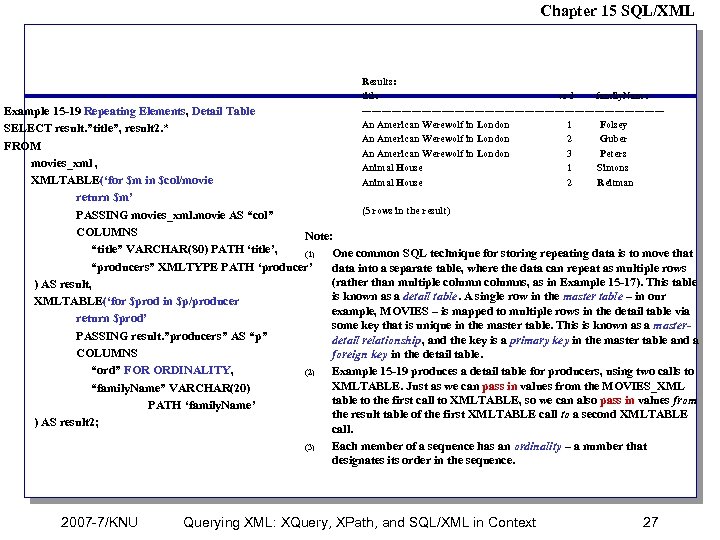 Chapter 15 SQL/XML Results: title ord family. Name ---------------------------------------------An American Werewolf in London 1 Folsey An American Werewolf in London 2 Guber An American Werewolf in London 3 Peters Animal House 1 Simons Animal House 2 Reitman Example 15 -19 Repeating Elements, Detail Table SELECT result. ”title”, result 2. * FROM movies_xml , XMLTABLE(‘for $m in $col/movie return $m’ (5 rows in the result) PASSING movies_xml. movie AS “col” COLUMNS Note: “title” VARCHAR(80) PATH ‘title’, (1) One common SQL technique for storing repeating data is to move that “producers” XMLTYPE PATH ‘producer’ data into a separate table, where the data can repeat as multiple rows (rather than multiple columns, as in Example 15 -17). This table ) AS result, is known as a detail table. A single row in the master table – in our XMLTABLE(‘for $prod in $p/producer example, MOVIES – is mapped to multiple rows in the detail table via return $prod’ some key that is unique in the master table. This is known as a master. PASSING result. ”producers” AS “p” detail relationship, and the key is a primary key in the master table and a COLUMNS foreign key in the detail table. “ord” FOR ORDINALITY, (2) Example 15 -19 produces a detail table for producers, using two calls to XMLTABLE. Just as we can pass in values from the MOVIES_XML “family. Name” VARCHAR(20) table to the first call to XMLTABLE, so we can also pass in values from PATH ‘family. Name’ the result table of the first XMLTABLE call to a second XMLTABLE ) AS result 2; call. (3) Each member of a sequence has an ordinality – a number that designates its order in the sequence. 2007 -7/KNU Querying XML: XQuery, XPath, and SQL/XML in Context 27
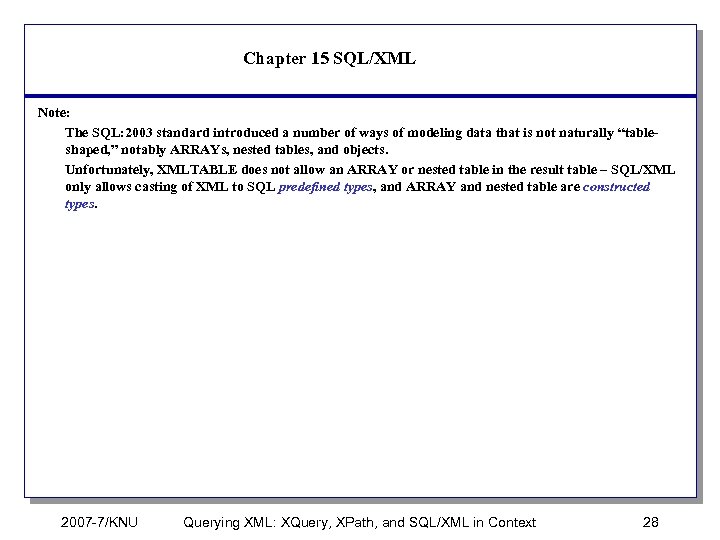 Chapter 15 SQL/XML Note: The SQL: 2003 standard introduced a number of ways of modeling data that is not naturally “tableshaped, ” notably ARRAYs, nested tables, and objects. Unfortunately, XMLTABLE does not allow an ARRAY or nested table in the result table – SQL/XML only allows casting of XML to SQL predefined types, and ARRAY and nested table are constructed types. 2007 -7/KNU Querying XML: XQuery, XPath, and SQL/XML in Context 28
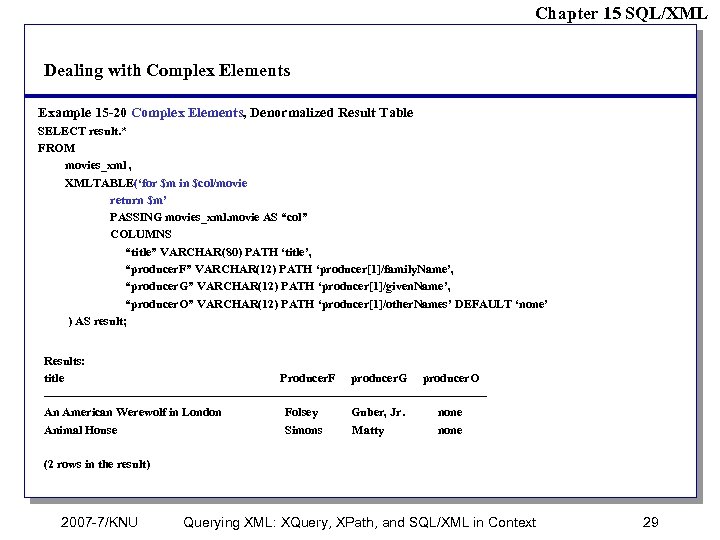 Chapter 15 SQL/XML Dealing with Complex Elements Example 15 -20 Complex Elements, Denormalized Result Table SELECT result. * FROM movies_xml , XMLTABLE(‘for $m in $col/movie return $m’ PASSING movies_xml. movie AS “col” COLUMNS “title” VARCHAR(80) PATH ‘title’, “producer. F” VARCHAR(12) PATH ‘producer[1]/family. Name’, “producer. G” VARCHAR(12) PATH ‘producer[1]/given. Name’, “producer. O” VARCHAR(12) PATH ‘producer[1]/other. Names’ DEFAULT ‘none’ ) AS result; Results: title Producer. F producer. G producer. O -------------------------------------------------------An American Werewolf in London Folsey Guber, Jr. none Animal House Simons Matty none (2 rows in the result) 2007 -7/KNU Querying XML: XQuery, XPath, and SQL/XML in Context 29
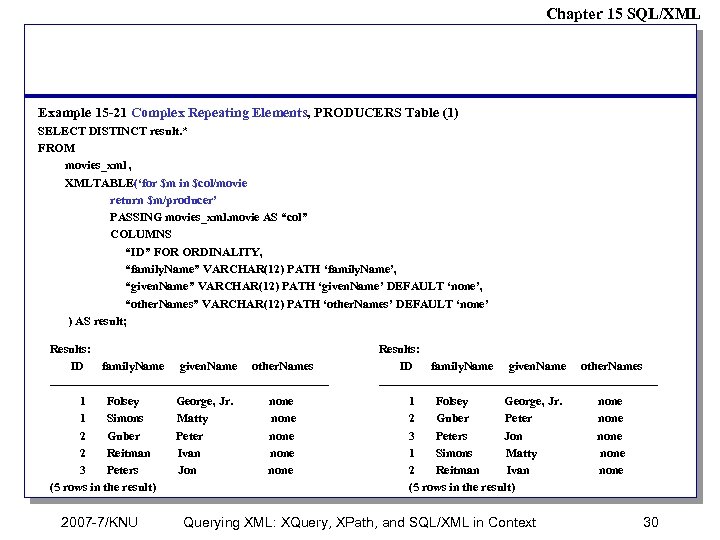 Chapter 15 SQL/XML Example 15 -21 Complex Repeating Elements, PRODUCERS Table (1) SELECT DISTINCT result. * FROM movies_xml , XMLTABLE(‘for $m in $col/movie return $m/producer’ PASSING movies_xml. movie AS “col” COLUMNS “ID” FOR ORDINALITY, “family. Name” VARCHAR(12) PATH ‘family. Name’, “given. Name” VARCHAR(12) PATH ‘given. Name’ DEFAULT ‘none’, “other. Names” VARCHAR(12) PATH ‘other. Names’ DEFAULT ‘none’ ) AS result; Results: ID family. Name given. Name other. Names -----------------------------------1 Folsey George, Jr. none 1 Simons Matty none 2 Guber Peter none 2 Reitman Ivan none 3 Peters Jon none (5 rows in the result) 2007 -7/KNU Results: ID family. Name given. Name other. Names -----------------------------------1 Folsey George, Jr. none 2 Guber Peter none 3 Peters Jon none 1 Simons Matty none 2 Reitman Ivan none (5 rows in the result) Querying XML: XQuery, XPath, and SQL/XML in Context 30
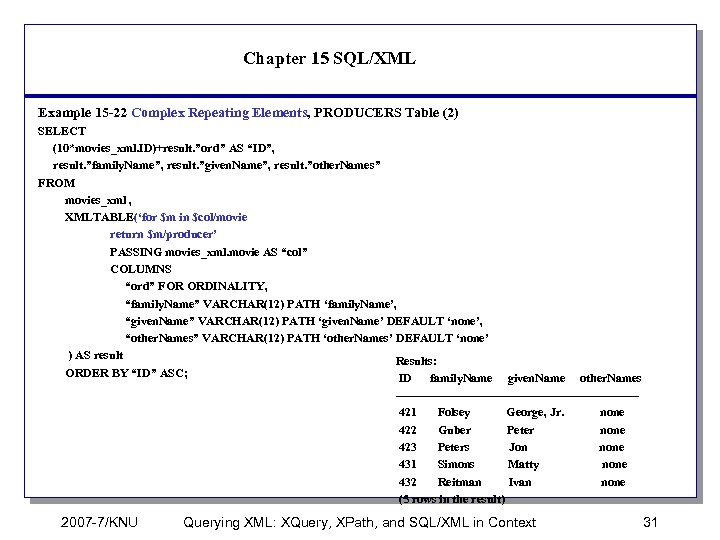 Chapter 15 SQL/XML Example 15 -22 Complex Repeating Elements, PRODUCERS Table (2) SELECT (10*movies_xml. ID)+result. ”ord” AS “ID”, result. ”family. Name”, result. ”given. Name”, result. ”other. Names” FROM movies_xml , XMLTABLE(‘for $m in $col/movie return $m/producer’ PASSING movies_xml. movie AS “col” COLUMNS “ord” FOR ORDINALITY, “family. Name” VARCHAR(12) PATH ‘family. Name’, “given. Name” VARCHAR(12) PATH ‘given. Name’ DEFAULT ‘none’, “other. Names” VARCHAR(12) PATH ‘other. Names’ DEFAULT ‘none’ ) AS result Results: ORDER BY “ID” ASC; ID family. Name given. Name other. Names ------------------------------421 Folsey George, Jr. none 422 Guber Peter none 423 Peters Jon none 431 Simons Matty none 432 Reitman Ivan none (5 rows in the result) 2007 -7/KNU Querying XML: XQuery, XPath, and SQL/XML in Context 31
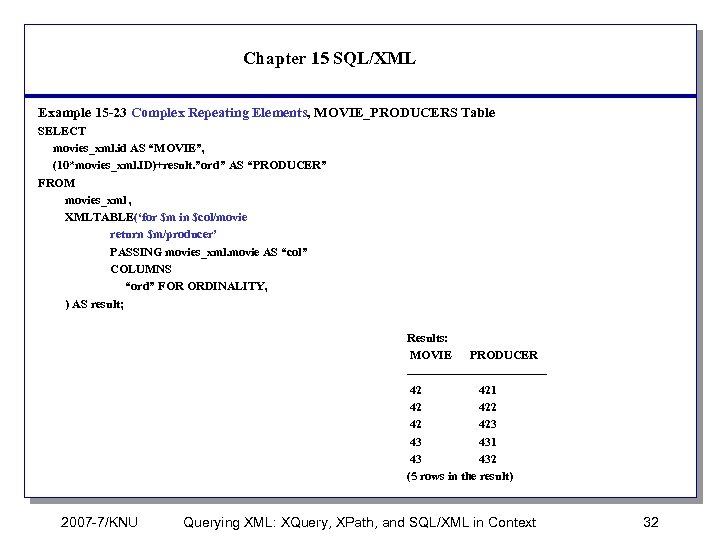 Chapter 15 SQL/XML Example 15 -23 Complex Repeating Elements, MOVIE_PRODUCERS Table SELECT movies_xml. id AS “MOVIE”, (10*movies_xml. ID)+result. ”ord” AS “PRODUCER” FROM movies_xml , XMLTABLE(‘for $m in $col/movie return $m/producer’ PASSING movies_xml. movie AS “col” COLUMNS “ord” FOR ORDINALITY, ) AS result; Results: MOVIE PRODUCER -----------------42 421 42 42 423 43 431 43 432 (5 rows in the result) 2007 -7/KNU Querying XML: XQuery, XPath, and SQL/XML in Context 32
 Chapter 15 SQL/XML Representing XML as SQL Data We have shown how to represent the movies XML documents as SQL data. This is tremendously useful for two reasons. (1) It frees the data administrator from the pressure of having to decide how to store data. If the data is born as XML, he now has the freedom (1 -1) to leave the data as XML and process it as XML, (1 -2) to convert the data to SQL and physically store it relationally (but still publish it as XML), or (1 -3) to create a set of SQL views that make the XML data look like SQL. (2) you can now apply all the power of SQL to your XML data, without necessarily shredding the data and storing it in tables. The analytic functions of SQL rollup and cube. Analytic functions (also known as OLAP (online analytic processing) functions) are generally used to analyze vast amounts of data. 2007 -7/KNU Querying XML: XQuery, XPath, and SQL/XML in Context 33
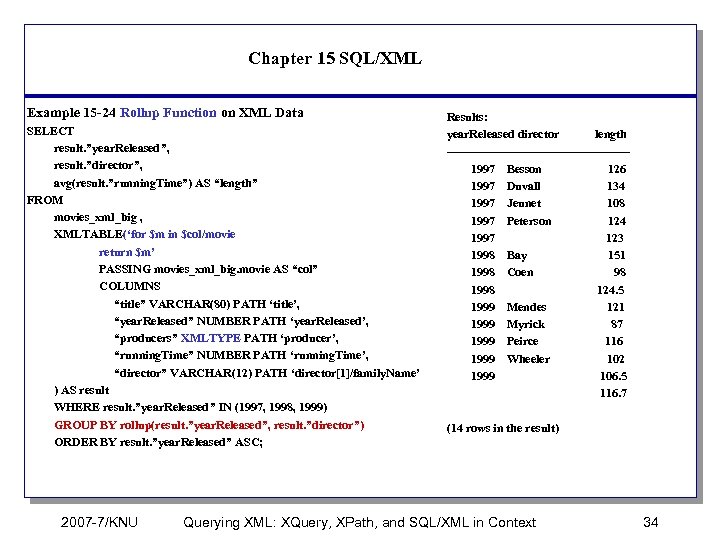 Chapter 15 SQL/XML Example 15 -24 Rollup Function on XML Data SELECT result. ”year. Released”, result. ”director”, avg(result. ”running. Time”) AS “length” FROM movies_xml_big , XMLTABLE(‘for $m in $col/movie return $m’ PASSING movies_xml_big. movie AS “col” COLUMNS “title” VARCHAR(80) PATH ‘title’, “year. Released” NUMBER PATH ‘year. Released’, “producers” XMLTYPE PATH ‘producer’, “running. Time” NUMBER PATH ‘running. Time’, “director” VARCHAR(12) PATH ‘director[1]/family. Name’ ) AS result WHERE result. ”year. Released” IN (1997, 1998, 1999) GROUP BY rollup(result. ”year. Released”, result. ”director”) ORDER BY result. ”year. Released” ASC; 2007 -7/KNU Results: year. Released director length -----------------------1997 Besson 126 1997 Duvall 134 1997 Jeunet 108 1997 Peterson 124 1997 123 1998 Bay 151 1998 Coen 98 1998 124. 5 1999 Mendes 121 1999 Myrick 87 1999 Peirce 116 1999 Wheeler 102 1999 106. 5 116. 7 (14 rows in the result) Querying XML: XQuery, XPath, and SQL/XML in Context 34
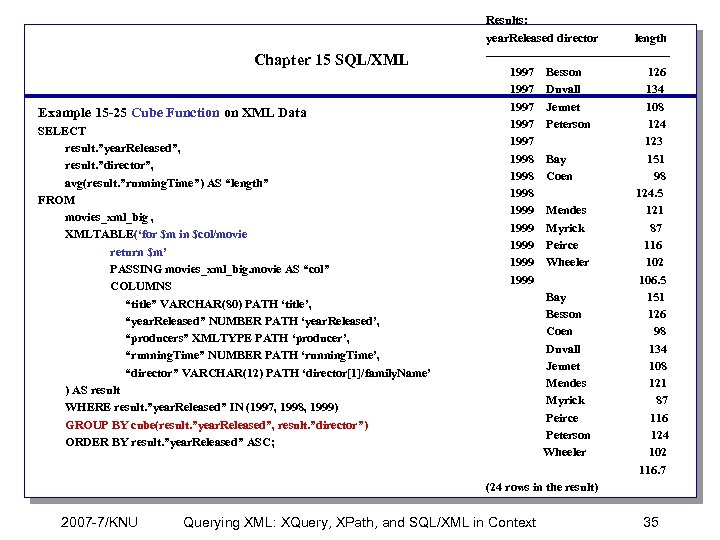 Chapter 15 SQL/XML Example 15 -25 Cube Function on XML Data SELECT result. ”year. Released”, result. ”director”, avg(result. ”running. Time”) AS “length” FROM movies_xml_big , XMLTABLE(‘for $m in $col/movie return $m’ PASSING movies_xml_big. movie AS “col” COLUMNS “title” VARCHAR(80) PATH ‘title’, “year. Released” NUMBER PATH ‘year. Released’, “producers” XMLTYPE PATH ‘producer’, “running. Time” NUMBER PATH ‘running. Time’, “director” VARCHAR(12) PATH ‘director[1]/family. Name’ ) AS result WHERE result. ”year. Released” IN (1997, 1998, 1999) GROUP BY cube(result. ”year. Released”, result. ”director”) ORDER BY result. ”year. Released” ASC; 2007 -7/KNU Results: year. Released director length -----------------------1997 Besson 126 1997 Duvall 134 1997 Jeunet 108 1997 Peterson 124 1997 123 1998 Bay 151 1998 Coen 98 1998 124. 5 1999 Mendes 121 1999 Myrick 87 1999 Peirce 116 1999 Wheeler 102 1999 106. 5 Bay 151 Besson 126 Coen 98 Duvall 134 Jeunet 108 Mendes 121 Myrick 87 Peirce 116 Peterson 124 Wheeler 102 116. 7 (24 rows in the result) Querying XML: XQuery, XPath, and SQL/XML in Context 35
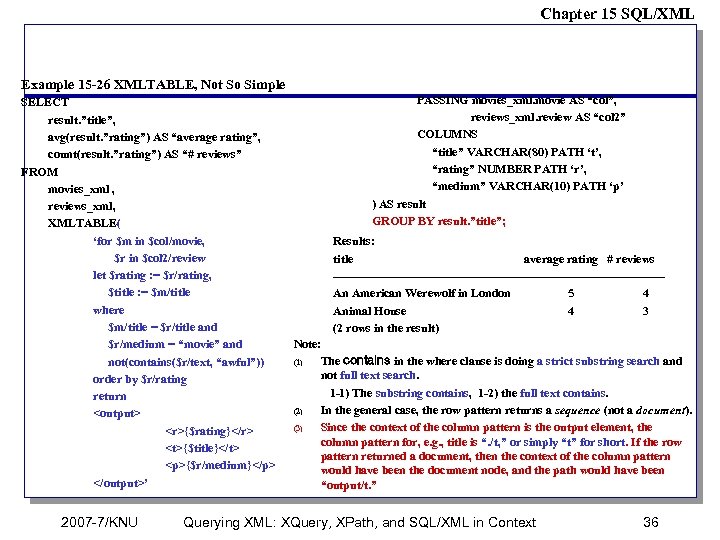 Chapter 15 SQL/XML Example 15 -26 XMLTABLE, Not So Simple SELECT result. ”title”, avg(result. ”rating”) AS “average rating”, count(result. ”rating”) AS “# reviews” FROM movies_xml , reviews_xml, XMLTABLE( ‘for $m in $col/movie, $r in $col 2/review let $rating : = $r/rating, $title : = $m/title where $m/title = $r/title and $r/medium = “movie” and not(contains($r/text, “awful”)) order by $r/rating return ’ 2007 -7/KNU PASSING movies_xml. movie AS “col”, reviews_xml. review AS “col 2” COLUMNS “title” VARCHAR(80) PATH ‘t’, “rating” NUMBER PATH ‘r’, “medium” VARCHAR(10) PATH ‘p’ ) AS result GROUP BY result. ”title”; Results: title average rating # reviews -----------------------------------------An American Werewolf in London 5 4 Animal House 4 3 (2 rows in the result) Note: (1) The contains in the where clause is doing a strict substring search and not full text search. 1 -1) The substring contains, 1 -2) the full text contains. (2) In the general case, the row pattern returns a sequence (not a document). (3) Since the context of the column pattern is the output element, the column pattern for, e. g. , title is “. /t, ” or simply “t” for short. If the row pattern returned a document, then the context of the column pattern would have been the document node, and the path would have been “output/t. ” Querying XML: XQuery, XPath, and SQL/XML in Context 36
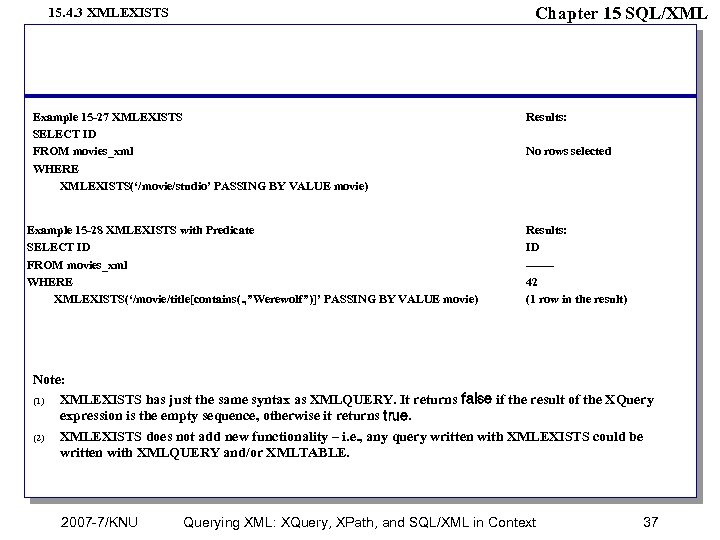 Chapter 15 SQL/XML 15. 4. 3 XMLEXISTS Example 15 -27 XMLEXISTS SELECT ID FROM movies_xml WHERE XMLEXISTS(‘/movie/studio’ PASSING BY VALUE movie) Example 15 -28 XMLEXISTS with Predicate SELECT ID FROM movies_xml WHERE XMLEXISTS(‘/movie/title[contains(. , ”Werewolf”)]’ PASSING BY VALUE movie) Results: No rows selected Results: ID ------42 (1 row in the result) Note: (1) XMLEXISTS has just the same syntax as XMLQUERY. It returns false if the result of the XQuery expression is the empty sequence, otherwise it returns true. (2) XMLEXISTS does not add new functionality – i. e. , any query written with XMLEXISTS could be written with XMLQUERY and/or XMLTABLE. 2007 -7/KNU Querying XML: XQuery, XPath, and SQL/XML in Context 37
 Chapter 15 SQL/XML 15. 5 Managing XML in the Database What we need is the ability to express a piecewise insert, update, or delete of the XML as part of the SQL statement. Efforts are under way within the W 3 C XML Query Working Group (which has spawned an Update Task Force) to produce the language for piecewise updates of XML. See Chapter 13, “What’s Missing? ” for more details. 2007 -7/KNU Querying XML: XQuery, XPath, and SQL/XML in Context 38
 Chapter 15 SQL/XML 15. 6 Talking the Same Language – Mapping We have assumed that the two languages – SQL and XQuery/XPath – have the same context, or at least that there is an obvious mapping from the SQL context to the XQuery/XPath context and vice versa. In fact, these mappings are neither obvious nor trivial, and a great deal of early work of the SQLX group involved defining these mappings. In this section we look at a bit more closely at the way character sets, names, data types, and values are mapped. 15. 6. 1 Character Sets XML data is Unicode – the W 3 C XML specification says that “All XML processors MUST accept the UTF-8 and UTF-16 encodings of Unicode 3. 1. ” SQL/XML standard insists that any SQL/XML implementation provides a mapping from strings of each character set supported in its database to strings in Unicode, and vice versa. 2007 -7/KNU Querying XML: XQuery, XPath, and SQL/XML in Context 39
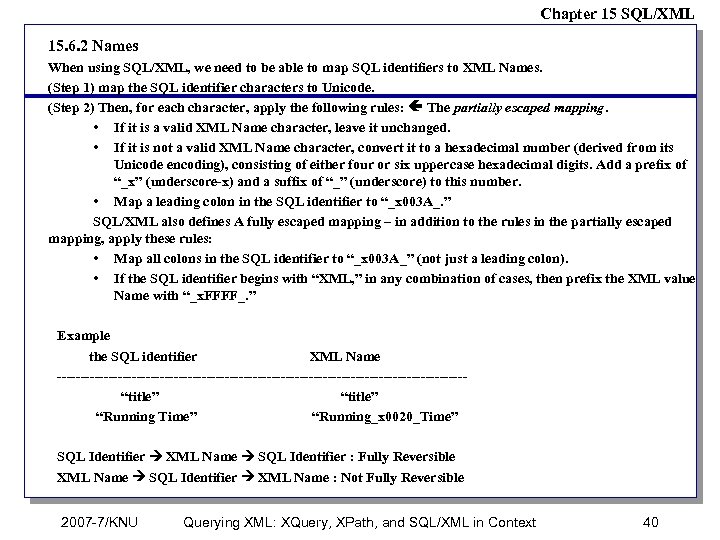 Chapter 15 SQL/XML 15. 6. 2 Names When using SQL/XML, we need to be able to map SQL identifiers to XML Names. (Step 1) map the SQL identifier characters to Unicode. (Step 2) Then, for each character, apply the following rules: The partially escaped mapping. • If it is a valid XML Name character, leave it unchanged. • If it is not a valid XML Name character, convert it to a hexadecimal number (derived from its Unicode encoding), consisting of either four or six uppercase hexadecimal digits. Add a prefix of “_x” (underscore-x) and a suffix of “_” (underscore) to this number. • Map a leading colon in the SQL identifier to “_x 003 A_. ” SQL/XML also defines A fully escaped mapping – in addition to the rules in the partially escaped mapping, apply these rules: • Map all colons in the SQL identifier to “_x 003 A_” (not just a leading colon). • If the SQL identifier begins with “XML, ” in any combination of cases, then prefix the XML value Name with “_x. FFFF_. ” Example the SQL identifier XML Name --------------------------------------------“title” “Running Time” “Running_x 0020_Time” SQL Identifier XML Name SQL Identifier : Fully Reversible XML Name SQL Identifier XML Name : Not Fully Reversible 2007 -7/KNU Querying XML: XQuery, XPath, and SQL/XML in Context 40
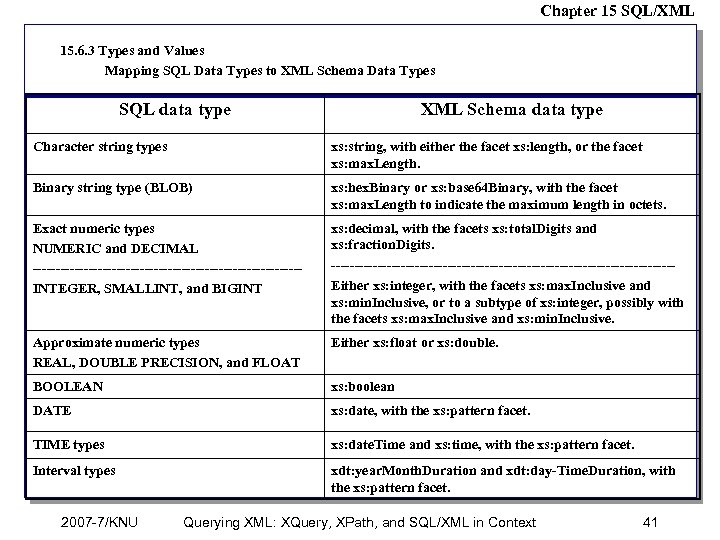 Chapter 15 SQL/XML 15. 6. 3 Types and Values Mapping SQL Data Types to XML Schema Data Types SQL data type XML Schema data type Character string types xs: string, with either the facet xs: length, or the facet xs: max. Length. Binary string type (BLOB) xs: hex. Binary or xs: base 64 Binary, with the facet xs: max. Length to indicate the maximum length in octets. Exact numeric types NUMERIC and DECIMAL -----------------------------INTEGER, SMALLINT, and BIGINT xs: decimal, with the facets xs: total. Digits and xs: fraction. Digits. -------------------------------------Either xs: integer, with the facets xs: max. Inclusive and xs: min. Inclusive, or to a subtype of xs: integer, possibly with the facets xs: max. Inclusive and xs: min. Inclusive. Approximate numeric types REAL, DOUBLE PRECISION, and FLOAT Either xs: float or xs: double. BOOLEAN xs: boolean DATE xs: date, with the xs: pattern facet. TIME types xs: date. Time and xs: time, with the xs: pattern facet. Interval types xdt: year. Month. Duration and xdt: day-Time. Duration, with the xs: pattern facet. 2007 -7/KNU Querying XML: XQuery, XPath, and SQL/XML in Context 41
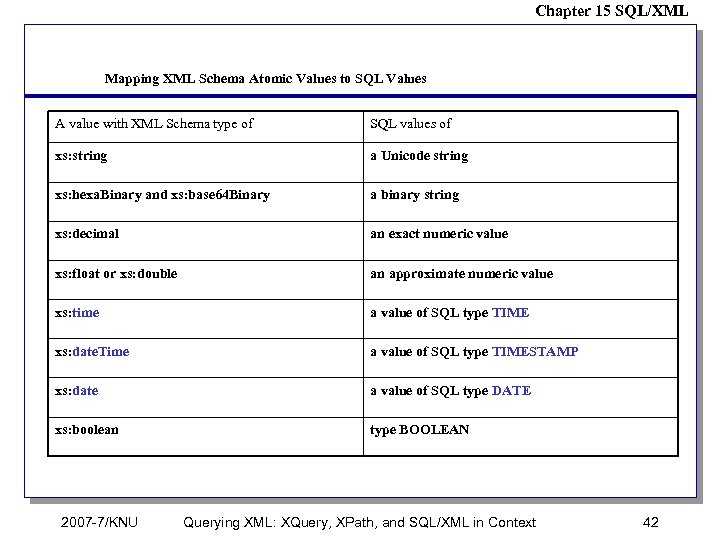 Chapter 15 SQL/XML Mapping XML Schema Atomic Values to SQL Values A value with XML Schema type of SQL values of xs: string a Unicode string xs: hexa. Binary and xs: base 64 Binary a binary string xs: decimal an exact numeric value xs: float or xs: double an approximate numeric value xs: time a value of SQL type TIME xs: date. Time a value of SQL type TIMESTAMP xs: date a value of SQL type DATE xs: boolean type BOOLEAN 2007 -7/KNU Querying XML: XQuery, XPath, and SQL/XML in Context 42
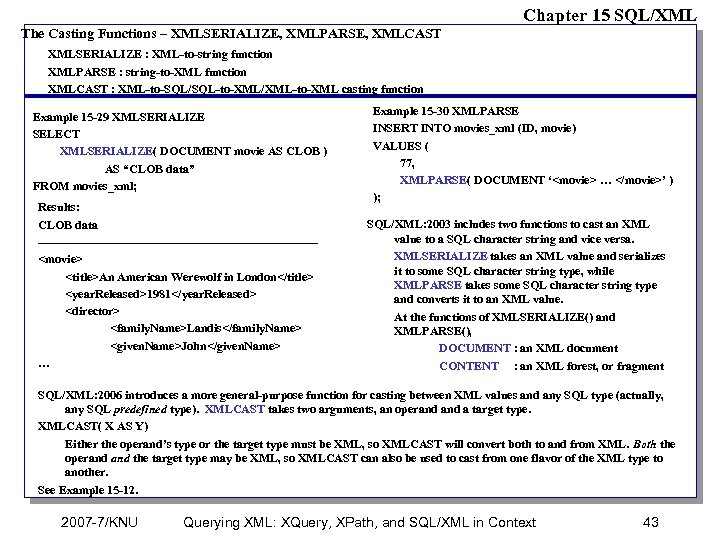 Chapter 15 SQL/XML The Casting Functions – XMLSERIALIZE, XMLPARSE, XMLCAST XMLSERIALIZE : XML-to-string function XMLPARSE : string-to-XML function XMLCAST : XML-to-SQL/SQL-to-XML/XML-to-XML casting function Example 15 -29 XMLSERIALIZE SELECT XMLSERIALIZE( DOCUMENT movie AS CLOB ) AS “CLOB data” FROM movies_xml; Results: CLOB data -----------------------------------
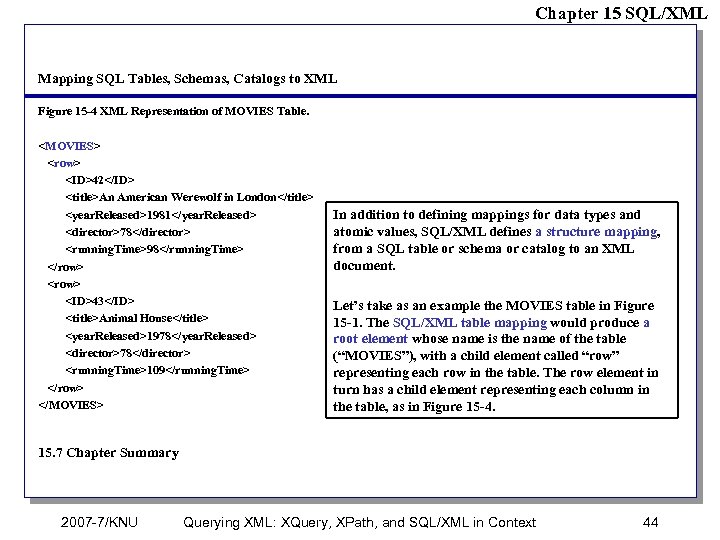 Chapter 15 SQL/XML Mapping SQL Tables, Schemas, Catalogs to XML Figure 15 -4 XML Representation of MOVIES Table.