


 Скачать презентацию QM 240 -Chapter 14 Redesigning the Organization with
47920abaf94adaf89091b41dc996ef82.ppt
- Количество слайдов: 40
 QM 240 -Chapter 14 Redesigning the Organization with Information systems Prepared by Dr Kamel ROUIBAH / Dept. QM & IS Dr K. ROUIBAH Chapter 14 (240) / dept QM & IS 1
 Objectives • Identify and describe the different steps of the systems development process. • Explain and introduce students to alternatives to systems development • Evaluate their advantages and disadvantages • ONLY SECTONS 3 , 4) Dr K. ROUIBAH Chapter 14 (240) / dept QM & IS 2
 12. 3. Overview of Systems Development Establishing information requirement System design Completing the system development process Dr K. ROUIBAH Chapter 14 (240) / dept QM & IS 3
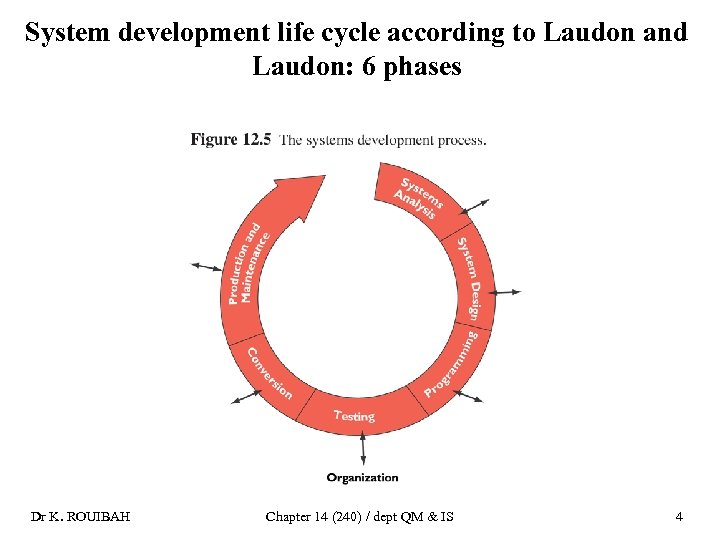 System development life cycle according to Laudon and Laudon: 6 phases Dr K. ROUIBAH Chapter 14 (240) / dept QM & IS 4
 Phase 1: Analysis • Definition of Analysis – Refers to the analysis of a problem that the organization will try to solve with an information system • Activities – Identify the problem & its causes and specify solutions – Identify the “information requirements” that must be met by a system solution – Perform “feasibility study” • E. g. of techniques – 5 W + H Dr K. ROUIBAH Chapter 14 (240) / dept QM & IS 5
 The “ 5 w’s and an H” • • • W 1. Who has the problem? W 2. What does the problem seem to be? W 3. When does the problem occur? W 4. Where does the problem occur? W 5. Why does the problem occur? What is root cause? H 1. How does the problem occur? How can the problem be solved? • Other techniques: Why-Why Diagram (see Chapter 3) Dr K. ROUIBAH Chapter 14 (240) / dept QM & IS 6
 Phase 1: Analysis (Con’d) • Information requirements “ ”ﻣﺘﻄﻠﺒﺎﺕ – Refers to a detailed statement of the information needs that a new system must satisfy – Identifies who needs what information, where, and how the information is needed. – E. g. system must be able to authenticate users • Feasibility – Refers to the way to determine whether the solution is achievable, given the organization’s resources and constraints. – Assess cost & benefits – All solutions are achievable given unlimited time and resources Dr K. ROUIBAH Chapter 14 (240) / dept QM & IS 7
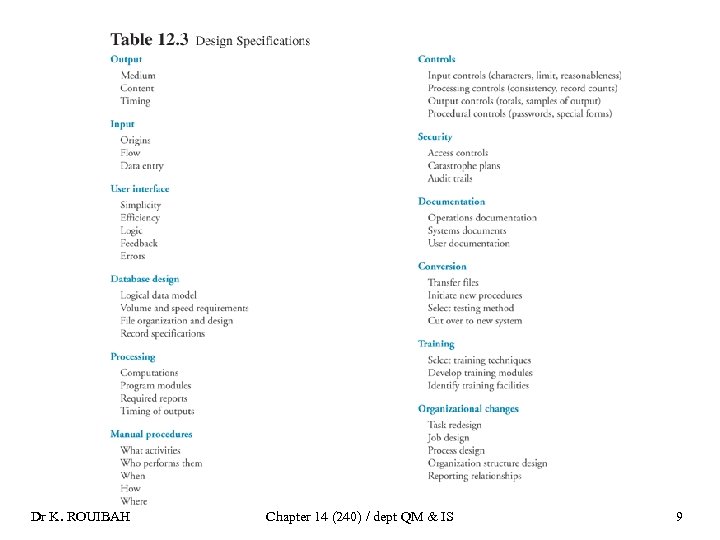
 Phase 2: Systems Design • Definition – The details on how a system will meet the information requirements determined by the systems analysis. – E. g. track video tapes rented from a video store and produce a daily management report • Activities: create design specifications such as – – End-users’ input/ output (errors, feedback) User interface Database design (ERD, reports, forms) Automatic vs manual procedures (what activities, who perform, when, how and where) – Security aspect (access control) Dr K. ROUIBAH Chapter 14 (240) / dept QM & IS 8
 Dr K. ROUIBAH Chapter 14 (240) / dept QM & IS 9
 Six phases of systems development/ Programming • Definition – Programming is the process of translating the system specifications prepared during the design stage into program code. • Activities – Write codes – Identify errors Dr K. ROUIBAH Chapter 14 (240) / dept QM & IS 10
 Phase 4: Testing • Definition – Testing is the process that determines whether the system produces the desired results under known conditions – Why • Activities (3 types of tests) – “Unit testing” is the process of testing each program separately in the system; it is sometimes called “program testing” – “System testing” tests the functioning of the information system as a whole in order to determine if discrete or separate modules will function together as planned. – “Acceptance testing” provides the final user and management certification that the system is ready to be used in a production setting. Dr K. ROUIBAH Chapter 14 (240) / dept QM & IS 11
 Why testing • Objective is to eliminate bugs, i. e. program code defects • Example: Patriot missile that killed 28 American in Saudi Arabia 1991 • Results haves shown that 60% of errors discovered during testing are result of specification that were missing or in conflict • 0 defect is the subject of Total Quality Management (TQM) Dr K. ROUIBAH Chapter 14 (240) / dept QM & IS 12
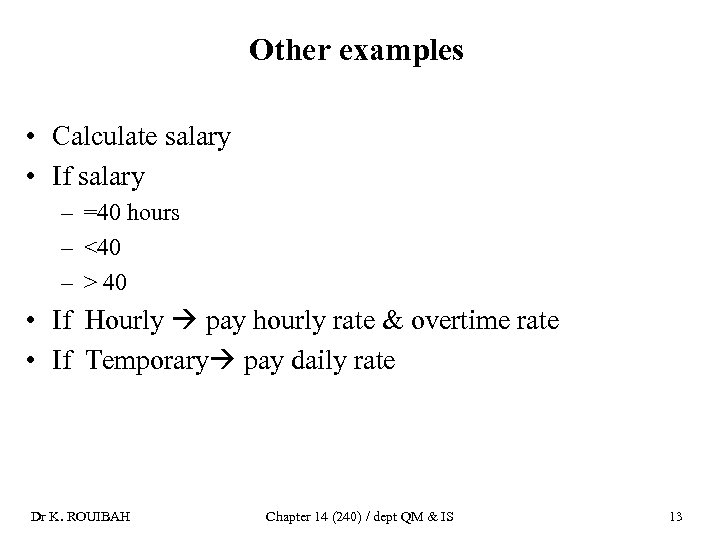 Other examples • Calculate salary • If salary – =40 hours – <40 – > 40 • If Hourly pay hourly rate & overtime rate • If Temporary pay daily rate Dr K. ROUIBAH Chapter 14 (240) / dept QM & IS 13
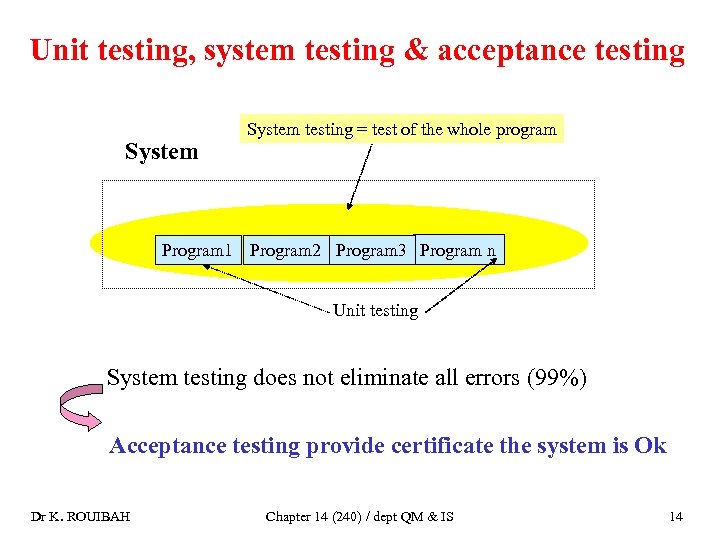 Unit testing, system testing & acceptance testing System testing = test of the whole program Program 1 Program 2 Program 3 Program n Unit testing System testing does not eliminate all errors (99%) Acceptance testing provide certificate the system is Ok Dr K. ROUIBAH Chapter 14 (240) / dept QM & IS 14
 Phase 4: Testing (Con’d) • Remark – The system development team carefully plan the three previous tests called also the “test plan” • Test plan – Is prepared by the development team in conjunction with the users – Includes all of the preparations for the series of tests to be performed on the system. Dr K. ROUIBAH Chapter 14 (240) / dept QM & IS 15
 Phase 5: Conversion • Definition – Conversion is the process of changing from the old system to the new system. • Three activities (03) – Plan conversion (there are four strategies) – Prepare documentation, i. e. it is descriptions of how an information system works from either a technical or end-user standpoint – Train end users Dr K. ROUIBAH Chapter 14 (240) / dept QM & IS 16
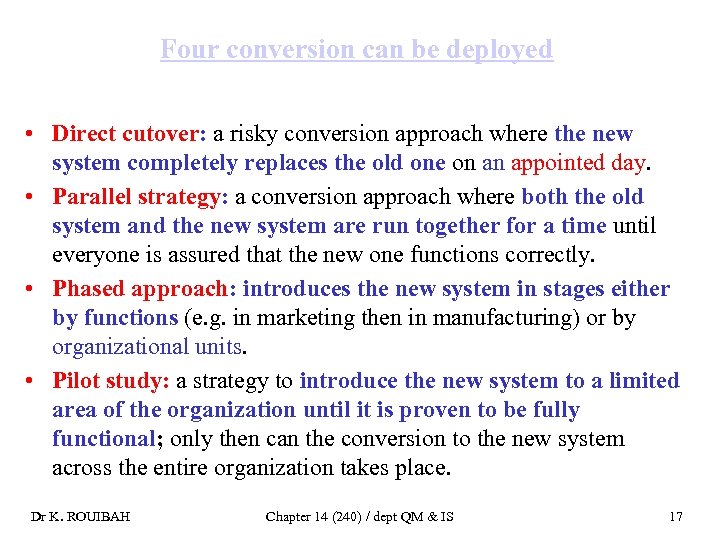 Four conversion can be deployed • Direct cutover: a risky conversion approach where the new system completely replaces the old one on an appointed day. • Parallel strategy: a conversion approach where both the old system and the new system are run together for a time until everyone is assured that the new one functions correctly. • Phased approach: introduces the new system in stages either by functions (e. g. in marketing then in manufacturing) or by organizational units. • Pilot study: a strategy to introduce the new system to a limited area of the organization until it is proven to be fully functional; only then can the conversion to the new system across the entire organization takes place. Dr K. ROUIBAH Chapter 14 (240) / dept QM & IS 17
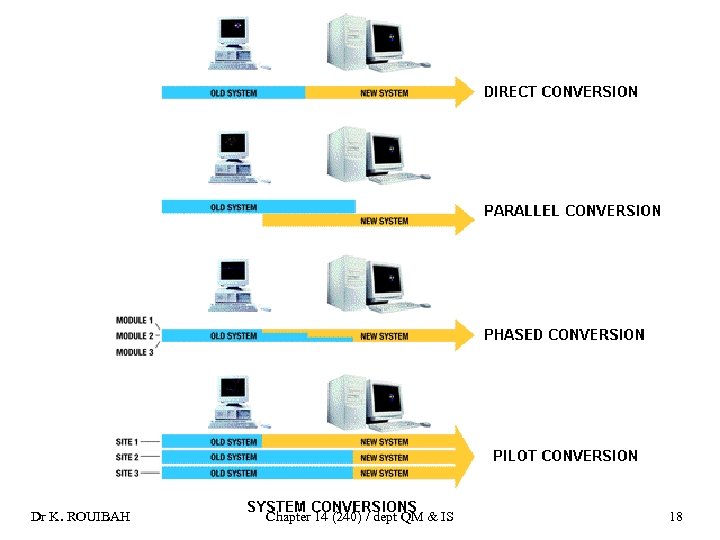 Dr K. ROUIBAH Chapter 14 (240) / dept QM & IS 18
 Phase 6: Production & Maintenance • Definition – Production is the stage after the new system is installed and the conversion is complete – Then the system is reviewed by end-users and technical specialists to determine how well it has met its original goals. • Maintenance – The changes in hardware, software, documentation, or procedures to a production system – Why changes? – Three reasons: correct errors, meet new requirements, or improve processing efficiency Dr K. ROUIBAH Chapter 14 (240) / dept QM & IS 19
 Phase 6: Production & Maintenance (Con’d) • Remark about importance of maintenance – 20% of time are devoted to debugging problems – 20% are concerned with changes in data, files, reports, hardware, or system software. – 60% of all maintenance work consists of making user enhancements, improving documentation, and recoding system components for greater processing efficiency. • But – Maintenance problems could be reduced significantly through better systems analysis and design practices Dr K. ROUIBAH Chapter 14 (240) / dept QM & IS 20
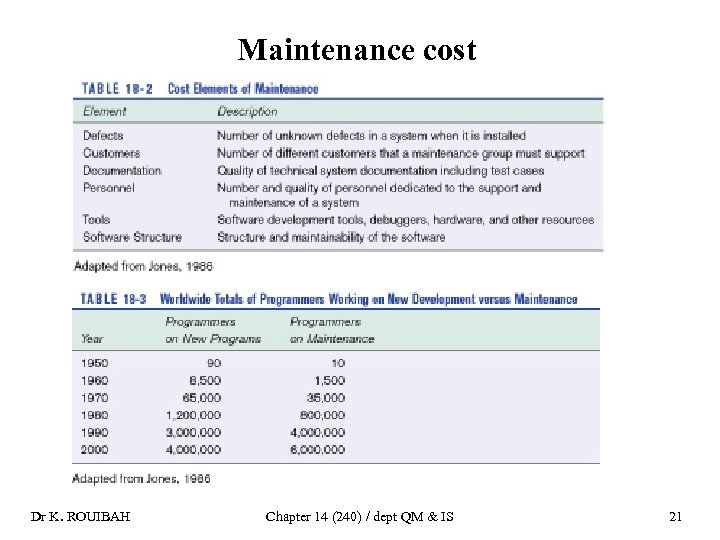 Maintenance cost Dr K. ROUIBAH Chapter 14 (240) / dept QM & IS 21
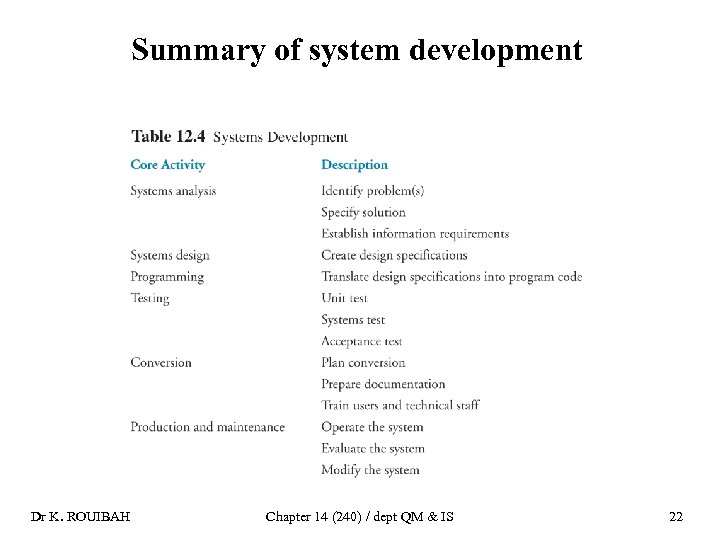 Summary of system development Dr K. ROUIBAH Chapter 14 (240) / dept QM & IS 22
 12. 4. Alternative System-Building Approaches Traditional Systems Development Lifecycle (SDLC) Alternatives to SDLC Dr K. ROUIBAH Chapter 14 (240) / dept QM & IS 23
 Alternatives • In house development • Buy or purchase software package • Lease • Outsourcing- ﺍﻟﻌﻬﻮﺩﻳﺔ Dr K. ROUIBAH Chapter 14 (240) / dept QM & IS 24
 Traditional system development life cycle (SDLC) • Systems development lifecycle – A traditional methodology for developing an information system that partitions the systems development process into formal stages that must be completed sequentially with a very formal division of labor between end users and information systems specialists. • Characteristics – Activities are performed sequentially ( )ﻋﻤﻠﻴﺎﺕ ﻣﺘﺘﺎﻟﻴﺔ – The next activity only starts once the previous is finished Dr K. ROUIBAH Chapter 14 (240) / dept QM & IS 25
 Three disadvantages of traditional SDLC • Advantages: it is more suitable – for large complex systems – with formal requirements – Tight control of system building process • Disadvantages – Is costly, time consuming and inflexible (frozen requirements cannot be changed) – Each phase (stage) should be completed before moving to the next one – Does not allow includes changes once the system is developed – Encourages to freeze requirements early in the development process – Is not adequate for many small desktop systems which are less structured and more individualized Dr K. ROUIBAH Chapter 14 (240) / dept QM & IS 26
 Improving or alternatives to the traditional SDLC Prototyping Object-oriented Analysis and Design & RAD Application software package End-user development Outsourcing Dr K. ROUIBAH Chapter 14 (240) / dept QM & IS 27
 Prototyping ( )ﻧﻤﻮﺫﺝ • Definition – The process of building an experimental system quickly and inexpensively for demonstration and evaluation so that users can better determine information requirements. • Result is a prototype – It aims to create a rapid system that need further improvement. – The focus is on developing a small model, or prototype, of the overall system. – Users work with the prototype and suggest modifications Dr K. ROUIBAH Chapter 14 (240) / dept QM & IS 28
 Prototyping approach (four steps) • Step 1: system designer identify and collect the user’s basic requirements. • Step 2: system designer develops an initial prototype quickly using par example CASE tools or any database management system • Step 3: user uses the prototype-interface in order to identify how well it meets his or her needs and make suggestions for improving • Step 4: system designer revises and enhance the prototype according to end-users suggestions. • After the prototype has been revised, the cycle returns to Step 3. Steps 3 and 4 are repeated until the user is satisfied. • Remark: end-user interface refers to the part of an information system through which the end user interacts with the system, such as on-line screens and commands Dr K. ROUIBAH Chapter 14 (240) / dept QM & IS 29
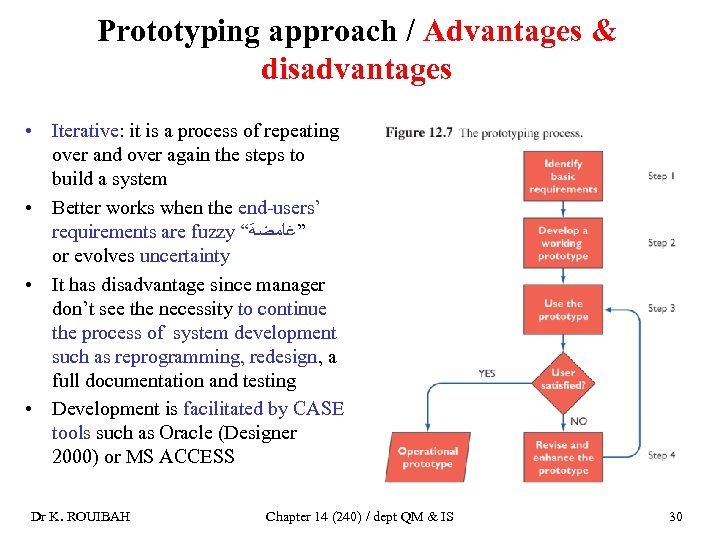 Prototyping approach / Advantages & disadvantages • Iterative: it is a process of repeating over and over again the steps to build a system • Better works when the end-users’ requirements are fuzzy “ ”ﻏﺎﻣﻀﺔ or evolves uncertainty • It has disadvantage since manager don’t see the necessity to continue the process of system development such as reprogramming, redesign, a full documentation and testing • Development is facilitated by CASE tools such as Oracle (Designer 2000) or MS ACCESS Dr K. ROUIBAH Chapter 14 (240) / dept QM & IS 30
 Application software package • Application Software Package – A set of prewritten, pre-coded application software programs that are commercially available for sale or lease ( . )ﺗﺄﺠﻴﺮ – Example: Oracle or Power Builder for web pages creation, – They allow to built information system easily but for specific application such as payroll system – If the package cannot fulfill most of the organization’s requirements, then it has to be customized • Customization ( )ﺍﻟﻓﺼﻴﻞ ﺃﻮ ﺍﻟﺘﺨﺼﻴﺺ – The modification of a software package to meet an organization’s unique requirements without destroying the package software’s integrity. Dr K. ROUIBAH Chapter 14 (240) / dept QM & IS 31
 Advantages vs. disadvantages of application software package • Advantages Dr K. ROUIBAH • Disadvanatges Chapter 14 (240) / dept QM & IS 32
 End –user development • End-user development – The development of information systems by end users with little or no formal assistance from technical specialists – E. g. creation of a small DB by a user • Benefits and limitations – Advantages: less cost – Disadvantage: risky approach, since there is a lack of control and problem of data exchange with other systems in the company Dr K. ROUIBAH Chapter 14 (240) / dept QM & IS 33
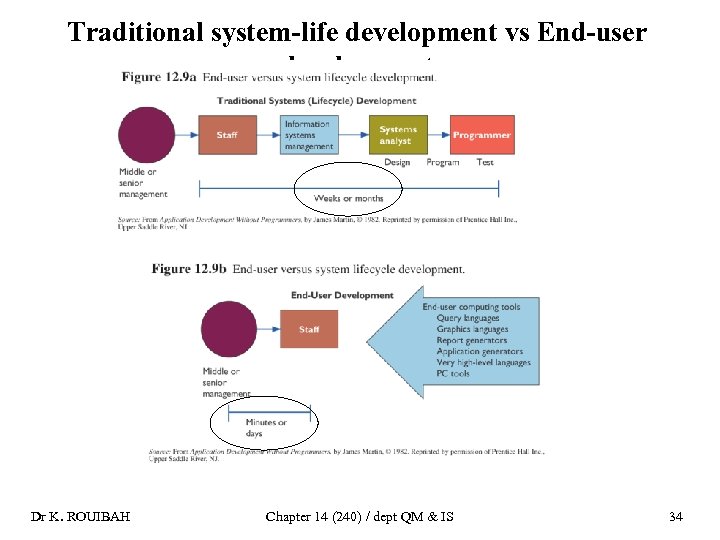 Traditional system-life development vs End-user development Dr K. ROUIBAH Chapter 14 (240) / dept QM & IS 34
 Outsourcing ( )ﺍﻟﻌﻬﻮﺩﻳﺔ • Definition: The practice of contracting: – Computer center operations, – Telecommunications networks, or – Applications development to external vendors. • Examples – Most call centers in Europe and USA are outsourced in India – Projection: India will reach 6% of the world market • Remark – It is the most used approach in Kuwait – It should be approached carefully • Question – What you need to do before outsourcing? • Response: Require much of information about – Capacity of outsourcing companies – Operating costs Dr K. ROUIBAH Chapter 14 (240) / dept QM & IS 35
 Benefits and limitations • Benefits • Limits – It can save application development costs – It may allow firms to develop applications without internal information system staff – It is appropriate for applications that: • Are not sources of competitive advantage (core business) or • Require technical expertise not available in the firm. Dr K. ROUIBAH – It can make firms lose control over their information systems and make them too dependent on external vendors – It might generate extra “hidden” cost that might undercut anticipated benefits • Examples of extra costs – Under estimate evaluating a vendor of IT services – Cost to transits to a new vendor or – Cost to make sure the outsourcer fulfills his contractual obligations Chapter 14 (240) / dept QM & IS 36
 Example of outsourcing • • Big players like Telstra in Australia are opting for services from countries like India Class discussion: Why India is becoming the most Eldorado for western firms outsourcing? Why Arab countries are lacking behind India? Response: – There are multinational companies, such as Microsoft, IBM and HSBC that move their business to India – There is abundance of cheap and highly skilled workers – There is business-friendly and stable government Dr K. ROUIBAH Chapter 14 (240) / dept QM & IS 37
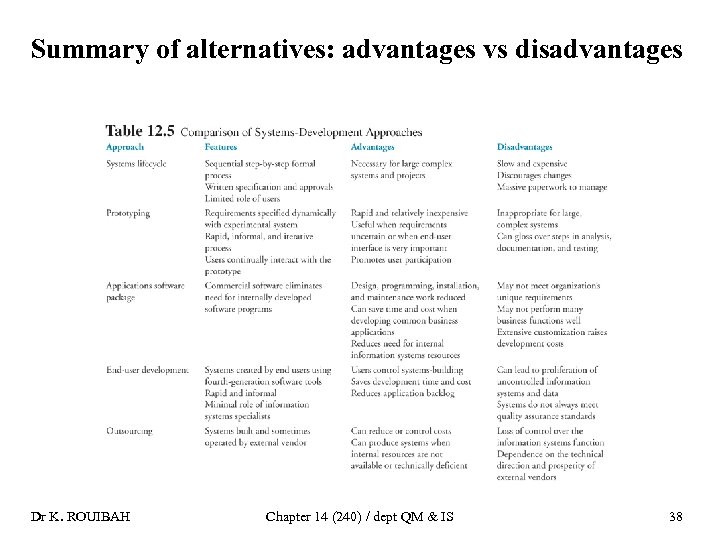 Summary of alternatives: advantages vs disadvantages Dr K. ROUIBAH Chapter 14 (240) / dept QM & IS 38
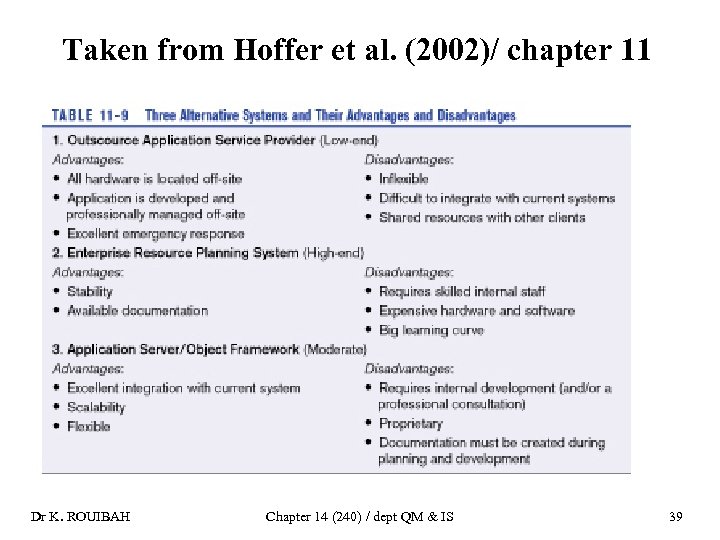 Taken from Hoffer et al. (2002)/ chapter 11 Dr K. ROUIBAH Chapter 14 (240) / dept QM & IS 39
 End chapter 14 Dr K. ROUIBAH Chapter 14 (240) / dept QM & IS 40