


 Скачать презентацию Purchasing a Computer Today v Things to
620aeed59479f9bdadd5c09e07a0b382.ppt
- Количество слайдов: 14
 Purchasing a Computer
 Today v Things to consider when purchasing a Computer v The spreadsheet exercise v Final project
 Things to consider when purchasing a computer 1) Hardware – The tangible parts of the computer • • • Processing hardware – CPU and RAM must be considered first! Input devices –These come standard. Output devices – Monitor and printer are variable. Storage devices – hard drive measured by capacity. Communications – wireless modem most important.
 Purchasing computer hardware? Will it be a … • PC or MAC? • Desktop or Mobile computer?
 Purchasing computer hardware v A general rule of thumb is: – Purchase the most powerful processor you can afford!!! – Don’t get caught up in the gimmicks v Evaluate and compare the processor speed – This is the one thing you will not be able to change later v Stay with the name brands unless you really know what you are doing!!
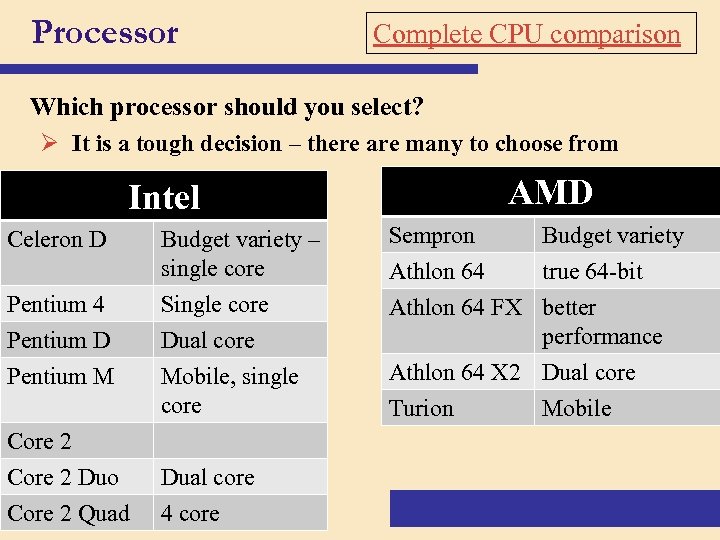 Processor Complete CPU comparison Which processor should you select? Ø It is a tough decision – there are many to choose from Intel Celeron D Pentium 4 Pentium D Pentium M Core 2 Duo p. 139 Core 2 Quad AMD Budget variety – single core Single core Dual core Sempron Budget variety Athlon 64 true 64 -bit Athlon 64 FX better performance Mobile, single core Athlon 64 X 2 Dual core Turion Mobile Dual core 4 core
 Things to consider when purchasing a computer 2) Software – The instructions • System software – software the computer needs to operate itself • • Operating system – Windows Vista is preinstalled. Utilities – Security software is critical • Application software – software that makes the user productive • Depends on the needs of the user
 Software for purchase v Bundled software – software that is sold with the computer hardware v Most computers do NOT come bundled with all the software you will need
 Application software that typical home based users need: • • • Web Browser Word processing spreadsheet presentation Database DTP PIM Email Web page development Bookkeeping
 Things to consider when purchasing a computer 3) Services • • • § § Warranty Service agreement Internet service – Requires hardware, software, an internet connection (high or slow speed), and an ISP. Web page service – Requires web host, and domain name registration and web page creation software, and FTP. Email – requires an internet connection and email software Vendor – support, reputation Terms – Leasing, Return policy, Shipping and handling, Installation
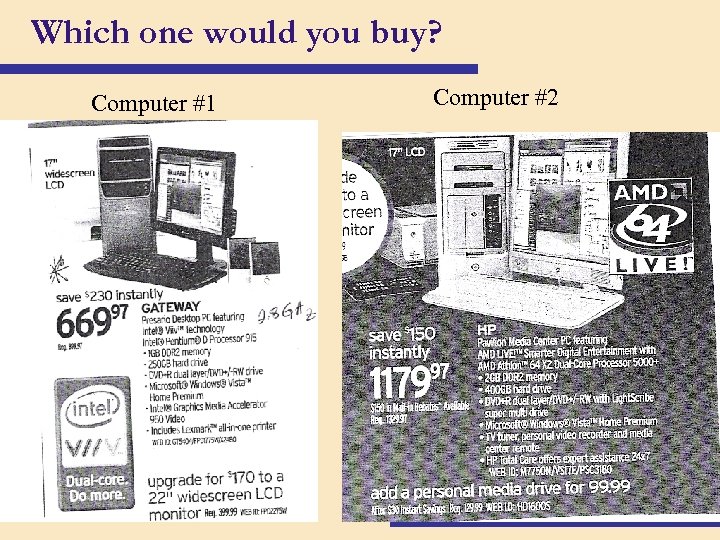 Which one would you buy? Computer #1 Computer #2
 Class exercise: 1. Get into your groups 2. Use a worksheet to compare these two computers 3. Decide, as a group, which computer you would buy and why
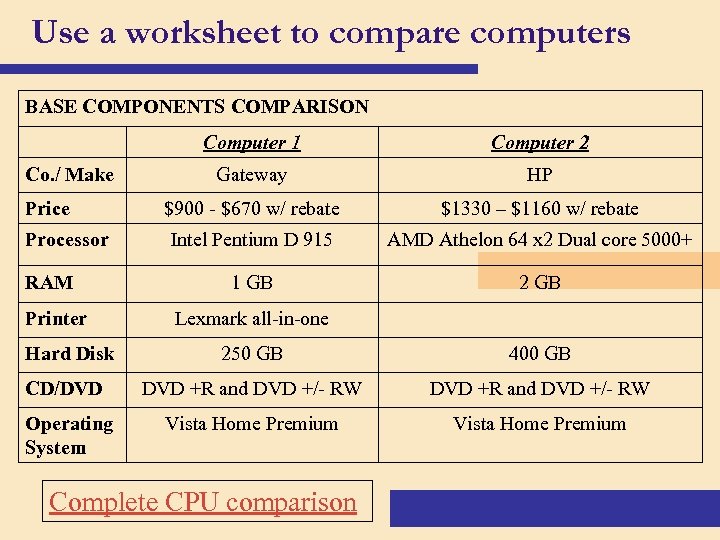 Use a worksheet to compare computers BASE COMPONENTS COMPARISON Computer 1 Co. / Make Price Processor RAM Printer Computer 2 Gateway HP $900 - $670 w/ rebate $1330 – $1160 w/ rebate Intel Pentium D 915 AMD Athelon 64 x 2 Dual core 5000+ 1 GB 2 GB Lexmark all-in-one Hard Disk 250 GB 400 GB CD/DVD +R and DVD +/- RW Operating System Vista Home Premium Complete CPU comparison
 The Final Project