


 Скачать презентацию PRV PROCESS Procedure Step 1 Customer
c67aa53935474122c2c08f05ffb5246e.ppt
- Количество слайдов: 18
 PRV PROCESS
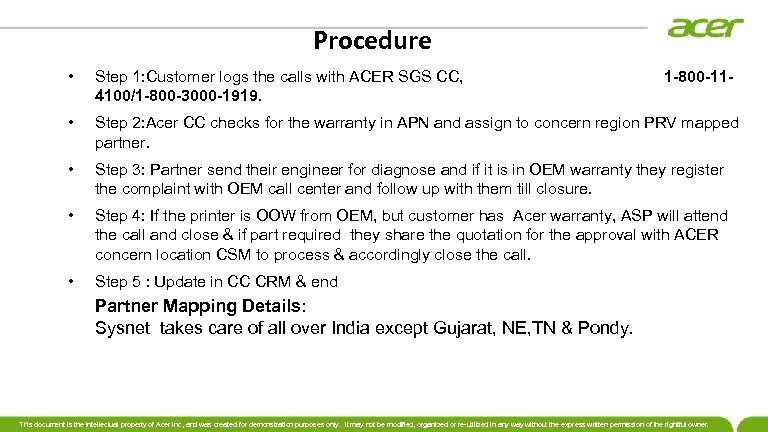 Procedure • Step 1: Customer logs the calls with ACER SGS CC, 1 -800 -114100/1 -800 -3000 -1919. • Step 2: Acer CC checks for the warranty in APN and assign to concern region PRV mapped partner. • Step 3: Partner send their engineer for diagnose and if it is in OEM warranty they register the complaint with OEM call center and follow up with them till closure. • Step 4: If the printer is OOW from OEM, but customer has Acer warranty, ASP will attend the call and close & if part required they share the quotation for the approval with ACER concern location CSM to process & accordingly close the call. • Step 5 : Update in CC CRM & end Partner Mapping Details: Sysnet takes care of all over India except Gujarat, NE, TN & Pondy. This document is the intellectual property of Acer Inc, and was created for demonstration purposes only. It may not be modified, organized or re-utilized in any way without the express written permission of the rightful owner.
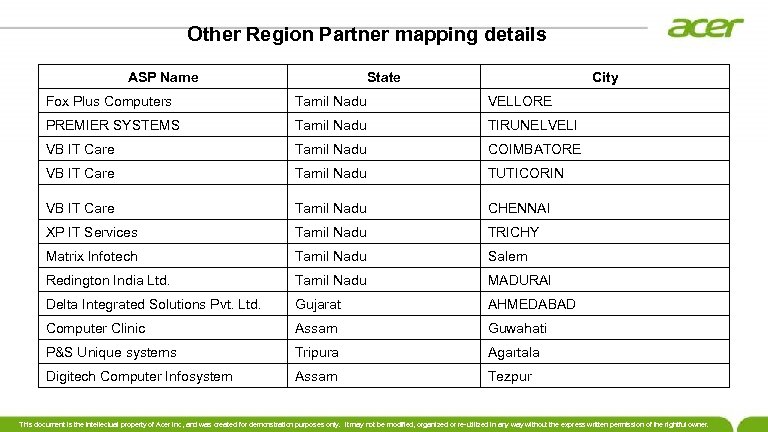 Other Region Partner mapping details ASP Name State City Fox Plus Computers Tamil Nadu VELLORE PREMIER SYSTEMS Tamil Nadu TIRUNELVELI VB IT Care Tamil Nadu COIMBATORE VB IT Care Tamil Nadu TUTICORIN VB IT Care Tamil Nadu CHENNAI XP IT Services Tamil Nadu TRICHY Matrix Infotech Tamil Nadu Salem Redington India Ltd. Tamil Nadu MADURAI Delta Integrated Solutions Pvt. Ltd. Gujarat AHMEDABAD Computer Clinic Assam Guwahati P&S Unique systems Tripura Agartala Digitech Computer Infosystem Assam Tezpur This document is the intellectual property of Acer Inc, and was created for demonstration purposes only. It may not be modified, organized or re-utilized in any way without the express written permission of the rightful owner.
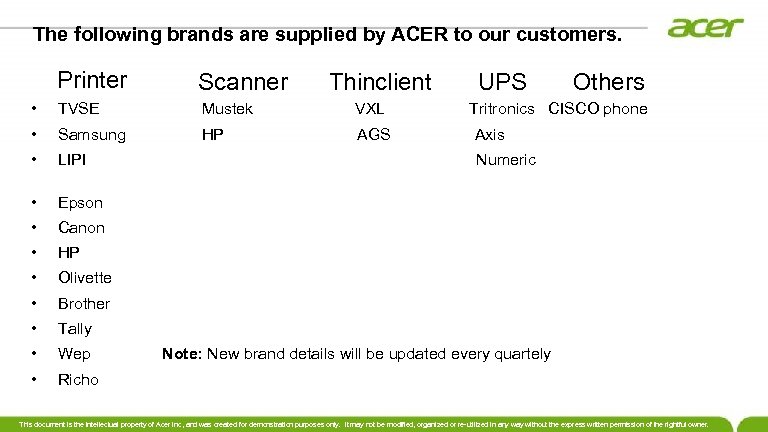 The following brands are supplied by ACER to our customers. Printer Scanner Thinclient UPS Others • TVSE Mustek VXL Tritronics CISCO phone • Samsung • LIPI • Epson • Canon • HP • Olivette • Brother • Tally • Wep Note: New brand details will be updated every quartely • Richo HP AGS Axis Numeric This document is the intellectual property of Acer Inc, and was created for demonstration purposes only. It may not be modified, organized or re-utilized in any way without the express written permission of the rightful owner.
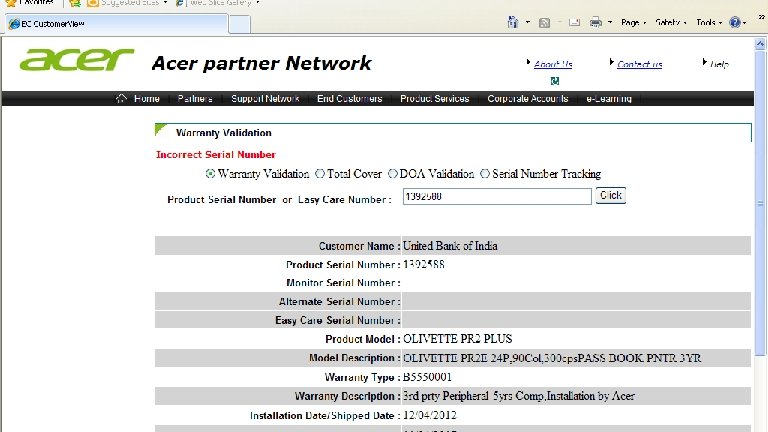
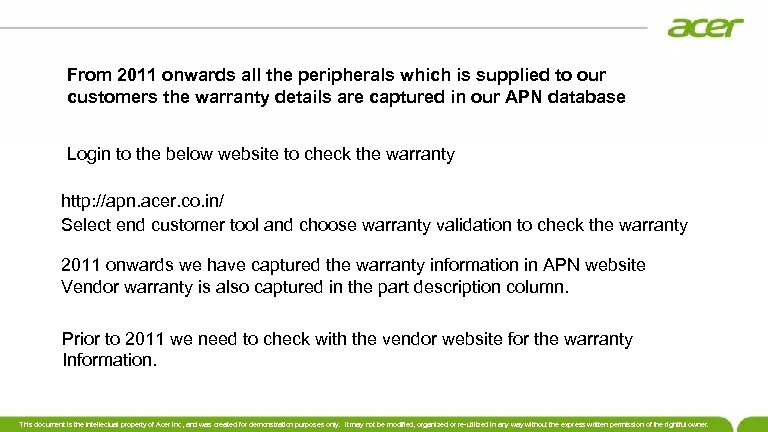 From 2011 onwards all the peripherals which is supplied to our customers the warranty details are captured in our APN database Login to the below website to check the warranty http: //apn. acer. co. in/ Select end customer tool and choose warranty validation to check the warranty 2011 onwards we have captured the warranty information in APN website Vendor warranty is also captured in the part description column. Prior to 2011 we need to check with the vendor website for the warranty Information. This document is the intellectual property of Acer Inc, and was created for demonstration purposes only. It may not be modified, organized or re-utilized in any way without the express written permission of the rightful owner.
 This document is the intellectual property of Acer Inc, and was created for demonstration purposes only. It may not be modified, organized or re-utilized in any way without the express written permission of the rightful owner.
 How to check TVSE warranty detail? The serial number of the product is the Alpha numeric character that is printed right below the bar codes. For Example : GAV 32 B 003673 is the serial number as mentioned in the sticker. This sticker is placed on the rear side of the printer. This will be available on the right hand side (on the rear side) The first digits denote the Year , Second and third digit says Week. Hence, the manufacturing week / month for GAV 32 B 003673 is as follows: G – Year 2007 [Alphabetically G is the 7 th digit starting from A] AV – Week 22 (starts as AA(1 Week), AB (second week), AC (Third Week) ----etc) This document is the intellectual property of Acer Inc, and was created for demonstration purposes only. It may not be modified, organized or re-utilized in any way without the express written permission of the rightful owner.
 LIPI For Lipi products to check OEM warranty, we need to login to below webpage. www. lipidata. com/warranty Login id: acer Password: 135123@acer OLIVETTI For Olivette products to check OEM warranty, we need to login to below webpage. Olivette serial # should be having 7 digit http: //27. 251. 135. 100/PR 2 PLUS/search. asp Login id : olivetti Password: olivetti This document is the intellectual property of Acer Inc, and was created for demonstration purposes only. It may not be modified, organized or re-utilized in any way without the express written permission of the rightful owner.
 EPSON Write to following ID to check the warranty email: Sabitha@eid. epson. co. in SAMSUNG Write to following ID to check the warranty brijesh. s 3@partner. samsung. com This document is the intellectual property of Acer Inc, and was created for demonstration purposes only. It may not be modified, organized or re-utilized in any way without the express written permission of the rightful owner.
 HP Login to below website to check warranty http: //h 10025. www 1. hp. com/ Wep Write to following ID to check the warranty wepcare. support@wepindia. com This document is the intellectual property of Acer Inc, and was created for demonstration purposes only. It may not be modified, organized or re-utilized in any way without the express written permission of the rightful owner.
 VXL Login to below website to check warranty Support. india@vxl. net Canon Call the below mentioned Toll free # 18001803366 This document is the intellectual property of Acer Inc, and was created for demonstration purposes only. It may not be modified, organized or re-utilized in any way without the express written permission of the rightful owner.
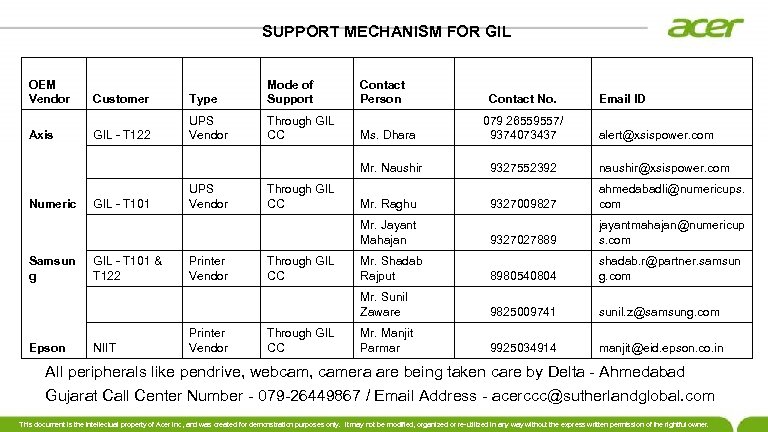 SUPPORT MECHANISM FOR GIL OEM Vendor Customer Type Mode of Support Contact Person Axis GIL - T 122 UPS Vendor Through GIL CC Ms. Dhara 079 26559557/ 9374073437 Mr. Naushir 9327552392 naushir@xsispower. com Numeric GIL - T 101 UPS Vendor Through GIL CC Mr. Raghu 9327009827 ahmedabadli@numericups. com Mr. Jayant Mahajan 9327027889 jayantmahajan@numericup s. com Samsun g GIL - T 101 & T 122 Printer Vendor Through GIL CC Mr. Shadab Rajput 8980540804 shadab. r@partner. samsun g. com Mr. Sunil Zaware 9825009741 sunil. z@samsung. com Epson NIIT Printer Vendor Through GIL CC Mr. Manjit Parmar 9925034914 manjit@eid. epson. co. in Contact No. Email ID alert@xsispower. com All peripherals like pendrive, webcam, camera are being taken care by Delta - Ahmedabad Gujarat Call Center Number - 079 -26449867 / Email Address - acerccc@sutherlandglobal. com This document is the intellectual property of Acer Inc, and was created for demonstration purposes only. It may not be modified, organized or re-utilized in any way without the express written permission of the rightful owner.
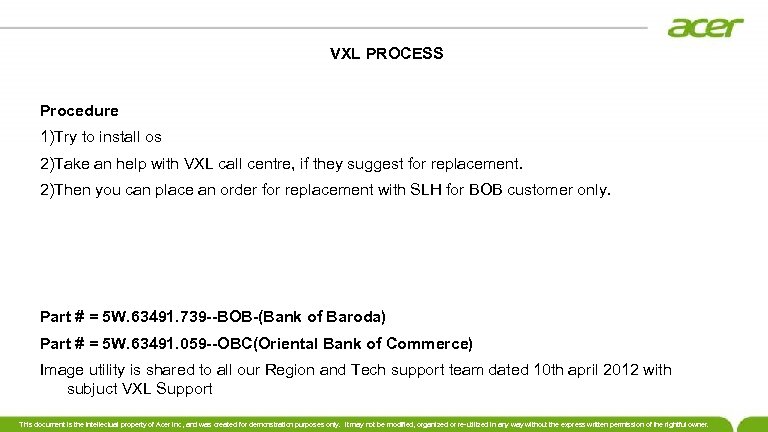 VXL PROCESS Procedure 1)Try to install os 2)Take an help with VXL call centre, if they suggest for replacement. 2)Then you can place an order for replacement with SLH for BOB customer only. Part # = 5 W. 63491. 739 --BOB-(Bank of Baroda) Part # = 5 W. 63491. 059 --OBC(Oriental Bank of Commerce) Image utility is shared to all our Region and Tech support team dated 10 th april 2012 with subjuct VXL Support This document is the intellectual property of Acer Inc, and was created for demonstration purposes only. It may not be modified, organized or re-utilized in any way without the express written permission of the rightful owner.
 DOA PROCESS • 1. Transit Damage: • Whenever engineer visit the customer place for the installation and found the BOX in damage condition and inside product also found to be in damage condition request your partner engineer immediately to share the snap shot of the same also we need to check with customer if any relocation taken place and provide the details to us for the replacement, some times the box will be intact but the product may be in damage condition even for this it is necessary to share the snap shot to us also we have to ask POD with our OFG team and check for the address and remark on the POD, this is called transit damage case. • 2. Installation Failure: • During installation if any spares is found to be damage like motherboard issue (not powering on, hanging) etc similarly with other spares found to be DOA, request you all to instruct the partner engineer to immediately log the case with vendor and share the case-id to speed up the process, this is called installation failure. This document is the intellectual property of Acer Inc, and was created for demonstration purposes only. It may not be modified, organized or re-utilized in any way without the express written permission of the rightful owner.
 DO’S AND DONT’S OF TVSE PRODUCT • DO’S • 1. Clean your printer regularly from dust particles • 2. Use only TVS-E genuine ribbons instead of duplicate and unbranded • ribbons and refills for longer print head life and increased printer UPTIME • 3. Connect Power & interface cables properly in order to avoid loose • connections • 4. Always Close the top cover to prevent dust particles entering into printer • 5. Set the Gap adjust lever according to the stationary usage ex: 1, 1+1… • 6. Install respective TVS-E driver according to the model used • 7. Ever use proper tools for servicing your printers • 8. Always refer to Quick Reference Guide for printer • 9. Carefully read the instructions for correct ribbon cartridge placement • to avoid ribbon smudge / jam • 10. Read warranty policy to know warranty terms and conditions and • communicate to end users • 11. Always get your printer serviced only by TVS-E Authorized service • personnel • 12. Do not hold / rotate platen knob when the printer in ON condition • 13. Do not connect Interface cable when the printer is in ON condition This document is the intellectual property of Acer Inc, and was created for demonstration purposes only. It may not be modified, organized or re-utilized in any way without the express written permission of the rightful owner.
 • DON’T’S • 14. Do not Power ON the printer when the Neutral-Earth voltage is > 4 VAC • 15. Do not use unbranded ribbon cartridges or refills • 16. Do not carry the printer spare parts with out proper packing to protect them • from Physical and ESD damages • 17. Do not change the front panel settings unnecessarily Note: The above mentioned DO’s and DONT’s is applicable for many brand This document is the intellectual property of Acer Inc, and was created for demonstration purposes only. It may not be modified, organized or re-utilized in any way without the express written permission of the rightful owner.
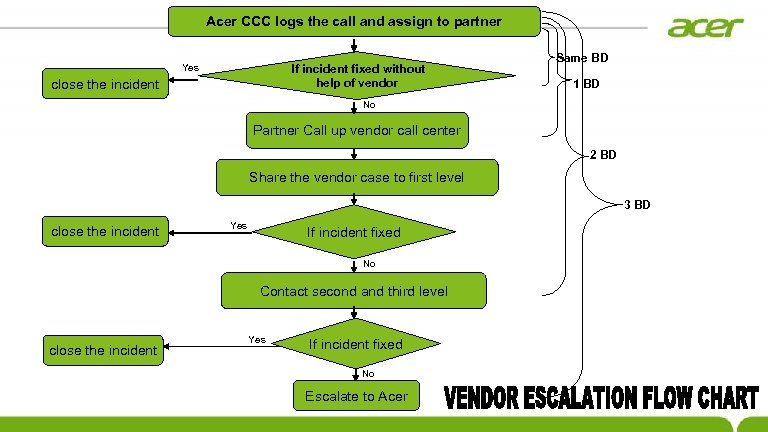 Acer CCC logs the call and assign to partner Yes If incident fixed without help of vendor close the incident Same BD 1 BD No Partner Call up vendor call center 2 BD Share the vendor case to first level 3 BD close the incident Yes If incident fixed No No Contact second and third level close the incident Yes If incident fixed No Escalate to Acer
 Thank you