 Скачать презентацию Promoting Collaborative Learning Environment in the Classroom Using
919f77262eb4dcc3ab484dce246c671f.ppt
- Количество слайдов: 40



Promoting Collaborative Learning Environment in the Classroom Using Mobile Tablet-PCs and Classroom Management Tools Kuldeep S. Rawat, Ph. D Department of Technology Elizabeth City State University Email: ksrawat@mail. ecsu. edu Project Supported by HP Technology for Teaching Grant
Presentation Outline l Good Teaching Principles l HP Tablet-PC Project l Technology Enabled Classroom l Net. Support School (NSS) l Pre Survey l Collaborative Activities l Results: Post Survey l Discussion & Conclusion
Good Teaching Principles l Student-faculty contact l Collaboration among students l Active learning l Prompt feedback l Task on time l Communicating high expectations l Diverse talent and ways of learning Can be achieved through effective use of technology Reference: Chickering & Gamson, AAHE, 1987
HP Tablet PC Project l Integrate HP Tablet-PC mobile technology in UG Engineering Technology courses ¡ Electrical Circuits w/Labs (TCEL 205) ¡ Analog Electronics w/Labs (TCEL 234) l Objectives: ¡Increase usage of technology in classroom teaching ¡Promote collaborative work and active learning environment in classroom ¡Achieve active participation of all students during classroom instruction ¡Encourage other faculty members to experience and observe effective use of technology in their teaching
A Traditional Classroom l There is limited interaction between the students and instructor l Virtually no interaction between students l Written or verbal feedback is given at a later date, which is usually overlooked by students
Technology Enabled Classroom l Use mobile Tablet-PCs in classroom l Use Classroom Management Software that supports collaboration l Use digital note-taking tools l Use dynamic presentation
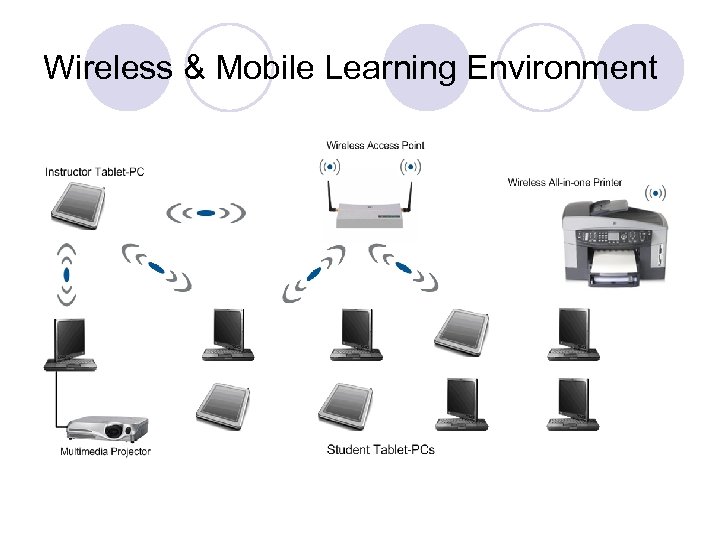
Wireless & Mobile Learning Environment
Tablet-PC l Attached to a multimedia projector, the tablet-PC acts as a virtual whiteboard l The key features: ¡work from anywhere, ¡take notes electronically, ¡import documents into journal, ¡edit, search and convert handwritten notes into typed text
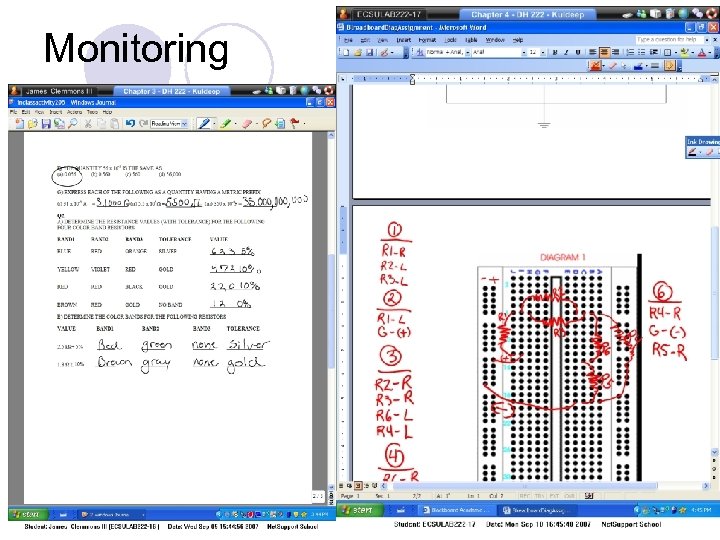
Net. Support School (NSS) Supports Collaborative Learning l The NSS networks students’ tablets to the teacher’s tablet; supports sharing and viewing student screens l Allows instructor to broadcast the dynamic screen contents along with electronic ink in real-time. l NSS users can save the ink annotations and screen activity as a movie file l Save time by quickly polling the class and showing results instantly
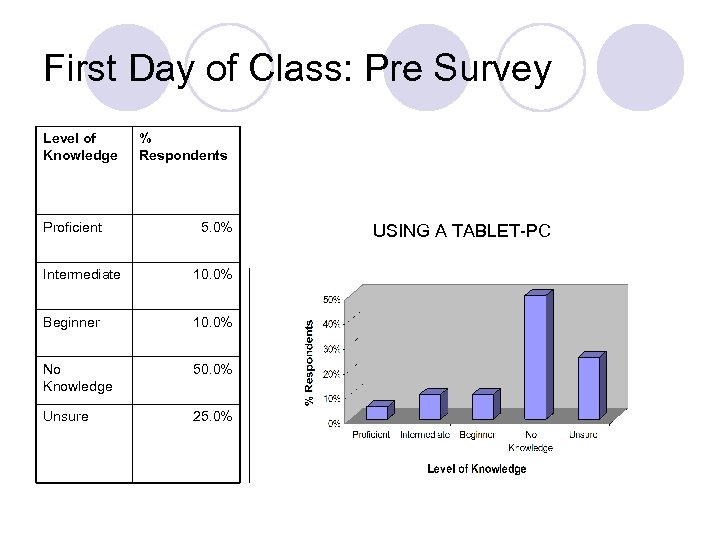
First Day of Class: Pre Survey Level of Knowledge Proficient % Respondents 5. 0% Intermediate 10. 0% Beginner 10. 0% No Knowledge 50. 0% Unsure 25. 0% USING A TABLET-PC
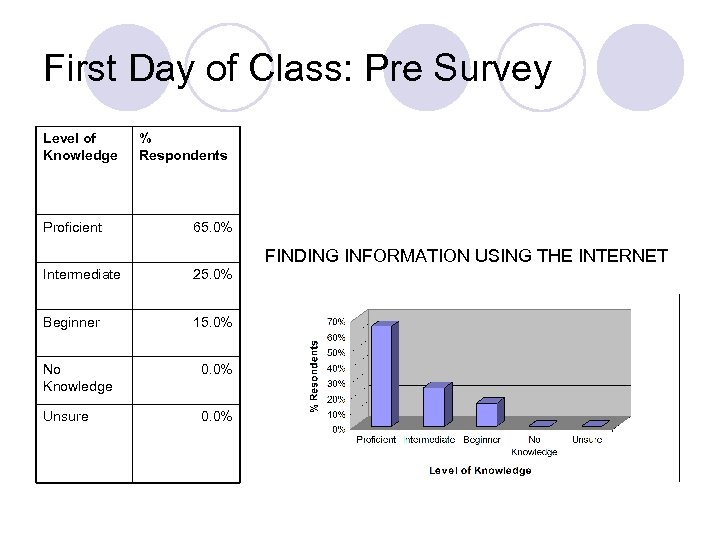
First Day of Class: Pre Survey Level of Knowledge Proficient % Respondents 65. 0% FINDING INFORMATION USING THE INTERNET Intermediate 25. 0% Beginner 15. 0% No Knowledge 0. 0% Unsure 0. 0%
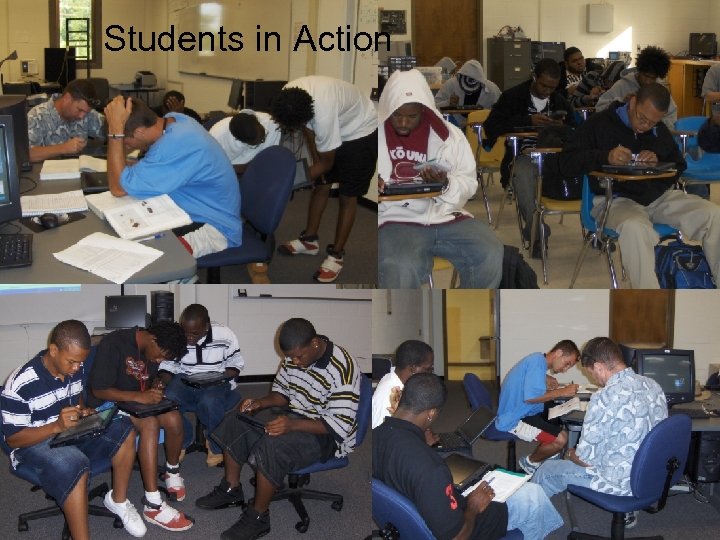
Collaborative & Active Learning Environment l Learning in teams l Share ideas and respond l Students ask questions to each other l Groups assigned for collaborative in-class activities l In-class assignments to encourage students to apply concepts learned during lectures ¡Feedback built-into assignment
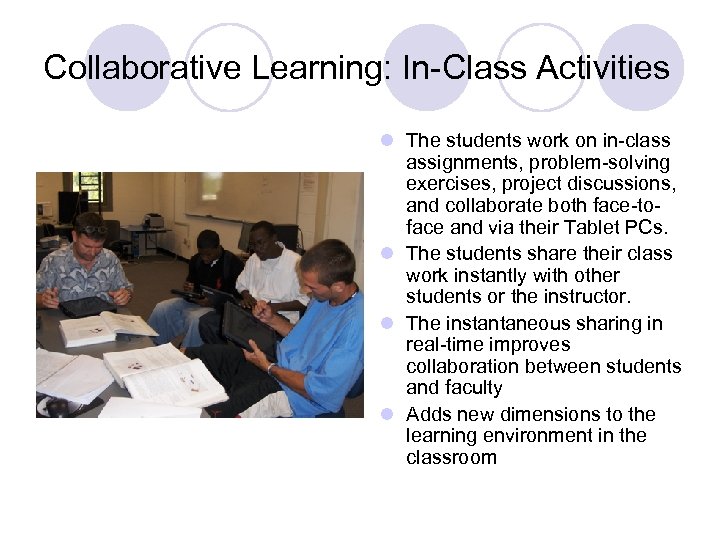
Collaborative Learning: In-Class Activities l The students work on in-class assignments, problem-solving exercises, project discussions, and collaborate both face-toface and via their Tablet PCs. l The students share their class work instantly with other students or the instructor. l The instantaneous sharing in real-time improves collaboration between students and faculty l Adds new dimensions to the learning environment in the classroom
Students in Action
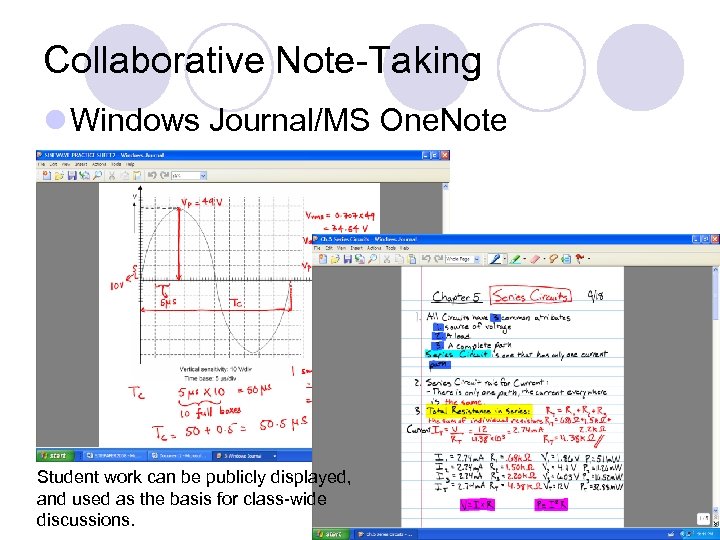
Collaborative Note-Taking l Windows Journal/MS One. Note Student work can be publicly displayed, and used as the basis for class-wide discussions.
Monitoring
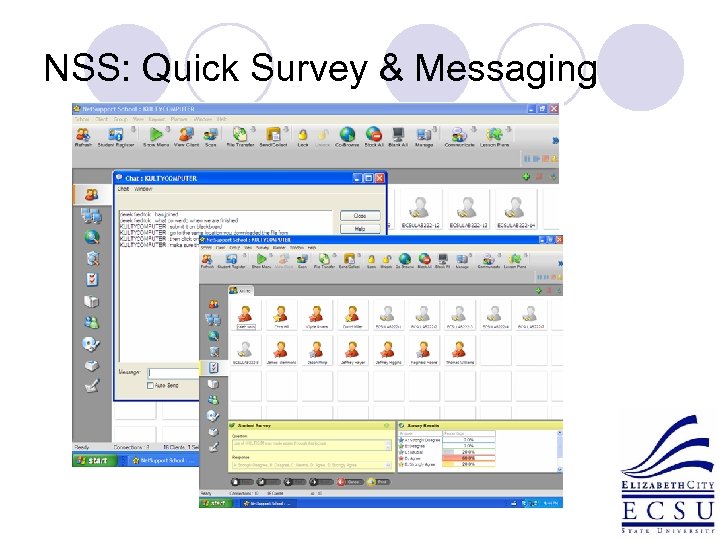
NSS: Quick Survey & Messaging
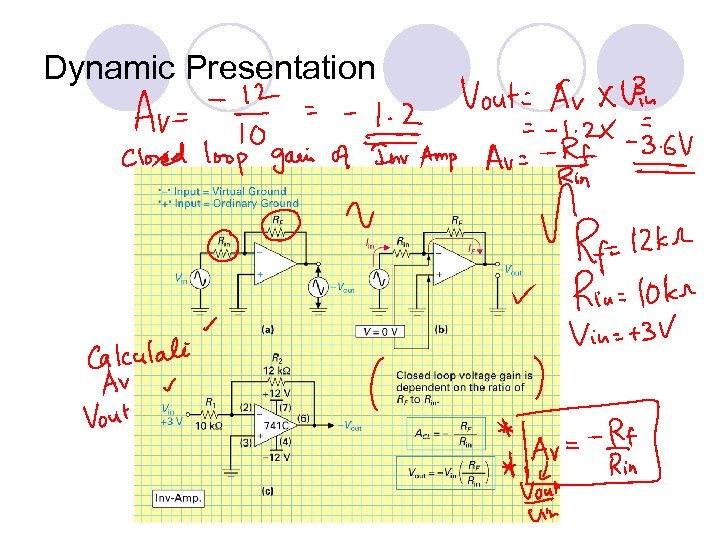
Dynamic Presentation
Active Learning l Supplementary online material l Students self-test on textbook website l Discussion: A Lemon & 2 Nickels l Outside Classroom ¡Energy awareness project (Individual) ¡DC Motor Project (Group)

l “Approximately 90% of the energy consumed by incandescent bulbs produces heat, not light. With florescent light bulbs, there is 75% less heat generated, which also saves money on cooling the home, and these bulbs last 10% longer. By changing the five most used bulbs in my house with florescent bulbs, I can save $52 a year. ” Where, N=number of fixtures PWE=power rating of existing fixtures PWP=power rating of proposed fixtures H=annual operating hours C=conversion constant [1000 W/k. W] UC=usage cost for electricity l “In conclusion, this project was a good way to see how much energy my home consumes per month and how the energy is distributed. It also allowed me to see the many steps that can be taken to cut down on the amount of energy used. I estimated that I could save approximately $300 a year on energy cost by performing the tasks mentioned throughout the report. Every part of the home provides an opportunity to use less energy. Even simple steps can produce big savings. ”
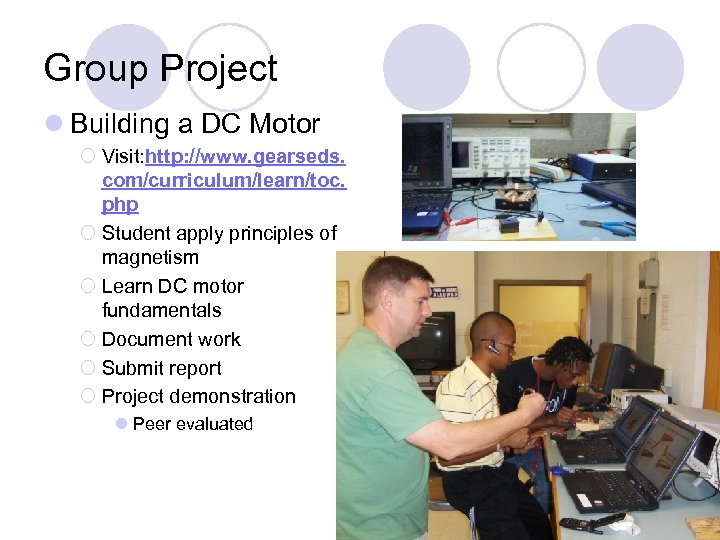
Group Project l Building a DC Motor ¡ Visit: http: //www. gearseds. com/curriculum/learn/toc. php ¡ Student apply principles of magnetism ¡ Learn DC motor fundamentals ¡ Document work ¡ Submit report ¡ Project demonstration l Peer evaluated
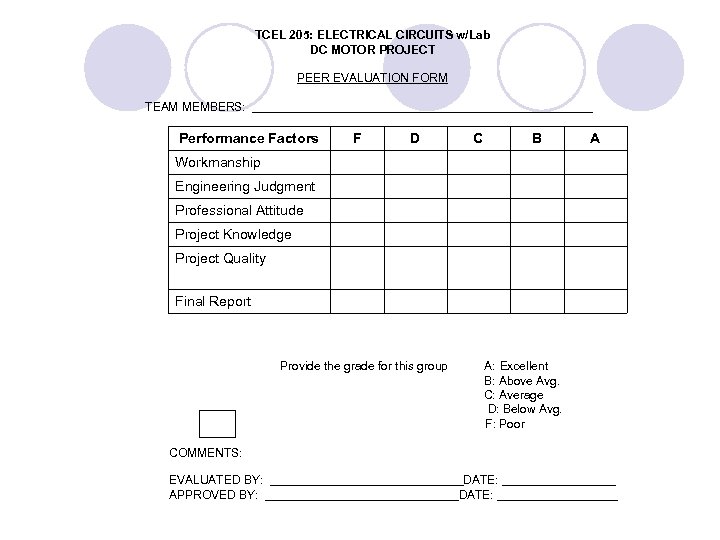
TCEL 205: ELECTRICAL CIRCUITS w/Lab DC MOTOR PROJECT PEER EVALUATION FORM TEAM MEMBERS: __________________________ Performance Factors F D C B A Workmanship Engineering Judgment Professional Attitude Project Knowledge Project Quality Final Report Provide the grade for this group A: Excellent B: Above Avg. C: Average D: Below Avg. F: Poor COMMENTS: EVALUATED BY: _______________DATE: _________ APPROVED BY: _______________DATE: _________
Students Maintain E-Record l Class Notes l Annotated Power. Point Slides l Assignments l Project Report l Research Paper Critique l Lab Reports l Project Demo Photos l Exams
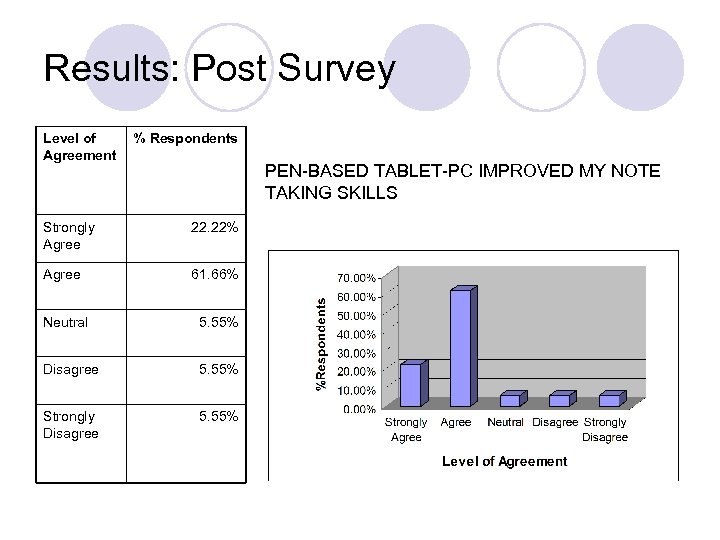
Results: Post Survey Level of Agreement % Respondents PEN-BASED TABLET-PC IMPROVED MY NOTE TAKING SKILLS Strongly Agree 22. 22% Agree 61. 66% Neutral 5. 55% Disagree 5. 55% Strongly Disagree 5. 55%
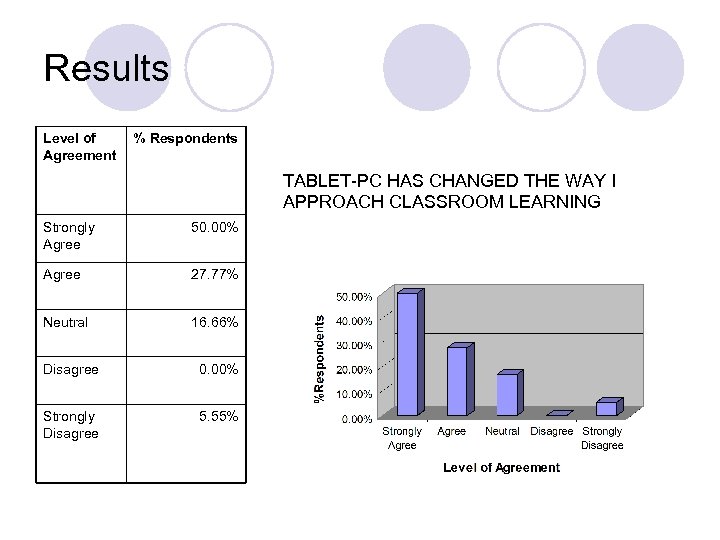
Results Level of Agreement % Respondents TABLET-PC HAS CHANGED THE WAY I APPROACH CLASSROOM LEARNING Strongly Agree 50. 00% Agree 27. 77% Neutral 16. 66% Disagree 0. 00% Strongly Disagree 5. 55%
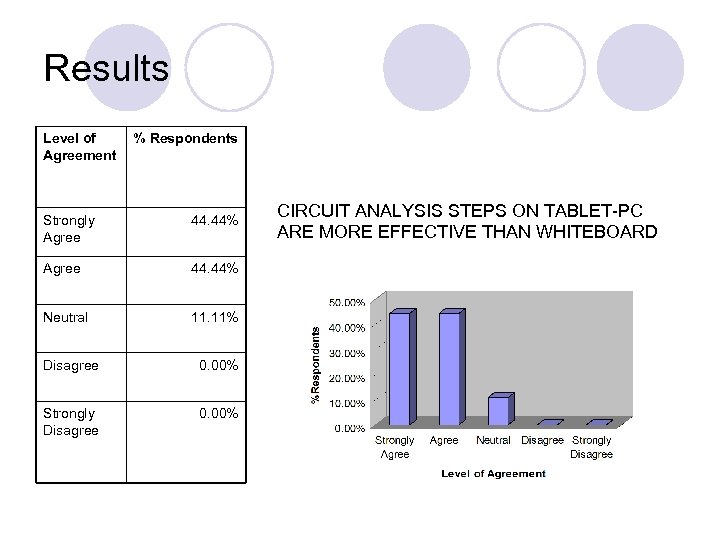
Results Level of Agreement % Respondents Strongly Agree 44. 44% Neutral 11. 11% Disagree 0. 00% Strongly Disagree 0. 00% CIRCUIT ANALYSIS STEPS ON TABLET-PC ARE MORE EFFECTIVE THAN WHITEBOARD
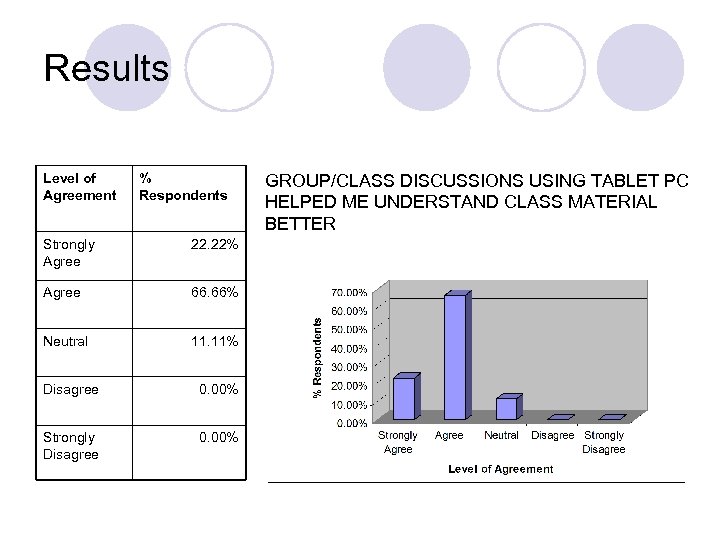
Results Level of Agreement % Respondents Strongly Agree 22. 22% Agree 66. 66% Neutral 11. 11% Disagree 0. 00% Strongly Disagree 0. 00% GROUP/CLASS DISCUSSIONS USING TABLET PC HELPED ME UNDERSTAND CLASS MATERIAL BETTER
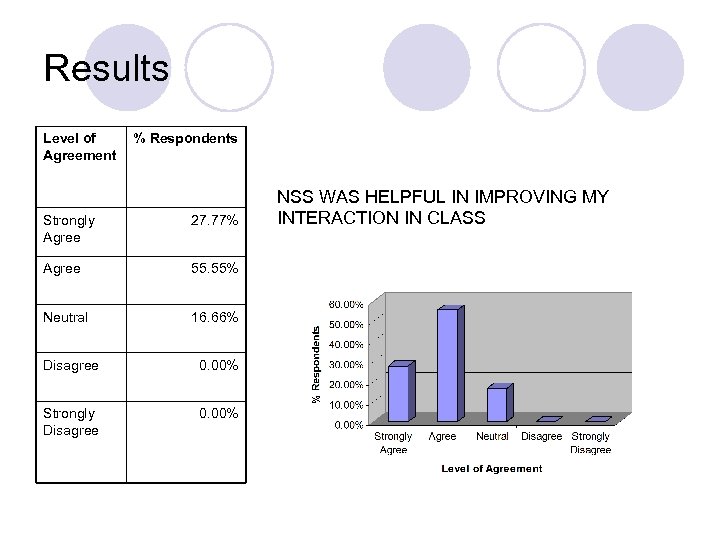
Results Level of Agreement % Respondents Strongly Agree 27. 77% Agree 55. 55% Neutral 16. 66% Disagree 0. 00% Strongly Disagree 0. 00% NSS WAS HELPFUL IN IMPROVING MY INTERACTION IN CLASS
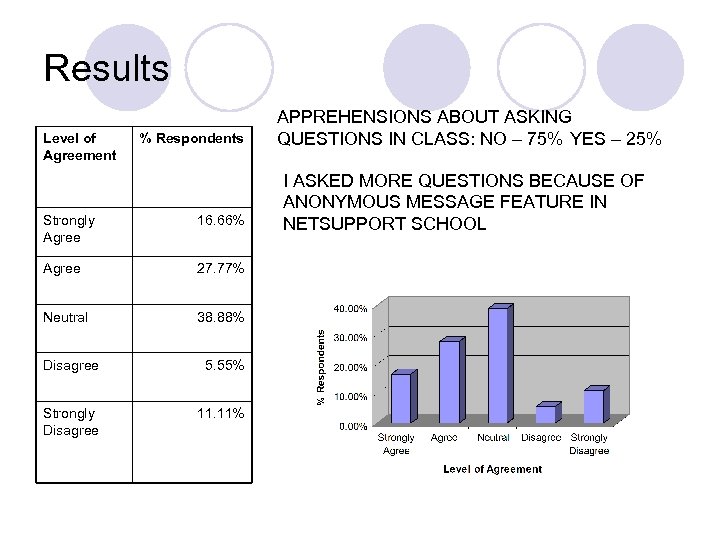
Results Level of Agreement % Respondents Strongly Agree 16. 66% Agree 27. 77% Neutral 38. 88% Disagree 5. 55% Strongly Disagree 11. 11% APPREHENSIONS ABOUT ASKING QUESTIONS IN CLASS: NO – 75% YES – 25% I ASKED MORE QUESTIONS BECAUSE OF ANONYMOUS MESSAGE FEATURE IN NETSUPPORT SCHOOL
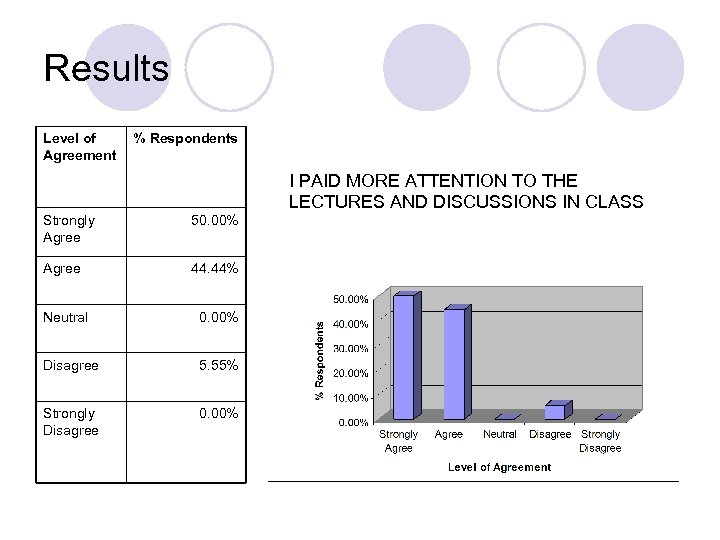
Results Level of Agreement % Respondents I PAID MORE ATTENTION TO THE LECTURES AND DISCUSSIONS IN CLASS Strongly Agree 50. 00% Agree 44. 44% Neutral 0. 00% Disagree 5. 55% Strongly Disagree 0. 00%
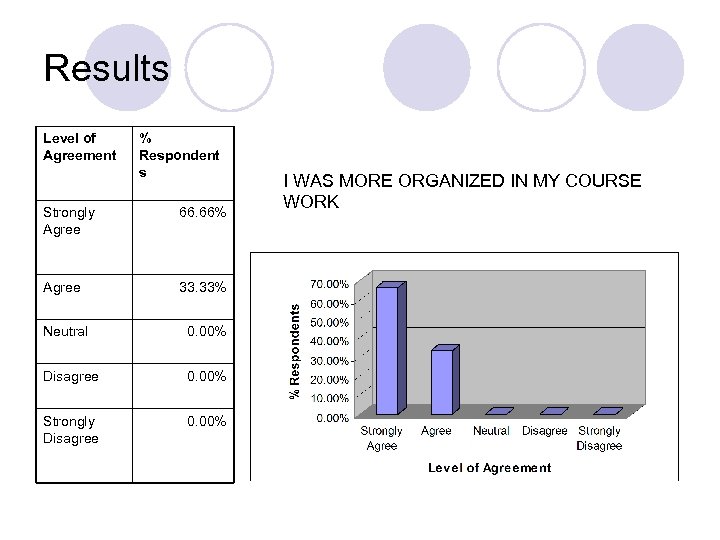
Results Level of Agreement % Respondent s Strongly Agree 66. 66% Agree 33. 33% Neutral 0. 00% Disagree 0. 00% Strongly Disagree 0. 00% I WAS MORE ORGANIZED IN MY COURSE WORK
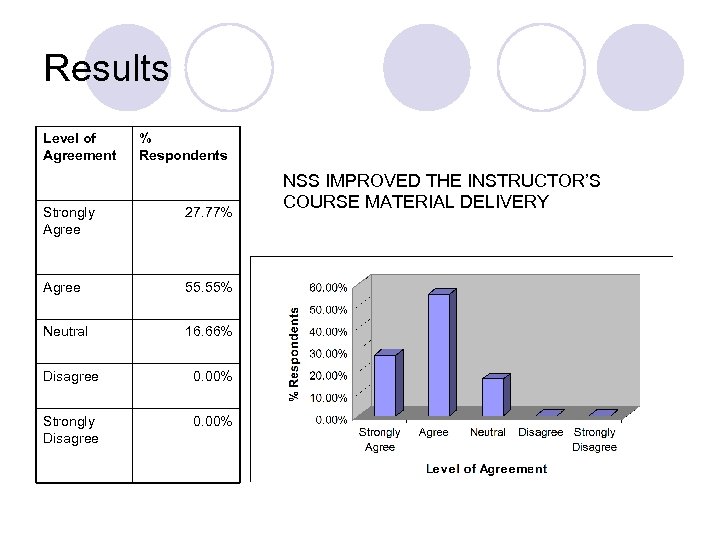
Results Level of Agreement % Respondents Strongly Agree 27. 77% Agree 55. 55% Neutral 16. 66% Disagree 0. 00% Strongly Disagree 0. 00% NSS IMPROVED THE INSTRUCTOR’S COURSE MATERIAL DELIVERY
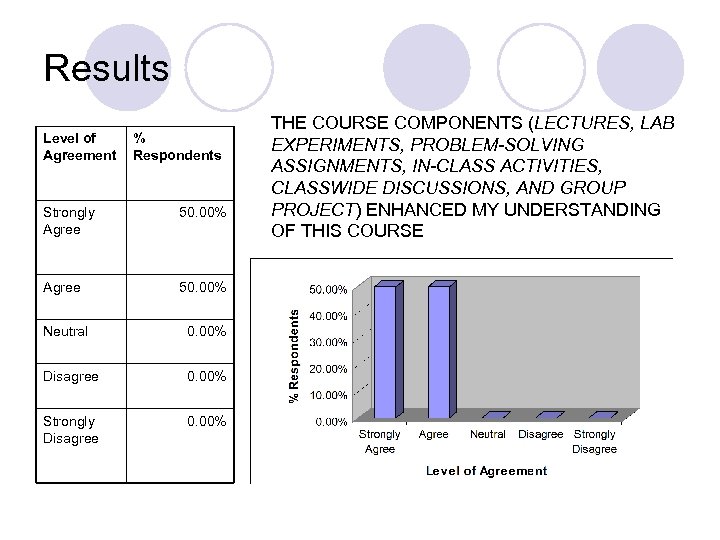
Results Level of Agreement % Respondents Strongly Agree 50. 00% Neutral 0. 00% Disagree 0. 00% Strongly Disagree 0. 00% THE COURSE COMPONENTS (LECTURES, LAB EXPERIMENTS, PROBLEM-SOLVING ASSIGNMENTS, IN-CLASS ACTIVITIES, CLASSWIDE DISCUSSIONS, AND GROUP PROJECT) ENHANCED MY UNDERSTANDING OF THIS COURSE
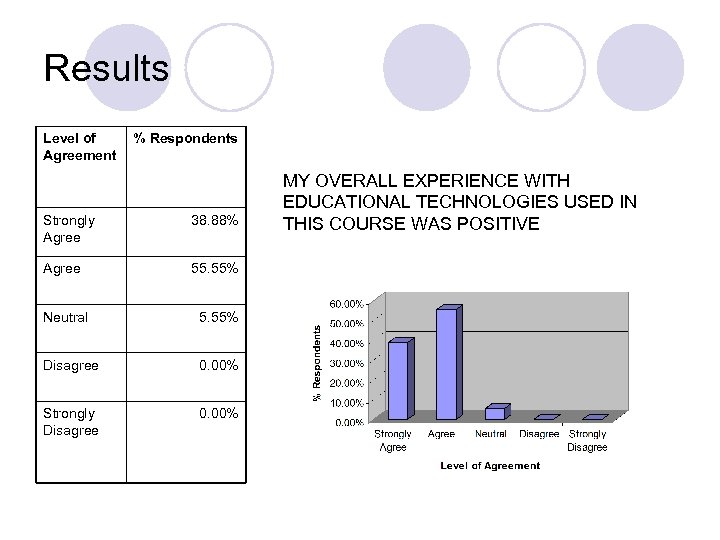
Results Level of Agreement % Respondents Strongly Agree 38. 88% Agree 55. 55% Neutral 5. 55% Disagree 0. 00% Strongly Disagree 0. 00% MY OVERALL EXPERIENCE WITH EDUCATIONAL TECHNOLOGIES USED IN THIS COURSE WAS POSITIVE
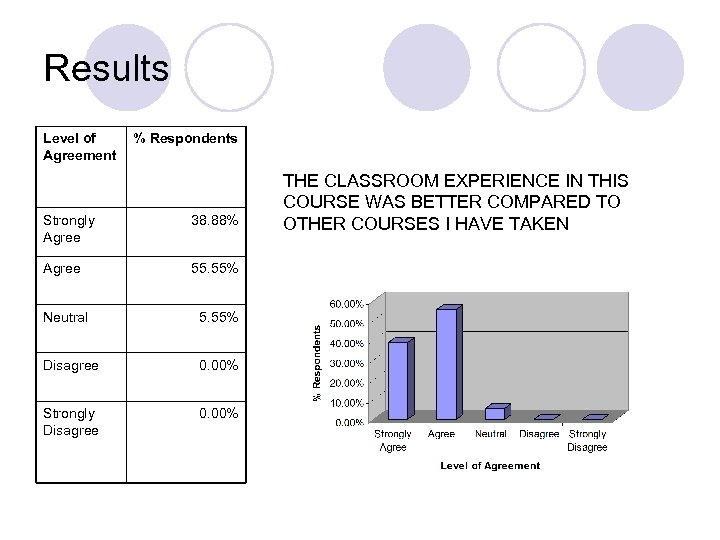
Results Level of Agreement % Respondents Strongly Agree 38. 88% Agree 55. 55% Neutral 5. 55% Disagree 0. 00% Strongly Disagree 0. 00% THE CLASSROOM EXPERIENCE IN THIS COURSE WAS BETTER COMPARED TO OTHER COURSES I HAVE TAKEN
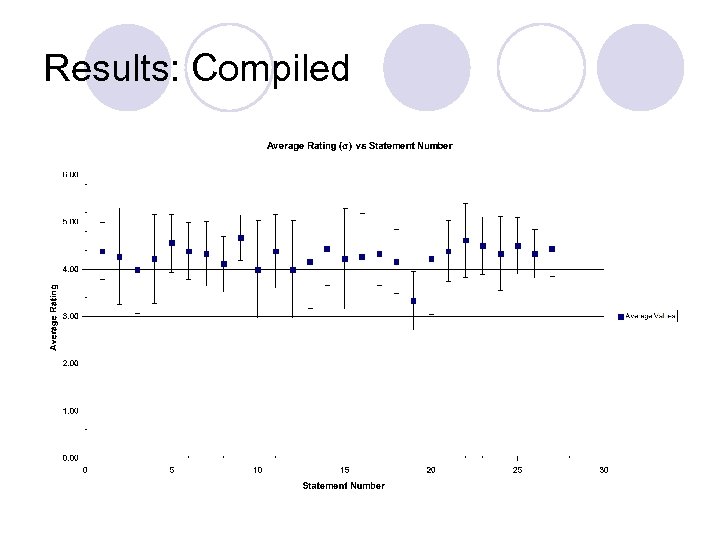
Results: Compiled
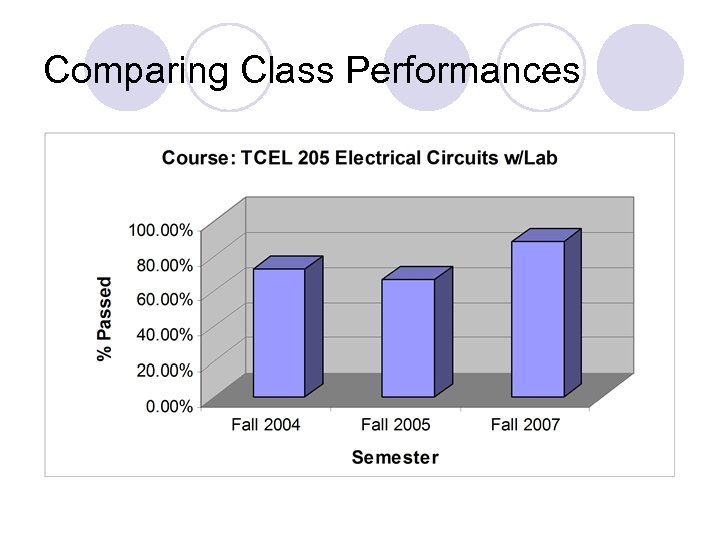
Comparing Class Performances
Discussion & Conclusion l Students have expressed positive attitude towards use of technology in classroom. l It helps keep them interested and engaged. l Technology Changes dynamics of classroom ¡students become more self-directed ¡The teacher’s role in a classroom shifts to that of a facilitator rather than a lecturer
Discussion & Conclusion l Technology can be utilized to enrich student learning experience l Using digital ink capability of Tablet-PCs students keep records of their learning process from the beginning, and steadily work on them, rather than cramming all the work at the end l Actively participate in class discussions and use technology in every aspect of learning l Learn to collaborate both face-to-face and via technology resulting in better performance l The outcome for the redesigned course compared with the course taught previously resulted in improved passing rate

Acknowledgement l HP US Philanthropy & Jim Vanides, Program Manager HP TFT grant program l Dr. Ali Khan, Provost & Vice Chancellor for Academic Affairs, ECSU l Dr. Kim Stevenson, Director for Distance Education, ECSU
Скачать презентацию Promoting Collaborative Learning Environment in the Classroom Using
919f77262eb4dcc3ab484dce246c671f.ppt