


 Скачать презентацию Procedures on how to enter the GRID Christos
d3cd37d1980786f0c2a89b27440113b0.ppt
- Количество слайдов: 28
 Procedures on how to enter the GRID Christos Papachristos (cpapachr@ics. forth. gr) Site Manager of the HG-05 -FORTH and GR-04 -FORTH-ICS nodes Distributed Computing Systems Lab Christos Papachristos FORTH-ICS, Distributed Computing Systems Lab Crete, 19 th Jun 06 - 1
 Answers provided to… • Who can apply for registration? • What is the registration procedure? • Who should be contacted? • What are the Virtual Organizations? • What tools do I need and where can I find them? • How do I submit jobs to the Grid? • What is the procedure of submitting jobs? • Tutorials on job submission. • Failed jobs. Who should be contacted? • • Where can I see the status of the Grid? What does the infrastructure look like? Is there any user support? . . and some other Grid related issues. Christos Papachristos FORTH-ICS, Distributed Computing Systems Lab Crete, 19 th Jun 06 - 2
 Who can apply for registration? The whole Greek research community • Universities • Technical Education Centers • Research Centers The Eligible (global) Grid User Community is defined to be people from: • the academic research and education community; • public funded bodies, institutes and research laboratories working in areas related to research and education; • other bodies and organisations, such as commercial companies, who are collaborating on academic research and education with the above institutes. EGEE Access Users Policy (AUP) Christos Papachristos FORTH-ICS, Distributed Computing Systems Lab Crete, 19 th Jun 06 - 3
 Registration procedure 1. Register yourself as a Hellas. GRID user 2. Get an account to a User Interface node (UI) 3. Acquire a digital certificate from your accredited National Certification Authority (CA) 4. Join an existing Virtual Organization (VO) Christos Papachristos FORTH-ICS, Distributed Computing Systems Lab Crete, 19 th Jun 06 - 4
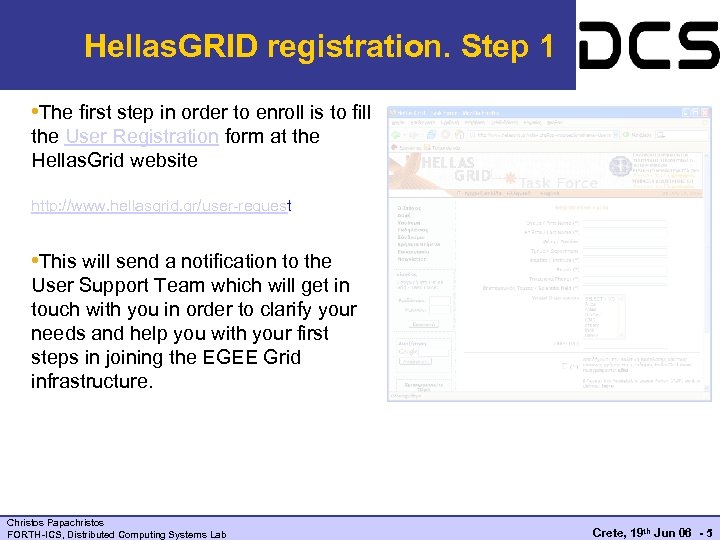 Hellas. GRID registration. Step 1 • The first step in order to enroll is to fill the User Registration form at the Hellas. Grid website http: //www. hellasgrid. gr/user-request • This will send a notification to the User Support Team which will get in touch with you in order to clarify your needs and help you with your first steps in joining the EGEE Grid infrastructure. Christos Papachristos FORTH-ICS, Distributed Computing Systems Lab Crete, 19 th Jun 06 - 5
 Get a UI account. Step 2 In order to become a user of the EGEE Grid Infrastructure you should: • Gain access to a User Interface (UI) machine which hosts the required client software for developing and running applications in the EGEE Grid • A UI is a Linux box having the appropriate client software that will help you send and execute your applications in the Grid The choices on how to obtain a UI account are: • Set up your own UI node • Obtain access to a local UI, already installed in your organization § hellasgrid-ui. ics. forth. gr. Send an email at {cpapachr, hargikas}@ics. forth. gr • Request for a UI account in the GRNET node Christos Papachristos FORTH-ICS, Distributed Computing Systems Lab Crete, 19 th Jun 06 - 6
 Get a UI account. Step 2. 1 • In practice everyone can install and setup a UI with the required EGEE tools following the instructions in the LCG-2 Installation Guide. • Also the Italian SA 1 EGEE Activity has made available a package called UIPn. P which can be installed in any Linux machine and turn it into a User Interface (you can even install it as a regular non-root user). Note though that it is pre-configured for accessing the Italian EGEE sites and some manual configuration steps are required at the moment in order to be useful for EGEE-SEE users (for instructions see How to customize UIPn. P for SEE-VO). Christos Papachristos FORTH-ICS, Distributed Computing Systems Lab Crete, 19 th Jun 06 - 7
 Acquire a Digital Certificate. Step 3 In order to access the Grid you need a Digital Certificate. First of all a fax has to be sent to the National Certification Authority (fax: 2310 99 43 09) with names and IDs. Then: 1. Login to your UI account and execute the following 2. $grid-cert-request 1. The command will produce a. globus directory with 3 files: . globus/usercert. pem size=0. globus/usercert_request. pem size<>0. globus/userkey. pem size<>0 3. The user-cert-request. pem file has to be emailed to the Hellas. Grid-CA (hellasgrid-ca@physics. auth. gr). Christos Papachristos FORTH-ICS, Distributed Computing Systems Lab Crete, 19 th Jun 06 - 8
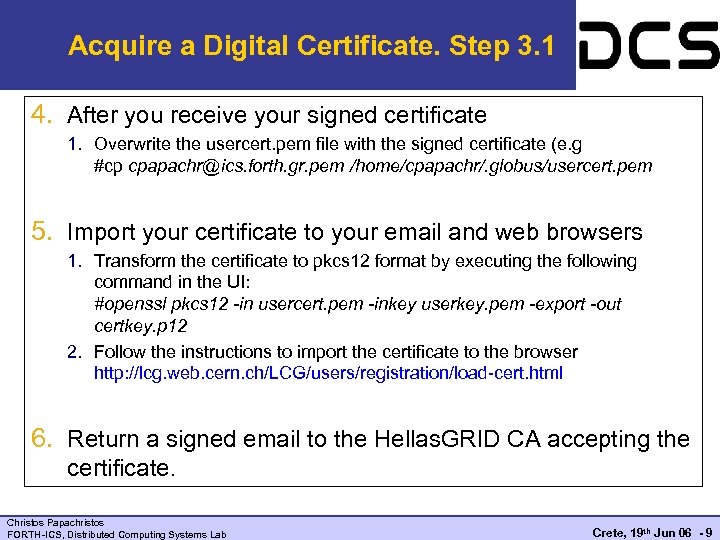 Acquire a Digital Certificate. Step 3. 1 4. After you receive your signed certificate 1. Overwrite the usercert. pem file with the signed certificate (e. g #cp cpapachr@ics. forth. gr. pem /home/cpapachr/. globus/usercert. pem 5. Import your certificate to your email and web browsers 1. Transform the certificate to pkcs 12 format by executing the following command in the UI: #openssl pkcs 12 -in usercert. pem -inkey userkey. pem -export -out certkey. p 12 2. Follow the instructions to import the certificate to the browser http: //lcg. web. cern. ch/LCG/users/registration/load-cert. html 6. Return a signed email to the Hellas. GRID CA accepting the certificate. Christos Papachristos FORTH-ICS, Distributed Computing Systems Lab Crete, 19 th Jun 06 - 9
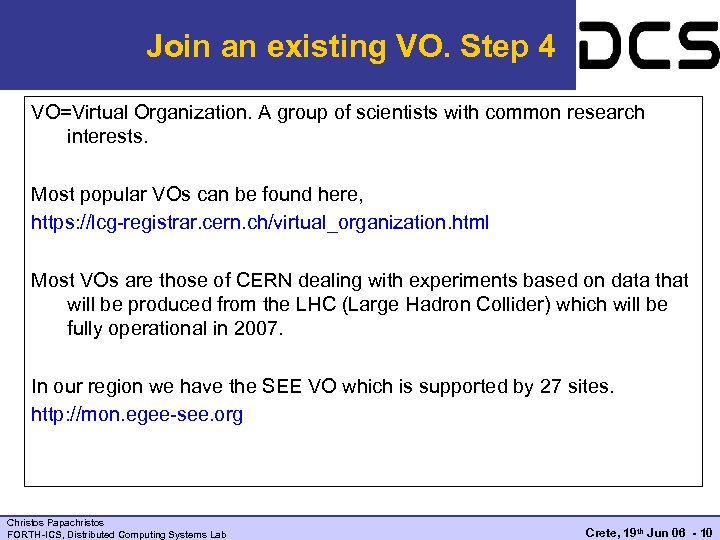 Join an existing VO. Step 4 VO=Virtual Organization. A group of scientists with common research interests. Most popular VOs can be found here, https: //lcg-registrar. cern. ch/virtual_organization. html Most VOs are those of CERN dealing with experiments based on data that will be produced from the LHC (Large Hadron Collider) which will be fully operational in 2007. In our region we have the SEE VO which is supported by 27 sites. http: //mon. egee-see. org Christos Papachristos FORTH-ICS, Distributed Computing Systems Lab Crete, 19 th Jun 06 - 10
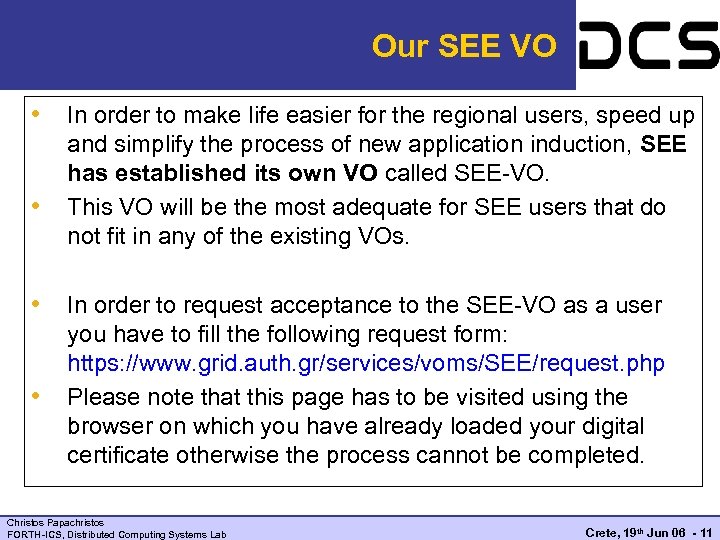 Our SEE VO • In order to make life easier for the regional users, speed up • and simplify the process of new application induction, SEE has established its own VO called SEE-VO. This VO will be the most adequate for SEE users that do not fit in any of the existing VOs. • In order to request acceptance to the SEE-VO as a user • you have to fill the following request form: https: //www. grid. auth. gr/services/voms/SEE/request. php Please note that this page has to be visited using the browser on which you have already loaded your digital certificate otherwise the process cannot be completed. Christos Papachristos FORTH-ICS, Distributed Computing Systems Lab Crete, 19 th Jun 06 - 11
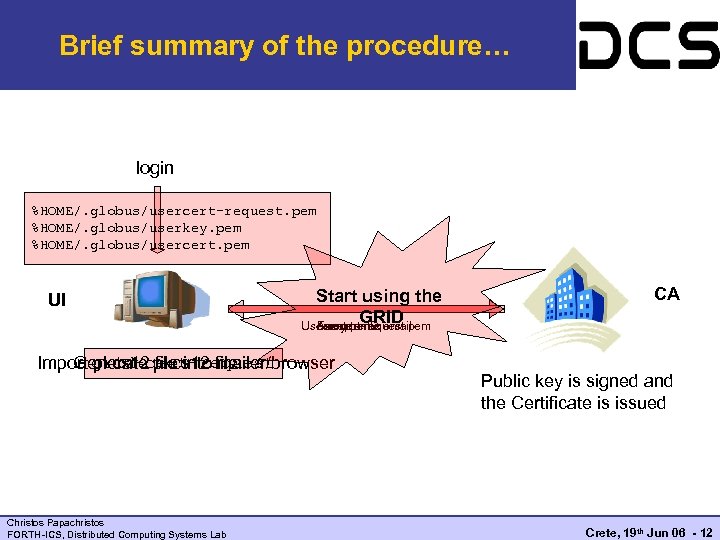 Brief summary of the procedure… login %HOME/. globus/usercert-request. pem %HOME/. globus/userkey. pem %HOME/. globus/usercert. pem UI Start using the GRID Usercert. pem email Acceptance Fax your ID usercert-request. pem Import grid-cert-request Generate pkcs 12 file into mailer/browser Christos Papachristos FORTH-ICS, Distributed Computing Systems Lab CA Public key is signed and the Certificate is issued Crete, 19 th Jun 06 - 12
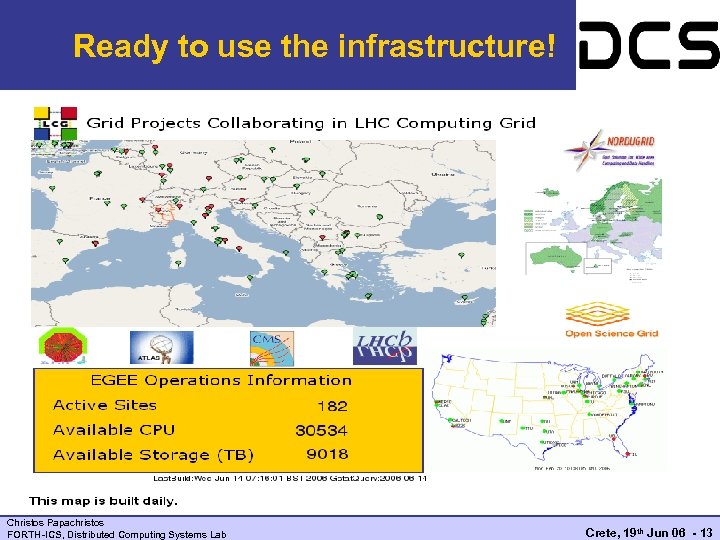 Ready to use the infrastructure! Christos Papachristos FORTH-ICS, Distributed Computing Systems Lab Crete, 19 th Jun 06 - 13
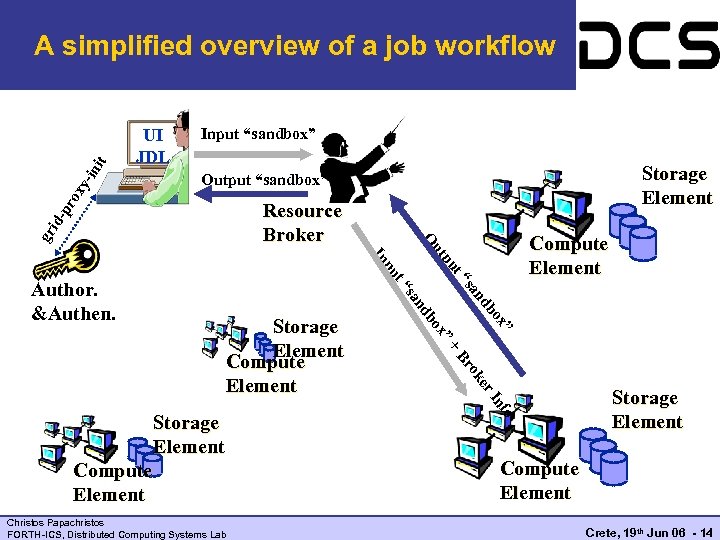 UI JDL Input “sandbox” Storage Element Output “sandbox” ut gr t pu ” er ok fo In Christos Papachristos FORTH-ICS, Distributed Computing Systems Lab Br Compute Element + Storage Element x” Storage Element Compute Element o db an x bo nd “s sa t“ pu In Author. &Authen. Compute Element O Resource Broker id- pr ox y -in it A simplified overview of a job workflow Storage Element Compute Element Crete, 19 th Jun 06 - 14
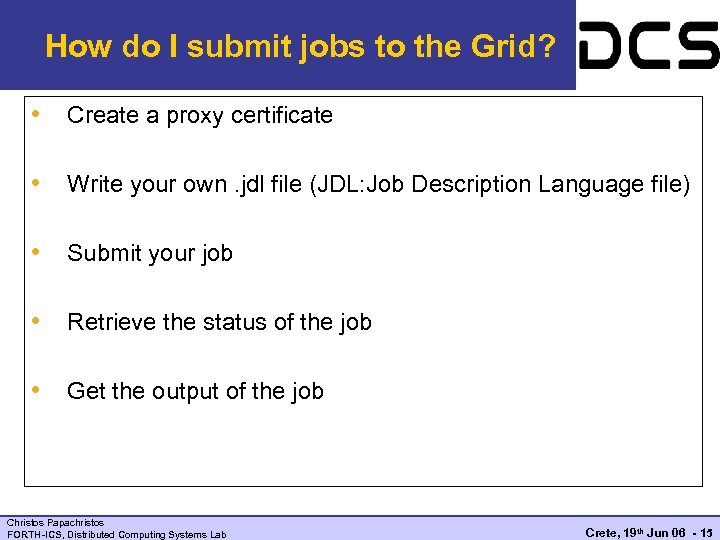 How do I submit jobs to the Grid? • Create a proxy certificate • Write your own. jdl file (JDL: Job Description Language file) • Submit your job • Retrieve the status of the job • Get the output of the job Christos Papachristos FORTH-ICS, Distributed Computing Systems Lab Crete, 19 th Jun 06 - 15
![Step 1 - Creating a proxy certificate [cpapachr@hellasgrid-ui cpapachr]$ grid-proxy-init -debug -verify User Cert](https://present5.com/presentation/d3cd37d1980786f0c2a89b27440113b0/image-16.jpg "Step 1 - Creating a proxy certificate [cpapachr@hellasgrid-ui cpapachr]$ grid-proxy-init -debug -verify User Cert") Step 1 - Creating a proxy certificate [cpapachr@hellasgrid-ui cpapachr]$ grid-proxy-init -debug -verify User Cert File: /home/cpapachr/. globus/usercert. pem User Key File: /home/cpapachr/. globus/userkey. pem Trusted CA Cert Dir: /etc/grid-security/certificates Output File: /tmp/x 509 up_u 0 Your identity: /C=GR/O=Hellas. Grid/OU=ics. forth. gr/CN=Christos Papachristos Enter GRID pass phrase for this identity: Creating proxy. . ++++++ Done Proxy Verify OK Your proxy is valid until: Wed Jun 14 02: 49: 17 2006 [cpapachr@hellasgrid-ui cpapachr]$ Christos Papachristos FORTH-ICS, Distributed Computing Systems Lab Crete, 19 th Jun 06 - 16
Step 1 - Creating a proxy certificate [cpapachr@hellasgrid-ui cpapachr]$ grid-proxy-init -debug -verify User Cert File: /home/cpapachr/. globus/usercert. pem User Key File: /home/cpapachr/. globus/userkey. pem Trusted CA Cert Dir: /etc/grid-security/certificates Output File: /tmp/x 509 up_u 0 Your identity: /C=GR/O=Hellas. Grid/OU=ics. forth. gr/CN=Christos Papachristos Enter GRID pass phrase for this identity: Creating proxy. . ++++++ Done Proxy Verify OK Your proxy is valid until: Wed Jun 14 02: 49: 17 2006 [cpapachr@hellasgrid-ui cpapachr]$ Christos Papachristos FORTH-ICS, Distributed Computing Systems Lab Crete, 19 th Jun 06 - 16
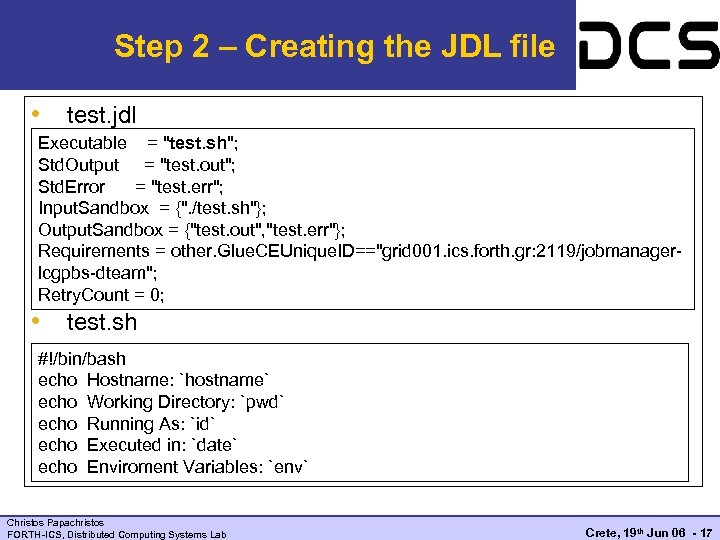 Step 2 – Creating the JDL file • test. jdl Executable = "test. sh"; Std. Output = "test. out"; Std. Error = "test. err"; Input. Sandbox = {". /test. sh"}; Output. Sandbox = {"test. out", "test. err"}; Requirements = other. Glue. CEUnique. ID=="grid 001. ics. forth. gr: 2119/jobmanagerlcgpbs-dteam"; Retry. Count = 0; • test. sh #!/bin/bash echo Hostname: `hostname` echo Working Directory: `pwd` echo Running As: `id` echo Executed in: `date` echo Enviroment Variables: `env` Christos Papachristos FORTH-ICS, Distributed Computing Systems Lab Crete, 19 th Jun 06 - 17
![Step 3 – Submitting the job [cpapachr@hellasgrid-ui cpapachr]$ edg-job-submit --vo dteam test. jdl Selected](https://present5.com/presentation/d3cd37d1980786f0c2a89b27440113b0/image-18.jpg "Step 3 – Submitting the job [cpapachr@hellasgrid-ui cpapachr]$ edg-job-submit --vo dteam test. jdl Selected") Step 3 – Submitting the job [cpapachr@hellasgrid-ui cpapachr]$ edg-job-submit --vo dteam test. jdl Selected Virtual Organisation name (from --vo option): dteam Connecting to host rb. isabella. grnet. gr, port 7772 Logging to host rb. isabella. grnet. gr, port 9002 *********************************************** JOB SUBMIT OUTCOME The job has been successfully submitted to the Network Server. Use edg-job-status command to check job current status. Your job identifier (edg_job. Id) is: - https: //rb. isabella. grnet. gr: 9000/Ggf. NDFsg. B 0 L 3 bt. K_2 CRf. KQ Keep this URL for further reference to the job already submitted *********************************************** [cpapachr@hellasgrid-ui cpapachr]$ Christos Papachristos FORTH-ICS, Distributed Computing Systems Lab Crete, 19 th Jun 06 - 18
Step 3 – Submitting the job [cpapachr@hellasgrid-ui cpapachr]$ edg-job-submit --vo dteam test. jdl Selected Virtual Organisation name (from --vo option): dteam Connecting to host rb. isabella. grnet. gr, port 7772 Logging to host rb. isabella. grnet. gr, port 9002 *********************************************** JOB SUBMIT OUTCOME The job has been successfully submitted to the Network Server. Use edg-job-status command to check job current status. Your job identifier (edg_job. Id) is: - https: //rb. isabella. grnet. gr: 9000/Ggf. NDFsg. B 0 L 3 bt. K_2 CRf. KQ Keep this URL for further reference to the job already submitted *********************************************** [cpapachr@hellasgrid-ui cpapachr]$ Christos Papachristos FORTH-ICS, Distributed Computing Systems Lab Crete, 19 th Jun 06 - 18
![Step 4 – Querying the job status [cpapachr@hellasgrid-ui cpapachr]$ edg-job-status https: //rb. isabella. grnet.](https://present5.com/presentation/d3cd37d1980786f0c2a89b27440113b0/image-19.jpg "Step 4 – Querying the job status [cpapachr@hellasgrid-ui cpapachr]$ edg-job-status https: //rb. isabella. grnet.") Step 4 – Querying the job status [cpapachr@hellasgrid-ui cpapachr]$ edg-job-status https: //rb. isabella. grnet. gr: 9000/Ggf. NDFsg. B 0 L 3 bt. K_2 CRf. KQ ******************************* BOOKKEEPING INFORMATION: Status info for the Job : https: //rb. isabella. grnet. gr: 9000/Ggf. NDFsg. B 0 L 3 bt. K_2 CRf. KQ Current Status: Scheduled Status Reason: Job successfully submitted to Globus Destination: grid 001. ics. forth. gr: 2119/jobmanager-lcgpbs-dteam reached on: Tue Jun 13 15: 54: 26 2006 Finally after a couple of minutes… [cpapachr@hellasgrid-ui cpapachr]$ edg-job-status https: //rb. isabella. grnet. gr: 9000/Ggf. NDFsg. B 0 L 3 bt. K_2 CRf. KQ ******************************* BOOKKEEPING INFORMATION: Status info for the Job : https: //rb. isabella. grnet. gr: 9000/Ggf. NDFsg. B 0 L 3 bt. K_2 CRf. KQ Current Status: Done (Success) Exit code: 0 Status Reason: Job terminated successfully Destination: grid 001. ics. forth. gr: 2119/jobmanager-lcgpbs-dteam reached on: Tue Jun 13 16: 00: 07 2006 Christos Papachristos FORTH-ICS, Distributed Computing Systems Lab Crete, 19 th Jun 06 - 19
Step 4 – Querying the job status [cpapachr@hellasgrid-ui cpapachr]$ edg-job-status https: //rb. isabella. grnet. gr: 9000/Ggf. NDFsg. B 0 L 3 bt. K_2 CRf. KQ ******************************* BOOKKEEPING INFORMATION: Status info for the Job : https: //rb. isabella. grnet. gr: 9000/Ggf. NDFsg. B 0 L 3 bt. K_2 CRf. KQ Current Status: Scheduled Status Reason: Job successfully submitted to Globus Destination: grid 001. ics. forth. gr: 2119/jobmanager-lcgpbs-dteam reached on: Tue Jun 13 15: 54: 26 2006 Finally after a couple of minutes… [cpapachr@hellasgrid-ui cpapachr]$ edg-job-status https: //rb. isabella. grnet. gr: 9000/Ggf. NDFsg. B 0 L 3 bt. K_2 CRf. KQ ******************************* BOOKKEEPING INFORMATION: Status info for the Job : https: //rb. isabella. grnet. gr: 9000/Ggf. NDFsg. B 0 L 3 bt. K_2 CRf. KQ Current Status: Done (Success) Exit code: 0 Status Reason: Job terminated successfully Destination: grid 001. ics. forth. gr: 2119/jobmanager-lcgpbs-dteam reached on: Tue Jun 13 16: 00: 07 2006 Christos Papachristos FORTH-ICS, Distributed Computing Systems Lab Crete, 19 th Jun 06 - 19
![Step 5 – Retrieving the results [cpapachr@hellasgrid-ui cpapachr]$ edg-job-get-output https: //rb. isabella. grnet. gr:](https://present5.com/presentation/d3cd37d1980786f0c2a89b27440113b0/image-20.jpg "Step 5 – Retrieving the results [cpapachr@hellasgrid-ui cpapachr]$ edg-job-get-output https: //rb. isabella. grnet. gr:") Step 5 – Retrieving the results [cpapachr@hellasgrid-ui cpapachr]$ edg-job-get-output https: //rb. isabella. grnet. gr: 9000/Ggf. NDFsg. B 0 L 3 bt. K_2 CRf. KQ Retrieving files from host: rb. isabella. grnet. gr ( for https: //rb. isabella. grnet. gr: 9000/Ggf. NDFsg. B 0 L 3 bt. K_2 CRf. KQ ) ***************************************** JOB GET OUTPUT OUTCOME Output sandbox files for the job: - https: //rb. isabella. grnet. gr: 9000/Ggf. NDFsg. B 0 L 3 bt. K_2 CRf. KQ have been successfully retrieved and stored in the directory: /tmp/job. Output/cpapachr_Ggf. NDFsg. B 0 L 3 bt. K_2 CRf. KQ ***************************************** Christos Papachristos FORTH-ICS, Distributed Computing Systems Lab Crete, 19 th Jun 06 - 20
Step 5 – Retrieving the results [cpapachr@hellasgrid-ui cpapachr]$ edg-job-get-output https: //rb. isabella. grnet. gr: 9000/Ggf. NDFsg. B 0 L 3 bt. K_2 CRf. KQ Retrieving files from host: rb. isabella. grnet. gr ( for https: //rb. isabella. grnet. gr: 9000/Ggf. NDFsg. B 0 L 3 bt. K_2 CRf. KQ ) ***************************************** JOB GET OUTPUT OUTCOME Output sandbox files for the job: - https: //rb. isabella. grnet. gr: 9000/Ggf. NDFsg. B 0 L 3 bt. K_2 CRf. KQ have been successfully retrieved and stored in the directory: /tmp/job. Output/cpapachr_Ggf. NDFsg. B 0 L 3 bt. K_2 CRf. KQ ***************************************** Christos Papachristos FORTH-ICS, Distributed Computing Systems Lab Crete, 19 th Jun 06 - 20
 Tutorials on job submission • The LCG-2 User Guide describing almost everything https: //edms. cern. ch/file/454439//LCG-2 -User. Guide. html • A small tutorial with information on JDL files and job submission https: //edms. cern. ch/file/498081//User. Scenario 2. pdf • There is also MPI support (MPICH v 1. 2. 5). A test example can be found here http: //quattor. web. lal. in 2 p 3. fr/packages/mpi/ Christos Papachristos FORTH-ICS, Distributed Computing Systems Lab Crete, 19 th Jun 06 - 21
 Failed job submissions Who do I contact if my jobs fail? • • GGUS system is the main user support framework. https: //gus. fzk. de/pages/home. php Contact via email as well:
 Monitoring the Grid • Where can I see the status of the Grid? • • • The Grid Operations Centre (GOC) maintains a map with the overall state of the grid and links to various monitoring pages. http: //goc. grid-support. ac. uk/gridsite/monitoring/ http: //goc 02. grid-support. ac. uk/googlemaps/lcg. html • Our ROC also keeps track of the regional Grid resources of the SEE • • http: //goc. grid. sinica. edu. tw/gstat/South. Eastern. Europe. html http: //mon. egee-see. org/gridice/site. php Christos Papachristos FORTH-ICS, Distributed Computing Systems Lab Crete, 19 th Jun 06 - 23
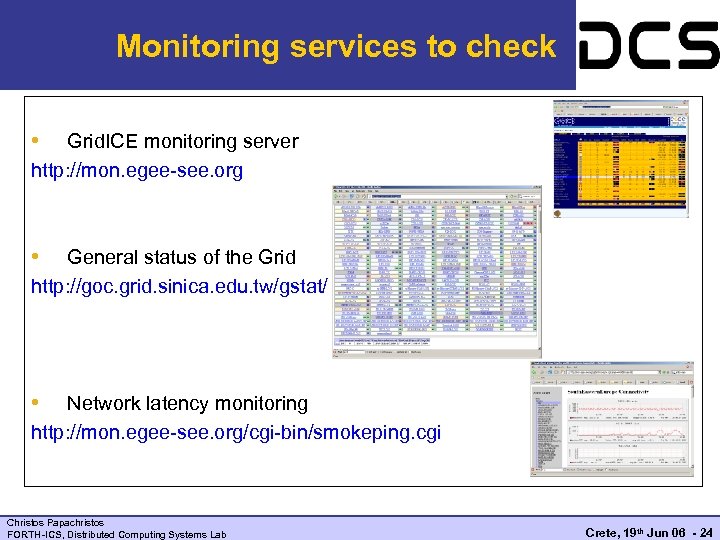 Monitoring services to check • Grid. ICE monitoring server http: //mon. egee-see. org • General status of the Grid http: //goc. grid. sinica. edu. tw/gstat/ • Network latency monitoring http: //mon. egee-see. org/cgi-bin/smokeping. cgi Christos Papachristos FORTH-ICS, Distributed Computing Systems Lab Crete, 19 th Jun 06 - 24
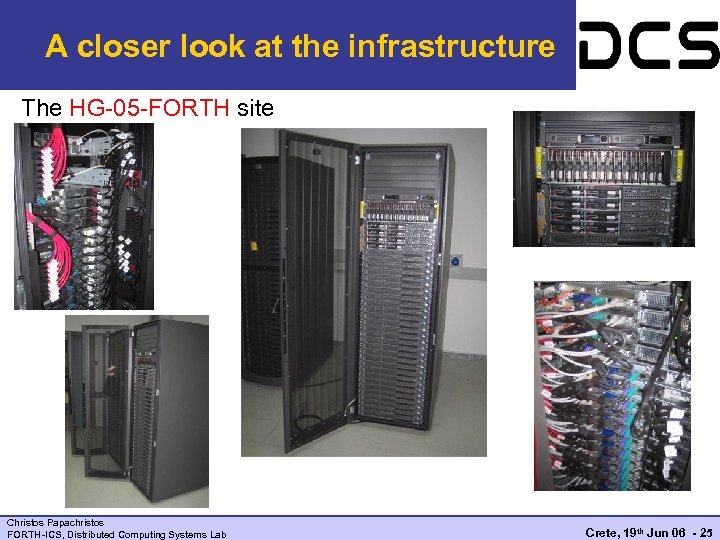 A closer look at the infrastructure The HG-05 -FORTH site Christos Papachristos FORTH-ICS, Distributed Computing Systems Lab Crete, 19 th Jun 06 - 25
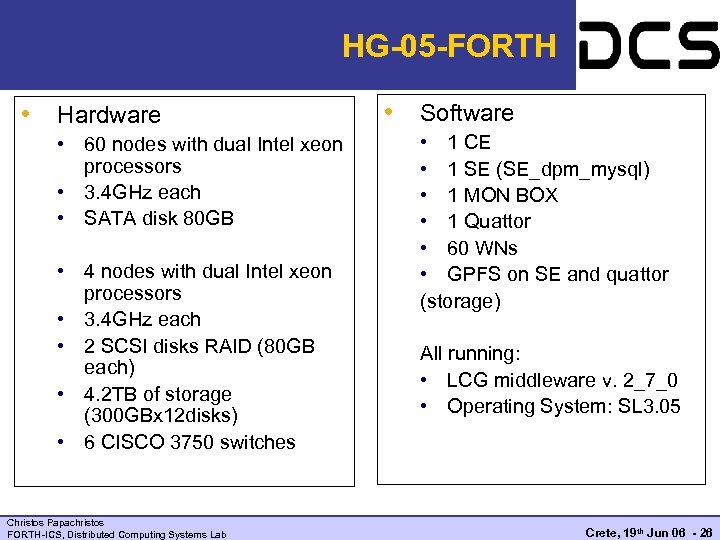 HG-05 -FORTH • Hardware • 60 nodes with dual Intel xeon processors • 3. 4 GHz each • SATA disk 80 GB • 4 nodes with dual Intel xeon processors • 3. 4 GHz each • 2 SCSI disks RAID (80 GB each) • 4. 2 TB of storage (300 GBx 12 disks) • 6 CISCO 3750 switches Christos Papachristos FORTH-ICS, Distributed Computing Systems Lab • Software • 1 CE • 1 SE (SE_dpm_mysql) • 1 MON BOX • 1 Quattor • 60 WNs • GPFS on SE and quattor (storage) All running: • LCG middleware v. 2_7_0 • Operating System: SL 3. 05 Crete, 19 th Jun 06 - 26
 User Support Team Operated by NCSR “Demokritos” - Institute of Nuclear Physics (http: //grid. inp. demokritos. gr/) Responsibilities – To guide new users in their first steps in the Grid and provide continuous support in their activities. Email (egee-user-support@inp. demokritos. gr) Wiki (http: //wiki. egee-see. org/index. php/Users) Mailing list (user-info@grnet. gr) – Includes all registered grid users Newsletter – Published every ~2 months in Greek. Provides local and EGEE-wide news update (http: //grid. inp. demokritos. gr/indexegeenewsletter. htm) Christos Papachristos FORTH-ICS, Distributed Computing Systems Lab Crete, 19 th Jun 06 - 27
 For urgent matters The site managers can be contacted. {cpapachr, hargikas}@ics, forth. gr Christos Papachristos FORTH-ICS, Distributed Computing Systems Lab Crete, 19 th Jun 06 - 28