


 Скачать презентацию Printing in the Meta Frame Environment Jim West
6de06027246faa0e220c1555d550305f.ppt
- Количество слайдов: 51
 Printing in the Meta. Frame Environment Jim West Global Escalation Team CSEIT Event 2003
 Agenda • • Printer Definition Autocreation Imported Print Servers Windows CE Universal Print Driver (UPD) Follow the Print Job Utilities 2
 Printer Definitions • Auto-created (Requires the client network) – Locally Attached • Info stored in HKLM – Locally Defined • Info stored in the user’s profile • Autoconnected – Imported print queues assigned to users • Retained in the data store • Manually Mapped – Mapped from inside the session • Retained in the users’ profile • HKCU/Printers/Connections 3
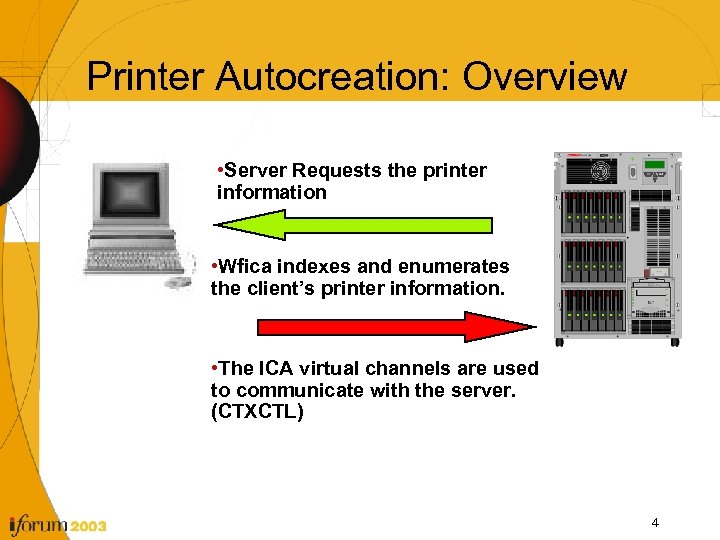 Printer Autocreation: Overview • Server Requests the printer information • Wfica indexes and enumerates the client’s printer information. • The ICA virtual channels are used to communicate with the server. (CTXCTL) 4
 Printer Autocreation: Client Side • The basic questions that need to be answered…… – What port? – Printer name? – Which print driver? • Answered by Wfica(ICA client engine) – Wfica 32 for win 32 clients(Win 9 x, Win 2 k, etc). – Wfica. CE for Windows CE – Wfica for Linux and Unix • Ini file entries required • Universal Print Driver now supported 5
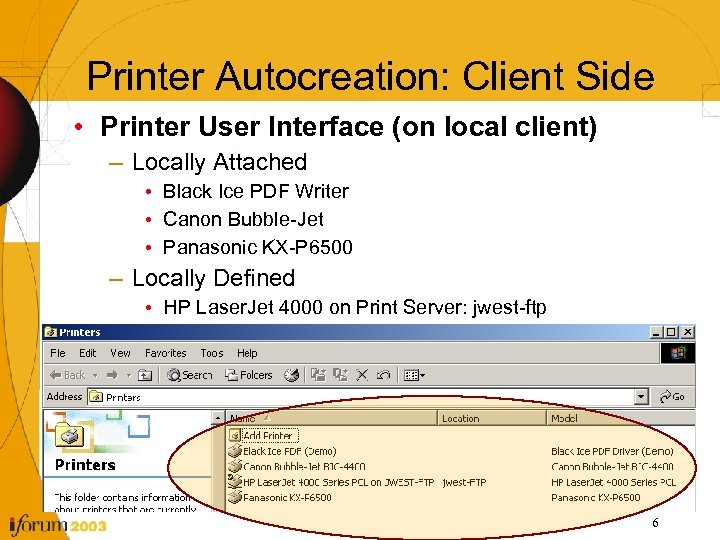 Printer Autocreation: Client Side • Printer User Interface (on local client) – Locally Attached • Black Ice PDF Writer • Canon Bubble-Jet • Panasonic KX-P 6500 – Locally Defined • HP Laser. Jet 4000 on Print Server: jwest-ftp 6
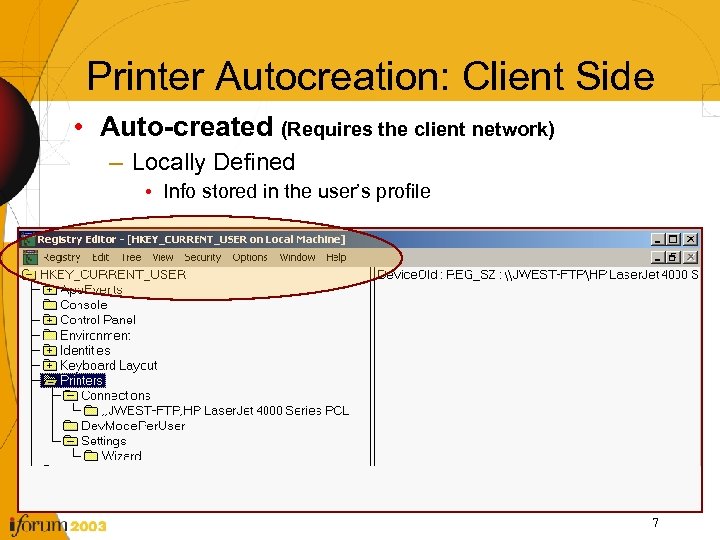 Printer Autocreation: Client Side • Auto-created (Requires the client network) – Locally Defined • Info stored in the user’s profile 7
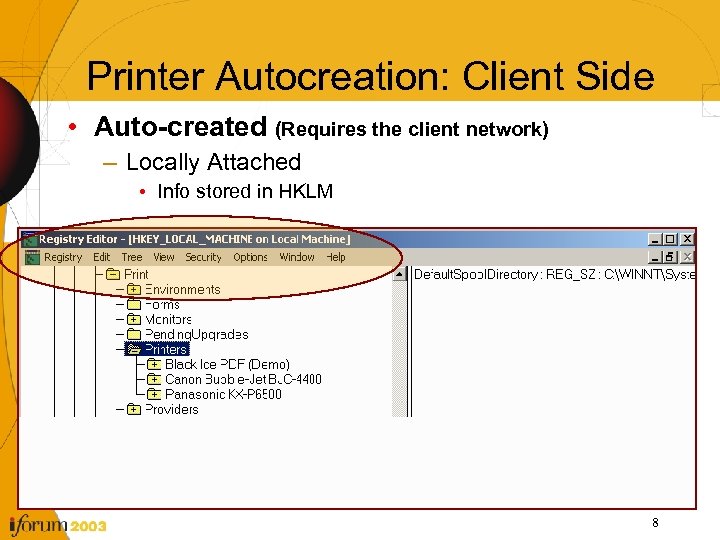 Printer Autocreation: Client Side • Auto-created (Requires the client network) – Locally Attached • Info stored in HKLM 8
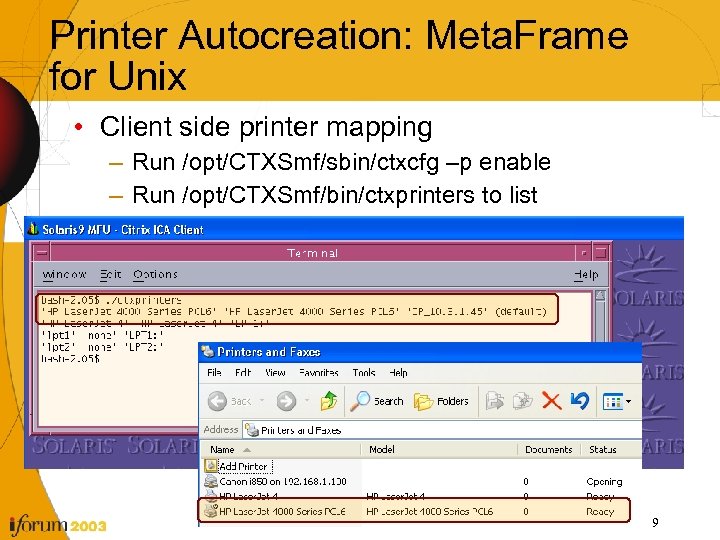 Printer Autocreation: Meta. Frame for Unix • Client side printer mapping – Run /opt/CTXSmf/sbin/ctxcfg –p enable – Run /opt/CTXSmf/bin/ctxprinters to list 9
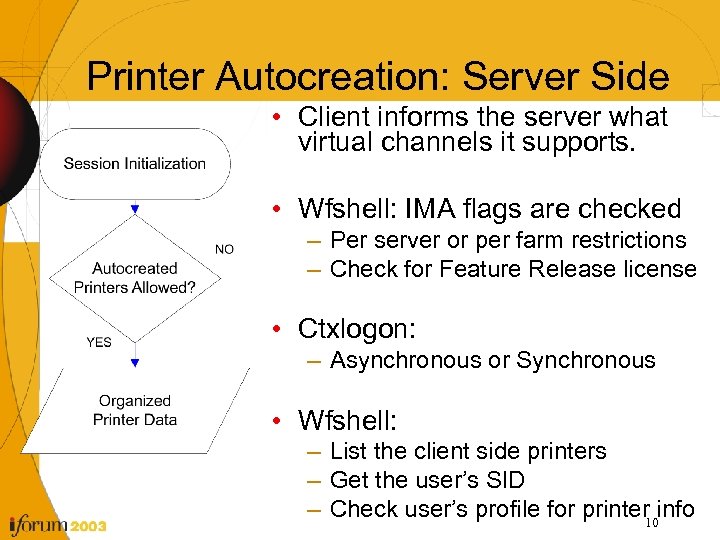 Printer Autocreation: Server Side • Client informs the server what virtual channels it supports. • Wfshell: IMA flags are checked – Per server or per farm restrictions – Check for Feature Release license • Ctxlogon: – Asynchronous or Synchronous • Wfshell: – List the client side printers – Get the user’s SID – Check user’s profile for printer 10 info
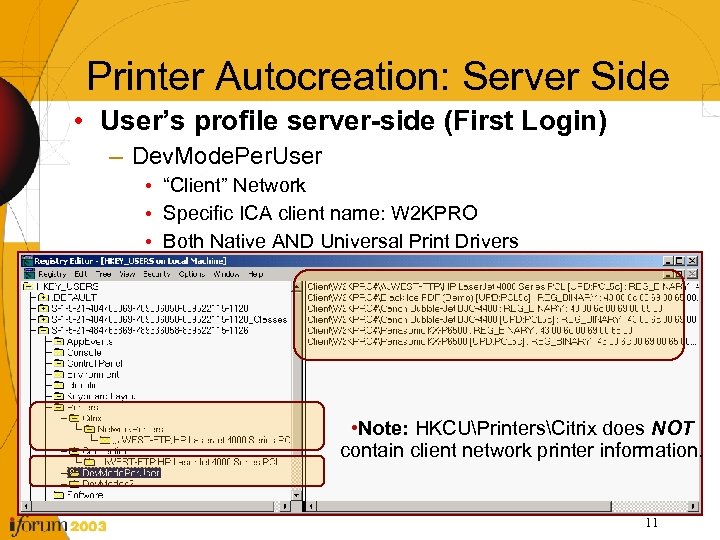 Printer Autocreation: Server Side • User’s profile server-side (First Login) – Dev. Mode. Per. User • “Client” Network • Specific ICA client name: W 2 KPRO • Both Native AND Universal Print Drivers • Note: HKCUPrintersCitrix does NOT contain client network printer information. 11
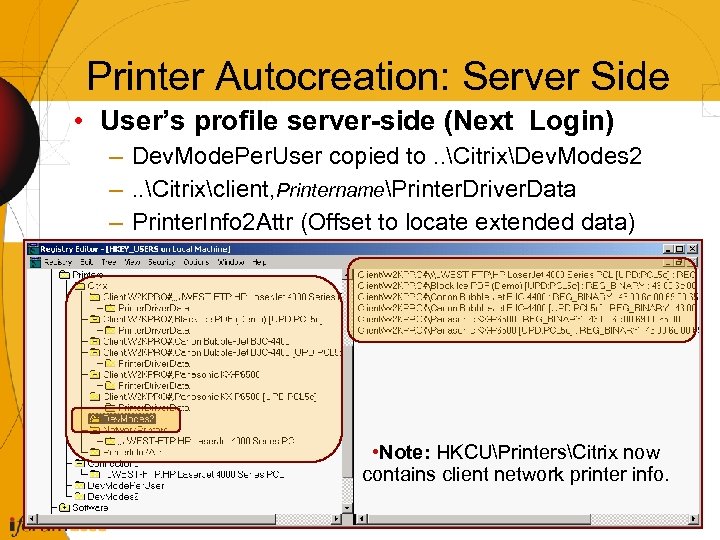 Printer Autocreation: Server Side • User’s profile server-side (Next Login) – Dev. Mode. Per. User copied to. . CitrixDev. Modes 2 –. . Citrixclient, PrinternamePrinter. Driver. Data – Printer. Info 2 Attr (Offset to locate extended data) • Note: HKCUPrintersCitrix now contains client network printer info. 12
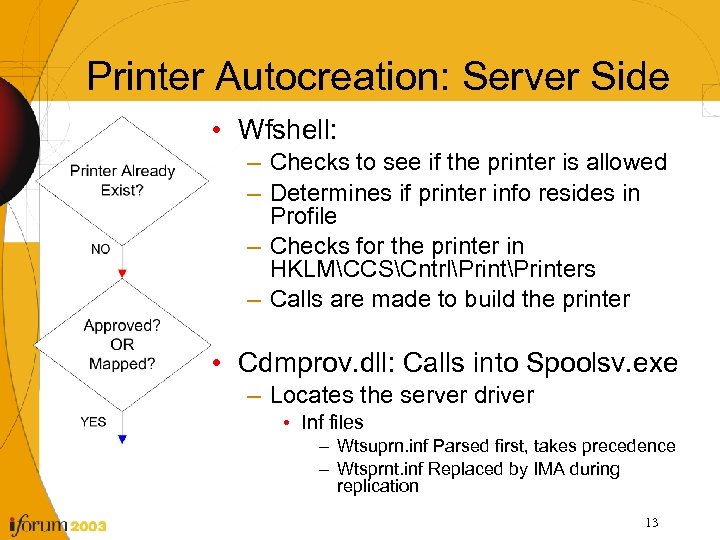 Printer Autocreation: Server Side • Wfshell: – Checks to see if the printer is allowed – Determines if printer info resides in Profile – Checks for the printer in HKLMCCSCntrlPrinters – Calls are made to build the printer • Cdmprov. dll: Calls into Spoolsv. exe – Locates the server driver • Inf files – Wtsuprn. inf Parsed first, takes precedence – Wtsprnt. inf Replaced by IMA during replication 13
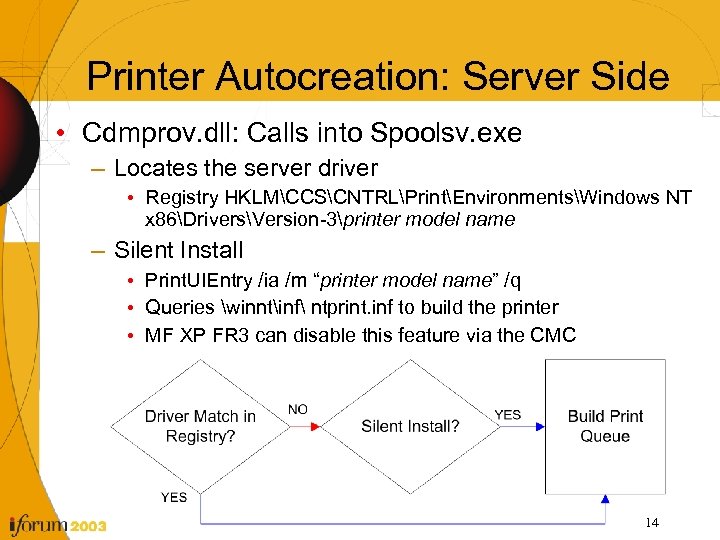 Printer Autocreation: Server Side • Cdmprov. dll: Calls into Spoolsv. exe – Locates the server driver • Registry HKLMCCSCNTRLPrintEnvironmentsWindows NT x 86DriversVersion-3printer model name – Silent Install • Print. UIEntry /ia /m “printer model name” /q • Queries winntinf ntprint. inf to build the printer • MF XP FR 3 can disable this feature via the CMC 14
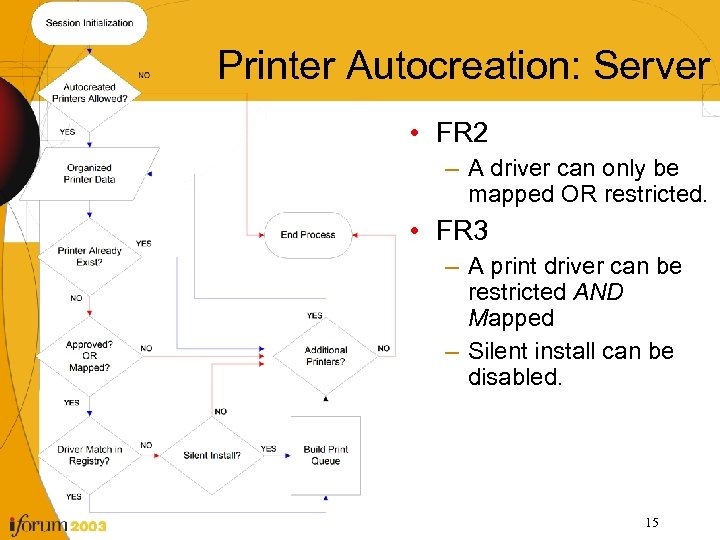 Printer Autocreation: Server • FR 2 – A driver can only be mapped OR restricted. • FR 3 – A print driver can be restricted AND Mapped – Silent install can be disabled. 15
 Printer Autocreation: Server Side • Mapping files – Wtsuprn. inf is read into IMA only during the MF XP install. • Qprinter utility from the Meta. Frame CD can be used to import WTSUPRN entries into the CMC post install. • Qprinter /imprmapping Mapping. File. Name – Wtsprnt. inf is rewritten not appended as changes are replicated. • Driver entries in the registry – HKLMSystemCCSControlPrintEnvironmentsWindows NT X 86 –. . Version-2 specifies Windows NT 4 drivers –. . . Version-3 specifies Windows 2000 drivers • Silent install – NTprint. inf contains the file names required to install the win 2 k native drivers. – Can be modified by 3 rd party vendors so their drivers appear in the pull down list during install or to update the native OS drivers. 16
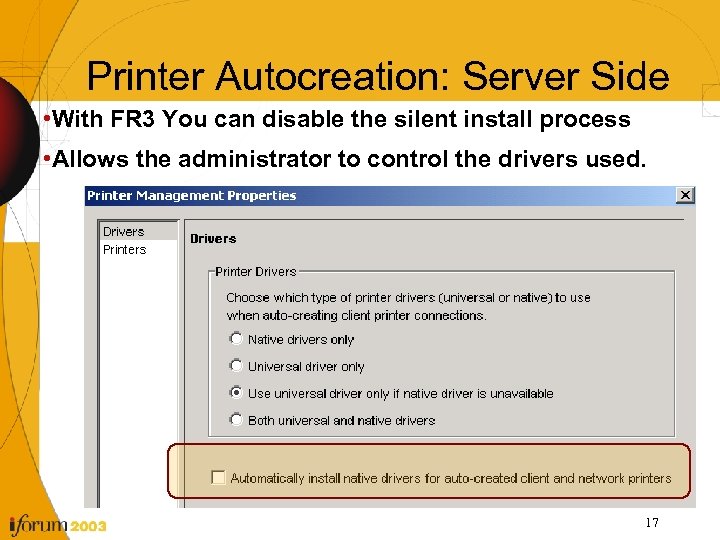 Printer Autocreation: Server Side • With FR 3 You can disable the silent install process • Allows the administrator to control the drivers used. 17
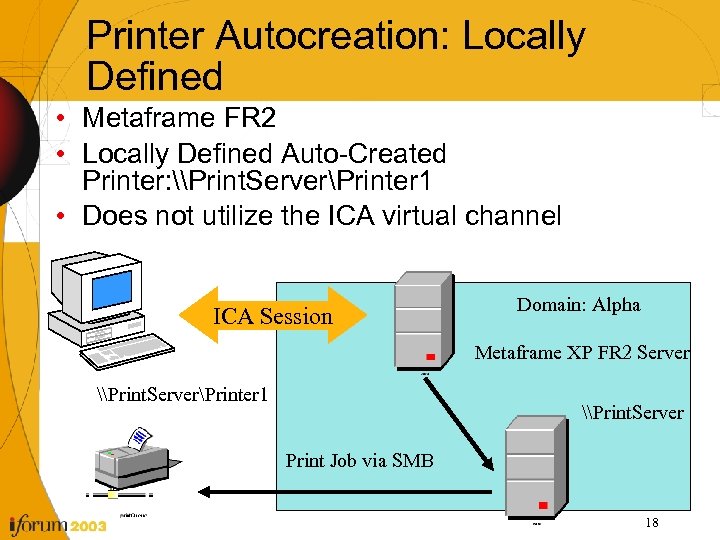 Printer Autocreation: Locally Defined • Metaframe FR 2 • Locally Defined Auto-Created Printer: \Print. ServerPrinter 1 • Does not utilize the ICA virtual channel ICA Session Domain: Alpha Metaframe XP FR 2 Server \Print. ServerPrinter 1 \Print. Server Print Job via SMB 18
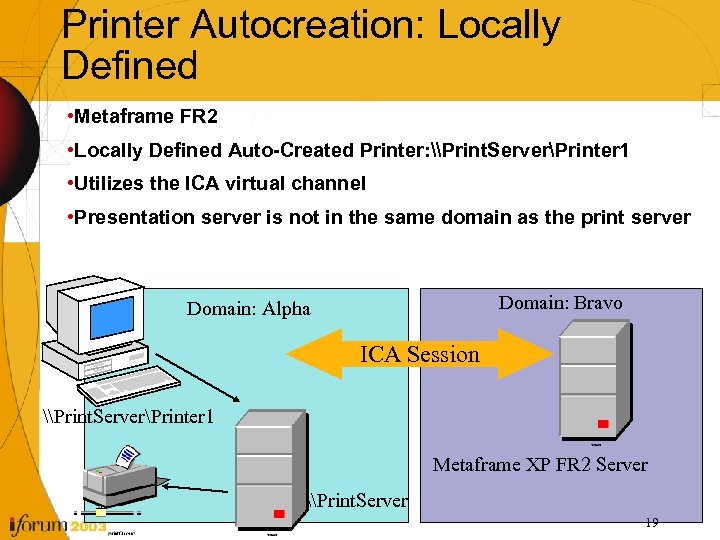 Printer Autocreation: Locally Defined • Metaframe FR 2 • Locally Defined Auto-Created Printer: \Print. ServerPrinter 1 • Utilizes the ICA virtual channel • Presentation server is not in the same domain as the print server Domain: Bravo Domain: Alpha ICA Session \Print. ServerPrinter 1 Metaframe XP FR 2 Server \Print. Server 19
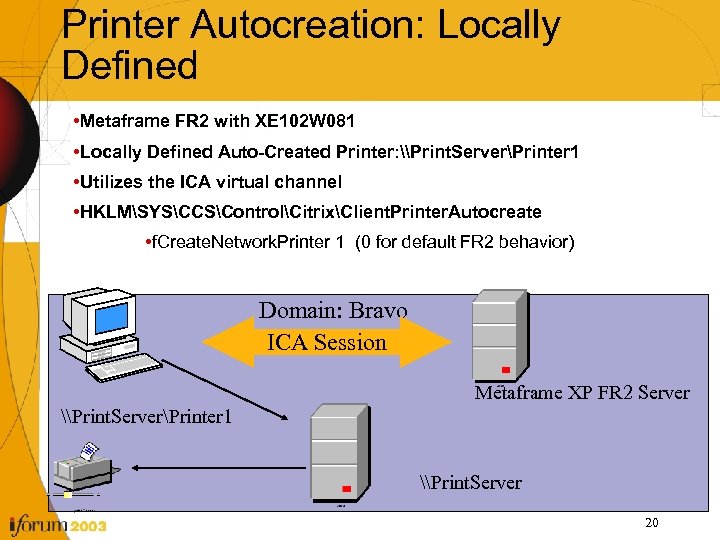 Printer Autocreation: Locally Defined • Metaframe FR 2 with XE 102 W 081 • Locally Defined Auto-Created Printer: \Print. ServerPrinter 1 • Utilizes the ICA virtual channel • HKLMSYSCCSControlCitrixClient. Printer. Autocreate • f. Create. Network. Printer 1 (0 for default FR 2 behavior) Domain: Bravo ICA Session Metaframe XP FR 2 Server \Print. ServerPrinter 1 \Print. Server 20
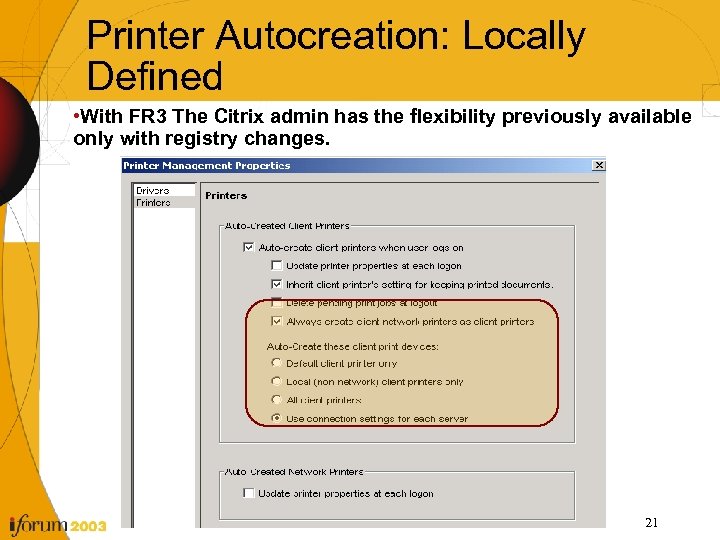 Printer Autocreation: Locally Defined • With FR 3 The Citrix admin has the flexibility previously available only with registry changes. 21
 Printer Autocreation • Can LPT port redirection be disabled but the users still auto-create their printers? ? ? • Can USB printers be autocreated? ? ? 22
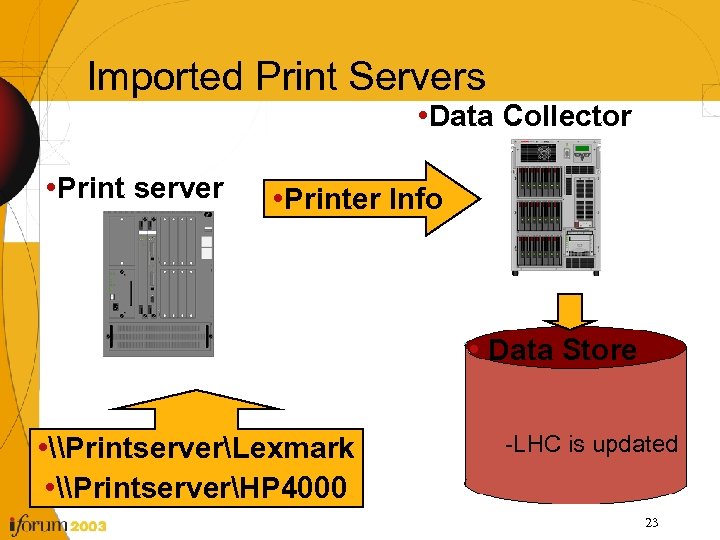 Imported Print Servers • Data Collector • Print server • Printer Info • Data Store • \PrintserverLexmark • \PrintserverHP 4000 -LHC is updated 23
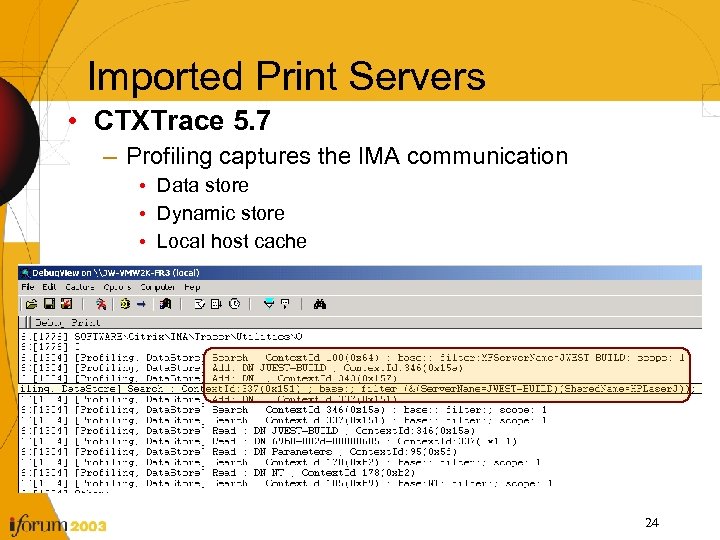 Imported Print Servers • CTXTrace 5. 7 – Profiling captures the IMA communication • Data store • Dynamic store • Local host cache 24
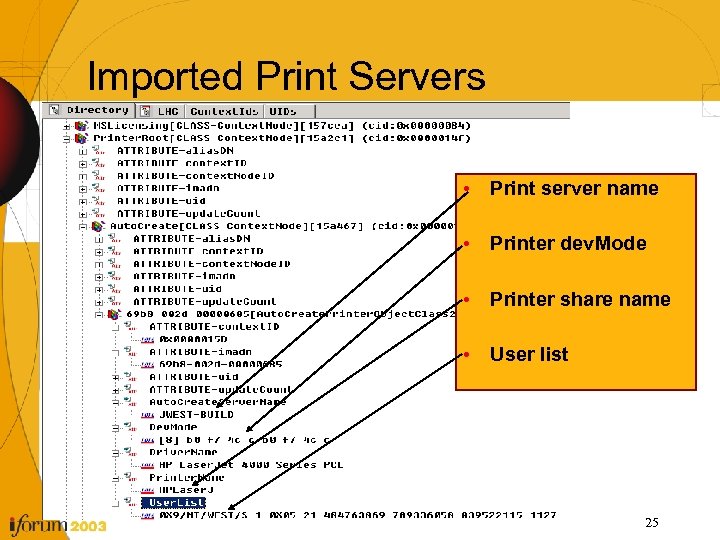 Imported Print Servers • Print server name • Printer dev. Mode • Printer share name • User list 25
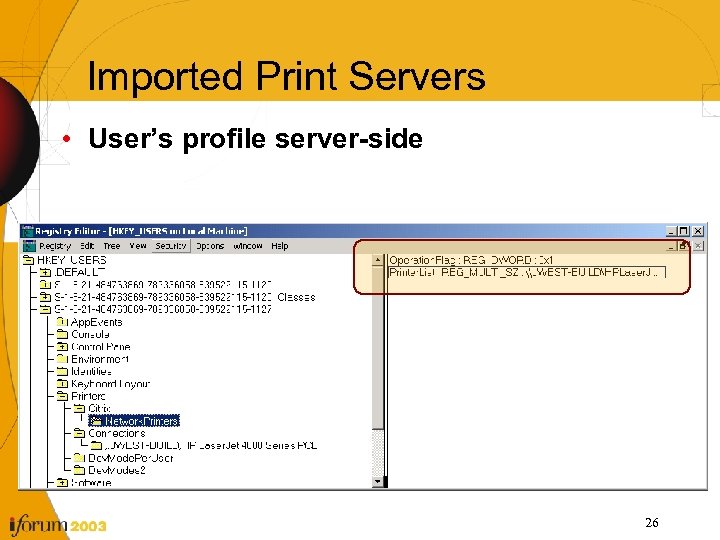 Imported Print Servers • User’s profile server-side 26
 Imported Print Servers • Auto-connected Printers – Do not use the ICA channel – Use MS SMB printing – The print job does not spool on the Metaframe server – The printers do not have associated registry keys in HKLM only HKCU – Print jobs might be slower to an autoconnected printer if the print server is over a WAN link from the Metaframe server. – The print jobs cannot be throttled and do not use the ICA compression 27
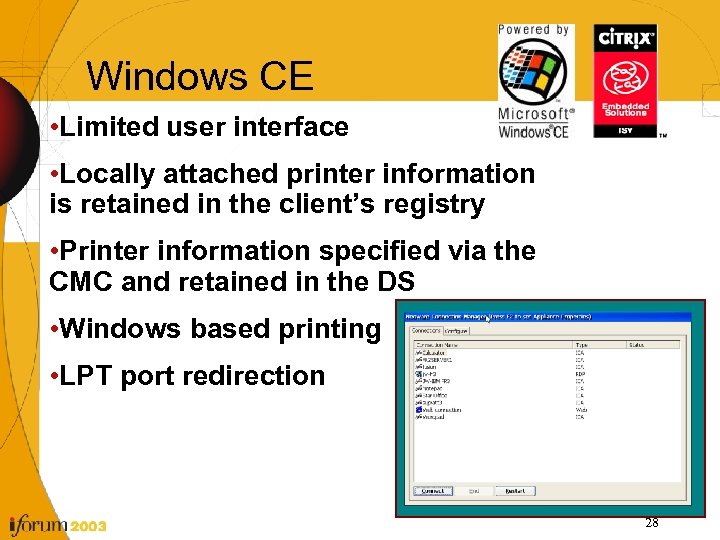 Windows CE • Limited user interface • Locally attached printer information is retained in the client’s registry • Printer information specified via the CMC and retained in the DS • Windows based printing • LPT port redirection 28
 Windows CE • Printcfg. exe – User required to select print driver and client port – Adds registry entry to the user’s profile • HKCUSoftwareCitrixAutocreated. Client PrinterClientname • Citrix Management Console – No end user action required – 2 nd login required to complete the process – Admin specifies the printer information per terminal name • Printer name • Driver • Client side Port 29
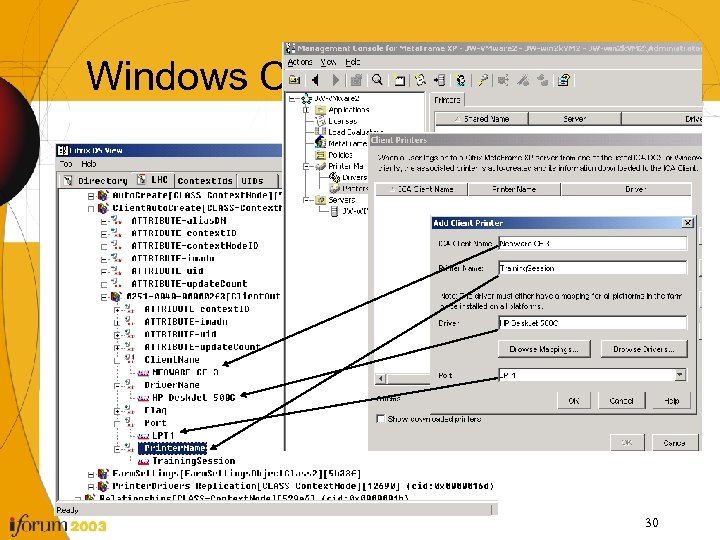 Windows CE 30
 Windows CE • Deleting the CE client printers – Sets the status from “downloaded” to “deleting” – Requires the client to log in again to complete the action. – Dependant upon the client name • What if the client name is changed? ? ? – The printer will remain as “deleting”. – Does not affect the performance of the server. • How do you clear the “deleting” printers? ? – The same client name needs to login to complete the delete process 31
 Universal Print Driver(UPD) “People can have the Model T in any colour--so long as it's black. ” Henry Ford • Similar to the first version of the Universal Print Driver…. Any color as long as its black. 32
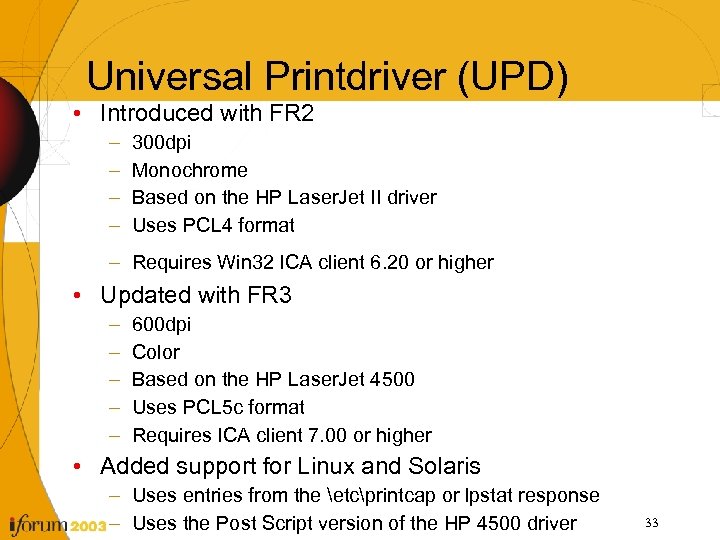 Universal Printdriver (UPD) • Introduced with FR 2 – – 300 dpi Monochrome Based on the HP Laser. Jet II driver Uses PCL 4 format – Requires Win 32 ICA client 6. 20 or higher • Updated with FR 3 – – – 600 dpi Color Based on the HP Laser. Jet 4500 Uses PCL 5 c format Requires ICA client 7. 00 or higher • Added support for Linux and Solaris – Uses entries from the etcprintcap or lpstat response – Uses the Post Script version of the HP 4500 driver 33
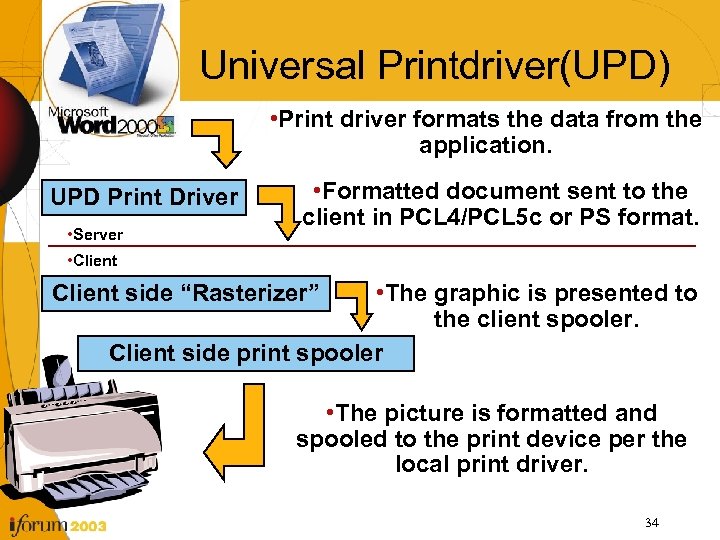 Universal Printdriver(UPD) • Print driver formats the data from the application. UPD Print Driver • Server • Formatted document sent to the client in PCL 4/PCL 5 c or PS format. • Client • The graphic is presented to the client spooler. Client side print spooler Client side “Rasterizer” • The picture is formatted and spooled to the print device per the local print driver. 34
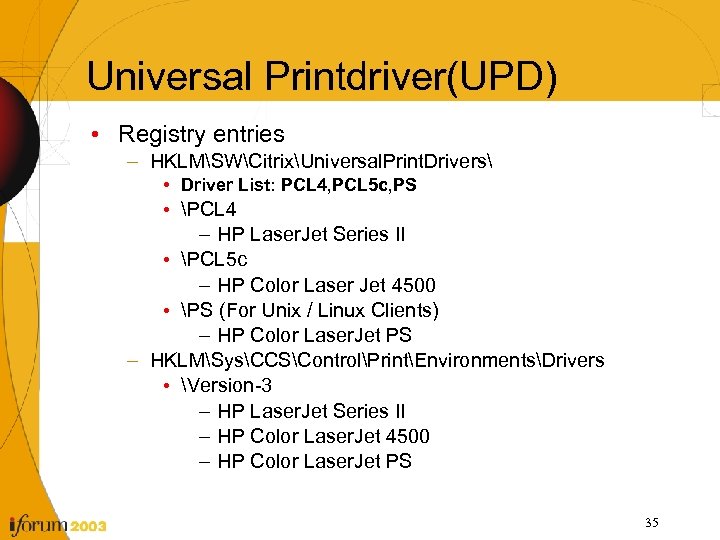 Universal Printdriver(UPD) • Registry entries – HKLMSWCitrixUniversal. Print. Drivers • Driver List: PCL 4, PCL 5 c, PS • PCL 4 – HP Laser. Jet Series II • PCL 5 c – HP Color Laser Jet 4500 • PS (For Unix / Linux Clients) – HP Color Laser. Jet PS – HKLMSysCCSControlPrintEnvironmentsDrivers • Version-3 – HP Laser. Jet Series II – HP Color Laser. Jet 4500 – HP Color Laser. Jet PS 35
 Universal Printdriver(UPD) • Can the Universal Print driver be used when printing directly to the print server? ? ? • Can UPD II be disabled so only UPD I will be used without changing the feature release level? ? ? 36
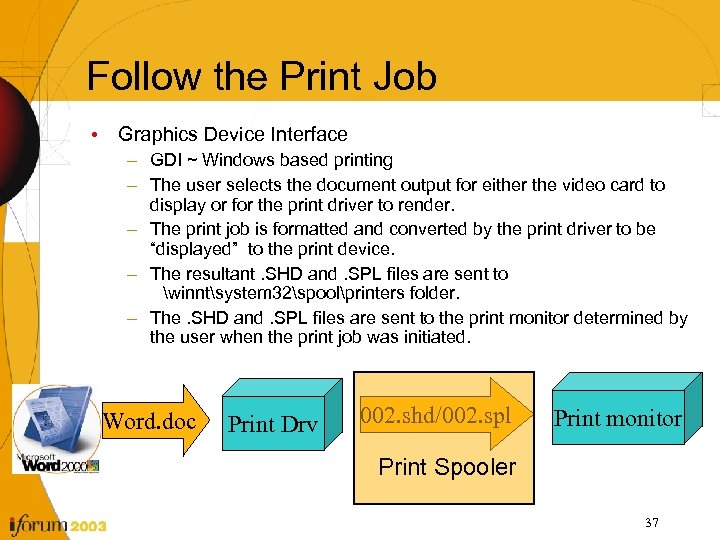 Follow the Print Job • Graphics Device Interface – GDI ~ Windows based printing – The user selects the document output for either the video card to display or for the print driver to render. – The print job is formatted and converted by the print driver to be “displayed” to the print device. – The resultant. SHD and. SPL files are sent to winntsystem 32spoolprinters folder. – The. SHD and. SPL files are sent to the print monitor determined by the user when the print job was initiated. Word. doc Print Drv 002. shd/002. spl Print monitor Print Spooler 37
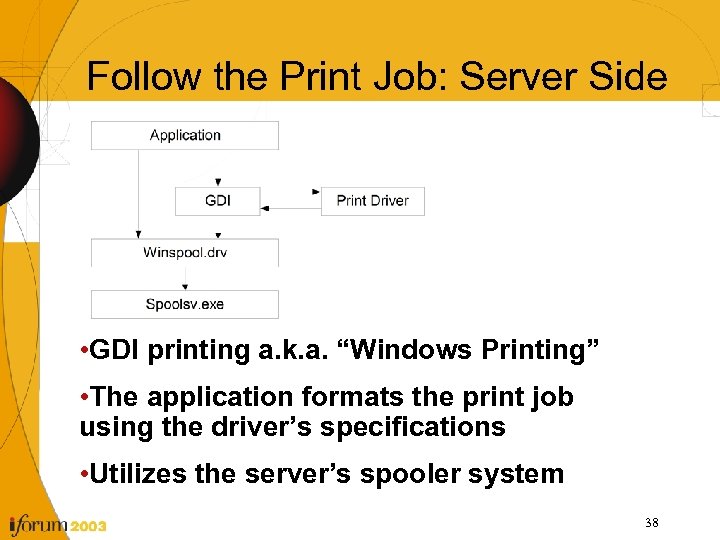 Follow the Print Job: Server Side • GDI printing a. k. a. “Windows Printing” • The application formats the print job using the driver’s specifications • Utilizes the server’s spooler system 38
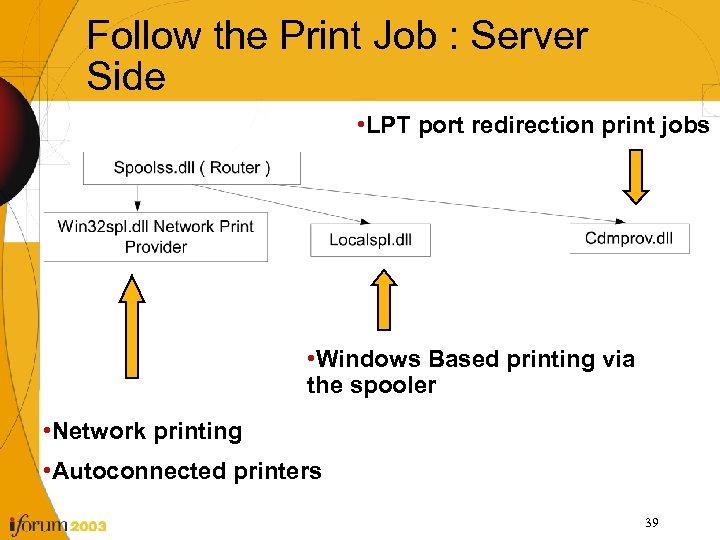 Follow the Print Job : Server Side • LPT port redirection print jobs • Windows Based printing via the spooler • Network printing • Autoconnected printers 39
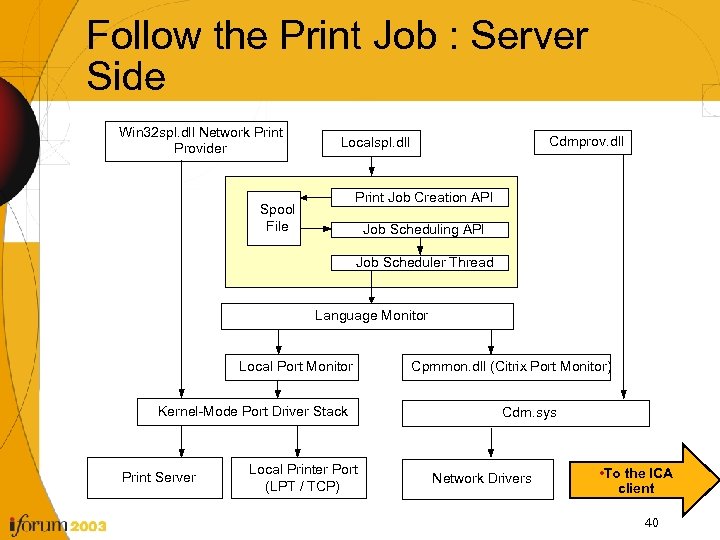 Follow the Print Job : Server Side Win 32 spl. dll Network Print Provider Cdmprov. dll Localspl. dll Print Job Creation API Spool File Job Scheduling API Job Scheduler Thread Language Monitor Local Port Monitor Kernel-Mode Port Driver Stack Print Server Local Printer Port (LPT / TCP) Cpmmon. dll (Citrix Port Monitor) Cdm. sys Network Drivers • To the ICA client 40
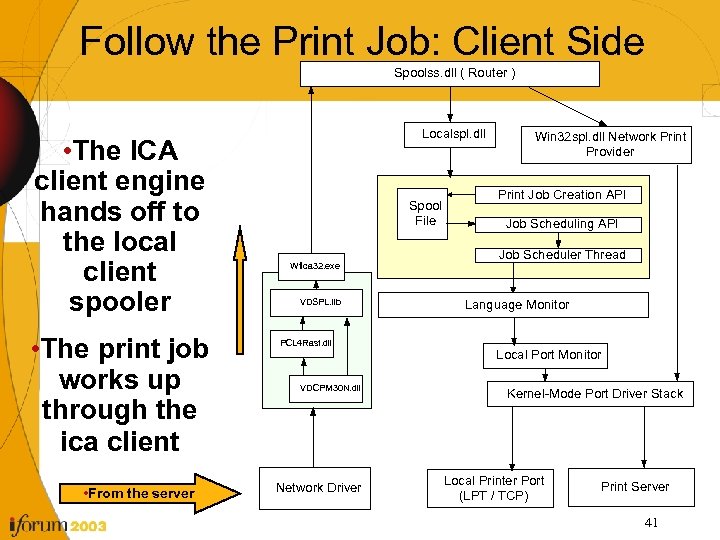 Follow the Print Job: Client Side Spoolss. dll ( Router ) • The ICA client engine hands off to the local client spooler • The print job works up through the ica client • From the server Localspl. dll Spool File Wfica 32. exe VDSPL. lib PCL 4 Rast. dll VDCPM 30 N. dll Network Driver Win 32 spl. dll Network Print Provider Print Job Creation API Job Scheduling API Job Scheduler Thread Language Monitor Local Port Monitor Kernel-Mode Port Driver Stack Local Printer Port (LPT / TCP) Print Server 41
 Utilities • Print Migrator 3 • SMC Console • Project Compatibility 42
 Utilities: Print Migrator 3 • Print Migrator 3 from Microsoft – Allows all the print driver info to be saved to a cab file – Allows a print server to be replicated in a test environment – Allows Citrix Support to replicate the customer’s printing environment down to the exact files 43
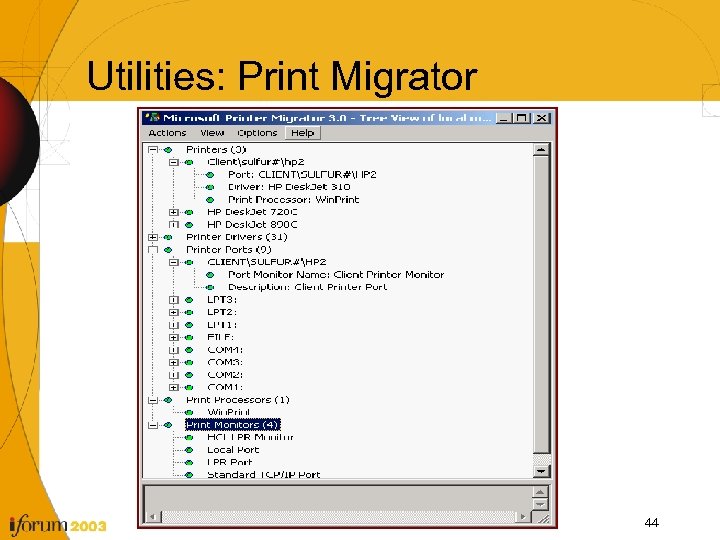 Utilities: Print Migrator 44
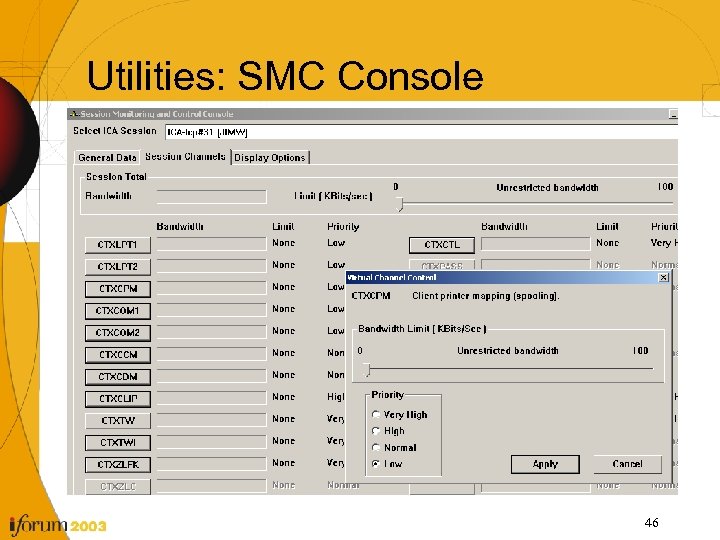
 Utilities: SMC Console • SMC console from Citrix CDN – Allows a live session’s bandwidth to be temporarily limited to test the impact of BW restrictions for Printing. – Provides real time insight on the Virtual channel usage. • Citrix. com/cdn – Citrix Server SDK ver 2. 3 is the latest as of 6/11/2003 and includes the SMC components and supports FR 3. No sessions are returned in the pull down list if the wrong version is used. 45
 Utilities: SMC Console 46
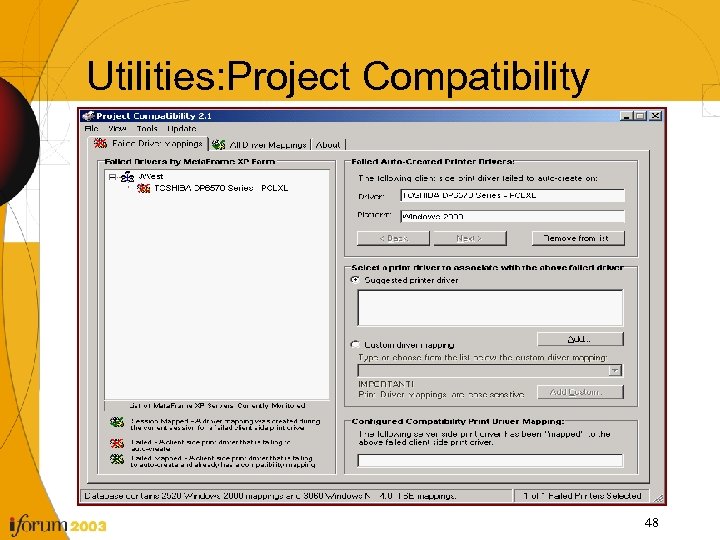
 Utilities: Project Compatibility • Project Compatibility http: //www. dabcc. com • Not developed by Citrix • Written using the SDKs • Pulls event viewer info from the servers • Dynamically sets print mappings • Reads and Writes to the data store 47
 Utilities: Project Compatibility 48
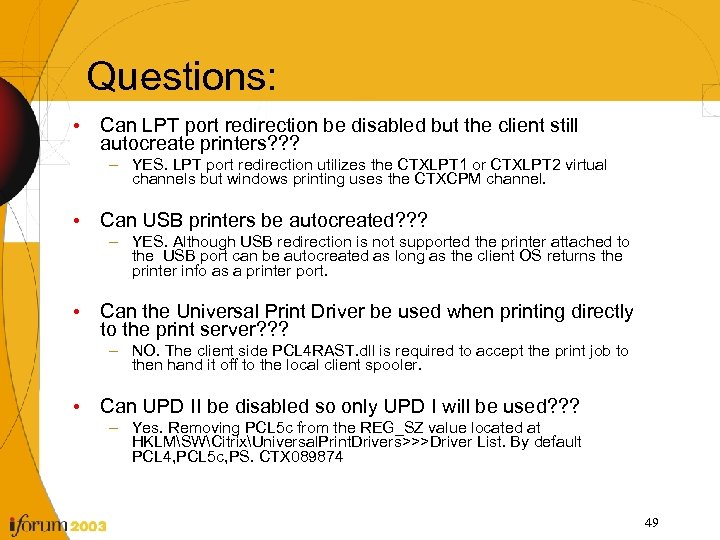 Questions: • Can LPT port redirection be disabled but the client still autocreate printers? ? ? – YES. LPT port redirection utilizes the CTXLPT 1 or CTXLPT 2 virtual channels but windows printing uses the CTXCPM channel. • Can USB printers be autocreated? ? ? – YES. Although USB redirection is not supported the printer attached to the USB port can be autocreated as long as the client OS returns the printer info as a printer port. • Can the Universal Print Driver be used when printing directly to the print server? ? ? – NO. The client side PCL 4 RAST. dll is required to accept the print job to then hand it off to the local client spooler. • Can UPD II be disabled so only UPD I will be used? ? ? – Yes. Removing PCL 5 c from the REG_SZ value located at HKLMSWCitrixUniversal. Print. Drivers>>>Driver List. By default PCL 4, PCL 5 c, PS. CTX 089874 49
 • Questions? ? ?
 Thank You! Jim West Global Escalation Team CSEIT Event 2003