


 Скачать презентацию Principles of Information Systems Tenth Edition Chapter 4
f55a3ea372993347bbcc3591a7ab1eba.ppt
- Количество слайдов: 59
 Principles of Information Systems, Tenth Edition Chapter 4 Software: Systems and Application Software
 Principles and Learning Objectives • Systems and application software critical in helping individuals and organizations achieve their goals – Identify and briefly describe the functions of the two basic kinds of software – Outline the role of the operating system and identify the features of several popular operating systems Principles of Information Systems, Tenth Edition 2
 Principles and Learning Objectives (continued) • Organizations use off-the-shelf application software for common business needs and proprietary application software to meet unique business needs and provide a competitive advantage – Discuss how application software can support personal, workgroup, and enterprise business objectives – Identify three basic approaches to developing application software and discuss the pros and cons of each Principles of Information Systems, Tenth Edition 3
 Principles and Learning Objectives (continued) • Organizations should choose programming languages with functional characteristics that are appropriate for the task at hand well suited to the skills and experience of the programming staff – Outline the overall evolution and importance of programming languages and clearly differentiate among the generations of programming languages Principles of Information Systems, Tenth Edition 4
 Principles and Learning Objectives (continued) • The software industry continues to undergo constant change; users need to be aware of recent trends and issues to be effective in their business and personal life – Identify several key software issues and trends that have an impact on organizations and individuals Principles of Information Systems, Tenth Edition 5
 Why Learn About Software? • Software is indispensable for any computer system and the people using it • Applications software: – Key to helping you achieve your career goals and enrich your life – Stock trading, scientific, accounting, tax, etc. Principles of Information Systems, Tenth Edition 6
 An Overview of Software • Computer programs: – Sequences of instructions for the computer • Documentation: – Describes program functions to help the user operate the computer system • Types of software: – Systems software – Application software Principles of Information Systems, Tenth Edition 7
 Systems Software • Set of programs that coordinates the activities and functions of hardware and other programs • Computer system platform: – Combination of a hardware configuration and systems software Principles of Information Systems, Tenth Edition 8
 Application Software • Helps users solve particular problems • In most cases, resides on the computer’s hard disk • Can be stored on CDs, DVDs, and even USB flash drives Principles of Information Systems, Tenth Edition 9
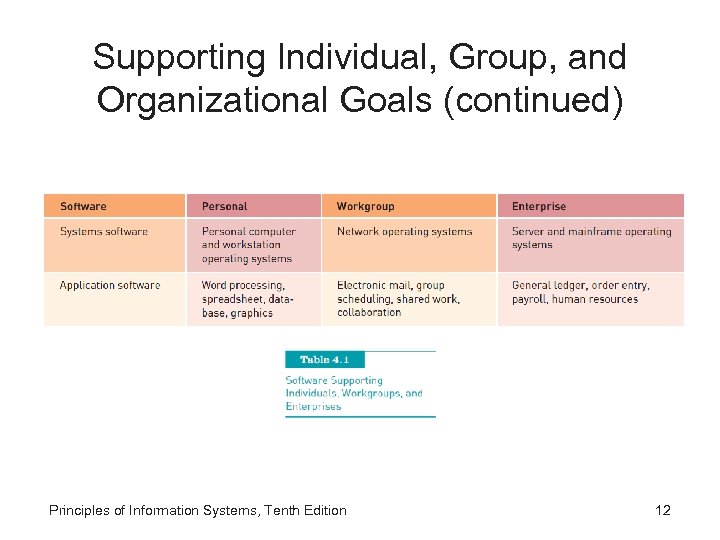
 Supporting Individual, Group, and Organizational Goals • Sphere of influence: – Scope of problems and opportunities addressed by a particular organization • Personal sphere of influence: – Serve the needs of an individual user • Personal productivity software: – Help users improve their personal effectiveness • Workgroup: – When two or more people work together to achieve a common goal Principles of Information Systems, Tenth Edition 10
 Supporting Individual, Group, and Organizational Goals (continued) • Workgroup sphere of influence: – Serves the needs of a workgroup • Enterprise sphere of influence: – Supports the firm in its interaction with its environment Principles of Information Systems, Tenth Edition 11
 Supporting Individual, Group, and Organizational Goals (continued) Principles of Information Systems, Tenth Edition 12
 Systems Software • Controls the operations of computer hardware • Supports the application programs’ problem-solving capabilities • Types of systems software: – Operating systems – Utility programs – Middleware Principles of Information Systems, Tenth Edition 13
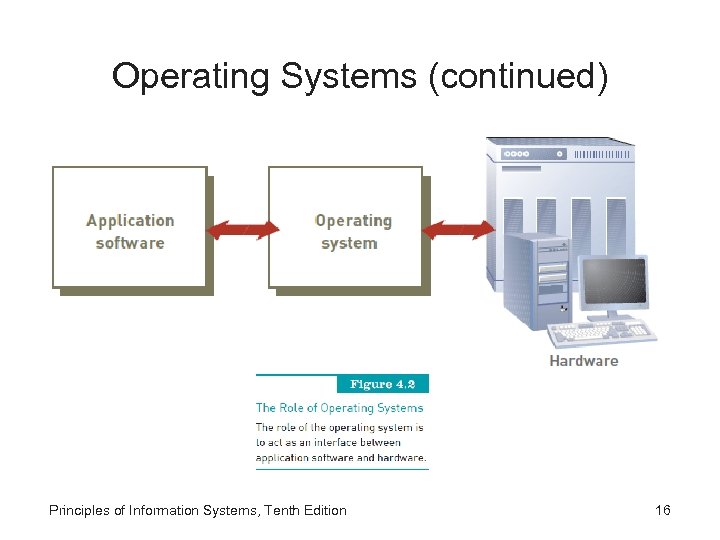
 Operating Systems • Set of programs that controls computer hardware and acts as an interface with application programs • Kernel: – Ties all components of the OS together and regulates other programs Principles of Information Systems, Tenth Edition 14
 Operating Systems (continued) • Combinations of OSs, computers, and users: – – Single computer with a single user Single computer with multiple simultaneous users Multiple computers with multiple users Special-purpose computers Principles of Information Systems, Tenth Edition 15
 Operating Systems (continued) Principles of Information Systems, Tenth Edition 16
 Operating Systems (continued) • Activities performed by the operating system: – Perform common computer hardware functions – Provide a user interface and input/output management – Provide a degree of hardware independence – Manage system memory Principles of Information Systems, Tenth Edition 17
 Operating Systems (continued) • Activities performed by the operating system (continued): – – Manage processing tasks Provide networking capability Control access to system resources Manage files Principles of Information Systems, Tenth Edition 18
 Operating Systems (continued) • Common hardware functions: – – Get input from keyboard or another input device Retrieve data from disks Store data on disks Display information on a monitor or printer Principles of Information Systems, Tenth Edition 19
 Operating Systems (continued) • User interface and input/output management – User interface: • Allows individuals to access and command the computer system – Command-based user interface: • Requires that text commands be given to the computer to perform basic activities – Graphical user interface (GUI): • Uses icons and menus displayed on screen to send commands to the computer system Principles of Information Systems, Tenth Edition 20
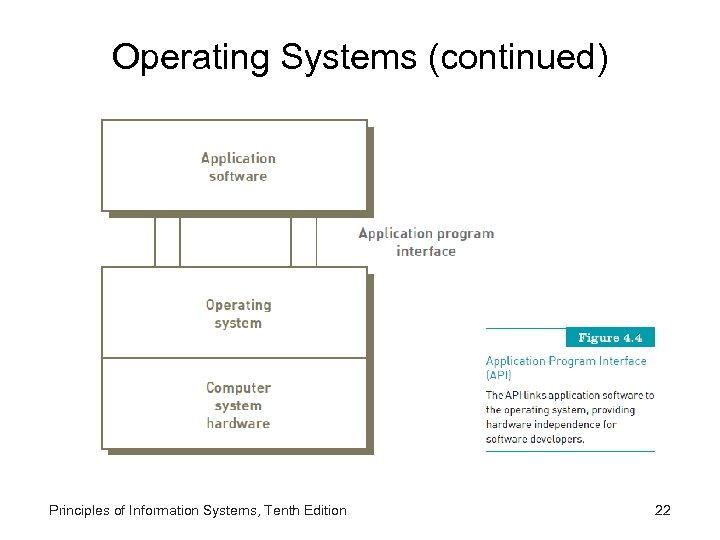
 Operating Systems (continued) • Hardware independence: – Application program interface (API): • Allows applications to make use of the operating system • Memory management: – Allows computer to execute program instructions effectively and to speed processing Principles of Information Systems, Tenth Edition 21
 Operating Systems (continued) Principles of Information Systems, Tenth Edition 22
 Operating Systems (continued) • Processing tasks: – Multitasking: • More than one program can run at the same time – Time-sharing: • Allows more than one person to use a computer system at the same time – Scalability: • Ability of the computer to handle an increasing number of concurrent users smoothly Principles of Information Systems, Tenth Edition 23
 Operating Systems (continued) • Networking capability: – Allows computers in a network to send and receive data and share computing resources • Access to system resources and security: – Protection against unauthorized access – OS establishes a logon procedure • File management: – Ensures that files in secondary storage are available when needed and that they are protected from access by unauthorized users Principles of Information Systems, Tenth Edition 24
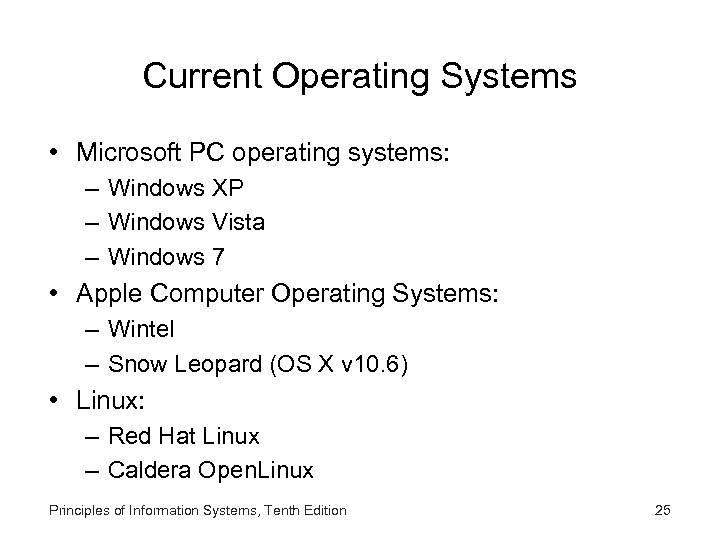 Current Operating Systems • Microsoft PC operating systems: – Windows XP – Windows Vista – Windows 7 • Apple Computer Operating Systems: – Wintel – Snow Leopard (OS X v 10. 6) • Linux: – Red Hat Linux – Caldera Open. Linux Principles of Information Systems, Tenth Edition 25
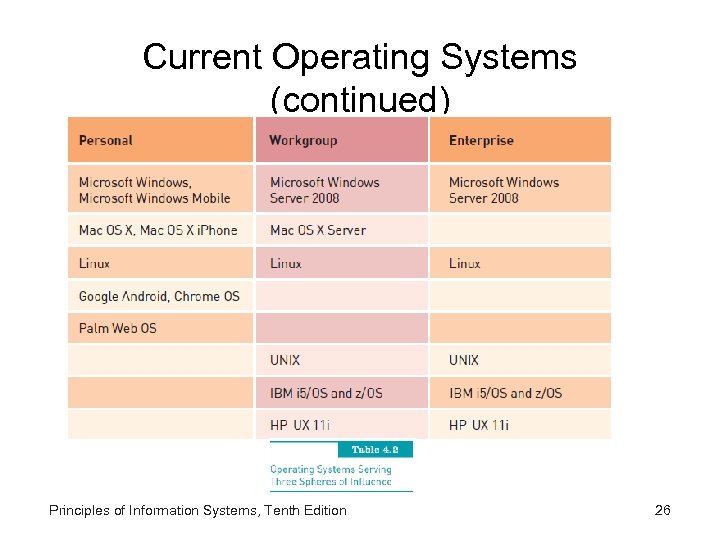 Current Operating Systems (continued) Principles of Information Systems, Tenth Edition 26
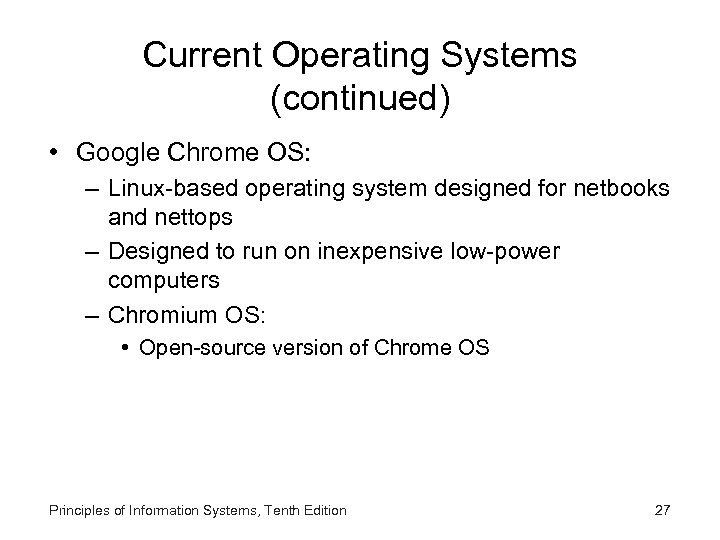 Current Operating Systems (continued) • Google Chrome OS: – Linux-based operating system designed for netbooks and nettops – Designed to run on inexpensive low-power computers – Chromium OS: • Open-source version of Chrome OS Principles of Information Systems, Tenth Edition 27
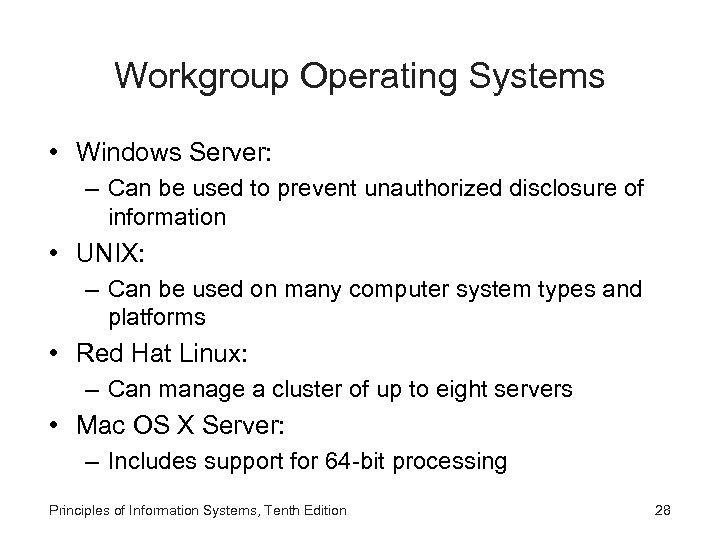 Workgroup Operating Systems • Windows Server: – Can be used to prevent unauthorized disclosure of information • UNIX: – Can be used on many computer system types and platforms • Red Hat Linux: – Can manage a cluster of up to eight servers • Mac OS X Server: – Includes support for 64 -bit processing Principles of Information Systems, Tenth Edition 28
 Enterprise Operating Systems • z/OS: – IBM’s first 64 -bit enterprise OS • HP-UX and Linux: – HP-UX: • Robust UNIX-based OS from Hewlett-Packard • Supports Internet, database, and business applications on server and mainframe enterprise systems Principles of Information Systems, Tenth Edition 29
 Operating Systems for Small Computers, Embedded Computers, and Special-Purpose Devices • Cell phone embedded systems and operating systems: – Embedded systems provide communication and limited personal information management services • Windows embedded: – Included with or embedded into small computer devices • Proprietary Linux-based systems: – Linux is a major competitor to Symbian Principles of Information Systems, Tenth Edition 30
 Utility Programs • Help to perform maintenance or correct problems with a computer system • Common types of utilities: – – – Hardware utilities Security utilities File-compression utilities Spam-filtering utilities Network and Internet utilities Server and mainframe utilities Principles of Information Systems, Tenth Edition 31
 Utility Programs (continued) • Other utilities: – Key logging software allows a manager to see every keystroke a worker makes on a computer system – Monitoring software can catalog the Internet sites that employees visit – Keyboard shortcut utilities allow users to map common tasks to defined keyboard combinations Principles of Information Systems, Tenth Edition 32
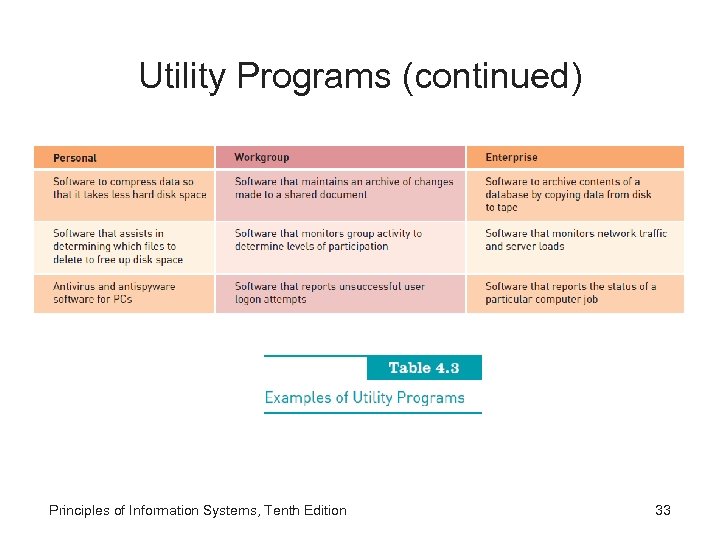 Utility Programs (continued) Principles of Information Systems, Tenth Edition 33
 Middleware • Software that allows different systems to communicate and exchange data • Can also be used as an interface between the Internet and older legacy systems • Service-oriented architecture (SOA): – Uses modular application services to allow users to interact with systems, and systems to interact with each other Principles of Information Systems, Tenth Edition 34
 Application Software • Application programs: – Interact with systems software – Help you perform common tasks, such as: • Creating and formatting text documents • Performing calculations • Managing information Principles of Information Systems, Tenth Edition 35
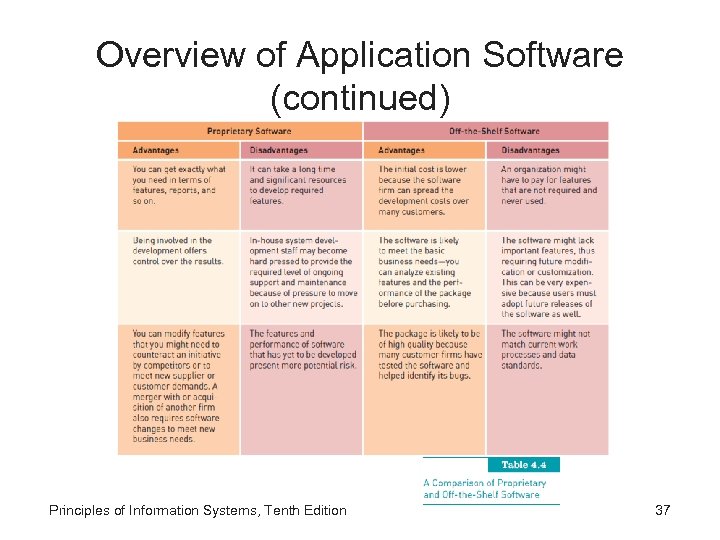
 Overview of Application Software • Proprietary software: – One-of-a-kind program for a specific application, usually developed and owned by a single company • Off-the-shelf software: – Existing software program that is purchased • Application service provider (ASP): – Company that can provide software, support, and computer hardware on which to run the software from the user’s facilities over a network Principles of Information Systems, Tenth Edition 36
 Overview of Application Software (continued) Principles of Information Systems, Tenth Edition 37
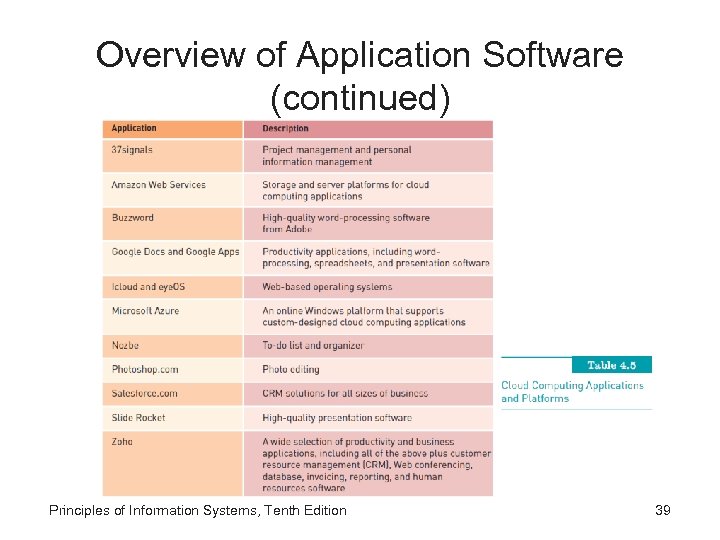
 Overview of Application Software (continued) • Software as a service (Saa. S): – Allows businesses to subscribe to Web-delivered business application software by paying a monthly service charge or a per-use fee – Can reduce expenses by sharing its running applications among many businesses • Cloud computing: – Use of computing resources on the Internet (the cloud) rather than on local computers Principles of Information Systems, Tenth Edition 38
 Overview of Application Software (continued) Principles of Information Systems, Tenth Edition 39
 Personal Application Software • • Word processing Spreadsheet analysis Database applications Presentation graphics program Personal information managers Software suites and integrated software packages Other personal application software Principles of Information Systems, Tenth Edition 40
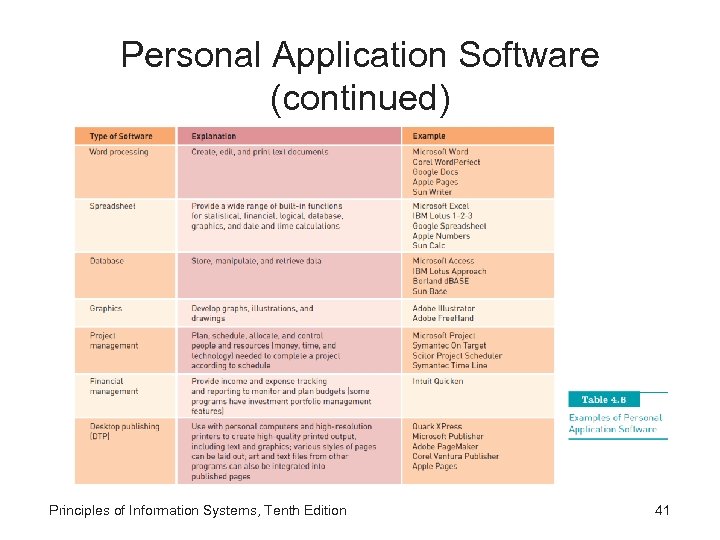 Personal Application Software (continued) Principles of Information Systems, Tenth Edition 41
 Mobile Application Software • Operating systems designed for smartphones include: – OS X i. Phone, Android, and Web. OS • Tens of thousands of applications have been: – Developed by third parties for the i. Phone • Palm Web. OS: – Has only recently released its software development kit Principles of Information Systems, Tenth Edition 42
 Workgroup Application Software • Support teamwork, whether people are in the same location or dispersed around the world • Groupware: – Software that helps groups of people work together more effectively Principles of Information Systems, Tenth Edition 43
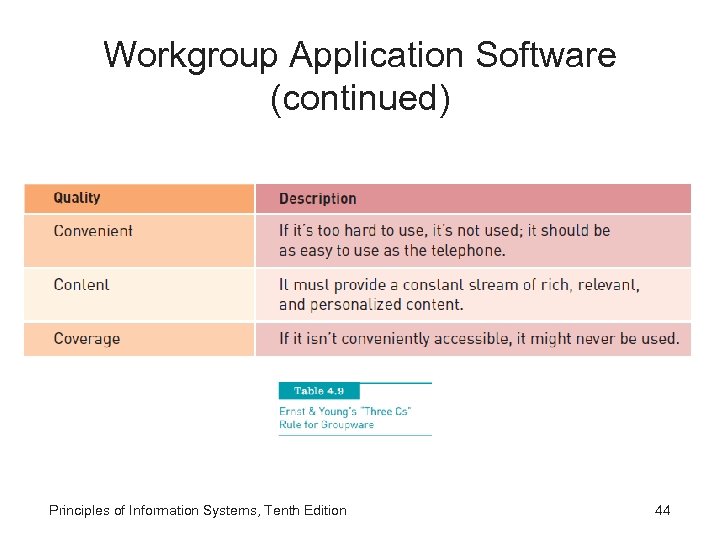 Workgroup Application Software (continued) Principles of Information Systems, Tenth Edition 44
 Enterprise Application Software • Software that benefits an entire organization • Enterprise resource planning (ERP) software: – Set of integrated programs that manage a company’s vital business operations for an entire multisite, global organization Principles of Information Systems, Tenth Edition 45
 Application Software for Information, Decision Support, and Specialized Purposes • Available in every industry: – Specialized application software for information, decision support, and other purposes Principles of Information Systems, Tenth Edition 46
 Programming Languages • Sets of keywords, symbols, and a system of rules for constructing statements: – By which humans can communicate instructions to be executed by a computer • Program code: – Set of instructions that signal the CPU to perform circuit-switching operations • Syntax – Set of rules associated with a programming language Principles of Information Systems, Tenth Edition 47
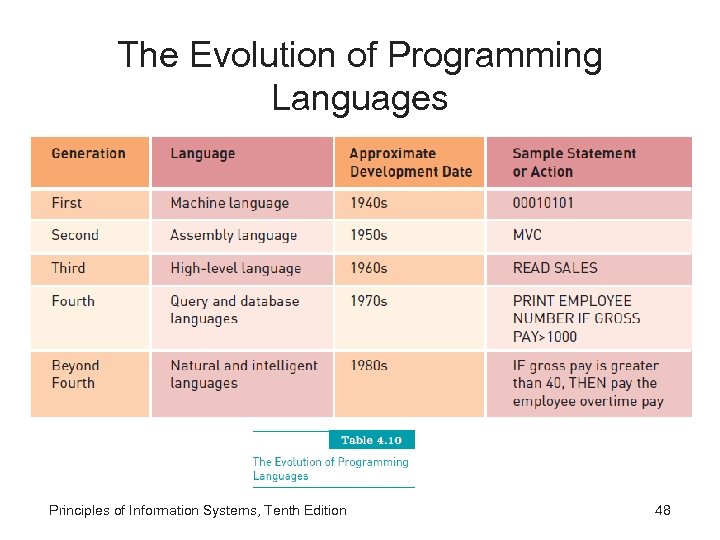 The Evolution of Programming Languages Principles of Information Systems, Tenth Edition 48
 Visual, Object-Oriented, and Artificial Intelligence Languages • Visual programming: – Uses a graphical or “visual” interface combined with text-based commands • Object-oriented programming languages: – Programming languages that are based on objects • Fifth-generation languages (5 GLs): – Used to create artificial intelligence or expert systems applications • Compiler: – Converts the programmer’s source code into machine-language instructions Principles of Information Systems, Tenth Edition 49
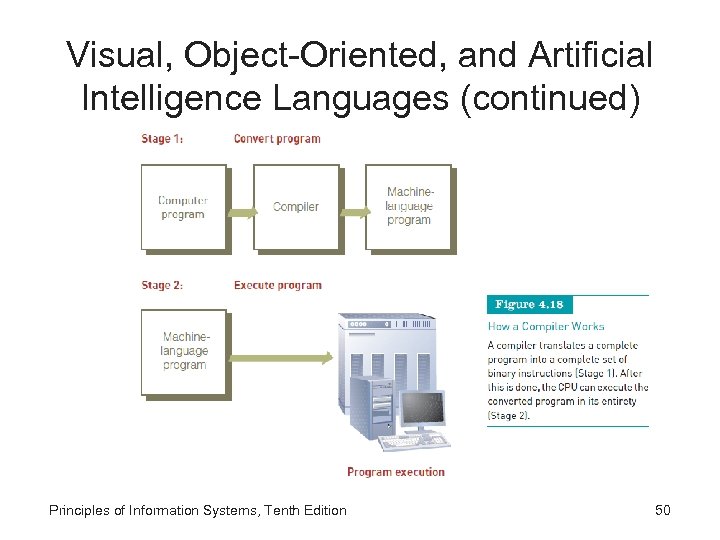 Visual, Object-Oriented, and Artificial Intelligence Languages (continued) Principles of Information Systems, Tenth Edition 50
 Software Issues and Trends • Software bug: – Defect in a program that keeps it from performing as it should • Some tips for reducing impact of software bugs: – Register all software – Check read-me files for work-arounds – Access support area of the manufacturer’s Web site for patches – Install latest software updates Principles of Information Systems, Tenth Edition 51
 Copyrights and Licenses • Most software products are protected by law using copyright or licensing provisions: – In some cases, you are given unlimited use of software on one or two computers – In other cases, you pay for your usage; if you use the software more, you pay more • Some software now requires that you register or activate it before it can be fully used Principles of Information Systems, Tenth Edition 52
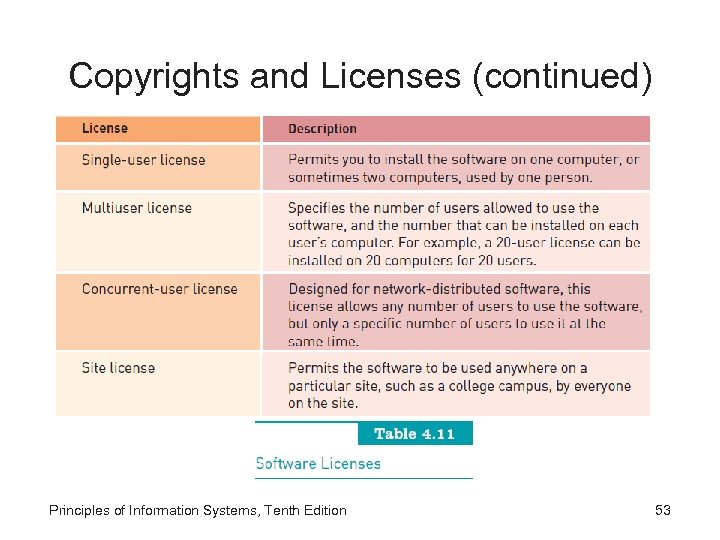 Copyrights and Licenses (continued) Principles of Information Systems, Tenth Edition 53
 Freeware and Open-Source Software • Freeware: – Software that is made available to the public for free • Open-source software: – Distributed, typically for free, with the source code • GPL grants you the right to: – Run the program for any purpose – Study how the program works and adapt it to your needs – Redistribute copies so you can help others – Improve the program and release improvements to the public Principles of Information Systems, Tenth Edition 54
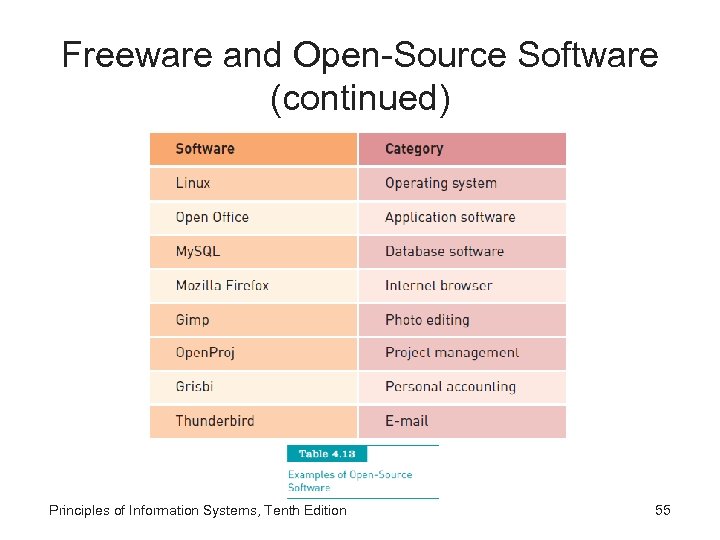 Freeware and Open-Source Software (continued) Principles of Information Systems, Tenth Edition 55
 Software Upgrades • Software companies revise their programs and sell new versions periodically • Most software upgrades: – Offer new features and capabilities • Some users do not always get the most current software upgrades or versions: – Unless it includes significant improvements or capabilities Principles of Information Systems, Tenth Edition 56
 Global Software Support • Supporting local operations: – One of the biggest challenges IS teams face when putting together standardized, company-wide systems • Trend: – Outsourcing global support to one or more third-party distributors Principles of Information Systems, Tenth Edition 57
 Summary • Main categories of software: – Systems software and application software • Operating system (OS): – Set of computer programs that controls the computer hardware to support users’ computing needs • Three approaches to developing application software: – Build proprietary application software – Buy existing programs off the shelf – Use a combination of customized and off-the-shelf application software Principles of Information Systems, Tenth Edition 58
 Summary (continued) • Application service provider (ASP): – Can provide software, support, and computer hardware on which to run the software from the user’s facilities over a network • Important software issues and trends: – – – Software bugs, software licensing and copyrighting Open-source software and freeware Multiorganizational software development Software upgrades Global software support Principles of Information Systems, Tenth Edition 59