 Скачать презентацию Prescription Processing 7 0 Steve Bowman Information Systems
69b50e0a0a248b8a84c9a8d3115b969b.ppt
- Количество слайдов: 7



Prescription Processing 7. 0 Steve Bowman Information Systems Consultant
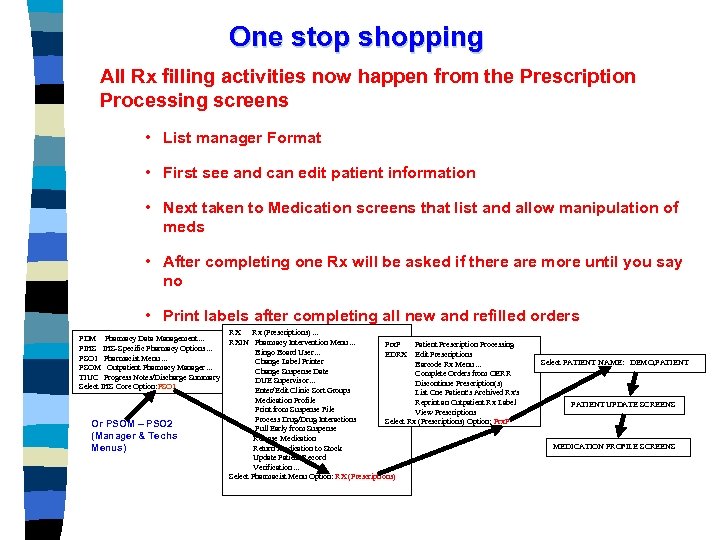
One stop shopping All Rx filling activities now happen from the Prescription Processing screens • List manager Format • First see and can edit patient information • Next taken to Medication screens that list and allow manipulation of meds • After completing one Rx will be asked if there are more until you say no • Print labels after completing all new and refilled orders RX Rx (Prescriptions). . . PDM Pharmacy Data Management. . . RXIN Pharmacy Intervention Menu. . . PIHS IHS-Specific Pharmacy Options. . . Bingo Board User. . . PSO 1 Pharmacist Menu. . . Change Label Printer PSOM Outpatient Pharmacy Manager. . . Change Suspense Date TIUC Progress Notes/Discharge Summary [TIU]. . . DUE Supervisor. . . Select IHS Core Option: PSO 1 Enter/Edit Clinic Sort Groups Menu Path Or PSOM – PSO 2 (Manager & Techs Menus) Prx. P Patient Prescription Processing EDRX Edit Prescriptions Barcode Rx Menu. . . Complete Orders from OERR Discontinue Prescription(s) List One Patient's Archived Rx's Reprint an Outpatient Rx Label View Prescriptions Select Rx (Prescriptions) Option: Prx. P Medication Profile Print from Suspense File Process Drug/Drug Interactions Pull Early from Suspense Release Medication Return Medication to Stock Update Patient Record Verification. . . Select Pharmacist Menu Option: RX (Prescriptions) Select PATIENT NAME: DEMO, PATIENT UPDATE SCREENS MEDICATION PROFILE SCREENS
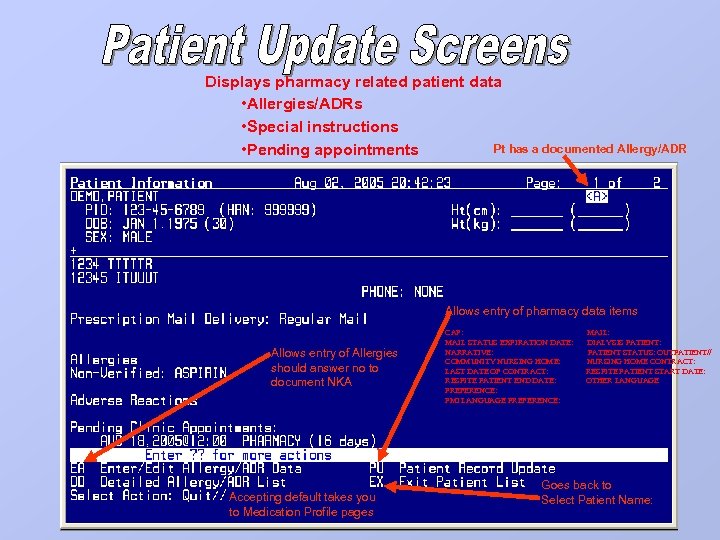
Displays pharmacy related patient data • Allergies/ADRs • Special instructions Pt has a documented Allergy/ADR • Pending appointments Allows entry of pharmacy data items Allows entry of Allergies should answer no to document NKA Accepting default takes you to Medication Profile pages CAP: MAIL: MAIL STATUS EXPIRATION DATE: DIALYSIS PATIENT: NARRATIVE: PATIENT STATUS: OUTPATIENT// COMMUNITY NURSING HOME: NURSING HOME CONTRACT: LAST DATE OF CONTRACT: RESPITE PATIENT START DATE: RESPITE PATIENT END DATE: OTHER LANGUAGE PREFERENCE: PMI LANGUAGE PREFERENCE: Goes back to Select Patient Name:
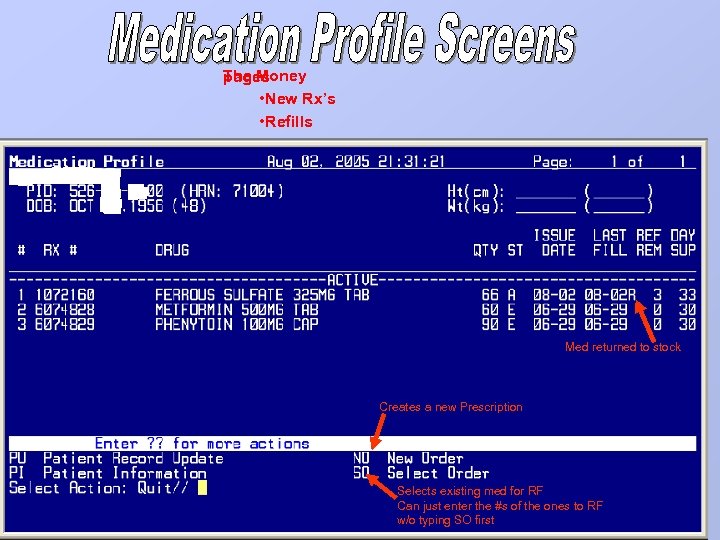
The Money pages • New Rx’s • Refills Med returned to stock Creates a new Prescription Selects existing med for RF Can just enter the #s of the ones to RF w/o typing SO first
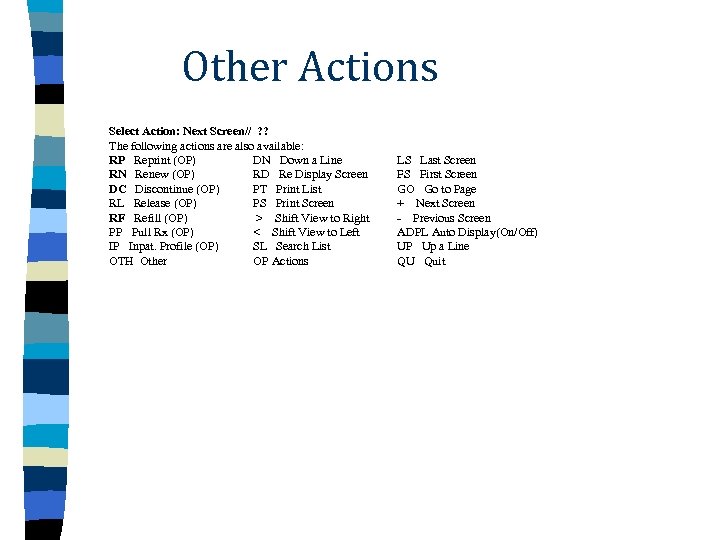
Other Actions Select Action: Next Screen// ? ? The following actions are also available: RP Reprint (OP) DN Down a Line RN Renew (OP) RD Re Display Screen DC Discontinue (OP) PT Print List RL Release (OP) PS Print Screen RF Refill (OP) > Shift View to Right PP Pull Rx (OP) < Shift View to Left IP Inpat. Profile (OP) SL Search List OTH Other OP Actions LS Last Screen FS First Screen GO Go to Page + Next Screen - Previous Screen ADPL Auto Display(On/Off) UP Up a Line QU Quit
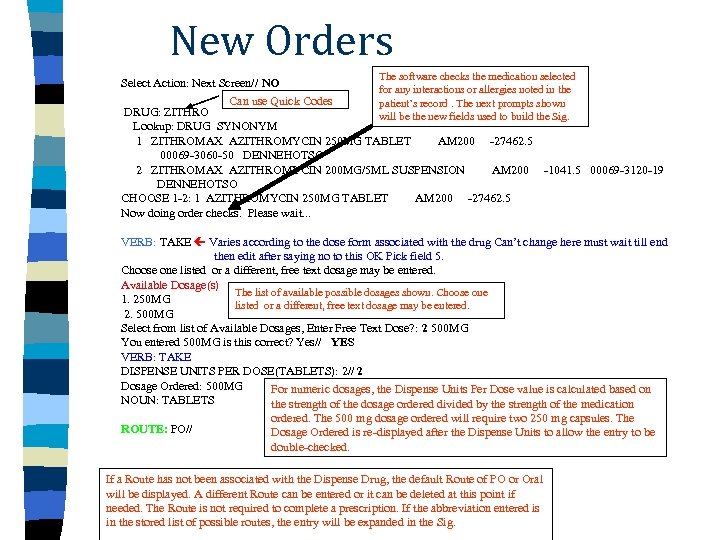
New Orders The software checks the medication selected Select Action: Next Screen// NO for any interactions or allergies noted in the Can use Quick Codes patient’s record. The next prompts shown DRUG: ZITHRO will be the new fields used to build the Sig. Lookup: DRUG SYNONYM 1 ZITHROMAX AZITHROMYCIN 250 MG TABLET AM 200 -27462. 5 00069 -3060 -50 DENNEHOTSO 2 ZITHROMAX AZITHROMYCIN 200 MG/5 ML SUSPENSION AM 200 -1041. 5 00069 -3120 -19 DENNEHOTSO CHOOSE 1 -2: 1 AZITHROMYCIN 250 MG TABLET AM 200 -27462. 5 Now doing order checks. Please wait. . . VERB: TAKE Varies according to the dose form associated with the drug Can’t change here must wait till end then edit after saying no to this OK Pick field 5. Choose one listed or a different, free text dosage may be entered. Available Dosage(s) The list of available possible dosages shown. Choose one 1. 250 MG listed or a different, free text dosage may be entered. 2. 500 MG Select from list of Available Dosages, Enter Free Text Dose? : 2 500 MG You entered 500 MG is this correct? Yes// YES VERB: TAKE DISPENSE UNITS PER DOSE(TABLETS): 2// 2 Dosage Ordered: 500 MG For numeric dosages, the Dispense Units Per Dose value is calculated based on NOUN: TABLETS the strength of the dosage ordered divided by the strength of the medication ordered. The 500 mg dosage ordered will require two 250 mg capsules. The ROUTE: PO// Dosage Ordered is re-displayed after the Dispense Units to allow the entry to be double-checked. If a Route has not been associated with the Dispense Drug, the default Route of PO or Oral will be displayed. A different Route can be entered or it can be deleted at this point if needed. The Route is not required to complete a prescription. If the abbreviation entered is in the stored list of possible routes, the entry will be expanded in the Sig.
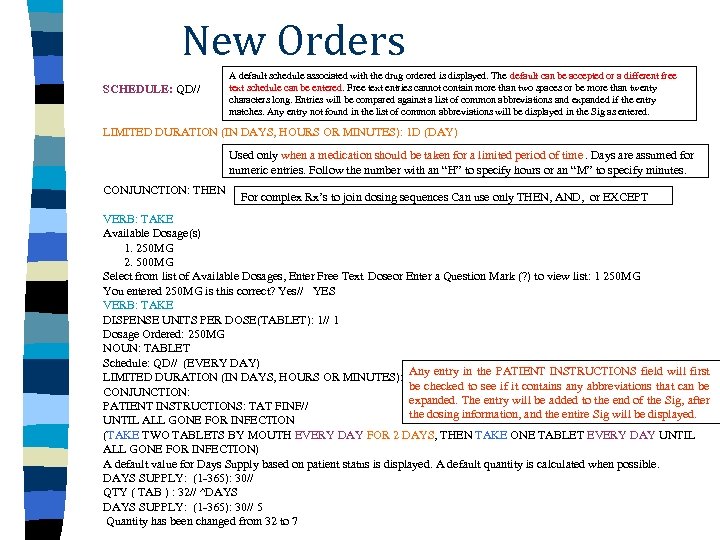
New Orders SCHEDULE: QD// A default schedule associated with the drug ordered is displayed. The default can be accepted or a different free text schedule can be entered. Free text entries cannot contain more than two spaces or be more than twenty characters long. Entries will be compared against a list of common abbreviations and expanded if the entry matches. Any entry not found in the list of common abbreviations will be displayed in the Sig as entered. LIMITED DURATION (IN DAYS, HOURS OR MINUTES): 1 D (DAY) Used only when a medication should be taken for a limited period of time. Days are assumed for numeric entries. Follow the number with an “H” to specify hours or an “M” to specify minutes. CONJUNCTION: THEN For complex Rx’s to join dosing sequences Can use only THEN, AND, or EXCEPT VERB: TAKE Available Dosage(s) 1. 250 MG 2. 500 MG Select from list of Available Dosages, Enter Free Text Doseor Enter a Question Mark (? ) to view list: 1 250 MG You entered 250 MG is this correct? Yes// YES VERB: TAKE DISPENSE UNITS PER DOSE(TABLET): 1// 1 Dosage Ordered: 250 MG NOUN: TABLET Schedule: QD// (EVERY DAY) Any entry in the PATIENT INSTRUCTIONS field will first LIMITED DURATION (IN DAYS, HOURS OR MINUTES): be checked to see if it contains any abbreviations that can be CONJUNCTION: expanded. The entry will be added to the end of the Sig, after PATIENT INSTRUCTIONS: TAT FINF// the dosing information, and the entire Sig will be displayed. UNTIL ALL GONE FOR INFECTION (TAKE TWO TABLETS BY MOUTH EVERY DAY FOR 2 DAYS, THEN TAKE ONE TABLET EVERY DAY UNTIL ALL GONE FOR INFECTION) A default value for Days Supply based on patient status is displayed. A default quantity is calculated when possible. DAYS SUPPLY: (1 -365): 30// QTY ( TAB ) : 32// ^DAYS SUPPLY: (1 -365): 30// 5 Quantity has been changed from 32 to 7
Скачать презентацию Prescription Processing 7 0 Steve Bowman Information Systems
69b50e0a0a248b8a84c9a8d3115b969b.ppt