


 Скачать презентацию PRELIMINARY DESIGN REVIEW P 09321 AUTOMATED MEDICINE
f576e53e0744106943d4db6fb55cd7c7.ppt
- Количество слайдов: 39
 PRELIMINARY DESIGN REVIEW P 09321 – AUTOMATED MEDICINE DISPENSER Date 01 -16 -2009 Time 11 -12: 30 Room 78 -2230 Michael Boquard (CE) Felix Feliz (ME) 1 Rebecca Jaiven (EE) (Lead Engineer) Matthew Jones (ME) Shuaib Mansoori (EE) Justin Zagorski (IE) (Team Leader)
 OVERVIEW 1. 2. 3. 4. 5. 6. 7. 8. Intro 1. Project Description 2. Roles and Responsibilities Customer Requirements & Engineering Specifications Summary of Concept Selection Electrical System Summary Software System Summary Preliminary System Integration Risks & Issues Schedule 2
 INTRO – PROJECT DESCRIPTION o o o Produce a robust prototype that dispenses medication on a time-based schedule to patients in a secure and accountable environment. Allow to dispense a week’s supply of up to 6 different pills for two patients accessed twice daily. Reliable and compact electro-mechanical dispensing system that can be controlled by a common laptop. 3
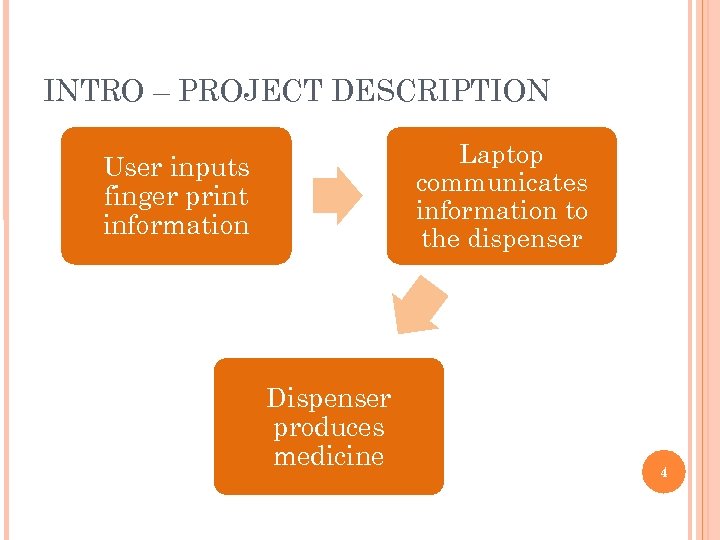 INTRO – PROJECT DESCRIPTION Laptop communicates information to the dispenser User inputs finger print information Dispenser produces medicine 4
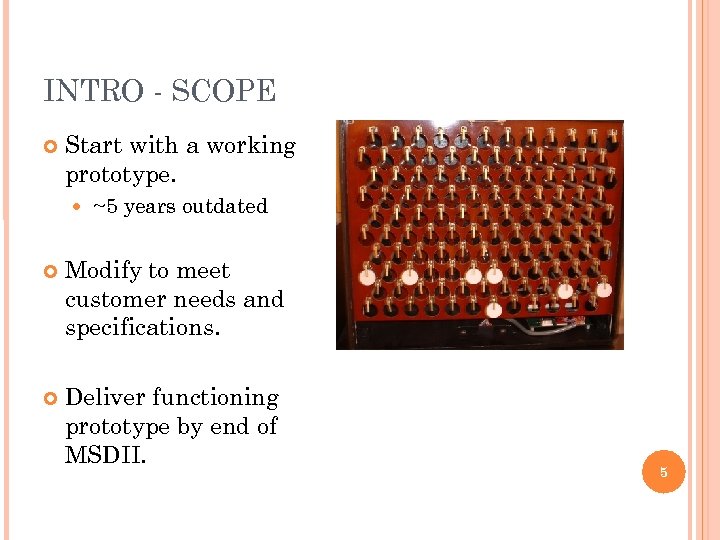 INTRO - SCOPE Start with a working prototype. ~5 years outdated Modify to meet customer needs and specifications. Deliver functioning prototype by end of MSDII. 5
 INTRO – Target End User One who takes medication on a regular basis, is technologically capable*, and desires to have their medication in a safe and secure environment. * a technology capable person is familiar with basic computer functions and/or has the willingness to learn. 6
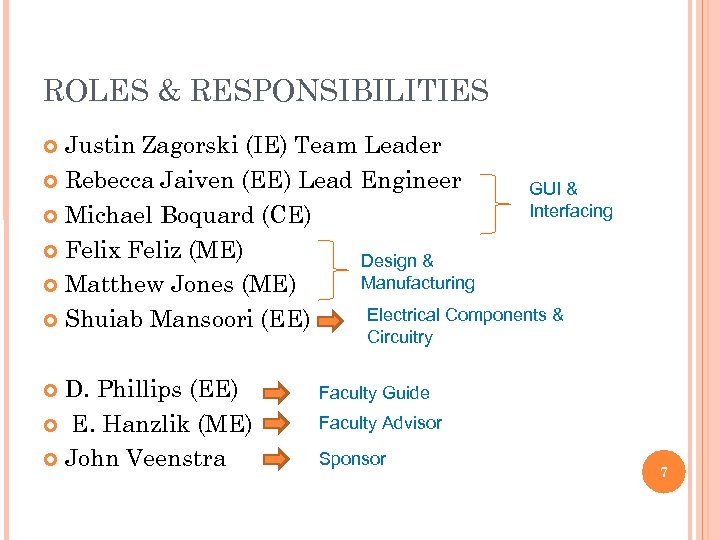 ROLES & RESPONSIBILITIES Justin Zagorski (IE) Team Leader Rebecca Jaiven (EE) Lead Engineer GUI & Interfacing Michael Boquard (CE) Felix Feliz (ME) Design & Manufacturing Matthew Jones (ME) Electrical Components & Shuiab Mansoori (EE) Circuitry D. Phillips (EE) E. Hanzlik (ME) John Veenstra Faculty Guide Faculty Advisor Sponsor 7
 OVERVIEW 1. 2. 3. 4. 5. 6. 7. 8. Intro 1. Project Description 2. Roles and Responsibilities Customer Requirements & Engineering Specifications Summary of Concept Selection Electrical System Summary Software System Summary Preliminary System Integration Risks & Issues Schedule 8
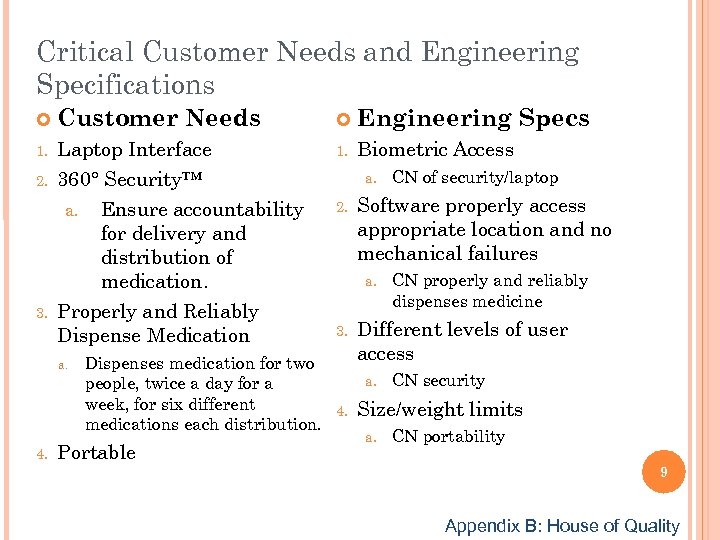 Critical Customer Needs and Engineering Specifications 1. 2. 3. Customer Needs Laptop Interface 360° Security™ a. Ensure accountability for delivery and distribution of medication. Properly and Reliably Dispense Medication a. 4. Engineering Specs 1. Biometric Access a. 2. Software properly access appropriate location and no mechanical failures a. 3. CN of security/laptop CN properly and reliably dispenses medicine Different levels of user access Dispenses medication for two a. CN security people, twice a day for a week, for six different 4. Size/weight limits medications each distribution. a. CN portability Portable 9 Appendix B: House of Quality
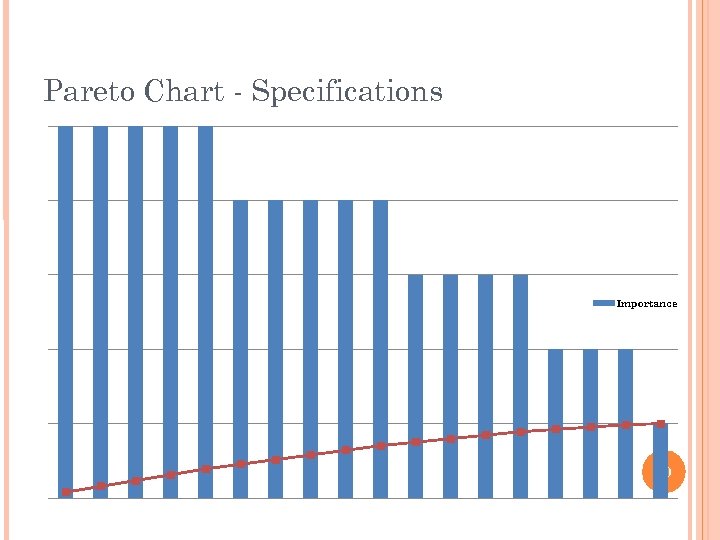 Pareto Chart - Specifications Importance Series 2 10
 OVERVIEW 1. 2. 3. 4. 5. 6. 7. 8. Intro 1. Project Description 2. Roles and Responsibilities Customer Requirements & Engineering Specifications Summary of Concept Selection Electrical System Summary Software System Summary Preliminary System Integration Risks & Issues Schedule 11
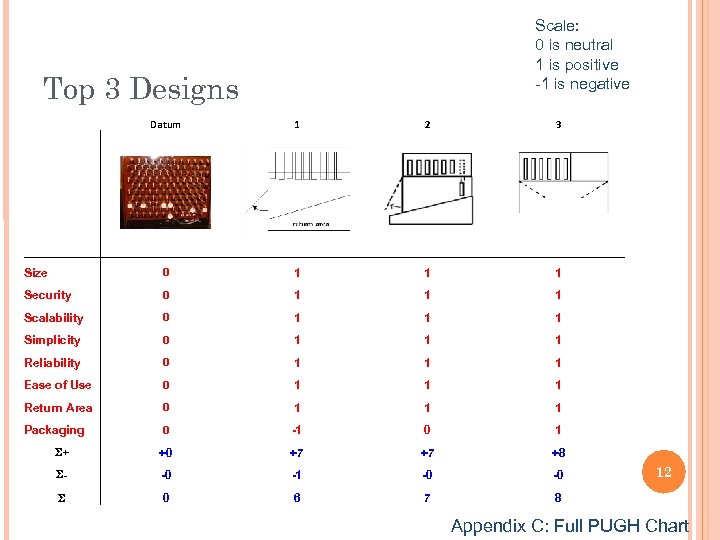 Scale: 0 is neutral 1 is positive -1 is negative Top 3 Designs Datum 1 2 3 Size 0 1 1 1 Security 0 1 1 1 Scalability 0 1 1 1 Simplicity 0 1 1 1 Reliability 0 1 1 1 Ease of Use 0 1 1 1 Return Area 0 1 1 1 Packaging 0 -1 0 1 S+ +0 +7 +7 +8 S- -0 -1 -0 -0 S 0 6 7 8 12 Appendix C: Full PUGH Chart
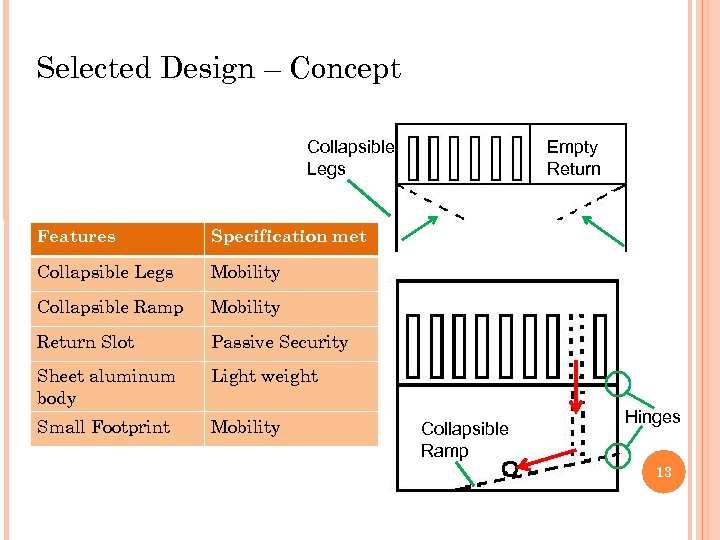 Selected Design – Concept Collapsible Legs Features Specification met Collapsible Legs Mobility Collapsible Ramp Mobility Return Slot Passive Security Sheet aluminum body Light weight Small Footprint Mobility Empty Return Collapsible Ramp Hinges 13
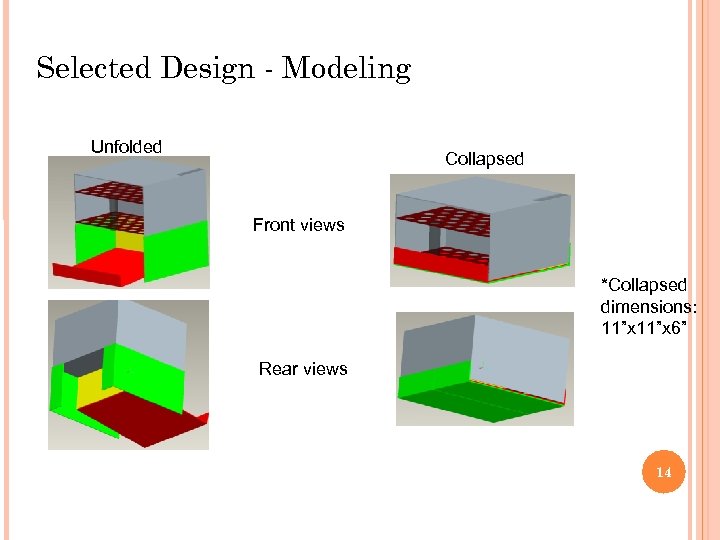 Selected Design - Modeling Unfolded Collapsed Front views *Collapsed dimensions: 11”x 6” Rear views 14
 OVERVIEW 1. 2. 3. 4. 5. 6. 7. 8. Intro 1. Project Description 2. Roles and Responsibilities Customer Requirements & Engineering Specifications Summary of Concept Selection Electrical System Summary Software System Summary Preliminary System Integration Risks & Issues Schedule 15
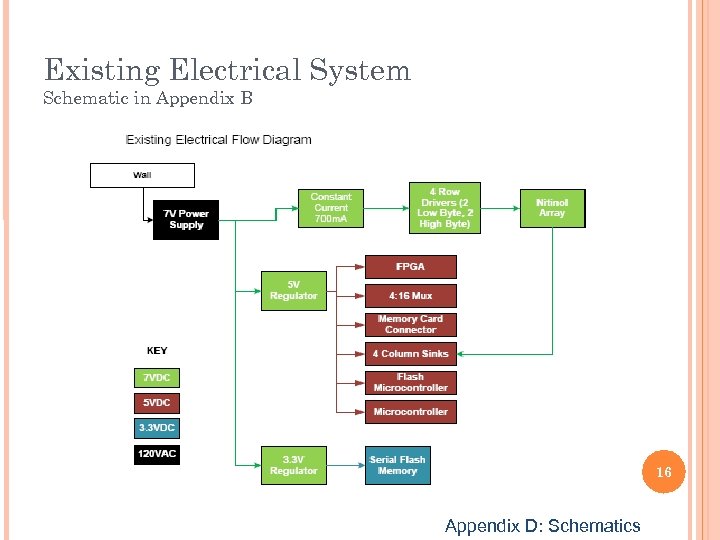 Existing Electrical System Schematic in Appendix B 16 Appendix D: Schematics
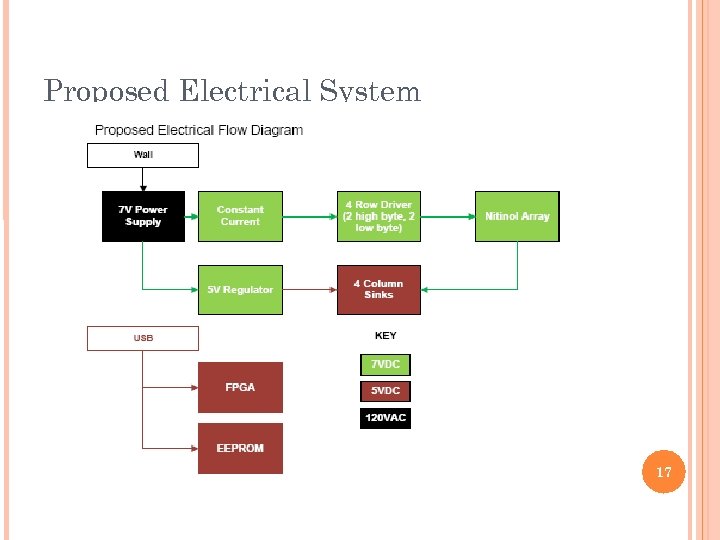 Proposed Electrical System 17
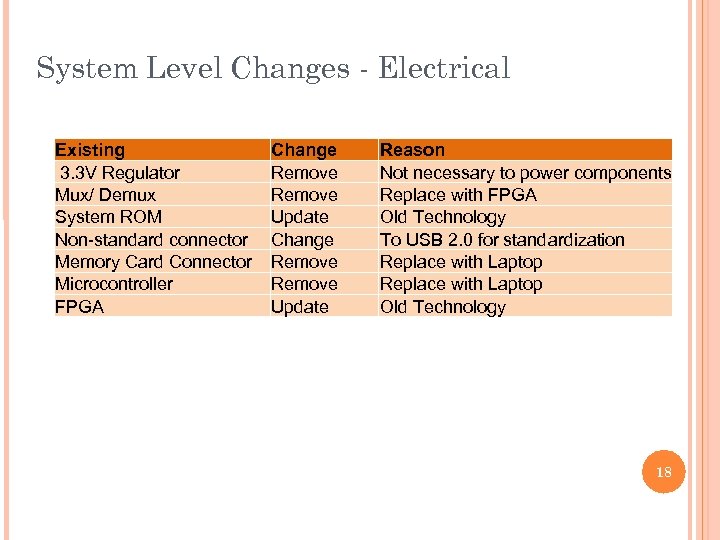 System Level Changes - Electrical Existing 3. 3 V Regulator Mux/ Demux System ROM Non-standard connector Memory Card Connector Microcontroller FPGA Change Remove Update Reason Not necessary to power components Replace with FPGA Old Technology To USB 2. 0 for standardization Replace with Laptop Old Technology 18
 OVERVIEW 1. 2. 3. 4. 5. 6. 7. 8. Intro 1. Project Description 2. Roles and Responsibilities Customer Requirements & Engineering Specifications Summary of Concept Selection Electrical System Summary Software System Summary Preliminary System Integration Risks & Issues Schedule 19
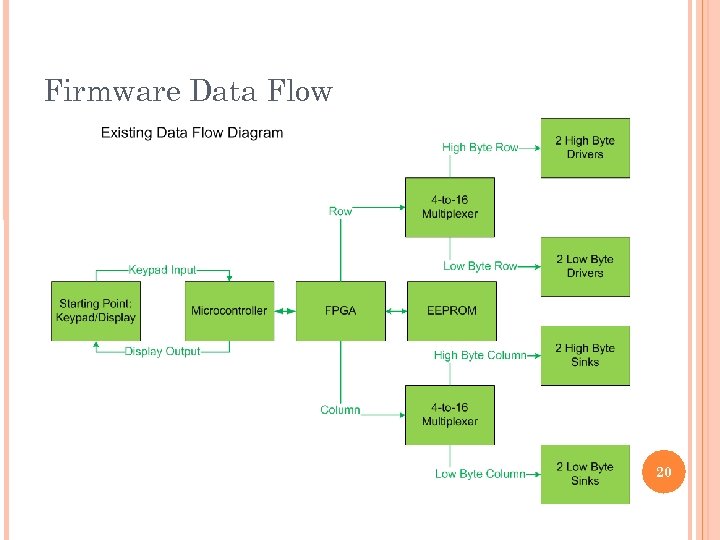 Firmware Data Flow 20
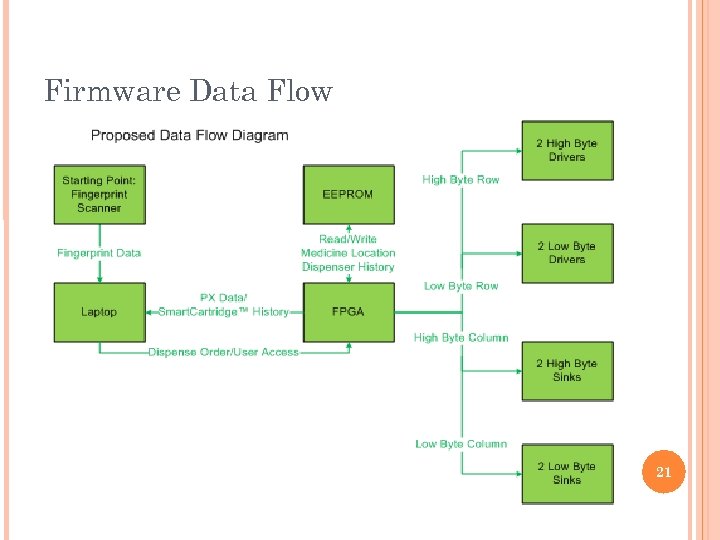 Firmware Data Flow 21
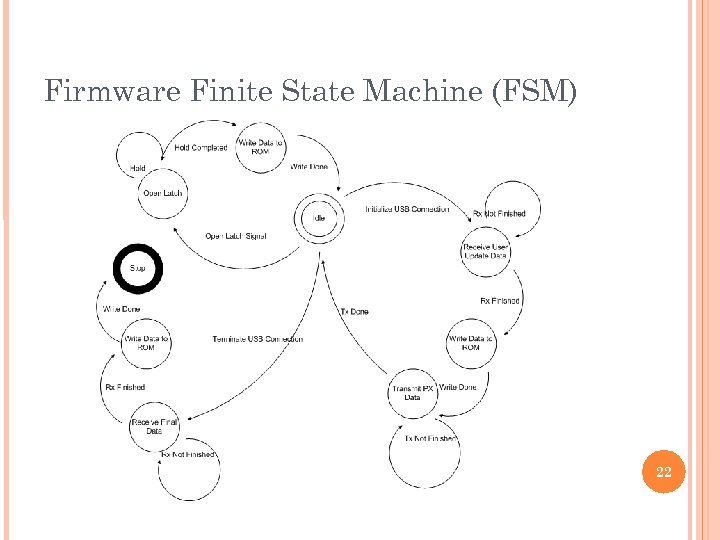 Firmware Finite State Machine (FSM) 22
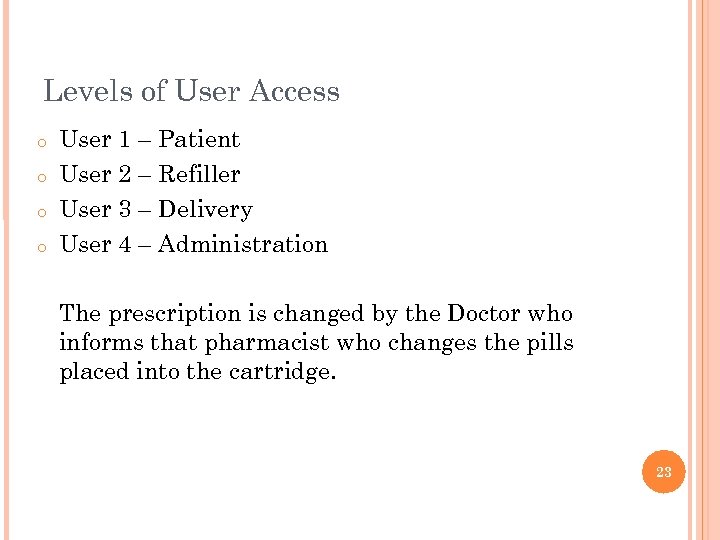 Levels of User Access o o User 1 – Patient User 2 – Refiller User 3 – Delivery User 4 – Administration The prescription is changed by the Doctor who informs that pharmacist who changes the pills placed into the cartridge. 23
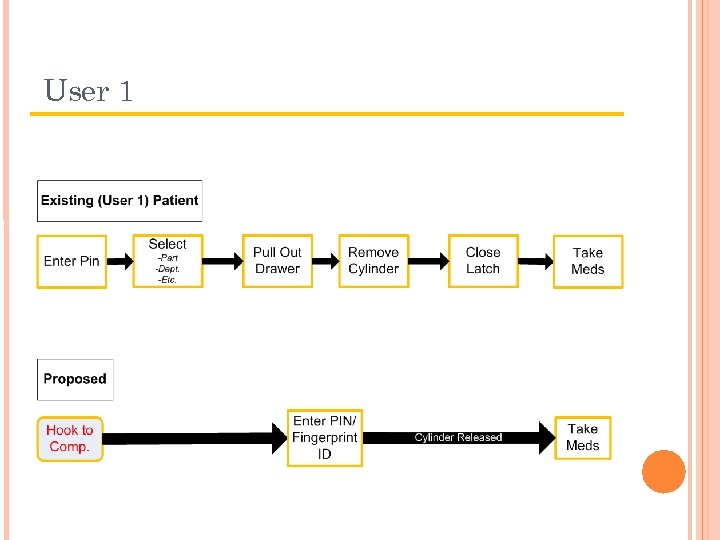 User 1
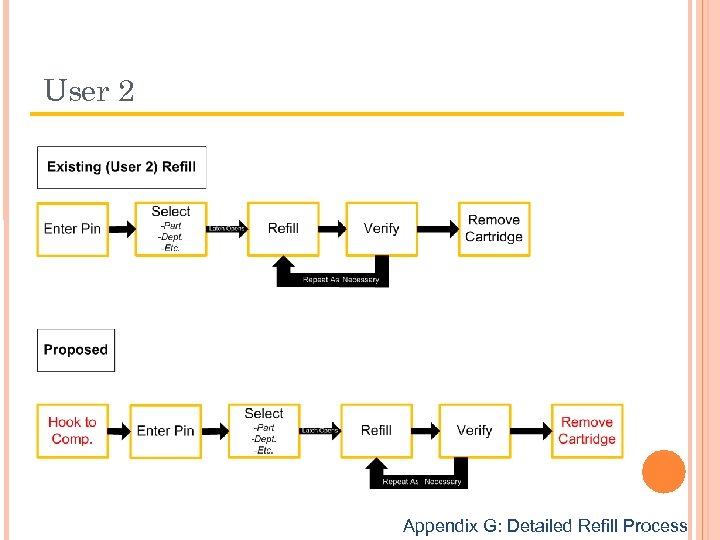 User 2 Appendix G: Detailed Refill Process
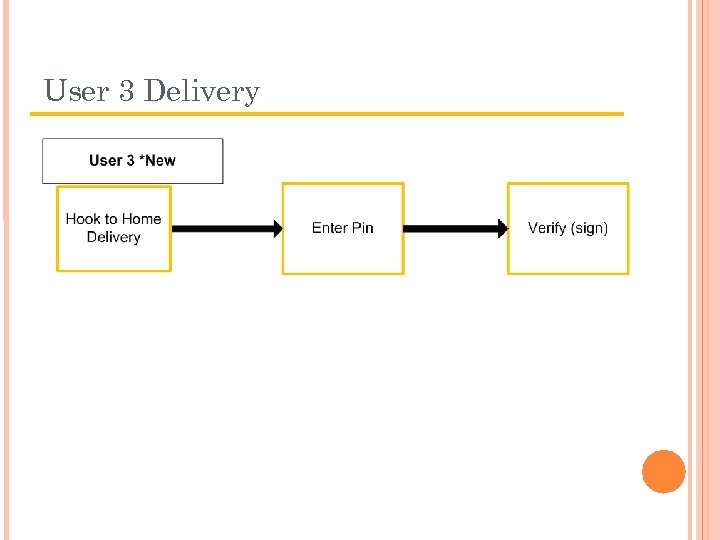 User 3 Delivery
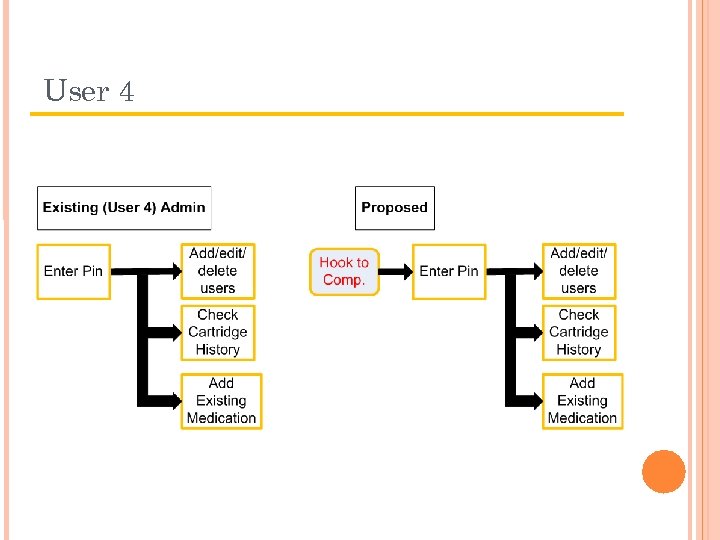 User 4
 OVERVIEW 1. 2. 3. 4. 5. 6. 7. 8. Intro 1. Project Description 2. Roles and Responsibilities Customer Requirements & Engineering Specifications Summary of Concept Selection Electrical System Summary Software System Summary Preliminary System Integration Risks & Issues Schedule 28
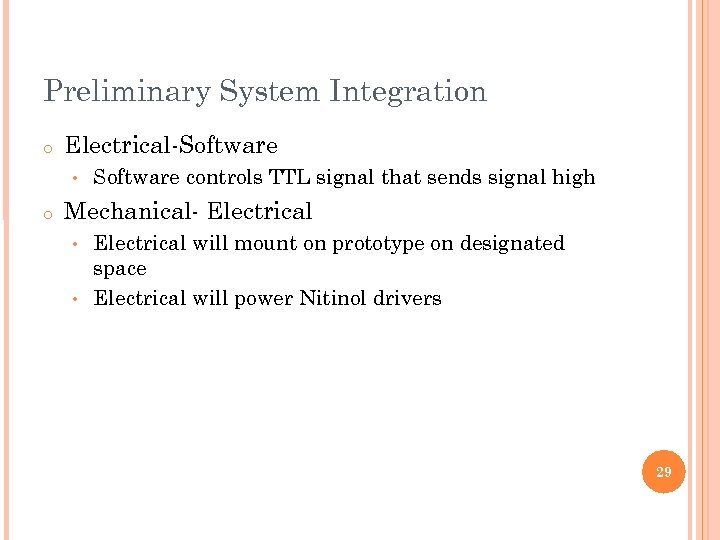 Preliminary System Integration o Electrical-Software • o Software controls TTL signal that sends signal high Mechanical- Electrical will mount on prototype on designated space • Electrical will power Nitinol drivers • 29
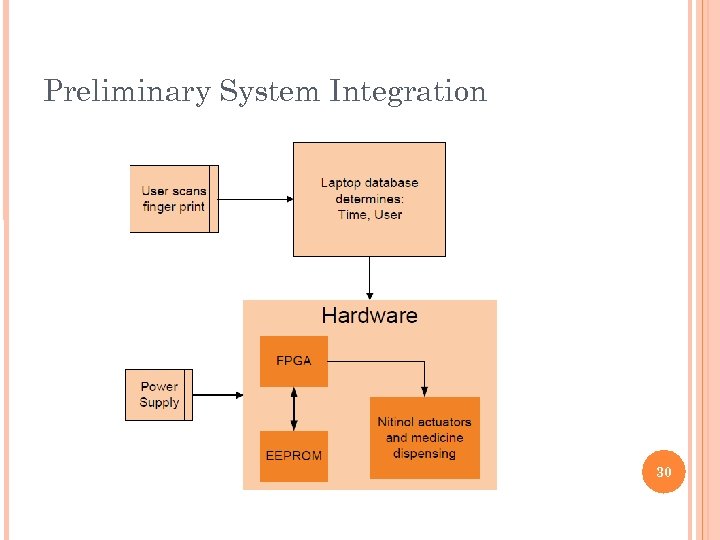 Preliminary System Integration 30
 OVERVIEW 1. 2. 3. 4. 5. 6. 7. 8. Intro 1. Project Description 2. Roles and Responsibilities Customer Requirements & Engineering Specifications Summary of Concept Selection Electrical System Summary Software System Summary Preliminary System Integration Risks & Issues Schedule 31
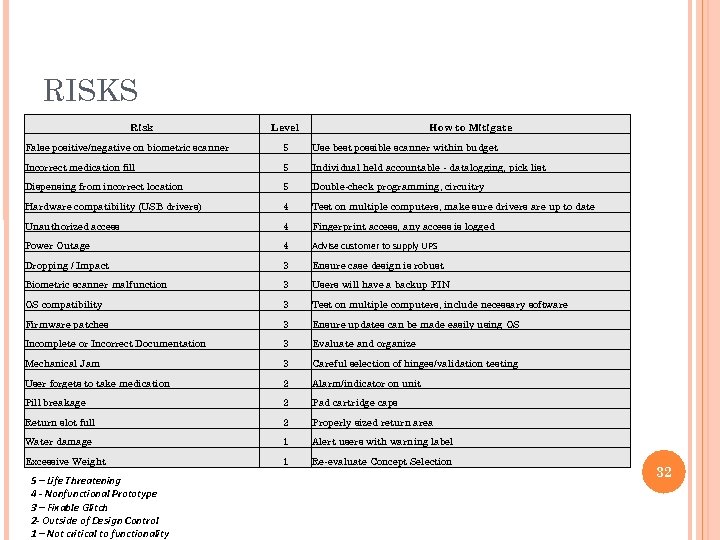 RISKS Risk Level How to Mitigate False positive/negative on biometric scanner 5 Use best possible scanner within budget Incorrect medication fill 5 Individual held accountable - datalogging, pick list Dispensing from incorrect location 5 Double-check programming, circuitry Hardware compatibility (USB drivers) 4 Test on multiple computers, make sure drivers are up to date Unauthorized access 4 Fingerprint access, any access is logged Power Outage 4 Advise customer to supply UPS Dropping / Impact 3 Ensure case design is robust Biometric scanner malfunction 3 Users will have a backup PIN OS compatibility 3 Test on multiple computers, include necessary software Firmware patches 3 Ensure updates can be made easily using OS Incomplete or Incorrect Documentation 3 Evaluate and organize Mechanical Jam 3 Careful selection of hinges/validation testing User forgets to take medication 2 Alarm/indicator on unit Pill breakage 2 Pad cartridge caps Return slot full 2 Properly sized return area Water damage 1 Alert users with warning label Excessive Weight 1 Re-evaluate Concept Selection 5 – Life Threatening 4 - Nonfunctional Prototype 3 – Fixable Glitch 2 - Outside of Design Control 1 – Not critical to functionality 32
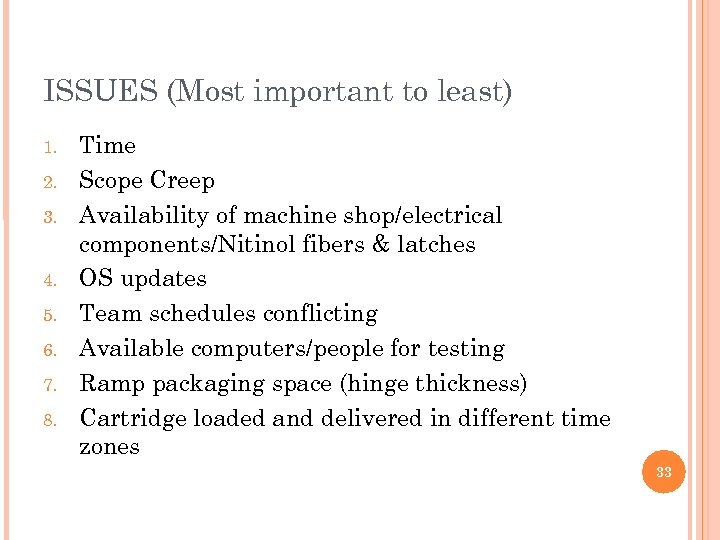 ISSUES (Most important to least) 1. 2. 3. 4. 5. 6. 7. 8. Time Scope Creep Availability of machine shop/electrical components/Nitinol fibers & latches OS updates Team schedules conflicting Available computers/people for testing Ramp packaging space (hinge thickness) Cartridge loaded and delivered in different time zones 33
 OVERVIEW 1. 2. 3. 4. 5. 6. 7. 8. Intro 1. Project Description 2. Roles and Responsibilities Customer Requirements & Engineering Specifications Summary of Concept Selection Electrical System Summary Software System Summary Preliminary System Integration Risks & Issues Schedule 34
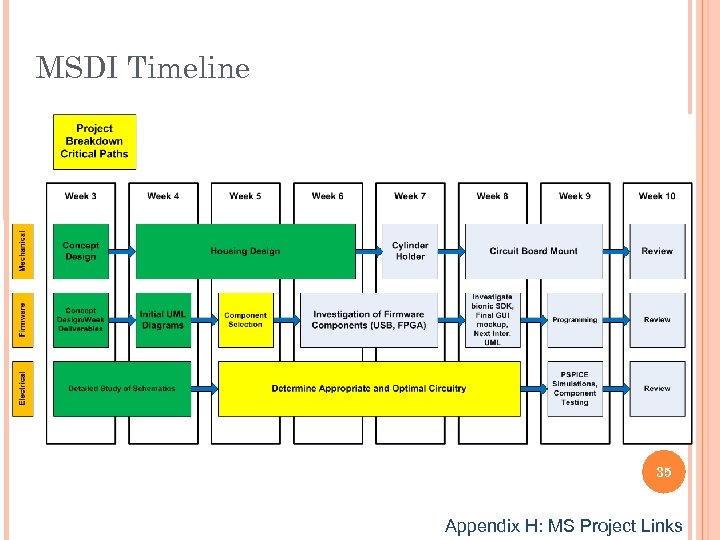 MSDI Timeline 35 Appendix H: MS Project Links
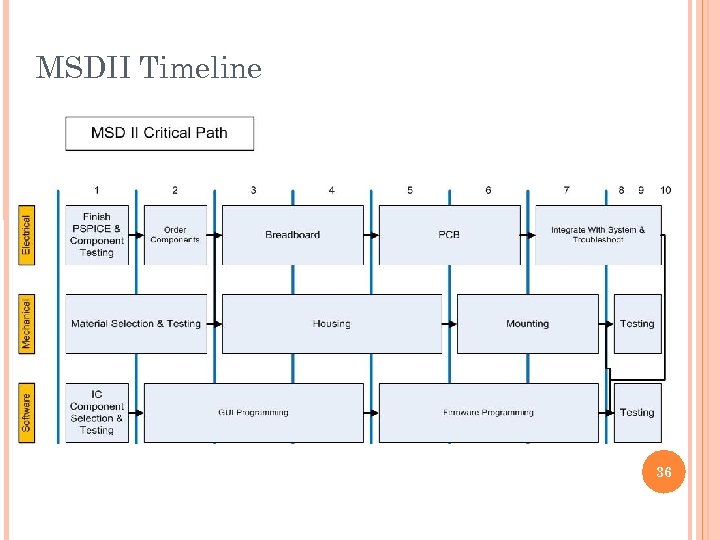 MSDII Timeline 36
 BACK UP SLIDES 37 (Appendix, extra info, etc. . )
 Appendix A – One Page Project Summary https: //edge. rit. edu/content/P 09321/public/Project. Summary. doc Appendix B – House of Quality https: //edge. rit. edu/content/P 09321/public/QFD. xls Appendix C – PUGH Chart https: //edge. rit. edu/content/P 09321/public/Week 5/PUGHv 1_2. xls Appendix D – Schematics https: //edge. rit. edu/content/P 09321/public/PJSolutions. Documents 38
 Appendix E – FEA Ansys Analysis https: //edge. rit. edu/content/P 09321/public/Week 4/Engineering_Analysis_missing_PCB. doc Appendix F – Material Selection Matrix Appendix G – Refill Process Detailed https: //edge. rit. edu/content/P 09321/public/Week 5/Refill_Process_with_drawing. ppt Appendix H – MS Project Link https: //edge. rit. edu/content/P 09321/public/WIPDocs/Two. Quarter. Plan. pdf 39