


 Скачать презентацию Preliminaries What we will discuss Programming languages
f8a6291782cdcaaa2e418d1f0b636eb5.ppt
- Количество слайдов: 30
 Preliminaries What we will discuss: • Programming languages and the process of programming. • Criteria for the design and evaluation of programming languages • Basic ideas of programming language implementations. 1
 Programming languages and the process of programming Points to discuss: – Programming means more than coding. – Why study programming languages? – Programming language paradigms and applications. 2
 Programming means much more than coding in a programming language • Before coding begins, you analyze the problem, design (or borrow) an algorithm, analyze the cost of the solution. • After all coding has been done, you have to maintain the program. • Programming languages are used to instruct computers. – What do we communicate to computers? – How do computers talk back to us? 3
 Programming means more than coding (2) • How do programming languages differ from natural languages? Would talking to computers (instructing them) in human languages be preferable? • What makes someone a good programmer? • Should a good programmer know more than one programming language? 4
 Why should we study programming languages? • To understand better the connection between algorithms and programs. • To be able to look for general, languageindependent solutions. • To have a choice of programming tools that best match the task at hand: – identify subtasks and apply to each of them the best language, using the full expressive power of each language. 5
 Why should we study programming languages? (2) • To appreciate the workings of a computer equipped with a programming language—by knowing how languages are implemented. • To learn new programming languages easily and to know how to design new formal languages (for example, input data formats). • To see how a language may influence the discipline of computing and strengthen good software engineering practice. 6
 The many classes of programming languages: programming language paradigms • Every programming language supports a slightly different or dramatically different style of problem solving. • The same computation can be expressed in various languages, and then run on the same computer. 7
 Programming languages classified by paradigm • Imperative: how do we solve a problem (what steps does a solution have)? • Logic-based: what do we do to solve a problem? (The language decides how to do it. ) • Functional: what simple operations can be applied to solving a problem, how are they mutually related, and how can they be combined? • Object-oriented: what objects play roles in a problem, what can they do, and how do they interact to solve the problem? 8
 Classification by generality of use • General-purpose programming languages (most of the known languages are in this category); • Specialized programming languages (for example, database languages, vectorprocessing languages, report generation languages, scripting languages, and more). 9
 Classification by complication, abstraction, level • Low-level languages (machine languages, assembly languages). • High-level languages (most of the wellknown languages belong in this category). • Very high-level languages (Prolog is sometimes listed in this category, and some specialized languages). • Beyond programming languages: – Programming environments, software development tools and workbenches. 10
 Classification by area of application • Data processing (also known as "business applications"). Now made largely unnecessary, since we have databases and other business-related packages, such as spreadsheets, and specialpurpose software. • Scientific computing (this includes engineering). Today this has been changed by new hardware designs such as supercomputers or vector computers, and specialized computing devices. 11
 Classification by area of application (2) • Artificial intelligence and other applications not in the computer science mainstream. – This might include educational software and games. – New hardware (so far mostly simulated) such as connection machines and neural networks. • "In-house" computing applications. – compiler construction, systems programming, GUI, API, and so on. 12
 Criteria for the design and evaluation of programming languages • Points to discuss: – Readability – Writability – Reliability – Cost 13
 Readability • This is subjective, but very important. • Language readability is essential because of software engineering practices, and in particular the needs of software evolution and maintenance. – Abstraction—support for generality of programs: procedural abstraction, data abstraction. – Absence of ambiguity (and absence of too many coding choices, like having five different loop constructs). 14
 Readability (2) • Orthogonality: there are no restrictions on combinations of primitive language concepts. (It is easier to detect lack of orthogonality. ) – For example, can everything have a value? – Can an array group things of every kind? –. . . • More orthogonality = fewer special cases in the language. • This may be carried too far (as in Algol 68). 15
 Readability (3) • Expressivity of control and data structures. – what is better (easier to read, maintain and so on): – a longer program made of simple elements? – a shorter program built out of complex, specialized constructions? – Examples of high expressive power: recursion, built-in backtracking (as in Prolog), search in database languages. – Examples of low expressive power: instructions in machine or assembly languages. • Appearance: syntax, including comments. 16
 Writability • Abstraction and simplicity: once more, subjective. – Pascal has always been considered simple, Ada—complicated – Basic is very simple – Prolog is conceptually simple, but may be difficult to learn. – is Java simple? • Expressivity again. • Modularity and tools for modularization, support for integrated programming environments. 17
 Reliability and Cost • Reliability. – Safety for the programmer (type checking, error and exception handling, unambiguous names). • Cost. – Development time (ease of programming, availability of shared code). – Efficiency of implementation: how easy it is to build a language processor (Algol 68 is a known failure, Ada almost a failure; Pascal, C, C++ and Java have been notable successes). – Translation time and the quality of object code. – Portability and standardization. 18
 Implementing programming languages • Points to discuss: – Language processors, virtual machines – Models of implementation – Compilation and execution 19
 Language processors • A processor for language L is any device (hardware or software) that understands and can execute programs in language L. • Translation is a process of mapping a program in the source language into the target language, while preserving the meaning or function of the source program. • The target language may be directly executable on the computer or (more often) may have to be translated again—into an even lower-level language. 20
 Virtual machines • A virtual machine is a software realization (simulation) of a language processor. • Programming directly for hardware is very difficult—we usually "cover" hardware with layers of software. • A layer may be shared by several language processors, each building its own virtual machine on top of this layer. 21
 Examples of shared layers • All language processors require support for input/output. • All language processors eventually must do some calculations, that is, use the CPU. 22
 Virtual machines • We normally have hierarchies of virtual machines: – at the bottom, hardware; – at the top, languages close to the programmer's natural way of thinking. • Each layer is expressed only in terms of the previous layer—this ensures proper abstraction. 23
 A generic hierarchy of virtual machines Layer 0: hardware Layer 1: microcode Layer 2: machine language Layer 3: system routines Layer 4: machine-independent code Layer 5: high-level language (or assembler) Layer 6: application program Layer 7: input data [this is also a language!] 24
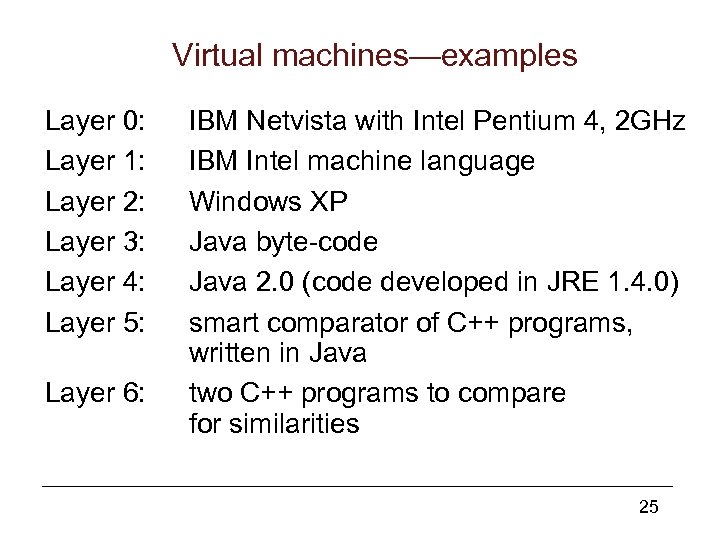 Virtual machines—examples Layer 0: Layer 1: Layer 2: Layer 3: Layer 4: Layer 5: Layer 6: IBM Netvista with Intel Pentium 4, 2 GHz IBM Intel machine language Windows XP Java byte-code Java 2. 0 (code developed in JRE 1. 4. 0) smart comparator of C++ programs, written in Java two C++ programs to compare for similarities 25
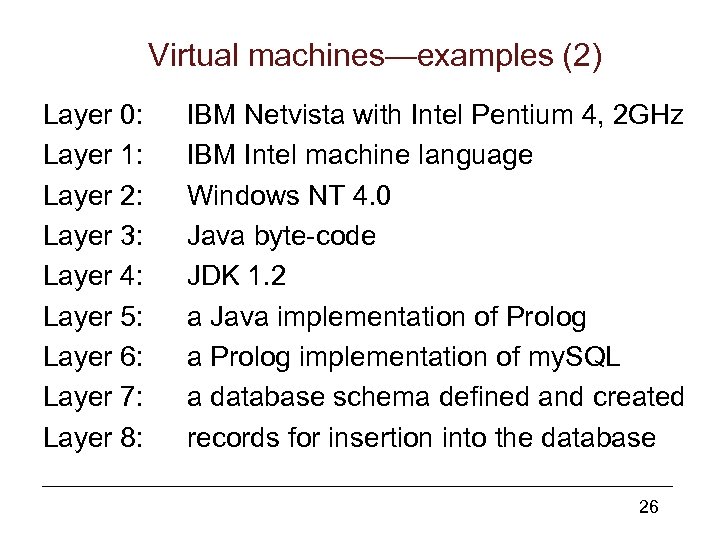 Virtual machines—examples (2) Layer 0: Layer 1: Layer 2: Layer 3: Layer 4: Layer 5: Layer 6: Layer 7: Layer 8: IBM Netvista with Intel Pentium 4, 2 GHz IBM Intel machine language Windows NT 4. 0 Java byte-code JDK 1. 2 a Java implementation of Prolog a Prolog implementation of my. SQL a database schema defined and created records for insertion into the database 26
 Models of implementation • Compilation: – translate the program into an equivalent form in a lower-layer virtual machine language; – execute later. • Interpretation: – divide the program up into small (syntactically meaningful) fragments; – in a loop, translate and execute each fragment immediately. 27
 Models of implementation (2) • Pure compilation and pure interpretation are seldom use. Normally, an implementation employs a mix of these models. – For example: compile Java into bytecodes, then interpret bytecodes. • We consider a language processor an interpreter if it has "more interpretation than compilation". We consider a processor a compiler if there is more of compilation. 28
 Models of implementation (3) • Some languages are better interpreted, for example interactively used Prolog or Lisp. • Some languages are better compiled, for example, C++, Java. • There can also be compiled Prolog or Lisp: – an interpretive top-level loop handles user interaction. – Predicates of functions are compiled into an optimized form which is then interpreted. 29
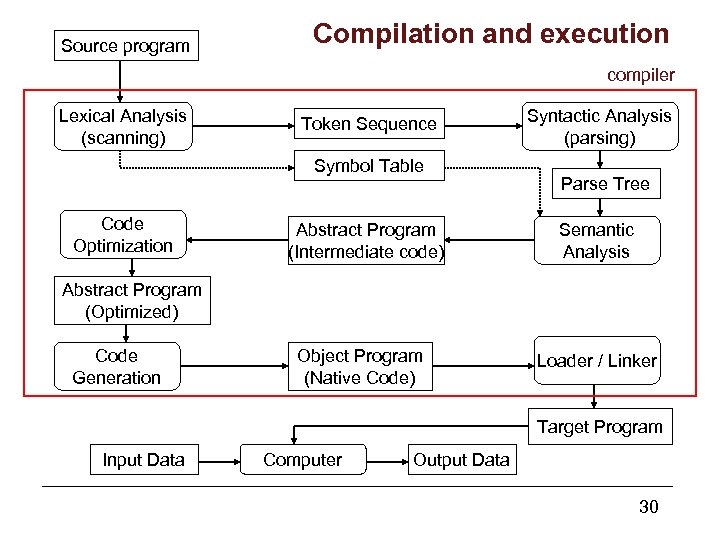 Source program Compilation and execution compiler Lexical Analysis (scanning) Token Sequence Symbol Table Code Optimization Abstract Program (Intermediate code) Syntactic Analysis (parsing) Parse Tree Semantic Analysis Abstract Program (Optimized) Code Generation Object Program (Native Code) Loader / Linker Target Program Input Data Computer Output Data 30