


 Скачать презентацию Practical Implementation of SH Lighting and HDR Rendering
8684cee7758fbe4c49ff040d8f9a56a2.ppt
- Количество слайдов: 154
 Practical Implementation of SH Lighting and HDR Rendering on Play. Station 2 Yoshiharu Gotanda Tatsuya Shoji Research and Development Dept. tri-Ace Inc.
 This slide • includes practical examples about – SH Lighting for the current hardware (Play. Station 2) – HDR Rendering – Plug-ins for 3 ds max
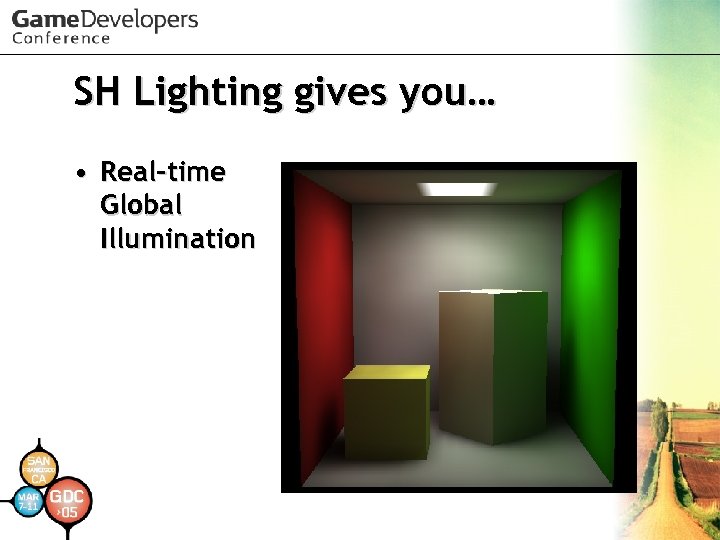 SH Lighting gives you… • Real-time Global Illumination
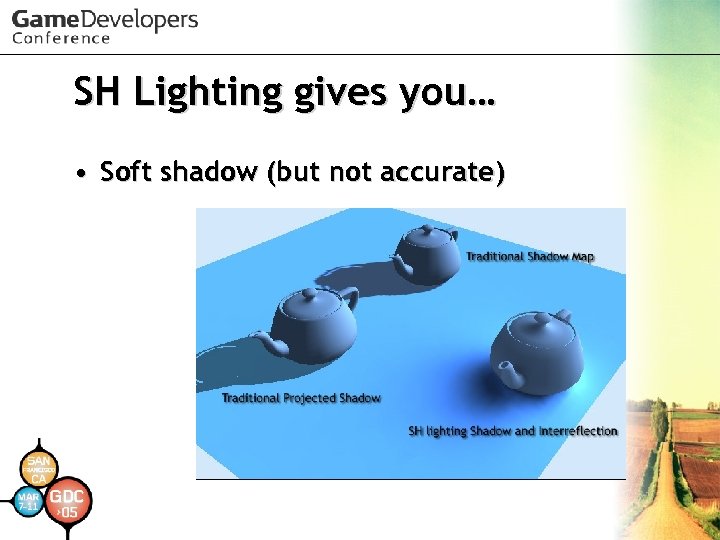 SH Lighting gives you… • Soft shadow (but not accurate)
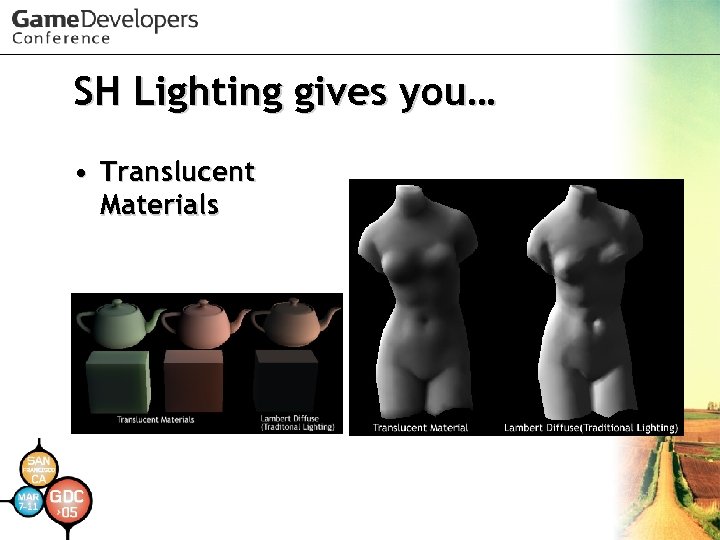 SH Lighting gives you… • Translucent Materials
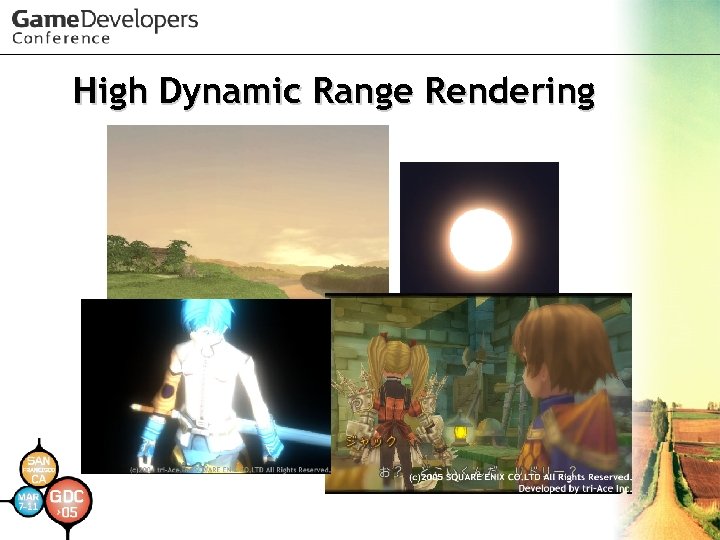
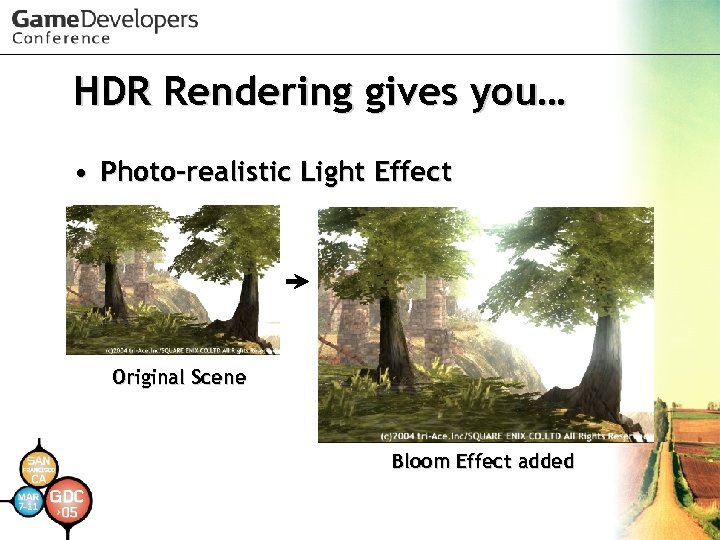 HDR Rendering gives you… • Photo-realistic Light Effect Original Scene Bloom Effect added
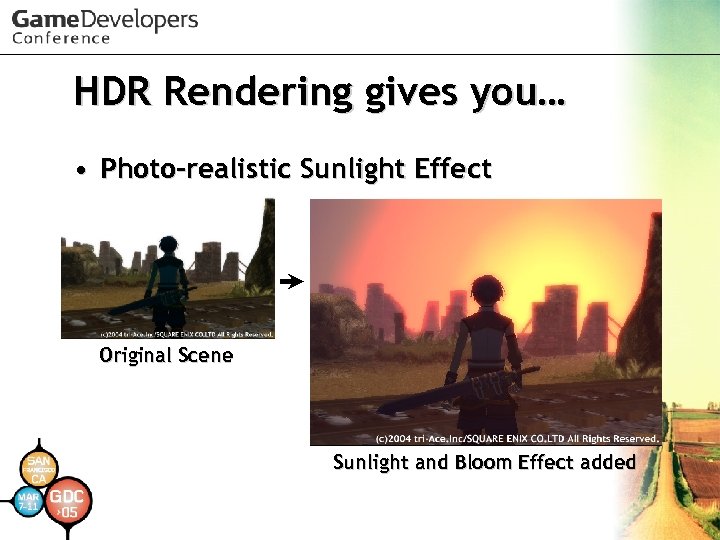 HDR Rendering gives you… • Photo-realistic Sunlight Effect Original Scene Sunlight and Bloom Effect added
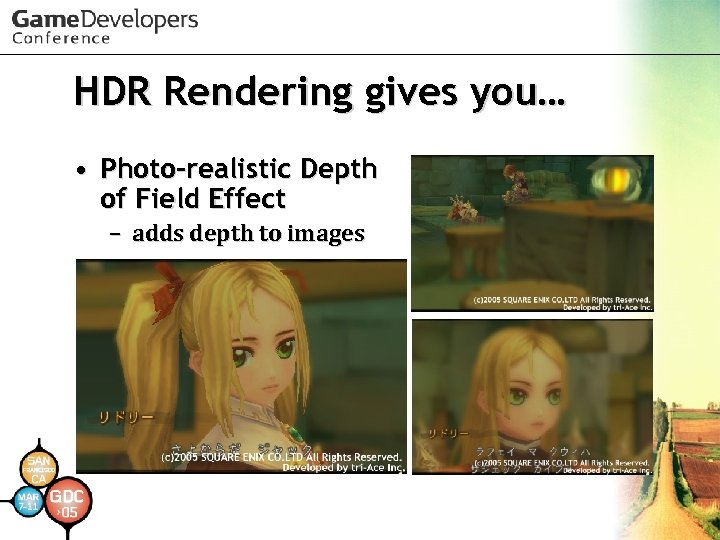 HDR Rendering gives you… • Photo-realistic Depth of Field Effect – adds depth to images
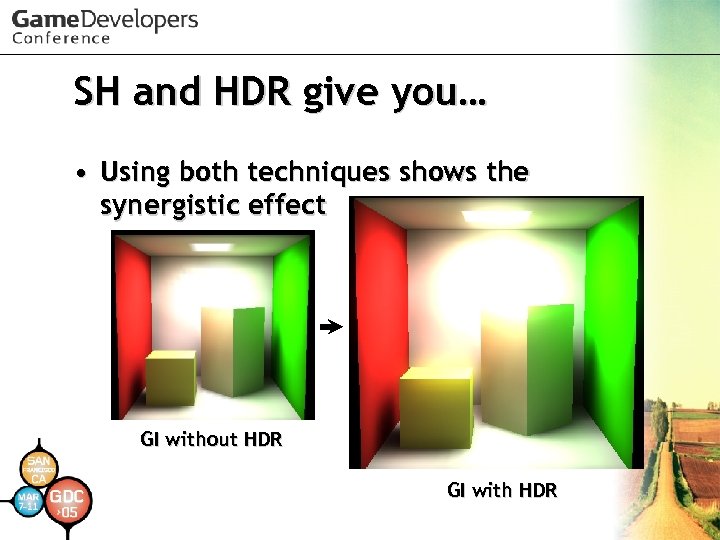 SH and HDR give you… • Using both techniques shows the synergistic effect GI without HDR GI with HDR
 Where to use SH and HDR • Don’t have to use all of them – SH lighting could be used to represent various light phenomena – HDR Rendering could be used to represent various optimal phenomena as well – There a lot of elements (backgrounds, characters, effects) in a game – It is important to let artists express themselves easily with limited resources for each element
 Engine we’ve integrated • Lighting specification (for each object) – 4 vertex directional lights (including pseudo point light, spot light) – 3 vertex point lights – 2 vertex spot lights – 1 ambient light (or hemi-sphere light) Light usage is automatically determined by the engine
 Engine we’ve integrated • Lighting Shaders – Color Rate Shader (light with intensity only) – Lambert Shader – Phong Shader
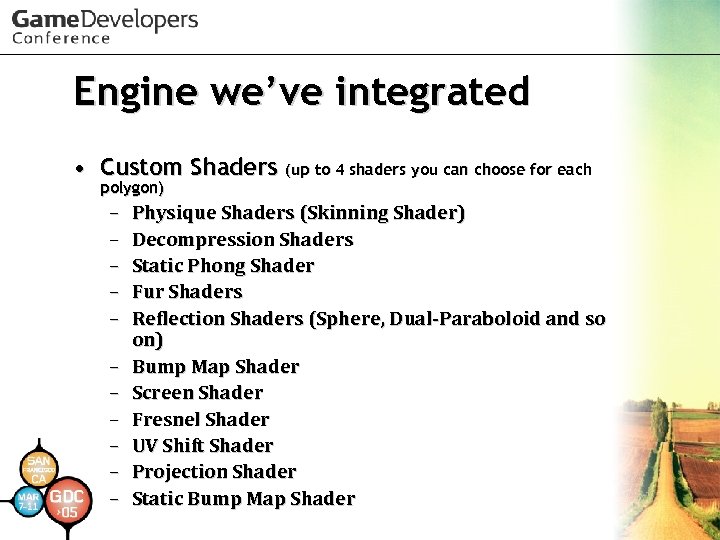 Engine we’ve integrated • Custom Shaders (up to 4 shaders you can choose for each polygon) – – – Physique Shaders (Skinning Shader) Decompression Shaders Static Phong Shader Fur Shaders Reflection Shaders (Sphere, Dual-Paraboloid and so on) Bump Map Shader Screen Shader Fresnel Shader UV Shift Shader Projection Shader Static Bump Map Shader
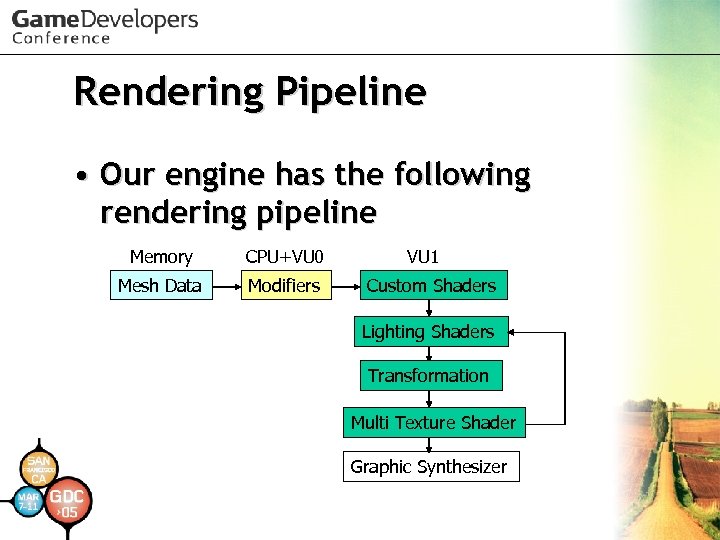 Rendering Pipeline • Our engine has the following rendering pipeline Memory CPU+VU 0 Mesh Data Modifiers VU 1 Custom Shaders Lighting Shaders Transformation Multi Texture Shader Graphic Synthesizer
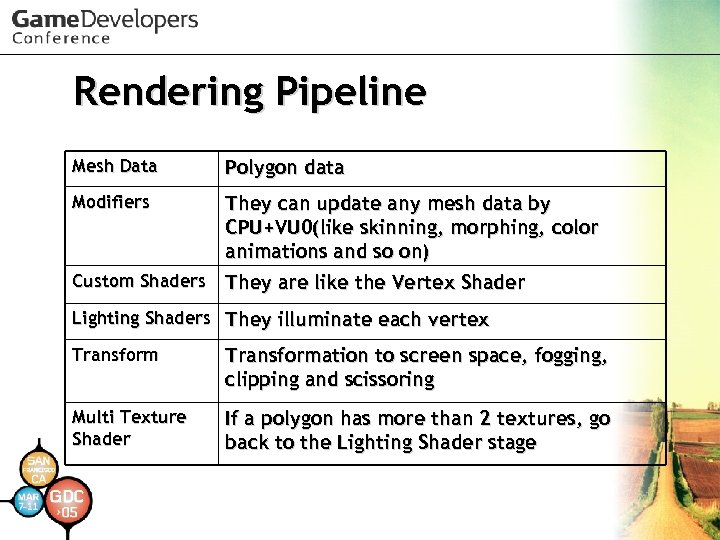 Rendering Pipeline Mesh Data Polygon data Modifiers They can update any mesh data by CPU+VU 0(like skinning, morphing, color animations and so on) Custom Shaders They are like the Vertex Shader Lighting Shaders They illuminate each vertex Transformation to screen space, fogging, clipping and scissoring Multi Texture Shader If a polygon has more than 2 textures, go back to the Lighting Shader stage
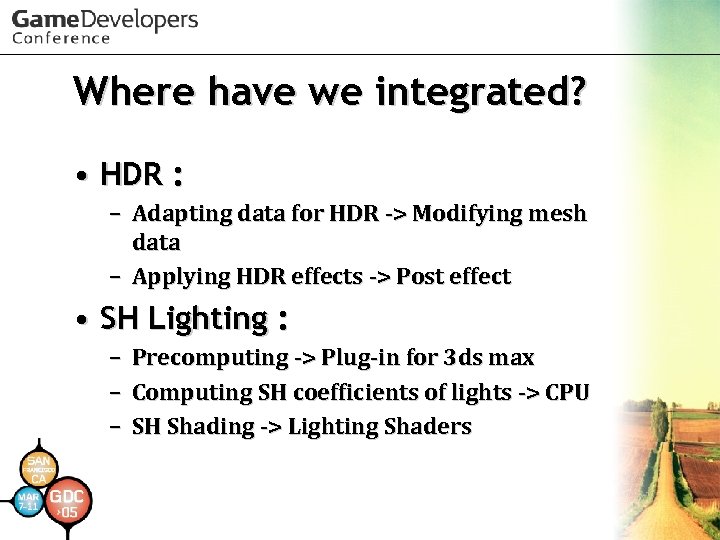 Where have we integrated? • HDR : – Adapting data for HDR -> Modifying mesh data – Applying HDR effects -> Post effect • SH Lighting : – – – Precomputing -> Plug-in for 3 ds max Computing SH coefficients of lights -> CPU SH Shading -> Lighting Shaders
 High Dynamic Range Rendering
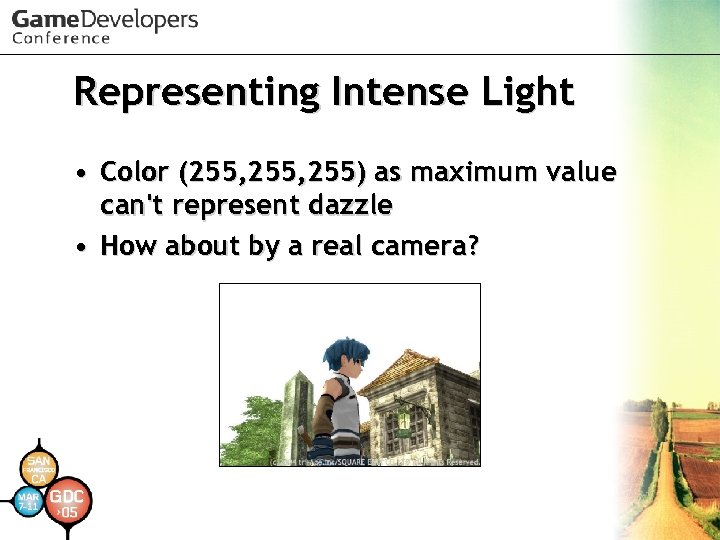 Representing Intense Light • Color (255, 255) as maximum value can't represent dazzle • How about by a real camera?
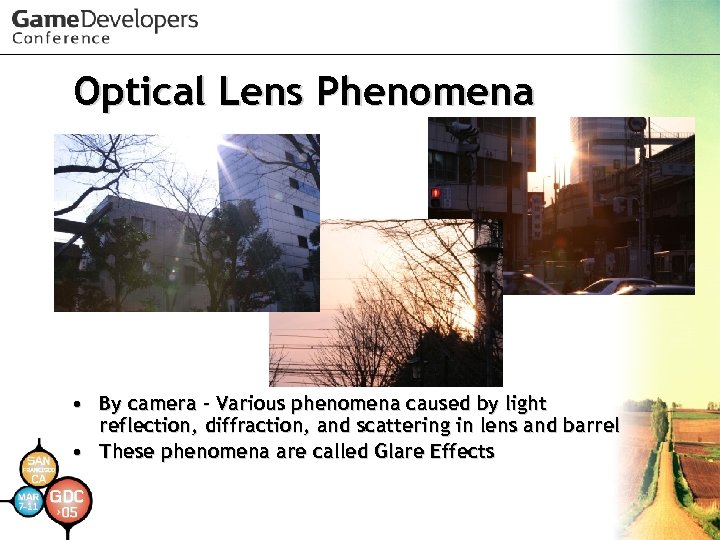 Optical Lens Phenomena • By camera - Various phenomena caused by light reflection, diffraction, and scattering in lens and barrel • These phenomena are called Glare Effects
 Glare Effects • Visible only when intense light enters • May occur at any time but are usually invisible when indirect from light sources because of faintness
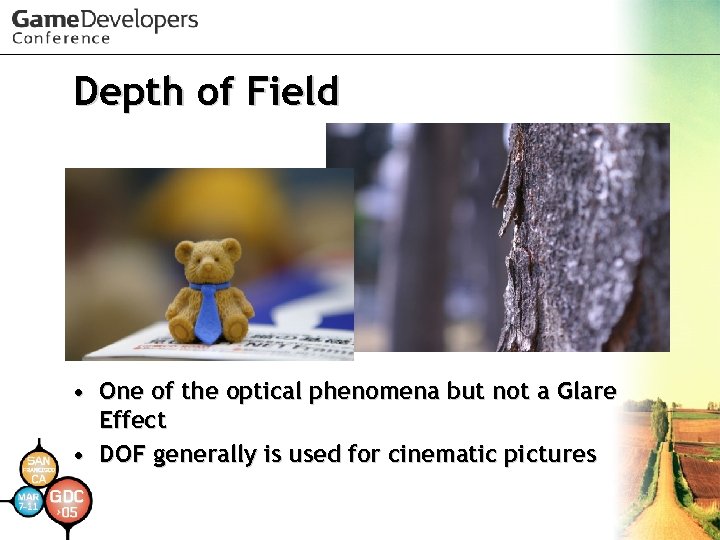 Depth of Field • One of the optical phenomena but not a Glare Effect • DOF generally is used for cinematic pictures
 Representing Intense Light - Bottom Line • Accurate reproduction of Glare Effects creates realistic intense light representations • Glare Effects reproduction requires highly intense brightness level • But the frame buffer ranges only up to 255 • Keep higher level on a separate buffer (HDR buffer)
 What is HDR? • Stands for High Dynamic Range • Dynamic Range is the ratio between smallest and largest signal values • In simple terms, HDR means a greater range of value • So HDR Buffers can represent a wide range of intensity
 Physical Quantity for HDR Sunlight vs 100 -watt bulb 40, 000 : 1 Sunlight vs Blue sky 250, 000 : 1 100 -watt bulb vs Moonlight 25 : 1 • For example, when you want to handle sunlight and blue sky at the same time accurately, int 32 or fp 32 are necessary at least
 Implementation of HDR Buffer on PS 2 • PS 2 has no high precision frame buffer - Have to utilize the 8 bit-integer frame buffer • Adopt a fixed-point-like method to raise maximum level of intensity instead of lowering resolution (When usual usage is described as “ 0: 0: 8", describe it as “ 0: 1: 7" or “ 0: 2: 6" in this method) • Example: If representing regular white by 128, 255 can represent double intensity level of white • Therefore, this method is not true HDR
 Mach-Band Issue • Resolution of the visible domain gets worse and Mach-Band is emphasized • But with texture mapping, double rate will be feasible
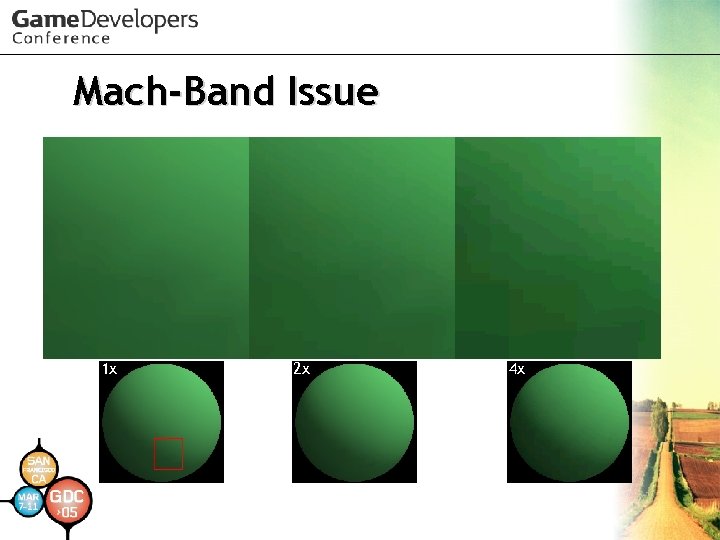 Mach-Band Issue 1 x 2 x 4 x
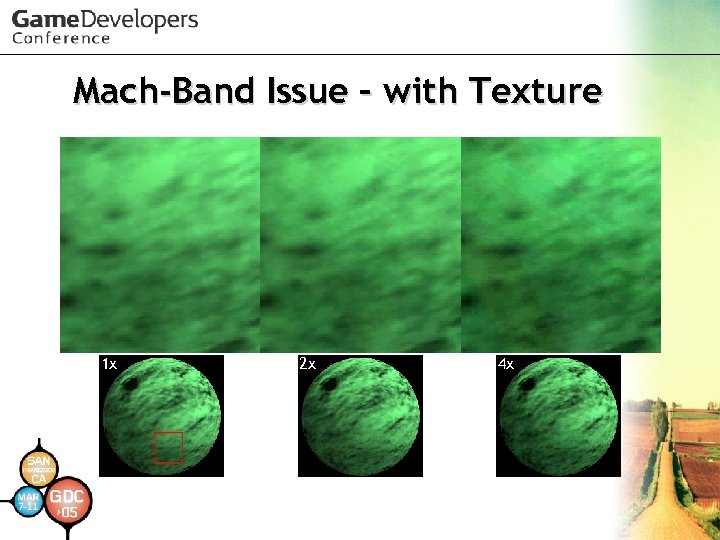 Mach-Band Issue – with Texture 1 x 2 x 4 x
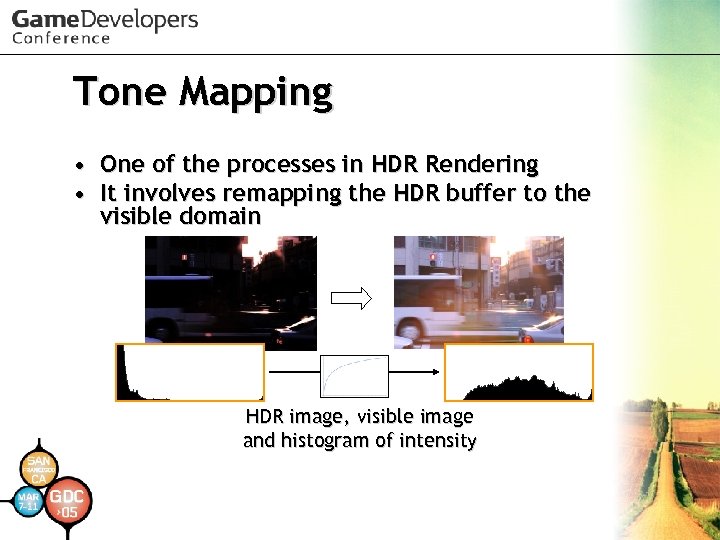 Tone Mapping • One of the processes in HDR Rendering • It involves remapping the HDR buffer to the visible domain HDR image, visible image and histogram of intensity
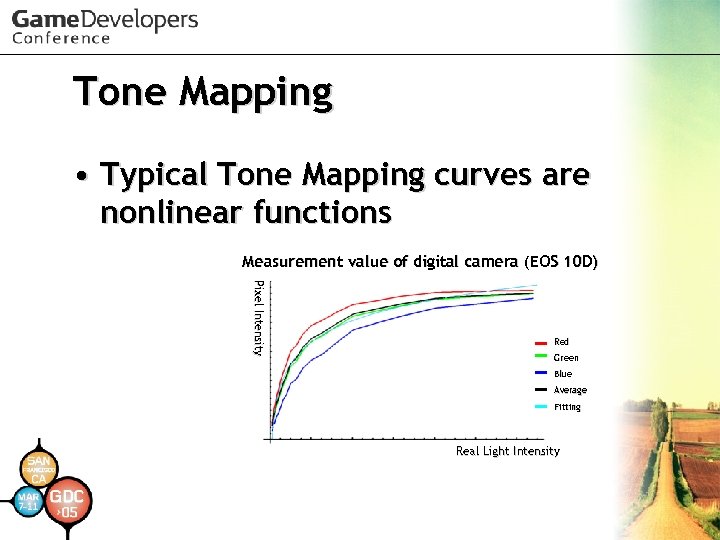 Tone Mapping • Typical Tone Mapping curves are nonlinear functions Measurement value of digital camera (EOS 10 D) Pixel Intensity Red Green Blue Average Fitting Real Light Intensity
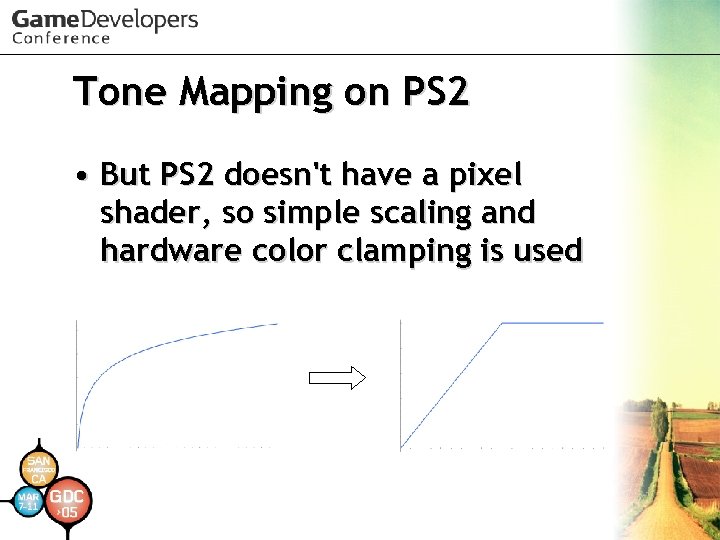 Tone Mapping on PS 2 • But PS 2 doesn't have a pixel shader, so simple scaling and hardware color clamping is used
 Tone Mapping on PS 2 • PS 2's alpha blending can scale up about six times on 1 pass – dst = Cs*As + Cs • Cs = Frame. Buffer*2. 0 • As = 2. 0 • In practice, you will have a precision problem, so use the appropriate alpha operation: 0 -1 x, 1 -2 x, 2 -4 x, 4 -6 x for highest precision
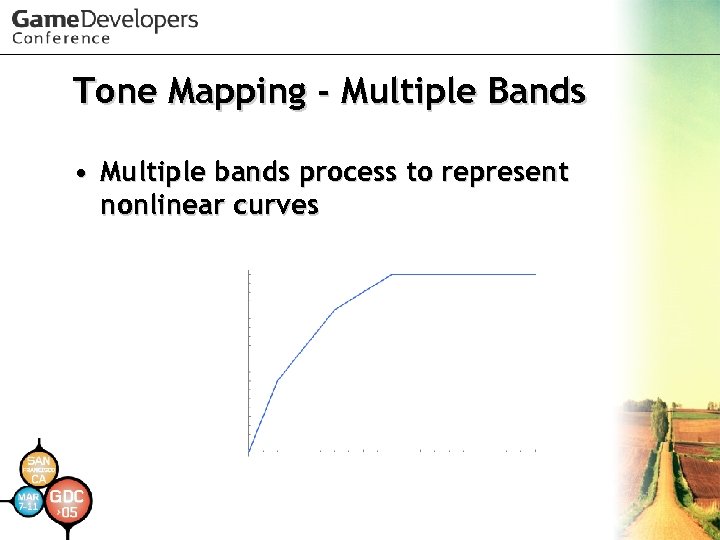 Tone Mapping - Multiple Bands • Multiple bands process to represent nonlinear curves
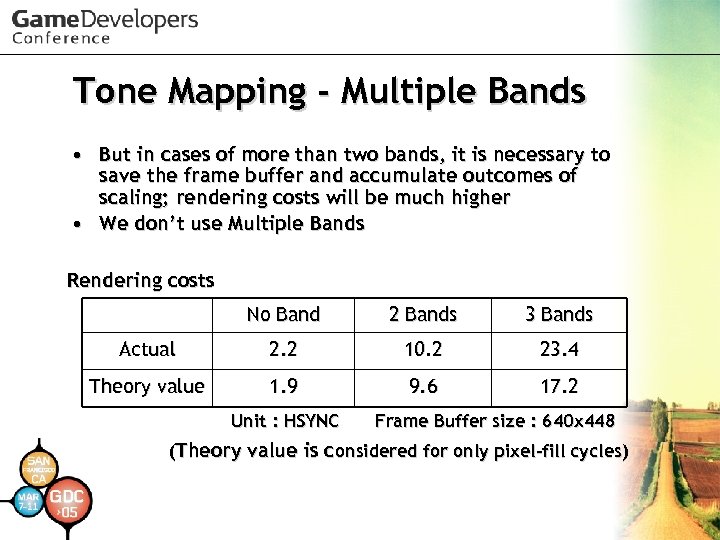 Tone Mapping - Multiple Bands • But in cases of more than two bands, it is necessary to save the frame buffer and accumulate outcomes of scaling; rendering costs will be much higher • We don’t use Multiple Bands Rendering costs No Band 2 Bands 3 Bands Actual 2. 2 10. 2 23. 4 Theory value 1. 9 9. 6 17. 2 Unit : HSYNC Frame Buffer size : 640 x 448 (Theory value is considered for only pixel-fill cycles)
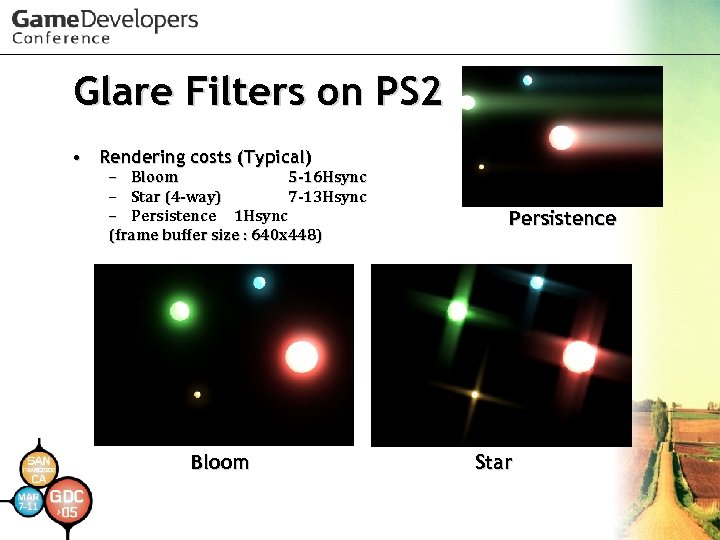 Glare Filters on PS 2 • Rendering costs (Typical) – Bloom 5 -16 Hsync – Star (4 -way) 7 -13 Hsync – Persistence 1 Hsync (frame buffer size : 640 x 448) Bloom Persistence Star
 Basic Topics for Glare Filters use • Reduced Frame Buffer • Filtering Threshold • Shared Reduced Accumulation Buffer
 Reduced Frame Buffer • Using 128 x 128 Reduced Frame Buffer • All processes substitute this for the original frame buffer • The most important tip is to reduce to half repeatedly with bilinear filtering to make the pixels contain average values of the original pixels • It will improve aliasing when a camera or objects are in motion
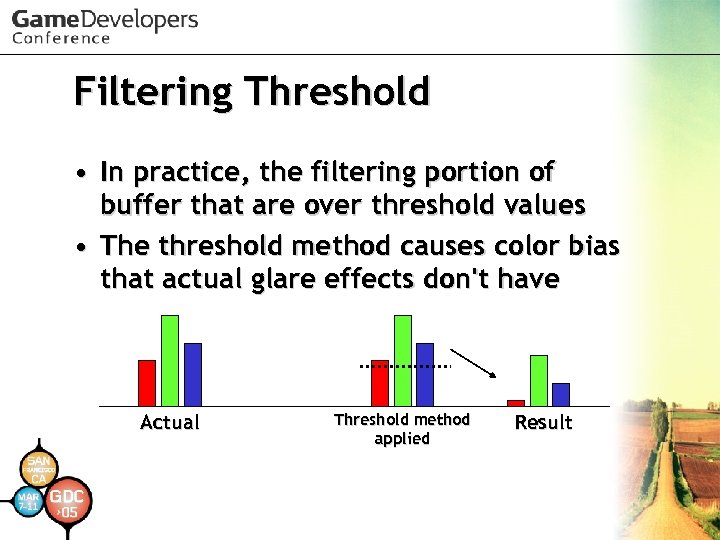 Filtering Threshold • In practice, the filtering portion of buffer that are over threshold values • The threshold method causes color bias that actual glare effects don't have Actual Threshold method applied Result
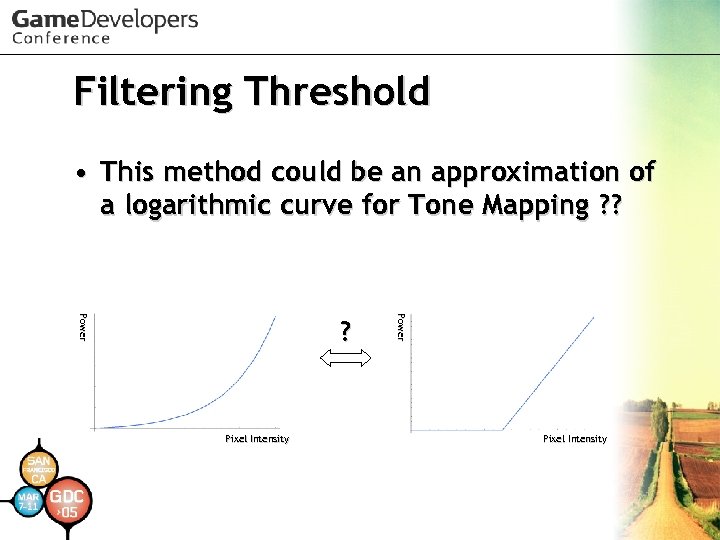 Filtering Threshold • This method could be an approximation of a logarithmic curve for Tone Mapping ? ? Pixel Intensity P ow e r ? Pixel Intensity
 Shared Reduced ACC Buffer • Main frame buffers take a large area so fill costs are expensive • Use the Shared Reduced Accumulation Buffer to streamline the main frame buffer once
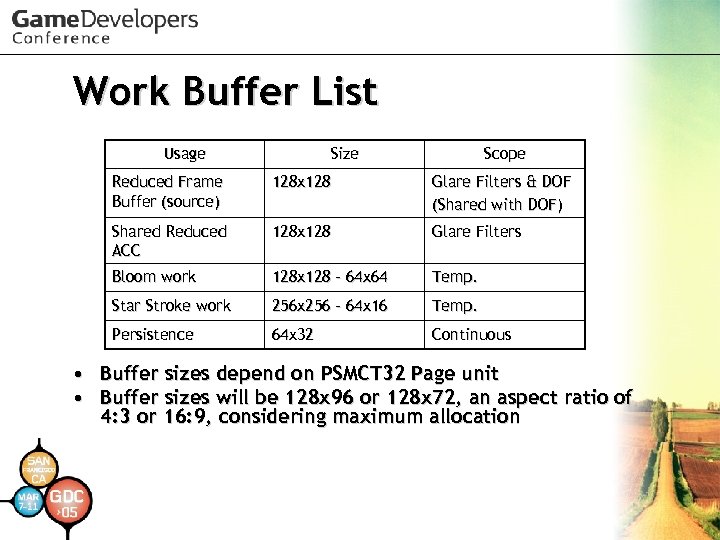 Work Buffer List Usage Size Scope Reduced Frame Buffer (source) Glare Filters & DOF (Shared with DOF) Shared Reduced ACC 128 x 128 Glare Filters Bloom work 128 x 128 – 64 x 64 Temp. Star Stroke work 256 x 256 – 64 x 16 Temp. Persistence • • 128 x 128 64 x 32 Continuous Buffer sizes depend on PSMCT 32 Page unit Buffer sizes will be 128 x 96 or 128 x 72, an aspect ratio of 4: 3 or 16: 9, considering maximum allocation
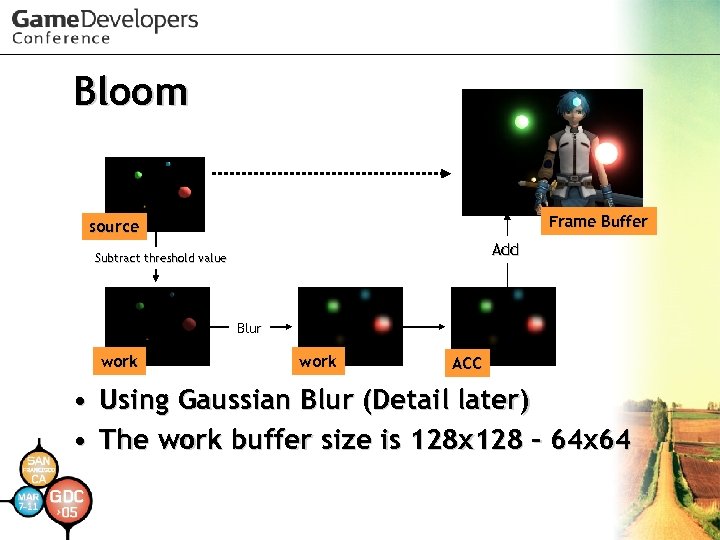 Bloom Frame Buffer source Add Subtract threshold value Blur work ACC • Using Gaussian Blur (Detail later) • The work buffer size is 128 x 128 - 64 x 64
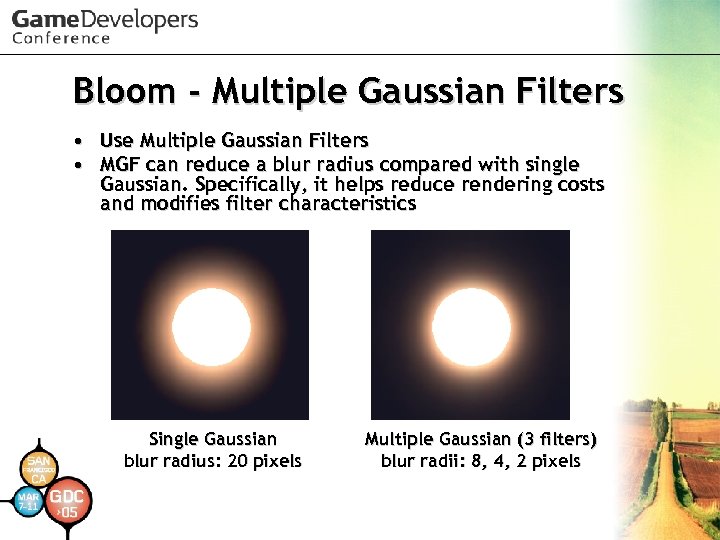 Bloom - Multiple Gaussian Filters • • Use Multiple Gaussian Filters MGF can reduce a blur radius compared with single Gaussian. Specifically, it helps reduce rendering costs and modifies filter characteristics Single Gaussian blur radius: 20 pixels Multiple Gaussian (3 filters) blur radii: 8, 4, 2 pixels
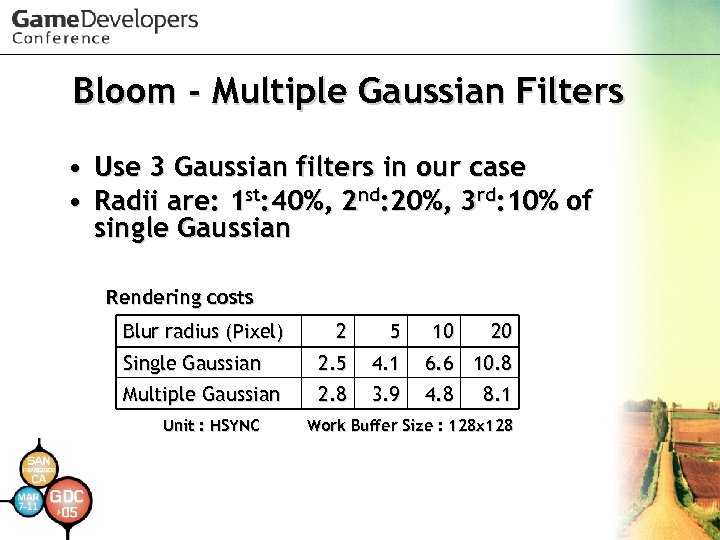 Bloom - Multiple Gaussian Filters • Use 3 Gaussian filters in our case • Radii are: 1 st: 40%, 2 nd: 20%, 3 rd: 10% of single Gaussian Rendering costs Blur radius (Pixel) 2 5 Single Gaussian 2. 5 4. 1 6. 6 10. 8 Multiple Gaussian 2. 8 3. 9 4. 8 Unit : HSYNC 10 20 8. 1 Work Buffer Size : 128 x 128
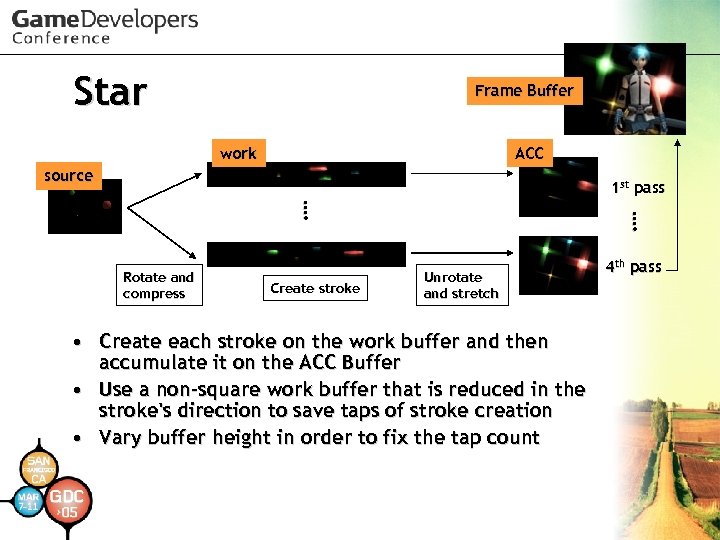 Star Frame Buffer work ACC source 1 st pass Create stroke …. …. Rotate and compress Unrotate and stretch • Create each stroke on the work buffer and then accumulate it on the ACC Buffer • Use a non-square work buffer that is reduced in the stroke's direction to save taps of stroke creation • Vary buffer height in order to fix the tap count 4 th pass
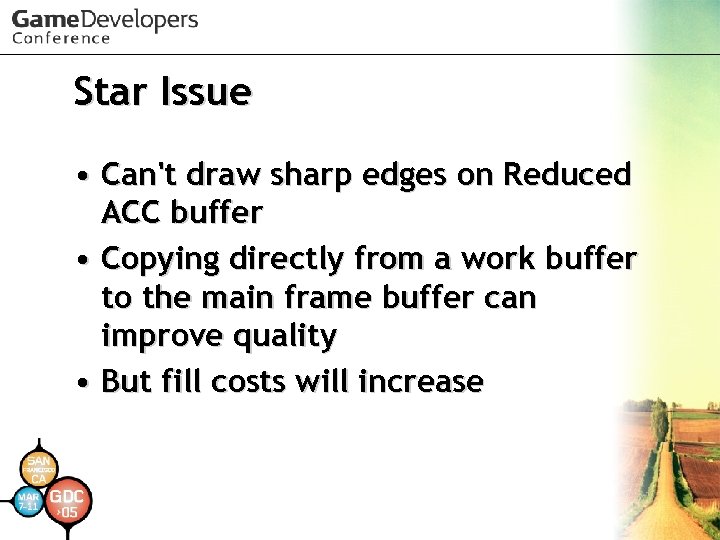 Star Issue • Can't draw sharp edges on Reduced ACC buffer • Copying directly from a work buffer to the main frame buffer can improve quality • But fill costs will increase
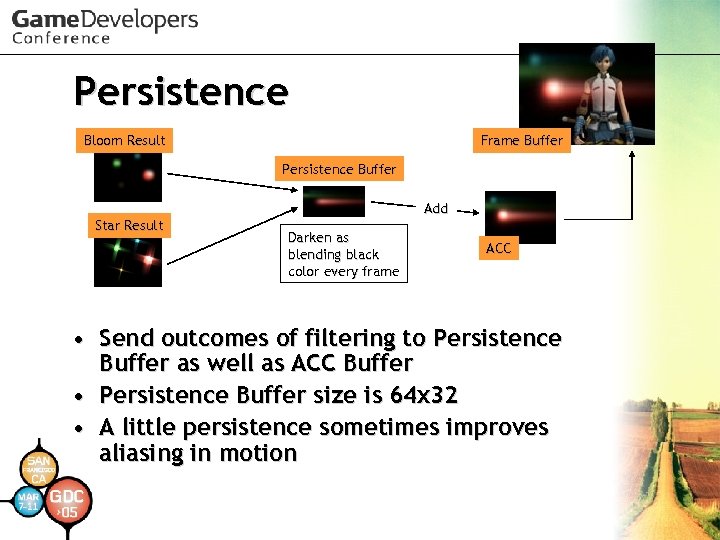 Persistence Bloom Result Frame Buffer Persistence Buffer Add Star Result Darken as blending black color every frame ACC • Send outcomes of filtering to Persistence Buffer as well as ACC Buffer • Persistence Buffer size is 64 x 32 • A little persistence sometimes improves aliasing in motion
 More Details for Glare Filters • Multiple Gaussian Filters • How to create star strokes • and so on. . See references below – Masaki Kawase. "Frame Buffer Postprocessing Effects in DOUBLE-S. T. E. A. L (Wreckless)“ GDC 2003. – Masaki Kawase. "Practical Implementation of High Dynamic Range Rendering“ GDC 2004.
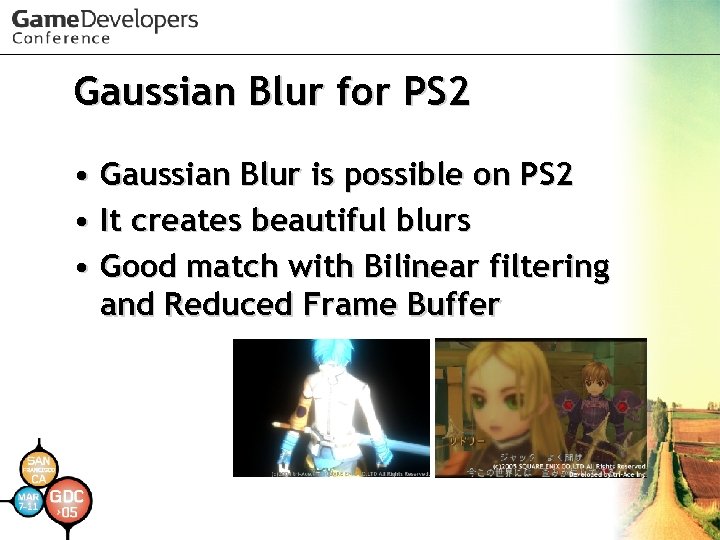 Gaussian Blur for PS 2 • Gaussian Blur is possible on PS 2 • It creates beautiful blurs • Good match with Bilinear filtering and Reduced Frame Buffer
 Gaussian Blur • Use Normal Alpha Blending • Requires many taps, so processing on Reduced Work Buffer is recommended • Costs are proportional to blur radii • Various uses: – Bloom, Depth of Field, Soft Shadow, and so on
 Gaussian Filter on PS 2 • Compute Normal blending coefficients to distribute the pixel color to nearby pixels according to Gaussian Distribution • Don’t use Additive Alpha Blending
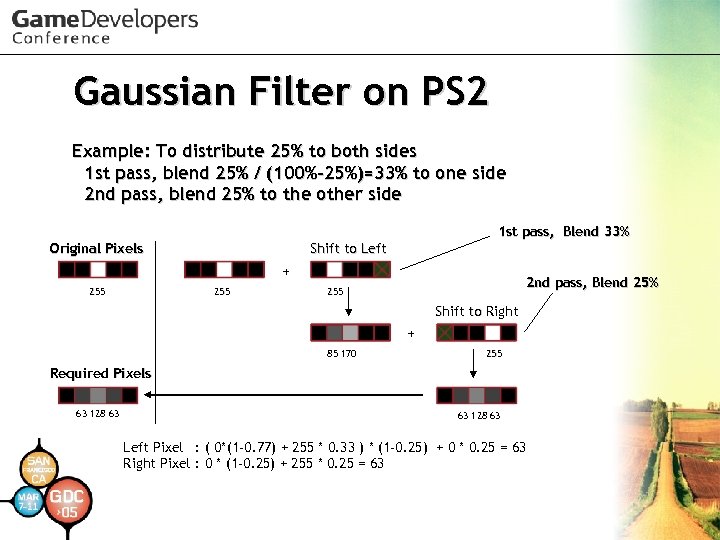 Gaussian Filter on PS 2 Example: To distribute 25% to both sides 1 st pass, blend 25% / (100%-25%)=33% to one side 2 nd pass, blend 25% to the other side 1 st pass, Blend 33% Original Pixels Shift to Left + 255 2 nd pass, Blend 25% 255 Shift to Right + 85 170 255 Required Pixels 63 128 63 Left Pixel : ( 0*(1 -0. 77) + 255 * 0. 33 ) * (1 -0. 25) + 0 * 0. 25 = 63 Right Pixel : 0 * (1 -0. 25) + 255 * 0. 25 = 63
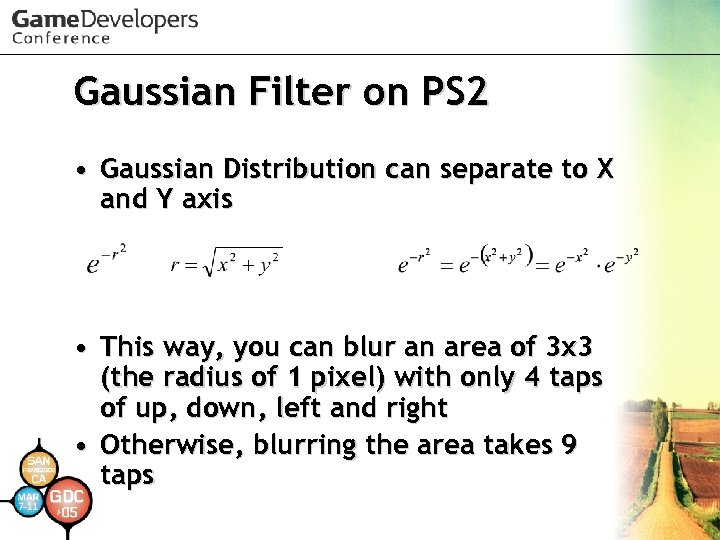 Gaussian Filter on PS 2 • Gaussian Distribution can separate to X and Y axis • This way, you can blur an area of 3 x 3 (the radius of 1 pixel) with only 4 taps of up, down, left and right • Otherwise, blurring the area takes 9 taps
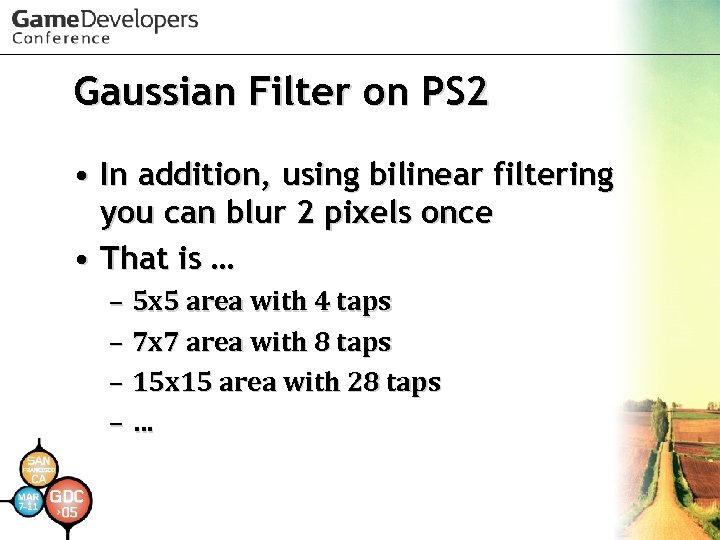 Gaussian Filter on PS 2 • In addition, using bilinear filtering you can blur 2 pixels once • That is … – 5 x 5 area with 4 taps – 7 x 7 area with 8 taps – 15 x 15 area with 28 taps –…
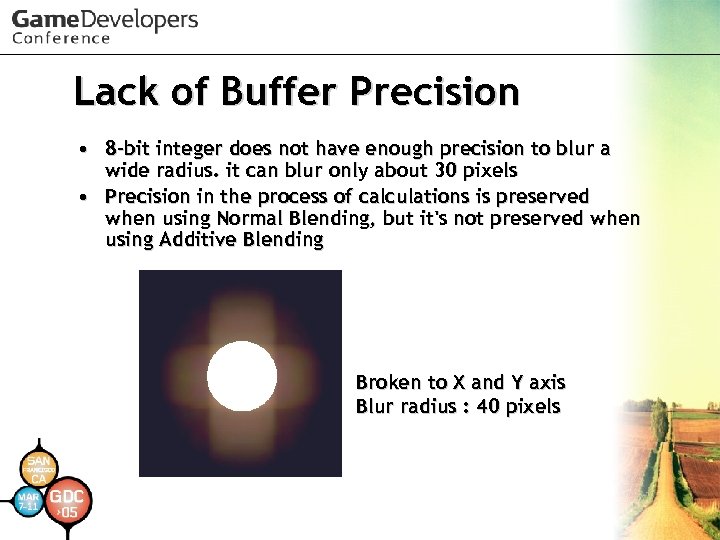 Lack of Buffer Precision • 8 -bit integer does not have enough precision to blur a wide radius. it can blur only about 30 pixels • Precision in the process of calculations is preserved when using Normal Blending, but it's not preserved when using Additive Blending Broken to X and Y axis Blur radius : 40 pixels
 Gaussian Filter Optimization • Of course using VU 1 saves CPU • Avoiding Destination Page Break Penalty of a frame buffer is effective for those filters • In addition, avoiding Source Page Break Penalty reduces rendering costs by 40%
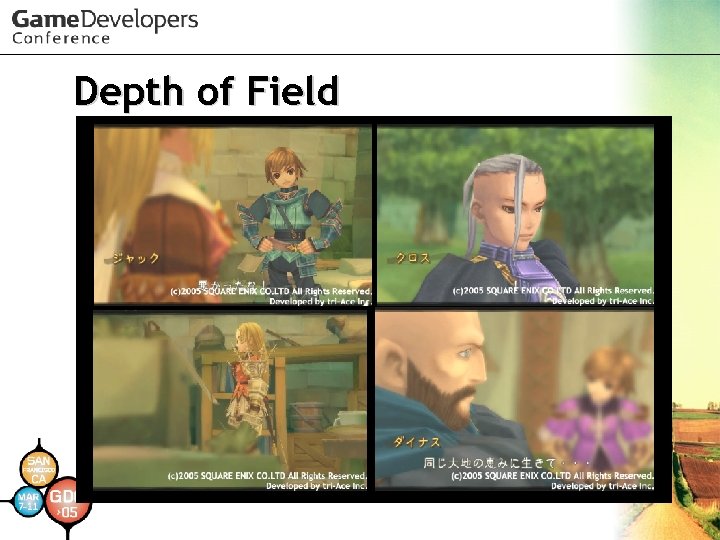
 Depth of Field • Achievements of our system: – Reasonable rendering costs: • 8 -24 Hsync(typically), 35 Hsync • (frame buffer size : 640 x 448) – Extreme blurs – Accurate blur radii and handling by real camera parameters • Focal length and F-stop
 Depth of Field
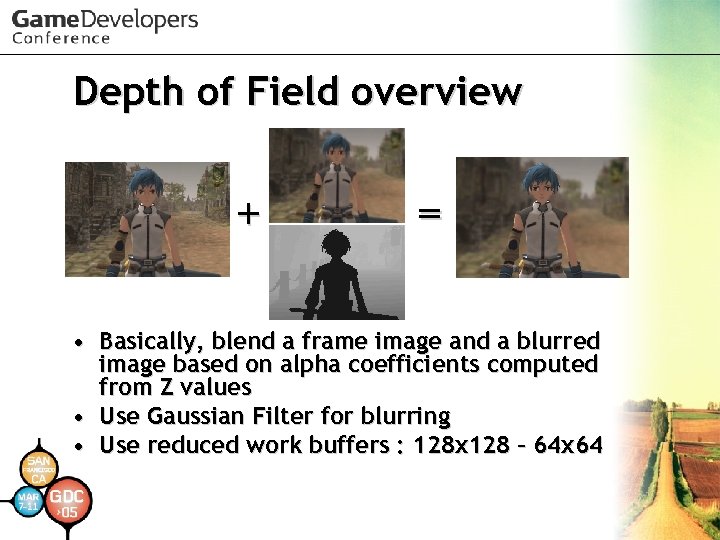 Depth of Field overview + = • Basically, blend a frame image and a blurred image based on alpha coefficients computed from Z values • Use Gaussian Filter for blurring • Use reduced work buffers : 128 x 128 – 64 x 64
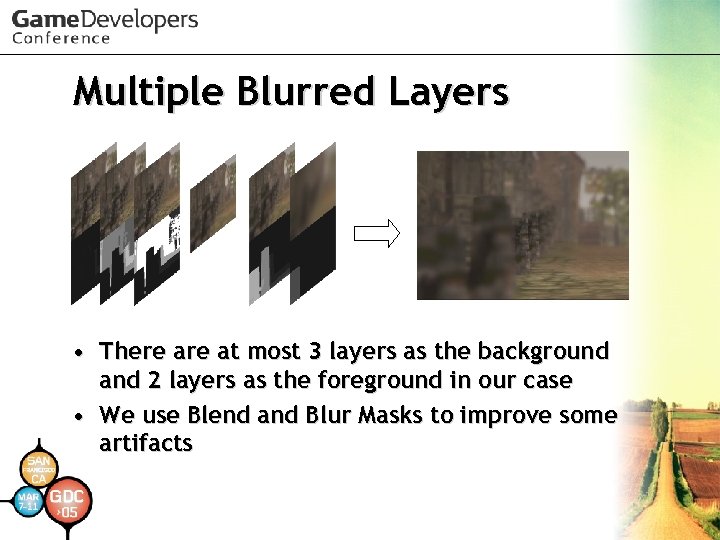 Multiple Blurred Layers • There at most 3 layers as the background and 2 layers as the foreground in our case • We use Blend and Blur Masks to improve some artifacts
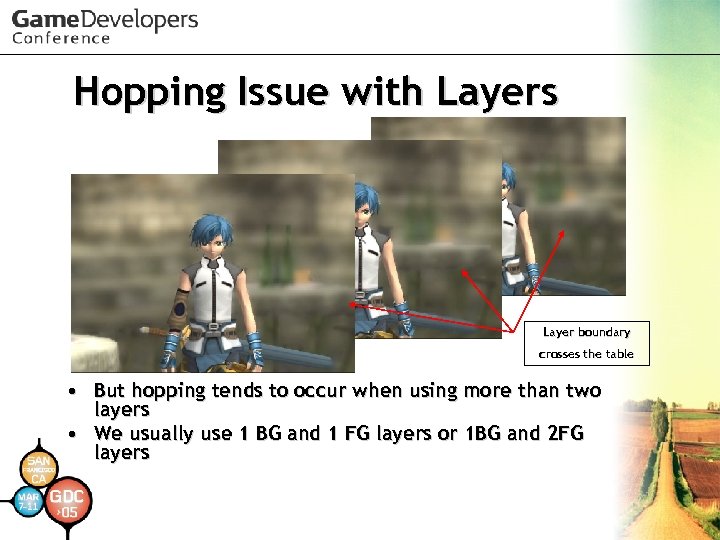 Hopping Issue with Layers Layer boundary crosses the table • But hopping tends to occur when using more than two layers • We usually use 1 BG and 1 FG layers or 1 BG and 2 FG layers
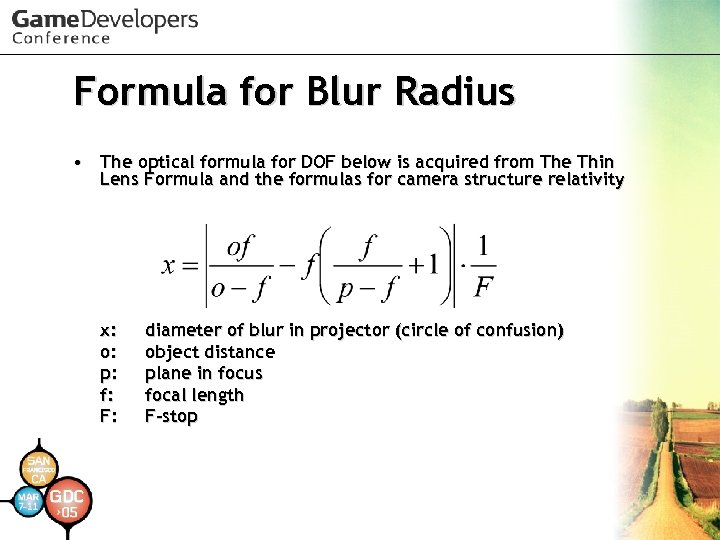 Formula for Blur Radius • The optical formula for DOF below is acquired from The Thin Lens Formula and the formulas for camera structure relativity x: o: p: f: F: diameter of blur in projector (circle of confusion) object distance plane in focus focal length F-stop
 Conversions of Frame Buffers • DOF uses the conversions of frame buffers below (details later) – Swizzling Each Color Element from G to A or A to G – Converting Z to RGB with CLUT – Shifting Z bits toward upper side
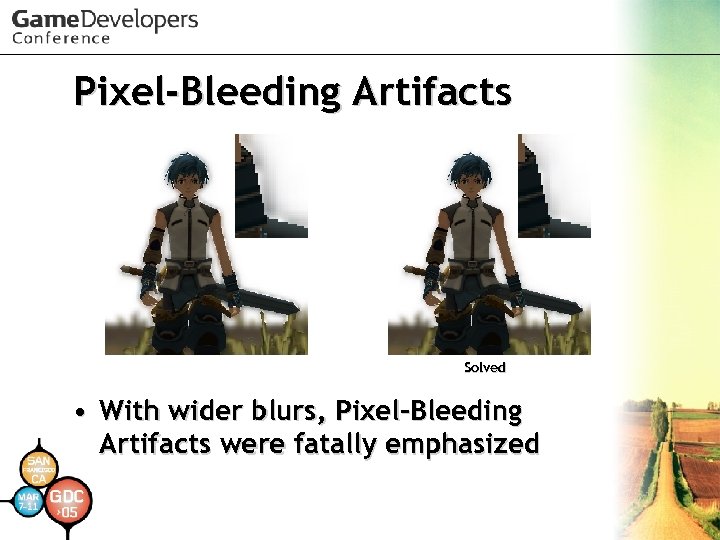 Pixel-Bleeding Artifacts Solved • With wider blurs, Pixel-Bleeding Artifacts were fatally emphasized
 Pixel-Bleeding Artifacts • Solve it by blurring with a mask • Use normal alpha blending so put masks in alpha components of a source buffer • Gaussian Distribution is incorrect near the borders of the mask but looks OK
 Edge on Blurred Foreground • Generally, blurred objects in the foreground have sharp edges • Need to expand Blending Alpha Mask for the foreground layers
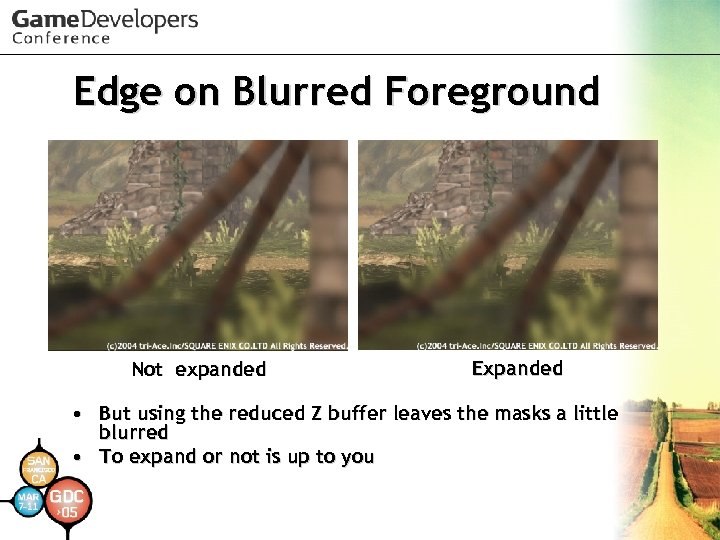 Edge on Blurred Foreground Not expanded Expanded • But using the reduced Z buffer leaves the masks a little blurred • To expand or not is up to you
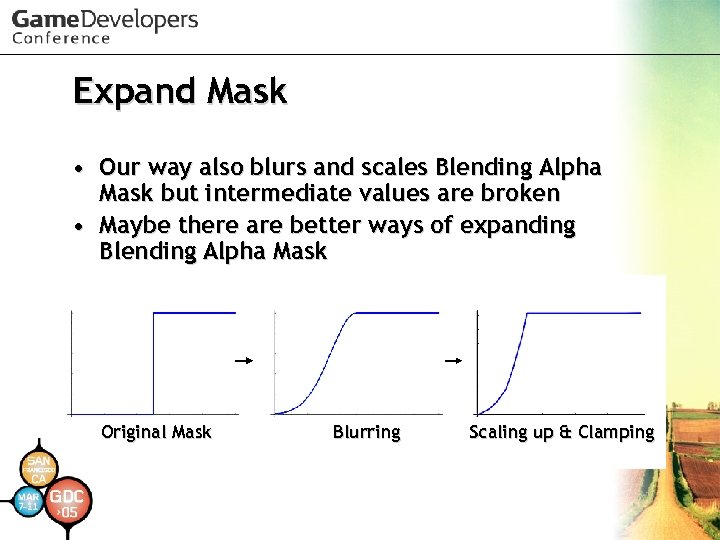 Expand Mask • Our way also blurs and scales Blending Alpha Mask but intermediate values are broken • Maybe there are better ways of expanding Blending Alpha Mask Original Mask Blurring Scaling up & Clamping
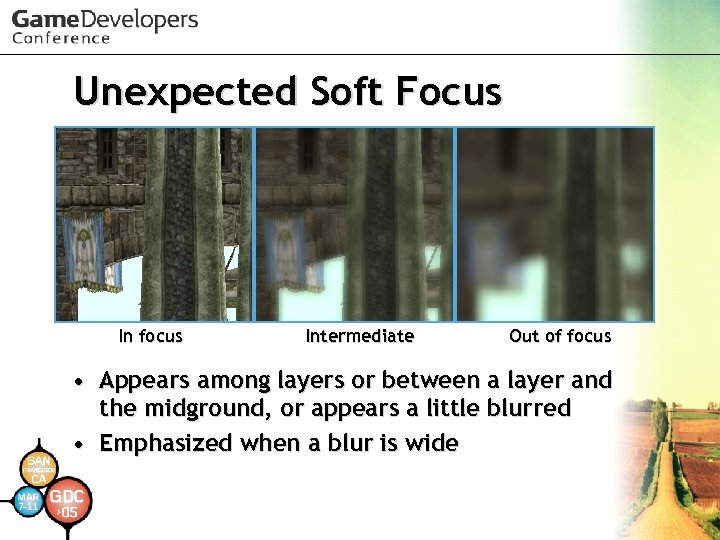 Unexpected Soft Focus In focus Intermediate Out of focus • Appears among layers or between a layer and the midground, or appears a little blurred • Emphasized when a blur is wide
 Unexpected Soft Focus • One solution is to increase the number of layers • Another way is to put intermediate values on the blurring mask • But it causes incorrect Gaussian blurring areas
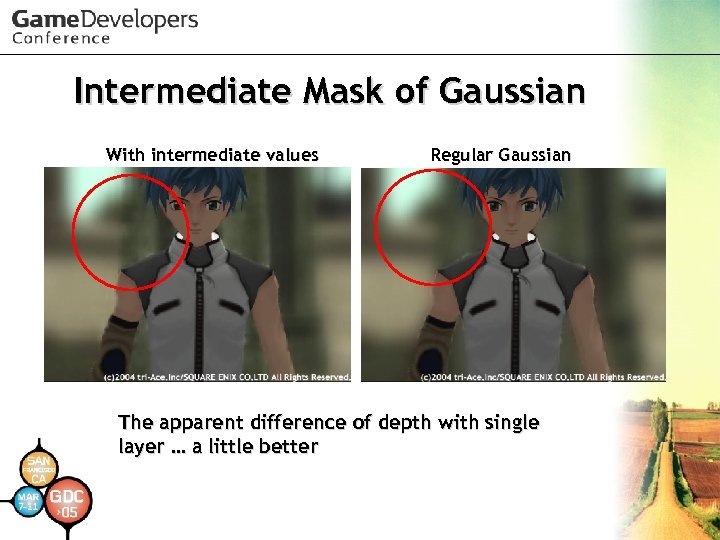 Intermediate Mask of Gaussian With intermediate values Regular Gaussian The apparent difference of depth with single layer … a little better
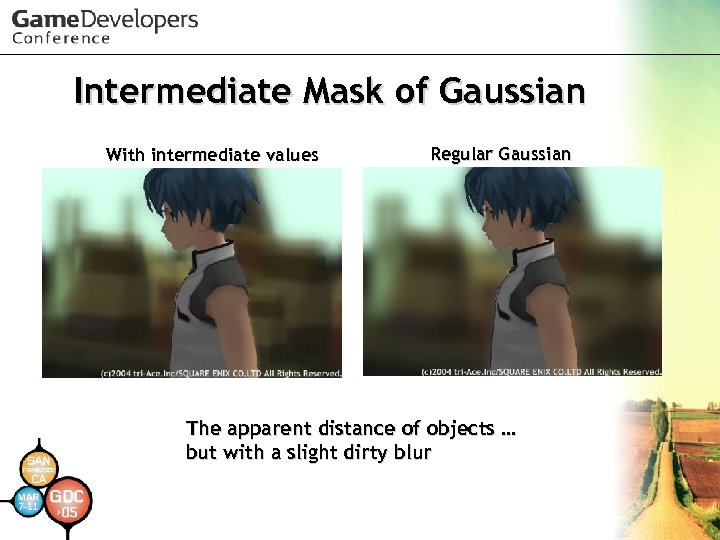 Intermediate Mask of Gaussian With intermediate values Regular Gaussian The apparent distance of objects … but with a slight dirty blur
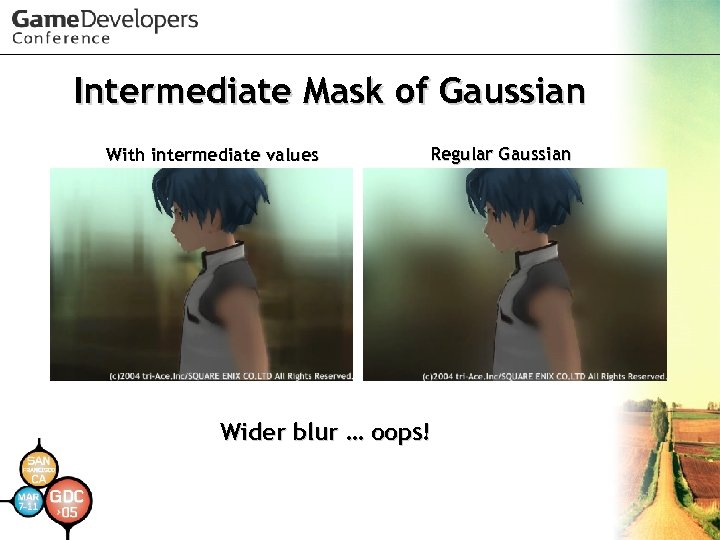 Intermediate Mask of Gaussian With intermediate values Regular Gaussian Wider blur … oops!
 Unnatural Blur • Gaussian Function is different from a real camera blur • The real blur function is more flat • Maybe the difference will be conspicuous using HDR values
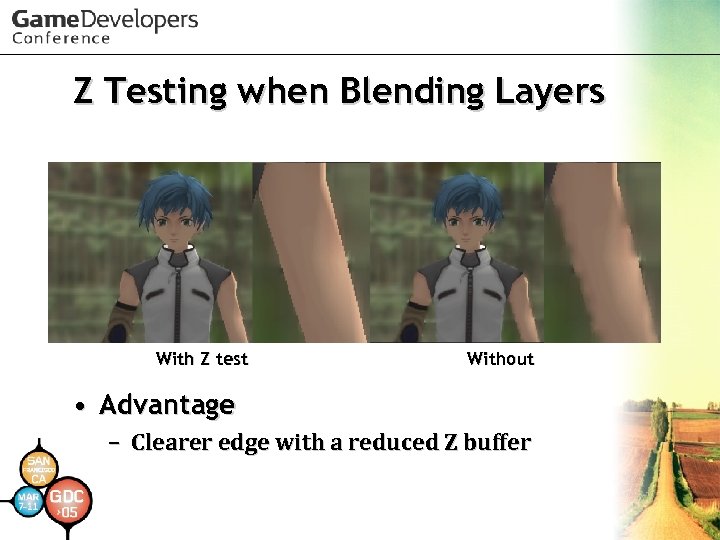 Z Testing when Blending Layers With Z test Without • Advantage – Clearer edge with a reduced Z buffer
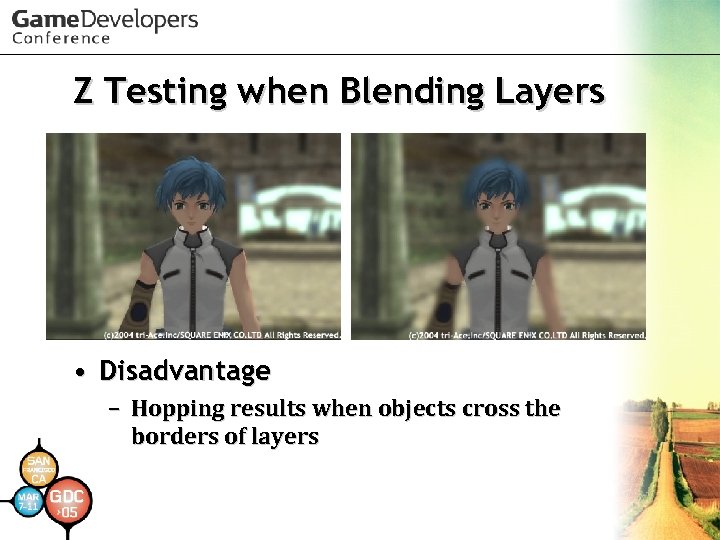 Z Testing when Blending Layers • Disadvantage – Hopping results when objects cross the borders of layers
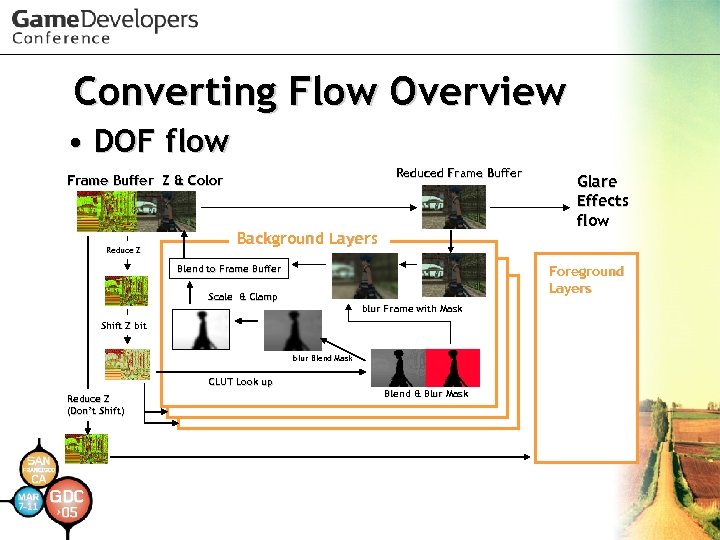 Converting Flow Overview • DOF flow Reduced Frame Buffer Z & Color Reduce Z Background Layers Foreground Layers Blend to Frame Buffer Scale & Clamp blur Frame with Mask Shift Z bit blur Blend Mask CLUT Look up Reduce Z (Don’t Shift) Glare Effects flow Blend & Blur Mask
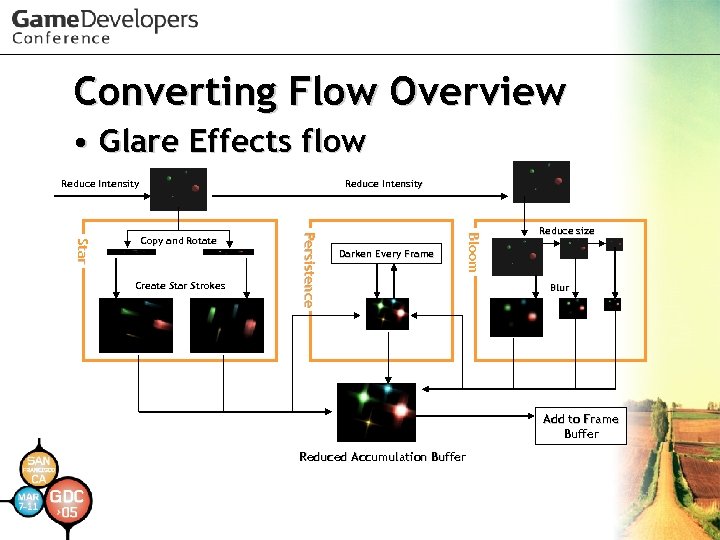 Converting Flow Overview • Glare Effects flow Reduce Intensity Darken Every Frame Bl o o m Create Star Strokes P e rs i s t e n c e St a r Copy and Rotate Reduce size Blur Add to Frame Buffer Reduced Accumulation Buffer
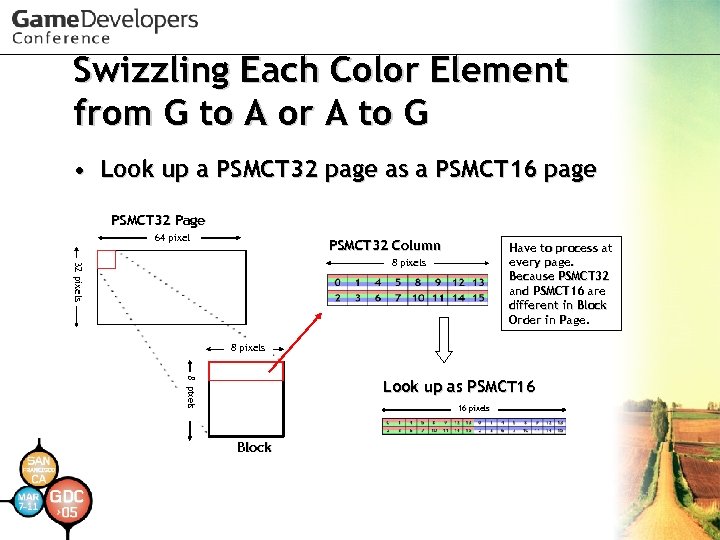 Swizzling Each Color Element from G to A or A to G • Look up a PSMCT 32 page as a PSMCT 16 page PSMCT 32 Page 64 pixel PSMCT 32 Column Have to process at every page. Because PSMCT 32 and PSMCT 16 are different in Block Order in Page. 32 pixels 8 pixels Look up as PSMCT 16 16 pixels Block
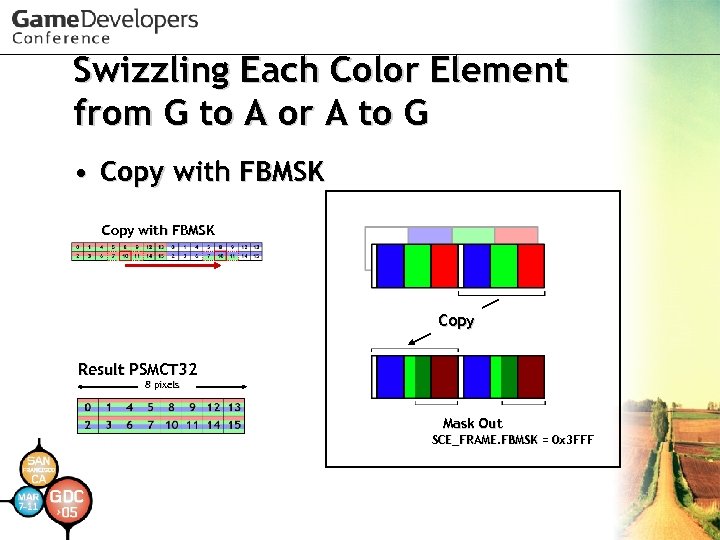 Swizzling Each Color Element from G to A or A to G • Copy with FBMSK Copy Result PSMCT 32 8 pixels Mask Out SCE_FRAME. FBMSK = 0 x 3 FFF
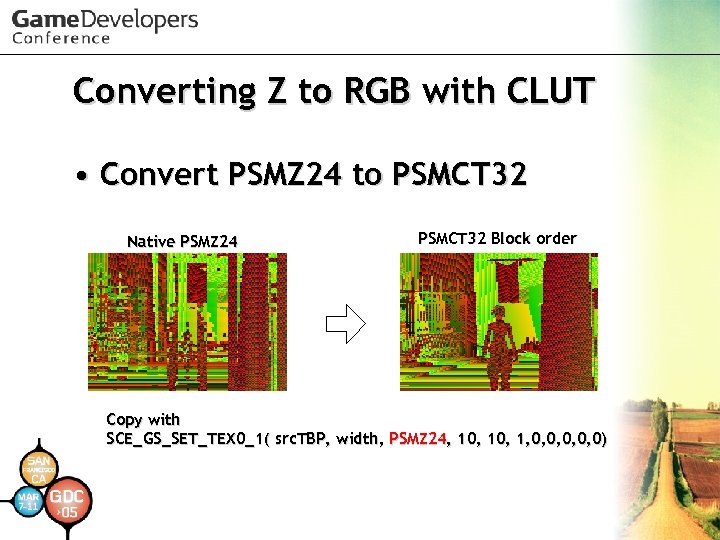 Converting Z to RGB with CLUT • Convert PSMZ 24 to PSMCT 32 Native PSMZ 24 PSMCT 32 Block order Copy with SCE_GS_SET_TEX 0_1( src. TBP, width, PSMZ 24, 10, 1, 0, 0, 0)
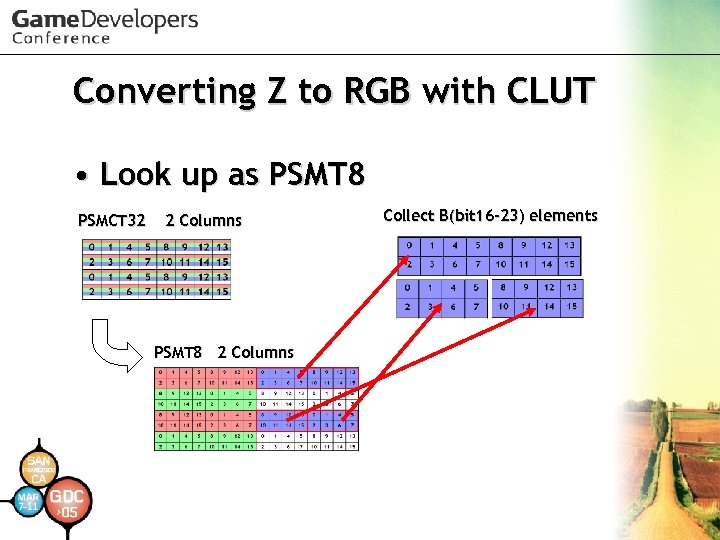 Converting Z to RGB with CLUT • Look up as PSMT 8 PSMCT 32 2 Columns PSMT 8 2 Columns Collect B(bit 16 -23) elements
 Converting Z to RGB with CLUT • Requires many tiny sprites such as 8 x 2 or 4 x 2, so it's inefficient if creating on VU • When converting a larger area, using Tile Base Processing for sharing a packet is recommended
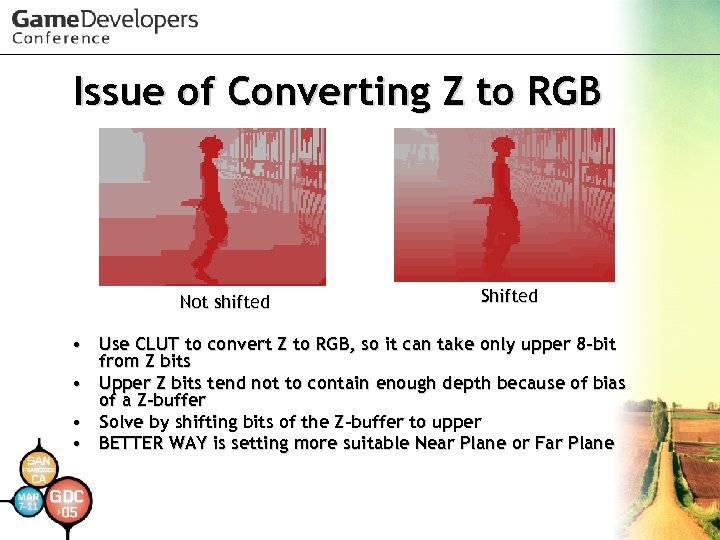 Issue of Converting Z to RGB Not shifted Shifted • Use CLUT to convert Z to RGB, so it can take only upper 8 -bit from Z bits • Upper Z bits tend not to contain enough depth because of bias of a Z-buffer • Solve by shifting bits of the Z-buffer to upper • BETTER WAY is setting more suitable Near Plane or Far Plane
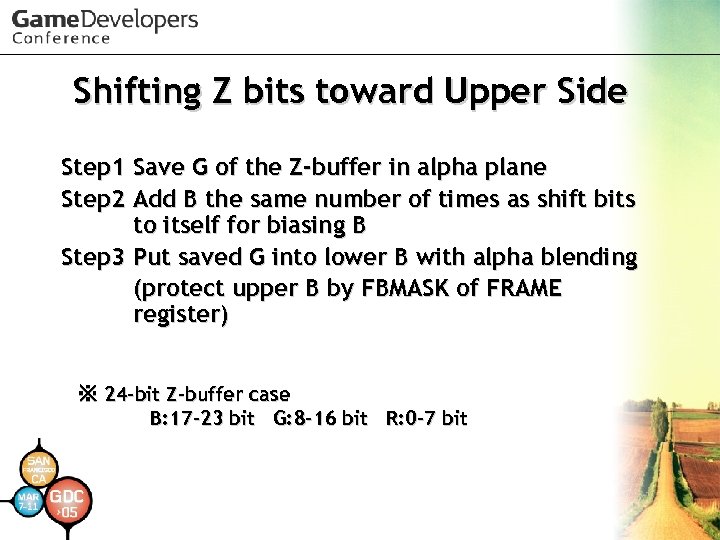 Shifting Z bits toward Upper Side Step 1 Step 2 Save G of the Z-buffer in alpha plane Add B the same number of times as shift bits to itself for biasing B Step 3 Put saved G into lower B with alpha blending (protect upper B by FBMASK of FRAME register) ※ 24 -bit Z-buffer case B: 17 -23 bit G: 8 -16 bit R: 0 -7 bit
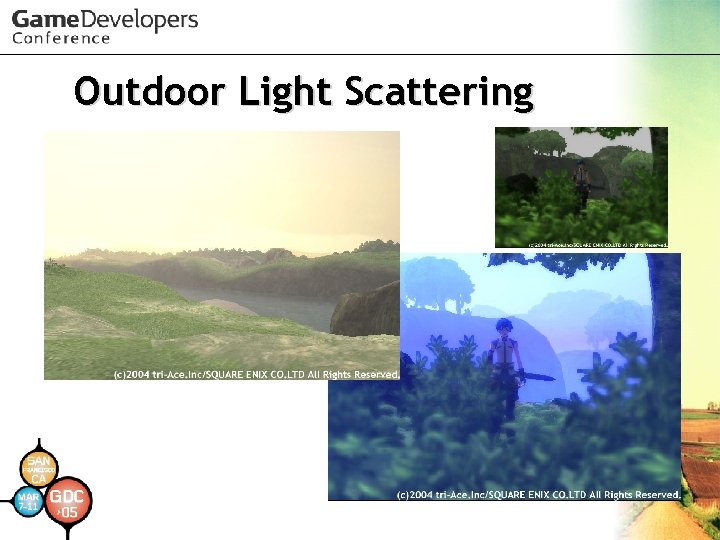 Outdoor Light Scattering
 Outdoor Light Scattering • Implementation of: – Naty Hoffman, Arcot J Preetham. "Rendering Outdoor Light Scattering in Real Time“ GDC 2002. • Glare Effects and DOF work good enough on Reduced Frame Buffer, but OLS requires higher resolution, so OLS tends to need more pixel-fill costs • Takes 13 -39 Hsync (typically), 57 Hsync
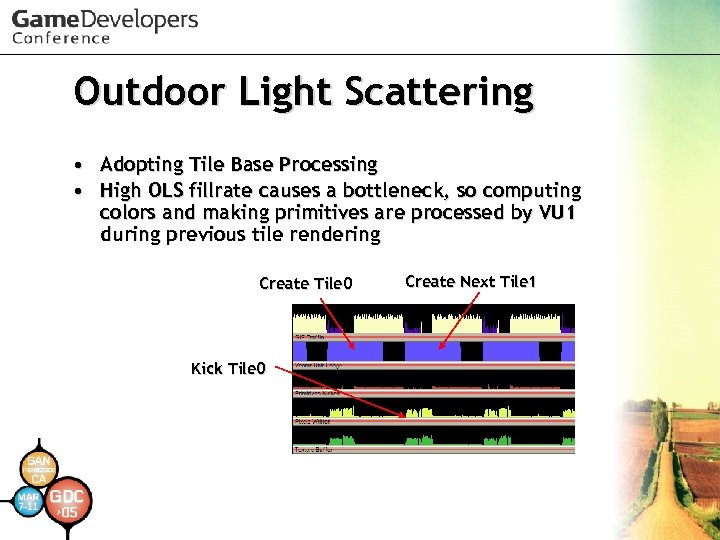 Outdoor Light Scattering • Adopting Tile Base Processing • High OLS fillrate causes a bottleneck, so computing colors and making primitives are processed by VU 1 during previous tile rendering Create Tile 0 Kick Tile 0 Create Next Tile 1
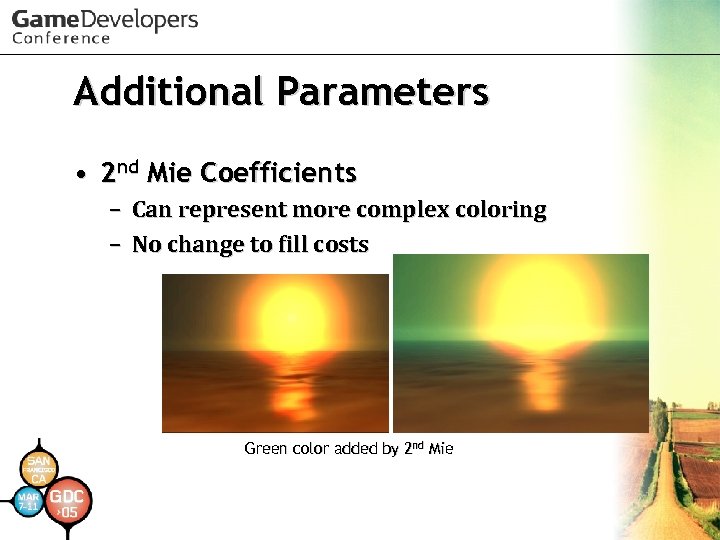 Additional Parameters • 2 nd Mie Coefficients – Can represent more complex coloring – No change to fill costs Green color added by 2 nd Mie
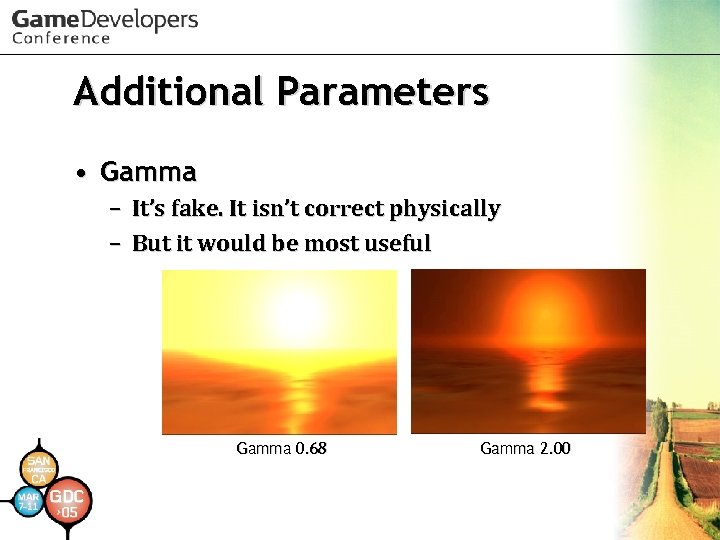 Additional Parameters • Gamma – It’s fake. It isn’t correct physically – But it would be most useful Gamma 0. 68 Gamma 2. 00
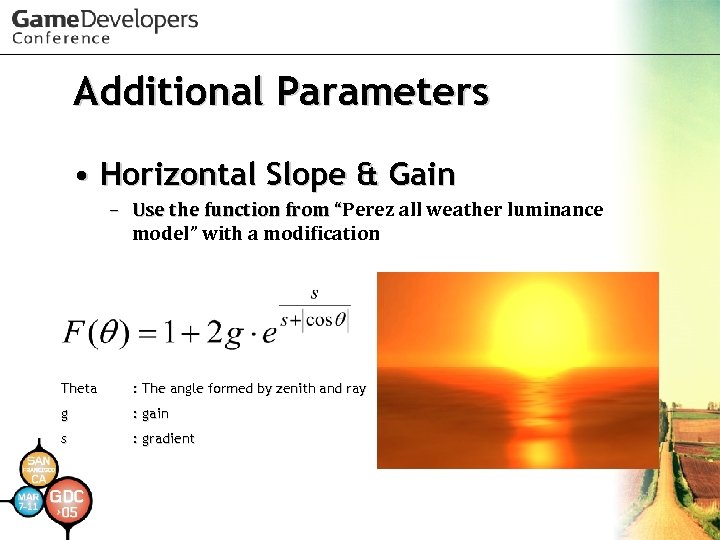 Additional Parameters • Horizontal Slope & Gain – Use the function from “Perez all weather luminance “ model” with a modification Theta : The angle formed by zenith and ray g : gain s : gradient
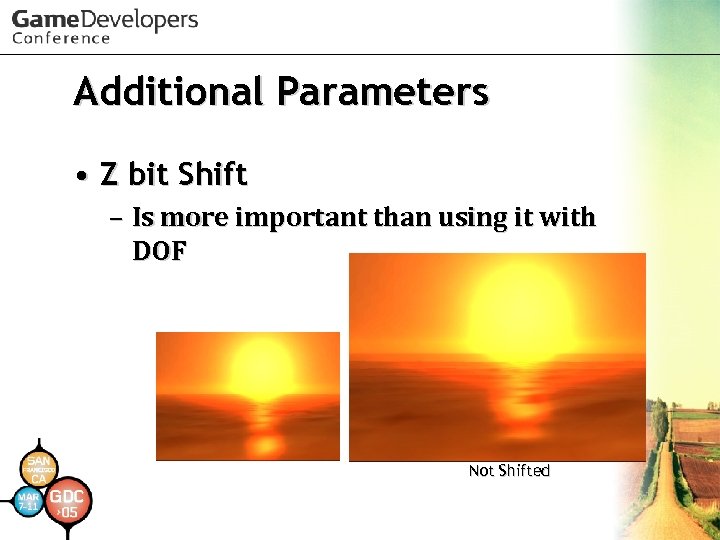 Additional Parameters • Z bit Shift – Is more important than using it with DOF Not Shifted
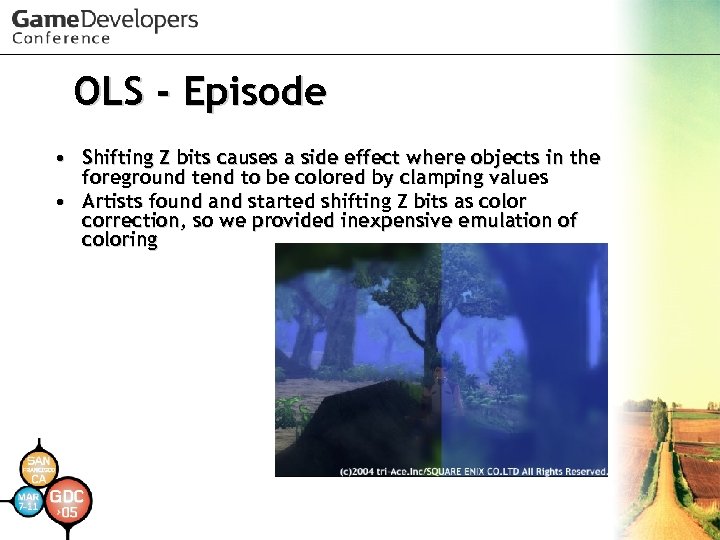 OLS - Episode • Shifting Z bits causes a side effect where objects in the foreground tend to be colored by clamping values • Artists found and started shifting Z bits as color correction, so we provided inexpensive emulation of coloring
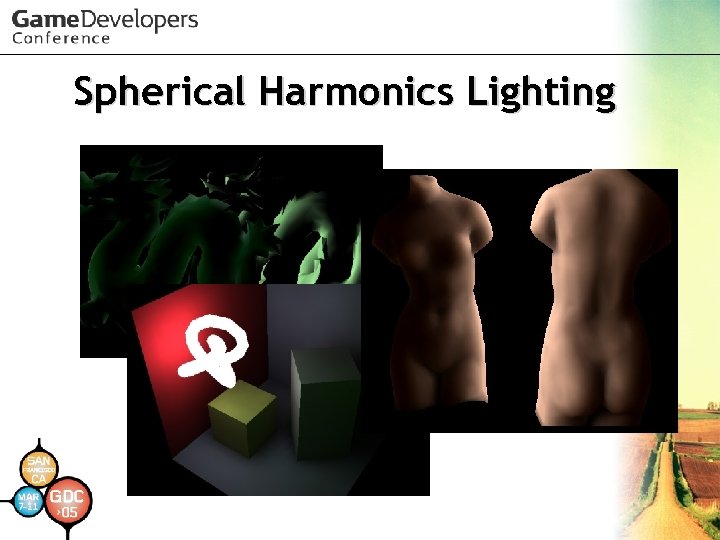 Spherical Harmonics Lighting
 How to use SH Lighting easily? • Use Direct. X 9 c! – Of course, we know you want to implement it yourselves – But SH Lighting implementation on Direct. X 9 c is useful to understand it – You should look over its documentation and samples
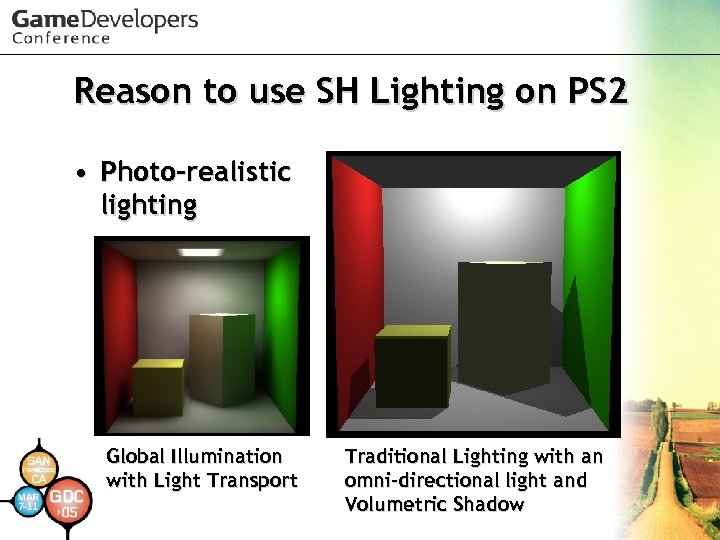 Reason to use SH Lighting on PS 2 • Photo-realistic lighting Global Illumination with Light Transport Traditional Lighting with an omni-directional light and Volumetric Shadow
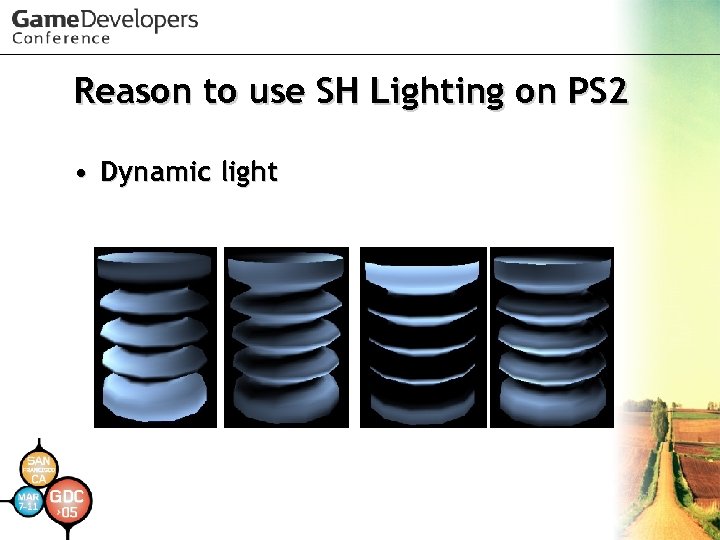 Reason to use SH Lighting on PS 2 • Dynamic light
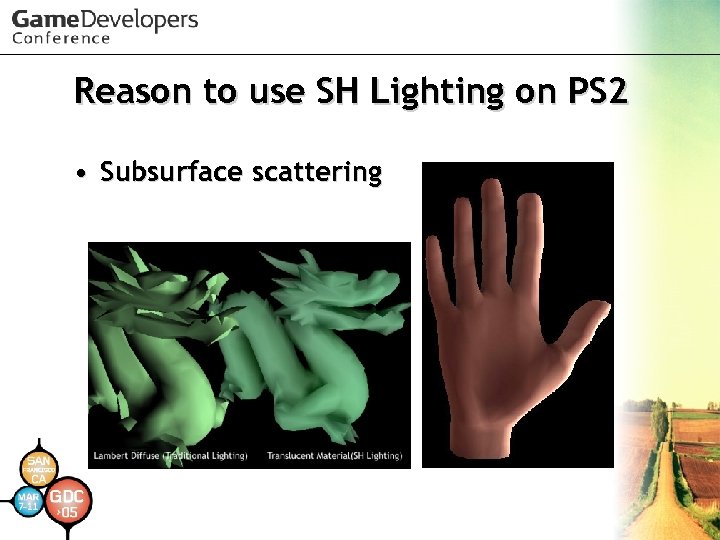 Reason to use SH Lighting on PS 2 • Subsurface scattering
 PRT • Precomputed Radiance Transfer was published by Peter Pike Sloan et al. in SIGRAPH 2002 – Compute incident light from all directions off line and compress it – Use compressed data for illuminating surfaces in real-time
 What to do with PRT • Limited real-time global illumination – Basically objects mustn't deform – Basically objects mustn't move • Limited B(SS)RDF simulation – Lambertian Diffuse – Glossy Specular – Arbitrary (low frequency) BRDF
 Limited Animation • SH Light position can move or rotate – But SH lights are regarded as infinite distance lights (directional light) • SH Light color and intensity can be animated – IBL can be used • Objects can move or rotate – But if objects affect each other, those objects can’t move • Because light effects are pre-computed!
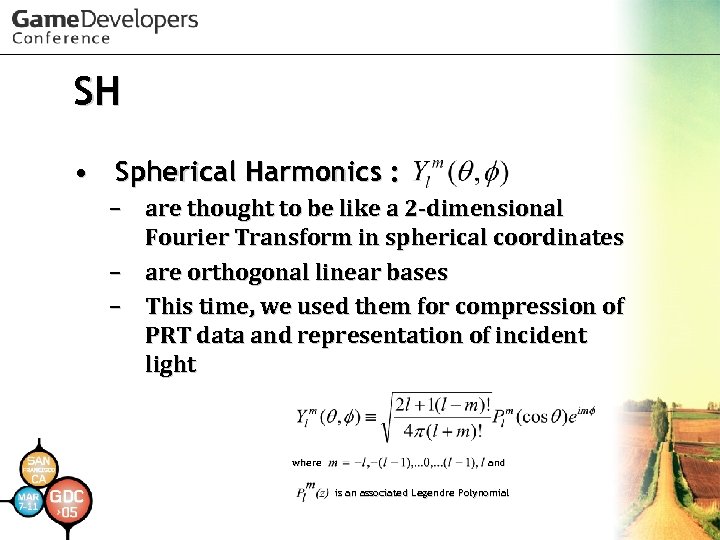 SH • Spherical Harmonics : – are thought to be like a 2 -dimensional Fourier Transform in spherical coordinates – are orthogonal linear bases – This time, we used them for compression of PRT data and representation of incident light where and is an associated Legendre Polynomial
 How is data compressed? • PRT data is considered as a response to rays from all directions in 3 Dspace • Think of it as 2 D-space, so as to understand easily
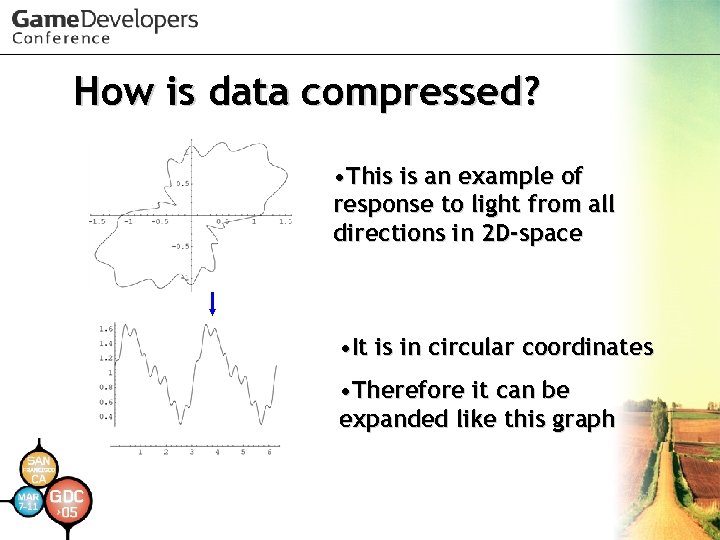 How is data compressed? • This is an example of response to light from all directions in 2 D-space • It is in circular coordinates • Therefore it can be expanded like this graph
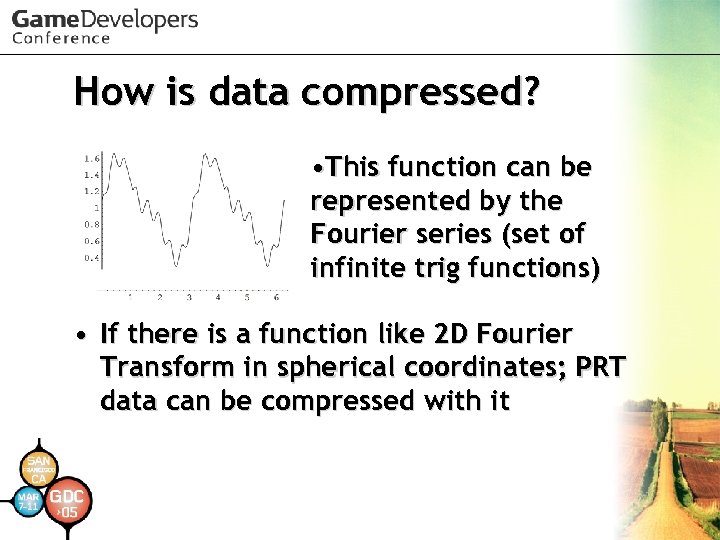 How is data compressed? • This function can be represented by the Fourier series (set of infinite trig functions) • If there is a function like 2 D Fourier Transform in spherical coordinates; PRT data can be compressed with it
 How is data compressed? • You could think of Spherical Harmonics as a 2 D Fourier Transform in spherical coordinates, so as to understand easily
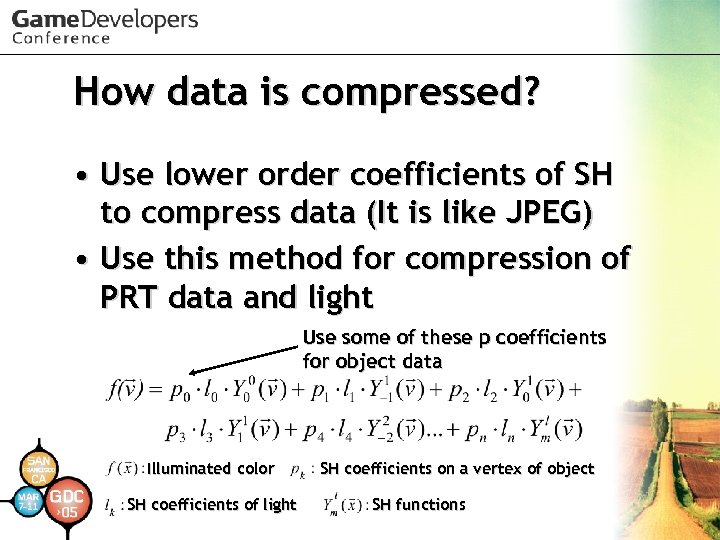 How data is compressed? • Use lower order coefficients of SH to compress data (It is like JPEG) • Use this method for compression of PRT data and light Use some of these p coefficients for object data Illuminated color SH coefficients of light SH coefficients on a vertex of object SH functions
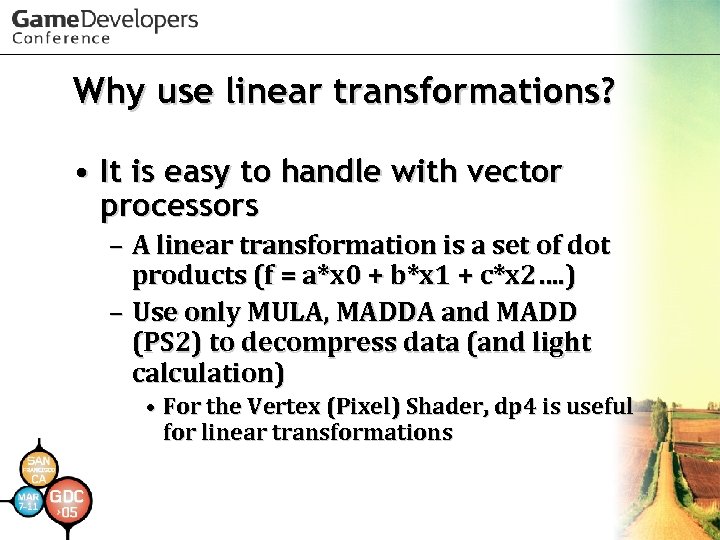 Why use linear transformations? • It is easy to handle with vector processors – A linear transformation is a set of dot products (f = a*x 0 + b*x 1 + c*x 2…. ) – Use only MULA, MADDA and MADD (PS 2) to decompress data (and light calculation) • For the Vertex (Pixel) Shader, dp 4 is useful for linear transformations
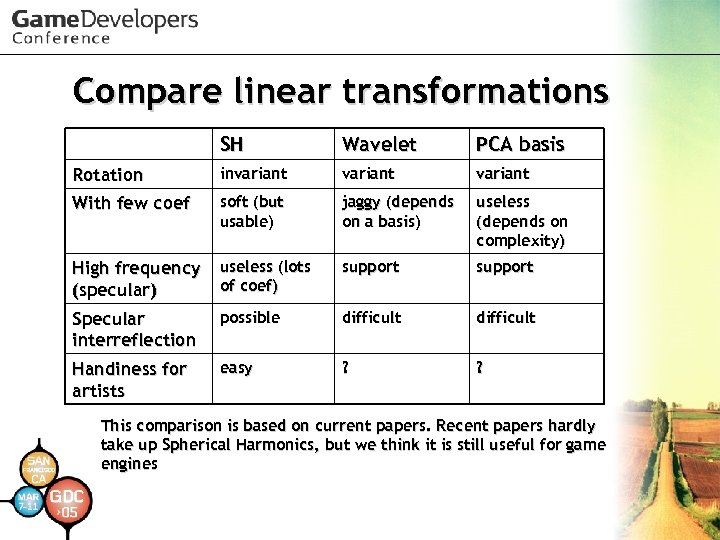 Compare linear transformations SH Wavelet PCA basis Rotation invariant With few coef soft (but usable) jaggy (depends on a basis) useless (depends on complexity) High frequency (specular) useless (lots of coef) support Specular interreflection possible difficult Handiness for artists easy ? ? This comparison is based on current papers. Recent papers hardly take up Spherical Harmonics, but we think it is still useful for game engines
 Details of SH we use • It is tough to use SH Lighting on Play. Station 2 – Therefore we used only a few coefficients – Coefficient format : 16 bit fixed point (1: 2: 13) • Play. Station 2 doesn’t have a pixel shader – Only per-vertex lighting
 Details of SH we use Num of coef size of SH data Num of VU 1 instructions Actual speed ratio Actual size ratio (Example with no texture) Traditional light 0 0 10(15) 1. 00 SH : 2 bands – 1 ch 4 8 6(13) 1. 05 1. 37 SH : 3 bands – 1 ch 9 18 13(20) 1. 56 2. 05 SH : 4 bands – 1 ch 16 32 21(28) 2. 07 2. 83 SH : 2 bands – 3 chs 12 24 9(16) 1. 57 2. 00 ( ) including Secondary Light Shader does light clamping and calculation of final color
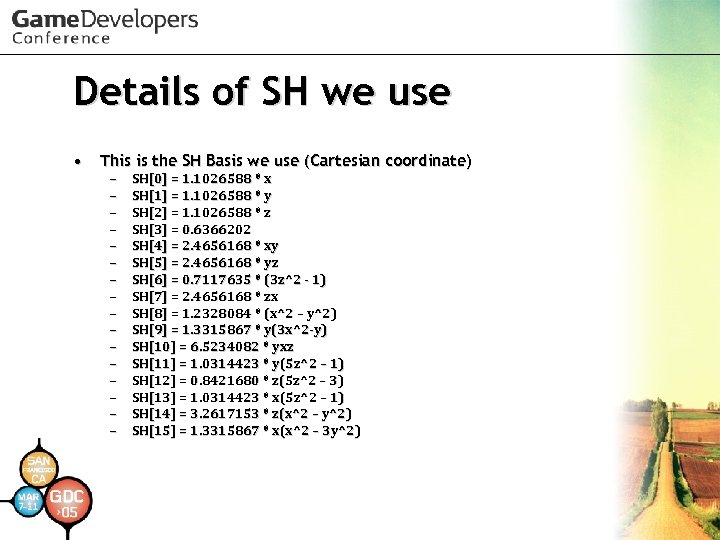 Details of SH we use • This is the SH Basis we use (Cartesian coordinate) – – – – SH[0] = 1. 1026588 * x SH[1] = 1. 1026588 * y SH[2] = 1. 1026588 * z SH[3] = 0. 6366202 SH[4] = 2. 4656168 * xy SH[5] = 2. 4656168 * yz SH[6] = 0. 7117635 * (3 z^2 - 1) SH[7] = 2. 4656168 * zx SH[8] = 1. 2328084 * (x^2 – y^2) SH[9] = 1. 3315867 * y(3 x^2 -y) SH[10] = 6. 5234082 * yxz SH[11] = 1. 0314423 * y(5 z^2 – 1) SH[12] = 0. 8421680 * z(5 z^2 – 3) SH[13] = 1. 0314423 * x(5 z^2 – 1) SH[14] = 3. 2617153 * z(x^2 – y^2) SH[15] = 1. 3315867 * x(x^2 – 3 y^2)
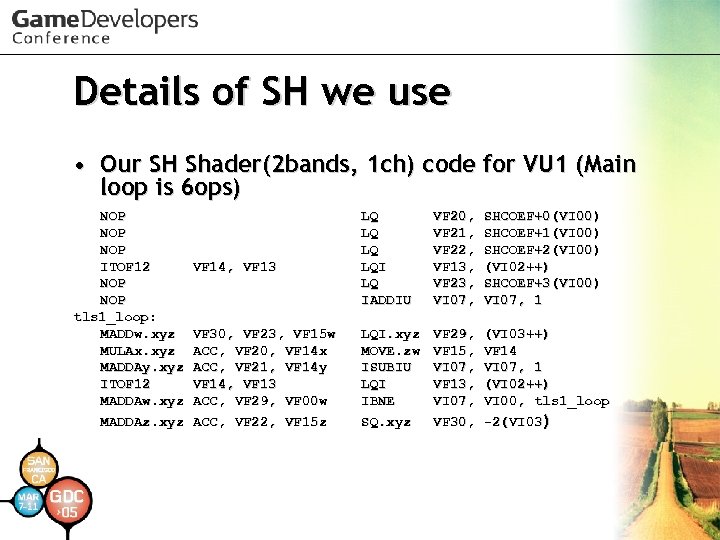 Details of SH we use • Our SH Shader(2 bands, 1 ch) code for VU 1 (Main loop is 6 ops) NOP NOP ITOF 12 NOP tls 1_loop: MADDw. xyz MULAx. xyz MADDAy. xyz ITOF 12 MADDAw. xyz MADDAz. xyz VF 14, VF 13 VF 30, VF 23, VF 15 w ACC, VF 20, VF 14 x ACC, VF 21, VF 14 y VF 14, VF 13 ACC, VF 29, VF 00 w ACC, VF 22, VF 15 z LQ LQI LQ IADDIU VF 20, VF 21, VF 22, VF 13, VF 23, VI 07, SHCOEF+0(VI 00) SHCOEF+1(VI 00) SHCOEF+2(VI 00) (VI 02++) SHCOEF+3(VI 00) VI 07, 1 LQI. xyz MOVE. zw ISUBIU LQI IBNE SQ. xyz VF 29, VF 15, VI 07, VF 13, VI 07, VF 30, (VI 03++) VF 14 VI 07, 1 (VI 02++) VI 00, tls 1_loop -2(VI 03)
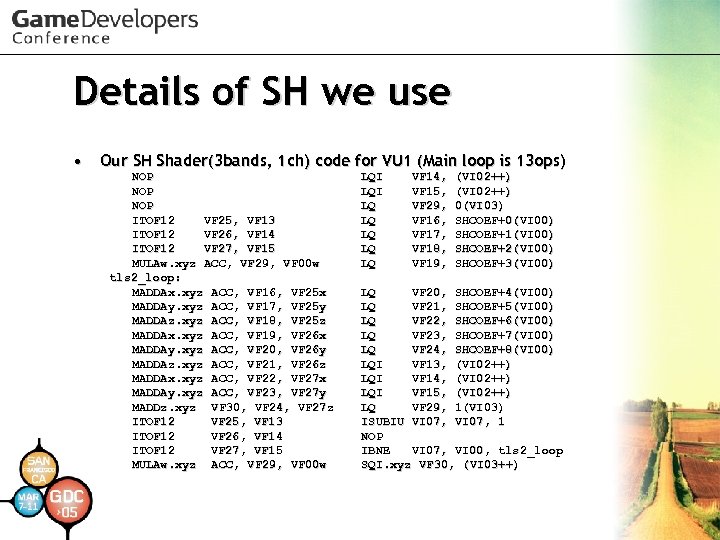 Details of SH we use • Our SH Shader(3 bands, 1 ch) code for VU 1 (Main loop is 13 ops) NOP NOP ITOF 12 VF 25, VF 13 ITOF 12 VF 26, VF 14 ITOF 12 VF 27, VF 15 MULAw. xyz ACC, VF 29, VF 00 w tls 2_loop: MADDAx. xyz ACC, VF 16, VF 25 x MADDAy. xyz ACC, VF 17, VF 25 y MADDAz. xyz ACC, VF 18, VF 25 z MADDAx. xyz ACC, VF 19, VF 26 x MADDAy. xyz ACC, VF 20, VF 26 y MADDAz. xyz ACC, VF 21, VF 26 z MADDAx. xyz ACC, VF 22, VF 27 x MADDAy. xyz ACC, VF 23, VF 27 y MADDz. xyz VF 30, VF 24, VF 27 z ITOF 12 VF 25, VF 13 ITOF 12 VF 26, VF 14 ITOF 12 VF 27, VF 15 MULAw. xyz ACC, VF 29, VF 00 w LQI LQ LQ LQ VF 14, VF 15, VF 29, VF 16, VF 17, VF 18, VF 19, (VI 02++) 0(VI 03) SHCOEF+0(VI 00) SHCOEF+1(VI 00) SHCOEF+2(VI 00) SHCOEF+3(VI 00) LQ VF 20, SHCOEF+4(VI 00) LQ VF 21, SHCOEF+5(VI 00) LQ VF 22, SHCOEF+6(VI 00) LQ VF 23, SHCOEF+7(VI 00) LQ VF 24, SHCOEF+8(VI 00) LQI VF 13, (VI 02++) LQI VF 14, (VI 02++) LQI VF 15, (VI 02++) LQ VF 29, 1(VI 03) ISUBIU VI 07, 1 NOP IBNE VI 07, VI 00, tls 2_loop SQI. xyz VF 30, (VI 03++)
 Details of SH we use • Engineers think that SH can be used with at least the 5 th order (25 coefficients for each channel) • Practically, artists think SH is useful with even the 2 nd order (4 coefficients) • Artists will think about how to use it efficiently
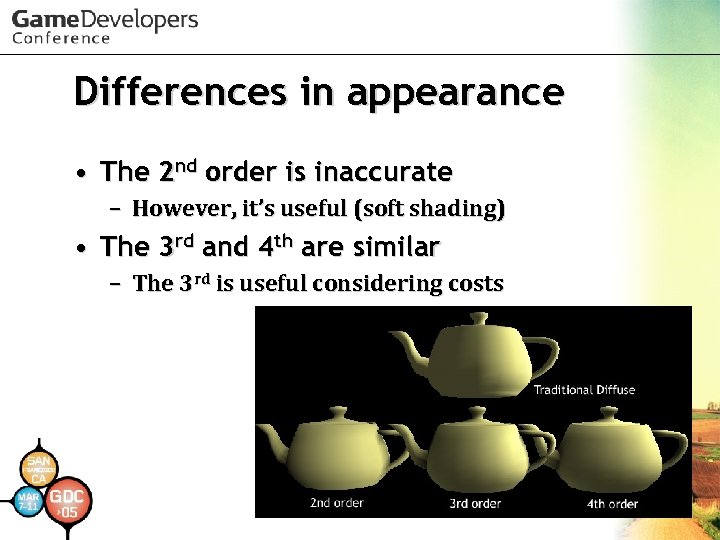 Differences in appearance • The 2 nd order is inaccurate – However, it’s useful (soft shading) • The 3 rd and 4 th are similar – The 3 rd is useful considering costs
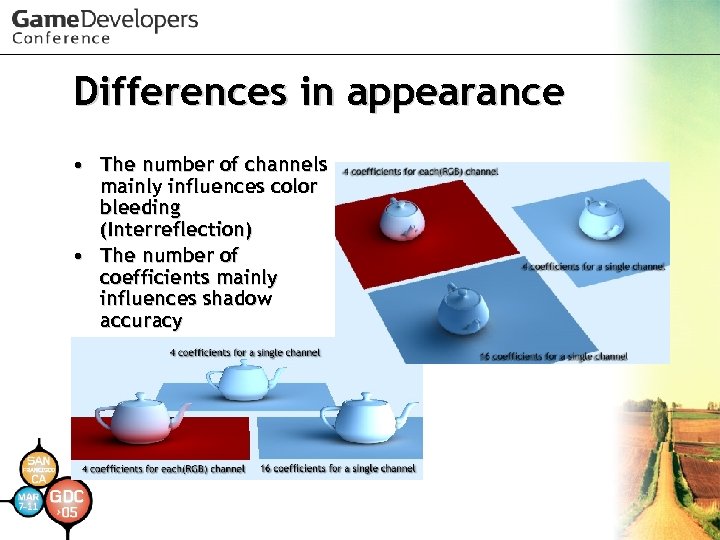 Differences in appearance • The number of channels mainly influences color bleeding (Interreflection) • The number of coefficients mainly influences shadow accuracy
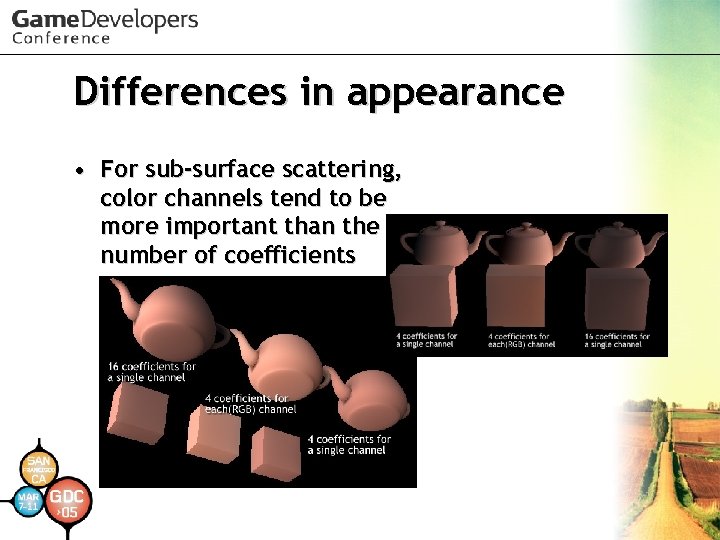 Differences in appearance • For sub-surface scattering, color channels tend to be more important than the number of coefficients
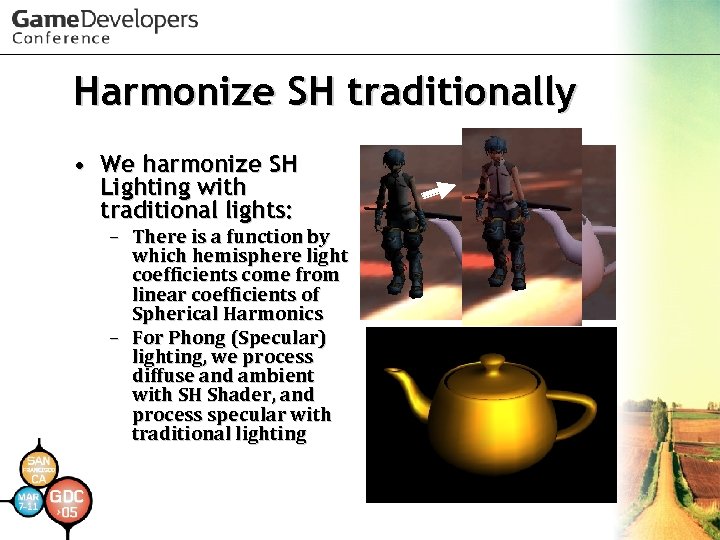 Harmonize SH traditionally • We harmonize SH Lighting with traditional lights: – There is a function by which hemisphere light coefficients come from linear coefficients of Spherical Harmonics – For Phong (Specular) lighting, we process diffuse and ambient with SH Shader, and process specular with traditional lighting
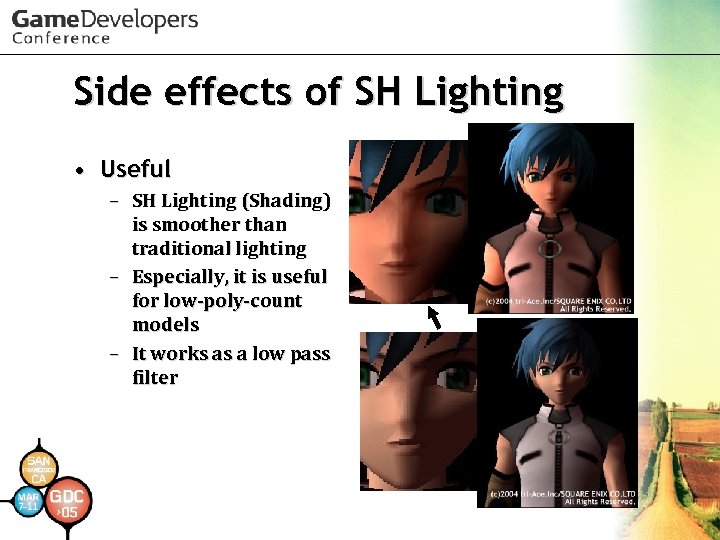 Side effects of SH Lighting • Useful – SH Lighting (Shading) is smoother than traditional lighting – Especially, it is useful for low-poly-count models – It works as a low pass filter
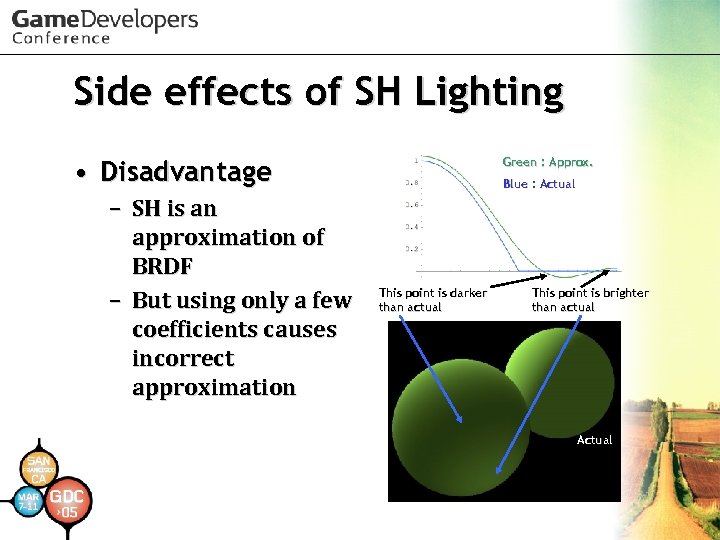 Side effects of SH Lighting • Disadvantage – SH is an approximation of BRDF – But using only a few coefficients causes incorrect approximation Green : Approx. Blue : Actual This point is darker than actual This point is brighter than actual Actual
 Our precomputation engine • supports : – Lambert diffuse shading – Soft-edged shadow – Sub-surface scattering – Diffuse interreflection – Light transport (detail later)
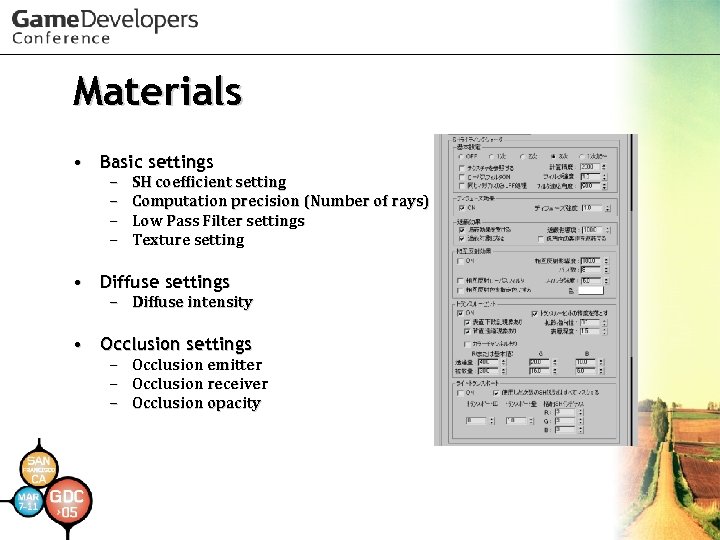 Materials • Basic settings – – SH coefficient setting Computation precision (Number of rays) Low Pass Filter settings Texture setting • Diffuse settings – Diffuse intensity • Occlusion settings – – – Occlusion emitter Occlusion receiver Occlusion opacity
 Materials • Interreflection settings – – Interreflection intensity Number of passes Interreflection low pass filter Color settings • Translucent settings – – – Enabling single scattering Enabling multi scattering Diffusion directivity Surface thickness Permeability Diffusion amount • Light Transport settings
 Algorithms for PRT • Based on (Stratified) Monte Carlo ray-tracing
![PRT Engine [1 st stage] • Calculate diffuse and occlusion coefficients by Monte Carlo](https://present5.com/presentation/8684cee7758fbe4c49ff040d8f9a56a2/image-126.jpg "PRT Engine [1 st stage] • Calculate diffuse and occlusion coefficients by Monte Carlo") PRT Engine [1 st stage] • Calculate diffuse and occlusion coefficients by Monte Carlo raytracing: – Cast rays for all hemispherical directions – Then integrate diffuse BRDF with the SH basis and calculate occlusion SH coefficients (occluded = 1. 0, passed = 0. 0)
PRT Engine [1 st stage] • Calculate diffuse and occlusion coefficients by Monte Carlo raytracing: – Cast rays for all hemispherical directions – Then integrate diffuse BRDF with the SH basis and calculate occlusion SH coefficients (occluded = 1. 0, passed = 0. 0)
![PRT Engine [2 nd stage] • Calculate sub-surface scattering coefficients with diffuse coefficients by](https://present5.com/presentation/8684cee7758fbe4c49ff040d8f9a56a2/image-127.jpg "PRT Engine [2 nd stage] • Calculate sub-surface scattering coefficients with diffuse coefficients by") PRT Engine [2 nd stage] • Calculate sub-surface scattering coefficients with diffuse coefficients by ray-tracing – We used modified Jensen’s model (using 2 omni-directional lights) for simulating sub-surface scattering
PRT Engine [2 nd stage] • Calculate sub-surface scattering coefficients with diffuse coefficients by ray-tracing – We used modified Jensen’s model (using 2 omni-directional lights) for simulating sub-surface scattering
![PRT Engine [3 rd stage] • Calculate interreflection coefficients from diffuse and subsurface scattering](https://present5.com/presentation/8684cee7758fbe4c49ff040d8f9a56a2/image-128.jpg "PRT Engine [3 rd stage] • Calculate interreflection coefficients from diffuse and subsurface scattering") PRT Engine [3 rd stage] • Calculate interreflection coefficients from diffuse and subsurface scattering coefficients: – Same as computing diffuse BRDF coefficients – Cast rays for other surfaces and integrate their SH coefficients with diffuse BRDF
PRT Engine [3 rd stage] • Calculate interreflection coefficients from diffuse and subsurface scattering coefficients: – Same as computing diffuse BRDF coefficients – Cast rays for other surfaces and integrate their SH coefficients with diffuse BRDF
![PRT Engine [4 th stage] • Repeat from the 2 nd stage for number](https://present5.com/presentation/8684cee7758fbe4c49ff040d8f9a56a2/image-129.jpg "PRT Engine [4 th stage] • Repeat from the 2 nd stage for number") PRT Engine [4 th stage] • Repeat from the 2 nd stage for number of passes • After that, Final Gathering (gather all coefficients and apply a low pass filter)
PRT Engine [4 th stage] • Repeat from the 2 nd stage for number of passes • After that, Final Gathering (gather all coefficients and apply a low pass filter)
 Optimize precomputation • To optimize finding of rays and polygon intersection, we used those typical approaches (nothing special) – Multi-threading – Using SSE 2 instructions – Cache-caring data
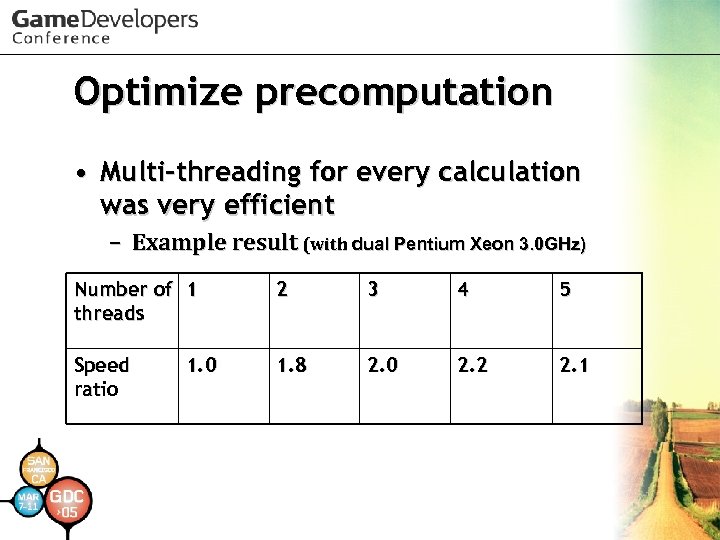 Optimize precomputation • Multi-threading for every calculation was very efficient – Example result (with dual Pentium Xeon 3. 0 GHz) Number of 1 threads 2 3 4 5 Speed ratio 1. 8 2. 0 2. 2 2. 1 1. 0
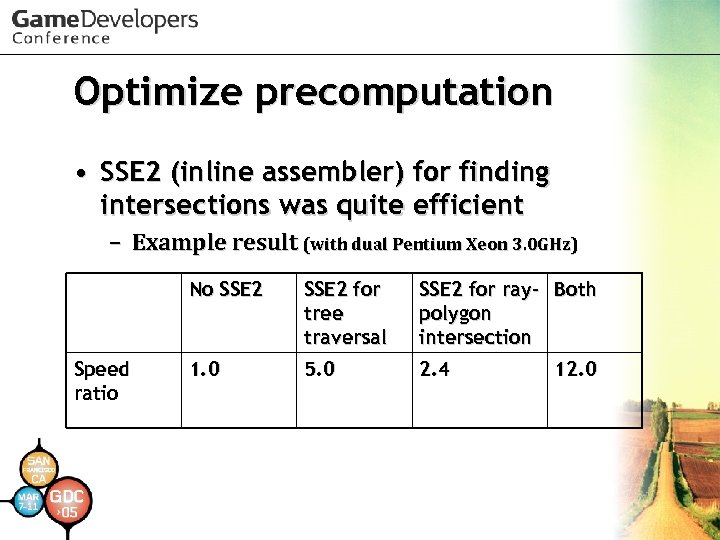 Optimize precomputation • SSE 2 (inline assembler) for finding intersections was quite efficient – Example result (with dual Pentium Xeon 3. 0 GHz) No SSE 2 Speed ratio SSE 2 for tree traversal SSE 2 for ray- Both polygon intersection 1. 0 5. 0 2. 4 12. 0
 Optimize precomputation • File Caching System – SH coefficients and object geometry are cached in files for each object – Use cache files unless parameters are changed
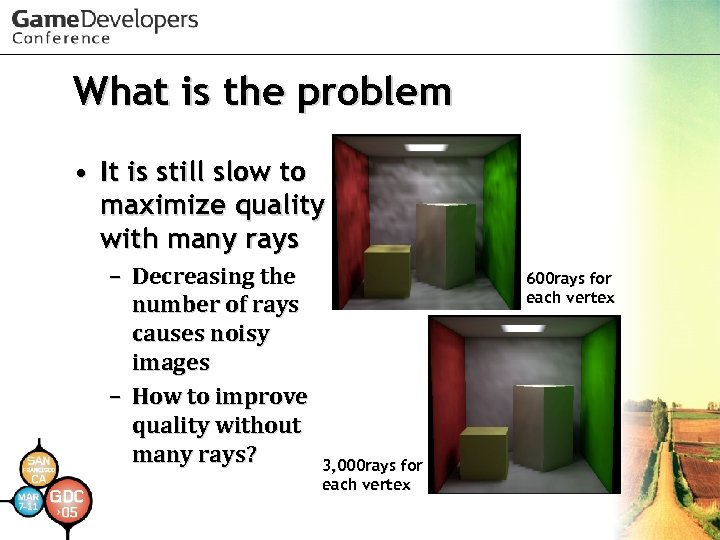 What is the problem • It is still slow to maximize quality with many rays – Decreasing the number of rays causes noisy images – How to improve quality without many rays? 600 rays for each vertex 3, 000 rays for each vertex
 Solving the problem • We used 2 -stage low pass filters to solve it – Diffuse interreflection low pass filter – Final low pass filter
 Solving the problem • We used Gaussian Filter for a low pass filter – Final LPF was efficient to reduce noise – But it caused inaccurate result • Therefore we used a pre-filter for diffuse interreflection – Diffuse interreflection LPF works as irradiance caching – Diffuse interreflection usually causes noisy images – Reducing diffuse interreflection noise is efficient
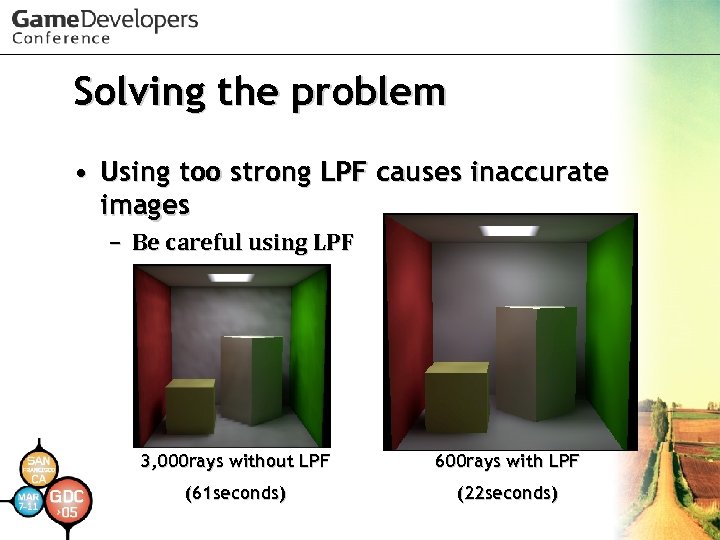 Solving the problem • Using too strong LPF causes inaccurate images – Be careful using LPF 3, 000 rays without LPF 600 rays with LPF (61 seconds) (22 seconds)
 Light Transport • It is our little technique for expanding SH Lighting Shader – It is feasible to represent all frequency lighting (not specular) and area lights – BUT! Light position can't be animated – Only light color and intensity can be animated – Some lights don’t move • For example, torch in a dungeon, lights in a house • Particularly, most light sources in the background don’t need to move
 Details of Light Transport • It is not used on the Spherical Harmonic basis – Spherical Harmonics are orthogonal – It means that the coefficients are independent of each other – You can use some of (SH) coefficients for other coefficients on a different basis
 Details of Light Transport • To obtain Light Transport coefficients, the precomputation engine calculates all their incoming coefficients from other surfaces – It means that Light Transport coefficients have the same Light Transport energy that the surfaces collect from other surfaces – And surfaces which emit light give energy to other surfaces • Without modification to existing SH Lighting Shader, it multiplies Light Transport coefficients by light color and intensity – They are just like vertex color multiplied by specific intensity and color
 Details of Light Transport • They are automatically computed by existing global illumination engine – When you set energy parameters into some coefficients, a precomputation engine for diffuse interreflection will transmit them to other surfaces
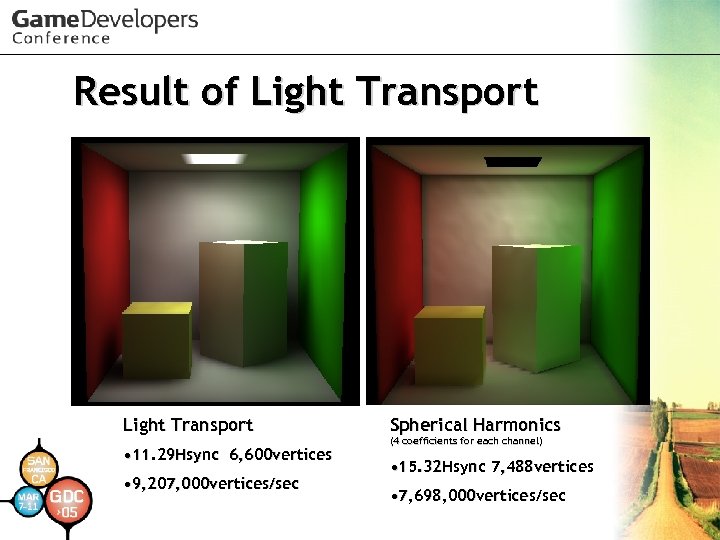 Result of Light Transport • 11. 29 Hsync 6, 600 vertices • 9, 207, 000 vertices/sec Spherical Harmonics (4 coefficients for each channel) • 15. 32 Hsync 7, 488 vertices • 7, 698, 000 vertices/sec
 Image Based Lighting • Our SH Lighting engine supports Image Based Lighting – It is too expensive to compute light coefficients in every frame for Play. Station 2 – Therefore light coefficients are precomputed off line – IBL lights can be animated with color, intensity, rotation, and linear interpolation between different IBL lights
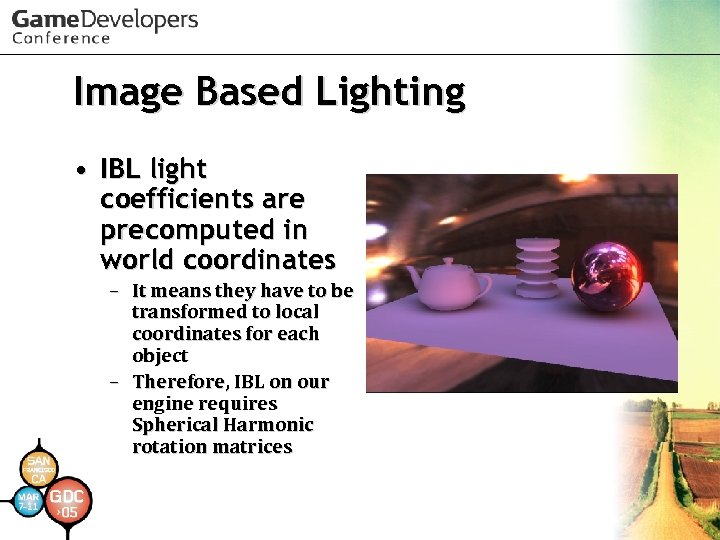 Image Based Lighting • IBL light coefficients are precomputed in world coordinates – It means they have to be transformed to local coordinates for each object – Therefore, IBL on our engine requires Spherical Harmonic rotation matrices
 SH rotation • To obtain Spherical Harmonic rotation matrices is one of the problems of handling Spherical Harmonics – We used "Evaluation of the rotation matrices in the basis of real spherical harmonics" – It was easy to implement
 SH animation • Our SH Lighting engine supports limited animation – Skinning – Morphing
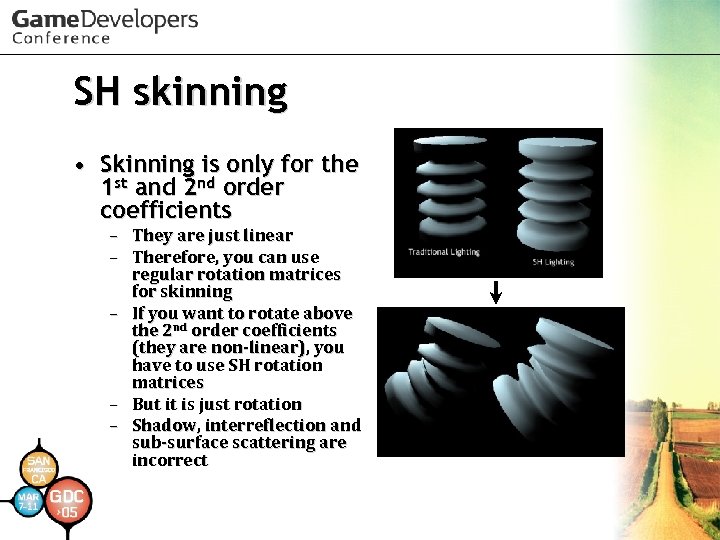 SH skinning • Skinning is only for the 1 st and 2 nd order coefficients – They are just linear – Therefore, you can use regular rotation matrices for skinning – If you want to rotate above the 2 nd order coefficients (they are non-linear), you have to use SH rotation matrices – But it is just rotation – Shadow, interreflection and sub-surface scattering are incorrect
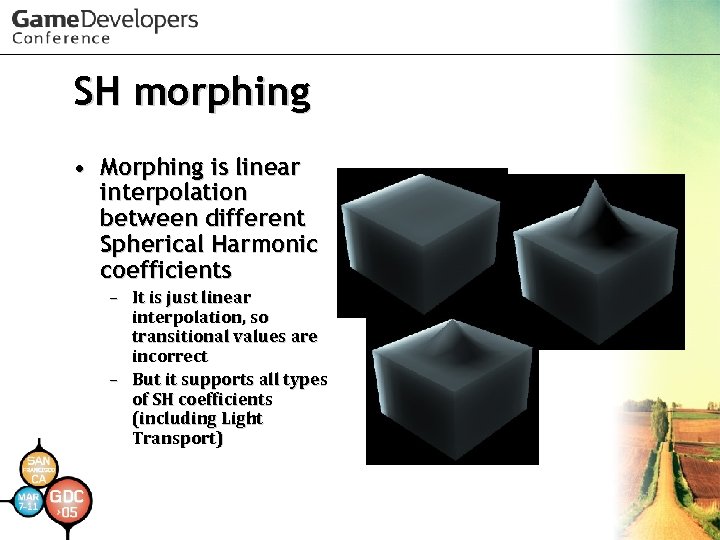 SH morphing • Morphing is linear interpolation between different Spherical Harmonic coefficients – It is just linear interpolation, so transitional values are incorrect – But it supports all types of SH coefficients (including Light Transport)
 Future work • Using high precision buffer and pixel shader!! • More precise Glare Effects in optics • Natural Blur function not Gaussian • Diaphragm-shaped Blur • Seamless and Hopping-free DOF along depth direction • OLS using HDR values • Higher quality slight blur effect
 Future Work • Distributed precomputation engine • SH Lighting for next-gen hardware – Try: Thomas Annen et al. EGSR 2004 “Spherical Harmonic Gradients for Mid-Range Illumination” – More generality for using SH lighting – IBL map • Try other methods for real-time global illumination
 References • Masaki Kawase. "Frame Buffer Postprocessing Effects in DOUBLE-S. T. E. A. L (Wreckless)“ GDC 2003. • Masaki Kawase. "Practical Implementation of High Dynamic Range Rendering“ GDC 2004. • Naty Hoffman et al. "Rendering Outdoor Light Scattering in Real Time“ GDC 2002. • Akio Ooba. “GS Programming Men-keisan: Cho SIMD Keisanho” CEDEC 2002. • Arcot J. Preetham. "Modeling Skylight and Aerial Perspective" in "Light and Color in the Outdoors" SIGGRAPH 2003 Course.
 References • Peter-Pike Sloan et al. “Precomputed Radiance Transfer for Real-Time Rendering in Dynamic, Low-Frequency Lighting Environments. ” SIGGRAPH 2002. • Robin Green. “Spherical Harmonic Lighting: The Gritty Details. “ GDC 2003. • Miguel A. Blanco et al. “Evaluation of the rotation matrices in the basis of real spherical harmonics. ” ECCC-3 1997. • Henrik Wann Jensen “Realistic Image Synthesis Using Photon Mapping. ” A K PETERS LTD, 2001. • Paul Debevec “Light Probe Image Gallery” http: //www. debevec. org/
 Acknowledgements • We would like to thank – Satoshi Ishii, Daisuke Sugiura for suggestion to this session – All other staff in our company for screen shots in this presentation – Mike Hood for checking this presentation – Shinya Nishina for helping translation – The Stanford 3 D Scanning Repository http: //graphics. stanford. edu/data/3 Dscanrep/
 Thank you for your attention. • This slide presentation is available on http: //research. tri-ace. com/