


 Скачать презентацию Postal One Electronic Mail Improvement Reporting e MIR
79849d4b9b4098a5b33583238f97ca6e.ppt
- Количество слайдов: 47
 Postal. One!® Electronic Mail Improvement Reporting (e. MIR) Marketing Technology & Channel Management
 e. MIR & Mail Quality § History § Program Overview Ø Business Ø System Process § Improving Mail Quality Ø Bundle Breakage Blitzes Ø “Perfect Bundle” Preparation § Customer Reports 2
 e. MIR History § MTAC workgroup consisting of consortium of Mail Industry Members, USPS Operations and Marketing Systems Ø Objective v Find solutions to business mailing preparation problems impacting USPS processing operations v Improve service v Increase productivity and customer satisfaction v Save costs § Cooperative effort between USPS Operations, Business Service Network & Business Mail Acceptance personnel § Deployed in Fall of 2004 to Operations, BMC & 3
 e. MIR Process Analysis § Current PS Form 3749 process was ineffective & inefficient Ø Many customers never saw the PS Form 3749 Ø Paper process was not conducive to BMEU follow-up Ø Mail processing employees never saw improvements § BSN process only manages National & Premier Accounts Ø Contacts often were not at the necessary process owner level Ø Information was not available to the origin BMEU § Need for technical solutions to facilitate business process improvement Ø Inability to centralize information for analytical 4 capabilities
 e. MIR Program Objective Implement Web-enabled business process improvement that: § Identifies issues impacting efficient mail processing of business mailings § Informs – process owners of identified deficiencies and impacts to mailing efficiency § Improves – business processes through information management and reporting capabilities 5
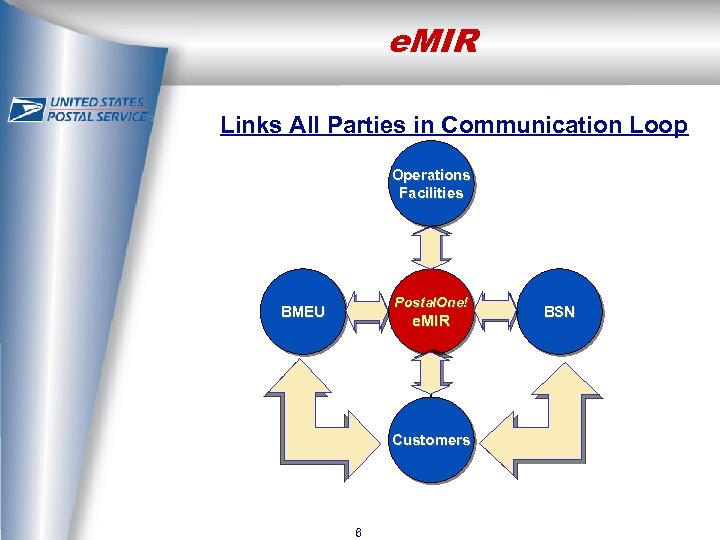 e. MIR Links All Parties in Communication Loop Operations Facilities Postal. One! BMEU e. MIR Customers 6 BSN
 e. MIR Business Process § Mail preparation problems found in postal processing are reported in e. MIR by operations personnel § If identified as a managed account, the report is forwarded to the BSN through an interface with the i. BSN System Ø BSN receives as a service request Ø BMEU receives a copy of the report for information purposes § If the report is for a non-managed account, it is 7
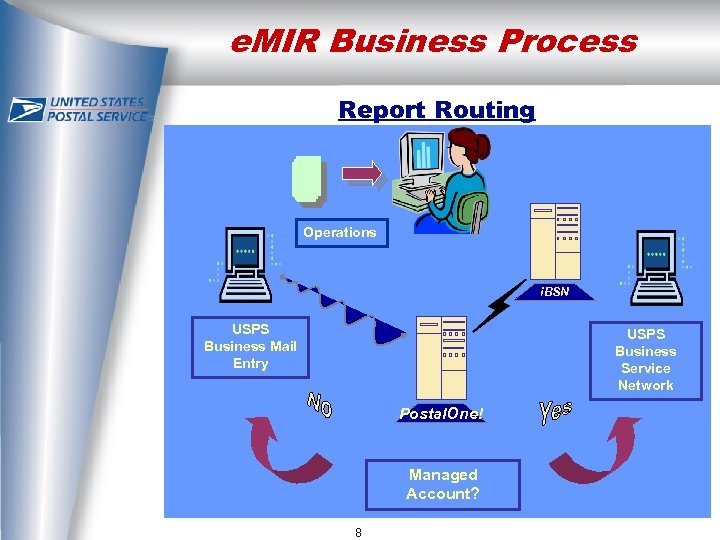 e. MIR Business Process Report Routing Operations i. BSN USPS Business Mail Entry USPS Business Service Network Postal. One! Managed Account? 8
 e. MIR Business Process § BSN / BMEU investigates issue, makes customer contact and closes report § Resolution information available to all parties Ø USPS personnel Ø Customers § BMEU automatically notified when mailer with a previous reported mail preparation issue submits a mailing 9
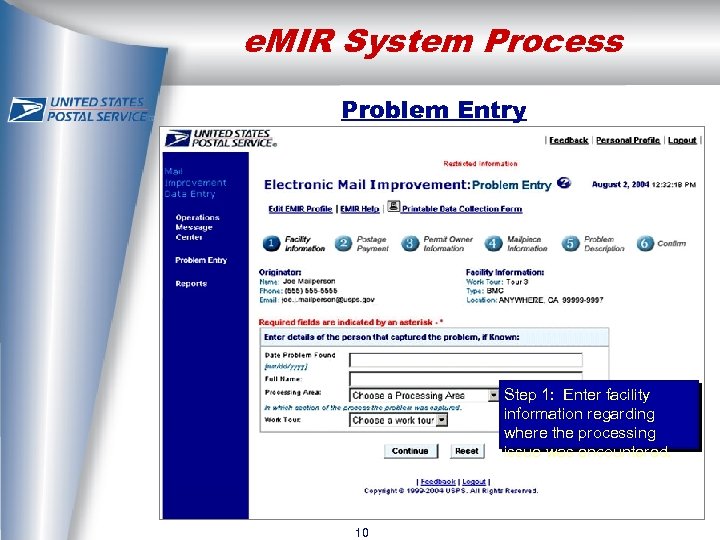 e. MIR System Process Problem Entry Step 1: Enter facility information regarding where the processing issue was encountered. 10
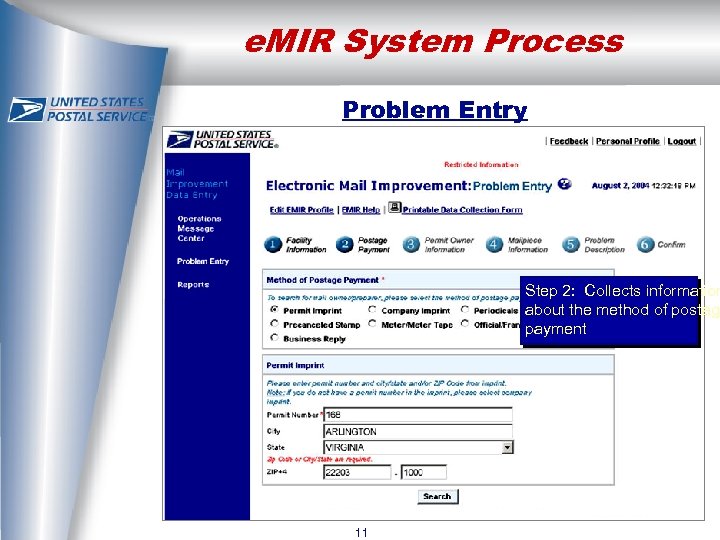 e. MIR System Process Problem Entry Step 2: Collects information about the method of postage payment 11
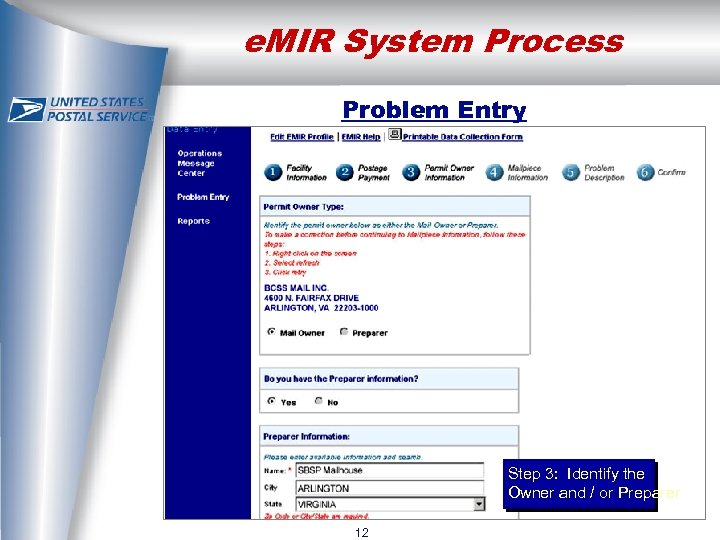 e. MIR System Process Problem Entry Step 3: Identify the Owner and / or Preparer 12
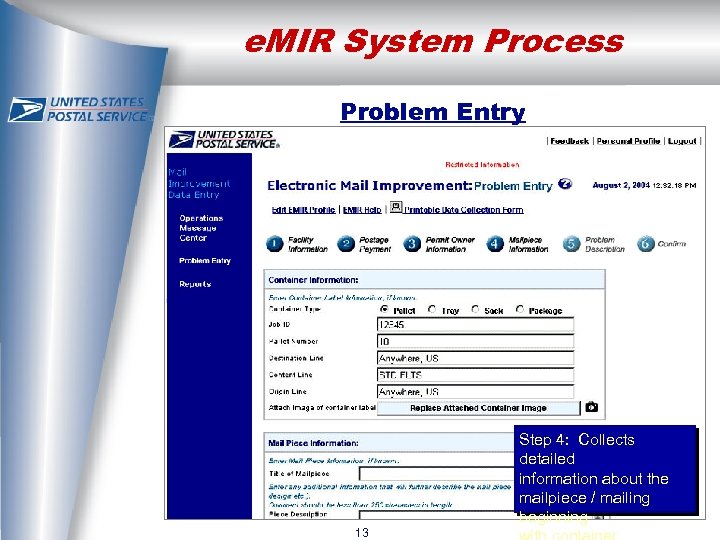 e. MIR System Process Problem Entry Step 4: Collects detailed information about the mailpiece / mailing beginning 13
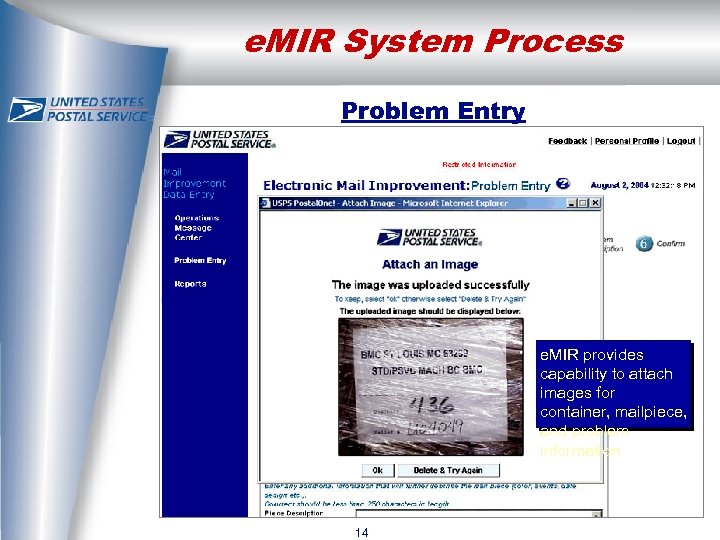 e. MIR System Process Problem Entry e. MIR provides capability to attach images for container, mailpiece, and problem information 14
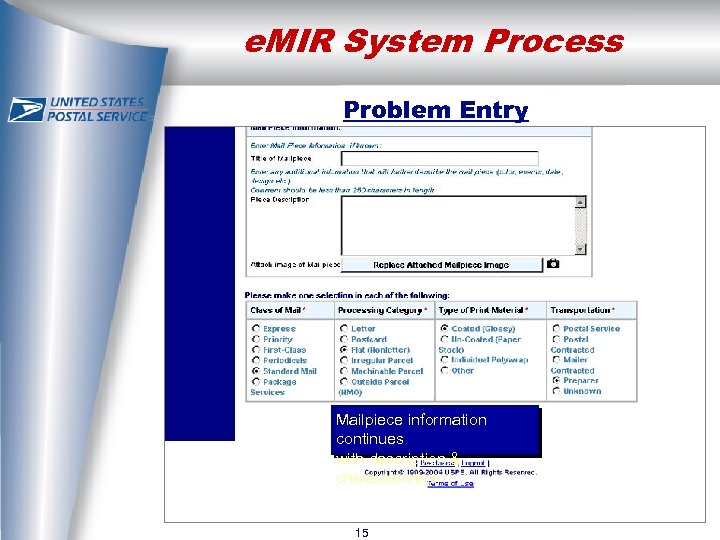 e. MIR System Process Problem Entry Mailpiece information continues with description & characteristics 15
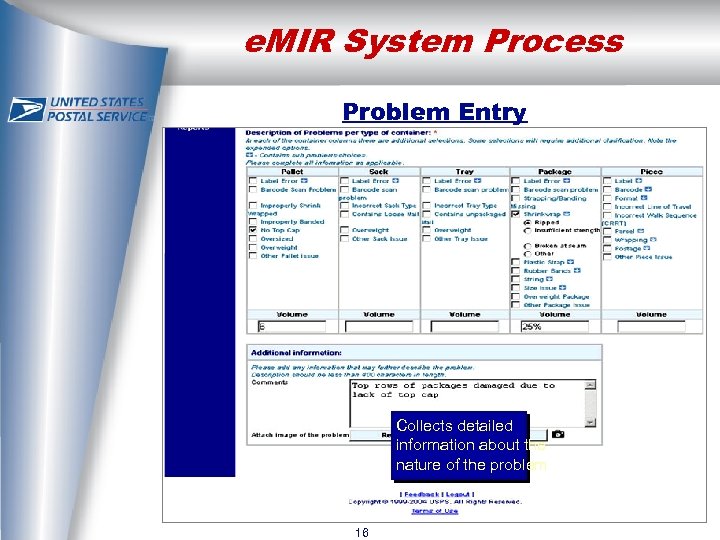 e. MIR System Process Problem Entry Collects detailed information about the nature of the problem 16
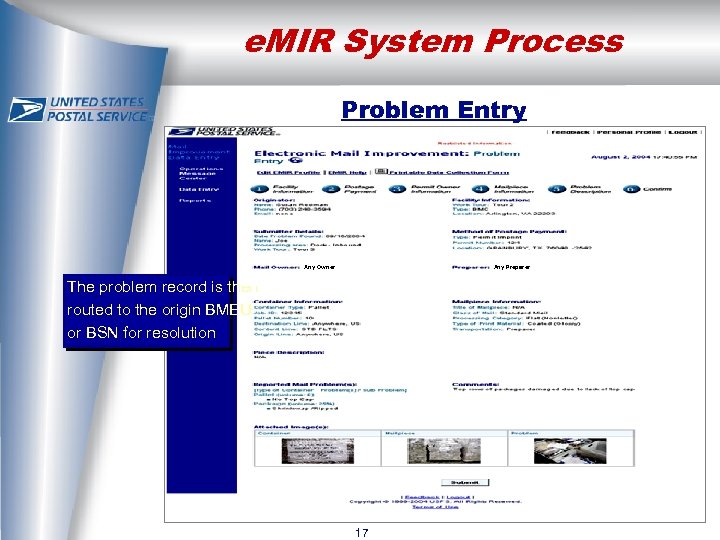 e. MIR System Process Problem Entry Any Owner Any Preparer The problem record is then routed to the origin BMEU or BSN for resolution 17
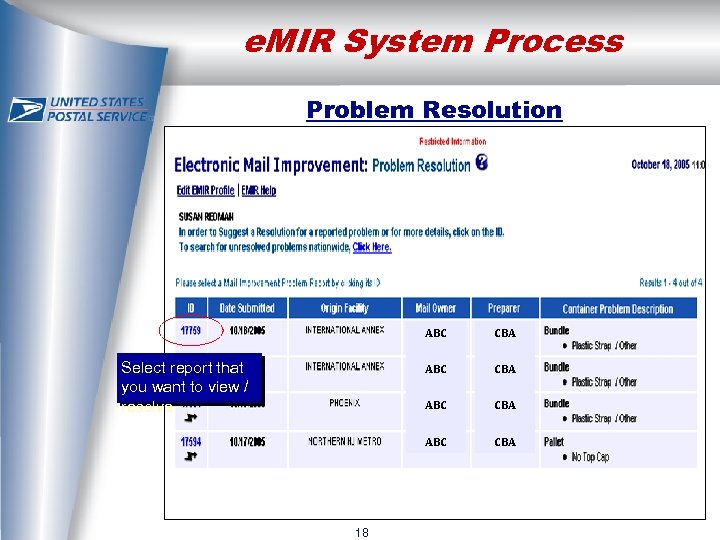 e. MIR System Process Problem Resolution ABC CBA ABC 18 CBA ABC Select report that you want to view / resolve CBA
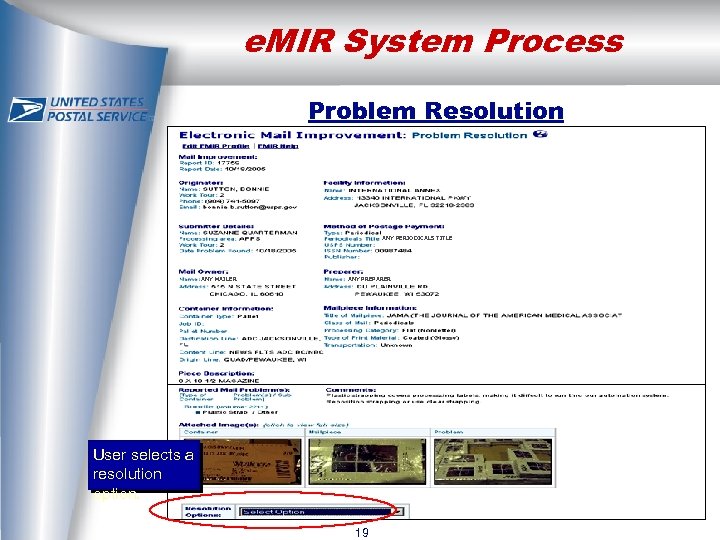 e. MIR System Process Problem Resolution ANY PERIODICALS TITLE ANY MAILER ANY PREPARER User selects a resolution option. 19
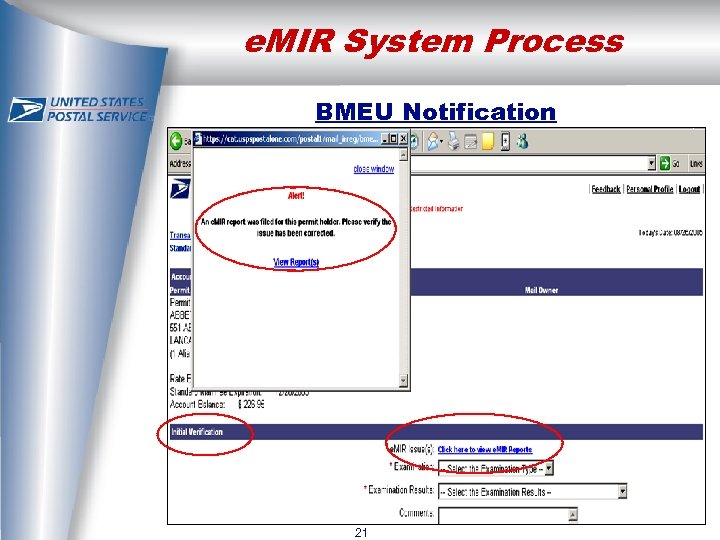
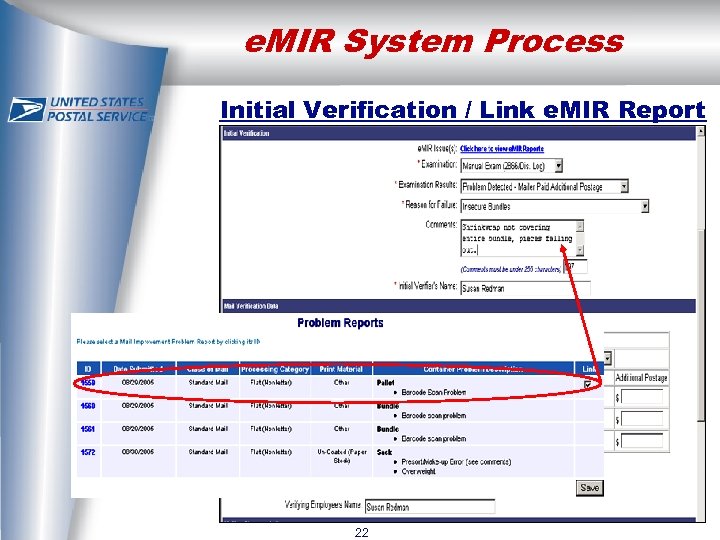
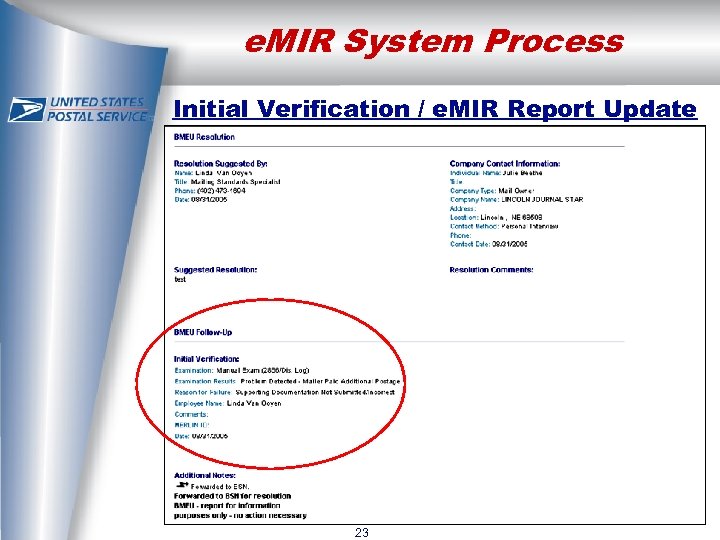
 e. MIR System Process BMEU Notification § When a mailer with a previous reported mail preparation issue submits mailing, USPS automatically notified of issue Ø Balance and Fees page now displays a dialog box noting presence of problem reports when applicable Ø Postage Statement displays a dialog box noting presence of e. MIR issues Ø Dialog box allows user to click link and view problem report(s) 20
 e. MIR System Process BMEU Notification 21
 e. MIR System Process Initial Verification / Link e. MIR Report 22
 e. MIR System Process Initial Verification / e. MIR Report Update 23
 e. MIR Reports for First-Class Mail
 Improving Mail Quality § Deployed in fall of 2004 to operations BMC & plant sites § Initial focus was on APPS (Automated Package Processing System) deployment issues Ø Bundle breakage blitzes conducted periodically § Participation: Ø All BMCs (Bulk Mail Centers) and Mail Processing Facilities required to participate Ø Delivery Units optional § e. MIR is designated source system to record mail quality issues identified in the mail 25 processing stream
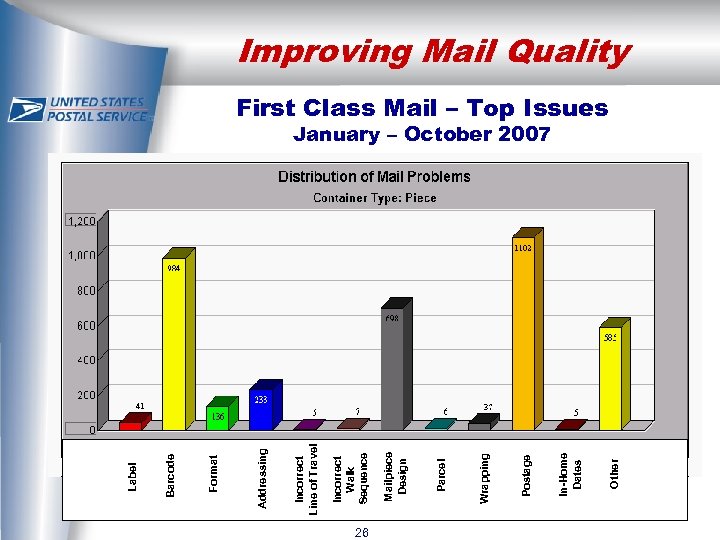 Label L a b e l 26 Other In-Home Dates Postage Wrapping Parcel Mailpiece Design Incorrect Walk Sequence Incorrect Line of Travel Addressing Format Barcode Improving Mail Quality First Class Mail – Top Issues January – October 2007
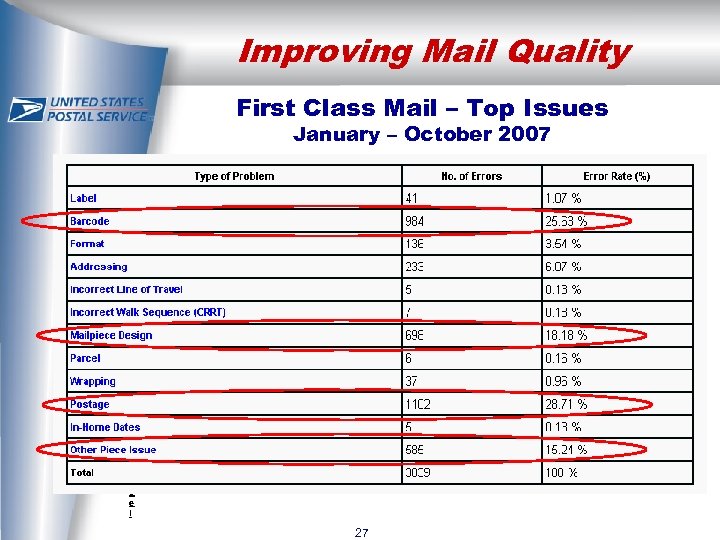 Improving Mail Quality First Class Mail – Top Issues January – October 2007 L a b e l 27
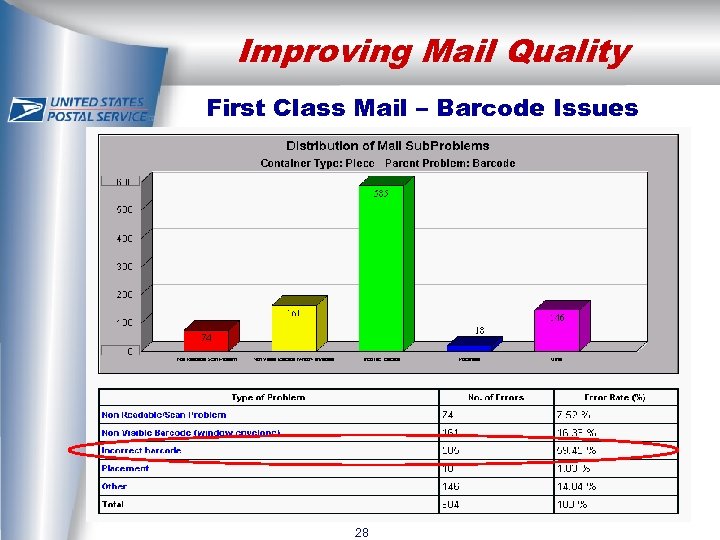 Improving Mail Quality First Class Mail – Barcode Issues L a b e l 28
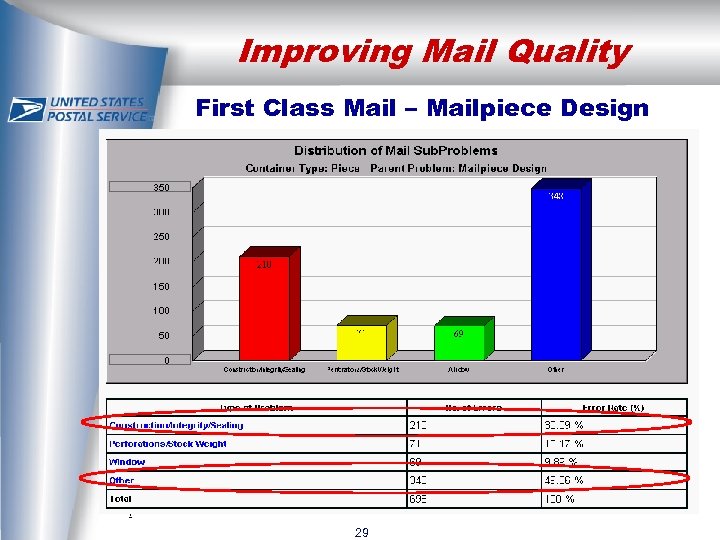 Improving Mail Quality First Class Mail – Mailpiece Design L a b e l 29
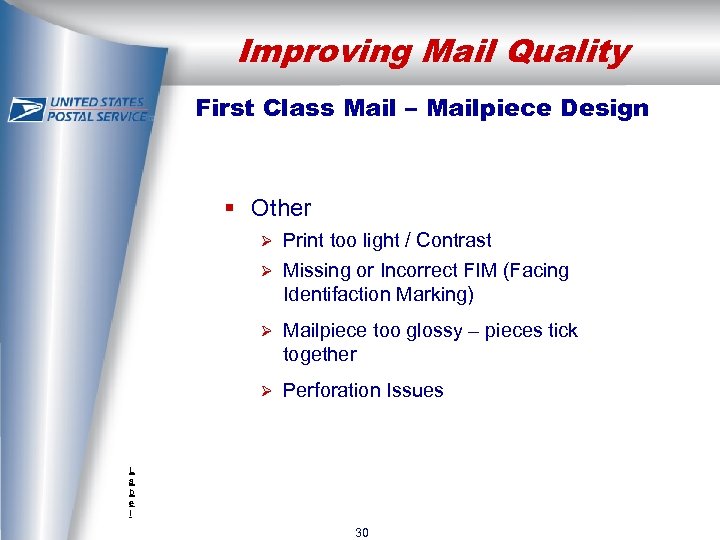 Improving Mail Quality First Class Mail – Mailpiece Design § Other Print too light / Contrast Ø Missing or Incorrect FIM (Facing Identifaction Marking) Ø Ø Mailpiece too glossy – pieces tick together Ø Perforation Issues L a b e l 30
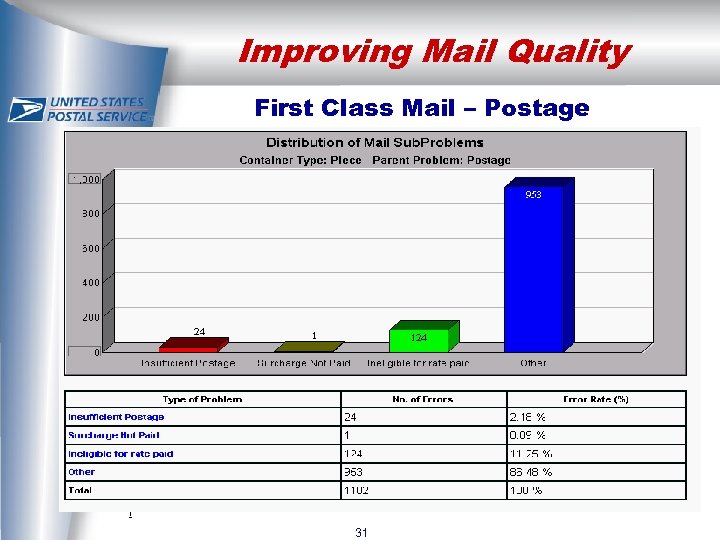 Improving Mail Quality First Class Mail – Postage L a b e l 31
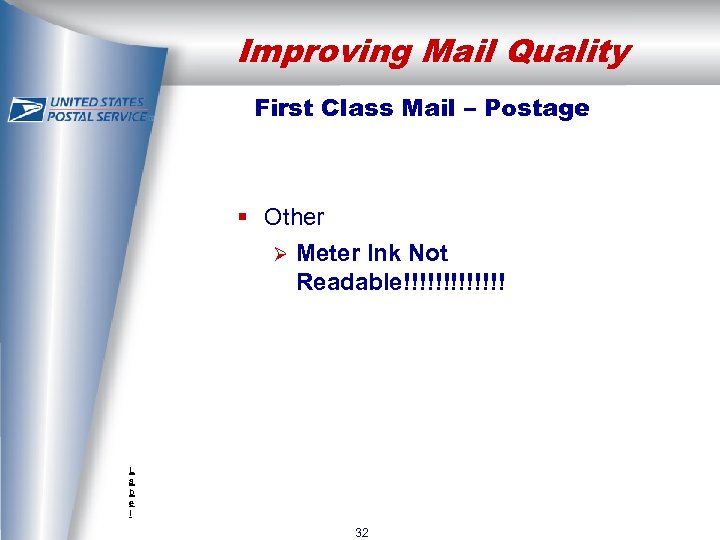 Improving Mail Quality First Class Mail – Postage § Other Ø Meter Ink Not Readable!!!!!!! L a b e l 32
 Improving Mail Quality First Class Mail – Other § Residual Glue § Pieces sticking together § Tabbing – improper/missing L a b e l 33
 e. MIR Utilization Results § Increased utilization resulted in better data collection § Better quantitative data Ø Volume information determines extent of problem § Better qualitative data Ø Completion of all data collection fields results in more resolved reports Ø Emphasis on preparer and container label information to help identify entry point of mail § Pictures powerful in identifying & resolving issues 34
 e. MIR Customer Reports
 e. MIR Customer Reports § Provides Owners / Preparers electronic access to their reports § Users will see reports that are in a resolved status only (open reports will not show until resolved/closed) § Users will only see reports where they have been identified as the Owner / Preparer Ø Preparers have been identified on ~ 30% of reports § All users (Owners or Preparers) must apply for Postal. One! Owner View to get access to e. MIR reports § Customers can apply online for Postal. One! access at usps. com 36
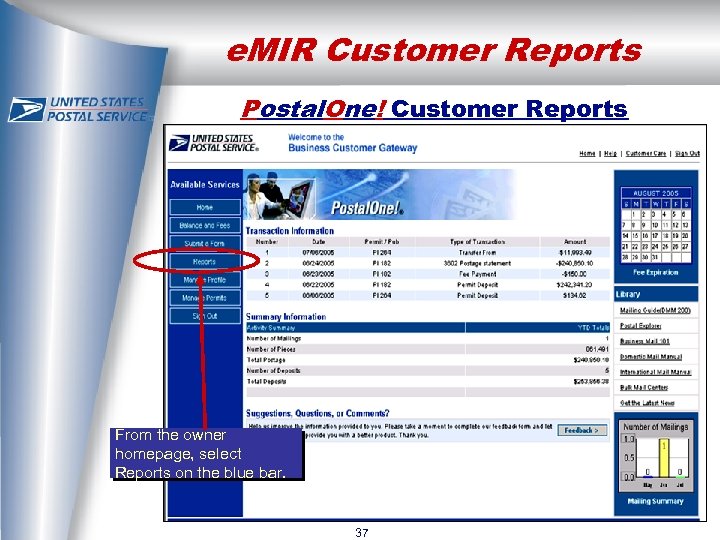 e. MIR Customer Reports Postal. One! Customer Reports From the owner homepage, select Reports on the blue bar. 37
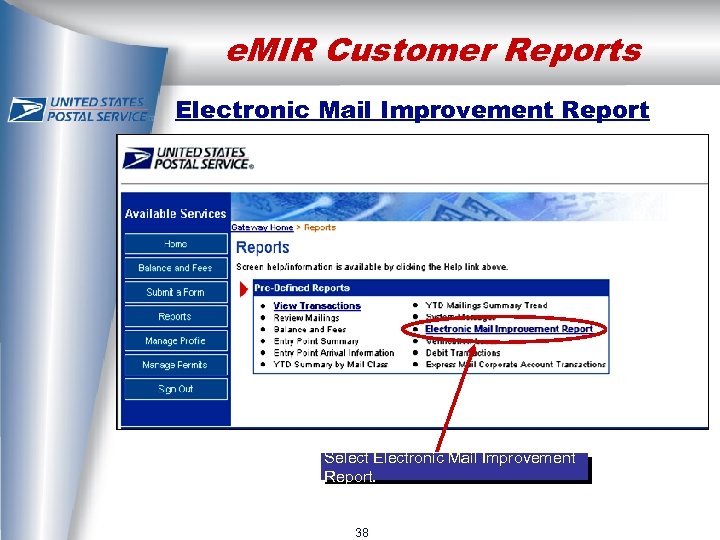 e. MIR Customer Reports Electronic Mail Improvement Report Select Electronic Mail Improvement Report. 38
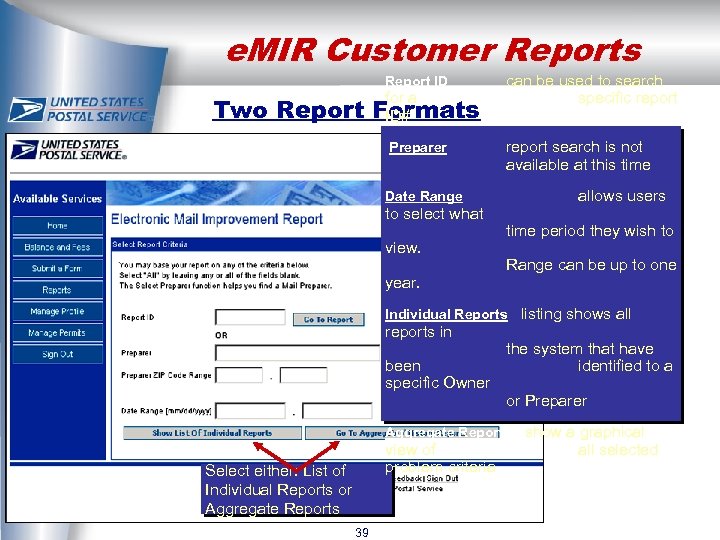 e. MIR Customer Reports Report ID Preparer Two Report can be used to search specific report search is not available at this time for a Formats ID# Date Range to select what view. year. allows users time period they wish to Range can be up to one Individual Reports listing shows all reports in been specific Owner the system that have identified to a or Preparer Aggregate Reports show a graphical view of problem criteria Select either: List of Individual Reports or Aggregate Reports 39 all selected
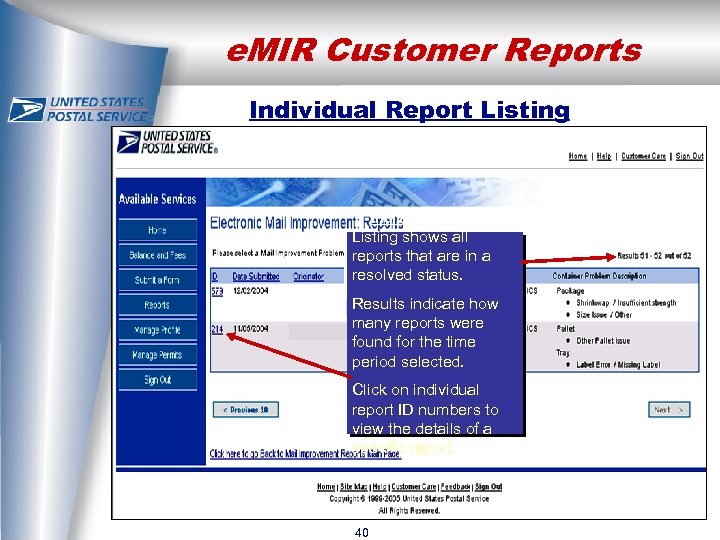 e. MIR Customer Reports Individual Report Listing Individual Reports Listing shows all reports that are in a BCSS Test resolved status. Inc. Results indicate how e. MIR Test Inc. many reports were found for the time period selected. Click on individual report ID numbers to view the details of a specific report. 40
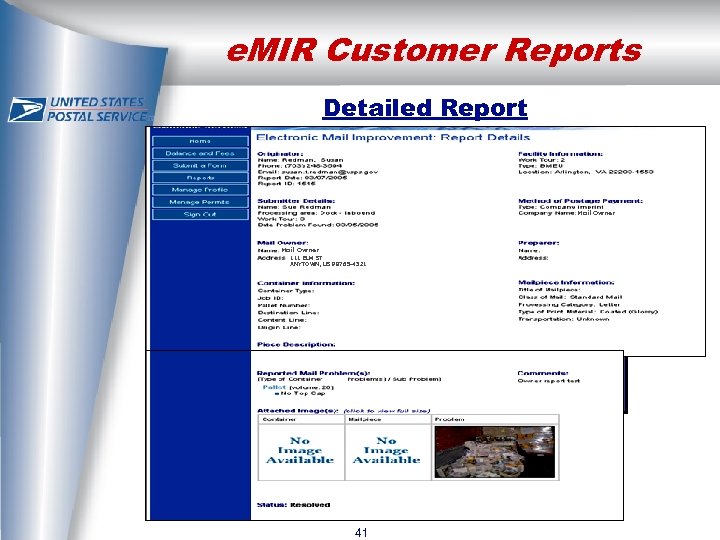 e. MIR Customer Reports Detailed Report Mail Owner 111 ELM ST ANYTOWN, US 98765 -4321 Individual Report Enlarge images by clicking on them. 41
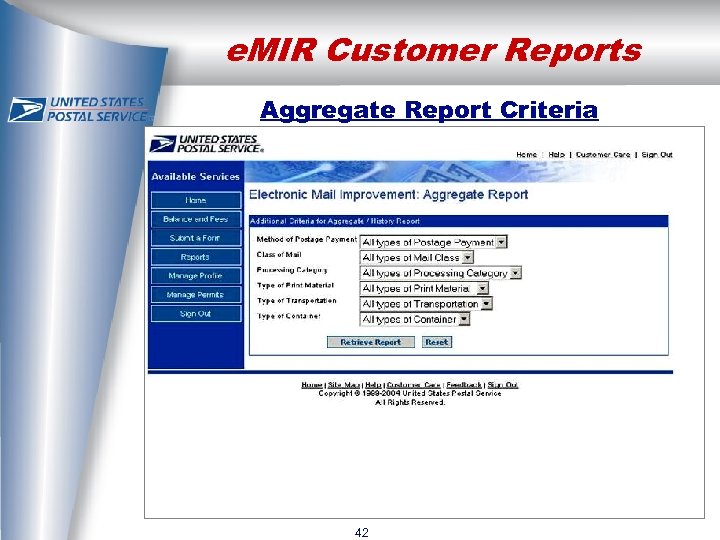 e. MIR Customer Reports Aggregate Report Criteria 42
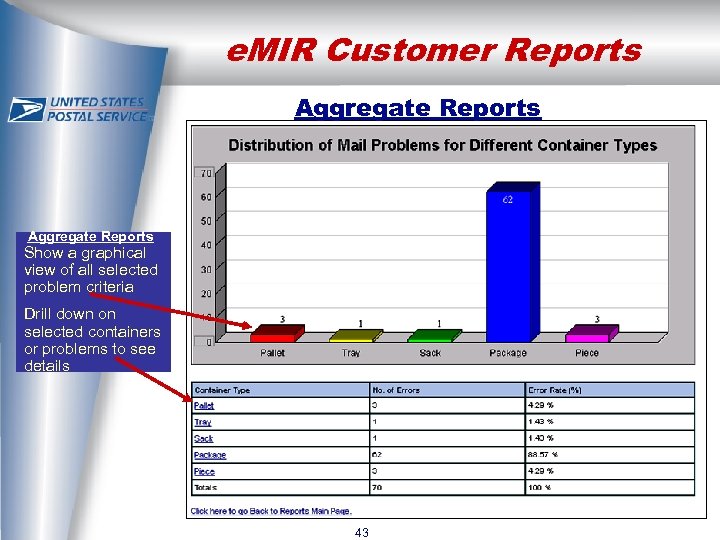 e. MIR Customer Reports Aggregate Reports Show a graphical view of all selected problem criteria Drill down on selected containers or problems to see details 43
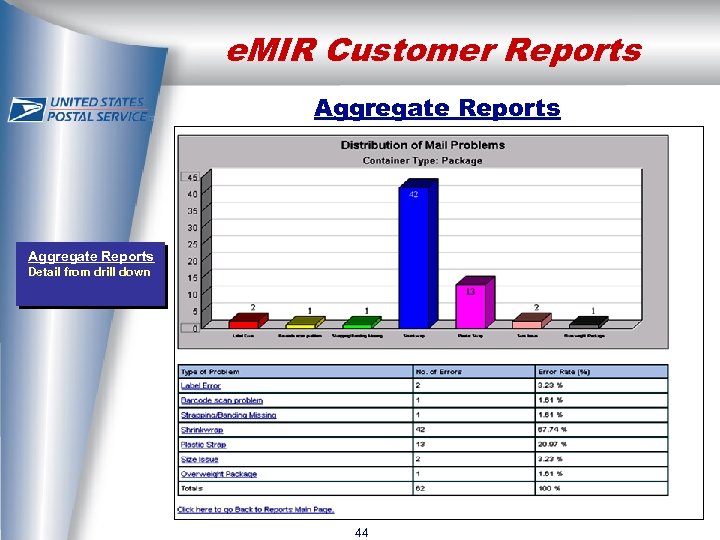 e. MIR Customer Reports Aggregate Reports Detail from drill down 44
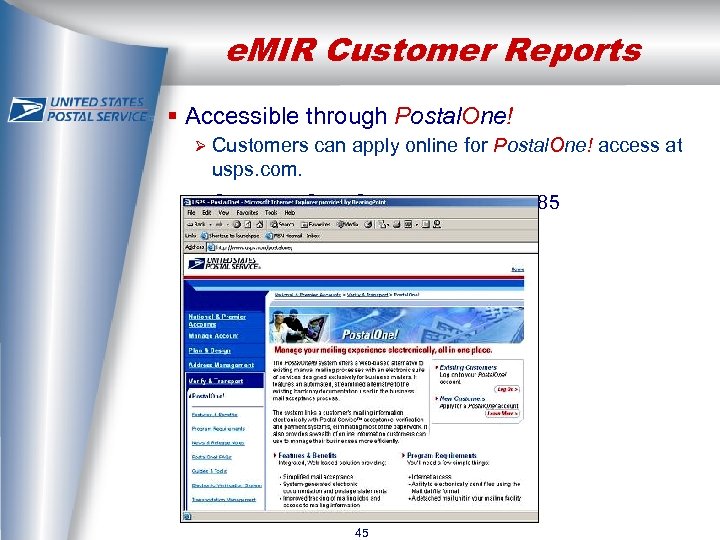 e. MIR Customer Reports § Accessible through Postal. One! Ø Customers can apply online for Postal. One! access at usps. com. Ø Customer Care Center – 800 -522 -9085 45
 For more information on e. MIR, please contact: Susan Redman 202 -268 -8073 susan. f. redman@usps. gov Marketing Technology & Channel Management 2006
 Questions? 47