 Скачать презентацию Portfolios Marketing Yourself Online Presentation adapted from Shelby
63341ca2e264acb707f966ed8095b977.ppt
- Количество слайдов: 25



Portfolios: Marketing Yourself Online Presentation adapted from Shelby Rosiak, 47 th STC Conference
What is an online portfolio? • A showcase of your interactive, print or written work delivered in an online format.
Why an online portfolios? • • Presents current and past work Showcases your top work Asked for by potential employers Access to distance jobs or freelance work
Why compile a portfolio? • Showcase accomplishments and successes • Control the direction and content of an interview • Evidence of proficiencies: your individual talents, skills, and professionalism • As evidence of your level of skill in communicating. • To help focus on your areas of expertise • Allows you to say “Yes” when an employer asks if you samples of specific type of work
Why compile a portfolio? • Displays projects in the medium for which they were created – Web pages, Flash applications and interfaces lose their effectiveness when presented as a hardcopy. – If it was created for online delivery, it should be delivered online.
Online Portfolios • Organization • Creation • Distribution
Organization • • • Collect projects & samples Select your best work Show only your best work Create a client list Write a synopsis of the project or work Be creative
What do I choose? • What type of job are you applying for • Choose projects that reflect your proficiencies and accomplishments • Choose projects that show the breadth of your work • Choose only a sample of your best work
Essential elements • Name and contact information • Resume • Synopsis for each entry (optional) – Project Name – Explanation of the project or motivation – Screenshot and link to project • imm. sheridanc. on. ca/imm 2003/kasmara
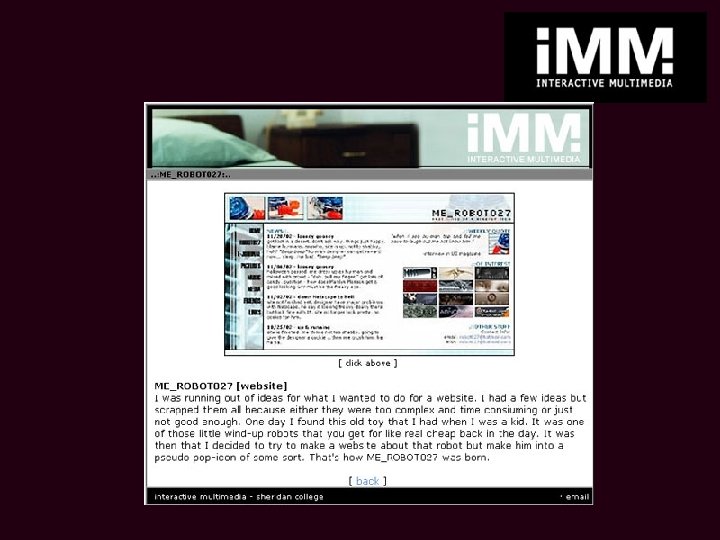
Sample entries • Web sites and pages • Layout or design projects • Print work • Logo design • Usability questionnaires • Professional Accomplishments • Information Architecture Wireframes • Professional articles and white papers • User’s guides • Project Management documents • Awards • Style guides • Technical Writing • Instruction Design Samples
Legal Issues for your Portfolio • Get permission to use logins to Intranets, or secure areas • Get permission to use client names • Make proprietary information generic • Be careful not to break confidentiality or non-compete agreements.
Portfolio Creation • Design an interface • Create content • Link and manage
Design interface • Select a theme – color scheme – icons – navigation • Optimize for online readability – Choose readable font types and sizes – Choose standard fonts unless you know for sure that your fonts will be imbedded • Follow interface design guidelines
Create content • • Screenshots of websites or cdroms Scans of photographs or print work PDF version of your resume Make backup copies of everything
Create content, cont. • • • Create portfolio and implement theme Edit each document carefully Edit for theme consistency SPELL CHECK!!! Edit again Have someone else edit
Link • • Link all of your components Make sure there are no dead ends Test for broken links Check that all buttons, mouse-overs, pop-ups, loaders, streaming movies, and any other linked documents work
Test your portfolio • Test your portfolio on as many computers with as many profiles as you can – Windows 98, NT, 2000 – Netscape, Internet Explorer compatible – Opera? – Mac
Test your portfolio, cont. • Set up a usability test for users with a wide variety of skill levels – Peers or willing coworkers – Friends, family, neighbors – A kindergartner • Test for negative transfer – Are you using standard conventions differently?
Create CD or web page • Burn a preliminary CD – Buy a 50 or 100 disk CD spindle to cut costs • Upload files to web server and implement page
Test your preliminary portfolio • Test, test! • Test on different computers • Conduct a usability test among your friends, family, and neighbors
Design and print cover art • Use theme from your portfolio for a coherent whole • Print jewel case inserts or CD envelopes • Fold, glue, stick, etc.
Before you send it out • Make multiple copies of your portfolio – Don’t get caught without a backup file • Print out color copies of your portfolio just in case • Test it one last time • Thank your testers
Other Distribution Issues • Include a cover letter • Include a paper copy of your resume • Include any requirements or troubleshooting needed to run your portfolio • Send it out to potential employers
Presentation adapted from Shelby Rosiak 47 th STC Conference
Скачать презентацию Portfolios Marketing Yourself Online Presentation adapted from Shelby
63341ca2e264acb707f966ed8095b977.ppt