 Скачать презентацию PHY 235 Robotics Workshop Day 2 ZX-24 a
b27cf752842572c66655346b85790be5.ppt
- Количество слайдов: 46



PHY 235 Robotics Workshop Day 2 ZX-24 a Microcontroller, Servo Review, and I/O
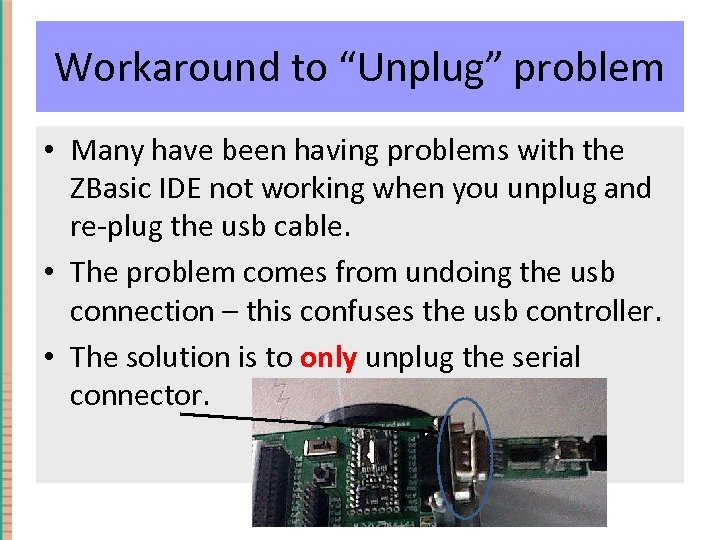
Workaround to “Unplug” problem • Many have been having problems with the ZBasic IDE not working when you unplug and re-plug the usb cable. • The problem comes from undoing the usb connection – this confuses the usb controller. • The solution is to only unplug the serial connector.
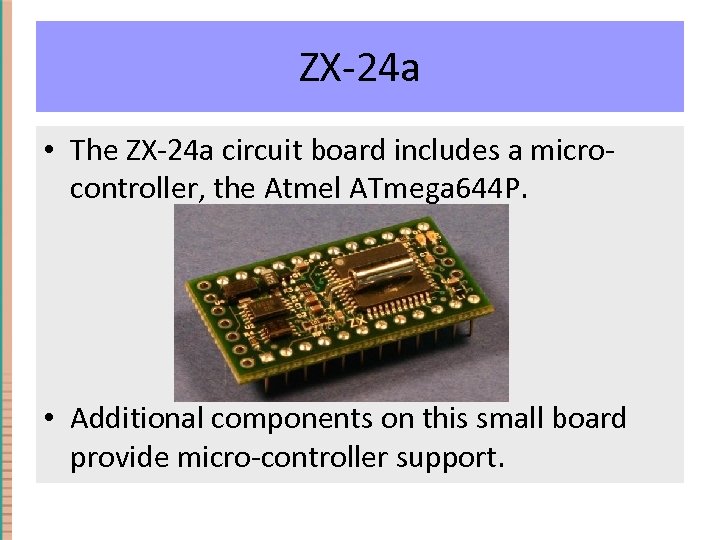
ZX-24 a • The ZX-24 a circuit board includes a microcontroller, the Atmel ATmega 644 P. • Additional components on this small board provide micro-controller support.
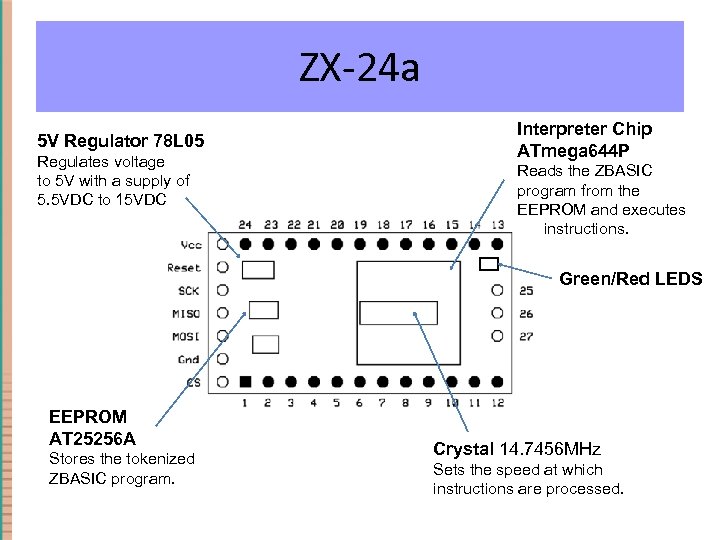
ZX-24 a 5 V Regulator 78 L 05 Regulates voltage to 5 V with a supply of 5. 5 VDC to 15 VDC Interpreter Chip ATmega 644 P Reads the ZBASIC program from the EEPROM and executes the instructions. Green/Red LEDS EEPROM AT 25256 A Stores the tokenized ZBASIC program. Crystal 14. 7456 MHz Sets the speed at which instructions are processed.
ZX-24 a • The ZX-24 a is programmed in ZBasic, a version of the BASIC programming language. • Code is written in the ZBasic IDE and downloaded to the chip on the Boe-bot Board of Education (BOE) circuit board.
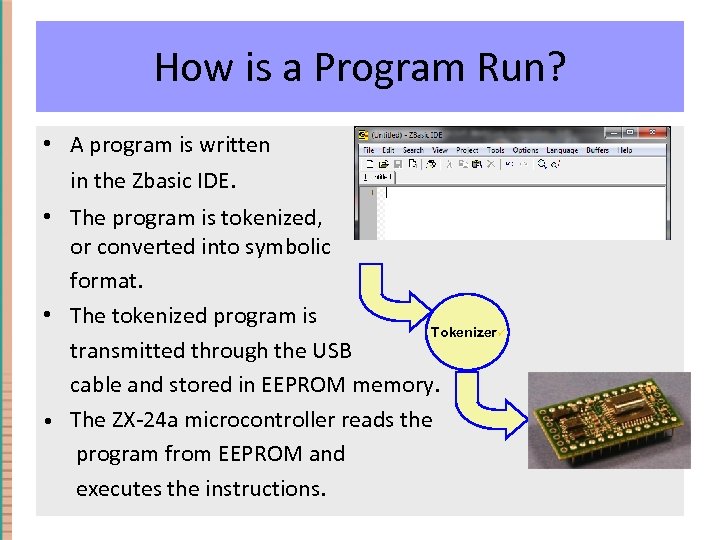
How is a Program Run? • A program is written in the Zbasic IDE. • The program is tokenized, or converted into symbolic format. • The tokenized program is Tokenizerü transmitted through the USB cable and stored in EEPROM memory. • The ZX-24 a microcontroller reads the program from EEPROM and executes the instructions.
How is a Program Run? • NOTE: Once you choose “Go” from the Project menu, the program is immediately downloaded to the ZX-24 a and run on the chip. • Even if you unplug the USB cable, the program will continue running on the chip. • Each time you hit the reset button on the board, the program will restart on the ZX-24 a.
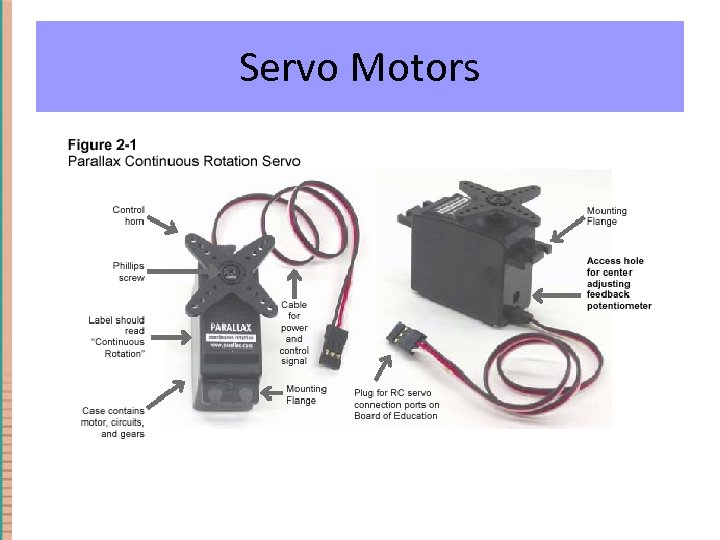
Servo Motors • A servo is a single device that contains: – Motor – Gearbox that gears down the motor to provide slower speeds (than most motors) and higher torque (power to turn). – Built-in electronics such that the motor position or speed can be controlled by a series of pulses. The servo is powered using 5 V (4. 8 – 6. 0 V)
Servo Motors
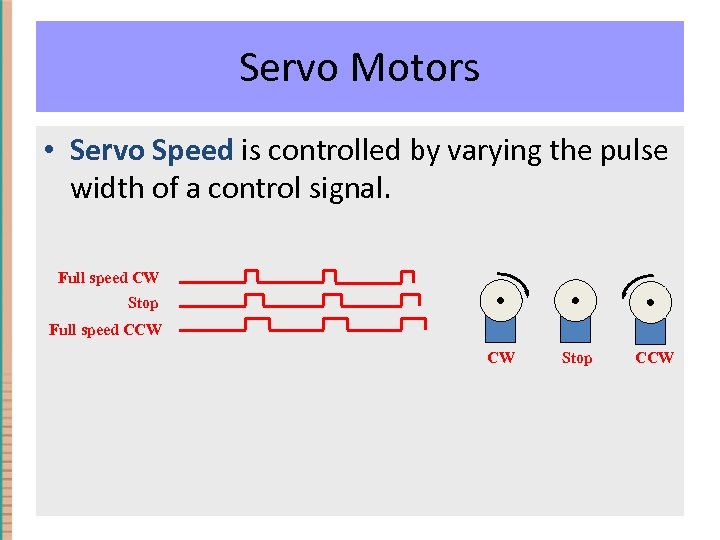
Servo Motors • Servo Speed is controlled by varying the pulse width of a control signal. Full speed CW Stop Full speed CCW CW Stop CCW
Controlling Timing and Pulses • Call Delay(duration) – Duration is in seconds Example: Call Delay(2. 0) is used to have the microcontroller wait for 2. 0 seconds. • Call Pulseout(pin, duration, level) is used to generate a pulse on pin number pin of duration (seconds). Level indicates the transition state of the pulse. – Example: Call Pulseout(17, 0. 0013, 1) generates a pulse of duration 1. 3 ms on pin 17, going from 0 -1 -0
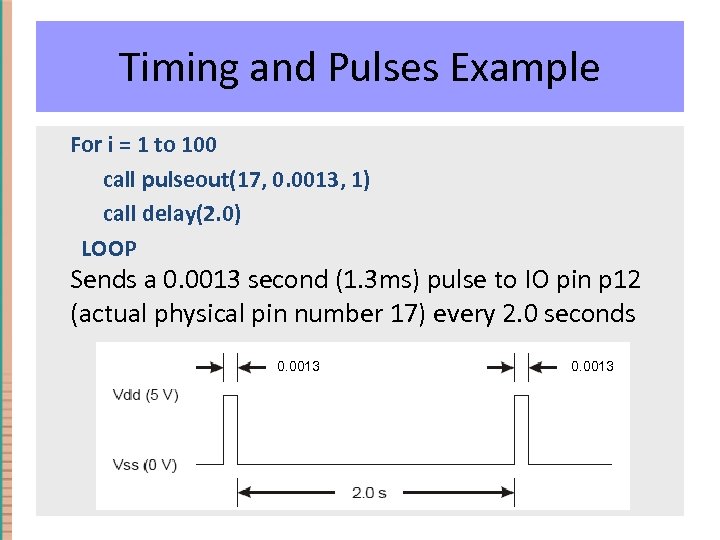
Timing and Pulses Example For i = 1 to 100 call pulseout(17, 0. 0013, 1) call delay(2. 0) LOOP Sends a 0. 0013 second (1. 3 ms) pulse to IO pin p 12 (actual physical pin number 17) every 2. 0 seconds 0. 0013
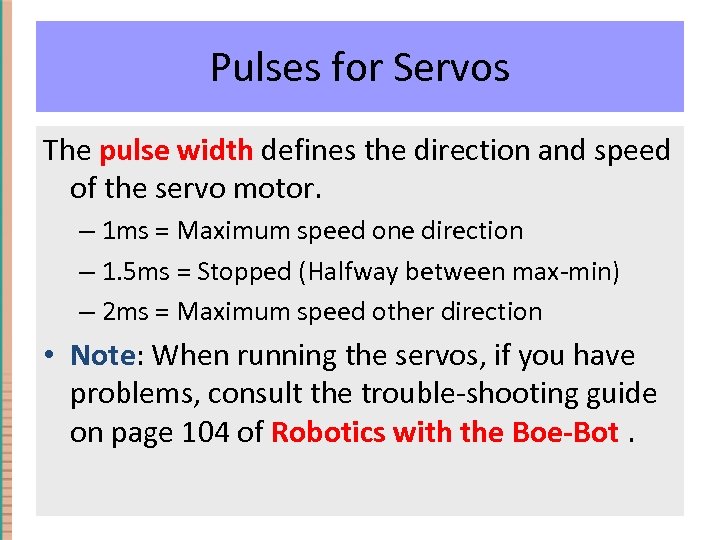
Pulses for Servos The pulse width defines the direction and speed of the servo motor. – 1 ms = Maximum speed one direction – 1. 5 ms = Stopped (Halfway between max-min) – 2 ms = Maximum speed other direction • Note: When running the servos, if you have problems, consult the trouble-shooting guide on page 104 of Robotics with the Boe-Bot.
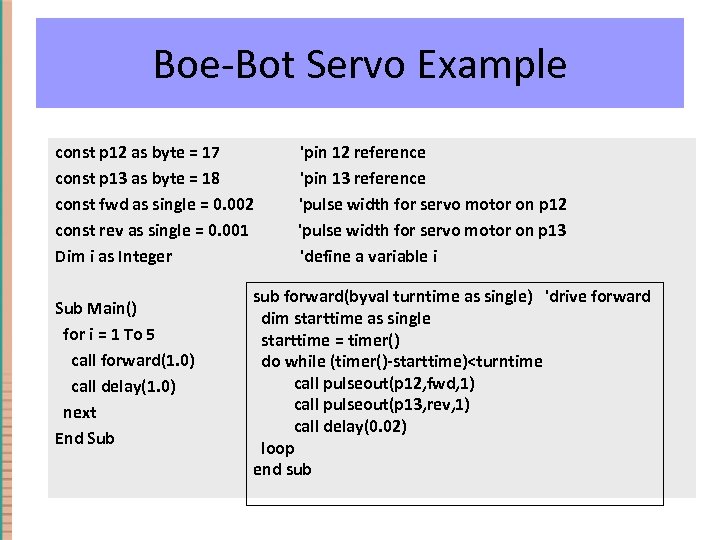
Boe-Bot Servo Example const p 12 as byte = 17 'pin 12 reference const p 13 as byte = 18 'pin 13 reference const fwd as single = 0. 002 'pulse width for servo motor on p 12 const rev as single = 0. 001 'pulse width for servo motor on p 13 Dim i as Integer 'define a variable i Sub Main() for i = 1 To 5 call forward(1. 0) call delay(1. 0) next End Sub sub forward(byval turntime as single) 'drive forward dim starttime as single starttime = timer() do while (timer()-starttime)<turntime call pulseout(p 12, fwd, 1) call pulseout(p 13, rev, 1) call delay(0. 02) loop end sub
Timer Code • Timer() returns the current RTC (run-time clock) time represented as the number of seconds since midnight with a best-case resolution of 1. 95 ms. • sub forward(byval turntime as single) is a subroutine that has the servos rotate for turntime seconds. (in opposite directions- why? ). • The use of timers will be critical in our Robopong contest, as each robot will be expected to run for exactly 60 seconds.
Boe-bot Programming • The biggest task for controlling our robot will be to effectively design and test programs. • Design: Sensors, timing, motors • Test: Running program, Modifying code if needed, Re-test.
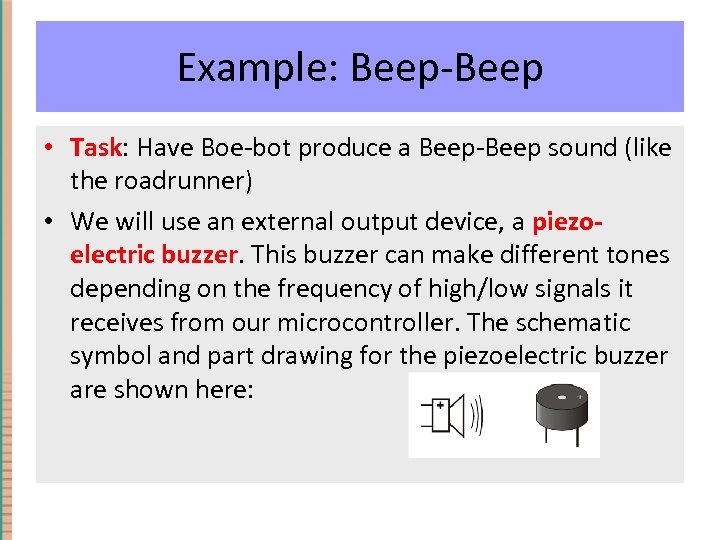
Example: Beep-Beep • Task: Have Boe-bot produce a Beep-Beep sound (like the roadrunner) • We will use an external output device, a piezoelectric buzzer. This buzzer can make different tones depending on the frequency of high/low signals it receives from our microcontroller. The schematic symbol and part drawing for the piezoelectric buzzer are shown here:
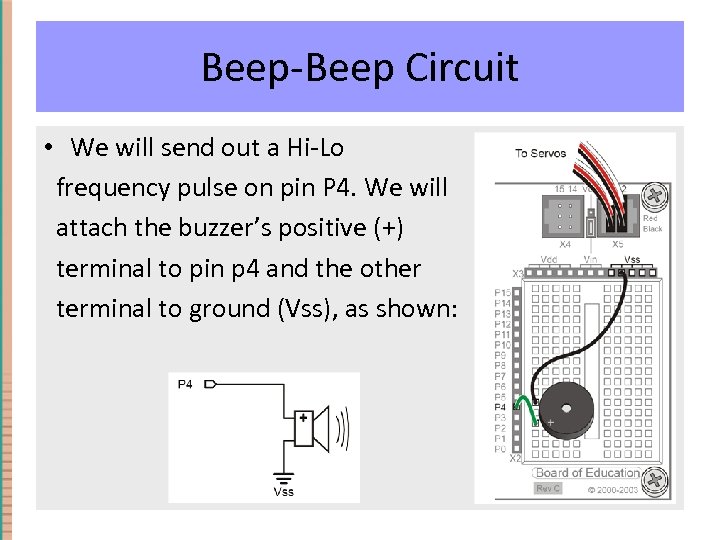
Beep-Beep Circuit • We will send out a Hi-Lo frequency pulse on pin P 4. We will attach the buzzer’s positive (+) terminal to pin p 4 and the other terminal to ground (Vss), as shown:
Freq. Out • Freq. Out(pin, freq. A, freq. B, duration) • From the help page: “This routine generates a signal on the specified pin that is a digital approximation of two superimposed sine waves having the specified frequencies. ” • Example: Call Freq. Out(pin, 440, 880, 5. 0) ' play middle C/high C 5 sec
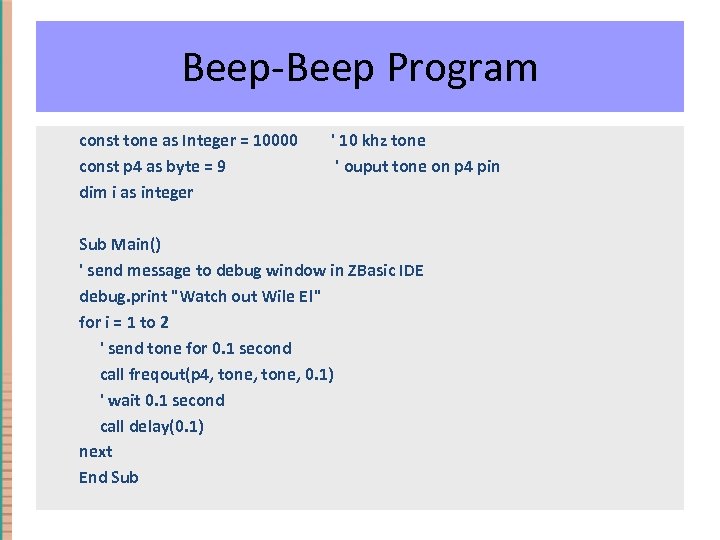
Beep-Beep Program const tone as Integer = 10000 const p 4 as byte = 9 dim i as integer ' 10 khz tone ' ouput tone on p 4 pin Sub Main() ' send message to debug window in ZBasic IDE debug. print "Watch out Wile E!" for i = 1 to 2 ' send tone for 0. 1 second call freqout(p 4, tone, 0. 1) ' wait 0. 1 second call delay(0. 1) next End Sub
Beep-Beep Program • Download and run this program. (It is called “beep. Day 2” on the Code page of our course web site) • Note the use of the code debug. print "Watch out Wile E!" This serves as a “print” statement to the output area in the ZBasic IDE. The ability to print out messages, and the state of variables, will be useful for testing and debugging our code.
Whiskers I/O • The Beep-Beep program is an example where we send output over an I/O pin connection. In our next example we will look at how to use an I/O pin to gather input. • Do Activity #1: BUILDING AND TESTING THE WHISKERS on pages 165 -171 in the Boe-Bot text. • Then, use the program on the next slide to test the whiskers. Note how we use the debug. print command to display the state of the whiskers. (It is called “beep. Day 2” on the Code page of our course web site)
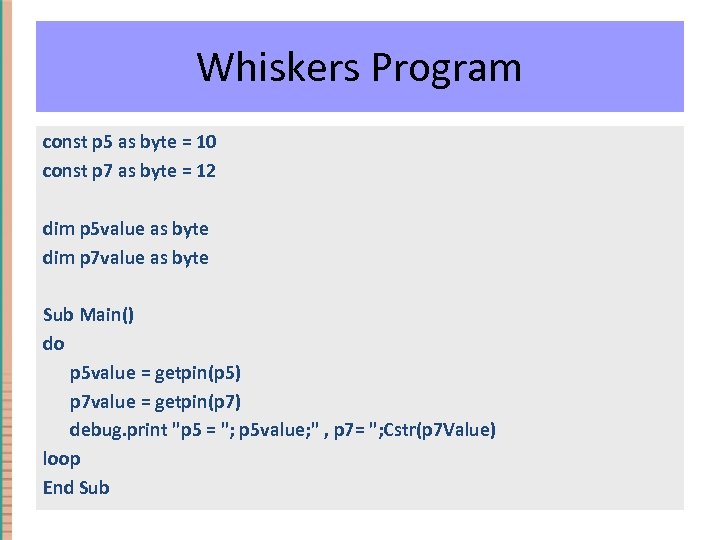
Whiskers Program const p 5 as byte = 10 const p 7 as byte = 12 dim p 5 value as byte dim p 7 value as byte Sub Main() do p 5 value = getpin(p 5) p 7 value = getpin(p 7) debug. print "p 5 = "; p 5 value; " , p 7= "; Cstr(p 7 Value) loop End Sub
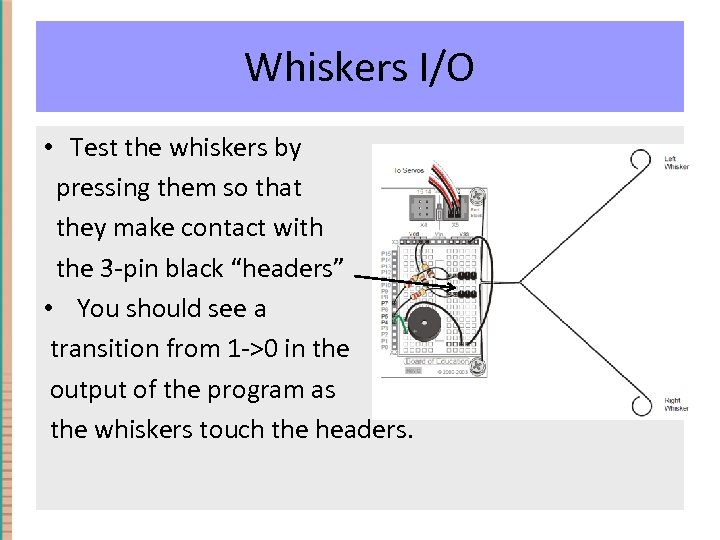
Whiskers I/O • Test the whiskers by pressing them so that they make contact with the 3 -pin black “headers” • You should see a transition from 1 ->0 in the output of the program as the whiskers touch the headers.
Whiskers Program Code • Get. Pin(pin) If the specified pin is configured to be an input, this function reads the state of the pin and returns the value 0 or 1. If the pin was configured to be an output, it is reconfigured to be an input before reading the input value. • Debug. Print string. List This method is used for outputting debugging information. The argument string. List consists of zero or more strings or values each separated by a semicolon. If non-string values are supplied, they are converted to strings using the CStr() function. Unless the list ends with a semicolon, a carriage return/new line will also be output after all of the strings have been output
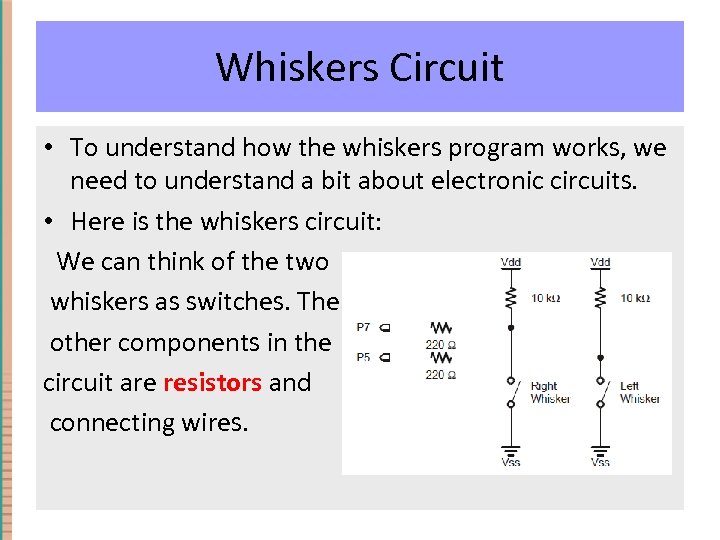
Whiskers Circuit • To understand how the whiskers program works, we need to understand a bit about electronic circuits. • Here is the whiskers circuit: We can think of the two whiskers as switches. The other components in the circuit are resistors and connecting wires.
Circuits • Electrical circuits involve the flow of electrons through devices. We analyze this flow using the following measurements: V = Voltage R = Resistance I = Current • The info in the next few slides was created by Parallax (the maker of our robots) and adapted by Martin Hebel at Southern Illinois University for use in a robotics camp he runs each summer.
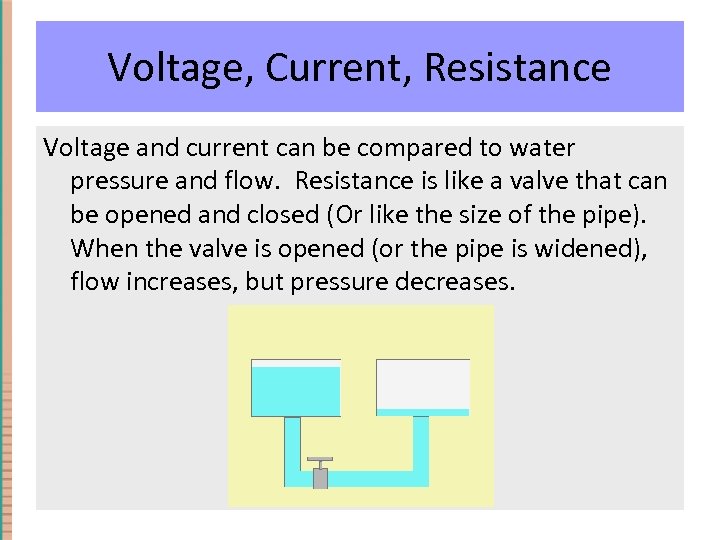
Voltage, Current, Resistance Voltage and current can be compared to water pressure and flow. Resistance is like a valve that can be opened and closed (Or like the size of the pipe). When the valve is opened (or the pipe is widened), flow increases, but pressure decreases.
Voltage, Current, Resistance Of course water will flow from the fuller tank because it has greater pressure than the empty tank. The flow rate is dependent on: • The difference in pressure between the two tanks. • The amount of restriction to flow in the pipe and valve. The water that flows from your faucet is dependent on the height of your town's water tank, the size of the pipes, and how far you open the faucet.
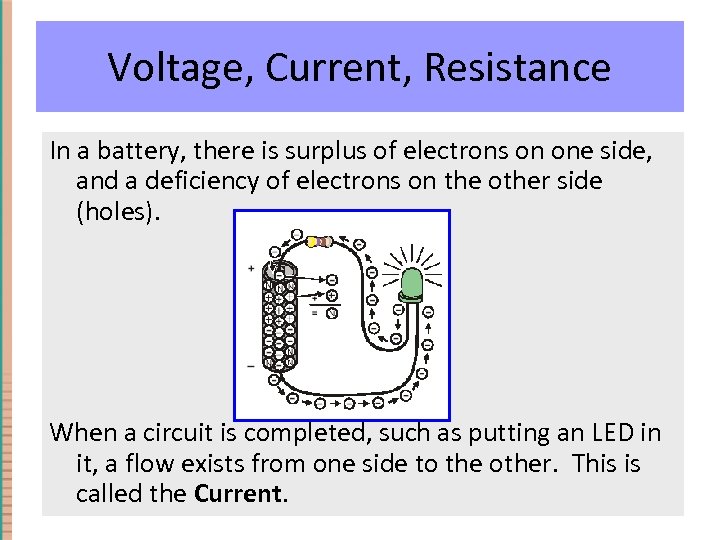
Voltage, Current, Resistance In a battery, there is surplus of electrons on one side, and a deficiency of electrons on the other side (holes). When a circuit is completed, such as putting an LED in it, a flow exists from one side to the other. This is called the Current.
Voltage, Current, Resistance • The greater the pressure, (the difference in electrical potential), or voltage, (measured in Volts), the greater the amount of current that can flow in a unit time (measured in Amperes). • The greater the restriction to flow (resistance – measured in Ohms), the lower the amount of current that can flow.
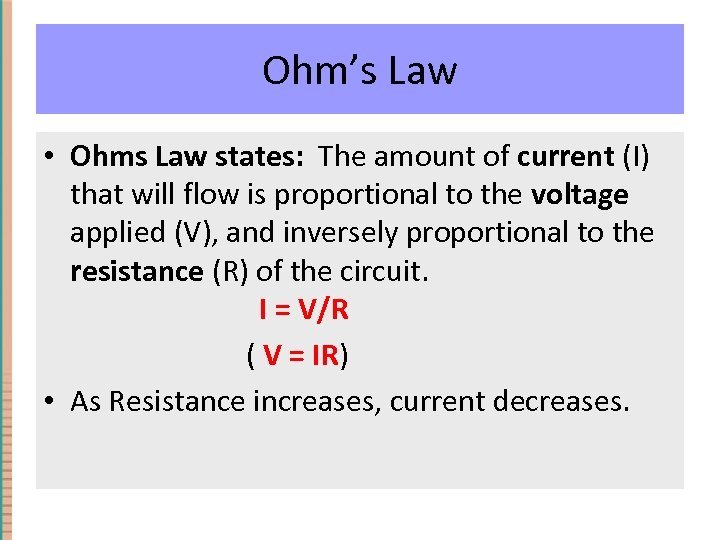
Ohm’s Law • Ohms Law states: The amount of current (I) that will flow is proportional to the voltage applied (V), and inversely proportional to the resistance (R) of the circuit. I = V/R ( V = IR) • As Resistance increases, current decreases.
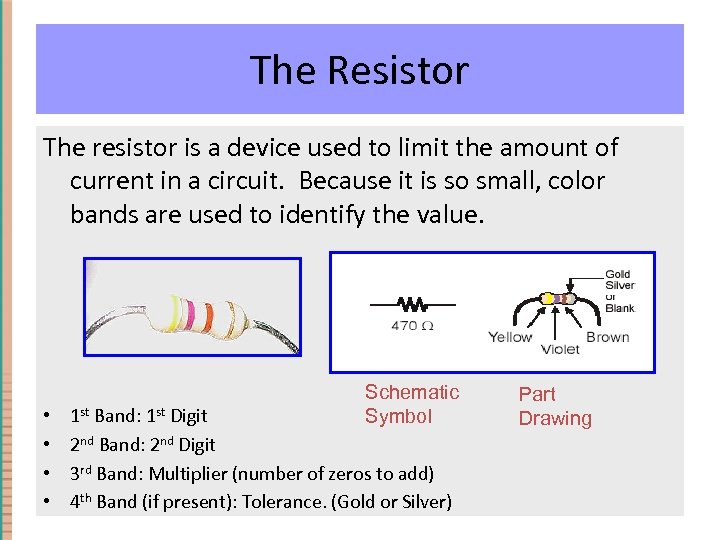
The Resistor The resistor is a device used to limit the amount of current in a circuit. Because it is so small, color bands are used to identify the value. 1 st Band: 1 st Digit Schematic Symbol • • 2 nd Band: 2 nd Digit • 3 rd Band: Multiplier (number of zeros to add) • 4 th Band (if present): Tolerance. (Gold or Silver) Part Drawing
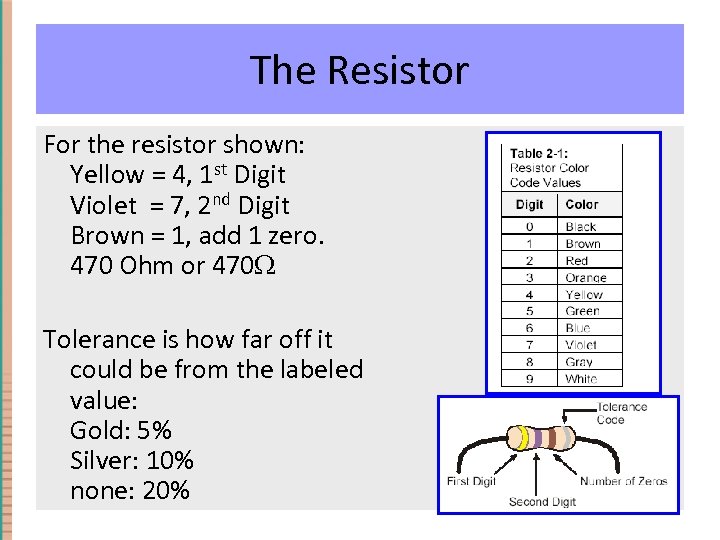
The Resistor For the resistor shown: Yellow = 4, 1 st Digit Violet = 7, 2 nd Digit Brown = 1, add 1 zero. 470 Ohm or 470 Tolerance is how far off it could be from the labeled value: Gold: 5% Silver: 10% none: 20%
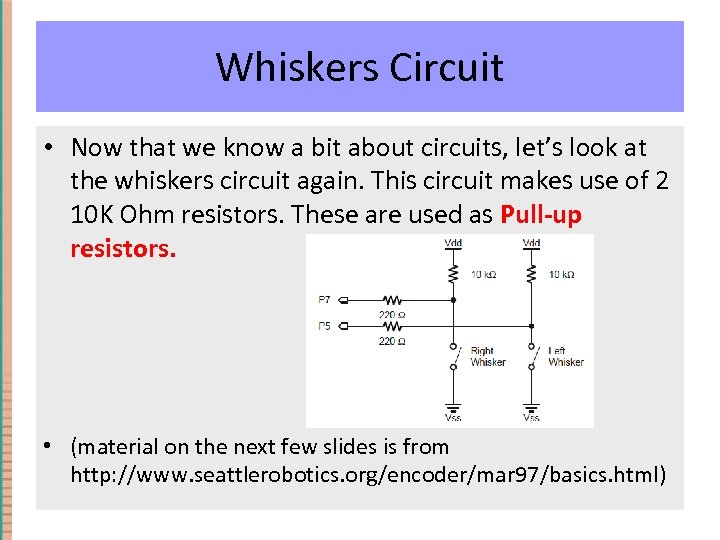
Whiskers Circuit • Now that we know a bit about circuits, let’s look at the whiskers circuit again. This circuit makes use of 2 10 K Ohm resistors. These are used as Pull-up resistors. • (material on the next few slides is from http: //www. seattlerobotics. org/encoder/mar 97/basics. html)
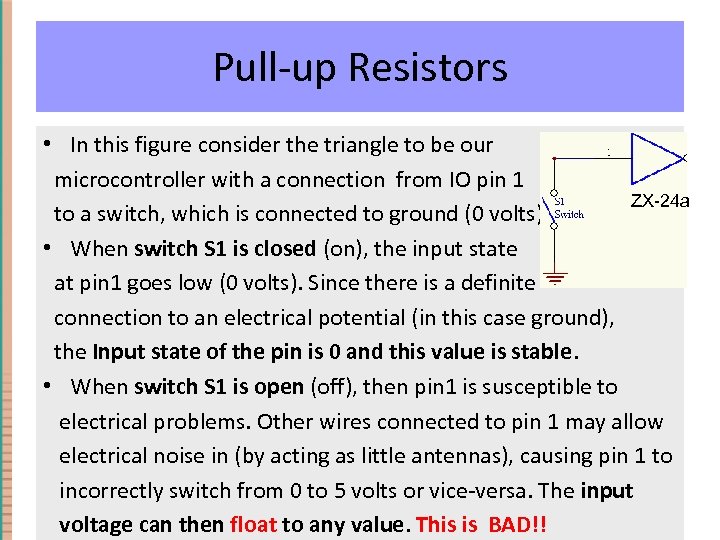
Pull-up Resistors • In this figure consider the triangle to be our microcontroller with a connection from IO pin 1 ZX-24 a to a switch, which is connected to ground (0 volts). • When switch S 1 is closed (on), the input state at pin 1 goes low (0 volts). Since there is a definite connection to an electrical potential (in this case ground), the Input state of the pin is 0 and this value is stable. • When switch S 1 is open (off), then pin 1 is susceptible to electrical problems. Other wires connected to pin 1 may allow electrical noise in (by acting as little antennas), causing pin 1 to incorrectly switch from 0 to 5 volts or vice-versa. The input voltage can then float to any value. This is BAD!!
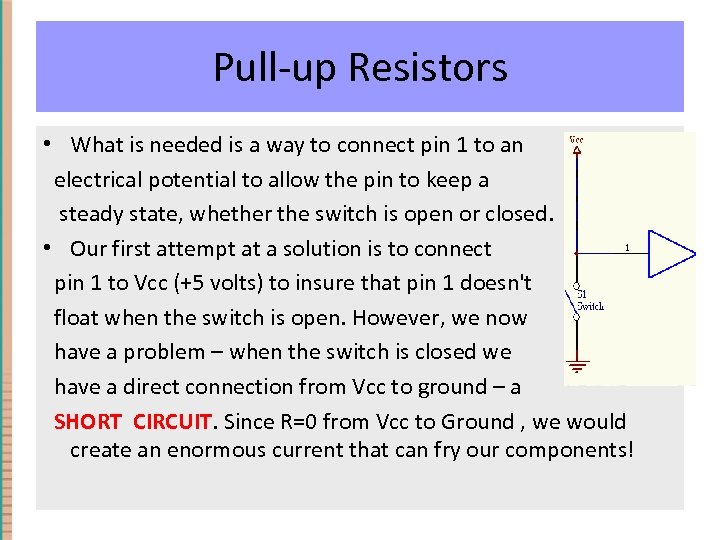
Pull-up Resistors • What is needed is a way to connect pin 1 to an electrical potential to allow the pin to keep a steady state, whether the switch is open or closed. • Our first attempt at a solution is to connect pin 1 to Vcc (+5 volts) to insure that pin 1 doesn't float when the switch is open. However, we now have a problem – when the switch is closed we have a direct connection from Vcc to ground – a SHORT CIRCUIT. Since R=0 from Vcc to Ground , we would create an enormous current that can fry our components!
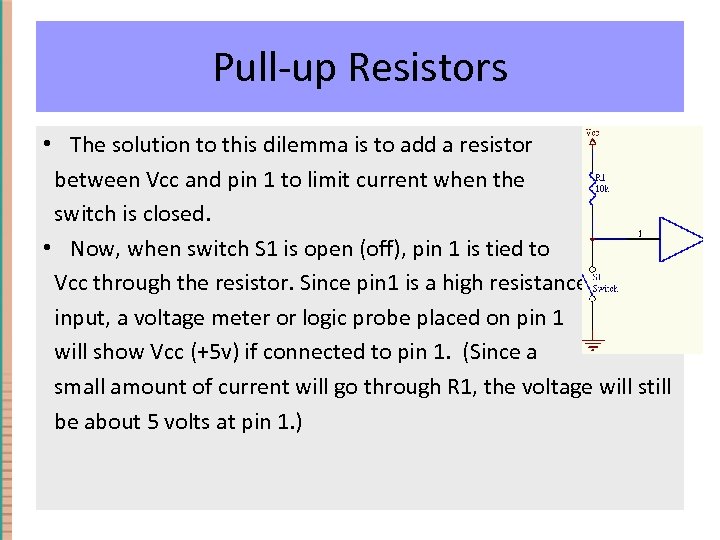
Pull-up Resistors • The solution to this dilemma is to add a resistor between Vcc and pin 1 to limit current when the switch is closed. • Now, when switch S 1 is open (off), pin 1 is tied to Vcc through the resistor. Since pin 1 is a high resistance input, a voltage meter or logic probe placed on pin 1 will show Vcc (+5 v) if connected to pin 1. (Since a small amount of current will go through R 1, the voltage will still be about 5 volts at pin 1. )
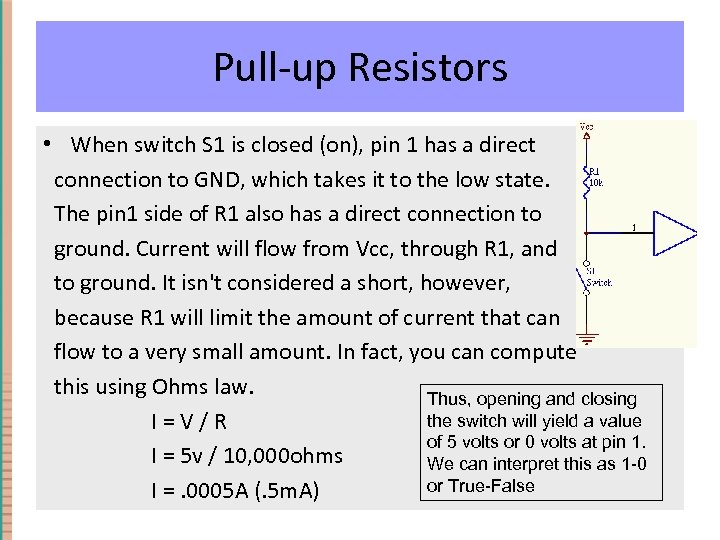
Pull-up Resistors • When switch S 1 is closed (on), pin 1 has a direct connection to GND, which takes it to the low state. The pin 1 side of R 1 also has a direct connection to ground. Current will flow from Vcc, through R 1, and to ground. It isn't considered a short, however, because R 1 will limit the amount of current that can flow to a very small amount. In fact, you can compute this using Ohms law. Thus, opening and closing the switch will yield a value I = V / R of 5 volts or 0 volts at pin 1. I = 5 v / 10, 000 ohms We can interpret this as 1 -0 or True-False I =. 0005 A (. 5 m. A)
Pull-up Resistors • Pull-up resistors are extremely common in digital circuits. Their function is to keep input lines from floating erratically from one state to another. • The key function for the resistor is to prevent too much current from flowing through the pull-up circuit.
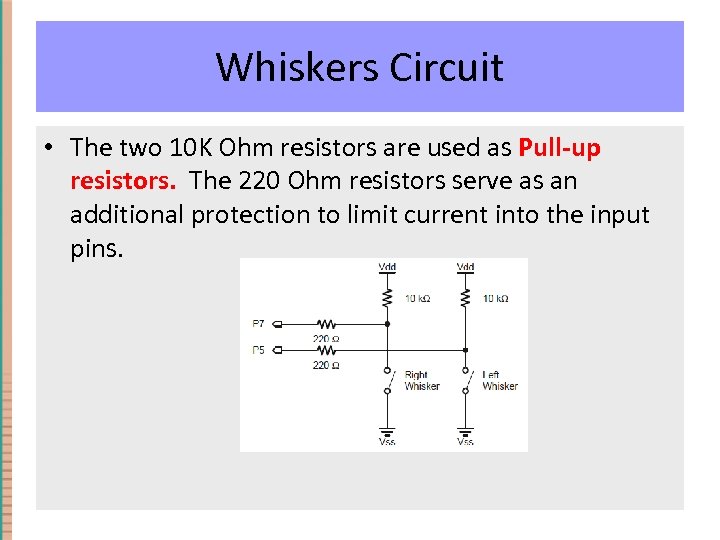
Whiskers Circuit • The two 10 K Ohm resistors are used as Pull-up resistors. The 220 Ohm resistors serve as an additional protection to limit current into the input pins.
Team Tasks • Modify the Whiskers program so that the Boe-bot emits a “Beep-beep” when one or both whiskers are pushed. • Modify the Whiskers program so that it uses the servos and the whiskers to create a navigation program. That is, add the capability to have the Boebot move forward and when it hits something (whiskers are pushed) it backs up, turns a different direction, and continues forward.
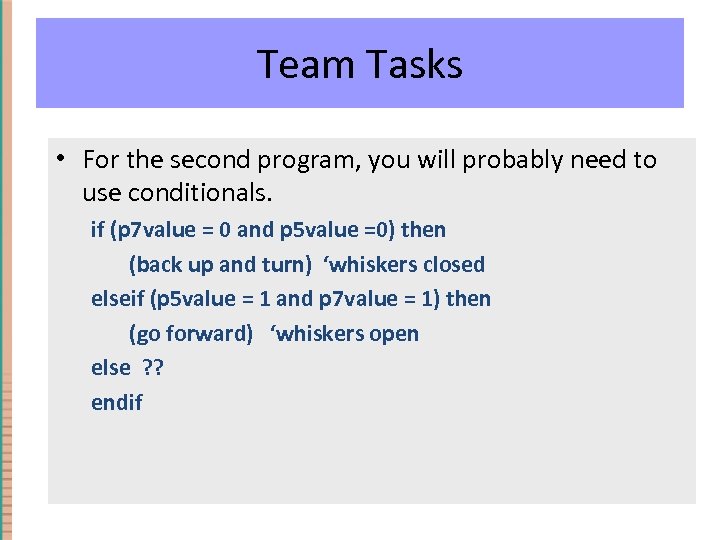
Team Tasks • For the second program, you will probably need to use conditionals. if (p 7 value = 0 and p 5 value =0) then (back up and turn) ‘whiskers closed elseif (p 5 value = 1 and p 7 value = 1) then (go forward) ‘whiskers open else ? ? endif
Team Tasks • For some ideas on doing this task, you can look at Activity #3: NAVIGATION WITH WHISKERS in Chapter 5. The code in that section is not ZBasic, but you should be able to translate the ideas into ZBasic. • Suggestion: To make your coding more adaptable, model your forward, reverse, and turn sub-routines after the forward example included earlier in these slides. • If you want a further challenge try the on the next couple of slides.
Wall Following • Program the BOE-BOT to follow the outside (leftt) wall. Do this by giving the BOE-BOT a slight bias (drift) to the left. • You will have to re-design the whisker system so that a whisker makes contact with the 3 -prong header when it touches the wall. • When the left whisker hits the wall, the robot should turn right for a short time and then resume the slight bias to the left. • This is illustrated on the following slide.
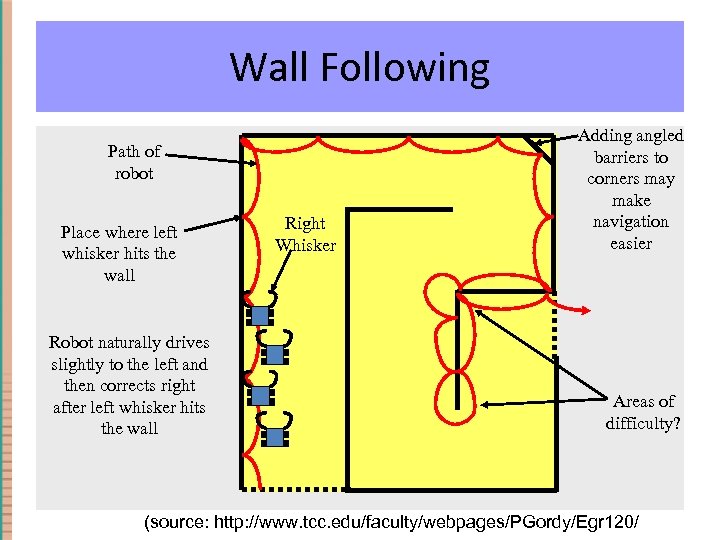
Wall Following Path of robot Place where left whisker hits the wall Robot naturally drives slightly to the left and then corrects right after left whisker hits the wall Right Whisker Adding angled barriers to corners may make navigation easier Areas of difficulty? (source: http: //www. tcc. edu/faculty/webpages/PGordy/Egr 120/
Скачать презентацию PHY 235 Robotics Workshop Day 2 ZX-24 a
b27cf752842572c66655346b85790be5.ppt