


 Скачать презентацию PERT CPM Key Terms Critical Path The
7ab22cfd1f09fe423362b246cb888d8c.ppt
- Количество слайдов: 46
 PERT/CPM
 Key Terms – Critical Path: The longest time path through the task network. The series of tasks (or even a single task) that dictates the calculated finish date of the project (That is, when the last task in the critical path is completed, the project is completed) The "longest" path (in terms of time) to the completion of a project. – If shortened, it would shorten the time it takes to complete the project. Activities off the critical path would not affect completion time even if they were done more quickly. 2
 Slack Time The amount of time a task can be delayed before the project finish date is delayed. Total slack can be positive or negative. If total slack is a positive it indicates the amount of time that the task can be delayed without delaying the project finish date. If negative, it indicates the amount of time that must be saved so that the project finish date is not delayed. Total Slack = Latest Start - Earliest Start. By default and by definition, a task with 0 slack is considered a critical task. If a critical task is delayed, the project finish date is also delayed. (Also known as float time) 3
 Crashing Shifting resources to reduce slack time so the critical path is as short as possible. Always raises project costs and is typically disruptive – a project should be crashed with caution. 4
 • Gantt Chart: A bar chart. While visually appealing on a task/duration basis, it is limited because it does not show task or resource relationships well. Strength: easy to maintain and read. • Network Diagram: A wire diagram, Also known as a PERT network diagram. A diagram that shows tasks and their relationships. Limited because it shows only task relationships. Strength: easy to read task relationships. 5
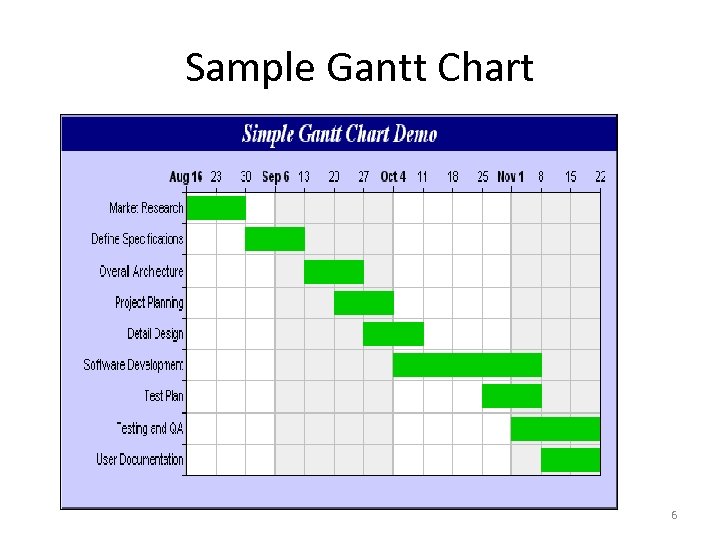 Sample Gantt Chart 6
 Dependencies Links between project tasks. There are 3 types of dependencies: – Causal, where 1 task must be completed before another can begin (have to bake bread before you can make a sandwich) » critical path schedules are based only on causal dependencies – Resource, where a task is limited by availability of resources (more bread can be baked by 2 bakers, but only 1 is available) – Discretionary, optional task sequence preferences that, though not required, may reflect organizational preferences 7
 Dummy activity An imaginary activity with no duration, used to show either an indirect relationship between 2 tasks or to clarify the identities of the tasks. In CPM, each activity must be uniquely defined by its beginning and ending point. When two activities begin and end at the same time, a dummy activity (an activity which begins and ends at the same time) is inserted into the model to distinguish the two activities. 8
 Milestone A significant task which represents a key accomplishment within the project. Typically requires special attention and control. 9
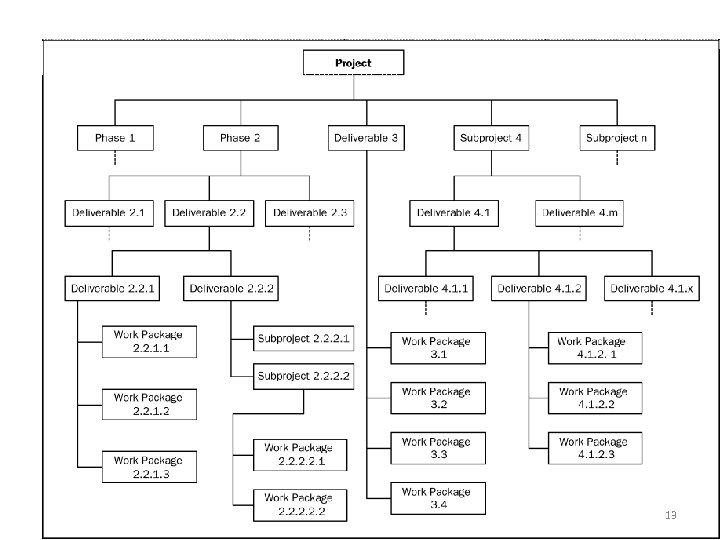
 Work Breakdown Structure (WBS) • A detailed, hierarchical (from general to specific) tree structure of deliverables and tasks that need to be performed to complete a project. • Purpose: to identify actual tasks to be done in a project. Serves as basis for project planning. • An extension to PERT. 10
 Work Breakdown Structure • • • Identify the major task categories Identify sub-tasks, and sub-tasks Use verb-noun to imply action to something – Example: Getting up in the morning • • • Hit snooze button again Get outa bed Avoid dog Go to bathroom… 11
 Create WBS • • • Decomposition of project deliverables and activities into smaller, more manageable parts The lowest level in WBS is a Work Package based on Statement Of Work (SOW) Needs to be S. M. A. R. T (Specific, Measurable, Attainable, Realistic, Timely) 12
 13
13
 Work Breakdown Structure Canoe Trip to Boundary Waters Arrange Travel Plan Meals Get Equipment Schedule Flights to Mpls Plan for Emergencies Plan Activities Bring cooking gear Assign Budget Person Obtain emerg. #’s Bring Cards Freeze dry food Get deposits Arrange contact at BW Bring Joke book Prepare 7 breakfasts Retain Receipts Bring emerg. flares Bring scotch Bring Sleeping Bags Prepare 7 lunches Pay for supplies Bring two first aid kits Bring Fishing Gear Prepare 6 dinners Close-out trip Contact BW Outfitter Rent Van Rent canoes Arrange Motel Rent Tents Schedule return flights Prepare Budget Bring lights and waterproof matches 14
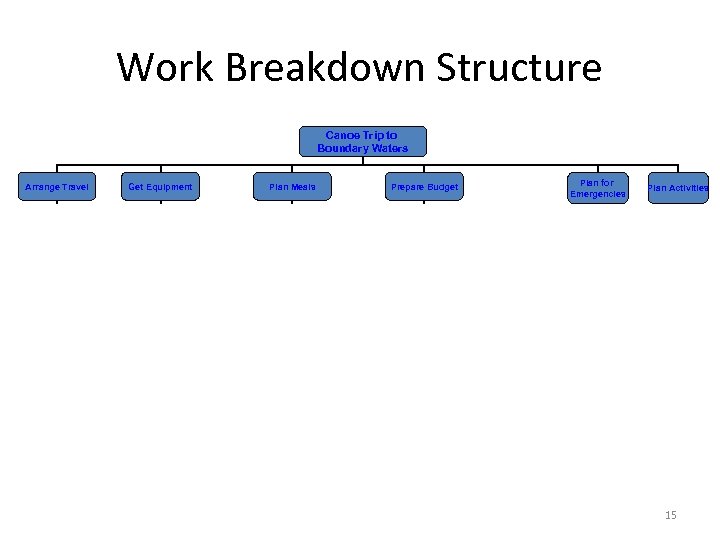 Work Breakdown Structure Canoe Trip to Boundary Waters Arrange Travel Plan Meals Get Equipment Schedule Flights to Mpls Plan for Emergencies Plan Activities Bring cooking gear Assign Budget Person Obtain emerg. #’s Bring Cards Freeze dry food Get deposits Arrange contact at BW Bring Joke book Prepare 7 breakfasts Retain Receipts Bring emerg. flares Bring scotch Bring Sleeping Bags Prepare 7 lunches Pay for supplies Bring two first aid kits Bring Fishing Gear Prepare 6 dinners Close-out trip Contact BW Outfitter Rent Van Rent canoes Arrange Motel Rent Tents Schedule return flights Prepare Budget Bring lights and waterproof matches 15
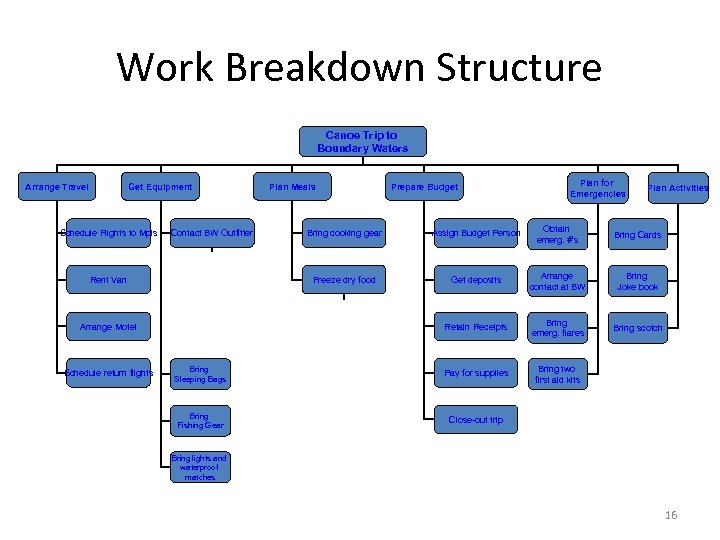 Work Breakdown Structure Canoe Trip to Boundary Waters Arrange Travel Plan Meals Get Equipment Schedule Flights to Mpls Plan for Emergencies Plan Activities Bring cooking gear Assign Budget Person Obtain emerg. #’s Bring Cards Freeze dry food Get deposits Arrange contact at BW Bring Joke book Prepare 7 breakfasts Retain Receipts Bring emerg. flares Bring scotch Bring Sleeping Bags Prepare 7 lunches Pay for supplies Bring two first aid kits Bring Fishing Gear Prepare 6 dinners Close-out trip Contact BW Outfitter Rent Van Rent canoes Arrange Motel Rent Tents Schedule return flights Prepare Budget Bring lights and waterproof matches 16
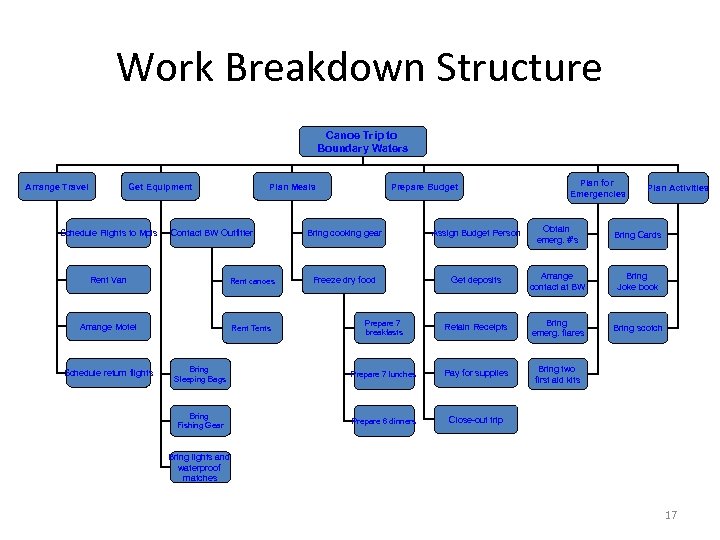 Work Breakdown Structure Canoe Trip to Boundary Waters Arrange Travel Plan Meals Get Equipment Schedule Flights to Mpls Plan for Emergencies Plan Activities Bring cooking gear Assign Budget Person Obtain emerg. #’s Bring Cards Freeze dry food Get deposits Arrange contact at BW Bring Joke book Prepare 7 breakfasts Retain Receipts Bring emerg. flares Bring scotch Bring Sleeping Bags Prepare 7 lunches Pay for supplies Bring two first aid kits Bring Fishing Gear Prepare 6 dinners Close-out trip Contact BW Outfitter Rent Van Rent canoes Arrange Motel Rent Tents Schedule return flights Prepare Budget Bring lights and waterproof matches 17
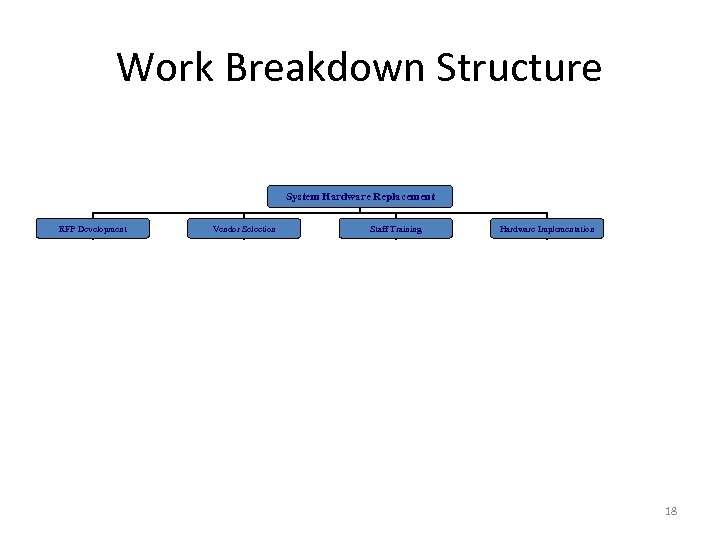 Work Breakdown Structure System Hardware Replacement RFP Development Vendor Selection Hardware Implementation Staff Training Needs Assessment Research Vendors Identify training Plan Schedule Installation Needs Analysis Research Sites Schedule Training Prepare Site Write RFP Select Vendors to mail RFP Train Arrange Vendor Support Finalize with Purchasing Review Proposals Configure System Rank Proposals Install System Recommendation 18
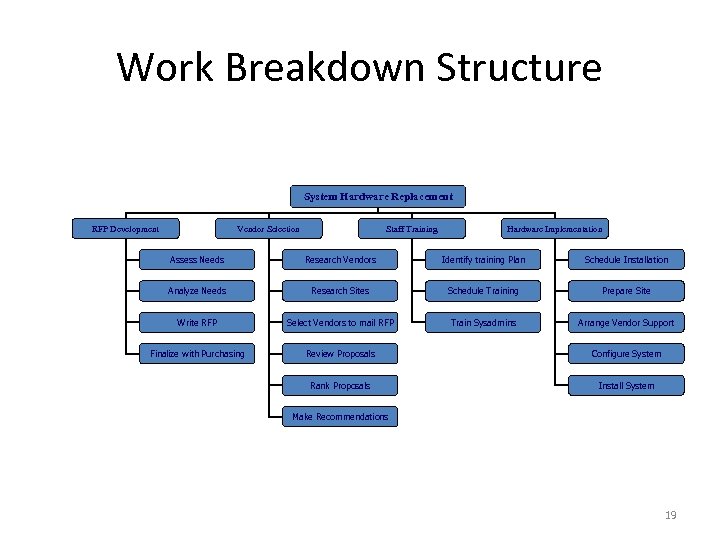 Work Breakdown Structure System Hardware Replacement RFP Development Vendor Selection Staff Training Hardware Implementation Assess Needs Research Vendors Identify training Plan Schedule Installation Analyze Needs Research Sites Schedule Training Prepare Site Write RFP Select Vendors to mail RFP Train Sysadmins Arrange Vendor Support Finalize with Purchasing Review Proposals Configure System Rank Proposals Install System Make Recommendations 19
 Work Breakdown Structure • Requires structured brainstorming 20
 WBS Dictionary • • • A companion document to the WBS May have detailed content of the components contained in a WBS, including work packages and control accounts For each WBS component, the WBS dictionary includes a code of account identifier, a statement of work, responsible organization, and a list of schedule milestones Can include a list of associated schedule activities, resources required, and an estimate of cost Each WBS component is cross-referenced, as appropriate, to other WBS components 21
 Project Management Assumptions • PM makes several key assumptions – All tasks have distinct begin and end points – All estimates can be mathematically derived – Tasks must be able to be arranged in a defined sequence that produces a pre-defined result – Resources may be shifted to meet need – Cost and time share a direct relationship (Cost of each activity is evenly spread over time) – Time, of itself, has no value • These assumptions make PM controversial 22
 THE PM Concept Assumption A Critical Path Exists • A small set of activities, which make up the longest path through the activity network control the entire project. • If these "critical" activities could be identified & assigned to responsible persons, management resources could be optimally used by concentrating on the few activities which determine the fate of the entire project. • Others can be re-planned, rescheduled & resources for them can be reallocated, without affecting the project. 23
 Standardized PM Tools • 1917: Henry Gantt introduced standardized PM tools • • Gantt Chart – visual tracking of tasks and resources Depiction of relationships between tasks Depiction of constraints between tasks First Widespread acceptance of a single technique • Created out of need and frustration as industrialization became ever more complex 24
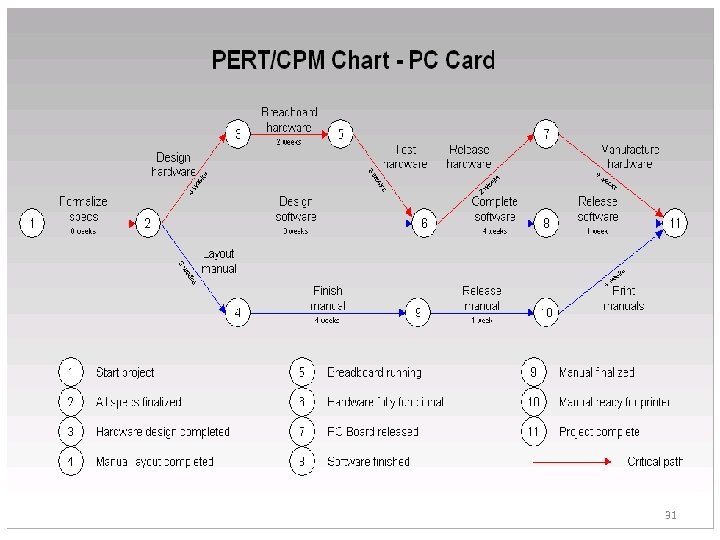
 PERT & CPM • PERT (Program Evaluation and Review Technique) – introduced by US military (Navy) in 1958 • US Navy : control costs & schedules for Polaris Submarine construction • CPM (Critical Path Method) – introduced by US industry in 1958 (Du. Pont Corporation and Remington. Rand) • Industry: control costs and schedules in manufacturing – Common weakness to both: ignores most dependencies • Considers only completion of a preceding required task • Both rely on a logical sequence of tasks – Organized visually (Charts), tabular or simple lists 25
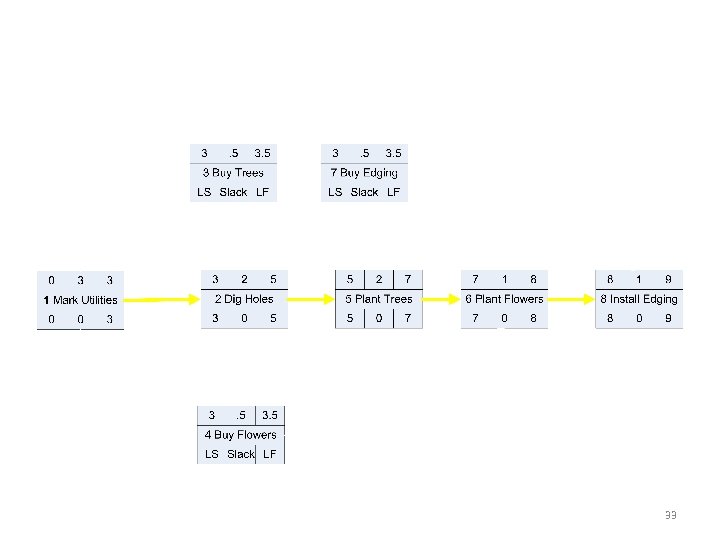
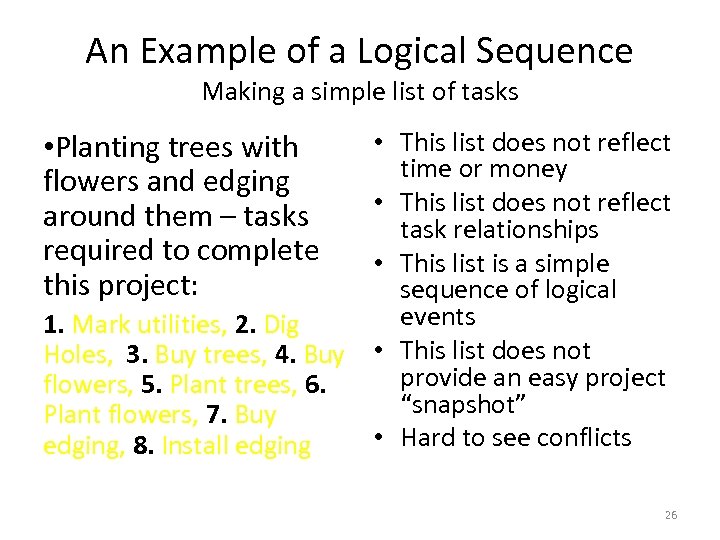 An Example of a Logical Sequence Making a simple list of tasks • This list does not reflect time or money • This list does not reflect task relationships • This list is a simple sequence of logical events 1. Mark utilities, 2. Dig Holes, 3. Buy trees, 4. Buy • This list does not provide an easy project flowers, 5. Plant trees, 6. “snapshot” Plant flowers, 7. Buy • Hard to see conflicts edging, 8. Install edging • Planting trees with flowers and edging around them – tasks required to complete this project: 26
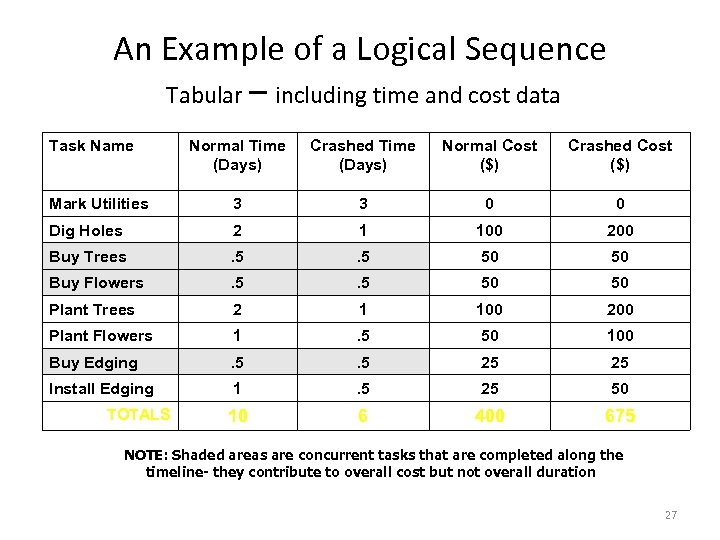 An Example of a Logical Sequence Tabular – including time and cost data Task Name Normal Time (Days) Crashed Time (Days) Normal Cost ($) Crashed Cost ($) Mark Utilities 3 3 0 0 Dig Holes 2 1 100 200 Buy Trees . 5 50 50 Buy Flowers . 5 50 50 Plant Trees 2 1 100 200 Plant Flowers 1 . 5 50 100 Buy Edging . 5 25 25 Install Edging 1 . 5 25 50 10 6 400 675 TOTALS NOTE: Shaded areas are concurrent tasks that are completed along the timeline- they contribute to overall cost but not overall duration 27
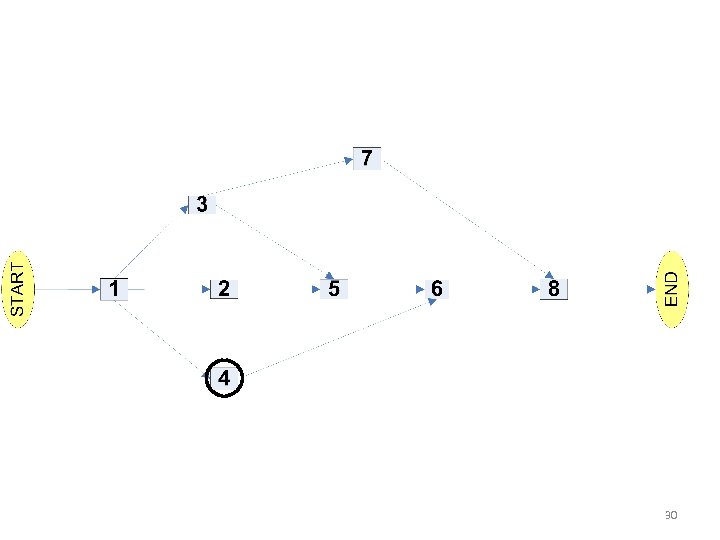
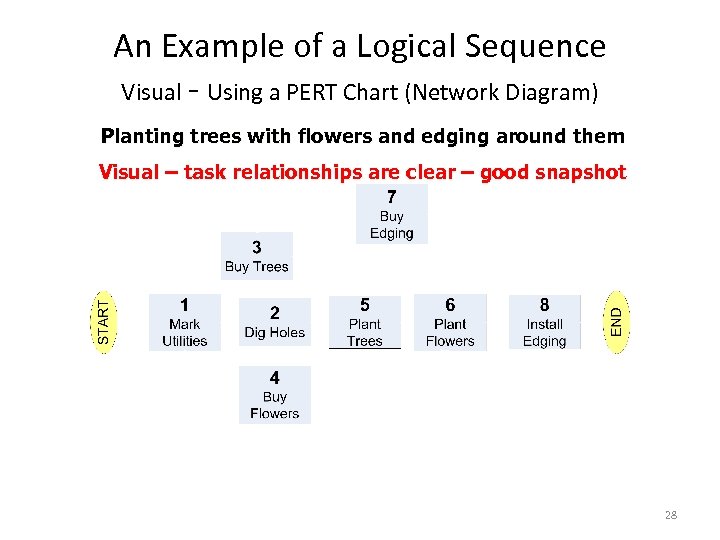 An Example of a Logical Sequence Visual - Using a PERT Chart (Network Diagram) Planting trees with flowers and edging around them Visual – task relationships are clear – good snapshot 28
 Variation in Networks • Standards such as BS 6046 • Activity on Arrow • Activity on Node 29
 30
30
 31
31
 32
32
 33
33
 Forward and Backward Pass • Forward pass is a technique to move forward through a diagram to calculate activity duration. Backward pass is its opposite. • Early Start (ES) and Early Finish (EF) use the forward pass technique. • Late Start (LS) and Late Finish(LF) use the backward pass technique. • MEMORY TRIGGER: if the float of the activity is zero, the two starts (ES and LS) and the two finish (EF and LF) are the same. Hence, If float of activity is zero, ES = LS and EF = LF. 34
 PM Today – Necessary? • Frustration with cost & schedule overruns • Frustration with reliability of production estimates • Management challenges exist today: – – – Only 44% of projects are completed on time On average, projects are 189% over-budget 70% of completed projects do not perform as expected 30% of projects are canceled before completion On average, projects are 222% longer than expected • PM has been shown to improve this performance These statistics were compiled by an independent monitoring group, The Standish Group, and represent the US national average for 1998 35
 PERT/CPM CALCULATIONS Basic Techniques
 PERT Calculations • Step 1: Define tasks • Step 2: Place Tasks in a logical order, find the critical path – The longest time path through the task network. The series of tasks (or even a single task) that dictates the calculated finish date • Step 3: Generate estimates – Optimistic, pessimistic, likely and PERT- expected – Standard Deviation and variance • Step 4: Determine earliest and latest dates • Step 5: Determine probability of meeting expected date • Steps 1 and 2 are logic and legwork, not calculation – these require a clear goal 37
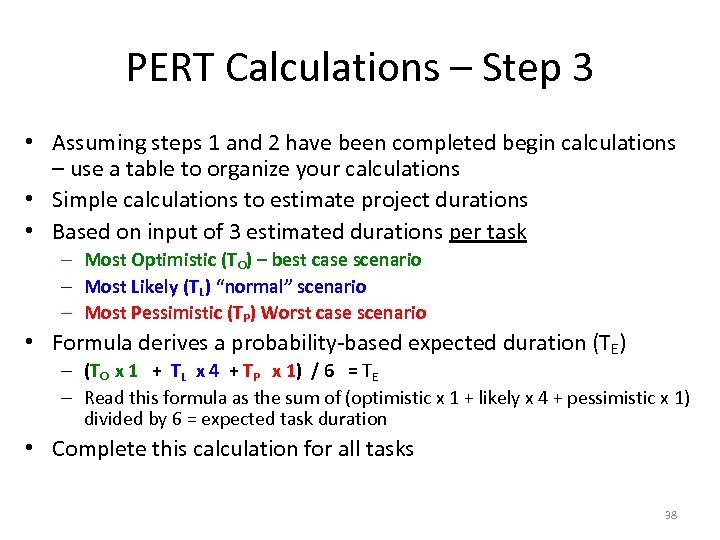 PERT Calculations – Step 3 • Assuming steps 1 and 2 have been completed begin calculations – use a table to organize your calculations • Simple calculations to estimate project durations • Based on input of 3 estimated durations per task – Most Optimistic (TO) – best case scenario – Most Likely (TL) “normal” scenario – Most Pessimistic (TP) Worst case scenario • Formula derives a probability-based expected duration (TE) – (TO x 1 + TL x 4 + TP x 1) / 6 = TE – Read this formula as the sum of (optimistic x 1 + likely x 4 + pessimistic x 1) divided by 6 = expected task duration • Complete this calculation for all tasks 38
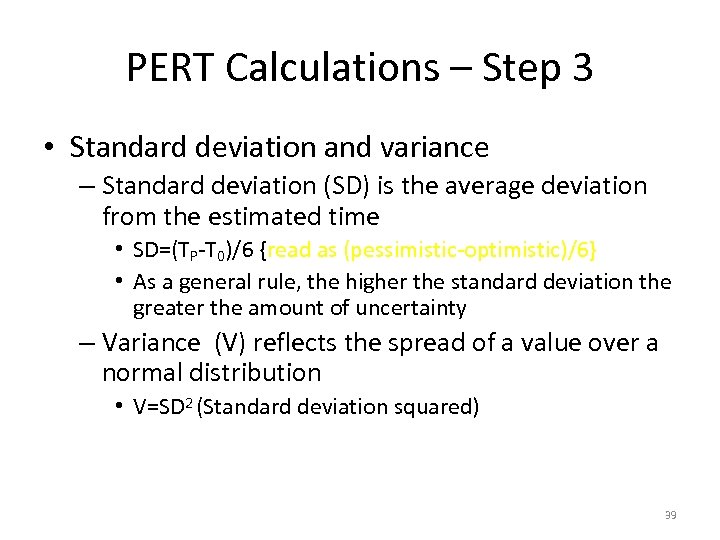 PERT Calculations – Step 3 • Standard deviation and variance – Standard deviation (SD) is the average deviation from the estimated time • SD=(TP-T 0)/6 {read as (pessimistic-optimistic)/6} • As a general rule, the higher the standard deviation the greater the amount of uncertainty – Variance (V) reflects the spread of a value over a normal distribution • V=SD 2 (Standard deviation squared) 39
 PERT Calculations – Step 3 • When doing manual PERT Calculations it is helpful to construct a table to stay organized • Consider the sample project– planting trees and flowers, set up using a list – Rough estimates and no risk analysis • No Range, simply rough estimates - unreliable? – PERT Analysis will better refine estimates • Start by setting up a table to organize data 40
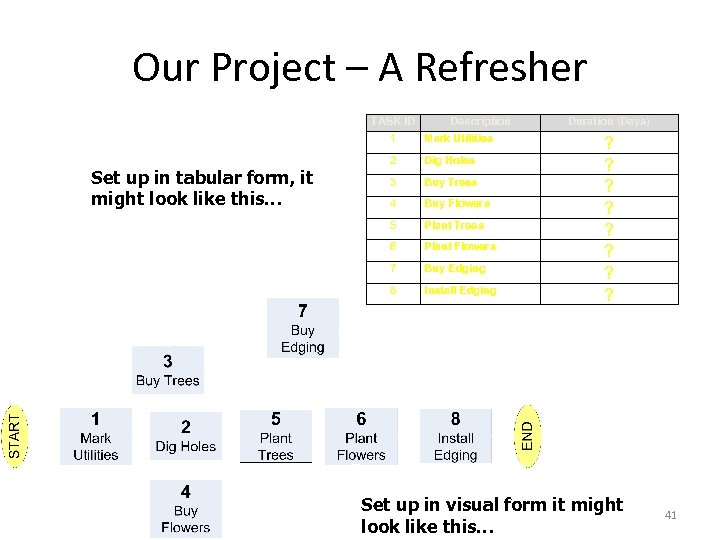 Our Project – A Refresher TASK ID Description 1 Set up in tabular form, it might look like this… Mark Utilities 2 Dig Holes 3 Buy Trees 4 Buy Flowers 5 Plant Trees 6 Plant Flowers 7 Buy Edging 8 Install Edging Duration (Days) ? ? ? ? Set up in visual form it might look like this… 41
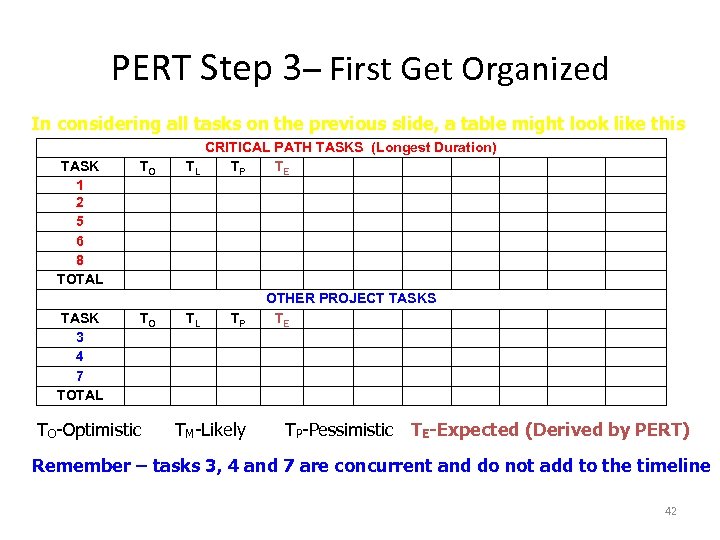 PERT Step 3– First Get Organized In considering all tasks on the previous slide, a table might look like this TASK 1 2 5 6 8 TOTAL TASK 3 4 7 TOTAL TO TO TO-Optimistic CRITICAL PATH TASKS (Longest Duration) TL TP TE TL TP TM-Likely OTHER PROJECT TASKS TE TP-Pessimistic TE-Expected (Derived by PERT) Remember – tasks 3, 4 and 7 are concurrent and do not add to the timeline 42
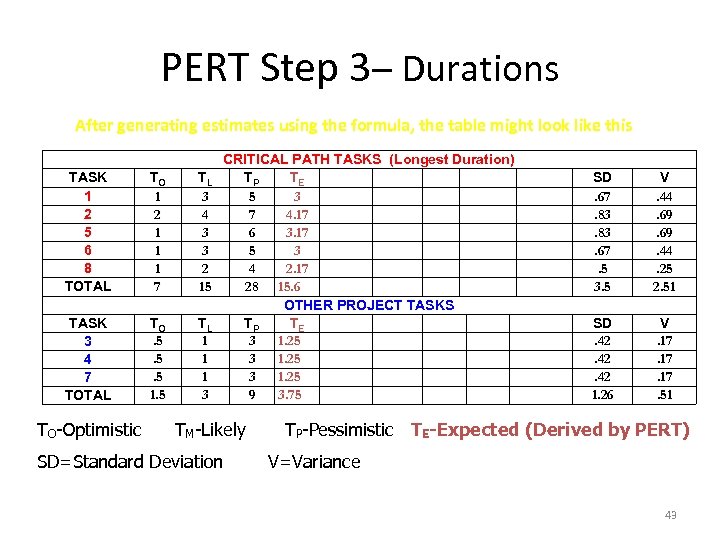 PERT Step 3– Durations After generating estimates using the formula, the table might look like this TASK 1 2 5 6 8 TOTAL TO 1 2 1 1 1 7 TASK 3 4 7 TOTAL TO. 5. 5. 5 1. 5 TO-Optimistic CRITICAL PATH TASKS (Longest Duration) TL TP TE 3 5 3 4 7 4. 17 3 6 3. 17 3 5 3 2 4 2. 17 15 28 15. 6 OTHER PROJECT TASKS TL TP TE 1 3 1. 25 3 9 3. 75 TM-Likely SD=Standard Deviation SD. 67. 83. 67. 5 3. 5 V. 44. 69. 44. 25 2. 51 SD. 42. 42 1. 26 V. 17. 17. 51 TP-Pessimistic TE-Expected (Derived by PERT) V=Variance 43
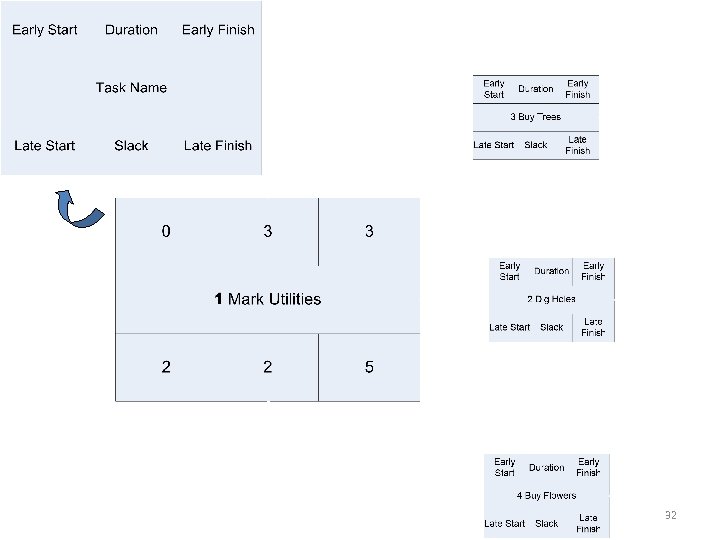
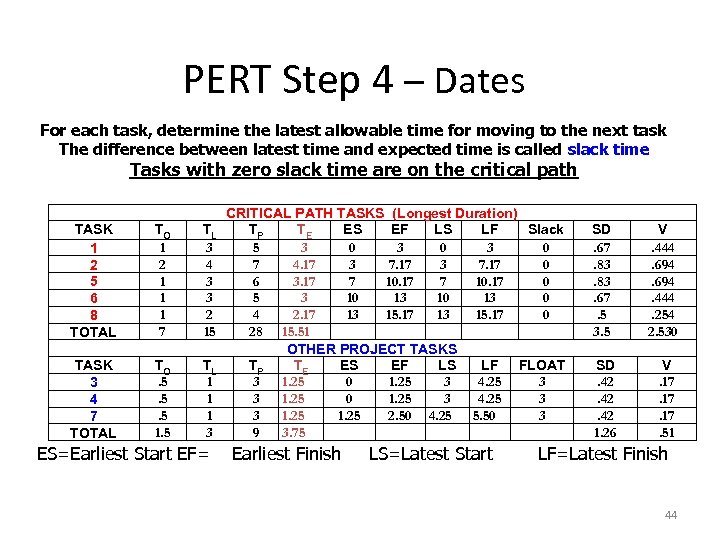 PERT Step 4 – Dates For each task, determine the latest allowable time for moving to the next task The difference between latest time and expected time is called slack time Tasks with zero slack time are on the critical path TASK 1 2 5 6 8 TOTAL TO 1 2 1 1 1 7 TL 3 4 3 3 2 15 TASK 3 4 7 TOTAL TO. 5. 5. 5 1. 5 TL 1 1 1 3 ES=Earliest Start EF= CRITICAL PATH TASKS (Longest Duration) TP TE ES EF LS LF Slack 5 3 0 3 0 7 4. 17 3 7. 17 0 6 3. 17 7 10. 17 0 5 3 10 13 0 4 2. 17 13 15. 17 0 28 15. 51 OTHER PROJECT TASKS TP TE ES EF LS LF FLOAT 3 1. 25 0 1. 25 3 4. 25 3 3 1. 25 2. 50 4. 25 5. 50 3 9 3. 75 Earliest Finish LS=Latest Start SD. 67. 83. 67. 5 3. 5 V. 444. 694. 444. 254 2. 530 SD. 42. 42 1. 26 V. 17. 17. 51 LF=Latest Finish 44
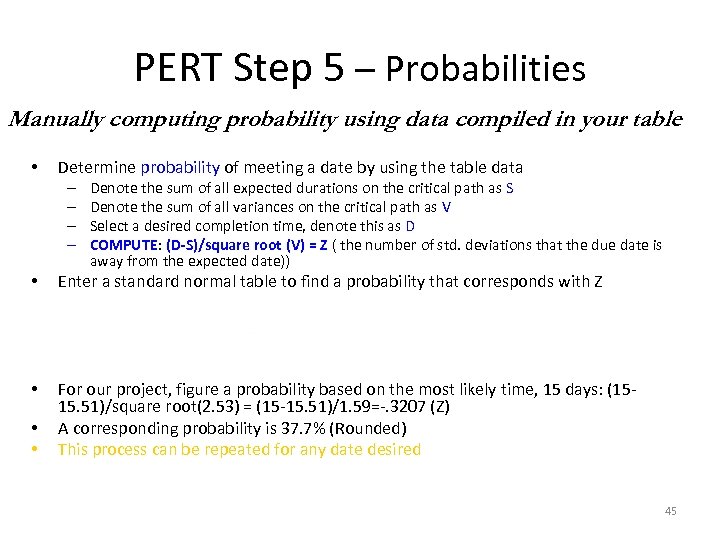 PERT Step 5 – Probabilities Manually computing probability using data compiled in your table • Determine probability of meeting a date by using the table data – – Denote the sum of all expected durations on the critical path as S Denote the sum of all variances on the critical path as V Select a desired completion time, denote this as D COMPUTE: (D-S)/square root (V) = Z ( the number of std. deviations that the due date is away from the expected date)) • Enter a standard normal table to find a probability that corresponds with Z • For our project, figure a probability based on the most likely time, 15 days: (1515. 51)/square root(2. 53) = (15 -15. 51)/1. 59=-. 3207 (Z) A corresponding probability is 37. 7% (Rounded) This process can be repeated for any date desired • • 45
 PERT Step 5 – Probabilities Computing probability in Excel using data compiled in your table • Microsoft Excel has normal distribution functions built in and can compute PERT probabilities • By creating a table as a spreadsheet, the addition of a few simple formulae will do the rest of the work • Create a table as a template that can be used over and over again – simply change the input 46