


 Скачать презентацию Perimeter Defense in Networks Virtual Private Networks Advanced
f058fae42cee167146af3dfca83626f1.ppt
- Количество слайдов: 23
 Perimeter Defense in Networks: Virtual Private Networks Advanced Network Security Peter Reiher August, 2014 Advanced Network Security Lecture 16 Page 1
 Outline • Another aspect of the perimeter defense problem • Virtual private networks – What are they? – How do they handle this problem? – Their practical use Advanced Network Security Lecture 16 Page 2
 Another Aspect of the Problem • What if you need to work across the Internet? • You want to get the same protection on both ends that firewalls would give • But those running the Internet won’t install firewalls for you • So there’s an untrusted hole in your perimeter Advanced Network Security Lecture 16 Page 3
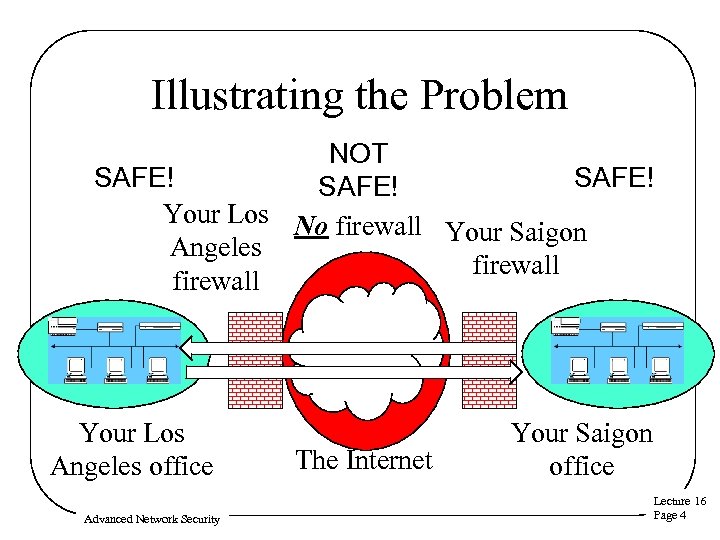 Illustrating the Problem NOT SAFE! Your Los No firewall Your Saigon Angeles firewall Your Los Angeles office Advanced Network Security The Internet Your Saigon office Lecture 16 Page 4
 Cryptography to the Rescue • We can’t ensure bad guys don’t see the packets we send outside our firewalls • But we can ensure they don’t understand them and can’t alter them • We can use cryptography to do that • Essentially, a different way to provide perimeter defense – When physical boundaries don’t apply Advanced Network Security Lecture 16 Page 5
 How To Do That? • Encrypt all traffic between our trusted endpoints – Literally everything • For preference, even hide sender and receiver information – To prevent attackers from knowing details of our networks Advanced Network Security Lecture 16 Page 6
 Virtual Private Networks • VPNs • The formal name for the solution we just outlined • A dedicated virtual closed network • Running across an untrusted open network • Security provided by cryptography Advanced Network Security Lecture 16 Page 7
 Encryption and Virtual Private Networks • Use encryption to convert a shared line to a private line • Set up a firewall at each installation’s network • Set up shared encryption keys between the firewalls • Encrypt all traffic using those keys Advanced Network Security Lecture 16 Page 8
 Actual Use of Encryption in VPNs • VPNs run over the Internet • Internet routers can’t handle fully encrypted packets • Obviously, VPN packets aren’t entirely encrypted • They are encrypted in a tunnel mode – Often using IPSec • Gives owners flexibility and control Advanced Network Security Lecture 16 Page 9
 Key Management and VPNs • All security of the VPN relies on key secrecy • How do you communicate the key? – In early implementations, manually – Modern VPNs use IKE or proprietary key servers • How often do you change the key? – Better be often – And better be largely automated Advanced Network Security Lecture 16 Page 10
 Some Other VPN Issues • Interactions between VPNs and firewalls • New models of VPN deployment Advanced Network Security Lecture 16 Page 11
 VPNs and Firewalls • VPN encryption is typically done between firewall machines – VPN often integrated into firewall product • Do I need the firewall for anything else? • How much do I trust the remote office. . . ? • Remember, you must not only trust honesty – You must also trust caution Advanced Network Security Lecture 16 Page 12
 Placing the Firewall Outside the VPN • Placing the firewall “outside” the VPN is pointless – Traffic is encrypted, at that point – Also, true IP addresses, ports, etc. are hidden by the tunneling – Can’t usefully analyze packets here Advanced Network Security Lecture 16 Page 13
 Placing the Firewall Inside the VPN • Meaning, after the VPN encryption has been removed • And the tunneling undone • Allows firewall to analyze the packets that would actually be delivered • “Inside” means “later in same box” usually – One machine handles both VPN and firewalls Advanced Network Security Lecture 16 Page 14
 New Models of VPNs • Original model sets up VPN between two endpoints – Static endpoints – Semi-permanent VPN • Modern needs have suggested other ways to use VPNs Advanced Network Security Lecture 16 Page 15
 VPNs and Portable Computing • Increasingly, workers connect to offices remotely – While on travel – Or when working from home • We can use VPNs to offer a secure solution Advanced Network Security Lecture 16 Page 16
 Securing the Mobile Worker • Set up VPN software on his computer • Capturing all incoming/outgoing packets • Applying encryption • Using a key shared with the home office • Wherever the user goes, his VPN endpoint goes with him Advanced Network Security Lecture 16 Page 17
 Temporary VPNs • What if a group of users want to communicate securely? • They’ve never done so before • They might never do so again • They will never meet in person • They want it set up quickly Advanced Network Security Lecture 16 Page 18
 Arranging a Temporary VPN • Get the same VPN software to all participants • Securely set up a key distributed to all of them • For the period of the conversation, send just relevant packets through VPN • Throw it all away when you’re done Advanced Network Security Lecture 16 Page 19
 Practical Use of Temporary VPNs • Often set up by video/teleconferencing companies • Using a web interface for – Administration – Software distribution – Key distribution • Requires customers to trust that company – SW could be bogus – Key distribution could be bugged – They claim, of course, they don’t do that Lecture 16 Advanced Network Security Page 20
 Major Security Issues for Temporary VPNs • Key distribution – Typically want to distribute same symmetric key to all • Authentication – How does everyone know that the other participants are proper • Bogus software • Compromised user machines Advanced Network Security Lecture 16 Page 21
 How It Usually Works • Clients get access from any machine • Using downloaded code – Connect to web server, download VPN applet, away you go – Crypto usually leverages existing SSL code – Authentication via user ID/password – Implies you trust the applet. . . Advanced Network Security Lecture 16 Page 22
 Conclusion • VPNs offer a reasonable way to get some degree of perimeter defense across the Internet • VPNs are really just a case of applied cryptography • If you use one, think about what components you’re trusting – Should you trust them? Advanced Network Security Lecture 16 Page 23