


 Скачать презентацию PDF Days Europe 2017 www pdfa org Next-Generation
0be3e4101a3347b5701556e3f38f653d.ppt
- Количество слайдов: 18
 PDF Days Europe 2017 www. pdfa. org Next-Generation PDF: Server-side Applications Bruno Lowagie CTO at i. Text Group NV Bruno Lowagie, CTO of i. Text Group NV 2017 -05 -16 A PDF Association Presentation · © 2017 by PDF Association · www. pdfa. org 1
 PDF Days Europe 2017 www. pdfa. org About this talk § I am a member of the TWG / MWG for the Next-Generation PDF project, § But this talk doesn’t reflect what will be in the final specification, § Instead this talk includes items on my personal wish list for the new format. Bruno Lowagie, CTO of i. Text Group NV 2017 -05 -16 A PDF Association Presentation · © 2017 by PDF Association · www. pdfa. org 2
 PDF Days Europe 2017 www. pdfa. org Sorry for § On April 1 st, we announced the pdf. Fish add-on for i. Text: § Tagline: “it’s PDF, but not as you know it!” § That was an April Fool’s joke: § the spec hasn’t been finalized yet, § i. Text doesn’t support Next-Generation PDF yet. Bruno Lowagie, CTO of i. Text Group NV 2017 -05 -16 A PDF Association Presentation · © 2017 by PDF Association · www. pdfa. org 3
 Server-side Applications www. pdfa. org § Applications without a Graphical User Interface (GUI) § Applications with a Command Line Interface (CLI) § Started by a user in a console window or client/server application (e. g. manually generate PDF reports), § Started from a cron job (e. g. generate invoices every month on a specific date / time), § Started from a daemon that monitors a directory (e. g. process uploaded PDF invoices). Web applications § § Bruno Lowagie, CTO of i. Text Group NV 2017 -05 -16 Deployed on a web server, Triggered from a web request in a browser, The resulting PDF is § served to a viewer on the client-side, or § downloaded to the end user’s disk. This is the core business of i. Text: server-side creation / manipulation of PDF Association Presentation · © 2017 by PDF Association · www. pdfa. org 4
 Serving PDF to a browser, “old style” www. pdfa. org • Either you have the PDF in a document server-side document repository: • • • The user gets the PDF straight “from disk” through the web server, or The user gets the PDF through an application server (logging in might be required). Or, you create the PDF on the fly: • • • The user gets a customized PDF based on his query (e. g. a boarding pass), or The user gets a real-time view of specific data (e. g. stock information), or A combination of both (e. g. a bank statement). Bruno Lowagie, CTO of i. Text Group NV 2017 -05 -16 A PDF Association Presentation · © 2017 by PDF Association · www. pdfa. org 5
 Which problem do we want to solve? www. pdfa. org • Documents can get quite large (e. g. hi-res images, 10 K+ pages, …): • • Documents created on the fly and streamed to a browser can’t be linearized, Slow internet connections (e. g. roaming) result in long download-times, Devices might lack sufficient storage or memory to receive the document. PDF isn’t responsive (pages have fixed size, limited interactivity, …) • • Huge difference between reading a document on a small device versus on a wall, Filling out PDF forms has become obsolete; HTML 5 has won that battle. Can we solve these problems on the server-side? Bruno Lowagie, CTO of i. Text Group NV 2017 -05 -16 A PDF Association Presentation · © 2017 by PDF Association · www. pdfa. org 6
 Serving PDF: “old style, new format” www. pdfa. org • Serve a full Next-Generation PDF file to the browser: • • • If the browser supports Next-Generation PDF, the user has the “full experience”. If the purpose is merely to consume the document: • • • If the browser doesn’t support Next-Generation PDF, the user sees a traditional PDF, Why would you send a full Next-Generation PDF file to the browser? Why not send a version of the document that is adapted to the device (and only that version)? For example: • If you want to read a document on your tablet, why would you download the print version as well? • • • You want to save on storage, bandwidth, time, processing power, … Next-Generation PDF has a negative impact on all of these metrics! Real-life example (a day in the life of i. Text support): • Support ticket 1: demanding an explanation on how to create tagged PDF using i. Text. Solved! • Support ticket 2: demanding to reduce the file size of the tagged PDFs to the size of untagged PDFs. Bruno Lowagie, CTO of i. Text Group NV 2017 -05 -16 A PDF Association Presentation · © 2017 by PDF Association · www. pdfa. org 7
 Serving PDF: “new style, old format” www. pdfa. org • Serve one traditional PDF to the browser • • Select the PDF alternate that matches these media queries, Serve only the PDF that matches those media queries. What are the benefits? • • Process the media queries of a specific client on the server-side, No need for a Next-Generation PDF viewer on the end user’s device, The end-user only gets the PDF he needs for his specific device, • It is “adapted” to his device, but not “responsive”, The end user saves on storage / bandwidth / download time / CPU requirements. Things to consider: • Do we extend the concept of Media Queries? • • • E. g. show only a PDF alternate in the language corresponding with the HTTP_ACCEPT_LANGUAGE header E. g. show only part of a map or document based on current geolocation, e. g. a restaurant guide What if people switch to another view? Trigger a new download? • Bruno Lowagie, CTO of i. Text Group NV 2017 -05 -16 E. g. switch from m. website. com (mobile view) to www. website. com (desktop view), • • E. g. change a tablet from portrait to landscape view, E. g. add a download button: get full Next-Generation PDF file. A PDF Association Presentation · © 2017 by PDF Association · www. pdfa. org 8
 Serving PDF: “new style, HTML 5” www. pdfa. org • Next-Generation PDF on the server; serve HTML 5 to the browser: • • No need for the browser to support the Next-Generation PDF or even the PDF format; All the content reflows nicely! This is an disadvantage because: • • “Traditional” PDF will never support responsive design; choosing HTML 5 is the logical thing to do, The adoption of Next-Generation PDF on the client will be slow (people won’t need a viewer). This is an advantage because: • • The adoption of Next-Generation PDF on the server can (and will) happen overnight! Next-Generation PDF will be a format that everyone uses, but no one notices! • • That’s great: it’s usually a bad sign when people notice which document format they use; e. g. people complain about HTML when printing, about Word on Linux, about PDF’s rigidness, … This is the most appealing approach for a company such as i. Text! Bruno Lowagie, CTO of i. Text Group NV 2017 -05 -16 A PDF Association Presentation · © 2017 by PDF Association · www. pdfa. org 9
 Server-side Next-Generation PDF www. pdfa. org Imagine a library that: • Can walk through a PDF and select elements based on parameters (media queries) • Either can produce a new PDF based on these objects, • • This can be implemented in less than a week! Or, can derive HTML 5 from these objects: • Next-Generation PDF documents will be structured: The Next-Generation specification should define unambiguous derivation methods; if the rules are known, it should be fairly easy to convert Tagged PDF to HTML. • HTML snippets stored in the Next-Generation PDF could be used to improve the experience: A chart that is static in the PDF could be replaced by HTML that fetches real-time data, A radio group (“Not interested”, “somewhat interested”, “Very interested”) could be replaced by a slider, … • It’s not as easy as one would think at first sight! How do you serve fonts, images, external JS Scripts, external CSS, … Bruno Lowagie, CTO of i. Text Group NV 2017 -05 -16 Do we involve SVG? Math. ML? What is the impact on the security model? A PDF Association Presentation · © 2017 by PDF Association · www. pdfa. org 10
 Do we even need PDF? www. pdfa. org • Next-Generation PDF: ideal for self-contained web-ready content? • • • Store one (or more) HTML page(s) in the file (“provided” HTML), Store all the resources needed to view the content in that file, Store different versions of the same resource in that file: • • Use cases: • • • Bruno Lowagie, CTO of i. Text Group NV 2017 -05 -16 E. g. images at different resolutions for different purposes (print, desktop, mobile). Export a full web site as a Next-Generation PDF and deploy it on another server, Distribute a Next-Generation PDF as an “App” to a mobile device, Use Next-Generation PDF as a template (cf. XFA). 20 years of experience with open source PDF libraries have taught me that people always find ways to use your technology in ways you didn’t expect, and there is very little you can (or should? ) do about it! A PDF Association Presentation · © 2017 by PDF Association · www. pdfa. org 11
 Who’s afraid of XFA? www. pdfa. org • Next-Generation PDF could be ideal as a templating format: • • • A Next-Generation PDF could easily be deployed on an Application server • • HTML: structure of the document, CSS: style of the document, PDF: single page company stationery, Add all the necessary resources: fonts, validation scripts, … Java. Script: define data-binding; provide data in JSON format; merge into HTML using j. Query. Out-of-the-box functionality support for a wide range of templates, No custom programming required: the template is the application, No more vendor lock-in because of proprietary formats (BIRT, Jasper. Reports, …). It could be like XFA, but done right! Bruno Lowagie, CTO of i. Text Group NV 2017 -05 -16 A PDF Association Presentation · © 2017 by PDF Association · www. pdfa. org 12
 Given a Next-Generation PDF template www. pdfa. org • Use it to serve an HTML 5 form to the browser, • E. g. a form to book a flight: • • Use it to create a document that presents this data, • E. g. a boarding pass: • • • The user can fill out the required data, The form can communicate with a server to get data (e. g. to populate a drop-down box), The form adapts to any device (desktop, phone, …). Contains more or less the same information that was stored when booking the flight, But the information is organized in a totally different way. This solves the main problem with XFA: • • In XFA, the UI for data entry coincided with the UI for data presentation, With Next-Generation PDF, you can define a UI for HTML that is different from the UI for PDF. Bruno Lowagie, CTO of i. Text Group NV 2017 -05 -16 A PDF Association Presentation · © 2017 by PDF Association · www. pdfa. org 13
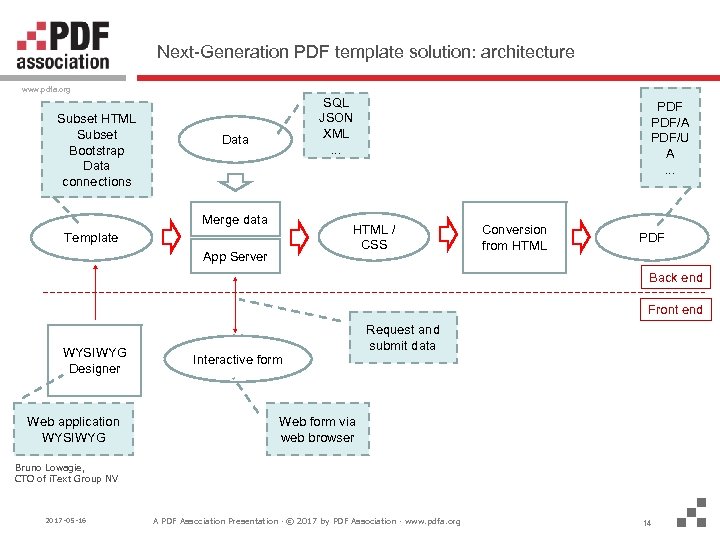 Next-Generation PDF template solution: architecture www. pdfa. org Subset HTML Subset Bootstrap Data connections SQL JSON XML. . . Data Merge data PDF/A PDF/U A. . . HTML / CSS Template App Server Conversion from HTML PDF Back end Front end WYSIWYG Designer Web application WYSIWYG Interactive form Request and submit data Web form via web browser Bruno Lowagie, CTO of i. Text Group NV 2017 -05 -16 A PDF Association Presentation · © 2017 by PDF Association · www. pdfa. org 14
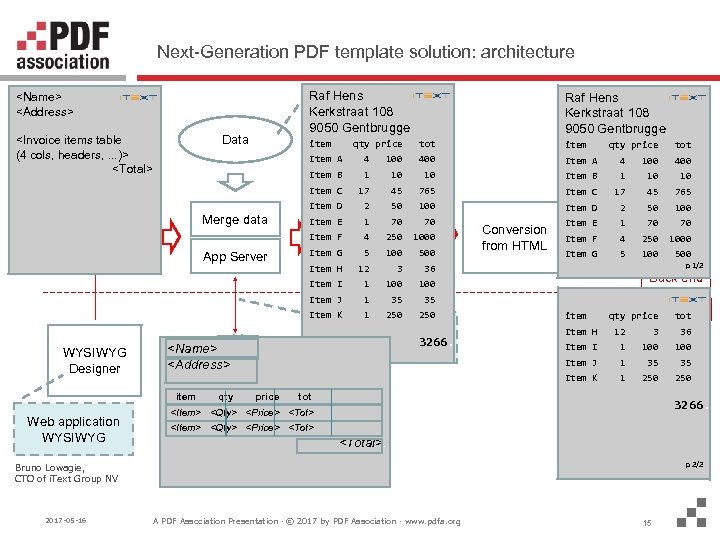 Next-Generation PDF template solution: architecture www. pdfa. org Raf Hens SQL Kerkstraat 108 JSON 9050 Gentbrugge XML
 Abuse, Threat, or Opportunity? www. pdfa. org • Is this abuse of the PDF format? • • • Who’s going to stop the industry from using the format in that way? Why would you stop innovative use of the new format? Is this a threat to the PDF format? • • Do we even need to include a PDF in a Next-Generation PDF? See XFA: “This document requires a more recent version of your viewer…” • • • This is considered being one of the major pains of XFA, Next-Generation PDF could avoid this pain by confining the template to the server. Is this an opportunity for the PDF format? • • It would be a missed opportunity if we didn’t embrace innovative ideas, We need to leverage the power of PDF as well as the power of HTML 5! Bruno Lowagie, CTO of i. Text Group NV 2017 -05 -16 A PDF Association Presentation · © 2017 by PDF Association · www. pdfa. org 16
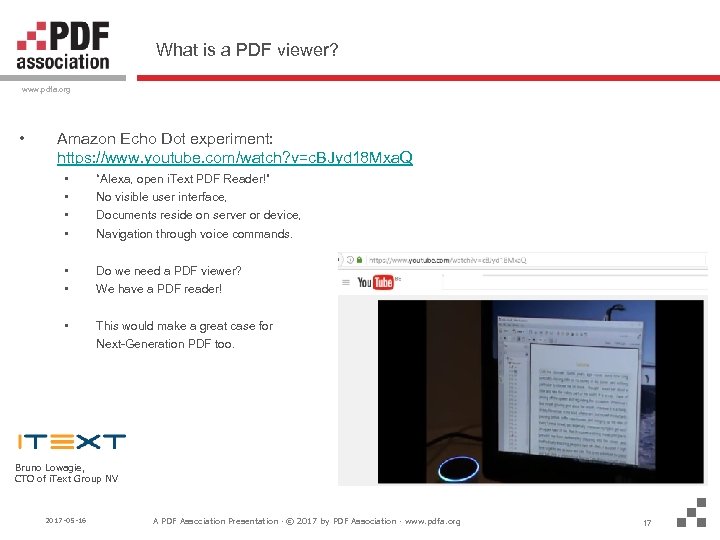 What is a PDF viewer? www. pdfa. org • Amazon Echo Dot experiment: https: //www. youtube. com/watch? v=c. BJyd 18 Mxa. Q • • “Alexa, open i. Text PDF Reader!” • • Do we need a PDF viewer? • This would make a great case for No visible user interface, Documents reside on server or device, Navigation through voice commands. We have a PDF reader! Next-Generation PDF too. Bruno Lowagie, CTO of i. Text Group NV 2017 -05 -16 A PDF Association Presentation · © 2017 by PDF Association · www. pdfa. org 17
 PDF Days Europe 2017 www. pdfa. org Open for Discussion! Get in touch: Web site: Twitter: bruno. Lowagie@itextpdf. com www. itextpdf. com bruno 1970 Bruno Lowagie, CTO of i. Text Group NV 2017 -05 -16 A PDF Association Presentation · © 2017 by PDF Association · www. pdfa. org 18