 Скачать презентацию Patron Acquisition Requests in the Aleph Web OPAC
adab1489eebade7b215a32581469a2f3.ppt
- Количество слайдов: 28



Patron Acquisition Requests in the Aleph Web OPAC Version 20 (also present in 18 and 19) Yoel Kortick
Introduction • In this presentation we will show • The library configures all prerequisite conditions for allowing the requests • The new requests may be made by the patron • The patron may view and cancel his requests • The library may configure a check procedure to see if it already owns the record before the patron submits his request • The OPAC acquisition requests may be retrieved online or in batch. Patron Acquisition Requests. Yoel Kortick 2
Prerequisites • The Web OPAC allows the submitting of an acquisition request from the library Web OPAC interface. • In order to allow a patron to submit an ACQ request three conditions must exist: • Acquisition Request permission in the patron's profile record. • Patron Home Library must be populated with a valid sub library code. • The variable OPAC-NEW-ACQ in tab 100 should be set to Y in the Administrative library Patron Acquisition Requests. Yoel Kortick 3
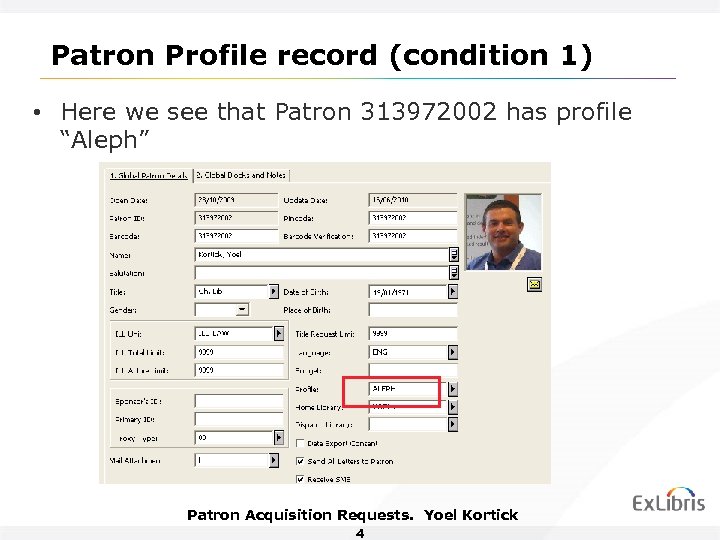
Patron Profile record (condition 1) • Here we see that Patron 313972002 has profile “Aleph” Patron Acquisition Requests. Yoel Kortick 4
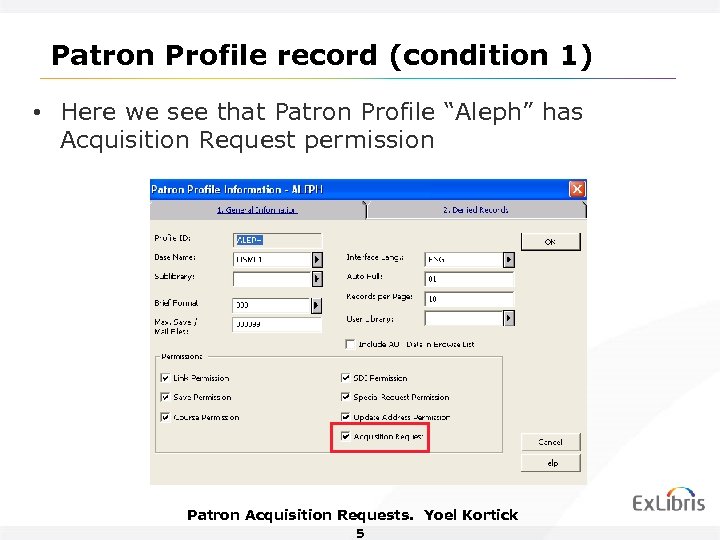
Patron Profile record (condition 1) • Here we see that Patron Profile “Aleph” has Acquisition Request permission Patron Acquisition Requests. Yoel Kortick 5
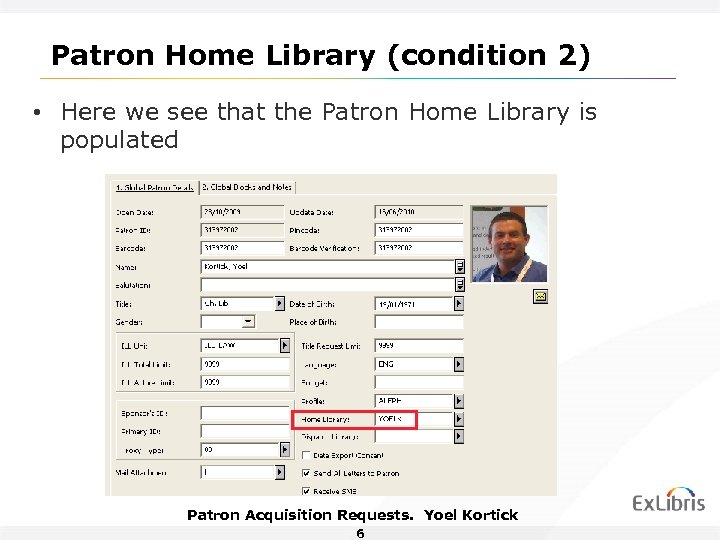
Patron Home Library (condition 2) • Here we see that the Patron Home Library is populated Patron Acquisition Requests. Yoel Kortick 6
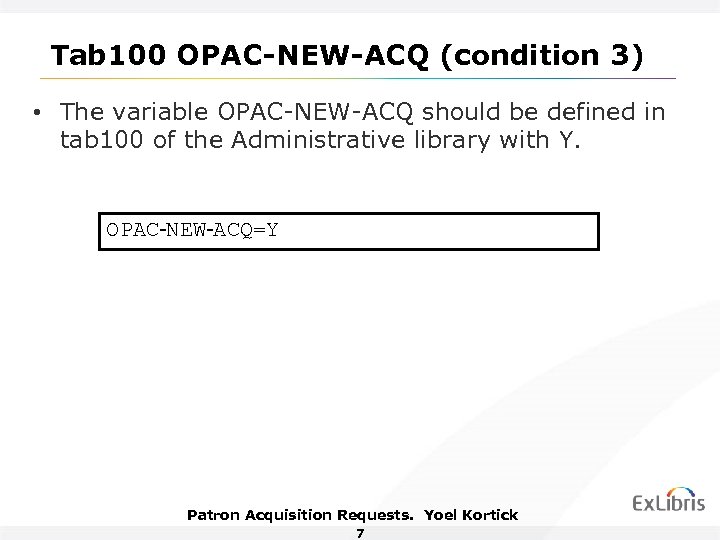
Tab 100 OPAC-NEW-ACQ (condition 3) • The variable OPAC-NEW-ACQ should be defined in tab 100 of the Administrative library with Y. OPAC-NEW-ACQ=Y Patron Acquisition Requests. Yoel Kortick 7
Acquisition Requests • We will show here two types of acquisitions requests: 1. Option 1 = An acquisition request for a record not found in any library. The user will need to manually add bibliographic information into a blank form. 2. Option 2 = An acquisition request for a record found in another library. The user will need to only enter the reason for ordering the material. Bibliographic information will be filled in automatically Patron Acquisition Requests. Yoel Kortick 8
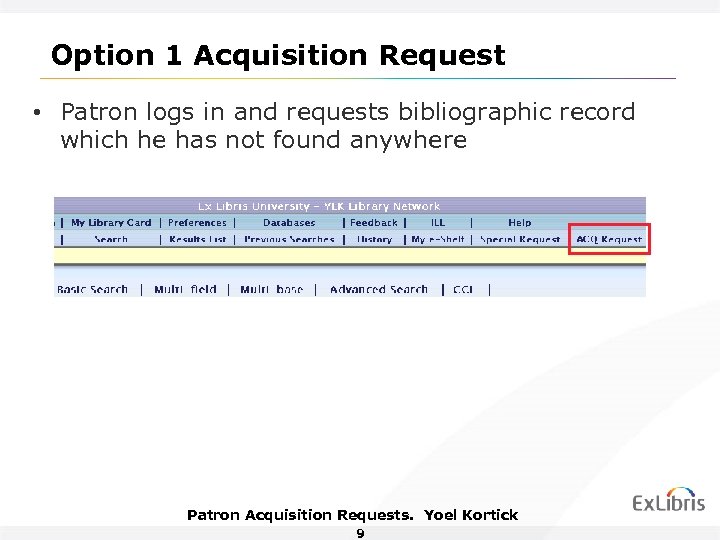
Option 1 Acquisition Request • Patron logs in and requests bibliographic record which he has not found anywhere Patron Acquisition Requests. Yoel Kortick 9
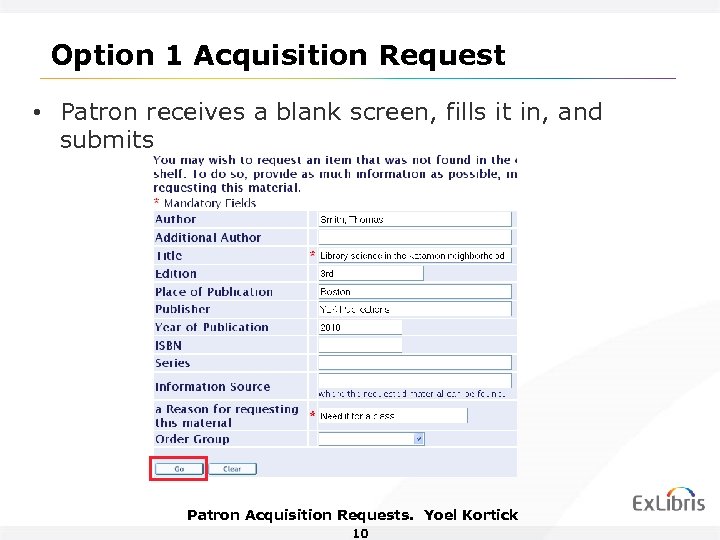
Option 1 Acquisition Request • Patron receives a blank screen, fills it in, and submits Patron Acquisition Requests. Yoel Kortick 10
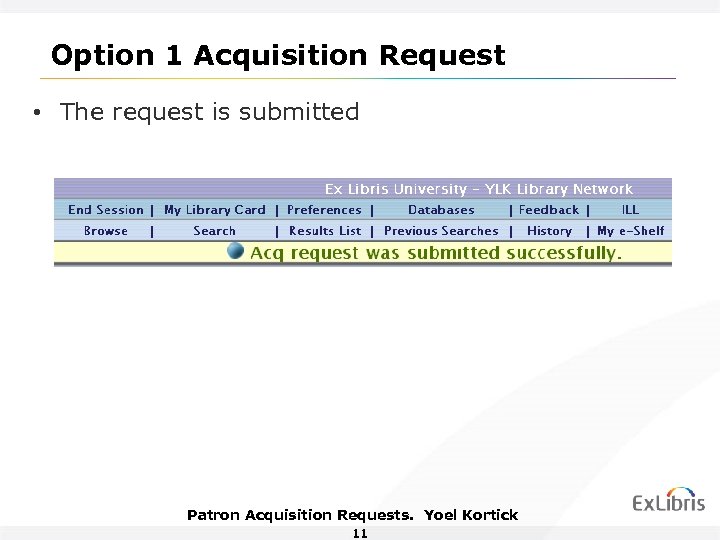
Option 1 Acquisition Request • The request is submitted Patron Acquisition Requests. Yoel Kortick 11
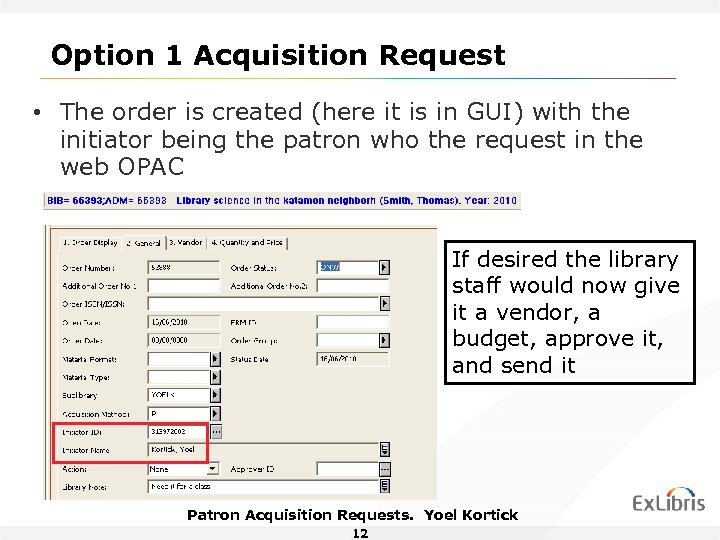
Option 1 Acquisition Request • The order is created (here it is in GUI) with the initiator being the patron who the request in the web OPAC If desired the library staff would now give it a vendor, a budget, approve it, and send it Patron Acquisition Requests. Yoel Kortick 12
Option 2 Acquisition Request • It is also possible to create an acquisition request based on a record found in another library. • In the following case the user will search Oxford Library via Z 39. 50 and find a record which he wants his library to buy. • He will click the Acq Request link which is displayed with the record. Patron Acquisition Requests. Yoel Kortick 13
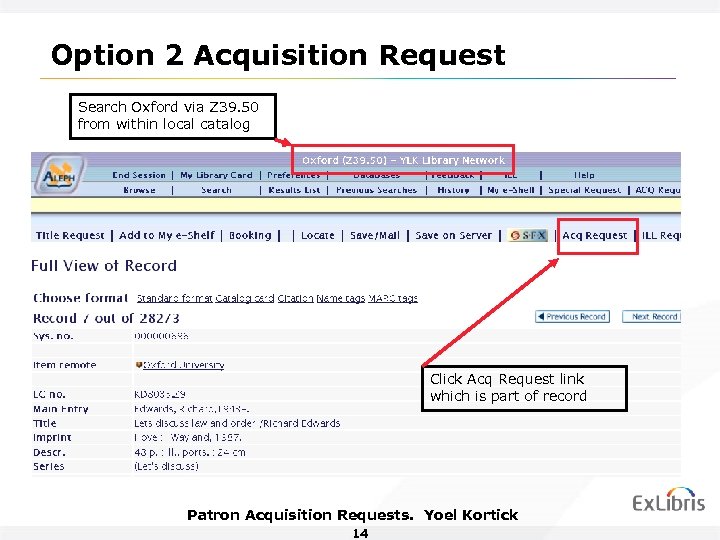
Option 2 Acquisition Request Search Oxford via Z 39. 50 from within local catalog Click Acq Request link which is part of record Patron Acquisition Requests. Yoel Kortick 14
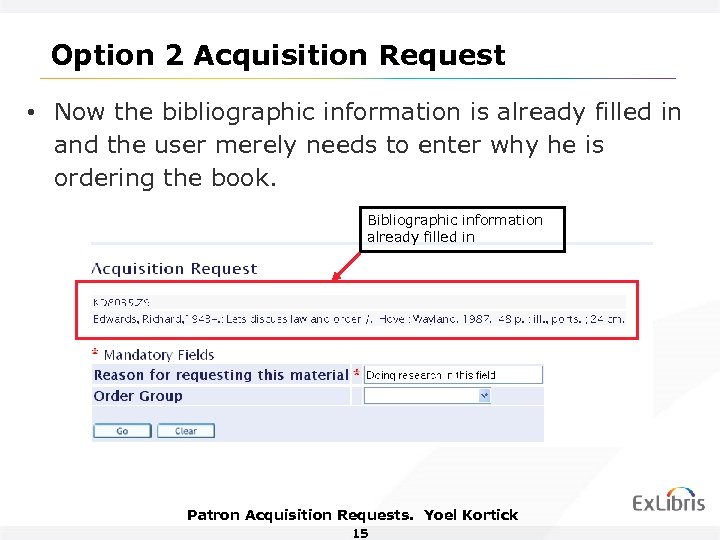
Option 2 Acquisition Request • Now the bibliographic information is already filled in and the user merely needs to enter why he is ordering the book. Bibliographic information already filled in Patron Acquisition Requests. Yoel Kortick 15
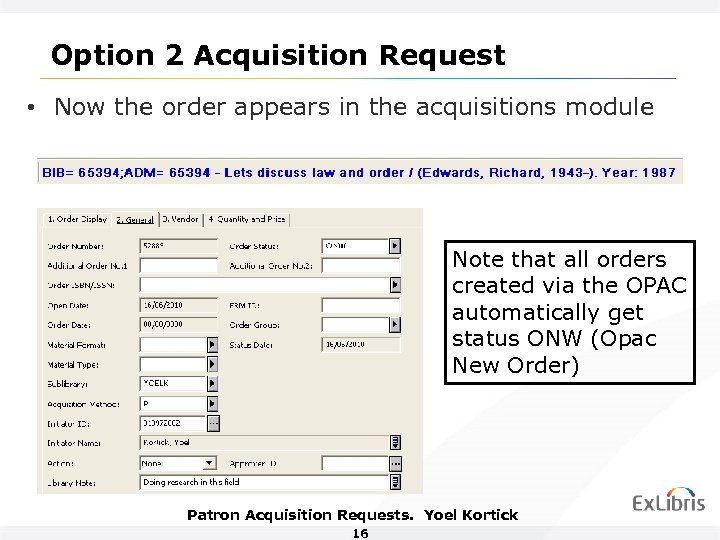
Option 2 Acquisition Request • Now the order appears in the acquisitions module Note that all orders created via the OPAC automatically get status ONW (Opac New Order) Patron Acquisition Requests. Yoel Kortick 16
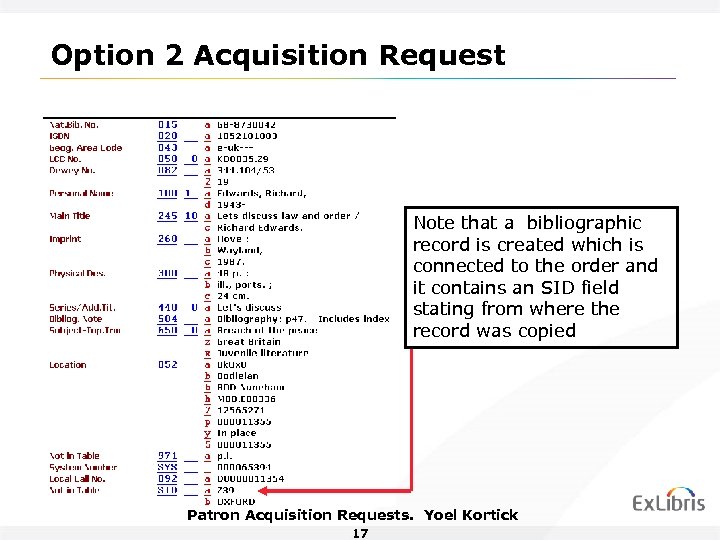
Option 2 Acquisition Request Note that a bibliographic record is created which is connected to the order and it contains an SID field stating from where the record was copied Patron Acquisition Requests. Yoel Kortick 17
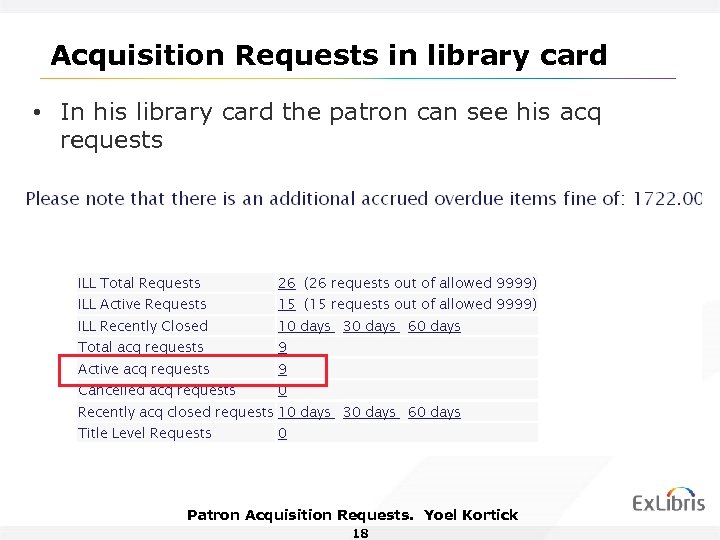
Acquisition Requests in library card • In his library card the patron can see his acq requests Patron Acquisition Requests. Yoel Kortick 18
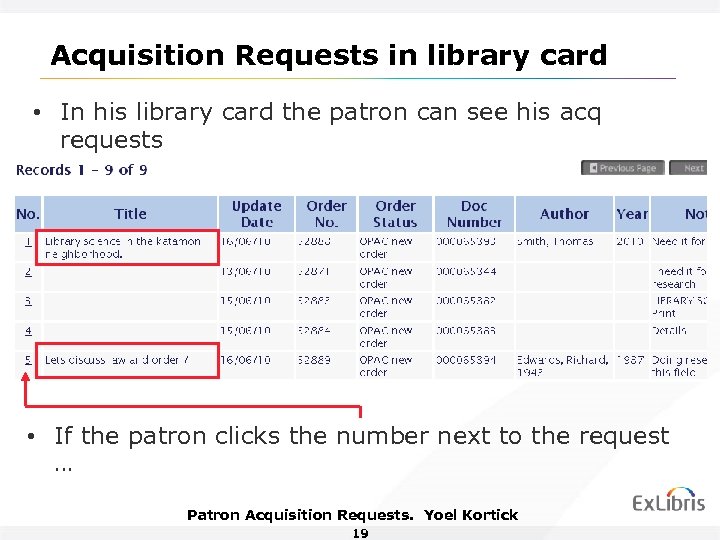
Acquisition Requests in library card • In his library card the patron can see his acq requests • If the patron clicks the number next to the request … Patron Acquisition Requests. Yoel Kortick 19
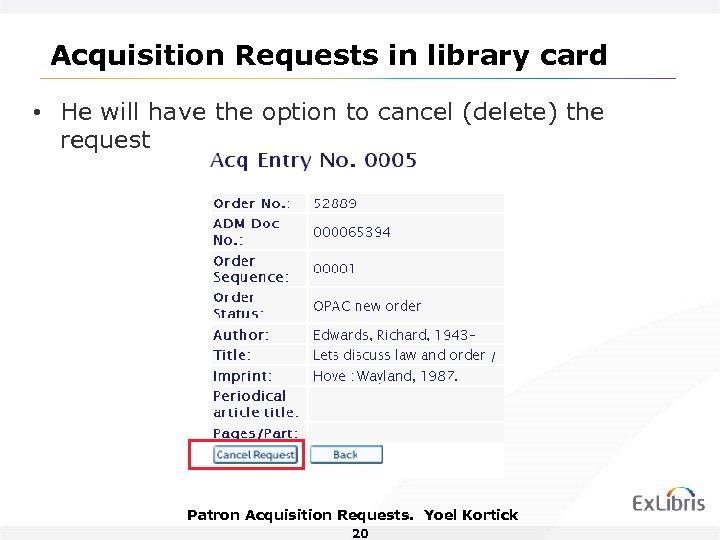
Acquisition Requests in library card • He will have the option to cancel (delete) the request Patron Acquisition Requests. Yoel Kortick 20
Acquisition Request checks • It is also possible for the library to automatically perform checks on the acquisition request before it is submitted by the patron • The check procedure will check if the record is already owned by the library • If so the user will receive a message stating that the record already exists and he will not be allowed to make the request. Patron Acquisition Requests. Yoel Kortick 21
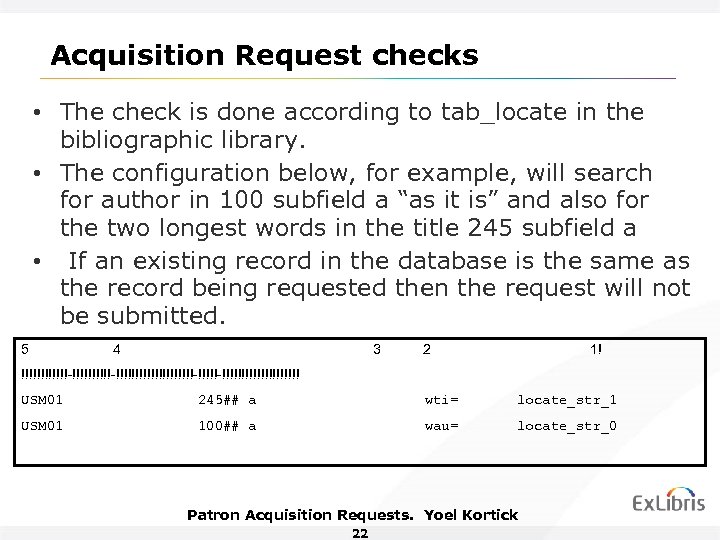
Acquisition Request checks • The check is done according to tab_locate in the bibliographic library. • The configuration below, for example, will search for author in 100 subfield a “as it is” and also for the two longest words in the title 245 subfield a • If an existing record in the database is the same as the record being requested then the request will not be submitted. 5 4 3 2 1! !!!!!!-!!!!!!!!!!!!!!!-!!!!!!!!!!!!! USM 01 245## a wti= locate_str_1 USM 01 100## a wau= locate_str_0 Patron Acquisition Requests. Yoel Kortick 22
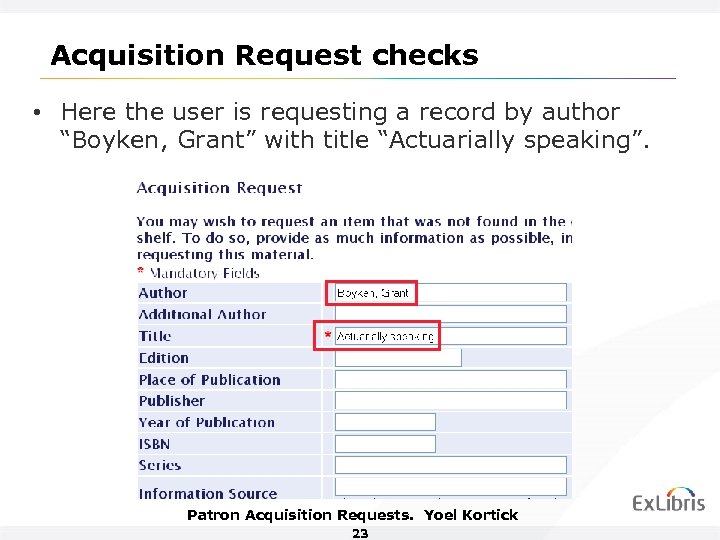
Acquisition Request checks • Here the user is requesting a record by author “Boyken, Grant” with title “Actuarially speaking”. Patron Acquisition Requests. Yoel Kortick 23
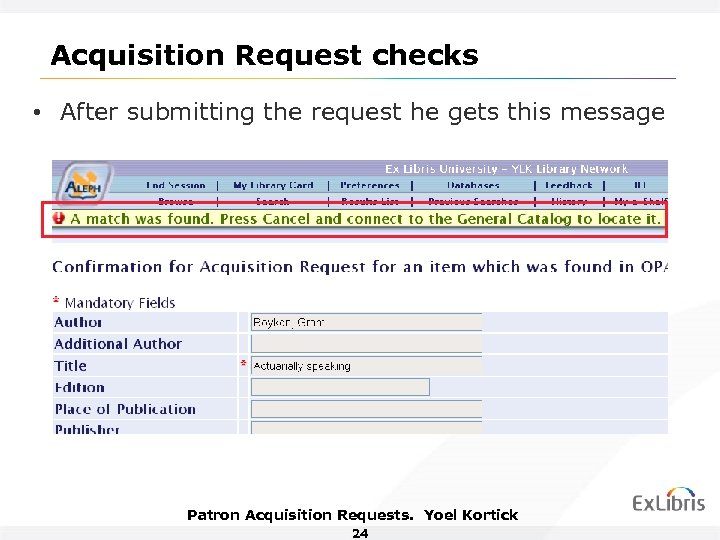
Acquisition Request checks • After submitting the request he gets this message Patron Acquisition Requests. Yoel Kortick 24
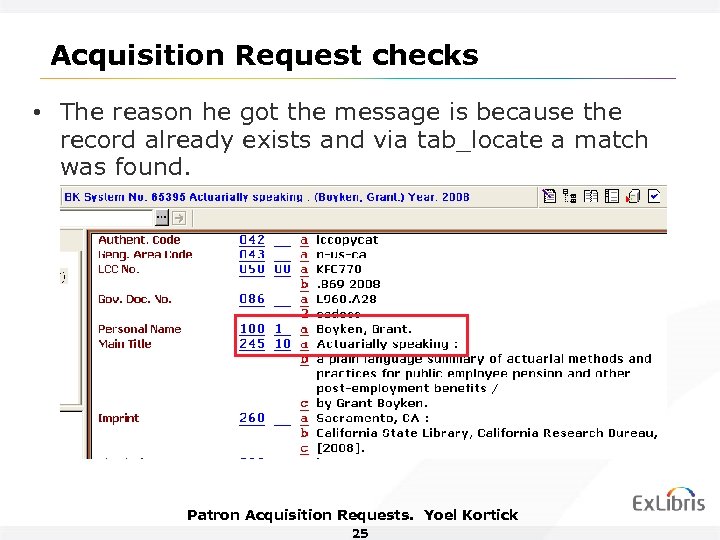
Acquisition Request checks • The reason he got the message is because the record already exists and via tab_locate a match was found. Patron Acquisition Requests. Yoel Kortick 25
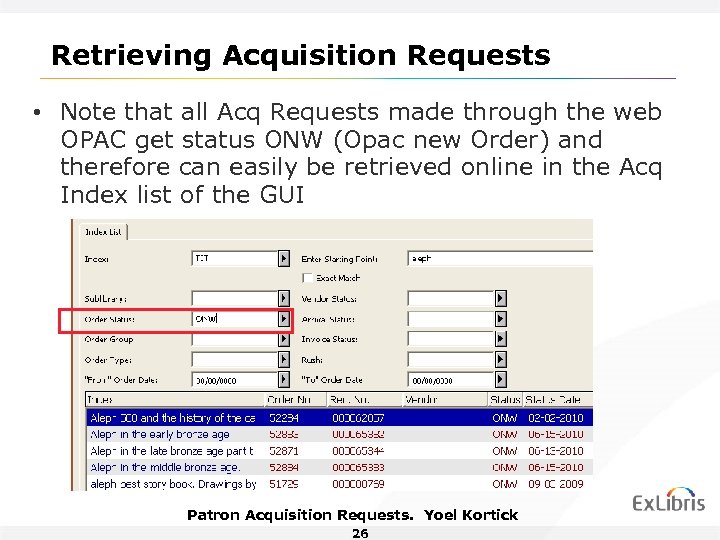
Retrieving Acquisition Requests • Note that all Acq Requests made through the web OPAC get status ONW (Opac new Order) and therefore can easily be retrieved online in the Acq Index list of the GUI Patron Acquisition Requests. Yoel Kortick 26
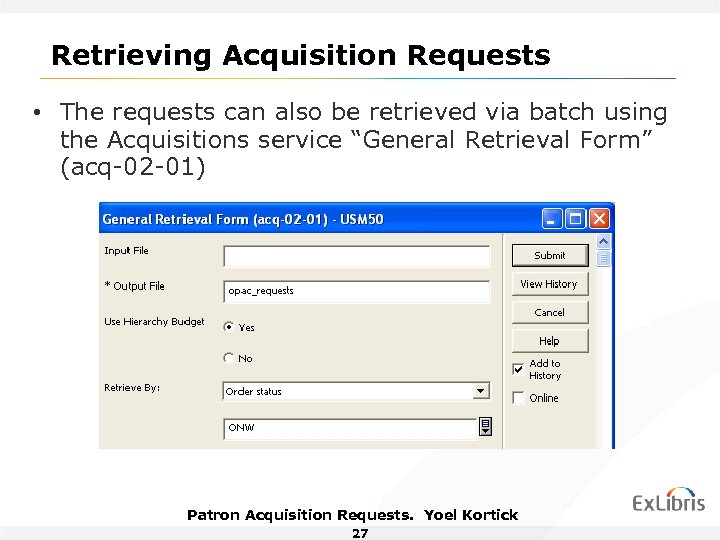
Retrieving Acquisition Requests • The requests can also be retrieved via batch using the Acquisitions service “General Retrieval Form” (acq-02 -01) Patron Acquisition Requests. Yoel Kortick 27

Thank You! Yoel. Kortick@exlibrisgroup. com
Скачать презентацию Patron Acquisition Requests in the Aleph Web OPAC
adab1489eebade7b215a32581469a2f3.ppt