 Скачать презентацию Panasonic PSNA TGP 5 XX Technical Bulletin 082011
1dff2d83d12d02d3427c8917531d108a.ppt
- Количество слайдов: 7



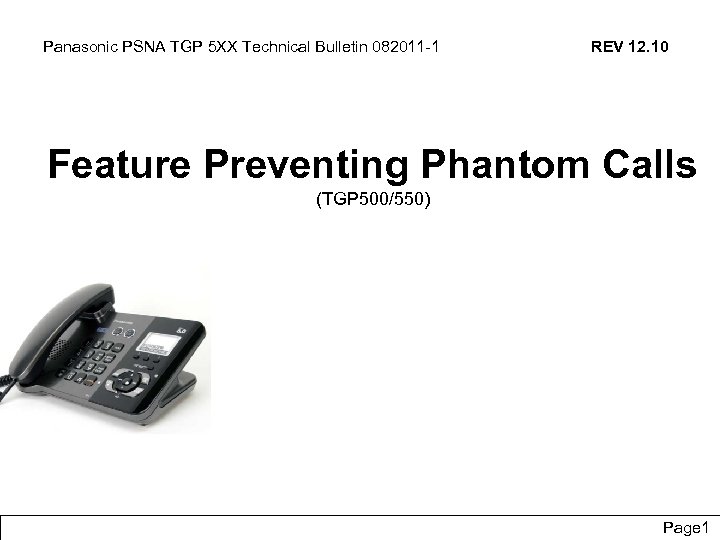
Panasonic PSNA TGP 5 XX Technical Bulletin 082011 -1 REV 12. 10 Feature Preventing Phantom Calls (TGP 500/550) Panasonic System Networks Co. , Ltd. Confidential Page 1
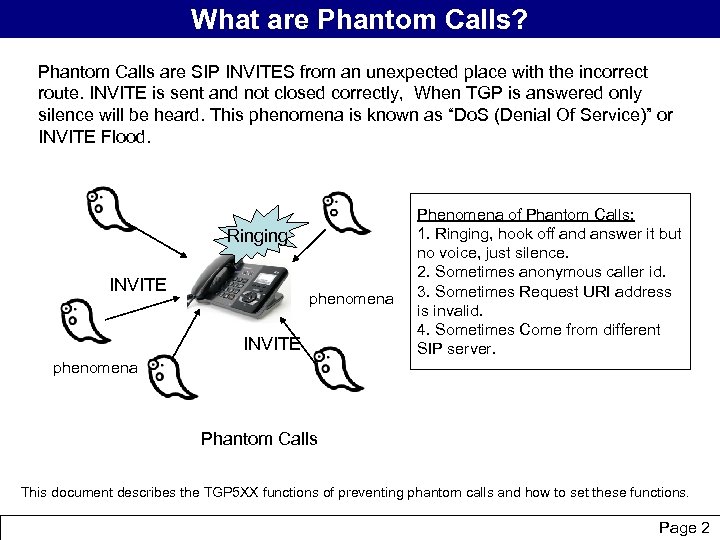
What are Phantom Calls? Phantom Calls are SIP INVITES from an unexpected place with the incorrect route. INVITE is sent and not closed correctly, When TGP is answered only silence will be heard. This phenomena is known as “Do. S (Denial Of Service)” or INVITE Flood. Ringing INVITE phenomena INVITE Phenomena of Phantom Calls: 1. Ringing, hook off and answer it but no voice, just silence. 2. Sometimes anonymous caller id. 3. Sometimes Request URI address is invalid. 4. Sometimes Come from different SIP server. phenomena Phantom Calls This document describes the TGP 5 XX functions of preventing phantom calls and how to set these functions. Panasonic System Networks Co. , Ltd. Confidential Page 2
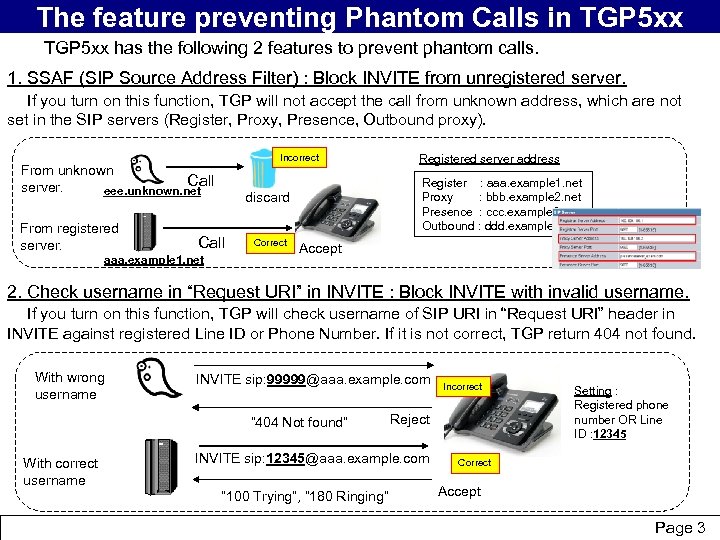
The feature preventing Phantom Calls in TGP 5 xx has the following 2 features to prevent phantom calls. 1. SSAF (SIP Source Address Filter) : Block INVITE from unregistered server. If you turn on this function, TGP will not accept the call from unknown address, which are not set in the SIP servers (Register, Proxy, Presence, Outbound proxy). Incorrect From unknown Call server. eee. unknown. net From registered server. Register : aaa. example 1. net Proxy : bbb. example 2. net Presence : ccc. example 3. net Outbound : ddd. example 4. net discard Call Correct aaa. example 1. net Registered server address Accept 2. Check username in “Request URI” in INVITE : Block INVITE with invalid username. If you turn on this function, TGP will check username of SIP URI in “Request URI” header in INVITE against registered Line ID or Phone Number. If it is not correct, TGP return 404 not found. With wrong username INVITE sip: 99999@aaa. example. com “ 404 Not found” With correct username Reject INVITE sip: 12345@aaa. example. com “ 100 Trying”, “ 180 Ringing” Panasonic System Networks Co. , Ltd. Incorrect Setting : Registered phone number OR Line ID : 12345 Correct Accept Confidential Page 3
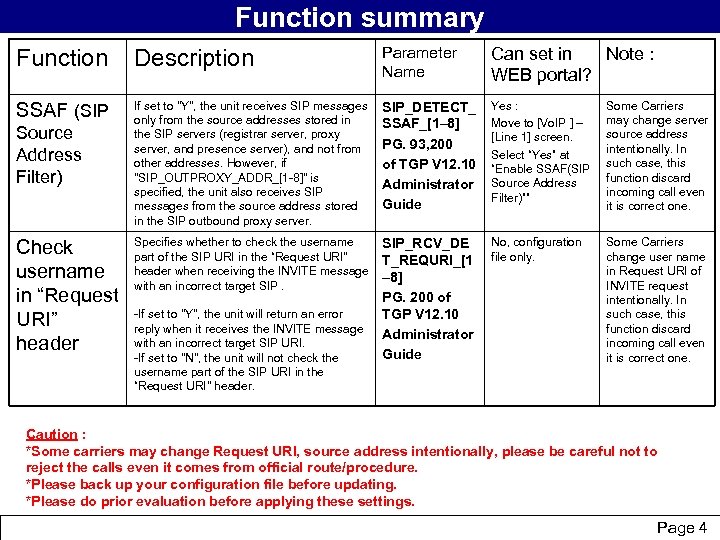
Function summary Function Description Parameter Name Can set in Note : WEB portal? SSAF (SIP If set to "Y", the unit receives SIP messages only from the source addresses stored in the SIP servers (registrar server, proxy server, and presence server), and not from other addresses. However, if "SIP_OUTPROXY_ADDR_[1 -8]" is specified, the unit also receives SIP messages from the source address stored in the SIP outbound proxy server. SIP_DETECT_ SSAF_[1– 8] PG. 93, 200 of TGP V 12. 10 Administrator Guide Yes : Move to [Vo. IP ] – [Line 1] screen. Select “Yes” at “Enable SSAF(SIP Source Address Filter)”” Some Carriers may change server source address intentionally. In such case, this function discard incoming call even it is correct one. Specifies whether to check the username part of the SIP URI in the “Request URI" header when receiving the INVITE message with an incorrect target SIP_RCV_DE T_REQURI_[1 – 8] PG. 200 of TGP V 12. 10 Administrator Guide No, configuration file only. Some Carriers change user name in Request URI of INVITE request intentionally. In such case, this function discard incoming call even it is correct one. Source Address Filter) Check username in “Request URI” header -If set to "Y", the unit will return an error reply when it receives the INVITE message with an incorrect target SIP URI. -If set to "N", the unit will not check the username part of the SIP URI in the “Request URI" header. Caution : *Some carriers may change Request URI, source address intentionally, please be careful not to reject the calls even it comes from official route/procedure. *Please back up your configuration file before updating. *Please do prior evaluation before applying these settings. Panasonic System Networks Co. , Ltd. Confidential Page 4
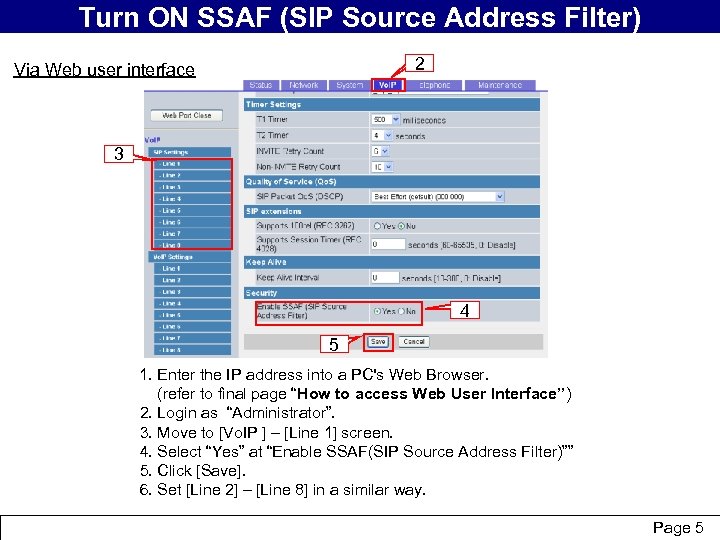
Turn ON SSAF (SIPoverview How to turn on “SSAF” brief Source Address Filter) 2 Via Web user interface 3 4 5 1. Enter the IP address into a PC's Web Browser. (refer to final page “How to access Web User Interface”) 2. Login as “Administrator”. 3. Move to [Vo. IP ] – [Line 1] screen. 4. Select “Yes” at “Enable SSAF(SIP Source Address Filter)”” 5. Click [Save]. 6. Set [Line 2] – [Line 8] in a similar way. Panasonic System Networks Co. , Ltd. Confidential Page 5
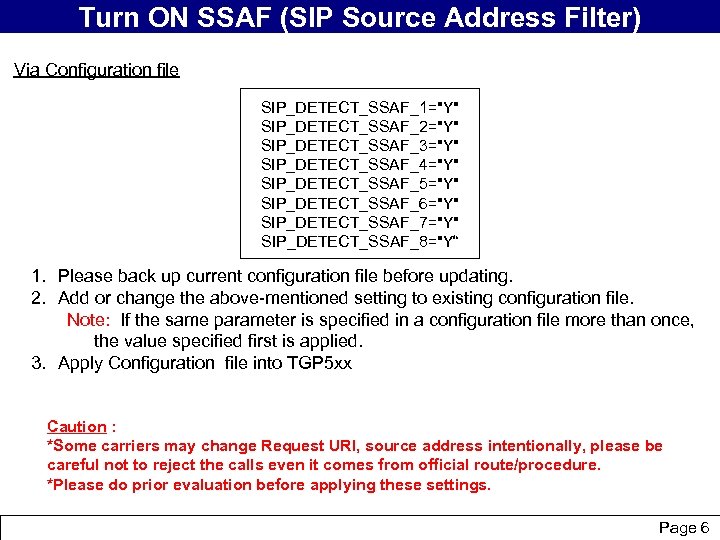
Turn ON SSAF (SIPoverview brief Source Address Filter) Via Configuration file SIP_DETECT_SSAF_1="Y" SIP_DETECT_SSAF_2="Y" SIP_DETECT_SSAF_3="Y" SIP_DETECT_SSAF_4="Y" SIP_DETECT_SSAF_5="Y" SIP_DETECT_SSAF_6="Y" SIP_DETECT_SSAF_7="Y" SIP_DETECT_SSAF_8="Y“ 1. Please back up current configuration file before updating. 2. Add or change the above-mentioned setting to existing configuration file. Note: If the same parameter is specified in a configuration file more than once, the value specified first is applied. 3. Apply Configuration file into TGP 5 xx Caution : *Some carriers may change Request URI, source address intentionally, please be careful not to reject the calls even it comes from official route/procedure. *Please do prior evaluation before applying these settings. Panasonic System Networks Co. , Ltd. Confidential Page 6
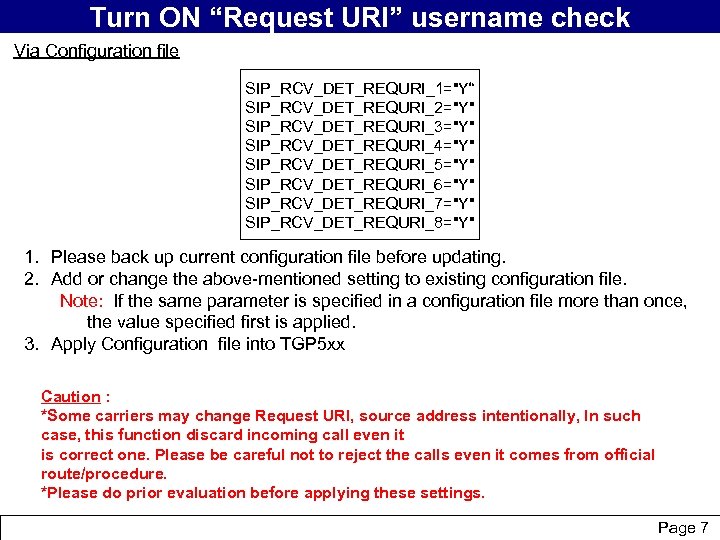
Turn ON “Request URI” username check Via Configuration file SIP_RCV_DET_REQURI_1="Y“ SIP_RCV_DET_REQURI_2="Y" SIP_RCV_DET_REQURI_3="Y" SIP_RCV_DET_REQURI_4="Y" SIP_RCV_DET_REQURI_5="Y" SIP_RCV_DET_REQURI_6="Y" SIP_RCV_DET_REQURI_7="Y" SIP_RCV_DET_REQURI_8="Y" 1. Please back up current configuration file before updating. 2. Add or change the above-mentioned setting to existing configuration file. Note: If the same parameter is specified in a configuration file more than once, the value specified first is applied. 3. Apply Configuration file into TGP 5 xx Caution : *Some carriers may change Request URI, source address intentionally, In such case, this function discard incoming call even it is correct one. Please be careful not to reject the calls even it comes from official route/procedure. *Please do prior evaluation before applying these settings. Panasonic System Networks Co. , Ltd. Confidential Page 7
Скачать презентацию Panasonic PSNA TGP 5 XX Technical Bulletin 082011
1dff2d83d12d02d3427c8917531d108a.ppt